NICE ROBUS RBS800 - standalone drive for sliding gates (A)
NEW| Product availability: | In stock | We normally dispatch goods within 24 hours. |
|---|
In stock
€835.88 including VAT
| Weight |
|---|
| 8,00 kg |
Description of NICE ROBUS RBS800 - standalone drive for sliding gates (A)
Drive NICE Robus RBS800 is designed for sliding gates weighing up to 800 kg and with a passage width of up to 8 m. It features a magnetic (inductive) limit switch. The drive is non-reversible. The drive is compact, safe and practical, with an impact-resistant cover, making it ideal for both residential and commercial use. 230 V power supply, 24 V DC motor. Detailed technical specifications ». Drive programming ». Download the manual ».
This product—the standalone NICE Robus RBS800 sliding gate drive (our code NICE-RBS800-A)—includes:
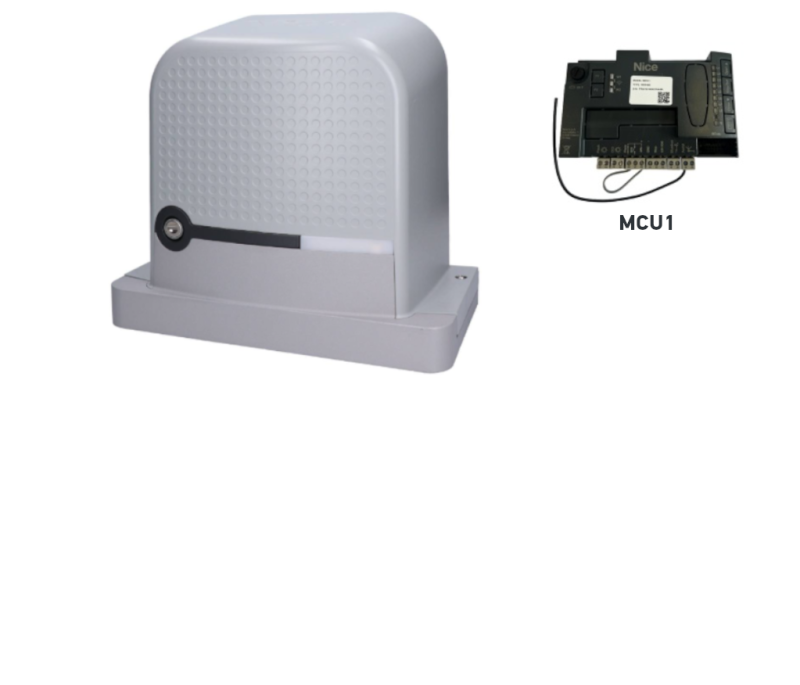
- Electromechanical NICE Robus RBS800 drive with a capacity of 800 kg, a maximum gate leaf length of 8 m, and an integrated (but removable) MCU1R30 control unit, with a built-in radio receiver and an “SM” connector for a plug-in receiver.
- 2 x release keys for manual operation of the drive (required in the event of a power failure).
- 2x magnetic limit switches.
- Drive mounting components : anchors, mounting plate and magnetic stops for the inductive limit switch.
- Installation manual
One of the key advantages of the Robus RBS800 drive is its high opening and closing speed, enabled by advanced technology. It features obstacle detection and allows photocells to be connected, ensuring maximum safety. It is also equipped with a temperature sensor that adjusts the drive's pulling force to suit the weather conditions, and is protected by a thermal fuse.
Its high-quality construction and IP44 rating ensure long service life. The Robus RBS800 is compatible with Nice accessories. The integrated "Eye Check" system provides visual feedback via an LED indicator (red/green).
The “Slave Unit” function (master-slave mode) enables two motors to be operated in sync, allowing you to automate a pair of sliding gates opening in opposite directions. It is also compatible with the older Robus RB400, but only versions equipped with the RBA3R10 control unit. The older RBA3/c is not compatible with the RBS.
The built-in control unit makes operation easy. Programmability is one of this model's key features.
The built-in bidirectional receiver is ready to be programmed straight away, making connection and operation easier.
Another advantage is the ability to add extra features via an expansion board, including lighting for a safer installation.
User-friendly BlueBUS technology makes it easy to power and control up to 7 pairs of photocells using a two-core cable.
The drive achieves up to 90% energy savings in standby mode and is compatible with the Nice solar kit.
It features a module 4, compatible with the gear rack in our range.
Thanks to the BiDi-WiFi module (optional accessory), the drive can be controlled using the MyNice app (Android/iOS) and programmed with MyNice Pro (Android/iOS).
It features Opera. It allows you to connect the Oview. The unit is used for controlling, programming and diagnosing devices equipped with a BUS T4 connection. O-View connects directly to a compatible control unit via a BUS T4 cable, providing access to all the unit's parameters and allowing the system to be tailored to any requirement (such as force, speed, deceleration and so on). Oview also lets you use the Opera system to update the control unit firmware..
It is compatible with the Solemyo solar system (24 V). When the automation system is powered by the “Solemyo” system, it MUST NOT be powered from the mains at the same time.
Remote control compatibility:
The drive has a built-in receiver that is compatible with NICE series MYGO, ONE and INTI remote controls.. The internal receiver does not support FloR or Flo coding. However, the control unit also has an SM connector for connecting a plug-in receiver, which may be useful if you have replaced an old drive with a new RBS and own older remote controls.
Information for owners of older NICE FLOR remote controls:
If you already own older NICE FLOR remote controls (models FLO2R-S, FLO2RE, FLO4R-S, FLO4RE), you can continue using them with the new NICE RBS. However, you will need to purchase a plug-in OXIBD receiver or one of the external receivers, such as the NICE OX2.
Extra-long remote control range:
The NICE RBS drive has a slot for an internal receiver, allowing you to install a NICE OXILR receiver with LoRa technology. Likewise, a NICE OXIFM receiver can also be connected for extended functionality.
Information for owners of older NICE FLO and NICE SMILO remote controls:
If you use NICE remote controls at home with FLO or SMILO, these can also be used with the NICE RBS. However, you will need to purchase an internal receiver OXIBD, which supports fixed-code signals (FLO, SMILO). In this case, the receiver will only accept these older remote control models, and newer models cannot be paired at the same time.
Accessories compatible with the Nice Robus RBS800 gate opener
We recommend purchasing compatible optional accessories for the gate opener, or choosing one of our pre-assembled gate opener kits at a discounted price.
| What | Why | Type |
|---|---|---|
| Flashing light | Flashes to indicate gate movement—ideal for driveways with limited visibility. Also includes an antenna for increased remote-control range. |
Alternatively, any flashing lights with a 12V-24V power supply from other manufacturers. |
| Photocells | They detect obstacles while the gate is closing and stop its movement, preventing it from hitting vehicles or people. | |
| Transmitter | For remote control of the gate. | |
| Receiver |
For remote control of the gate. The RBS gate opener has an integrated radio receiver, but also allows you to connect a plug-in receiver. This makes it easy to switch from an older RB opener to a newer RBS model without having to pair the remote controls again. |
|
| Programming devices |
|
|
| Antenna | For improved remote-control range. | |
| Keypad | If you forget your remote control, or have lots of vehicles or users and don't want to issue a remote control to everyone. | |
| Key switch | Operate the gate with a key using a switch wired to the gate opener. | |
| Card readers | Operate the drive by presenting a card or key fob to the reader. | ERA Transponder Reader ETPB |
| Rack | Required for the automation system itself — without a rack, the drive cannot move the gate. | |
| Backup power supply | Keeps the gate operating during a power outage. |
Manuals and documents for download
Nice Robus RBS800 drive manual – PDF
Instructions for pairing remotes with a Nice drive – link
NICE Robus RBS800 at a glance
NICE Robus RBS is a range of irreversible electromechanical geared drives for sliding gates. They are supplied with an integrated (removable) NICE MCU1R30 control unit with a built-in receiver and an SM connector for plug-in radio receivers of the OXI type, for example NICE OXIBD. It features an ON-OFF function for disabling the internal receiver (in Level I programming). The internal receiver does not support FloR or Flo coding.
Electrical connections for external devices ( photocells, warning beacon etc.) have been simplified in the NICE Robus RBS range using BlueBUS, which allows multiple devices to be connected to a shared connector using a single two-wire cable (with no need to observe polarity). Conventional relay-operated photocells can also be connected to the control unit.. The control unit MCU1R30 also has an OSE input (Optoelectronic Safety Edge), max. 15 mA.
Automatic operation of the drive depends on the availability of mains power. During a power outage, the motor can be released using the release key. You can also purchase the NICE PSS124 backup battery, which allows the system to operate during a power outage. The older backup power supply model NICE PS124 is compatible only when used with the CABLA11.
The drive has two LEDs: green indicates movement; red indicates active photocells, unusual conditions and errors. The limit switch is inductive.. The functions can also be controlled and configured using the mobile MyNice Pro app (Android/iOS).
Choosing a drive – is the NICE Robus RBS800 suitable for my gate?
Every gate has its own size (i.e. lever arm) and weight (i.e. the force exerted by the lever arm), and every drive has its limits.. The NICE Robus RBS800 drive is suitable for the following gate leaf lengths and gate weights:
| Cycles per hour Consecutive cycles |
Gate leaf weight | ||
|---|---|---|---|
| up to 600 kg | up to 800 kg | ||
| Gate leaf length | up to 4 m | 40 | 35 |
| from 8 m | 20 | 20 | |
In general, the gate leaf length determines the maximum number of cycles per hour and consecutive cycles, i.e. it indicates how long the drive can operate. A greater weight reduces these figures proportionally due to the increased strain, and also determines the maximum permitted speed for the given load. The drive is equipped with a thermal overload protector that measures the temperature of the motor and its surroundings and reduces the number of possible cycles accordingly.
The stated values apply when the manufacturer's conditions are met (weather conditions, temperatures, rigidity and smooth movement of the gate). In practice, we recommend keeping the total load to around 80% of these parameters.
NICE Robus RBS800 drive limits
The stated values are recommended by NICE. Based on our experience, we recommend allowing a safety margin and sizing the system for approximately 80% of the stated values:
| Robus RBS800 | Maximum | Recommended |
|---|---|---|
| Gate leaf length | 8 m | 6.4 m |
| Gate leaf weight | 800 kg | 640 kg |
Using the drive at its maximum capacity reduces its service life — below is an estimated service-life calculation based on stress factors.
NICE Robus RBS800 drive service life
Add the stress indices for the gate leaf weight and length in the table, then add the indices for any other applicable factors. Then use the graph to determine the drive's service life in cycles.
Example: A gate with a 4.5 m passage width and a weight of up to 200 kg: length index ~30 + weight index 10 + low-temperature index 10 ⇒ total 40. The graph indicates ~120,000 cycles, which at 10 operations per day is ≈ 32 years.
| Features of the complete automation system | Index | Service life chart |
|---|---|---|
| Gate leaf weight | 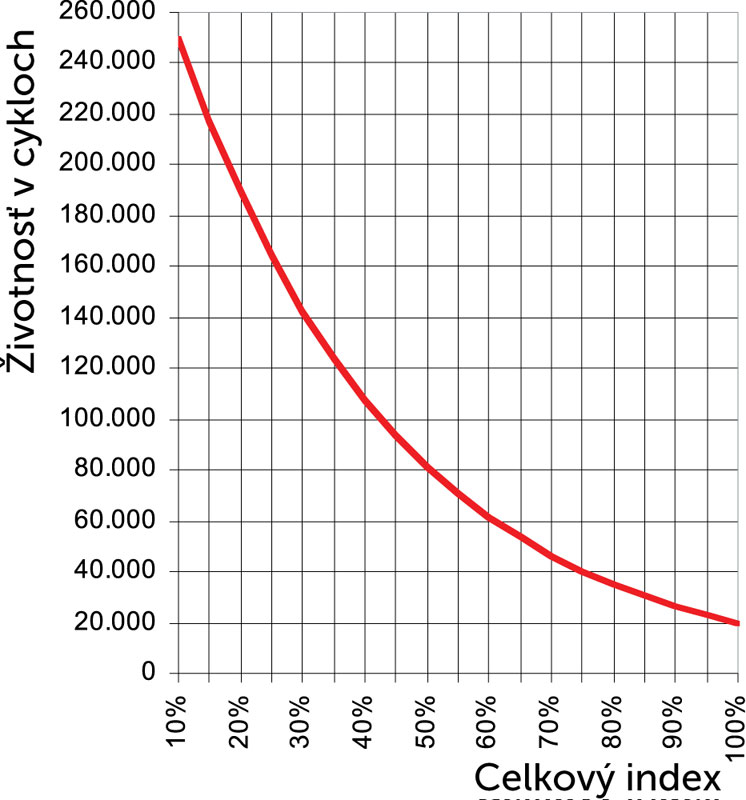
The recommended maximum total index is up to 75% (≈ 40,000 cycles; at 10 cycles/day ≈ 10 years). |
|
| Up to 200 kg | 10 | |
| 200–400 kg | 20 | |
| 400-500 | 30 | |
| 500-600 | 40 | |
| 600-800 | 60 | |
| Gate leaf length | ||
| Up to 4 m | 15 | |
| 4–6 m | 25 | |
| 6–8 m | 40 | |
| Other factors (if the probability of occurrence is > 10%) | ||
| Temperature > 40 °C, < 0 °C, or humidity > 80% | 10 | |
| Dusty environment | 15 | |
| Saline environment | 20 | |
| Photocell activation | 30 | |
| STOP input activation | 40 | |
| Speed higher than “L4 – Fast” | 25 | |
| Peak function active | 25 | |
Installing the NICE Robus RBS800 drive
The installation method of the drive is different for a track-mounted sliding gate and a cantilever sliding gate is different. For a track-mounted gate, the drive is generally installed at ground level, while for a cantilever gate, the drive needs to be raised (using Ø8 threaded rods, a custom bracket, a raised concrete base, etc.). The key factor is the height of the rack, so that it meshes correctly with the drive pinion (see “The rack and its end stop”).
Wiring
A typical (optional) wiring setup for the drive and accessories is as follows:

List of accessories
- A – Nice Robus RBS drive
- B – Photocells
- C – Photocell posts
- D – Key switch
- E – Flashing light with built-in antenna
- F – Rack
- G – Fixed safety edge 1
- H – Moving safety edge 1
- I – Opening end stop
- J – Fixed safety edge 2
- K – Moving safety edge 2
- L – Closing end stop
- M – Remote control
Wiring list
| Purpose | Type | Max. length |
|---|---|---|
| Power supply | 3 × 1.5 mm² |
30 m For longer distances, use 3 × 2.5 mm² + ground wire. |
| Flashing light with antenna |
2 × 0.5 mm² 1 × RG58 coaxial cable |
20 m 10 m (recommended < 5 m) |
| Photocells | 2 × 0.5 mm² |
30 m; for lengths over 30 m, use 2 × 1 mm²
Andif the BlueBUS cable is > 30 m (max. 50 m), use 2 × 1 mm². |
| Key switch | 2 cables, each 2 × 0.5 mm² |
50 m
Can be replaced with a single 4 × 0.5 mm² cable. |
| Safety edges – fixed | 2 × 0.5 mm² |
30 m
For multiple fixed safety edges, see the manual – “Adding or removing devices / STOP input”. |
| Safety edges – moving | 2 × 0.5 mm² |
50 m
For multiple fixed safety edges, see the manual – “Adding or removing devices / STOP input”. |
Installation
The installation height of the drive is one of the requirements for correct operation. More in the article “What height should the drive be installed at?”.
The rack and its end stop
Operating principle: the pinion's torque is converted into linear motion through the rack-and-pinion gearing on the rack. Most common types:
 |
Nylon rack (possibly with steel reinforcement) – fastened with self-tapping screws through the mounting holes; ideal for lighter/shorter gates and quieter operation (nylon vs. steel pinion). |
 |
Steel rack – attached by welding threaded brackets in place and then bolting the rack on; suitable for longer/heavier gates, with slightly noisier operation (steel against steel). |
The key requirement is, for the pinion module to be compatible with the module of rack. Drive NICE Robus RBS800 has a gear wheel with module 4.
The drive detects the end positions when opening and closing using limit stops mounted on the rack.
How to install the limit stops on the rack:
1. Align the drive and gate. The gate and drive must be level.

2. Leave a 1–2 mm gap between the rack and pinion so the gate's weight is not transferred to the motor.

3. Tighten the drive mountings so it does not shift when engaged.

4. Move the gate to the open position and adjust the stops so they activate the switch at the end position.


5. Move the gate to the closed position and adjust the stops so they activate the switch at the end position.


Wiring the NICE Robus RBS800 drive
Before connecting, disconnecting or changing the wiring of the drive (to the mains or auxiliary devices), remember to disconnect the power supply – switch off the circuit breakers, remove the power fuse or disconnect the backup battery.
MAINS WIRING
 |
For basic operation, you need to run a power cable to the drive. |
| The connection is simple: | |
| L – live (brown) | |
| I – earth/PE (green) | |
| N – neutral (blue) |
AUXILIARY DEVICE WIRING
NICE MCU1R30 control unit for the NICE Robus RBS800 drive provides the following inputs and outputs:
| Input/output | Description |
|---|---|
| FLASH (warning light) |
24 V output for a warning light, e.g. Nice ELDC. |
| OGI (indicator) |
Output for an indicator (24 V). Behaviour configurable in Level II programming, item L4 – Indicator output. |
| FOTO (photocells) |
Photocell input. |
| STEP-BY-STEP (SbS, P.P., step-by-step) |
Input for devices that control the gate's movement step by step. NO (normally open) contacts can be connected. |
| 24 V (+) | Power supply for external devices (e.g. contactless card reader): 24 V DC −30% to +50%, max. current 100 mA. |
| GND (ground) |
Ground for external devices powered from the 24 V terminal. |
| STOP (stop) |
Input for devices that stop the gate's movement. Possible wiring configurations:
|
| OSE (optical safety edge) |
Interface for an OSE (Optical Safety Edge) sensor, 12 V. |
| BLUEBUS | Input for parallel connection of compatible devices via BlueBUS technology (the two-wire cable carries power and communication). |
| AERIAL (antenna) |
Input for the radio receiver antenna. The antenna is usually built into the warning light, e.g. Nice ELDC, or an external NICE Aerial ABF. |
Drive fuses
There are two fuses in the drive:
| Designation | Protection | Type |
|---|---|---|
| F1 | control unit | T 2A 250 V |
| F2 | power supply | T 1.6A 250 V |
 |
||
Standard wiring diagram

Drive photocells
BlueBUS user-friendly technology allows you to power and control up to 7 pairs of photocells using a two-wire cable.
Connecting multiple pairs of NICE EPMB photocells to the NICE BlueBUS data network
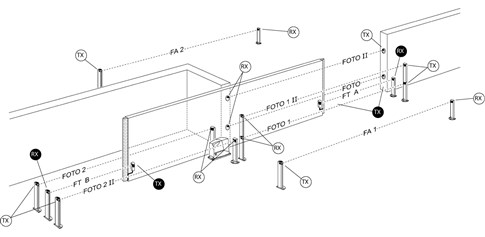
Position the photocells around the gate according to the example configurations for the complete setup and set the jumpers according to the jumper table for NICE EPMB photocells. To prevent interference between pairs installed close together, make sure the transmitters are oriented correctly TX and receivers RX according to the example configurations. Connect the photocells in parallel as shown (polarity does not matter):
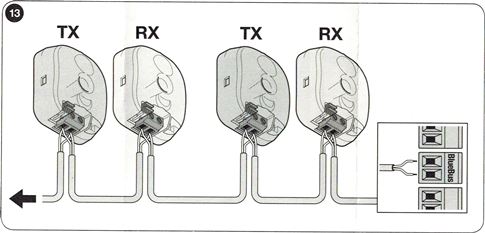
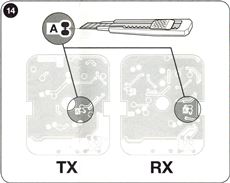
If you want the photocells to function as gate openers (see FA1 and FA2 in the example configurations), i.e. when a vehicle enters between their optical axes and triggers opening, interrupt connection A on the transmitter TX and receiver RX – see figure:
Example photocell wiring configuration
NICE EPMB photocell jumper table
 |
Connecting multiple pairs of photocells to the system BlueBUS is done by setting different jumper combinations. Each connected pair must have a unique combination; no two pairs in the same BlueBUS data network may have the same setting. Set the jumper identically on both the TX transmitter and RX receiver in each pair. Keep any unused jumpers for future use. |
| Photocell pair designation | Jumper – jumper combination |
|---|---|
| PHOTO | 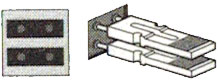 |
| PHOTO II | 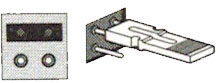 |
| PHOTO 1 | 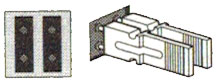 |
| PHOTO 1 II | 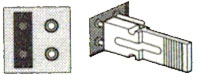 |
| PHOTO 2 | 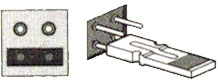 |
| PHOTO 2 II | 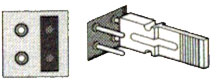 |
| PHOTO 3 | 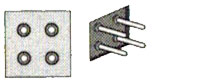 |
| FA1 (Interrupt connection A on both TX and RX) |
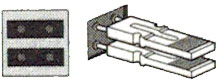 |
| FA2 (Interrupt connection A on both TX and RX) |
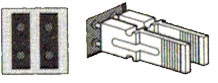 |
If you need to replace a photocell, set the same jumper on the replacement as on the original; there is no need to repeat the device recognition procedure.
Radio receiver for operators
The NICE Robus RBS800 operator has a radio receiver built into its control unit NICE MCU1R30. MCU1R30 also has an SM connector (under the plastic cover) for connecting an external radio receiver NICE OXIBD (or the older NICE OXI). The SM connector makes it easy to upgrade from an older Robus RB operator to a Robus RBS while retaining already paired remote controls.
Selecting the gate opening direction
The direction setting must correspond to the position of the operator relative to the gate leaf. View the gate from the side where the operator is installed.

| If the gate opens to the left, set the switch to the left. | If the gate opens to the right, set the switch to the right. |
| The switch is on the rear right-hand side of the MCU1R30 control unit. |
|

Recognizing connected operator devices
After connecting, disconnecting, or changing the wiring of any devices on the BlueBUS and STOP inputs, perform the accessory recognition procedure.. The operator signals that this is required by flashing LEDs L1 and L2.
 |
|
Recognizing the gate leaf length
To correctly calculate the acceleration and deceleration distances and partial opening, the operator must determine the gate leaf length. During the procedure, it moves the gate from one end stop to the other and determines the length using a switch.
 |
|
Programming the operator
The Robus RBS operator allows you to program various functions, either by enabling or disabling a function in Level I programming or by setting a preset parameter in Level II programming.
MCU1R30 control unit has three buttons for operating and programming the operator:
 |
Open |
This button sends an open-gate command to the operator. During programming, it is also used to increase the value of the parameter being programmed. |
|
Stop/Set |
This button sends a stop command to the operator. Pressing and holding it for 5 seconds takes you into Level I programming. Pressing and holding it again takes you into Level II programming for the current LED. |
|
|
Close |
This button sends a close-gate command to the operator. During programming, it is also used to decrease the value of the parameter being programmed. |
Programming – Level I
In Level I programming, the selected function is enabled or disabled.. When a function is enabled, the corresponding LED on the control unit is lit. All functions are disabled by default.
Entering Level I programming. Press and hold the “Stop/Set” button for approximately 5 seconds, until the LED starts flashing L1. Use the “Open” and “Close” buttons to move the active LED up or down. You have 10 seconds for each action; otherwise, the drive will exit programming mode. When the flashing LED is beside the function you want to change, press “Stop/Set” to make it flash faster (function enabled) or slower (function disabled), then let the drive exit programming mode; this takes up to 20 seconds. If everything went as expected, the corresponding LED will remain lit.
List of functions that can be enabled:
| LED | Function | Description |
|---|---|---|
| L1 | Automatic closing | After the set time (“Level II Programming – Pause Duration”), the gate closes automatically after opening. If this function is disabled, the gate responds only to a command (e.g. from a remote control or similar). |
| L2 | Close after photocell interruption | Once the photocells are clear (the vehicle has passed), closing starts after 5 seconds. Behavior depends on L1:
|
| L3 | Always close | After a power outage, the gate either remains in its original position (disabled) or closes automatically (enabled). |
| L4 | Standby mode | Reduces power consumption to a minimum (useful with the PSS124). One minute after the last movement, BlueBUS (and connected devices) and all LEDs except the BlueBUS LED switch off; the BlueBUS LED flashes slowly. When a command is received, the control unit first wakes up/restarts and only then carries out the command. |
| L5 | Soft start | Disables the soft start—the motor immediately runs at full power (useful with high friction, snow or ice). Reduces the service life of the drive. |
| L6 | Pre-flashing | Before the gate starts moving, the warning light flashes for 3 seconds, and only then does the movement begin. |
| L7 | Disable the built-in radio control | Disables the radio receiver integrated into the control unit. Enable this if you are using an external plug-in receiver such as the OXI. If this function is disabled, the internal receiver is active. |
| L8 | “Slave” mode – subordinate unit | When activated, the drive becomes the “Slave.” Allows two motors on opposing gate leaves to be synchronized (Master/Slave). For details, see the Robus RBS manual, section “Slave Mode.” |
Programming – Level II.
Level II is used to set function values (unlike Level I).
Entering Level II programming. Press and hold the “Stop/Set” button for approximately 5 seconds, until LED L1 starts flashing. Use the “Open” and “Close” buttons to move the active LED up or down. You have 10 seconds for each action; otherwise, the drive will exit programming mode. When the LED is beside the function whose parameter you want to adjust, press and hold “Stop/Set” to enter the settings. The lit LED (while you continue holding “Stop/Set”) indicates the current value. Change the value using “Open” (up) or “Close” (down), then release “Stop/Set” and wait for the drive to exit programming mode; this takes up to 20 seconds. To verify the setting, repeat the procedure without changing the value.
List of adjustable functions:
| Entry LED — Name and description | Setting LED — Value |
|---|---|
| L1 — Pause duration If “Automatic closing” is enabled in Level I, this sets the interval between opening and automatic closing. |
L1 — 5 s L2 — 15 s L3 — 30 s L4 — 45 s L5 — 60 s L6 — 80 s L7 — 120 s L8 — 180 s |
| L2 — Step-by-step mode Sets the movement sequence when a command is repeated (remote-control button or STEP-BY-STEP/P.P./Step-by-step input). Note: For L4, L5, L7 and L8, the behavior of the “Open” and “Close” commands changes. |
L1 — Open/Stop/Close/Stop L2 — Open/Stop/Close/Open L3 — Open/Close/Open/Close L4 — Condominium L5 — Condominium after two “Stop” commands L6 — Step-by-step after two “partial opening” commands L7 — Hold-to-run L8 — “Semi-automatic” opening; hold-to-run closing |
| L3 — Motor speed Speed during normal operation (not during acceleration or deceleration). „L6 – Extremely fast” = 100% of 0.34 m/s, etc. |
L1 — Very slow (30%) L2 — Slow (44%) L3 — Medium (58%) L4 — Fast (72%) L5 — Very fast (86%) L6 — Extremely fast (100%) L7 — Opens “Fast,” closes “Slow” L8 — Opens “Extremely fast,” closes “Fast” |
| L4 — OGI output indicator Setting the OGI output function (supplies 24 V when activated, −30%/+50%, max. 10 W). |
L1 — Gate opening L2 — Gate closed L3 — Gate open L4 — Second radio output L5 — Third radio output L6 — Fourth radio output L7 — Maintenance L8 — Electric lock |
| L5 — Motor force Adjusts the force control to the weight of the automation system. The system also takes the ambient temperature into account and increases the force in cold weather. |
L1 — Extremely lightweight gate L2 — Very lightweight gate L3 — Lightweight gate L4 — Average-weight gate L5 — Medium-heavy gate L6 — Heavy gate L7 — Very heavy gate L8 — Extremely heavy gate |
| L6 — Partial opening Passage length during partial opening. |
L1 — 0.5 m L2 — 1.0 m L3 — 1.5 m L4 — 2.0 m L5 — 2.5 m L6 — 3.0 m L7 — 3.4 m L8 — 4.0 m |
| L7 — Maintenance alert Number of manoeuvres after which the drive indicates that maintenance is required. |
L1 — 1,000× L2 — 2,000× L3 — 4,000× L4 — 7,000× L5 — 10,000× L6 — 15,000× L7 — 17,000× L8 — 20,000× |
| L8 — Fault list Check the fault type for the last 8 manoeuvres (see “Fault history” in the manual). |
L1 — Result of the 1st manoeuvre L2 — Result of the 2nd manoeuvre L3 — Result of the 3rd manoeuvre L4 — Result of the 4th manoeuvre L5 — Result of the 5th manoeuvre L6 — Result of the 6th manoeuvre L7 — Result of the 7th manoeuvre L8 — Result of the 8th manoeuvre |
Automating two opposing sliding gates with two NICE Robus RB800 drives (Master-Slave mode)
If you need to automate two sliding gates facing each other, the Robus drives support slave mode (“Master-Slave”). One drive acts as the master (Master) and sends commands to the other, the slave (Slave). All Robus drives are configured as master by default, so enable function L8 (Slave unit). The connection between the Master ↔ Slave units is made via BlueBUS.
Restrictions for connecting the master and slave units
- The gate cannot be opened using the slave unit.
- All devices (e.g. photocells, external receiver etc.) must be connected to the master unit. Only a warning light and devices connected to the STOP, SBS (STEP-BY-STEP/Step-by-step) input and the output indicator OGIcan be connected to the slave unit; the OPEN/CLOSE inputs are ignored.
- If you use a backup battery (NICE PSS124), each drive must have its own.
- On the slave unit, all programmed functions are ignored except those listed below.
| Level I programming | Level II programming |
|---|---|
| L4 — Standby mode | L3 — Motor speed |
| Soft start | L4 — Output indicator |
| L8 — Slave unit | L5 — Motor force |
| L8 — Fault log |
Installation procedure for two Robus drives in slave mode
- Install both gate leaves and both motors. Decide which one will be the Master (N) and which the Slave (P). In Master-Slave mode, only the slave gate leaf can be fully opened.
- (P) Select the opening direction (direction switch on the control unit).

- (P) On the Slave run device and gate-leaf length learning (“Device learning”, “Gate-leaf length learning”). If the direction is reversed, repeat step 1.
- (P) On the Slave enable the “Master-Slave mode” function (Level I, L8).
- (P+N) Connect the two automation systems as shown in the diagram.

- (N) Select the opening direction on the Master.
- (N) On Master run the device and gate-leaf length learning procedure. The Slave will also move while the gate-leaf length is being learned. For the opposite direction, repeat step 6.

Connecting additional external devices
The control unit
On the MCU1R30 control unit there is 24 V DC (+) and GND (−) available for powering external devices, as well as terminals OGI, BlueBUS and Flash. In Master-Slave connect devices to the master drive (for exceptions for "Slave" see the manual – "Master-Slave mode").
MCU1R30 also allows you to connect an expansion board, which provides additional inputs and outputs.
Expanding the control unit with additional inputs/outputs
The control unit can also, in addition to the terminals provided, connect an expansion board.. This allows the MCU1R30 unit to be expanded with additional inputs and outputs, enabling more devices to be connected. The number and type of inputs and outputs depend on the type of expansion board. For MCU1R30 there are currently 3 types of expansion boards:
MLAE21 - 2x 24 V inputs (default: Open, Close), 1x 24 V output (default: OGI)
MLAE22 - 2x 24 V inputs (default: Open, Close), 1x 24 V output (default: OGI), 1x 230 V output (default: Lighting)
MLAE44 - 4x 24 V inputs (default: Open, Close, Partial opening, Photo), 4x 24 V outputs (default: OGI, Gate closed, Radio output 4, Phototest)
Procedure for connecting an expansion board:
Adding or removing expansion boards must always be done with the power supply disconnected (by removing fuse F2 and, if connected, the backup battery).
 |
|
Procedure for learning additional devices.
 |
|
After adding or removing devices, the automation system must be tested again as described in the section “Testing” (see manual, section 6.1, page 24).
Special drive functions
Gate held open
If a command to the STEP-BY-STEP input (P.P., SbS, Step-by-step) lasts longer than 2 seconds, the control unit will hold the gate open for as long as the command is active. Suitable for use with a timer.
Forced operation
If a safety device fails or an obstacle blocks, for example, the photocells and the gate does not move for safety reasons, activate “Hold-to-run” mode—permanently (Level II, L2 = L7) or temporarily:
- Send a command (e.g. remote control or key switch).
- If there is a problem, the gate will not move and the warning light will probably indicate a fault.
- Within 3 seconds of the previous command, send it again and keep it held.
- The gate moves while the command is held; it stops when the command is released.
Maintenance warning
In Level II programming, item L7 – Maintenance warning sets the number of cycles after which the drive should signal that maintenance (inspection) is required. The drive signals this using the warning light (or, if Level II programming item L4 – Indicator output is set to level L7 – Maintenance) as follows:
| Number of cycles | Warning light signal | OGI indicator output signal |
|---|---|---|
| less than 80% of the limit | Normal operation; flashes at half-second intervals. | “Lights up” for 2 seconds after opening starts. |
| 80–100% of the limit | Lights for 2 seconds after the manoeuvre starts, then continues normally. | Flashes during the manoeuvre. |
| over 100% of the limit | Lights for 2 seconds after the manoeuvre starts, then behaves normally; lights again for 2 seconds after the manoeuvre ends. | Flashes continuously. |
These settings can also be made using the mobile app My Nice Pro.
Troubleshooting the operator
If anything is unclear or you have another problem, feel free to contact our technical support for NICE operators.
Depending on the nature of the problem
During installation (or if the operator malfunctions), you may encounter some of the following problems:
| Problem | Possible solution |
|---|---|
| The gate does not respond to the remote control, and the LED on the remote does not light up. | Check that the batteries in the operator remote control are working; if not, replace them (see the instructions in the manual for the specific remote control). |
| The gate does not respond to the remote control, but the LED on the remote lights up. | Check that the remote control has been stored in the receiver's memory correctly; if necessary, store it again. |
| The gate does not move and the BlueBUS LED does not flash. | Check that the operator is receiving 230 V power. If it is, test both fuses and replace them if necessary with new ones of the same rating. |
| The gate does not move and the warning light does not flash. | Check whether the operator has registered the command at all: – for a command from the remote control, the BlueBUS LED should flash rapidly twice; – for a command via the STEP-BY-STEP (SbS) input, the corresponding STEP-BY-STEP LED should light up. |
| The gate does not move and the warning light flashes several times. | Count the flashes and see “Diagnostics using warning-light flashes” below. |
| The gate starts moving, but stops shortly afterwards and reverses. | The motor force is probably set too low. Check for obstructions and increase the force if necessary; you can also enable the “Soft start“. |
| The gate starts moving, but the warning light does not work. | Check whether voltage is present at the FLASH terminal during the manoeuvre (approx. 10–30 V DC). If voltage is present, the problem is with the warning light — try replacing it. If there is no voltage, the FLASH output may be overloaded — check the wiring for a short circuit. |
| The gate starts moving, but the OGI output does not work. | Check which function is assigned to the OGI output; if it should flash, check for 24 V DC. If voltage is present, the bulb is faulty — replace it. If there is no voltage, the OGI output may be overloaded — check the wiring for a short circuit. |
Diagnostics using warning-light flashes
While the gate is moving, the warning light flashes regularly once per second. If a problem occurs, it signals an error with two consecutive, faster sequences of flashes.
| Flash sequence | Error | Solution |
|---|---|---|
| 1 flash, 1 s pause, 1 flash | BlueBUS error | The devices connected to the BlueBUS input do not match those detected during the setup phase. Repeat the setup phase; if that does not help, use a process of elimination to identify the faulty device, then replace it, repair it or return it under warranty. |
| 2 flashes, 1 s pause, 2 flashes | Photocell activation | The photocells are being triggered (normal if the beam is interrupted while closing). If the beam was not interrupted, the photocells may be dirty, exposed to glare or faulty. |
| 3 flashes, 1 s pause, 3 flashes | Motor force limiter activated | The gate is detecting increased friction — check and adjust the gate (test it by moving it manually). Increasing the force or enabling “Soft start“. may help. The problem may also be caused by an excessively high bottom stop.. |
| 4 flashes, 1 s pause, 4 flashes | STOP input activated | A command was received at the STOP input. If this was unexpected, check the connected devices. |
| 5 flashes, 1 s pause, 5 flashes | Internal control unit error | Wait at least 30 seconds, then send the command again. If the error persists, try a reset.. The control unit will probably need to be repaired or replaced. |
| 6 flashes, 1 s pause, 6 flashes | Hourly manoeuvre limit reached | Wait a few minutes for the cycle limiter to drop below its maximum. |
| 7 flashes, 1 s pause, 7 flashes | Internal electronic circuit error | Disconnect the operator from the power supply for a few seconds, reconnect it and try sending a command. If the error persists, try a reset.. If that does not help, the control unit will probably need to be repaired or replaced. |
| 8 flashes, 1 s pause, 8 flashes | Continuous command active | If a command is being sent continuously to the operator, check the devices connected to the OPEN input. If a timer is connected, it is probably sending this continuous command. |
Diagnostics using LED flashes
Diagnostics can be performed by monitoring several sets of LEDs. Two sets can be foundon the control unit, and the third is the status light directly on the operator.
On the operator...
The status light is located on the front of the cover of Nice RBS operators..

The red and green LEDs indicate normal operation and provide basic gate diagnostics, as shown in the table below. If the drive detects an anomaly/error, it signals it using the warning light.
| Status light with learned positions | |
|---|---|
| Green light | |
| on | Indicates the start of each gate movement, if there are no anomalies/errors in the system and goes out when the movement ends. |
| off | Normal operation |
| Red light | |
| on | Indicates the start of each gate movement, if the set number of movements before maintenance has been exceeded; and goes out when the movement ends. |
| off | Normal operation |
| Warning light | The control unit has detected an anomaly. See the table “Diagnostics using warning-light flashes”. |
| Status light with unlearned positions | |
|---|---|
| Green light | |
| on | The light comes on when the opening limit switch is reached. |
| off | Normal operation |
| Red light | |
| on | The light comes on when the closing limit switch is reached. |
| off | Normal operation |
| Warning light | The control unit has detected an anomaly. See the table “Diagnostics using warning-light flashes”. |
On the MCU1/MCU1R30 control unit...
MCU1R30 control unit of the NICE Robus RBS800 drive, there are two sets of LEDs, each of which uses flashing and steady illumination to indicate normal operation of the control unit or to diagnose errors, as shown in the tables below.

Horizontal LEDs: BLUEBUS, STOP, SbS, FOTO:
| Indicator | Status | Solution |
|---|---|---|
| BlueBUS LED | ||
| off | anomaly/error | Check the mains connection. If it is OK, check fuses F1 and F2 and replace them, if necessary, with new ones of the same specifications. |
| on | serious error |
Try disconnecting the control unit, or possibly all inputs. If that does not help, reset the control unit. If the error persists, the control unit will probably need to be replaced. |
| 2 green flashes at one-second intervals | everything is OK | Normal operation of the control unit. |
| 2 quick green flashes | input status has changed |
Normal operation – the status of the STEP-BY-STEP, STOP, OPEN or CLOSE input has changed, or photocells were activated, or the drive received a command from the remote control. |
| a series of red flashes separated by a one-second pause | various | The number of flashes in the series corresponds to the error diagnosis indicated by the warning light. See “Diagnostics using warning-light flashes”. |
| a series of rapid and slow red flashes | short circuit at the BlueBUS terminal | Disconnect the terminal and check the BlueBUS connections to find the cause of the short circuit. After eliminating the short circuit, reconnect the terminal. After ten seconds, the LED will start flashing again. |
| STOP LED | ||
| off | the STOP input has been activated | Check the devices connected to the STOP input. |
| on | the STOP input has not responded | The STOP input is active. |
| STEP-BY-STEP LED (also labelled SbS, P.P. or Step) | ||
| off | everything is OK |
The STEP-BY-STEP input is inactive. |
| on | the STEP-BY-STEP input has been activated | Normal operation of the control unit if a device connected to the STEP-BY-STEP input has been activated. |
| FOTO LED | ||
| off | The FOTO input has been activated | The FOTO input has been triggered. |
|
on |
Everything is OK | Normal operation of the control unit if the safety device has not been triggered. |
Vertical LEDs L1–L8:
| Indicator | Solution |
|---|---|
| LED 1 | |
| off | During normal operation, indicates that the “Automatic closing” function is disabled. |
| on | During normal operation, indicates that the “Automatic closing” function is enabled. |
| flashing |
- The function is being programmed.
|
| LED 2 | |
| off | During normal operation, indicates that the “Close” function after photocell activation is disabled. |
| on | During normal operation, indicates that the “Close” function after photocell activation is enabled. |
| flashing |
- The function is being programmed.
|
| LED 3 | |
| off | During normal operation, indicates that the “Always close” function is disabled. |
| lit | During normal operation, indicates that the “Always close” function is enabled. |
| flashing |
- The function is being programmed.
|
| LED 4 | |
| off | During normal operation, indicates that the “Standby mode” function is disabled. |
| lit |
During normal operation, indicates that the “Standby mode” function is enabled. |
| flashing |
- The function is being programmed.
|
| LED 5 | |
| off | During normal operation, indicates that the “Soft start” function is disabled. |
| lit | During normal operation, indicates that the “Soft start” function is enabled. |
| flashing | Functions are being programmed. |
| LED 6 | |
| off | During normal operation, indicates that the “Pre-flashing” function is disabled. |
| lit | During normal operation, indicates that the “Pre-flashing” function is enabled. |
| flashing | Functions are being programmed. |
| LED 7 | |
| off | During normal operation, indicates that the “Internal radio receiver” function is disabled. |
| lit | During normal operation, indicates that the “Internal radio receiver” function is enabled. |
| flashing | The function is being programmed. |
| LED 8 | |
| off | During normal operation, indicates that Robus is configured as the “Master unit” (also called Master). |
| lit | During normal operation, indicates that Robus is configured as the “Slave unit” (also called Slave). |
| flashing | The function is being programmed. |
Installing the backup battery in the NICE Robus RBS800 operator
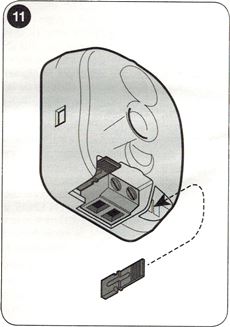
The backup NICE PSS124 battery is not included as standard with the operator, but can be ordered separately. In the event of a power failure, it will power the gate operator. The battery is continuously charged from the mains. Connect the battery to the control unit only after completing all installation and programming steps.
| 1. Pry off the plastic cover (A) from the battery connector on the operator. | 2. Connect the supplied cable to the backup battery connector (PSS124). |
 |
 |
| 3. Connect the corresponding connector (C) to the battery connector on the operator. | 4. Insert the backup battery (D) into its slot inside the operator. |
 |
 |
Manually releasing the NICE Robus RBS800 operator
In the event of a power failure or malfunction, you will not be able to operate the gate using the remote control. Therefore, you can release the operator using the release key and move the gate manually.
1. Use the supplied key to open the locking hook (A) and pull out the release lever. You can now move the gate manually.

2. To lock the gate, close the locking hook, turn the key anticlockwise and remove it.

Technical specifications of the NICE Robus RBS800 operator
| Model | NICE Robus RBS800 |
|---|---|
| Description | Electromechanical gearmotor for automatic operation of sliding gates in residential settings. Supplied with NICE MCU1R30 control unit with an integrated radio receiver. |
| Pinion |
|
| Torque [Force] |
22,5 Nm [750 N] – force required to start the gate leaf moving |
| Rated torque [Rated force] |
12 Nm [400 N] – force required to keep the gate leaf moving |
| Speed | 0,30 m/s |
| Cycle limit | Gate leaf length up to 4 m, 35 cycles/hour. Up to 8 m, 20 cycles/hour. |
| Operating limit | 7 minutes (the control unit limits the time depending on the conditions – see drive selection) |
| Service life | Approximately 20,000–250,000 cycles, depending on the weight and length of the gate leaf and the drive settings. |
| Power supply | 230 V (+10% / −15%) 50/60 Hz |
| Power consumption [Load] |
230 W [1.1 A] |
| Insulation class | 1 – must be earthed |
| Backup power supply | A NICE PSS124 backup battery can be purchased separately and installed. (Using the adapter CABLA11 it is also possible to use the older model PS124.) |
| Protection rating | IP44 |
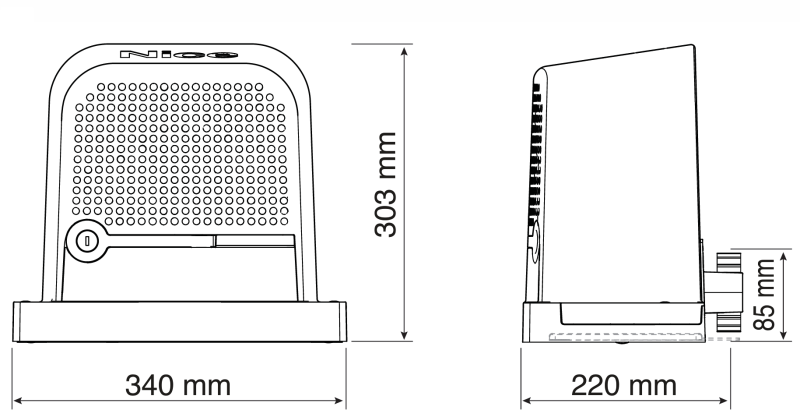
| Dimensions | 340 x 220 x 303 mm |
| Control unit | MCU1R30 |
360° view of the Nice Robus RBS800 drive
How can I order this item?
Choose the option that suits you:
- order online: use the buy button to add the goods to your shopping cart (you will find the buy button here in the product variants table).
- order by email: place your order at [email protected]






