NICE MOFB - Moon Photocells - photocells with BlueBUS connection (1 pair)
| Product availability: | Unavailable | We’ll be happy to help you choose a replacement. Feel free to contact us. |
|---|

Description of NICE MOFB - Moon Photocells - photocells with BlueBUS connection (1 pair)
NICE MOFB photocells are no longer manufactured. They have been replaced by their successor, NICE EPMB, which have the same internal electronics (you don't need to replace the entire photocells; simply transfer the electronics from the new photocells to the old ones).
Other photocells compatible with the NICE MOFB model are the designer versions NICE EPSB and NICE EPLB.
Replacement covers for the photocells are available to buy: NICE-ND-PRB-MOFB
Outdoor safety photocells NICE MOFB (technical specifications) are installed opposite each other across the gate opening, or at any point where there is a risk of the gate hitting an obstacle. They create an infrared beam along the optical axis; when the beam is interrupted, they send a signal to stop the gate. They can only be used with devices that support NICE BlueBUS.
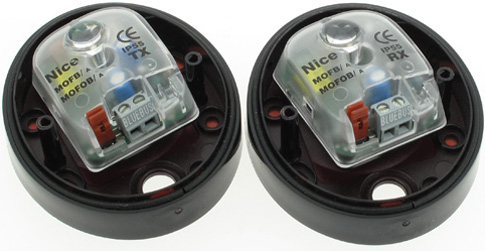
They consist of two synchronised components: transmitter TX and receiver RX.
Installing NICE MOFB photocells
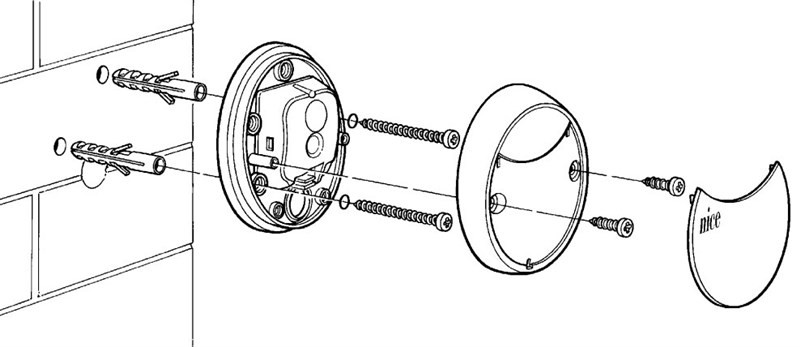
1. Mount the photocells on a wall, masonry wall, post or any suitable surface (surface-mounted), at the same height and facing each other along the same axis. The mounting surface must be flat so that the photocells can be easily aligned:
2. Next, connect the photocells according to the diagram supplied with your gate operator or control unit (see wiring diagram for NICE Robus 400, 600, 1000 - control unit RBA3 control unit).
3. Carry out the connected-device recognition procedure (this procedure is supported by every gate operator or control unit with a BlueBUS).
4. Then, to test that the wiring is correct, see the section Checking operation and troubleshooting, or continue below for information on connecting multiple pairs of photocells:
Connecting multiple pairs of NICE MOFB photocells to the NICE BlueBUS
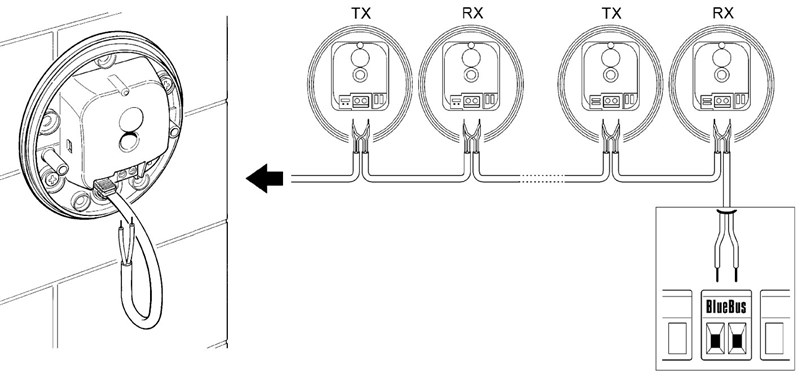
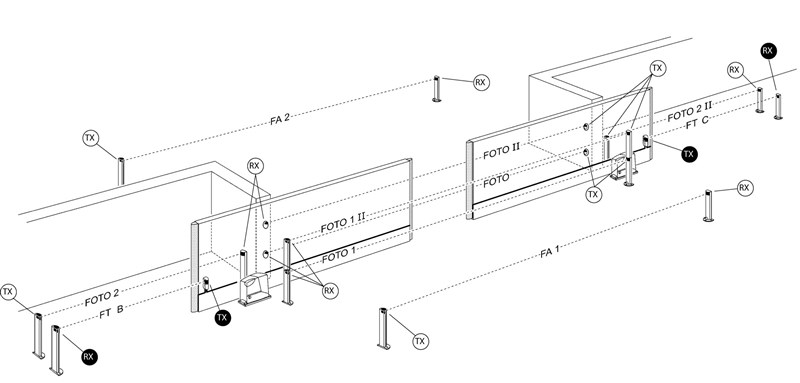
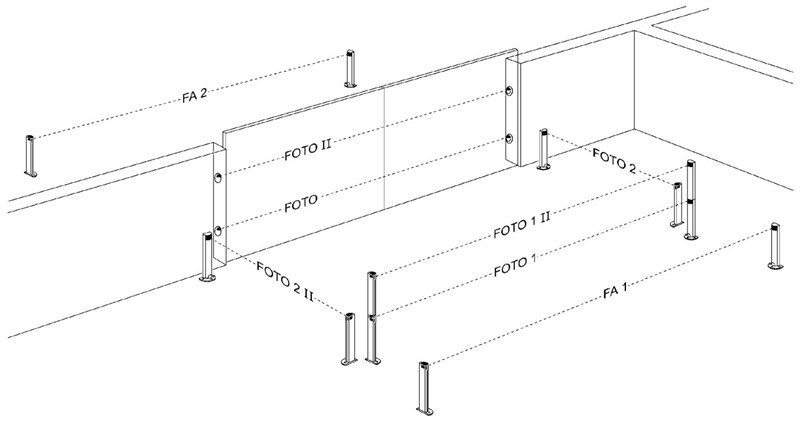
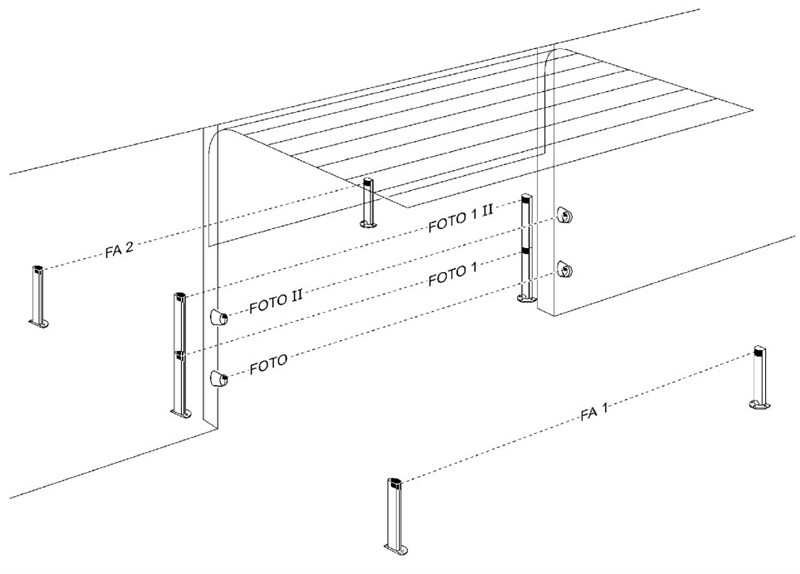
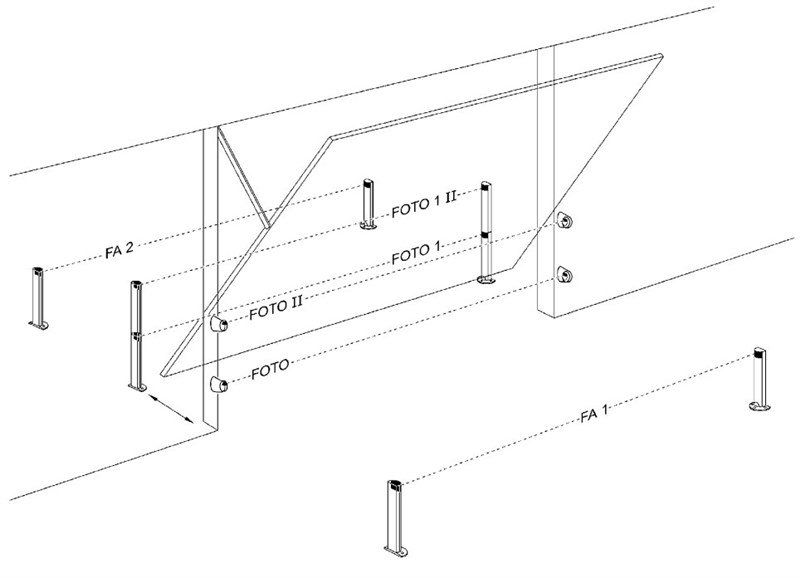
Position the photocells around the gate or gates according to the example configurations for complete wiring, and set the jumpers according to the photocell jumper table NICE MOFB gate operator. To prevent interference between pairs positioned close together, follow these example configurations, ensuring the correct orientation of the transmitters TX and receivers RX. Connect the photocells in parallel as shown (polarity does not need to be observed):
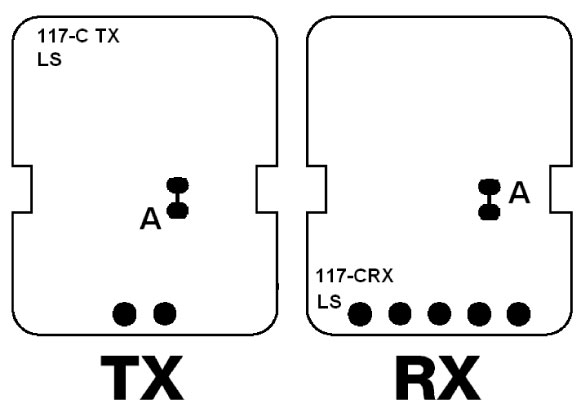
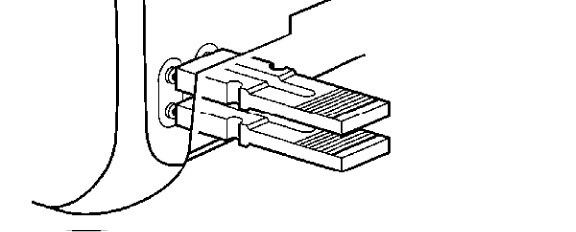
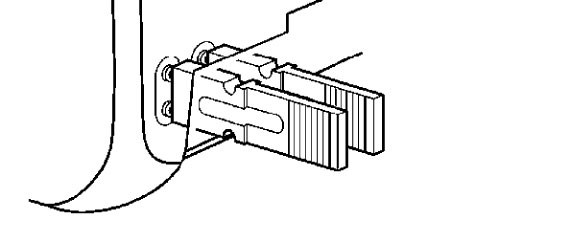
If you want the photocells to work as gate openers (see FA1 and FA2 in the example configurations), i.e. to open the gate when a vehicle passes between their optical axes, you must break connection A on both the TX and RX, as shown:
Example configurations for fully wiring multiple pairs of photocells to a NICE MOFB gate operator
1. Single-leaf sliding gate
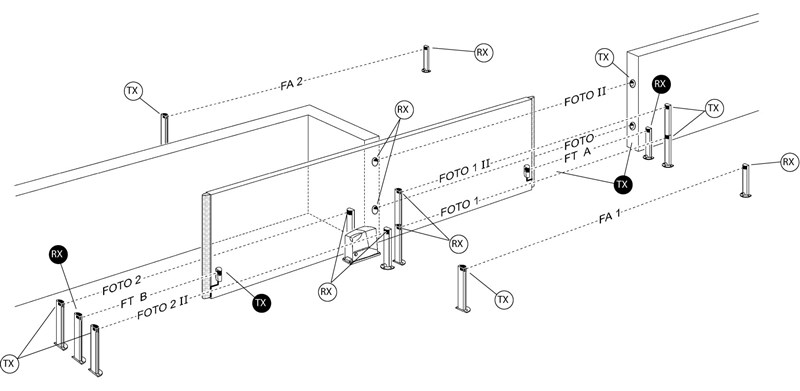
2. Two synchronised sliding gates facing each other
3. Swing gate
4. Sectional garage door
5. Up-and-over garage door
NICE MOFB gate operator photocell jumper table
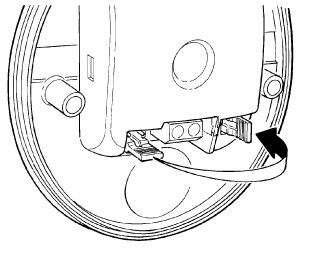 |
Connecting multiple pairs of photocells to the BlueBUS system is done by setting different jumper combinations, with each connected pair requiring a unique jumper combination. Make sure that no two pairs in the same BlueBUS data network have the same combination. Set the jumper to the same value on both the TX transmitter and RX receiver in each pair of photocells. If a jumper setting uses only one jumper, always place the other one in the unused compartment, as shown in the image on the left. |
| Photocell pair designation | Jumper setting using a combination of jumpers |
|---|---|
| FOTO | 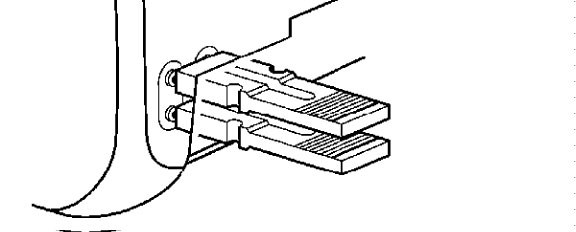 |
| FOTO II | 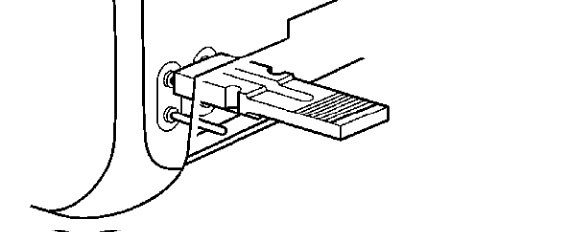 |
| FOTO 1 | 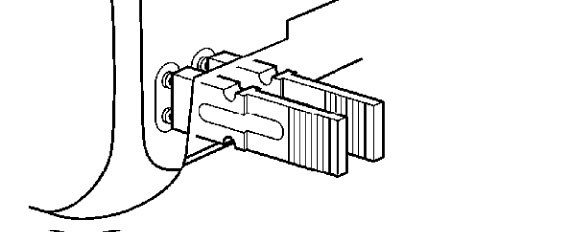 |
| FOTO 1 II | 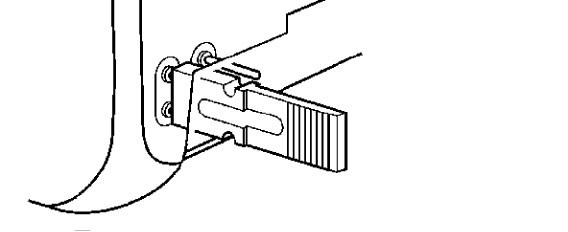 |
| FOTO 2 | 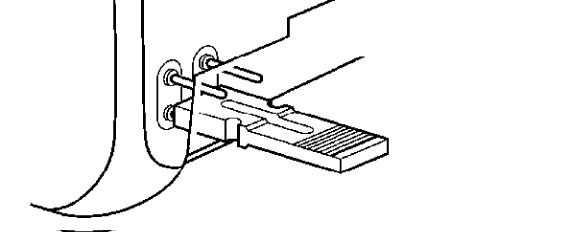 |
| FOTO 2 II | 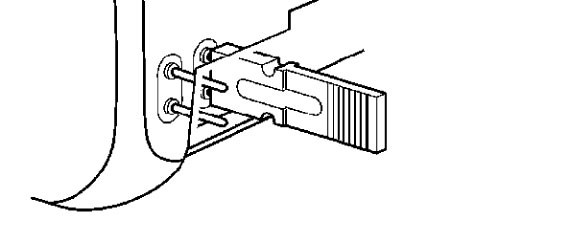 |
| FOTO 3 | 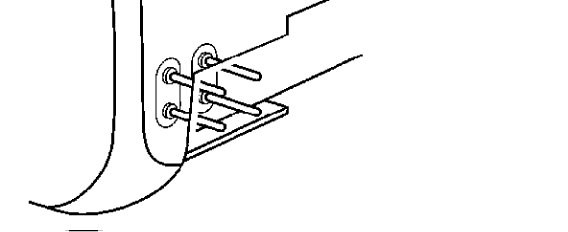 |
|
FA1 |
 |
|
FA2 |
 |
If a photocell needs to be replaced for any reason, simply set it to the same jumper setting as the original one; there is no need to carry out the device recognition procedure.
Testing photocell operation and troubleshooting NICE MOFB wiring
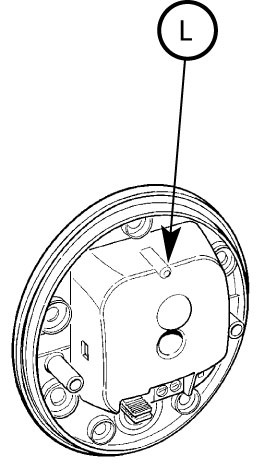 |
After the control unit's device recognition procedure, check that the LED on both the TX transmitter and RX receiver is flashing. The LED's flashing pattern may indicate the following situations: |
| LED "L" | Situation | What to do |
|---|---|---|
| Off | The photocell is not receiving power or is faulty. | Check that the voltage at the photocell inputs is approximately 8-12V. If the voltage is correct, the photocells are probably faulty. |
| 3 quick flashes followed by a one-second pause | The control unit has not recognized the device. | Repeat the recognition procedure on the control unit. Make sure that each pair of photocells has a unique address assigned using jumpers . |
| Very slow flashing | The TX transmitter is transmitting regularly The RX receiver is receiving an excellent signal |
Normal operation |
| Slow flashing | The RX receiver is receiving a good signal | Normal operation |
| Fast flashing | The RX receiver is receiving a weak signal | Normal operation. Nevertheless, ideally check the alignment of the TX transmitter and RX receiver and make sure the covers are clean. |
| Very fast flashing | The RX receiver is receiving a very weak signal | Operation is still normal, but at the limit. Ideally, check the alignment of the TX transmitter and RX receiver and make sure the covers are clean. |
| On | The RX receiver is not receiving any signal | Make sure the LED on the TX is flashing slowly. Check that there is no obstruction in the optical path between the TX transmitter and RX receiver. Check the alignment of the TX and RX. |
NICE MOFB photocell technical specifications
| Product type | A detector for automatic swing gates, sliding gates and type D garage doors in accordance with EN 12453, consisting of a transmitter TX and a receiver RX. |
|---|---|
| Technology | Direct optical TX-RX interpolation using a modulated infrared beam. |
| Power supply/output | The device may only be connected to a data network that supports the NICE interface BlueBUS, from which it receives electrical power and sends an output signal. |
| Power consumption | 1 BlueBUS unit |
| Detection capability | Opaque objects larger than 50 mm passing through the optical axis between the TX transmitter and RX receiver at a speed below 1.6 m/s. |
| TX transmitter beam angle | 20° +-25% |
| RX receiver acceptance angle | Approximately 20° |
| Nominal range | 15 m with a maximum TX transmitter and RX receiver axis misalignment of +-5%, even in adverse weather conditions |
| Maximum range | 30 m with a maximum TX transmitter and RX receiver axis misalignment of +-5% in excellent weather conditions |
| Addressing | 7 pairs with a safety function and 2 pairs with an "Open" command function |
| Use in acidic or saline environments, or in environments with an increased risk of explosion | No |
| Installation | Vertical wall mounting |
| Protection rating | IP55 |
| Operating temperature | -20°C to 55°C |
| Dimensions | 69x78x25mm |
| Weight | 50g |
Photocell wiring NICE MOFB with the NICE Robus 400, 600, 1000
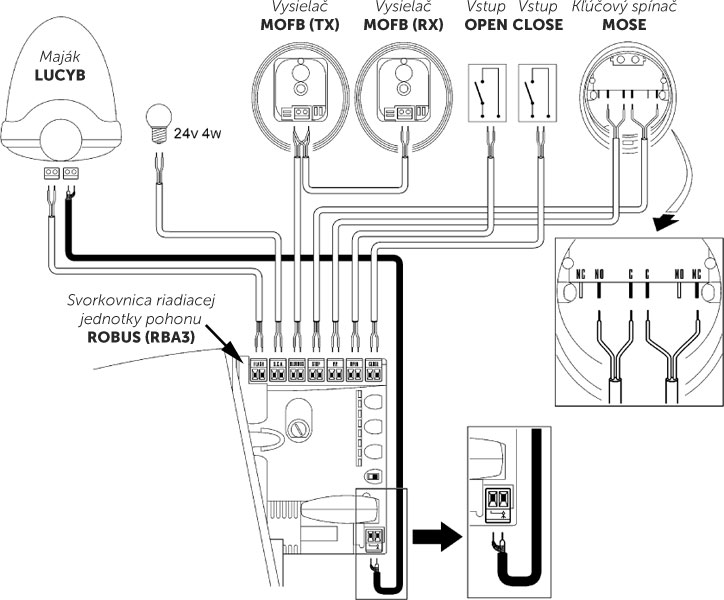
Photocell interior NICE MOFB for gate operators
How can I order this item?
Choose the option that suits you:
- order online: use the buy button to add the goods to your shopping cart (you will find the buy button here in the product variants table).
- order by email: place your order at [email protected]






