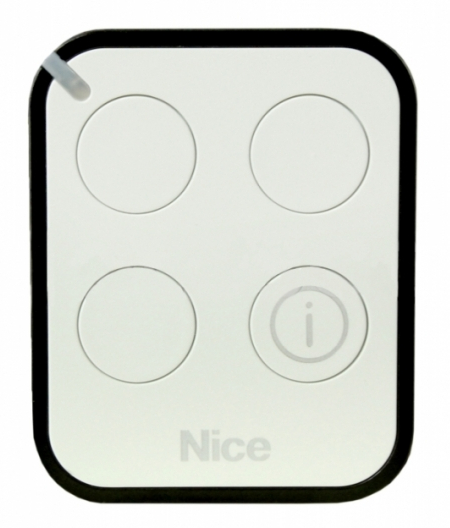
NICE Era One BD ON3EBD – three-channel remote control, bidirectional
| Product availability: | In stock | We normally dispatch goods within 24 hours. |
|---|

in stock
€29.28 including VAT
| Weight |
|---|
| 50,00 g |
Description of NICE Era One BD ON3EBD – three-channel remote control, bidirectional
Three-channel (what does that mean?) controller compatible with all NICE drives using a rolling code of the O-Code (the 192-bit code allows quadrillions of combinations, making it virtually impossible to misuse) and an LED indicator for the transmitted signal. With this remote control, you can control three NICE devices, or use the NICE OXIBD receiver to control a device from another brand.
The transmitter is bidirectional, which in practice means that thanks to two-way communication with the receiver, it can determine the current status of the gate (closed, partially open, open). The status is then indicated on the remote control itself: the LED lights green when the gate is open, orange when it is partially open, and red when it is closed.
A low battery or any communication or automation errors are indicated by the entire remote control vibrating. The remote control is compatible with the NICE OXIBD.
What’s included NICE Era One ON3EBD
- remote control
- CR2032 lithium battery
- keychain lanyard
- manual for the NICE Era One ON3E remote control
Optional accessories available to purchase adhesive mount for a wall, car dashboard, etc.
Technical specifications of the remote control NICE Era One ON3EBD
| Frequency: | 433.92 MHz (±100KHz) |
|---|---|
| Number of channels: | 3 buttons |
| Power supply: | 3V DC; CR2032 lithium battery |
| Battery life: | approximately 2 years at 10 uses per day |
| Remote control range: |
approx. 200 m outdoors |
| Signal encoding: | O-Code (192-bit rolling code), compatible with FloR |
| Transmitted signal: | 1mW ERP |
| Operating temperature: | -5°C to 55°C |
| Ingress protection rating: | IP40 |
| Dimensions: | 45×56×11 mm (W×D×H) |
| Weight: | 18g |
How to pair the remote control NICE Era One ON3EBD with a NICE
How to reprogram the ON3EBD remote control for unidirectional mode
Reprogram the remote control in two steps: first, reprogram it, then save it to the receiver’s memory again as a standard unidirectional transmitter.
1) Reprogramming the ON3EBD remote control
For each of the first, second, and third control buttons on the remote, perform the procedure for switching to unidirectional operation:
- On the ON3EBD remote, press the “i” button three times
- Press and hold the control button you want to switch until the LED lights up red
- Done
2) Saving the transmitter to the receiver’s memory
You can then save the reprogrammed transmitter to the receiver’s memory using the standard procedure in Mode I or Mode II.
I erased the receiver and can’t pair the remote controls
After erasing the receiver, you also need to delete the remote controls (ON3EBD) using the procedure for resetting the NICE ON3EBD remote control:
- Remove the battery
- Press and hold the first button while reinserting the battery
- Keep holding the first button. The remote will flash red a few times; when the LED stays lit red, release the button and, within three seconds, press it once again without holding it down.
Typical scenario with an ON3EBD transmitter in an environment with high levels of radio signal interference
If you have any problems with the remote control in bidirectional mode (rapid battery drain, short range, etc.), they may also be caused by interference in the surrounding environment. Read more in Typical scenario with an ON3EBD transmitter in an environment with high levels of radio signal interference.
Pairing the ON3EBD remote control with an older receiver model
All three control buttons on the remote control are factory-set to bidirectional “BD” mode. To save the remote control to older receiver models that do not support “O-Code” or “BD” encoding, you need to switch the relevant button on the remote to unidirectional mode. Proceed as follows:
- On the ON3EBD remote, press the “i” button three times
- Press and hold the desired button on the remote until the LED lights up red.
- Done
You can then pair that button with older receiver models in the same way as any standard remote control. If necessary, you can switch the button back using the same procedure; in step 2, the LED will light up green instead.
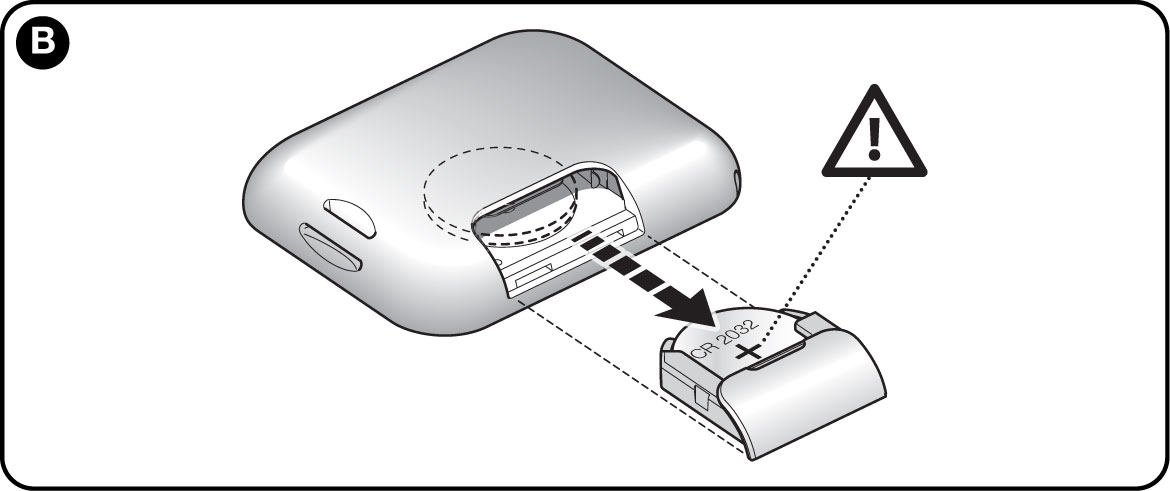
Replacing the battery in the remote control NICE Era One ON3EBD
How can I order this item?
Choose the option that suits you:
- order online: use the buy button to add the goods to your shopping cart (you will find the buy button here in the product variants table).
- order by email: place your order at [email protected]






