NICE M-Fab MFAB3024 - standalone underground operator for a swing gate leaf up to 3.5 m / 600 kg
| Product availability: | within 3 days | We usually ship the goods within 3 days. |
|---|
within 3 days
€452.28 including VAT
| Weight |
|---|
| 11 kg |
Description of NICE M-Fab MFAB3024 - standalone underground operator for a swing gate leaf up to 3.5 m / 600 kg
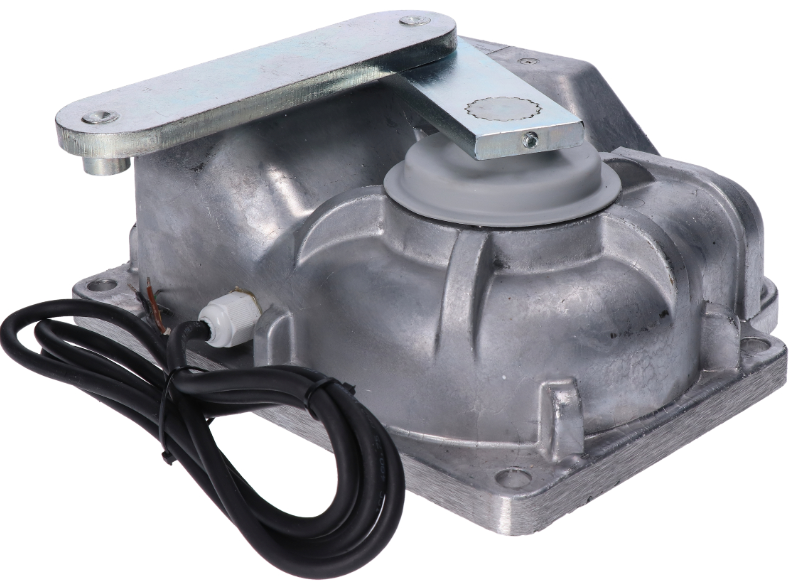
NICE M-FAB MFAB3024 is a standalone underground non-reversible drive with a 24 V DC motor and magnetic encoder for one gate leaf. It does not include a control unit; for a new setup, use NICE MC824HR30. For two leaves, you need two motors and one compatible control unit.
The motor is concealed beneath the hinge axis, so it does not affect the gate's appearance. It is also suitable where there is no room beside the leaf for a linear actuator or articulated arm actuator. The box itself forms the lower support for the gate leaf. 24 V is the motor voltage; the MC824HR30 is powered by 230 V AC mains.
Controls and compatible accessories
Both 24 V M-FAB motors use the MC824H control unit with encoder inputs. MC824L is not a replacement for this motor. For an older MC824HR10, follow the procedure for the board actually installed; do not apply MC824HR30 settings to a different generation.
| What | Why | Type |
|---|---|---|
| Control unit | Controls one or two motors. Connection. |
|
| Warning light | Indicates gate movement. The control unit determines the power supply and permitted load; output specifications. |
Other warning lights select according to the voltage and maximum load of the FLASH output on the control unit actually installed. |
| Photoelectric safety sensors | Protect the passage area according to the position and operating mode. Wiring and setup. |
Connect wired BlueBUS pairs to BLUEBUS. EPMOW units require a radio interface NICE IBW connected to BlueBUS; they are not wired directly like EPMB units. With FT210B, the transmitter on the gate leaf is battery-powered, while the receiver connects to BlueBUS with two wires. FT210B also transmits the status of the safety edge. Relay photoelectric sensors connect to contact inputs, not to BlueBUS. |
| Transmitter | Remote control. The coding type must match the receiver installed. ON3ELR is for OXILR; ON3EBD is for OXIBD. Pairing remote controls. | |
| Receiver | Receiver for the SM control unit connector. OXIBD and OXILR use different radio systems; choose transmitters according to the receiver. |
|
| Antenna | Improves remote-control reception. Connect the antenna to the installed receiver; with OXIBD, connect it directly to its antenna terminals. | |
| Keypad | Access by code. EDSWG must match the radio receiver; EDSB uses BlueBUS and requires device learning afterwards. | |
| Key switch | Key-operated control via a volt-free NO contact connected to the step-by-step, open or close input. | |
| Electric locks | Recommended for securing gate leaves longer than 2.5 m; lock output. |
|
| Card readers | Access using a chip or card. ETPB connects to BlueBUS; run device learning after installation. |
|
| Backup power supply | Operation during a power outage. Choose the battery to match the control unit generation and connector. |
For MC824HR30 NICE PSS324. The older PS324 used with MC824HR30 requires Standby to be disabled (L4 = OFF) and cable CABLA11 and the corresponding setting; backup connection. |
Motor, foundation box and manual release
| Assembly component | What you need |
|---|---|
| MFAB3024 motor | One 24 V motor with a magnetic encoder, 2 m power cable, connecting arm and mechanical closing stop. |
| Foundation box | MFABBOX made of cataphoresis-treated steel or stainless steel MFABBOXI. The box includes an opening stop. Not included with the standalone motor. |
| Manual release | NICE MEA2 with a key or NICE MEA3 with a lever. The release mechanism must be accessible and correctly connected to the gate leaf. |
| Controls and safety | MC824HR30, photocells, receiver, remote controls and warning light, depending on the gate configuration. Not built into the motor. |
| Larger opening angle | NICE MEA1 with chain drive; only for gate leaves up to 2.5 m and with suitable external stops. |
Both the box and motor can be used with right- or left-hand gate leaves. When replacing components, check compatibility of the specific box, connecting arm and release mechanism.
Kits for one or two gate leaves
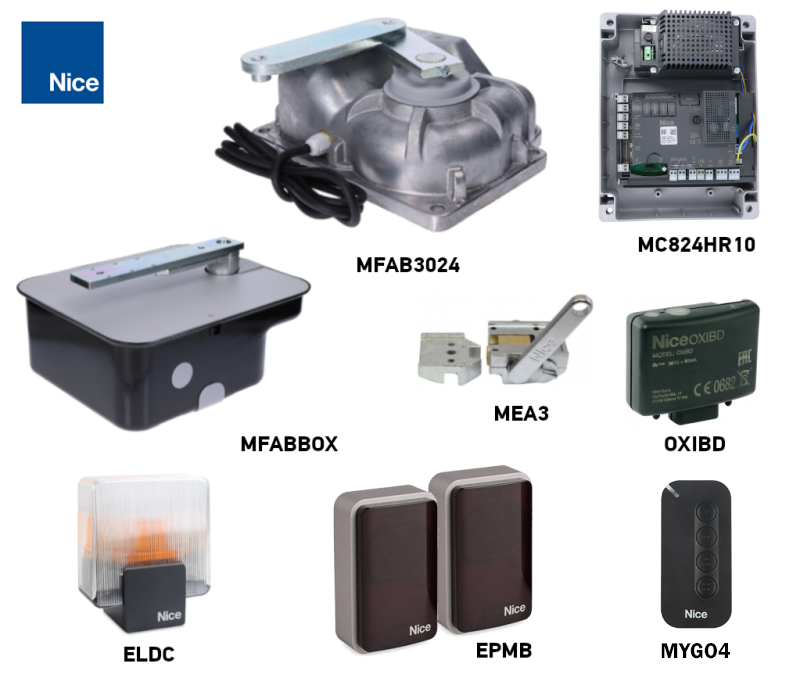
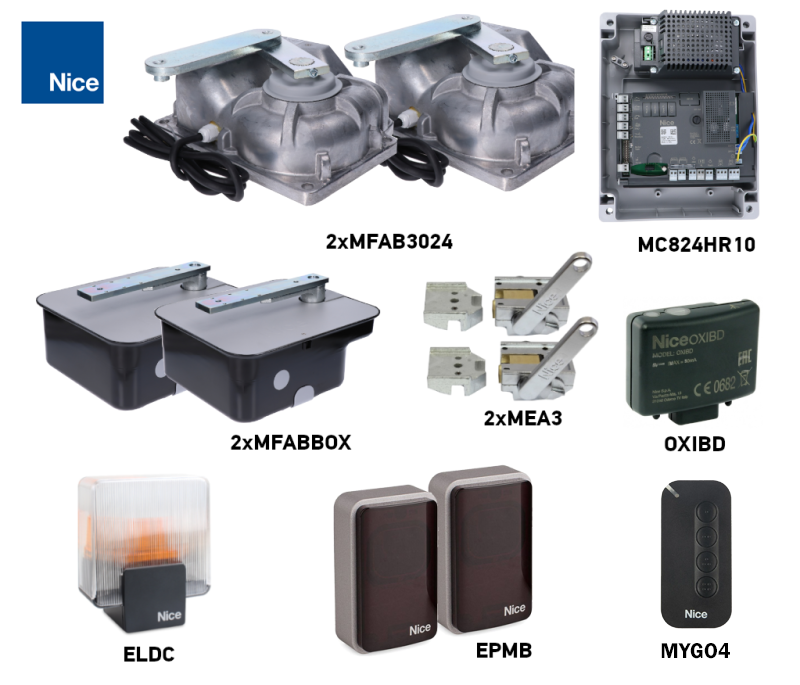
The kits include the motor and safety accessories listed below. The number of motors corresponds to the number of gate leaves; two motors do not increase the limit for a single gate leaf. When choosing, refer to the suitability chart.
| One gate leaf | Standalone motor | Two gate leaves |
|---|---|---|
1 motor, 1 MFABBOX box, 1 MEA3 release mechanism. MC824HR30, OXIBD, 1 MYGO4 remote control, a pair of EPMB photocells and an ELDC flashing light. | Standalone MFAB3024 motor
One 24 V DC motor. The box, release mechanism, control unit and safety accessories are selected separately. |
2 motors, 2 MFABBOX boxes, 2 MEA3 release mechanisms. MC824HR30, OXIBD, 1 MYGO4 remote control, a pair of EPMB photocells and an ELDC flashing light. |
Gate length, weight and operation
When selecting a new system, allow for a gate leaf length of up to 3 m. The chart permits a weight of 600 kg for a gate leaf up to 2.5 m; at 3 m, the lower limit shown in the chart applies. Do not use the older rating of up to 3.5 m as a general limit for a new system; for a longer gate leaf, have the suitability of the specific configuration confirmed.
| Parameter | Limit and condition |
|---|---|
| Length of one gate leaf | Up to 3 m for a new system; also check the weight in the chart. |
| Weight of one gate leaf | Maximum 600 kg for a gate leaf up to 2.5 m. |
| Operation | 76 cycles/h at 90°; half that at 180°, i.e. 38 cycles/h. Rated motor duty cycle: 80%. |
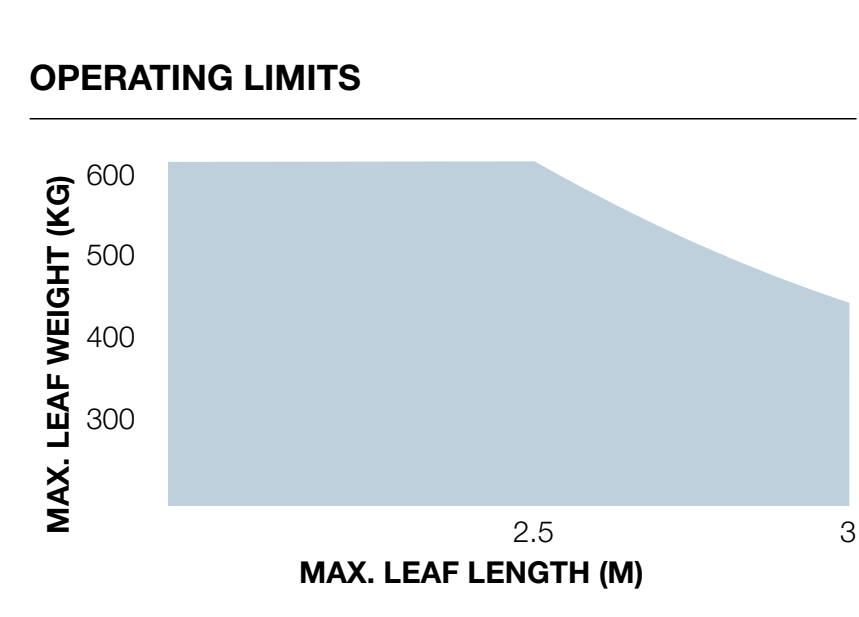
The horizontal axis of the chart shows the length of one gate leaf in metres, and the vertical axis shows its weight in kilograms. The combination must remain within the blue area; do not use this operator outside it.
A solid infill, a tall gate or strong winds may reduce the permissible load. Hinge resistance, the shape of the gate leaf and the strength of its mounting also matter. The gate leaf must move smoothly by hand along its entire travel and must not start moving on its own when released.
Duty cycle 80% does not mean continuous operation without breaks. Actual operating intensity is affected by the opening angle, load, temperature, and the acceleration or deceleration settings. A larger opening angle increases travel time and reduces the available number of cycles.
Installing the box and mounting the gate leaf
The foundation-box pin and all the gate-leaf hinges must lie on the same axis. The axis of rotation must not change during movement. Misalignment puts strain on both the operator and the gate, and cannot be corrected by increasing the force. Installing the underground operator foundation box.
- Check the gate leaf's load capacity and condition, the opening clearance, and access to the cover and release mechanism. If the gate leaf has a pedestrian door, opening it must prevent the automation from operating.
- Prepare the foundation pit, cable conduit and an effective drainage pipe.
- Before pouring the concrete, attach the opening-stop bracket to the box. Follow its orientation and dimensions shown in the stop diagram.
- Set the box level in the concrete, with its pin directly beneath the axis of the upper hinge.
- Fit the control arm and ball onto the box pin. Weld the gate leaf securely to the release lever as shown; the leaf must remain securely mounted on its hinges.
- Lubricate the contact points with a suitable lubricant and grease the bearing through the grease nipple.
- Insert the motor in the correct position. Insert the closing-stop bracket into the relevant opening and secure the motor with four self-locking nuts and the supplied washers.
- Connect the motor to the gate leaf using the connecting arm. Adjust both stops and manually check the full travel.
- Route the cable through the conduit, outside the box. Any electrical junction box must be located outside the underground box.
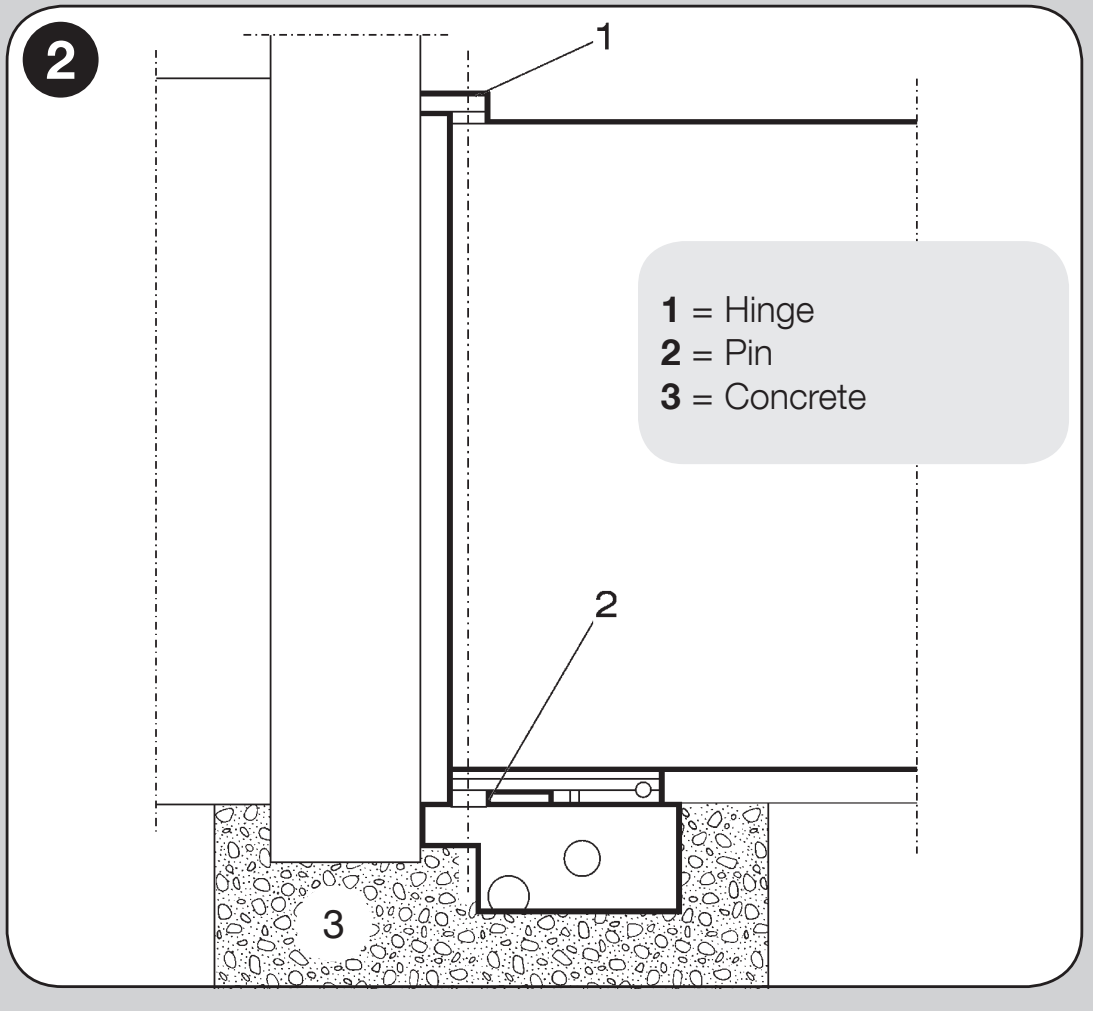
Labels in the alignment diagram: 1 hinge, 2 box pin, 3 concrete foundation.
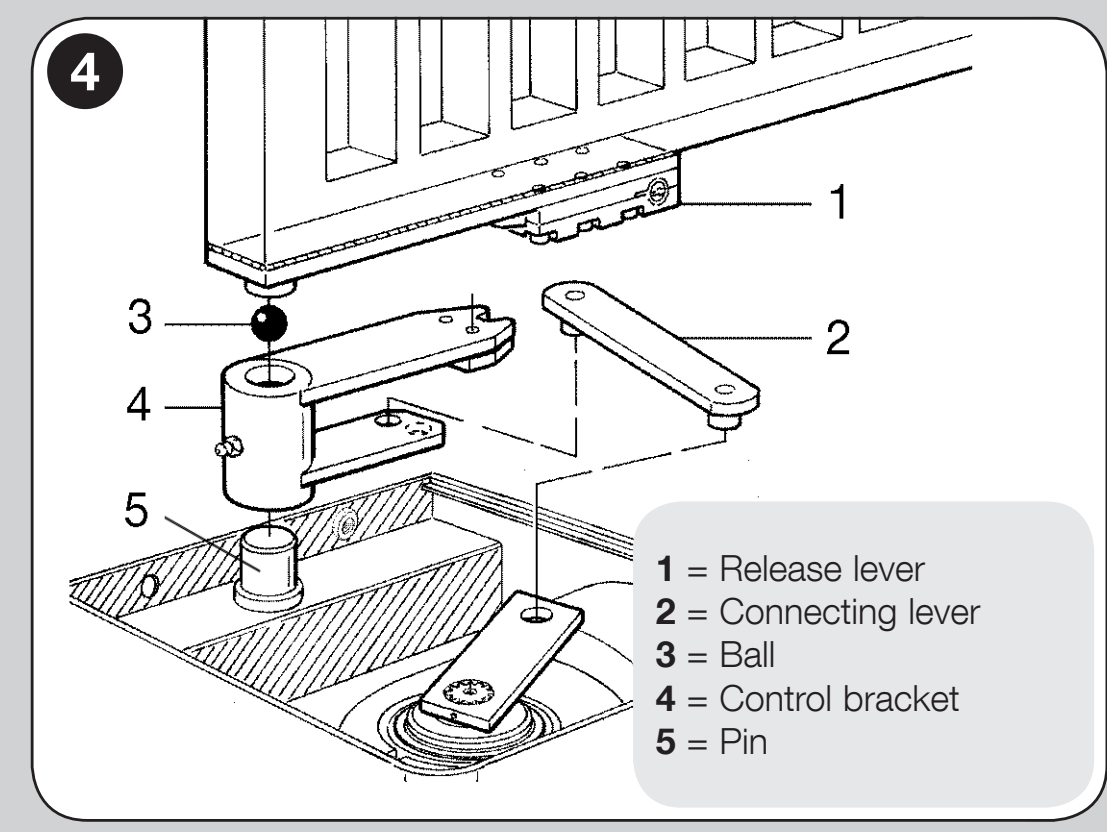
Labels in the motor-to-gate connection diagram: 1 release lever, 2 connecting arm, 3 ball, 4 control arm, 5 pins. The exact installation depends on the actual box and its drawing.
The motor's metal housing has IP67 rating. The rating does not replace drainage or regular cleaning of the box; the box must not remain flooded. Electrical connectors must not be installed in the foundation box. Installation and mains wiring must be carried out by a qualified technician.
Mechanical stops and opening angle
In a standard setup, the maximum opening angle is 110°. The closing stop is supplied with the motor, and the opening stop with the foundation box. Adjust the end positions by positioning them; these are not electrical limit switches.
With the NICE MEA1 a wider angle of up to 360°, only with a gate leaf up to 2.5 m. The chain drive requires suitable external stops and an assessment of the entire gate leaf travel. A wider angle cannot be achieved simply by changing the control unit programming.
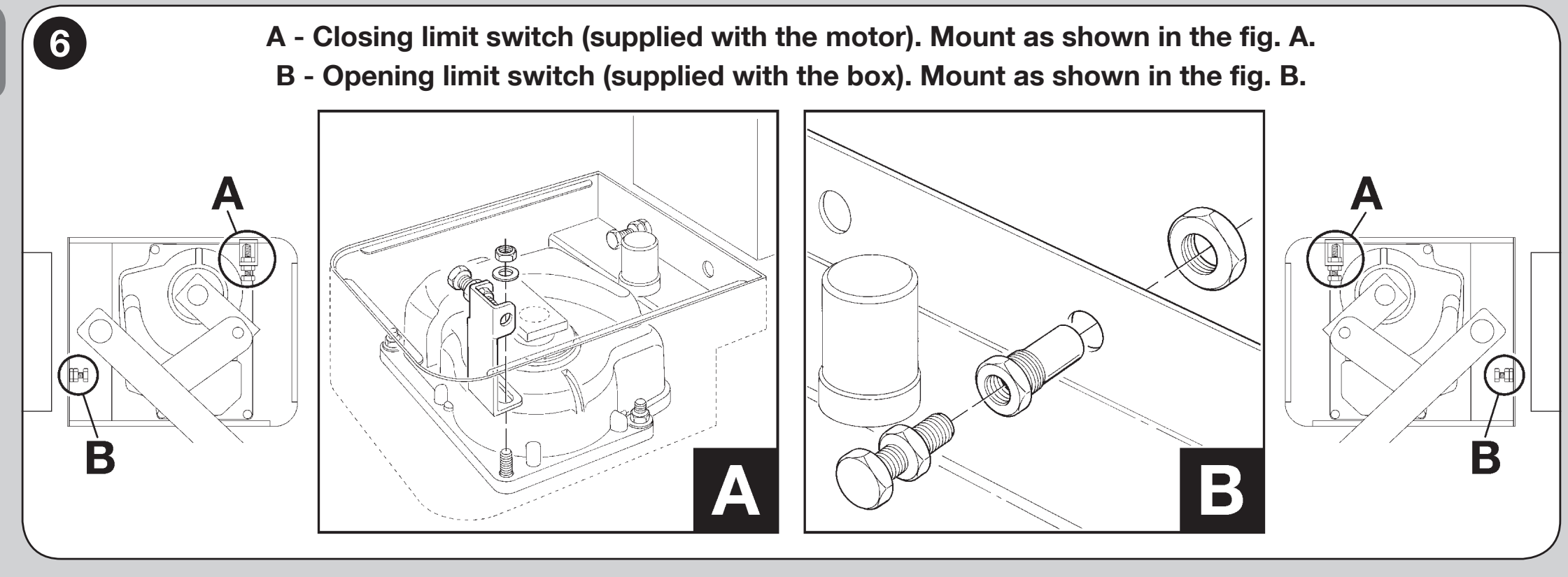
Tighten the stop locknuts after adjustment. For a gate leaf longer than 2.5 m an electric lock is recommended NICE PLA10 or NICE PLA11; connect it to the ELS output.
Motor and magnetic encoder wiring
Disconnect both the mains supply and backup battery before wiring. The supplied motor cable is 2 m. If extending it, use a suitable junction box outside the box; splicing wires inside the box is prohibited.
| MFAB3024 wiring | Connection to MC824H |
|---|---|
| Blue and brown | 24 V DC power pair to M1 or M2. The control unit reverses the power supply direction; there is no fixed, permanent +/−. |
| Black and grey | ENC1 for M1 or ENC2 for M2. The encoder on the MC824H does not require polarity to be observed; never connect it to the motor power supply. |
| Yellow-green | Protective earth conductor (PE); do not use it to power the motor or as an encoder wire. |
For a single gate leaf, use M2 and ENC2, leaving M1 unused. For two gate leaves, M2 opens first and closes last, while M1 closes first. Each encoder must correspond to the same motor as its motor wiring.
For the MC824HR30, the motor cable, including PE, is 3 × 1.5 mm² and the encoder cable is 2 × 1.0 mm²; both cables must be no longer than 10 m between the control unit and the motor. They can be replaced by a single 5 × 1.5 mm² cable. Cables must be suitable for the environment and protected from water. Complete MC824HR30 wiring.
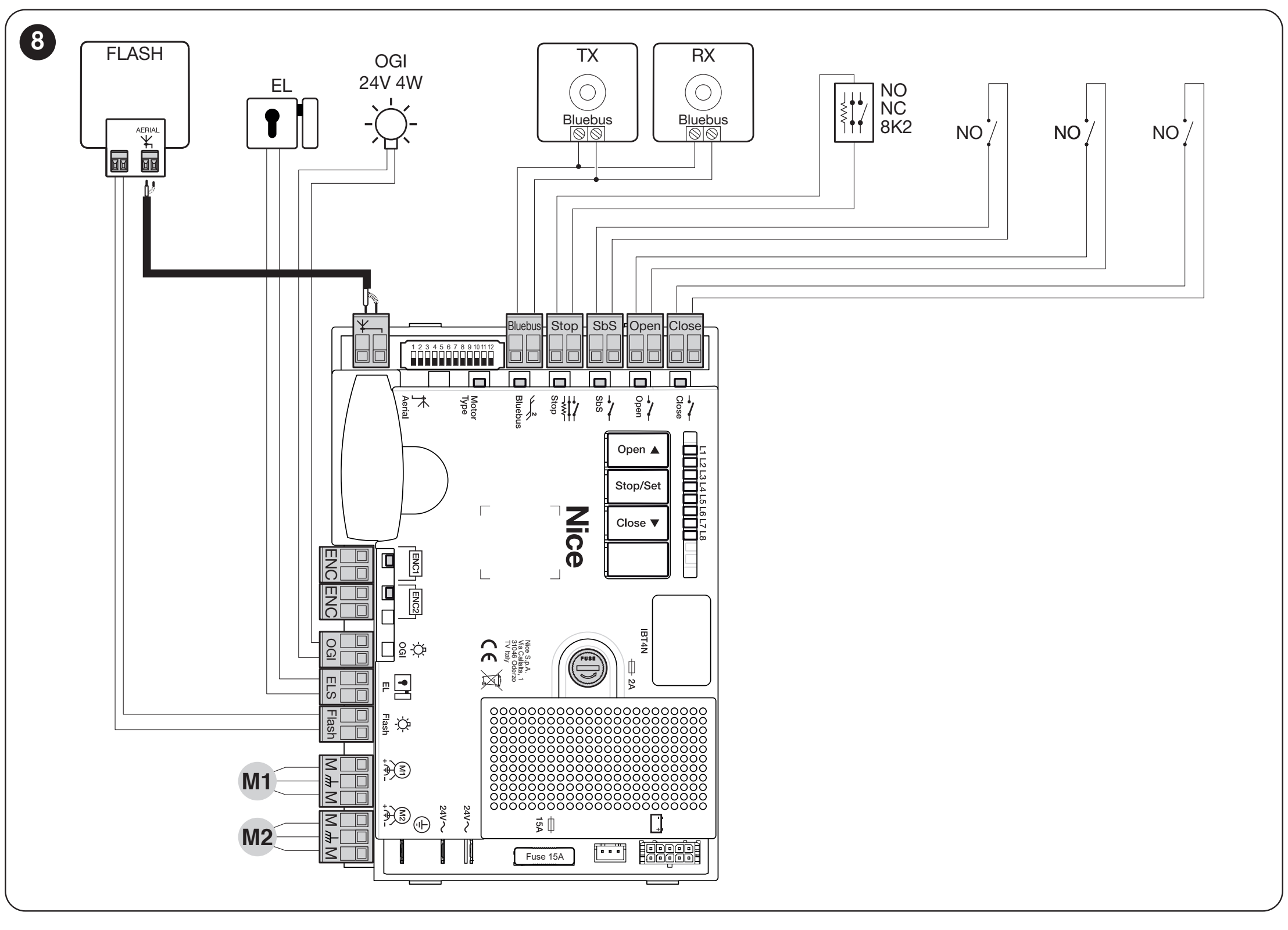
MC824HR30 accessory terminals and power supply
| Connection | Voltage, polarity and limit |
|---|---|
| Auxiliary power supply | + is the left terminal of the SbS pair; − is the right terminal of the STOP pair, when viewed with the STOP and SBS labels readable, as shown in the illustration. 24 V DC −30/+50%, 200 mA maximum total; power remains on in Standby. |
| BLUEBUS | Two wires for compatible EPMB and other devices. Non-polarised; this is not a universal 24 V output for arbitrary accessories. |
| FLASH | 12 V DC, 21 W maximum; for example, ELDC. Connect to the dedicated FLASH output, not to the STOP/SbS auxiliary power supply. |
| ELS | 12 V AC, 15 VA maximum for an electric lock; no +/− polarity. Select the output function according to the connected load. |
| OGI | Gate-open indicator: 24 V DC, 4 W maximum. The output function depends on the control unit settings. |
| SbS / OPEN / CLOSE | Control voltage-free NO contact; do not apply external voltage to the command input. The contact has no +/− polarity. |
| STOP | Safety contact NO/NC or 8.2 kΩ resistive edge, depending on the wiring and subsequent learning procedure. This is not a universal power supply pair. |
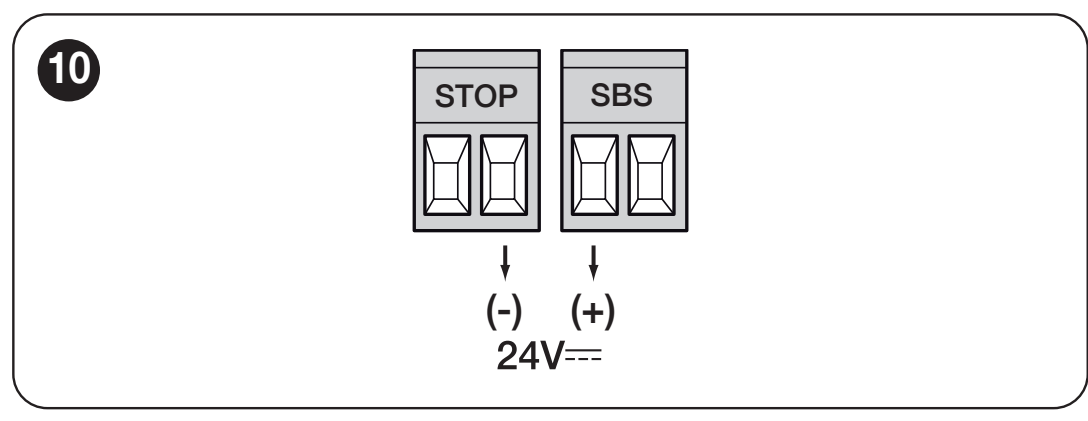
For the FLASH and OGI outputs, connect the load according to its label and the control unit wiring diagram; do not confuse them with the STOP/SbS auxiliary pair. Calculate the total accessory current draw, as continuous power supply reduces battery life. Detailed auxiliary power supply.
Photocells and safety inputs
Connect compatible devices to BLUEBUS using two wires, without regard to polarity. Each pair of photocells must have its own function address; the TX and RX jumpers for each pair must match. Address FOTO 3 is not used with this swing-gate setup. Locations, addresses and responses are shown in the MC824HR30 photocell wiring and addressing guide.
After adding or removing a photocell or STOP device, perform a new device recognition procedure. Photocells provide supplementary protection; they do not replace proper mechanical design, protection of all hazardous areas or force measurement.
Initial start-up and learning
First check manual operation, drainage, mechanical stops, earthing and safety devices. The drive must be locked for automatic operation. Carry out the learning procedure with the gate path clear and under the supervision of a technician.
Motor selection on the MC824HR30
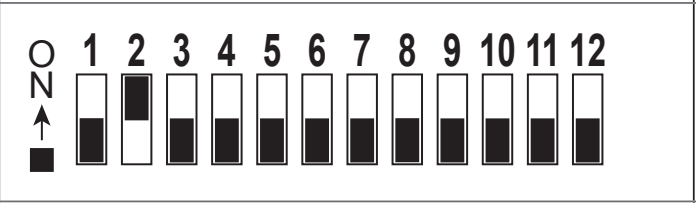
Set the motor selector before learning the positions: MFAB3024 – only DIP 2 to ON, all other DIPs 1–12 to OFF. In the Oview service interface, this option is displayed as ME3024. The ON position is toward the switch numbers, as shown in the picture. The setting must match the motor, not the kit’s commercial designation.
BlueBUS and STOP device recognition
After switching on, BlueBUS should flash once per second and FLASH should remain off. With the gate stationary, press and hold OPEN ▲ + STOP/SET for about 3 seconds; release when L1/L2 flash rapidly. Wait until the process is complete: the STOP LED lights up and L1/L2 go out. Recognition must also be carried out with no devices connected and after every change to the setup.
Automatic limit-position learning
- Check the selector setting, M1/M2 and ENC1/ENC2 assignments, and both mechanical stops.
- Press and hold CLOSE ▼ + STOP/SET for about 5 seconds; release the buttons when L3/L4 flash rapidly.
- For a two-leaf gate, the sequence is: slow closing of M1, slow closing of M2, slow opening of M2 and M1 with a controlled delay, then fast closing of both leaves. A single-leaf setup uses M2 only.
- When the process is complete, L3/L4 go out. Test opening, closing, deceleration, and the correct leaf sequence.
If the direction or sequence is incorrect, stop the movement immediately using the OPEN or CLOSE button. After disconnecting both the mains and battery, when swapping the leaves, change the assignment of M1/M2 together with the corresponding ENC; for the opposite direction, correct only the motor pair. Do not use the protective conductor or encoder to change the direction. Repeat the learning procedure afterward.
Activation of a photocell or STOP input interrupts learning and L1 starts flashing. Remove the cause and start again. Manual fine-tuning, SA/SC positions, and mixed learning are covered in the control unit manual; mixed learning follows the previous automatic learning procedure.
Testing and handing over the gate
The technician must test every control in use, photocells, STOP and safety edges in their operating positions, the strength of the stops, manual release, and the forces across the entire gate. The force or speed setting must not mask mechanical resistance. Use the automation only after it has passed testing; hand over the keys and maintenance plan.
Control unit settings, transmitters, and servicing
| What you need | Procedure and conditions |
|---|---|
| Automatic closing | Enabling the function and safety conditions |
| Pause time | Time between opening and automatic closing |
| Motor speed | The speed must be suitable for the safety of the entire gate |
| Motor force | Remove any mechanical resistance first |
| Partial opening | M2 leaf only or both leaves, depending on the setting |
| Transmitters and antenna | Pairing with the receiver actually installed |
| Backup power supply | PSS324 or older PS324 with the correct adapter and settings |
| Fault indications and reset | Find the cause first; resetting the control board and deleting radio codes are different operations |
For detailed ranges, LEDs, and factory settings, see MC824HR30 programming. For an older control board, use its own procedure. Repeat the safety test after changing the force, speed, or stops.
Manual release and returning to operation
Release the gate only when it is stationary. Switch off the power supply and secure the leaf to prevent it from moving on its own. The release mechanism must remain accessible from the required side, even during a power outage.
| Mechanism | Procedure |
|---|---|
| MEA2 – key | Slide back the lock cover, insert the key, and turn it 90° clockwise. The leaf can now be moved by hand. To re-engage the mechanism, turn the key 90° counterclockwise. |
| MEA3 – lever | Insert the lever into the star-shaped opening and turn it to disengage the connection, as shown in the picture. Then move the leaf by hand. Return the mechanism to the locked position before using the automation. |
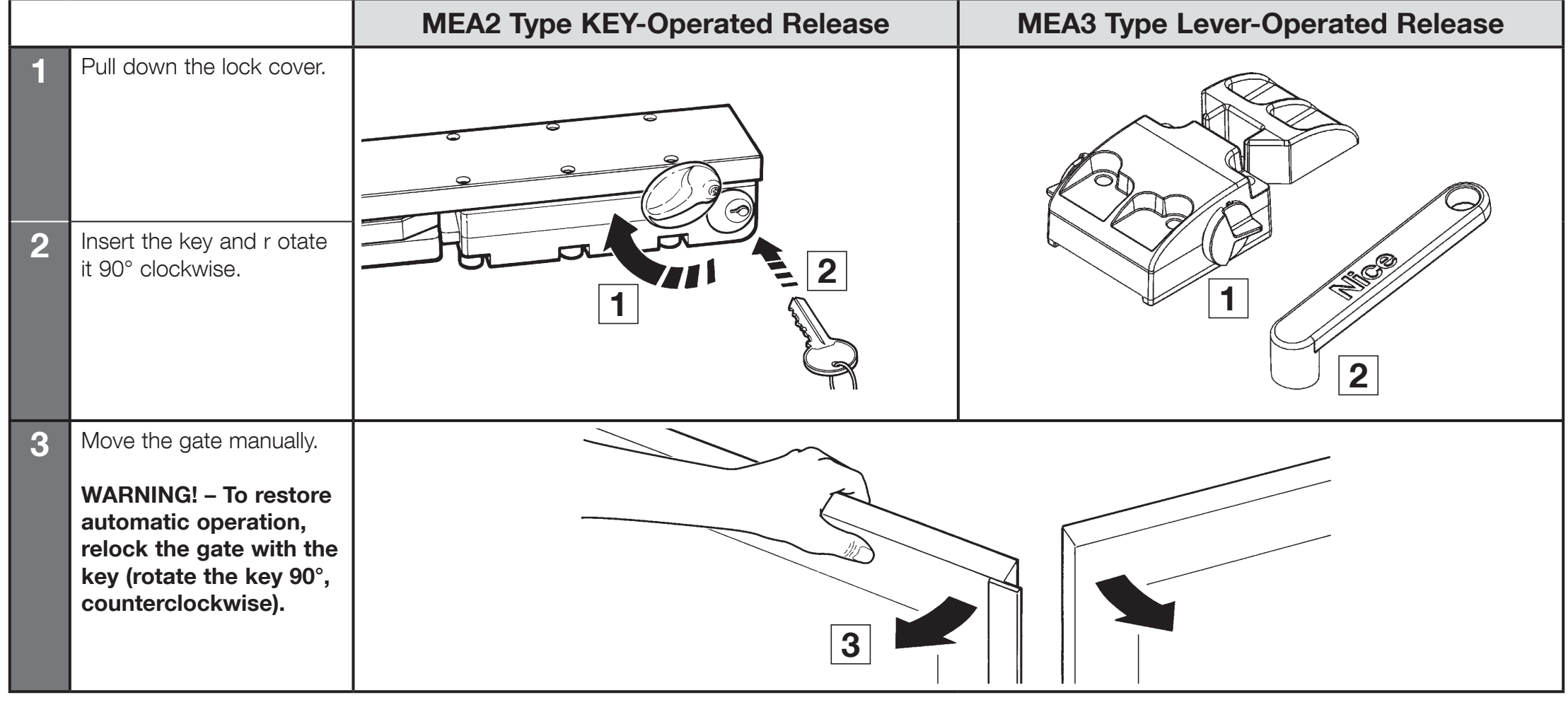
After locking, check that the drive is connected to the leaf and remove the key or lever. Restore the power supply and, while supervising, run a complete movement cycle. If a fault occurs, leave the gate safely in manual mode and arrange for servicing.
If the drive is not working correctly
| Symptom | What to check |
|---|---|
| The leaf is difficult to move even when released | Hinges, the alignment of the box and leaf, deformation, dirt, and stops. Remove the mechanical cause first. |
| Water is standing in the box | Disconnect the power supply. Clean and check the drainage in accordance with the maintenance instructions. A technician must inspect any damaged electrical components. |
| The motor runs, but the leaf does not move | Re-engaging the release mechanism and reconnecting the mechanical levers to the leaf. |
| Incorrect direction or sequence | Motor wiring and correct encoder assignment, then repeat limit-position learning. |
| L3/L4 are flashing or the positions are incorrect | The DIP setting for the correct motor, both mechanical stops and completion of the learning process. |
| The motor does not start or stops | Power supply, fuses, STOP, photocells, and the number of control unit flashes. Do not bypass safety devices. |
| Only the remote control is not working | Battery, coding compatibility, antenna and button storage in the correct receiver. |
For support, have the motor and control unit model, photocell and receiver types, LED status, number of flashes, and the step at which the problem occurs ready. Contact us.
Maintenance and safe use
Have a technician carry out a professional inspection and maintenance at least every six months, and more often in demanding conditions, according to the maintenance schedule. The following tasks and force measurements must be performed by a qualified technician. Disconnect the mains power and battery before maintenance, and secure the gate leaf to prevent it from moving.
- Clean the box and drainage, and check that the water drains freely and that the cable conduit is in good condition.
- Check the hinges, mechanical levers, motor and stop fastenings; lubricate the contact points as specified in the installation procedure.
- Test the manual release and then re-engage the drive.
- Repeat the manual movement along the full travel, test each safety device, and have the forces measured by a qualified technician.
- Record inspections and repairs in the maintenance schedule. Do not use a damaged assembly.
Keep the photocells clean, keep remote controls out of children's reach, and do not enter the gate leaf's path while it is moving. If you notice unusual noise, increased resistance or a fault, switch off the automation and call a technician. Do not attempt electrical or mechanical repairs yourself.
Technical specifications and dimensions
| Parameter | MFAB3024 |
|---|---|
| Motor and sensing | 24 V DC, magnetic encoder; no built-in control unit |
| Current draw | 5 A |
| Power consumption | 120 W |
| Speed | 1.4 rpm |
| Torque | 250 Nm |
| Operation | 76 cycles/h at 90°; 38 cycles/h at 180°; duty cycle 80% |
| Standard opening angle | Up to 110°; a wider angle is possible with MEA1 only for gate leaves up to 2.5 m |
| Protection rating and temperature | IP67; −20 to +50 °C |
| Motor weight | 11 kg; the box and additional equipment are assessed separately |
| Power cable | 2 m |
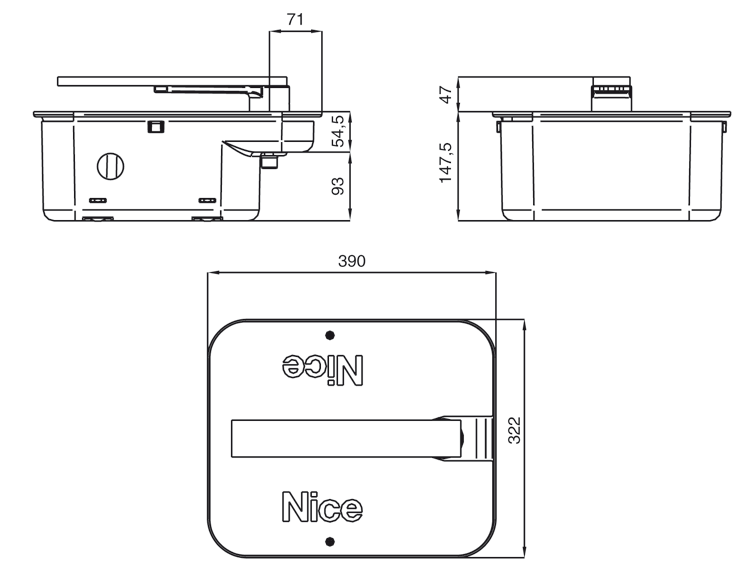
| Installation dimensions in the box | Footprint 390 × 322 mm; box height 147.5 mm and protruding section 47 mm, as shown in the diagram. The supplied box determines the exact installation position |
| Box | MFABBOX or MFABBOXI |
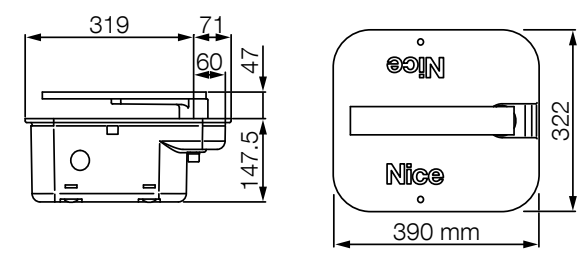
Determine the dimensions of the foundation pit and the gate leaf installation height according to the supplied box, drainage and site conditions. The dimensional drawing does not replace checking the alignment of the hinges and box.
Product view
How can I order this item?
Choose the option that suits you:
- order online: use the buy button to add the goods to your shopping cart (you will find the buy button here in the product variants table).
- order by email: place your order at [email protected]






