NICE Run RUN1800 - standalone drive for sliding gates (A)
| Product availability: | In stock | We normally dispatch goods within 24 hours. |
|---|
in stock
€934.73 including VAT
| Weight |
|---|
| 22 kg |
Description of NICE Run RUN1800 - standalone drive for sliding gates (A)
NICE RUN1800 is a standalone non-reversible sliding gate operator with a built-in control unit RUA1. Both the motor and the mains supply are 230 V AC. It has an electromechanical limit switch. The limits for a single gate leaf are 1,800 kg and 15 m; suitability also depends on the resistance to movement and the required number of cycles.
The standalone motor is not a complete kit: choose the radio receiver, transmitters, photocells and rack to suit your gate setup. Installation manual PDF · Technical specifications
| Quick navigation | ||
|---|---|---|
| Selection and limits | Kits | Accessories |
| Installation | Wiring | Initial start-up |
| Programming | Faults | Maintenance |
| Manual release | Specifications | Manual PDF |
(Is this gate operator right for me?)
Compare with other gate operators:
This product—the standalone NICE Run RUN1800 sliding gate operator (our code NICE-RUN1800)—includes:
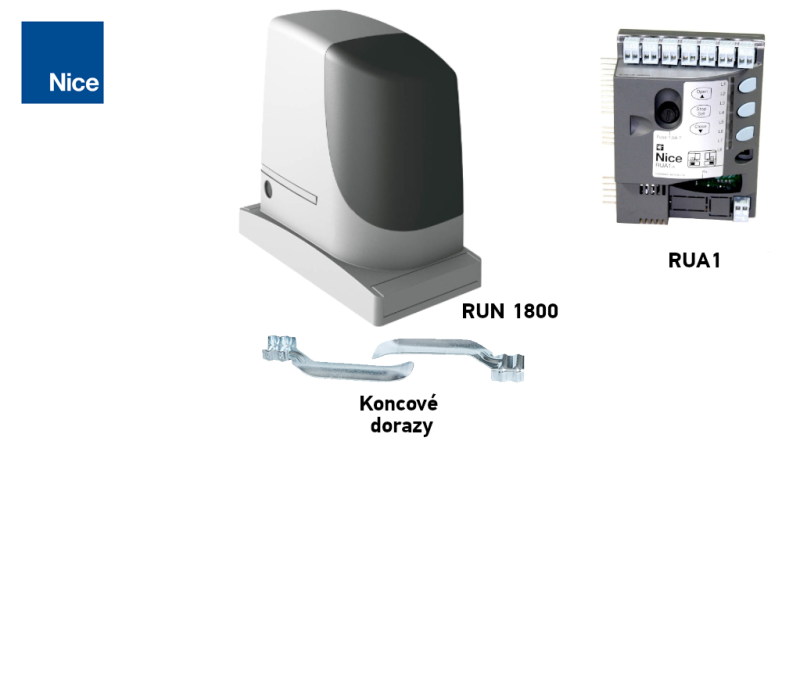
- electromechanical NICE Run RUN1800 gate operator with a capacity of 1,800 kg and a maximum gate-leaf length of 15 m, and a built-in (but removable) control unit RUA1 without radio receiver (if you want to operate the gate using remote control, you need to buy a receiver separately, e.g. SMXI, or OXI).
- 2 × manual release key for manually operating the gate operator (required in the event of a power outage)
- gate operator installation components, anchors and bracket, and stops for the electromechanical limit switch
- installation manual
Special-price kits containing the gate operator NICE Run RUN1800:
| Gate operator kit with accessories » | Standalone gate operator | Gate operator kit with accessories and rack » |
|---|---|---|
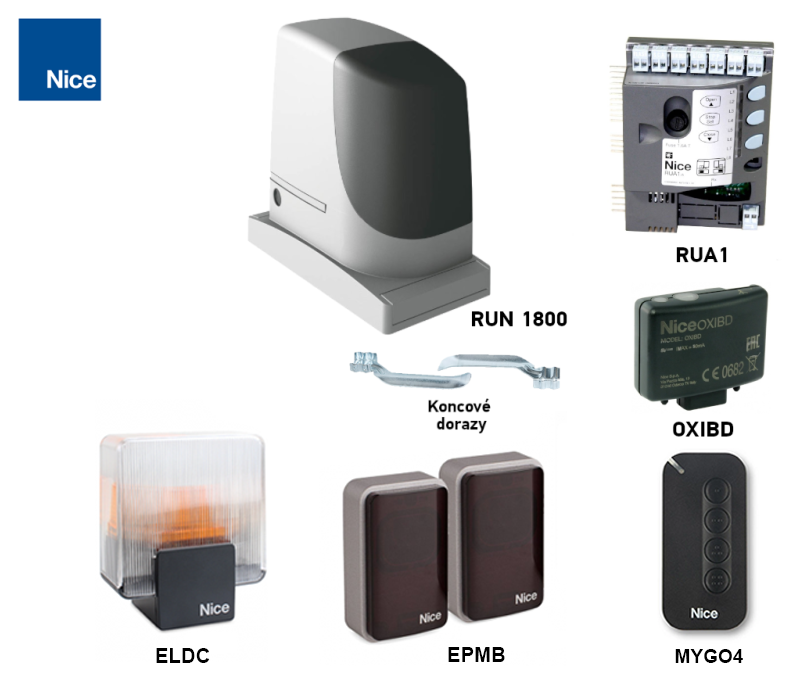
1 × RUN1800 with RUA1, 1 pair of EPMB, 1 × ELDC, 1 × OXIBD and 1 × MYGO4. |
Electromechanical switch. |
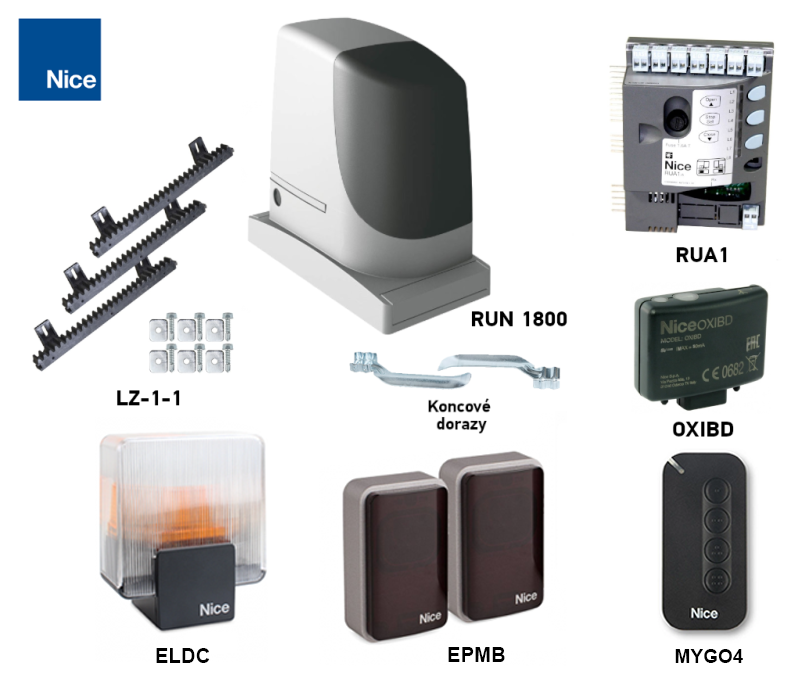
1 × RUN1800 with RUA1, 1 pair of EPMB, 1 × ELDC, 1 × OXIBD and 1 × MYGO4. Additional 4 m of rack LZ-1; check the rack’s length and load capacity for your gate. |
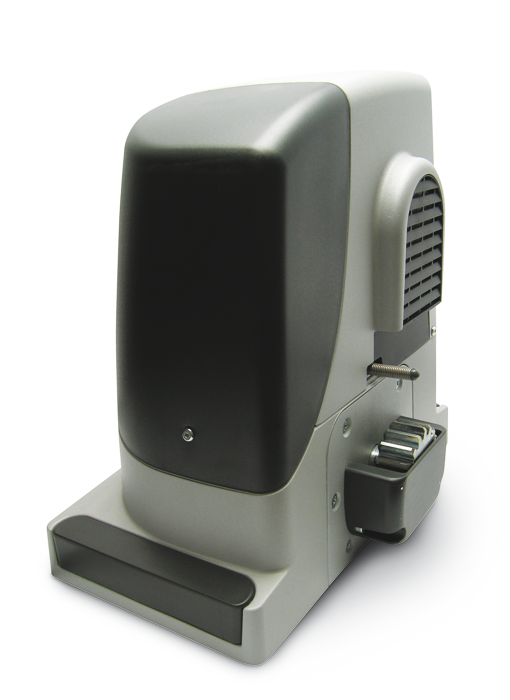
The drive is compact, safe and practical, ideal for both residential and commercial use. Impact-resistant housing, body made of epoxy-coated aluminium alloy.
The drive is suitable for automating sliding gates weighing up to 1,800 kg with a leaf length of up to 15 m. These values apply under the conditions specified by the manufacturer, including weather conditions, temperature fluctuations, gate rigidity and, above all, smooth gate movement. These conditions cannot always be achieved or controlled, so we recommend using the NICE Run RUN1800 drive for gates operating at ideally 80% of these values. See the Choosing a drive chapter for more information.
BlueBUS connects compatible photocells using a two-core cable. RUA1 supports seven basic protection addresses and a total load of up to 15 BlueBUS devices; one device is not necessarily one pair. Connecting and addressing photocells.
Thermal management protects the motor from overheating and reduces the permitted number of cycles at high temperatures. Optional motor heating for low temperatures is configured via a supported service interface; it is not a substitute for clearing ice from the track.
Adjustable force, obstacle sensitivity, automatic closing pause and deceleration at the end of travel. Settings are in the programming tables.
Diagnostics using a warning light.
Pinion module 4 is compatible with the toothed rack in our range.
Run 1800 drive features "Slave unit" enables automatic synchronisation of two motors. This means that two sliding gates moving towards each other can be automated.
Safety is assessed for the complete, installed gate: mechanical security, protection of hazardous areas, operation of photocells and safety edges, and impact force measurement. The motor alone does not replace these tests.
Accessories compatible with the NICE Run RUN1800 drive
We also recommend purchasing compatible optional accessories for the drive, or choosing one of the pre-assembled discounted kits:
| What | Why | Type |
|---|---|---|
| Warning light | Alerts you to movement and indicates faults. Connects to FLASH; the antenna has a separate coaxial cable. | |
| Photocells | Detect an obstruction in the beam; the response is determined by the pair address. They do not replace protection for all hazardous areas of the gate. |
BlueBUS wiring; FT210B for a moving safety edge. The TX and RX of a pair must have the same address. |
| Transmitter | Choose according to the coding and type of receiver installed. The same frequency alone does not guarantee compatibility; LoRa and two-way functions require a compatible receiver. | |
| Receiver | The radio receiver plugs into the SM connector; pairing depends on the receiver. Wi-Fi/GSM requires a supported interface or a volt-free P.P. contact. |
|
| Antenna |
For improved remote-control range. |
|
| Keypad | EDSWG requires a compatible radio receiver. For EDSB, the specific RUA1 version must support BlueBUS control devices; the bus alone does not confirm compatibility. | |
| Key switch |
Operate the gate with a key using a switch connected to the drive by cable from any location. |
|
| Card readers | Use ETPB only after confirming that the installed RUA1 supports BlueBUS control devices. Connect a reader with a volt-free relay to P.P. and power it separately according to its current draw. |
|
| Rack | Required module 4 rack. Choose the material, fixing method and load capacity according to the gate weight; a nylon rack is not automatically suitable for the full 1,800 kg maximum. | |
| Power failure | In the event of a power failure, use the manual release. Neither PS124 nor Solemyo provides direct backup power for a 230 V RUN1800 motor with RUA1. |
NICE RUN1800 at a glance
Model RUN1800 has an electromechanical limit switch, a 230 V motor and RUA1 control unit. The cover is impact-resistant and the body is made of aluminium alloy. The receiver is selected separately; the SM connector and BlueBUS are two different interfaces.
When disengaged, the motor allows the gate to be moved manually during a power outage. The gate must have reliable guidance, protection against derailment and sturdy mechanical stops at both ends. The limit switch does not replace these stops.
Choosing a NICE RUN1800 gate operator
Weight and length alone are not enough. Measure the force required to start the gate moving and to keep it moving along its entire travel, including areas with higher friction. For the RUN1800, the starting force must be below 555 N and the force required to keep it moving must be below 280 N; these are half the available peak and rated forces, respectively. Also allow for conditions to worsen during winter.
Limits and operating margin
| Parameter | Manufacturer's maximum | Our indicative recommendation |
|---|---|---|
| Gate leaf length | 15 m | Up to 12 m |
| Total gate leaf weight | 1,800 kg | Up to 1,400 kg |
We retain the recommendation with a margin for typical selection purposes. This is not a separate manufacturer limit or confirmation that every gate of these dimensions is suitable. Also check mechanical resistance and operating load. The relevant measurements are the length and weight of the entire moving gate leaf, including the infill and any counterweight—not just the clear opening width.
How many cycles the operator can perform
One cycle is a complete opening and closing. First select the row by length; then multiply both figures by the weight factor. Round the resulting whole-number figures down. Higher temperatures and more demanding movement may reduce the number further.
| Gate leaf length | Max. cycles/hour | Max. consecutive cycles |
|---|---|---|
| Up to 6 m | 42 | 28 |
| Over 6 m up to 9 m | 28 | 18 |
| Over 9 m up to 12 m | 21 | 14 |
| Over 12 m up to 15 m | 17 | 11 |
| Gate leaf weight | Available cycle factor |
|---|---|
| Up to 500 kg | 100% |
| Over 500 kg up to 900 kg | 80% |
| Over 900 kg up to 1,200 kg | 75% |
| Over 1,200 kg up to 1,500 kg | 60% |
| Over 1,500 kg up to 1,800 kg | 50% |
Example based on the tables: 10 m / 1,300 kg leaf → 21 × 0.60 = 12.6 and 14 × 0.60 = 8.4. For planning, allow for no more than 12 cycles/hour and 8 consecutive cycles, before applying any further reduction for temperature. A factor of 60% means 60% of the available number, not a 60% reduction.
Indicative service life
Add the weight and length indices and any other relevant factors. Include other factors if they are more than 10% likely to occur. Look up the total in the original graph. The cycle estimate is not a service-life guarantee or a fixed number of years.
| Characteristics of the complete automation system | Index | Service-life graph |
|---|---|---|
| Weight up to 500 kg | 5% | 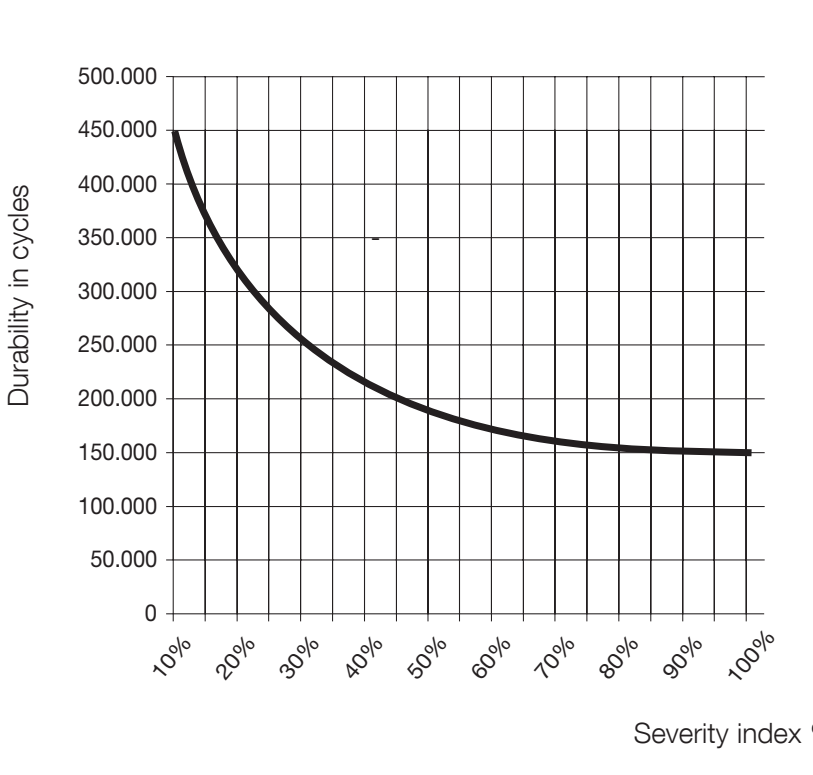 Horizontal axis: sum of indices in %. |
| Over 500 kg up to 900 kg | 10% | |
| Over 900 kg up to 1,200 kg | 20% | |
| Over 1,200 kg up to 1,500 kg | 30% | |
| Over 1,500 kg up to 1,800 kg | 40% | |
| Length up to 6 m | 5% | |
| Over 6 m up to 9 m | 10% | |
| Over 9 m up to 12 m | 15% | |
| Over 12 m up to 15 m | 25% | |
| Temperature above 40 °C / below 0 °C or humidity above 80% | 10% | |
| Dust and sand | 15% | |
| Saline environment | 20% | |
| Movement interrupted by a photocell | 10% | |
| Movement interrupted by the STOP input | 20% | |
| Peak function enabled | 10% |
For example, 1,300 kg and 10 m gives 30% + 15% = 45%; if movement is frequently interrupted by a photocell, add 10%, for a total of 55%. The mere presence of photocells does not mean their index should automatically be added. A total above 100% means the conditions are outside acceptable limits. The operator is not intended for use in acidic, saline or explosive atmospheres; the stated salinity index does not authorise such use.
Installing the NICE RUN1800 gate operator
Anchor the operator to a solid, level base, away from areas that may flood. Determine the height based on the actual position of the rack and pinion. A cantilever gate may require a taller base or a suitable rigid bracket; its structure must safely withstand the load. The gate must not place its weight on the motor.
Wiring
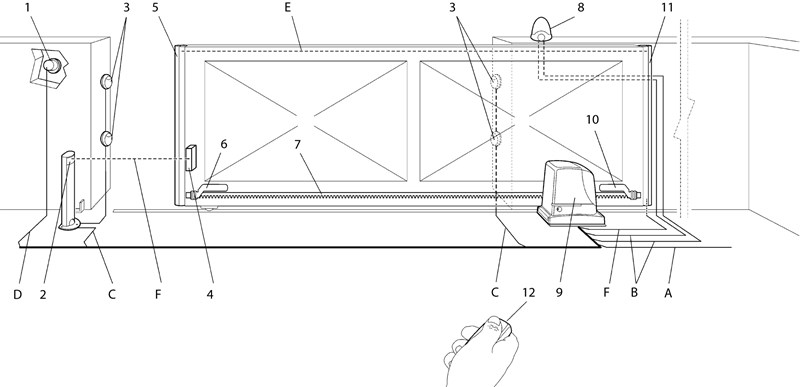
Route the mains supply separately from low-voltage and signal cables. Select accessories, cables and protection according to the specific installation. Original typical setup:
|
|
| Purpose | Cable | Max. length |
|---|---|---|
| A – mains | 3 × 1,5 mm² | 30 m; over 30 m, at least 3 × 2,5 mm², subject to assessment of voltage drop and protection |
| B – warning light | 2 × 0,5 mm² | 20 m |
| B – antenna | RG58 coaxial cable | 20 m; under 5 m recommended |
| C – BlueBUS | 2 × 0,5 mm² | 30 m; for 30–50 m, 2 × 1 mm² |
| D – key switch | 2 cables, 2 × 0,5 mm² or 4 × 0,5 mm² | 50 m |
| E – fixed safety edges | 2 × 0,5 mm² | 20 m |
| F – moving safety edge | 2 × 0,5 mm² | 30 m; moving cable or FT210B |
Installing and checking the foundation
- Before installation, disengage the drive and check for smooth manual movement, proper gate guidance, secure mechanical end stops and protection against the gate leaf jumping off its track.
- Install cable conduits and a base plate with four anchors. Leave no more than 40 mm of thread protruding above the plate.
- Level the plate, set it into a solid foundation and allow the concrete to cure fully. Do not install the motor on a soft or unstable surface.
- Secure the motor with four nuts and washers, align it with the rack, then tighten the fixings.
- Along the entire travel path, check the clearance, rack joints, gate guidance and switch positions. Secure the cables so they cannot come loose and catch in moving parts.
Gear rack and its stop
The gate moves by transmitting the drive pinion’s rotary torque into linear motion through the rack-and-pinion mechanism on the drive gear rack. The two most commonly used types of gear rack are:
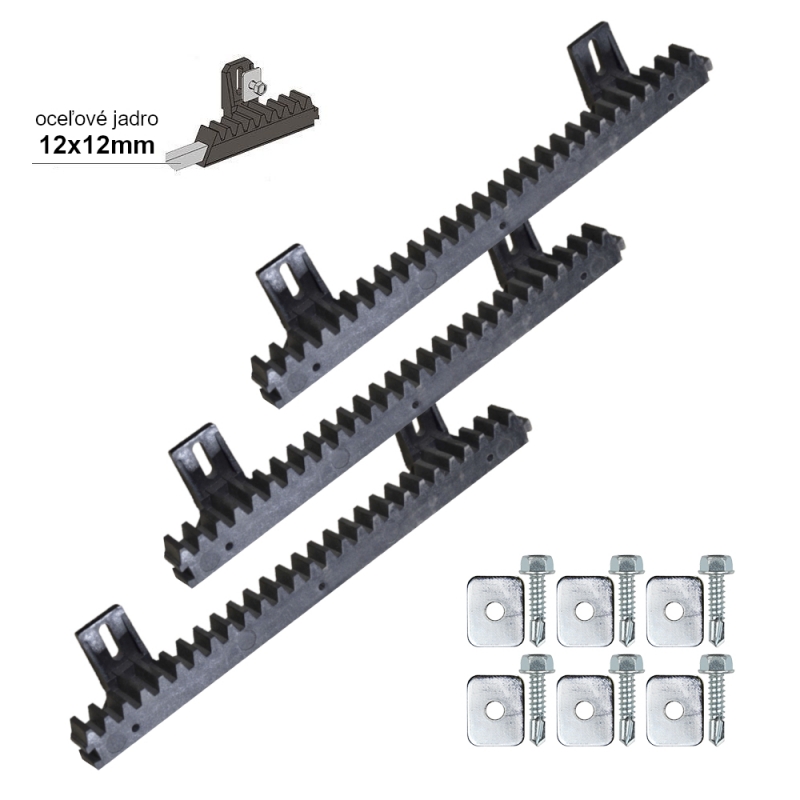 |
Nylon rack (optionally with steel reinforcement) – attached to the gate with self-tapping screws through the eyelets. Ideal for relatively lighter and shorter gates. Movement is quiet thanks to the friction between the steel pinion and the nylon rack. |
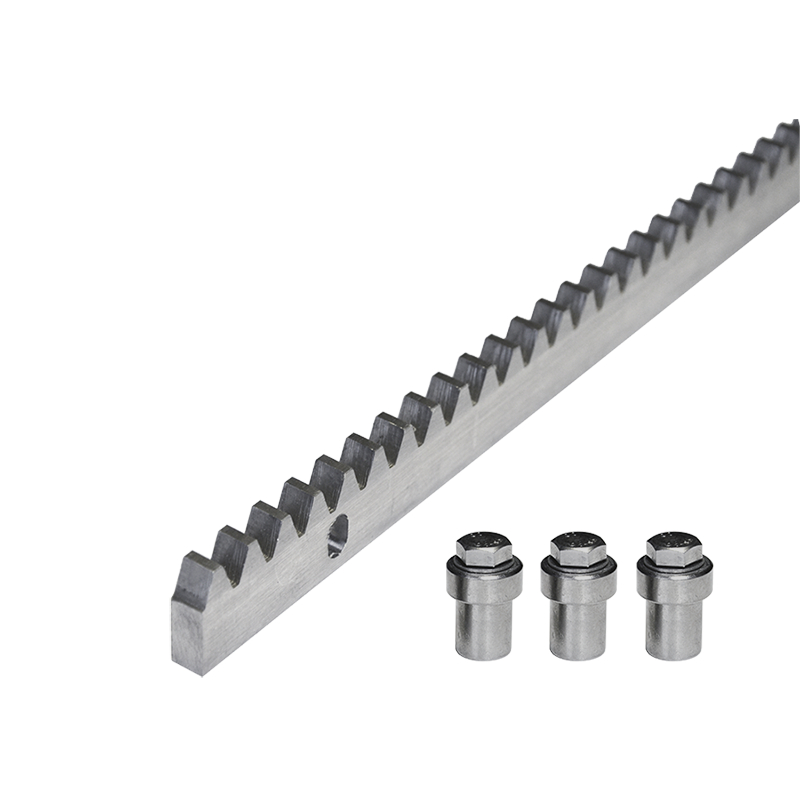 |
Steel rack – attached to the gate by welding on threaded brackets, which the rack is then screwed into. Used for longer and heavier gates. Movement is slightly noisier due to friction between the steel pinion and steel rack. |
It is essential that the drive tooth module is compatible with the gear rack module. The NICE Run RUN1800 has a tooth module of 4.
The drive detects the end positions when opening and closing using end stops mounted on the gear rack:
| 1. Level the drive using the four adjustment points | 2. The gate and drive must be level | 3. Leave a gap of approximately 1-2 mm between the gear rack and the drive pinion so the gate’s weight is not transferred to the drive. |
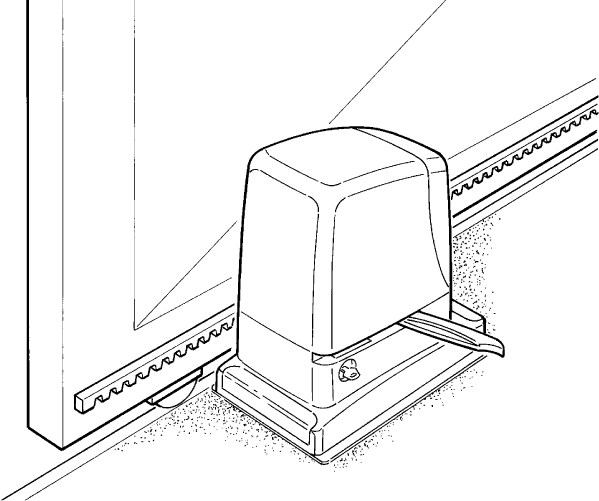 |
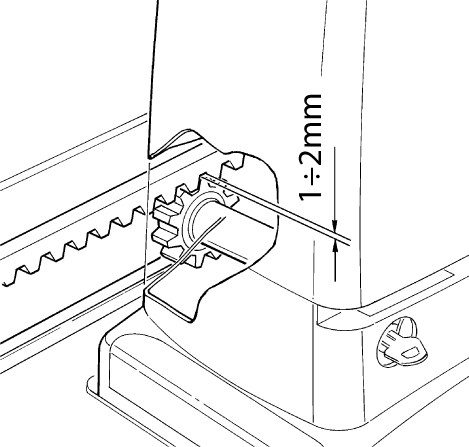 |
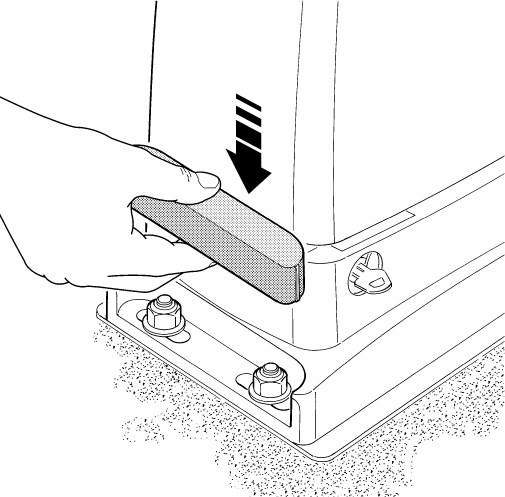 |
| 4. Tighten the drive anchors so the drive cannot move when engaged | 5. Set the limit switch brackets according to the instructions below. Fixed mechanical stops must remain at both ends of the travel path. |
|
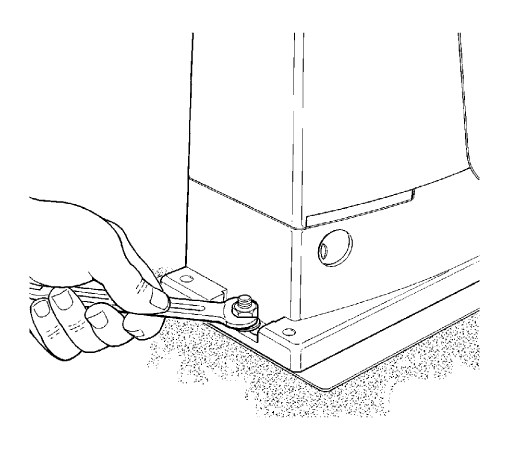 |
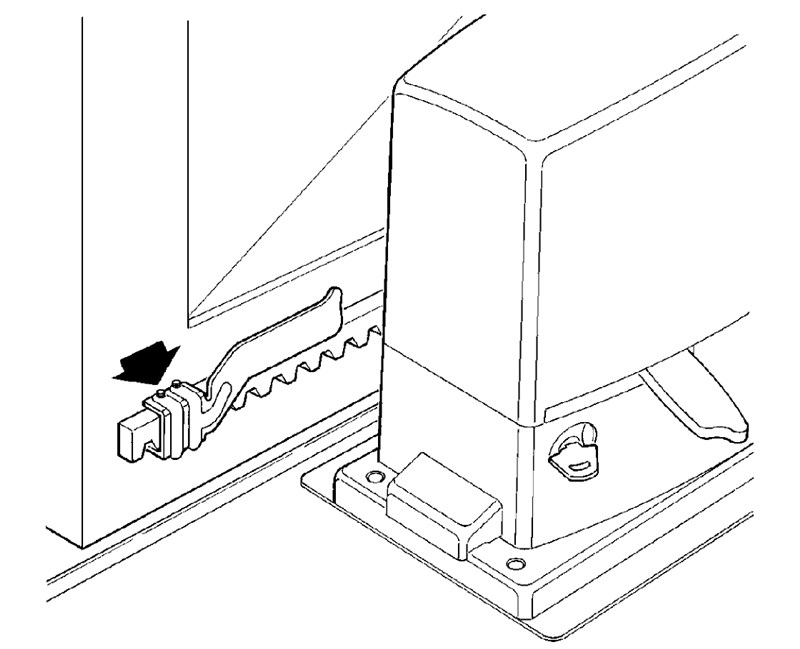 |
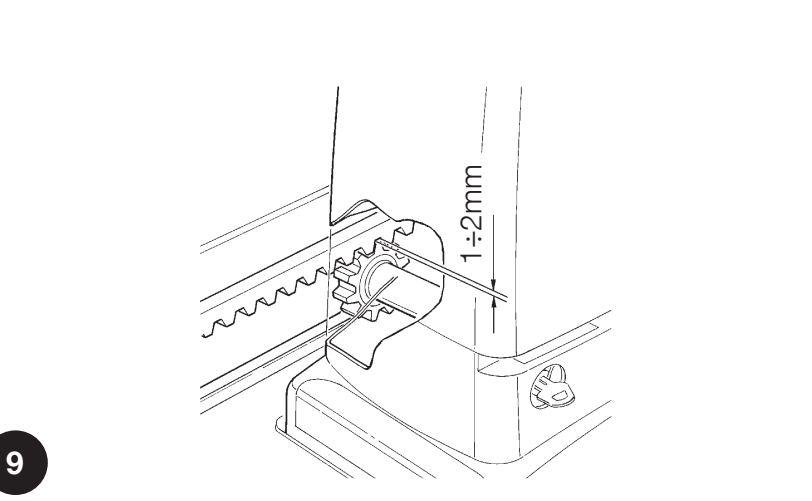
Clearance 1–2 mm must be maintained along the entire travel path. Align the rack with the pinion; during a manual run-through, check for lateral deviations of no more than 5 mm and smooth transitions between sections. Tighten the motor securely after adjustment.
Setting the limit switches
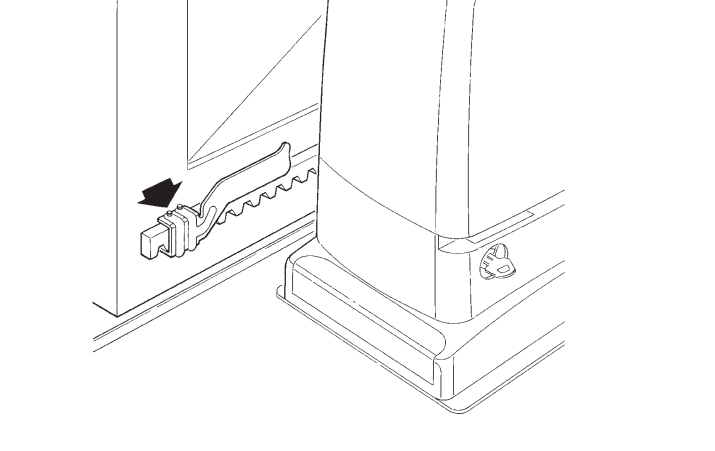
The RUN1800 has an electromechanical limit switch. The brackets on the rack operate its lever.
- Move the gate leaf manually to the open position, at least 2–3 cm before the fixed stop.
- Slide the bracket along the rack in the opening direction until it activates the limit switch.
- Move the bracket at least 2 cm farther in the same direction and secure it.
- Set the closed-position bracket in the same way.
- After engaging the gearbox and programming the travel path, check that the gate stops before both mechanical stops.
NICE RUN1800 drive wiring
Have installation and electrical connections carried out by a qualified professional. Disconnect the mains supply and verify that the circuit is de-energized before opening the unit or connecting or disconnecting terminals. The mains supply is 230 V AC; accessory terminals have different voltages and functions.
230 V AC mains supply
| Terminal | Wire and function |
|---|---|
| L | Live wire; usually brown. |
| N | Neutral wire; usually blue. |
| PE / protective earth | Green-and-yellow protective conductor. Class I equipment requires reliable protective earthing. |
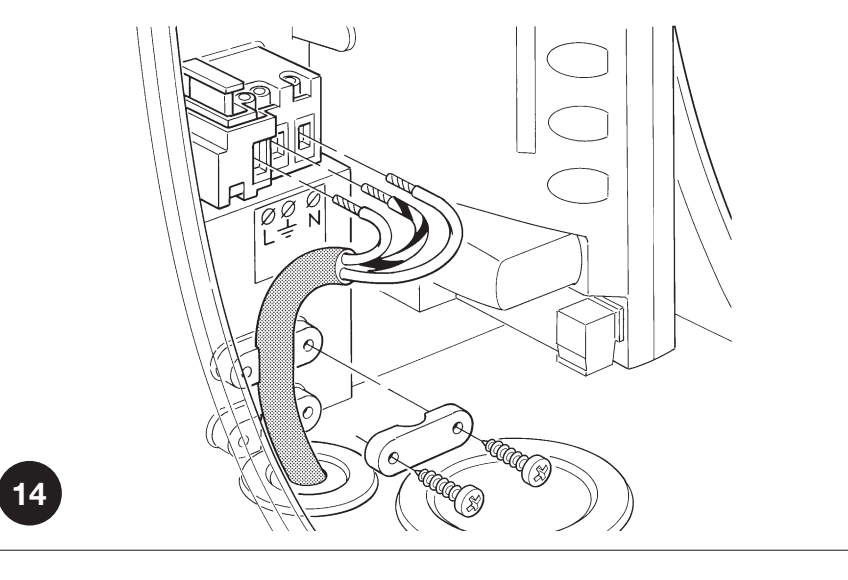
Route the mains cable through the smaller grommet and the other cables through the larger one. Fit the membranes snugly around the cables, restore the seal, and secure the wiring against pull-out. Leave the required slack inside, approximately 20–30 cm; cables must not obstruct the cover or moving parts.
RUA1 control unit terminals
| Terminal | Use, voltage and polarity |
|---|---|
| FLASH – warning light | For the current configuration ELDC LED warning light (12–36 V DC); connect the light to FLASH and the antenna to the separate antenna input. WLT use according to its instructions. The output flashes and is not a continuous power supply. The original incandescent-lamp load limit is one or two warning lights, each rated at 12 V / 21 W. Follow the terminal markings on the warning light and the board; do not apply the polarity of the auxiliary output here. Wiring diagram with ELDC. |
| S.C.A. – indicator | 24 V DC, maximum 4 W, voltage tolerance −30% / +50%. Function according to II/L4. The exact polarity of the pair is not marked here; if using a polarized accessory, check it on the specific board before connecting. |
| BLUEBUS | Power and communication for compatible devices. Photocells are connected with no polarity. Total limit: 15 BlueBUS load units. For two Master/Slave motors the wire sequence must be followed exactly. |
| STOP | Potential-free NO, NC or 8.2 kΩ resistive devices; RUA1 learns the device type. A change in the learned state stops movement and briefly reverses it. The contacts have no +/− polarity and must not be connected to an external voltage source. |
| P.P. / STEP-BY-STEP | Potential-free NO contact for step-by-step operation. Connect the module relay's COM and NO contacts to the two P.P. terminals; the contact is not polarity-sensitive. The module's power supply requires a separate connection. |
| OPEN | Potential-free NO contact for opening; no polarity. |
| CLOSE | Potential-free NO contact for closing; when I/L7 is ON, it opens partially. No polarity. |
| AERIAL / antenna | Connect the coaxial cable's center conductor and shield according to the receiver/board terminal markings. These are not power-supply +/− terminals. RG58, 52 Ω input as specified in the instructions; select an antenna to match the receiver frequency. |
Multiple devices on STOP
Wire NO contacts in parallel and NC contacts in series. Two 8.2 kΩ resistive devices may be wired in parallel; for more, use the configuration with a single 8.2 kΩ end-of-line resistor, as shown in the device diagram. Combining NO and NC requires an 8.2 kΩ resistor in series with the NC branch. Do not replace a safety edge with a simple jumper wire. After making a change, repeat the learning procedure and safety test.
Fuses
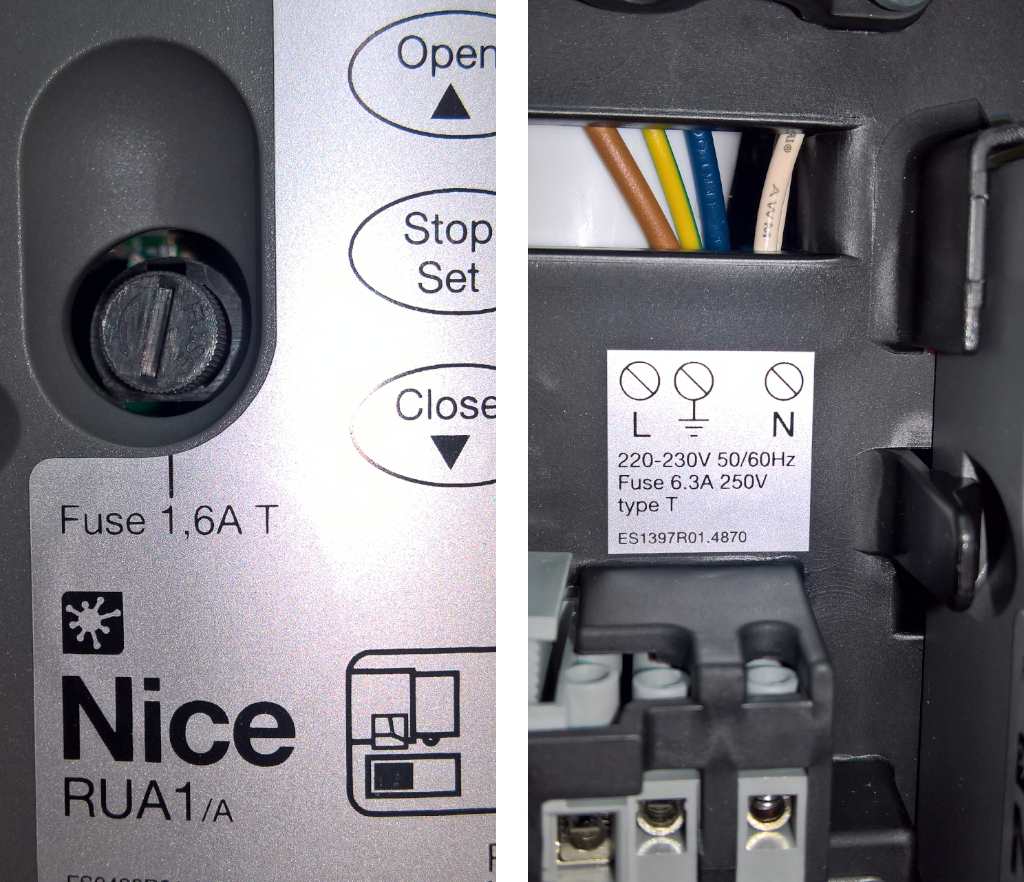
Check only after disconnecting the mains. Replace fuses F1/F2 with the same type, time-current characteristic and rating specified on the fitted board. If a fuse blows repeatedly, identify the cause; do not fit a higher-rated fuse.
RUA1 control unit diagram
Wiring ELDC warning light, EPMB photocells and EKS key switch. Accessory shapes are illustrative; when wiring, follow the terminal markings on the specific device. For EKS, use C–NO for both OPEN and CLOSE; do not use the NC terminal shown in the drawing for a command.
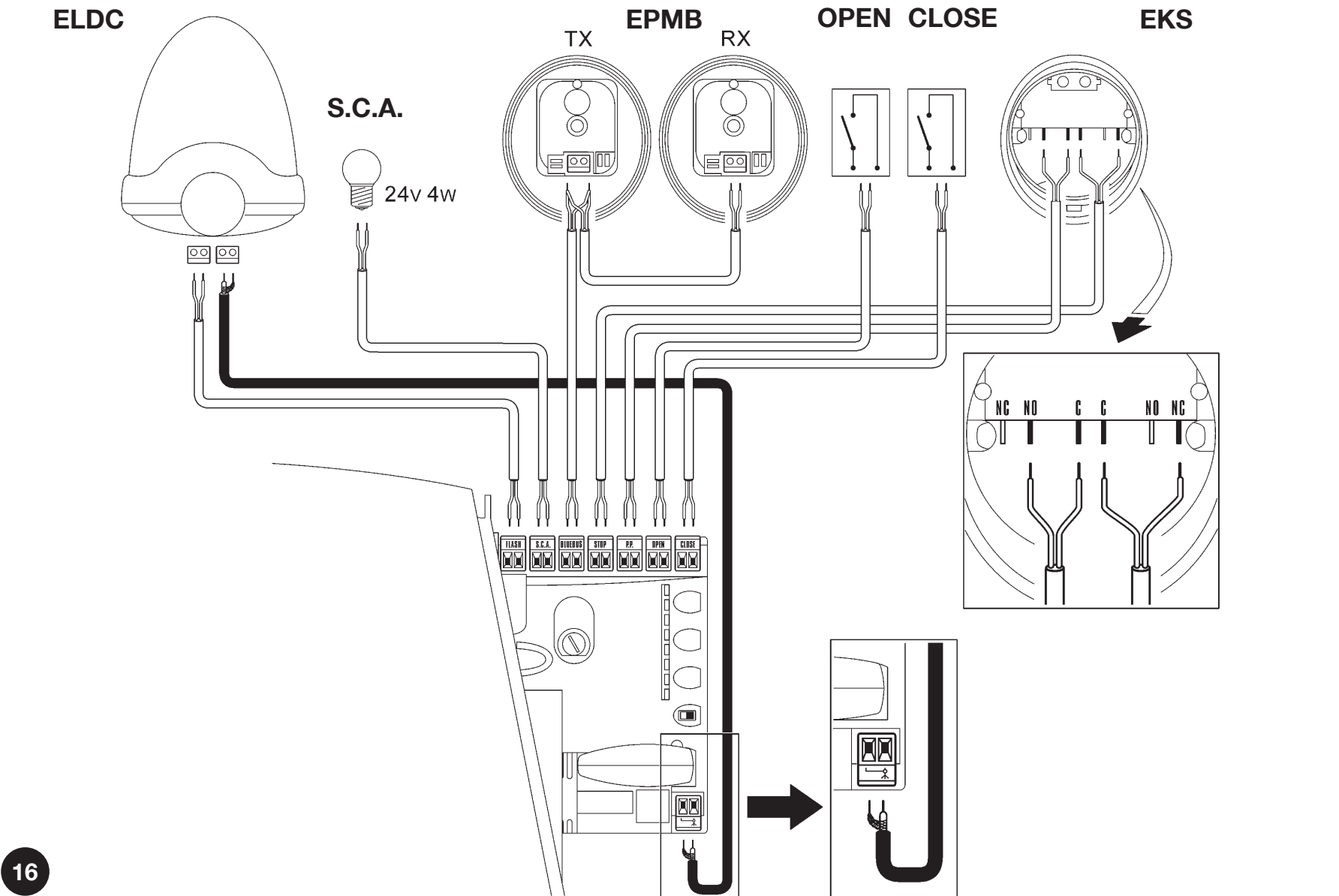
| Accessory | Connection |
|---|---|
| ELDC – light | The two terminals of the input marked with a bulb symbol → the FLASH pair on RUA1. ELDC is designed for 12–36 V DC; do not connect it to 230 V mains. FLASH is not a continuous auxiliary power supply. Follow the markings on the warning light and the board; do not apply the polarity of the STOP/P.P. auxiliary output here. |
| ELDC – antenna | Use a separate RG58 coaxial cable: connect the center conductor to the antenna signal and the shield to the shield terminal as indicated by the symbol. This is not a +/− power supply. Select an antenna to match the frequency of the installed receiver. |
| EPMB – both TX and RX | The two BlueBUS terminals on each device → both BLUEBUS terminals on RUA1, wired in parallel and with no polarity. Do not confuse EPMB with EPM relay photocells. |
| EKS – open / close | C–NO of one microswitch → both OPEN terminals; C–NO of the other → both CLOSE terminals. Leave NC unconnected. These are two potential-free, non-polarized contacts; do not apply external voltage to the inputs. When I/L7 = ON, the CLOSE input triggers partial opening. |
Drive photocells
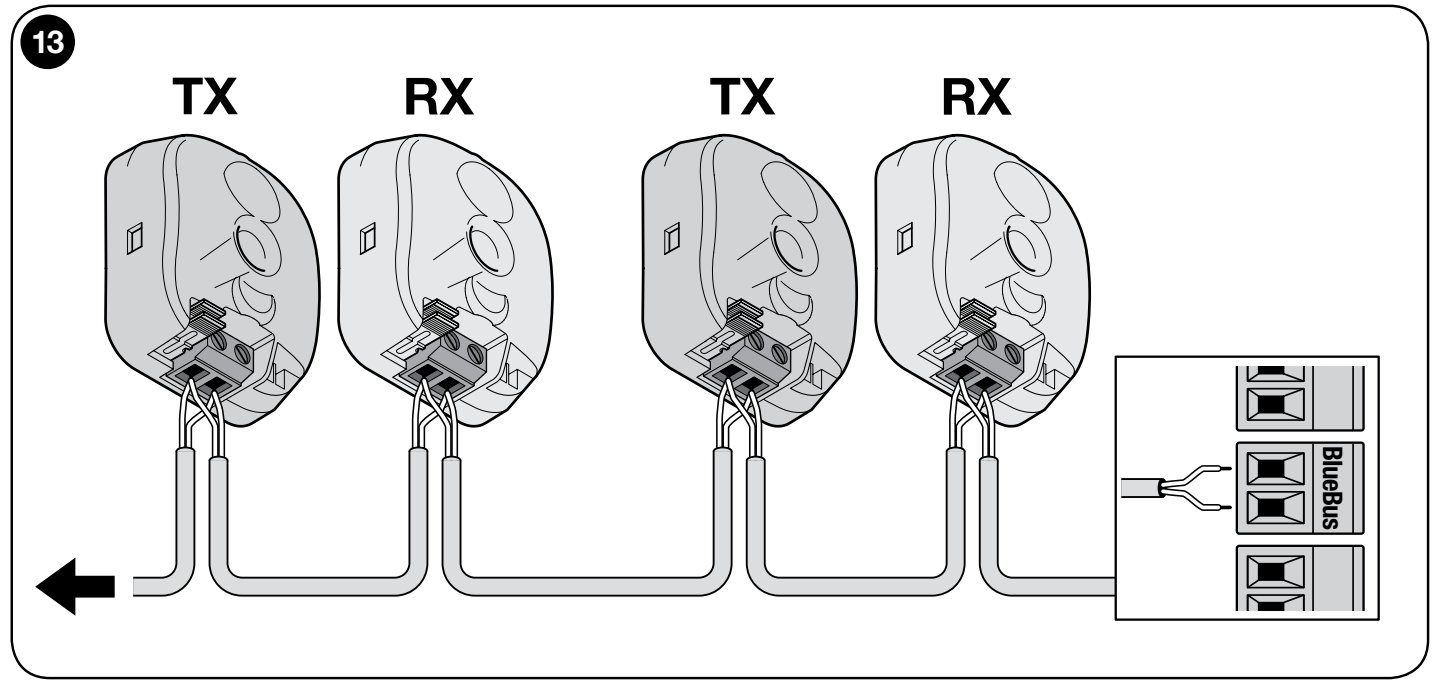
For the current configuration, use compatible NICE EPMB. TX is the transmitter and RX is the receiver. Both devices connect to the two BLUEBUS terminals with no polarity; do not connect them to the auxiliary 24 V output. After adding or removing a device, repeat the device learning procedure and safety test. The RUA1 limit is 15 BlueBUS load units; one unit does not necessarily correspond to one pair.
Wiring multiple EPMB pairs
Connect the pairs in parallel as shown. TX and RX of one pair have the same address, the next pair must have a different address. Choose the mounting position, TX/RX orientation and jumpers according to the protected direction and the gate’s hazardous areas.
Layout of the protective pairs
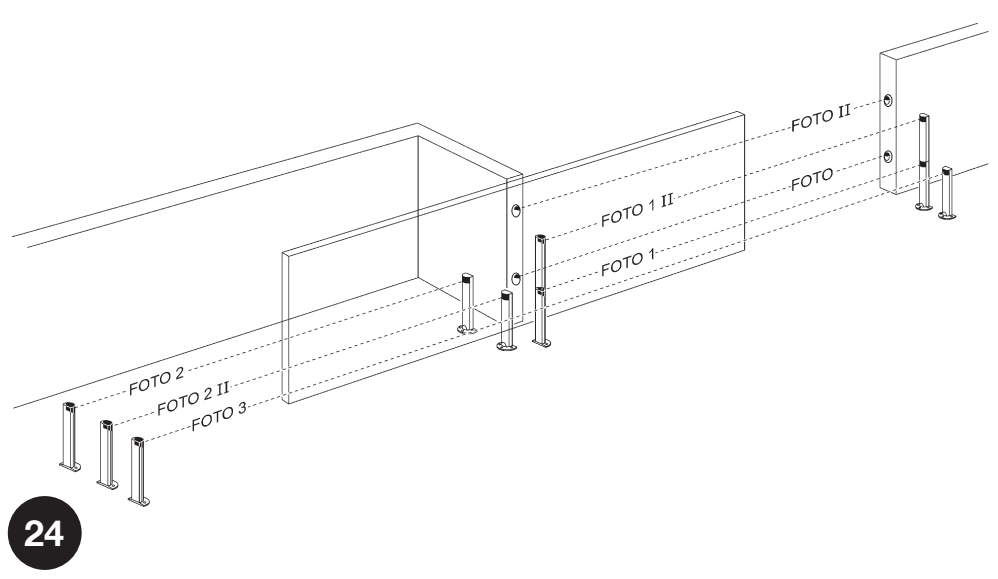
The layout is for guidance only. FOTO and FOTO II protect the outer passage while closing, FOTO 1 and FOTO 1 II protect the inner passage while closing, and FOTO 2 and FOTO 2 II protect while opening. FOTO 3 is a single pair installed along the gate leaf’s travel path as shown. Detection applies to its beam; it does not automatically cover all hazardous areas of the gate. When using FOTO II and FOTO 3 together, follow the TX/RX orientation in the photocell installation instructions to prevent interference between the pairs.
For standard protective wiring with RUA1, use addresses FOTO to FOTO 3. The FA1/FA2 settings for triggering opening are not used in this setup; do not interrupt connection A on the photocell.
EPMB photocell jumper table
Set the same combination on both the TX and RX of one pair. Two pairs in the same BlueBUS network must not have the same address. Store any unused jumper in the designated spare compartment; do not leave it loose inside the photocell.
| Address and protective function | TX and RX jumpers |
|---|---|
| FOTO While closing, outer pair approximately 50 cm above ground level. | 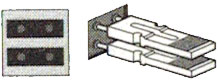 |
| FOTO II While closing, outer pair approximately 100 cm above ground level. | 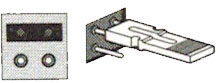 |
| FOTO 1 While closing, inner pair approximately 50 cm above ground level. | 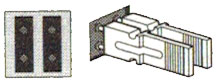 |
| FOTO 1 II While closing, inner pair approximately 100 cm above ground level. | 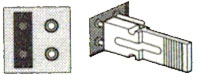 |
| FOTO 2 While opening, outer pair. | 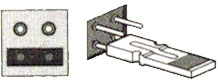 |
| FOTO 2 II While opening, inner pair. | 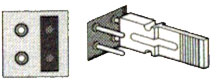 |
| FOTO 3 A single protective pair along the gate leaf’s travel path as shown. | 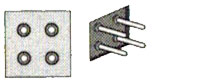 |
When replacing a photocell with the same type, retain the pair’s address and function. After replacement, check the TX/RX indicators and the gate’s safety response in both directions. If the type or number of devices changes, repeat the device learning procedure.
Moving safety edge and FT210B
NICE FT210B transmits the status of an 8.2 kΩ resistive safety edge via an optical beam. The TX on the gate leaf is powered by its own battery; the RX is connected to polarity-free BlueBUS. Set the address and connect the safety edge according to the FT210B instructions; this is not a standard pair with a hard-wired TX power supply. The RX current consumption counts toward the BlueBUS load.
Radio receiver for operators
For a new setup, you can choose NICE OXIBD for the SM connector. With an existing SMXI or OXI, choose transmitters using a coding system supported by that receiver. Insert the receiver with the power disconnected; pair transmitters according to the remote control pairing instructions and the specific receiver’s instructions. Radio memory, travel learning and RUA1 settings are separate functions.
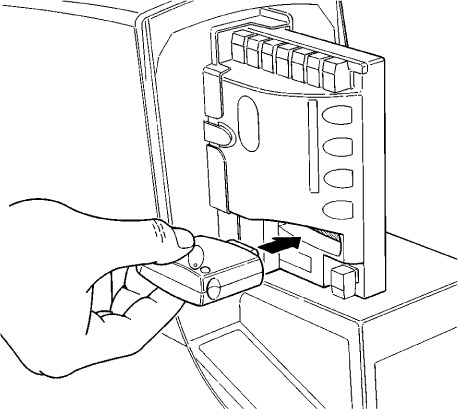 |
NICE Run RUN1800 operator is supplied with the NICE RUA1 control unit, which has an SM connector for connecting an external radio receiver (e.g. NICE OXI, NICE SMXI). This receiver is essential for receiving commands sent from remote controls, and is therefore required for remote operation of the sliding gate using a remote control. |
Selecting the gate’s direction of travel
The sliding gate’s opening direction must be selected according to the position of the operator relative to the sliding gate leaf. View the gate from the side where the operator is installed.
 |
 |
| If the gate opens to the left, set the switch to the left. | If the gate opens to the right, set the switch to the right. |
The switch is located on the right side of the RUA1 control unit in the middle.
First power-up and device learning
Leave the gate leaf approximately halfway along its travel, engage the gearmotor, check the direction setting and limit switches, and make sure the travel path is clear. Switch on the power. The BLUEBUS LED should flash approximately once per second, and the LEDs on both the TX and RX photocells should indicate activity. On first startup with the factory settings, the FLASH beacon and S.C.A. indicator should be off. Once commissioned, S.C.A. operates according to the selected function II/L4; in the default mode, it lights up when the gate is open. If the status is incorrect, disconnect the power and correct the fault first.
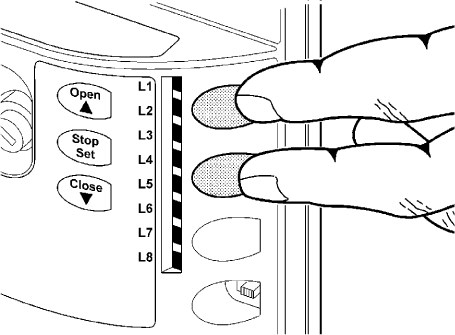
- Press and hold OPEN + STOP/SET for approximately 3 s.
- Release when L1 and L2 start flashing rapidly.
- Wait for BlueBUS and the STOP input to be recognised. L1/L2 will stop indicating that learning is required, and the STOP LED must be lit; L3/L4 may continue flashing because the travel has not been learned.
- After adding or removing a device, repeat the learning procedure and test its safety function again.
Travel limit learning
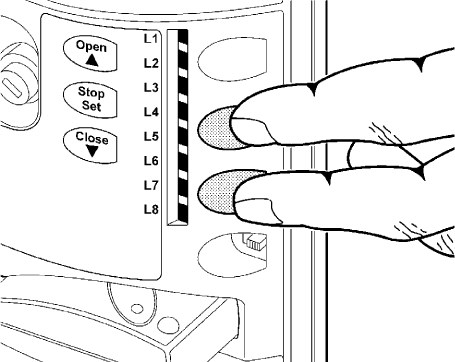
- After the device learning procedure is complete, hold CLOSE + STOP/SET for approximately 3 s.
- Release when movement starts. The first movement must be opening.
- If the gate closes, stop it with STOP, disconnect the power, correct the direction setting, and repeat the learning procedure.
- Allow the gate to open to the limit switch, then close fully to the second limit switch. Do not obstruct the travel path during learning.
- Check the limit positions, partial opening, and several complete cycles.
Testing and handing over the gate
The installer must check movement in both directions, the mounting of the operator and rack, the limit stops and mechanical stops, and each safety device individually. Test the photocells while opening, closing, and at rest, as applicable to their function. Impact forces must be measured. Repeat the test after changing the force, sensitivity, or soft-start settings. Do not put the gate into operation if a safety device is not working. The user must be given the keys and manual, and shown how to release the operator manually and carry out maintenance.
Programming the operator
The RUA1 board has OPEN, STOP/SET, and CLOSE buttons, and eight LEDs, L1–L8. The gate must be stationary before making changes. Safety settings should be adjusted by an installer, followed by a test of the complete gate.
| Button | Normal operation / programming |
|---|---|
| OPEN ▲ | Open / move to the next LED. |
| STOP/SET | Stop / enter settings and confirm. |
| CLOSE ▼ | Close / move to the previous LED. |
Level I – switching functions on and off
- Hold STOP/SET until L1 starts flashing, approximately 3 s; release the button.
- Use OPEN/CLOSE to select the function LED.
- Press SET briefly to toggle ON/OFF. During programming, a short flash means OFF and a long flash means ON.
- Set the next function in the same way, or do not press any button for 10 s. The settings are saved and programming ends.
| LED – function and meaning | Status |
|---|---|
| L1 – Automatic closing After opening, the gate closes after the pause set in II/L1. The factory-set pause is 30 s. When OFF, the gate waits for a command. | OFF – factory setting ON – function enabled |
| L2 – Close after photocell activation Closes 5 s after the passage is clear. With I/L1 OFF, the gate first opens fully; with I/L1 ON, opening stops when the photocell beam is clear. A STOP command cancels this function for the current maneuver. | OFF – factory setting ON – function enabled |
| L3 – Always close After power is restored, closes the open gate; the warning light flashes for 5 s before movement. When OFF, the gate remains stationary after power is restored. | OFF – factory setting ON – function enabled |
| L4 – Slowdown At the end of opening and closing, speed is reduced to approximately 60% of the rated speed. Available torque is halved; slowdown may not be suitable for a heavy gate or one with high resistance. | OFF – factory setting ON – function enabled |
| L5 – Boost When ON, the soft start is disabled and maximum starting force is used. This does not replace fixing friction, track problems, or a frozen gate. Check that the forces are safe after making a change. | OFF – factory setting ON – function enabled |
| L6 – Pre-flashing The warning light flashes for 3 s before movement. When OFF, flashing starts only when movement begins. | OFF – factory setting ON – function enabled |
| L7 – CLOSE = partial opening A CLOSE command from the terminals or radio control triggers partial opening as set in II/L6. When OFF, the command closes the gate. | OFF – factory setting ON – function enabled |
| L8 – Secondary unit – Slave Enable only on the second motor in a Master/Slave configuration. When OFF, the operator is the Master. | OFF – factory setting ON – function enabled |
Outside programming mode, the LED for each function is lit when ON and off when OFF. L1/L2 or L3/L4 flashing simultaneously may indicate that device or travel learning is required; see LED diagnostics.
Level II – adjustable values
- Hold SET until L1 starts flashing, approximately 3 s; release.
- Use OPEN/CLOSE to select the parameter input LED.
- Press SET again and hold it while adjusting. After approximately 3 s, the LED for the current value lights up.
- While continuing to hold SET, select the value using OPEN/CLOSE. Then release SET.
- Repeat the procedure for the next parameter; to exit, wait 10 s without pressing any buttons.
| Input LED – name and description | Setting LED – value |
|---|---|
| L1 – Pause duration Automatic closing time when I/L1 is enabled. | L1 – 5 s L2 – 15 s L3 – 30 s (factory setting) L4 – 45 s L5 – 60 s L6 – 80 s L7 – 120 s L8 – 180 s |
| L2 – Step-by-step mode Sequence of commands for the step-by-step input (P.P.) and the corresponding radio channel. | L1 – Open → stop → close → stop L2 – Open → stop → close → open (factory setting) L3 – Open → close → open → close L4 – Shared access: during opening, the next command is ignored; during closing, it reopens L5 – Shared access 2: same as L4; a command held for more than 2 s stops the gate L6 – Step-by-step 2: a short command of up to 2 s triggers partial opening L7 – Hold-to-run: movement continues while the command is held L8 – Semi-automatic opening; closing while the command is held |
| L3 – Obstacle sensitivity Higher sensitivity responds to less resistance. First set the motor force to II/L5, then adjust sensitivity; measure impact forces after making changes. | L1 – Very high – lightweight gates L2 – Very high L3 – High L4 – Medium L5 – Medium-low (factory setting) L6 – Low L7 – Very low L8 – Very low – heavy gates |
| L4 – S.C.A. output 24 V output function / max. 4 W. The radio channel selection also depends on the receiver. | L1 – Gate-open indicator: off when closed, on when open; flashes slowly while opening and quickly while closing (factory setting) L2 – Active when the gate is closed L3 – Active when the gate is open L4 – Radio output 2 L5 – Radio output 3 L6 – Radio output 4 L7 – Maintenance indicator L8 – Electric lock |
| L5 – Motor force Torque control. Force is not determined by weight alone; do not use excessive force to overcome a mechanical fault. | L1 – 40% L2 – 50% L3 – 60% L4 – 80% L5 – 100% L6 – Semi-automatic 40–100% L7 – Semi-automatic 60–100% L8 – Automatic 0–100% (factory setting) |
| L6 – Partial opening Pedestrian access distance. It must fit within the gate's actual travel distance. | L1 – 0.5 m L2 – 1.0 m (factory setting) L3 – 1.5 m L4 – 2.0 m L5 – 2.5 m L6 – 3.0 m L7 – 3.4 m L8 – 4.0 m |
| L7 – Maintenance reminder Number of operations since servicing. Opening and closing are two operations; one complete cycle consists of both opening and closing. | L1 – Automatic according to operating difficulty (factory setting) L2 – 2,000 operations L3 – 4,000 operations L4 – 7,000 operations L5 – 10,000 operations L6 – 15,000 operations L7 – 20,000 operations L8 – 30,000 operations |
| L8 – Error log Records of the last eight operations; this is not an adjustable default setting. | L1 – Most recent operation L2 – Second most recent operation L3 – Third most recent operation L4 – Fourth most recent operation L5 – Fifth most recent operation L6 – Sixth most recent operation L7 – Seventh most recent operation L8 – Eighth most recent operation |
Two sliding gate leaves – Master/Slave
Each leaf has its own RUN operator and its own 230 V AC mains supply. One motor is the Master, the other the Slave. Using two motors does not increase the weight or length limit for either individual leaf.
BlueBUS connection
Maintain the wire order between the motors: Master terminal 1 → Slave terminal 1 and Master terminal 2 → Slave terminal 2 as shown, with the connectors oriented the same way in the diagram. Labels 1/2 indicate positions in the illustration, not universal power supply +/−. This is an exception to BlueBUS photocells, which do not require polarity.

Accessory shapes are for illustrative purposes only. For OPEN and CLOSE on the EKS, use the C–NO contacts; do not use the NC terminal shown in the drawing for the command. EPMB and the shared EKS key switch must be connected to the Master. Any second ELDC connect to the FLASH terminal on the second motor. The antenna is a separate coaxial connection.
- Set the opening directions for both opposing leaves and wire them according to the diagram with the power disconnected.
- Connect the receiver and shared safety/control devices to the Master.
- Switch on both motors. On the Slave, set level I, L8 = ON.
- Run the device learning procedure first on the Slave, then on the Master.
- Start the travel learning procedure on the Master and check that both leaves move together and that all safety devices work.
FLASH, S.C.A., a safety edge (STOP) and P.P. can also be connected separately to the Slave. A P.P. command on the Slave opens only its own leaf fully; do not use OPEN/CLOSE on the Slave. The Master controls most settings. Sensitivity, force, the S.C.A. output, peak and error history must also be evaluated for the specific second operator.
Power supply for external accessories
The auxiliary output from the RUA1 is 24 V DC, −30% / +50%, maximum 100 mA total. At a nominal 24 V, this corresponds to approximately 16.8–36 V; the connected module must support this range. The power supply and command contact are two separate pairs of wires.
| Purpose | RUA1 terminal | Accessory terminal |
|---|---|---|
| Power supply negative − | Right-hand STOP terminal in the orientation shown in the image below | Device power supply − / GND |
| Power supply positive + | Left-hand P.P. terminal in the same orientation | Device power supply + / V+ |
| Step-by-step command | Both P.P. terminals | Voltage-free relay COM and NO; no polarity |
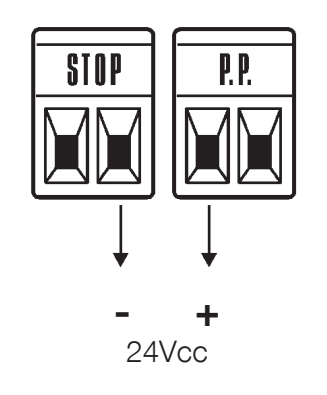
For higher current draw, an unsuitable voltage range or startup current peaks, use a separate power supply suitable for the module and connect only an isolated, voltage-free contact to P.P. Do not use the FLASH or BlueBUS output as a substitute for the auxiliary power supply.
Gate held open and timer
A voltage-free P.P. command lasting more than 2 s opens the gate and keeps it open for as long as the command is active, for example when triggered by a time switch. This function is not used in mode II/L2, value L5 “Shared entrance 2”. If a continuous command is detected unexpectedly, check the timer and the corresponding input.
Emergency operation in the event of a safety-device fault
Only under direct supervision and with the safety path completely clear: after the first command is rejected due to a safety fault, issue the command again within 3 seconds and keep holding it. After approximately 2 seconds, the gate moves while you hold the command; releasing it stops the gate. This is a temporary emergency mode, not a substitute for repair. Never bypass a safety device for continuous operation.
Maintenance and servicing
Carry out maintenance at least once every 6 months or after 20,000 operating cycles, whichever comes first. Disconnect the power supply, check the fastenings, corrosion, wear on the wheel and rack, the wiring and free movement; clean the photocells and repeat the safety tests. The service indicator does not replace regular maintenance.
Maintenance alert
The threshold is set by II/L7. To have S.C.A. indicate maintenance as well, set II/L4 = L7.
| Counter status | FLASH / maintenance indicator |
|---|---|
| Below 80% of the threshold | FLASH flashes normally; the indicator lights for 2 seconds when opening begins. |
| 81–100% of the threshold | FLASH stays on for 2 seconds at the start and then flashes normally; the indicator flashes during operation. |
| Above 100% of the threshold | FLASH stays on for 2 seconds at both the start and end; the indicator flashes continuously. |
Checking the number of operating cycles
- Enter SET programming mode for approximately 3 seconds, then release when L1 flashes.
- Use OPEN/CLOSE to select input L7.
- Hold SET and wait approximately 3 seconds for the LED showing the current value to light up.
- While holding SET, briefly press and release OPEN + CLOSE simultaneously.
- The number of flashes of the value LED represents the tens of percent of the threshold used; no flashes means the value is below 10%. Release SET.
Resetting the service counter
- After maintenance, select II/L7 using the same procedure.
- Hold SET and wait approximately 3 seconds for the value LED to light up.
- While still holding SET, press OPEN + CLOSE for at least 5 seconds, then release both buttons.
- Rapid flashing confirms the reset; release SET and wait for programming to finish.
This procedure resets the service counter. It does not erase transmitters, replace travel learning or perform a full control unit reset. If an electronic fault occurs, do not try unverified button combinations; follow the diagnostics and service instructions for the specific RUA1.
Troubleshooting
Before working on an open operator, disconnect the power supply. Measurements on mains or live terminals must be carried out by a qualified person. Contact our technical support team with the motor model, control board marking and number of flashes.
By fault symptom
| Symptom | What to check |
|---|---|
| The remote control does not light up | Check the battery and contacts in the remote control according to its instructions. |
| The remote control lights up, but the gate does not respond | Receiver compatibility and memory; pairing. Also test the button or P.P. input to distinguish a radio issue from an operator fault. |
| BLUEBUS is off | Check the mains supply and fuses with the power safely disconnected; do not bypass safety devices. |
| The command is not registered | When the BLUEBUS input changes, it flashes rapidly twice; an NO command on P.P./OPEN/CLOSE should light the corresponding LED. Check the contact and cable. |
| The gate starts moving, stops or reverses | First, manually check for friction, track issues, trolley issues, ice, rack clearance and end stops. Then check the force/sensitivity settings; any change requires a new impact-force measurement. |
| The warning light does not work | Check FLASH, wiring, short circuits and warning light compatibility. While flashing, the measured voltage may fluctuate around 10–30 V DC; it is not a constant 24 V supply. |
| S.C.A. does not work | First check the II/L4 mode, then the load (up to 4 W), cable and output (approximately 24 V DC). |
| The limit switch does not stop the movement | Check the fastening and position of the electromechanical limit switch brackets. If the direction is incorrect, stop and correct the direction selector. |
Warning-light diagnostics
During normal operation, the light flashes at regular intervals. An error code consists of a series of flashes, a 1-second pause and the same series repeated; count the flashes in one series.
| Flashes | Meaning / solution |
|---|---|
| 1 | BlueBUS Check the devices, wiring and addresses. Repeat learning after a repair or an intentional change to the configuration, not to conceal a faulty safety device. |
| 2 | Photocell A normal response when the beam is interrupted in the protected direction. If the path is clear, check cleanliness, alignment and addresses. |
| 3 | Resistance / obstacle detection Remove the obstacle and eliminate any mechanical resistance. Do not increase Force or Peak without checking the gate and then carrying out a safety test. |
| 4 | STOP The learned state has changed. Check the safety edge, contacts and wiring; do not bypass the safety device. |
| 5 | Internal parameters Wait 30 seconds and repeat the command. If the fault recurs, have the RUA1 serviced. |
| 6 | Cycle limit / temperature Wait a few minutes and let the motor cool down. Check the required operating frequency and mechanical resistance. |
| 7 | Electronic circuits Disconnect the power supply for a few seconds and try again. If the fault persists, arrange servicing; do not guess at a reset procedure. |
| 8 | Continuous command Check the timer or for a permanently active control input. This may be expected if the gate is intentionally being held open. |
Control unit LEDs
BLUEBUS, STOP, P.P., OPEN, CLOSE
| LED / status | Meaning |
|---|---|
| BLUEBUS is off | No power or a fault. Check the mains supply and fuses. |
| BLUEBUS stays on | Serious fault. Safely disconnect the power supply and check the wiring; if the fault recurs, arrange servicing. |
| BLUEBUS flashes once per second | Normal operation. |
| BLUEBUS flashes rapidly twice | Input status changed or a command was received. |
| BLUEBUS series of flashes | Code as in warning-light diagnostics. |
| STOP is lit | The correct STOP status has been learned. |
| STOP is not lit | STOP status changed or learning is incomplete; check the safety device. |
| P.P./OPEN/CLOSE is lit | The corresponding volt-free contact is active. |
| P.P./OPEN/CLOSE is not lit | The corresponding contact is not active. |
LEDs L1–L8
During normal operation, lit means the Level I function is enabled; unlit means it is disabled. L1 automatic closing, L2 closing after photocell activation, L3 always close, L4 slowdown, L5 Peak, L6 pre-flashing, L7 CLOSE = partial opening, L8 Slave. A single flashing LED may indicate programming; L1/L2 together indicate a request to learn devices, and L3/L4 together indicate travel learning.
Reading the error history
- Press SET for about 3 seconds, release when L1 flashes; use OPEN/CLOSE to select the input at L8.
- Hold SET; after about 3 seconds, the LEDs for movements during which an error was recorded will light up.
- While holding SET, use OPEN/CLOSE to select a specific record. L1 is the most recent, L8 the eighth most recent.
- Read the number of flashes for the selected record using the beacon diagnostics. Release SET and wait for programming to finish.
Manual release of NICE RUN1800
Stop the gate, disconnect the power supply and secure it against uncontrolled movement. Use the release with the gate leaf stationary.
| 1. Slide the release-lock cover aside | 2. Insert the release key and turn it clockwise |
|---|---|
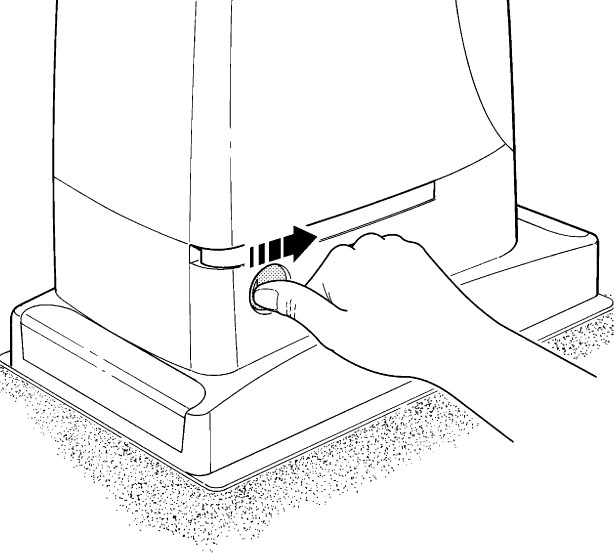 |
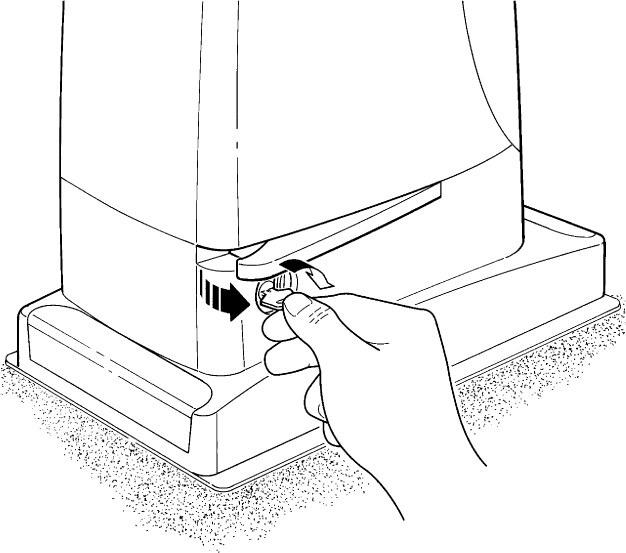 |
| 3. Pull out the release lever | 4. The gate can now be moved manually |
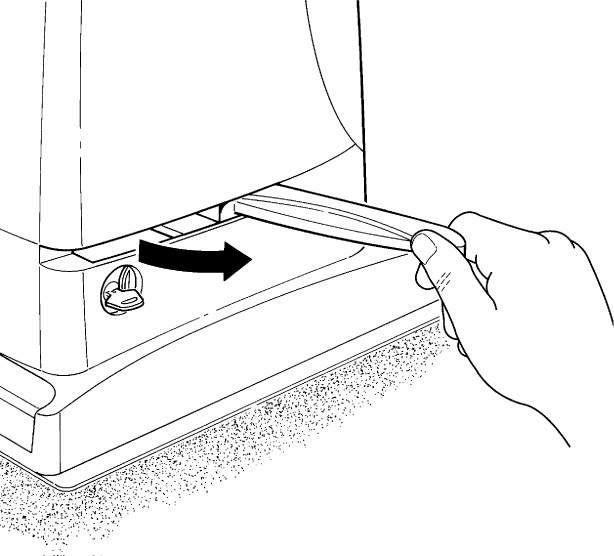 |
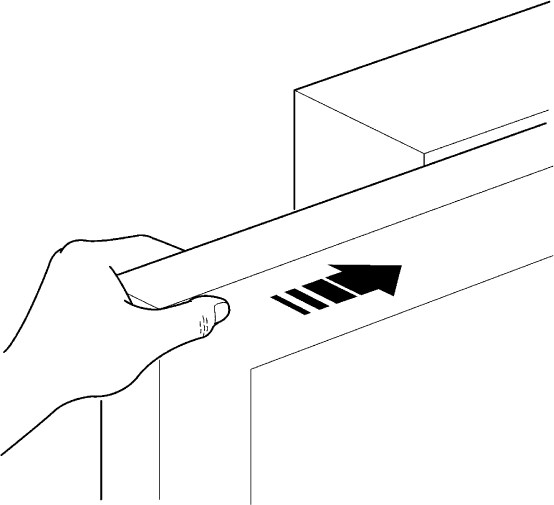 |
After moving the gate manually, close the release lever, lock the mechanism with the key and cover the lock. Check that the gearbox has re-engaged before restoring power. If the key is the only way to enter during a power outage, keep it accessible outside the enclosed property.
NICE RUN1800 technical specifications
Values apply to the RUN1800 in the 230 V AC version. Rated values apply at approximately 20 °C. Always check the electrical version and permitted mains range on the label of the specific motor as well.
| Parameter | Value |
|---|---|
| Model | RUN1800 – electromechanical limit switch |
| Type and control | Electromechanical sliding gate operator, RUA1; plug-in radio receiver not included with the standalone motor. |
| Motor and mains supply | 230 V AC, 50/60 Hz; tolerance according to the label on the supplied version. |
| Max. weight / length | 1,800 kg / 15 m; further conditions and duty cycles as specified in the suitability tables. |
| Pinion | 18 teeth, module 4; rack tooth pitch approximately 12.6 mm. |
| Peak torque / force | 40 Nm / 1,110 N |
| Rated torque / force | 20 Nm / 560 N |
| No-load speed | 0.17 m/s at 50 Hz, approximately 10.2 m/min. |
| Rated speed | 0.14 m/s at 50 Hz, approximately 8.4 m/min. |
| Rated frequency for a 15 m gate leaf | 11 cycles/h, 264 cycles/day at rated torque; limits according to length, weight and temperature also apply. This is not the number of cycles that can be run without a break. |
| Continuous operation | Maximum 40 min at rated torque, subject to additional duty-cycle limits. At 50 °C, maximum 10 min; for a 15 m gate leaf, maximum 7 cycles/h. |
| Power consumption / current | Starting: 700 W / 3 A; rated: 400 W / 1.8 A. |
| Electrical protection | Class I – PE protective earthing. |
| FLASH | For the current configuration ELDC. Incandescent lamp load limit: one or two beacons, 12 V / 21 W each; not intended as a continuous auxiliary power supply. |
| S.C.A. | 24 V DC, max. 4 W, voltage −30 % / +50 %. |
| Auxiliary power supply | 24 V DC, −30 % / +50 %, max. 100 mA total; correct STOP/P.P. polarity. |
| BlueBUS | Max. 15 load units; photocells are polarity-free. |
| STOP | Volt-free NO/NC or 8.2 kΩ resistor; learned status. |
| P.P., OPEN, CLOSE | Volt-free NO contacts. |
| Radio / antenna | SM connector; receiver selected separately. Antenna input specified in the original as 52 Ω, RG58 or similar coaxial cable. |
| Programming | 8 ON/OFF functions and 8 parameters; Levels I and II. |
| Learning | BlueBUS devices, STOP input type and travel length with slowdown/partial-opening points. |
| Operating temperature | −20 to +50 °C |
| Ingress protection rating | IP44 |
| Unsuitable environments | Acidic, saline or potentially explosive atmosphere. |
| Overall dimensions | 400 × 255 × 390 mm according to the technical table; installation dimensions are shown in the original drawing below. |
| Motor weight | 24.5 kg |
| Service life | Approximately 150,000–450,000 cycles, depending on the sum of the indices and the graph; not a guarantee. |
Operator dimensions
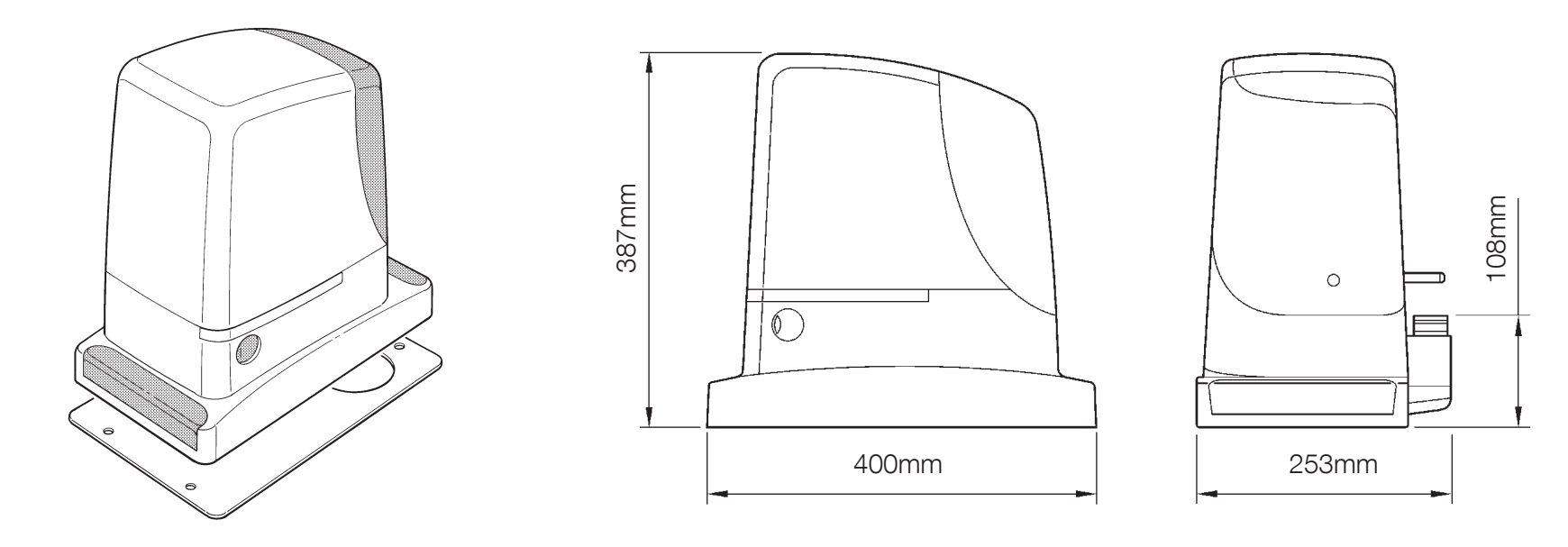
How can I order this item?
Choose the option that suits you:
- order online: use the buy button to add the goods to your shopping cart (you will find the buy button here in the product variants table).
- order by email: place your order at [email protected]






