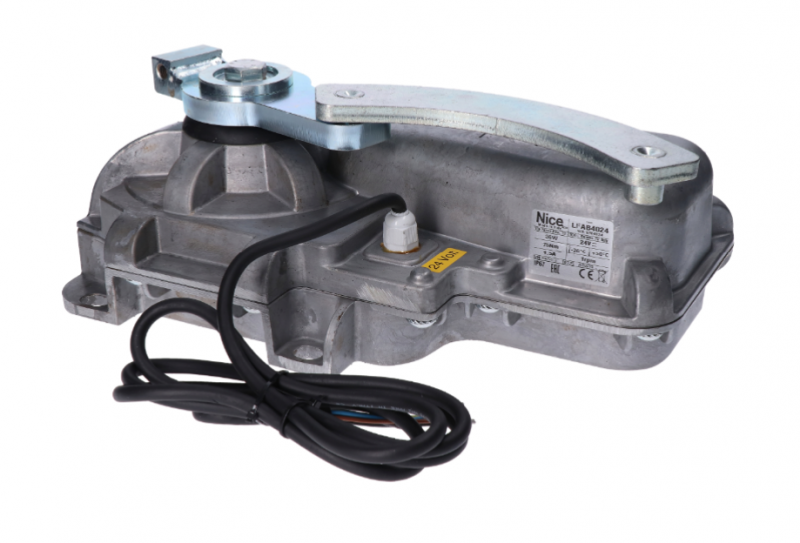
NICE L-Fab LFAB4024HS – standalone underground operator for a swing gate leaf up to 4 m / 400 kg
NEW| Product availability: | within 14 days | We normally dispatch goods within 14 days. |
|---|
within 14 days
€625.62 including VAT
| Weight |
|---|
| 15 kg |
Description of NICE L-Fab LFAB4024HS – standalone underground operator for a swing gate leaf up to 4 m / 400 kg
NICE L-FAB LFAB4024HS is a standalone underground non-reversible drive for one gate leaf. It has a 24 V DC motor with a magnetic encoder. The control unit is not included; for a new setup, use the NICE MC824HR30. For a double-leaf gate, you need two motors and one compatible control unit.
The drive is concealed beneath the hinge axis and does not affect the gate's appearance from either side. An underground solution is also suitable where there is no room for a linear actuator or articulated-arm actuator. The box with its load-bearing lever forms the lower support for the gate leaf; it must be securely installed, aligned with the hinges, and drained.
The HighSpeed version opens to 90° in approximately 6 seconds under standard installation conditions, excluding acceleration and deceleration. The actual time depends on the gate leaf and speed setting. 4 m / 400 kg limit does not mean 400 kg at a length of 4 m.
24 V is the motor voltage; the MC824HR30 is powered from a 230 V AC mains supply. For a complete setup, also choose a box, release mechanism, controls, and safety devices.
Controls and compatible accessories
The wiring and setup instructions below apply to the MC824HR30 with the MCA1R30 control board. For an older control unit, choose the wiring instructions for the board actually installed. The MC824L is not a substitute for the MC824H with this motor.
| What | Why | Type |
|---|---|---|
| Control unit | Controls one or two motors. Motor wiring. |
|
| Warning light | Signals gate movement. The voltage and maximum current draw must match the FLASH output. |
Other warning lights should be selected to match the voltage and current draw of the specific control unit's FLASH output. |
| Photocells | Protects the gate opening according to the photocell positioning and operating mode; wiring. |
EPMOW requires the radio interface IBW connected to BlueBUS. FT210B has a battery-powered transmitter on the gate leaf and a receiver connected to BlueBUS by two wires; it also transmits the status of the safety edge. |
| Transmitter | Remote control compatible with the coding of the installed receiver. ON3ELR uses OXILR; ON3EBD uses OXIBD. Pairing the remote control. |
|
| Receiver | Radio receiver for the control unit's SM connector. The receiver and transmitter must use the same coding. OXILR and OXIBD use different radio systems. |
|
| Antenna | Select an antenna to match the frequency of the installed receiver. For OXIBD, connect it to the antenna terminals. |
|
| Keypad | Access using a code. Choose EDSWG to match the receiver; EDSB uses BlueBUS and device learning. |
|
| Key switch | Key-operated control via a volt-free NO contact connected to the control unit's command input. |
|
| Electric locks | An electric lock is required for gate leaves longer than 3 m with the LFAB4024HS. ELS power supply. |
|
| Card readers | Access using a chip or card. Connect ETPB to BlueBUS; run device learning after connecting it. |
|
| Backup power supply | Operation during a mains power failure. Choose a battery to match the control board and control unit connector. |
For the current MC824HR30 PSS324. The older PS324 requires CABLA11 and Standby switched off (L4 = OFF); backup connection. |
| Safety edge | Limits the effects of contact with an obstacle; separate protection is required for hazardous areas. Pre-handover tests. |
|
Motor, foundation box and manual release
| Component | What you need |
|---|---|
| Standalone LFAB4024HS | One motor with a magnetic encoder, a 2 m power cable and a mechanical closing stop. The box and control unit are not built into the motor. |
| Foundation box | LFABBOX4 made of cataphoretically treated steel or stainless steel LFABBOX4I. The box includes a load-bearing lever for the gate leaf and a mechanical opening stop. Sold separately. |
| Manual release | NICE BMA3 with a lever key for manually moving the gate leaf during a power outage. Sold separately. |
| Control and safety | MC824HR30, receiver, remote controls, photocells and safety edge, depending on the specific gate. |
| Larger opening angle | NICE BMA1 with chain drive, up to 360° for gate leaves up to 3.5 m. Adequate clearance and external mechanical stops are required. |
The motor has a metal housing. The box can be used for either right- or left-hand gate leaves. The steel and stainless steel versions differ in material and surface finish; even the stainless steel box does not replace effective water drainage.
Kits for one or two gate leaves
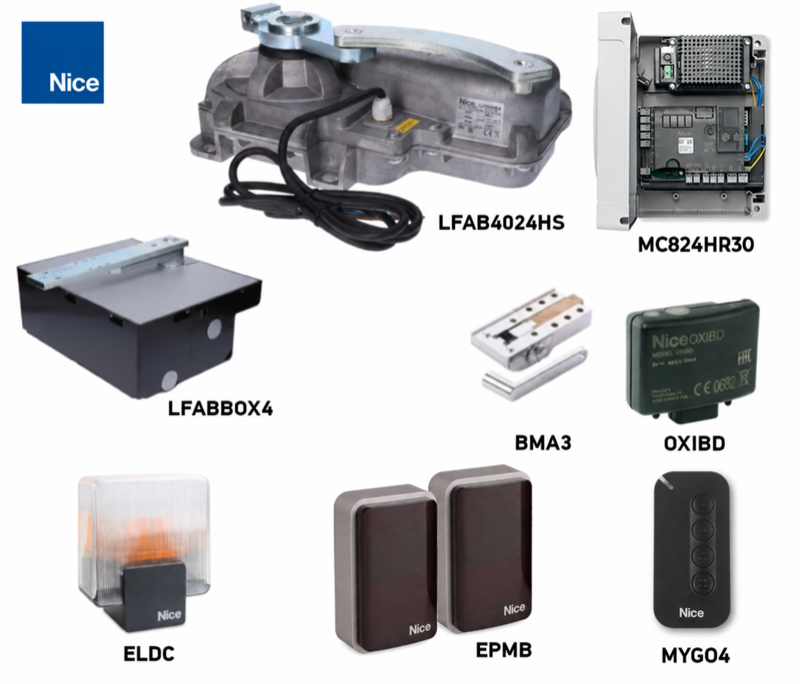
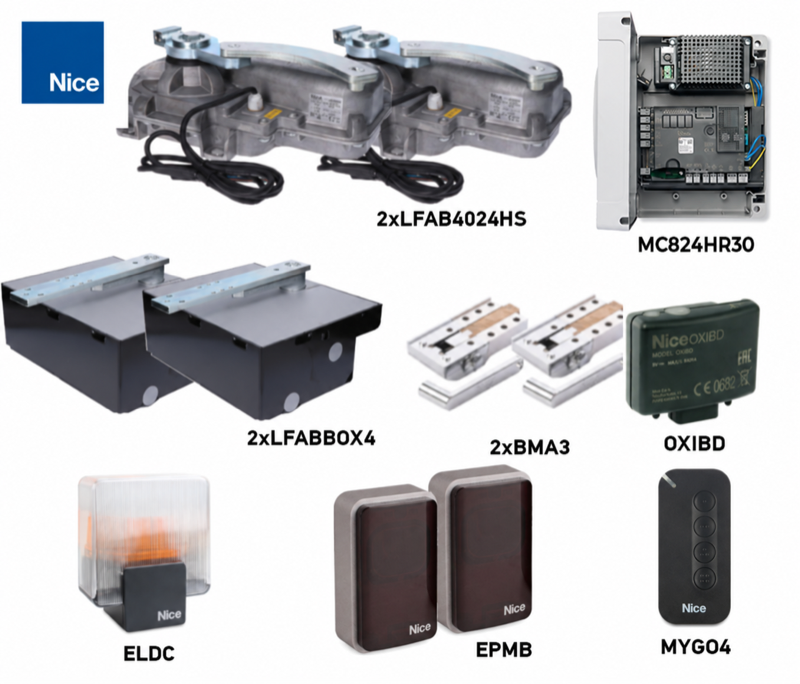
The kits differ in the number of motors, boxes and manual releases. Two motors do not increase the permitted length or weight of an individual gate leaf. Compare the equipment below for the complete gate.
| One gate leaf | Standalone motor | Two gate leaves |
|---|---|---|
| Standalone LFAB4024HS
One 24 V DC motor with encoder. The box, manual release and control unit are sold separately. |
|
Gate length, weight and operation
4 m and 400 kg are separate maximum limits. Read the permitted weight for a given length from the graph: the horizontal axis shows the length of one gate leaf in metres, and the vertical axis shows its weight in kilograms. For a 4 m gate leaf, the limit is approximately 150 kg; for a shorter leaf, select the weight according to the curve.
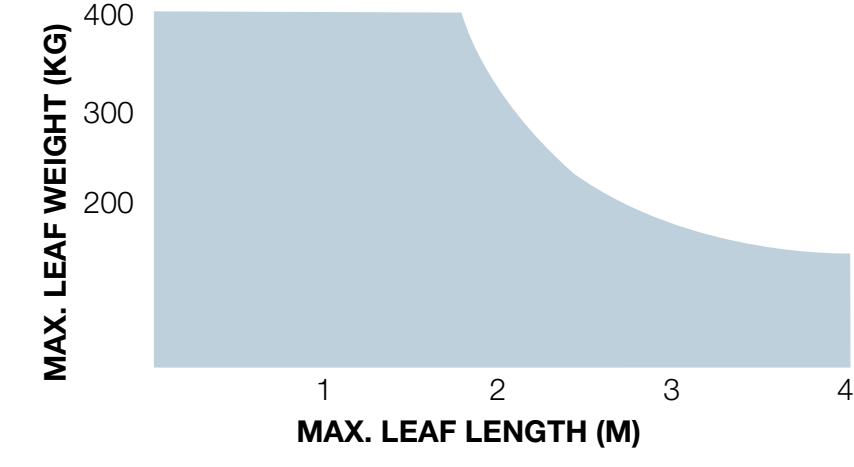
Gate leaf height, solid infill, strong winds and hinge resistance can significantly reduce the permitted values. Before choosing, check the gate's full manual travel and safe operating forces; weight or motor power alone does not guarantee suitability.
| Specification | LFAB4024HS |
|---|---|
| Application | Fast operation of a lighter gate leaf |
| Maximum limits according to the graph | 4 m / 400 kg |
| Maximum torque | 200 Nm |
| Operation at 90° opening | 50 cycles/h |
| Box | LFABBOX4 / LFABBOX4I |
| Control unit for the new assembly | MC824HR30 |
One cycle consists of opening and closing. When opening to 180° with BMA1, the stated number of cycles per hour is halved. This is operation at the rated load, not unlimited continuous operation.
Installing the box and drive
Have a qualified technician carry out the installation and adjustment. The gate must be mechanically sound: the leaf must move easily by hand, without sticking or moving on its own. Also check for pinch points at the hinges and between the leaves. If the leaf includes a pedestrian gate, it must have a safety contact that disables the drive when the gate is open.
Drainage, alignment and concreting
- Prepare an excavation for the specific box, secure it firmly in concrete, and provide cable conduits and drainage. Check the dimensions and installation height against the supplied box before concreting.
- Route a dedicated cable conduit and effective drainage into the box. The drain must not be blocked or routed to a place where water can flow back.
- Position the box level. The axis of its pin must align precisely with the axis of the gate leaf hinges throughout the full range of movement. Check the position and installation height before concreting.
- Securely set the box in concrete and allow the concrete to cure fully. Protect the threads and drain from dirt.
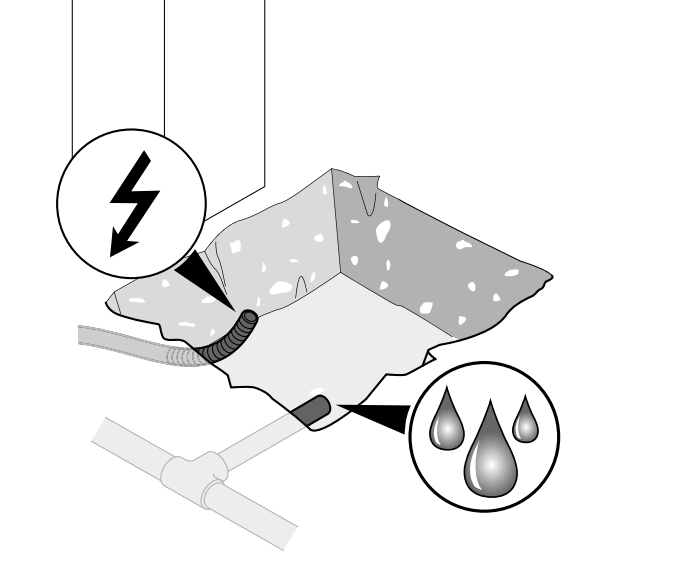
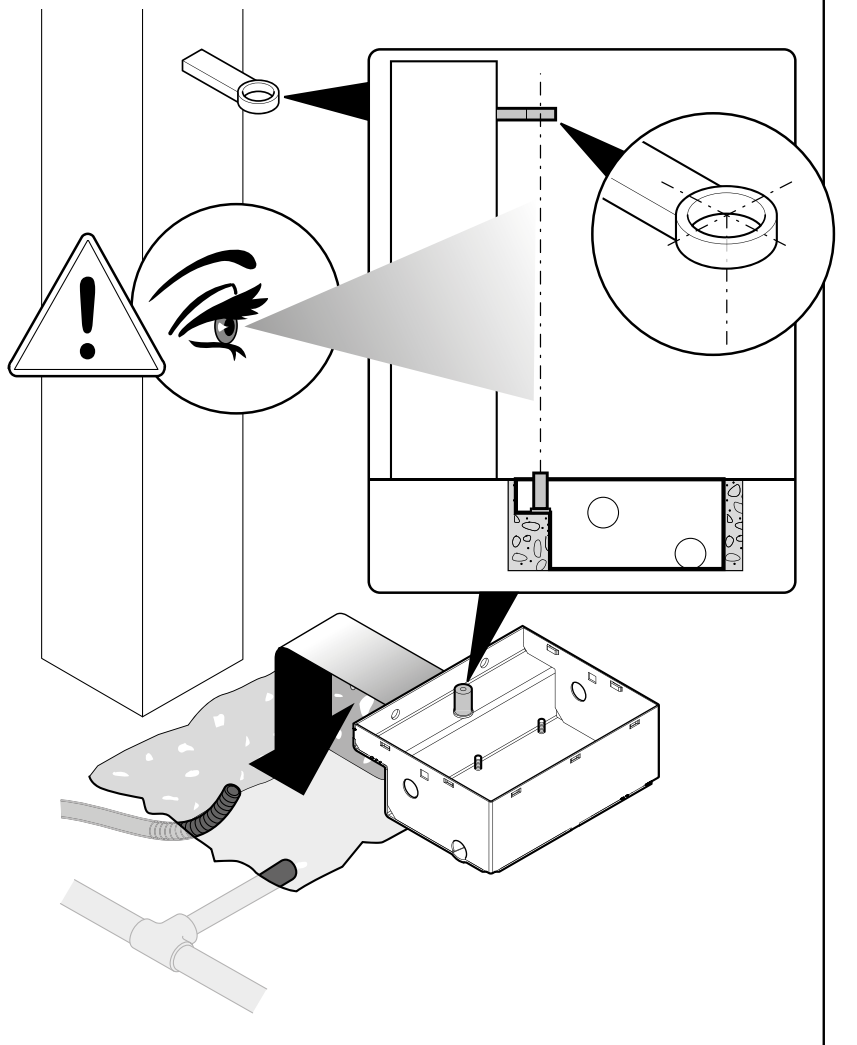
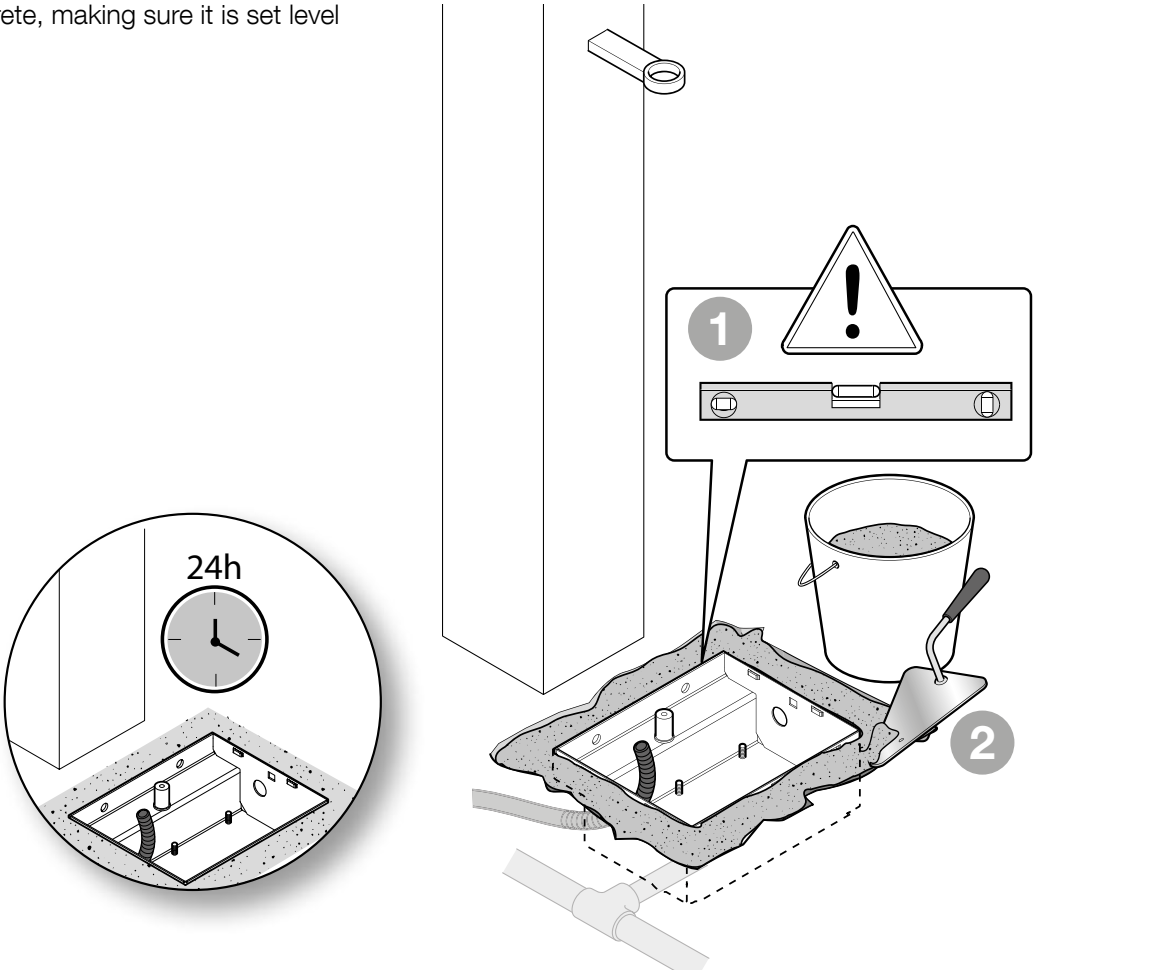
For a practical explanation, see the foundation box installation guide. Ingress protection rating IP67 protects the motor even during temporary immersion; it does not replace drainage and is no reason to leave the box flooded for long periods.
Installing the motor and attaching the gate leaf
- Place the motor in the box in the correct orientation and secure it with washers and nuts.
- Fit the ball and control bracket onto the box pin. Install the release and connecting levers as shown in the drawing. All moving parts must be connected correctly.
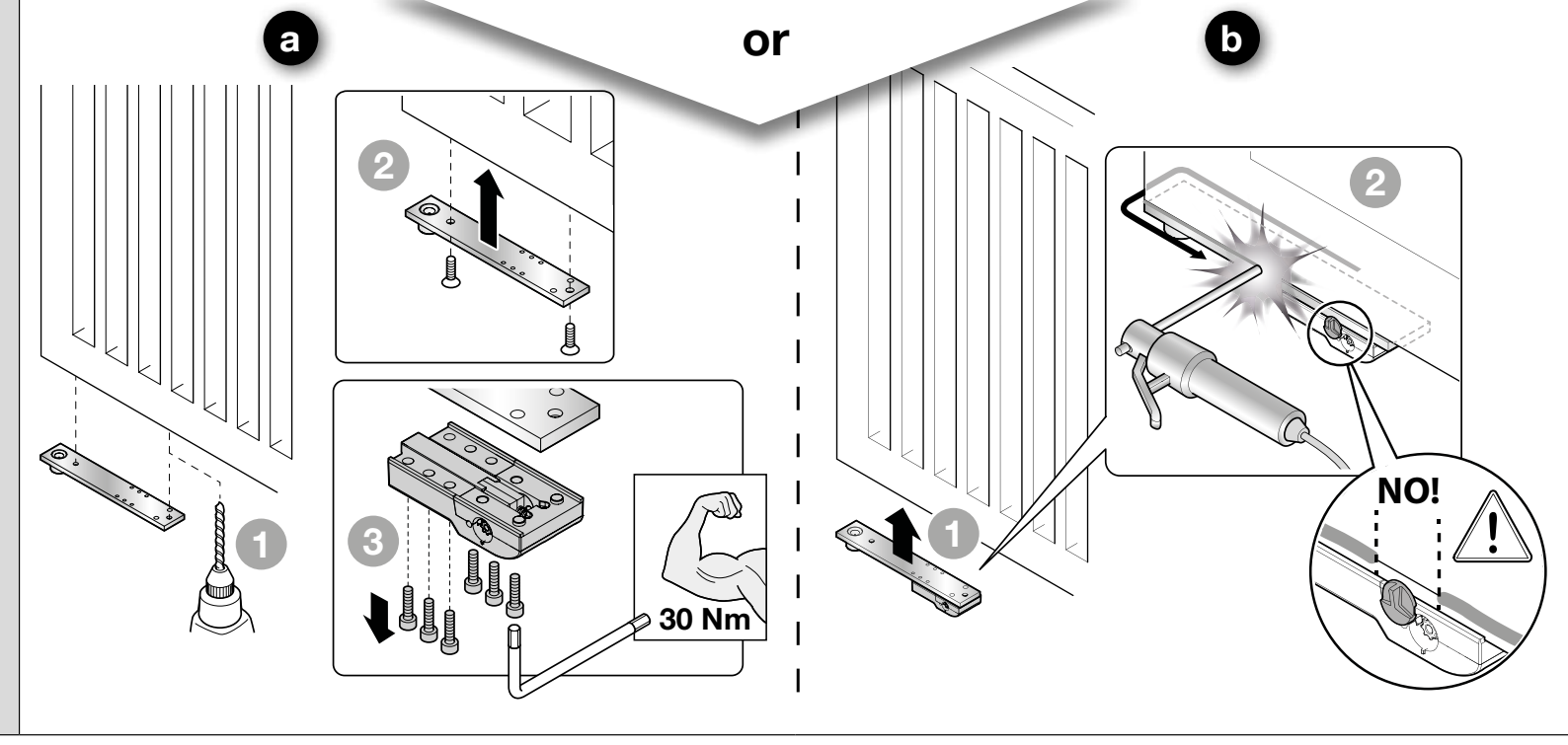
- Secure the gate leaf to the support arm with screws or a strong weld. Tighten the illustrated screw connection to 30 Nm. When welding, protect the motor, release mechanism and plastic parts from heat; do not weld the gate leaf to the release sleeve marked as the incorrect location.
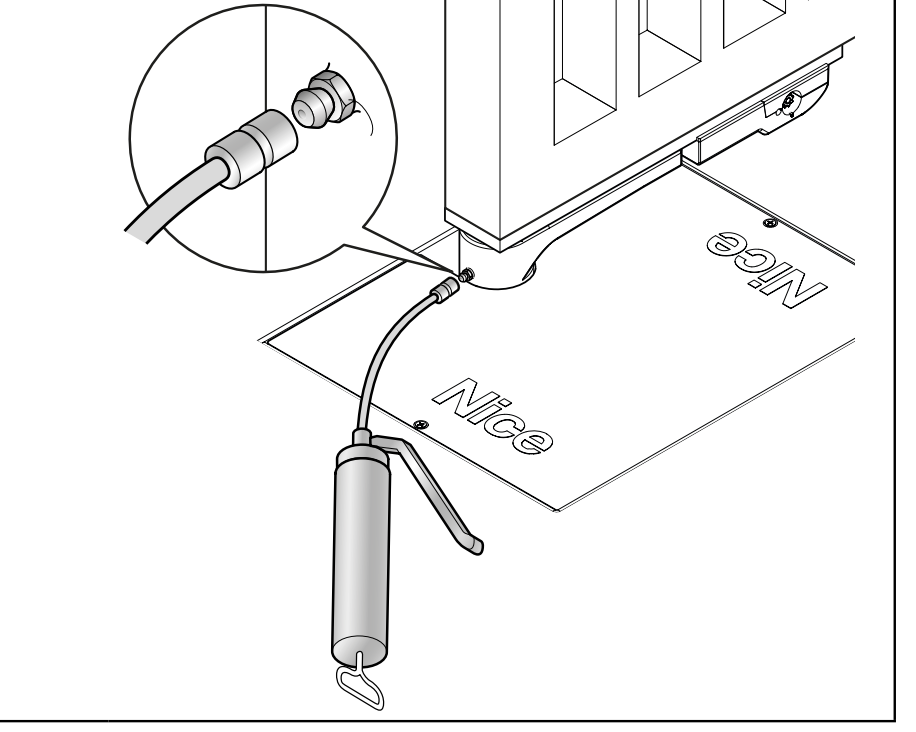
- Lubricate the specified contact surfaces and check that everything moves freely. Route the cable without strain or damage; its connection must not be inside the box.
- After adjusting the stops and carrying out the tests, fit the cover and secure it with two screws. Keep the release mechanism accessible.
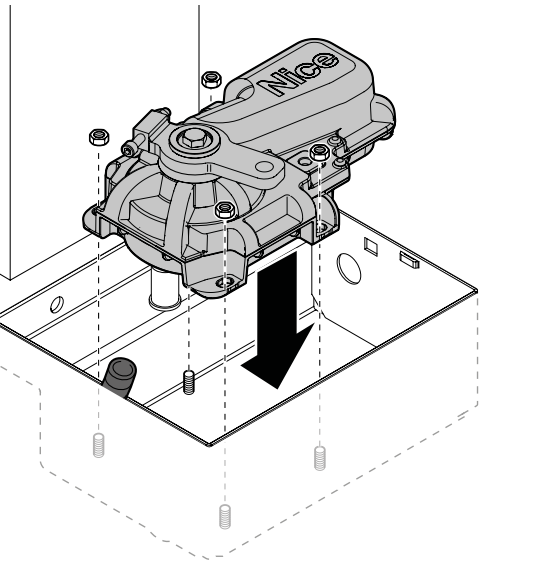
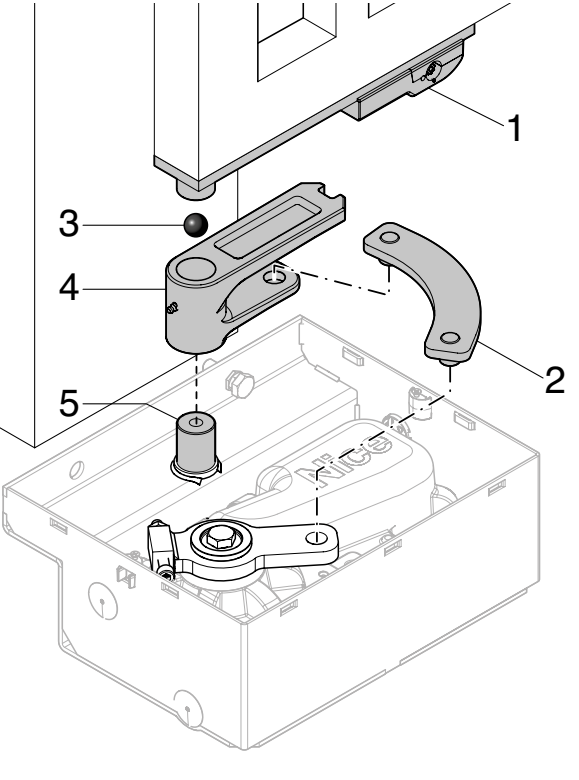
Lever legend: 1 release lever, 2 connecting arm, 3 ball, 4 control bracket, 5 box pin. The numbers in the following attachment procedure indicate the installation sequence.
Mechanical stops and opening angle
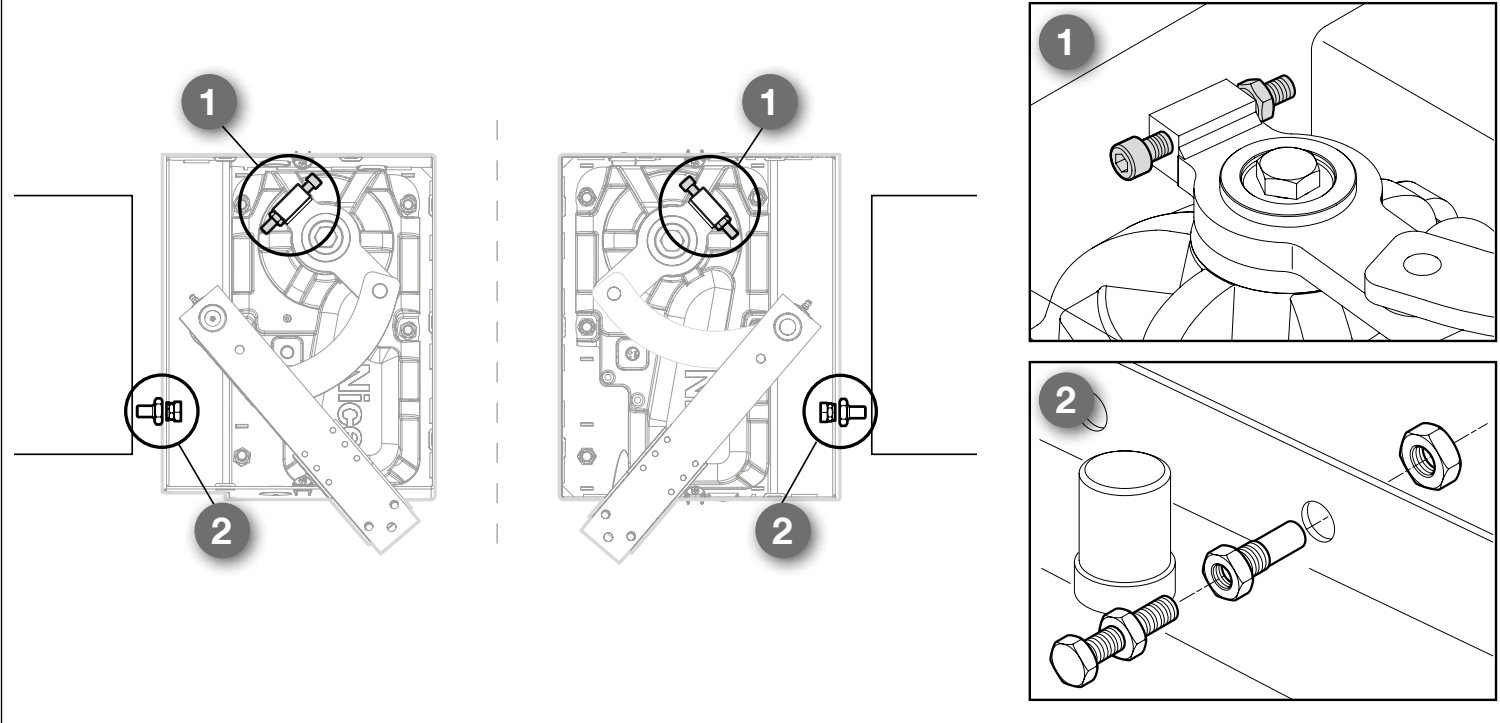
The standard opening angle is up to 110°. If the gate does not have suitable external stops, adjust the supplied stops: 1 is the closing stop on the motor; 2 is the opening stop in the box. They stop the gate leaf in the required position without it striking the surrounding structure. These are mechanical stops, not electrical limit switches.
A greater opening angle is possible with NICE BMA1 with a chain drive, up to a maximum of 360°, and only for gate leaves up to 3.5 m. Suitable external stops and a safe clearance area are also required for this installation. The BMA1 limit does not replace the drive load chart.
Manual release in the event of a power failure
Stop the gate and disconnect the mains power and any backup battery. Hold the gate leaf, especially in windy conditions. Keep people clear of its path.
- Slide open the cover over the release mechanism.
- Insert the supplied BMA3 lever key and turn it 90° clockwise.
- Move the gate leaf by hand slowly and without forcing it.
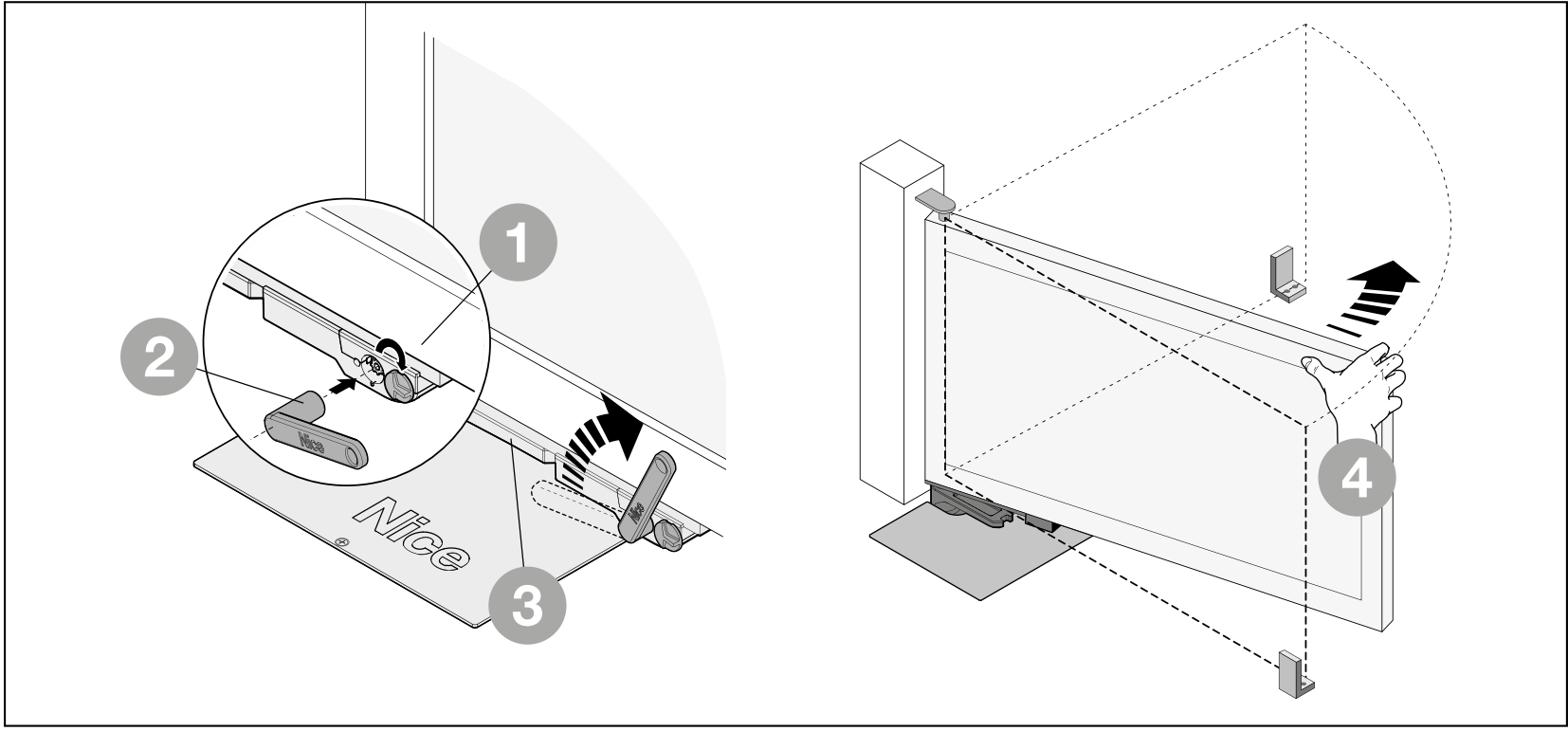
Re-engaging the drive
- Move the gate leaf to approximately the midpoint of its travel.
- Slide open the cover, insert the key and turn it 90° anticlockwise.
- Move the gate leaf gently until the mechanism clearly engages. Check that the mechanism is properly locked before restoring power.
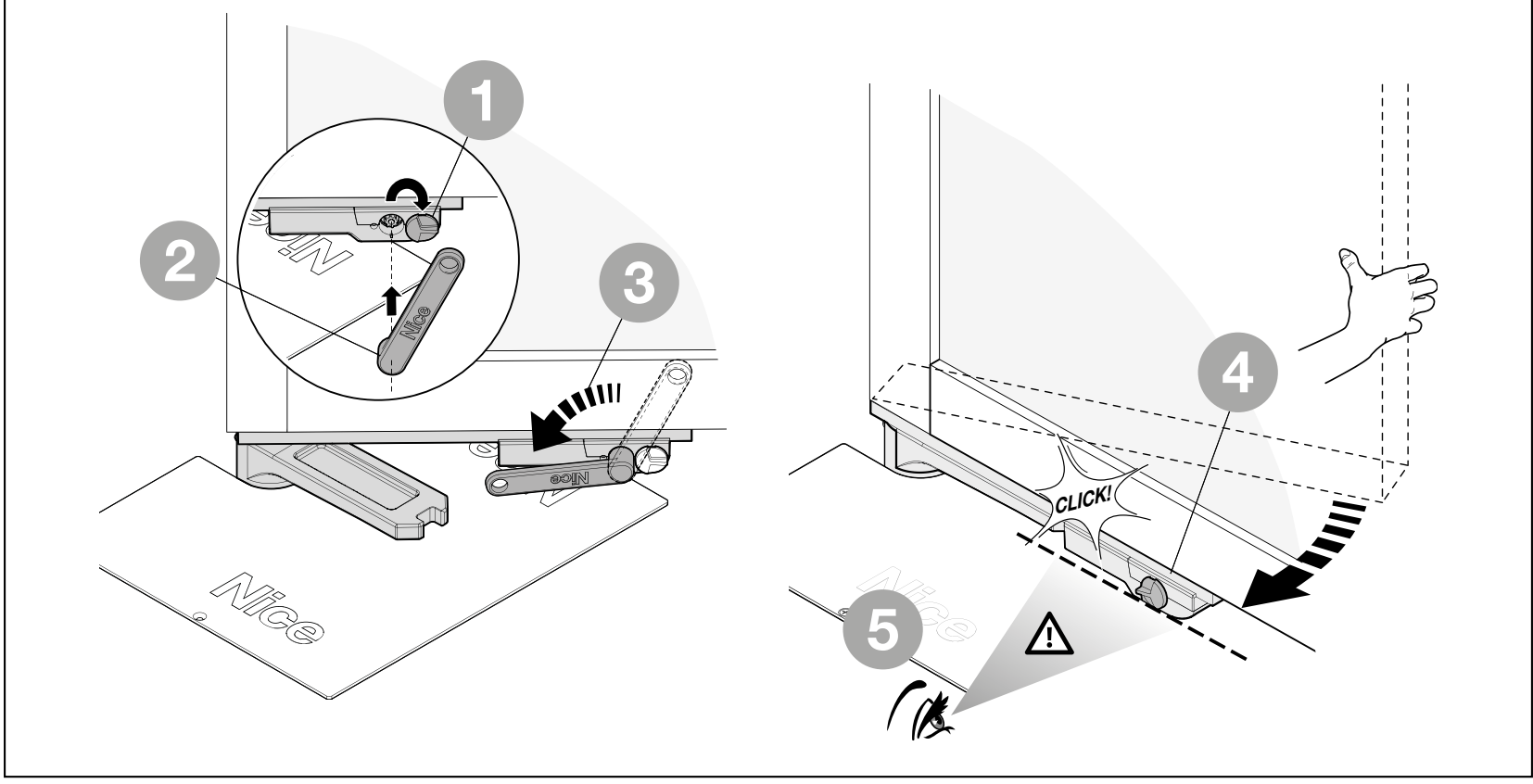
Connecting the motor and control unit
Have the electrical connections made by a qualified person. Disconnect the mains power and backup battery before working on the equipment. Do not place any cable joint or terminal block in the foundation box. Use a suitable protected junction box outside the foundation box for any cable extension. Maintain protective earth (PE).
| LFAB4024HS wires | Connection |
|---|---|
| Blue and brown | Motor 24 V DC power pair to output M1 or M2. The control unit reverses the direction of travel by reversing the power supply; do not assign fixed +/− polarity to this pair. |
| Black and grey | Encoder pair to ENC1 or ENC2 for the same motor. Encoder wires are not polarity-sensitive. |
| Yellow-green | Protective earth (PE). Do not use it for the motor or encoder signal. |
For the MC824HR30, connect one motor to M2 and ENC2. With two motors, M2 is for the leaf that opens first; M1 is for the leaf that closes first. The ENC connection must correspond to the same motor output. If the supplied cable is labelled differently, check the wiring for the specific motor before connecting it.
| Wiring for the MC824HR30 | Cross-section and length |
|---|---|
| Motor, including PE | 3 × 1.5 mm², max. 10 m. |
| Encoder | 2 × 1 mm², max. 10 m. |
| BlueBUS | 2 × 0.5 mm² up to 20 m; for lengths over 20 m and up to 40 m, 2 × 1 mm². |
| FLASH | 2 × 0.5 mm², max. 20 m. |
| Antenna | Shielded RG58; recommended for lengths under 5 m, max. 20 m. |
Use cables suitable for the environment and protected cable routing. The motor and encoder can be combined in one suitable 5 × 1.5 mm² cable. Additional wiring and mains supply: MC824HR30 wiring.
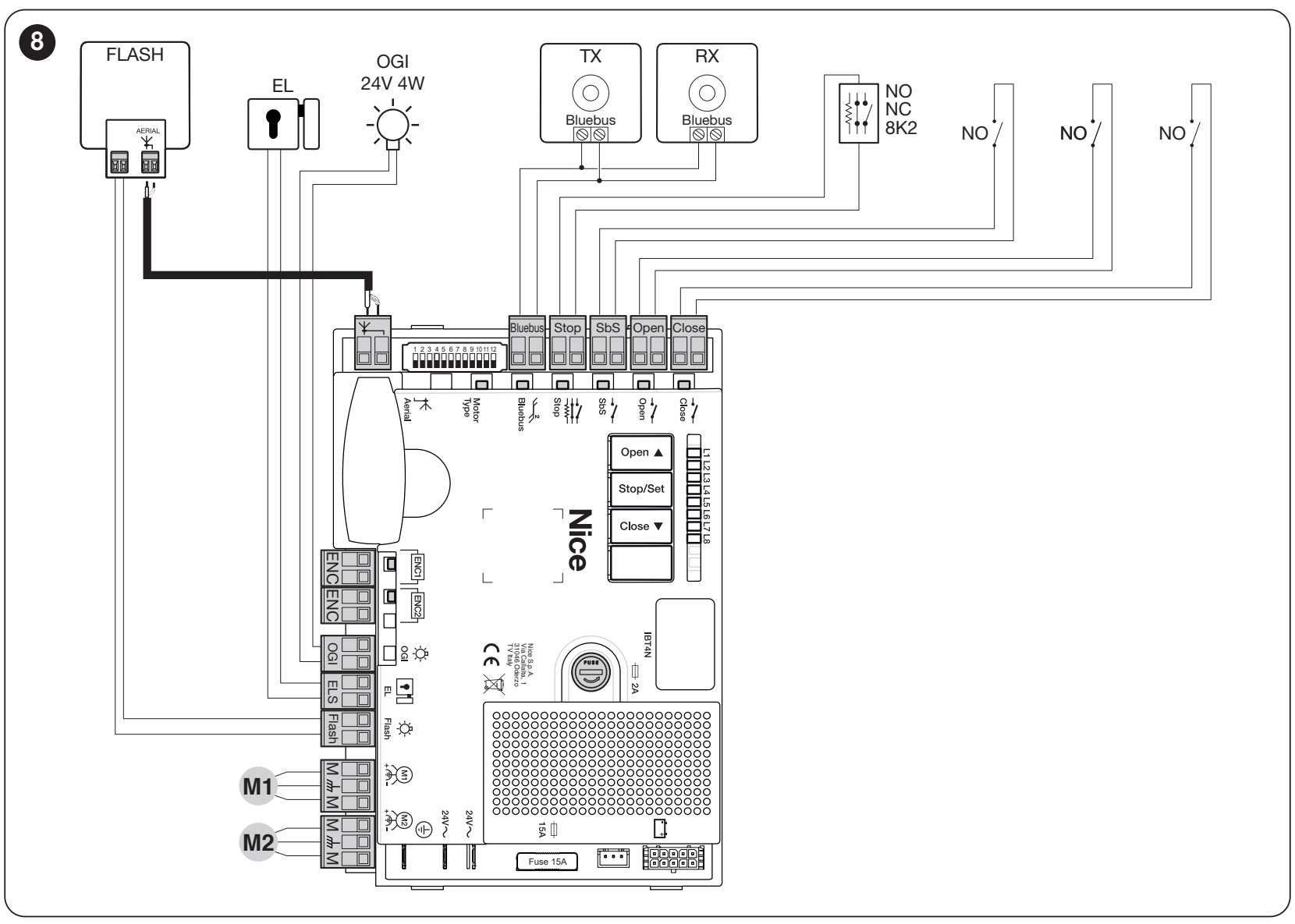
Accessory terminals and polarity
| MC824HR30 output or input | Power supply and polarity |
|---|---|
| Auxiliary power supply | Left SbS terminal = +; right STOP terminal = − when viewing the board as shown below. 24 V DC −30/+50%, max. 200 mA total for connected devices. |
| BLUEBUS | Two wires non-polarized. They carry both power and data; they are not universal +/− terminals. |
| FLASH | Flashing beacon output 12 V DC, max. 21 W; e.g. ELDC. Follow the wiring diagram for the specific light; do not confuse the +/− polarity of this output with the SbS/STOP auxiliary power supply. |
| OGI | Gate-open indicator, 24 V DC, max. 4 W. For a polarity-sensitive light, follow the markings on the actual output and light. |
| ELS | Electric lock 12 V AC, max. 15 VA; AC power supply with no +/− polarity. |
| SbS, OPEN, CLOSE | Command inputs for a voltage-free NO contact. Do not apply an external voltage to these inputs. |
| STOP | Voltage-free NO/NC contacts or an 8.2 kΩ resistive safety edge, depending on the selected configuration. The input is detected during device learning; do not apply an external voltage to it. |
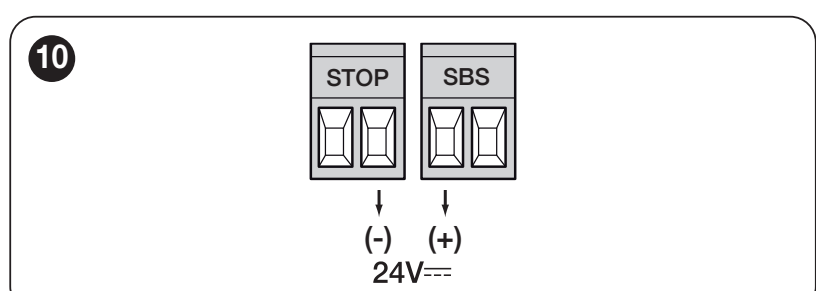
BlueBUS devices are connected in parallel. Each pair of photocells must have the correct address for the required response; repeat the learning procedure after changing devices. MC824HR30 photocell wiring and addressing. Relay photocells must not be connected directly to BlueBUS. The ELAC 230 V beacon must not be connected to this 12 V DC FLASH output.
Initial startup and safety tests
The assembly requires a suitable pressure-sensitive safety edge to limit impact forces. Its type and position must be determined according to the gate's hazardous areas. Photocells and force settings alone do not replace a complete safety test.
- Disengage the drive and manually check the entire travel path, alignment, secure mounting, both stops and drainage. The gate leaf must not stick or move by itself.
- Re-engage the release mechanism. Check the motor, encoder, PE, safety devices and accessories.
- With the power disconnected, set the correct motor type on the 12-position selector. Then switch on the power and check the input status.
- Run device and position learning. Monitor the direction and sequence of the leaves; stop immediately if movement is incorrect or unexpected. Disconnect both the mains supply and backup power before correcting the wiring.
- Test the complete cycle, deceleration, stops and release mechanism. Test each pair of photocells, the safety edge and any emergency stop separately.
- Have the effective forces professionally measured before handover. Attach the manual release instructions to the drive and show the user how to operate, release and maintain it. Do not use the gate until all tests have been completed.
MC824HR30: selecting the LFAB4024HS motor
Set the following on the 12-position selector: DIP 8 = ON; all other DIP switches 1–12 = OFF. Make this setting with the power disconnected, before learning the positions. After changing the motor selection, the positions must be learned again.

LFAB4024HS belongs to the shared WINGOELITE group on the selector. Use only the selector setting specified for the LFAB4024HS.
MC824HR30: device learning
Press and hold Open and Stop/Set. When L1 and L2 start flashing rapidly, after about 3 s, release the buttons. When learning is complete, STOP must be lit and L1 and L2 must be off; L3 and L4 may flash if the positions have not yet been learned. Repeat learning after changing BlueBUS or STOP devices.
MC824HR30: automatic position learning
Before learning, check the wiring, correct motor selection, safety device operation and mechanical stops. Device learning must be completed first. For a single-motor setup, M2/ENC2 is connected. Keep the movement in view while it is operating.
- Press and hold Stop/Set and Close. When L3 and L4 start flashing rapidly, after about 5 s, release both buttons.
- For a double-leaf gate, M1 first closes slowly against the mechanical stop, followed by M2. M2 and M1 then open slowly to the stops, followed by both leaves closing quickly.
- When learning is successful, L3 and L4 go out. Check the complete cycle and safety devices.
If the direction or sequence is incorrect, interrupt learning immediately using Open or Close. Disconnect both the mains supply and backup power before checking the wiring. If swapping M1/M2, the technician must also move the corresponding ENC1/ENC2 pairs; if the direction is reversed, check the motor power pair. Then repeat learning.
If learning is interrupted by a photocell or the STOP input, L1 flashes. Resolve the cause and restart automatic learning; do not bypass safety devices. Detailed procedure and other MC824HR30 learning modes.
Settings, transmitters and reset
The control unit sets the force, speed, automatic closing pause, partial opening and leaf sequence. After making a change, check the safety forces and protective devices. Increasing the force setting does not fix poor mechanical installation.
- MC824HR30 programming – functions and values
- Pairing a transmitter according to the fitted receiver
- MC824HR30 LED indicators and light signals
Deleting radio transmitters and resetting the control unit are separate operations. After deleting settings, the corresponding learning procedure must be performed again. Follow the procedure for the specific control board and receiver.
Troubleshooting
| Symptom | What to check |
|---|---|
| The gate leaf cannot be moved by hand | Manual release, hinges, linkage between the arms, alignment, and foreign objects in the box. Do not force a jammed gate to operate. |
| The motor runs, but the gate leaf does not move | Engagement of the manual release mechanism and linkage between the arms. Disconnect the power before carrying out any work. |
| Incorrect direction or sequence | M1/ENC1 and M2/ENC2 assignment, motor selection and run the learning procedure again. |
| The gate stops or reverses | Free movement, obstructions, photocells, the safety edge, and Control unit LED indication. After resolving the cause, carry out safety tests. |
| Water in the box | Drain, sediment, water backing up, and wiring. If a cable is damaged or water has seeped into a connection, take the equipment out of service. |
| Remote control does not respond | Check the remote control battery, its pairing, the receiver, and the antenna; remote control pairing. |
Maintenance
Have professional maintenance carried out at least every 6 months, and more frequently with intensive use or in harsh environments. Disconnect both the mains supply and backup power before cleaning or carrying out work. Do not use a damaged gate or one that sticks until it has been repaired.
- Remove mud, leaves, and stones from the box and keep the drain clear.
- A technician will check for corrosion and inspect the cables, screws, hinges, arms, and stops; worn parts will be replaced.
- Lubricate the specified moving contact surfaces through the grease nipple with a suitable lubricant. Check that the gate moves freely and that the manual release works.
- After maintenance, test manual operation, a complete automatic cycle, and every safety device.
Estimated service life
Service life depends on the weight and length of the gate leaf, as well as the environment. Add the index for the relevant combination and any other applicable factors. The following must be met first: operating limits; the service-life index does not mean that a heavier gate leaf is permitted. The graph shows an estimated number of cycles with regular maintenance, not a guarantee or a number of years. The horizontal axis shows the sum of the indices as a percentage; the vertical axis shows the number of cycles.
For temperatures above 40 °C or below 0 °C, or humidity above 80%, add 15%. A solid infill adds 20%; a windy environment adds a further 15%.
| Properties of the complete automation system | Index | Service-life graph |
|---|---|---|
| Up to 150 kg | 2.01–3 m: 10% 3.01–4 m: 20% | 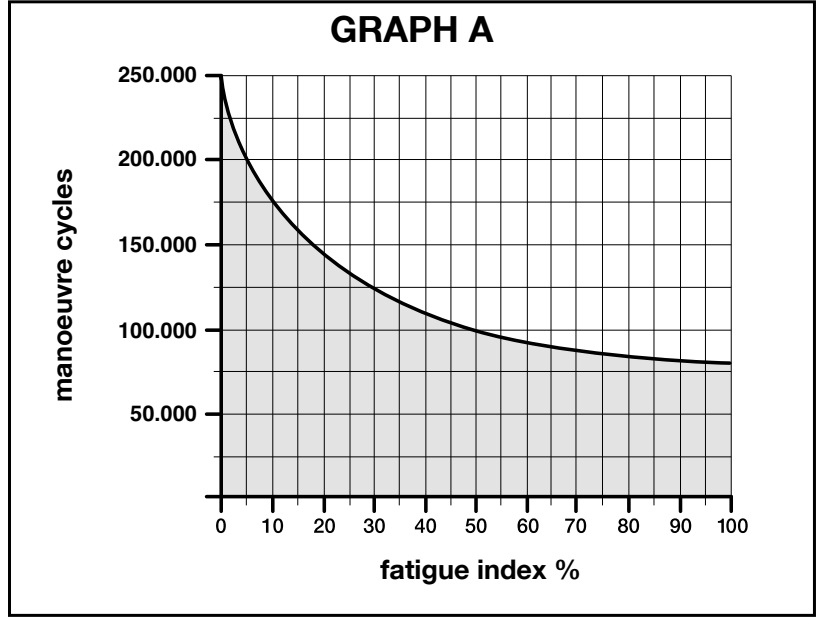 |
| 151–350 kg | 2.01–3 m: 20% 3.01–4 m: 30% | |
| 351–400 kg | 2.01–3 m: 30% 3.01–4 m: 40% | |
| Temperature / humidity | +15% | |
| Solid infill | +20% | |
| Windy environment | +15% |
Example: a 3 m / 180 kg gate leaf has an index of 20%. In a windy environment, add 15%, for a total of 35%. Any other applicable factors should also be added.
The combinations shown apply to gate leaves longer than 2 m. For a shorter gate leaf or an unclear combination, contact us with the length, weight, infill type, and required number of cycles.
Technical specifications and dimensions
| Parameter | NICE LFAB4024HS |
|---|---|
| Motor voltage | 24 V DC, separate from the control unit's mains supply |
| Control unit for the new system | MC824HR30 / MCA1R30, 230 V AC mains supply |
| Encoder | Magnetic, with a separate ENC connection |
| Peak current / power consumption | 7 A / 170 W |
| Torque | Maximum 200 Nm; rated 90 Nm |
| Speed | No load: 3 rpm; at rated torque: 2.4 rpm |
| 90° opening | Approximately 6 s, excluding acceleration and deceleration, with a typical installation. |
| Operation at 90° opening | 50 cycles/h at rated load; half that at 180° with BMA1 |
| Typical opening angle | Up to 110°; up to 360° with BMA1 for a gate leaf up to 3.5 m |
| Protection rating / operating temperature | IP67 / −20 to +55 °C |
| Power cable | 2 m; extensions and connections must be outside the box |
| Motor weight | 12.5 kg; the box is calculated separately |
| Steel box | LFABBOX4 – 14.4 kg |
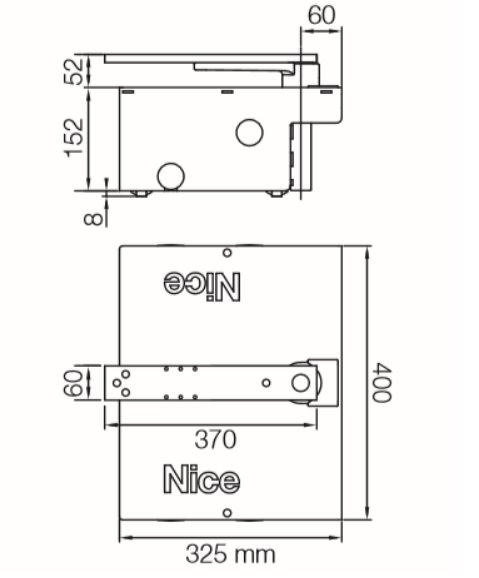
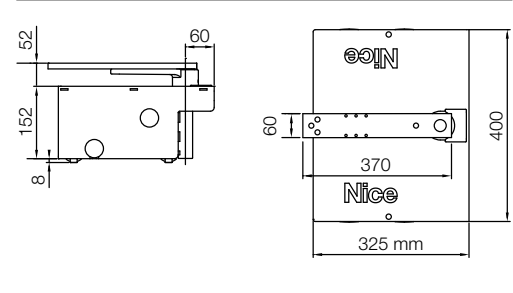
| Box dimensions as shown in the drawing | 400 × 325 mm, body height 152 mm; also observe the pin position and hinge axis |
Maximum torque and peak power consumption are not continuous-duty ratings. When planning the excavation and gate-leaf height, follow the drawing and check the box actually supplied. The dimensions of the motor alone do not replace the box dimensions.
Product view
How can I order this item?
Choose the option that suits you:
- order online: use the buy button to add the goods to your shopping cart (you will find the buy button here in the product variants table).
- order by email: place your order at [email protected]






