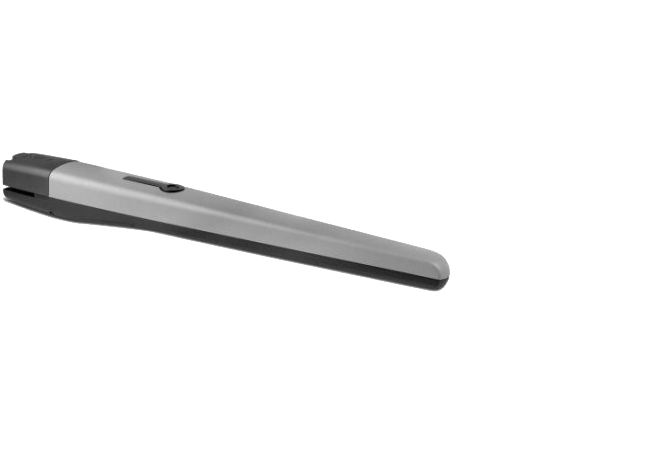
NICE Toona TO5024I – standalone 24 V swing gate operator for gates up to 5 m, according to the load chart
| Product availability: | within 3 days | We usually ship the goods within 3 days. |
|---|

within 3 days
€623.98 including VAT
| Weight |
|---|
| 11 kg |
Description of NICE Toona TO5024I – standalone 24 V swing gate operator for gates up to 5 m, according to the load chart
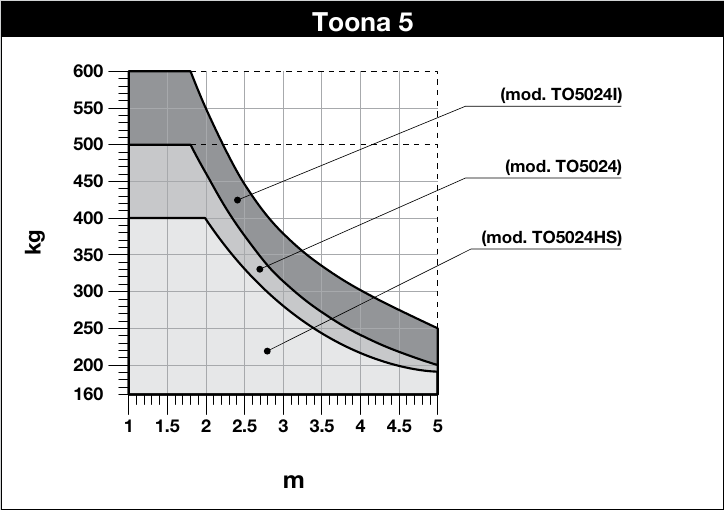
NICE Toona TO5024I is a standalone 24 V DC motor for one gate leaf. NICE describes it as a version for intensive use; compared with the TO5024, it has a higher rated force and is rated for 75 cycles per hour at its rated force. The 5 m length and 600 kg weight are maximum figures; the permissible combination is shown in the graph for the specific model.
24 V indicates the motor voltage. The mains supply, radio receiver, safety devices and position learning depend on the control unit actually installed. For the current MC824HR30/MCA1R30 use the its own manual; for the older MC824HR10, follow the instructions for the MCA1R10 board.
| Quick navigation | |
|---|---|
| Package contents | Limits |
| Service life | Installation |
| Wiring | Stop |
| Accessories | Control unit |
| Manual release | Specifications |
| Maintenance | Manual |
| Accessories – terminals and polarity | PDF manual |
- Non-reversible
- 24 V
- Magnetic encoder
- With an opening stop
- Version for intensive use according to NICE
What is included with the standalone operator
| NICE-supplied component | Purpose |
|---|---|
| TO5024I motor | Drives one gate leaf. |
| Front and rear brackets with mounting plate | Attach to the gate leaf and post. |
| Fasteners and release keys | Mount the operator on the brackets and move it manually in the event of a power failure. |
The exact number of parts depends on the supplied version; check the package against Figure 1 in the NICE manual. Anchor bolts and plugs for the post or wall are supplied separately, according to the substrate. Choose the control unit and safety accessories to suit the specific setup.
Operating range
TO5024I: at 5 m, the graph shows approximately 250 kg; the 600 kg limit applies only up to approximately 1.8 m. Also assess movement resistance, gate infill and wind exposure. The graph shows the operating limit, not a service-life guarantee.
Service life by load
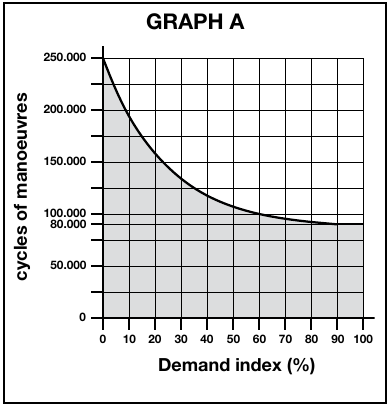
For each gate leaf, add the relevant indices for weight, length and environmental conditions. Read the approximate number of cycles from the original graph. This is the manufacturer's estimate, not a service-life guarantee.
| Characteristics of the complete automation system | Index | Service-life graph |
|---|---|---|
Weight up to 300 kg | 0% |
|
Over 300 up to 400 kg | 10% | |
Over 400 up to 500 kg | 20% | |
Over 500 kg | 30% | |
Length 2–3 m | 0% | |
Length over 3 up to 4 m | 10% | |
Length over 4 up to 5 m | 20% | |
Temperature above 40 °C, below 0 °C, or humidity above 80% | 20% | |
Solid gate infill | 15% | |
Windy area | 15% |
| NICE graph |
|---|
Compatible control units
Current: MC824HR30/MCA1R30. Older compatible setup: MC824HR10/MCA1R10; use the manual for the board installed in this setup. The motor is also sold separately, so check the contents of the specific kit to confirm which control unit it includes.
I. Installing the rear mounting bracket
Bracket mounting: For a standard steel structure, a 120 × 120 mm post is recommended as a general guide. A 100 × 100 mm section may be used after assessing the material, wall thickness, height, foundation, anchoring and wind load. The post dimensions alone do not confirm that the installation will be strong enough.
Measure the hinge offset C, then use the original installation diagram to determine B, the opening angle and A. A and B should be similar; NICE does not recommend B values below the line t . does not recommend. extended rear bracket PLA6. An extended rear bracket is required for outward opening; determine the dimensions based on the actual gate. Before welding, measure the supplied brackets and check the full travel of the gate leaf.
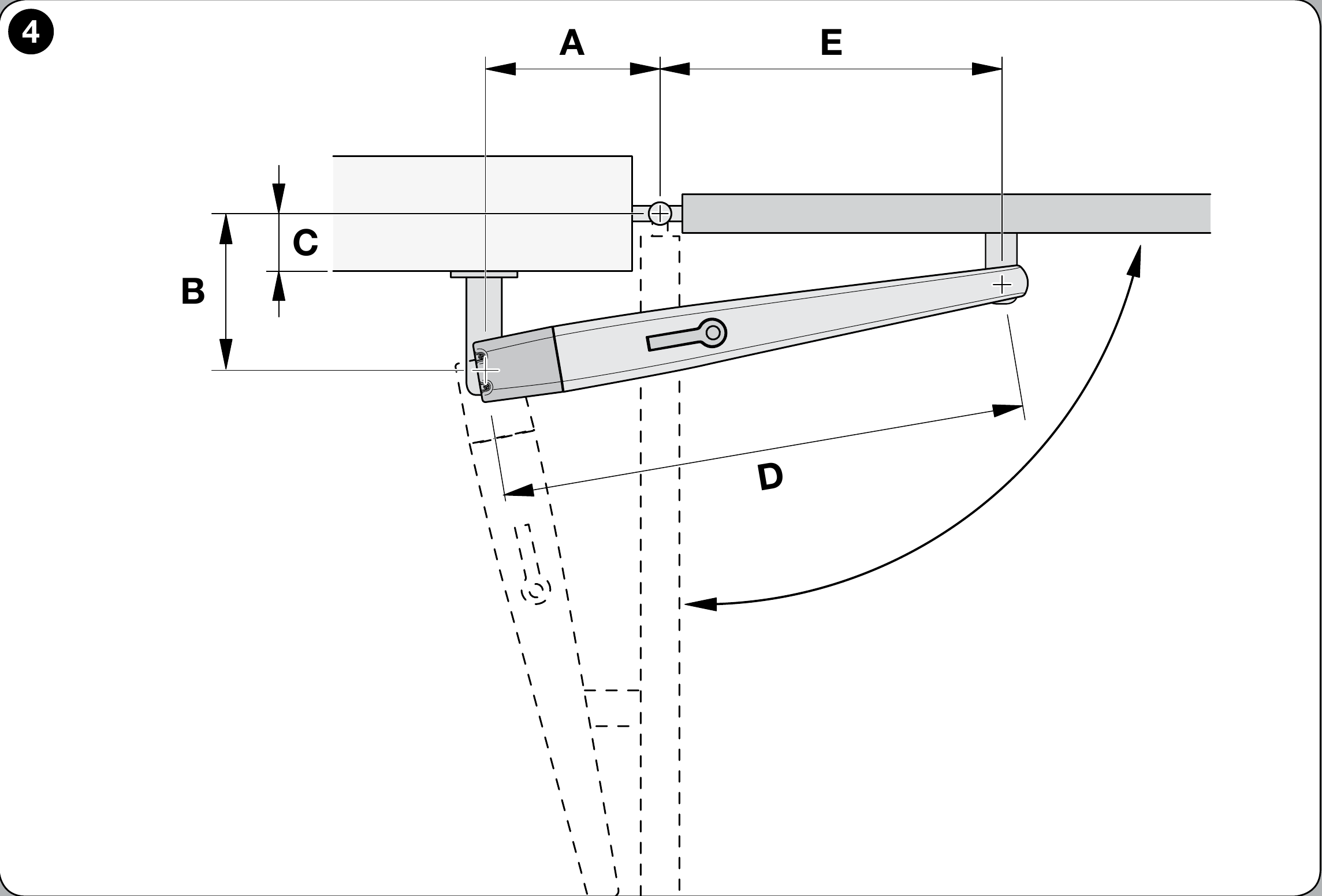
Diagram: inward opening
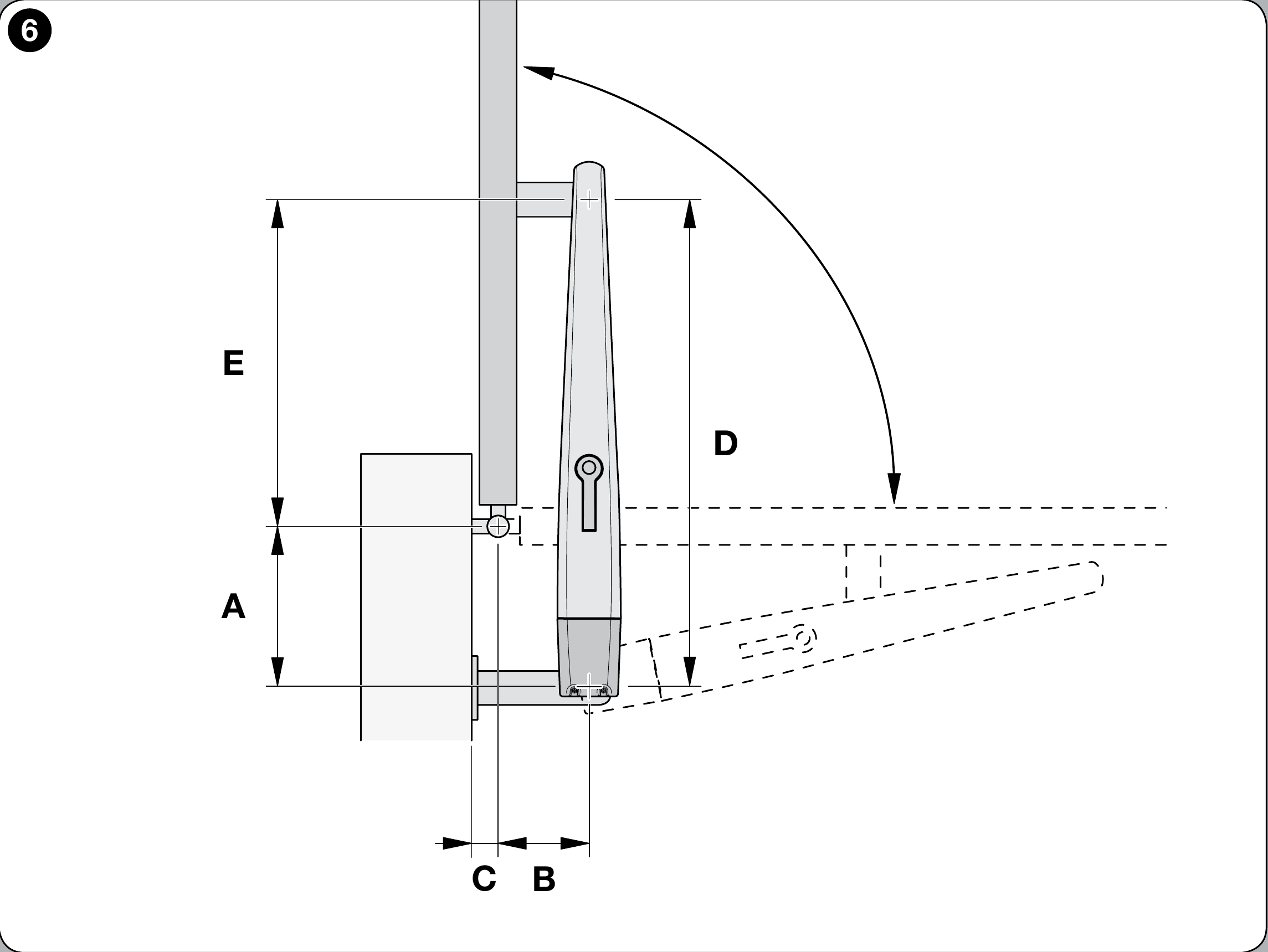
Outward opening diagram
The position of the rear bracket determines the achievable opening angle and the load on the motor. Read dimensions A/B/C from the graph explicitly marked TO5024I; do not shorten or weld the bracket before testing the complete geometry.
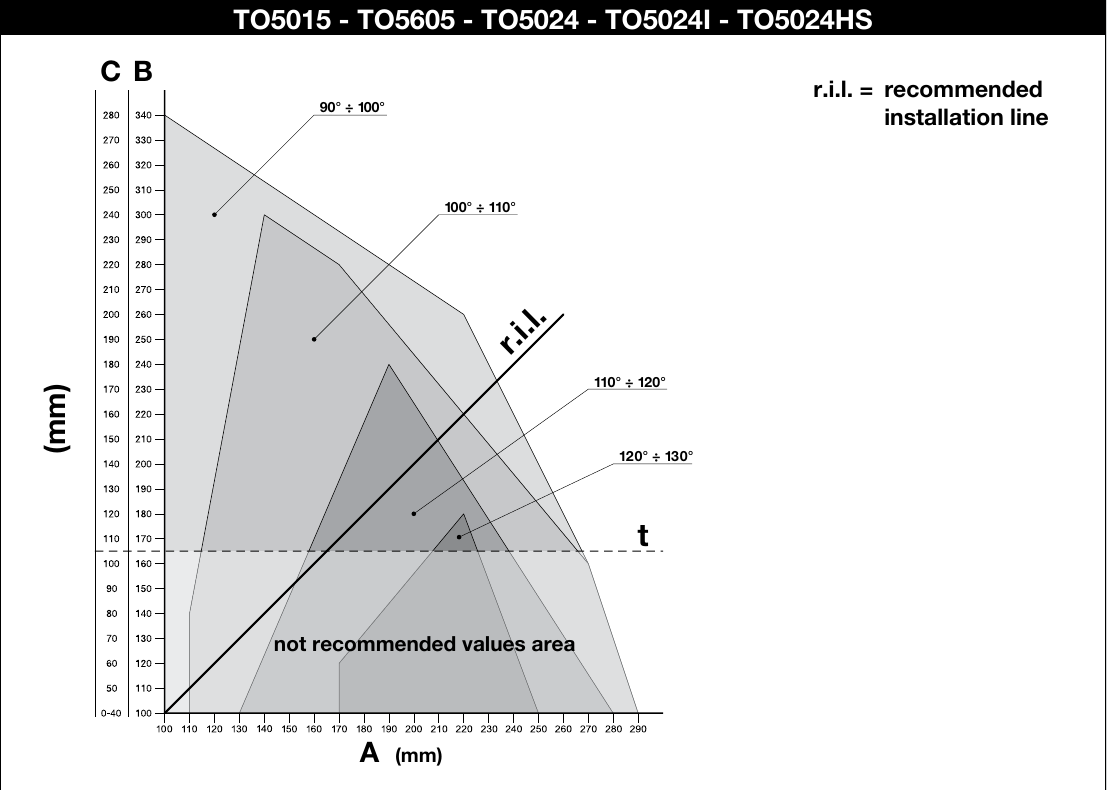
NICE Toona 5 mounting graph for TO5024I
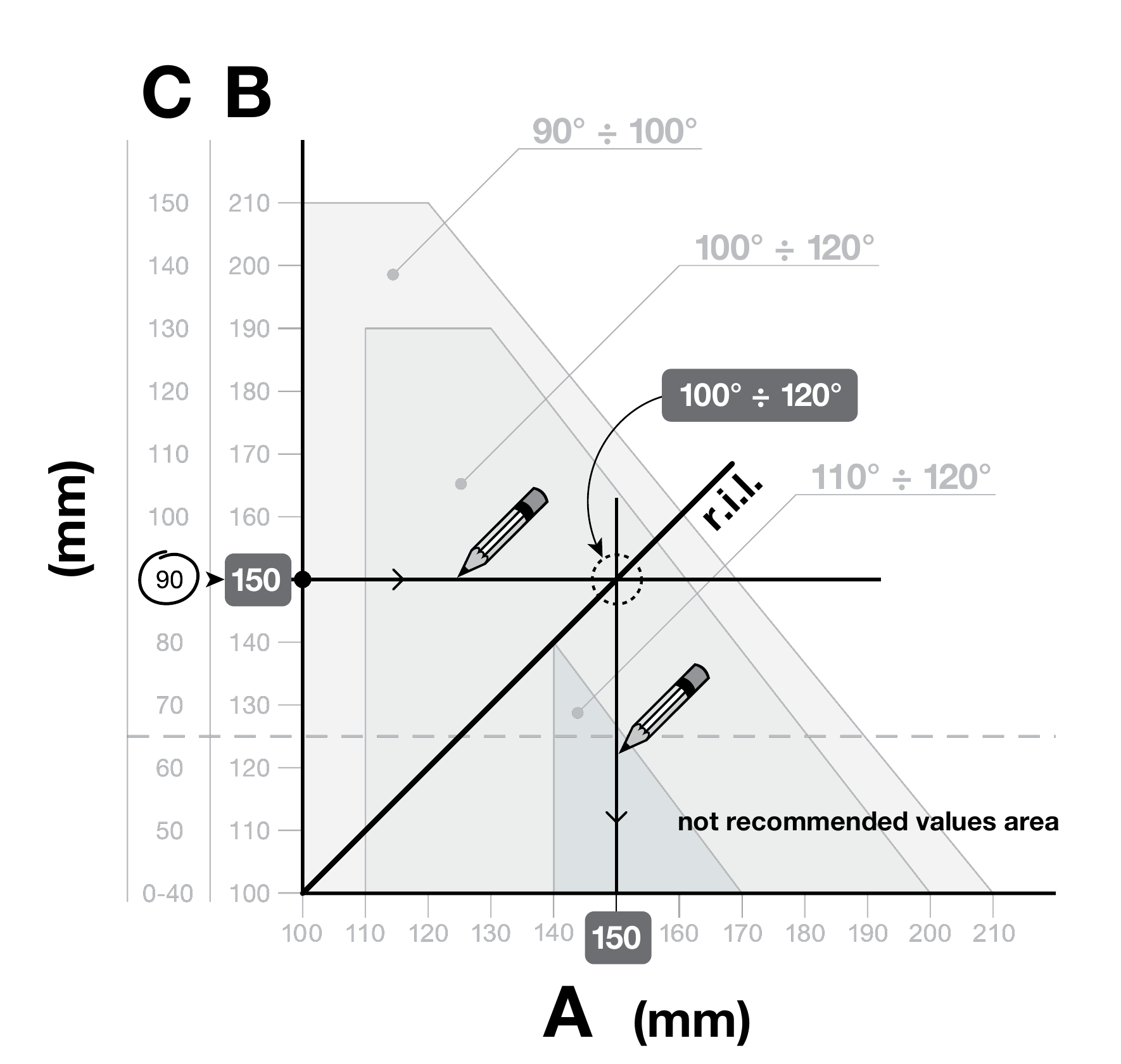
Example of reading A/B/C
Calculation procedure:
- Measure C as shown in the gate diagram.
- From C on the graph, draw a horizontal line and read off B.
- The intersection with the recommended r.i.l. line determines the maximum angle; read off A by drawing a vertical line.
- If the angle is unsuitable, adjust A and, if necessary, B so that they are approximately equal. Do not use B values below line t.
Before securing the rear bracket, transfer dimensions A and B from the graph to the actual gate. If the supplied bracket needs shortening, modify it only after testing the geometry, then securely join it to the mounting plate.
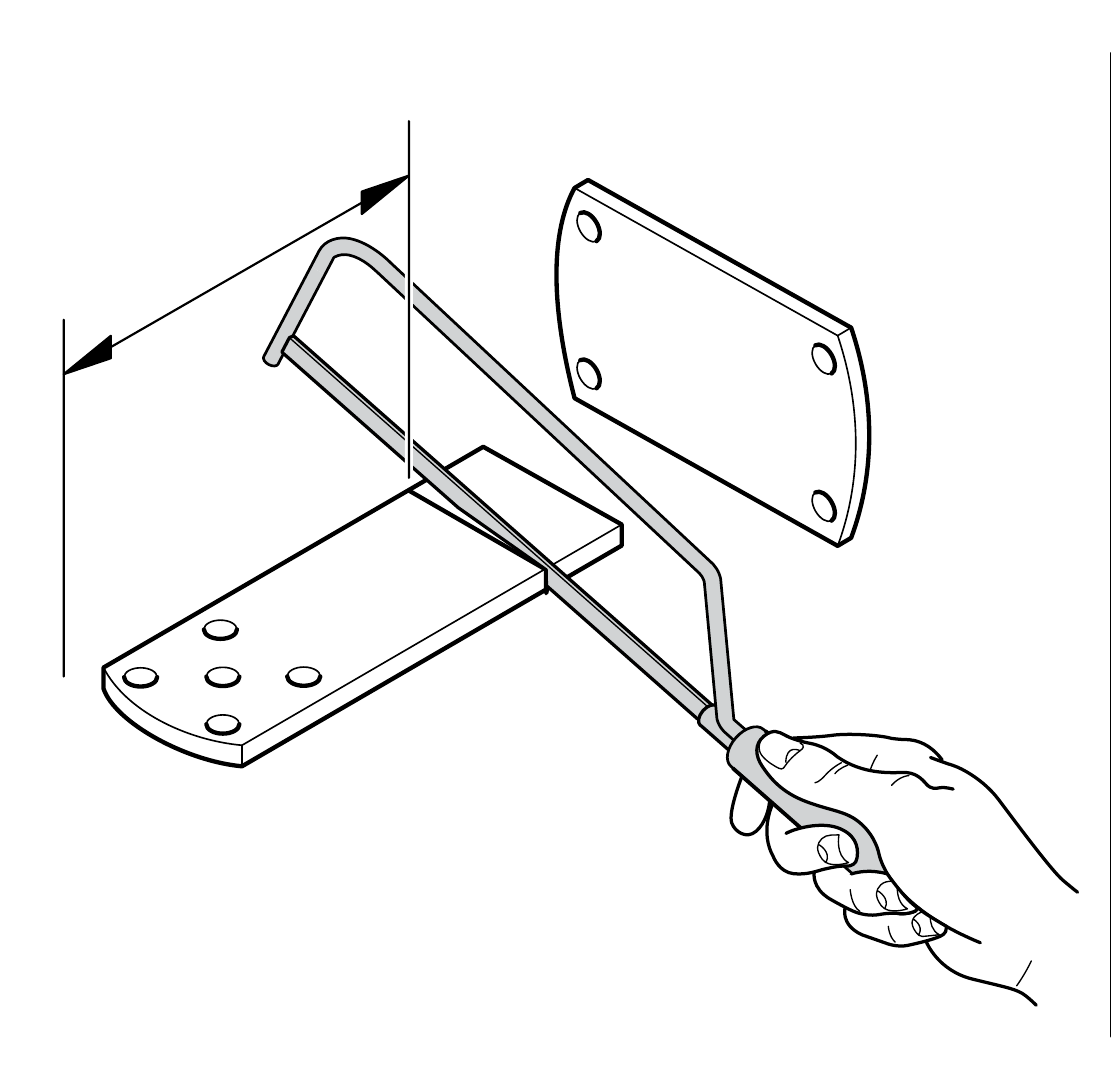
1. Cut the bracket to the required length
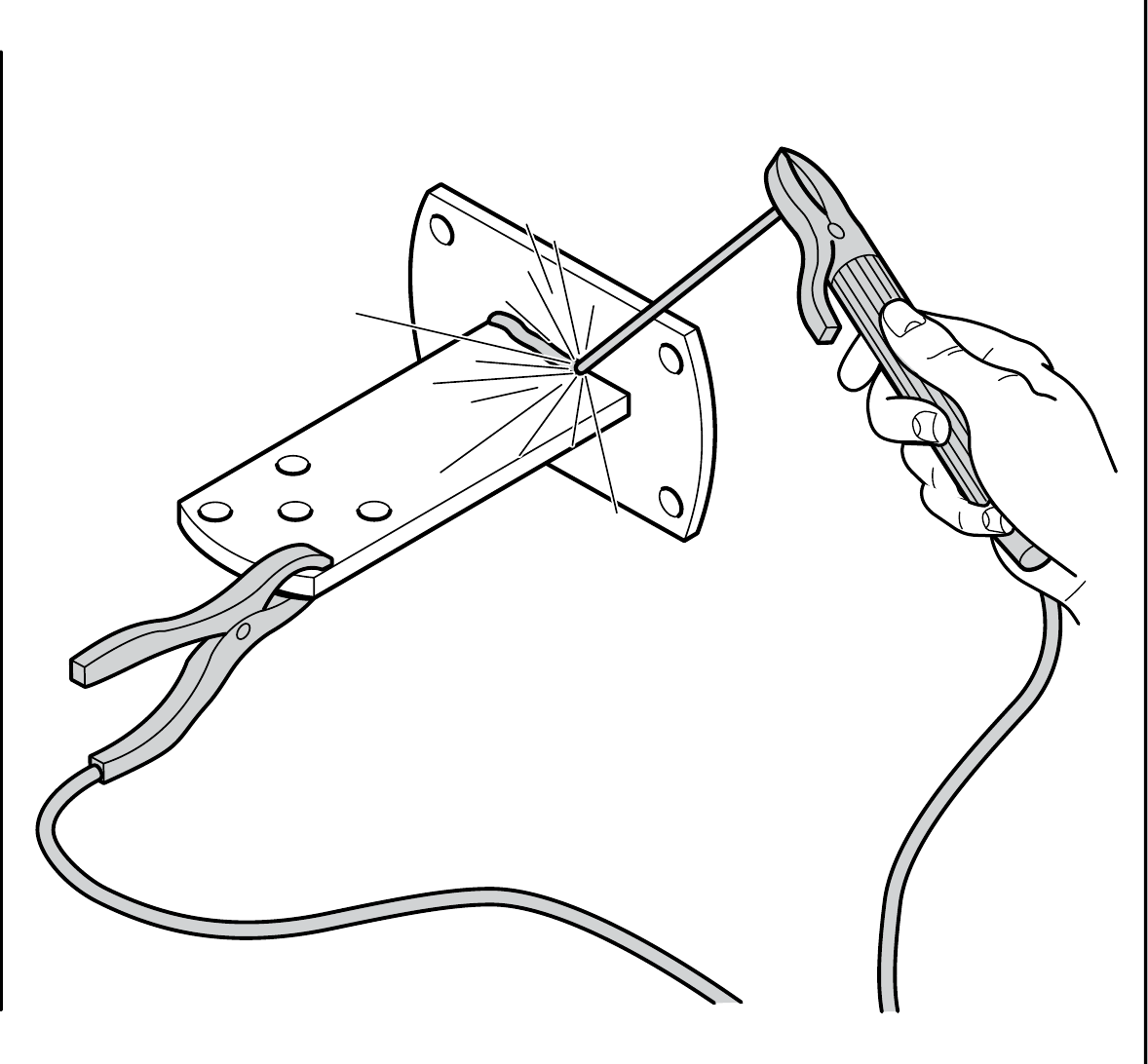
2. Weld the shortened bracket to the mounting plate
The supplied Toona 4–5 series rear bracket is 150 mm long. For a greater hinge offset or outward opening, use PLA6 and check the bracket positions again against the graph.
Before attaching the rear bracket, check that the front bracket will land on the fixed part of the gate leaf, since there is a height difference between the front and rear brackets, as shown in the picture.
Height difference F = 34 mm as specified by NICE for Toona 4–5. Before final attachment, measure the brackets actually supplied and check that the gate leaf moves freely along its entire travel path.
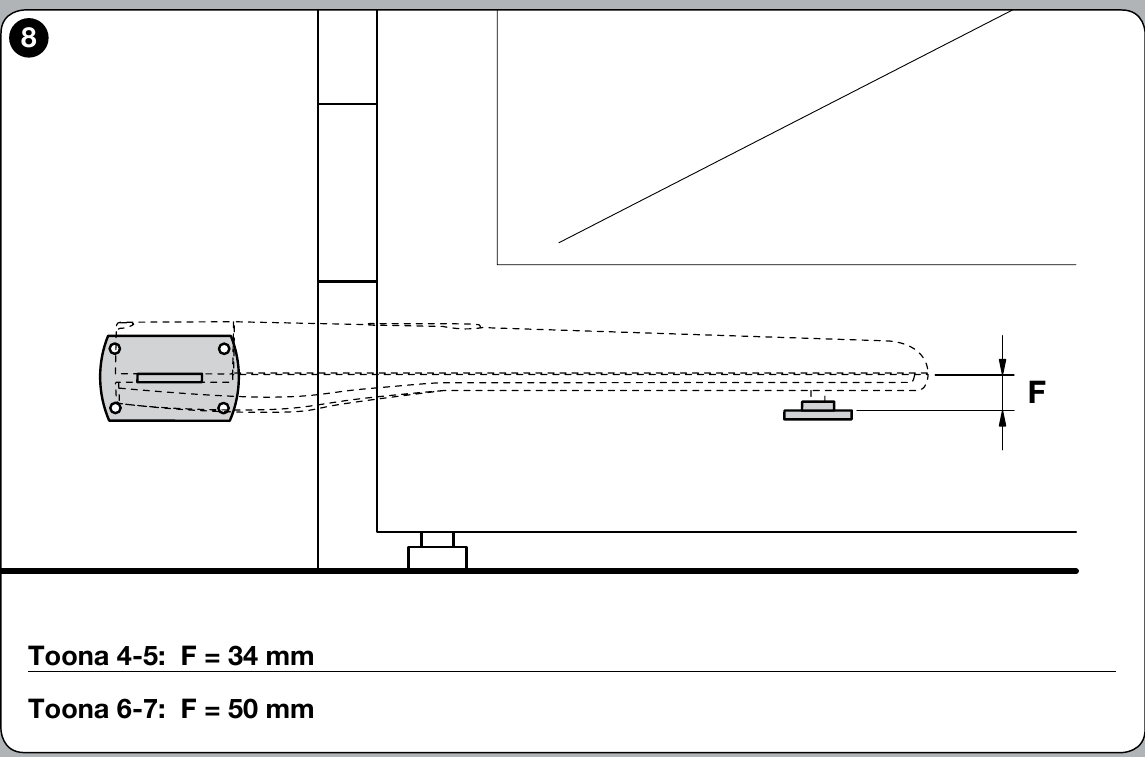
NICE Toona – bracket height difference F = 34 mm
After checking the geometry, securely fasten the rear bracket to the post or wall using suitable screws, wall plugs and washers for the substrate material. These fasteners are not included with the motor.
II. Installing the front mounting bracket
Position the front bracket on the gate leaf using the fixed mounting dimension D = 880 mm. Read the value E from the table for the dimension A selected when installing the rear bracket.
| A (mm) | E (mm) |
|---|---|
| 100 | 780 |
| 110 | 770 |
| 120 | 760 |
| 130 | 750 |
| 140 | 740 |
| 150 | 730 |
| 160 | 720 |
| 170 | 710 |
| 180 | 700 |
| 190 | 690 |
| 200 | 680 |
| 210 | 670 |
| 220 | 660 |
| 230 | 650 |
| 240 | 640 |
| 250 | 630 |
| 260 | 620 |
| 270 | 610 |
| 280 | 600 |
The supplied front bracket is designed to be welded on. If it needs to be bolted on, use a suitable NICE PLA8 bracket.
- For the selected A, read the value E from the table.
- Install the front bracket with a height difference of F = 34 mm according to the NICE drawing.
- Attach the front bracket to the fixed part of the gate leaf; if welding, tack it in place first and recheck the movement before completing the weld.
III. Installing the gate operator on the rear bracket
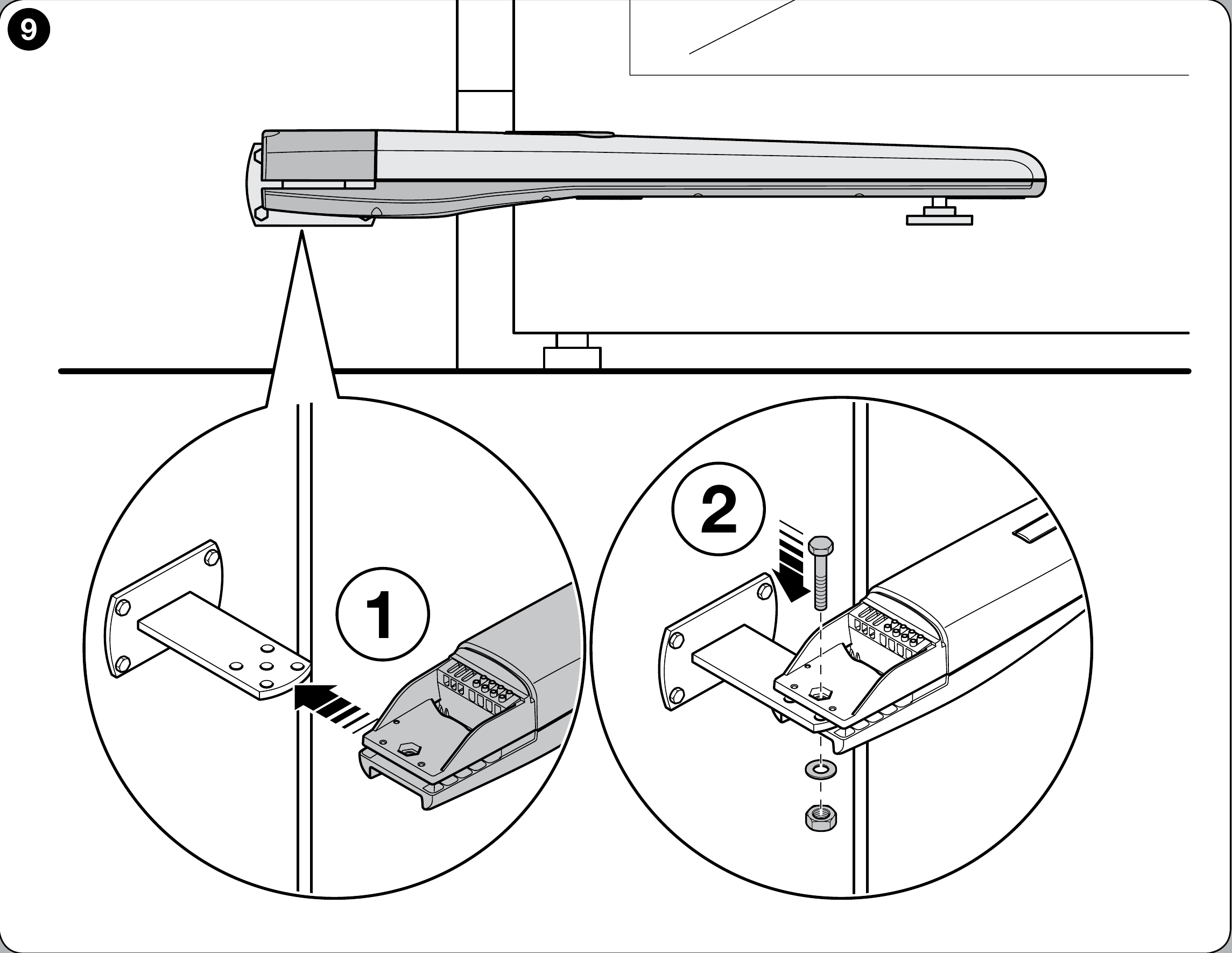
Installing the NICE Toona operator on the rear bracket
- Attach the motor to the bracket as shown, using the supplied rear bracket pin, washer and nut.
- Tighten the nut fully, then loosen it by 1/10 turn, leaving minimal clearance between the parts, as specified by NICE.
IV. Installing the gate operator on the front bracket
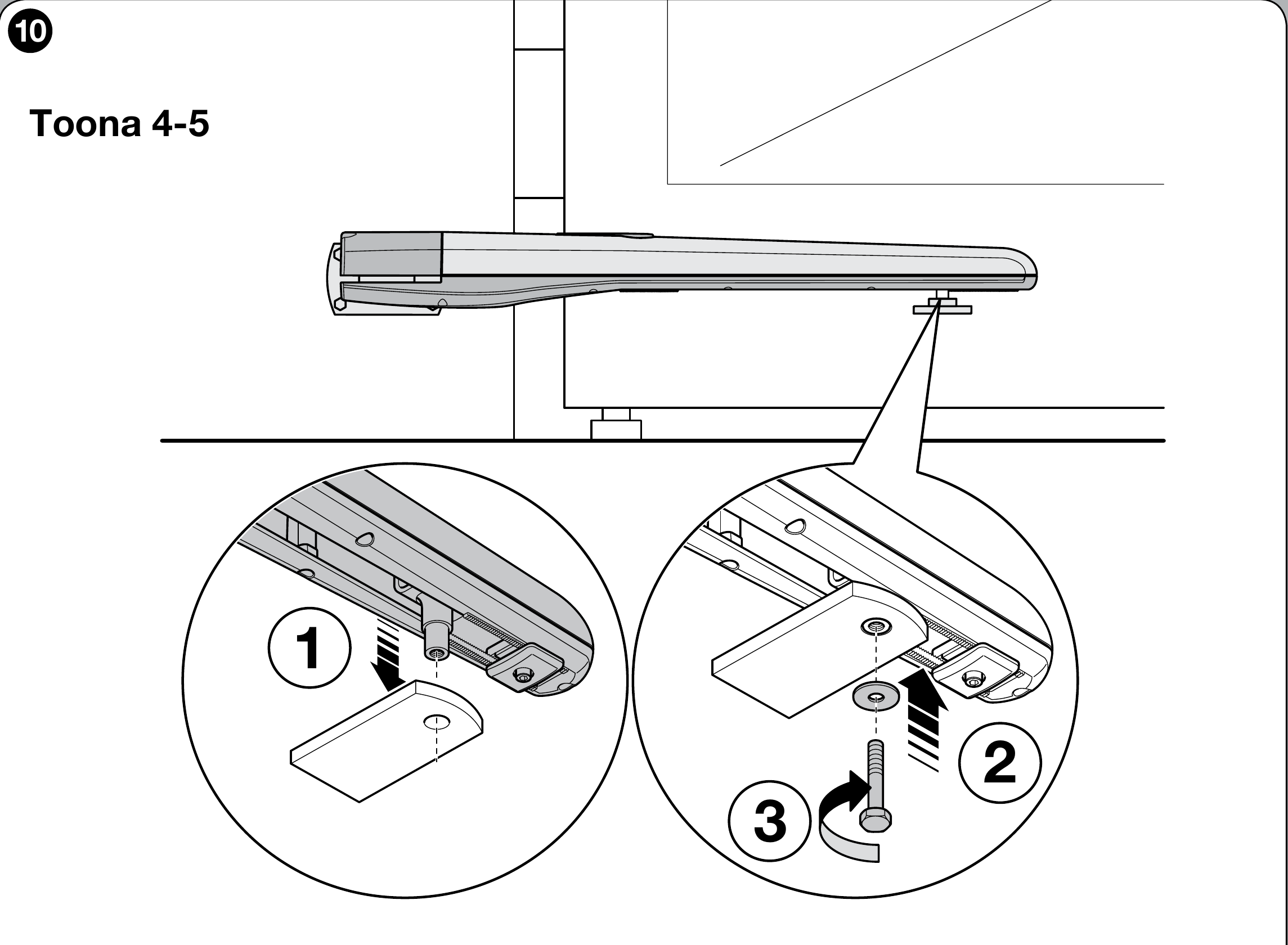
Installing the NICE Toona operator on the front bracket
- Attach the operator to the bracket as shown, using the supplied pin and washer.
- Tighten the front fixing fully, as shown in the NICE installation drawing.
V. Adjusting the mechanical travel stop
The TO5024I has an internal mechanical opening stop. When adjusting it, stay within the range marked on the NICE drawing as 100 mm max. Determine the closed position and any required external stops based on the complete gate and the control unit installed.
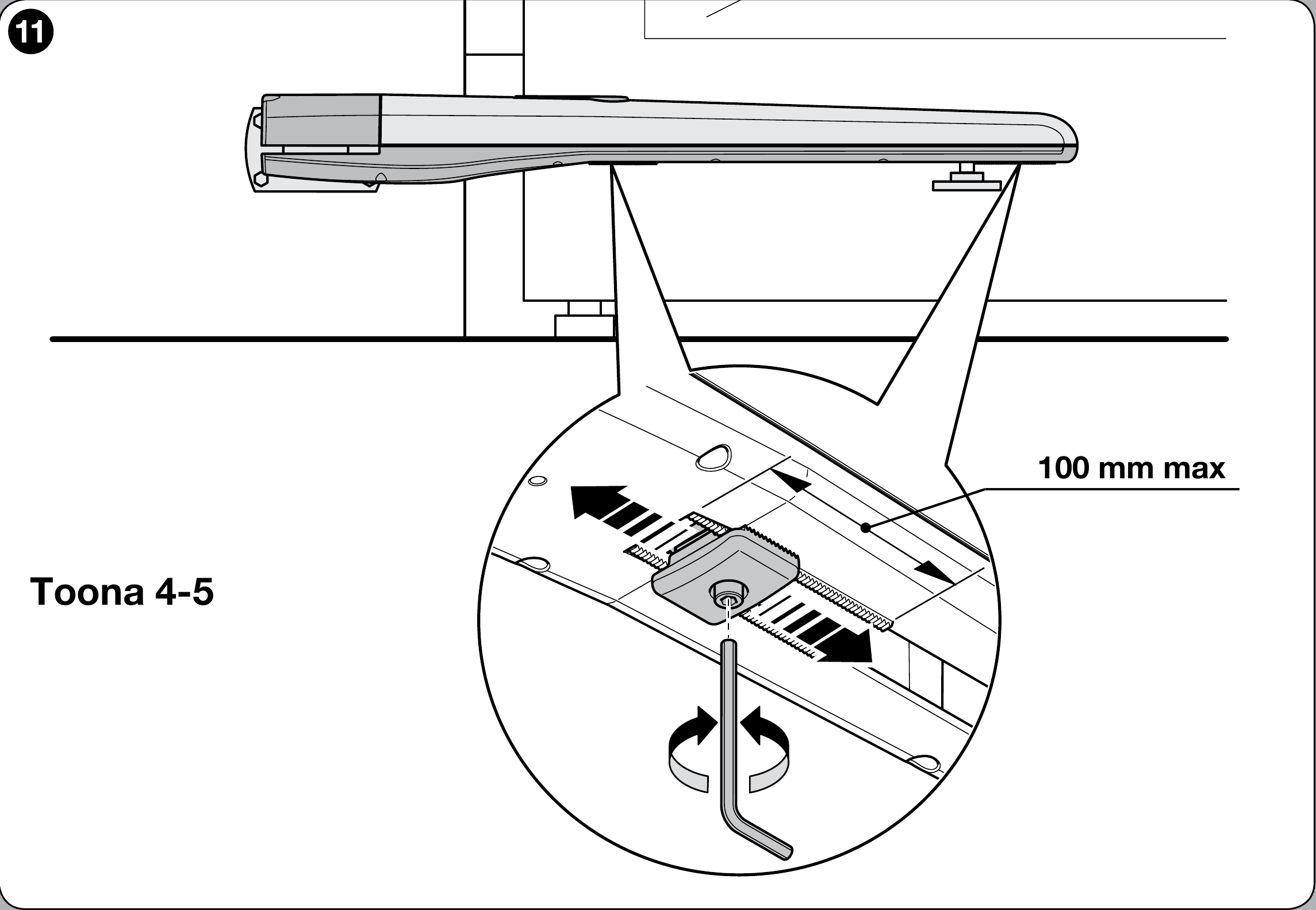
Setting the NICE Toona drive’s mechanical travel stop
- Release the drive according to the drive release instructions
- Loosen the mechanical stop screw
- Manually move the gate leaf to the desired open position
- Move the entire mechanical stop up to the pin and tighten the screw as shown
- Manually move the gate leaf to the closed position and engage the drive
Motor wiring and connections
Disconnect the power supply before wiring. 24 V DC is the motor voltage; the control unit’s power supply and accessory outputs must be considered separately. The motor has a separate pair of motor wires and a pair of encoder wires. For series 4–5 drives, the terminals are labelled as shown; for series 6–7, use its separate diagram. Make connections on the control board solely according to the actual board installed in the system. For a gate that opens outwards, NICE specifies reversing the motor supply polarity; do not connect the encoder as the motor power supply.
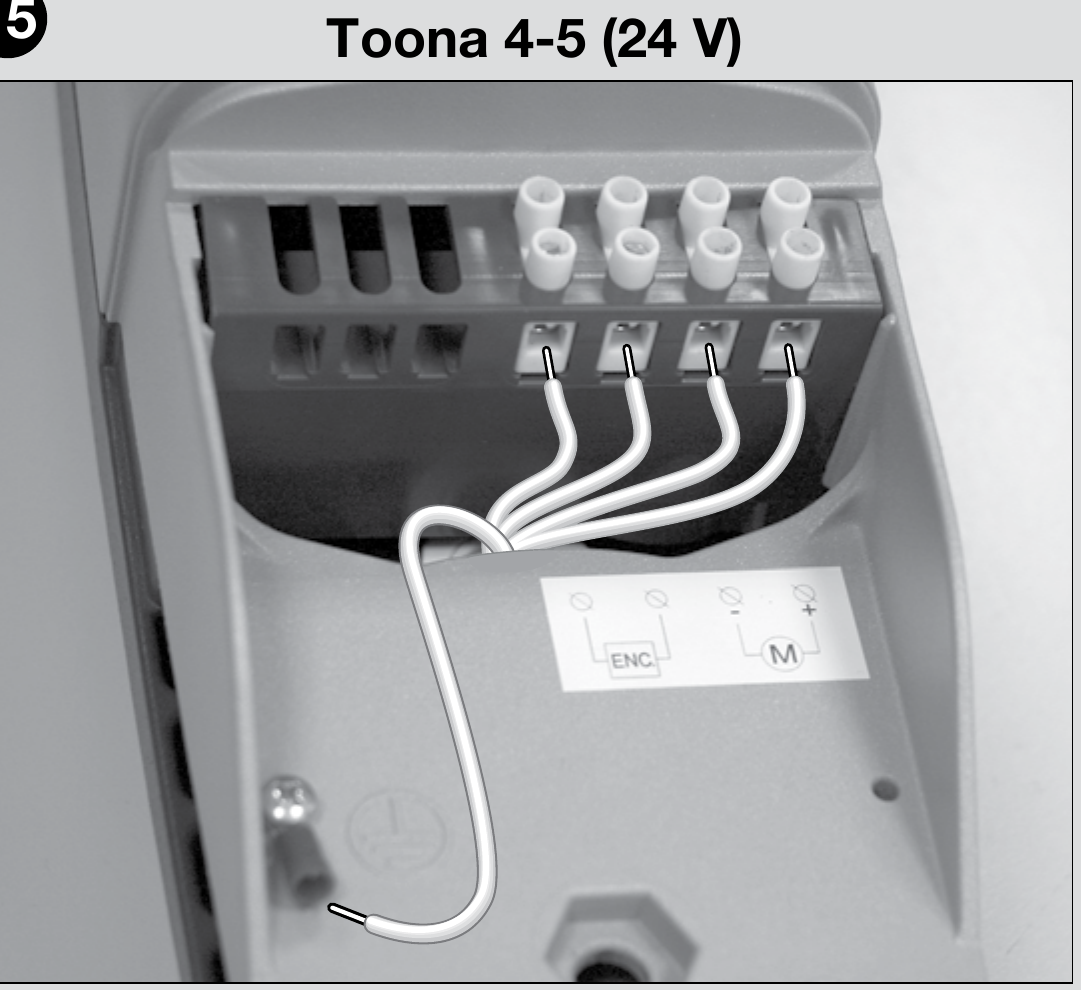
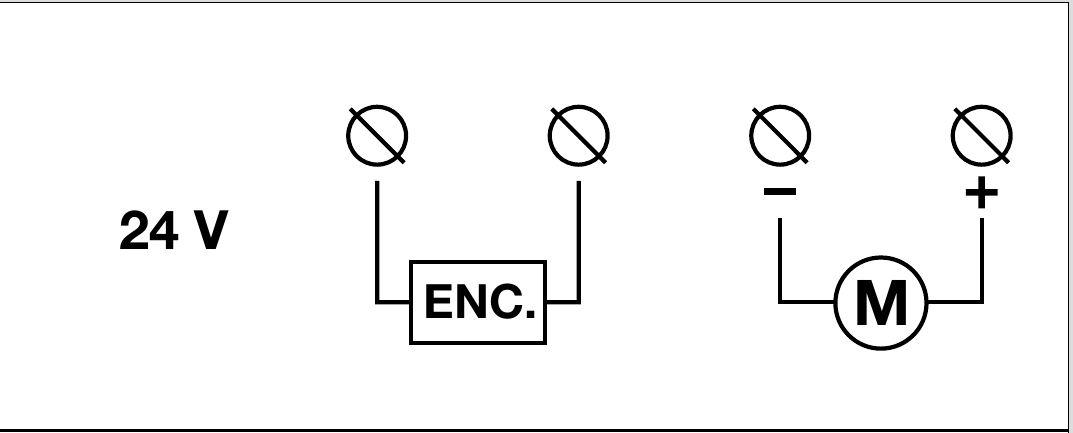
After wiring, check the direction of travel, stop positions and safety devices according to the manual for the control unit actually installed. Electrical connections and testing must be carried out by a qualified person.
Pre-start checks
Have a qualified technician carry out the installation, electrical connections and commissioning of the automatic gate. Before switching on, release the drive and check that the gate leaf travels smoothly along its full path without sticking, and that the brackets and post remain secure.
- After wiring according to the actual control unit, check the direction of travel and set the positions as instructed in its manual. Force settings are adjusted on the control unit, not on the motor itself.
- Test the open stop, safety photocells, any safety edges, the STOP control and manual release. The technician must check that the operating forces are safe and, if there is a wicket gate in the leaf, that the drive is interlocked when it is open.
- Give the customer the release procedure and the manual for the control unit actually installed.
Connecting accessories to the MC824HR30
The following terminals belong to the MC824HR30/MCA1R30 control unit in a system with a TO5024I motor, not to the motor itself. Disconnect the mains supply and backup battery before working. For a different control board, use its own wiring diagram.
| Accessory | Terminals, voltage and polarity |
|---|---|
| BlueBUS photocells | Connect compatible photocells, such as EPMB, using a two-wire connection to BlueBUS. + and − are not polarity-sensitive. Set the address and repeat the learning procedure whenever devices are changed. |
| STOP and command inputs | The STOP input accepts a volt-free NO or NC contact, or an 8.2 kΩ resistive device 8.2 kΩ; its state is learned. SbS, Open and Close accept a volt-free NO contact on the corresponding pair of terminals. Contacts have no +/− polarity; do not apply an external voltage to the input. |
| Auxiliary power supply | Right-hand terminal of the STOP pair = −; left-hand terminal of the SbS pair = +, with the diagram oriented as shown below (labels above the terminals). Power supply for a suitable reader or module: 24 V DC (−30% to +50%), maximum 200 mA, including in Stand-by mode. Wire the module’s command relay separately as a volt-free contact; check the module’s permissible voltage range and current draw. |
| Flashing light, lock, indicator light | FLASH: 12 V DC, maximum 21 W; ELS: 12 V AC, maximum 15 VA, no fixed +/− polarity; OGI: 24 V DC, maximum 4 W. The diagram does not specify the +/− order on the FLASH/OGI terminal pair, so do not guess; for a polarity-sensitive product, check the markings on both the board and the product. Output functions may vary depending on the programming. |
| Radio receiver and backup | The plug-in receiver fits into the SM, and the backup battery connects to its dedicated connector, as indicated on the installed board. They do not connect to BlueBUS or to the motor terminals. |
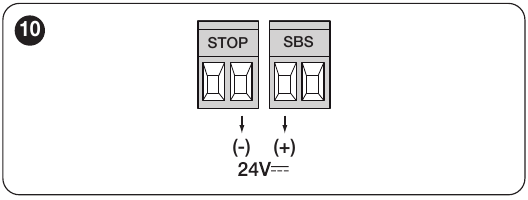
For detailed terminal locations, the learning procedure and testing of safety devices, see the manual for the MC824HR30 control unit itself.
Older MC824HR10/MCA1R10 system
For a kit with this board, use the R10 wiring diagram. For auxiliary devices, the manufacturer specifies STOP = −, SbS = +, 24 V DC, maximum 200 mA including in Stand-by mode. However, the original R10 diagram does not identify which specific contact in the STOP/SbS pair supplies power. Connect the auxiliary power supply only after verifying the relevant contact on the actual board; do not assume the R30 terminal location applies here. Connect the command relay separately to the SbS pair as a volt-free NO contact; do not apply an external voltage to the input. Slovak MC824HR10 manual.
| Device | Connection to the MCA1R10 |
|---|---|
| BlueBUS | Two wires to BlueBUS; no +/− polarity. Repeat the learning procedure after changing addressed devices. |
| STOP and command inputs | STOP: NO, NC or 8.2 kΩ; SbS, OPEN, CLOSE: volt-free NO contact on the corresponding pair. Contacts have no +/− polarity. |
| Outputs | FLASH: 12 V DC, maximum 21 W; ELS: 12 V AC, maximum 15 VA, no +/− polarity; OGI: 24 V DC, maximum 4 W. For a polarity-sensitive FLASH/OGI device, determine +/− from the markings on the actual board and device; the diagram does not specify the order. |
| Radio receiver and backup | The receiver fits into the SM; for R10, the manufacturer specifies a backup battery PS324 with its own connector. Do not use the R30 battery or cable here. |
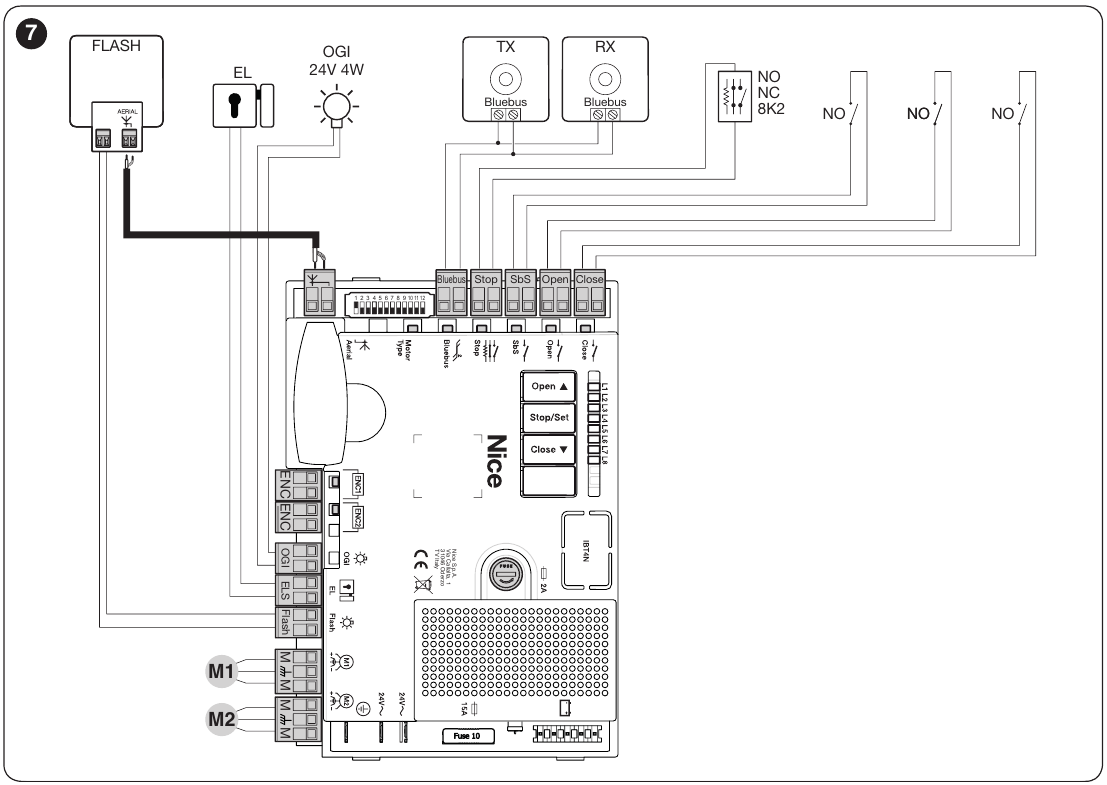
Before wiring, check the label and diagram for the board actually installed. The learning procedure for this board differs from the newer MCA1R30.
Compatible accessories
Choose accessories for the specific control unit and receiver. The following types have the listed interfaces; wireless and command devices may require additional accessories or configuration.
| What | Why | Type |
|---|---|---|
| Control unit | Motor electronics; choose the manual for the board actually installed. |
|
| Beacon | Indicates movement. Only models specified by the manufacturer include an antenna. The choice depends on the control unit output. |
On the MC824HR30, the FLASH output is intended for a 12 V beacon rated up to 21 W. For other lights, check the voltage, power consumption and flashing mode. |
| Photocells | They monitor the beam area and send a signal to the control unit. The gate response depends on the wiring and settings; test the complete system after installation. | |
| Transmitter | Choose a remote control to match the receiver and coding installed in the control unit. ON3EBD is compatible with OXIBD, and ON3ELR with OXILR. | |
| Receiver | The radio receiver must support the remote control's coding; smart home interfaces offer different functions. |
|
| Antenna | Improves receiver reception when correctly positioned and connected. | |
| Keypad | Code-based control. A BlueBUS keypad requires a control unit that supports command devices. | |
| Key switch | Control via a suitable control unit input. | |
| Electric locks | Locks the gate leaf; check the lock’s control method and voltage against the control unit and installation requirements. |
|
| Card readers | The ETPB requires the specific control board to support BlueBUS command devices. |
|
| Backup power supply | A battery connected to a compatible control unit enables operation during a power outage. |
Manual drive release
Release or engage the drive only when the gate leaf is stationary. If the gate has an electric lock, unlock it first. In the event of a fault, disconnect the power supply.
- Slide back the protective cover, insert the supplied key and turn it clockwise.
- Lift the release lever and move the gate leaf manually.
- To re-engage the drive, lower the lever, turn the key anticlockwise, remove it and close the cover.
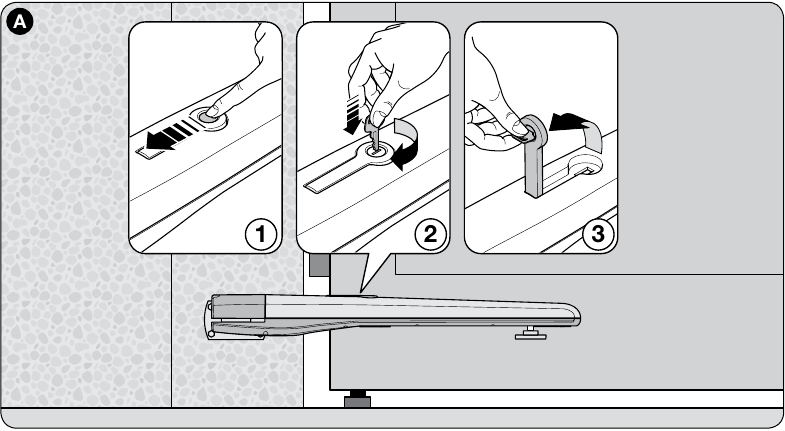
Before restarting, check that the drive is engaged and that no one is in the gate’s path.
Inspection and maintenance
Service at least every 6 months must be carried out by a qualified technician: after disconnecting the power supply, they check the fastenings, corrosion, wear and lubrication of the screw and nut. They then test the movement, release mechanism and safety devices of the entire gate.
Technical specifications
| Parameter | Value |
|---|---|
Model | TO5024I |
Drive motor | 24 V DC |
Maximum / rated current draw | 5 A / 2.2 A |
Maximum / rated power input | 120 W / 60 W |
Stroke | 540 mm |
No-load speed | 0,013 m/s |
Speed under load | 0,010 m/s |
Maximum / rated force | 2 200 N / 800 N |
Cycles per hour at rated force | 75 |
Protection rating | IP44 |
Operating temperature | −20 to +50 °C |
Insulation class | F |
Indicative service life according to NICE | 80 000 to 250 000 operating cycles |
Dimensions L × W × H | 965 × 115 × 105 mm |
Motor weight | 8 kg |
The motor weight in the table is the NICE figure excluding packaging. The weight for the selected variant includes packaging and is used to calculate shipping costs.
Slovak-Czech NICE Toona installation manual. Programming, position learning and accessories are covered in the manual for the actual control unit.
How can I order this item?
Choose the option that suits you:
- order online: use the buy button to add the goods to your shopping cart (you will find the buy button here in the product variants table).
- order by email: place your order at [email protected]






