NICE MC824HR30 Technical Manual
Overview of all three manuals · MC824HR30 · MC800 / MCA5 · Road RD400
Practical guide to the NICE MC824HR30 control unit
This guide is intended for MC824HR30, model MC824H, with an MCA1R30 board. It will help you choose accessories, wire the system, perform the initial startup, and troubleshoot a single- or double-leaf gate.
Before wiring, check the label on the control unit against the manual. The NICE manual covers both MC824H and MC824L, but these units do not use the same motors. According to the manufacturer's table, the MC824L is intended for the OLTRE1824, and its ENC inputs are not used. The following procedures and motor selection apply to the MC824H/MC824HR30.
- The supported operators are 24 V DC; the control unit is supplied with 230 V AC.
- In the wiring diagram below, the photocells are connected using the BlueBUS system.
- M2 opens first; M1 closes first. For a single-leaf gate, use M2.
- Select the motor type using the switches before running travel learning.
What do you need help with?
- Compatible operators and accessories
- Installation and wiring
- Terminals and wiring diagram
- BlueBUS photocells
- Initial startup and travel learning
- Manual adjustment of leaf positions
- Programming functions and parameters
- Receiver, antenna, and remote controls
- Standby and backup battery
- Troubleshooting and reset
- Final checks and maintenance
Compatible operators and accessories
Compatibility depends on more than just the 24 V power supply or the operator family name. The specific motor must be listed in the motor selection table and its switches must be set correctly.
| Group | Models listed by the manufacturer for the MC824H |
|---|---|
| Toona | TO4024, TO5024, TO5024I, TO7024 |
| Toona Hi-Speed | TO5024HS, TO6024HS |
| Hyppo | HY7024, HY7124 |
| Underground operators | MFAB3024, LFAB4024, BFAB5024 |
| Other high-speed operators | MFAB3024HS, LFAB4024HS, WG3524HS, TTN3724HS, TTN6024HS |
| Other models in the manual | MB4024, MB5024, XFAB2124, METROELITE, WINGOELITE |
The designations are taken from the manufacturer's Table 4. If the commercial name differs or the motor is an older model, first verify its full model designation. See the section Selecting the motor type.
Safety and signalling
- NICE EPMB – two-wire BlueBUS photocells. EPM or BF relay photocells are not connected according to this diagram.
- NICE ELDC – warning light listed in the MC824H technical specifications. The light's power supply and the antenna connection are two separate circuits.
- Safety edges and STOP contacts – choose NO, NC, or 8.2 kΩ according to the wiring and the risks presented by the specific gate.
Controls and backup
- NICE OXIBD – plug-in radio receiver for the SM connector. One example of a remote control for this receiver is NICE ON3EBD; select the pairing method and communication mode according to the receiver manual.
- NICE EKS – key switch with momentary contacts. For SbS, OPEN, or CLOSE, use a voltage-free C–NO contact. A suitable button or control-module relay can provide the same type of contact.
- NICE PSS324 – backup battery listed in the current manual. For the older NICE PS324 the specific conditions stated in the backup section.
- NICE IBT4N and NICE OVIEW – interface and programmer for accessing service settings via BusT4; install and operate according to their manuals.
Source: original NICE manual, Table 4; accessories in Sections 4.2, 8, and 11.
Control unit installation and wiring
Mount the box on a sturdy vertical surface so that its lower edge is at least 40 cm above ground. Prevent water from entering through the cable routes. According to the manufacturer, the side cable entry is intended for protected indoor environments only; outdoors, use the prepared bottom entries with suitable cable glands.
| Purpose | Cable and maximum length |
|---|---|
| Control unit power supply | 3 × 1.5 mm²; up to 30 m. For lengths over 30 m, the manufacturer specifies 3 × 2.5 mm² and grounding at the automation system. |
| Each motor | 3 × 1.5 mm²; up to 10 m. |
| Encoder for each motor | 2 × 1 mm²; up to 10 m. The motor and encoder cables may be replaced with a single 5 × 1.5 mm² cable, as specified in the manual. |
| BlueBUS | 2 × 0.5 mm²; up to 20 m. For lengths of 20–40 m, use 2 × 1 mm². |
| Warning light | 2 × 0.5 mm²; up to 20 m. |
| Antenna | RG58 coaxial cable; up to 20 m, recommended length less than 5 m. |
| Key switch | 2 cables, 2 × 0.5 mm², or one 4 × 0.5 mm² cable; up to 50 m. |
| Electric lock | 2 × 1 mm²; up to 10 m. |
The stated cross-sections are not a substitute for designing the power supply circuit. The insulation type, cable routing, protective conductor and disconnecting device must be suitable for the environment and the specific installation.
Source: original NICE manual, Table 1 and Section 3.5.
MC824HR30 terminals and wiring diagram
Connect all conductors with both the mains and backup power supplies disconnected. The labels on the board are authoritative; terminal numbering from the MC424L, MC800 or RD400 does not apply here.
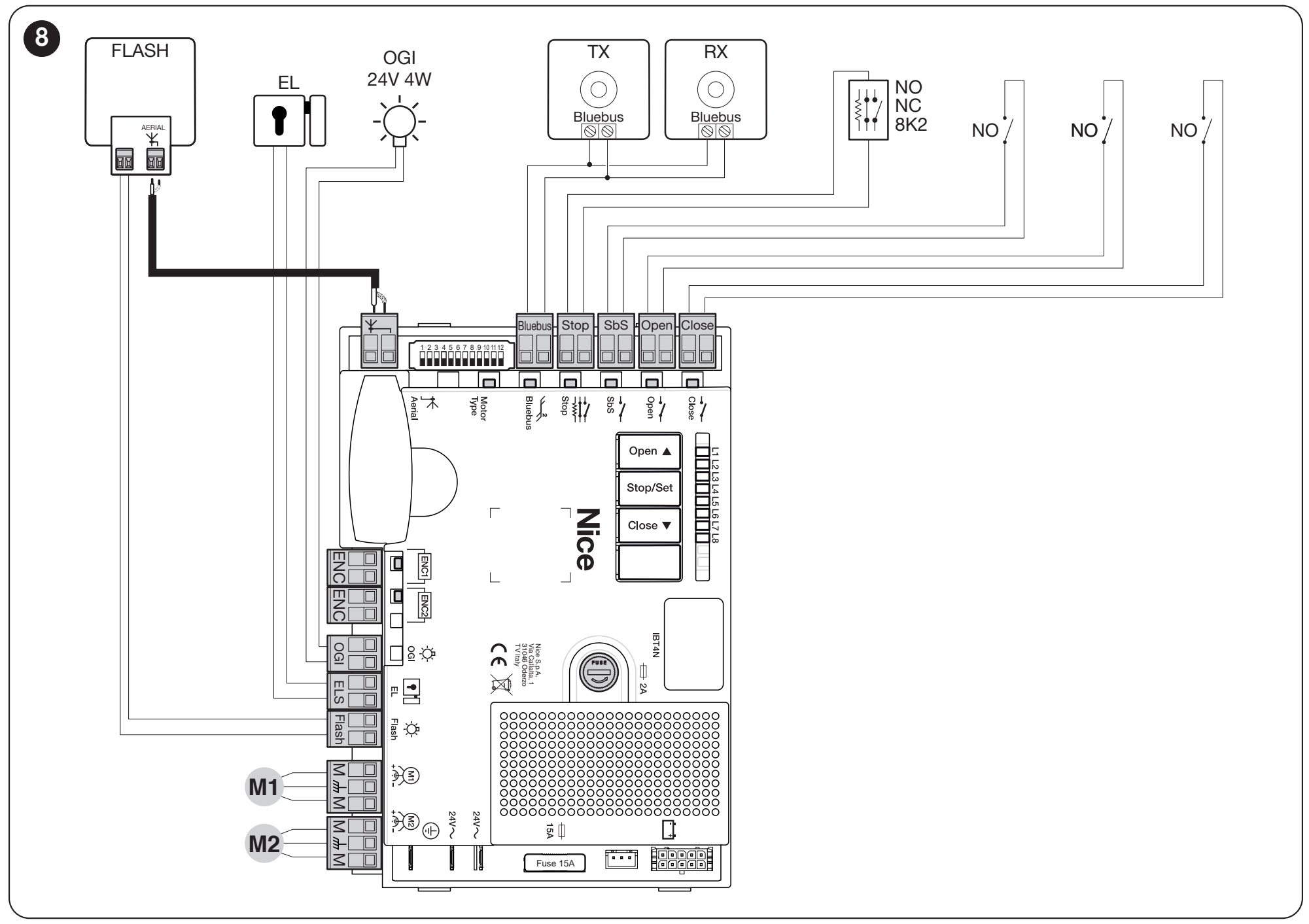
Original NICE diagram, Figure 8. TX and RX in this diagram are BlueBUS. The antenna connection to the board shown here applies to OXI; with OXIBD, the antenna connects directly to the receiver, as shown in the separate section on radio control. Click to enlarge the image.
| Terminal | Use |
|---|---|
| L / N / PE | 230 V AC mains supply and protective earth, as indicated on the power supply section. Do not connect to the low-voltage inputs. |
| M1 + ENC1 | Motor for the gate leaf that moves first when closing, and its encoder. |
| M2 + ENC2 | Motor for the gate leaf that moves first when opening, and its encoder. For a single-leaf gate, connect the motor to M2; leave M1 unused. |
| FLASH | Flashing beacon output; 12 V DC in beacon mode, max. 21 W. The manufacturer specifies NICE ELDC. This is not a 230 V output. |
| ELS | Electric lock output, 12 V AC, max. 15 VA. Changing the function to lighting also changes the electrical output parameters. |
| OGI | Open gate indicator: 24 V, max. 4 W; voltage may vary by −30 to +50%. |
| BlueBUS | Two wires for both power and communication with compatible devices; connect in parallel, with no polarity requirement. |
| STOP | Safety input for NO, NC or 8.2 kΩ. During setup, the control unit memorises the connected state; a change triggers a stop and a brief reverse movement. |
| SbS / OPEN / CLOSE | Control inputs for voltage-free NO contacts: step-by-step, open and close. Do not apply an external voltage to these inputs. |
| SM / IBT4N | Plug-in receiver connector / service interface connector. Insert accessories with the power disconnected. |
Motors and encoders
Each encoder must be paired with the correct motor. Polarity does not matter on the two-wire ENC input. If setup shows that the gate leaves are in the wrong order, swap their encoders as well as the motors. Do not confuse the protective conductor with the motor wires.
Push button and key switch
For standard control, connect the NO contact to the pair of SbS terminals. With the NICE EKS switch, use the C and NO contacts of the selected microswitch. Parameter L2 in level 2 determines the command sequence. Separate commands can be connected to OPEN and CLOSE. Function L7 in level 1 can change the CLOSE input to partial opening.
STOP safety input
Connect multiple NO contacts in parallel and multiple NC contacts in series. Combinations with 8.2 kΩ safety edges have specific requirements; connect them according to Section 4.2.2 and the edge manufacturer's instructions. Do not bypass a safety device as a way to resolve a fault.
Source: original NICE manual, Figure 8, Table 2 and Note 1 below Table 14.
BlueBUS photocells
For a basic pair, use a compatible TX transmitter and RX receiver, such as NICE EPMB. Connect both using two wires in parallel to BlueBUS. These are not relay-type photocells with COM/NC contacts; wiring for EPM or BF photocells from another control unit does not apply here.
- Position TX and RX opposite each other to protect the required area.
- Set the address jumpers according to the required function. TX and RX in one pair must have the same address; the next pair must have a different address.
- Connect both BlueBUS wires; polarity does not matter.
- Run the learning procedure for the connected devices and test each pair while the gate is moving.
| Address | Response according to the MC824H manual |
|---|---|
| FOTO / FOTO II | Protection during closing: stops and reverses movement. |
| FOTO 1 / FOTO 1 II | During closing, stops and reverses; during opening, stops and resumes once the beam is clear. |
| FOTO 2 / FOTO 2 II | Protection during opening: stops and reverses movement. |
| FOTO 3 | This configuration is not permitted for this control unit. |
Check the exact jumper positions in Table 3 of the MC824H manual and in the instructions for the specific photocells. Repeat the learning procedure whenever you add or remove a device. When replacing an accessory, also follow its instructions.
Initial start-up and gate travel learning
1. Select the motor type
With the power disconnected, set the selector to match the exact drive model. Complete this setting before teaching the mechanical stops. Use only a combination specified by the manufacturer.
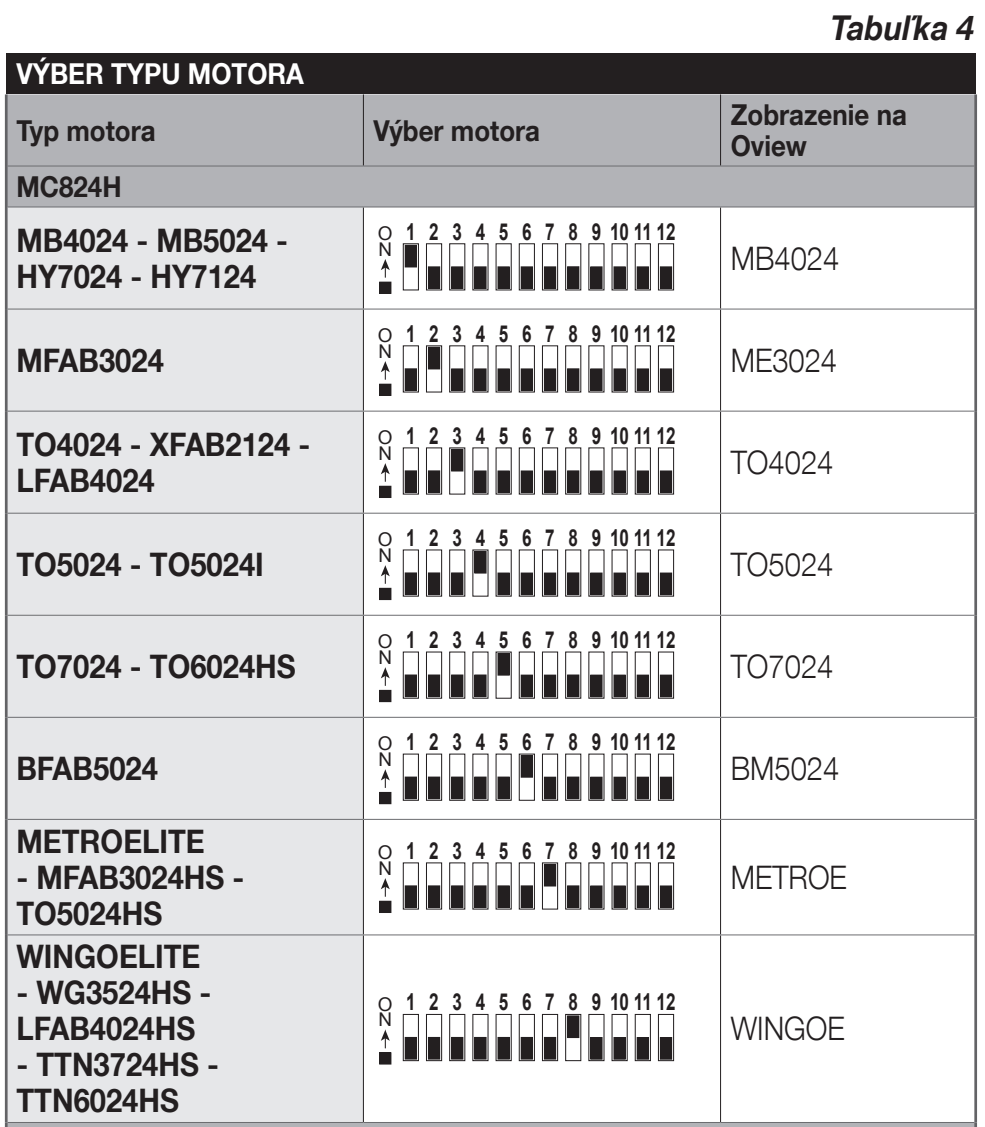
Extract from Table 4 of the current Slovak manual: MC824H rows only. Read the black and white switch positions according to the ON marking shown in the diagram and on the actual selector. Click to enlarge the image.
2. Check the mechanics and power up for the first time
Check the stops, free movement and drive locking as described in the drive instructions. After power-up, the BlueBUS LED should flash regularly about once per second, the photocell TX/RX LEDs should flash, and the beacon should be off. If anything differs, disconnect the power and check the wiring.
3. Teach the connected devices
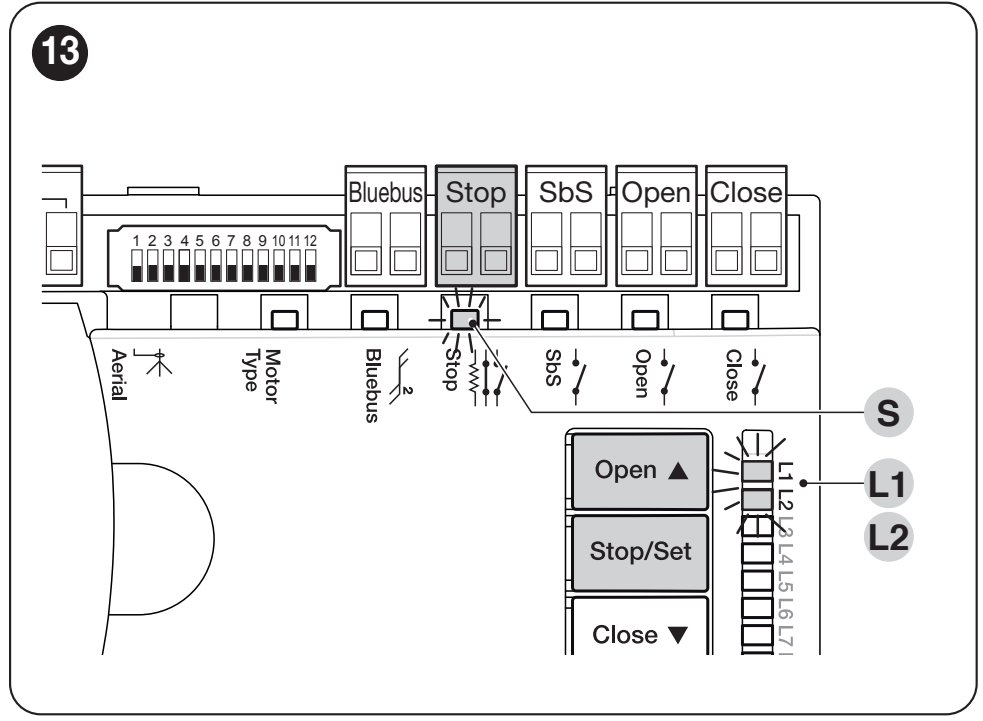
Figure 13: controls for detecting BlueBUS and STOP. Click to enlarge the image.
- Press and hold Open ▲ + Stop/Set.
- When L1 and L2 start flashing rapidly, after about 3 seconds, release the buttons.
- Wait for the process to finish. The STOP LED should be lit, and L1 and L2 should be off. L3 and L4 may indicate that the gate travel still needs to be learned.
This step is also required when no devices are connected to BlueBUS or STOP.
4. Automatically learn the mechanical stops
- Press and hold Stop/Set + Close ▼.
- Release the buttons only when L3 and L4 flash rapidly, after approximately 5 seconds. Releasing earlier, when L1 flashes, starts manual learning.
- Check the movement sequence: M1 closes slowly, M2 closes slowly, M2 and M1 open slowly to the stops, and finally both leaves close quickly.
- When the procedure is completed correctly, L3 and L4 go out. Test opening and closing separately using the buttons.
If the direction or sequence is incorrect: stop the learning procedure using the Open or Close button. Disconnect all power before correcting the wiring. If the leaves are swapped, correct both M1/M2 and the corresponding ENC connections; if the direction is reversed, change only the motor wires, following the original wiring diagram. Then repeat the learning procedure. Activation of the photocell or STOP interrupts the learning procedure.
There is no need to clear the entire memory as a precaution before repeating the learning procedure.
Source: original NICE manual, sections 4.5 to 4.8.1.
Manually adjusting leaf positions
If automatic learning does not suit the gate geometry, positions can be learned manually. In mixed mode, automatic learning is performed first, followed by fine-tuning selected intermediate positions. The mechanical end positions 0 and 1 are not changed in mixed mode.
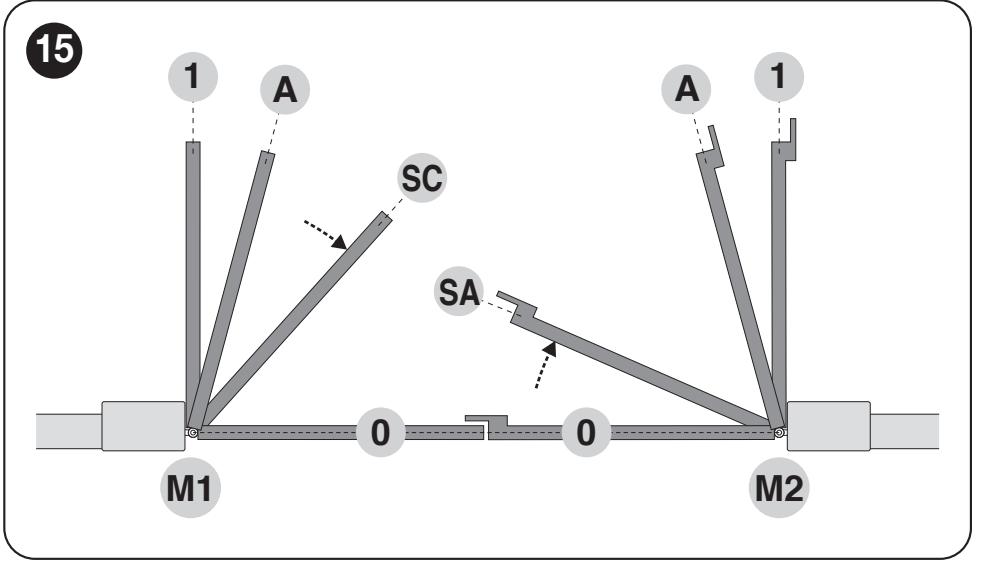
Figure 15: SA and SC define the sequence of leaf movement; A is the desired open position. Click to enlarge the image.
| LEDs during manual learning | Position |
|---|---|
| L1 | M1 mechanical closed stop (0). |
| L2 | M2 mechanical closed stop (0). |
| L3 | SA: M2 position at which M1 starts moving during opening. |
| L4 | Desired open position A for motor M1. |
| L5 | Desired open position A for motor M2. |
| L6 | SC: M1 position after which M2 starts closing during the closing cycle. |
| L7 | M1 mechanical open stop (1). |
| L8 | M2 mechanical open stop (1). |
To enter manual learning, hold Stop/Set + Close and release when L1 flashes, after approximately 3 seconds. A brief press of Open/Close selects a position; holding the button moves the corresponding motor. Save the position by holding Stop/Set for at least 3 seconds; then move on to the next one. Wait no longer than 10 seconds between steps.
A single-leaf gate has a special procedure for skipping unused positions. The detailed sequence for one or two motors is in sections 4.8.2 and 4.8.3, pages 11–12. Do not confuse the positions and LEDs with the MC800 table.
Programming functions and parameters
The Open ▲ and Close ▼ buttons select an item; Stop/Set confirms or changes the setting. Level I switches the function on or off; Level II sets its value. For example, L1 at Level I enables automatic closing, while L1 at Level II sets the pause duration.
Level I – switching on and off
- With the gate stationary, hold Stop/Set until L1 starts flashing, then release it.
- Use Open/Close to select the desired LED.
- Briefly press Stop/Set to toggle the setting: short flash = OFF, long flash = ON.
- When finished, do not press anything; wait for programming to end.
| LED / function | What it changes |
|---|---|
| L1 – automatic closing | After opening, the set pause is counted down and the gate then closes. |
| L2 – closing after photocell activation | Changes the closing behaviour after the photocells are triggered. When automatic closing is enabled, it shortens the pause to 5 s; if L1 is not enabled, triggering the photocell may still start automatic closing after the set pause. Check the behaviour against Table 6. |
| L3 – always close | After power is restored, an open gate may close automatically; a warning light flashes before movement starts. |
| L4 – Standby all | Energy-saving mode, enabled by default. Battery conditions are described below. |
| L5 – lock / light | Changes ELS from an electric lock output to an auxiliary light output. Check that the connected load is suitable before changing the setting. |
| L6 – pre-flashing | The warning light starts flashing 3 s before movement. |
| L7 – CLOSE / partial opening | Changes the CLOSE input to a Partial Open 1 command. |
| L8 – OGI / maintenance | Changes the open-gate indicator output to a maintenance signal; see section 6.4.2 for setting the service signal. |
Level II – setting the value
- Hold Stop/Set until L1 flashes, then release it. Use Open/Close to select a parameter.
- Hold Stop/Set again. After about 3 seconds, the LED for the current value lights up.
- Keep holding Stop/Set and use Open/Close to select a value.
- Release Stop/Set and wait for the mode to end. Then test the function.
| Input LED | Parameter and available values |
|---|---|
| L1 – pause time | L1–L8: 5 / 15 / 30 / 45 / 60 / 80 / 120 / 180 s. Factory setting: 30 s. |
| L2 – step-by-step mode | L1: open–stop–close–stop; L2: open–stop–close–open; L3: open–close. Other modes include condominium and hold-to-run control; see Table 7. |
| L3 – speed | Six speed levels and two combinations with different opening and closing speeds. After changing the setting, check that movement is safe again. |
| L4 – pressure relief after closing | L1: no pressure relief; L2–L8: progressively larger brief reverse movements to release residual pressure. |
| L5 – motor force | L1 minimum to L8 maximum. Increasing force is not a substitute for correcting mechanical resistance; the result must be checked and measured by a technician. |
| L6 – partial opening | L1–L4: M2 opens by ¼, ½, ¾ or fully. L5–L8: both motors open by ¼, ½, ¾ or fully, based on the smaller of their set opening distances. |
| L7 – maintenance interval | L1–L8: 500 / 1 000 / 1 500 / 2 500 / 5 000 / 10 000 / 15 000 / 20 000 cycles. |
| L8 – fault history | Record of the last eight cycles; L1 is the most recent. |
Example – closing after 60 seconds: enable L1 at Level I. Then, at Level II, enter parameter L1 and select value L5. If the photocell closing function is also enabled, the pause may be shortened.
Do not wait unnecessarily between programming steps. For full definitions of the modes and how they interact, see section 6, Tables 6 and 7.
Radio receiver, antenna and remote controls
Remote control operation depends on the receiver installed. For the plug-in NICE OXIBD use the SM connector. According to the current manual, the radio-symbol button on the MC824H panel is not used; pair remote controls using the relevant receiver and follow its instructions.
For the OXIBD receiver, one remote control available in our range is the NICE ON3EBD. When expanding an existing setup, also check the coding and receiver mode already in use; matching frequency alone is not enough.
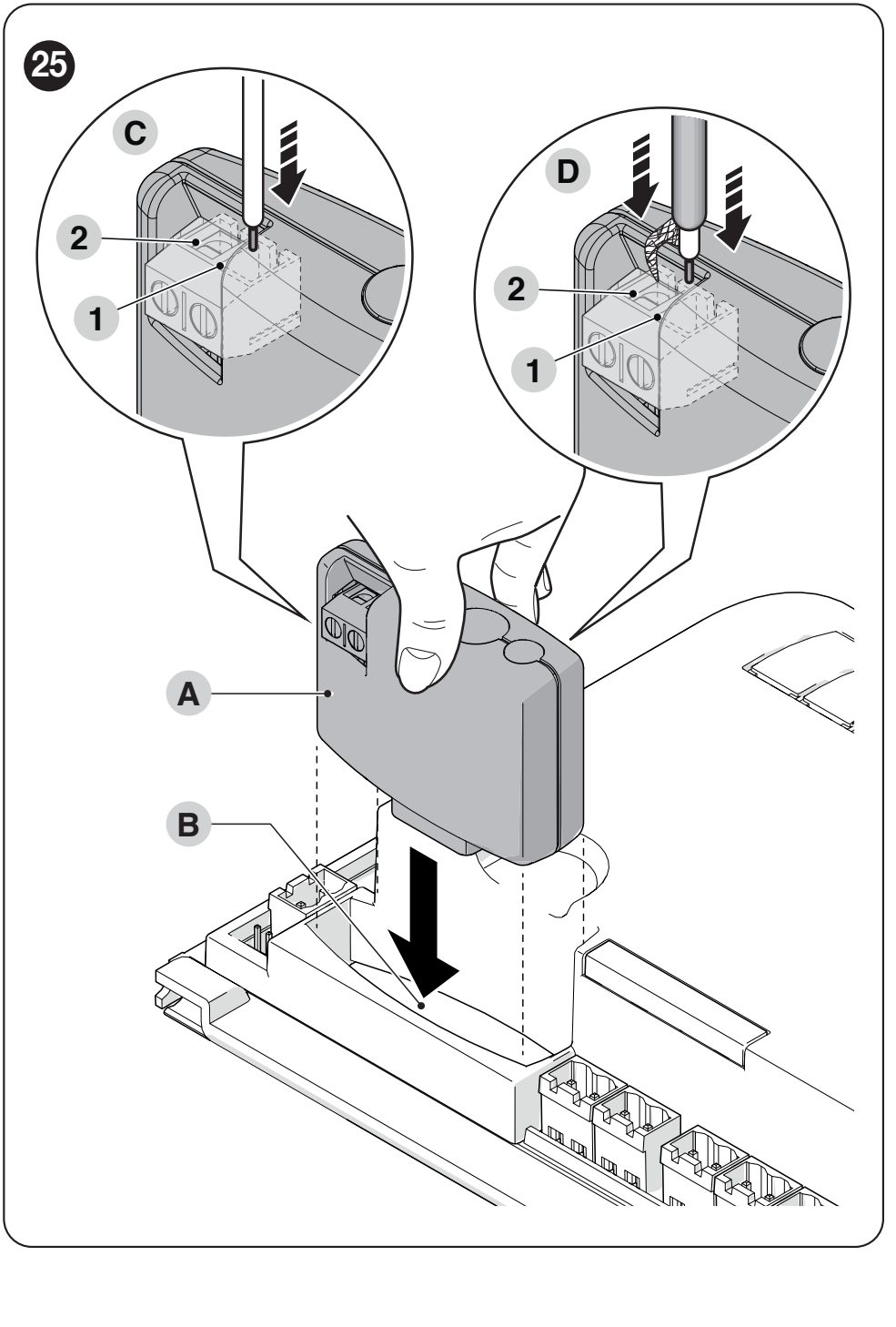
Figure 25 in the current manual. For the OXIBD, connect the external antenna with RG58 coaxial cable directly to receiver terminals 1 and 2, not to the control board’s antenna terminal. Click to enlarge the image.
Choose the procedure for storing the remote control according to the specific receiver in the NICE remote control pairing guide. Adding a remote control does not require erasing the control unit’s travel settings.
Source: original NICE manual, section 8.1.
Standby and backup power
Function L4 in Level I puts BlueBUS and most indicator LEDs to sleep approximately 5 minutes after a completed manoeuvre. BlueBUS flashes more slowly. Operation resumes with a short delay after a command is received. This state does not in itself indicate a fault.
| Battery | Connection requirement |
|---|---|
| PSS324 | The current type specified by the manufacturer. Use the appropriate instructions and the cable supplied for this setup; NICE PSS324 details. |
| Older PS324 | Use NICE CABLA11 and disable Standby (L4 = OFF). The adapter alone is not enough. Expect higher power consumption. |
Connect the battery only when the mains power is disconnected. Charging takes priority over entering power-saving mode. The radio receiver, service interface and accessories that remain powered can increase consumption; the catalogue figure without accessories cannot be applied to every setup.
Solemyo: The manual specifies solar power via the battery connector. Standby all must be active, and simultaneous mains connection is prohibited. Check the specific solar setup and its wiring separately; the requirements for the older PS324 do not automatically apply to it.
Source: original NICE manual, sections 8.3 and 8.4.
Troubleshooting and resolving common problems
First, note the LED status and the number of short flashes from the warning light. The fault flash sequence repeats twice, with a pause of about one second. Resetting as a first step may erase useful settings and will not resolve the cause of the fault.
| Short flashes | Meaning and first check |
|---|---|
| 1 | BlueBUS device mismatch. Check the connections and addresses; after changing the setup, run device recognition. |
| 2 | Photocell triggered. Check for obstructions, cleanliness and correct alignment of the TX/RX units. |
| 3 | Obstruction detected based on motor force. First check for mechanical resistance and ensure free movement. |
| 4 | STOP active. Check the safety device and its wiring. |
| 5 / 7 | Internal parameter / electrical circuit fault. Wait at least 30 s; if the fault recurs, servicing is required. |
| 6 | The number of manoeuvres per hour or continuous operating time has been exceeded. Let the system rest for a few minutes. |
| 8 | A continuously active command is blocking further commands. Check the button, relay or timer control. |
| 9 | The automation system is locked by a command. The appropriate unlocking command is required. |
| 10 | Obstruction or increased resistance detected by the MC824H encoder. Check the mechanical components and the connection between the correct encoder and the motor. |
What the LEDs on the board indicate
| Indicator | Meaning |
|---|---|
| BlueBUS once per second | Normal operation. Slower flashing after a period of inactivity may indicate Standby. |
| BlueBUS – two quick flashes | An input change or command received; not a fault in itself. |
| STOP on / off | On: the learned safety status is OK. Off: check STOP and the connected devices. |
| SbS / OPEN / CLOSE illuminated | The corresponding control input is active. Steady illumination without a command may explain why the controls are blocked. |
| L1 + L2 flash slowly | The connected devices need to be recognised. |
| L3 + L4 flash slowly | The travel has not been learned, or the motor selector setting was changed after learning. Check the selector and repeat the relevant learning procedure. |
| Neither LED nor BlueBUS illuminated | Check the power supply and fuses. The MC824H has a 15 A motor fuse and an F 2 A service fuse; check the rating and type on the board. Do not replace the fuse with one of a higher rating. |
The gate works with the buttons but not with the remote control
Check the power supply and installation of the radio receiver, remote control compatibility, its battery and whether it has been stored in memory. If the range is poor, also check where the antenna is connected. First determine whether the problem is with the radio or the control unit.
History of the last eight manoeuvres
In Level II, select L8 and hold Stop/Set. When L1 lights up, use Open/Close to select a record; L1 indicates the most recent one. Count the flashes using the diagnostic information above. For the detailed procedure, see section 7.3.
Erasing the control unit’s memory
This erases individual settings. Press and hold Open + Close simultaneously until L1 and L2 start flashing, then release the buttons. The settings and safety tests must then be carried out again. Do not confuse this procedure with erasing the memory of the plug-in radio receiver.
Source: original NICE manual, section 7; reset in section 6.5 and fuses on page 4.
Final checks and maintenance
- Test opening, closing and stopping with every control device in use.
- Check the leaf sequence, stops, acceleration and deceleration. The leaves must not collide or bind mechanically.
- Test each pair of photocells, the safety edge and STOP separately, including their response while the gate is moving.
- After adjusting the force or speed, check safety and carry out any required force measurements.
- If a battery is connected, check operation during a mains power failure and confirm that power is restored correctly.
- The owner must receive the user manual, the procedure for manually releasing the specific operators and a maintenance schedule.
Check the entire automation system at least every 6 months, or more often depending on usage. In the event of a power failure, release the operators themselves according to their instructions; the MC824HR30 control unit does not have its own mechanical release key.
Source: original NICE manual, section 5; routine maintenance in section 9.
Information for technical support
When reporting a problem, provide the control unit and both motor model designations, the types of photocells and receiver, the LED status, the number of flashes and the step at which the problem occurs. A photo of the complete wiring and a close-up of the label are helpful.
Overview of all three guides · MC824HR30 · MC800 / MCA5 · Road RD400
Source: NICE MC824H/MC824L, IS0606A01, revision 21. 4. 2026; this manual applies to MC824HR30.






