NICE MC800 technical manual with MCA5 board
Overview of all three manuals · MC824HR30 · MC800 / MCA5 · Road RD400
Practical guide to NICE MC800 with the MCA5 board
This guide is intended for MC800 with the board NICE MCA5: the board has an OGI output and a Photo PRG. This is the generation for which NICE provides a manual covering the period up to 09/2025. The newer MC800R30 has a different OutSTB output and energy-saving mode; its wiring diagram cannot be applied here automatically.
The MC800 controls one or two compatible 230 V AC swing-gate motors. For a single gate leaf, use M2. With two leaves, M2 opens first and M1 closes first. Mechanical stops, capacitors and any limit switches must be compatible with the specific operators.
Operators and accessories for the MC800
The exact operator type and power supply determine compatibility. For example, the manufacturer recommends the MC800 for NICE HY7005; the similarly named HY7024 is a 24 V motor and uses a different control unit. When replacing the original control unit, connect the wires according to the terminal functions, not their original numbers.
| Item | Meaning / procedure |
|---|---|
| Relay photocells | NICE EPM – TX/RX power supply and a separate C–NC safety contact. An example is shown in the diagram below. |
| BlueBUS photocells | NICE EPMB – two-wire connection to terminals 6–7, with no polarity. The EPM and EPMB wiring differs. |
| Warning beacon | NICE ELAC – mains-voltage version with a built-in flasher. FLASH on a 230 V control unit is not a low-voltage output. |
| Key switch | NICE EKS – voltage-free C–NO contact for SbS, OPEN or CLOSE. |
| Radio control | NICE OXIBD in the SM connector, and a compatible remote control, for example NICE ON3EBD. Pairing depends on the specific receiver. |
| Service settings | NICE IBT4N + NICE OVIEW for access via BusT4. |
Check the motor limits, duty cycle and capacitor in the manual for the selected operator. BlueBUS capacity is calculated in load units; the control unit supports a maximum of 15 units, not necessarily 15 arbitrary devices.
Wiring and terminal functions
| Circuit | Cable specified by the manufacturer |
|---|---|
| Power supply | 3 × 1.5 mm² up to 30 m; for longer runs, the manufacturer specifies 3 × 2.5 mm² and earthing at the automation unit. The protection and supply design must suit the installation. |
| Each motor | 4 × 1.5 mm² up to 10 m, including the protective conductor. Capacitor as specified for the specific motor. |
| FLASH beacon | 2 × 1.5 mm² up to 20 m, with insulation rated for mains voltage. |
| BlueBUS | 2 × 0.5 mm² up to 20 m; use 2 × 1 mm² for 20–40 m. |
| Antenna | RG58 coaxial cable, maximum 20 m; a length of less than 5 m is recommended. |
| Key switch | 2 cables, each 2 × 0.5 mm², up to 50 m. |
| Electric lock | 2 × 1 mm² up to 10 m. |
| Item | Meaning / procedure |
|---|---|
| L / N / PE | Supply input for the 230 V version of the control unit and protective earth. Also connect PE to the motors as specified in their manuals. |
| M1 / M2 | Three motor terminals: OPEN – COMMON – CLOSE, as marked on the board; connect the protective conductor separately to PE. Connect a single motor to M2; leave M1 unused. |
| FLASH | Switched mains voltage for a self-flashing beacon, max. 21 W. Suitable model: NICE ELAC; do not connect a 12/24 V beacon here. |
| 1–2 / EL | 12 V AC electric lock, max. 15 VA. |
| 3 / 4 | 3 = 0 V; 4 = COMMON, +24 V DC. A maximum total of 200 mA is available to power accessories between terminals 3–4. |
| 5 / OGI | Open-gate indicator, 24 V, max. 4 W. This designation is used on the older MCA5 board. |
| 6–7 / BlueBUS | Two wires for BlueBUS power and communication; connect in parallel, with no polarity. |
| 8 / AuxIn1 | M1 opening limit switch or PHOTO when using relay photocells. |
| 9 / AuxIn2 | M2 opening limit switch or PHOTO1 when using relay photocells. |
| 10 / AuxIn3 | M1 closing limit switch or PHOTO2 when using relay photocells. |
| 11 / AuxIn4 | M2 closing limit switch. When relay photocell mode is active, the AUX inputs are not used as limit switches. |
| 12 / STOP | Safety input for NO, NC or 8.2 kΩ. A change from the learned state causes the gate to stop and briefly reverse. |
| 13 / SbS | Step-by-step control via a voltage-free NO contact between terminals 4 and 13. |
| 14 / OPEN | Open via an NO contact between terminals 4 and 14. |
| 15 / CLOSE | Close via an NO contact between terminals 4 and 15; the function can be changed to partial opening. |
Do not apply an external voltage to the control inputs. For the NICE EKS use the common C contact and the NO contact of the selected microswitch. Leave unused AUX inputs open according to the selected mode; do not create universal bridges across all safety inputs.
Source: original NICE MC800 manual IDV0544A00EN, Tables 1–2 and Sections 4.2–4.3.
Photocell wiring diagrams
Choose the diagram based on the photocell technology and whether the photocell test is used. TX and RX stand for transmitter and receiver. The two TX/RX sets in the original diagrams show different technologies; you do not need to install both.
Relay photocells without photocell testing – original example
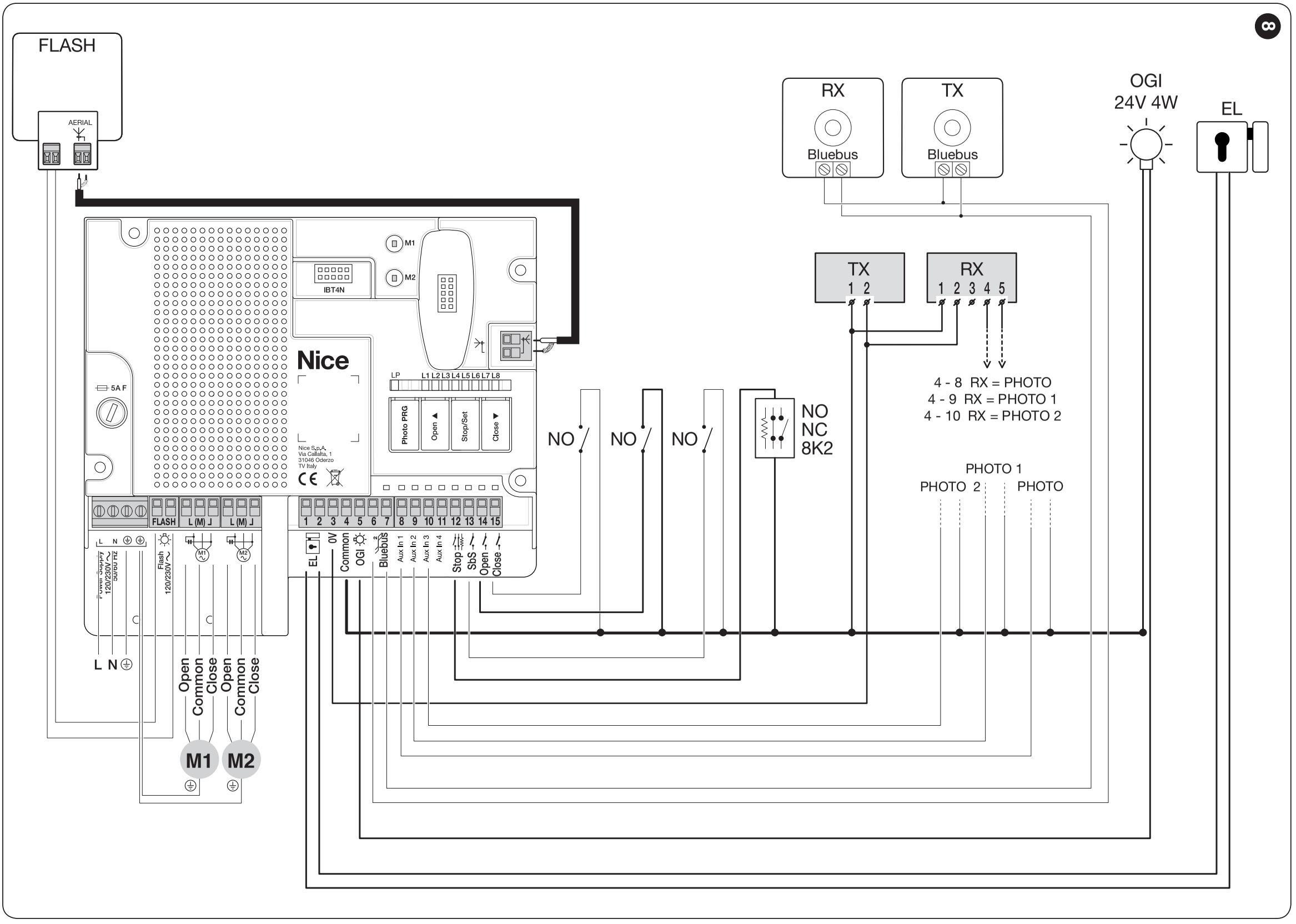
NICE original, Figure 8. The grey TX/RX units are relay type; the white TX/RX units are BlueBUS. The receiver shown is OXI; the OXIBD antenna connects directly to OXIBD. Click to enlarge the image.
For one pair NICE EPM and the PHOTO function, the basis of the existing wiring remains unchanged:
| Part | EPM wiring at 24 V DC |
|---|---|
| TX power supply | MC800 terminal 3 → TX terminal 2; MC800 terminal 4 → TX terminal 1. |
| RX power supply | MC800 terminal 3 → RX terminal 2; MC800 terminal 4 → RX terminal 1. |
| PHOTO contact | RX terminal 4 (C) → MC800 terminal 4; RX terminal 5 (NC) → MC800 terminal 8. Connecting RX 4 to RX 1 is equivalent in this wiring configuration to supplying COMMON. |
| Setting | Hold Photo PRG until LP lights up, then teach the devices. Leave unused AUX1–3 open. |
The TX/RX terminal numbers apply to the wiring shown and the specified EPM model. For other models, use their power supply and C–NC terminal markings. Relay photocells require the correct supply voltage range; the 12 V modification does not apply here.
Relay photocells with photocell testing
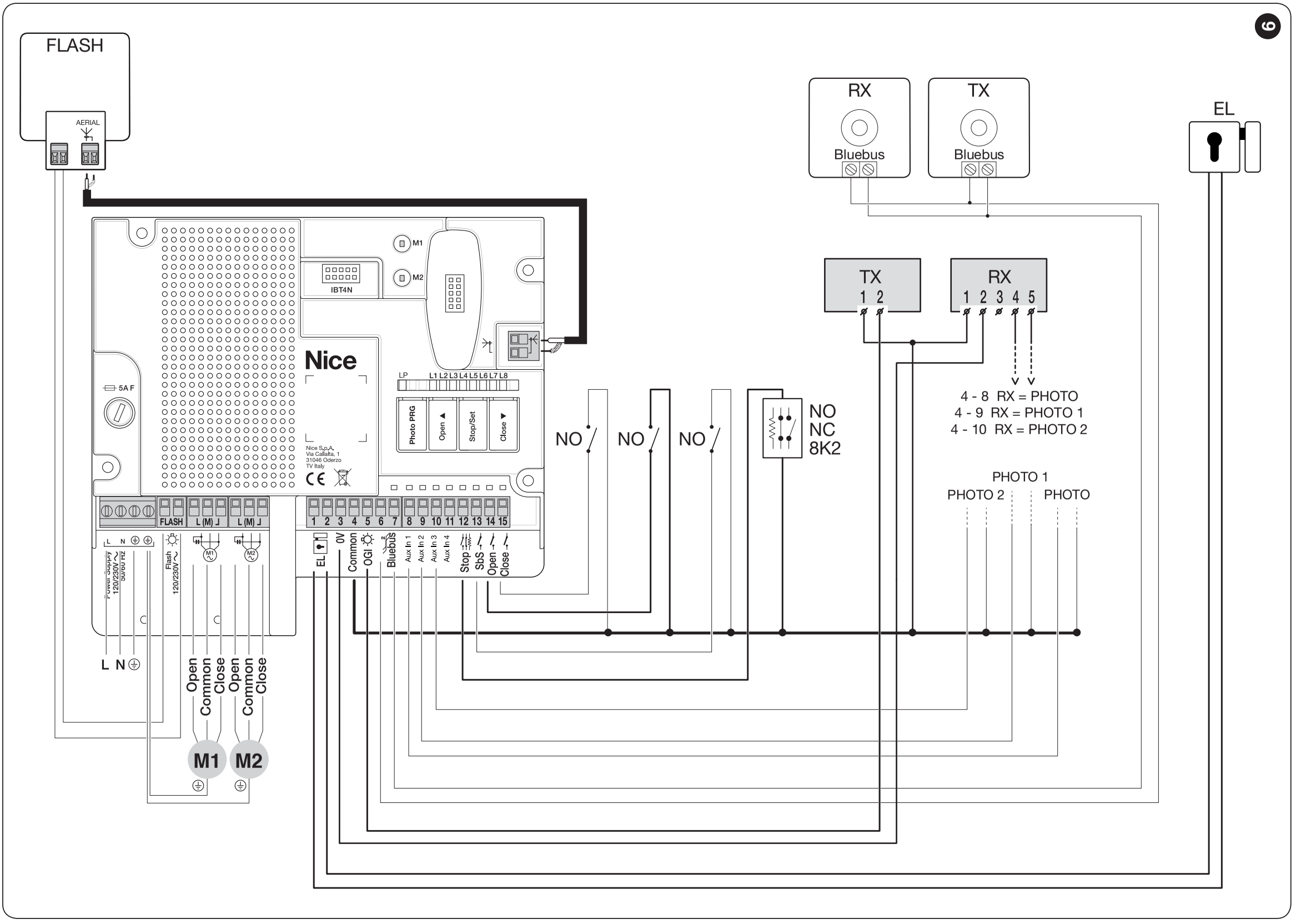
NICE original, Figure 9. The relay TX photocell test uses output 5, marked OGI. Terminals 6–7 in the diagram power separate BlueBUS devices. Click to enlarge the image.
As shown in Figure 9, connect TX terminal 1 to MC800 terminal 4 and TX terminal 2 to MC800 terminal 5. RX remains powered from terminals 3–4, and its C–NC contact connects to the selected PHOTO input. In this wiring configuration, output 5 is used for the photocell test and cannot also be used for the standard OGI indicator light. Repeat the learning procedure and functional test after changing the wiring. Selecting Photo PRG does not, by itself, change the physical TX power supply.
BlueBUS photocells and motor limit switches
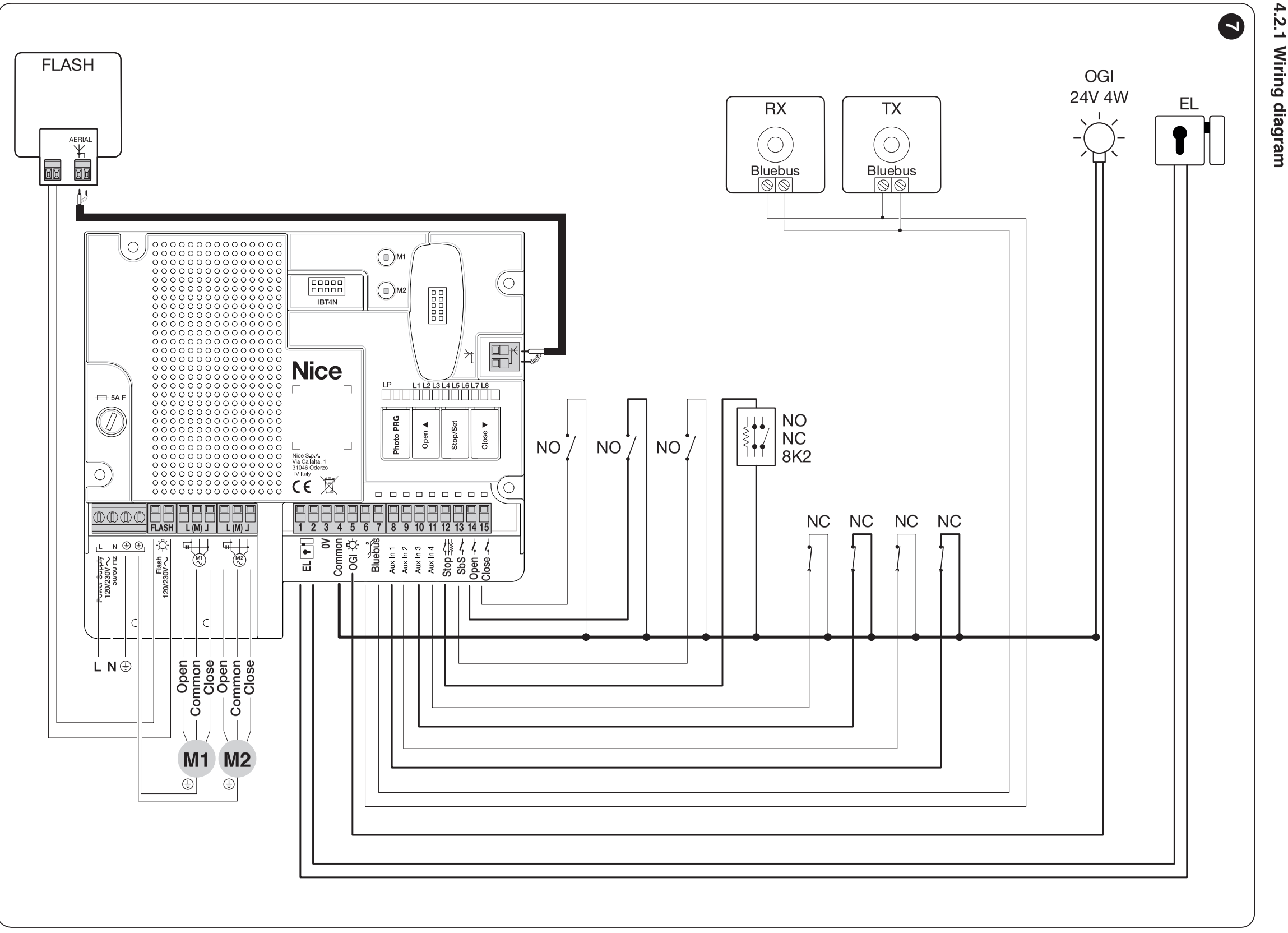
NICE original, Figure 7. Here, the AUX inputs are assigned to the limit switches; the relay photocell function is disabled. Click to enlarge the image.
NICE EPMB connect using two wires to terminals 6–7. The TX and RX jumpers for one pair must set the same address; the next pair must have a different address. FOTO/FOTO II protects closing, FOTO1/FOTO1 II protects both opening and closing, and FOTO2/FOTO2 II protects opening. The FOTO3 address is not permitted. Choose the exact jumper positions according to Table 3 in the MC800 manual and the photocell instructions.
If AUX is used as limit switches, LP must be off. Do not use relay photocells on AUX together with limit switches on those same inputs. Repeat the learning procedure every time you add or remove a device.
Source: original NICE MC800 manual IDV0544A00EN, Figures 7–9, Sections 4.4–4.6; EPM terminals according to IS0261A00MM.
Simplified first-start procedure
1. Mechanics, wiring and initial power-up
Check the stops, ensure the leaves move freely by hand, and make sure the operators are properly locked. Check M1/M2, PE, capacitors and safety inputs. Before teaching, check that the force setting is suitable for the specific motor: level II, parameter L6.
After power-up, BlueBUS should flash green about once per second and FLASH should be off. If this is not the case, check the wiring after disconnecting the power supply. A preventive reset is not required before every adjustment.
2. Select the photocell mode
For relay photocells on AUX1–3, press and hold Photo PRG, until LP lights up. When AUX is used for limit switches, LP must be off; switch it off by pressing and holding Photo PRG again. Do not enable relay mode when using BlueBUS photocells only.
3. Teach the connected devices
- Press and hold Open ▲ + Stop/Set.
- Release when L1 and L2 flash rapidly, after about 3 seconds.
- Wait for the procedure to finish. L1/L2 will turn off and STOP should be lit. L3/L4 may then indicate that the travel path needs to be taught.
Perform this step even when no devices are connected. For relay photocells, relay mode must be enabled before teaching.
4. Automatically teach the travel limits
- Move the unlocked leaves to approximately halfway along their travel, then mechanically lock the operators again according to their instructions.
- Press and hold Stop/Set + Close ▼ and release when L3/L4 flash rapidly, after about 3 seconds.
- Check the sequence: M1 closes, M2 closes, M2 opens, M1 opens, M1 closes and M2 closes.
- When the procedure is complete, L3/L4 will turn off. Test separate Open and Close commands and check the sequence and deceleration of the leaves.
If a leaf opens instead of closing: Stop the learning procedure by pressing Open or Close. Disconnect the power supply and verify that the circuit is de-energized. At the relevant motor, swap the two OPEN/CLOSE direction wires—the two outer operating wires shown in the diagram; do not change the COMMON or PE wire. With 230 V AC, this is not a change of polarity. Then repeat the learning procedure.
Activation of a photocell or STOP input interrupts learning and L1 starts flashing. Resolve the cause and restart the learning procedure. If the automatic setup is not satisfactory, continue with manual setup.
Source: original NICE MC800 manual IDV0544A00EN, Sections 4.5–4.9.
Manual setting of the limit positions
Manual setup has two stages: first, the closed and open limit positions, then the deceleration points during closing. Points A for L5/L6 are set only after the open position of the relevant motor has been taught.
| LED during learning | Position being stored |
|---|---|
| L1 | 0 M1 – M1 fully closed. |
| L2 | 0 M2 – M2 fully closed. |
| L5 | A M2 – start of M2 deceleration during closing. |
| L6 | A M1 – start of M1 deceleration during closing. |
| L7 | 1 M2 – M2 fully open. |
| L8 | 1 M1 – fully open M1. |
First phase: end positions
- Hold Stop/Set + Close and release when L3/L4 flash rapidly, after approximately 3 seconds. Immediately press Stop/Set briefly, selecting manual learning.
- When L1 is selected, hold Open or Close to move M1 to the closed position. Releasing the button stops the movement. Save by holding Stop/Set for at least 3 seconds, then release.
- When L2 is selected, save M2's closed position in the same way.
- L5 is now selected. Use brief presses of Open/Close to move past L5 and L6 to L7. Do not save these slowdown points yet.
- With L7 selected, set and save M2's open position; with L8 selected, set and save M1's open position.
- Allow the mode to exit, then test a safe opening and closing cycle.
Second phase: slowdown points
After learning the end positions, enter mixed setting mode: hold Stop/Set + Close and release when L1 flashes. Use brief presses of Open/Close to select L5. Move M2 to set the point where it starts slowing down during closing, then save it by holding Stop/Set for at least 3 seconds. In the same way, set L6 for M1. When starting from fully open, this is movement in the closing direction.
Do not wait more than 10 seconds between consecutive presses. A brief press of Open/Close selects an LED; holding the button moves the motor. For a single motor, use only L2, L5 and L7; skip the other items.
After each adjustment, check the full travel, the delay between the leaves, and safety. A general increase in motor run time against the stop does not replace correct settings or the instructions for the specific drive.
Source: original NICE MC800 manual IDV0544A00EN, Table 4 and Sections 4.8.2–4.8.3.
Programming functions and parameters
In Level I, the function is switched on or off. In Level II, its value is selected. Therefore, the same LED number does not indicate the same thing in both levels.
Level I – switching on and off
Hold Stop/Set until L1 flashes, then release. Use Open/Close to select an LED, then briefly press Stop/Set to change its state: a short flash = OFF, a long flash = ON. Programming ends if no button is pressed for 10 seconds.
| Item | Meaning / procedure |
|---|---|
| L1 – automatic closing | After opening, the pause time counts down and the gate closes. |
| L2 – closing after photocell activation | When automatic closing is enabled, this shortens the pause after the photocells are triggered to 5 seconds. Even with L1 switched off, a photocell trigger can start automatic closing after the set pause. |
| L3 – always close | After power is restored, an open gate may close automatically; a warning light flashes before movement begins. |
| L4 – brief closing movement | Before opening a closed gate, it briefly moves in the closing direction to help release the electric lock. |
| L5 – auxiliary lighting | Changes the FLASH output from a warning beacon to lighting. The output's electrical ratings must be suitable for the connected load. |
| L6 – pre-flashing | The warning beacon signals for 3 seconds before movement starts. |
| L7 – partial opening | Changes the CLOSE input to Partial Open 1. |
| L8 – pressure maintenance | For suitable hydraulic motors only: after the gate has been closed for 4 hours, it briefly restores pressure with a closing command. |
Level II – setting a value
Hold Stop/Set until L1 flashes, then release. Use Open/Close to select a parameter, then hold Stop/Set again. Its value appears after about 3 seconds. Keep holding Stop/Set and use Open/Close to select a new value. Release Stop/Set and wait 10 seconds.
| Item | Meaning / procedure |
|---|---|
| L1 – pause time | L1–L8: 5 / 15 / 30 / 45 / 60 / 80 / 120 / 180 s. Factory setting: 30 s. |
| L2 – step-by-step mode | L1: open–stop–close–stop. L2: open–stop–close–open. L3: open–close–open–close. L4/L5: condominium mode; L6: step-by-step with partial opening; L7: hold-to-run; L8: semi-automatic hold-to-run opening and closing. The detailed OPEN/CLOSE responses differ in the extended modes; see Table 6. |
| L3 – opening delay | L1–L8: 0 / 10 / 15 / 20 / 25 / 30 / 40 / 50% of the operating time. |
| L4 – closing delay | The same increments: 0 / 10 / 15 / 20 / 25 / 30 / 40 / 50% of the operating time. |
| L5 – time balancing | L1–L8: 0 / 20 / 30 / 40 / 60 / 70 / 80 / 100%. A lower setting shortens the closing time, while a higher setting lengthens it; this is not a force setting. |
| L6 – motor force | L1–L8: 25 / 35 / 45 / 55 / 65 / 75 / 85 / 100%. These values indicate electrical power control, not measured impact force. |
| L7 – start-up time | L1–L8: 0 / 0.5 / 1 / 1.5 / 1.8 / 2 / 2.5 / 3 s. |
| L8 – partial opening | L1–L4: M2 to ¼, ½, ¾ or fully open. L5–L8: both leaves to ¼, ½, ¾ or fully open, based on the smaller of the configured M1/M2 opening distances. |
Example – closing after 60 seconds: switch on L1 in Level I. In Level II, select parameter L1 and set its value to L5. If L2 is also active, photocell activation can shorten the pause.
Do not use force to compensate for mechanical binding. After changing force, start-up or timing settings, check the safety of the entire gate and carry out any required force measurements.
Source: original NICE MC800 manual IDV0544A00EN, Section 6, Tables 5–6.
Remote controls and service programmers
Install the plug-in receiver with the power disconnected. An existing SMXI or OXI may remain part of a suitable working setup; when adding remote controls, follow the exact receiver type and coding in use.
For a new compatible setup, NICE OXIBD and, for example, NICE ON3EBD. The OXIBD antenna connects directly to the receiver terminals. The original older diagrams for OXI do not show this connection method. The antenna coaxial cable and the warning beacon's mains supply are two separate circuits.
Example for an existing SMXI receiver
To store a remote control in Mode I, hold the receiver button for at least 3 seconds until its LED lights up, then release it. Within 10 seconds, hold the remote control button for at least 2 seconds. Three flashes from the receiver confirm that it has been stored. This mode stores the entire remote control; to assign a single specific command, use the relevant Mode II procedure.
For procedures for OXI, OXIBD and other receivers, see our NICE remote control pairing guide. Do not automatically apply the SMXI procedure to another receiver. Adding a remote control does not require resetting the MC800 travel limits.
Programming via BusT4
The original manual describes the NICE IBT4N and the NICE OVIEW. They enable advanced settings and diagnostics, such as OGI service indication. The existing reference to NICE BIDIWIFI remains for selecting mobile programming; check the module's manual for its connection, functions and support for the specific revision.
Source: original NICE MC800 manual IDV0544A00EN, Sections 8.1–8.2; pairing and antenna information depends on the receiver installed.
Diagnostics, fuse and reset
In the event of a fault, note down the number of red BlueBUS flashes and other illuminated or flashing LEDs. The red sequence repeats after a pause of about one second. Two quick green flashes when a command is issued indicate a normal input change.
| BlueBUS LED | Meaning and initial check |
|---|---|
| 1 red flash | BlueBUS devices do not match the learned configuration. Check the wiring and addresses; after changing the configuration, repeat the learning procedure. |
| 2 | Photocell triggered. Check for obstructions, cleanliness and TX/RX alignment, the power supply, and the relay contact if using a relay connection. |
| 4 | STOP triggered. Check the connected safety device and wiring. |
| 5 | Internal parameter error. Wait at least 30 s and try issuing a command. If the error recurs, servicing is required. |
| 7 | Electrical error. Next, read L1–L4 using the table below. |
| 8 | A command that remains active blocks all others. Check the button, relay or timer control. |
| 9 | The automation was locked by a command; use the appropriate command to unlock it. |
| Item | Meaning / procedure |
|---|---|
| 7 + L1 flashing | Motor protection activated or motors disconnected. |
| 7 + L2 flashing | Anomaly in the learned limit switches. |
| 7 + L3 flashing | Limit switches are present but have not been learned. |
| 7 + L4 flashing | General anomaly; if it persists after checking, servicing is required. |
| L1 + L2 flashing slowly | Device learning is incomplete. |
| L3 + L4 flashing slowly | Mechanical limit positions have not been learned. |
| STOP LED is off | Check the STOP safety input and its learned status. |
| BlueBUS LED is also off | Check the power supply and fuse; if the fault recurs, professional diagnostics are required. |
The MC800 table uses codes 1, 2, 4, 5, 7, 8 and 9. Codes and encoder errors from the MC824H do not apply here.
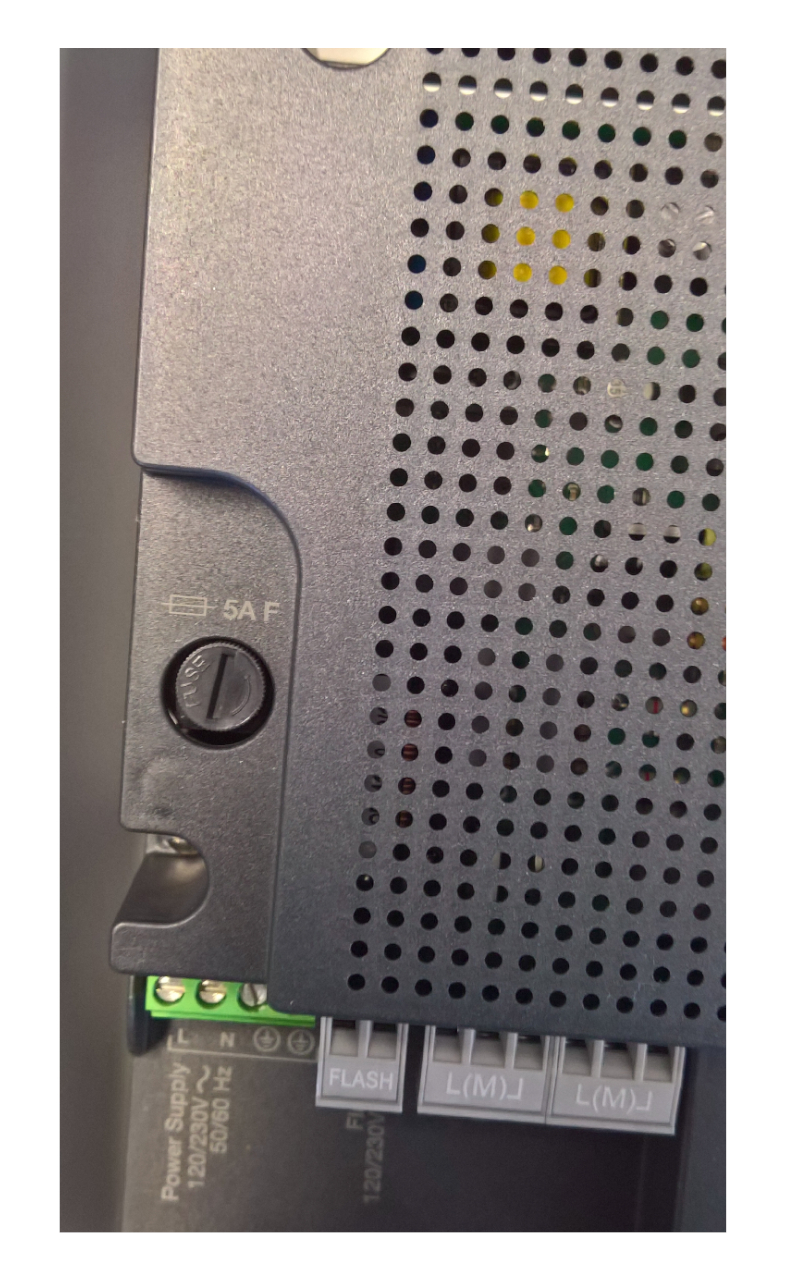
Main fuse: 5 A, fast-acting (F). When replacing it, also match the other parameters of the original fuse. Click to enlarge the image.
Check the fuse with the power disconnected. Find the cause of the blown fuse before replacing it; using a higher rating or bypassing it is not a repair.
When to reset
Resetting erases the control unit's custom settings. Only reset when deliberately restoring the factory settings: hold Open + Close until L1/L2 start flashing, then release. You will then need to reconfigure the inputs, learn the devices and travel, and carry out tests. The memory of the plug-in radio receiver is managed using its own procedure.
Source: original NICE MC800 manual IDV0544A00EN, Chapter 7, Tables 8–10; reset in Chapter 6.5.
Final tests and regular maintenance
- Check opening, closing and stopping using each control device in use.
- Check the sequence of the gate leaves, stops and slow-down; the leaves must not collide or bind.
- Test each pair of photocells and each STOP device separately, including its response while the gate is moving.
- Check the force settings and take the measurements required to safely commission the specific gate.
- Provide the owner with instructions for manually releasing the drives, safe operation and the maintenance schedule.
The automation must be checked at least every 6 months, or more frequently depending on use. In the event of a power failure, manually release the drives themselves according to their manuals.
For servicing, have the control unit, circuit board and motors identified, along with the photocell and receiver types, the number of red BlueBUS flashes, and a photo of the wiring.
Source: original NICE MC800 manual IDV0544A00EN, Chapters 5 and 9.
Overview of all three manuals · MC824HR30 · MC800 / MCA5 · Road RD400
Source: NICE MC800, IDV0544A00EN, revision 29. 8. 2018, for the MCA5 circuit board; this is not a manual for the newer MC800R30.






