NICE Road RD400 Technical Manual
NICE Road RD400 is a drive for residential sliding gates up to 400 kg and a gate leaf length of 8 m, with mechanical limit switches. Our store recommends a maximum of 5 m and approximately 250 kg with suitable gate hardware; this is not an additional manufacturer limit. Selection and duty cycle · Technical specifications.
(Is this drive right for me?)
Compare it with other drives:
| Item | Meaning / procedure |
|---|---|
| Alternative drive | NICE Robus RB400 – compare the specifications and available revision on its product page. |
| Higher weight category | NICE Robus RB600 – selection also depends on the gate length, friction and frequency of use. |
This product – the standalone NICE Road RD400 sliding gate drive (our code NICE-RD400-A) – includes:
- electromechanical NICE Road RD400 drive with a capacity of 400 kg and a maximum gate leaf length of 8 m, and with a built-in (but removable) control unit RBA4R10 with a built-in radio receiver (if you want to operate the gate by remote control, there is no need to buy a separate receiver).
- 2 × release keys for manual operation of the drive (required in the event of a power failure)
- drive installation components, anchors and bracket, limit switch stops for the drive
- installation manual
Discounted kits containing the drive NICE Road RD400:
| Drive kit with accessories » | Drive kit with accessories and a toothed rack » |
|---|---|
|
Road drive for gates up to 400 kg, remote control, photocells, warning light. |
ROAD drive for gates up to 400 kg, toothed rack, remote control, photocells, warning light. |
| Cantilever gate fabrication kit » | Track gate fabrication kit » |
Trolleys with 5 bearings, 5 m steel C-profile, guide-in ramp, receiver, guide, drive, toothed rack. |
Wheels Ø90 mm, 3 × 3 m galvanized track, bottom stops, guide, drive, toothed rack |
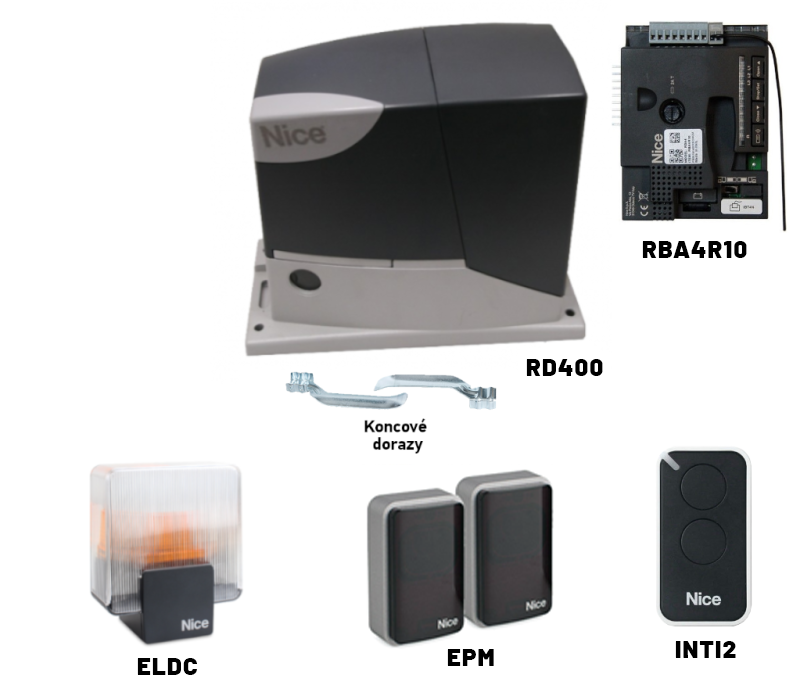
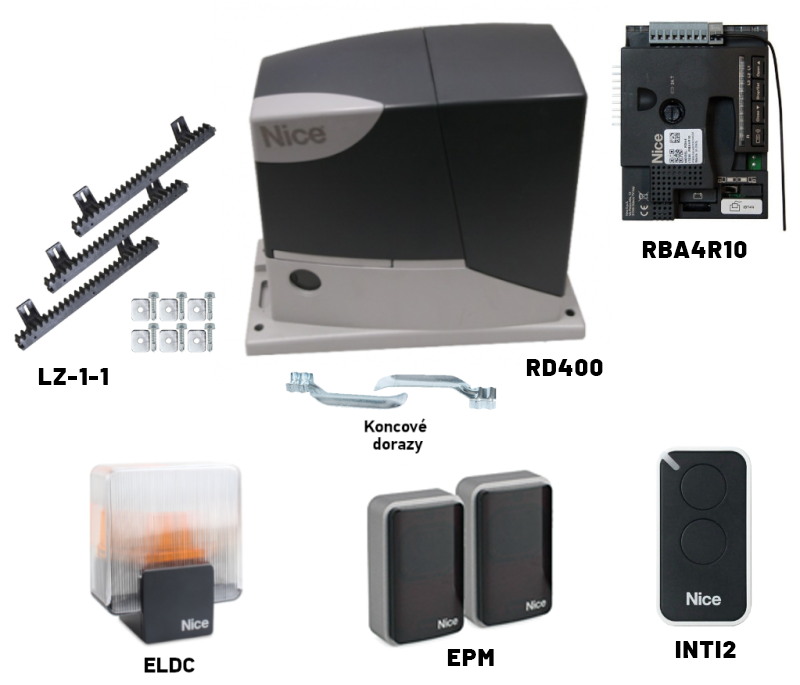
The RD400 is designed for residential use. Suitability depends on the condition, length and weight of the gate, how often it is used, and the design of the safety devices.
Relay photocells are used, for example NICE EPM. When using multiple pairs, connect the safety NC contacts in series; determine the power supply and pair arrangement according to the photocell instructions. The RD400 does not have BlueBUS terminals.
The following can be adjusted: speed, force, pause time and automatic closing. You can find the procedure in the Programming.
Diagnostics using warning light.
Gear wheel module 4 is compatible with the toothed rack in our range.
Choosing the right drive is only one part of having a safe gate. After installation, a technician must check the entire automation system, including its safety functions and forces, and hand it over to the user.
Accessories compatible with the NICE Road RD400 drive
When choosing accessories, the output type, power supply, and radio protocol are key. The links below lead to products in our range.
| What | Why / connection | Type |
|---|---|---|
| Flashing light | Movement signal on FLASH 7–8. The antenna is connected separately. | NICE ELDC |
| Photocells | PHOTO relay safety contact. Connection with photocell testing. BlueBUS models are not connected directly. | NICE EPM or NICE EPMA; the specific terminals below are for the EPM. |
| Key switch | Local SbS command via a volt-free C–NO contact between 1 and 2. | NICE EKS |
| Remote controls | Pairing with the integrated receiver. The first remote control paired determines the supported family; frequency alone is not enough. | NICE ON2E, NICE ON4E (O-Code), NICE FLO2RE (FloR). |
| Antenna | Improved reception of radio commands. Separate RG58 coaxial cable to the antenna input. | NICE ABFKIT or the ELDC flashing-light antenna. |
| Backup battery | Operation during a power failure for the RD400 generation described. | NICE PS124 – 1.2 Ah, integrated charging. |
| Service interface | Configuration and diagnostics via BusT4. Connect with the power supplies disconnected. | NICE IBT4N + NICE OVIEW |
| Rack | Transmits movement to the gate leaf. Module 4; fixing and load capacity depend on the rack type. | NICE LZ-1, NICE LZ-10 or steel NICE LZ-3. |
| Additional control | External module for the SbS input. Suitable power supply and volt-free NO contact. | Keypads and readers that require a decoder must not be connected directly to SbS. |
NICE Road RD400 at a glance
The RD400 has an integrated radio receiver. The control board described has four buttons and supports an optional battery NICE PS124. During a power failure, the gate can also be manually released.
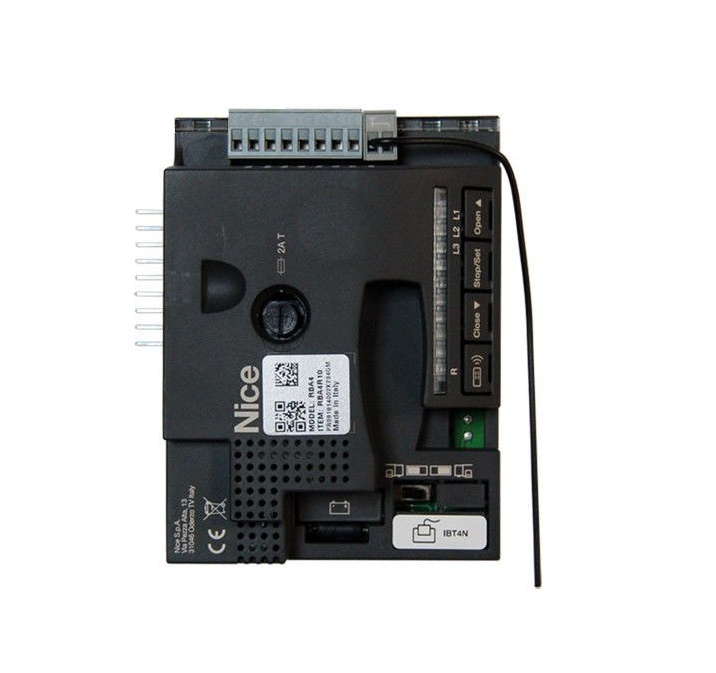
RBA4R10 control unit with four buttons. Before connecting, check the markings on the board and terminals. Click to enlarge the image.
Choosing a drive – is the drive NICE Road RD400 suitable for my gate?
Once released, the gate must slide smoothly by hand along its entire travel. Binding, damaged carriages or wheels, and an incorrectly positioned rack must be fixed before adjusting the force. The gate's weight alone does not determine its resistance.
| Gate leaf length | Max. cycles/hour | Max. consecutive cycles |
|---|---|---|
| Up to 5 m | 20 | 15 |
| Over 5 m up to 7 m | 16 | 12 |
| Over 7 m up to 8 m | 14 | 9 |
| Gate leaf weight | Percentage of the cycle count above |
|---|---|
| Up to 200 kg | 100% |
| Over 200 kg up to 300 kg | 85% |
| Over 300 kg up to 400 kg | 70% |
One cycle means opening and closing. The limits by length are multiplied by the percentage for the weight; round down when counting whole cycles. For example, 6 m / 350 kg: 16 × 0.70 = 11 whole cycles per hour, with a maximum of 8 consecutively. A limit of 50 cycles per day and a maximum of 9 minutes of continuous operation also apply. Temperature conditions may further limit the available operation.
NICE Road RD400 drive limits
For a reasonable margin when choosing a drive, our store recommends a maximum of approximately 5 m and 250 kg. This is a sales recommendation; a technician must assess the specific gate. The following table distinguishes this recommendation from the manufacturer's limits.
| Maximum | Recommended | |
|---|---|---|
| Gate leaf length | 8 m | 5 m |
| Gate leaf weight | 400 kg | 250 kg |
Service life and maintenance
The drive's service life depends on the gate mechanics, load, environment, and maintenance. Carry out servicing at least every 6 months or after no more than 10,000 movements since the last service, whichever comes first.
Installing the NICE Road RD400 drive
Install the drive on a solid, level base at the correct height relative to the rack. The anchoring must be suitable for the substrate and the RD400 mounting plate. For both cantilever and track-mounted gates, prepare conduits for the supply cables, drainage, and sufficient space for release and servicing.
Wiring
Accessory layout according to the original RD400 manual. The number of safety devices is determined by an assessment of the specific gate.
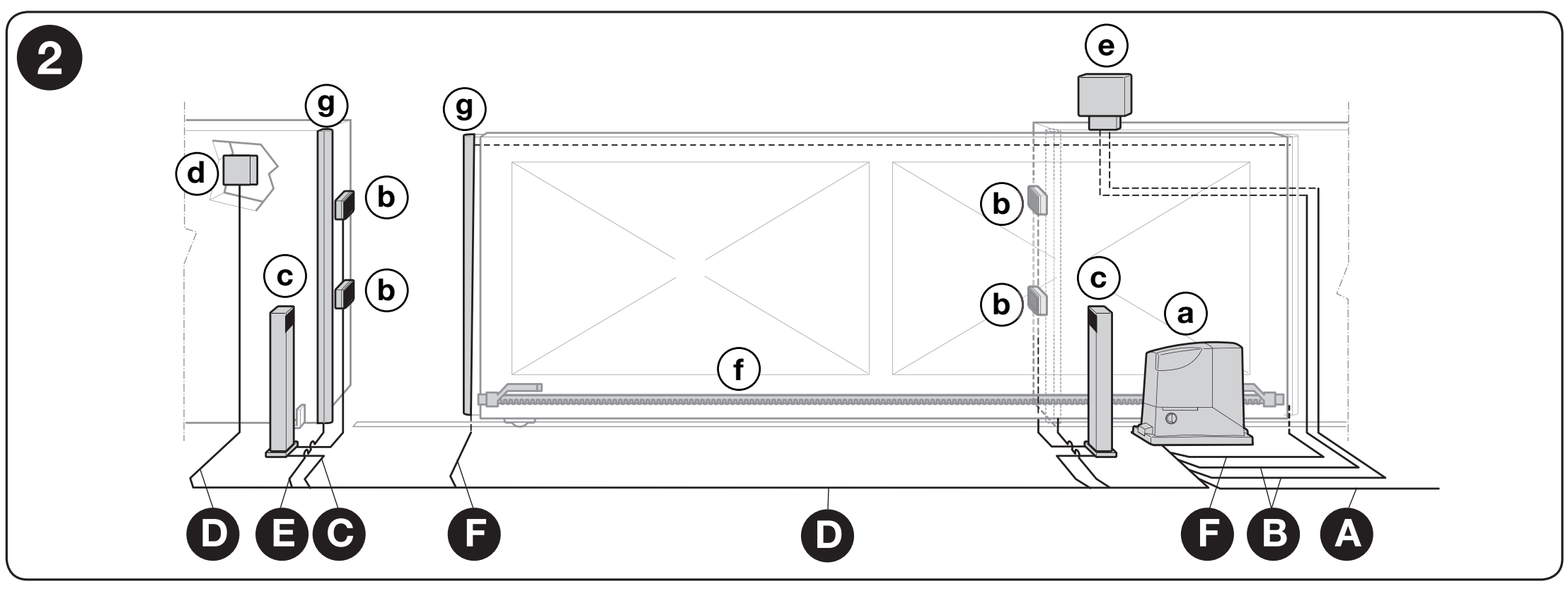
Device layout: lowercase letters indicate devices, uppercase letters indicate cable routes. Click to enlarge the image.
List of accessories
| Item | Meaning / procedure |
|---|---|
| a / b / c | Operator / photoelectric sensors / photoelectric sensor posts. |
| d / e | Key switch or keypad / warning beacon. |
| f / g | Rack / safety edges. |
Wiring list
| Item | Meaning / procedure |
|---|---|
| A – power supply | 3 × 1.5 mm² up to 30 m; for a longer supply cable, the manufacturer specifies, for example, 3 × 2.5 mm² and grounding for the automation system. |
| B – beacon / antenna | 2 × 0.5 mm² up to 20 m; separate RG58 up to 20 m, with less than 5 m recommended. |
| C – EPM photoelectric sensors | TX: 2 × 0.25 mm². RX: power supply and safety contact, for example, 4 × 0.25 mm² up to 30 m. The diagram below identifies all the conductors. |
| D – key switch | 2 cables of 2 × 0.5 mm² or 1 cable of 4 × 0.5 mm² up to 50 m; for a single C–NO command, use two conductors. |
| E / F – safety edges | 2 × 0.5 mm² up to 30 m. A suitable method of signal transmission is required on the moving gate leaf. |
Cables must be suitable for the environment, and their routes must separate mains voltage from control circuits. In addition to the power pair, the relay RX requires safety-contact conductors.
Installation
See “At what height should I install the operator".
Rack and its end stop
The gate moves by transferring the operator’s pinion torque into linear motion through the rack-and-pinion drive on the operator rack. There are two commonly used types of rack:
 |
Nylon rack (optionally with steel reinforcement) – attached to the gate with self-tapping screws through the eyelets. Ideal for relatively lighter and shorter gates. The steel pinion running against the nylon rack provides quiet operation. |
 |
Steel rack – attached by welding threaded brackets to the gate, then screwing the rack into them. Used for longer and heavier gates. The steel pinion running against the steel rack makes operation slightly noisier. |
The key requirement is that the operator pinion module is compatible with the rack module. Operator NICE Road RD400 has a pinion module of 4.
After installing the rack, check the clearance and adjust both limit-switch stops.
- Set the clearance along the entire travel 1–2 mm between the rack and pinion. The weight of the gate leaf must not rest on the operator.
- Manually move the gate leaf towards the open position, stopping 2–3 cm before the mechanical stop. Slide the limit-switch bracket until it engages, then, as specified by the manufacturer, move it at least a further 2 cm in the opening direction and secure it.
- Set the closed position in the same way, in the opposite direction. The gate’s mechanical stops must remain functional.
- Tighten the fasteners and check that the gate moves freely along its entire travel. Only then set the limit positions.
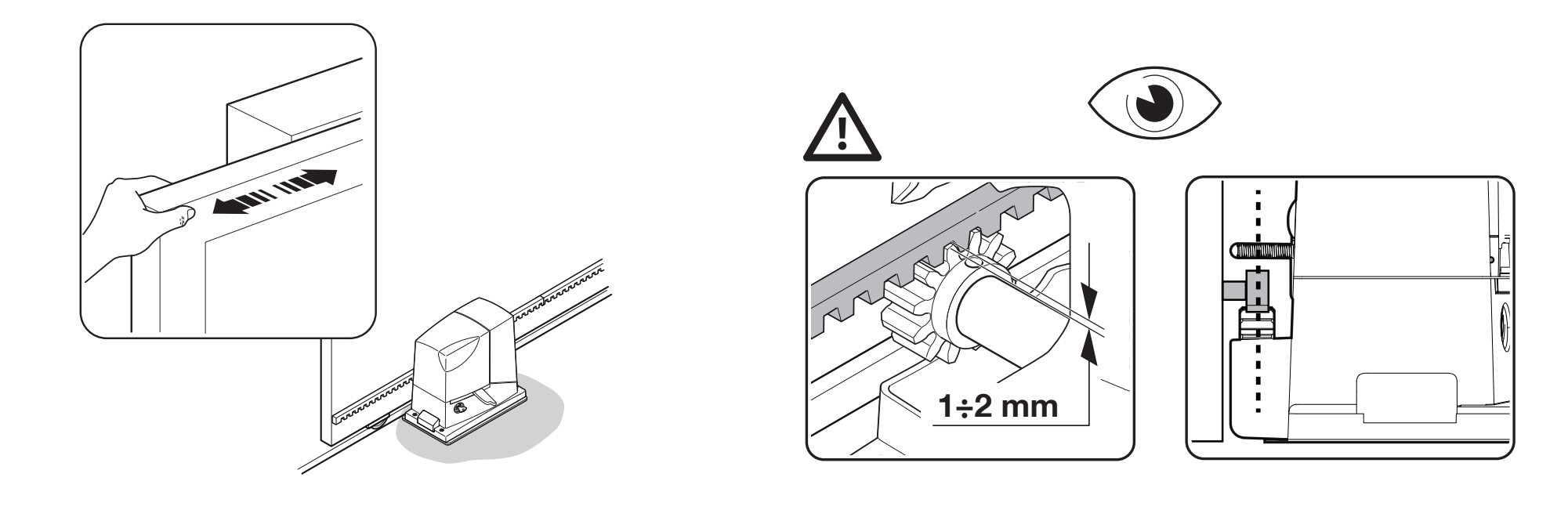
Clearance between the rack and pinion on the RD400. Click to enlarge the image.
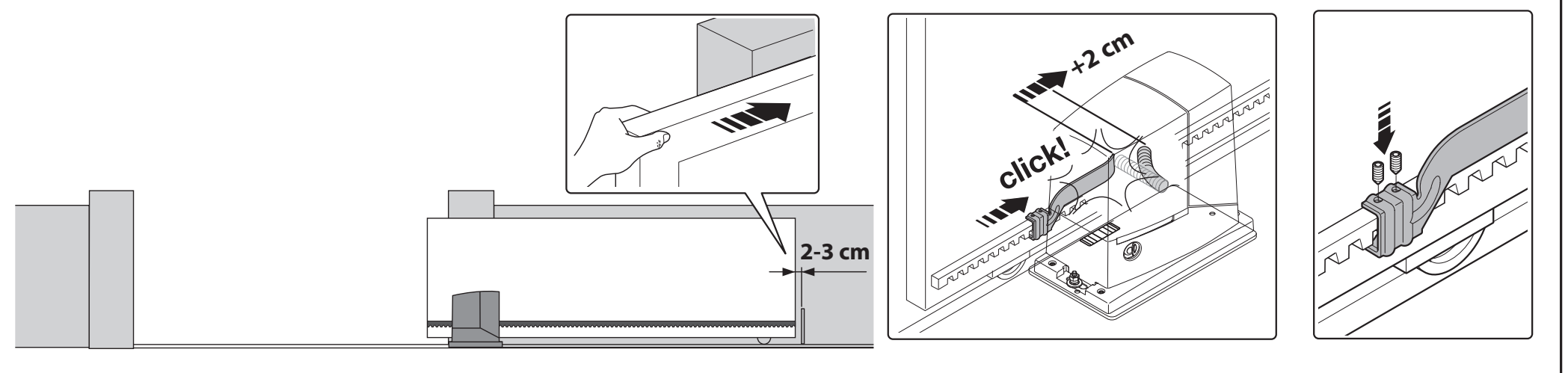
Clearance from the mechanical stop and additional bracket movement after engagement. Click to enlarge the image.
Wiring the NICE Road RD400 operator
Electrical wiring must be carried out by a qualified technician. Before changing wires, replacing fuses or connecting modules, disconnect the mains and any battery, then verify that the circuit is de-energized. Secure the gate to prevent unintended movement.
...to the mains
| Item | Meaning / procedure |
|---|---|
| L | Live conductor, as indicated on the mains terminal block. |
| N | Neutral conductor. |
| PE | Protective yellow-green conductor connected to the protective terminal; the operator is Class I and requires earthing. |
This RD400 version is powered by 230 V AC, 50/60 Hz. Never connect the mains supply to the low-voltage terminals 1–8. An electrician must size the protective devices, disconnection and supply cable for the installation.
...to accessories
The terminal numbers apply to the NICE RBA4R10 version shown on the board markings. Terminal 1 is +24 V and terminal 4 is GND.
| Item | Meaning / procedure |
|---|---|
| ANTENNA | Integrated receiver antenna input. The coaxial cable has a separate center conductor and shield, as indicated by the symbol on the board. |
| 1–2 / SbS | Step-by-step operation via a volt-free NO contact, for example, the C–NO contacts of a switch NICE EKS. |
| 3–4 / STOP | NO, NC or 8.2 kΩ, depending on the wiring. The type is learned during position setup; changing the learned state triggers a STOP with a brief reverse movement. |
| 1–5 / PHOTO | Safety NC contact for the photoelectric sensors. If triggered while closing, the gate reverses direction. |
| 4–6 / PHOTOTEST | Separate TX power supply for the photo test, maximum 100 mA. RX remains on 1–4. |
| 7–8 / FLASH | Output for one beacon NICE ELDC; switches at 0.5-second intervals during movement. |
| 1–4 / accessories | 24 V DC power supply, tolerance −30% / +50%; external device current draw: max. 100 mA. |
Connect multiple NC STOP contacts in series and multiple NO contacts in parallel. Resistive safety edges require the specified cascading connection with a single 8.2 kΩ termination. Do not bridge safety inputs as a way to resolve a fault. After changing devices, repeat the learning procedure and safety tests.
Drive fuses
| Item | Description / procedure |
|---|---|
| F1 | T 1 A / 250 V – time-delay fuse. |
| F2 | T 2 A / 250 V – time-delay fuse. |
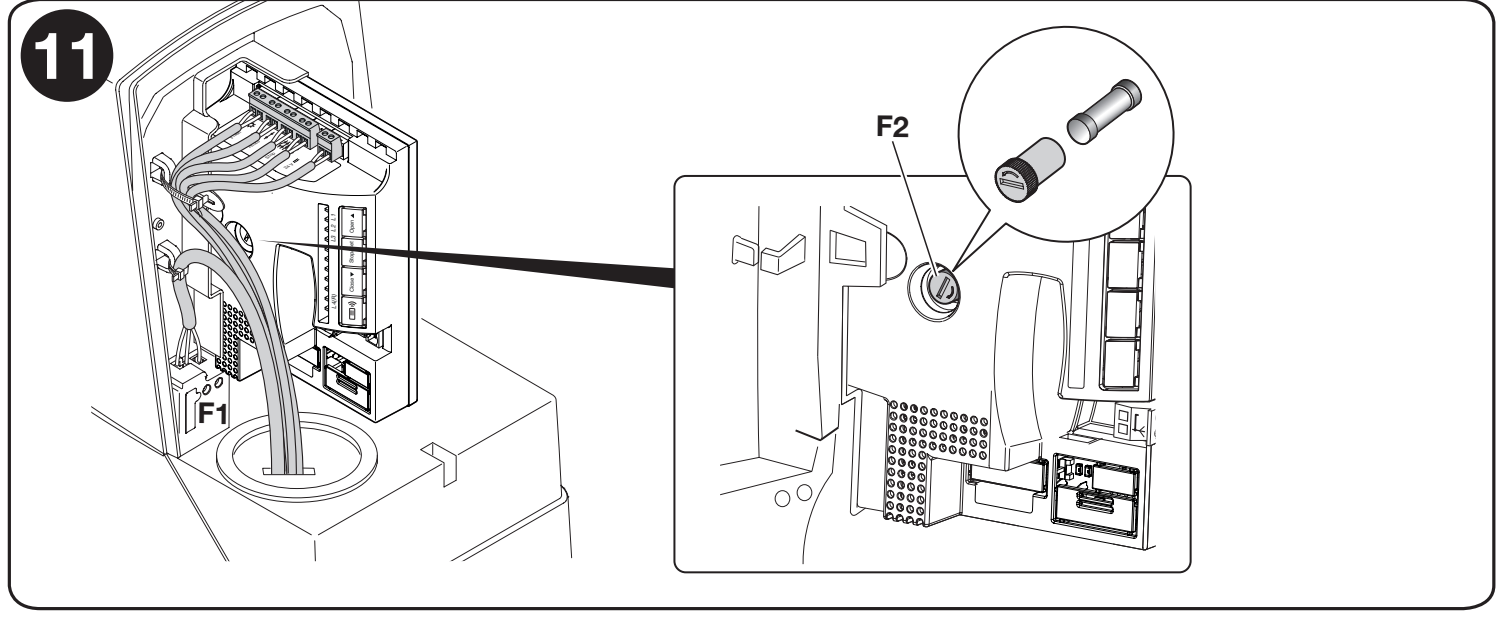
Location of fuses F1 and F2 in the RD400 drive. Click to enlarge the image.
Replace the fuse with one of the same type only after identifying the cause of the fault. Do not use a higher-rated fuse or bypass the fuse.
Standard wiring diagram:
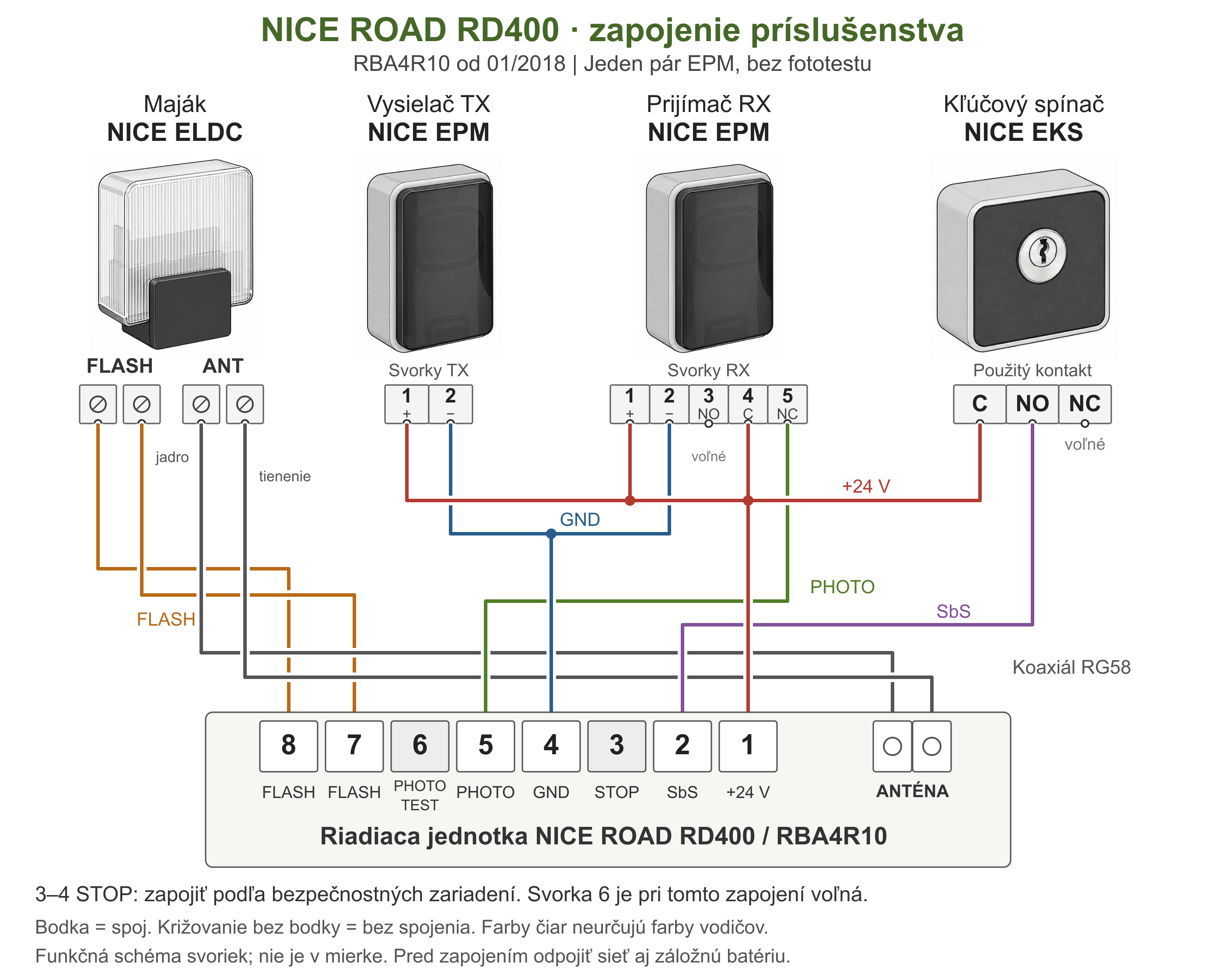
Wiring of one pair of EPM relay photocells without photocell testing for RD400 with an RBA4R10 control board, from 01/2018. Warning light ELDC has separate FLASH and antenna connections; the EKS switch controls the SbS input via the C–NO contact. A dot marks an electrical connection; crossing lines without a dot are not connected. Line colors distinguish circuits; they do not indicate wire colors. Click to enlarge the image.
| Device | Connection to RD400 / RBA4R10 |
|---|---|
| ELDC – warning light | Two-pin FLASH connector to terminals 7–8. Connect the antenna separately using RG58 coaxial cable to the antenna input: connect the core and shield according to the markings. |
| EPM – transmitter TX | TX 1 (+) → RD400 1; TX 2 (−) → RD400 4. |
| EPM – receiver RX | RX 1 (+) and 4 (C) → RD400 1; RX 2 (−) → RD400 4; RX 5 (NC) → RD400 5. RX 3 (NO) is left unused. |
| EKS – key switch | One contact: C → RD400 1, NO → RD400 2 (SbS). NC and the second contact are not used in this wiring configuration. |
| STOP and photocell testing | STOP between 3–4 is handled according to the safety devices; the diagram does not specify a universal jumper. Terminal 6 is unused here. For wiring with photocell testing follow the procedure below. |
Drive photocells
The example is for NICE EPM: TX is the transmitter and RX is the receiver. EPM terminals: TX 1 = +, 2 = − and RX 1 = +, 2 = −, 4 = C, 5 = NC; RX 3 (NO) is not used in the safety circuit. For other photocell types, check their own terminal numbering.
Wiring without the photocell test function
Check the total current draw of the photocells. Output 1–4 supplies a maximum of 100 mA. One pair of EPM photocells draws approximately 55 mA; two pairs without photocell testing would draw approximately 110 mA in total, exceeding this limit. Therefore, connecting the NC contacts in series alone is not sufficient to connect an additional pair. A technician must plan the power supply for multiple pairs based on their actual current draw and the relevant manuals.
Both photocells are continuously powered from terminals 1–4. Connect the receiver’s C–NC safety contact between terminals 1 and 5 of the control unit.
| Control unit | EPM photocells |
|---|---|
| RD400 1 (+24 V) | TX 1 and RX 1; also RX 4 (C). |
| RD400 4 (GND) | TX 2 and RX 2. |
| RD400 5 (PHOTO) | RX 5 (NC). |
| RX 3 (NO) | Not connected. |
The wiring matches the main diagram above. After wiring, check the alignment of the photocells and the gate’s response when the beam is interrupted.
Wiring with the photocell test function
With photocell testing, the transmitter’s power supply is changed: TX 1 connects to RD400 6 and TX 2 to RD400 4. RX and the C–NC contact remain connected as in the wiring configuration without photocell testing. The safety circuit response is tested before movement.
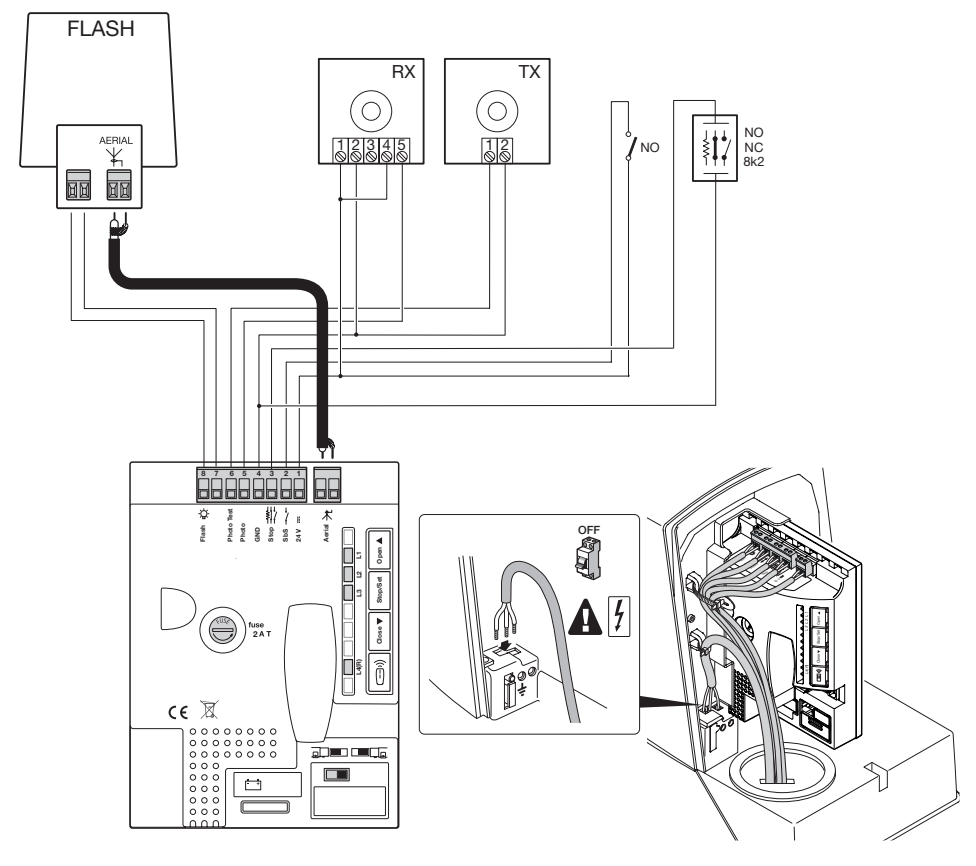
Wiring with photocell testing: TX power supply is connected to terminals 6–4. Click to enlarge the image.
| Item | Description / procedure |
|---|---|
| TX 1 / TX 2 | RD400 6 / RD400 4; maximum total output current: 100 mA at PHOTOTEST. |
| RX 1 / RX 2 | RD400 1 / RD400 4. |
| RX 4 (C) / RX 5 (NC) | RD400 1 / RD400 5. |
The mode of the connected safety devices is detected during position learning. After changing the wiring, repeat the learning procedure and verify that movement does not start if the test fails.
Synchronizing multiple pairs is a separate photocell function. Do not automatically change the SYNC jumper when enabling photocell testing: its use must match the manual for the specific photocells and their power supply type. EPM describes synchronization for AC power; the RD400 supplies DC here.
Selecting the gate travel direction
Determine the direction while looking toward the gate from the drive side. When opening to the left, set the switch to the left; when opening to the right, set it to the right.
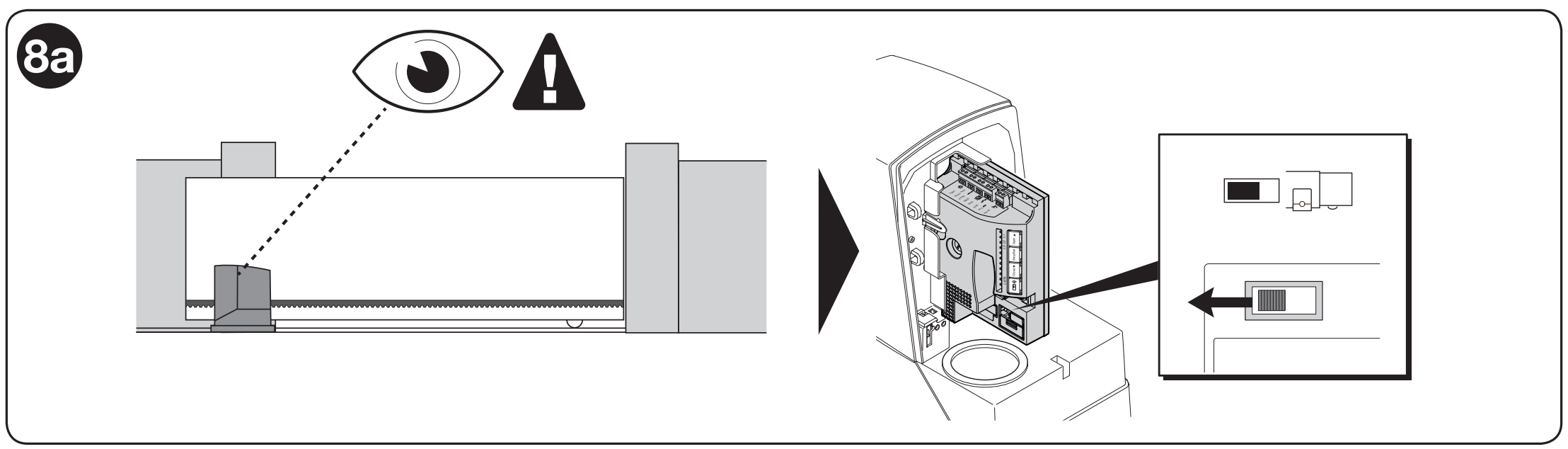
Left-hand opening, viewed from the drive side. Click to enlarge the image.
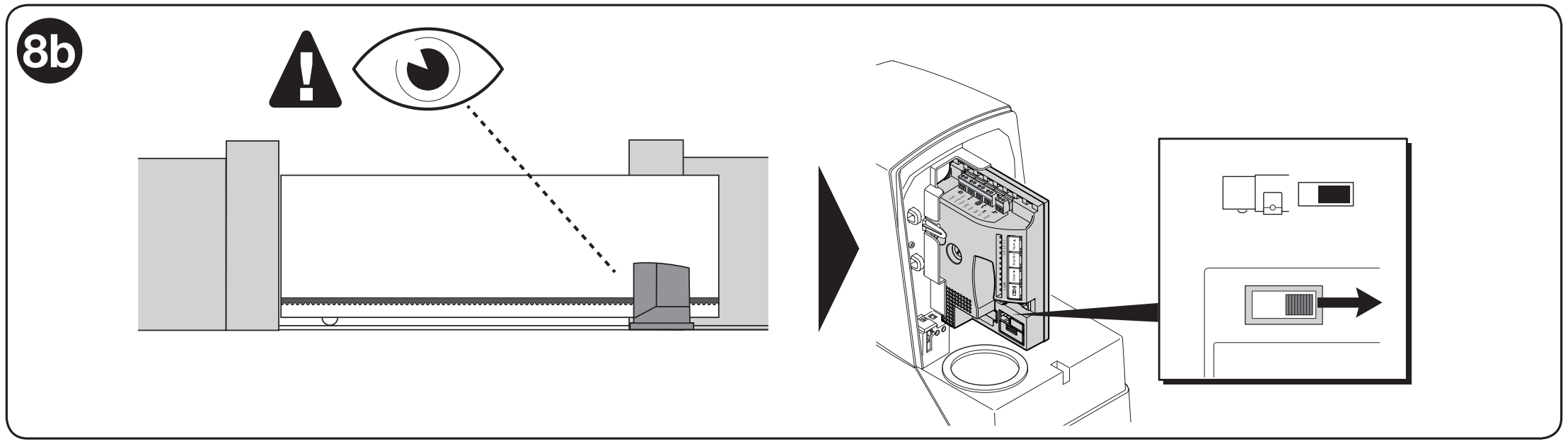
Right-hand opening, viewed from the drive side. Click to enlarge the image.
Do not change the switch while the gate is moving. Disconnect the power supply before working on the open drive; after changing the direction, repeat the limit-position learning procedure.
Gate leaf length detection
The learning procedure detects the limit positions, STOP connection, and photocell test mode. Repeat it after changing the stops or safety devices. Keep the movement area clear.
- Disengage the drive, move the gate to approximately halfway, then re-engage it mechanically. Check the direction switch.
- Switch on the power supply. When idle, the motor is stopped, the green OK LED flashes approximately once per second, and the warning light is off.
- Press and hold simultaneously Close + Stop/Set; release the buttons when movement starts, after approximately 3 seconds.
- The first movement must be closing. If the gate opens, stop the learning procedure with the Stop/Set button, disconnect the power supply, and check the direction.
- Allow the cycle to finish closing → opening → closing. L2 and L3 flash during the learning procedure.
- After learning is complete, send an SbS command to open the gate fully, then send another command to close it fully. During this test cycle, check that the gate slows down approximately 30–50 cm before the limit switches and stops 2–3 cm before the mechanical stops.
If L2 and L3 are still flashing after learning is complete, the procedure was unsuccessful. Check the wiring and diagnostics, resolve the cause, and repeat the learning procedure.
Drive programming
The Road drive allows several functions to be programmed, either by switching a function on or off using Level I programming., or by setting a preset parameter using Level II programming.
The control board has four buttons and four programming LEDs. For this generation, enter programming mode by holding Set for approximately 3 seconds.
| Item | Meaning / procedure |
|---|---|
| Open ▲ | Open; in the menu, move the selection up. |
| Stop/Set | Stop; hold for approximately 3 seconds to open the menu. |
| Close ▼ | Close; in the menu, move the selection down. |
| Radio | Store and delete remote controls; LED L4(R) indicator. |
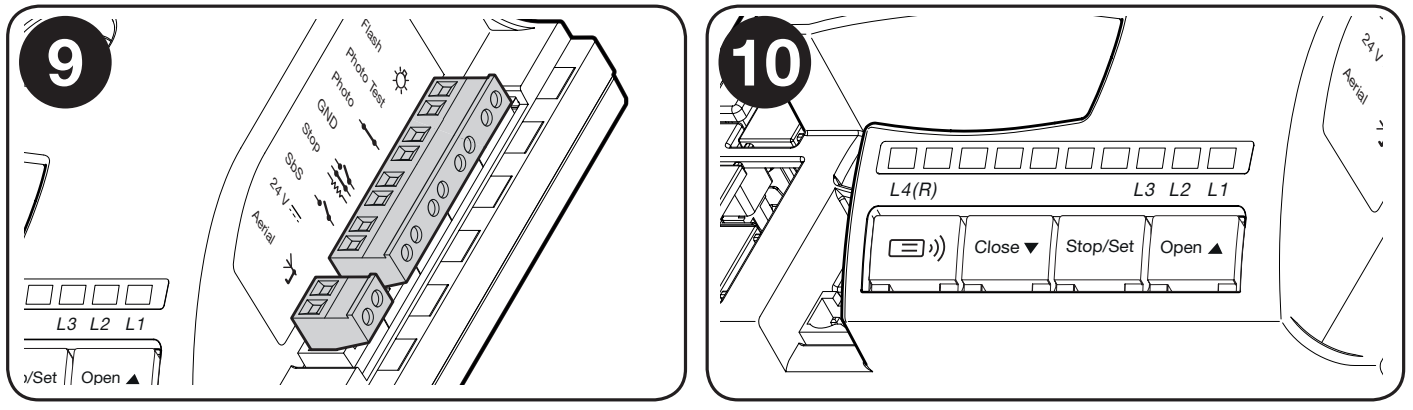
Control board buttons and LEDs. L4(R) belongs to the radio receiver. Click to enlarge the image.
Level I programming.
The default setting for all three Level I functions is OFF. A short flash when selected means OFF; a long flash means ON.
- Hold Set for approximately 3 seconds and release it when L1 starts flashing.
- Use Open / Close to select the function LED.
- Briefly press Set to switch between OFF and ON. Adjust another function if needed.
- Programming ends after 10 seconds without a button press, and the changes are saved.
List of programmable on/off functions:
| Item | Meaning / procedure |
|---|---|
| L1 – deceleration distance | OFF = short deceleration; ON = long deceleration. |
| L2 – speed | OFF = slow; ON = fast. |
| L3 – automatic closing | OFF = disabled; ON = enabled. The pause time is selected at Level II; the factory setting is 30 s. |
Level II programming.
Level II sets a parameter value. The parameter and its value are selected using the same LEDs in two consecutive steps.
- Hold Set for approximately 3 seconds and release it when L1 starts flashing.
- Use Open / Close to select parameter L1, L2, or L3.
- Hold Set. After approximately 3 seconds, the LED for the current value lights up.
- Keep holding Set and use Open / Close to select a new value; then release Set.
- The menu closes after 10 seconds without a button press.
List of programmable adjustable functions:
| Item | Meaning / procedure |
|---|---|
| L1 – motor force | L1 low; L2 medium; L3 high (factory setting). |
| L2 – SbS step sequence | L1 open–stop–close–open (factory setting); L2 open–stop–close–stop; L3 condominium mode. |
| L3 – pause time | L1 15 s; L2 30 s (factory setting); L3 60 s. Applies when automatic closing is enabled. |
Do not compensate for mechanical resistance in the gate by increasing the force. After changing the force, repeat the relevant measurements and safety tests.
Connecting additional external devices to the drive
| Item | Meaning / procedure |
|---|---|
| Accessory power supply | Between 1 (+) and 4 (GND): 24 V DC, tolerance −30% / +50%, maximum total current 100 mA. |
| Control contact | Separate volt-free NO contact on terminals 1–2 (SbS). Do not apply an external voltage to the input. |
Special drive functions
Gate held open
If the SbS command is held for longer than 3 seconds, the gate opens regardless of the configured step sequence. This can be used with a suitable timer contact to keep the gate open at a set time.
Forced movement
If a safety device fails, the manufacturer describes emergency movement with the control held continuously. Use this only with a clear view of the gate, the area kept clear, and no risk to people. The fault must be repaired as soon as possible.
- Send a command. If movement does not start because a safety device is blocking it, repeat the command within 3 seconds and keep holding it.
- After approximately 2 seconds, the gate will move only while the command is held.
- Releasing the control stops the gate immediately. This mode does not replace repair of the safety devices.
Drive troubleshooting
If anything is unclear or you have any other problem, feel free to contact our technical support team for NICE drives.
Depending on the nature of the problem
During installation (or if the drive fails), you may encounter one of the following problems:
| Item | Meaning / procedure |
|---|---|
| Remote control does not light up | Check its battery. |
| Remote control lights up, but the gate does not respond | Check that the remote control is stored and uses the correct protocol; check the antenna and whether the memory is locked. |
| OK LED is off | An electrician should check the power supply and fuses after safely disconnecting the power. |
| The command is received, but movement does not start | Note the red OK flashes or the beacon’s flash sequence; check PHOTO, STOP, and active commands. |
| Movement reverses immediately | Check for obstructions, friction, the rack, and the limit switch. Adjust the force only after checking the mechanics and re-verifying safety. |
Diagnostics using beacon flashes
During normal movement, the beacon flashes at 0.5-second intervals. If a fault occurs, count the flashes in the sequence, separated by a pause of about one second. The same faults are indicated by the red OK LED.
| Number of flashes | Meaning and checks |
|---|---|
| 2 | The photocell is blocking movement. Check for obstructions, alignment, power supply, and the safety contact. |
| 3 | Force limiter activated. Find the cause of excessive friction or an obstruction. |
| 4 | STOP input activated. Check the safety device and wiring. |
| 5 | Internal parameter error. Wait at least 30 s; if the fault persists, a technician must reset the unit and perform a new learning procedure. |
| 6 | Duty cycle exceeded. Let the operator rest for a few minutes. |
| 7 | Internal electrical fault. A technician should disconnect all power sources for a few seconds; if the fault recurs, check the control board and motor wiring. |
| 8 | Another continuous command is already active. Check the push button, relay, or timer. |
| 10 | Movement time exceeded or motor power supply missing during learning. Check the mechanics and movement time, and make sure the control board is seated correctly in its holder. |
Diagnostics using LED flashes
This control board has an OKLED, not BlueBUS. The STOP indicator shows the safety input status; LEDs L1, L2, L3, and L4(R) indicate settings and radio status. Their locations are shown in the button diagram.
Horizontal OK and STOP LEDs
| Item | Meaning / action |
|---|---|
| OK – green, once per second | Normal operation. |
| OK – 2 quick green flashes | Input change or command received. |
| OK – red flash sequence | Fault indicated by the flash-code table. |
| OK – steady green or red | Fault condition; if it recurs after disconnecting the power and checking the unit, servicing is required. |
| OK – off | Check the power supply and fuses. |
| STOP on / off | On: input status is OK. Off: STOP input activated; check the device and its learned status. |
LEDs L1–L4(R) by the buttons
| Item | Meaning / action |
|---|---|
| L1 | Off = short deceleration, on = long deceleration. |
| L2 | Off = slow speed, on = fast speed. |
| L3 | Off = automatic closing disabled, on = enabled. |
| L1 + L2 + L3 flashing | Position learning is required; follow the relevant procedure during programming. |
| L4(R) on | An unmemorized radio code was received during normal operation. |
| L4(R) flashing | Remote controls are being memorized or erased. |
Manual release of the NICE Road RD400 operator
In the event of a power failure or malfunction, the RD400 can be released using the supplied key so the gate can be operated by hand. First, prevent unintended movement and disconnect the power sources. If the gate leaf moves on its own or sticks after release, it needs repair.
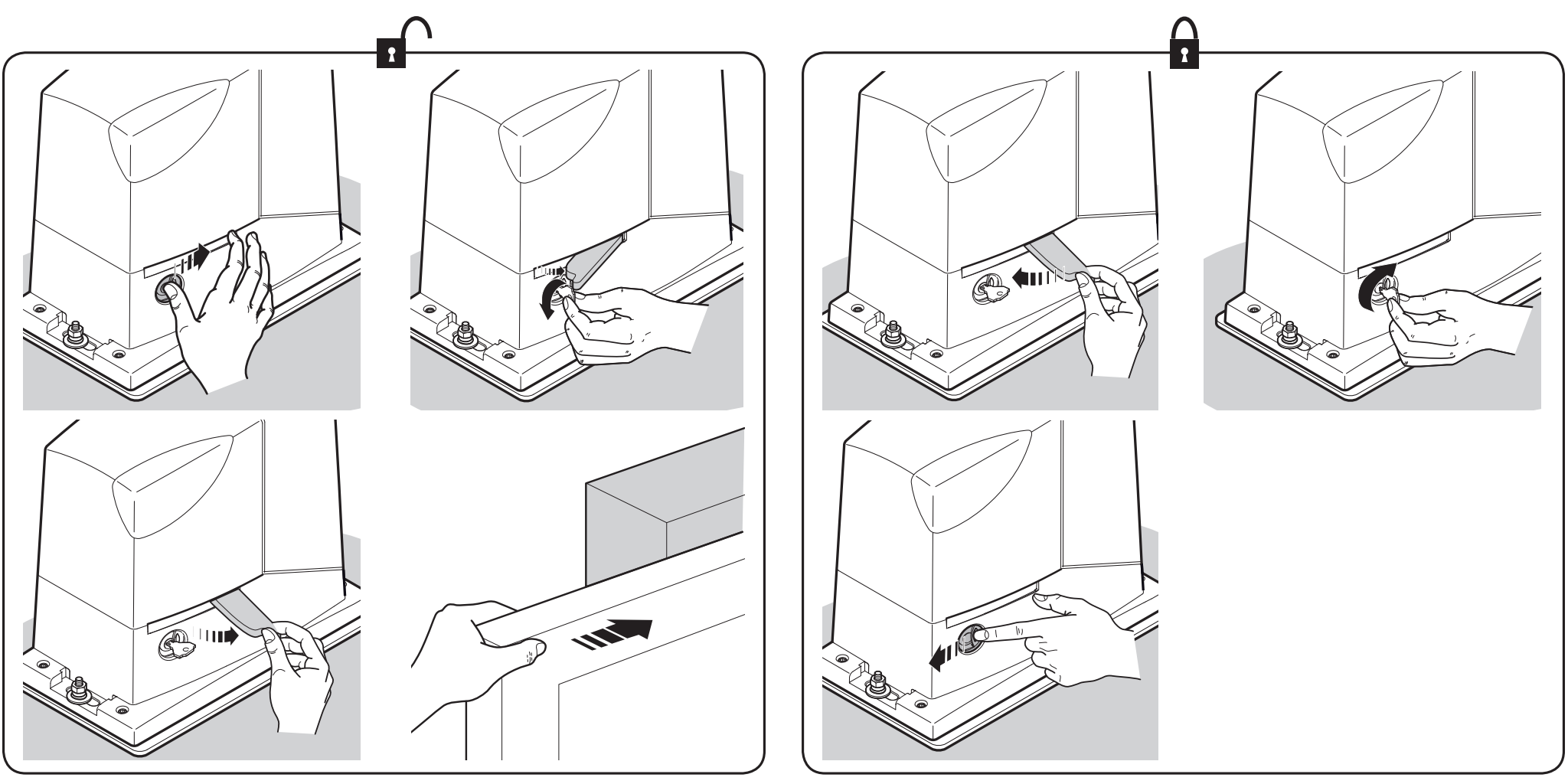
The left side of the image shows how to release the RD400; the right side shows how to re-engage it. Click the image to enlarge it.
- Open the lock cover, insert and turn the key, then swing out the release handle as shown.
- Move the gate slowly by hand, keeping it under control.
- To re-engage the operator, close the handle, turn and remove the key, and close the cover. Check that the mechanism is engaged before operating it automatically.
Technical specifications of the NICE Road RD400 operator
| Item | Meaning / action |
|---|---|
| Application / limits | For residential sliding gates, up to 400 kg and 8 m, depending on the duty cycle. |
| Motor / power supply | Electromechanical operator with integrated control unit; RD400 mains supply: 230 V AC, 50/60 Hz. The RD400/V1 is a different voltage version. |
| Max. power consumption / current | 210 W / 1.1 A. |
| Torque | Starting torque: 12 Nm (400 N); rated torque: 5 Nm (167 N). |
| Speed | No load: 0.13 or 0.25 m/s; at rated torque: 0.16 m/s. |
| Pinion | Z15, module 4, pitch 12.5 mm, pitch diameter 60 mm. |
| Operation | Max. 50 cycles per day, continuous operation max. 9 min; further limits depend on gate length and weight. |
| Fuses / protection | F1 T 1 A / 250 V; F2 T 2 A / 250 V; Class I, protective earth. |
| Beacon / battery | One NICE ELDC; optionally NICE PS124. |
| Functions | 3 ON/OFF functions and 3 adjustable parameters. STOP and position learning. |
| Operating environment | −20 to +55 °C; IP44. |
| Dimensions / weight | 330 × 195 × 277 mm; 8 kg. |
Technical specifications of the built-in radio receiver in the NICE Road RD400 operator
| Item | Meaning / action |
|---|---|
| Receiver | Integrated, 4 commands, 433.92 MHz. |
| Protocols | FloR, O-Code, Smilo. The first remote control memorized determines the family for subsequent remotes. |
| Memory | Up to 100 remote controls can be stored in Mode I. |
| Antenna / sensitivity | 52 Ω, RG58 or equivalent cable; sensitivity better than 0.5 µV. |
| Range | The manufacturer specifies 100–150 m; range is affected by obstacles, interference and antenna placement. |
| Temperature | −20 to +55 °C. |
Storing remote controls
These instructions are for the integrated receiver on the four-button control board described. Select a remote control with a supported protocol, for example NICE ON2E or NICE FLO2RE, depending on the family in use. Pairing does not require erasing the gate travel limits.
Mode I – entire remote control
- Press and hold Radio for at least 5 seconds, then release it when LED L4(R) lights up.
- Within 10 seconds, press and hold the first button on the remote control for at least 5 seconds, then release it.
- Three flashes of L4(R) confirm that it has been stored. If nothing else is stored, the mode ends after 10 seconds.
T1 = SbS, T2 = pedestrian passage, T3 = open, T4 = close; a two-button remote control has only T1 and T2.
Mode II – one button
- Briefly press Radio 1× for SbS, 2× for pedestrian passage, 3× for opening or 4× for closing.
- Check that L4(R) flashes the corresponding number of times.
- Within 10 seconds, press and hold the desired button on the remote control for at least 3 seconds; three flashes confirm that it has been stored.
You can compare other receivers and procedures in our NICE remote control pairing guide. If the remote control cannot be stored, also check the radio memory lock.
Control unit reset
Reset is for deliberately erasing settings, not a required first step. With the motor stopped, press and hold Open + Close for approximately 3 seconds. When all LEDs light up, release the buttons. When finished, L1, L2 and L3 flash. You will need to repeat position learning, settings and safety tests. This procedure does not erase stored remote controls.
Backup battery and service interface
The optional battery intended for this generation of RD400 is NICE PS124 with a capacity of 1.2 Ah and integrated charging. Connect it only after installation and programming are complete, with the mains power disconnected. Once connected, the drive is powered even when the mains supply is off. Runtime depends on the drive load and battery condition.
Service programmer NICE OVIEW is connected via NICE IBT4N to BusT4. Insert the interface with all power sources disconnected.
Testing, handover and maintenance
- Check opening, closing, stopping, slow-down and both limit switches.
- Test each pair of photocells, each STOP device and the photo test, if used.
- Check the forces and carry out the measurements required for the specific gate; excessive force must not be used to compensate for a mechanical fault.
- Check the release mechanism, covers, safety devices and labels. Provide the user with operating instructions and a maintenance schedule.
A technician must perform maintenance at least every 6 months or after no more than 10,000 movements since the last service. The user must keep the area and photocells clean; if unusual noise or jerky movement occurs, stop using the automation system. When cleaning the track, disconnect any backup battery as well. Watch the gate from a safe distance while it is moving. Only pass through when it is fully open and stationary. Children must not operate the gate or play near it.






