NICE Hyppo HY7024 - swing gate operator for a leaf up to 3 m/350 kg
| Product availability: | within 3 days | We usually ship the goods within 3 days. |
|---|
within 3 days
€719.25 including VAT
| Weight |
|---|
| 13 kg |
Description of NICE Hyppo HY7024 - swing gate operator for a leaf up to 3 m/350 kg
Backup in the event of a power failure: for the control unit MC824HR30 use NICE PSS324. With the older PS324 you need CABLA11 cable and Standby must be switched off. Backup connection.
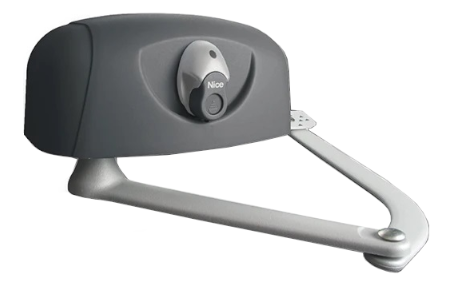
NICE HYPPO HY7024 – articulated-arm swing gate operator
NICE HYPPO HY7024 is a standalone electromechanical motor for one gate leaf. It has a 24 V DC, an articulated arm, and is non-reversible. It monitors the gate leaf position using a magnetic encoder. It requires a separate control unit and safety accessories; if the power supply fails, it can be released with a key.
Installation, wiring, and safety testing must be carried out by a qualified technician. Disconnect the power supply and any backup power before opening the motor or control unit. When operating the gate manually, secure the leaf to prevent unintended movement.
When to choose this operator
The HYPPO is suitable for swing gates where the articulated arm is installed on the inside. The choice depends on the gate leaf’s length and weight, resistance to movement, hinge position, and the space required for the arm’s full range of motion.
| Maximum gate leaf length | 3 m; the permitted weight decreases as the length increases. |
|---|---|
| Weight according to the graph | For a gate leaf length of 2 m the lower curve in the graph is below 350 kg; for 3 m, below 200 kg. Assess the specific weight according to the relevant curve and the gate conditions. |
| Duty cycle | 80%; also suitable for more intensive use. |
The 3 m and 350 kg limits do not apply simultaneously. The limits apply to one motor and one gate leaf. The gate’s height and shape, solid infill, and strong winds can significantly reduce these values. The duty cycle expressed as a percentage is not the number of cycles per hour or continuous operation.
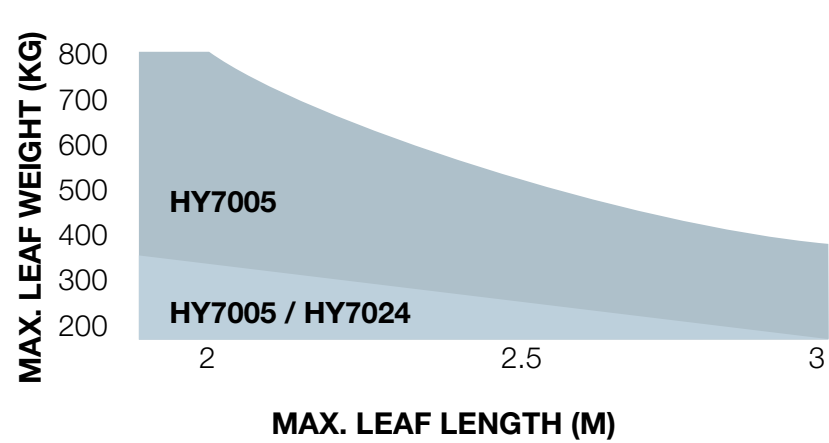
The horizontal axis shows length in metres, and the vertical axis shows weight in kilograms. For the HY7024, use only the lower permitted area of the graph.
Compatible accessories
Choose accessories based on the installed control unit, connectors, and voltage. The following wiring and procedures apply to the MC824HR30.
| What | Why | Type |
|---|---|---|
| Control unit | Controls one or two motors and safety devices. | |
| Warning light | Signals gate movement and can accommodate an antenna. |
|
| Photocells | They monitor the gate area; the response depends on their placement. | |
| Backup battery | Operation during a power outage. |
|
| Wireless photocells | A solution that avoids running cables to the photocells. |
|
| Receiver | Receives commands from remote controls; one receiver fits in the SM. |
|
| Transmitter | Remote control, depending on the installed receiver. | |
| Antenna | Helps improve the remote control’s range. |
|
| Keypad | Send a command using a code, without a remote control. |
|
| Key switch | Operate using a key from a fixed location. |
|
| Card reader | Operate using an assigned card or key fob. |
|
| Electric lock | Additional leaf locking, synchronized with the control system. |
|
| Extended arm | Greater reach for different mounting geometries. | |
| External release | Manual access during a power failure when there is no other entrance. |
|
| Wi-Fi / GSM control | Remote command via a voltage-free contact. |
|
| Programming and integration | Advanced configuration and diagnostics. |
|
FT210B not suitable for MC800 or MC824H: they require different FT A / FT B / FT C addresses. Select the compatible photocells listed above.
Standalone motor and control unit
The offer includes one HYPPO HY7024 motor with an articulated arm. The standalone motor does not include a control unit. A double-leaf gate requires two matching motors; they do not increase the limit for a single leaf. Select the control unit, photocells, warning light, receiver, and remote controls according to the system configuration.
| System configuration | Control unit | Important difference |
|---|---|---|
| HY7024 | MC824HR30 | 24 V DC with encoder. The control unit is powered by 230 V AC. MC824L is not a replacement for HY7024. |
For an existing gate, follow the instructions for the control board already installed. The manual for the current MC800 does not apply to the old A60, and MC824HR30 procedures do not automatically apply to a different generation of MC824H.
Installing the articulated arm operator
Before installation
- The gate leaf must move smoothly by hand along its entire travel path. Check the hinges, the strength of the gate leaf, and the load capacity of the mounting points.
- Install sturdy mechanical stops for the open and closed positions to limit travel and enable the control unit to learn the travel limits.
- Allow sufficient clearance for the motor housing, the full movement of the arm, and the release handle. Assess potential pinch and entrapment points and plan protective measures.
- Fit the support plate to the post and the front bracket to the gate leaf. The mounting dimensions and the strength of the mounting surface are decisive.
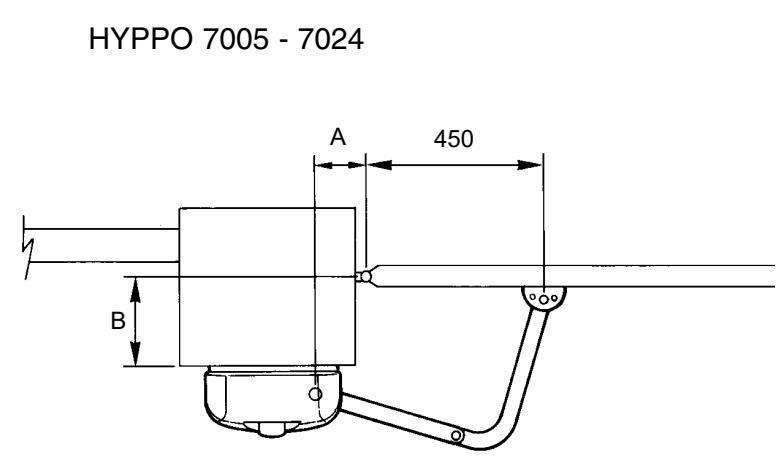
Mounting dimensions A and B
Measure dimensions A and B as shown in the illustration. The table applies to the standard HY7024 articulated arm and shows the opening angle for each pair of dimensions, in millimetres.
| B | A = 110 mm | A = 130 mm | A = 150 mm |
|---|---|---|---|
| 90 mm | 85° | 98° | 104° |
| 110 mm | 91° | 97° | 103° |
| 150 mm | 110° | 120° | 115° |
| 200 mm | 105° | 110° | 115° |
| 250 mm | 105° | 110° | 110° |
| 300 mm | 100° | 105° | 105° |
| 350 mm | 95° | 100° | 96° |
The angle is determined by the geometry, not an arbitrary setting on the control unit. Before final fastening, release the motor and check the full travel of the gate leaf and arm. The stops must prevent movement beyond the safe area.
Extended arm HYA12
NICE HYA12 extended articulated arm provides greater reach. The illustration also defines dimension D. The maximum A/B/D values are installation limits, not recommended post dimensions. Do not automatically apply the standard arm angle table to the HYA12.
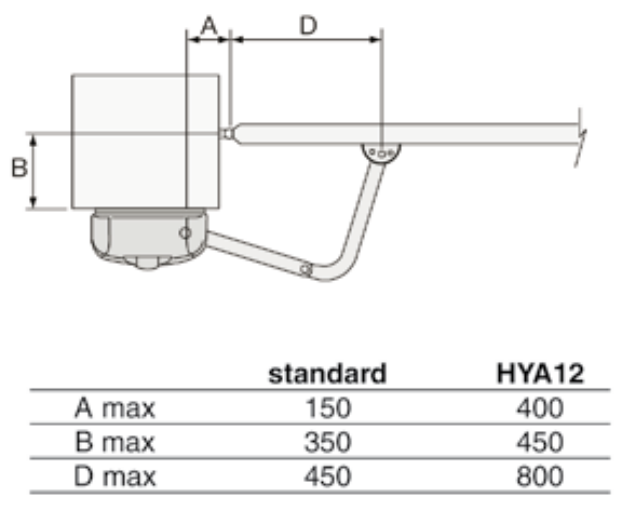
| Dimension | Standard arm | HYA12 |
|---|---|---|
| A max. | 150 mm | 400 mm |
| B max. | 350 mm | 450 mm |
| D max. | 450 mm | 800 mm |
Mounting the plate and bracket
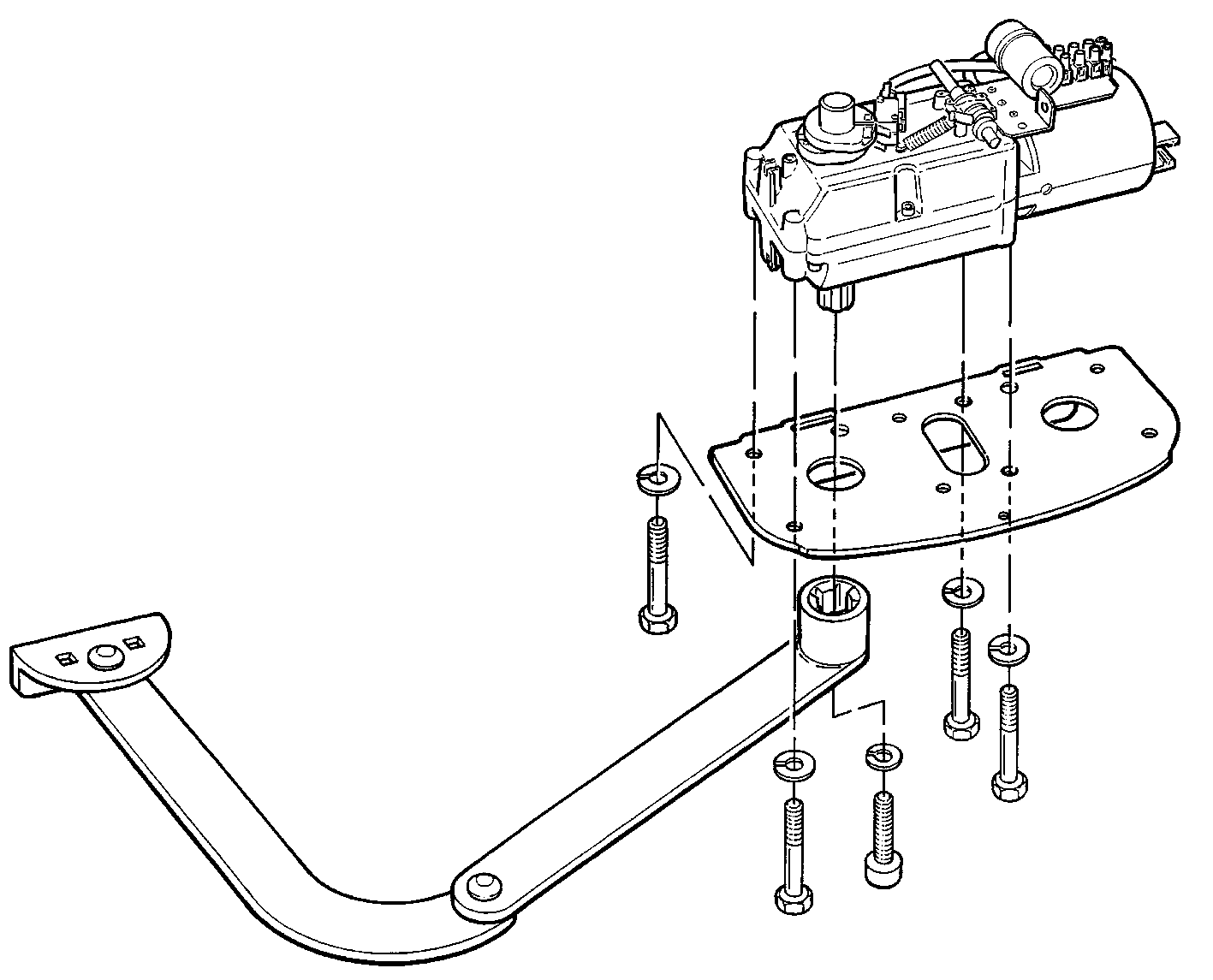
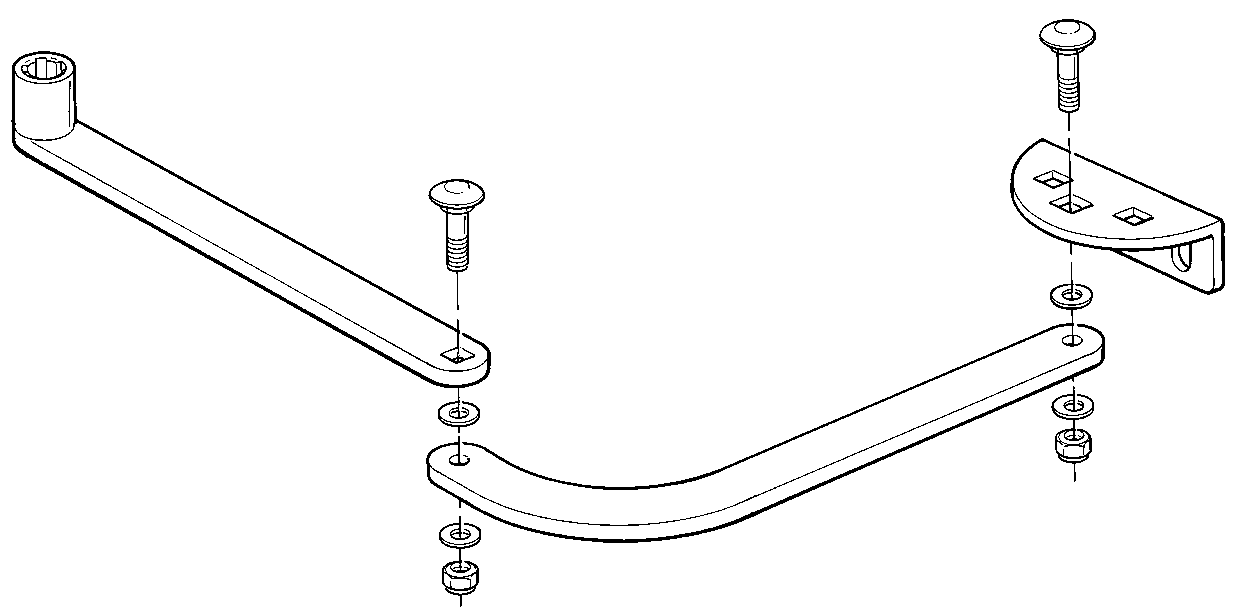
- Determine whether the installation is on the left or right when viewed from inside the property. The same model can be adapted to either side by changing the plate position and assembling the arm accordingly.
- Fasten the support plate A to the solid post surface and bracket B to the solid part of the gate leaf. Here, A/B identify the parts, not the mounting dimensions in the previous table.
- Bolt the motor to the plate. Correct minor alignment deviations using the slotted mounting holes.
- Assemble the arm for the selected side. Lubricate the bolts as instructed in the installation manual before assembly, then fit the washers and fasteners.
- With the motor released, move the gate leaf by hand to both stops; then fully tighten the fasteners.
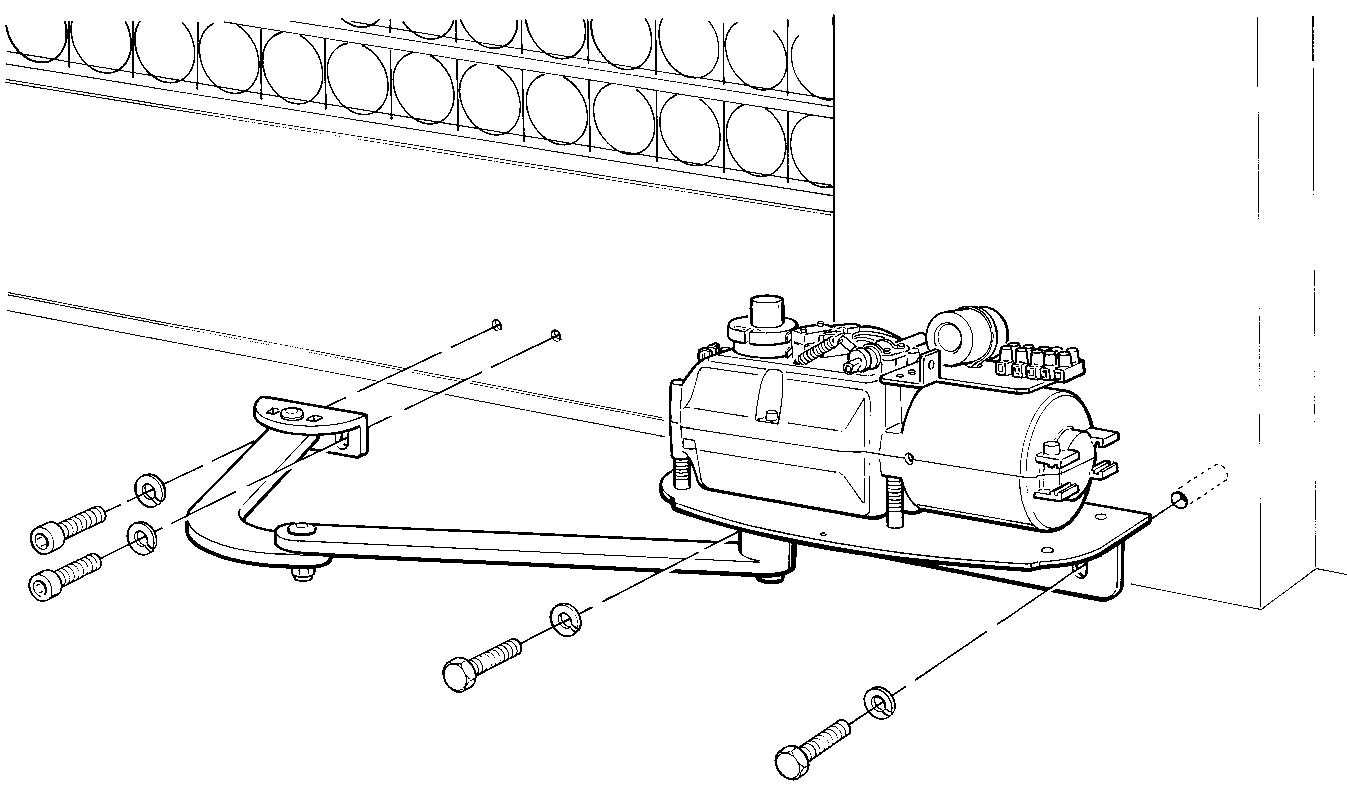
Left-side installation, viewed from inside:
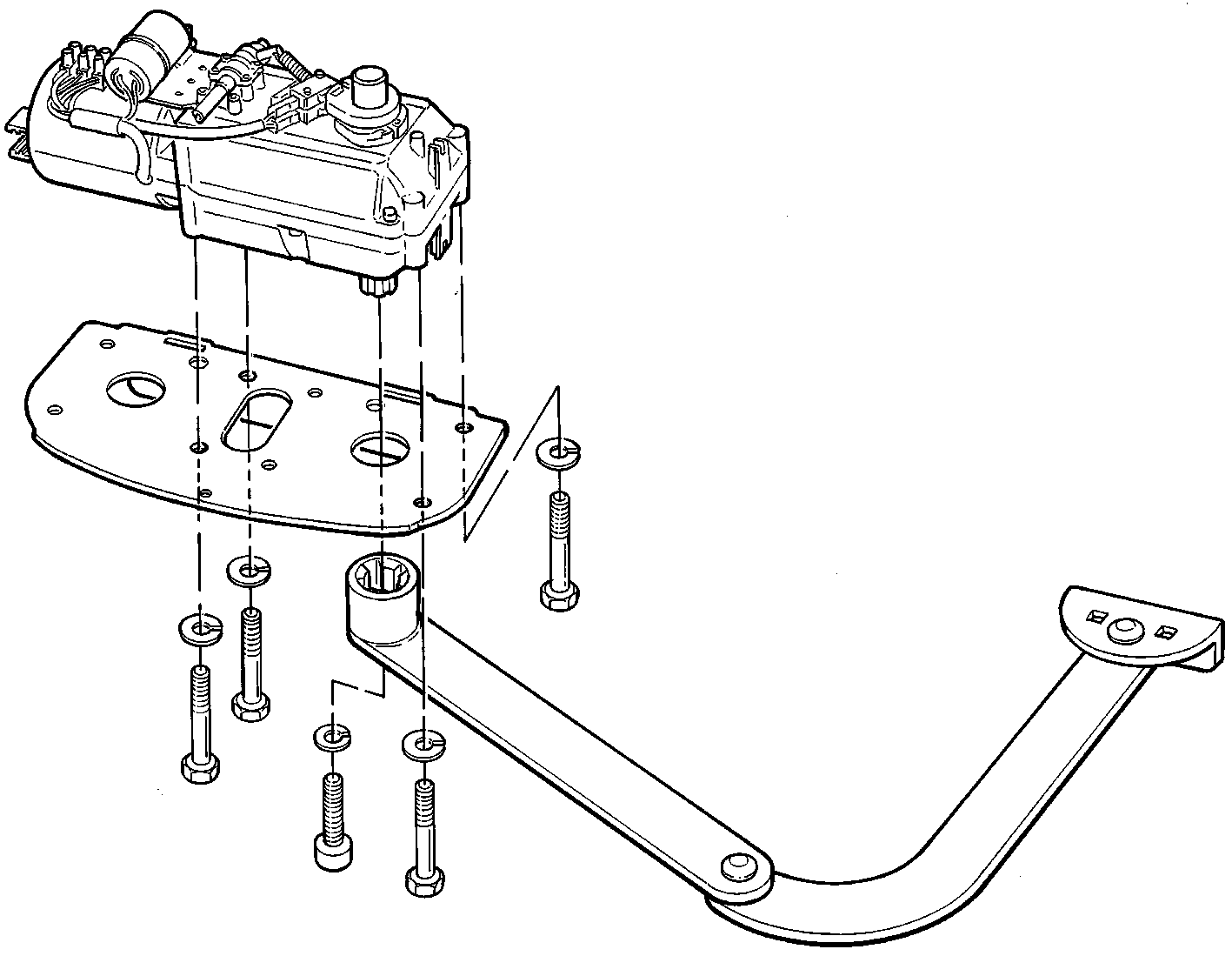
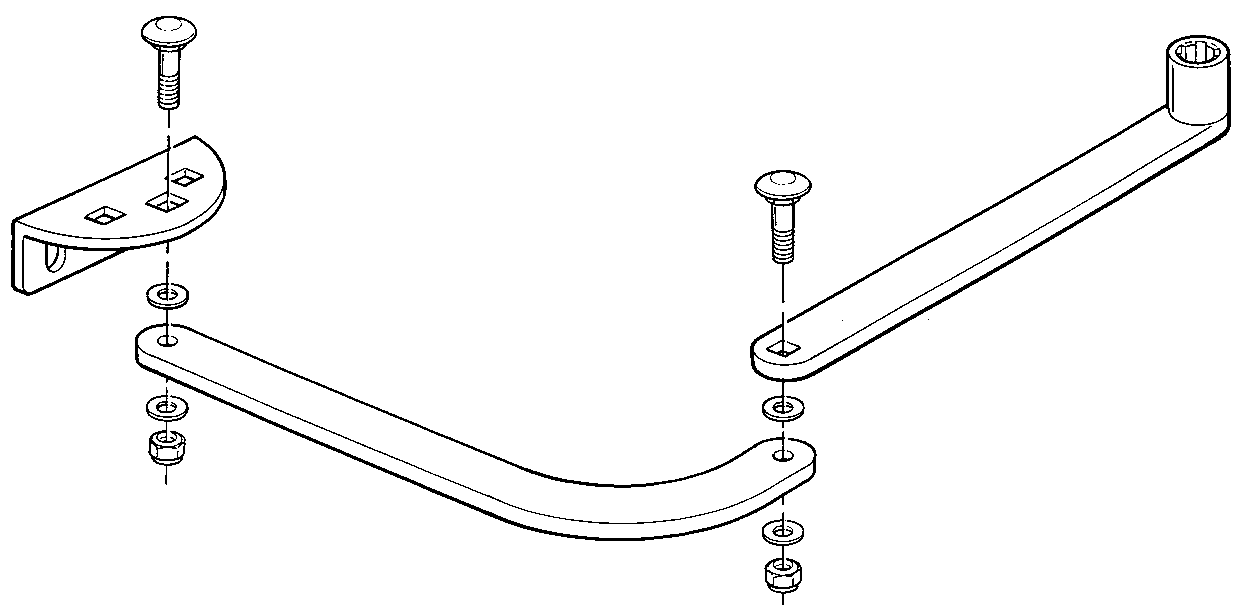
Right-side installation, viewed from inside:
Cover and mechanism protection
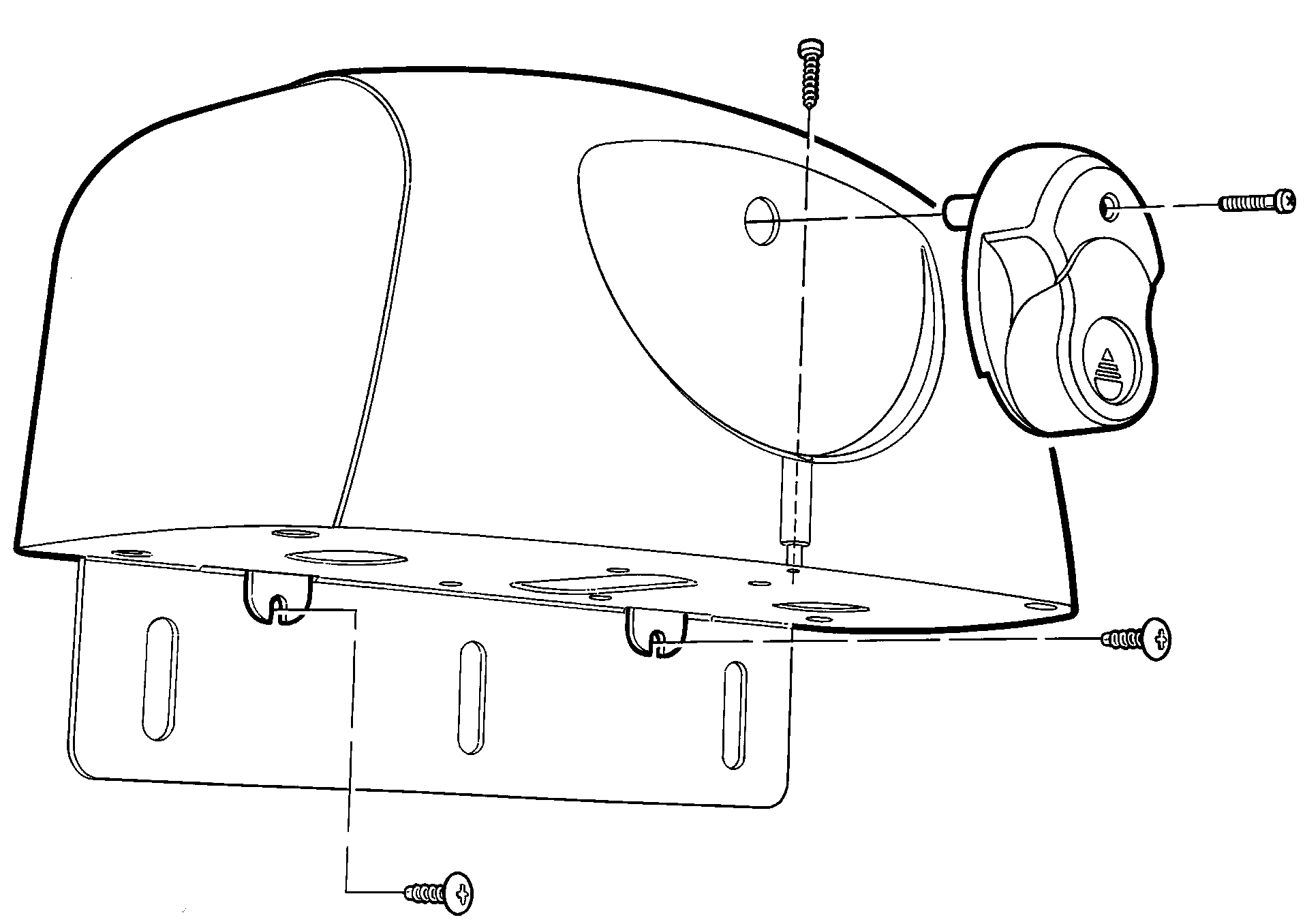
Once adjusted, fit the cover and release handle, and secure them with screws. Check the cable glands and ensure the cover is closed. Water must not enter the operator or control unit; protect the cables from the arm and moving gate leaf.
Manual release
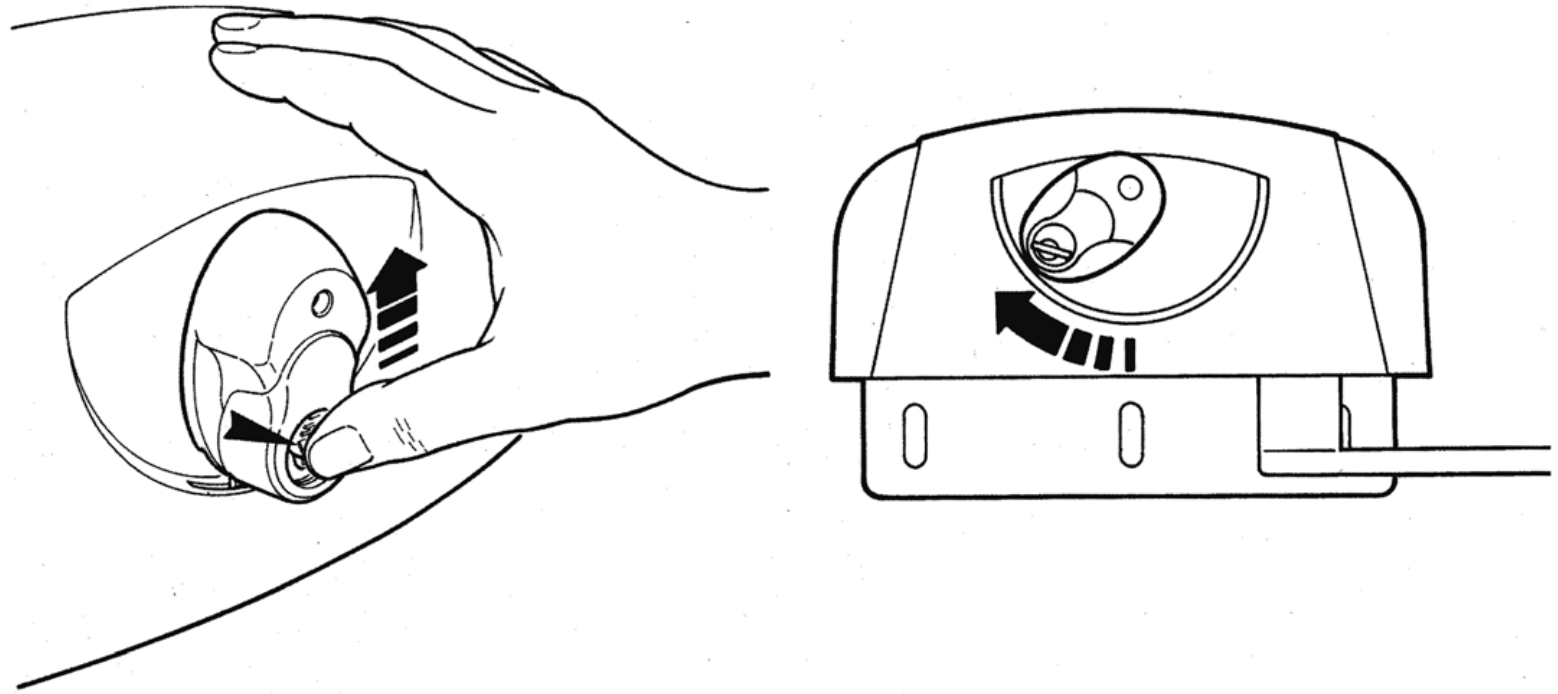
- Stop the automation, disconnect the power supply, and secure the gate leaf against unintended movement.
- Slide the lock cover upwards. Insert the key and turn it clockwise.
- Turn the release handle as shown; then move the gate leaf by hand.
- Before automatic operation, return the mechanism to the locked position with the handle vertical. Check that the drive is secured, remove the key, and close the lock cover.
If there is no other way onto your property, plan for access during installation: NICE KIO with KA1 cable allows manual release from the outside. Install and test the assembly before putting the gate into operation.
Wiring and electrical connections
Route and protect the mains supply, motor wires, and low-voltage signals according to their voltage and environment. The supply to the control unit must include L, N, and PE; protect it with suitable overcurrent protection and a means of complete disconnection. Secure the cables with cable glands and strain relief.
| Circuit | Cable | Use |
|---|---|---|
| Supply to control unit | 3 × 1.5 mm² | Up to 30 m; L, N, and PE. For longer supply runs, use 3 × 2.5 mm² and protective earthing at the automation unit, as specified in the control unit manual. |
| Motor | 3 × 1.5 mm² | Up to 10 m; dedicated motor circuit. |
| Encoder | 2 × 1 mm² | Up to 10 m, non-polarized; connect to the corresponding motor. |
| BlueBUS | 2 × 0.5 mm² | Up to 20 m; for runs longer than 20 m and up to 40 m, use 2 × 1 mm². |
| Flashing light | 2 × 0.5 mm² | Up to 20 m; low-voltage FLASH. |
| Electric lock | 2 × 1 mm² | Up to 10 m; output 12 V AC / max. 15 VA. |
| Key switch | 4 × 0.5 mm² | Up to 50 m; alternatively, two 2 × 0.5 mm² cables. |
| Antenna | RG58 | Up to 20 m; less than 5 m is recommended. |
The installer must verify the cable cross-section and route based on the cable lengths and the manual for the installed control unit.
Connecting the motor and control unit
HY7024 connects to the 24 V DC motor output on the MC824H, not to the 230 V mains. The procedure below is for the MC824HR30 with an MCA1R30 board. The two encoder wires are non-polarized; connect them to the corresponding ENC terminal. The MC824L uses different motors.
| Single leaf | Motor to M2, encoder to ENC2; M1 and ENC1 remain unused. |
|---|---|
| Two leaves | M2 opens first; M1 closes first. The M1 encoder connects to ENC1; the M2 encoder connects to ENC2. |
| Motor selector | Before learning the positions, set DIP 1 = ON; DIP 2–12 = OFF for HY7024. Do not use any other combination. |

Use the model-specific setting for HY7024; the programmer may list this group as MB4024. The key is to set the switches to the correct positions for HY7024.
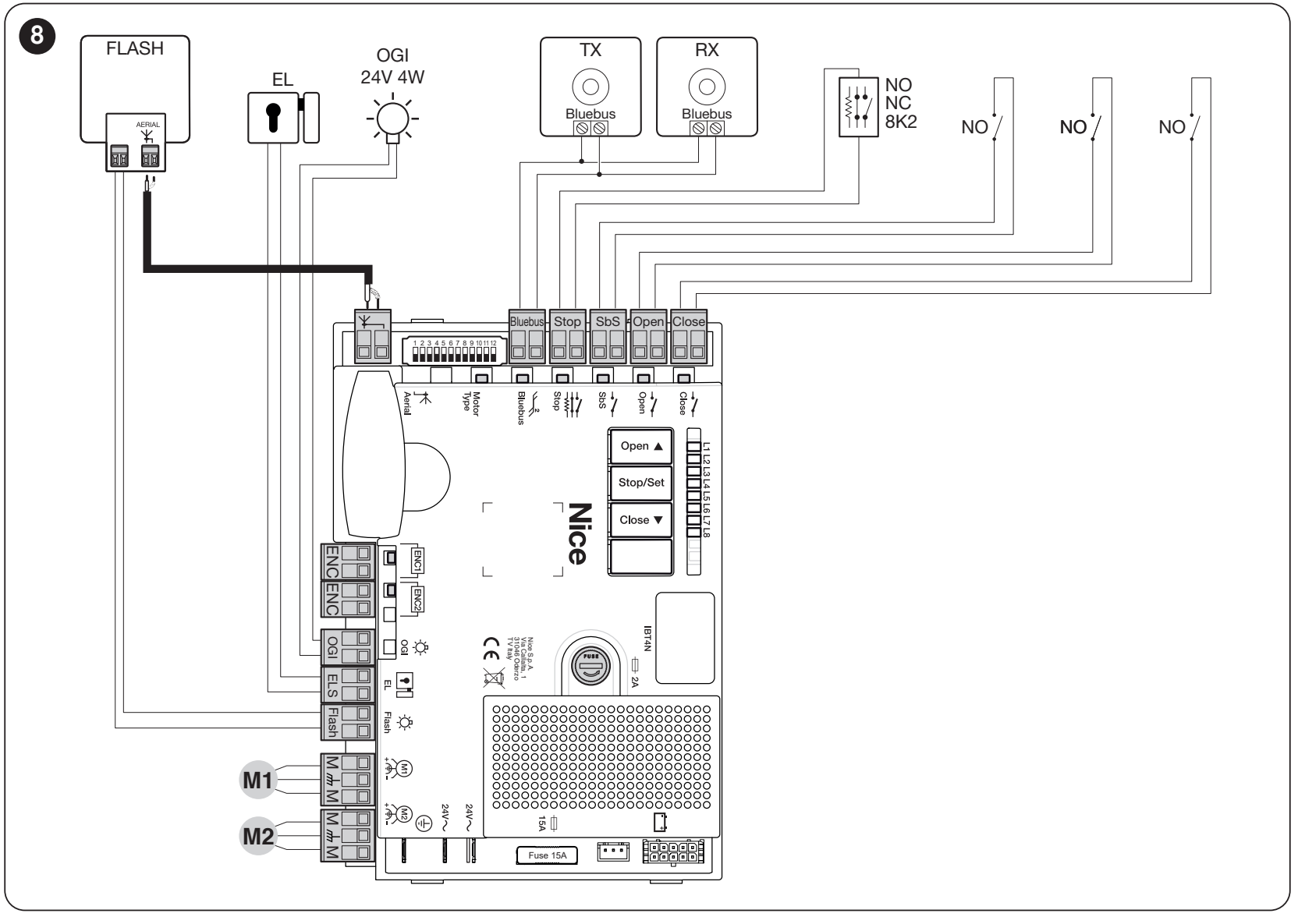
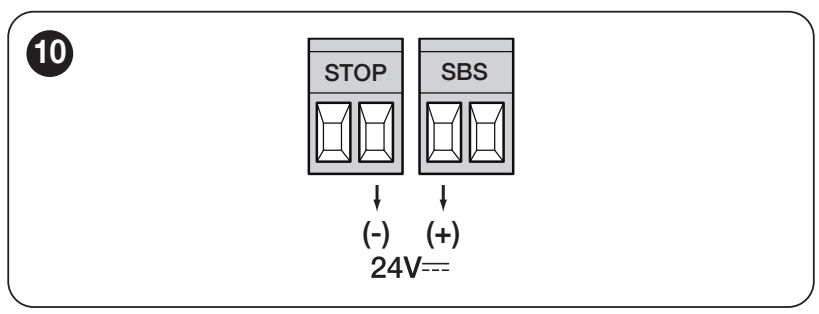
Accessory terminals and polarity
| Auxiliary power supply | Left terminal of the SbS pair = +; right terminal of the STOP pair = −, as shown in the detail below. 24 V DC −30% / +50%, total max. 200 mA. Voltage is present in Standby as well. These are the power-supply terminals shown, not arbitrary signal contacts. |
|---|---|
| BlueBUS | Two parallel wires carry both power and data; non-polarized (+/−). |
| ENC1 / ENC2 | Encoders for the corresponding motors; non-polarized. |
| FLASH | 12 V DC flashing light, max. 21 W; for example, ELDC. Before connecting, check the +/− markings on the specific output and flashing light. |
| ELS | Electric lock 12 V AC, max. 15 VA; AC has no +/− polarity. |
| OGI | Open-gate indicator: 24 V DC, max. 4 W. The mode depends on the settings; follow the markings on the fitted output. |
| SbS / Open / Close | Volt-free NO contacts for the corresponding pairs: step-by-step, open only, or close only. The contacts are non-polarized; do not connect an external voltage to them. |
| STOP | Learned safety input: NO, NC, or 8.2 kΩ. Volt-free contacts are non-polarized; wiring must match the safety devices. |
For a different board or terminal layout, refer to the manual for the installed unit. Detailed MC824HR30 wiring.
Backup during a power failure
The MC824HR30 supports PSS324. Disconnect both the mains and the battery before connecting, and use the designated connector. If you are keeping the older PS324, you need CABLA11 cable and Standby must be OFF. The number of operating cycles depends on the battery charge and gate load. Backup power does not replace proper manual release. Complete backup power connection procedure.
Photocells and safety inputs
Position the photocells according to the movement of the gate leaves and the gate’s hazards. Align TX/RX correctly. Protecting the passage does not replace protection at the crushing points by the hinge and arm.
MC824H uses BlueBUS. EPMB, EPLB, EPSB, EPMORB and F210B connect in parallel using two wires, with no polarity. TX/RX units in a pair must have the same address, and each pair must have a different address from the others. After changing the devices, repeat the learning procedure.
PHOTO/PHOTO II protect during closing; PHOTO 1/PHOTO 1 II intervene during both opening and closing. PHOTO 2/PHOTO 2 II protect during opening. PHOTO 3 is not permitted. The exact jumpers and responses are shown in the addressing table.
Test each pair during both opening and closing, as well as STOP and any safety edge. Do not bypass a safety device to make the gate move.
Initial startup and learning
The installer must carry out these steps after completing the mechanical and electrical checks. Set the motor to automatic mode, then check the stops, clear travel path and M1/M2. Be ready to stop the gate during its first movement.
On the MCA1R30, set DIP 1 to ON and the others to OFF for the HY7024, and connect the encoder.
After switching on the power, BlueBUS must flash approximately once per second, the LEDs on the connected BlueBUS photocell TX/RX units must flash, and the FLASH beacon must be off. If any check fails, disconnect the power supply and any backup power, then check the wiring before proceeding.
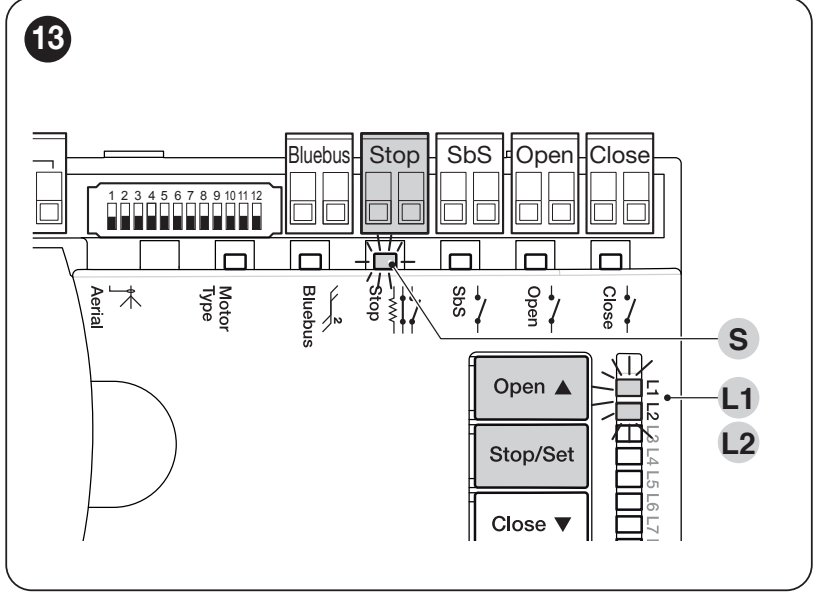
1. Device recognition
- Press and hold Open ▲ + Stop/Set.
- Release both buttons when L1/L2 start flashing rapidly, after approximately 3 seconds.
- Wait for the process to finish. Success: STOP is lit and L1/L2 are off. L3/L4 may flash to indicate that position learning is required.
Repeat after adding or removing a BlueBUS/STOP device. Carry out the learning procedure even if no accessories are connected.
2. Automatic position learning
- Press and hold Stop/Set + Close ▼.
- Release the buttons when L3/L4 start flashing rapidly, after approximately 5 seconds.
- Watch for: M1 slowly closing to its stop, M2 slowly closing to its stop, both motors slowly opening to their stops, then both motors closing quickly. With a single motor, only M2 moves.
- Successful completion is confirmed when L3/L4.
If either motor opens instead of closing during the first closing movements, stop the learning procedure by pressing Open ▲ or Close ▼. Disconnect the power supply and any backup power, then correct the direction of the relevant motor by swapping the two outer motor wires as shown in the MC824H diagram; do not change the encoder wires. If the motor sequence is incorrect, correct M1/M2 and their ENC1/ENC2 connections as well. Restart the learning procedure from the beginning. Activation of a photocell or STOP interrupts the procedure and causes L1 to flash; remove the cause and repeat the learning procedure.
3. Testing and handover
Test full opening and closing cycles, the stops, deceleration, gate-leaf overlap and manual release. Check every safety device, stopping function and reversal when an obstacle is encountered. The installer must measure the forces and assess the complete system. Do not set a high force as a substitute for fixing a gate that is sticking. The user must be given the instructions and shown how to release the drive safely.
Manual and mixed learning: detailed control unit procedure. Automatic learning must be completed before mixed learning.
Settings and remote controls
Set automatic closing, pause time, step-by-step operation, deceleration and force according to the gate. Repeat the tests after changing the force or safety functions. The full ranges, LEDs and factory settings are listed in the control unit programming tables.
Receiver, remote control and antenna
The motor alone does not have a built-in radio receiver. An SM receiver is fitted in the control unit. NICE OXIBD also supports bidirectional ON3EBD; OXILR use with ON3ELR. With the older OXI choose transmitters according to the stored coding. The same frequency alone does not guarantee compatibility.
Connect the coaxial cable according to the receiver: directly to the receiver for OXIBD, and as shown in the control unit diagram for OXI. Pairing and deleting remote controls. Deleting the radio memory does not reset the board or teach the positions.
What to check in the event of a fault
| Symptom | What to check |
|---|---|
| The gate does not move | Power supply, release mechanism engaged, and STOP. A technician must investigate power supply or fuse faults with the power disconnected. |
| The motor runs, but the gate leaf does not move | Check that the drive is engaged and the arm is secured; return the release mechanism to the locked position. |
| The gate stops or reverses | First check manual movement and the arm’s clearance, then the photocells, STOP and stops. Do not increase the force without identifying the cause. |
| Learning does not complete | Motor sequence and direction, stops and safety devices. For both HY7024 and DIP 1, as well as the encoders. |
| The remote control doesn’t work, but the button does. | Check the battery, coding, transmitter registration in the receiver, and antenna. |
| Fault after changing the photocells | Check the addresses and wiring, then repeat device recognition. |
Beacon and LED flash codes: Troubleshooting and repairs. Record the settings before resetting. Resetting the control board, deleting the receiver’s memory, and teaching in the devices are separate procedures; follow the instructions for the installed unit.
Inspection and maintenance
Have the complete assembly inspected at least every six months; in case of intensive use or harsh conditions, inspect it more often according to the maintenance schedule. Check the hinges, fasteners, arm play, stops, manual release, cable glands, and wiring. Test the photocells and STOP function, and record the inspection.
Stay clear of the gate leaf and articulated arm while they are moving. Do not allow children to play near the gate, and keep the remote controls out of their reach. Keep the gate area clear. Clean the surfaces and photocell lenses without using aggressive cleaning products. Do not rinse the motor with a pressure washer. Have a technician handle work on the mechanism, electrical circuits, and safety settings. If the arm is damaged, makes unusual noises, or moves on its own, take the automation system out of service and arrange for repairs.
NICE HYPPO HY7024 technical specifications
| Type | Non-reversible electromechanical articulated-arm operator for one gate leaf. |
|---|---|
| Motor | 24 V DC |
| Current | 5 A |
| Power consumption | 120 W |
| Torque | 250 Nm |
| Rotation speed | 2 rpm |
| Duty cycle | 80% |
| Position sensing | Magnetic encoder |
| Protection rating | IP43 |
| Operating temperature | −20 to +50 °C |
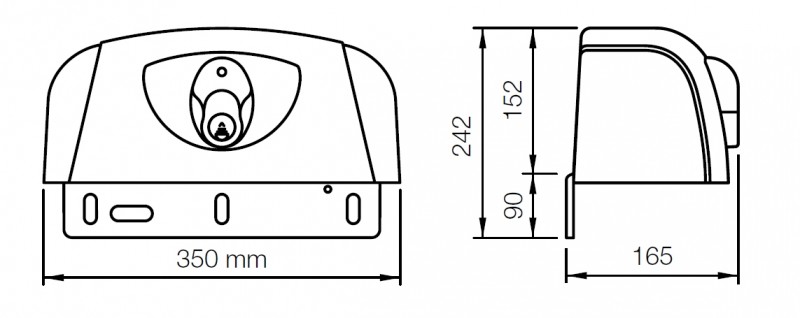
| Dimensions | 350 × 165 × 242 mm (width × depth × overall height) |
| Weight | 13 kg |
| Gate leaf limits | Up to 3 m; refer to the limit chart. |
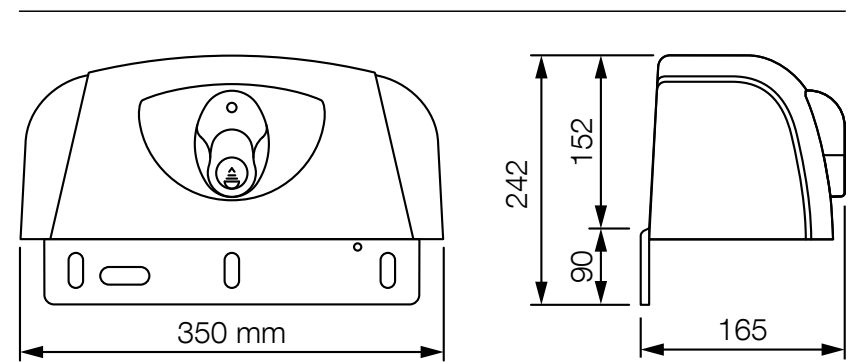
The overall height of 242 mm includes the mounting plate beneath the operator body; the drawing shows a cover height of 152 mm.
How can I order this item?
Choose the option that suits you:
- order online: use the buy button to add the goods to your shopping cart (you will find the buy button here in the product variants table).
- order by email: place your order at [email protected]






