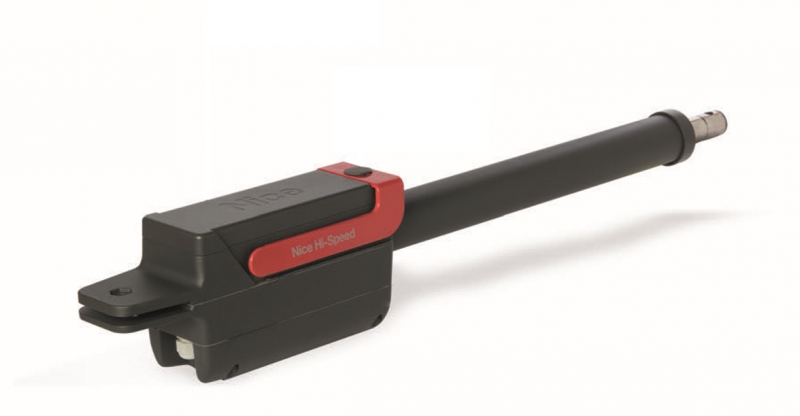
NICE TITAN TTN3724HS - standalone operator for swing gates with a leaf up to 3.7 m/450 kg
| Product availability: | within 3 days | We usually ship the goods within 3 days. |
|---|
within 3 days
€432.40 including VAT
| Weight |
|---|
| 12 kg |
Description of NICE TITAN TTN3724HS - standalone operator for swing gates with a leaf up to 3.7 m/450 kg
Warning!
For the swing gate operator NICE Titan TTN3724HS with control unit version R30 (MC824HR30) to connect the backup power supply PS124 or PS324 a cable adapter must be used CABLA11.
NICE TITAN TTN3724HS is a standalone high-speed linear actuator for one gate leaf. The motor has 24 V DC and a magnetic encoder; it does not include a control unit. It connects to NICE MC824HR30. A double-leaf gate requires two motors and one suitably wired control unit.
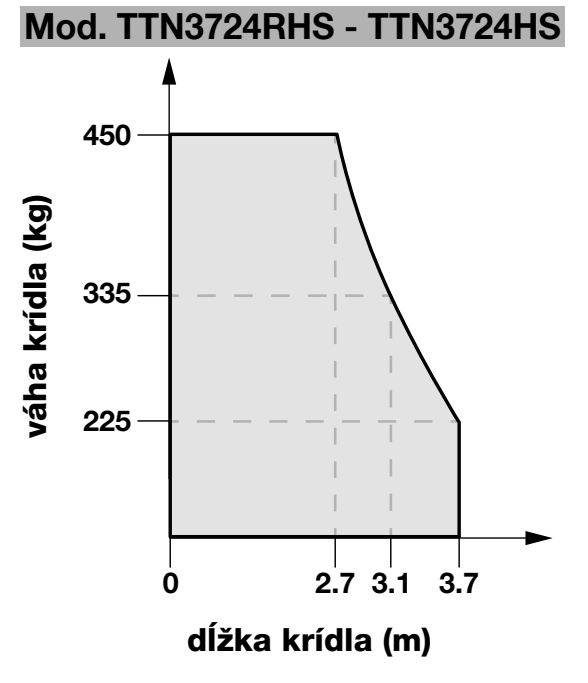
This is a non-reversible drive with convenient key-operated release at the top. Opening to 90° takes approximately about 12 seconds in a typical installation, excluding acceleration and deceleration; the actual time depends on the installation dimensions, settings and load. The 3.7 m and 450 kg limits must be assessed together using the application chart.
Control unit and compatible accessories
The magnetic encoder helps the control unit track the position of the gate leaf and detect obstacles. Automatic position learning, deceleration in both directions, three-button control and force adjustment are provided by MC824HR30 with MCA1R30 board. The control unit uses dual obstacle-detection technology. Safety must be verified on the complete gate.
| What | Why | Type |
|---|---|---|
| Control unit | Controls one or two TTN3724HS motors and their magnetic encoders. | |
| Photocells | Passageway protection. BlueBUS is the accessory connection on the control unit, not the motor power cable. | |
| Warning light | Movement indication from the FLASH output. | |
| Receiver and remote control | A plug-in receiver for the control unit and a compatible transmitter; these are not included with the standalone motor. | |
| Electric lock | Additional gate-leaf locking, depending on the gate mechanism; vertical or horizontal version. |
|
| Backup power supply | Operation during a power outage; select according to the connector and control unit version. | |
| Solar kit | Alternative power supply, subject to an assessment of consumption, number of cycles and sunlight conditions. |
For the TTN3724HS, use the MC824H designed for its encoder. The MC824L and control units designed for a different type of encoder are not substitutes for this control unit.
Kits for one or two gate leaves
All TITAN kits listed include an MC824HR30, an OXIBD receiver and a MYGO4 remote control. Versions with photocells also include EPMB; versions with accessories also include an ELDC warning light. The limits always apply to one gate leaf and one motor.
| One gate leaf | Standalone motor | Two gate leaves |
|---|---|---|
| Basic kit With photocells With accessories 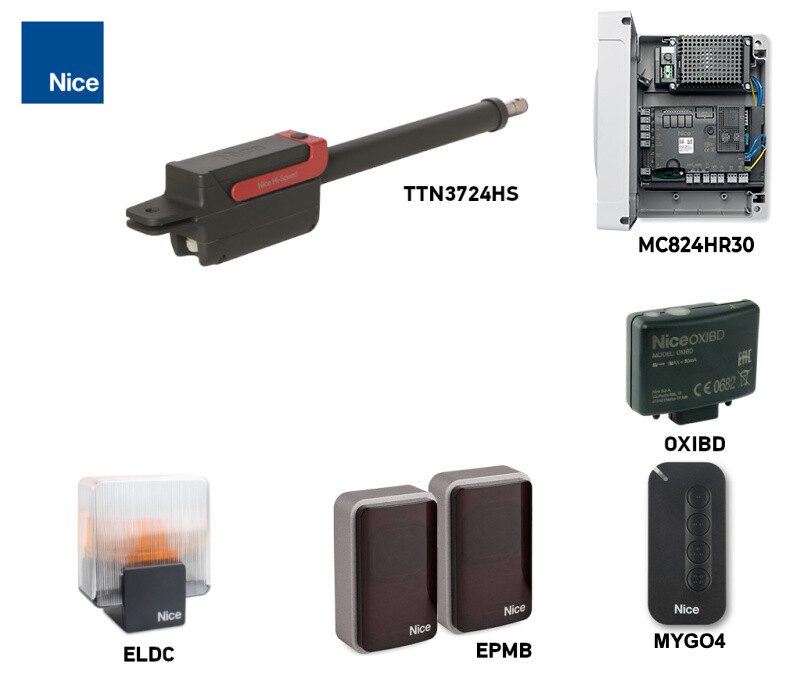 One motor + control unit. | TITAN TTN3724HS This product. Without a control unit, photocells or radio control. | Basic kit With photocells With accessories 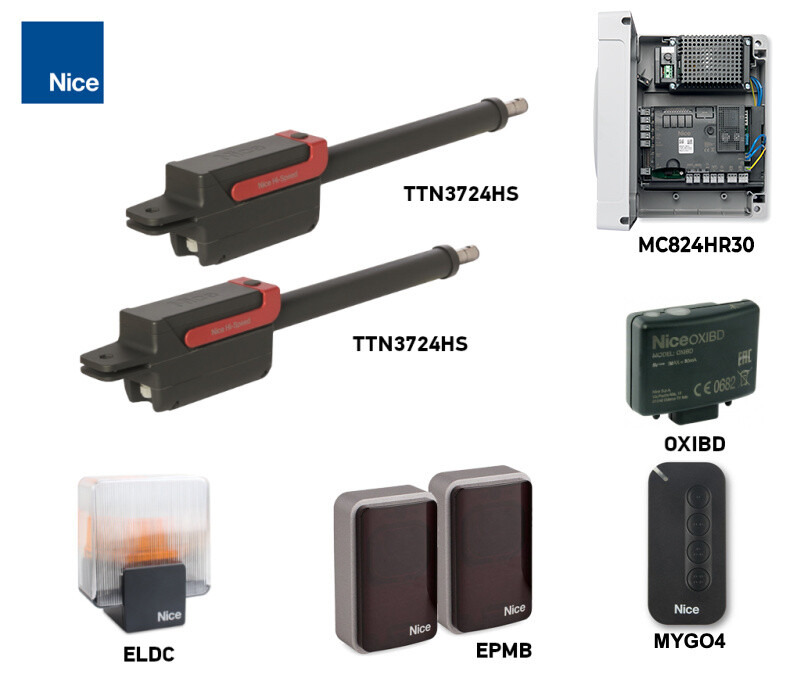 Two motors + one control unit. |
What’s included with the individual operator
The package contains one TTN3724HS motor, front and rear mounting brackets, and release keys. The control unit, receiver, remotes, photocells, warning light and backup battery are selected separately or as part of the relevant kit. Fixings into the supporting substrate must be suitable for the specific gate.
Leaf length, weight and suitability
When selecting a motor, you need to know the leaf’s length and weight, the resistance to movement, the hinge position and the effect of wind. The leaf must be rigid, correctly hung and move smoothly by hand along its entire travel.
| Length of one leaf | Weight according to graph |
|---|---|
| Up to 2.7 m | Up to 450 kg |
| 3.1 m | Approximately 335 kg |
| 3.7 m | Up to 225 kg |
Between the stated points, the graph curve determines the limit. The motor is therefore not designed for a 3.7 m leaf weighing 450 kg. A solid infill, wind or greater resistance to movement may require a different configuration, even at a lower weight.
Motor installation and bracket fixing
Have installation, wiring and commissioning carried out by a qualified installer. Disconnect all power sources, including the battery, before starting work. Neither the motor nor the front bracket may bear against weak gate infill; the fixings must transfer the forces to the supporting structure.
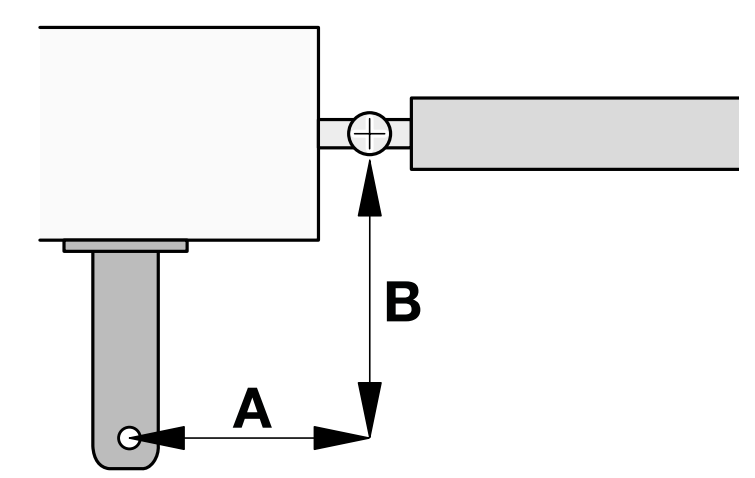
A/B dimensions, clearance and stops
| Requirement | What to observe |
|---|---|
| Geometry for 110° | For TTN3724HS, the specified dimensions are A = 180 mm and B = 180 mm. A/B are dimensions shown in the drawing, not the dimensions of the post cross-section. |
| Fixing | Fix the rear bracket to a solid substrate and the front bracket to the supporting gate frame. The motor must be level and the pins must rotate freely. |
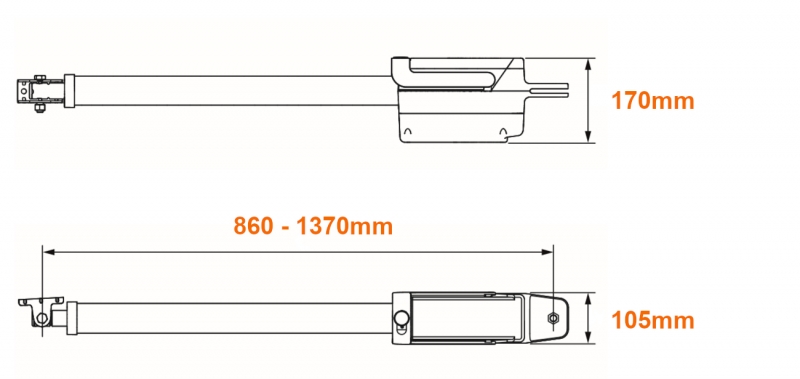
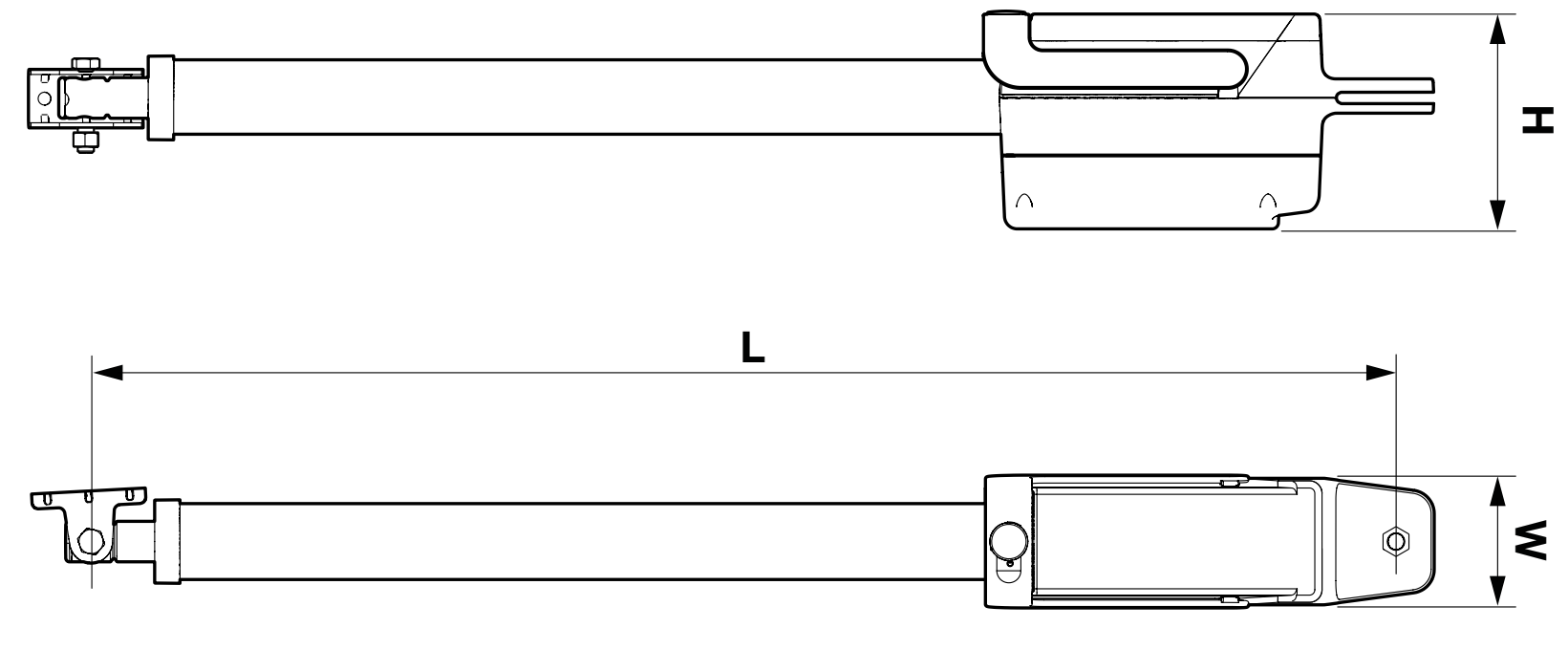
| Stroke | 510 mm; installation length L from 860 to 1,370 mm, depending on the piston position. Check the full travel to ensure the geometry does not force the motor beyond its stroke. |
| Height for low-level installation | At least 110 mm above ground level. Allow clearance for access, manual release and protection from water or dirt. |
| Stops | A fixed mechanical stop for the gate in the open and closed positions. Learning the positions does not replace proper mechanics and durable stops. |
| Clearance | Check the full travel of the motor and gate leaf, that the cover can be opened, and that the release key is accessible. |
Bracket installation procedure
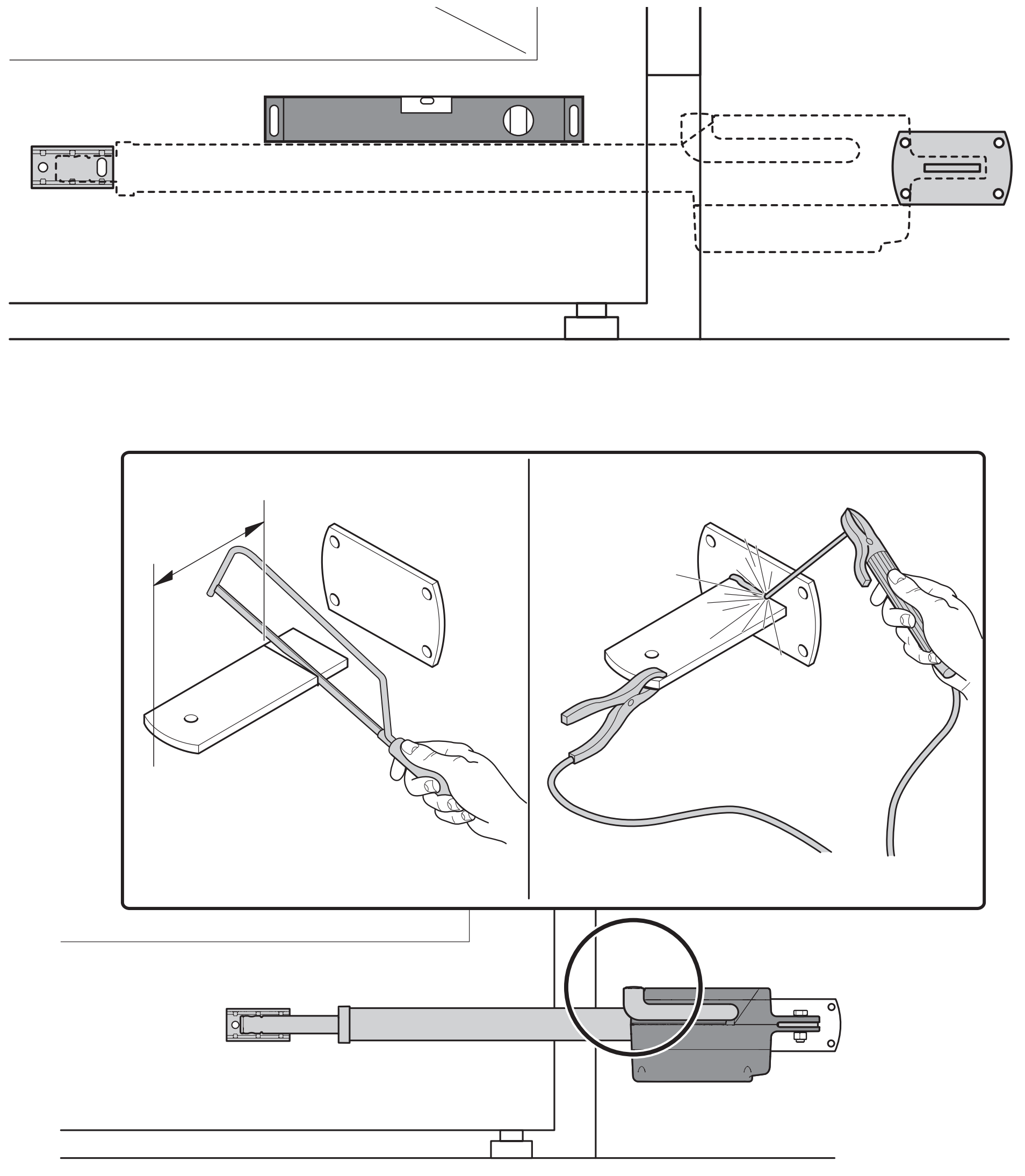
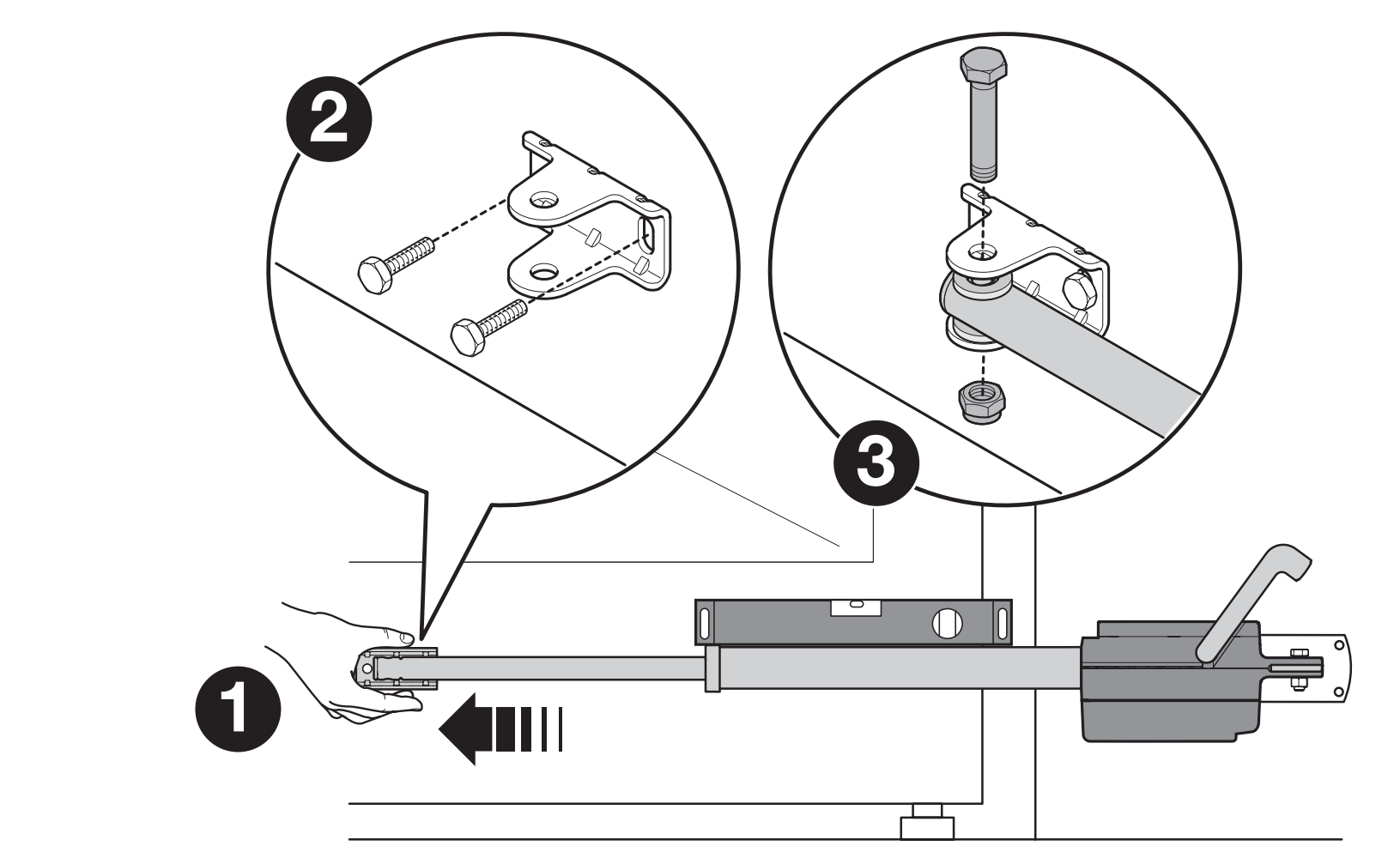
- Determine the positions of the front and rear brackets according to the geometry and required opening angle. Fix the rear bracket, check that it is level, and hang the motor on it.
- Release the motor using the key. Fully extend the piston and temporarily position the front bracket on the gate leaf as shown in the installation diagram.
- Level the motor, connect the piston to the front bracket and secure the pin. Move the gate leaf through its full travel by hand and check that it reaches the open stop without binding.
- Disconnect the piston from the front bracket, permanently fix the bracket and reconnect the motor. During welding, the motor must be disconnected from the power supply and protected from welding current and heat.
- Check the pins, fixings and full manual travel. Before teaching, move the gate leaf to approximately the halfway point and lock the motor.
Motor and magnetic encoder wiring
The motor operates at 24 V DC and must not be connected directly to 230 V. The mains power supply connects to the control unit. The motor has two terminals labelled MOTOR and two labelled ENCODER; the protective conductor connects to a separate earth lug.
| Cable | Connection and length |
|---|---|
| Motor | 3 × 1.5 mm², maximum 10 m: two motor wires and PE. Connect MOTOR to the corresponding M1 or M2 output on the control unit. |
| Encoder | 2 × 1 mm², maximum 10 m. Connect ENCODER to the corresponding ENC input for the same motor. ENC polarity does not matter. |
| Combined cable | The motor and encoder wiring can be replaced with a single cable 5 × 1.5 mm² of the specified length. The protective conductor must remain dedicated to PE. |
| Single leaf | Connect the motor to M2 and its encoder to the corresponding ENC input for motor 2. Leave M1 unused. |
| Two leaves | Assign the encoders to M1 and M2 correctly, and set the movement sequence according to the overlap of the gate leaves. |
- With the power off, remove the motor cover and loosen the cable gland.
- Feed the cable through, connect the MOTOR and ENCODER terminals as shown, and connect PE to the earth lug. Do not mix up the motor wires and encoder wires.
- Tighten the cable gland, check the strain relief and seal, then refit the cover. Allow enough slack in the cable for the motor to move, and ensure it cannot snag.
- On the MC824HR30, check the corresponding M/ENC connections and select the exact motor model before teaching the travel.
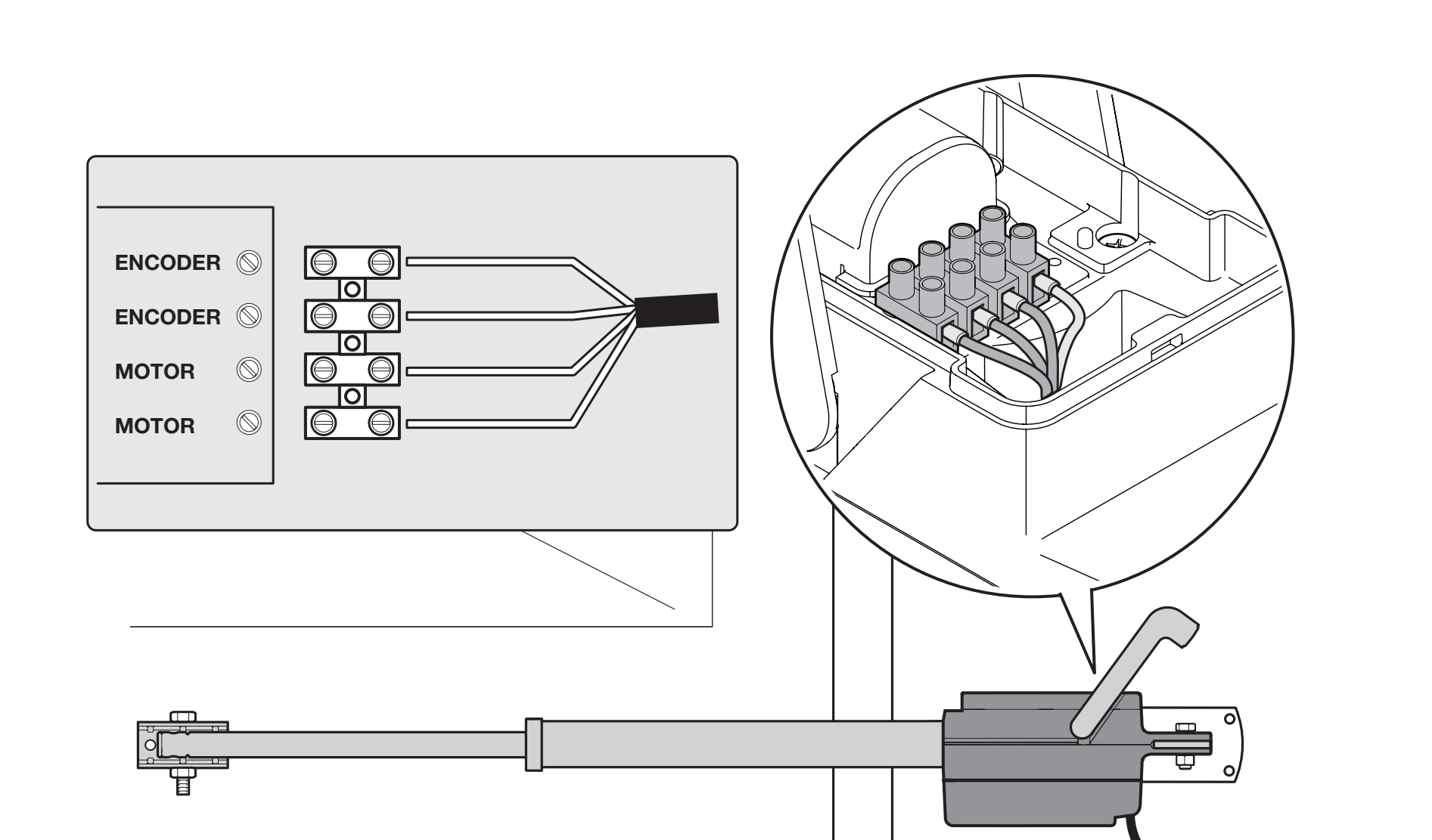
The motor terminals do not have fixed +/− polarity: the control unit reverses the polarity according to the direction of travel. If the motor runs in the wrong direction, check the pair of motor wires after disconnecting all power sources; do not change PE. For the full board orientation and wiring diagram, see MC824HR30 wiring.
Accessory wiring and polarity
Accessories connect to the MC824HR30. The TITAN motor cable is not BlueBUS. For auxiliary power connections, follow the STOP and SbS labels and the detail below.
| Connection | Polarity and electrical specifications |
|---|---|
| Auxiliary power supply | + left terminal of the SbS pair; − right terminal of the STOP pair when the labels are oriented as shown in the image. 24 V DC, −30% / +50%, max. 200 mA. Voltage remains present in Stand-by. |
| BlueBUS / NICE EPMB | Parallel connection using two wires, non-polarized. 2 × 0.5 mm² up to 20 m; 2 × 1 mm² for 20–40 m. Set the photocell addresses and repeat device learning. |
| SbS, OPEN, CLOSE | Voltage-free NO switching contacts. No +/−; do not connect an external voltage. |
| STOP | NO, NC, or 8.2 kΩ, depending on the connected safety device. The input type is detected during learning; the contact is non-polarized. |
| FLASH / NICE ELDC | Warning light output 12 V DC, max. 21 W. Use the ELDC input and wiring method specified for the given power supply; do not apply the polarity of the SbS/STOP auxiliary output here. |
| ELS / electric lock | 12 V AC, max. 15 VA; no +/−. Choose PLA10 or PLA11 according to the mechanical position of the lock. |
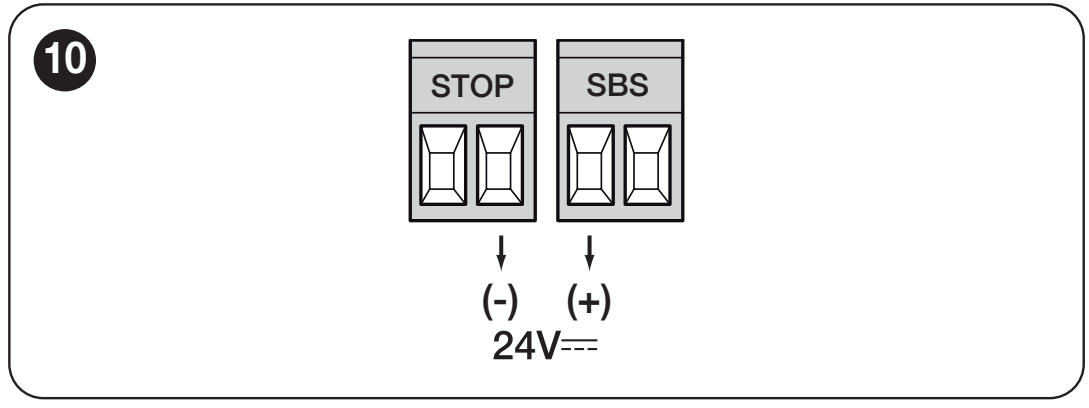
For wiring other inputs and outputs, see the complete MC824HR30 terminal table. Do not bypass safety devices just to get the gate moving.
First start-up with the MC824HR30
Before switching on, the brackets, stops, motor and encoder wiring, and safety devices must all be installed. Keep the entire gate area clear during travel learning.
| Step | What to do on the control unit |
|---|---|
| 1. Check the wiring | Check the motor and its ENC, protective conductors, photocells, and STOP. For a single leaf, use M2. |
| 2. Motor selection | Set the exact type TTN3724HS on the Motor Type selector according to the table and the original selector illustration. Select the motor before learning the end positions. |
| 3. Device learning | Learn the connected BlueBUS and STOP devices according to the MC824HR30 first start-up procedure. Repeat after adding or removing devices. |
| 4. Position learning | Release the drive, move the leaves to a suitable starting position, then re-engage it. Use the position-learning procedure for the selected mode. If the direction or sequence is incorrect, stop learning immediately. |
| 5. Test the system | Verify full opening and closing, the leaf overlap sequence, deceleration, and all safety devices. Only then hand over the gate. |
Programming and remote control
The TITAN TTN3724HS has no onboard adjustment buttons. It is adjusted using the three buttons on the MC824HR30: OPEN, STOP/SET, and CLOSE. Automatic closing, pause time, force, speed, deceleration, and leaf delay are adjusted on the control unit to suit the specific gate.
| Setting | Procedure |
|---|---|
| Levels I and II | The complete MC824HR30 programming tables show the ranges, LED values, and factory settings. |
| Force and deceleration | Changing the force setting does not fix a gate that is sticking. After making an adjustment, repeat the function and safety tests. |
| Remote controls NICE MYGO4 | Pair them with the NICE OXIBD receiver according to the radio-control procedure. Transmitter learning is separate from travel learning. |
| Deletion or reset | Follow the procedure for the specific control unit or receiver. Resetting the board and erasing the radio memory are separate operations. |
Operation during a power outage
Without a battery, release the gate using the key. For automatic backup with the current control unit, use NICE PSS324. Connect the battery to the designated control-unit connector only after installation, learning, and testing are complete; it is not included with the motor alone.
When using NICE PS124 or the older PS324 with the MC824HR30, an adapter is required: NICE CABLA11 and Stand-by must be disabled on the board (level I, L4 = OFF). The adapter alone is not sufficient without the correct setting. Details are in the MC824HR30 backup power supply wiring.
SOLEMYO solar power supply
NICE SOLEMYO SYKCE30 provides off-grid power for a compatible system, subject to assessment of daily cycle count, accessory power consumption, and sunlight conditions. For SOLEMYO, you need to enable Stand-by. Mains and solar power supplies must not be connected at the same time. This setting differs from using PS124/PS324 with CABLA11.
Troubleshooting
| Symptom | What to check |
|---|---|
| Motor does not move | Check the power supply and control-unit indicators, that the gear is not locked, the MOTOR connection, and the corresponding ENC. Use MC824HR30 diagnostics. |
| During learning, it moves in the opposite direction | Stop the learning process. After disconnecting all power sources, check the motor wires and selected model; the protective earth wire remains connected to PE. |
| It stops or reverses | First, manually check the mechanism, geometry and stops. Then check the safety inputs and the relevant encoder. Increasing the force will not solve mechanical resistance. |
| The gate leaves overlap incorrectly | Check the M1/M2 assignment, their ENC settings and the opening/closing delay to suit the overlap. Repeat the required learning procedure. |
| The button works, but the remote control does not | Check the transmitter, battery and radio receiver memory according to the remote control pairing instructions. |
| It does not work during a power outage | Check the battery condition and connection; with PS124/PS324, also check CABLA11 and Stand-by OFF. Check the backup power requirements. |
Manual release and locking
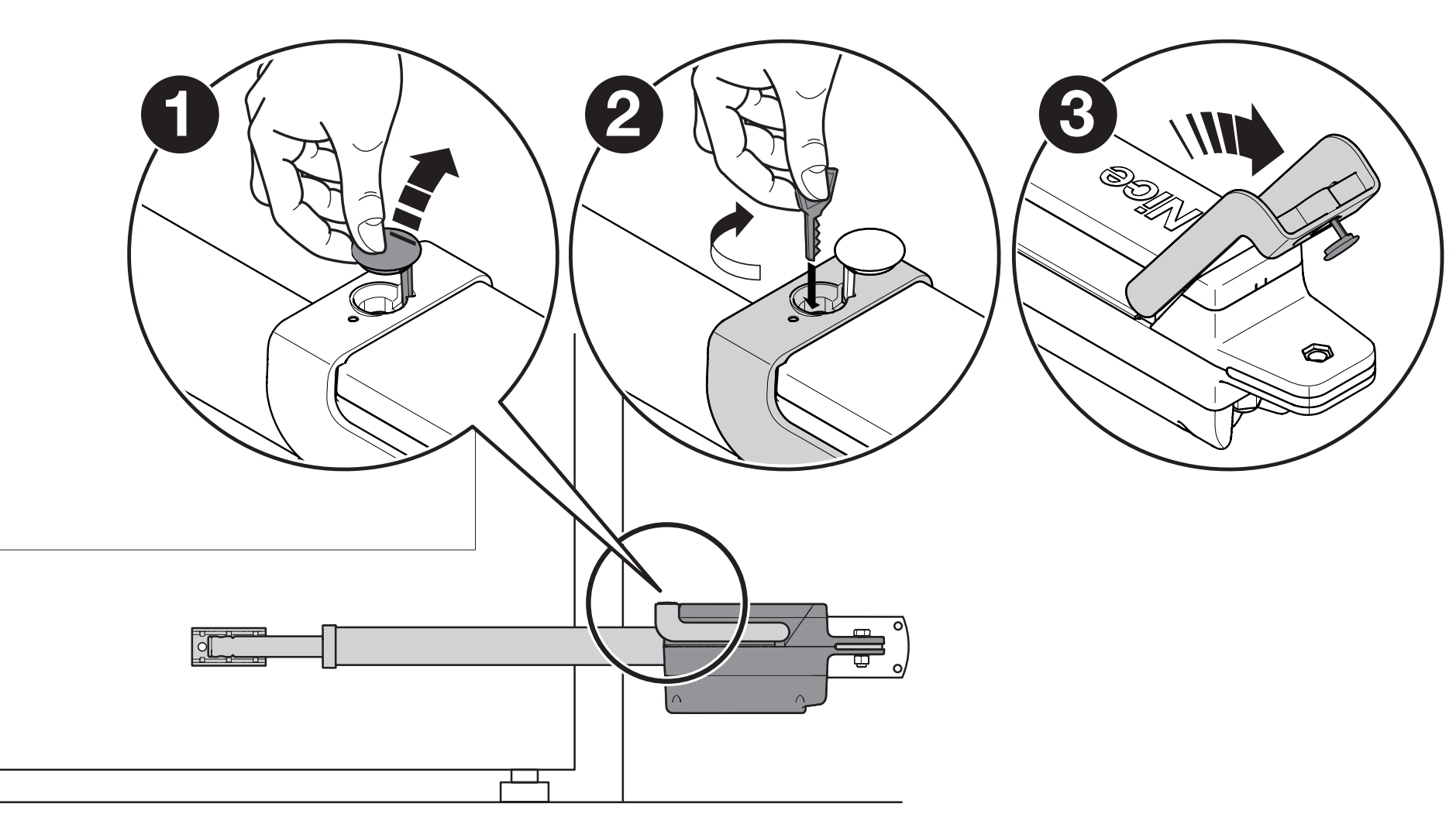
- Stop the movement and secure the gate leaf to prevent it from moving on its own. Remove the rubber release cover.
- Insert the key and turn it 90° clockwise. The gate leaf can now be opened or closed manually.
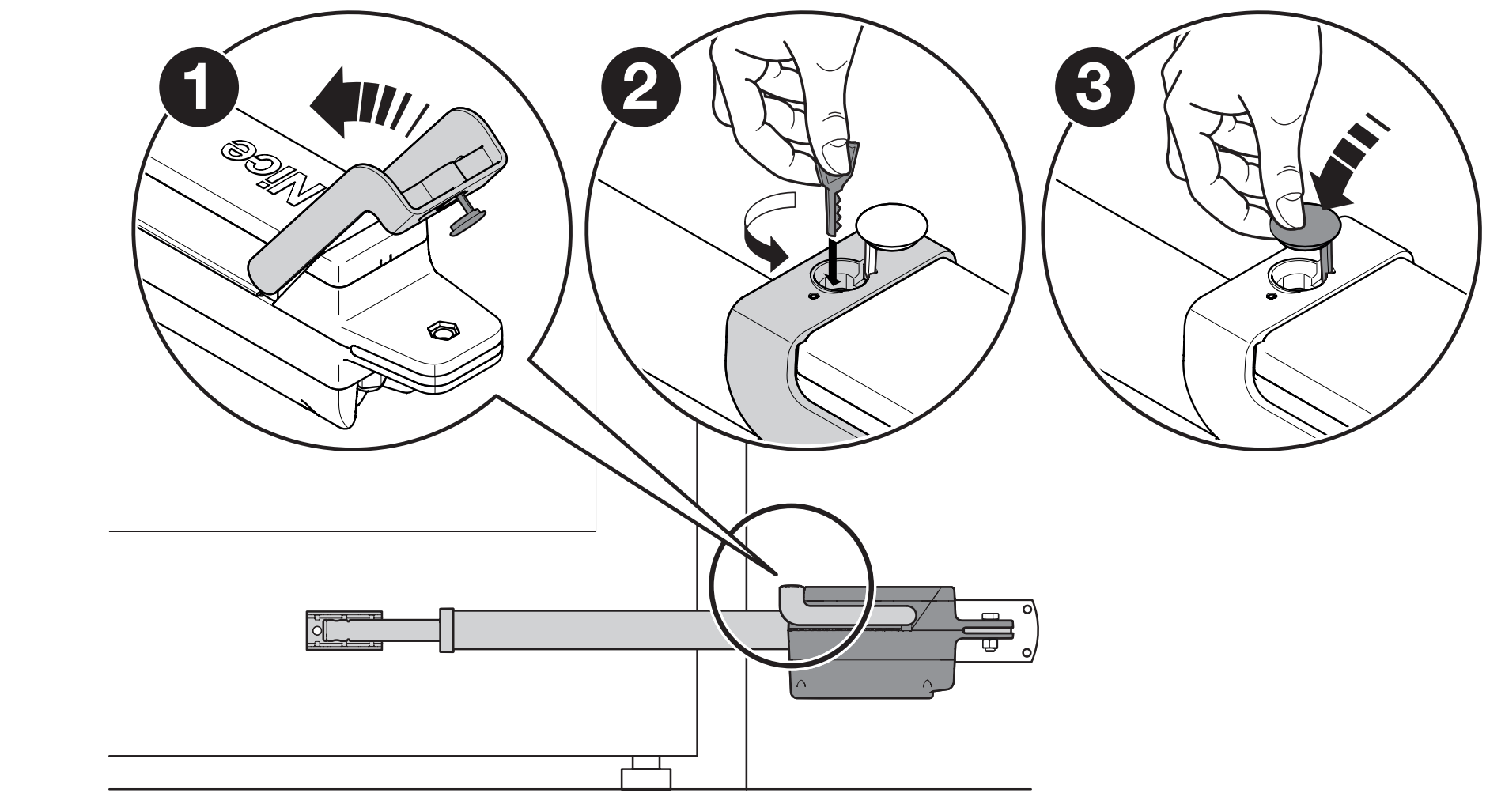
- Before returning to automatic operation, move the gate leaf to approximately halfway along its travel, then turn the key 90° counterclockwise and cover the opening.
- For a double-leaf gate, release or lock each motor separately.
Safety checks and handover
- When released, the gate leaf must be possible to open and close manually with a force of no more than 390 N. This is a test of mechanical movement, not an allowable impact force on a person.
- Lock the motors and test opening, closing and stopping. Check the stops, overlap between the gate leaves and that the end positions are reached.
- Test the photocells, STOP, safety edges and other protective devices individually. Where force limitation is used for protection, the installer must measure impact forces and verify the safety of the complete installation.
- The control unit sets the motor force; the maximum motor force in the technical table is not a safe contact force for a person.
- Hand over the gate only after successful testing and instructing the owner on operation, release and maintenance. Children must not play with the controls or in the gate's path of movement.
Regular maintenance
Arrange an inspection at least every 6 months. With the power disconnected, check the tightness of the brackets and screws, corrosion, wear on pins and moving parts, cables, grommets and seals. Replace damaged parts; after restoring power, repeat the functional and safety tests on the entire gate. Do not try to fix a mechanical fault by increasing the force.
TTN3724HS technical specifications
| Parameter | Value |
|---|---|
| Type | Non-reversible linear actuator with magnetic encoder |
| Motor power supply | 24 V DC |
| Control unit | MC824H; current model: MC824HR30 sold separately |
| Maximum gate leaf length / weight | 3.7 m / 450 kg, as separate maximum values according to the graph |
| Maximum piston speed | 3.2 cm/s = 0.032 m/s |
| Stroke | 510 mm |
| No-load current | 1.5 A |
| Rated / maximum current | 2.5 A / 6 A |
| Rated / maximum power input | 60 W / 150 W |
| Rated / maximum force | 300 N / 2,200 N |
| Duty cycle | Continuous duty according to the manufacturer; suitability for operation depends on the complete gate and control system |
| Ingress protection rating | IP54 |
| Operating temperature | −20 to +55 °C |
| Actuator dimensions | 910 × 105 × 170 mm |
| Installation length L | 860–1,370 mm depending on piston extension |
| Motor weight | 8 kg |
The installation length L shown in the drawing and the actuator dimensions are different measurements. When assessing the available space, also allow for the brackets, gate leaf movement and access to the cover.
How can I order this item?
Choose the option that suits you:
- order online: use the buy button to add the goods to your shopping cart (you will find the buy button here in the product variants table).
- order by email: place your order at [email protected]






