NICE TOO TOO4500 - standalone operator, for one gate leaf 4.5 m/250 kg
| Product availability: | within 3 days | We usually ship the goods within 3 days. |
|---|
within 3 days
€259.60 including VAT
| Weight |
|---|
| 6,00 kg |
Description of NICE TOO TOO4500 - standalone operator, for one gate leaf 4.5 m/250 kg
NICE TOO4500 is a standalone electromechanical operator for one swing gate leaf up to 4.5 m and up to 250 kg. The motor is 230 V AC; it is not a 24 V version. It is non-reversible and can be released with a key. Control unit and safety devices are selected for the gate as a whole.
| Quick navigation | |
|---|---|
| Choosing | Control unit |
| Kits | Installation |
| Dimension C | Wiring |
| Testing | Accessories |
| Manual release | Maintenance |
| Specifications | Manual |
| Accessories – terminals and polarity | PDF manual |
When to choose this operator
The 4.5 m and 250 kg limits apply to one gate leaf, but they do not by themselves determine suitability. Resistance to movement, hinge position, infill, wind and installation geometry also matter.
For the 230 V version, the manufacturer specifies a maximum of 24 cycles per hour. For more frequent use, assess the gate as a whole and check whether the duty cycle is suitable.
Control unit for a 230 V motor
Current MC800 with MCA5R30 board controls one or two motors. MC200 is the current option for one motor. For a two-leaf gate, use a suitable control unit for two motors. Our current TOO4500 kits include the MC800; always check the contents of the specific kit before wiring.
For an existing installation with an older control unit, A60, A400, A6 or A6F use the manual for the board actually installed. The MC800 is the current replacement for these control units. Its manual applies to the MC800/MCA5R30. The motor voltage, the control unit's mains supply and the low-voltage accessory output are separate circuits.
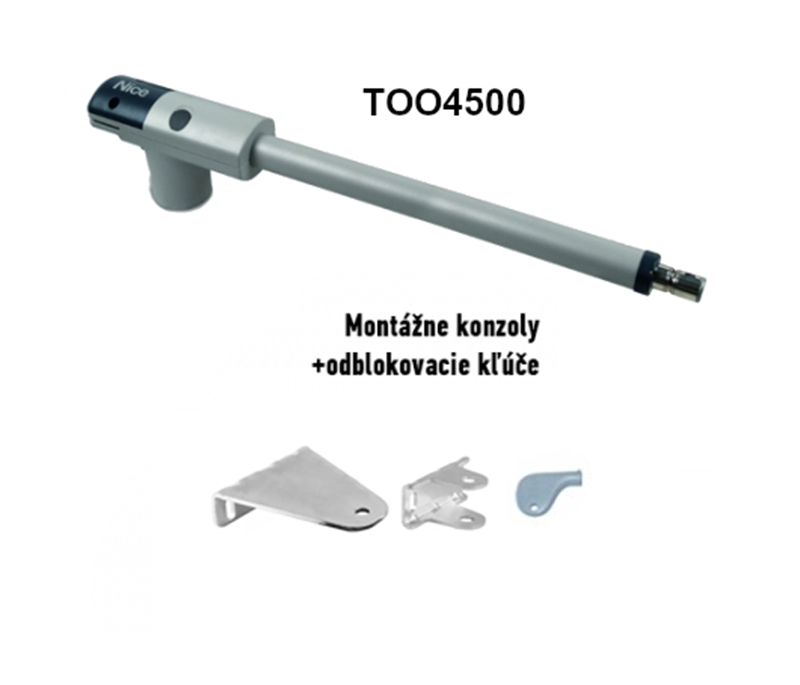
The image shows the main motor and bracket components. Check the supplied package before installation. The control unit and safety devices are selected separately or according to the equipment included in the complete kit.
Kits for one or two gate leaves
The standalone motor is designed for one gate leaf. A two-leaf gate requires two operators. Compare the 230 V kits with an MC800 control unit and different equipment on the sides; the standalone 24 V alternative motor is shown in the centre.
| Kits for 1 gate leaf | Kits for 2 gate leaves |
|---|---|
NICE TOO4500
MC800 control unit, Basic kit With photocells With accessories | NICE TOO4500
MC800 control unit, Basic kit With photocells With accessories |
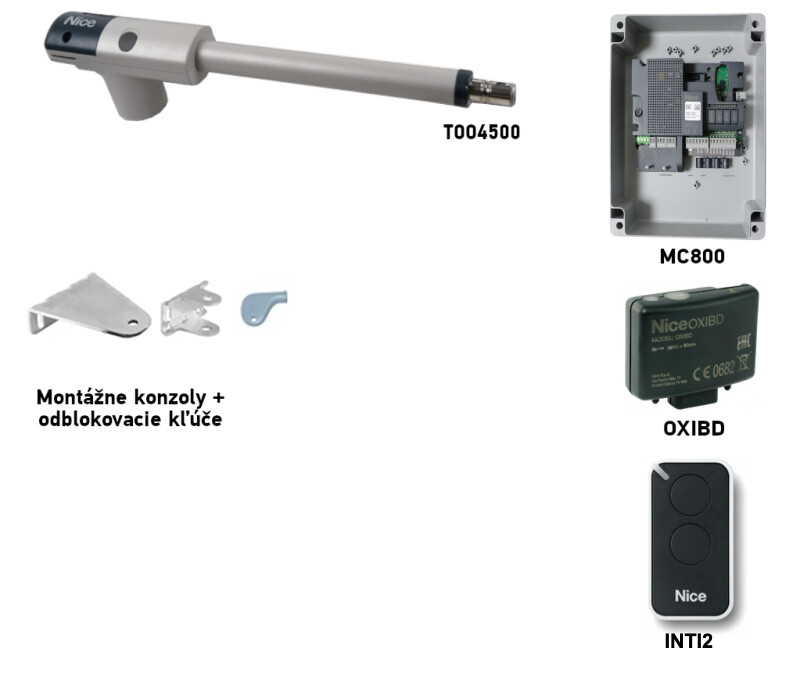
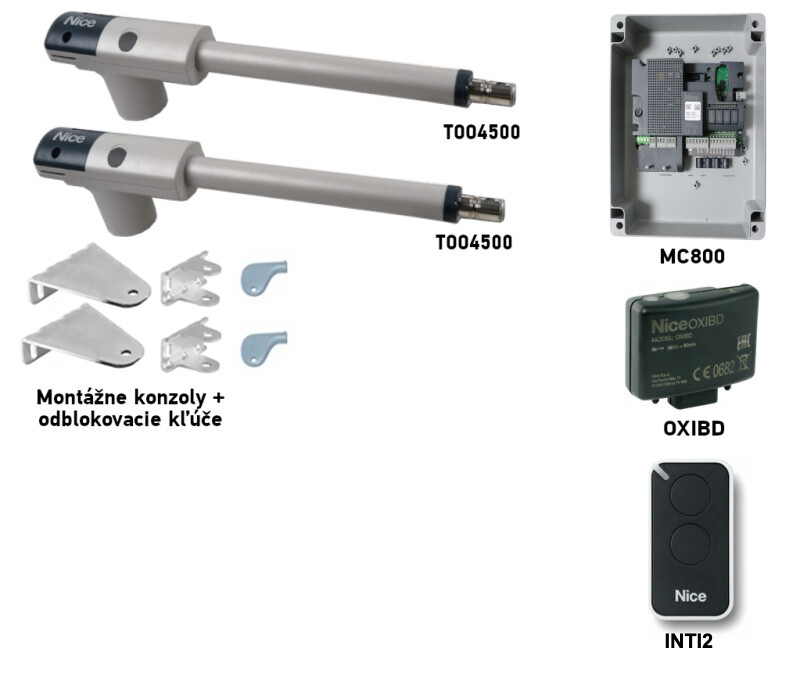
Length and weight limits are assessed separately for each gate leaf, together with the installation geometry. Before use, supplement the basic kit with the necessary safety devices; see compatible accessories.
Bracket installation and gate-leaf geometry
Before anchoring, determine the positions of the hinge, rear and front brackets, and the required opening angle. Dimensions A/B in the diagram determine the movement path and forces. The post and its anchoring must support the load; if the hinge position or post dimensions differ, adjust the brackets or select suitable extended brackets to maintain the required geometry. The profile dimensions alone do not guarantee this.
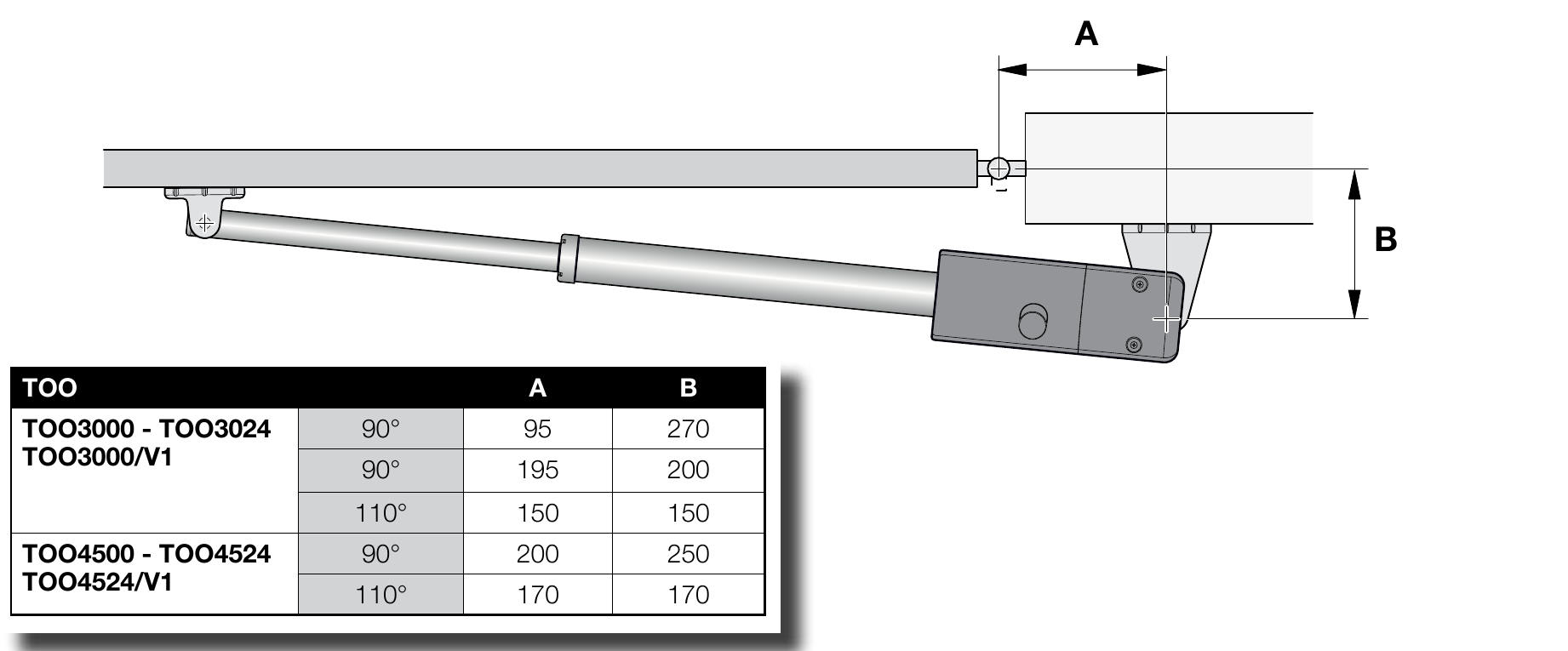
| Opening angle | A | B |
|---|---|---|
| 90° | 200 mm | 250 mm |
| 110° | 170 mm | 170 mm |
For the specific model, see TOO4500 anchoring bracket dimensions. When opening outward, different or extended mounting is usually required; the installer must recheck A, B, C and free movement throughout the full travel.
Dimension C with the gate closed
With the gate leaf closed, measure the distance C < 1 300 mm. The value must be below the stated limit; it must not equal or exceed it. The selected A/B combination must also be observed.
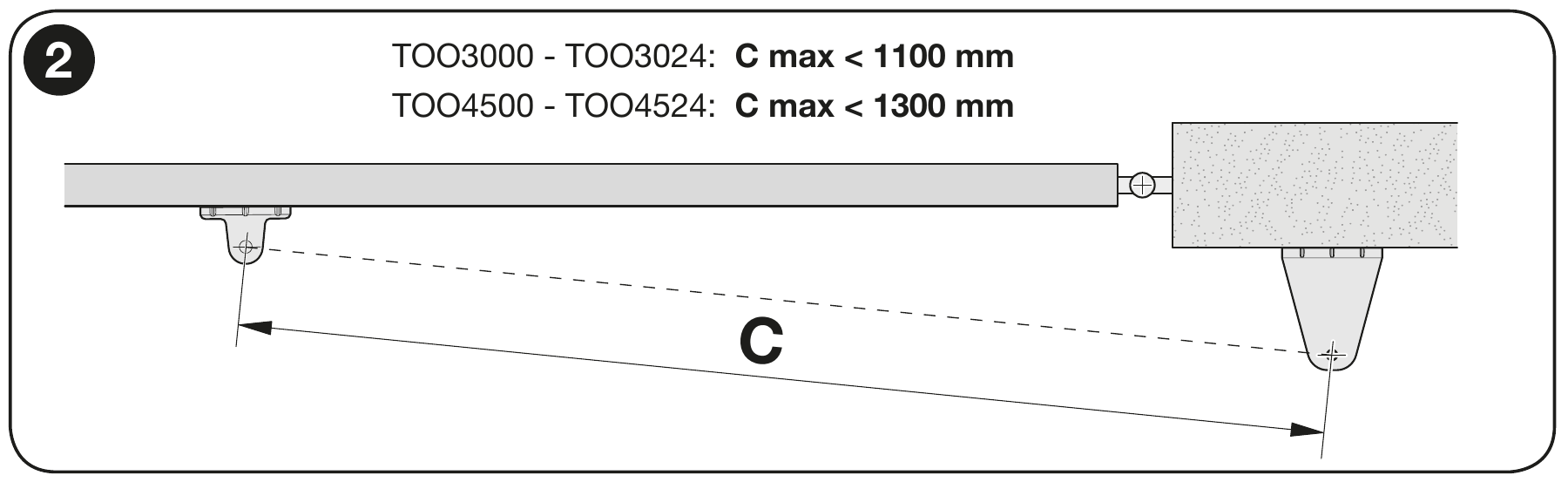
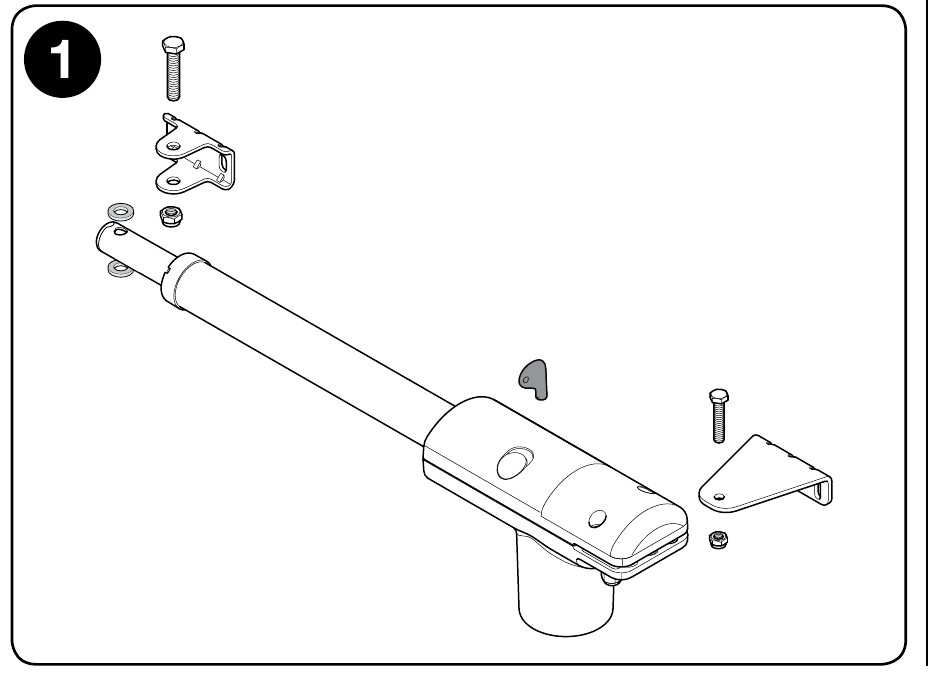
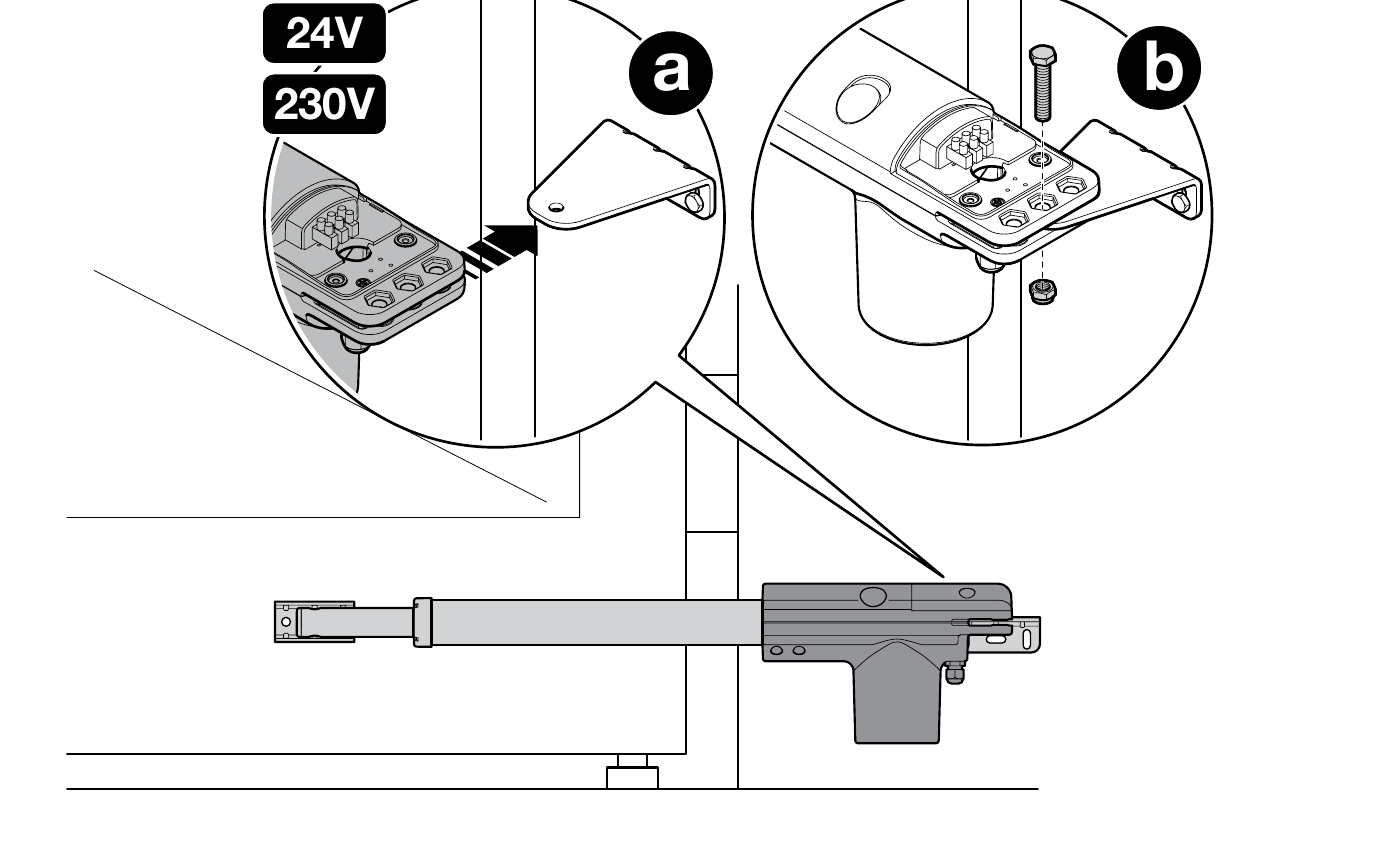
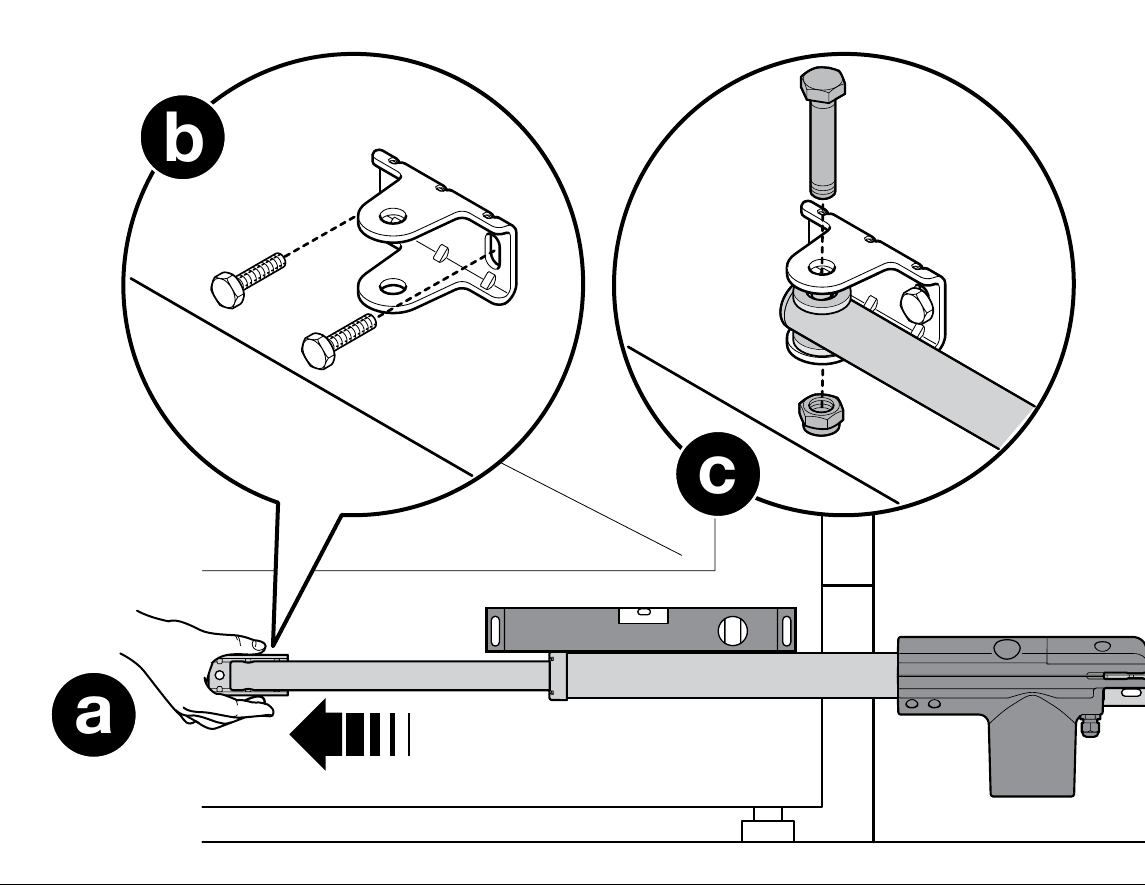
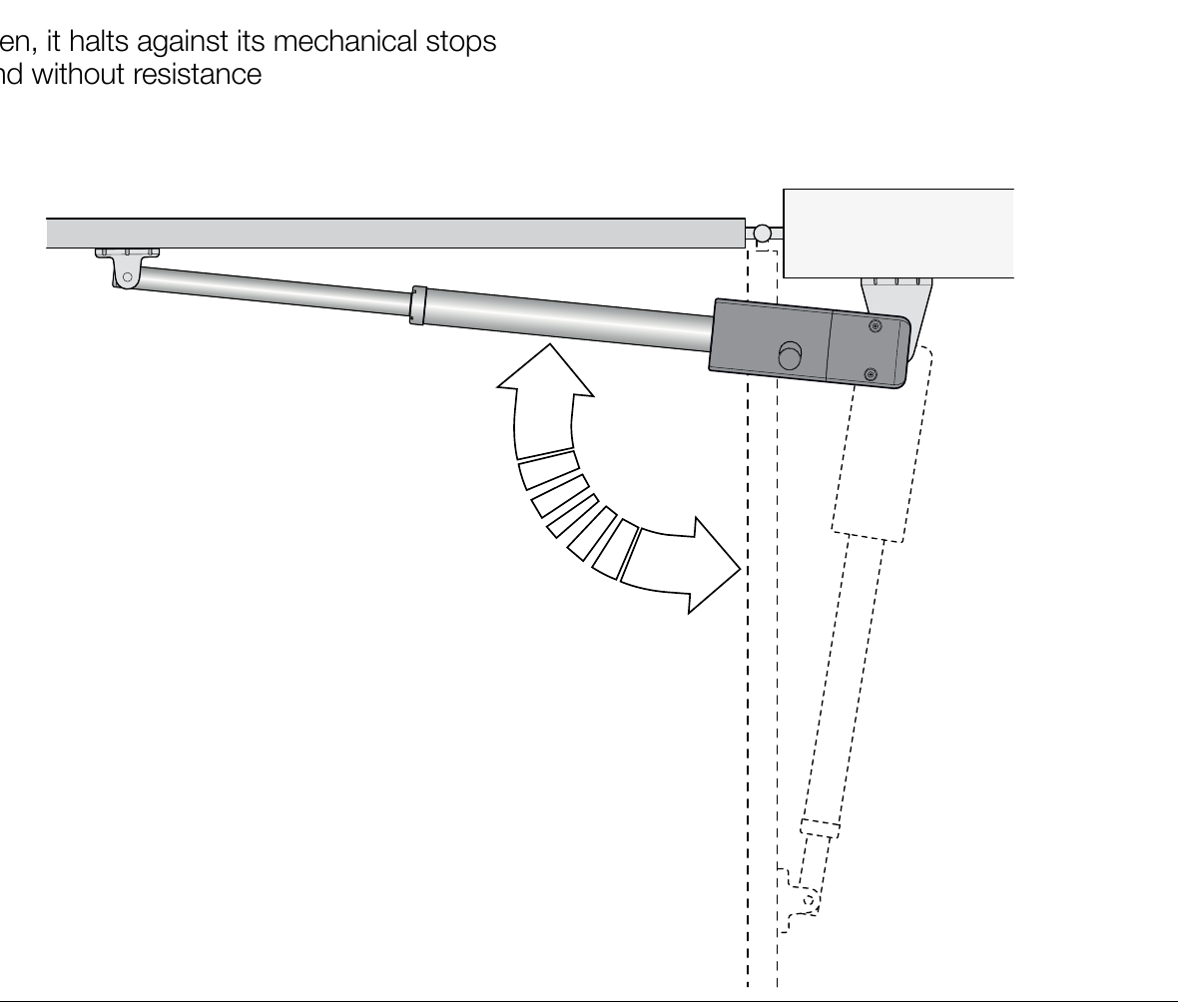
Fasten the rear bracket to the supporting structure, then release the motor, extend the piston, and initially fit the front bracket as a trial. After aligning the motor, check the full manual movement. Only then secure the brackets permanently. In both the open and closed positions, there must be mechanical gate stops; the end of the piston stroke does not replace them.
Wiring a 230 V motor
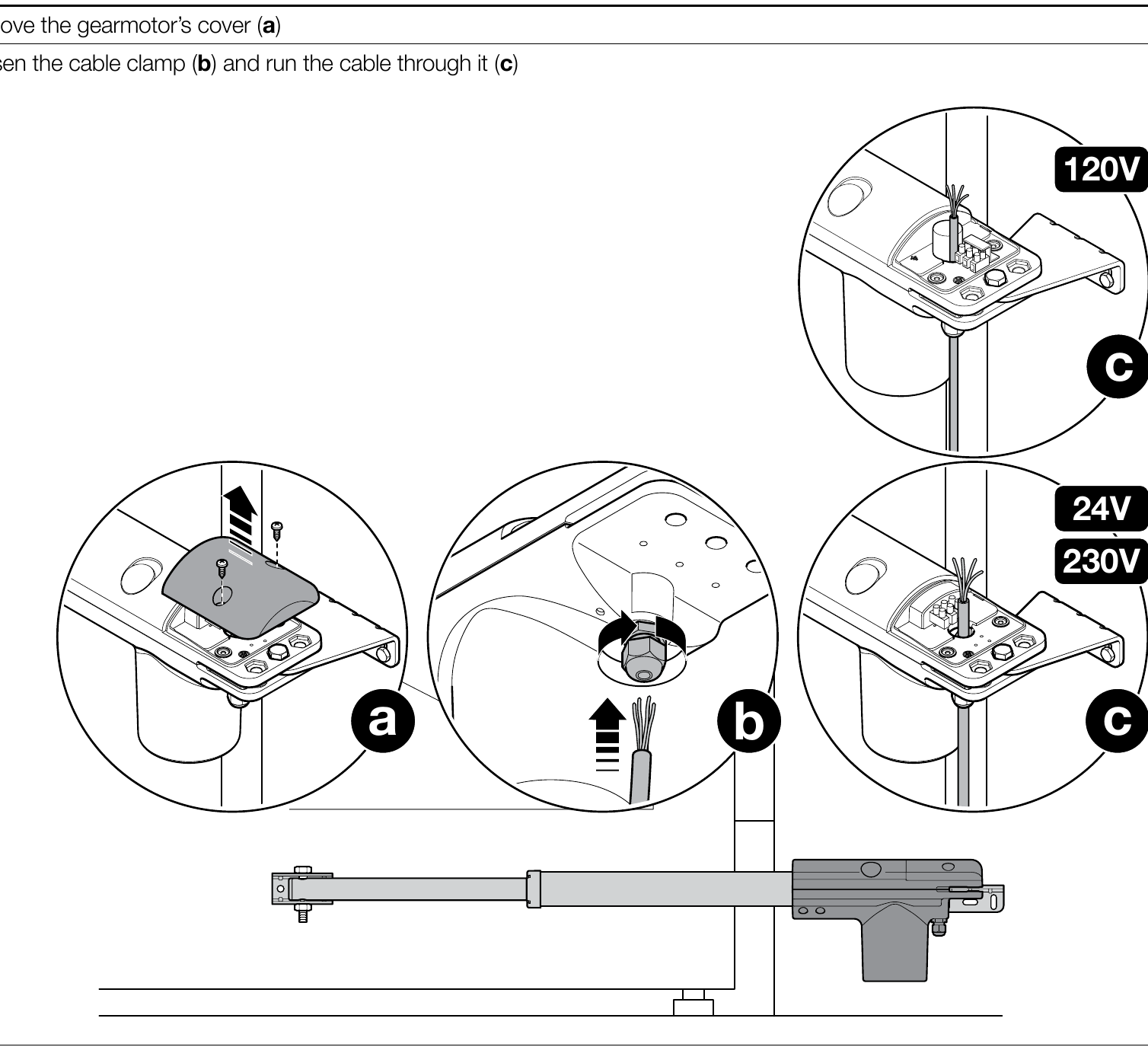
Wiring must be carried out by a qualified technician with the power disconnected. Route the cable through the gland and cable clip; connect the PE protective conductor to the motor as shown in the diagram. Connect the motor wires and the corresponding capacitor according to the terminals on the specific control board and the component label. With the MC800/MCA5R30, connect one motor to M2; with two motors, assign M1/M2 according to the movement sequence. Low-voltage photocells must not be connected to the motor terminals.
For the MC800/MCA5R30, see M1/M2 motor wiring and control unit wiring.
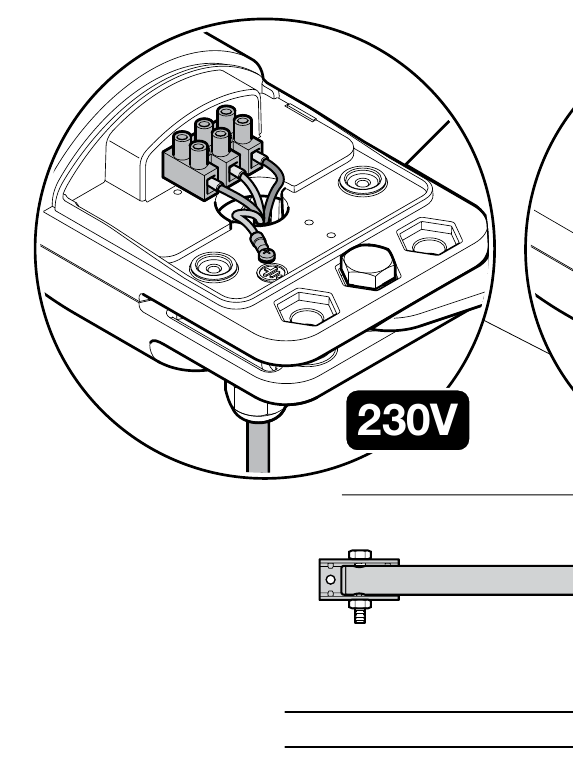
Test before first use
Check that the gate moves freely by hand, the fixings are secure, both stops are in place, and the motor runs in the correct direction. According to NICE, with the drive released, the gate leaf must be movable by hand in both directions with a force of no more than 390 N. Then test, following the instructions for the installed control unit, the photocells, STOP input, commands, and response to an obstruction. For a setup with the MC800, the manufacturer also requires safety edges; photocells alone do not replace them. The motor itself does not provide radio programming or travel learning; for the MC800, see radio controls and gate-leaf movement learning.
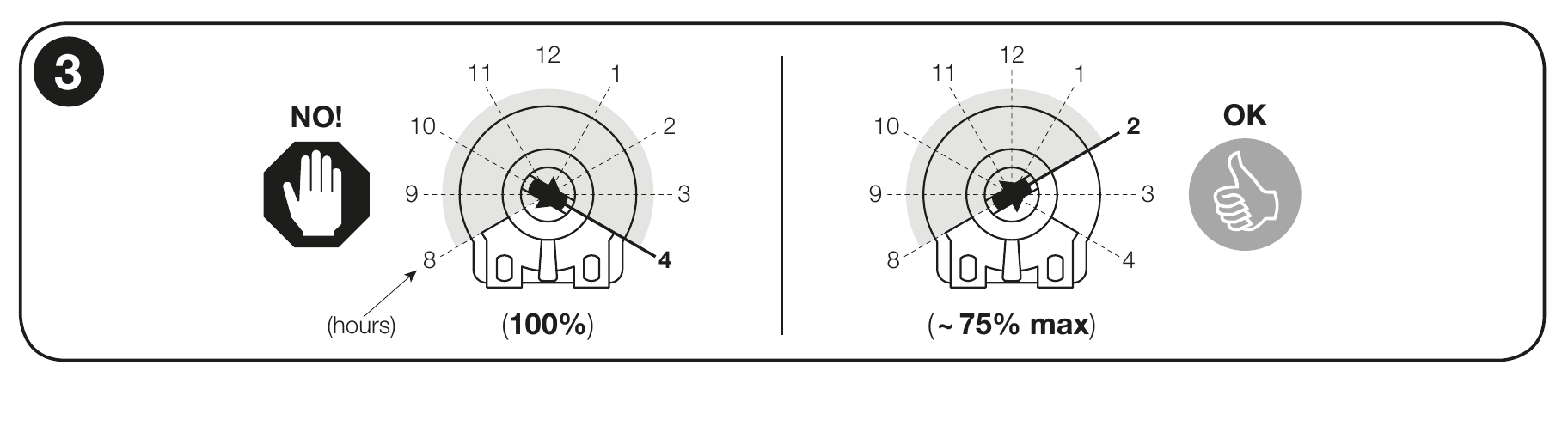
If the installed control unit has a force regulator Force-F, do not set it to 100% without a specific reason. If approximately 75% is not enough, contact technical support. On the current MC800/MCA5R30, the force is set according to this board’s instructions; do not apply the trimmer adjustment procedure to it. Force adjustment does not replace measuring and testing the safety of the entire gate.
Wiring accessories with the MC800 and MCA5R30 board
The following wiring applies to MC800/MCA5R30 in kits with this control unit. The accessory terminals are on the control unit, not on the motor itself. For a different control unit, use its own wiring diagram. Disconnect the mains power before starting work.
| Accessories | Terminals, power supply and polarity |
|---|---|
Auxiliary power supply | On the MCA5R30, terminal 3 = 0 V (−) and terminal 4 = +24 V DC and the common input reference. The shared limit for powered accessories is 200 mA; check the current draw and permissible voltage of each product. |
EPM relay photocells | With Standby disabled and no photocell test, power the TX transmitter and RX receiver from terminal 4 (+24 V DC) and terminal 3 (−). Voltage-free contact C–NC of the receiver to 4 (common) and the relevant input 8/PHOTO, 9/PHOTO1 or 10/PHOTO2. The contact has no +/− polarity. The AUX inputs must be set to relay photocell mode; in limit switch mode, they have a different function. |
EPM with Standby enabled | According to the MCA5R30 diagram, power both TX and RX between terminal 4 (+24 V DC) and terminal 5 (OutSTB, switched return line). On EPM photocells, 1 = +, 2 = return line. OutSTB is 24 V, max. 4 W and switches off in Standby; do not use terminal 5 as a permanent negative. Connect the RX C–NC contact between 4 and the relevant PHOTO input. |
EPM with photocell testing | According to the photocell test diagram, connect TX 1 → 4 (+24 V DC), TX 2 → 5 (OutSTB). The receiver is powered continuously: RX 1 → 4 (+), RX 2 → 3 (−). The RX C–NC contact is connected between 4 and the relevant PHOTO input. Do not overload OutSTB or use it simultaneously for another load; after wiring, perform a learning procedure and test the safety function. |
BlueBUS photocells | Compatible EPMB connect using two wires to BlueBUS terminals 6 and 7. + and − are not polarity-sensitive. Set the address and run device learning after adding or removing a device. |
STOP and command contacts | Voltage-free input 12/STOP accepts NO, NC or 8.2 kΩ, depending on the connected device; the state is learned. 13/SbS, 14/OPEN and 15/CLOSE use an NO contact against terminal 4 (common). These contacts have no +/− polarity; do not apply an external voltage to the inputs. The same applies to relays for a key switch or external receiver. |
ELAC beacon | NICE ELAC connect to the FLASH output intended for a self-flashing lamp: switched 120/250 V AC, max. 21 W. This is a mains output; it has no +/− polarity. Do not confuse it with the 24 V accessory terminals. |
Electric lock | Terminals 1–2 / EL: 12 V AC, max. 15 VA. The AC output has no +/− polarity; check the lock specifications. |
Radio receiver | OXIBD is installed in the SMconnector; do not use power terminals 3/4 or BlueBUS for it. Connect the antenna as specified for the receiver, not according to the motor terminals. |
If AUX inputs 8–11 are used for limit switches, their function differs from that of the PHOTO inputs. If you change the photocells or wiring, repeat the relevant learning procedure and test the gate’s stopping and response. For detailed instructions, see the MC800 control unit manual.
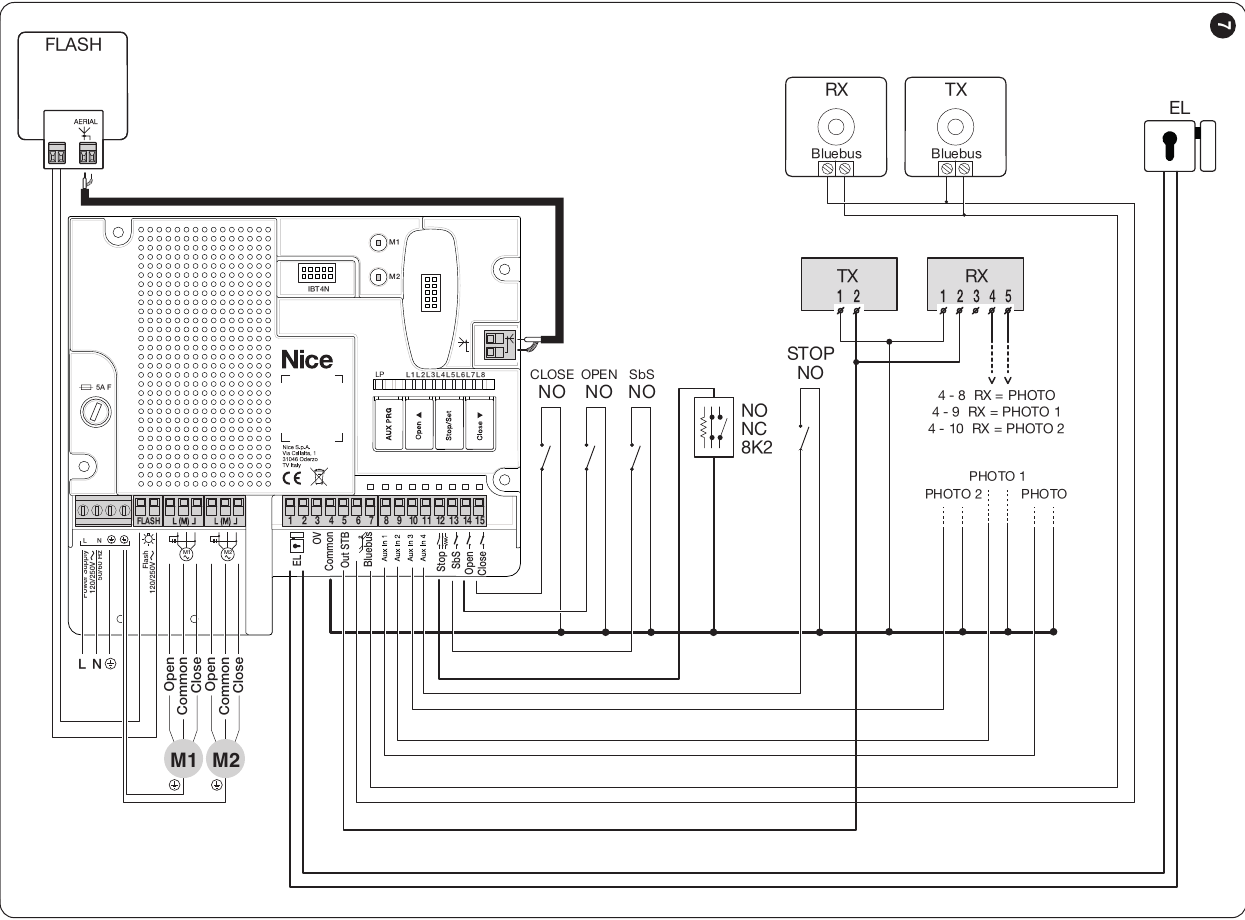
Relay photocells in Standby mode
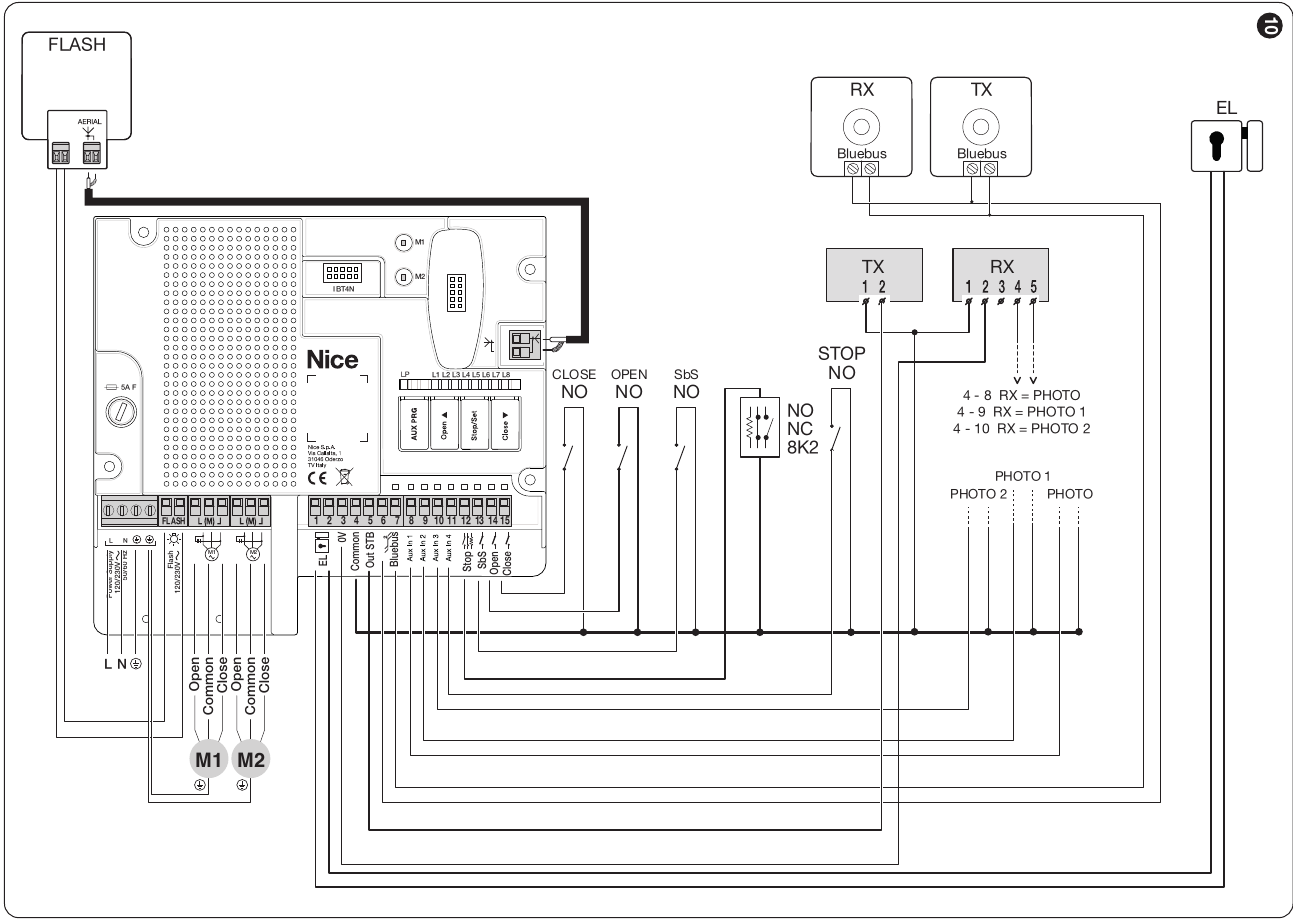
Relay photocells with photocell testing
Compatible accessories
Accessories connect to the selected control unit, not directly to the motor housing. The choice of photocells, radio receiver, beacon and lock depends on the outputs and connectors actually fitted to the board.
| What | Why | Type |
|---|---|---|
| Control unit | Controls one or two 230 V motors. Choose it according to the number of gate leaves and the gate equipment. |
|
| Beacon | Flashing warns that the gate is moving. Select the power supply according to the output on the installed control unit. |
|
| Photocells | Protect the gate area. The MC800/MCA5R30 supports relay contacts as well as BlueBUS, while the MC200 has a relay PHOTO input; determine the power supply, addressing and response according to the selected board. The types on the right are alternatives depending on the wiring. | |
| Safety edges | Required in addition to photocells when using the MC800 control unit. Choose the edge type and connection method according to the STOP input on the installed control board. |
|
| Transmitter | Remote control. Select the coding based on the radio receiver actually installed; matching frequency alone is not enough. For MC800, see receiver and remote controls. | |
| Receiver | The radio receiver and other interfaces are specific to the control unit. The SM plug-in module is used with the MC800; with the MC200, check its own radio receiver and connection options. |
|
| Antenna | Improves receiver range; connection depends on the installed radio module. | |
| Keypad | Code access. EDSWG requires a compatible radio receiver; BlueBUS EDSB is for the MC800 with this interface, not automatically for the MC200. | |
| Key switch | Key-operated control from a fixed location; connect the contact to a suitable command input on the control unit. | |
| Card readers | Access by card or key fob. ETPB uses BlueBUS MC800; do not connect this type directly to the MC200. |
|
| Electric locks | The lock helps keep the gate leaf closed, especially on longer leaves. PLA10/PLA11 are optional; check the power supply and timing against the control unit and specific gate. For MC800, see EL output. |
|
Manual release in the event of a power failure
Open the rubber cover, insert the supplied key and turn it 90° clockwise. You can then move the gate manually. To re-engage the lock, set the gate leaf to approximately half-open and turn the key 90° counterclockwise. Check that it is locked before operating the motor.
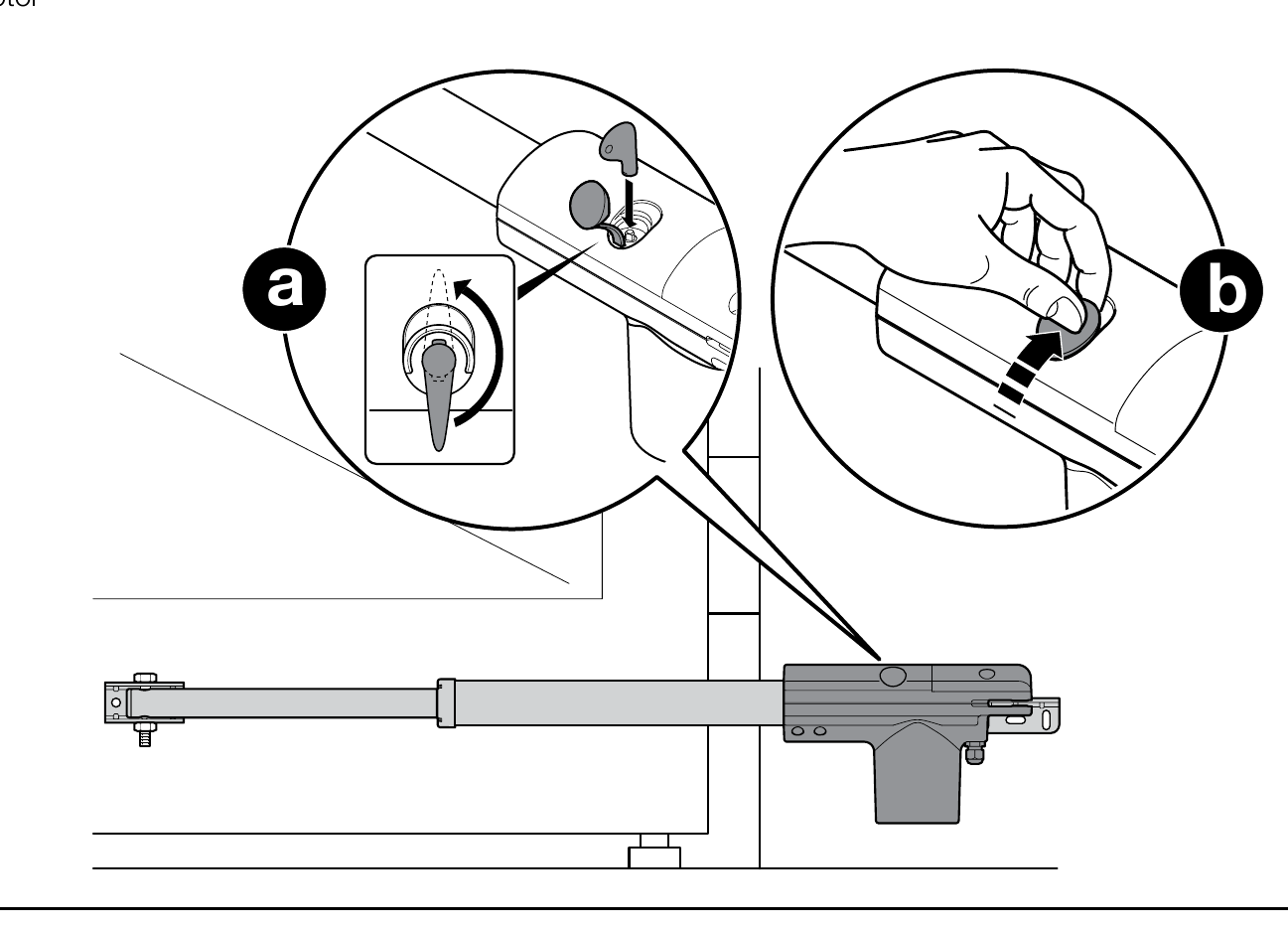
Maintenance and safety
Have the motor and gate inspected no later than six months after commissioning. With the power disconnected, a technician will check the brackets, bolts, corrosion, moving parts, stops and safety devices, then carry out a functional test. Do not use the gate if it is damaged or encounters unusual resistance.
Motor technical specifications
| Parameter | Value |
|---|---|
| Motor model | TOO4500 |
| Motor voltage | 230 V AC / 50 Hz |
| Maximum length of one gate leaf | 4.5 m |
| Maximum weight of one gate leaf | 250 kg |
| Rated / maximum power input | 250 / 340 W |
| Rated / maximum current | 1.1 / 1.5 A |
| Rated / maximum force | 300 / 2,000 N |
| Travel speed | 0.016 m/s |
| Piston stroke | 500 mm |
| Duty limit | 24 cycles/h |
| Ingress protection rating | IP54 |
| Operating temperature | −20 to +50 °C |
| Motor weight only | 6 kg |
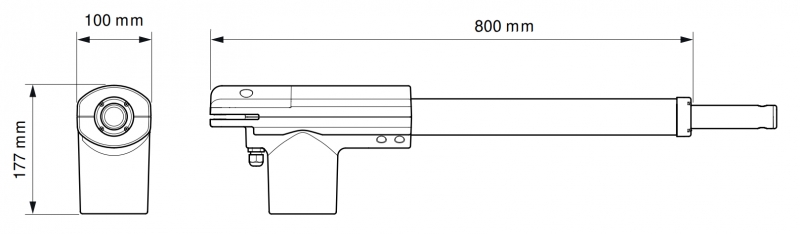
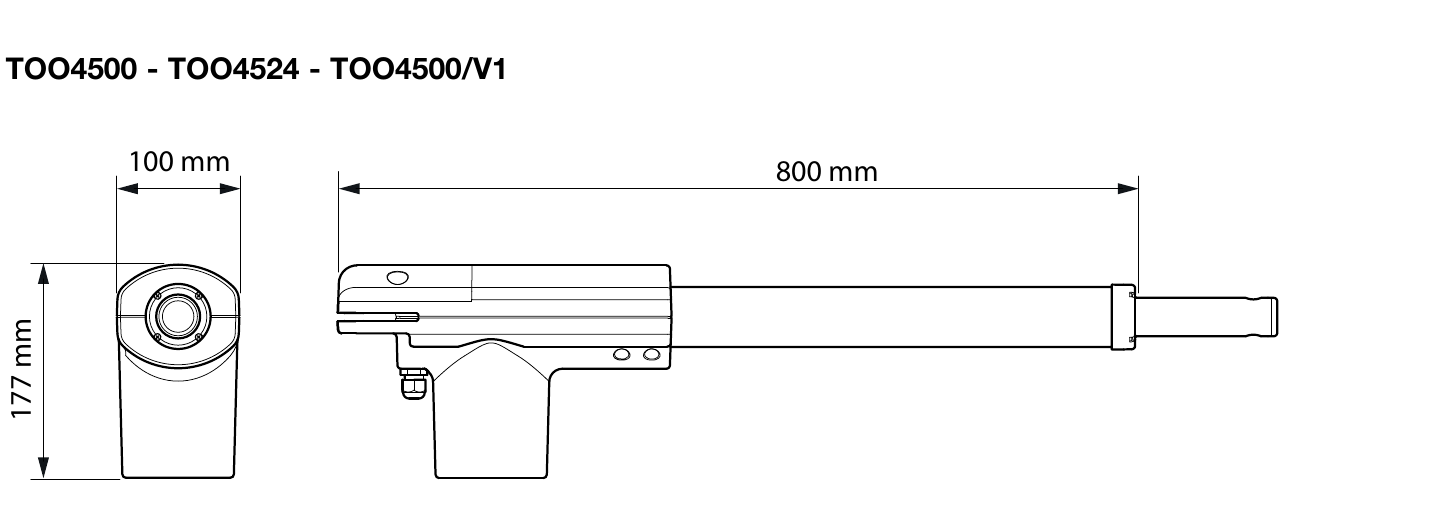
| Motor dimensions | 800 × 100 × 177 mm |
The values 340 W and 2,000 N are maximum, not rated values. The 6 kg weight is for the motor only; the weight of the delivered package may differ.
How can I order this item?
Choose the option that suits you:
- order online: use the buy button to add the goods to your shopping cart (you will find the buy button here in the product variants table).
- order by email: place your order at [email protected]






