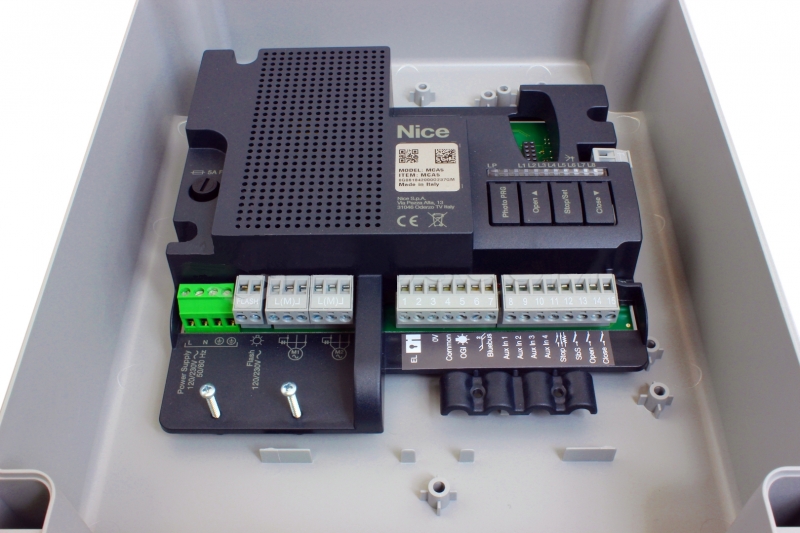
NICE MC800 – control unit for two 230 V motors with an MCA5R30 board
| Product availability: | In stock | We normally dispatch goods within 24 hours. |
|---|
in stock
€267.83 including VAT
| Weight |
|---|
| 1,00 kg |
Description of NICE MC800 – control unit for two 230 V motors with an MCA5R30 board
Wiring and setting up the NICE MC800 with the MCA5R30 board
NICE MC800 controls one or two 230 V AC swing-gate operators and is based on the older NICE Mindy A60 control unit. This version has the MCA5R30. It has an OutSTB and an Aux PRGbutton; the older manual for the MCA5 board with OGI and Photo PRG does not apply to these components.
For a single gate leaf, use M2. For two leaves, M2 opens first and M1 closes first. The control unit's 230 V AC supply, the motors' 230 V AC voltage, and the low-voltage accessory outputs are separate circuits.
Before wiring: check that the board is MCA5R30 by reading its label, disconnect the mains supply, and ensure the gate cannot move on its own while you work. Once installation is complete, test the photocells, STOP, and all commands.
| Quick navigation | Procedures | Service |
|---|---|---|
| Operators and accessories | Installation and wiring | Technical data |
| Terminals | Photocells and STOP | Diagnostics |
| First start-up | Manual positions | Reset |
| Standby | Programming | Receiver and remote controls |
Operators and accessories
| What | Why | Type |
|---|---|---|
| Warning light | Flashes to warn that the gate is moving, especially at an exit with poor visibility. |
|
| Photocells | Detect an obstacle in the gate's path and trigger the appropriate safety response. |
|
| Remote control | Open and close the gate remotely. |
|
| Receiver | Receives commands from remote controls; one module is fitted in the SM connector. |
|
| Service programming | Advanced control-unit settings and diagnostics. |
|
| Antenna | Helps increase the range of the radio control. |
|
| Keypad | Lets you enter a command using a code, without a remote control. |
|
| Key switch | Operate the gate with a key from a fixed location. |
|
An example of a compatible 230 V operator is the NICE HY7005. Choose the specific motor based on the leaf's dimensions, weight, and mechanics.
Enclosure installation and wiring
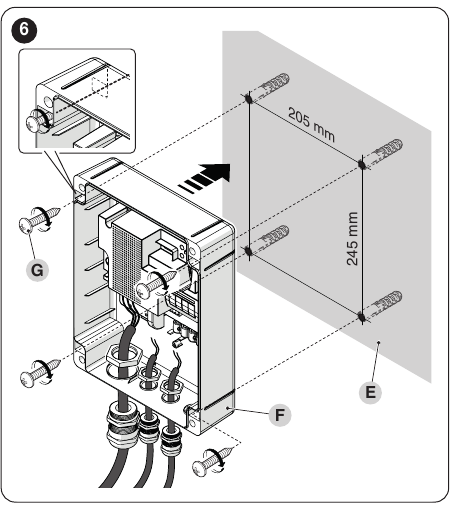
NICE's original diagrams show how to install the enclosure and route cables through suitable cable glands. Click the image to enlarge it.
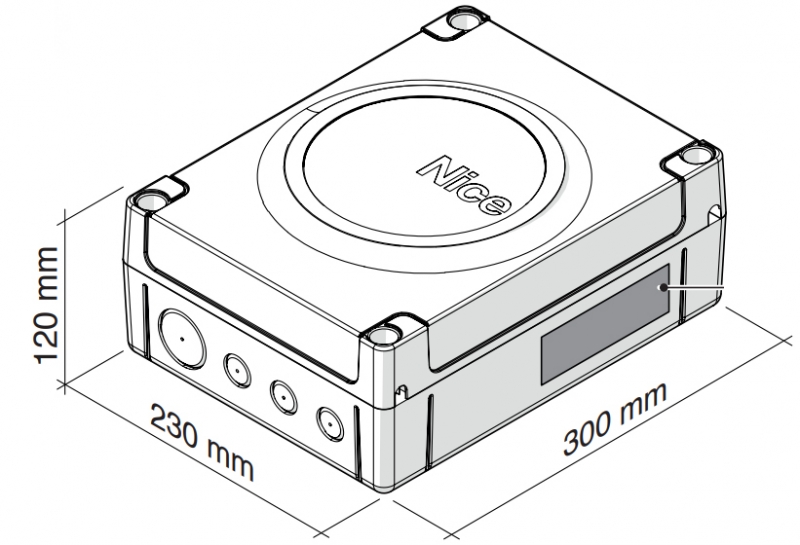
Mount the enclosure on a solid vertical surface. The mounting-hole spacing is 205 × 245 mm. After connecting the cables, secure the power cables with a clip so that no strain is transferred to the terminals. Protect the cable entries against water.
| Circuit | Cable and length |
|---|---|
| Control-unit supply | 3 × 1.5 mm² up to 30 m; for longer runs, the manufacturer specifies 3 × 2.5 mm² and grounding for the automation system. |
| Each motor | 4 × 1.5 mm² including PE, up to 10 m; capacitor as specified for the motor. |
| Warning light | 2 × 1.5 mm² up to 20 m, with insulation rated for mains voltage. |
| BlueBUS | 2 × 0.5 mm² up to 20 m; for 20–40 m, 2 × 1 mm². |
| Antenna | RG58 coaxial cable up to 20 m; recommended length under 5 m. |
| Key switch | Two 2 × 0.5 mm² cables up to 50 m. |
| Electric lock | 2 × 1 mm² up to 10 m. |
Board, terminals, and wiring
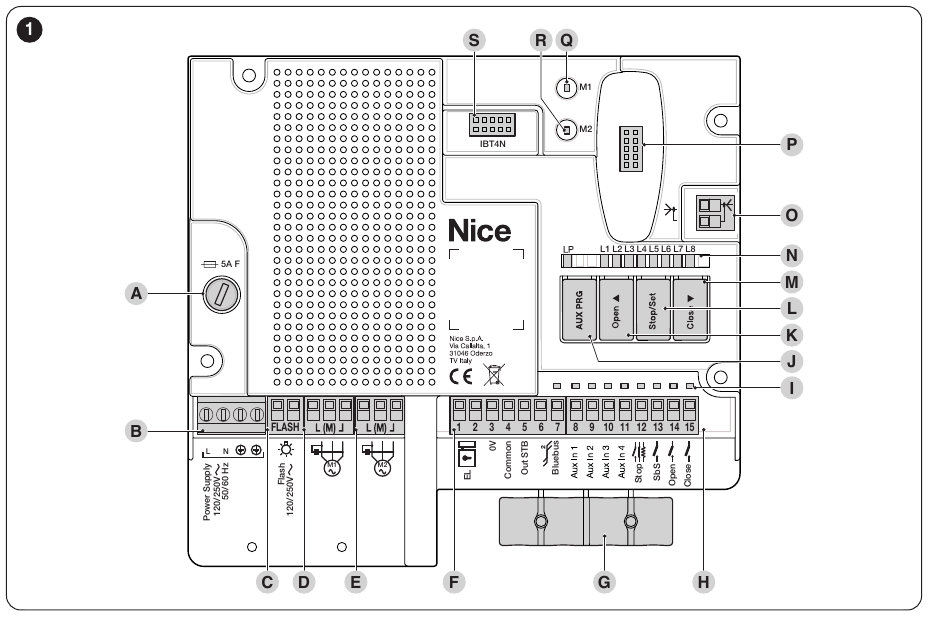
The diagram shows the MCA5R30 board: fuse A, power supply B, FLASH C, motors D/E, low-voltage terminals F/H, Aux PRG J, buttons K–M, SM connector P, and IBT4N connector S. Click the image to enlarge it.
| Terminal | Purpose | Connection |
|---|---|---|
| L / N / PE | 230 V AC supply | Also connect the PE protective conductor to the motors, as specified in their manuals. |
| M1 / M2 | Two 230 V AC motors | OPEN – COMMON – CLOSE, as marked on the board. For a single motor, use M2 only. |
| FLASH | Warning light | Switched mains voltage, max. 21 W; for example NICE ELAC. |
| 1–2 / EL | Electric lock | 12 V AC, max. 15 VA. |
| 3 / 4 | Accessories | Terminal 3 = 0 V (−), terminal 4 = common +24 V DC (+); total current draw max. 200 mA. |
| 5 / OutSTB | Power supply for relay photocells | 24 V, max. 4 W; switched off in Standby. This is not OGI on the old board. |
| 6–7 | BlueBUS | Two wires, connected in parallel, with no polarity. |
| 8–10 / AUX1–3 | PHOTO / PHOTO1 / PHOTO2 | In relay photocell mode; in limit switch mode, FCA1/FCA2/FCC1. |
| 11 / AUX4 | FCC2 or STOP | In limit switch mode, FCC2; in photocell mode, an additional STOP input. |
| 12 / STOP | Safety input | NO, NC or 8.2 kΩ, depending on the combination. |
| 13 / SbS | Step-by-step | Volt-free NO contact referenced to terminal 4. |
| 14 / OPEN | Open | Volt-free NO contact referenced to terminal 4. |
| 15 / CLOSE | Close | Volt-free NO contact referenced to terminal 4; the function can be changed to partial opening. |
For NICE EKS use the C–NO contact. Do not apply external voltage to the command inputs. Connect the OXIBD antenna directly to the receiver; the antenna is not part of the FLASH warning light circuit.
Photocells, photocell test and STOP
Select the wiring according to the actual photocell type and Standby status. TX is the transmitter, RX the receiver. EPM has a C–NC relay contact; EPMB uses two-wire BlueBUS. Terminal numbers may differ on other photocell types.
EPM relay photocells
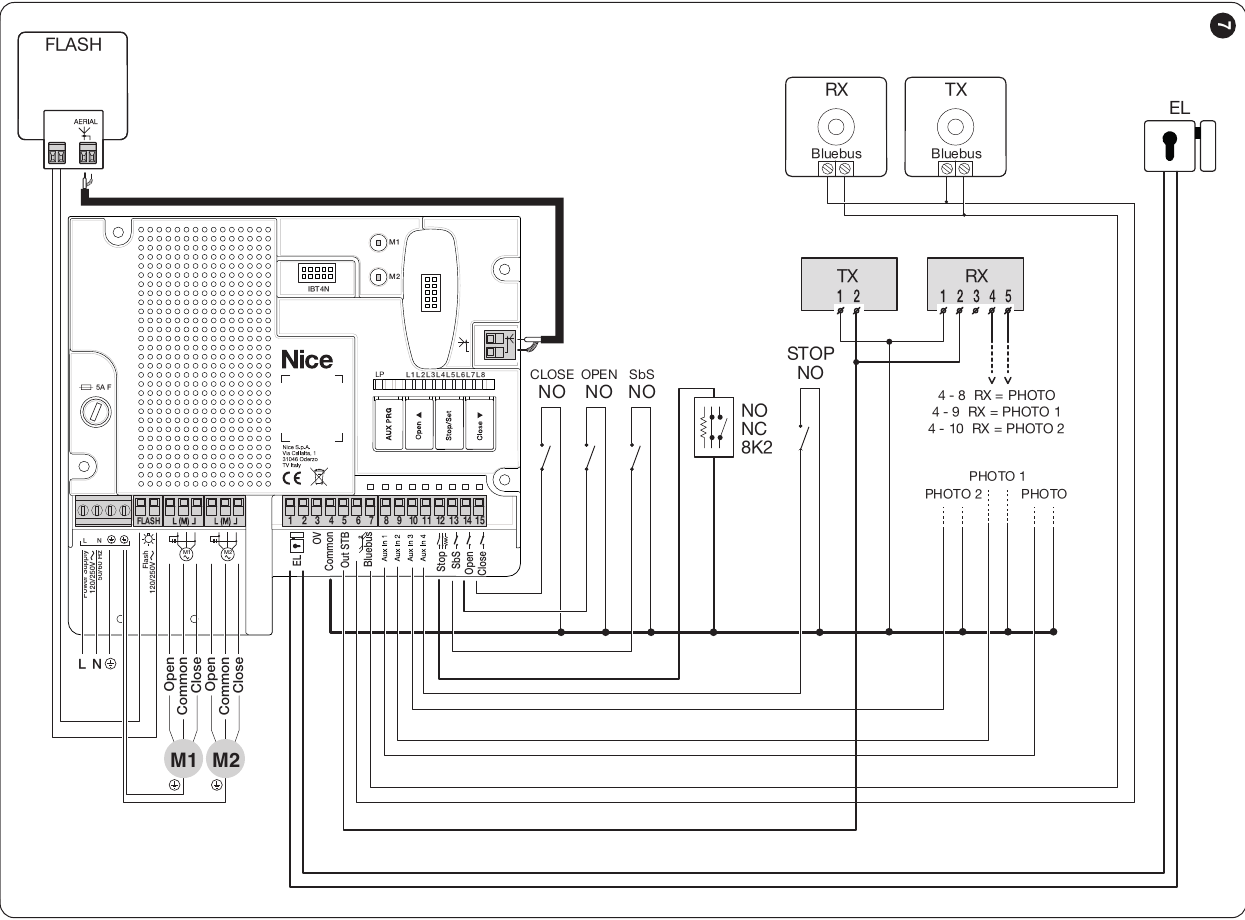
Figure 7 NICE: combined wiring with Standby enabled; relay photocells are powered via OutSTB. Click to enlarge the image.
One pair of EPM photocells without photocell testing, Standby disabled: power TX and RX from terminals 3/4; connect the RX C–NC contact between 4/COMMON and 8/PHOTO. For NICE EPM, use the following connections:
| MC800 MCA5R30 | NICE EPM TX | NICE EPM RX |
|---|---|---|
| 3 / 0 V | 2 | 2 |
| 4 / +24 V | 1 | 1; connect to RX 4 / C |
| 8 / PHOTO | — | 5 / NC |
With other types of relay photocells, their terminal numbers may differ. On the MCA5R30, output 5 functions as OutSTB, not OGI.
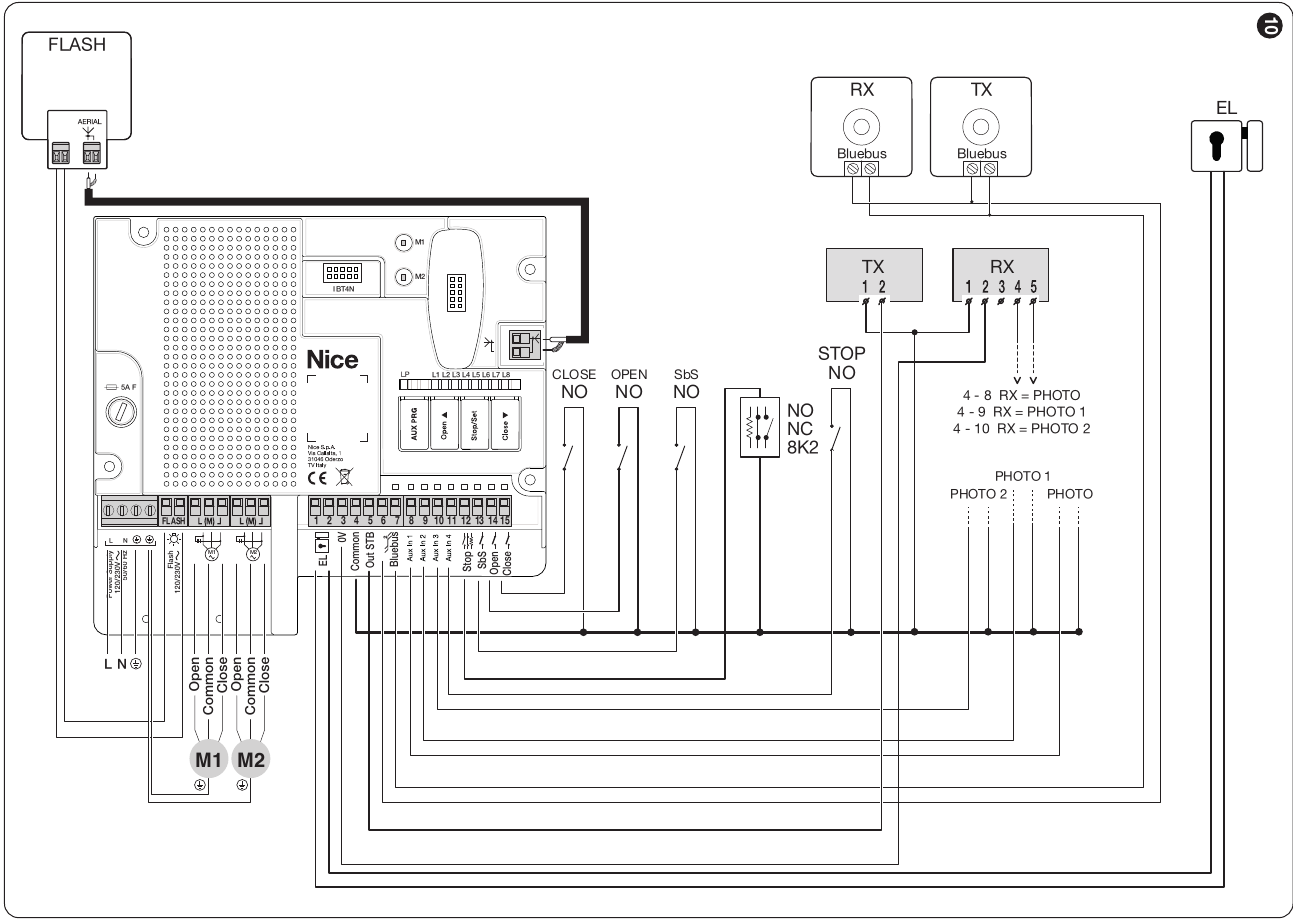
Figure 10 NICE: photocell test wiring; output 5 functions as OutSTB, not OGI. Click to enlarge the image.
For photocell testing as shown in Figure 10, connect TX 1 to MC800 terminal 4 and TX 2 to terminal 5. RX remains powered from terminals 3/4, and its C–NC contact is connected to the selected PHOTO input. Do not use output 5 for another load at the same time. After changing the wiring, repeat device learning and test the photocell while the gate is moving.
Aux PRG and LP: For relay photocells, LP must be lit; when AUX inputs are used as limit switches, it must be off. Leave unused AUX inputs unconnected. After switching, check the resulting LP status and repeat device learning.
BlueBUS and addressing
Connect BlueBUS photocells to terminals 6–7 using two wires, with no polarity. If AUX1–4 are used for the actuators’ limit switches, set Aux PRG so that LP is off: AUX1/8 = FCA1, AUX2/9 = FCA2, AUX3/10 = FCC1 and AUX4/11 = FCC2. Connect the limit switch contacts to common terminal 4; leave unused inputs unconnected.
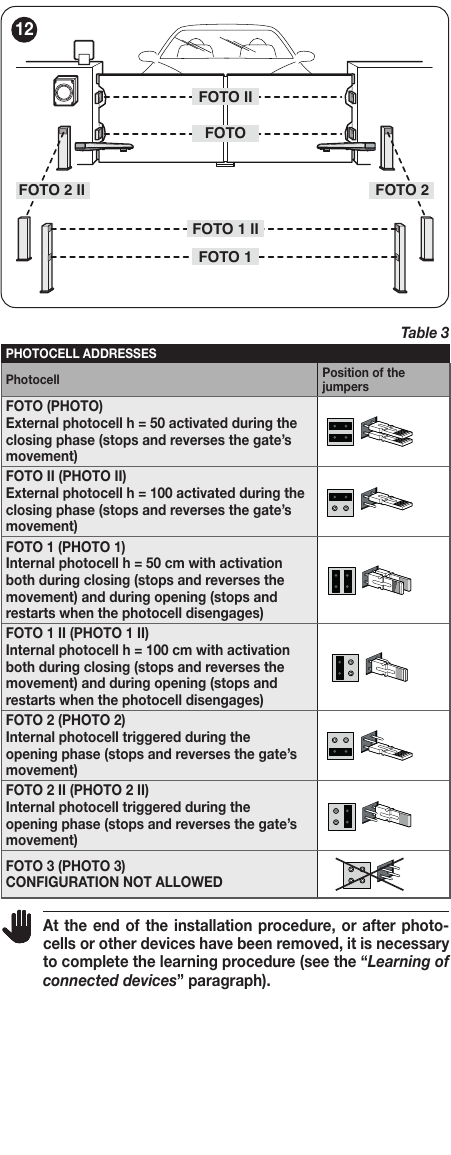
Original Table 3, including jumper positions: use the same address for TX and RX of one pair, and a different address for each additional pair. Click to enlarge the image.
| Address | Response |
|---|---|
| FOTO / FOTO II | On closing, stops and reverses direction. |
| FOTO 1 / FOTO 1 II | On closing, stops and reverses; on opening, stops and resumes once the beam is clear. |
| FOTO 2 / FOTO 2 II | On opening, stops and reverses direction. |
| FOTO 3 | Configuration not permitted for MC800. |
BlueBUS capacity is a maximum of 15 load units, not automatically 15 pairs of photocells. Run device learning again after adding or replacing a device.
Wiring the STOP input
| Devices | Wiring |
|---|---|
| Multiple NO contacts | In parallel. |
| Multiple NC contacts | In series. |
| Two 8.2 kΩ safety edges | In parallel; for more than two devices, connect in cascade with a single 8.2 kΩ end-of-line resistor. |
| NO + NC | As specified in NICE Table 2, connect in parallel, with an 8.2 kΩ resistor in series with NC; this also allows a combination of NO, NC and 8.2 kΩ safety edges. |
During learning, STOP stores the connected state. A subsequent change triggers a stop with a short reverse movement. Do not short-circuit the input as a workaround for a fault.
Simplified MC800/MCA5R30 wiring and setup procedure
This procedure describes an MCA5R30 board with one pair of EPM relay photocells on PHOTO, protecting the closing direction. For BlueBUS or multiple pairs, use the relevant diagram above.
Step 0. Wiring
Connect the L/N/PE supply, 230 V AC M1/M2 motors, capacitors and warning light according to the board terminals. For a single leaf, M1 remains unused. Wire the photocells according to the selected mode above; for EPM without a photo test and with Standby disabled, connect 3/4 to TX/RX and RX contact 4–5 between 4/COMMON and 8/PHOTO.
Step 1. Reset only when deliberately restoring factory settings
For a new installation, there is no need to reset the control unit “just in case.” If you need to erase your custom settings, use the reset procedure and then teach the devices and travel limits again.
Step 2. Select AUX and Standby mode
On the MCA5R30 board, there is an Aux PRG. For relay photocells, check that LP is lit; for AUX configured as limit switches, LP should be off. For relay wiring, select the diagram according to whether Standby. Selecting AUX alone does not replace correct TX/RX power supply.
After power is connected, the green BlueBUS LED should flash regularly about once per second, the photocell indicators should signal operation, and the FLASH beacon should be off. If any check fails, inspect the wiring before programming.
Step 3. Detection of connected devices
Hold Open + Stop/Set and release the buttons when L1/L2 flash rapidly, after about 3 seconds. When complete, L1/L2 should turn off and STOP should remain lit. Run detection even when no devices are connected to BlueBUS/STOP, and repeat it after changing accessories.
Step 4. Detection of gate-leaf movement
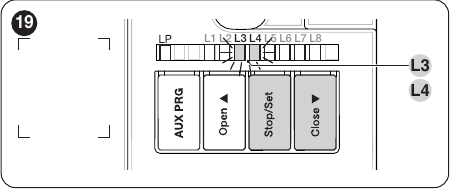
Buttons and LEDs L3/L4 used for travel programming. Click the image to enlarge it.
Move the released gate leaves to roughly the midpoint of their travel, re-engage the operators, and check the motor force (level II/L6) before programming. Hold Stop/Set + Close and release when L3/L4 flash rapidly, after about 3 seconds. The control unit will close M1 and M2 in sequence, open M2 and M1, and finally close M1 and M2. When successful, L3/L4 will turn off.
If a gate leaf opens instead of closing, interrupt programming by pressing Open or Close. With the power disconnected, swap the two directional live wires of the corresponding motor; leave COMMON and PE connected as they are. With 230 V AC, this is not a matter of “reversing polarity.” Then repeat programming. A photocell or STOP input can interrupt programming.
Step 5. Remote control and function test
Pair the remote control according to the receiver actually installed: SMXI, OXI, or another compatible module. The existing SMXI procedure is described in the radio section; there is no need to reset the control unit for this. Test OPEN, CLOSE, STOP, both directions, and the photocell response.
Manual setting of limit positions and slowdown points
The R30 uses positions 0, A and 1. Full manual programming is started by briefly pressing Stop/Set while L3/L4 are flashing rapidly; mixed programming of selected positions requires automatic programming first. Point A can be configured only after the open position of the corresponding gate leaf has been set.
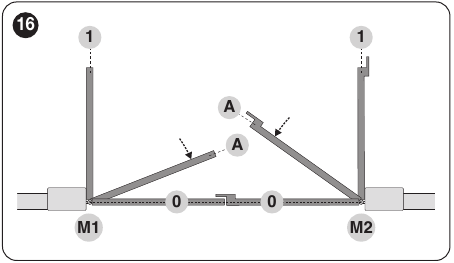
Original NICE image 16. Click the image to enlarge it.
Full manual programming
The gate must be stationary, the operators engaged, and connected devices already programmed. Press Stop/Set + Close together, release them after about 3 seconds when L3/L4 flash rapidly, then briefly press Stop/Set. The L1 position indicator will flash. Briefly pressing Open or Close moves the selection between flashing LEDs; holding Open or Close moves the corresponding gate leaf. At each desired position, hold Stop/Set for at least 3 seconds. After 2 seconds, the corresponding LED will stay lit; when you release the button, the next one will flash. Do not leave more than 10 seconds between successive presses, or the procedure will end and save the changes made so far.
| Sequence / LED | What to set | How to confirm |
|---|---|---|
| 1 / L1 | Move M1 to the fully closed position 0 | Hold Stop/Set for at least 3 seconds; L2 will then flash. |
| 2 / L2 | Move M2 to the fully closed position 0 | Hold Stop/Set for at least 3 seconds; L5 will then flash. |
| 3 / L5 | Move M2 to point A, where it begins to slow down while closing | Hold Stop/Set for at least 3 seconds; L6 will then flash. |
| 4 / L6 | Move M1 to point A, where it begins to slow down while closing | Hold Stop/Set for at least 3 seconds; L7 will then flash. |
| 5 / L7 | Move M2 to the fully open position 1 | Hold Stop/Set for at least 3 seconds; L8 will then flash. |
| 6 / L8 | Move M1 to the fully open position 1 | Hold Stop/Set for at least 3 seconds, then release the button. |
The manufacturer states that point A can be set only after the open positions have been established. If the board does not yet have these positions during the first manual programming, save L7/L8 first, then repeat the procedure for L5/L6. For a single gate leaf, only L2, L5 and L7 are used. After programming, run a full opening and closing cycle; during opening, the gate leaves should stop a few centimetres before the mechanical stop, and during closing they should reach the closing stop.
Fine-tuning programmed positions
Automatic programming must first complete successfully. Then hold Stop/Set + Close and release the buttons when L1 starts flashing. Briefly press Open/Close to select a position LED, hold the button to move the gate leaf, and save the position by holding Stop/Set for at least 3 seconds. Adjust the other positions in the same way. After making changes, test a complete gate cycle.
Standby mode
MC800 with MCA5R30 board has an energy-saving Standby mode. When enabled, the control unit enters this mode about 5 minutes after a movement completes correctly, or after about 10 minutes if it has not yet been configured. In this mode, the OutSTB output is switched off and, when correctly wired, the control unit itself consumes less than 0.5 W, excluding accessories. Wire the relay photocells according to whether Standby is enabled or disabled.
When power is switched on, three flashes of LEDs L1–L8 confirm that Standby is active. To change the mode, hold Open + Stop/Set + Close together and release on the third flash; when enabled, L1–L8 will flash three times again, but when disabled they will not. After changing the setting, check the wiring and test the photocells.
Programming functions and parameters
With the gate stationary, hold Stop/Set until L1 flashes. Use Open/Close to select an item. At level I, briefly press Stop/Set to change the status: a short flash = OFF, a long flash = ON. Level I functions are disabled by default. Do not wait more than 20 seconds between successive button presses; when finished, wait about 10 seconds for the mode to exit.
Level I – ON/OFF functions
| LED – function | ON and OFF status |
|---|---|
| L1 – Automatic closing | ON: After opening, the pause time is counted down and the gate closes. OFF (default): Semi-automatic mode. |
| L2 – Closing after photocell activation | ON: When L1 is active, photocell activation reduces the pause to 5 seconds; even without L1, activation can start closing after the set pause. OFF (default): No such function. |
| L3 – Always close | ON: When power is restored, the control unit monitors the open gate for 10 seconds and closes it after a 5-second warning flash. OFF (default): The gate remains in position. |
| L4 – Lock pressure | ON: Before opening, briefly presses the gate closed. OFF (default): No additional closing pressure. |
| L5 – FLASH as courtesy light | ON: Changes the FLASH output function to auxiliary lighting. OFF (default): FLASH controls the beacon. |
| L6 – Pre-flashing | ON: The beacon flashes for 3 seconds before movement. OFF (default): Movement starts immediately. |
| L7 – CLOSE as Partial Open 1 | ON: The CLOSE input triggers partial opening. OFF (factory setting): The input closes the gate. |
| L8 – Pressure maintenance | ON: For compatible hydraulic operators, after 4 hours of being closed, pressure is restored by briefly closing the gate. OFF (factory setting): No pressure restoration. |
Level II – parameter values
Select the parameter input LED, then hold Stop/Set for about 3 seconds until the LED for the current value lights up. Continue holding Stop/Set and use Open/Close to select a new value LED. After releasing the button, wait for the controller to return to normal mode. The input LED and the value LED have different meanings. The highlighted value is the factory setting.
| Input LED – parameter | Setting LED – value |
|---|---|
| L1 – Pause time Time before automatic closing. |
L1 – 5 s L2 – 15 s L3 – 30 s L4 – 45 s L5 – 60 s L6 – 80 s L7 – 120 s L8 – 180 s |
| L2 – Step-by-step operation Sequence for SbS, OPEN, CLOSE and radio commands; for L4, L5, L7 and L8, OPEN and CLOSE behavior also changes. |
L1 – open–stop–close–stop L2 – open–stop–close–open L3 – open–close–open–close L4 – condominium L5 – condominium 2 L6 – step-by-step 2; a short command triggers partial opening L7 – hold-to-run control L8 – semi-automatic opening, hold-to-run closing |
| L3 – Opening delay Delay between the opening of the leaves, expressed as a percentage of the operating time. |
L1 – 0% L2 – 10% L3 – 15% L4 – 20% L5 – 25% L6 – 30% L7 – 40% L8 – 50% |
| L4 – Closing delay Delay between the closing of the leaves, expressed as a percentage of the operating time. |
L1 – 0% L2 – 10% L3 – 15% L4 – 20% L5 – 25% L6 – 30% L7 – 40% L8 – 50% |
| L5 – Timing balance Changes the closing time relative to the opening time. Check the LED on the specific control board to determine the initial value. |
L1 – 0% L2 – 20% L3 – 30% L4 – 40% L5 – 60% L6 – 70% L7 – 80% L8 – 100% |
| L6 – Motor force Force of both motors; check the mechanism before increasing it. |
L1 – 25% L2 – 35% L3 – 45% L4 – 55% L5 – 65% L6 – 75% L7 – 85% L8 – 100% |
| L7 – Start-up time Duration of the start-up phase at the beginning of movement. |
L1 – 0 s L2 – 0.5 s L3 – 1 s L4 – 1.5 s L5 – 1.8 s L6 – 2 s L7 – 2.5 s L8 – 3 s |
| L8 – Partial opening Range of the Partial Open 1 command. For both leaves, the percentage is calculated from the smaller configured opening. |
L1 – M2 to ¼ L2 – M2 to ½ L3 – M2 to ¾ L4 – full M2 opening L5 – both leaves to ¼ L6 – both leaves to ½ L7 – both leaves to ¾ L8 – both leaves to the smaller full opening |
With L2/L4 (condominium mode), an SbS or OPEN command during opening has no effect, while CLOSE reverses the direction; during closing, SbS or OPEN reverses the direction, while CLOSE has no effect. L2/L5 has the same basic operation, but holding a command for more than 2 seconds triggers STOP. With L2/L6, a short command of up to 2 seconds triggers partial opening; L2/L7 requires the command to be held continuously, and L2/L8 requires it to be held during closing.
For parameter II/L5, two values are marked as defaults: L4 = 40% and L5 = 60%. Before changing the setting, check which value LED is actually lit on the specific control board.
Example: 60 s: enable level I/L1 and at level II/L1 select value L5. If L2 is active after the photocell is triggered, the pause time may be reduced.
Remote controls and service programmers
An SMXI or OXI receiver from an existing installation can be retained if it is compatible with the remotes in use. Install the plug-in receiver with the power disconnected. When using a new receiver, follow its own instructions; matching remote-control frequencies alone are not sufficient.
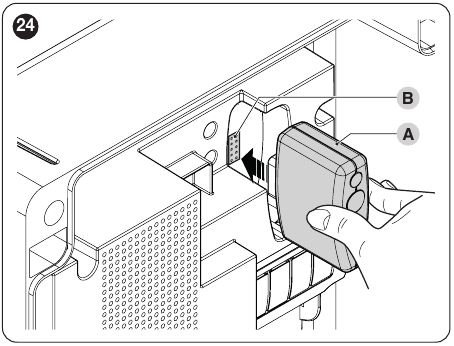
Figure 24 NICE. Click the image to enlarge it.
| SMXI/SMXIS or OXI receiver output in Mode 1/2 | Control unit command |
|---|---|
| 1 | SbS – step-by-step |
| 2 | Partial Open 1 |
| 3 | OPEN |
| 4 | CLOSE |
For an existing SMXI: in Mode I, hold down the receiver button for at least 3 seconds until the LED lights up, then within 10 seconds hold down the remote-control button for at least 2 seconds. Three flashes confirm that the setting has been saved. For a specific command, use the corresponding Mode II setting on the receiver; do not apply this procedure automatically to OXI or OXIBD.
NICE OXIBD is plugged into the SM connector; the antenna connects directly to the receiver. Remote control NICE ON3EBD Pair it according to the instructions for the receiver in use. The advanced commands in the following table apply to OXI/OXIFM/OXIT/OXITFM receivers. For OXIBD, follow its own instructions.
Advanced Mode II for OXI/OXIFM/OXIT/OXITFM receivers: Assign the command number to a button according to the instructions for that receiver. The following table does not describe OXIBD mode.
| No. | Command | Action |
|---|---|---|
| 1 | SbS | Step-by-step operation. |
| 2 | Partial 1 | Partial opening according to Level II parameter L8. |
| 3 | OPEN | Open. |
| 4 | CLOSE | Close. |
| 5 | STOP | Stop movement. |
| 6 | Condominium SbS | Command in condominium mode. |
| 7 | High-priority SbS | The command is accepted even when the automation is locked. |
| 8 | Partial 2 | Leaf M2 opens halfway. |
| 9 | Partial 3 | Both leaves open halfway. |
| 10 | Open and lock | After opening, it locks out further standard commands. |
| 11 | Close and lock | After closing, it locks out further standard commands. |
| 12 | Lock automation | Stops movement and locks out further standard commands. |
| 13 | Unlock automation | Restores standard operation. |
| 14 | Timed lighting | Turns on the auxiliary light, which switches off after a set time. |
| 15 | Lighting ON/OFF | Toggles the auxiliary light on and off. |
BusT4 and programming
NICE IBT4N With the power off, plug it into the board connector. It allows you to connect NICE OVIEW according to its instructions. For the NICE BIDIWIFI module, check compatibility and available functions for the MCA5R30 in the module’s latest instructions.
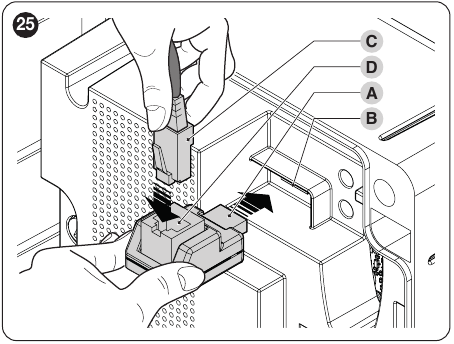
Figure 25 NICE. Click to enlarge the image.
Diagnostics and troubleshooting
In the event of an error, note the number of red BlueBUS flashes and the status of the other LEDs. Two quick green flashes indicate an input change or a received command. When Standby is active, some indicators may be off after a period of inactivity.
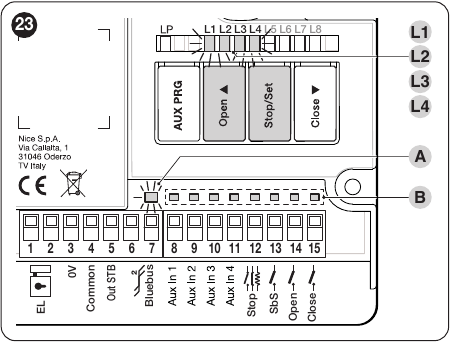
Figure 23 NICE identifies BlueBUS, STOP and status LEDs. Click to enlarge the image.
| Symptom / code | Check and remedy |
|---|---|
| 1 red flash | BlueBUS configuration change – check the addresses and repeat the device learning procedure. |
| 2 red flashes | Photocell obstructing movement – check for an obstacle, alignment, power supply and wiring. |
| 4 red flashes | STOP – check the safety device and wiring. |
| 5 red flashes | Internal parameter error; wait 30 seconds and try a command. If the error returns, contact a service technician. |
| 7 red flashes | Electrical fault; L1 = protection activated/motor disconnected, L2 = learned limit switch faulty, L3 = unlearned limit switch detected, L4 = general anomaly. |
| 8 red flashes | Continuous command – check the button or relay. |
| 9 red flashes | Automation locked by a command; unlock it using the corresponding command. |
| Board LED | Meaning / initial check |
|---|---|
| BlueBUS green, 1 flash/s | Normal operation. |
| BlueBUS continuously off / on | Power supply, fuse or board fault. |
| STOP off | Active or faulty STOP. |
| SbS / OPEN / CLOSE on | The corresponding input is active; a continuous state without a command explains the lockout. |
| LS1/LS2 OPEN/CLOSE | With limit switches connected, interpret the indicators according to their wiring and AUX mode; the state change should correspond to the movement. |
| L1 + L2 flashing slowly | Learn the devices. |
| L3 + L4 flashing slowly | Learn the travel or check whether the board settings have changed. |
5 A F fuse
The MCA5R30 board has a 5 A F fast-acting fuse. Disconnect the power before checking, and replace the fuse only with one of the same type.
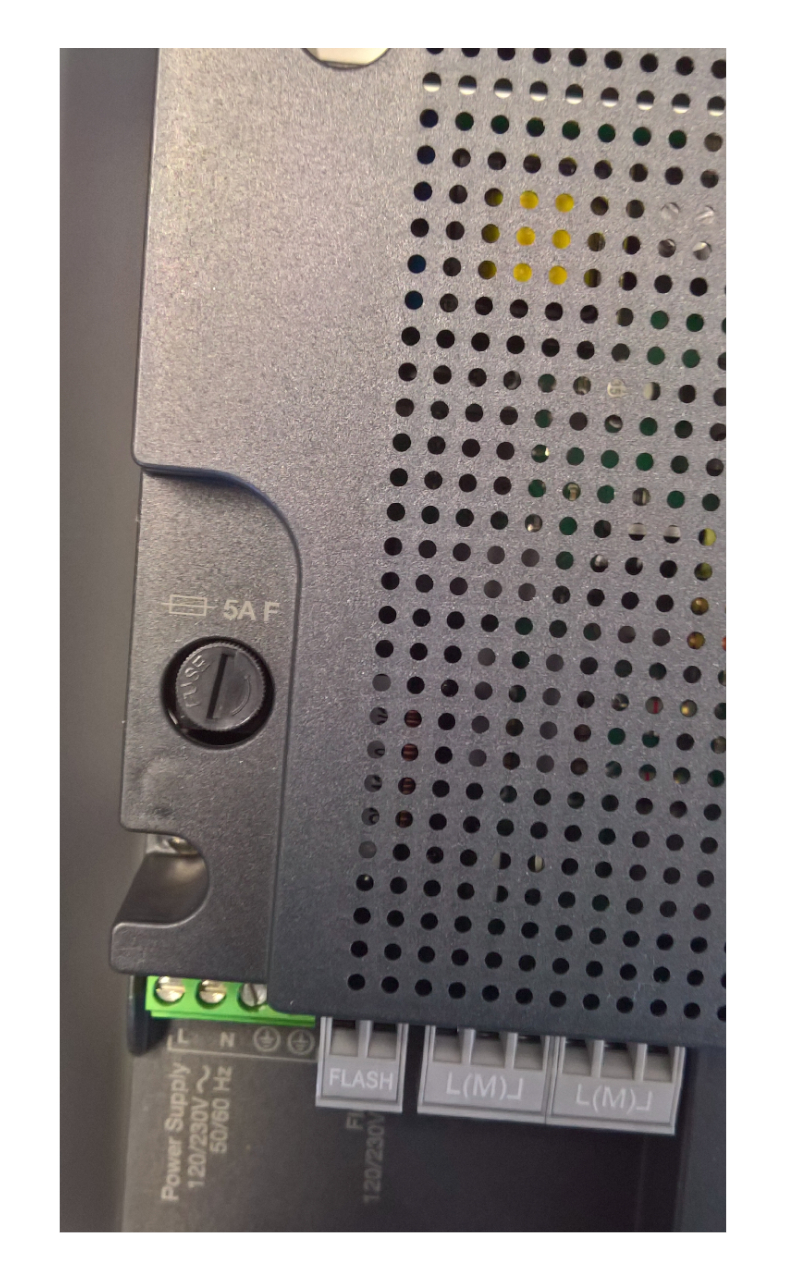
The cover is marked 5 A F. Click the image to enlarge.
Clearing the control unit memory
Resetting will erase custom settings; it is not a required first step when wiring a new system. Hold Open + Close until L1/L2 start flashing, then release. Set the AUX mode again, program the devices and travel limits, review the custom parameters, and run the tests. The plug-in receiver has a separate memory-clearing procedure.
Temporary movement when a safety device is faulty
If a fault in a safety input prevents the device from responding to a normal command, the manufacturer allows temporary movement by continuously holding the command: send the command, repeat it within 3 s, and keep holding it. After about 2 s, the gate moves only while the command is held. Then fix the cause of the fault and test the safety devices again.
Technical specifications and inspection
| Parameter | MCA5R30 / MC800R30 |
|---|---|
| Control unit power supply | 120–250 V AC, 50/60 Hz; 230 V AC on our mains supply. |
| Rated power input | 900 W. |
| Standby power consumption | Less than 0.5 W without accessories, when wired according to the original diagram. |
| Motors | One or two compatible 230 V AC operators. |
| FLASH | Mains-powered warning light, max. 21 W. |
| EL | 12 V AC electric lock, max. 15 VA. |
| OutSTB | 24 V, max. 4 W; switched off in Standby. |
| BlueBUS | Up to 15 load units. |
| Operating temperature / ingress protection rating | −20 to +55 °C / IP54 with the enclosure intact. |
| Enclosure dimensions and weight | 310 × 232 × 122 mm; 4.1 kg. |
After setup, test opening, closing, and stopping with every command in use. Test each pair of photocells and each STOP device separately and while the gate is moving; check the leaf sequence and the stops. In the event of a power failure, release the operators themselves as described in their manuals.
Inspect the automation system at least every 6 months. For a service request, provide the MCA5R30 and motor identification, a photo of the terminals, the LED status, and the number of red BlueBUS flashes.
The PDF below is for the older MCA5 board with OGI and Photo PRG. The supplied MCA5R30 has OutSTB and Aux PRG; when wiring and setting it up, follow the procedures above on this page.
How can I order this item?
Choose the option that suits you:
- order online: use the buy button to add the goods to your shopping cart (you will find the buy button here in the product variants table).
- order by email: place your order at [email protected]






