NICE S-Fab SFAB2124 - underground operator for a swing gate leaf up to 2.3 m / 400 kg
| Product availability: | within 3 days | We usually ship the goods within 3 days. |
|---|
within 3 days
€469.05 including VAT
| Weight |
|---|
| 6,00 kg |
Description of NICE S-Fab SFAB2124 - underground operator for a swing gate leaf up to 2.3 m / 400 kg
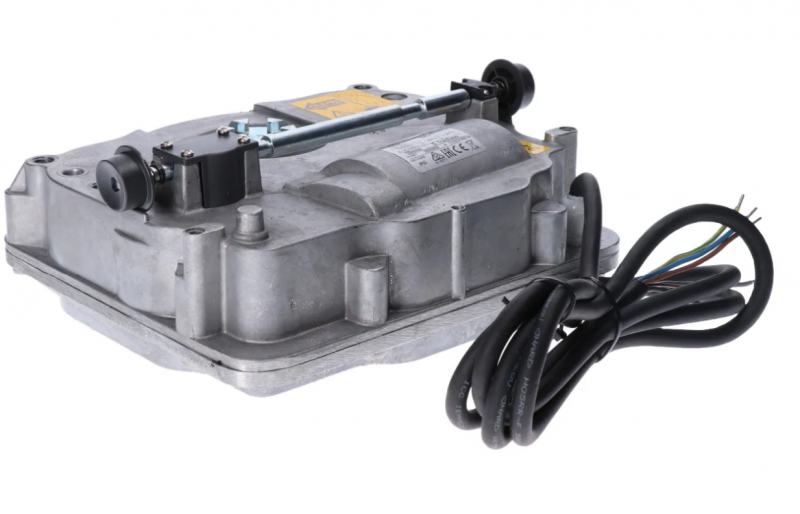
NICE S-FAB SFAB2124 is a standalone underground operator with a 24 V DC motor and magnetic encoder for one gate leaf. It is a non-reversible operator. It does not include a control unit; for a new setup, use MC824HR30. A double-leaf gate requires two motors and one compatible control unit.
The underground design keeps the operator concealed beneath the hinge axis. It is useful when there is no room beside the gate leaf for a linear operator or articulated-arm operator, or if you want to preserve the gate’s clean appearance. Voltage 24 V is the motor voltage; mains power and accessory functions are provided by the control unit.
Control unit and compatible accessories
The SFAB2124 has an encoder and is designed for the MC824H control system. The MC824L is not a substitute for the MC824H with this motor. For an older MC824HR10, follow the wiring and procedures for the board actually installed.
| What | Why | Type |
|---|---|---|
| Control unit | Controls one or two motors. Wiring. |
|
| Flashing light | Indicates movement. The control unit determines the power supply and permitted current draw; output specifications. |
Other warning lights select according to the voltage and maximum current draw of the FLASH output on the control unit actually installed. |
| Photocells | Protects the passage area according to the positioning and operating mode. Wiring and setup. |
Connect wired BlueBUS pairs to BLUEBUS. EPMOW requires an IBW radio interface connected to BlueBUS; it does not connect directly by wires like the EPMB. With the FT210B, the transmitter on the gate leaf is battery-powered, while the receiver connects to BlueBUS with two wires. The FT210B also transmits the safety-edge status. Relay photocells connect to contact inputs, not to BlueBUS. |
| Transmitter | Remote control. The coding type must match the receiver installed; pairing. | |
| Receiver | Receiver for the SM control unit connector. OXIBD and OXILR use different radio systems; choose transmitters to match the receiver. |
|
| Antenna | Improves remote-control reception. Connect the antenna to the installed receiver; for OXIBD, connect it directly to its antenna terminals. | |
| Keypad | Access by code. The radio model must match the receiver, and the wired model must match the interface type. | |
| Key switch | Key-operated control via a volt-free NO contact connected to the step-by-step, open or close input. | |
| Electric locks | Additional gate-leaf locking; lock output. |
|
| Card readers | Chip or card access via a compatible control-unit interface. |
|
| Backup power supply | Operation during a mains power failure. Choose a battery compatible with the control unit generation and connector. |
For MC824HR30 NICE PSS324. Older PS324 requires the correct cable CABLA11 and the corresponding settings; backup power connection. |
Standalone motor, box and gate equipment
| Part of the assembly | What you need |
|---|---|
| SFAB2124 motor | One motor with a magnetic encoder and a 2 m power cable. The limit applies to one gate leaf. |
| Foundation box | SFABBOX made of cataphoresis-coated steel, with a lever for attaching the gate leaf and mechanical stops. Select the box separately to suit the components included in your order. |
| Control and safety | MC824HR30, compatible photocells, controls and signal devices, depending on the configuration. These components are not built into the motor. |
| Manual release | Access to the openings in the cover from both sides and a suitable triangular key. After installation, the manual release must be easily and safely accessible. |
The box can be used with either a right- or left-hand gate leaf. When buying a kit, check the number of motors and boxes, the specific control unit and the included components; two motors do not increase the permissible weight of a single gate leaf.
Limits on length, weight and operation
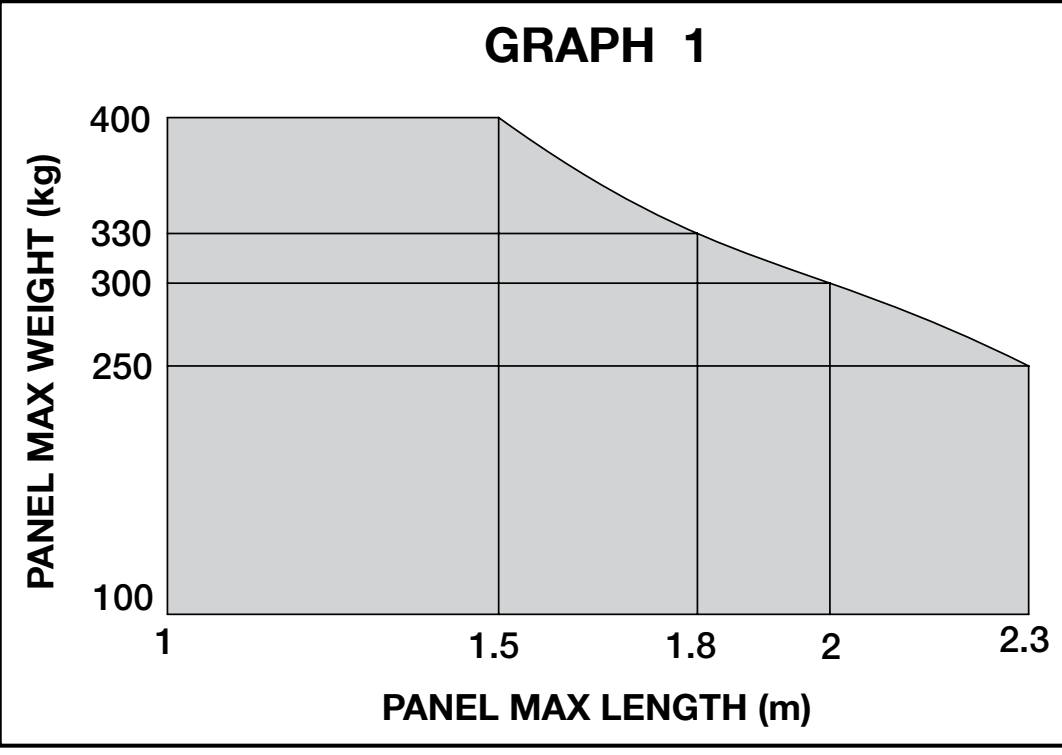
The maximum limits of 2.3 m and 400 kg do not apply at the same time. The combination of gate-leaf length and weight must fall within the permitted area of the graph. The shape and height of the gate leaf, solid infill and strong winds can significantly reduce the permissible load.
| Length of one gate leaf | Maximum weight according to the graph |
|---|---|
| 1.5 m | 400 kg |
| 1.8 m | 330 kg |
| 2.0 m | 300 kg |
| 2.3 m | 250 kg |
Movement must be smooth, with similar resistance throughout the travel; the gate leaf must not move by itself when released. As a guide, opening to 90° under rated load takes approximately 15 seconds, excluding acceleration and deceleration. The motor runs at 1.25 rpm without a load and at 1 rpm at rated torque.
For opening to 90°, the rate is 60 cycles per hour at rated load. When opening to 180°, this figure must be halved to 30 cycles/h. The actual number also depends on the gate as a whole and its operating conditions.
Estimated service life
First, check that the combination is permitted in the limit graph; the index table does not replace this limit. Then select the index for the gate-leaf weight and length. Add any relevant environmental factors, then read the estimated number of cycles from the graph. A dash indicates a combination that is not permitted. The estimate assumes regular maintenance and is not a service-life guarantee.
| Properties of the complete automation system | Index | Service-life graph | |||
|---|---|---|---|---|---|
| Gate-leaf weight | 1.50 m | 1.51–1.80 m | 1.81–2.00 m | 2.01–2.30 m |
|
| Up to 100 kg | 0% | 10% | 20% | 30% | |
| 101–250 kg | 10% | 20% | 30% | 40% | |
| 251–300 kg | 20% | 30% | 40% | 50% | |
| 301–330 kg | 30% | 40% | 50% | — | |
| 331–400 kg | 40% | 50% | — | — | |
| Additional factor | Add | ||||
| Temperature above 40 °C or below 0 °C, or humidity above 80% | 15% in total for this row | ||||
| Solid gate-leaf infill | 15% | ||||
| Windy location | 15% | ||||
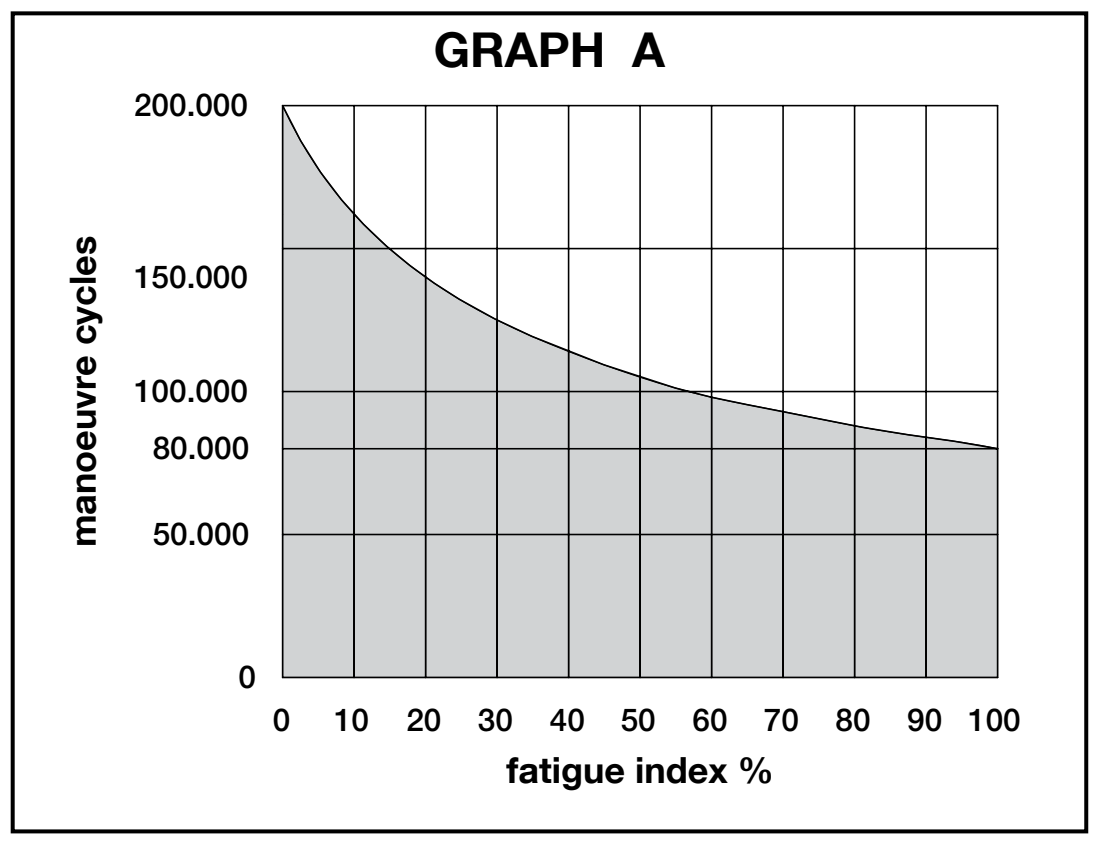
For a gate leaf shorter than 1.50 m, ask a technician to confirm the service-life index; the permissible weight is still determined by the limit graph above.
Installing the foundation box and gate leaf
The box pin and all hinges must share a common axis. Misalignment creates resistance and puts strain on the mechanism; it cannot be corrected by setting a higher force. Before installation, check the box dimensions, gate-leaf height, clearance for the covers and access to the manual release. How to install the underground box.
- Prepare a foundation pit to suit the box. Install a separate cable conduit and a functioning drainpipe; water must not collect in the box.
- Position the box so that its axis is directly beneath the axis of the upper hinge. Set it in concrete, level and at the correct height.
- Drill three M10 threaded holes, at least 15 mm deep, into the underside of the gate leaf and secure the lever with three screws. A sufficiently strong weld is an alternative.
- Grease the box bushing and insert the lever attached to the gate leaf. The gate leaf must be securely fixed in the hinges and prevented from being lifted.
- Set the stops. Place the motor in the box and loosely tighten the fasteners so that it sits slightly above the bottom.
- Move the gate leaf slowly so the drive engages correctly with the motor; only then fully tighten the mounting screws.
- Route the cable out of the box through the conduit. Fit covers A, B and C in the order shown in the illustration and secure them with the screws supplied.
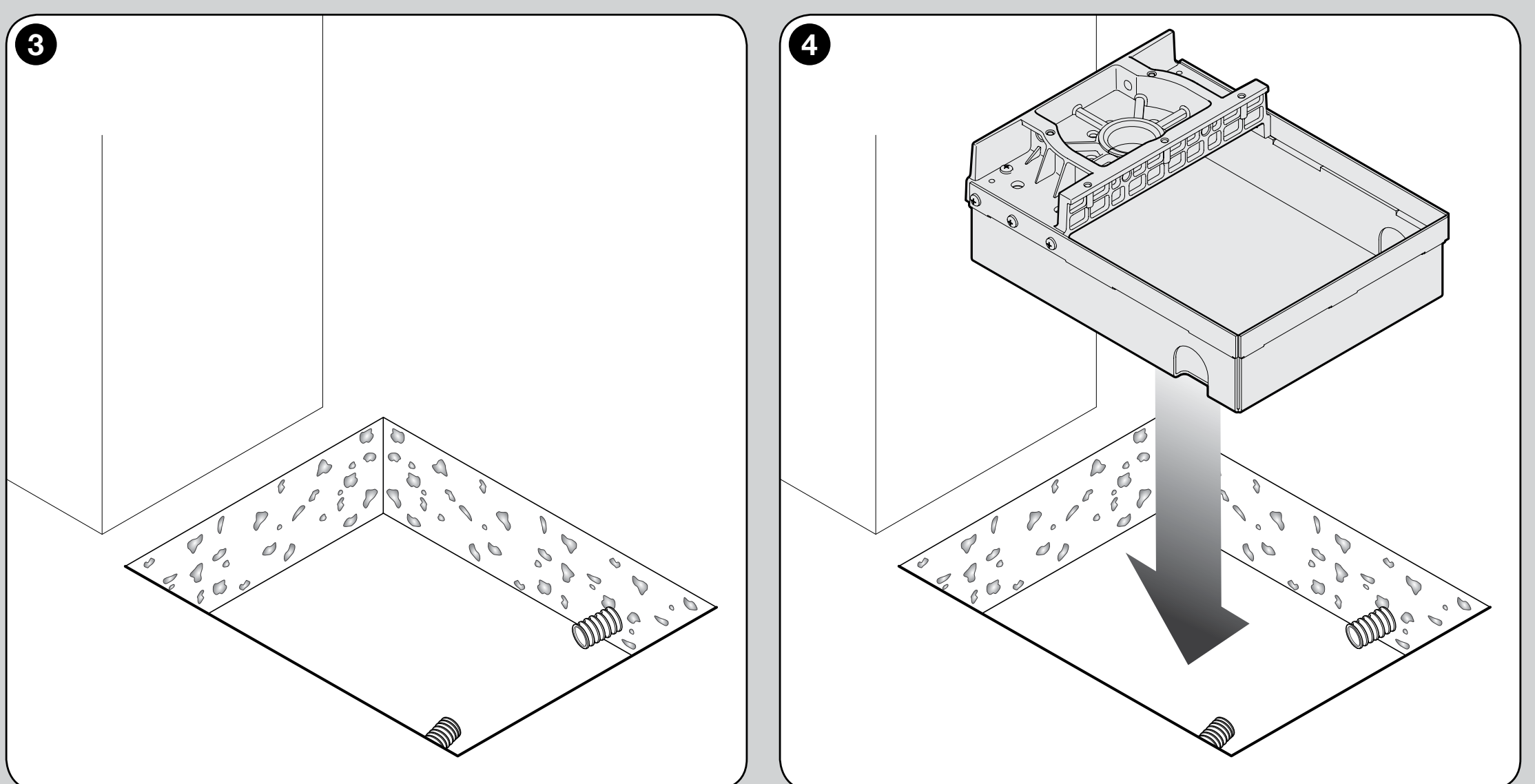
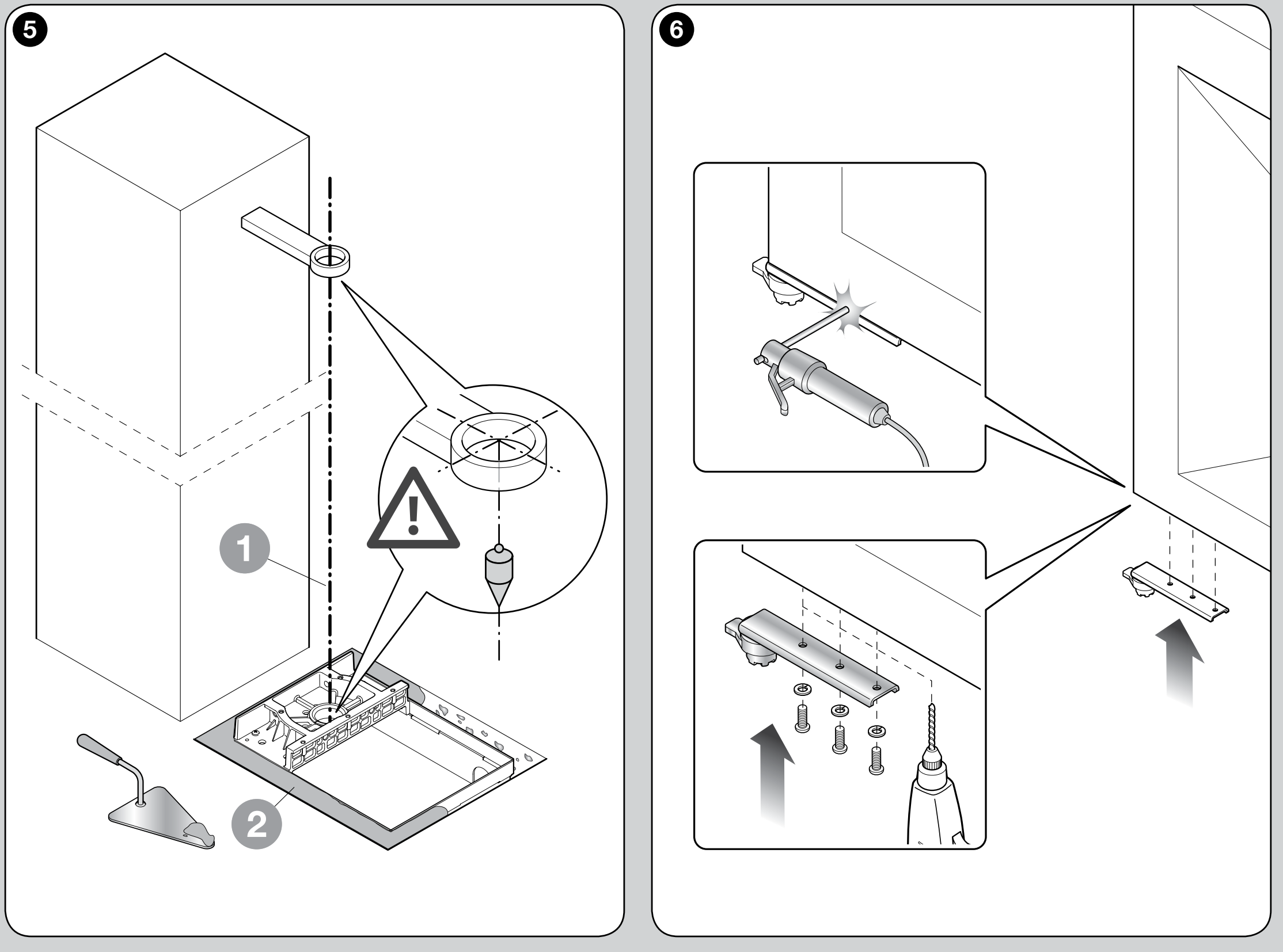
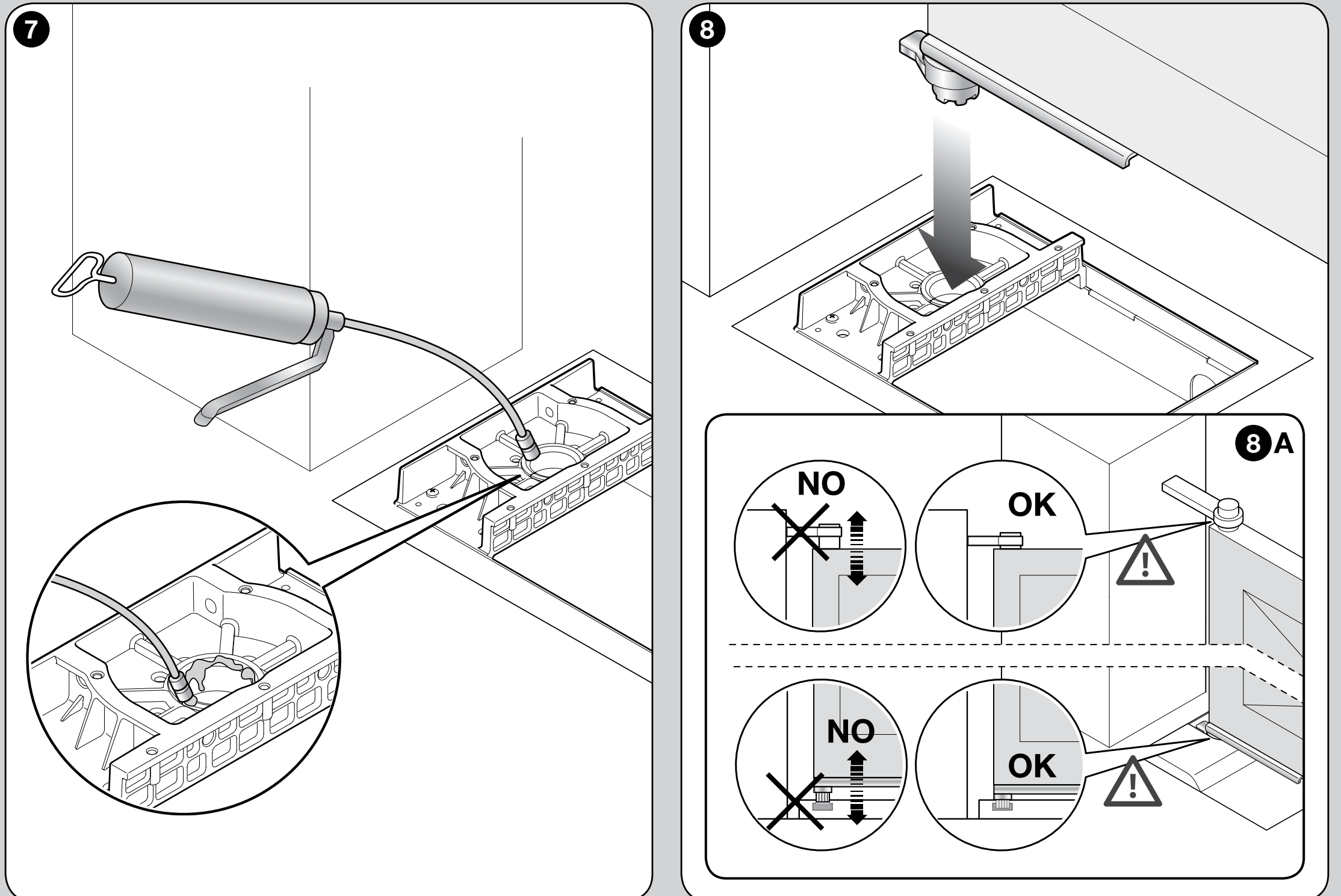
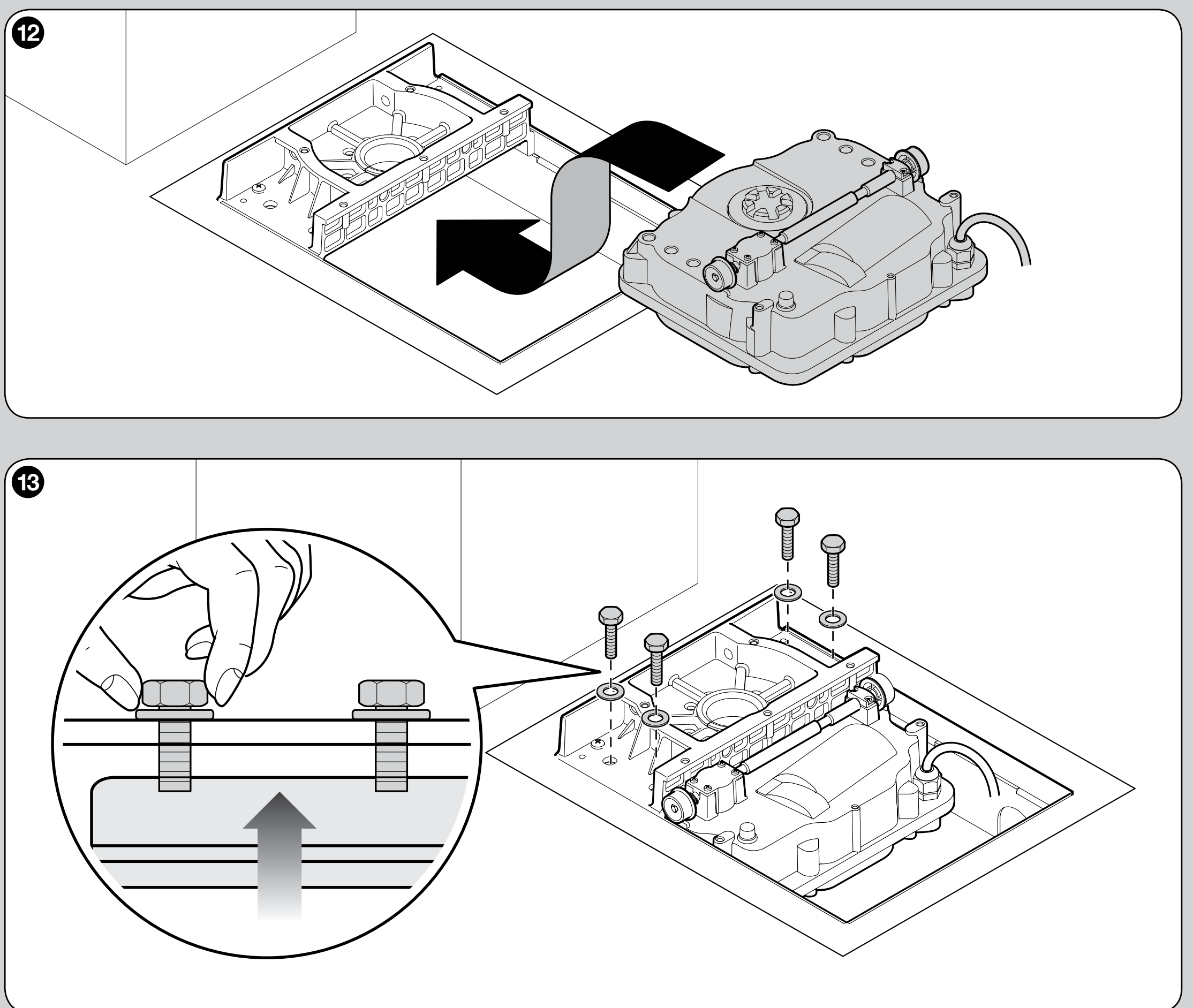
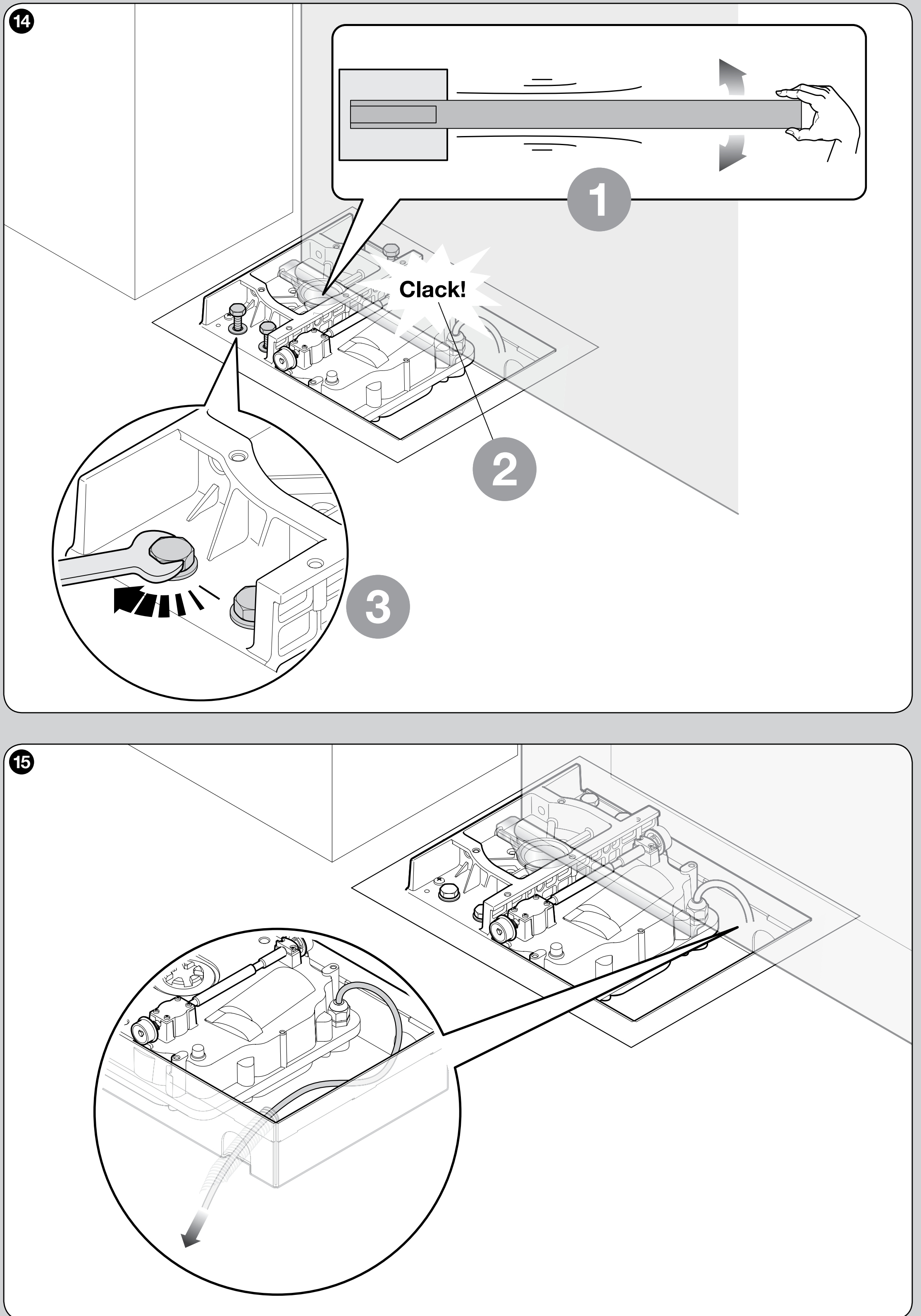
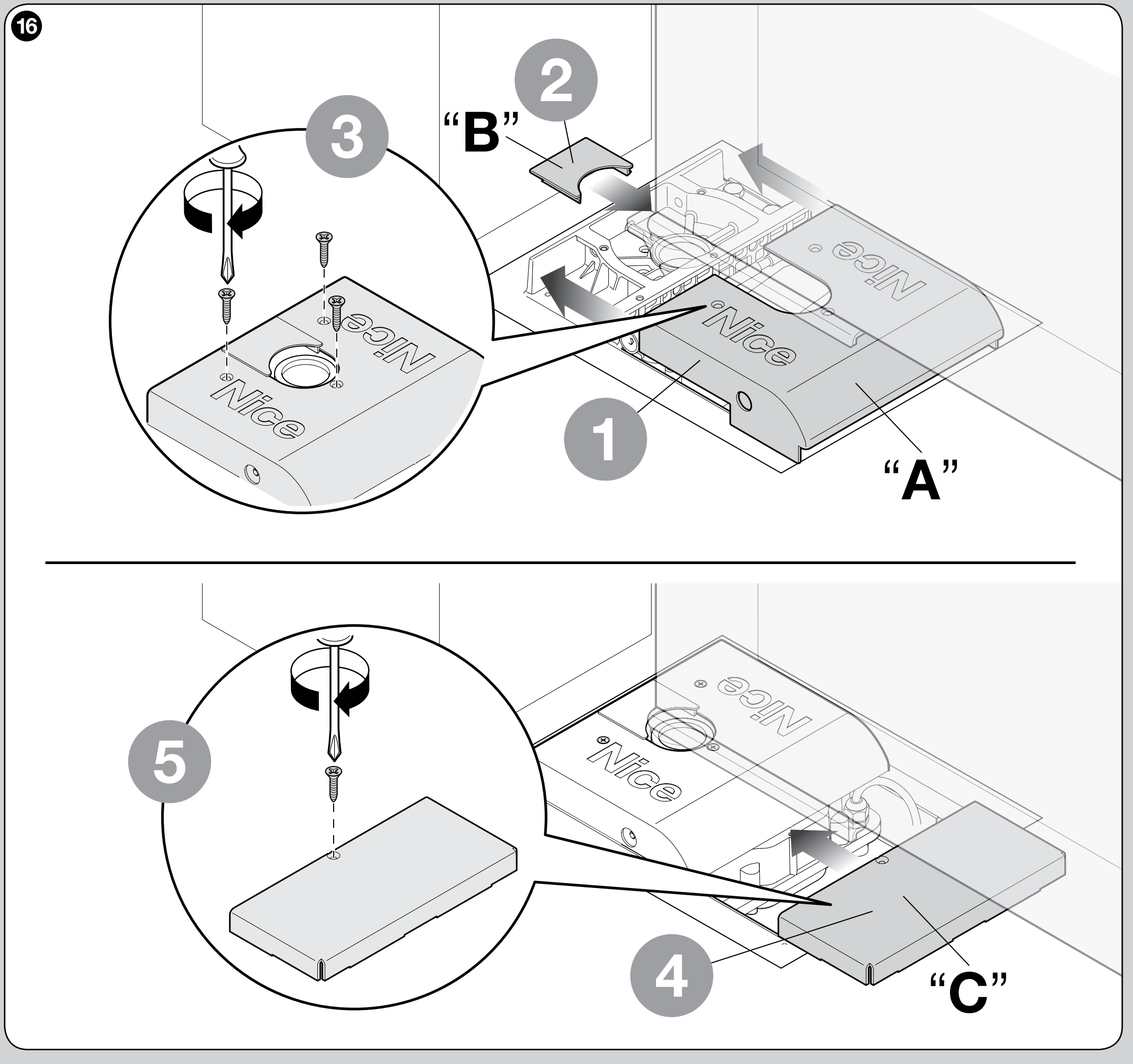
The motor has a metal housing and an IP67 rating IP67 protects the motor during temporary immersion; it does not replace drainage or regular cleaning of the box. Electrical connectors must not be placed in the box.
Stops and opening angle
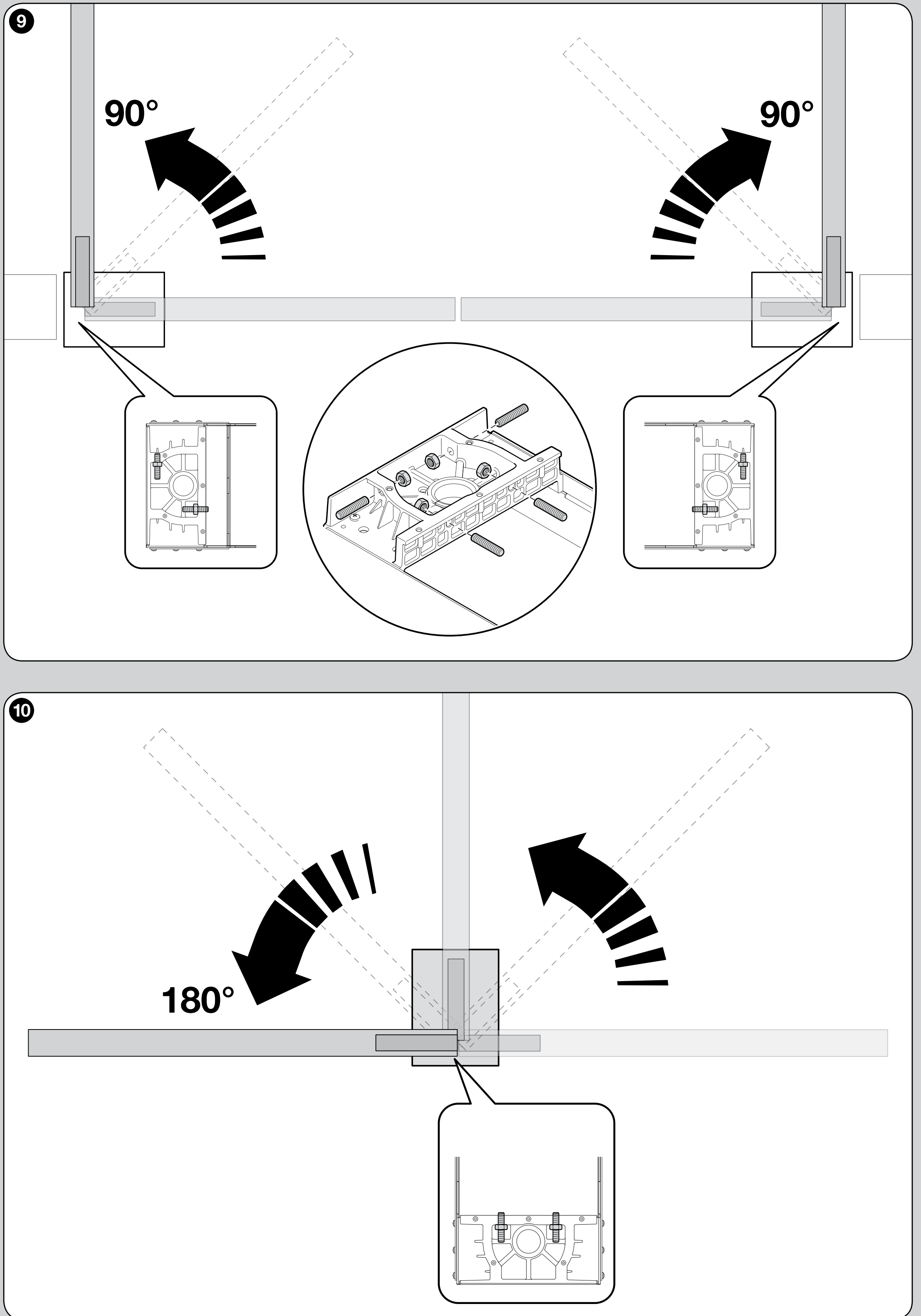
Mechanical stops limit both opening and closing. The internal stops allow you to set the opening angle to 90° ±10° or 180° ±10°; if you use custom external gate stops, a technician must verify their position and the resulting angle for the specific mechanical assembly. An external stop alone does not confirm that an arbitrary angle is suitable. The angle is not adjusted solely by changing the control unit’s learning time. The internal stops cannot be adjusted freely across the entire range between 90° and 180°.
Tighten the locknuts after adjusting the stops. Manually check both end positions, that the gate moves freely along its path, and that the mounting is secure; only then teach the positions on the control unit.
Motor and magnetic encoder wiring
The power cable is 2 m. For longer distances, use a suitable junction box outside the box; splicing the cable inside the foundation box is prohibited. Disconnect the mains supply and battery before wiring.
| SFAB2124 motor cable | Connection |
|---|---|
| Blue and brown | 24 V DC power pair to the M terminals of the corresponding motor. The control unit determines the direction; there is no permanent fixed +/−. |
| Black and grey | ENC input for the corresponding leaf. On the MC824H, encoder polarity is not significant; the pair must belong to the same motor. |
| Yellow-green | Protective earth (PE); never use it as a motor or encoder wire. |
On the MC824HR30, the motor cable, including PE, must have a cross-section of 3 × 1.5 mm², and the encoder cable 2 × 1.0 mm²; both the motor and encoder cables should be no longer than 10 m between the control unit and the motor. Connect a single leaf to M2 and ENC2. The full terminal and wiring details are in the MC824HR30 manual.
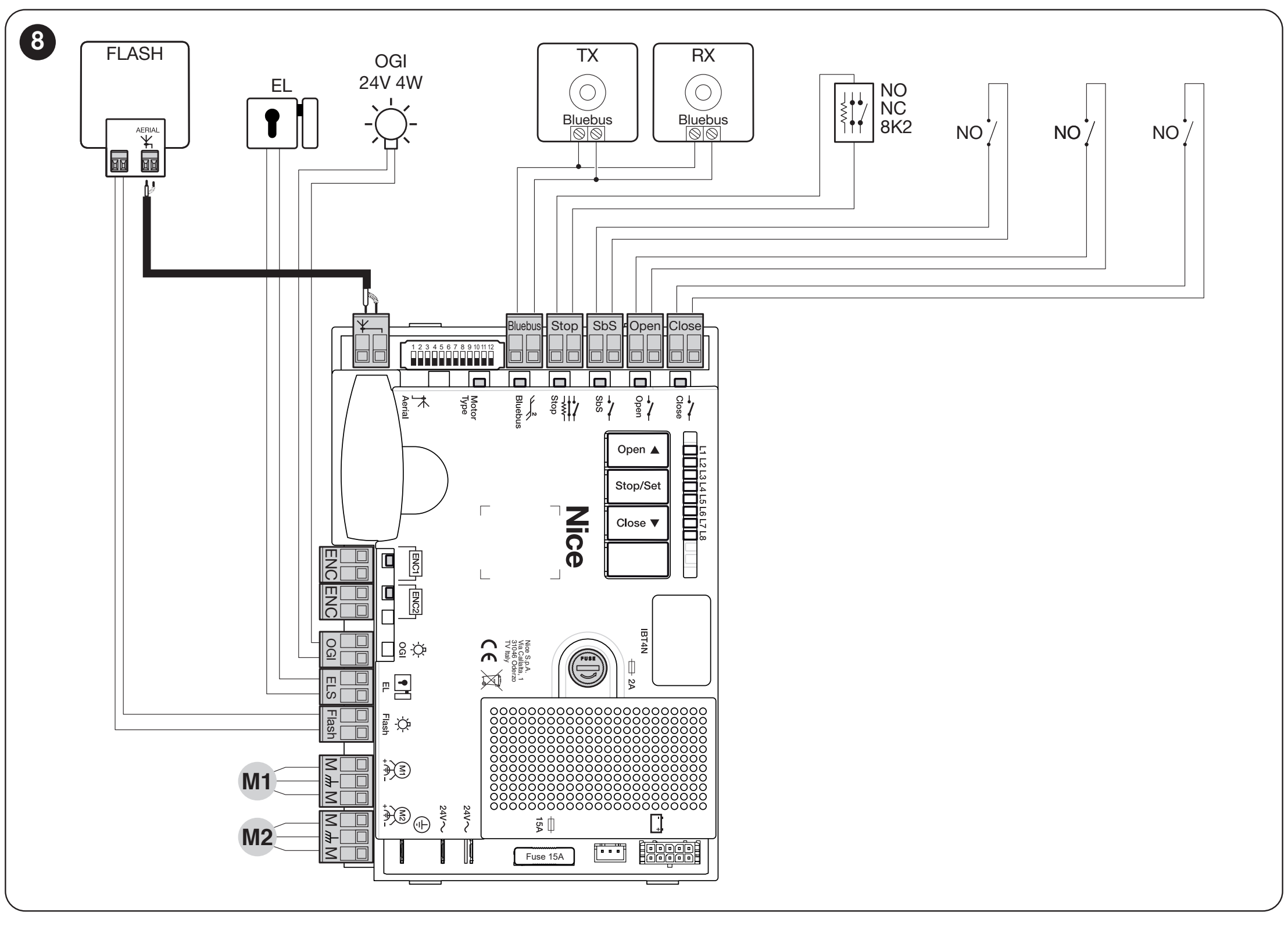
MC824HR30 terminals and accessory power supply
| Connection | Voltage, polarity and limit |
|---|---|
| Auxiliary power supply | + is the left terminal of the SbS pair; − is the right terminal of the STOP pair, when viewing the terminal blocks with the STOP and SbS labels readable, as shown in the image. 24 V DC −30/+50%, 200 mA maximum in total. |
| BlueBUS | Two wires for compatible EPMB photocells and other devices. Non-polarised; this is not a universal 24 V output. When devices are changed, they must be detected again. |
| FLASH | 12 V DC, 21 W maximum, for example ELDC. The auxiliary 24 V power terminals must not be confused with the FLASH output. |
| ELS | 12 V AC, 15 VA maximum for an electric lock; no +/− polarity. |
| OGI | Gate-open indicator: 24 V, 4 W maximum. The function depends on the output setting. |
| SbS / OPEN / CLOSE | Control input: volt-free NO contact; do not apply external voltage to the command inputs. |
| STOP | Safety input depending on the selected device: NO/NC contact or 8.2 kΩ resistive safety edge. Wiring and device detection must match the actual control board. |
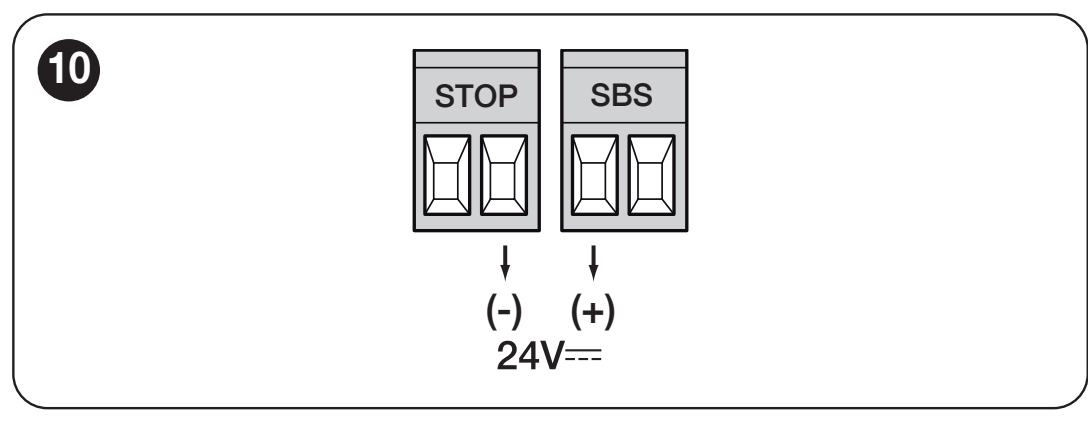
Connect only devices that match the voltage and current draw of the specific output. Select radio receivers, the battery and solar power supply to match the control unit’s connectors; detailed accessory power supply.
Initial start-up and gate checks
Before switching on, the gate must move freely by hand along its entire path, the box must be drained, the stops adjusted and the drive disengaged. Check the protective earth conductor, cable routing, photocells and protection of hazardous areas. Installation, mains wiring and safety testing must be carried out by a qualified technician.
- Disconnect the mains supply and any battery, then check all connections; no electrical joints are permitted inside the box.
- Restore the power supply. On the specified current control unit, the BlueBUS LED should flash regularly once per second, the TX/RX photocell LEDs should flash, and the FLASH warning light should remain off. If the status is incorrect, disconnect the power and resolve the cause.
- Detect the connected devices, then teach the leaf positions on the control board actually installed.
- Check the direction of movement, both end positions, deceleration and the correct closing sequence for overlapping leaves.
- Test each safety device in its operating position and measure the forces across the entire gate.
- Hand over the working manual release, keys, manual and inspection schedule. Use the gate only after the complete assembly has passed testing.
On the MC824HR30, for a single leaf use M2 and its encoder; M1 remains unused. For two leaves, assign each motor and encoder to the same leaf. For overlapping leaves, M2 opens first and closes last. Before teaching, the technician must confirm the position of the motor selector for the SFAB2124 on the actual control board; do not select it based only on a similar name for another motor.
Detecting connected devices
On the specified current control unit, press and hold OPEN ▲ and STOP/SET for approximately 3 seconds. Release them when L1 and L2 start flashing rapidly. Wait for the process to finish: the STOP LED stays on and L1/L2 go out. Detection must be performed even when no devices are connected, and repeated after devices are added or removed.
Automatic position learning
On the MC824HR30, after detecting the devices and checking the selector, press and hold CLOSE ▼ and STOP/SET for approximately 5 seconds; release them when L3/L4 flash rapidly. For a two-leaf gate, the sequence is: slow closing of M1, slow closing of M2, slow opening of M2 and M1 with a controlled interval, then fast closing of both. When the process is complete, L3/L4 go out. For a single leaf, only M2 is used; follow the procedure for a single-leaf assembly in the control unit manual.
For a two-leaf gate, M1 must close first. If M2 moves instead, stop the learning process using the OPEN or CLOSE button. After disconnecting both the mains supply and battery, swap the M1/M2 assignments and their encoders on the control unit, then repeat the learning process.
If the initial movement is in the wrong direction, stop the learning process immediately using the OPEN or CLOSE button. Correct the wiring only after disconnecting the power, then repeat the learning process. If a photocell or STOP input is triggered, learning is interrupted and L1 starts flashing; resolve the cause and start again. Older control boards may use a different procedure.
Control unit settings, controls and servicing
| What you need to set | Procedure for the relevant control unit |
|---|---|
| Device learning | Device learning |
| Position programming | Position programming |
| Automatic closing and pause | Automatic closing and pause |
| Motor force | Motor force |
| Remote control pairing | Remote control pairing |
| Battery and its connector | Battery and its connector |
| Control unit diagnostics | Control unit diagnostics |
Do not try to fix seized hinges or a flooded box by increasing the force setting. After changing positions, stops or force settings, check that the system is safe again. Deleting remote controls and resetting the control board are different operations; follow the procedure for the actual control unit.
When the drive does not work properly
| Symptom | What to check |
|---|---|
| The gate leaf is hard to move even when released | Hinges, box alignment, deformations and stops. First, eliminate the mechanical cause; installation. |
| Water is standing in the box | Disconnect the power supply. Clean and check the drainage; maintenance. Damaged electrical components must be checked by a technician. |
| The motor does not start or stops | Check the power supply and fuses on the control unit, the status of the STOP input and photocells, and the fault indicator. Do not bypass safety devices; diagnostics. |
| The motor runs, but the gate leaf does not move | Check that the manual release is engaged and that the motor is mechanically connected to the gate leaf. Releasing and returning to operation. |
| The gate leaf moves in the wrong direction | After disconnecting the power supply, check the motor wires and run the position programming procedure again; motor wiring. |
| Only the radio remote control is not working | Check the transmitter battery, coding compatibility, antenna and whether the button is programmed to the correct receiver. |
Maintenance and safe use
Carry out an inspection at least every six months, or more frequently in demanding conditions, as specified in the technician's maintenance schedule. Before carrying out any work, disconnect the mains and backup power supply, and secure the gate leaf against movement.
- Clean the box and drainage; water and dirt must not obstruct the mechanism.
- Check the fixings of the motor, gate leaf and stops, as well as the condition of the cables and manual release.
- Check the lubrication of mechanical contact points according to the installation procedure.
- Repeat the manual travel test and test the photocells and other safety devices.
- Have a technician measure the forces and carry out repairs; do not use a damaged assembly.
The gate must remain under supervision while moving. Keep remote controls out of children's reach, do not enter the travel path, and use the safe manual release in the event of a fault. If the gate leaf has a pedestrian gate, opening it must prevent the drive from operating.
Manual release in the event of a power failure
- Switch off the power supply and secure the gate leaf against unintended movement.
- Insert the triangular key into one of the two side openings in the top cover.
- Turn the key 180° in either direction and move the gate leaf by hand.
- To resume operation, insert the key again and turn it 180°. The drive will re-engage when the control unit receives its first command; check that it operates safely.
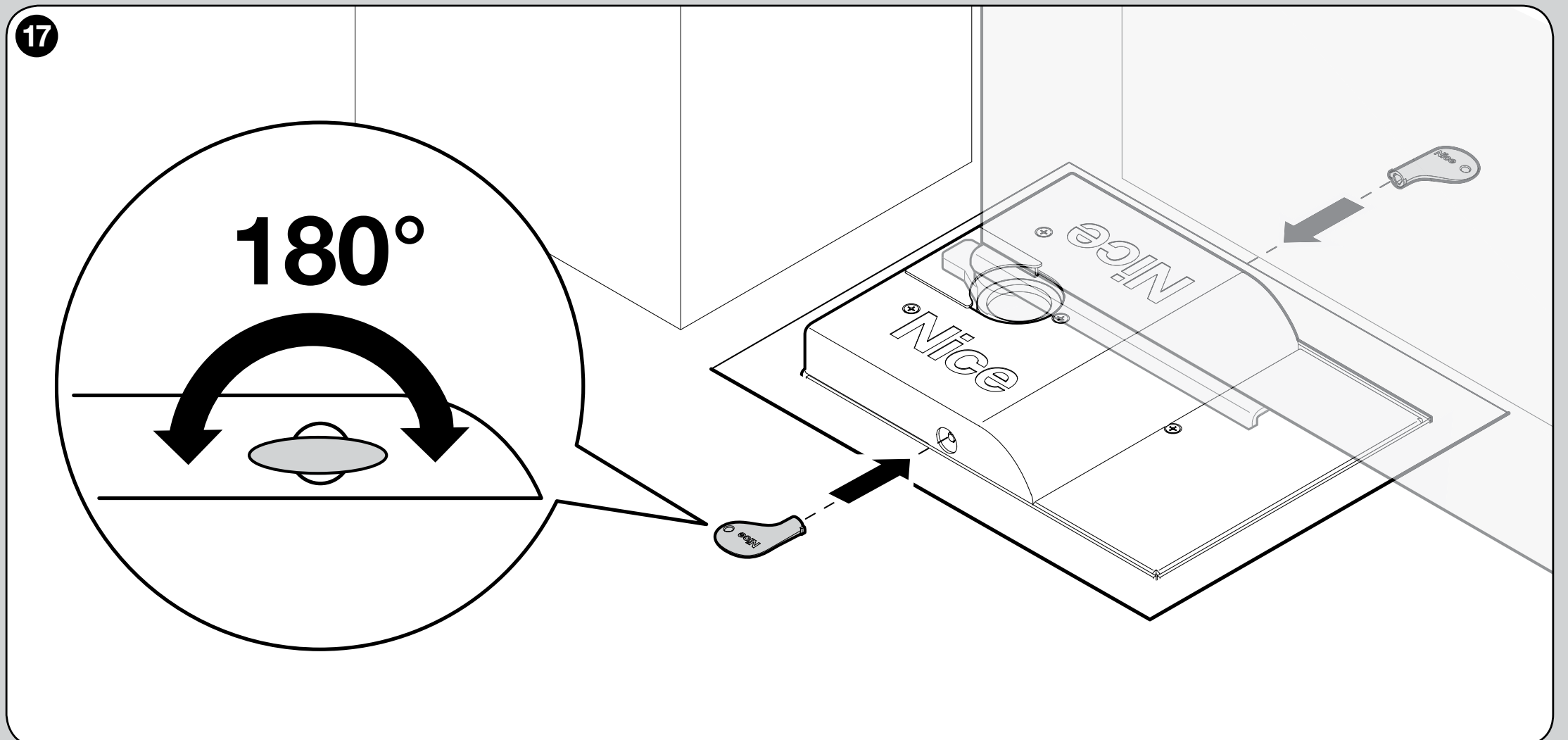
Technical specifications and dimensions
| Parameter | SFAB2124 |
|---|---|
| Motor | 24 V DC, magnetic encoder; without control unit |
| Maximum / rated torque | 250 / 120 Nm |
| Peak / maximum current | 5 / 2 A |
| Peak / maximum power | 120 / 50 W |
| Speed at no load / at rated torque | 1.25 / 1 rpm |
| Operation | 60 cycles/h at 90°; half that at 180° |
| Protection rating and temperature | IP67; −20 to +50 °C |
| Motor dimensions only | 235 × 206 × 96.5 mm |
| Motor weight only | 6 kg; the weight of the box and accessories is assessed separately |
| Cable | Supplied 2 m cable |
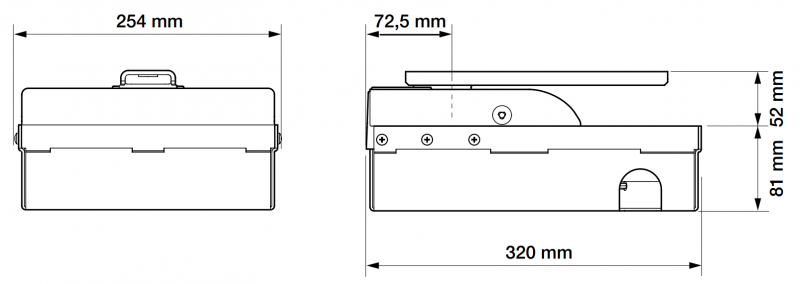
| Foundation box | SFABBOX; width 320 mm, box height 81 mm, protruding section as shown in the drawing 52 mm |
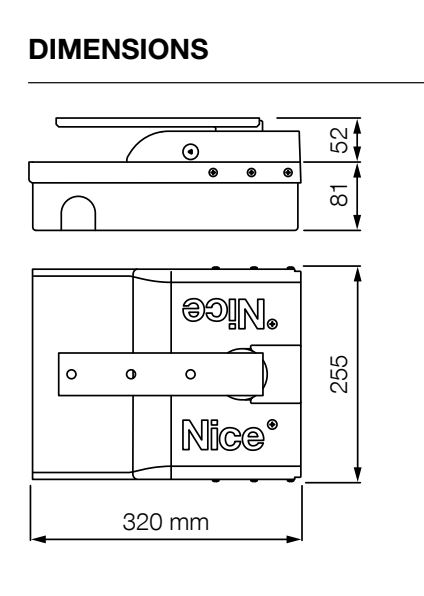
Product view
How can I order this item?
Choose the option that suits you:
- order online: use the buy button to add the goods to your shopping cart (you will find the buy button here in the product variants table).
- order by email: place your order at [email protected]






