NICE Wingo WG5000 - standalone operator for swing gates with leaves up to 3.5 m / 500 kg
| Product availability: | In stock | We normally dispatch goods within 24 hours. |
|---|

In stock
€376.20 including VAT
| Weight |
|---|
| 8,40 kg |
Description of NICE Wingo WG5000 - standalone operator for swing gates with leaves up to 3.5 m / 500 kg
NICE WINGO WG5000 is a standalone electromechanical operator for one gate leaf at a private home. It has a 230 V AC / 50 Hz motor, a worm gear and a pre-installed mechanical opening stop. It is non-reversible; in the event of a power failure, it can be released with a key. Choose the control unit separately, according to the number of motors and the gate equipment.
When to choose the NICE WINGO WG5000
The operator is designed for residential swing gates. Before choosing, assess the length and weight of one gate leaf, its infill, wind exposure, hinge resistance and the space available for the brackets. The gate must move smoothly by hand along its entire travel and must not start moving on its own after it has stopped.
| Maximum length | 3.5 m; the permitted weight varies according to the chart. |
|---|---|
| Maximum weight | 500 kg for a shorter leaf, not automatically at the maximum length. |
| Motor and control | 230 V AC motor, separate control unit; MC800 for one or two motors. |
| Use | Residential use, up to 30 cycles per hour at rated force and under suitable conditions. One cycle consists of opening and closing. |
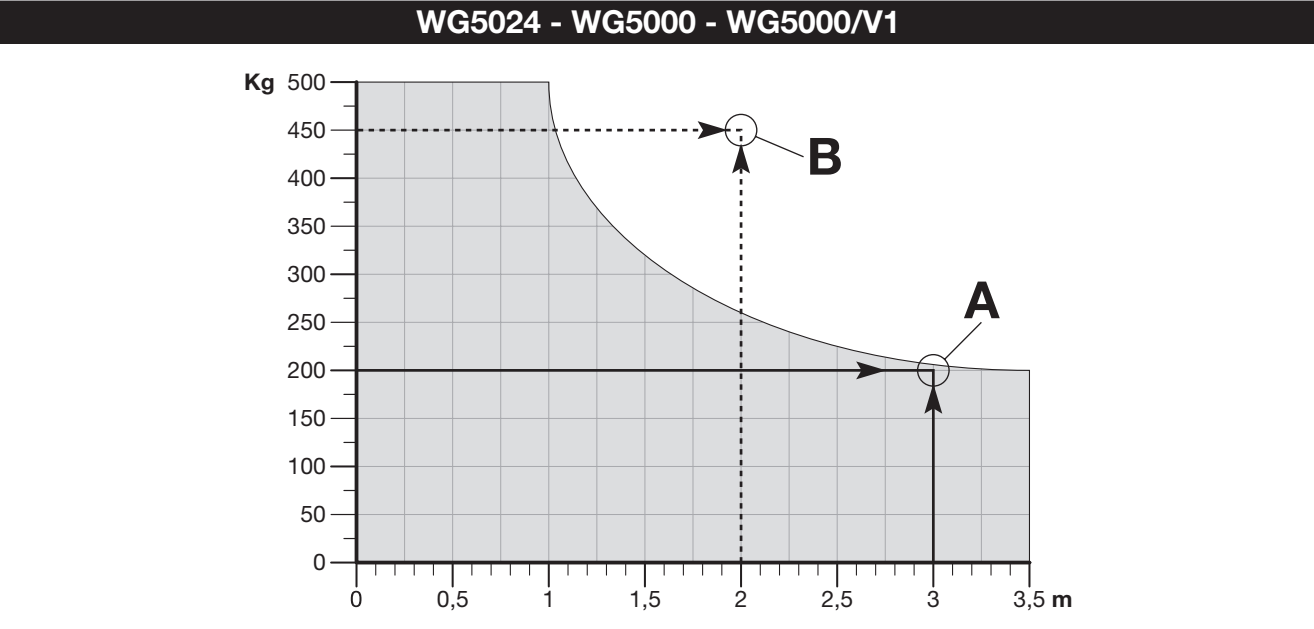
The horizontal axis shows length in metres and the vertical axis shows weight in kilograms. Choose a combination within the grey area. At 3.5 m, the limit is approximately 200 kg; 500 kg applies to a leaf approximately 1 m long. Points A and B show an acceptable and an impermissible combination; they are not bracket mounting dimensions. A solid gate leaf and strong winds may further limit suitability.
What is included with the standalone operator
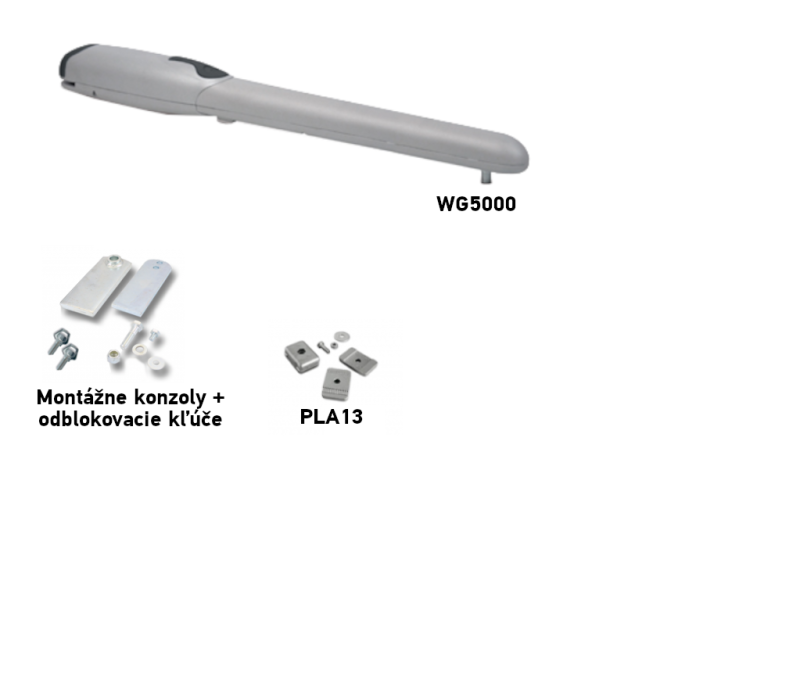
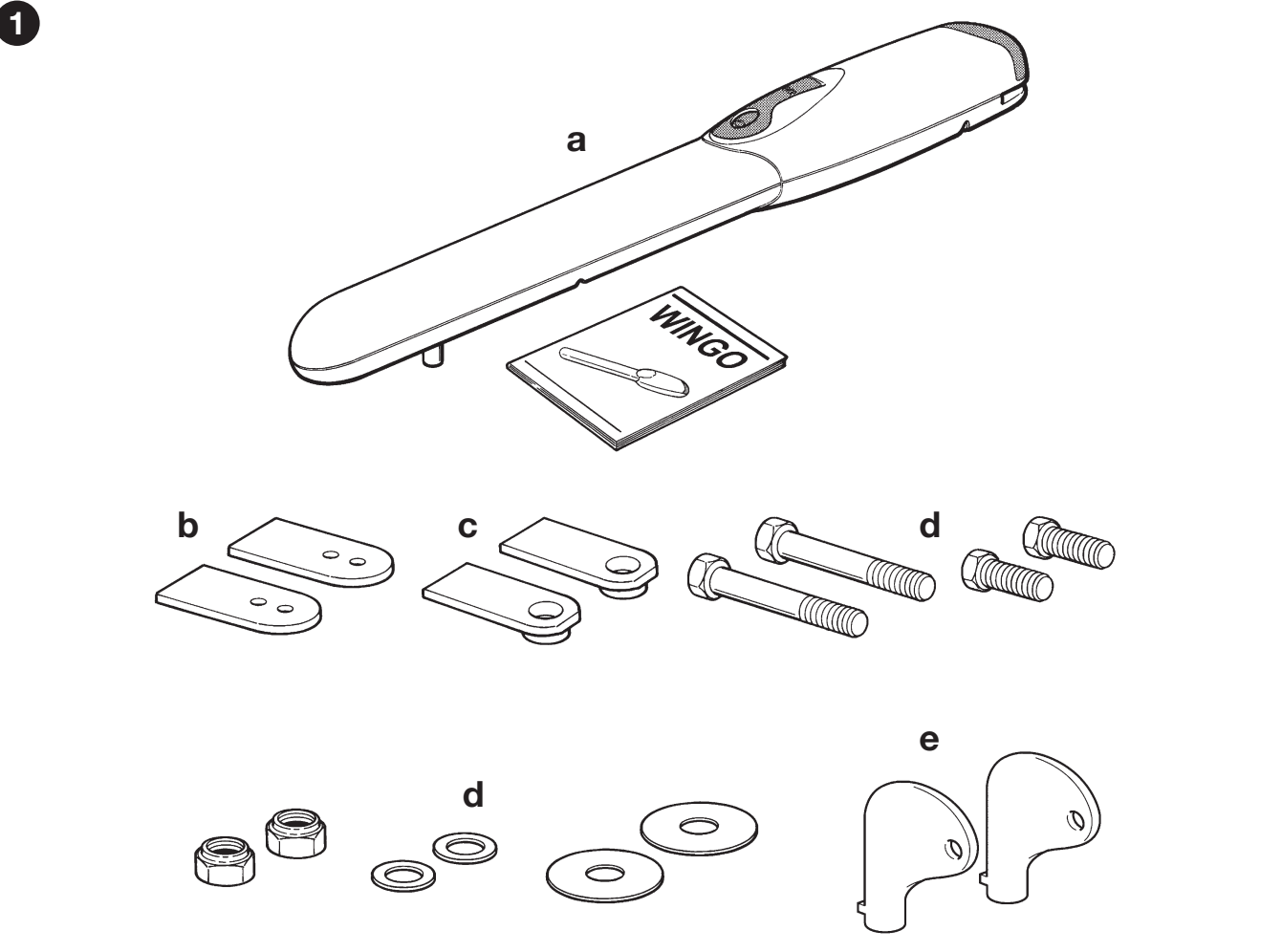
This product listing is for one WG5000 motor, not a complete automation system for a double-leaf gate. The motor comes with a front bracket, a rear bracket with mounting plate, fasteners, release keys and a pre-installed opening stop. Anchors for the specific post or wall should be selected according to the substrate.
Choose the control unit, receiver, remotes, photocells and warning light separately or as part of a suitable kit. The gate must have a fixed closing stop. Two motors are required for a double-leaf gate.
Kits for one or two leaves
All kits listed include an MC800, an OXIBD receiver and one INTI2 remote. The basic kit does not include photocells; the photocell version adds a pair of EPM, while the accessories version also includes a warning light, ELAC. The number of motors matches the number of gate leaves.
| Gate | Kit |
|---|---|
| 1 leaf | Basic |
| 1 leaf | With accessories |
| 1 leaf | With photocells |
| 2 leaves | Basic |
| 2 leaves | With accessories |
| 2 leaves | With photocells |
Choosing the control unit
Current control unit NICE MC800 / MCA5R30 controls one or two 230 V motors and replaces older control units used with these setups. For a single motor, an alternative is the NICE MC200 with its own wiring and functions.
Older compatible control units that have since been replaced: NICE Mindy A60, NICE A400, NICE-A6, NICE-A6F. If retaining them, use the instructions for the board actually installed. Older MCA5 board and the newer MCA5R30 differ in their terminals and functions; the MC800 designation alone does not identify the generation.
The detailed steps below apply to MC800 with an MCA5R30 board and an OutSTB output. They are not instructions for setting up the A60, A6, or MC200.
I. Rear bracket installation
Installation, wiring, and testing must be carried out by a qualified technician. Disconnect the power supply before starting work. The brackets must be securely anchored, and the motor must have clearance for its full range of movement, cover opening, and manual release. The operator will not fix a gate that sticks or is incorrectly hung.
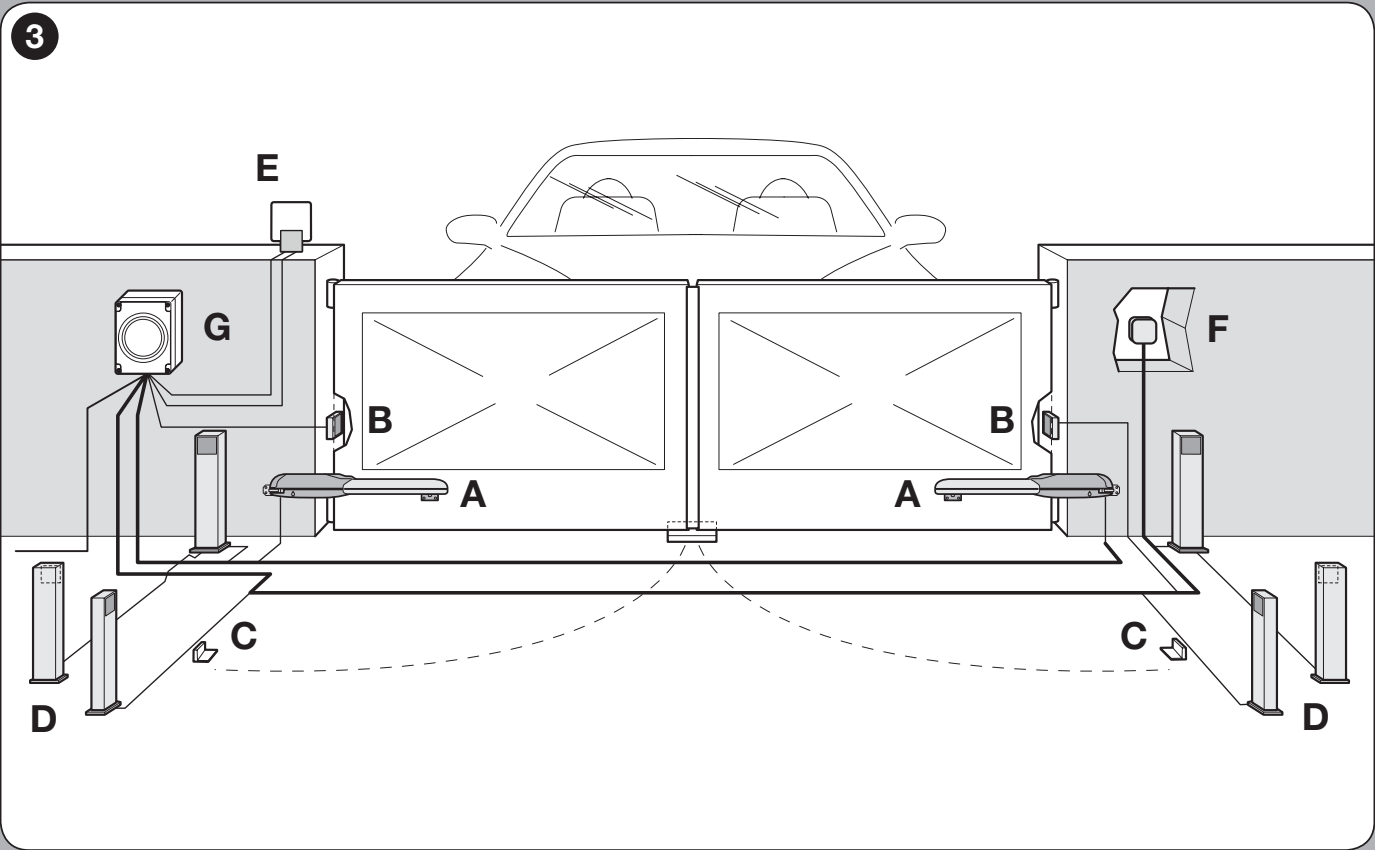
A operators, B photocells, C opening stops, D photocell posts, E warning light, F control device, G control unit. The specific safety devices are selected according to the gate's risks.
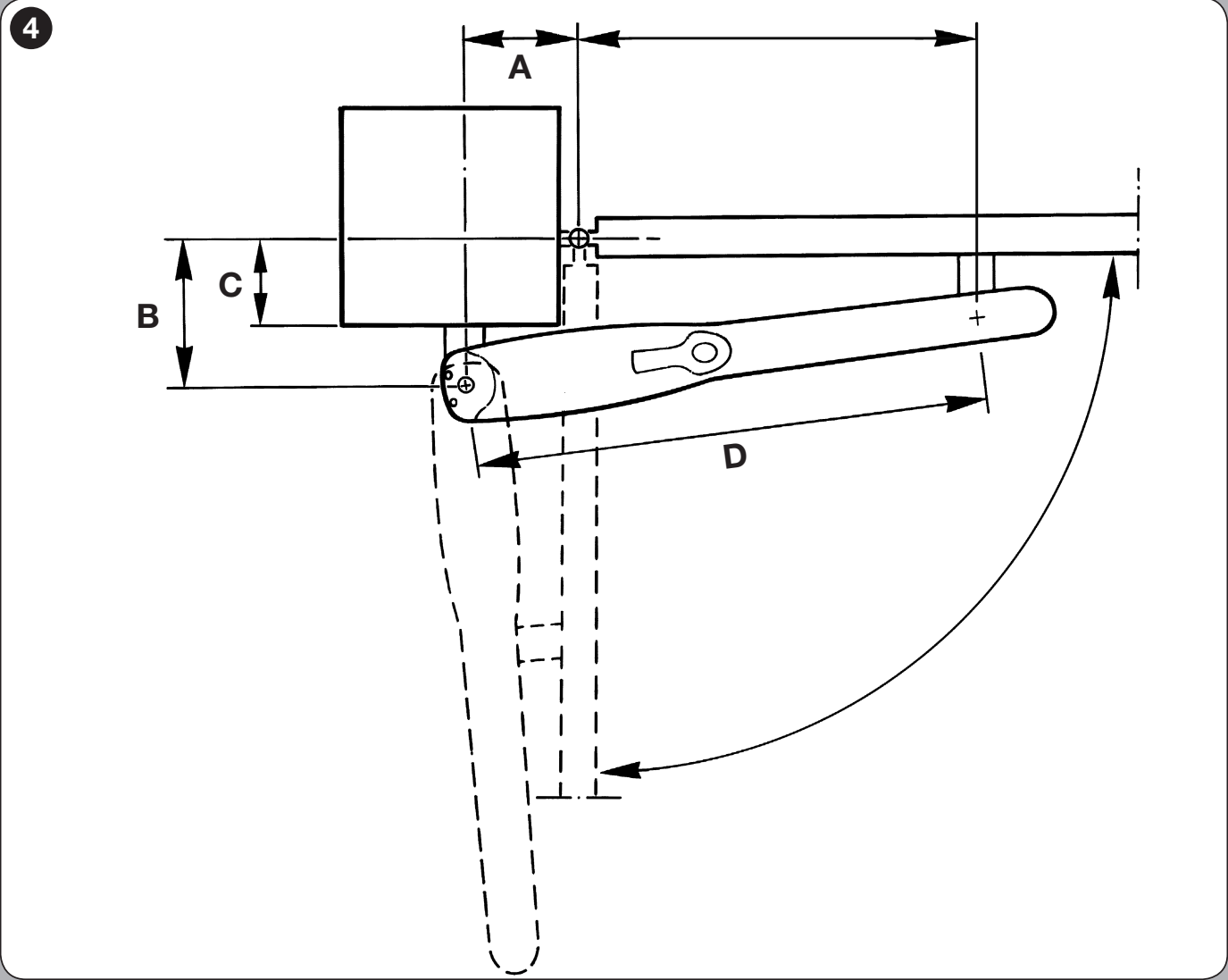
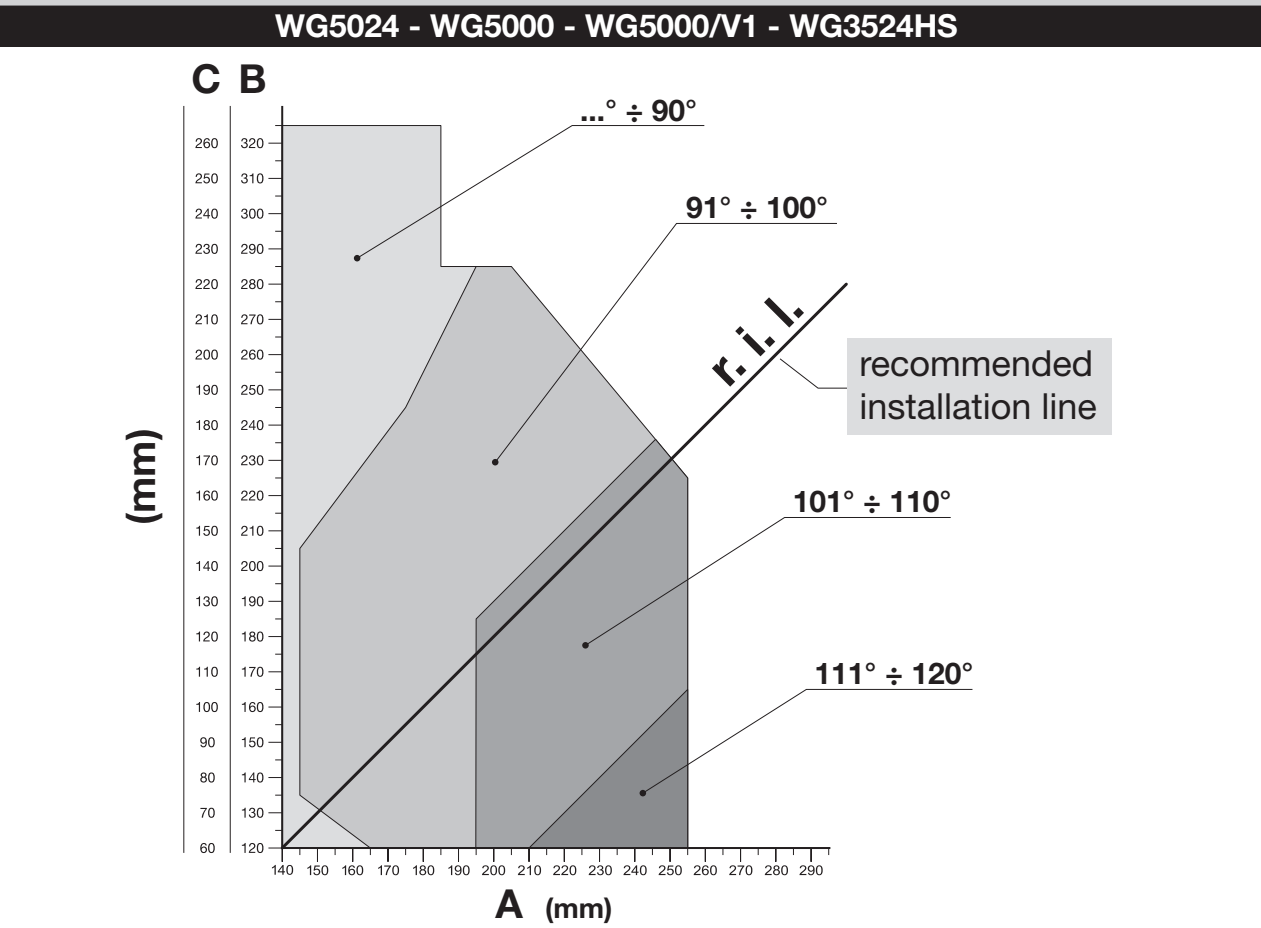
- Measure dimension C, i.e. the offset from the hinge axis to the mounting surface, as shown in the diagram.
- Find the measured C value on the chart. The horizontal line gives dimension B; on the recommended installation line r.i.l. / DIL read off the opening angle.
- From the selected point, draw a vertical line to axis A. A and B should be similar, ideally the same.
- If the angle is unsuitable, choose another permitted A/B combination. Do not use dimensions outside the chart's range.
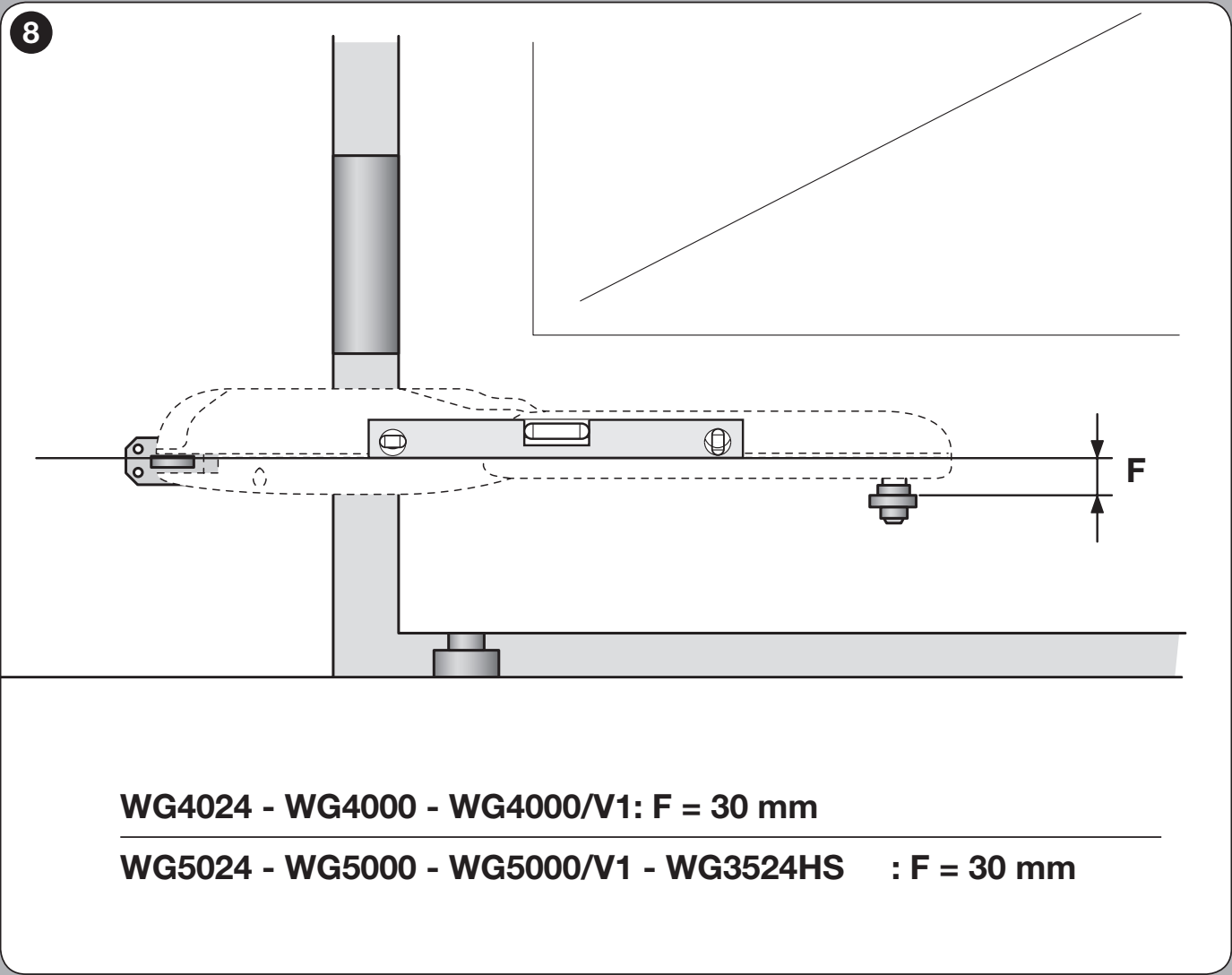
- Before anchoring, check that the front bracket will be positioned on a solid part of the gate leaf and that the height difference between the brackets will be F = 30 mm.
Shorten the rear bracket to suit the required A/B dimensions and weld it to the mounting plate; then anchor the plate with suitable screws, washers, and anchors. The supplied rear bracket is 150 mm. If the geometry requires a longer bracket, use the NICE PLA6 extended bracket; changing its length alone does not replace the calculation from the chart.
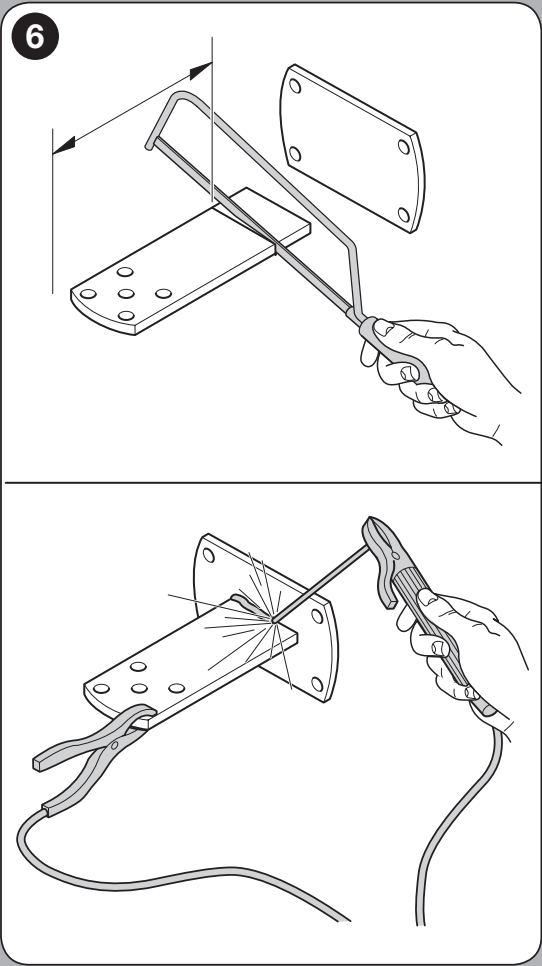
Complete dimensions of GAP02600 mounting brackets help verify the available mounting space. Check dimensions A/B/C against the hinge positions and operator model.
Outward opening
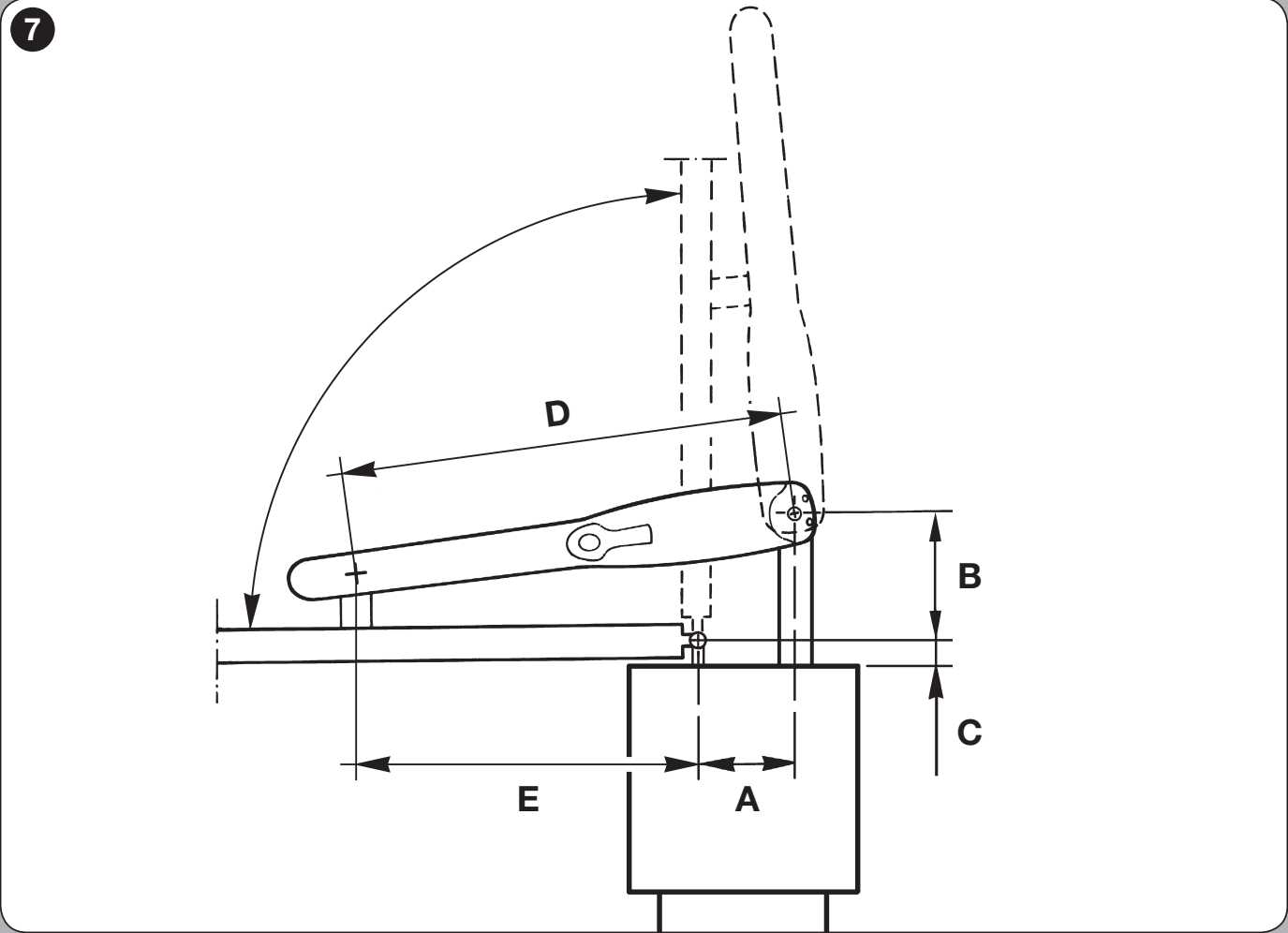
WINGO can also be installed for outward opening, as shown in the following diagram. Allow for the extended rear bracket PLA6 and check the clearance outside the passageway. The technician must adjust the direction of the operator wires to suit the wiring and recheck that the leaves operate in the correct sequence. The common wire and protective earth (PE) must not be interchanged.
II. Front bracket and installation dimensions
For the WG5000, D = 850 mm. Select dimension E according to A in the table. D is the installation dimension shown in the diagram; the actuator stroke is a different measurement. Weld the bracket to a solid part of the gate leaf; an alternative that can be bolted on is the NICE PLA8.
| A (mm) | E (mm) |
|---|---|
| 100 | 750 |
| 110 | 740 |
| 120 | 730 |
| 130 | 720 |
| 140 | 710 |
| 150 | 700 |
| 160 | 690 |
| 170 | 680 |
| 180 | 670 |
| 190 | 660 |
| 200 | 650 |
| 210 | 640 |
| 220 | 630 |
| 230 | 620 |
| 240 | 610 |
| 250 | 600 |
| 260 | 590 |
| 270 | 580 |
| 280 | 570 |
The front attachment on the gate leaf is F = 30 mm lower than the rear attachment on the post, as shown in the illustration. This does not mean the entire motor is sloped: check that it is correctly installed using a spirit level. Before welding, check both motor positions and make sure the bracket on the gate leaf is reachable.
III. Mounting the motor
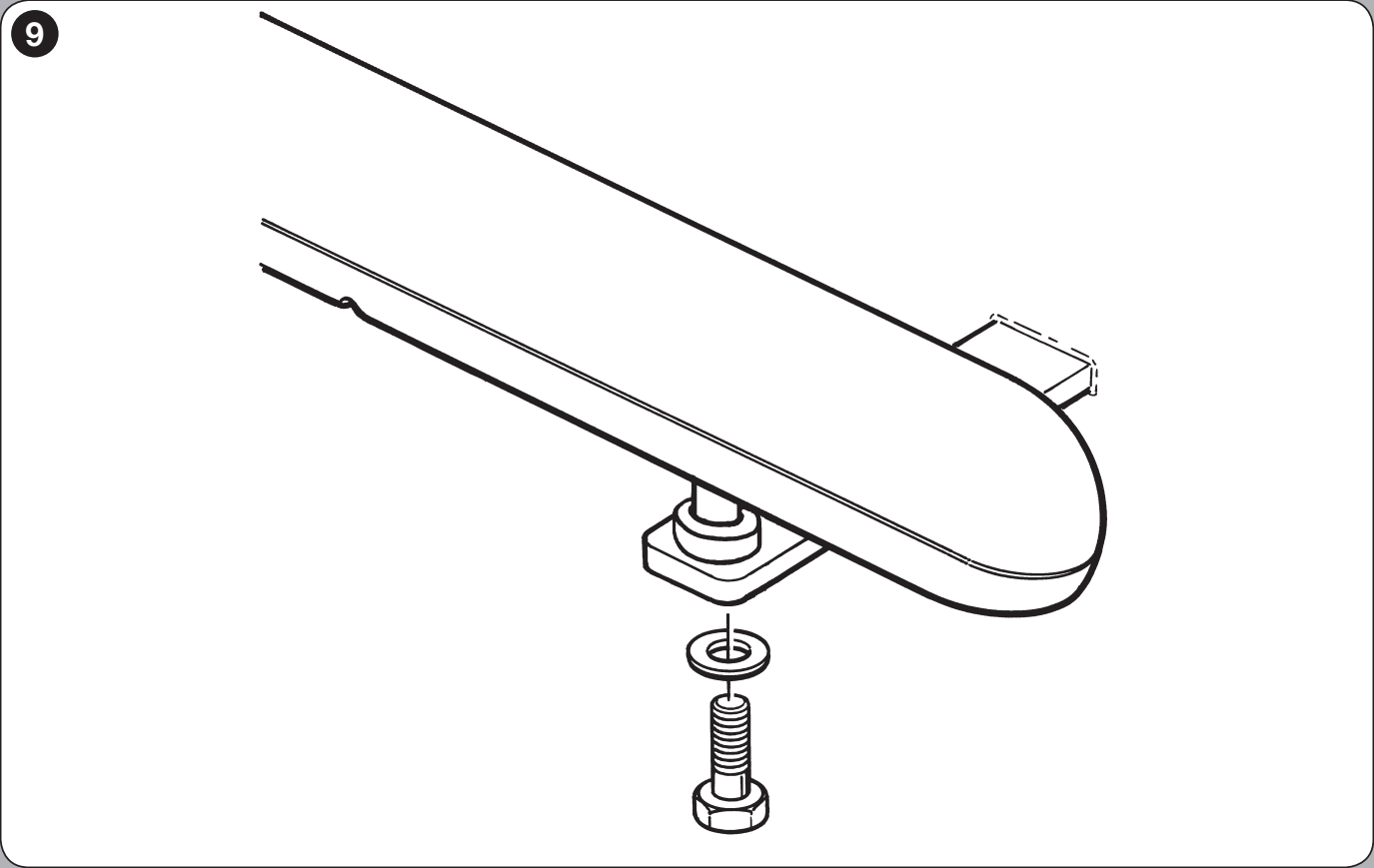
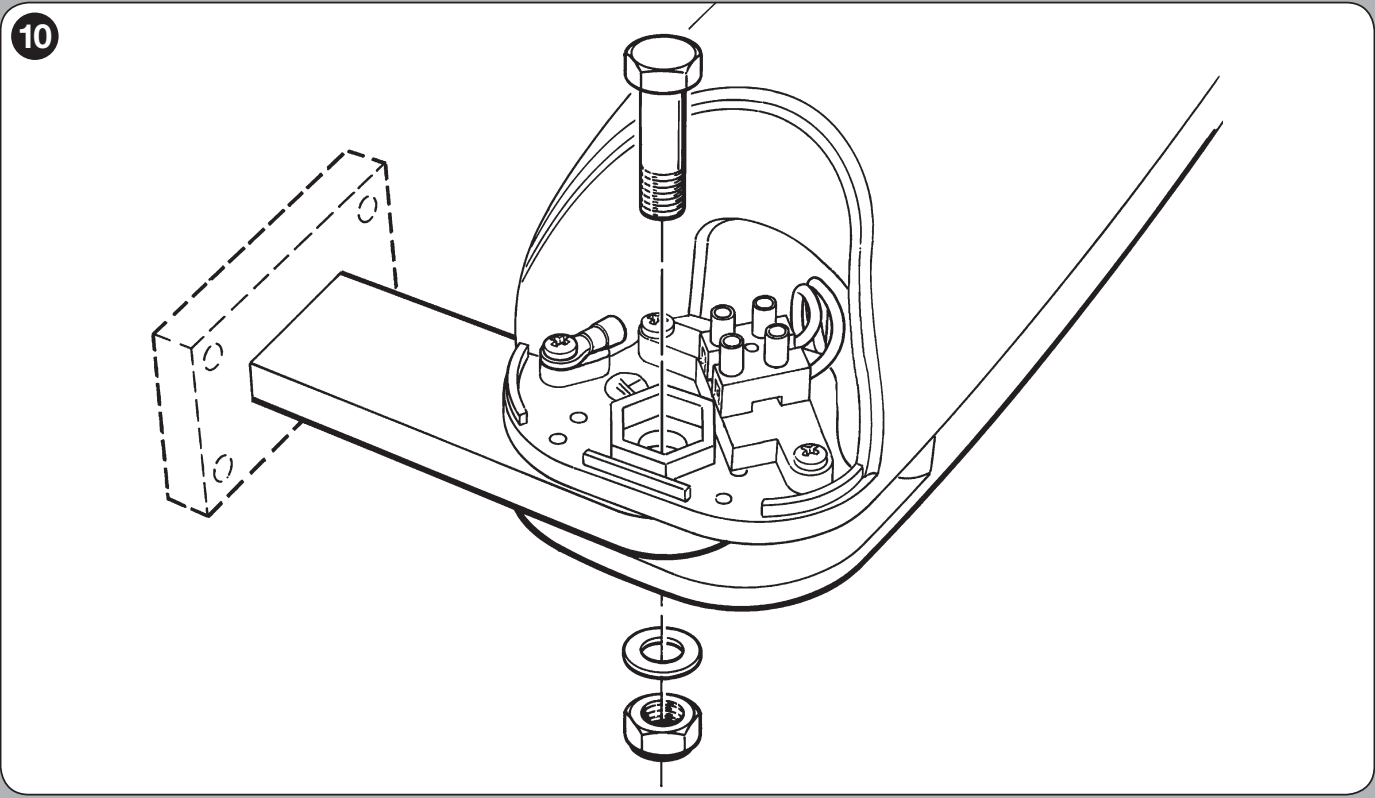
- Attach the motor to the rear bracket using the supplied bolt, washer and nut. Tighten the nut, then loosen it by approximately 1/10 of a turn, to leave the minimum clearance required.
- Connect the front section to the bracket using the supplied parts, and tighten as shown in the illustration.
- Manually test the full travel to ensure there is no jamming or lateral strain. Affix the release procedure label near the drive.
IV. Adjusting the mechanical stop
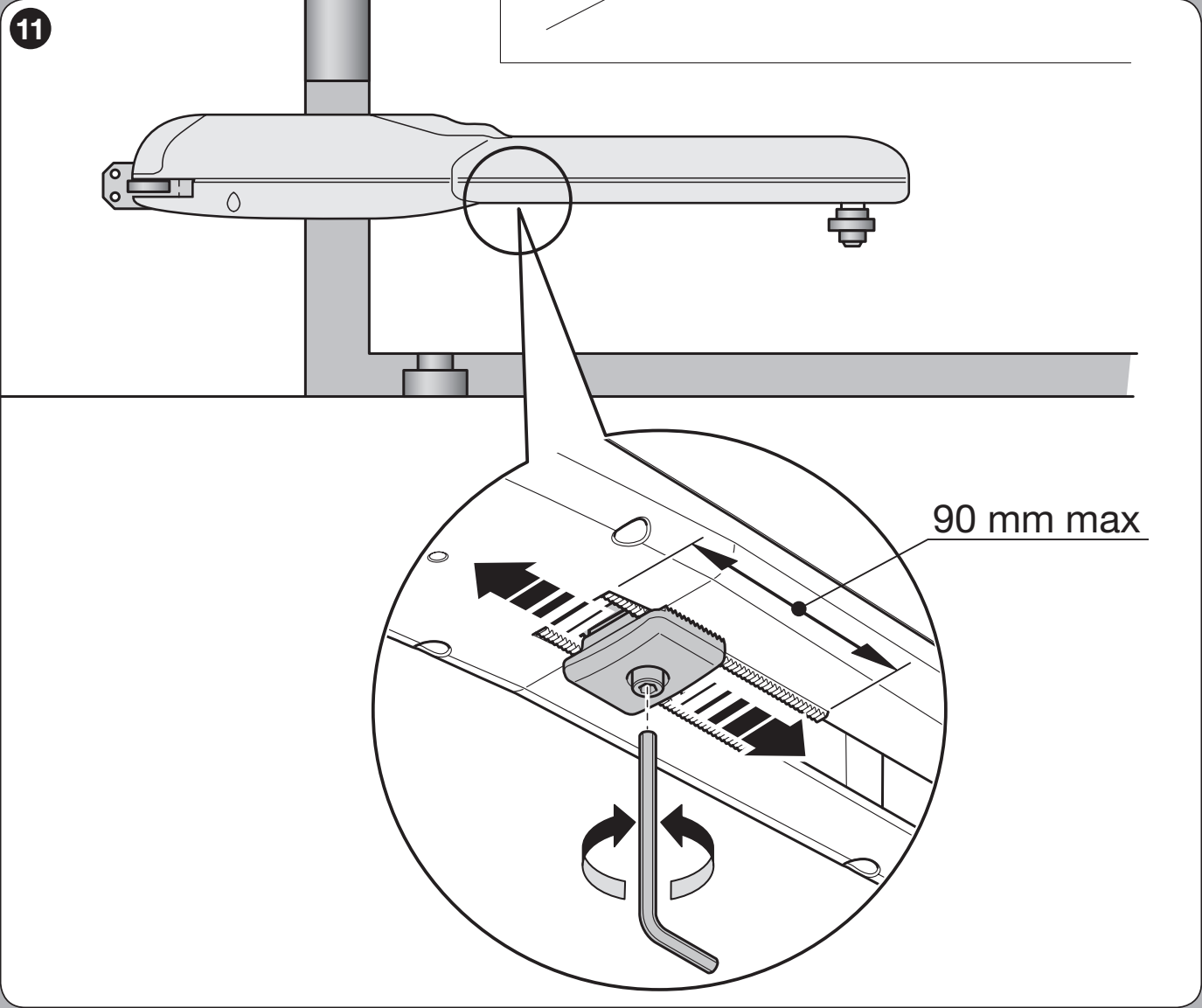
The pre-assembled stop mechanically defines the open position; it is not an electrical limit switch. Ensure the gate has a firm stop when closed. The MC800 requires mechanical stops in both directions.
- Disconnect the power supply and release the motor.
- Loosen the mechanical stop screw.
- Manually open the gate leaf to the desired position.
- Move the stop up to the pin and tighten the screw. Observe the dimension 90 mm max. shown in the stop adjustment detail. This is not the motor's total stroke; for the WG5000, the total stroke is 470 mm.
- Manually close the gate leaf and re-engage the drive. Then carry out the learning procedure and test the entire assembly.
Manual release during a power outage
- Stop the gate, disconnect the power supply and secure the gate leaf to prevent it from moving on its own. If an electric lock is fitted, unlock it first.
- Slide back the lock's protective cover, insert the key and turn it clockwise.
- Lift the release handle, guiding it as it moves. You can now move the gate leaf manually.
- Before automatic operation, lower the handle, turn the key counterclockwise, remove it and close the protective cover. Check that the drive is engaged.
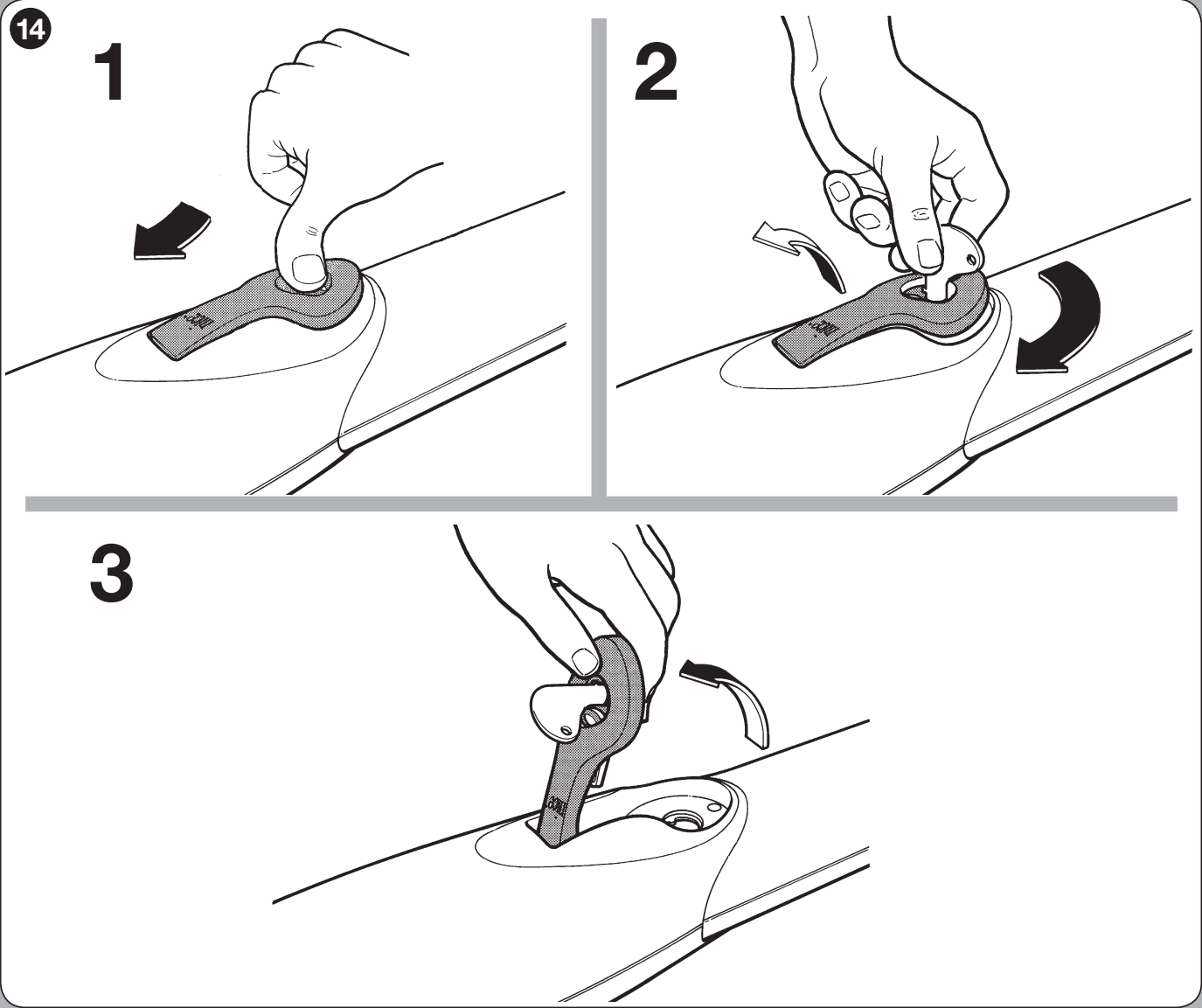
If the gate is the only entrance to the property, plan access to the release mechanism before installation. In the event of a fault, do not continue automatic operation until you have identified the cause.
Wiring
The following cable cross-sections and lengths apply to an assembly with MC800/MCA5R30. Keep mains and motor cables separate from low-voltage signals, protect them from water and movement of the gate leaf, and secure them in the cable glands. The power supply must have suitable overcurrent protection and a means of complete disconnection.
| Circuit | Cable | Length according to MC800 |
|---|---|---|
| Power supply to control unit | 3 × 1.5 mm² | Up to 30 m; for longer runs, use 3 × 2.5 mm² and protective earthing at the automation system as specified in the manual. |
| Each 230 V motor | 4 × 1.5 mm² | Up to 10 m, including protective PE. |
| ELAC flashing light | 2 × 1.5 mm² | Up to 20 m. |
| BlueBUS photocells | 2 × 0.5 mm² | Up to 20 m; for runs over 20 m and up to 40 m, use 2 × 1 mm², with no polarity requirement. |
| Key switch | 2 cables, 2 × 0.5 mm² | Up to 50 m. |
| Electric lock | 2 × 1 mm² | Up to 10 m. |
| Antenna | RG58 | Up to 20 m; less than 5 m is recommended. |
EPM relay photocells require both a power supply and a signal contact; the number of wires depends on the TX/RX diagram and the selected test configuration. Complete MC800 wiring and installation.
Motor wiring and accessory polarity
The WG5000 is a 230 V AC motor. Do not connect it to the 24 V motor output of the MC424L or MC824H. Connect the motor wires for open / common / close and the protective PE according to the labels on the motor and control unit. This is an AC circuit, not a +/− polarity connection. The motor has no separate encoder wire or volt-free electrical limit switches.
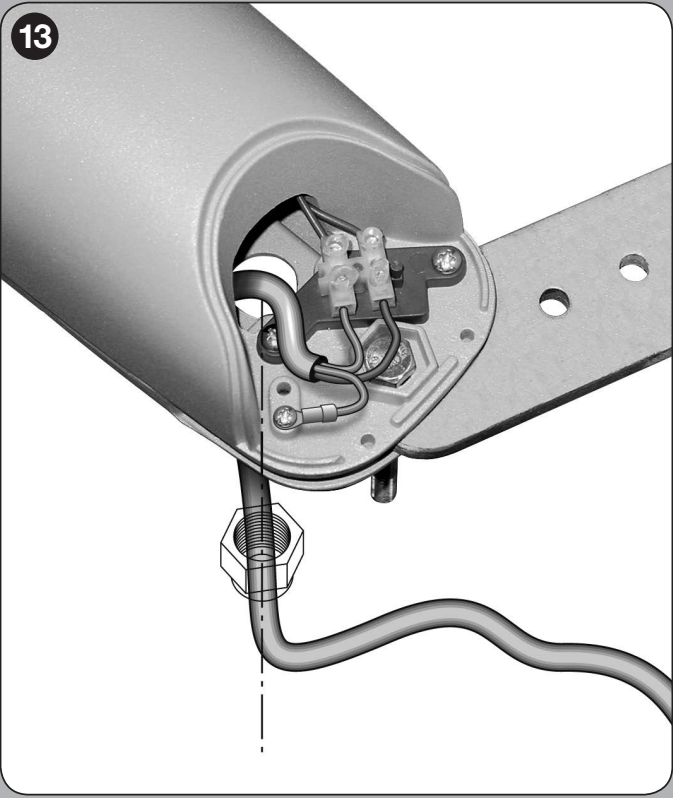
When using one motor with the MC800, use M2. With two motors, M2 opens first and M1 closes first. To correct the direction, swap the two directional wires of the relevant motor; leave the common wire and PE on their designated terminals. Disconnect the power before carrying out any wiring work.
| 3 / 4 – auxiliary power supply | 3 = 0 V (−), 4 = Common +24 V DC (+), up to 200 mA. |
|---|---|
| 5 / 3 – OutSTB | 5 = +24 V, 3 = −, switched power supply for photocells, max. 4 W. It switches off in Standby; do not confuse it with the OGI terminal on an older board. |
| 6 / 7 – BlueBUS | Two-wire power and data; no +/− polarity. |
| FLASH | Self-flashing warning light 230 V AC, max. 21 W, for example, ELAC. Do not connect the low-voltage ELDC to this output. |
| 1 / 2 – ELS | Electric lock 12 V AC, max. 15 VA; no DC polarity. |
| 4 / 13 – SbS | Voltage-free NO step-by-step contact; do not apply an external voltage to it. |
| 4 / 14, 4 / 15 | Voltage-free NO contacts: open / close. |
| 4 / 12 – STOP | Learned safety input: NO, NC or 8.2 kΩ, depending on the safety device wiring. |
| 8 / 9 / 10 – AUX | In relay photocell mode: PHOTO / PHOTO1 / PHOTO2, common contact 4; LP lit. Input 11 functions as STOP in this mode. Unused AUX inputs remain unconnected; do not add universal jumpers. |
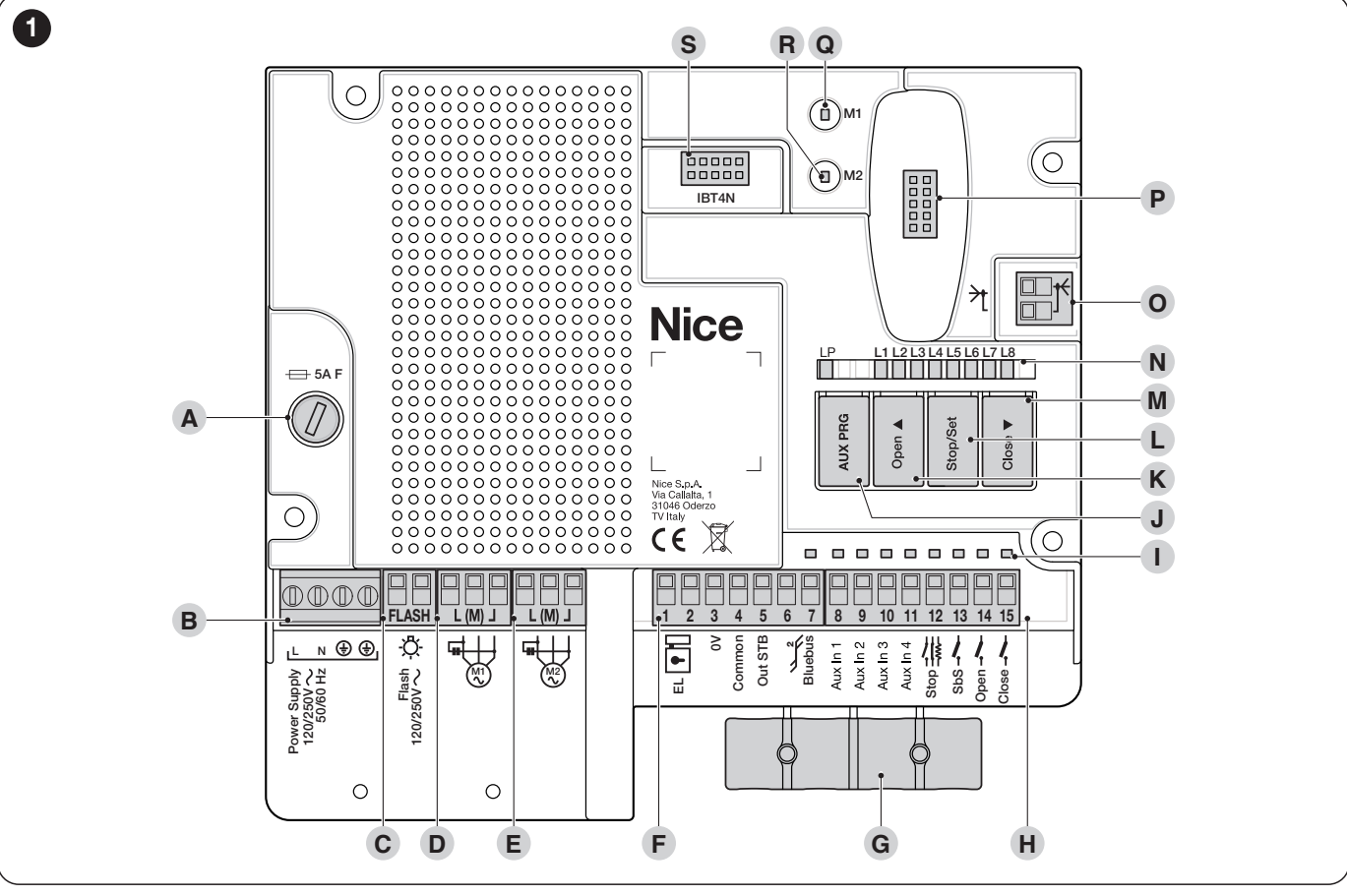
The board has the Open ▲, Stop/Set and Close ▼, LEDs L1–L8 and the AUX PRG. The receiver fits into the SM connector. Detailed wiring for each terminal.
Photocells, testing and safety edge
The MC800/MCA5R30 supports both relay and BlueBUS photocells, including combined wiring. Using AUX mode for relay photocells is incompatible with using AUX for electric limit switches; WINGO does not provide limit-switch connections on AUX. The TX/RX power supply wiring must match the Standby or photocell test mode.
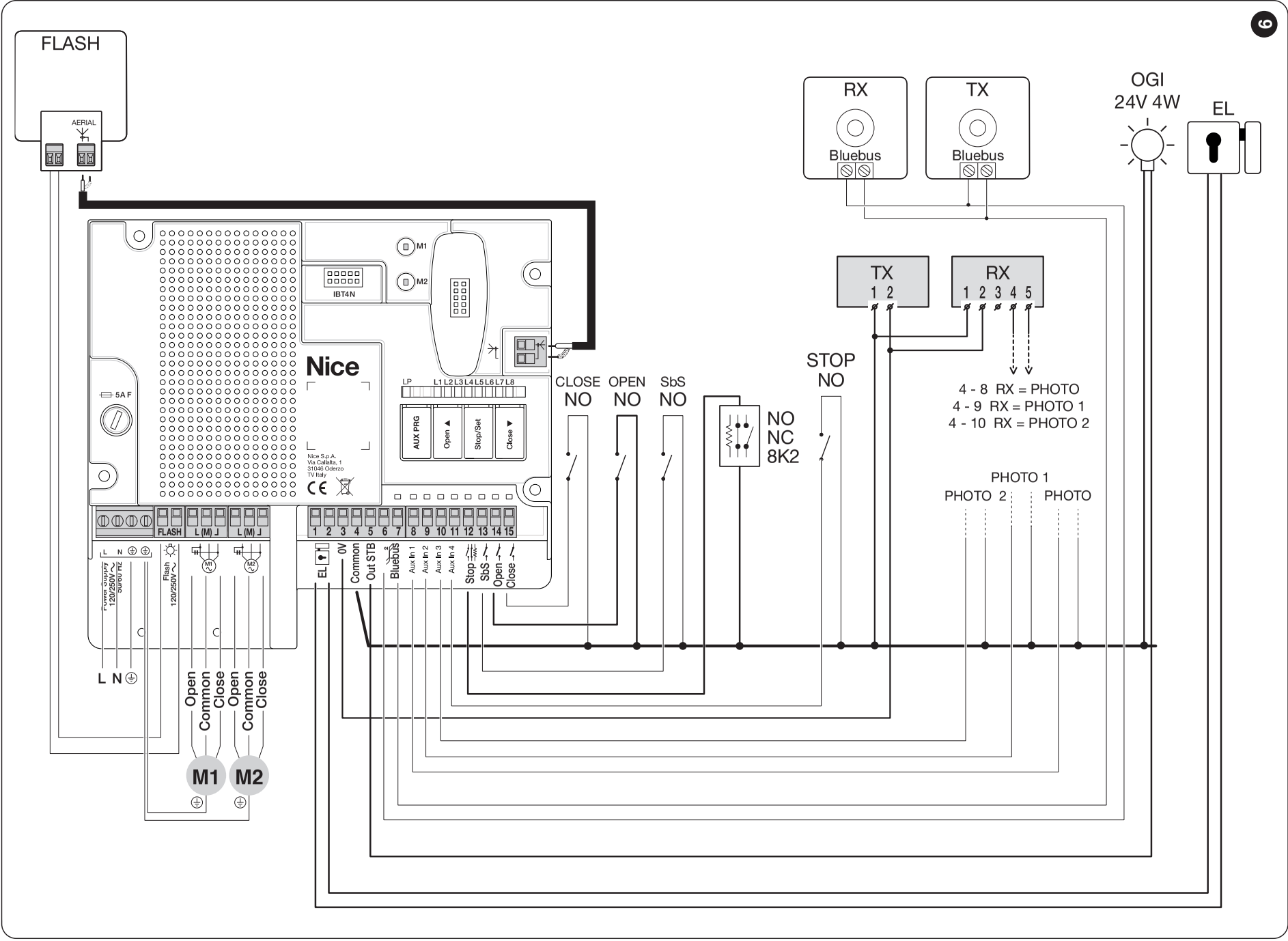
The diagram shows combined wiring without photocell testing, with Standby disabled. For a different mode, use its specific diagram; changing a single jumper is not enough. For EPM with DC power, the wiring is TX/RX 1 = +, 2 = −; RX 4 = COM, 5 = NC. The COM/NC contact connects between 4 Common and the selected PHOTO input 8, 9 or 10. Relay photocells, photocell testing and Standby.
Connect BlueBUS photocells in parallel using two wires, with no polarity. The TX and RX units in each pair must have the same address; different pairs must have different addresses. After changing the wiring, run device recognition again. Addressing and response of BlueBUS photocells.
Sensitive safety edges are required for automation with the MC800. The installer should determine the type and position based on pinch points and the test results. Photocells protect only the area they actually monitor. Connecting safety devices to STOP.
Initial commissioning with MC800 / MCA5R30
Before switching on, check that the equipment is securely fastened, the release mechanism is locked, the stops and guides are in place, the motor direction and M1/M2 sequence are correct, and all safety devices are connected. The gate area must be clear during the first movement, and the technician must be ready to stop it.
- After power-up, BlueBUS should flash about once per second; the LEDs on connected BlueBUS TX/RX units should flash, and FLASH should be off. If these conditions are not met, first correct the wiring fault.
- Device recognition: hold Open ▲ + Stop/Set and release when L1/L2 start flashing rapidly, after about 3 s. When recognition is successful, STOP stays lit and L1/L2 go out. Carry this out even if no accessories are installed.
- Automatic position learning: hold Stop/Set + Close ▼ and release when L3/L4 start flashing rapidly, after about 3 s. The sequence is: close M1, close M2, open M2, open M1, then close M1 and M2 to their respective stops. With one motor, only M2 operates.
- If the motor opens instead of closing during the first movement, stop the learning process by pressing Open or Close. Disconnect the power, correct the direction, and repeat the learning process from the beginning. For a double-leaf gate with the leaves operating in the opposite sequence, correct the M1/M2 assignment. Keep a single motor connected to M2; if it runs in the wrong direction, swap only its direction wires.
- Successful position learning is indicated when L3/L4 go out. Activation of a photocell or STOP interrupts learning; resolve the cause and repeat the entire procedure.
- Test repeated opening, closing and stopping, each safety device, leaf overlap and release operation, and measure the forces of the complete system. Only hand over a gate for operation once it has passed testing.
When testing the WINGO unit alone, it must be possible to move it manually with a force of no more than 390 N. This is the maximum permitted test force, not a target for a stiff-moving gate or an impact-force setting. Forces during automatic operation must be assessed by a technician using a separate measurement.
Settings and controls
The standalone motor has no programming buttons or radio receiver. Force, pause time, automatic closing, slowdown and leaf delay are set on the installed control unit. Repeat the tests after changing safety parameters. WINGO is electromechanical; do not enable the pressure-maintenance function for hydraulic motors.
MC800 programming and tables · Manual and mixed position learning
When pairing a remote control, compatibility depends on the specific receiver and stored coding, not just the frequency. Current kits include OXIBD and INTI2. The bidirectional ON3EBD requires a supported OXIBD; ON3ELR is for use with OXILR. Connect the OXIBD external antenna directly to the receiver as described in its instructions; do not automatically connect it to the base board's antenna input shown in an older diagram.
Pairing and deleting remote controls
What to check if a problem occurs
| Symptom | What to check |
|---|---|
| Motor does not move | Power supply, release mechanism locked in place, STOP and photocells. A technician must check fuses and electrical circuits with the power switched off. |
| Motor runs but the gate leaf does not move | Release mechanism locked in place, bracket connections and mechanical damage. |
| Gate leaf stops or reverses | First check manual movement, hinges, stops and obstructions; then check the photocells and safety settings. Do not increase the force without identifying the cause. |
| Incorrect direction or sequence | Direction wires and, for two motors, the M1/M2 assignment. Keep a single motor on M2; do not swap the common wire or PE. |
| Remote control does not respond, but the button does | Battery, compatibility, remote control learning and receiver antenna. |
| Fault after replacing an accessory | Wiring, power supply, AUX or BlueBUS addresses, and repeating device recognition. |
Flash counts and repair procedures: MC800 diagnostics. Resetting the control unit, deleting the receiver and programming the travel limits are different operations. Record the settings before resetting and follow the instructions for your control board.
Compatible accessories
Select accessories based on the actual control unit, its outputs and the receiver installed.
| What | Why | Type |
|---|---|---|
| Control unit | Controls one or two motors, depending on the model selected. |
|
| Flashing light | Signals movement. The voltage must match the control unit output. |
|
| Photoelectric safety sensors | Monitor the selected area of the gate. MC800/MCA5R30 supports a combination of relay and BlueBUS photoelectric sensors, as shown in the wiring diagram. | |
| Remote control | For remote operation of the gate. | |
| Receiver | Choose the radio receiver based on the remote controls' coding. Smart control requires a specific compatible interface and power supply. |
|
| Antenna | Improves reception for the compatible receiver; follow its wiring instructions. | |
| Keypad | Operate the gate via a compatible receiver or decoding interface; the data device itself is not a direct NO contact. | |
| Key switch |
For operating the gate with a key using a switch wired to the operator from any location. |
|
| Card readers | Operate the gate via a compatible receiver or decoding interface; the data device itself is not a direct NO contact. |
|
| Electric locks | Additional locking for the gate leaf, depending on its construction and load; MC800 has an ELS output of 12 V AC / 15 VA. |
|
Estimated service life
Add the relevant weight and length index values, then add the other factors. Use only one applicable row in each weight or length group. Use the total percentage to estimate the number of cycles from the chart.
| Characteristics of the complete automation system | Index | Service life chart |
|---|---|---|
| Gate leaf weight | over 100–200 kg → 0% over 200–300 kg → 10% over 300–400 kg → 20% over 400–500 kg → 30% |
|
| Gate leaf length | 1–2 m → 0% over 2–3 m → 10% over 3–3.5 m → 20% | |
| Temperature / humidity | Above +40 °C or below 0 °C, or humidity above 80% → 20% | |
| Solid gate leaf | 15% | |
| Windy location | 15% |
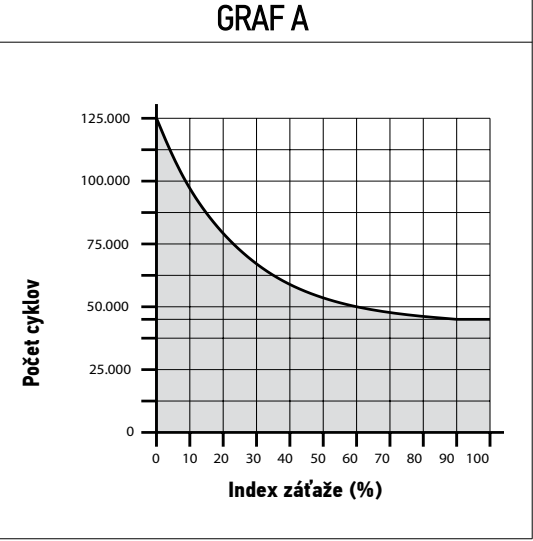
The chart is an estimate assuming regular maintenance; it does not guarantee a number of years or cycles. It cannot replace the chart of permissible gate leaf weight and length. The installer must assess operating loads and safety requirements for the complete gate.
Maintenance and safe use
At least every 6 months have the fixings, brackets, hinges, wear, corrosion, screw lubrication, stops, release mechanism and wiring checked. After maintenance, a technician must retest the movement and all safety devices. For intensive use, set the interval according to operating conditions.
Do not touch the motor or gate leaf while it is moving; enter only after it has opened fully and stopped. Children must not play near the gate or with the remote controls. If the gate has a pedestrian door, opening it must prevent the automation from starting. Regularly remove obstructions and clean the photocell lenses. If you notice an unusual noise, damage or movement on its own, disconnect the power and arrange for repairs.
NICE WINGO WG5000 technical specifications
| Type | Electromechanical non-reversible operator for one gate leaf, with no built-in control unit. |
|---|---|
| Motor power supply | 230 V AC / 50 Hz |
| Maximum / rated current | 1.5 A / 0.5 A |
| Maximum / rated power input | 200 W / 130 W |
| Stroke | 470 mm |
| No-load speed | 0.013 m/s |
| Maximum / rated force | 1,700 N / 600 N |
| Cycles per hour | 30 at rated force; actual performance depends on installation conditions. |
| Ingress protection rating | IP44 |
| Operating temperature | −20 to +50 °C |
| Insulation class | F |
| Dimensions | 920 × 98 × 95 mm (length × width × height) |
| Motor weight | 6 kg |
| Mechanical stop | Pre-installed opening stop; closing is controlled by the fixed gate stop. |
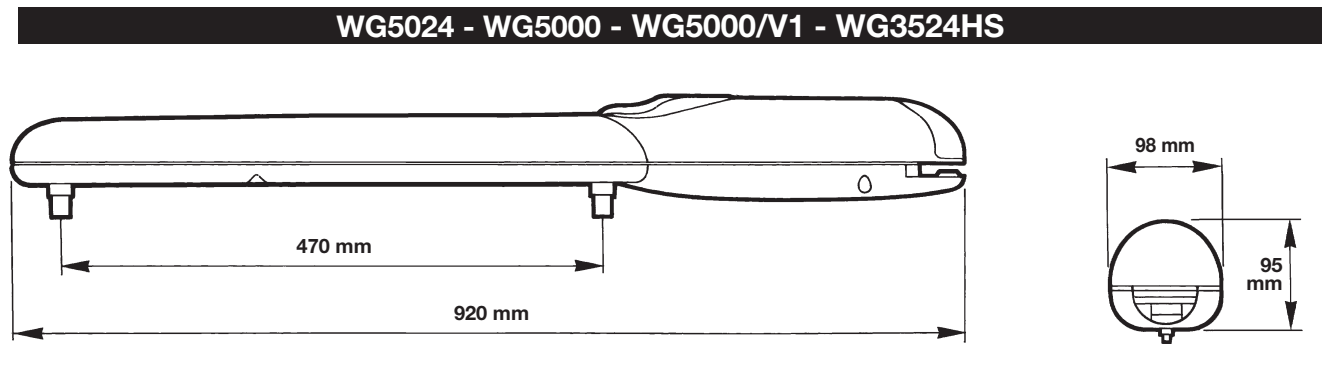
How can I order this item?
Choose the option that suits you:
- order online: use the buy button to add the goods to your shopping cart (you will find the buy button here in the product variants table).
- order by email: place your order at [email protected]






