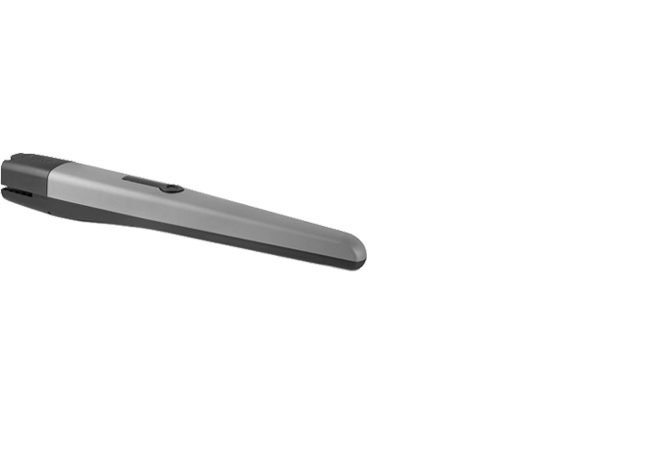
NICE Toona Toona 4016P - single gate operator for swing gates, for a gate leaf up to 3 m / 800 kg, for heavier-duty use
| Product availability: | In stock | We normally dispatch goods within 24 hours. |
|---|

in stock
€463.21 including VAT
| Weight |
|---|
| 10 kg |
Description of NICE Toona Toona 4016P - single gate operator for swing gates, for a gate leaf up to 3 m / 800 kg, for heavier-duty use
NICE Toona TO4016P is a standalone electromechanical motor for one gate leaf. The motor operates at 230 V AC from a suitable control unit. The motor voltage specification does not indicate the control unit's mains supply voltage.
Assess the weight and length of a single gate leaf together using the NICE graph; the two maximum values listed for the model do not automatically apply at the same time.
The reinforced version has its own graph showing the permitted gate-leaf weight and length. Use this graph for the exact motor model when selecting a motor.
If the motor is part of a kit with MC800/MCA5R30, use the manual for this control board. For another or older kit, check the actual type of control unit.
| Quick navigation | |
|---|---|
| Accessories | Limits |
| Service life | Installation |
| Wiring | Manual release |
| Specifications | Maintenance |
| Accessories – terminals and polarity | PDF manual |
- Non-reversible
- 230 V
- Slow
- With a mechanical stop and microswitch; check the limit positions against the actual motor configuration
- For heavier loads – 3200 N
Operating range
The NICE graph shows maximum values of 800 kg and 3 m for a single gate leaf. Read the permitted combination from the curve; the maximum values cannot automatically be used at the same time.
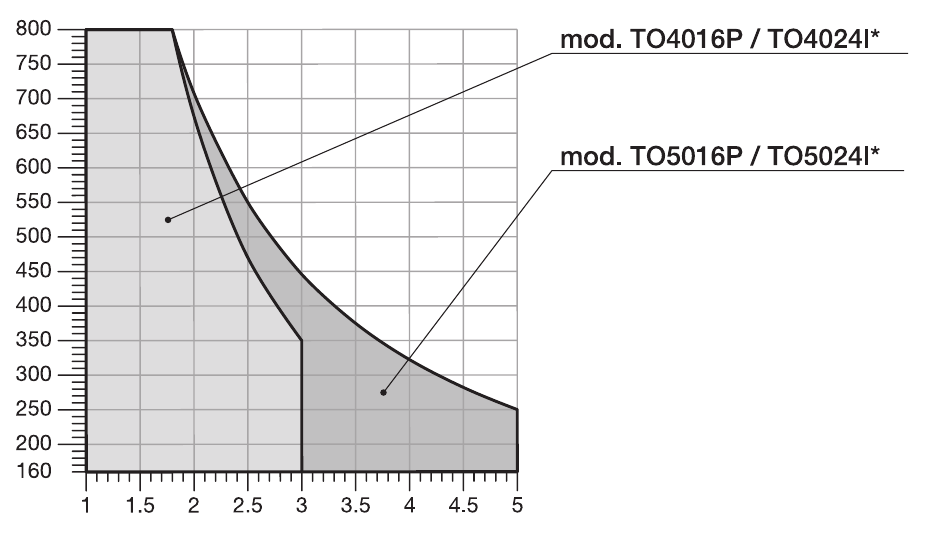
Service life and load
For the TO4016P model, the estimated service life is 50,000 to 150,000 operating cycles. It depends on the gate-leaf weight and length, resistance to movement, temperature, wind and maintenance. The exact number of cycles for a specific gate cannot be determined from this range.
Choosing a control unit
NICE MC800/MCA5R30 is the current control unit and replaces the older A60, A400, A6 and A6F models. The MC200 is also still available for one motor. If an older control unit is already installed, use the manual for the actual control board.
Currently available
- NICE MC800 – for one or two 230 V motors.
- NICE MC200 – for one 230 V motor.
Older compatible control units – discontinued
I. Installing the rear mounting bracket
Post and bracket mounting: For a standard installation, we recommend a sturdy post with a cross-section of 120 × 120 mm. A cross-section of 100 × 100 mm is a suggested minimum, provided the post and its foundation are strong enough and the hinge is correctly positioned.
For a different cross-section or hinge offset, adjust the rear bracket or use the extended PLA6 bracket. Dimensions A and B must correspond to the measured C and opening angle; their meaning is shown in the installation chart. Opening outwards requires an extended rear bracket; determine its length from the installation geometry and check that the gate leaf can move freely.
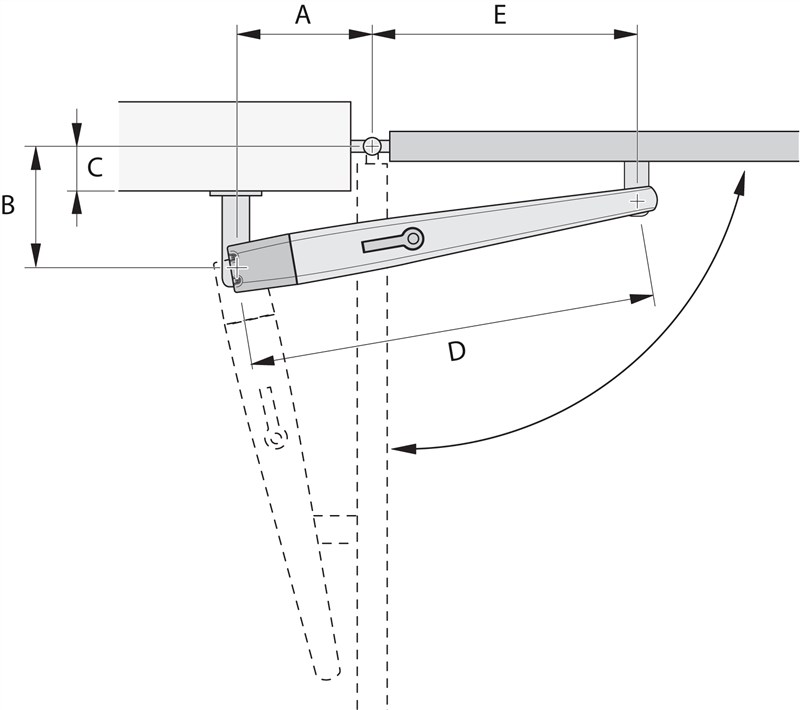
Inward opening diagram
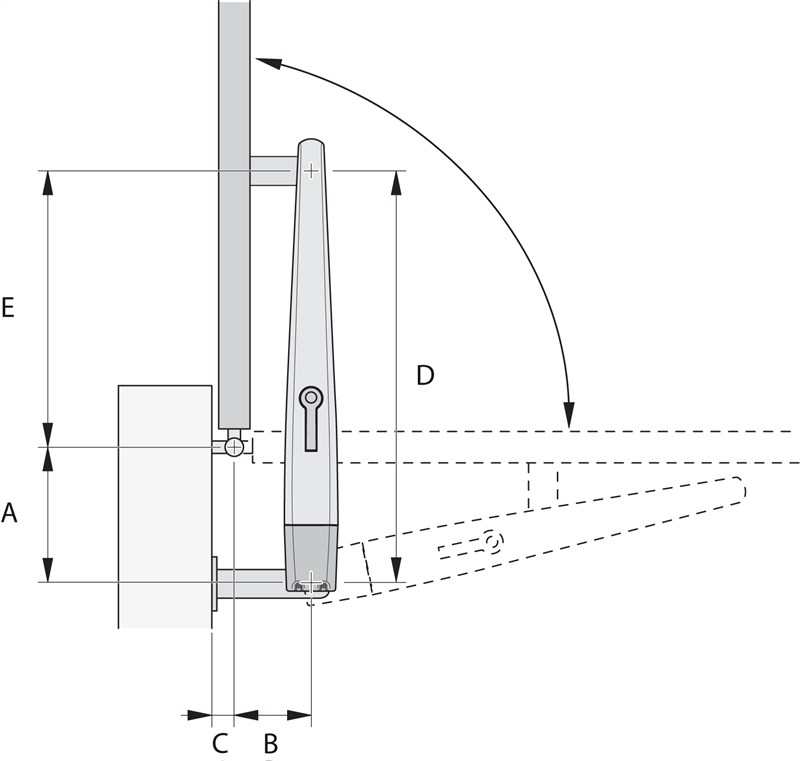
Outward opening diagram
Calculate the position of the rear bracket using the chart, which gives you dimensions A and B and the maximum opening angle. Note that values A and B must be similar (ideally identical) to ensure the operator moves smoothly in a linear path.
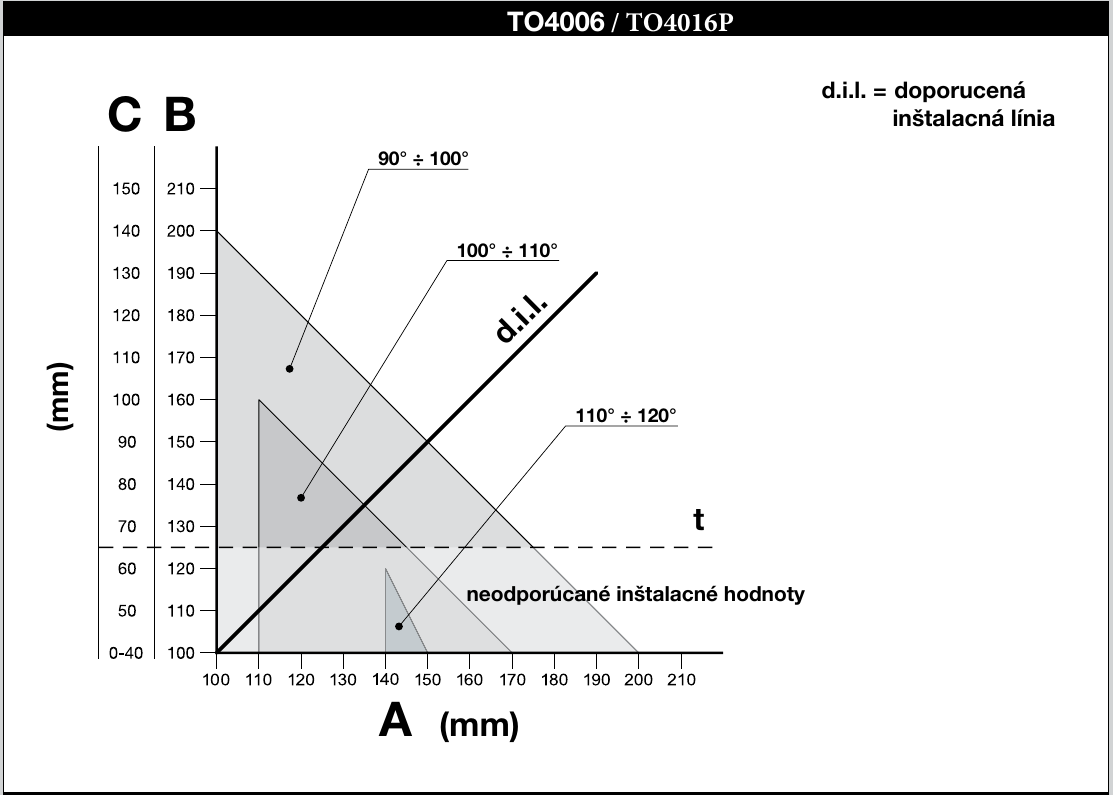
NICE Toona TO4006 / TO4016P installation chart
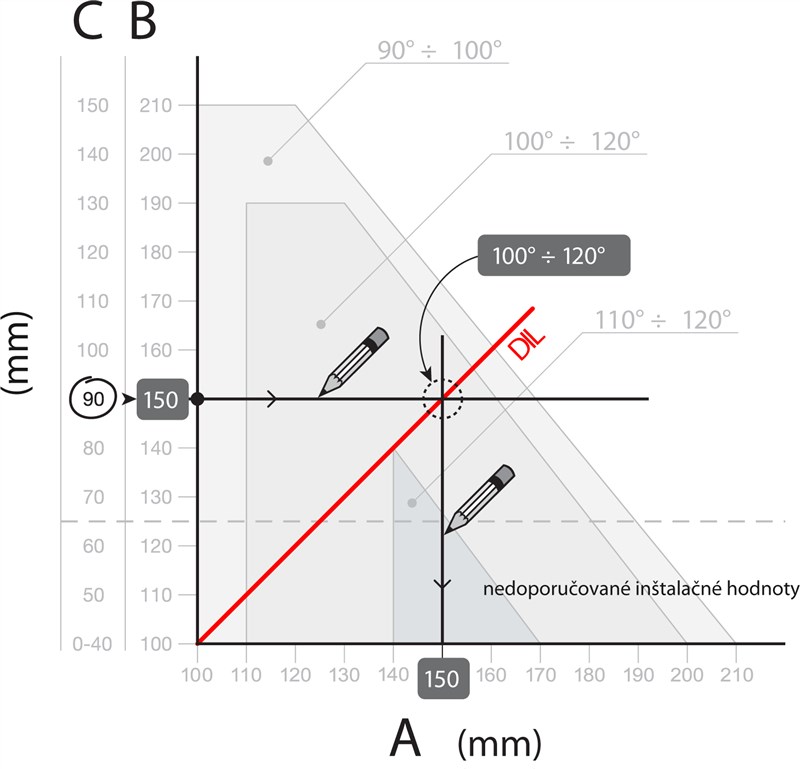
Example of reading values from the chart
Calculation procedure:
- Measure the distance C from the diagram
- Find the measured C on the installation chart and draw a horizontal line from it. Read the corresponding B dimension from the adjacent scale.
- The intersection with the d.i.l. line (the recommended installation line on the NICE chart) determines the maximum opening angle; read dimension A from it vertically.
- Do not use dimension B below the dashed t line; NICE does not recommend this area of the chart.
- If the opening angle is not suitable, adjust A and, if necessary, B so that they are approximately equal. Then check the full gate-leaf movement again.
Before fixing the bracket to the post or wall, shorten it to the required length corresponding to dimensions A and B and weld it to the mounting plate.
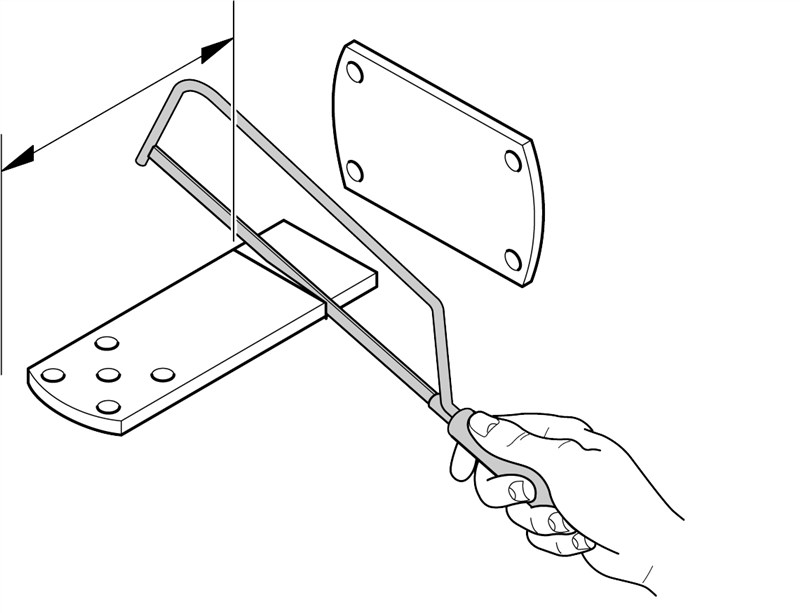
1. Cut the bracket to the required length
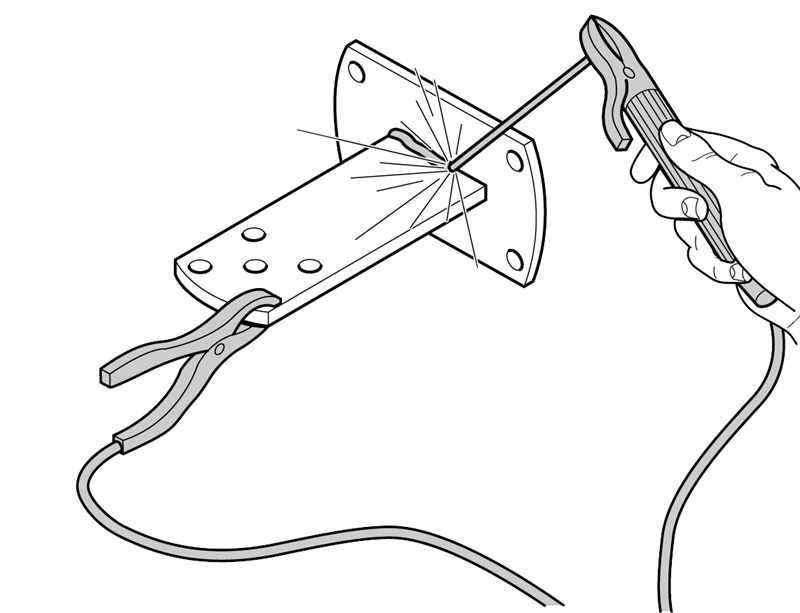
2. Weld the shortened bracket to the mounting plate
The supplied rear bracket is 150 mm long. Before shortening and welding it, check that it allows dimensions A and B to be met for your post; use an extended bracket if necessary.
Before attaching the rear bracket, check that the front bracket will align with the solid part of the gate leaf, as there is a height difference between the front and rear brackets, as shown in the illustration.
According to the NICE drawing, the height difference between the brackets is F = 34 mm. Check the dimension on the supplied brackets before welding as well.
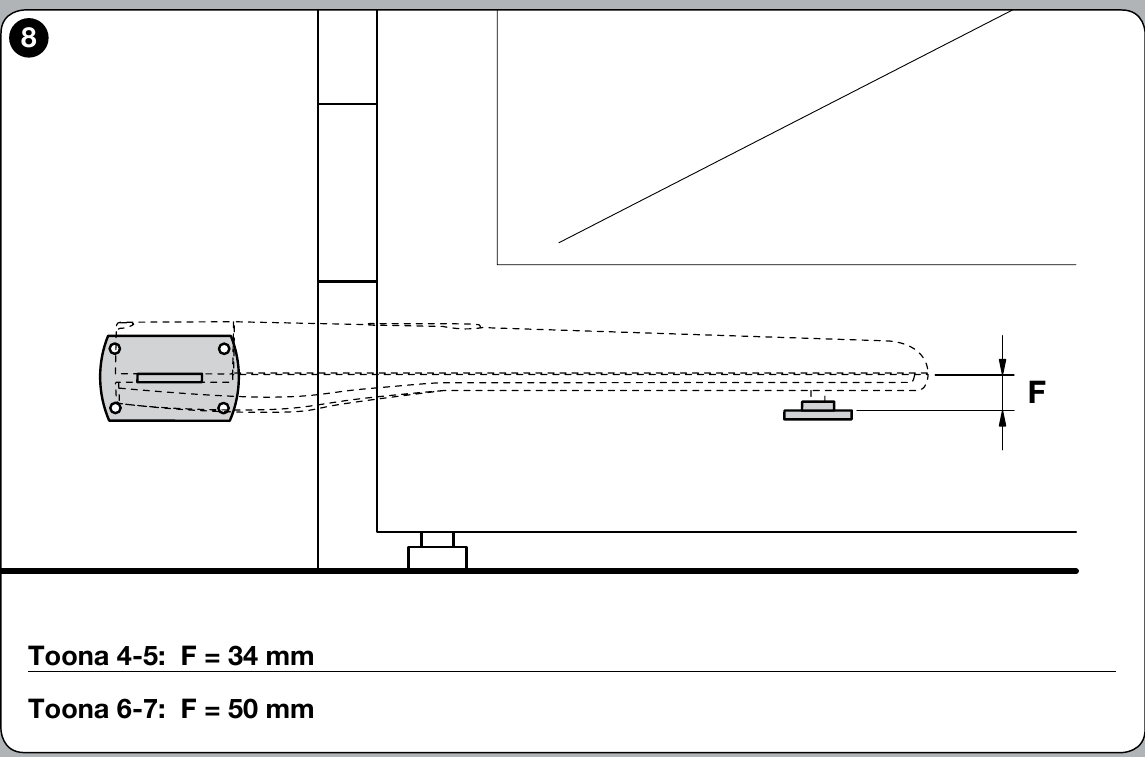
If everything is suitable, attach the rear bracket to the post or wall using screws, wall plugs and washers.
II. Installing the front mounting bracket
Position the front bracket according to dimensions A, D and E. For TO4016P, the installation table specifies D = 695 mm; select the corresponding E value based on the measured A:
| A (mm) | E (mm) |
|---|---|
| 100 | 595 |
| 110 | 585 |
| 120 | 575 |
| 130 | 565 |
| 140 | 555 |
| 150 | 545 |
| 160 | 535 |
| 170 | 525 |
| 180 | 515 |
| 190 | 505 |
| 200 | 495 |
| 210 | 485 |
The supplied package includes a bracket for welding. If you would prefer a bolt-on bracket, we recommend ordering the alternative NICE PLA8 bolt-on bracket.
- Calculate from the table the value E
- Calculate the height according to the illustration bracket heights (view illustration)
- Attach the bracket to the gate leaf (if welding the bracket, we recommend tack-welding it for now only)
III. Installing the gate operator on the rear bracket
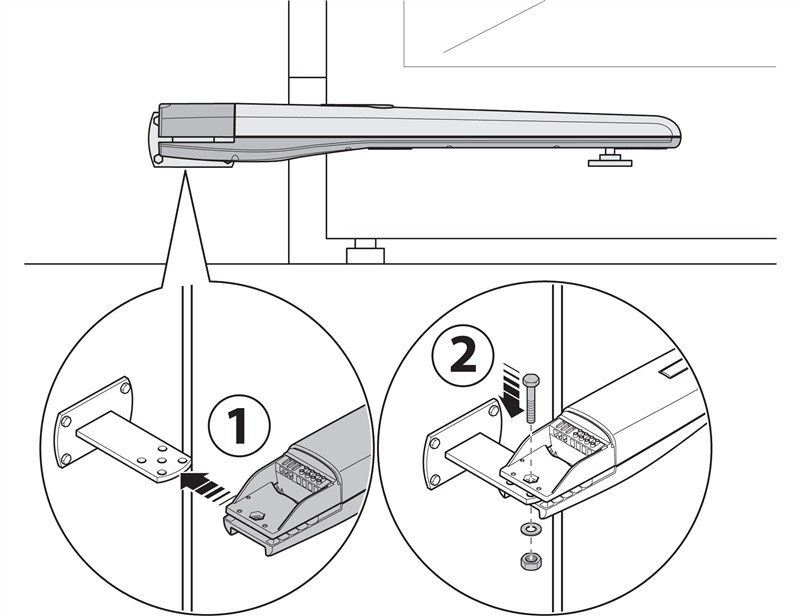
- Attach the motor to the bracket as shown in the illustration, using the supplied rear bracket pin, washer and nut.
- Tighten the nut fully, then loosen it by 1/10 of a turn so that the gate operator can pivot
IV. Installing the gate operator on the front bracket
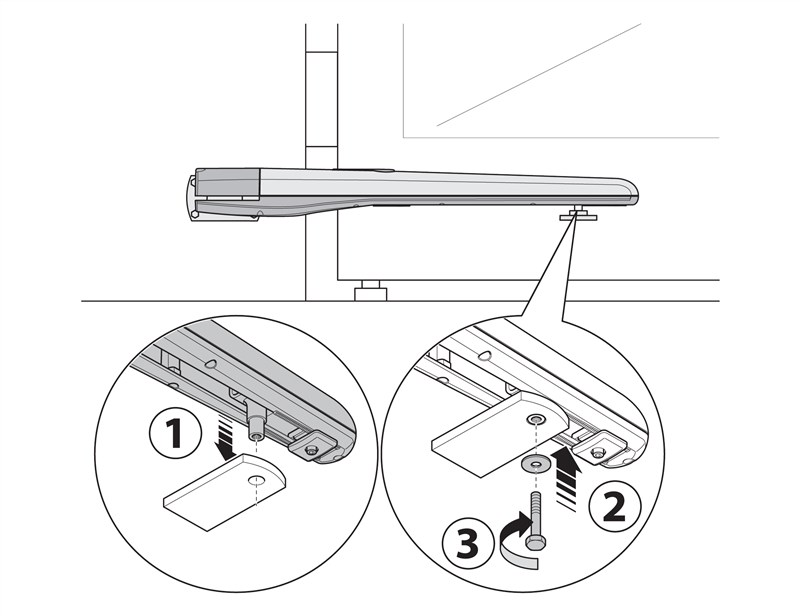
- Attach the operator to the bracket as shown in the illustration, using the supplied pin and washer.
- Tighten the pin fully
V. End positions and microswitch
V. End positions and microswitch With the power disconnected, the installer must check the actual end-stop equipment supplied with the operator, set the end positions, and test movement and safety devices before operation in accordance with the manual for the control unit used.
Motor cabling and wiring
Disconnect the power supply before wiring. 230 V AC is the motor voltage; the control unit power supply and accessory outputs must be considered separately. The motor terminals are marked AP / COM / CH and protective earth. Carry out wiring, check the direction of movement and test the microswitches according to the original NICE illustration and the manual for the control unit used. For opening outwards, NICE specifies reversing the direction wires; the protective conductor remains in place.
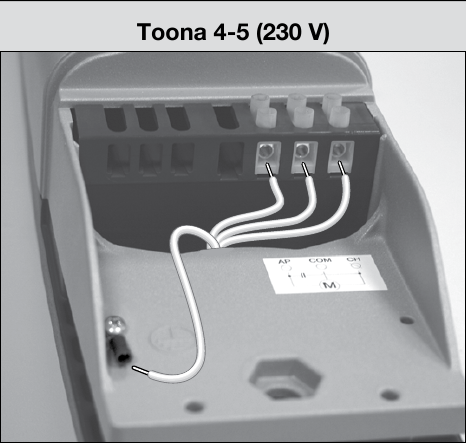
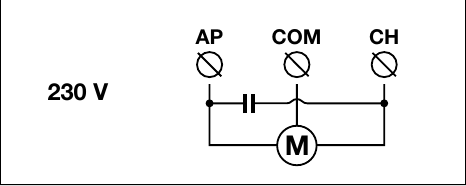
After wiring, check the direction of movement, stopping positions and safety devices according to the manual for the specific control unit. Electrical connections and testing must be carried out by a qualified person.
Wiring accessories to the MC800 with MCA5R30 board
The following wiring applies to the MC800/MCA5R30 in kits with this control unit. The accessory terminals belong to the control unit, not the motor itself. For a different control unit, use its own wiring diagram. Disconnect the mains supply before starting work.
| Accessories | Terminals, power supply and polarity |
|---|---|
Auxiliary power supply | On the MCA5R30, terminal 3 = 0 V (−) and terminal 4 = +24 V DC and the common input terminal. The shared current limit for powered accessories is 200 mA; check the current draw and permissible voltage of each product. |
EPM relay photocells | With Standby disabled and no photocell test, power the TX transmitter and RX receiver from terminal 4 (+24 V DC) and terminal 3 (−). Connect the voltage-free contact C–NC of the receiver between 4 (common) and the relevant input 8/PHOTO, 9/PHOTO1 or 10/PHOTO2. The contact has no +/−. AUX inputs must be set to relay photocell mode; in limit switch mode, they have a different function. |
EPM with Standby enabled | According to the MCA5R30 diagram, power both TX and RX between terminal 4 (+24 V DC) and terminal 5 (OutSTB, switched return line). On EPM photocells, 1 = +, 2 = return line. OutSTB is 24 V, max. 4 W and switches off in Standby; do not use terminal 5 as a permanent negative. Connect the RX C–NC contact between terminal 4 and the relevant PHOTO input. |
EPM with photocell testing | According to the photocell test diagram, connect TX 1 → 4 (+24 V DC), TX 2 → 5 (OutSTB). The receiver is powered continuously: RX 1 → 4 (+), RX 2 → 3 (−). The RX C–NC contact remains connected between terminal 4 and the relevant PHOTO input. Do not overload OutSTB or use it to power another load at the same time; after wiring, run device learning and test the safety function. |
BlueBUS photocells | Compatible EPMB connect using two wires to BlueBUS terminals 6 and 7. + and − are not polarity-sensitive. Set the address and run device learning after adding or removing a device. |
STOP and command contacts | Voltage-free input 12/STOP accepts NO, NC or 8.2 kΩ depending on the connected device; the state is learned. 13/SbS, 14/OPEN and 15/CLOSE use an NO contact connected to terminal 4 (common). These contacts have no +/−; do not apply an external voltage to the inputs. The same applies to the relay of a key switch or external receiver. |
ELAC beacon | NICE ELAC connect to the FLASH output, designed for a self-flashing lamp: switched 120/250 V AC, max. 21 W. This is a mains output; it has no +/−. Do not confuse it with the 24 V accessory terminals. |
Electric lock | Terminals 1–2 / EL: 12 V AC, max. 15 VA. The AC output has no +/−; check the lock specifications. |
Radio receiver | OXIBD is fitted into the SMconnector; do not use power terminals 3/4 or BlueBUS for it. Connect the antenna according to the receiver instructions, not to the motor terminals. |
If AUX inputs 8–11 are used for limit switches, their function differs from that of the PHOTO inputs. If you change the photocells or wiring, repeat the relevant learning procedure and test the gate's stop and response functions. For detailed instructions, see the MC800 control unit manual.
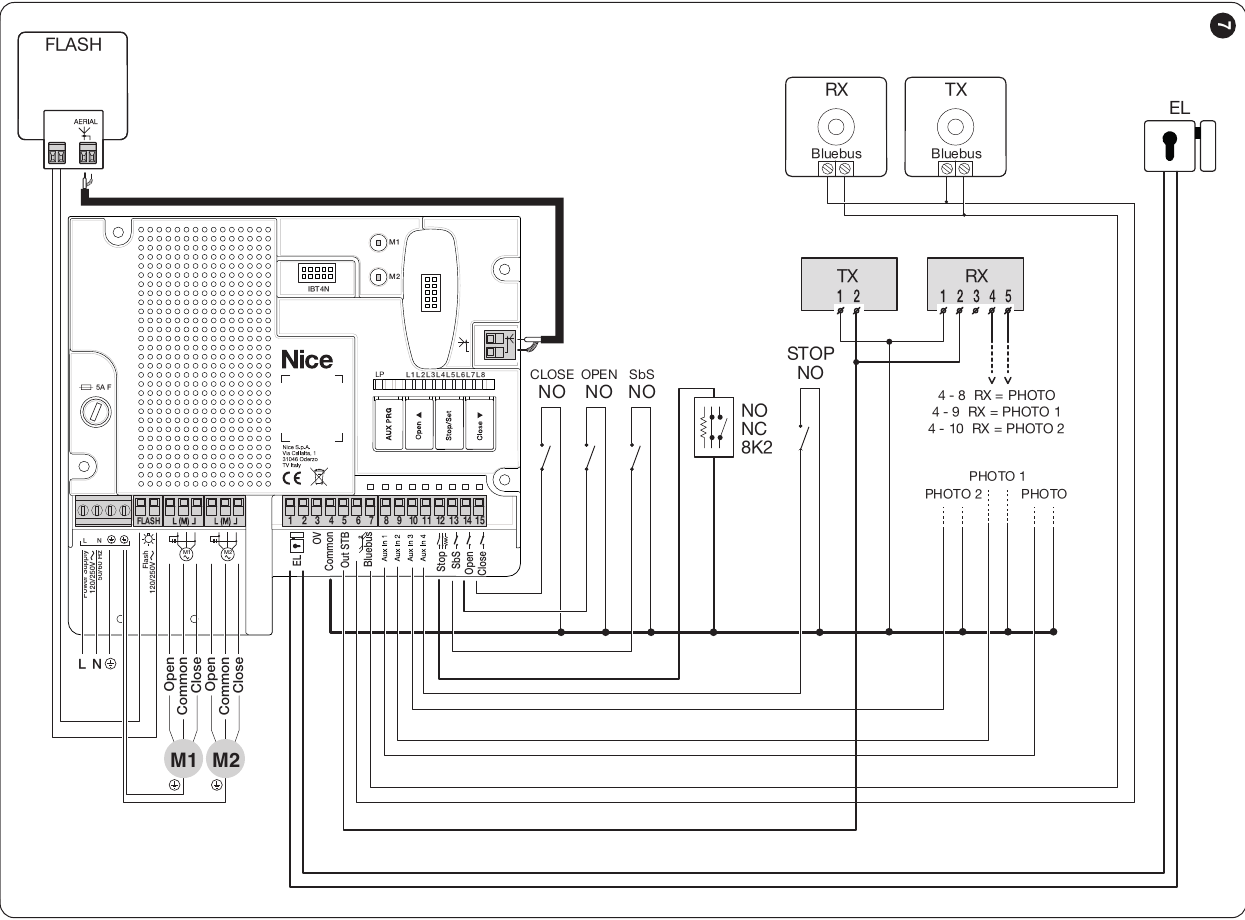
Relay photocells in Standby mode
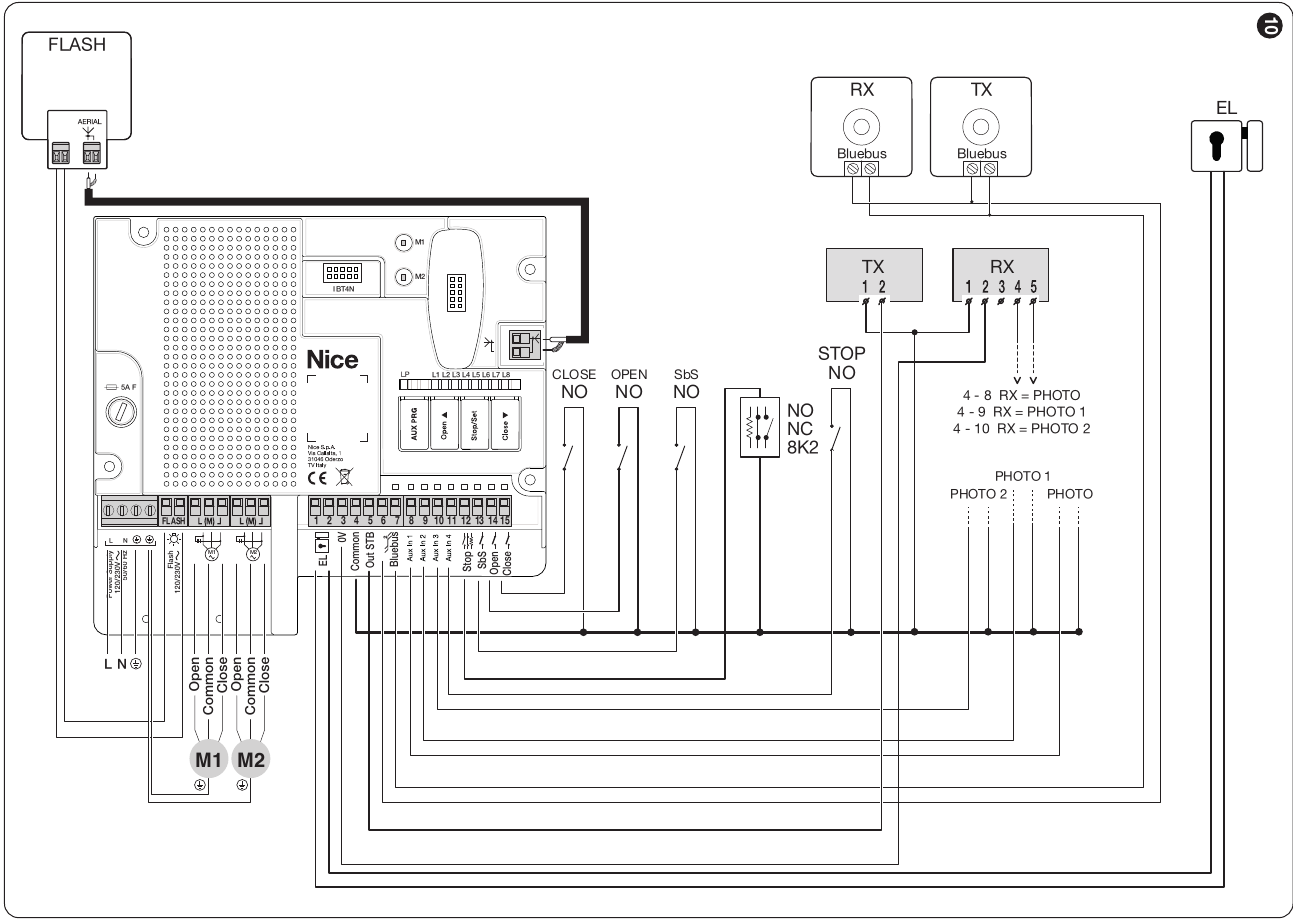
Relay photocells with photocell testing
Accessories by control unit
Choose optional accessories according to the control unit in the specific setup. Before ordering, check its voltage, inputs, receiver and connection type:
| What | Why | Type |
|---|---|---|
| Control unit |
The drive's control electronics. |
|
| Flashing beacon | Signals gate movement. The ELAC model has a built-in antenna; when connected correctly, it can improve remote-control reception. |
Choose another beacon according to the voltage and load capacity of the output on the actual control unit. |
| Photocells |
Photocells help detect obstacles; the gate's response depends on the wiring and control unit settings. On MC800 contact and BlueBUS photocells connect to different inputs. Determine the number of pairs and how to use them according to the actual board. |
|
| Transmitter | For remote operation of the gate. Choose the transmitter type and coding according to the receiver fitted in the control unit being used. |
|
| Receiver |
For remote control of the gate. Before choosing, check the connector and the coding supported by the specific control board. |
|
| Antenna |
For better remote-control range. |
|
| Keypad | Open the gate with a code, without a remote control. For BlueBUS models, check whether the actual control unit supports them as control devices. | |
| Key switch | Key-operated control via a suitable control input on the control unit; choose the installation location according to the wiring. | |
| Card readers | Access by card or key fob. ETPB requires a control unit with BlueBUS that supports control devices. |
|
| Electric locks | An electric lock secures the gate leaf in the closed position. Select the lock and its control method based on the gate, voltage and output of the control unit used. |
|
Manual release of the drive
Release or lock the drive only when the gate leaf is stationary. If the gate has an electric lock, unlock it first. In the event of a fault, disconnect the power supply.
- Slide the protective cover aside, insert the supplied key and turn it clockwise.
- Lift the release lever and move the gate leaf manually.
- To lock it again, lower the lever, turn the key counterclockwise, remove it and close the cover.
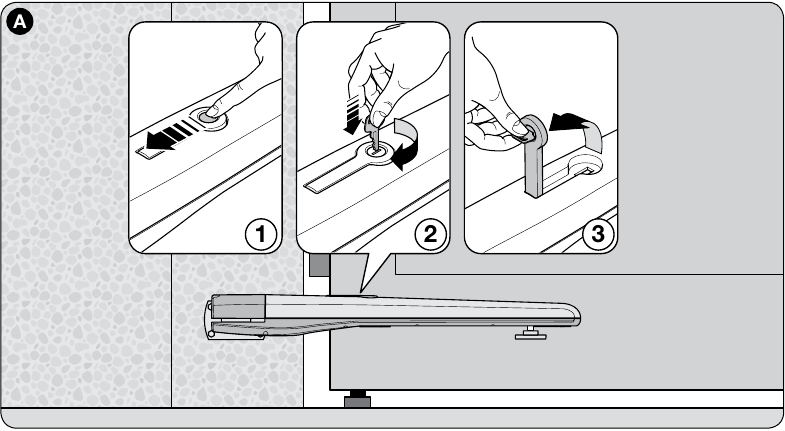
Before restarting, check that the drive is locked and that nobody is in the gate's path.
Inspection and maintenance
Have the drive professionally inspected at least every 6 months; more frequent inspections may be necessary with intensive use. With the power disconnected, a technician will check the fixings, corrosion, wear and lubrication of the lead screw and guide nut, then test the movement and safety devices. If the gate behaves unusually, do not attempt to repair it yourself; contact the installation company.
Technical specifications
| Parameter | Value |
|---|---|
Model | TO4016P |
Drive motor | 230 V AC |
Maximum / rated current | 1.7 A / 1.2 A |
Maximum / rated power consumption | 385 W / 220 W |
Motor capacitor | 12 µF |
Stroke | 350 mm |
No-load speed | 0.013 m/s |
Speed under load | 0.010 m/s |
Maximum / rated force | 3,200 N / 800 N |
Cycles per hour at rated force | 46 |
Protection rating | IP44 |
Operating temperature | −20 to +50 °C |
Thermal protection | 140 °C |
Insulation class | F |
Estimated service life according to NICE | 50,000 to 150,000 operating cycles |
Overall dimensions (length × width × height) | 820 × 115 × 105 mm |
Motor weight | 6 kg |
NICE Toona installation manual · Technical supplement for TO4016P. Programming, position learning, and accessories are covered in the manual for the actual control unit.
How can I order this item?
Choose the option that suits you:
- order online: use the buy button to add the goods to your shopping cart (you will find the buy button here in the product variants table).
- order by email: place your order at [email protected]






