NICE TOO TOO4524 - standalone operator for one leaf, 4.5 m/250 kg, intensive use
| Product availability: | within 7 days | We usually dispatch goods within 7 days. |
|---|
within 7 days
€427.17 including VAT
| Weight |
|---|
| 6,00 kg |
Description of NICE TOO TOO4524 - standalone operator for one leaf, 4.5 m/250 kg, intensive use
NICE TOO4524 is a standalone electromechanical operator for one gate leaf swing gate up to 4.5 m and up to 250 kg. The motor 24 V DC and is non-reversible. In the event of a power failure, it can be released with a key. It is suitable for residential and light industrial use; control unit and safety devices are selected for the complete gate.
When to choose this operator
The 4.5 m and 250 kg figures are the maximum values for a single gate leaf. The suitability of a specific gate also depends on the resistance to movement, hinge position, wind, gate leaf infill and bracket geometry. Check suitability against the gate's actual dimensions, weight and free movement.
The 24 V motor is also suitable for more intensive use. Assess the permitted opening frequency and load on the complete automation system based on the gate leaf, installation and control unit.
Control unit and gate equipment
| Generation | Compatible control unit |
|---|---|
| Current | MC424LR30 / MCA2R30 for one or two TOO 24 V motors. |
| Older, still available | MC424LR10 / MCA2R10. Use the manual for this generation. |
Check the markings on the installed board and use the manual for that generation. For the older MC424LR01, do not use procedures intended for the R10 or R30. Find the motor type selection, travel learning and programming for the current unit in the MC424LR30 manual.
The marking 24 V refers to the motor. Control unit MC424LR30 connects to a 230 V AC mains supply and provides the relevant motor and auxiliary outputs; the wiring must comply with the exact manual for the unit.
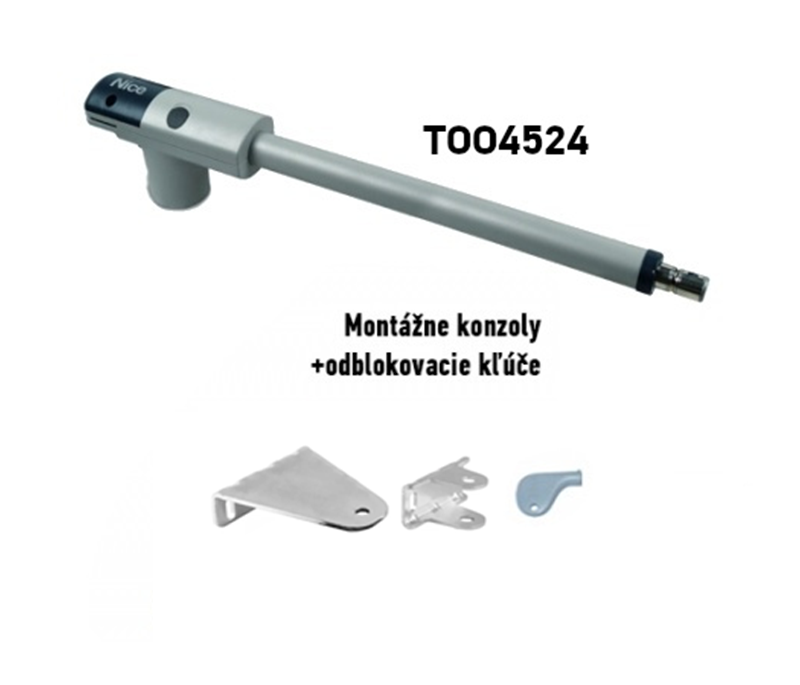
Shown with the motor are front and rear brackets, connecting parts and release key. Check the supplied package before installation. Control unit, photocells and the fixing method for the specific post are selected separately or according to the kit contents.
Kits for one or two leaves
The standalone motor is designed for one gate leaf. A double-leaf gate requires two operators. Our 24 V kits below include MC424LR10 and differ in their additional equipment. A standalone 230 V alternative motor is shown in the centre.
| Kits for 1 leaf | Kits for 2 leaves |
|---|---|
NICE TOO4524 kit for 1 leaf
MC424LR10 and 1 remote control INTI2. Basic With photocells With accessories | NICE TOO4524 kit for 2 leaves
MC424LR10 and 1 remote control INTI2. Basic With photocells With accessories |
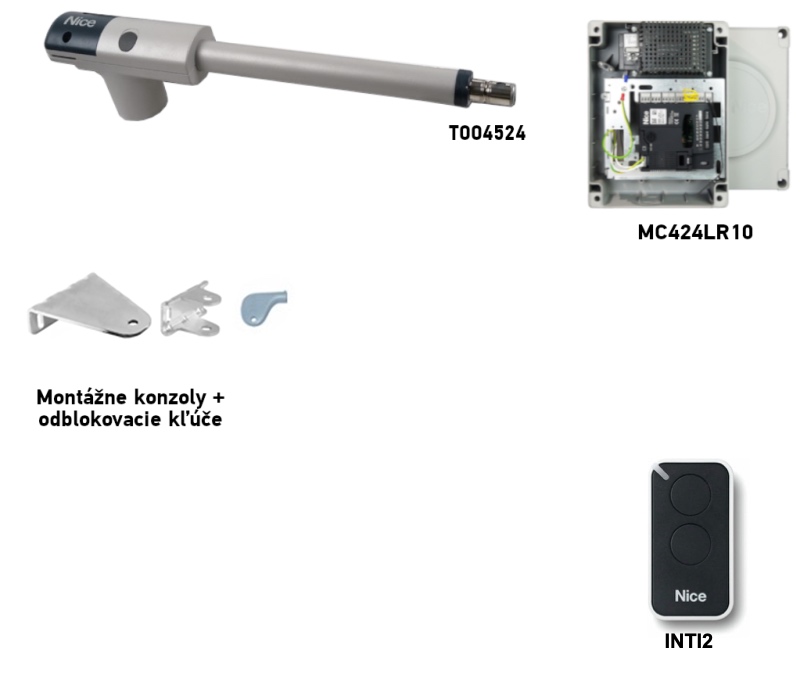
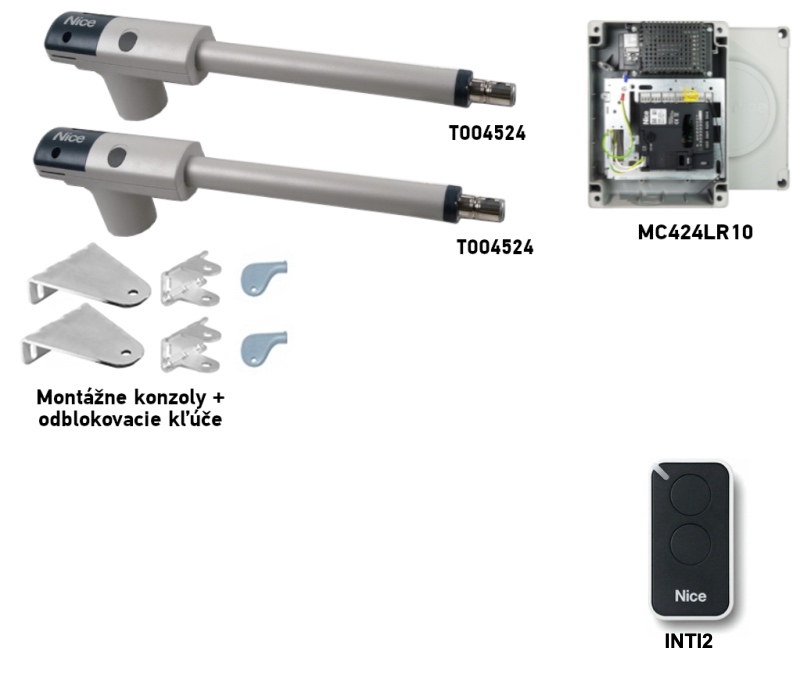
Limits 4.5 m and 250 kg are assessed separately for each leaf. With two leaves, the limit for one motor does not increase. Add the required items to the basic kit safety devices for the specific gate.
Bracket installation and operator positioning
First determine the hinge and rear bracket positions, then check clearance for the gate’s full range of movement. Dimensions A and B determine the achievable opening angle and the force profile. The brackets must be securely fastened to a suitably assessed structure; the post dimensions alone are not enough to assess the anchoring. Before fastening permanently, check that the gate moves freely by hand without binding.
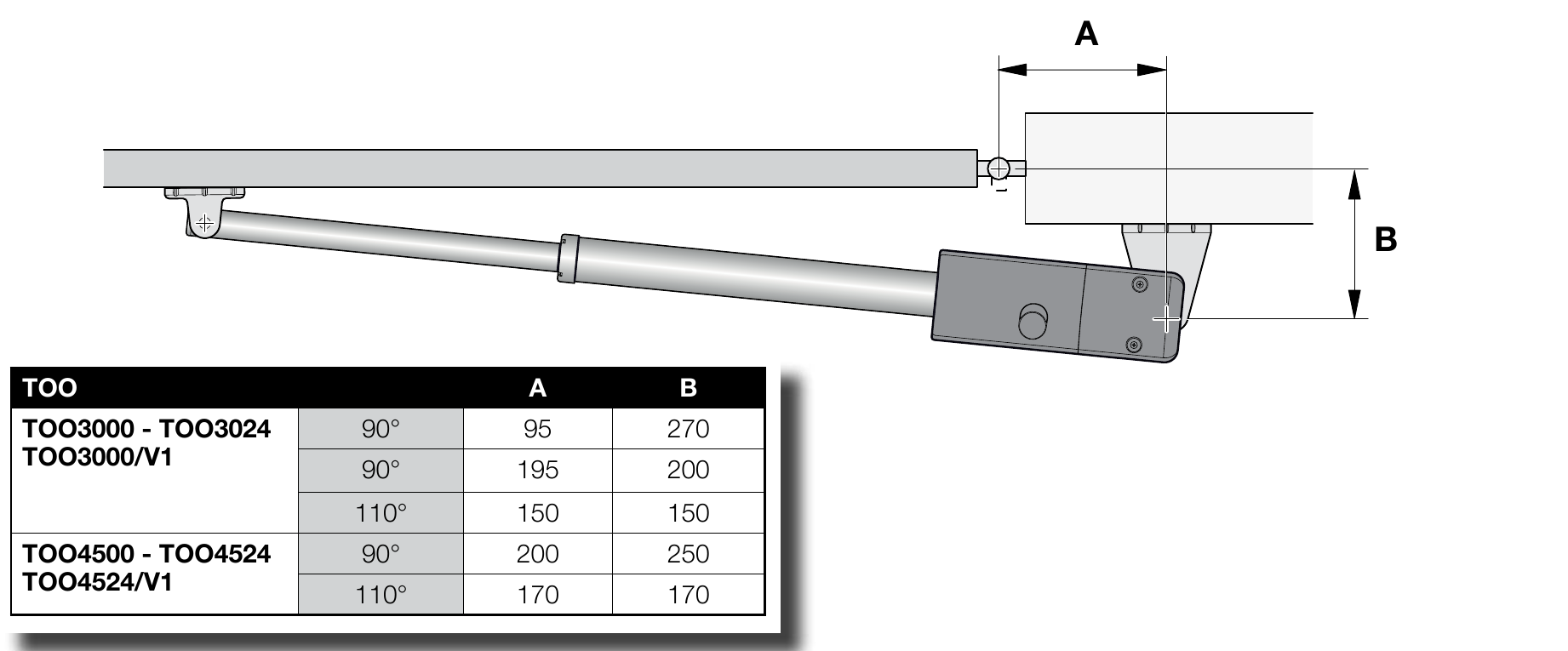
TOO4524 installation dimensions
| Opening angle | A [mm] | B [mm] |
|---|---|---|
| 90° | 200 | 250 |
| 110° | 170 | 170 |
For the specific post and bracket, see TOO4524 mounting bracket dimensions. If the hinge position or outward opening is unusual, have an installer specify a suitable mounting method that preserves dimensions A, B and C and keeps the motor and brackets clear of the leaf’s movement.
Dimension C with the gate closed
With the leaf closed, measure the distance C < 1 300 mm. The value must be below the stated limit; it must not equal or exceed it. Also maintain the selected A/B combination.
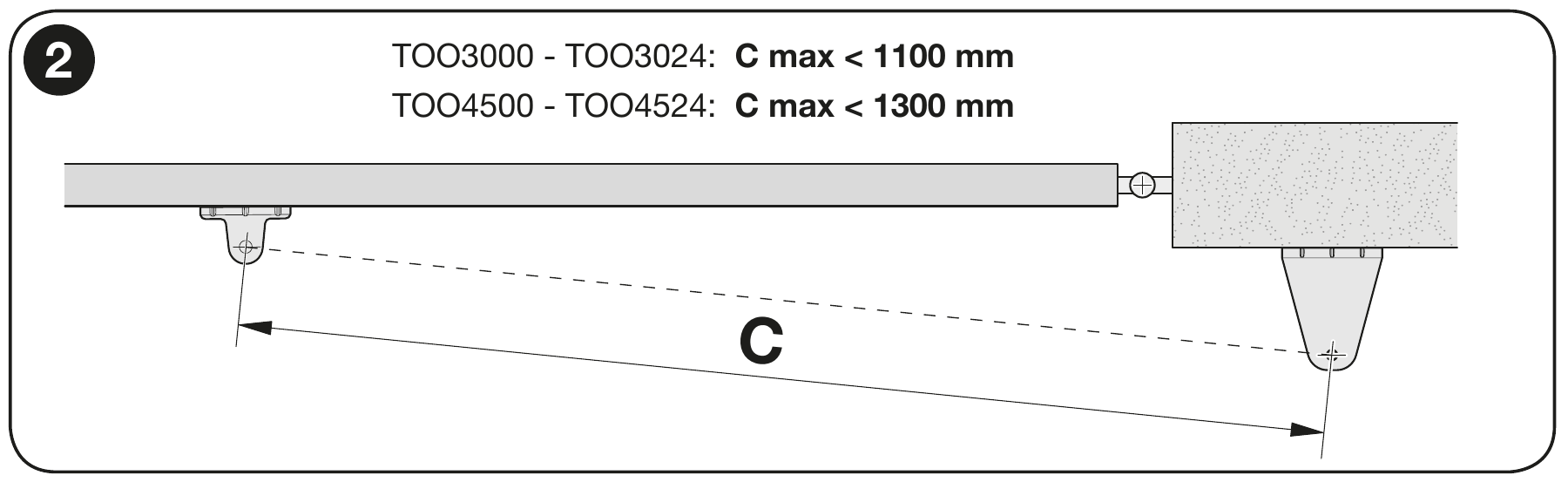
Mounting and movement check
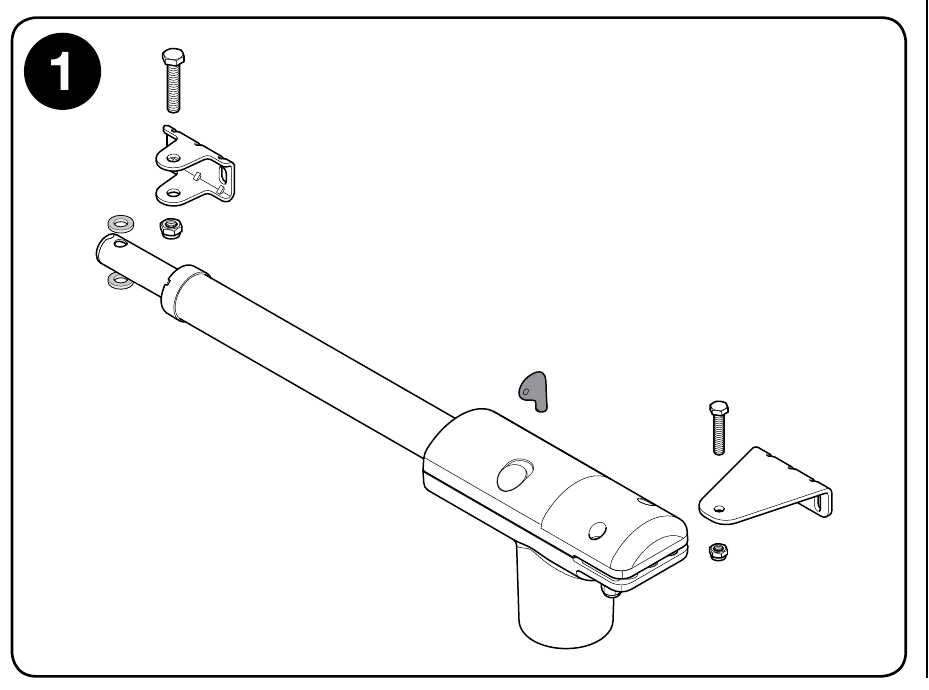
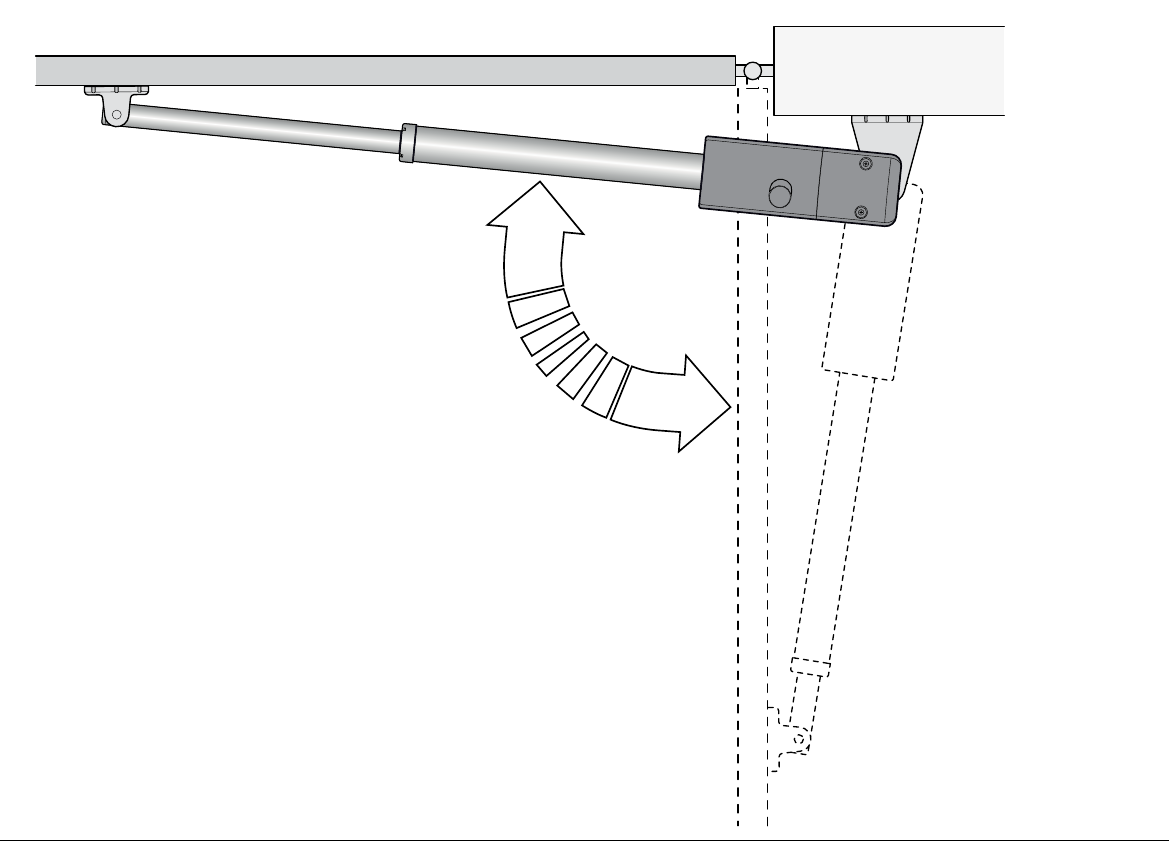
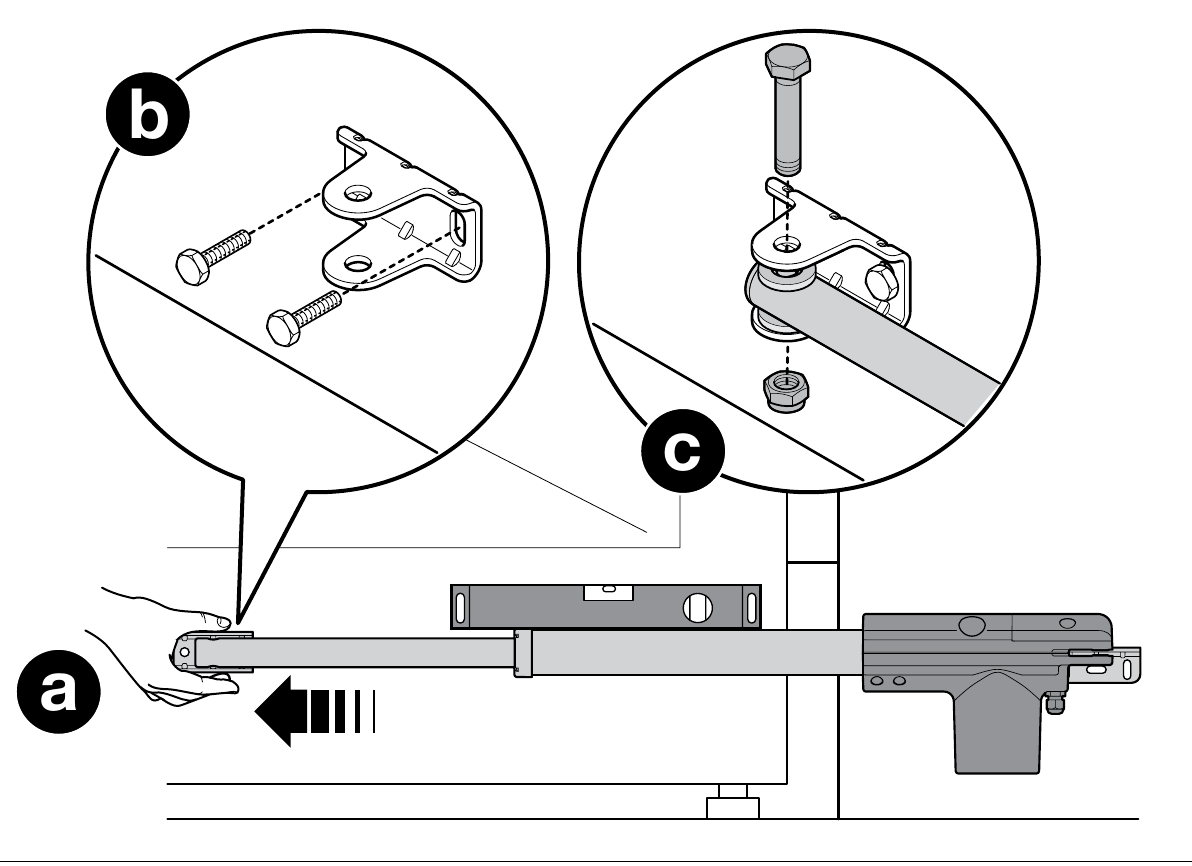
- Select one A/B combination for the specific motor and opening angle. Fasten the rear bracket to a sturdy post or a suitably designed supporting structure, then attach the motor to it.
- Operator release it with the key, fully extend the piston as shown in the NICE drawing, and temporarily position the front bracket against the sturdy gate frame.
- Level the motor and connect the piston to the front bracket. Check dimension C when closed and ensure the leaf moves freely through its entire travel.
- Check that the open leaf rests against the mechanical stop. Eliminate any binding or collisions involving the motor, brackets or leaf.
- Only after a successful manual test, permanently fasten the front bracket and secure the operator again. For a double-leaf gate, carry out the procedure on both leaves.
The gate must have suitable mechanical stops; the end of the piston stroke does not replace them. For a different post, adapt the anchoring method or use a suitable bracket while preserving dimensions A/B and C. Do not fasten the bracket to thin gate infill alone.
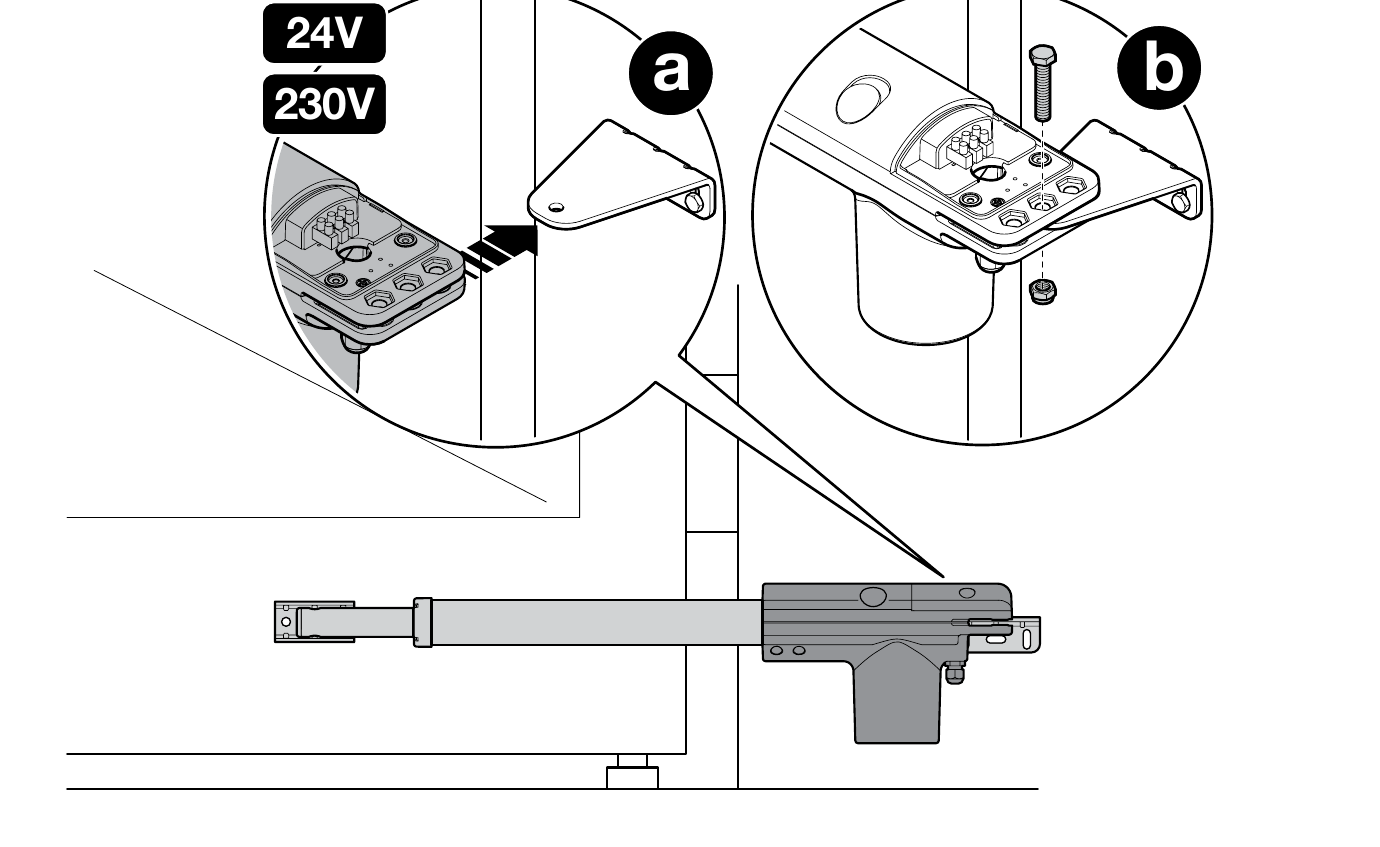
Wiring the 24 V motor
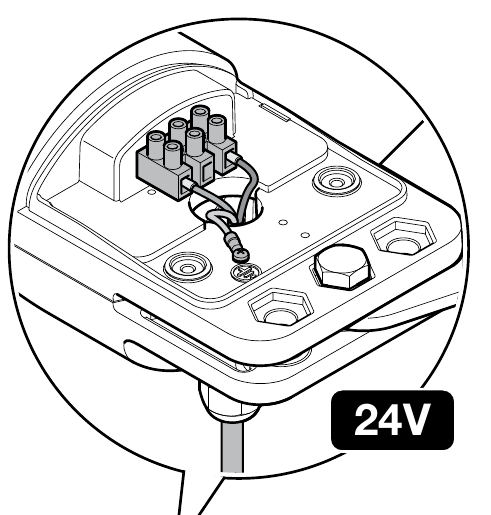
Disconnect both mains and backup power before opening the cover. Route the cable through the cable gland and strain relief. Connect the two motor wires and the PE protective conductor according to the diagram; connect PE to the designated grounding point, not to a motor output. Tighten the cable gland and close the cover.
With MC424LR30 one motor is connected to M2. With two leaves, M2 opens first and closes last; M1 operates in the opposite order. The control unit must be set to the exact TOO4524 model according to the motor selection table . Check the direction of travel and safety inputs before commissioning .
Test before first use
Installation and commissioning must be carried out by a qualified technician. After setting up the control unit, they must check the mounting is secure, the full travel, both stops, and the correct direction of movement, photocells, STOP, response to obstacles, and safety forces. Keep the travel area clear during testing. Provide the user with the manual release procedure and manual for the installed control unit.
Connecting accessories according to the MC424L board
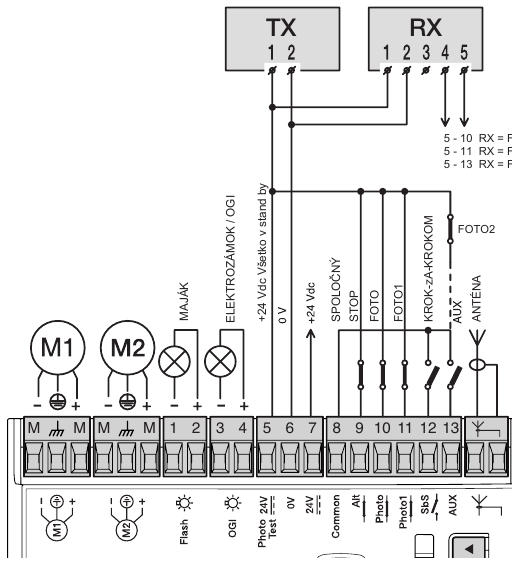
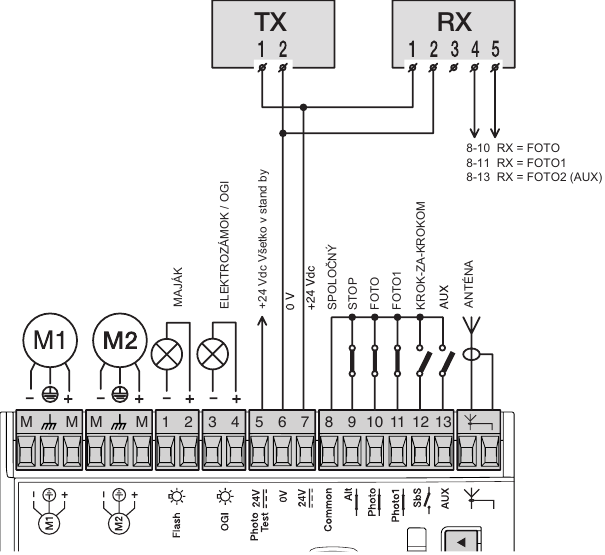
The TOO4524 drive is a 24 V motor; the terminals below are for the control unit. For supplied kits, check the marking on the installed board. Disconnect the mains power and battery before wiring. EPM relay photocells are not connected as BlueBUS devices.
MC424LR10 / MCA2R10 in TOO kits
| Component | Terminals and polarity |
|---|---|
| Auxiliary 24 V DC | 6 = 0 V (−), 7 = +24 V DC, with a maximum total of 200 mA. Terminal 8 = common +24 V for inputs without Stand-by all. Check the current draw of all powered devices. |
| EPM photocells | Without Stand-by all and without photocell testing, power TX and RX between 7 (+) and 6 (−). RX volt-free contact C–NC connect between 8 (common) and 10/FOTO, or 11/FOTO1 or 13/AUX, if AUX is configured as FOTO2. The contact has no +/− polarity. |
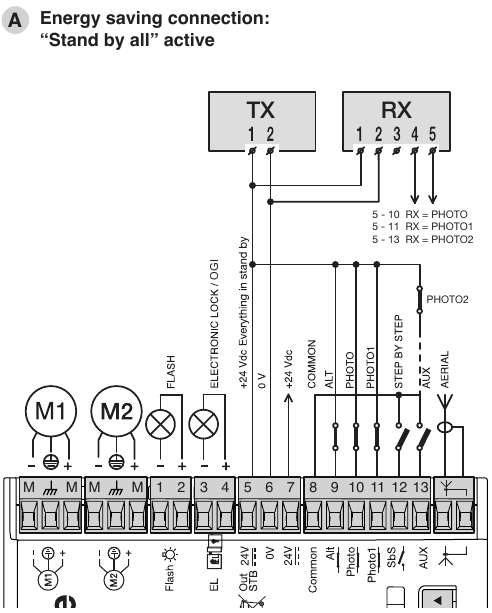
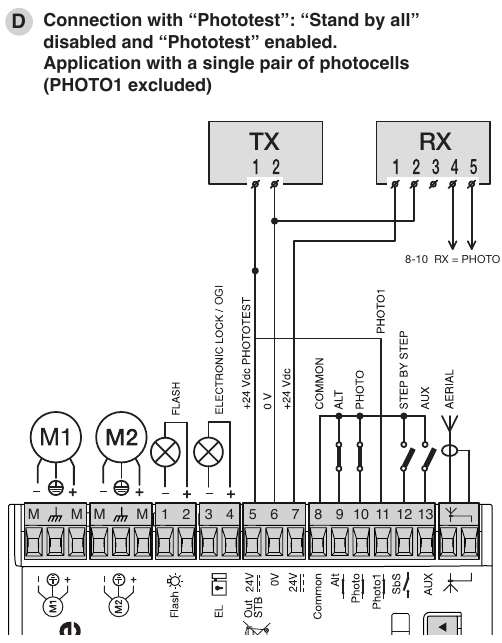
| Stand-by all / photocell test | These modes are mutually exclusive. With Stand-by all power TX and RX via 5 (+) / 6 (−); the common point for safety contacts is 5. With photocell testing, power TX via 5 (+) / 6 (−), maximum 100 mA; power RX via 7 (+) / 6 (−), connect the RX contact from 8 to the relevant FOTO input. Connect unused tested FOTO/FOTO1/FOTO2 inputs to 5 according to the diagram for the number of pairs, not automatically to 8. |
| STOP and command inputs | 9/STOP is for NC or 8.2 kΩ, depending on the learned mode; the common terminal is 5 in Stand-by all mode 5, otherwise 8. 12/step-by-step is NO relative to 8; 13/AUX depends on the configuration. Contacts have no +/− polarity; do not apply an external voltage to the inputs. |
| Flashing light, indicator light, electric lock | Flashing light 24 V DC/max. 25 W: 1 = −, 2 = +. OGI indicator light 24 V DC/max. 5 W: 3 = −, 4 = +. If 3–4 is programmed as an electric lock output, it is 12 V AC/max. 25 VA, with no fixed +/− polarity. Check the output function before connecting. |
| Radio receiver and backup | The receiver is fitted in the SMconnector, and the PS124 battery in its dedicated connector. They are not connected to the accessory power terminals. |
MC424LR30 / MCA2R30 with a separately selected control unit
| Component | Terminals and LR30 differences |
|---|---|
| Power supply and inputs | 6 = 0 V (−), 7 = +24 V DC for accessories, maximum 200 mA; 8 = common +24 V without Stand-by all. 9/ALT is NC or 8.2 kΩ; 10/FOTO, 11/FOTO1 are NC; 12/step-by-step is NO; 13/AUX depends on the configuration. Contacts have no polarity. |
| Stand-by all / photocell test | In Stand-by all mode, power TX/RX via 5 (+) / 6 (−) and the safety contacts, including ALT, share the common point 5. For photocell testing: TX 5 (+) / 6 (−), maximum 100 mA; RX 7 (+) / 6 (−); RX contact from 8 to the PHOTO input. Unused tested inputs are connected to 5 according to the relevant diagram. The modes are mutually exclusive. In Stand-by mode, output 7 drops to 21 V DC (±10 %), 2 W; check the current draw. |
| Outputs | Flashing light 24 V DC/max. 25 W: 1 = −, 2 = +. OGI indicator light 24 V DC/max. 5 W: 3 = −, 4 = +. With the electric lock function, terminals 3–4 provide 12 V AC/max. 15 VA, with no fixed +/− polarity. Check the programmed function before connecting. |
| Radio and backup | The receiver and battery use their own connectors; with an older battery and this control board, check the correct cable and the Stand-by all setting according to the MC424LR30 manual. |
Photocell diagrams for the specific control board
MC424LR10: Stand-by all · without Stand-by all and photocell test · photocell test.
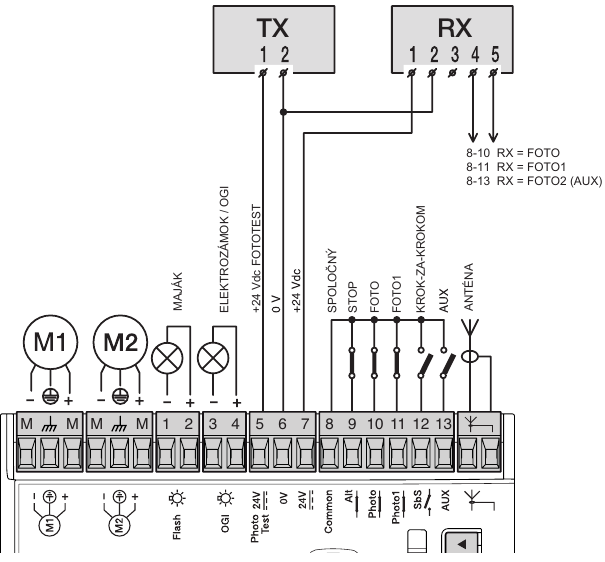
MC424LR30: Stand-by all · photocell test with one pair. Complete wiring diagrams, programming and setup are in the separate MC424LR30 manual.
After wiring, check the contact types, carry out the appropriate programming procedure, and test the safety devices during both opening and closing.
Compatible accessories
Accessories connect to the selected control unit, not directly to the motor housing. With an older control board, the connectors, radio receiver and output power supply may differ.
| What | Why | Type |
|---|---|---|
| Control unit | Controls one or two 24 V TOO motors. Manual and wiring depend on the control board actually installed. | |
| Flashing light | Warns that the gate is moving. Choose the voltage and power rating to match the output of the control unit used. | |
| Photocells | Monitor the area along the beam path. The control unit’s wiring, programming and safety input settings determine how the gate responds. See safety device test. | |
| Transmitter | Remote control compatible with the receiver protocol. The built-in MC424LR30 receiver supports Nice Opera. Two-way communication and long range require a receiver with the appropriate support. |
FLO2RE and FLO2R-S require a receiver that supports FloR. When replacing the control unit, also check that your existing remote controls are compatible. Pairing INTI2 with MC424LR30. |
| Radio / Wi-Fi / GSM | Board MCA2R30 has a built-in radio receiver. Wi-Fi or GSM control is an additional interface that requires a suitable connection. |
Other Wi-Fi modules should be selected according to the control unit's input. Zamel control uses the SUPLA app for Android and iOS. |
| Antenna | Helps extend the radio receiver's range; use an antenna that matches its frequency and connector. | |
| Keypad | Code-operated control. Wired EDS requires a decoder MORX; the wireless version must be compatible with the installed receiver. | |
| Key switch | Allows the gate to be operated with a key. Connect the switch contact to a suitable control input on the control unit, following its instructions. | |
| Card readers | Control by card or key fob. Reader ETP requires a decoder MORX and a control input on the control unit. |
|
| Electric locks | Help secure the closed gate leaf. The lock, power supply and timing must be matched to the specific control unit and gate. |
|
| Backup and solar power | Battery PS124 keeps the operator running during a power outage; with MC424LR30 requires a cable CABLA11 and switching off Stand-by all. Solar kit Solemyo is a standalone power supply method: the mains supply must not be connected at the same time, and Stand-by all must be enabled. |
Manual release in the event of a power failure
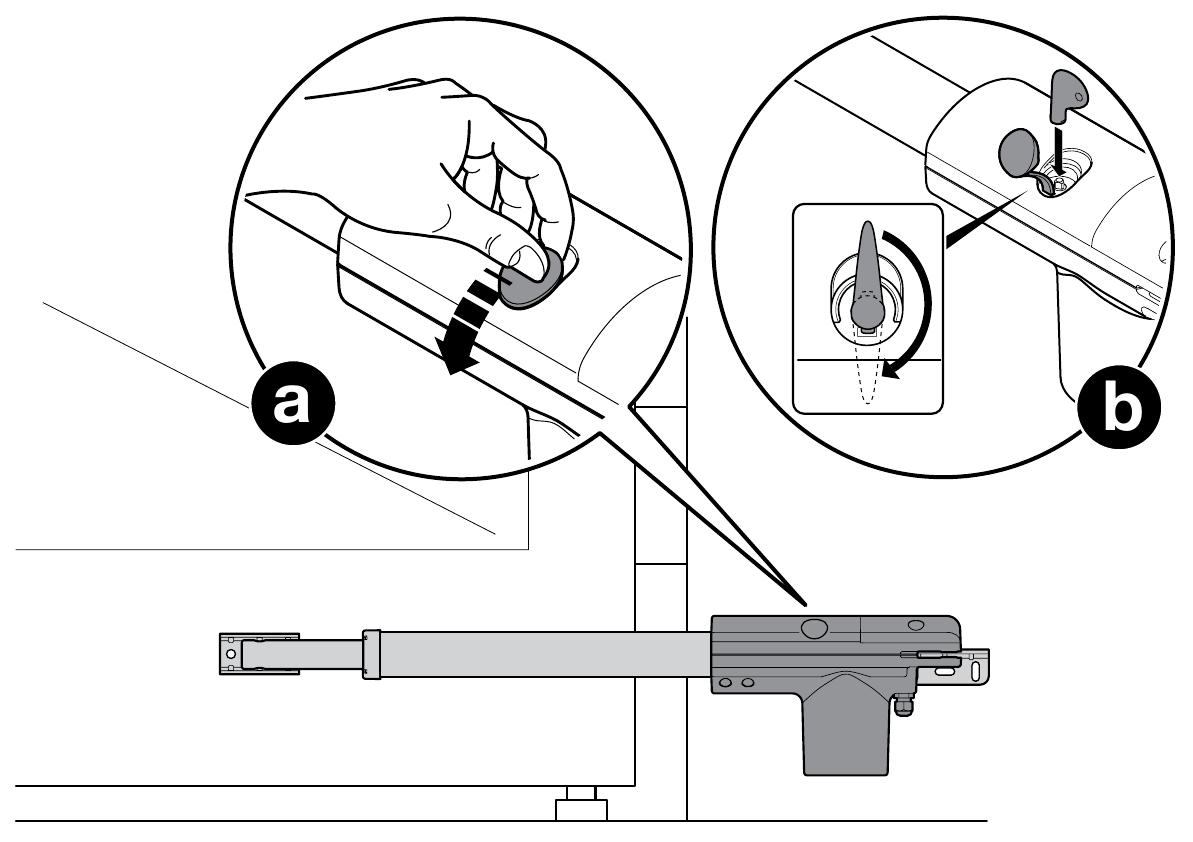
Open the rubber cover, insert the supplied key and turn it 90° clockwise. Then move the gate by hand. To re-engage the drive, position the gate leaf approximately halfway open and turn the key 90° counterclockwise. Before operating the motor again, check that the drive is securely engaged.
Maintenance and safety
Have the motor and the entire automation system inspected no later than 6 months after commissioning, and regularly thereafter depending on usage. With the power disconnected, a technician will check the brackets, screws, corrosion, moving parts, stops and safety devices; after the inspection, they will perform a functional test. If the drive is damaged or encounters unusual resistance, do not use the gate until the fault has been repaired.
Motor technical specifications
| Parameter | Value |
|---|---|
| Motor model | TOO4524 |
| Motor voltage | 24 V DC |
| Control unit power supply MC424LR30 | 230 V AC |
| Maximum length of one gate leaf | 4.5 m |
| Maximum weight of one gate leaf | 250 kg |
| Rated / maximum motor input power | 30 / 120 W |
| Rated / maximum current | 1.1 / 5 A |
| Rated / maximum force | 300 / 1,800 N |
| Travel speed | 0.014 m/s |
| Piston stroke | 500 mm |
| Protection rating | IP54 |
| Operating temperature | −20 to +50 °C |
| Weight of motor only | 5.5 kg |
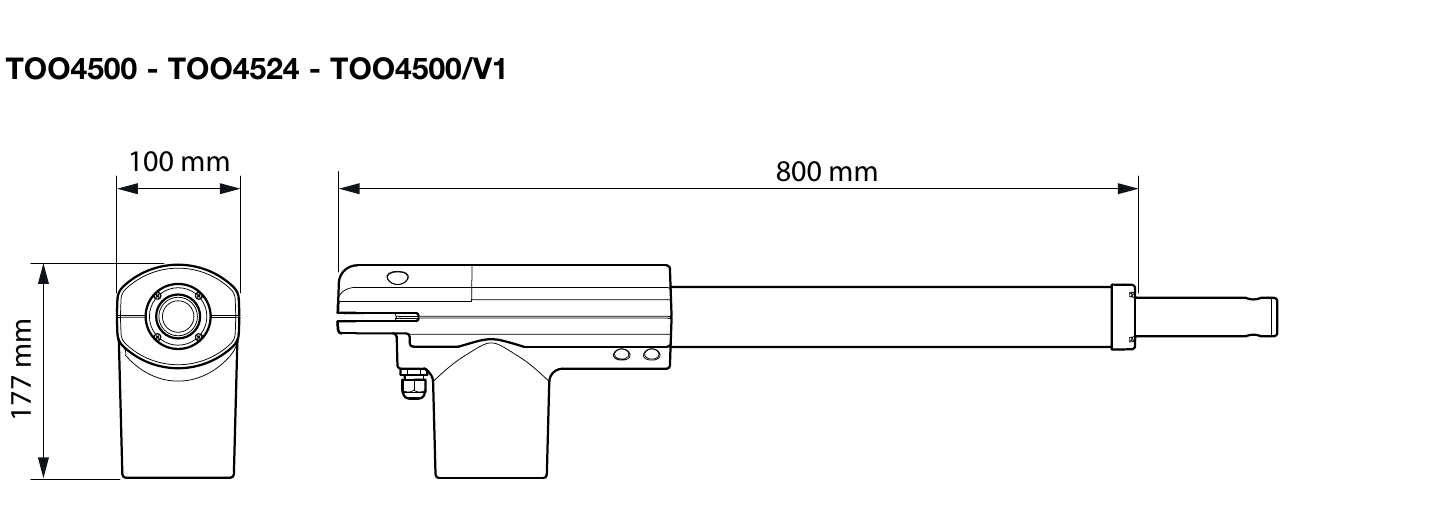
| Motor dimensions | 800 × 100 × 177 mm |
| Operating mode | Continuous operation |
NICE specifications apply at an ambient temperature of 20 °C (±5 °C). The weight of 5.5 kg is for the motor only. Maximum force and input power are not continuous-duty ratings.
How can I order this item?
Choose the option that suits you:
- order online: use the buy button to add the goods to your shopping cart (you will find the buy button here in the product variants table).
- order by email: place your order at [email protected]