Plan the operator together with the gate. Before manufacturing and pouring the concrete, compare the leaf length and estimated weight, infill, wind exposure, and number of openings. Check the space available for the brackets and prepare the wiring. For an existing gate, measure these dimensions and check the mechanism. Install the operator only after the finished gate leaf has passed a manual test.
| Swing gate: choose a topic | |
|---|---|
| Measuring and procedure | |
| Clearance and slope | Frame, hinges, and infill |
| Operator and brackets | Stops and accessories |
When choosing, carry out three checks: the leaf meets the combined length and weight limit, the brackets fit within the installation chart, and the system can handle the required usage. Meeting just one maximum is not enough.
How to choose a swing gate operator
Start with the length of one leaf, measured from the hinge axis, and the weight of the frame, infill, and hardware. For a new gate, use the details in the manufacturing drawing and material specifications, then check them again once it is complete. Record the usual number of openings and the busiest hour. A rating of “up to 2 m / 400 kg” does not mean that both maximums apply at the same time.
| Operator type | When to consider it |
|---|---|
| Wingo / Toona linear operator | For standard posts, provided the installation dimensions and stroke are suitable. |
| HOPP articulated-arm operator | The post requires a different mounting arrangement; check the full clearance for the arm. |
| S-Fab / M-Fab underground operator | When the operator should be hidden from view; a housing and drainage must be prepared. |
Example: adding an operator to an existing gate
You currently open two approximately two-metre leaves on steel posts by hand. When choosing, don't rely only on the “operator for gates up to 4 m” rating—each leaf must be assessed separately.
- With the infill in place, check the full manual movement of the gate. If a leaf needs lifting or forcing past a sticking point, repair the mechanism first.
- Measure the length from the hinge axis and determine the weight and opening angle. Take photos of the hinge axis, post, and frame from the yard; for a linear operator, also record its specific installation dimensions.
- Compare suitable motors and complete kits. Check that the kit includes the control unit, brackets, stops, safety devices, and access to the release key in the event of a power failure.
Related parts and procedures: manual test, operator models, measuring Wingo, kit contents.
24 V or 230 V motor?
| What you're comparing | 24 V DC motor | 230 V AC motor |
|---|---|---|
| Power supply | The motor is powered by the corresponding control unit. A standard system has a 230 V mains supply. | The motor operates on 230 V AC through a compatible control unit. |
| Backup battery | Possible only with a supported control unit and the correct battery module. Not included as standard in the kit. | A standard 24 V backup module cannot be connected here. Plan emergency access according to the specific system. |
| Slowdown and safety | Features depend on the motor, control unit, and any encoder. | Features also depend on the control unit and motor; voltage alone does not determine the equipment. |
| Which one to choose | Choose according to the leaf limits, geometry, number of cycles, and required features. | The same criteria apply. Higher voltage alone does not mean a more powerful or more suitable operator. |
For a typical home entrance, first decide whether you want battery backup, how often you will open the gate, and how many cycles will occur consecutively. Then compare specific models. Check the cycle count, safety features, and compatibility in the relevant manuals.
Overview of models by leaf length
The table shows the maximum leaf length for each model. Then check the permitted weight for your leaf length in the chart for the selected operator.
| Model | Length of one leaf, up to* | Motor power supply / manual |
|---|---|---|
| WG2024 | 2 m | 24 V DC Operator manual (PDF) |
| WG3524 | 3.5 m | 24 V DC Operator manual (PDF) |
| TO4024 | 3 m | 24 V DC Operator manual online Operator manual (PDF) |
| TO5024 | 5 m | 24 V DC Operator manual online Operator manual (PDF) |
| TO7024 | 7 m | 24 V DC Operator manual (PDF) |
| HO7124 / HO7224 | 2.4 m | 24 V DC HOPP manual online Operator manual (PDF) |
| SFAB2024 | 2.3 m | 24 V DC Operator manual (PDF) Chart and manual online |
| MFAB3024 | 3 m* | 24 V DC Operator manual (PDF) Chart and manual online |
| WG4000 | 2 m | 230 V AC Drive manual (PDF) |
| WG5000 | 3.5 m | 230 V AC Drive manual (PDF) |
| TO4005 | 3 m | 230 V AC Drive manual (PDF) |
| MFAB3000 | 3 m* | 230 V AC Drive manual (PDF) Graph and manual on the website |
* For M-Fab MFAB3000 and MFAB3024, use the 3 m limit as the basis for a new setup. Have the older name or documentation stating 3.5 m confirmed for the specific drive configuration; do not assume it applies automatically.
* The stated length is the model's upper limit, not a guarantee that the drive can also handle the maximum weight at that length. Also check the infill, wind exposure and mounting options.
The links in the table lead to the manuals for the individual drives. For the electrical connection, use the control unit wiring diagram supplied with the set; 24 V and 230 V motors have different wiring.
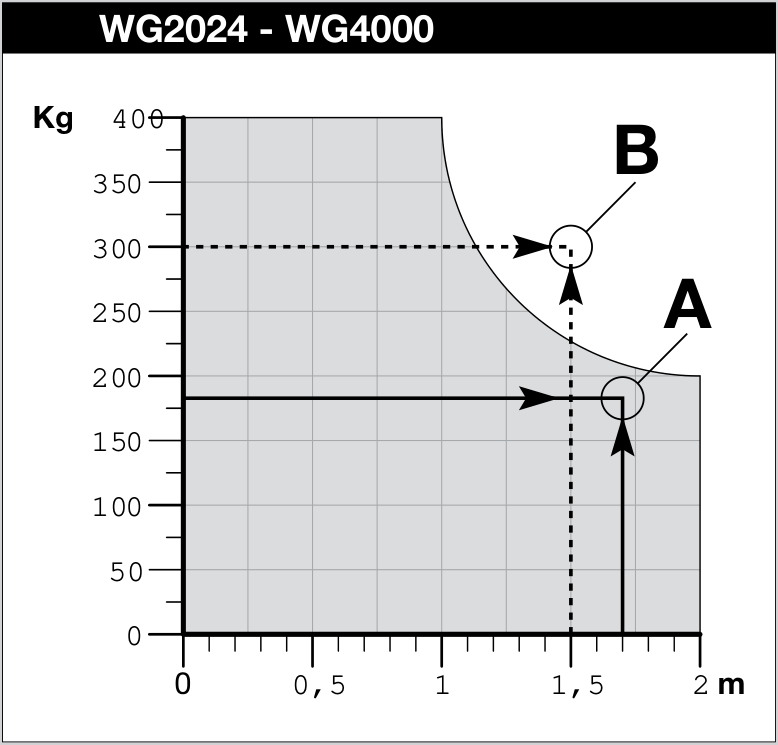
NICE Wingo WG2024/WG4000 chart: the permissible weight decreases as the gate-leaf length increases; at 2 m it is approximately 200 kg. Click to enlarge.
Example: how to read the drive limit
- Find the length of one gate leaf, measured from the hinge axis, on the horizontal axis. The vertical axis shows the weight of the finished gate leaf.
- For the Wingo WG2024/WG4000, the limit at 2 m is approximately 200 kg. Therefore, the standalone figure of 400 kg is not the load capacity for a two-metre gate leaf.
- If the point falls above the limit, the model is unsuitable. If it is within the permitted area, also check the infill and wind exposure, mounting dimensions and number of cycles. Only after all these checks can you make a decision.
Example for our gate: for two leaves approximately two metres long, the deciding factors are their actual length from the axis, weight, infill and mounting dimensions. The length/weight point on the chart, together with wind exposure and geometry, will show whether the WG2024 or another setup is suitable.
Full range of drives for swing gates »
When there is little room to open the gate
Consider opening the gate outwards when space on the property is limited. Check the entire swing area in front of the entrance, the property boundary and the drive mounting position. With Wingo and Toona linear drives, you will generally need an extended NICE PLA6 rear bracket; the installation diagram for the specific model will confirm whether it is needed and where it should go. See how to measure the space and slope. For a short driveway, a folding mechanismmay help; its joints, drive and pinch-point protection should be designed as one assembly.
Check drive geometry before welding on the brackets
Wide masonry pillar or recessed hinge
Measure the position of the hinge axis relative to the edge of the pillar and the finished mounting surface. Also measure the space behind the pillar and the required opening angle. Then compare the linear drive installation diagram with the space available for an articulated arm. HOPP is not an automatic solution for every wide pillar; the arm must travel through its full range without colliding with anything.
Wingo WG2024 and WG3524: where to measure A, B and C from
The following plan view is Figure 4 from the NICE Wingo manual. Use it together with the chart for your model: WG2024 and WG3524 have different installation charts. The drawing shows opening inwards; do not use its dimensions for Toona or HOPP.
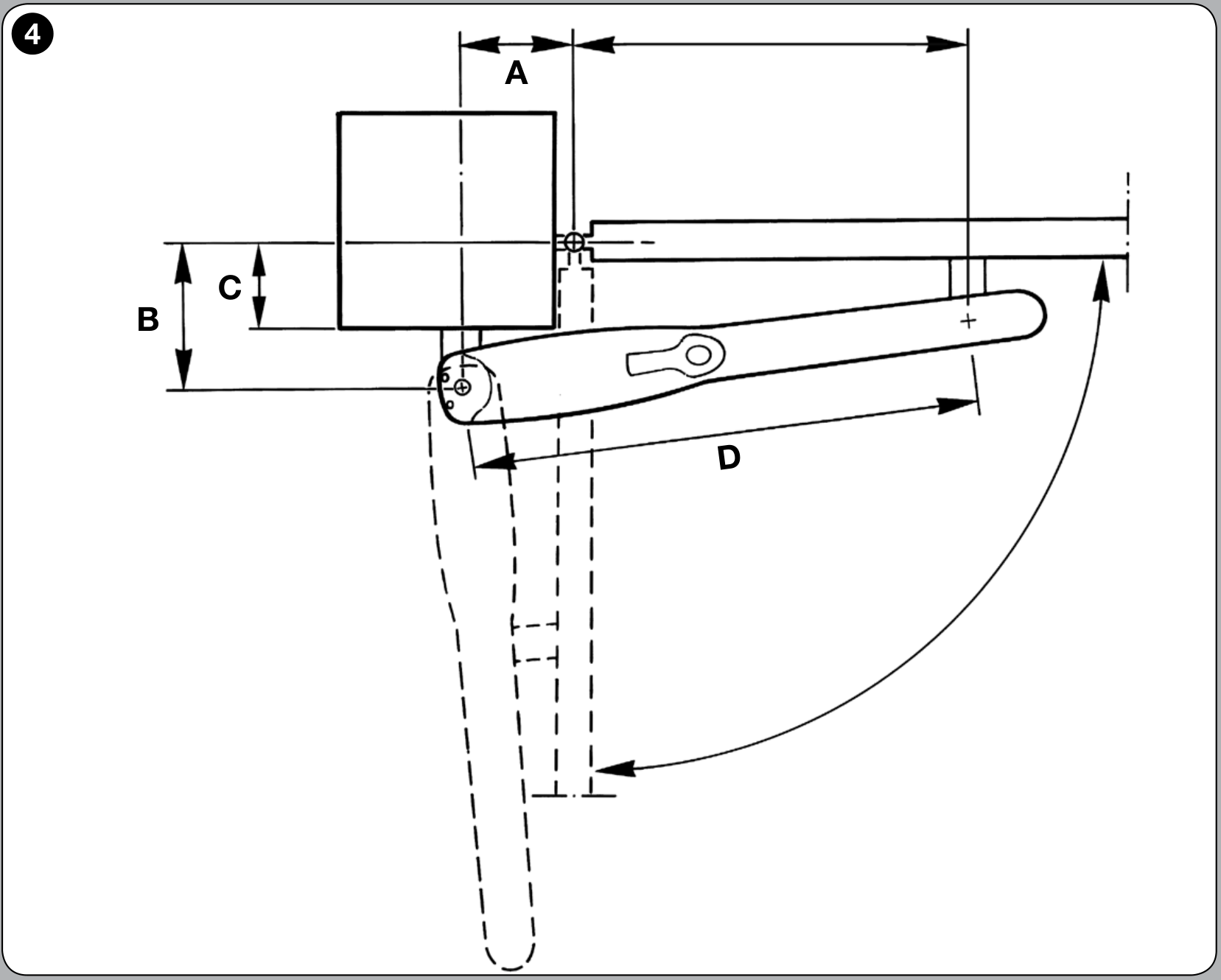
The solid line indicates the closed gate; the dashed line indicates the open position. Click to enlarge the drawing.
| Dimension | Where to measure from and to in the plan view |
|---|---|
| C | Perpendicularly from the hinge axis to the pillar surface where the rear bracket is attached. In the drawing, this is the lower edge of the pillar. Allow for the finished cladding. |
| A | In the direction of the closed gate leaf, from the hinge axis to the perpendicular projection of the centre of the drive's rear pin. In the drawing, this is the horizontal dimension above the pillar. |
| B | Perpendicular to the closed gate leaf, between the hinge axis and the centre of the drive's rear pin. In the drawing, this is the vertical dimension on the left. |
Measure to the centre of the axes, not to the edge of the motor. A set square or perpendicular guide lines on the sketch can help. The diagonal distance directly between the hinge and the rear pin is neither A nor B.
From the measured C to the bracket position
- Select the chart for your model. Find the measured C on the left. At the same height, read off B; A is shown on the chart's horizontal axis.
- Check the required angle. A horizontal line from C will intersect the recommended installation line (d.i.l.). Read off A by going down from the intersection. Check which angle range the point falls into.
- Check the dimensions on the pillar. Position the bracket so that the centre of the rear pin is at the selected A and B coordinates. If the required angle is not achievable, adjust the position within the permitted area of the chart; according to the manual, dimensions A and B should be similar.
- Determine the position of the front bracket. Select the D/E position for the model from Table 1 in the Wingo manual. Then check the specified height difference between the brackets, the full travel, unobstructed movement and access to the key.
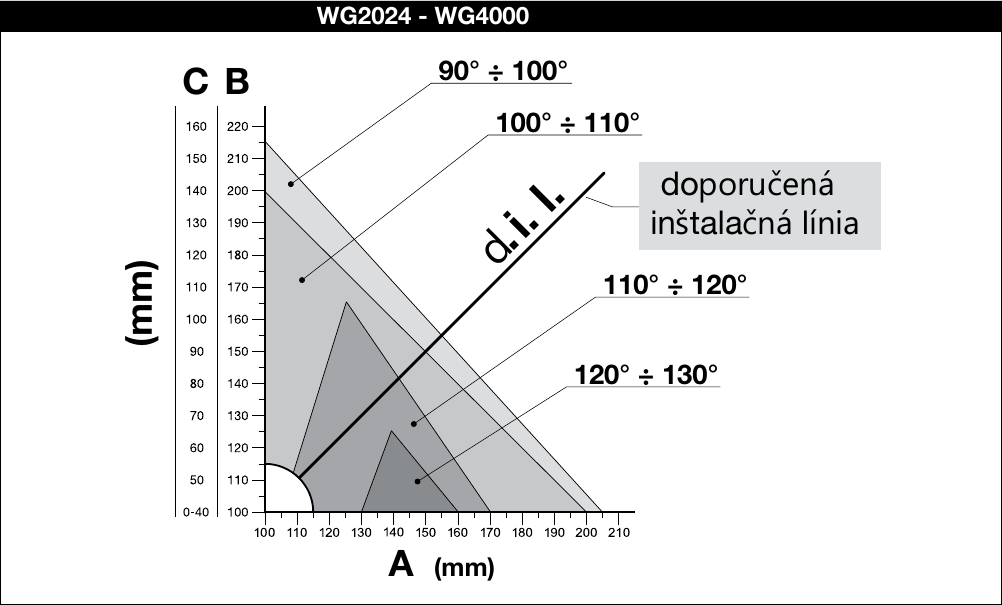
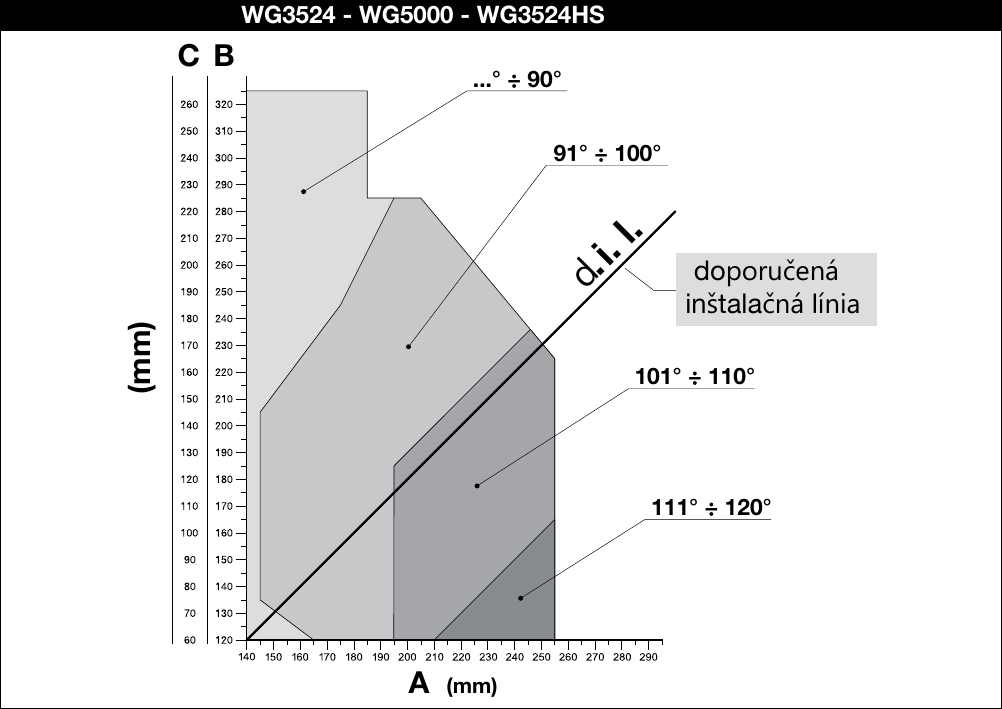
Click to enlarge the chart. These installation charts specify bracket positions; they do not replace the separate chart for gate-leaf length and weight.
Wingo installation charts in the manual (PDF)
If the bracket position does not work, do not simply move the pin to the nearest convenient spot. Check whether a suitable extended NICE PLA6 bracket, adapting it as specified in the manual, or using a different type of drive is an option. The front bracket must transfer force to the frame or reinforcement, not just to a thin slat. Assess the final position and anchoring together.
Wingo opening outwards
Opening outwards requires a different bracket arrangement. For the configuration shown in Figure 7 the Wingo manual specifies an extended PLA6 bracket. Use the relevant drawing and table, and check for clear passage and the motor's full range of movement. Figure 4 above is not a template for reverse mounting.
HOPP needs room for its arm
For HOPP, we are considering opening inwards. Measure the space required for the drive body and arm movement using the HOPP installation drawing for your model. At least 400 mm of clear space is required in the direction indicated in the drawing; this is not the width of the pillar. Check the arm's full travel, the hinge position and the secure mounting of the brackets.
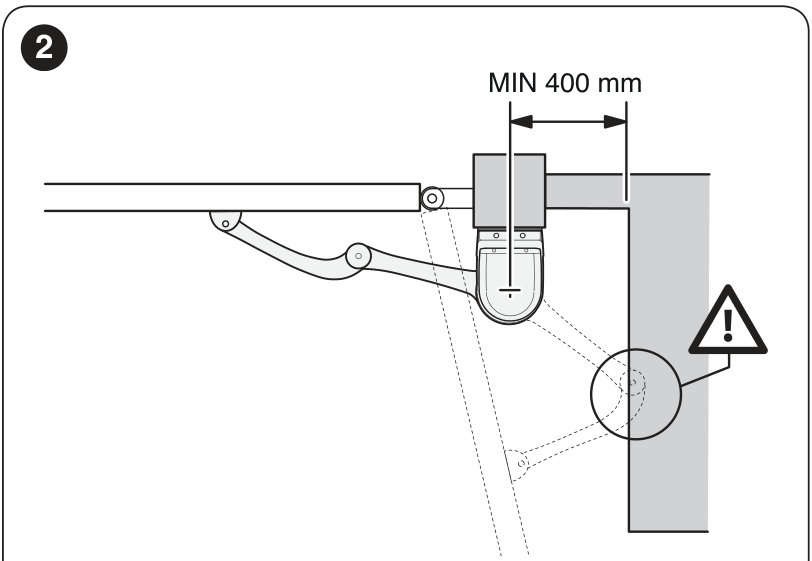
For a HOPP drive, leave at least 400 mm of clear space in the direction indicated in the drawing. Click to enlarge.
Example: the hinge is set deep into a masonry pillar
A wide post alone does not determine which operator is suitable for it. What matters is the position of the hinge and rear bracket, and the clearance needed for the actuator body or arm.
- Measure the dimensions according to the drawing for the selected linear actuator. If the bracket position falls outside the permitted area on the chart, do not simply move it just so it can be screwed in place.
- Check whether an extended bracket is available for that model, or choose an operator with an articulated arm. For HOPP, check the arm's full inward movement; the solution needs both clear space and a solid mounting surface.
- Mark the cladding edge, hinge axis and position of the load-bearing core in the photo. The bracket must be anchored to the load-bearing section, with suitable distances between the anchors and the edges.
Related parts and instructions: Wingo geometry, HOPP geometry, Post and anchoring.
Underground operator: axis and drainage
Determine the enclosure's position and dimensions before pouring concrete, based on the specific operator. Its output axis must be aligned with the upper hinge. Before ordering, check where water will drain from the enclosure and how you will access the cover and manual release. For M-Fab, also check the recommendation for an electric lock based on the gate-leaf width.
S-Fab SFAB2024 is the version without an encoder for the MC424 family. SFAB2124 has an encoder and uses MC824H; these designations are not interchangeable. M-Fab MFAB3024 is 24 V, while MFAB3000 is 230 V.
Plan the wiring before laying paving and pouring concrete
Wiring selection starts with the motor and the specific control unit. The 230 V supply to the control unit and the motor voltage are two different things. In the current Wingo WG2024/WG3524 kit with MC424LR30, the motors operate at 24 V DC. The HOPP HO7124 has the control unit in the main operator; HO7224 is the second motor.
| Route / component | What to prepare |
|---|---|
| Power supply | A separately designed supply line, protective devices and power disconnect. Electrical installation must be carried out by a qualified professional. |
| Both operators | A passage between the posts and cable outlets near the brackets. The number of cores and cross-section are determined by the motor and control unit. |
| Photocells | Routes to both sides and, if needed, to other locations as determined by the risk assessment. Relay-type EPM and BlueBUS EPMB are not electrically interchangeable. |
| Warning light and antenna | Cable outlet at a visible location. The lamp voltage depends on the output of the specific control unit. |
| Lock, safety edges, controls | Spare conduits and accessible connection points. The control unit manual describes the specific interface and power supply. |
Example: the paving has not been laid yet
First determine the positions of the control unit, both motors, photocells and controls. It is easier to prepare a passage under the driveway now than to take up the paving later. With HOPP, the control unit is in the main operator, so do not copy the cable routes from a setup with a separate control cabinet.
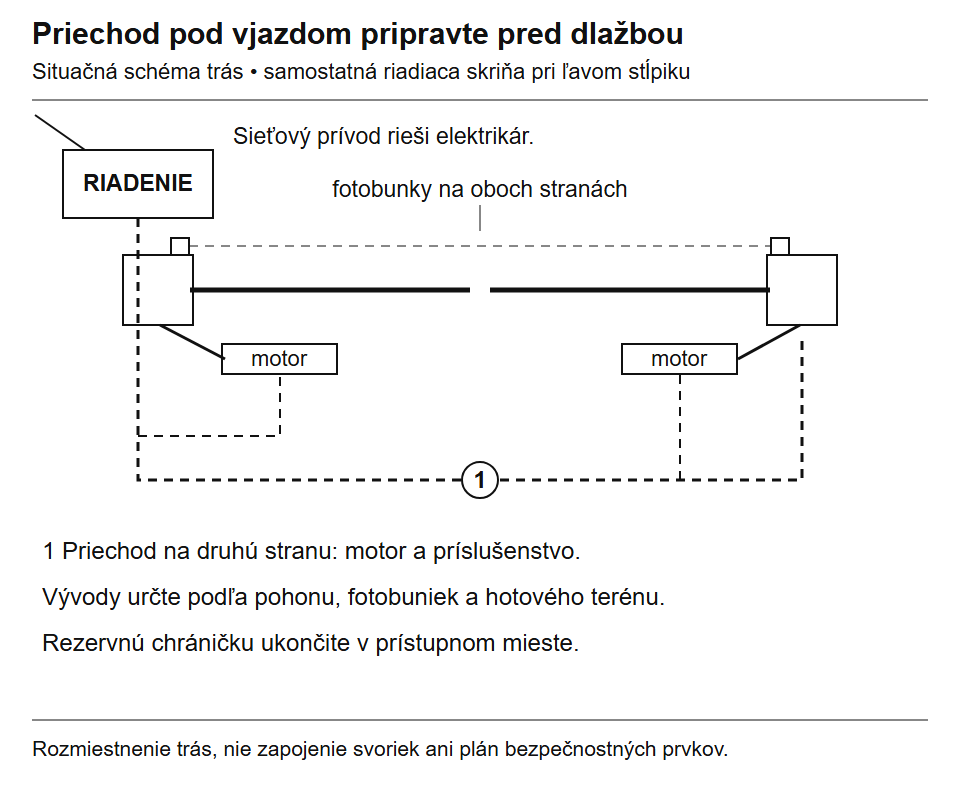
The diagram shows the building-work provisions. The electrical installation design for the specific setup determines the number of conduits, separation of cables and dimensions. Click to enlarge.
- Before digging: mark the finished paving level, exact cable outlets and any additional components, such as a keypad or electric lock, on the sketch.
- Before covering: check that the conduits are clear, install a draw wire and photograph the routes with measurements from fixed reference points.
- For future additions: consider installing a spare conduit. Its ends must remain accessible and protected from debris and water.
Have an electrician handle the mains supply, circuit protection, protective devices and cable installation. Connect the terminals and observe polarity according to the exact control board and accessories; the layout drawing is not a substitute for this.
Wiring example for MC424LR30
The following cross-sections and lengths apply to the Wingo setup with the MC424LR30. For another control board, use its own manual. An electrician must assess longer runs, voltage drop, cable type and installation conditions.
| Connection | Cable type specified in the table | Maximum |
|---|---|---|
| Supply to the control unit | 3 × 1.5 mm² | 30 m |
| Motor M1 / motor M2 | 3 × 1.5 mm² to each motor | 10 m |
| Warning light | 2 × 1 mm² | 10 m |
| Antenna | Shielded RG58 cable | 20 m; less than 3 m recommended |
See the MC424LR30 wiring diagram including photocells. For a single-leaf gate, the M1 motor output is unused; with another control unit, follow its own wiring diagram.
Before laying the paving, also decide on the location of the keypad, key switch or mobile control. The lock, sensors and controls may each require a separate route and a different power supply.
Where to check for trapping hazards
Safety depends on the complete system: the gate's design, its surroundings, the operator, the control unit and correct setup. A photocell monitors only its own beam. It may not detect a person near the hinge or in the space between an open gate leaf and a fixed fence.
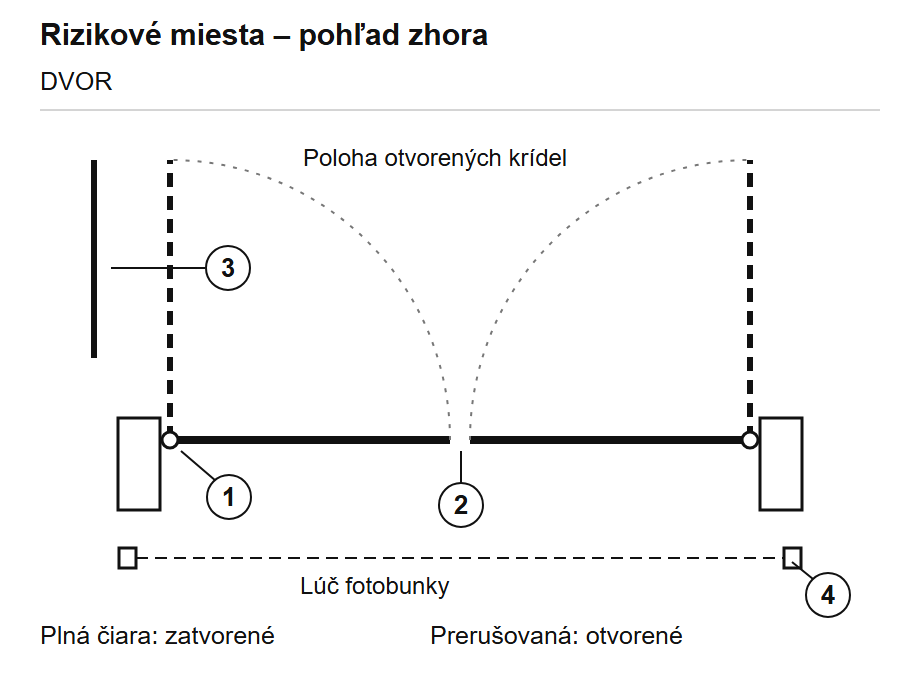
Solid line: closed position. Dashed line: open position of the same gate leaves. The drawing marks points to check; it does not specify safe distances.
| Location | What to check during testing |
|---|---|
| 1. At the hinge and post | Check whether the gap closes during movement in a way that could trap a hand or foot. |
| 2. Between the gate leaves | The movement sequence, overlap and end position at the central stop. |
| 3. Near a fixed obstacle | The full swing of the open gate leaf in relation to the fence, wall, car and pavement. |
| 4. In the driveway | Photocell positions, control-unit response and areas outside their beams. |
Choose protection based on the actual gaps and gate movement: guards, safety edges, suitable sensors or force limitation. Have a qualified installer commission the automation system. If protection relies on force limitation, its effectiveness must be verified using a suitable measuring instrument, in accordance with applicable requirements and the manual. Testing by hand or simply installing photocells does not replace this verification.
Installation and initial testing
- Confirm that the gate moves smoothly by hand, the hinges are secure and the stops work correctly.
- Before drilling or welding, check the dimensions and travel in the manual for the exact operator, including the bracket position when opening outward.
- Connect the motors, protective devices and controls according to the diagram for the control unit actually supplied. Mains connection must be carried out by a qualified professional.
- Set the direction, gate-leaf sequence, travel, forces and safety-input responses according to the manual.
- Run repeated cycles and test the safety functions, manual release and behaviour after a power failure.
If a gate leaf sticks or stops in the wind, check the mechanics, infill and suitability of the selected model. Simply increasing the force does not fix the underlying cause.
Frequently asked questions before ordering
Can a drive be added to an existing gate?
Yes, if the gate is suitable for automation. Check that it moves easily by hand, and inspect the hinges and frame strength. Then measure the space for the brackets. If the gate leaf catches, sags or twists, repair the mechanism first.
Can I install the drive later?
Yes. However, choose a suitable type while building and check its installation dimensions. Prepare solid mounting points for the brackets and conduits for the motors and accessories. For an underground drive, you also need to plan the housings and drainage in advance.
How do I open the gate during a power outage?
Follow the instructions to release the drive with the key, then open the gate by hand; if it has a lock, unlock that too. Test access to the manual release in advance, especially if you don't have a separate pedestrian gate. For this type of entrance, choose an emergency access method before installation.
If the gate is the only entrance to the property: Before buying, check how you'll access the motor release and lock during a power outage. A key kept inside the house won't help if you're locked out. Consider a second entrance or an approved external release for the system; a compatible battery backup has limited capacity.
Battery backup is only an option with a setup that supports it. If you have an electric lock, also check its status during a power outage. Automatic release of the drop bolt won't release a jammed drive by itself.
Maintenance and common problems
| Symptom | What to check first |
|---|---|
| Gate leaf has sagged | Hinges and their locking, anchor points, frame distortion and movement of the post. |
| Catches only along part of its travel | Ground conditions and obstructions, hinge alignment and bracket geometry. |
| Stops in windy conditions | Gate infill and wind, drive suitability and the mechanism. Increasing the force alone won't solve the problem. |
| The leaves collide when closing | Leaf sequence, overlap, stops and settings for the specific control unit. |
| Water in the underground housing | Drainage, clear drainage outlet and condition of the housing. |
| Gate does not respond | Power supply status, indicators and diagnostics for the exact control unit model. Safety inputs remain part of the wiring. |
Regularly checking the fixings, hinges, stops, corrosion, free movement, safety devices and manual release will keep the gate in good condition. The inspection interval depends on the manufacturer's recommendation and how often the gate is used. Carry out maintenance with the power disconnected, including the backup supply, and with the leaves secured. Lubrication requirements depend on the specific fittings.
We'll help you choose a setup for your entrance
Send us the length and approximate weight of each leaf, the type of infill, the hinge axis position relative to the post, the required opening angle and photos of the site. We can advise you on choosing a drive and accessories; compatibility is confirmed using the installation diagram for the exact model and the installation conditions.
| Continue with what you need to solve |
|---|
| Stops, drop bolts and accessories · All situations and examples |






