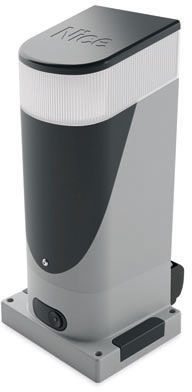
NICE Slight SLH400 - drive for sliding gates up to 400kg (A)
| Product availability: | In stock | We normally dispatch goods within 24 hours. |
|---|
in stock
€588.21 including VAT
| Weight |
|---|
| 7,00 kg |
Description of NICE Slight SLH400 - drive for sliding gates up to 400kg (A)
NICE SLIGHT SLH400 is a compact electromechanical operator for a sliding gate weighing up to 400 kg with a leaf length of 6 m, depending on operating conditions. The standalone motor in variant A already includes a built-in control unit NKA3R10 and light. The motor runs on 24 V DC, while the operator's standard mains supply is 230 V AC.
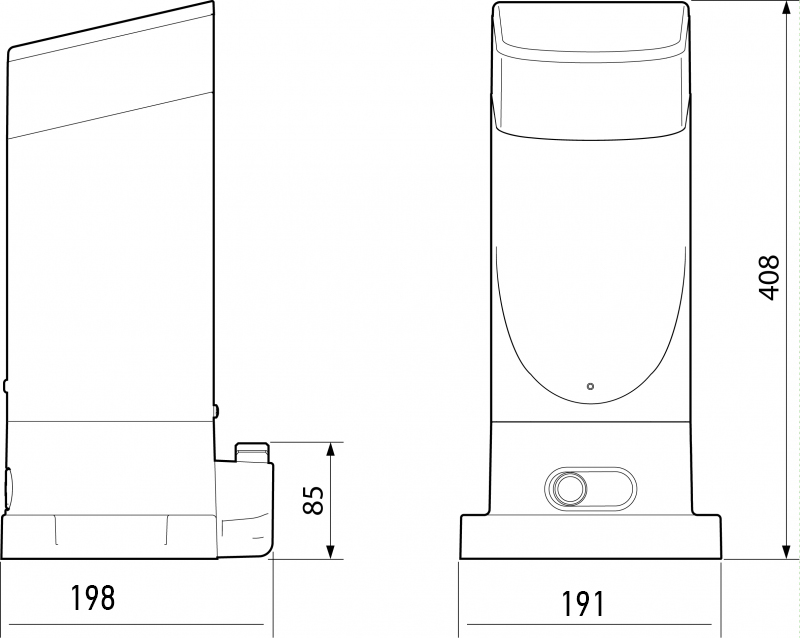
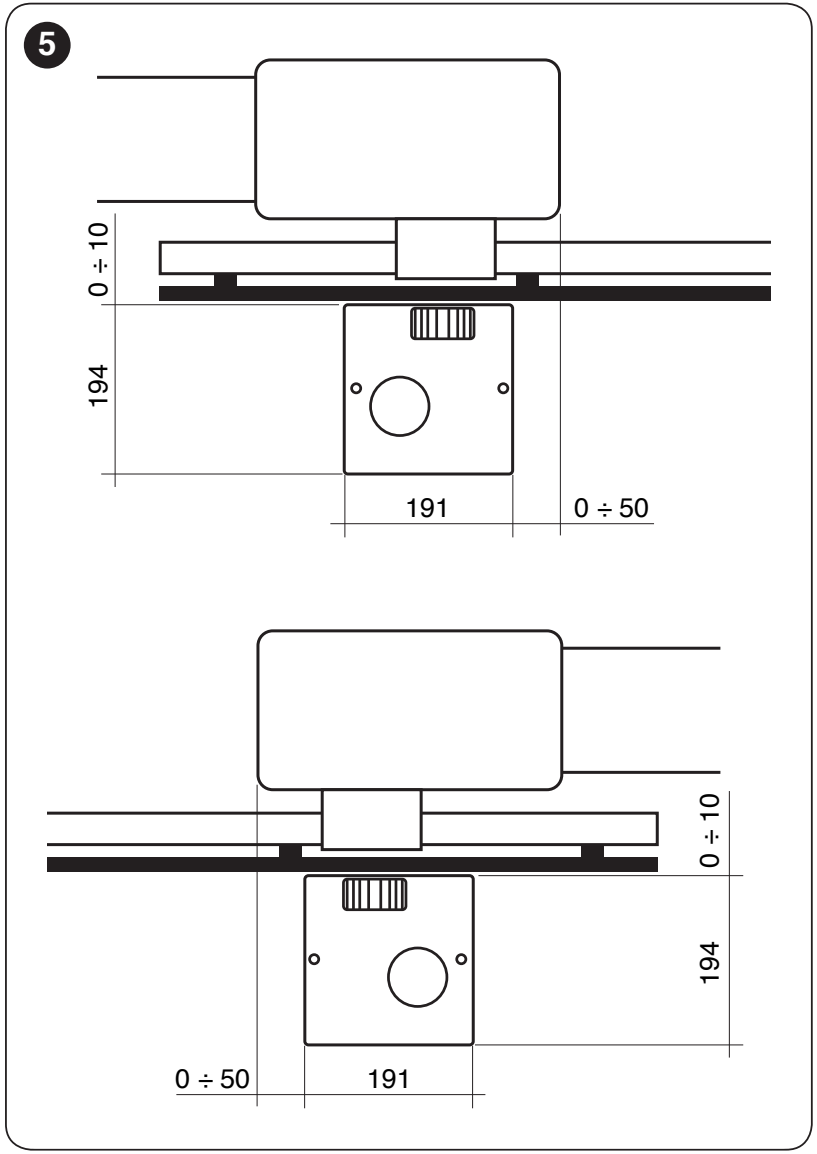
With a footprint of approximately 191 × 198 mm it is suitable where space next to the gate is limited. The internal limit switches allow installation without rack-mounted limit switch tabs: for a gate that runs in front of the fence, the operator can, depending on the geometry, be fitted on the inside near the edge of the opening, or on a track-mounted gate with little overhang. Rigid gate safety stops and sufficient rack overhang must be retained.
The operator is non-reversible; in the event of a power failure, it can be released with a key. The optional PS124 battery fits inside the operator housing. Supported features include automatic closing, partial opening for pedestrians, force and speed adjustment, and synchronisation of two opposing gate leaves.
When to choose the NICE SLH400 operator
Before choosing, check the gate leaf's weight, length and resistance throughout its travel. The gate must move smoothly, without sticking or moving on its own. Snow, ice, wind and wear increase the load. The rated thrust is 200 N; for measured travel resistance, the manufacturer recommends a margin of at least 50%, i.e. approximately up to 100 N.
Leaf length, weight and number of cycles
| Leaf length | Max. cycles/hour | Max. consecutive cycles |
|---|---|---|
| Up to 4 m | 35 | 14 |
| Over 4 m up to 6 m | 23 | 11 |
| Leaf weight | Cycle-count adjustment | Maximum speed |
|---|---|---|
| Up to 200 kg | 100% of the stated values | V6 – exceptionally fast |
| Over 200 kg up to 400 kg | 50% of the stated values | V5 – very fast |
For example, after applying both tables, a 5 m / 350 kg leaf is limited to approximately 11 cycles/hour and 5 consecutive cycles, at a maximum speed of V5. One cycle is a complete opening and closing sequence. Higher temperatures may further restrict the permitted operation; the thermal limiter is no substitute for choosing the right operator.
Standalone motor and kits with accessories
Motor A includes the control unit and built-in light. Remote control requires a compatible receiver and transmitter; choose the rack, photocells and any separate warning light to suit the installation. Kits B–F include different accessories; the limits for a single leaf remain the same.
| Configuration | Configuration | Configuration |
|---|---|---|
| A – standalone motor
NKA3R10 and built-in light; receiver, transmitters, photocells and rack are selected separately. | B – basic kit
MYGO4 and OXIBD. | C – with photocells
MYGO4, OXIBD and one pair of EPMB photocells. |
| D – with photocells and warning light
MYGO4, OXIBD, EPMB and ELDC. | E – with photocells and rack
MYGO4, OXIBD, EPMB and 4 × 1 m of rack. | F – with flashing light and rack
MYGO4, OXIBD, EPMB, ELDC and 4 × 1 m rack sections. |
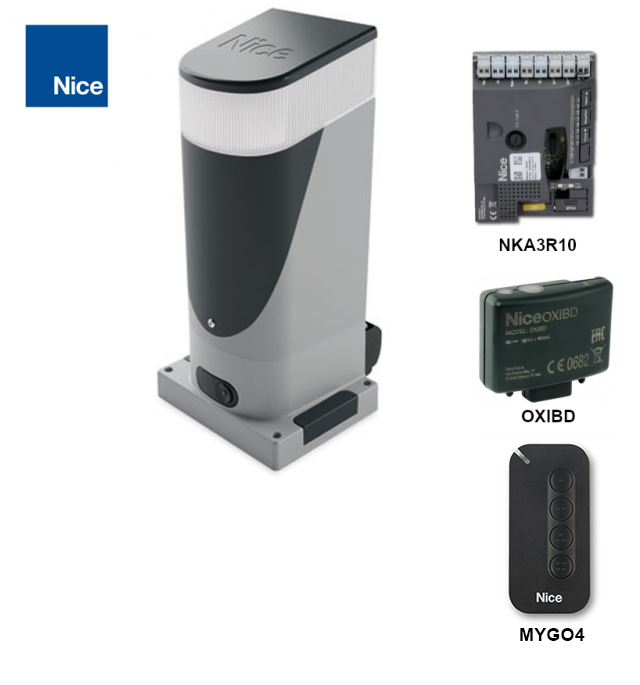
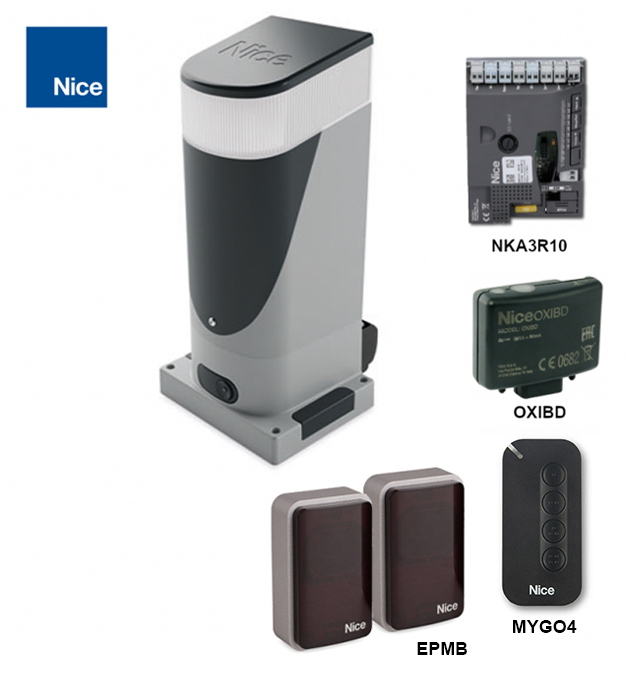
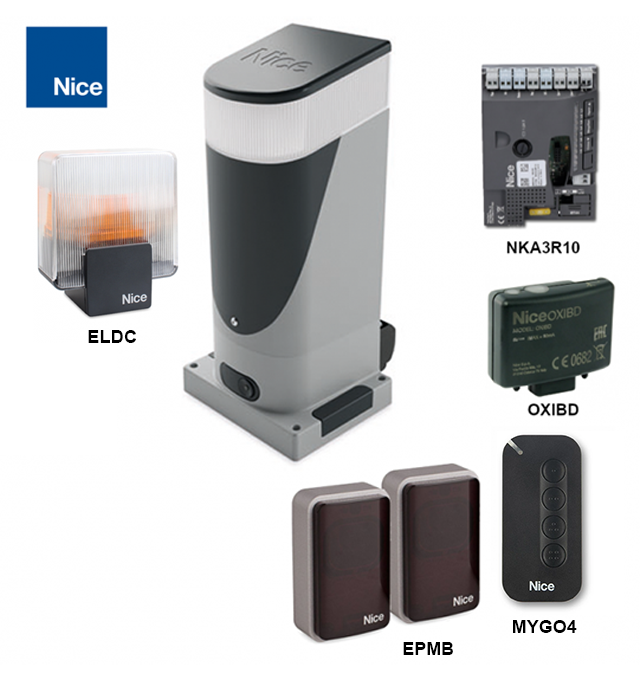
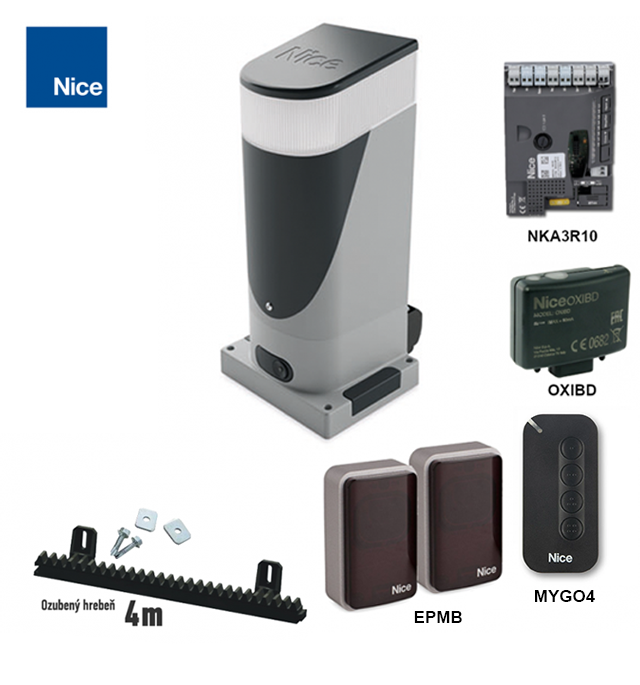
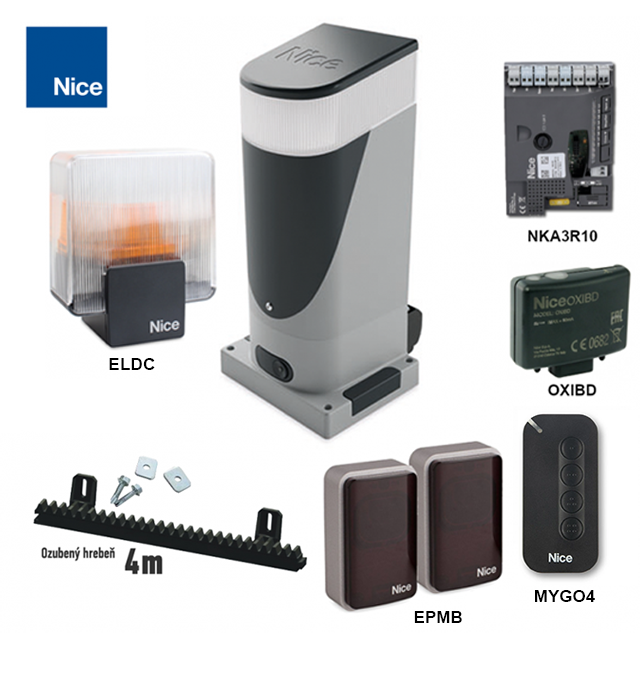
E/F kits include 4 m of rack; for a longer gate, add the required length with an allowance for installation. When replacing the receiver or remote control, check the specific coding.
What you need for the setup
| What | Why | Type |
|---|---|---|
NKA3R10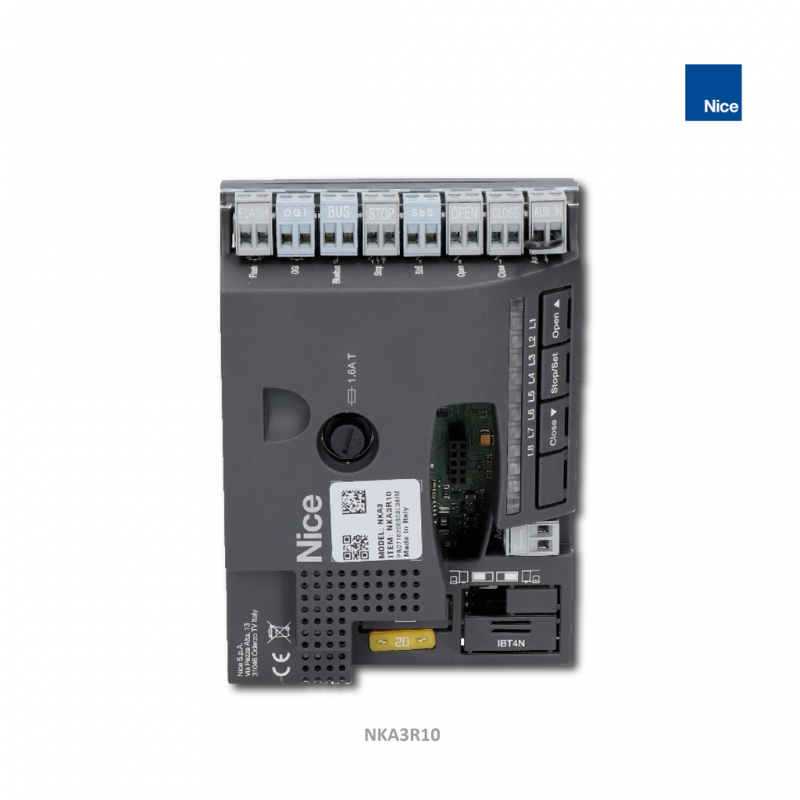 | The SLH400 has a built-in control unit; the circuit board is also suitable as a replacement part. | |
EPMB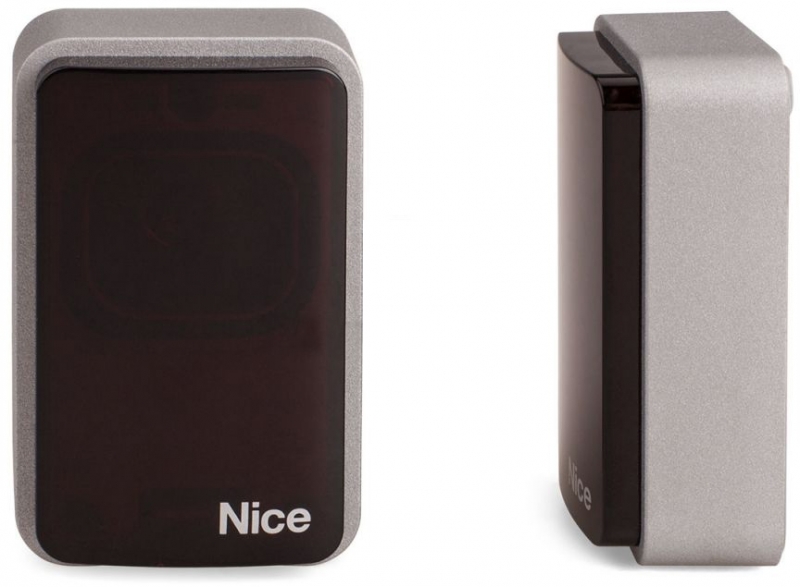 | BlueBUS photocells monitor hazardous areas; choose the function according to the risks. | |
OXIBD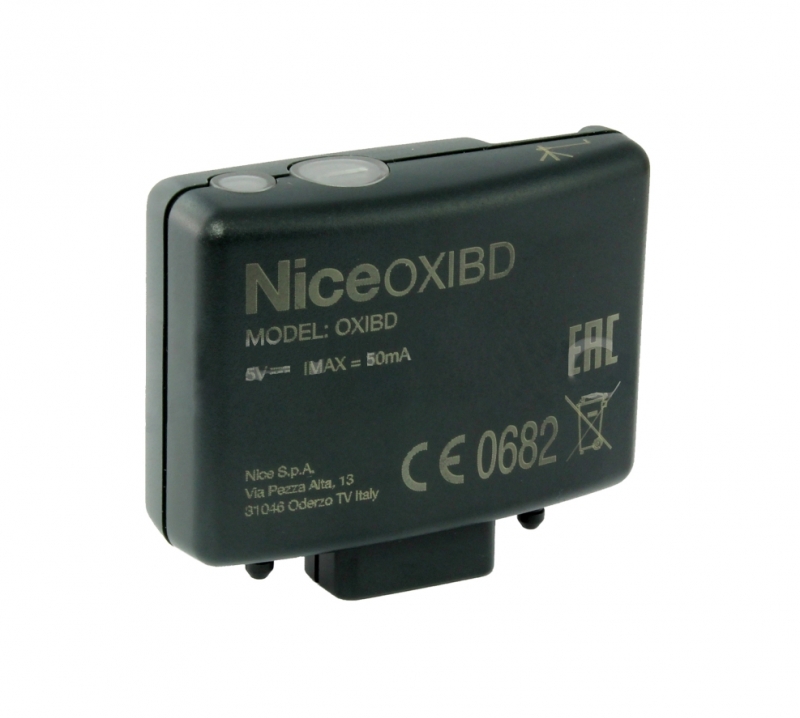 | Plug-in radio receiver for compatible remote controls; not automatically included with the operator on its own. | |
PS124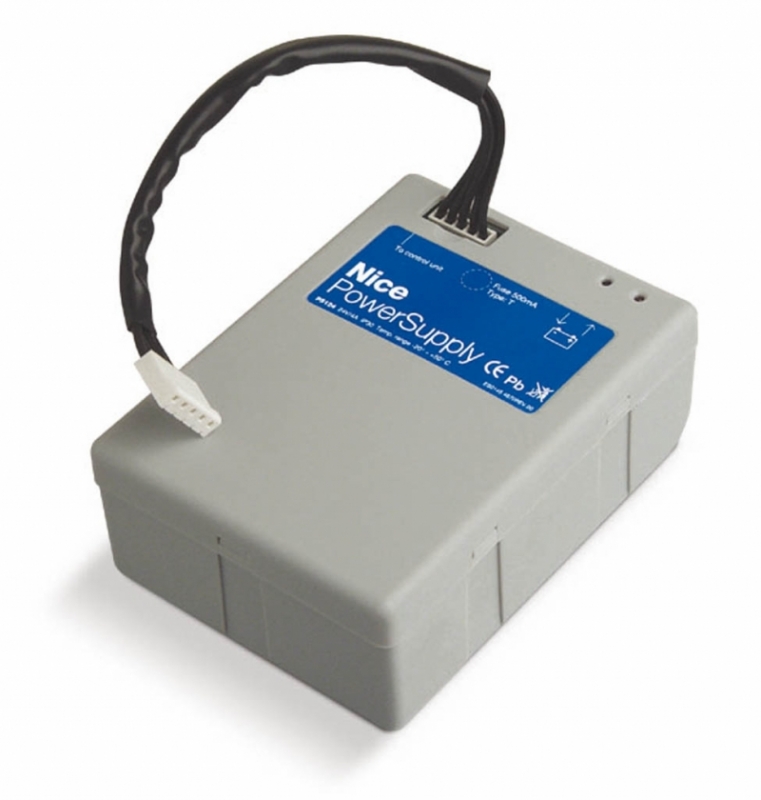 | Backup operation during a power outage. | |
WLT | The SLH400 already includes light electronics; the standalone WLT has its own housing. |
A more compact alternative to the photocells is EPSB. Both use BlueBUS; relay-type EPM/EPS photocells cannot be connected to BlueBUS as direct replacements.
The drive sprocket uses module 4. A suitable option is nylon rack with steel reinforcement, or a suitable metal rack with the same geometry. A higher rack rating alone does not increase the SLH400's limit.
Installing the SLH400 operator
The SLH400 uses the control unit NKA3R10. Assess the mechanical installation, housing and internal limit switches based on the actual SLH400 operator.
Installing the operator and rack
Installation, mains wiring and safety testing must be carried out by a qualified technician. Disconnect the mains supply and backup battery before starting work. Check the gate's structural integrity, wheels and guide, secure end stops, anti-derailment protection, clear access to the manual release key, and drainage around the operator. Any wicket gate in the gate leaf must have a suitable movement interlock.
- Position the gate approximately halfway along its travel. Choose the operator position based on the opening direction and the original mounting geometry.
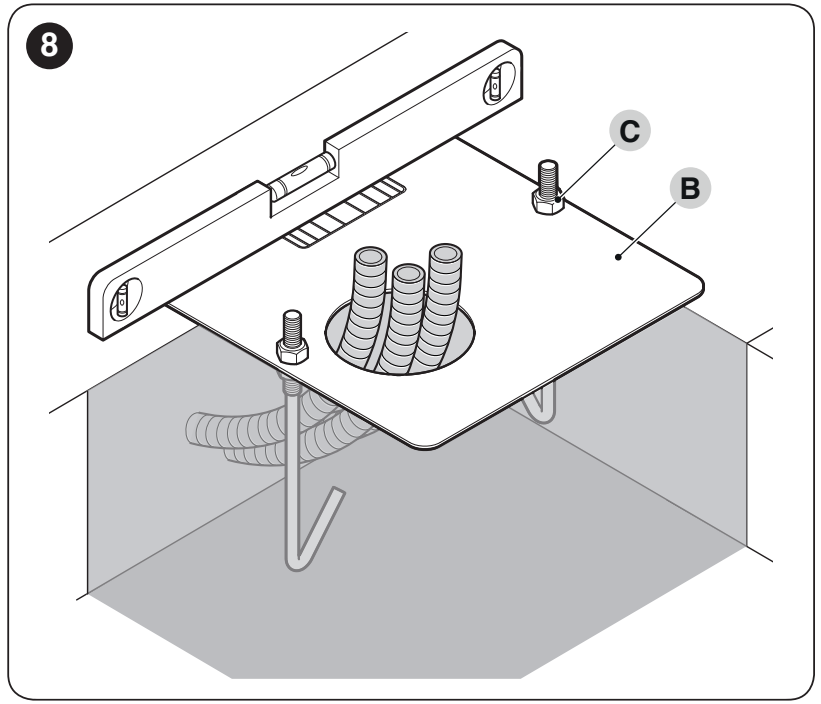
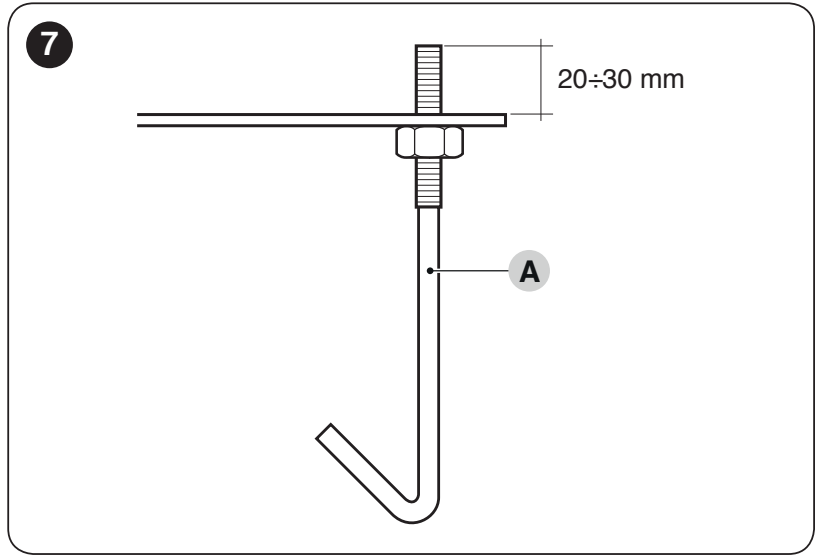
- Prepare a solid, level base, conduits and mounting plate. For cast-in anchors, leave approximately 20–30 mm of thread projecting above the plate; allow the concrete to cure fully.
- Position the operator parallel to the gate leaf, initially secure it loosely, and check its alignment with the rack.
- Disengage the operator; when installing the rack, position the gate at least 50 cm from the closing stop. Fit the rack sections progressively, following the sprocket, with no step between sections.
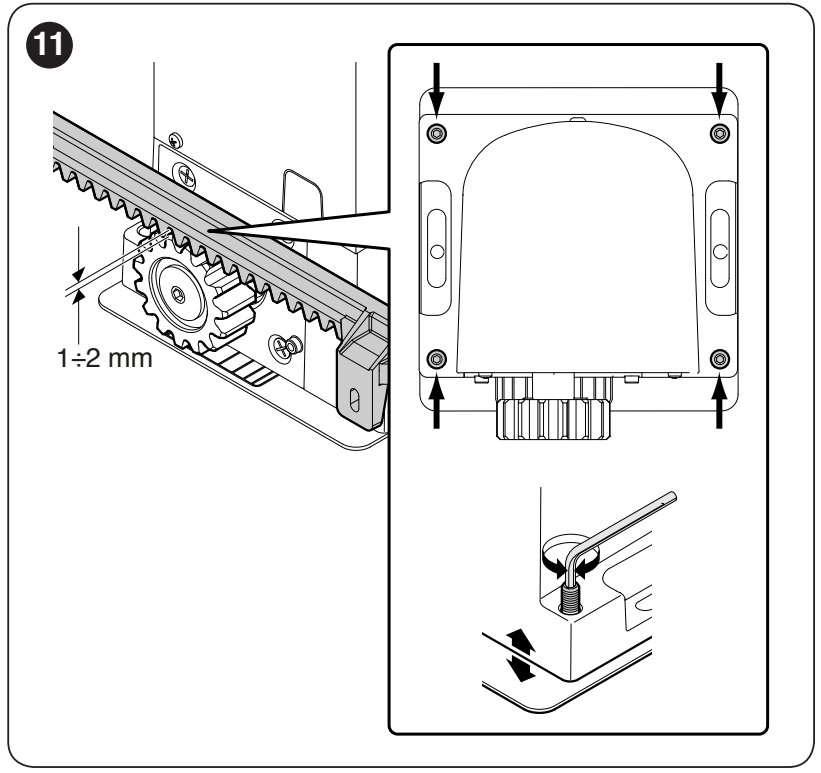
- Maintain 1–2 mm clearance between the rack and sprocketalong the entire travel; the gate's weight must not rest on the sprocket. Lateral misalignment must not exceed 5 mm.
- Open and close the gate manually several times, checking alignment, overhangs and stops. Tighten the operator securely and fit the mounting covers.
Internal limit switches and fine-tuning the positions
The SLH400 does not require switching cams on the rack. However, the gate's mechanical safety stops must remain secure and functional. Initially, set the internal mechanism by manually moving the gate through its full travel.
- Disengage the operator and manually open and close the gate fully. While the gate is moving, check the rack clearance and alignment.
- Move the gate back to the halfway point and engage the operator. Then perform travel learning.
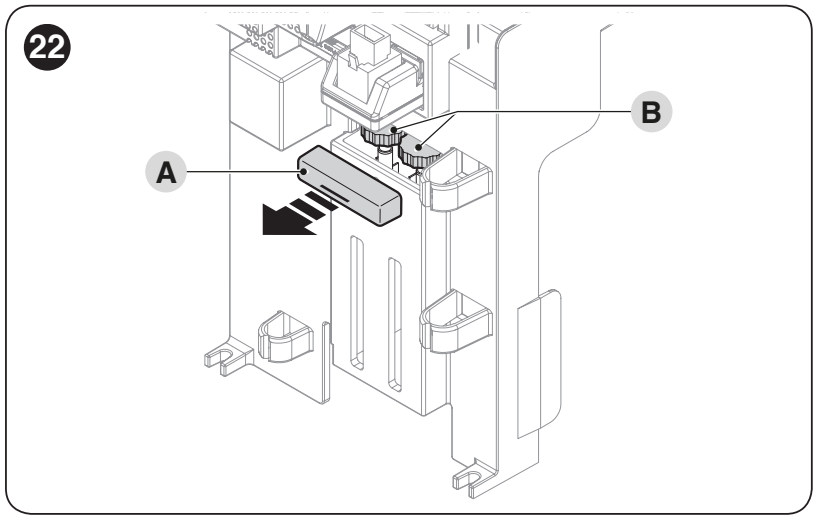
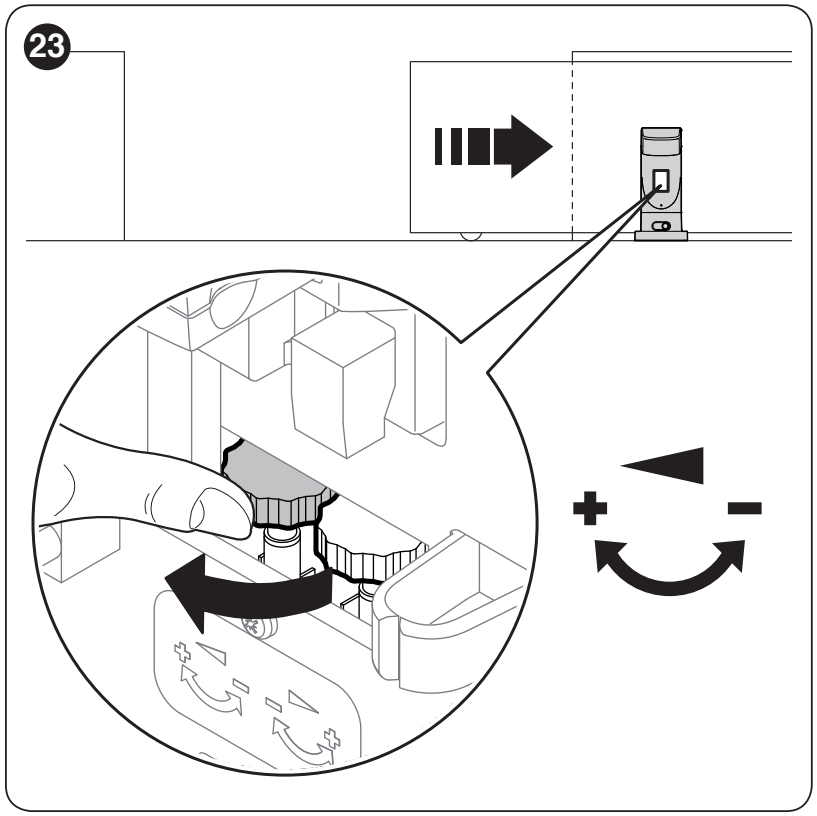
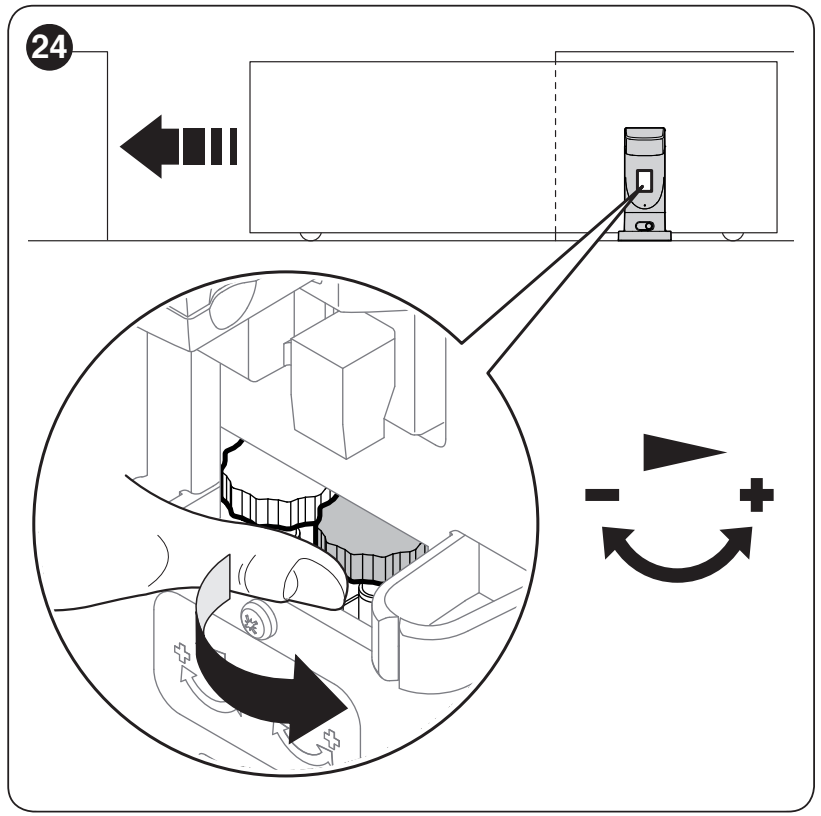
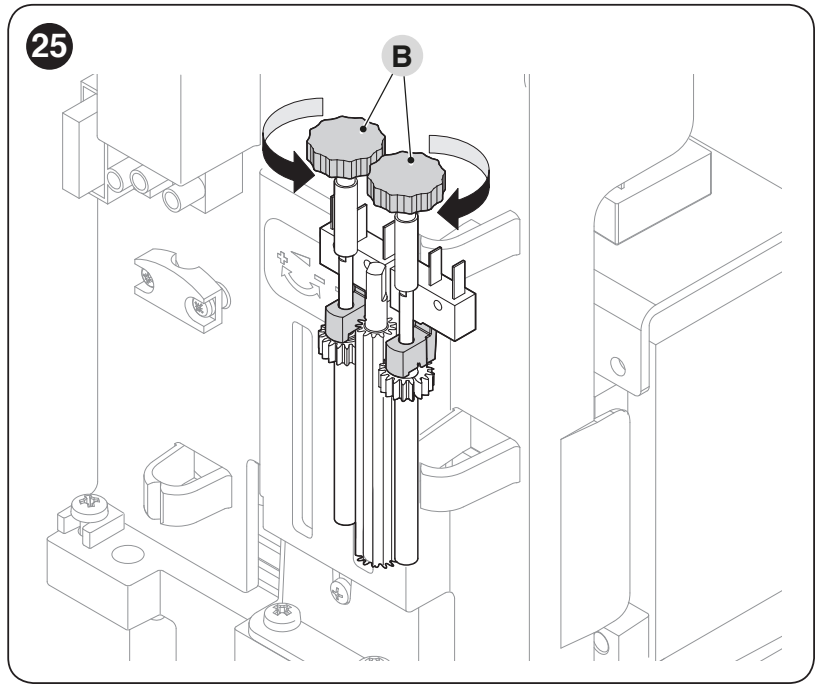
- For fine adjustment, remove cover A from adjustment wheels B. Select the wheel according to the direction arrow, not by guessing which side is left or right.
- Half a turn corresponds to an adjustment of approximately 3 cm. Use the OPEN/CLOSE command to run the gate again and check the result; adjust in small increments.
- If repeating the entire setup, turn both wheels towards “−” until the microswitches activate, as shown, then repeat the complete setup procedure. Finally, refit the cover.
Wiring preparation
| Cable | Cross-section and length |
|---|---|
| Mains supply | 3 × 1.5 mm², up to 30 m; for longer runs, 3 × 2.5 mm² with suitable protective earthing in accordance with the installation requirements. |
| Flashing light | 2 × 0.5 mm², up to 20 m. |
| Antenna | RG58, up to 20 m; a length under 5 m is recommended. |
| BlueBUS photocells | Up to 30 m: 2 × 1.5 mm². For runs of 30–50 m, the technician must determine the cross-section based on length, current draw and voltage drop; do not reduce the cross-section merely to extend the run. |
| Safety edge | 2 × 0.5 mm², up to 30 m; a moving safety edge requires a suitable signal transmission device. |
| Key switch | Two 2 × 0.5 mm² cables or one 4 × 0.5 mm² cable, up to 50 m. |
Leave approximately 20–30 cm of cable slack for wiring, use strain relief, and route cables clear of moving parts. The mains supply has separate L/N and PE conductors; do not connect 230 V to the signal terminals. The supply must allow safe, complete disconnection.
NKA3R10 control unit – terminals and wiring diagram
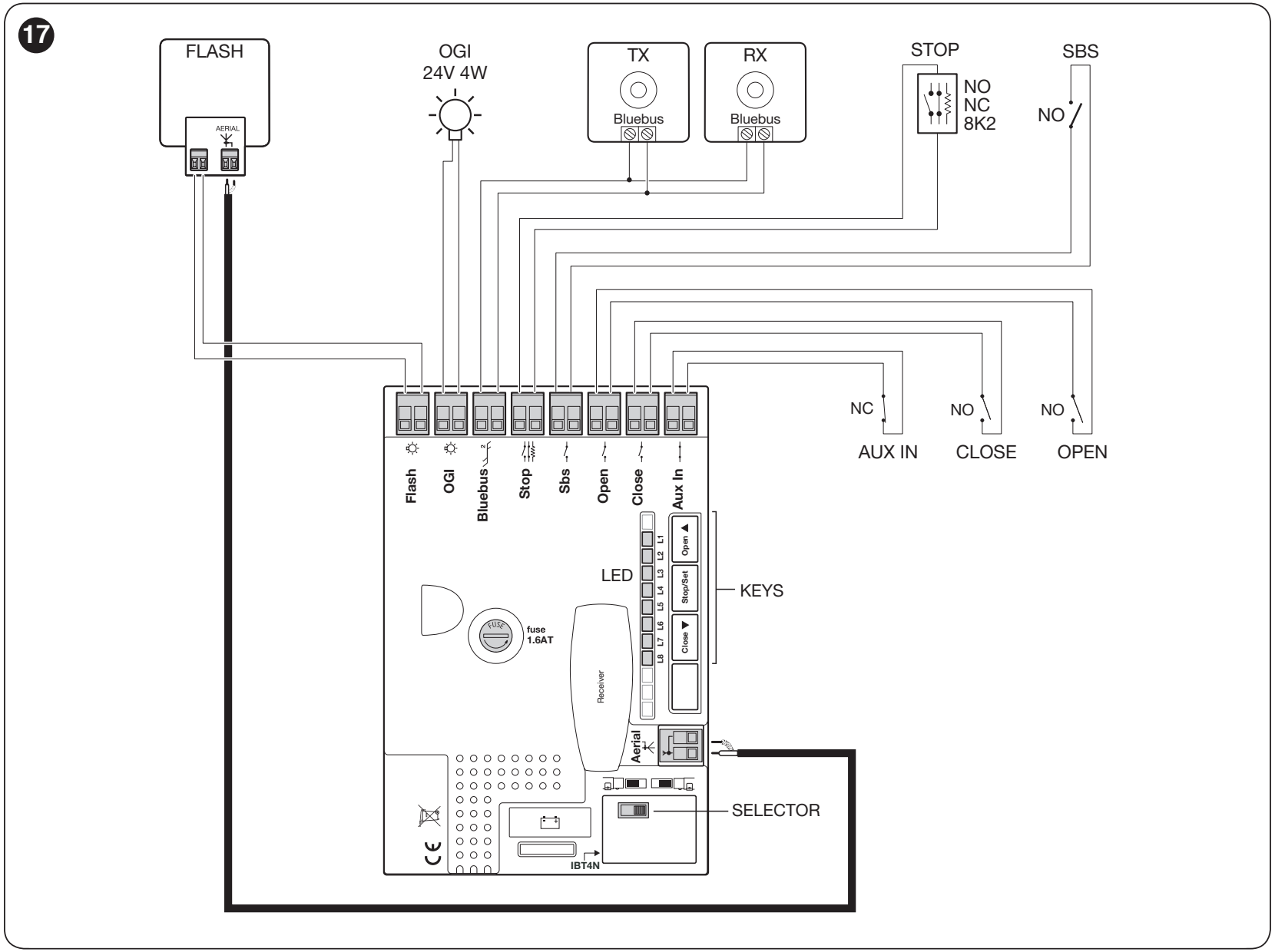
Check the model and board markings before wiring. The following procedure uses the layout FLASH, OGI, BlueBUS, STOP, SbS, OPEN, CLOSE and AUX IN and eight LEDs, L1–L8. The control unit is part of the drive; a separate NKA3R10 is also a spare part, so there is no need to buy a second one with a new complete motor.
| Terminal / connector | Purpose and conditions |
|---|---|
| FLASH | Warning light with a specified 12 V input; for incandescent warning lights, no more than two 12 V / 21 W bulbs. Polarity does not matter for an incandescent bulb. For an LED warning light, follow its specified input and markings; check the +/− polarity on the specific output before connecting, if applicable. This is not a mains power supply. |
| OGI | Programmable 24 V output, max. 4 W, tolerance −30 / +50%. Function according to level II/L4. It is not interchangeable with FLASH. For a polarity-sensitive DC light or relay, check the +/− polarity on the specific output before connecting; polarity does not matter for an incandescent bulb. |
| BlueBUS | Two-wire devices connected in parallel, with no polarity; maximum 15 BlueBUS load units, not automatically 15 pairs. |
| STOP | NO, NC or 8.2 kΩ resistor, depending on the learned configuration; a potential-free contact or resistor has no polarity. When the state changes, it stops and briefly reverses movement. Connect safety edges according to their specified interface. |
| SbS | Potential-free NO contact for step-by-step control, with no polarity; function at II/L2. |
| OPEN / CLOSE | Potential-free NO contacts for opening / closing, with no polarity. At I/L7, CLOSE can be changed to partial opening. |
| AUX IN | Factory-set NC Stop input; the potential-free contact has no polarity, and opening it stops movement. Set another function using suitable programming equipment, not an assumed jumper connection. |
| ANTENNA / SM | Receiver coaxial antenna / radio receiver socket. |
| IBT4N / battery | Specified BusT4 interface / PS124 connector. Do not connect them to the signal terminals instead of the designated connectors. |
Built-in WLT LED light
SLH400 includes the WLT light electronics beneath the drive’s own cover; the separate WLT is a complete unit with its own plastic cover. Depending on the wiring and settings, the built-in light can be used as a warning light or for area lighting.
For OGI, the corresponding function must be set in II/L4; by default, OGI is controlled by radio output 3, so it does not automatically flash during every movement. The following photos show the cover, electronics and connection. Disconnect all power supplies before changing any wires.
The WLT power input is designed for 12–24 V AC/DC; when working on it, retain the specified wiring for its power connector. Do not automatically substitute another LED light or relay. At 24 V DC, the WLT draws approximately 140 mA, or 3.36 W. When powered from OGI, observe its 4 W total limit; do not add another load without recalculating the total. Do not connect the WLT to the STOP/SbS auxiliary output, which has a 100 mA limit. When switching to FLASH, check the specified wiring and warning function; do not connect the two outputs together.


Powering small accessories
The auxiliary power supply is 24 V DC (−30 / +50%), max. 100 mA. The left and right terminals below are identified when viewing the connectors with the STOP and SbS labels readable, in the same orientation as in the original image.
| Board polarity | Accessory connection |
|---|---|
| Plus (+) | Left terminal of the SbS pair → accessory power supply + terminal. |
| Minus (−) | Right terminal of the STOP pair → accessory power supply − / 0 V terminal. |
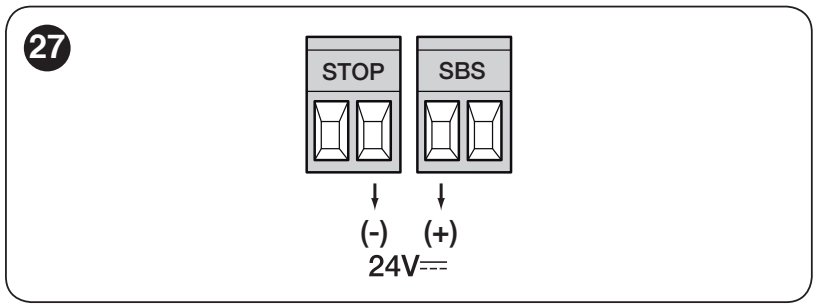
The total current draw of connected accessories must not exceed 100 mA. The STOP/SbS power pair is not the same as the STOP contact or step-by-step command: connect a potential-free contact across the two terminals of its own pair. BlueBUS photocells are powered by BlueBUS, not by this auxiliary pair.
Do not connect the WLT to this auxiliary output: at 24 V DC it draws approximately 140 mA. Its wiring and the OGI limit are covered in Built-in WLT LED light.
Photocells and BlueBUS learning
TX and RX in one pair must have the same address jumpers; the next pair must use a different address. Set the jumpers according to EPMB or EPSB and the functions supported by the board. After making a change, repeat learning.
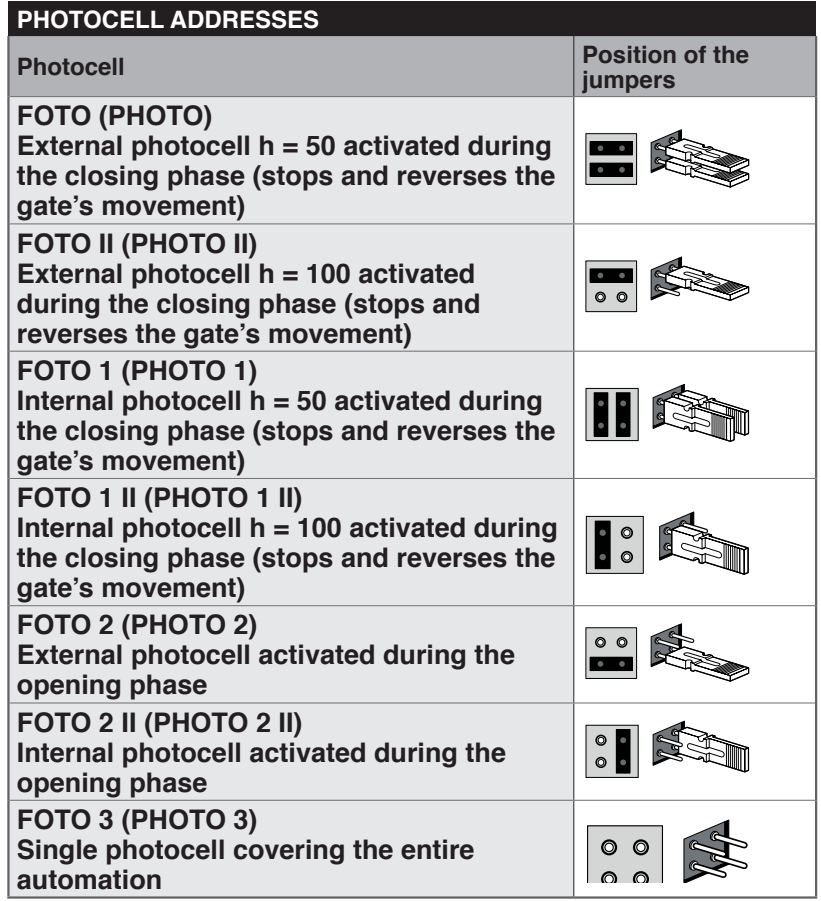
FOTO / FOTO II and FOTO 1 / FOTO 1 II provide protection during closing; FOTO 2 / FOTO 2 II provide protection during opening. FOTO 3 covers the entire automation system; when used together with FOTO II, observe the specified relative positioning of TX/RX. Check safety functions with a movement test, not just by checking that an LED is lit.
Initial startup
Set the gate approximately halfway along its travel and disengage the motor. With the power off, use the selector to set the opening direction according to the drive position and the arrows. After switching on, BlueBUS should flash once per second, the photocells should indicate their status, and the FLASH/OGI outputs should be in their idle state according to the configuration.
1. BlueBUS and STOP learning
- Press and hold OPEN + STOP/SET simultaneously for approximately 3 seconds.
- When L1/L2 flash rapidly, release the buttons and wait.
- When learning is complete, STOP should be lit and L1/L2 should be off; L3/L4 may indicate that travel learning is required.
Perform learning even when no accessories are connected. Adding or removing a device requires relearning and testing.
2. Travel-length learning
- Press and hold CLOSE + STOP/SET for approximately 3 seconds; release when movement begins.
- The first movement must be opening. If the direction is reversed, press STOP/SET immediately, disconnect the power supply, correct the direction setting, and repeat the entire procedure.
- Wait for it to open fully and then close. The learned travel determines both the slowdown and partial opening.
- Check the end positions and fine-tune them if necessary. internal switches.
Safety tests and handover
Run several complete cycles; check the slowdown before the end, rack alignment, and smooth movement along the entire travel path. Test the photocells, safety edges, STOP, and control inputs separately. Measure the impact forces and verify the response to an obstacle. The user must be given a key, the release procedure, and a maintenance schedule; only begin normal operation after the safety handover.
Control unit programming
OPEN ▲ opens and moves the selection, STOP/SET ■ stops and confirms, CLOSE ▼ closes and moves the selection in the opposite direction. The following tables use eight LEDs, L1–L8; the input LED selects the parameter, and the value LED indicates its setting.
Level I – switching functions on and off
- Hold STOP/SET until L1 starts flashing, then release the button.
- Use OPEN/CLOSE to select the LED for the desired function.
- Briefly press STOP/SET to change the state: a short flash means OFF, a long flash means ON.
- Select the next function with OPEN/CLOSE and switch it again with STOP/SET. After 10 seconds without a button press, the changes are saved and programming ends.
| Function and description | ON/OFF state |
|---|---|
| L1 – Automatic closing ON: after opening and the set pause, closing starts. OFF: waits for the next command. Set the time in Level II/L1. | ON = enabled OFF = disabled Factory setting: OFF |
| L2 – Close after photocell ON: closes 5 seconds after the photocell is cleared. With automatic closing disabled, it first completes opening; when enabled, it may stop opening as soon as the beam is cleared. A STOP command cancels this function for the current cycle. OFF: closing is controlled by the Automatic closing function and the set pause. | ON = enabled OFF = disabled Factory setting: OFF |
| L3 – Always close ON: after power is restored, it closes if it detects that the gate is open; the warning light flashes for 5 seconds before movement. OFF: remains in its original position. | ON = enabled OFF = disabled Factory setting: OFF |
| L4 – Stand-by ON: one minute after a cycle, it switches off BlueBUS and most LEDs; a new command activates them again. Saves battery power. OFF: energy-saving mode is disabled. | ON = enabled OFF = disabled Factory setting: OFF |
| L5 – Starting force ON: disables the soft start and applies a starting impulse. OFF: smooth acceleration. This does not replace repairing a gate that sticks. | ON = enabled OFF = disabled Factory setting: OFF |
| L6 – Pre-flashing ON: the warning light starts flashing 3 seconds before movement. OFF: flashes with movement. | ON = enabled OFF = disabled Factory setting: OFF |
| L7 – CLOSE as partial opening ON: the CLOSE input commands partial opening. OFF: closing. | ON = enabled OFF = disabled Factory setting: OFF |
| L8 – Slave mode ON: slave motor in a pair of opposing leaves. OFF: standalone motor or Master motor. See wiring for a pair. | ON = enabled OFF = disabled Factory setting: OFF |
Level II – adjustable parameters
- Hold STOP/SET until L1 flashes, then release it.
- Use OPEN/CLOSE to select the parameter input LED.
- Hold STOP/SET; after approximately 3 seconds, the value LED lights up. Continue holding STOP/SET and use OPEN/CLOSE to select the new value.
- Release STOP/SET. Set the next parameter in the same way; programming ends if no button is pressed for 10 seconds.
Basic factory settings are shown in bold. Settings on a board that has already been used may differ. L8 history has no adjustable factory setting.
| Input LED – name and description | Setting LED – value |
|---|---|
| L1 – Pause time Waiting time before automatic closing, when Level I/L1 is enabled. | L1 – 5 s L2 – 15 s L3 – 30 s L4 – 45 s L5 – 60 s L6 – 80 s L7 – 120 s L8 – 180 s |
| L2 – SbS sequence Wired SbS input and first radio command. The hold-to-run mode requires the command to be held down. | L1 – Open – stop – close – stop L2 – Open – stop – close – open L3 – Open – close – open – close L4 – Condominium mode L5 – Condominium mode 2; a command longer than 2 s triggers Stop L6 – Sequence mode 2; a command shorter than 2 s triggers partial opening L7 – Hold-to-run L8 – Opens automatically, closes in hold-to-run mode |
| L3 – Motor speed For a leaf weighing over 200 kg, use no more than V5; operating limits take precedence. | L1 – V1 – very slow L2 – V2 – slow L3 – V3 – medium L4 – V4 – fast L5 – V5 – very fast L6 – V6 – exceptionally fast L7 – Open quickly, close slowly L8 – Open exceptionally quickly, close quickly |
| L4 – OGI output 24 V when active, max. 4 W. Also check WLT wiring. | L1 – Gate-open indicator L2 – Active when the gate is closed L3 – Active when the gate is open L4 – Radio output 2 control L5 – Radio output 3 control L6 – Radio output 4 control L7 – Service indicator L8 – Electric lock |
| L5 – Motor force Choose the setting based on resistance along the entire travel path, not just the gate’s weight; measure impact forces after making a change. | L1 – Exceptionally lightweight gate L2 – Very lightweight gate L3 – Lightweight gate L4 – Medium-light gate L5 – Medium-heavy gate L6 – Heavy gate L7 – Very heavy gate L8 – Exceptionally heavy gate |
| L6 – Partial opening Pedestrian opening distance. Command from the radio or CLOSE input when level I/L7 is enabled. | L1 – 0.5 m L2 – 1 m L3 – 1.5 m L4 – 2 m L5 – 2.5 m L6 – 3 m L7 – 3.4 m L8 – 4 m |
| L7 – Service warning Number of cycles before the service signal; automatic mode takes operating effort into account. | L1 – Automatic, based on operating effort L2 – 1 000 cycles L3 – 2 000 cycles L4 – 4 000 cycles L5 – 7 000 cycles L6 – 10 000 cycles L7 – 15 000 cycles L8 – 20 000 cycles |
| L8 – Anomaly history The last eight cycles; read-only. Display sequence. | L1 – Result of cycle 1 – most recent L2 – Result of cycle 2 L3 – Result of cycle 3 L4 – Result of cycle 4 L5 – Result of cycle 5 L6 – Result of cycle 6 L7 – Result of cycle 7 L8 – Result of cycle 8 |
Do not use excessive force to compensate for friction, incorrect balancing or an obstruction. After changing the force or speed, repeat the safety tests and measure the impact forces.
Two SLH400 units for opposing gate leaves
Master–Slave synchronises two separate motors; each drives its own leaf within the permitted limits. Using two units does not increase the limit for an individual leaf. The BlueBUS and safety device wiring must follow the specified dual-unit wiring diagram.
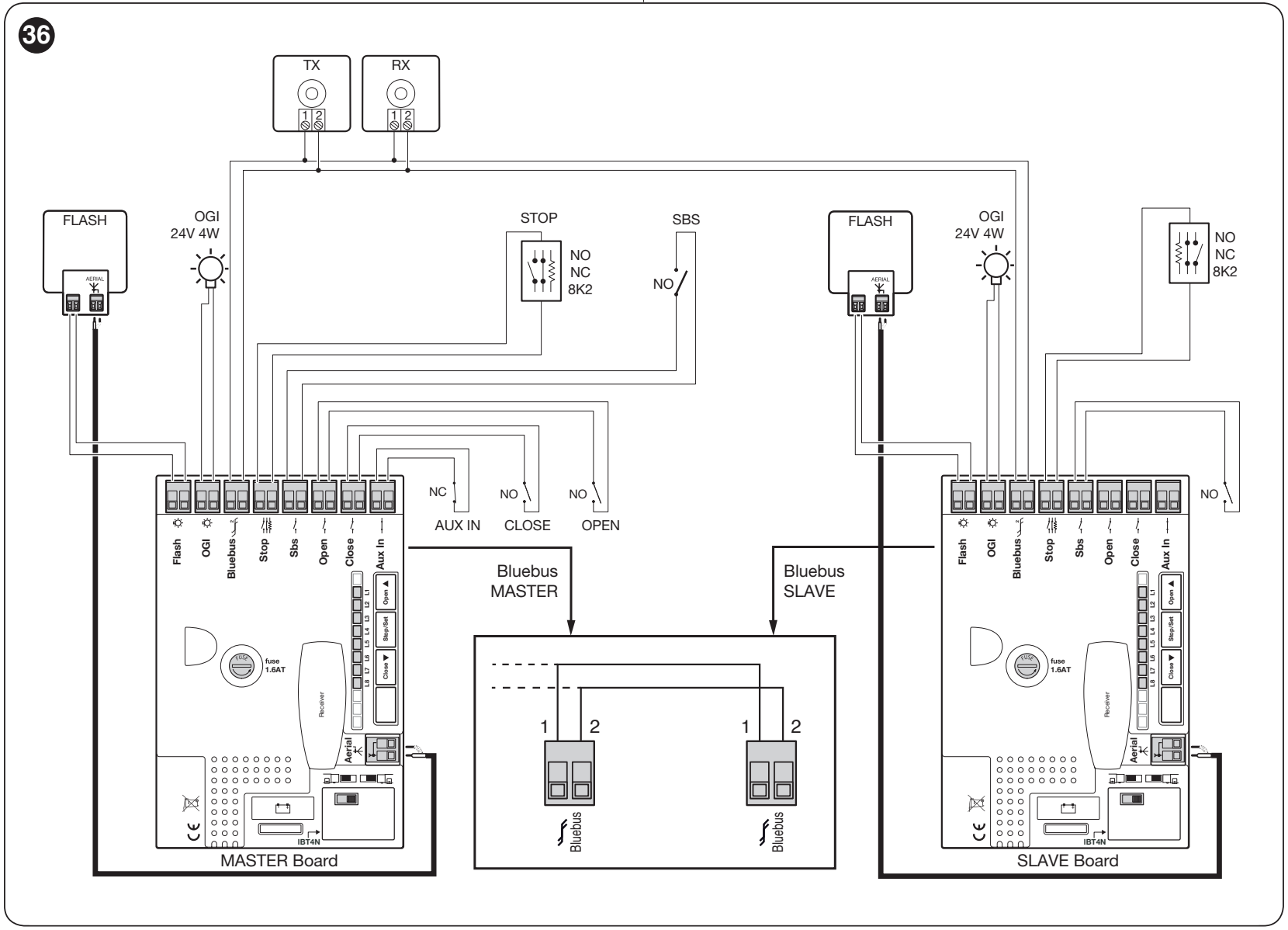
- With the power supplies switched off, connect the BlueBUS terminals on both control boards; connect contact 1 to 1 and 2 to 2 as shown in the enlarged detail of the original diagram. With the connectors oriented the same way, connect left to left and right to right; do not cross the wires between the control boards. These are not the photocell power supply +/− terminals. Set the correct opening direction for each motor.
- After powering up, enable I/L8 Slave on the subordinate motor.
- Teach in the devices on the Slave first, then on the Master. Run the travel learning procedure on the Master.
- Connect shared controls, the receiver and shared safety devices to the Master. The Slave can have its own STOP edge, FLASH, OGI and its own SbS input for independent full opening; OPEN/CLOSE/AUX IN on the Slave are not used.
- For backup power, each motor needs its own PS124. The Slave retains separate Stand-by, start-up, OGI and force settings; test the safety of both leaves.
Remote controls and backup power
Insert the radio receiver into the SM connector with both mains and battery power switched off. A standalone motor or barrier cabinet does not automatically include a receiver and control unit; check the contents of the specific kit. Current kits use OXIBD. Pairing, deleting transmitters and locking the radio memory are configured on the receiver according to its own instructions.
| Receiver output in basic mode | Command |
|---|---|
| 1 | SbS step-by-step |
| 2 | Partial opening |
| 3 | Open |
| 4 | Close |
NICE remote controls choose according to the receiver’s coding. Era One, Era Inti and MYGO transmitters with compatible coding pair with the corresponding family; matching frequency alone does not guarantee compatibility. Do not assess mixing different coding types in one memory by the transmitter name alone.
PS124 backup battery
PS124 is an optional 24 V rechargeable battery. It provides a limited number of cycles during a power failure; the number depends on the charge level, temperature and load. Connect it to the designated battery connector only after installation and programming. Switch off the mains before connecting; secure the battery safely, then restore power after connection. Disconnect the battery during servicing as well.
Use the supplied PS124 connection cable: the narrower connector goes to the battery, the wider one to the control board. Connect it to the designated battery connection, not to BlueBUS, FLASH or the 24 V auxiliary output. With the original supplied PS124 cable, polarity +/− does not need to be determined; use both designated connectors. Do not force or modify the connectors.
- With the mains disconnected and a charged battery connected, L2 on the PS124 should confirm that the automation system is powered.
- When the mains is switched on, L1 should indicate charging. If the battery is discharged, leave the system to charge and repeat the test.
- Test a complete cycle on mains power, then disconnect the mains and verify opening and closing on battery power. The speed may be lower on backup power.
- Restore the mains supply after testing.
For solar-only power Solemyo SYKCE30 the operator must not be connected to the mains at the same time. Selecting the system and connecting the PSY24 must take into account the specific control board, number of cycles, accessories, and local lighting conditions.
Diagnostics and troubleshooting
The beacon’s short flashes form two identical groups separated by approximately 1 s. Count the flashes in one group. During normal operation, BlueBUS flashes once per second; two quick flashes confirm an input change.
| Flashes | Meaning and what to check |
|---|---|
| 1 | BlueBUS error: check the wiring and addresses, then relearn the devices. |
| 2 | The photocell is blocking movement. Remove the obstruction, clean and align the TX/RX; check the addresses. |
| 3 | Increased resistance / force limit triggered. Check the mechanism and the rack; do not increase the force blindly. |
| 4 | STOP triggered. Check the contact or resistive circuit; do not bypass the safety input to get around the fault. |
| 5 | Internal parameter error. Wait at least 30 s and try the command again. If the error persists, the control board needs servicing. Relearning is not a full reset. |
| 6 | Maximum manoeuvre frequency exceeded. Wait a few minutes and observe the permitted number of cycles. |
| 7 | Internal electrical fault. Disconnect both the mains supply and battery; if the fault returns, the control board or motor wiring needs servicing. |
| 8 | A continuous command is preventing another command. For example, check the timer on OPEN. |
| 9 | The automation system is software-locked. Use the appropriate command to unlock the automation system; this is not the same as manually releasing it with the key. |
| Indicator / LED | Action |
|---|---|
| BlueBUS off | Check the power supply and fuses. Replace only when the power is off and the cause has been eliminated; always use the same type and rating. |
| BlueBUS on continuously | Serious fault. Disconnect both the mains supply and battery for a few seconds, then restore power. If the condition persists, the control board needs servicing. |
| STOP off | STOP does not match the learned safe state. Check the connected device and learning. |
| L1 + L2 flashing | The connected devices need to be learned. |
| L3 + L4 flashing | The positions / travel need to be learned. |
| Remote control indicator on, operator not responding | Check the battery, compatible coding, and storage in the receiver. |
| SbS / OPEN / CLOSE on continuously | The command contact may be stuck closed; check the push button, relay, and wiring. |
History of the last eight manoeuvres
- Use STOP/SET to enter programming, then use OPEN/CLOSE to select input LED L8.
- Hold STOP/SET for approximately 3 s. The lit value LEDs identify manoeuvres with an anomaly; L1 is the most recent and L8 is the eighth.
- While holding STOP/SET, use OPEN/CLOSE to select the relevant manoeuvre. The LED displays the number of error flashes shown in the table above.
- Release STOP/SET and allow the menu to exit.
Relearning and radio memory
Learning devices again is not a full control board reset. The service counter has its own procedure and transmitters are erased at the receiver. Record important settings before servicing; incorrect erasure may clear learned safety devices.
After changing accessories, repeat BlueBUS and STOP learning; after changing the travel position learning. Erase transmitters using the radio receiver. Have a service technician perform a full configuration restore for the specific NKA3R10; do not use the button-reset procedure for a different operator.
Manual release
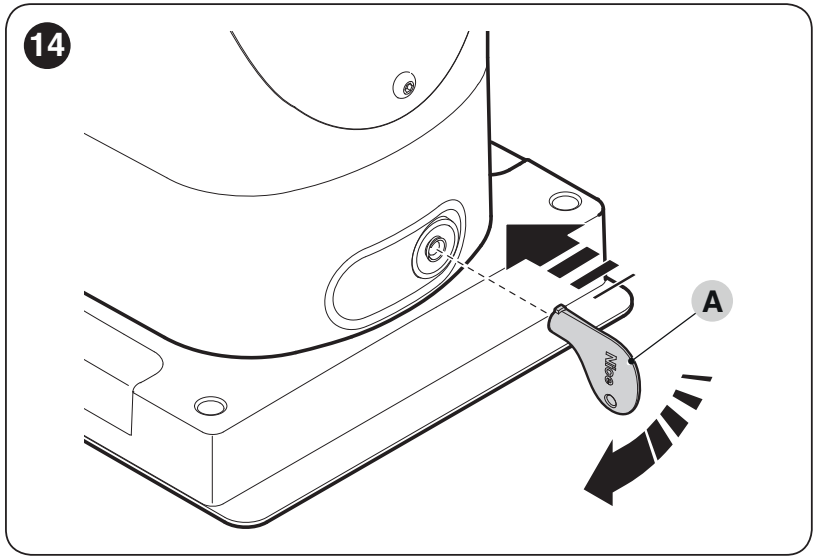
- Stop the operator, insert the key, and turn it 90° clockwise.
- Move the gate manually along a safe path; do not exceed the end stops.
- To re-engage the operator, turn the key 90° in the opposite direction, remove it, and check that it is locked before issuing another electrical command.
Maintenance and safe use
Service at least every 6 months or 20,000 manoeuvres, whichever comes first. Shorten the interval for demanding operating conditions. A service reminder does not replace regular inspections.
- Disconnect both the mains supply and backup battery before servicing.
- Check the anchors, corrosion, wiring, rack, pinion, wheels, gate guide, and end stops. Replace damaged parts.
- Clean the photocells, check that they respond correctly, and test the manual release. Repeat the safety tests after servicing.
- Keep remote controls out of reach of children. Stay clear of the movement path and do not use equipment that needs repair.
Service reminder and resetting the service counter
Enter Level II programming and select input LED L7. Hold STOP/SET for approximately 3 s until the value LED is displayed, and keep holding it during the following steps. Briefly press OPEN + CLOSE together to display the percentage of the limit used: one flash = approximately 10%. After servicing, on the same parameter, hold STOP/SET and press OPEN + CLOSE together for at least 5 s; rapid flashes confirm the reset. Then release STOP/SET. This does not erase transmitters or replace a full reset.
| Configured limit reached | Signal |
|---|---|
| Below 80% | The beacon flashes normally; the service indicator lights for 2 s when opening. |
| Approximately 81–100% | The beacon lights for 2 s at the start of movement; the service indicator flashes during the manoeuvre. |
| Above 100% | The beacon lights for 2 s at both the start and end; the service indicator remains on continuously. |
The service indicator only works with the corresponding setting output. Dispose of the device and batteries at the end of their service life at an appropriate collection point; do not put them in household waste.
Estimated service life depending on operating conditions
| Characteristics of the complete automation system | Index | Service life graph |
|---|---|---|
| Gate leaf length | Under 3 m: 0%; 3–4 m: 5%; 4–5 m: 10%; 5–6 m: 20%. |
|
| Weight | Under 200 kg: 0%; 200–300 kg: 15%; 300–400 kg: 30%. | |
| Temperature / humidity | Above 40 °C, below 0 °C or humidity above 80%: 20%. | |
| Dust, sand or salinity | 15%. | |
| Speed above V4 | 15%. |
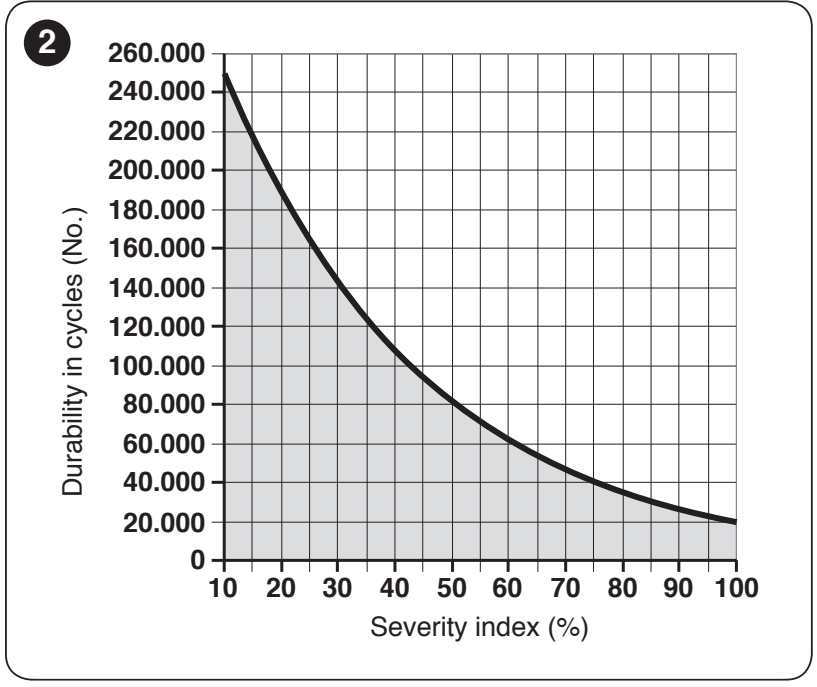
Add the relevant indices, find the total on the horizontal axis, and read the estimated number of cycles from the curve. This is an estimate assuming correct installation and regular maintenance, not a guarantee or a maintenance interval.
NICE SLH400 technical specifications and dimensions
| Parameter | Value |
|---|---|
| Motor / control board | 24 V DC / built-in NKA3R10 |
| Mains power supply | 230 V AC (+10 / −15%), 50/60 Hz; protective earthing |
| Gate leaf limits | 400 kg / 6 m, taking resistance and operating tables into account |
| Thrust force | 400 N at start-up / 200 N rated |
| Torque | 12 Nm at start-up / 6 Nm rated |
| Speed | 0.18 m/s at rated torque; 0.34 m/s unloaded. Higher speeds are limited by the weight. |
| Max. power consumption at start-up | 330 W |
| Max. continuous operation | 10 min at rated torque |
| Pinion | 15 teeth, module 4, pitch 12.6 mm, pitch diameter 60 mm |
| Protection rating | IP44 when correctly installed |
| Operating temperature | −20 to +55 °C |
| Footprint and height as shown in the drawing | 191 × 198 mm; height 408 mm |
| Light / backup power | Built-in WLT electronics / optional PS124 |
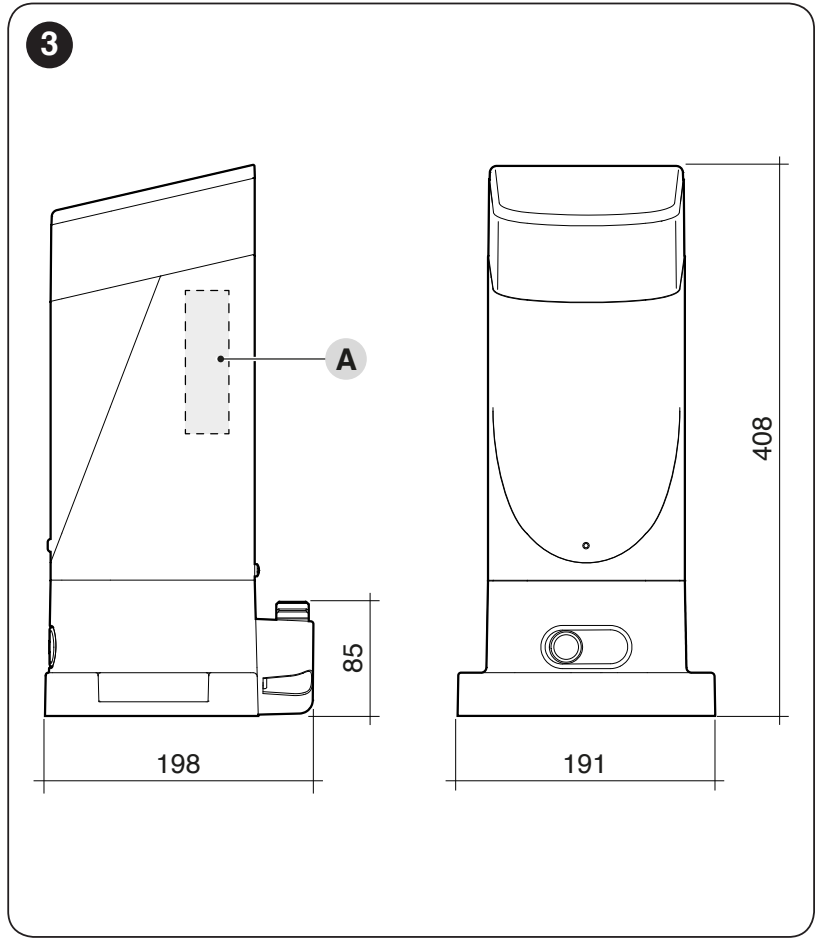
The installation drawing also shows the pinion position; before preparing the foundation, check the rack height on the specific gate and access to the manual release.
How can I order this item?
Choose the option that suits you:
- order online: use the buy button to add the goods to your shopping cart (you will find the buy button here in the product variants table).
- order by email: place your order at [email protected]






