NICE Moonclever MC424L - control unit for 24 V swing gate operators in the Wingo range
| Product availability: | In stock | We normally dispatch goods within 24 hours. |
|---|
in stock
€294.10 including VAT
| Weight |
|---|
| 1,50 kg |
Description of NICE Moonclever MC424L - control unit for 24 V swing gate operators in the Wingo range
Control unit change
The NICE MC424L control unit is no longer manufactured, so when you place your order, we will deliver the newer version NICE MC424LR10.
NICE Moonclever MC424L is a control unit for automating single-leaf, or double-leaf gates. Operators compatible with it must have a power supply of 24Vdc.
Compatible only with the specifically listed swing gate operators:
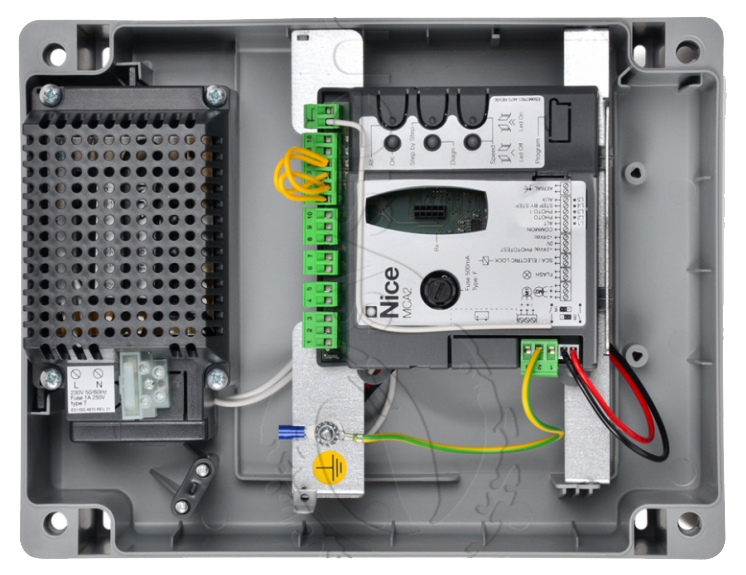
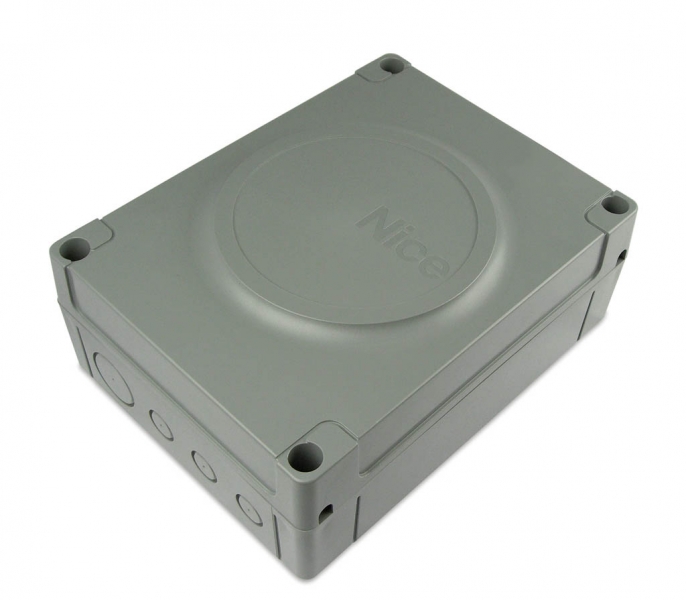
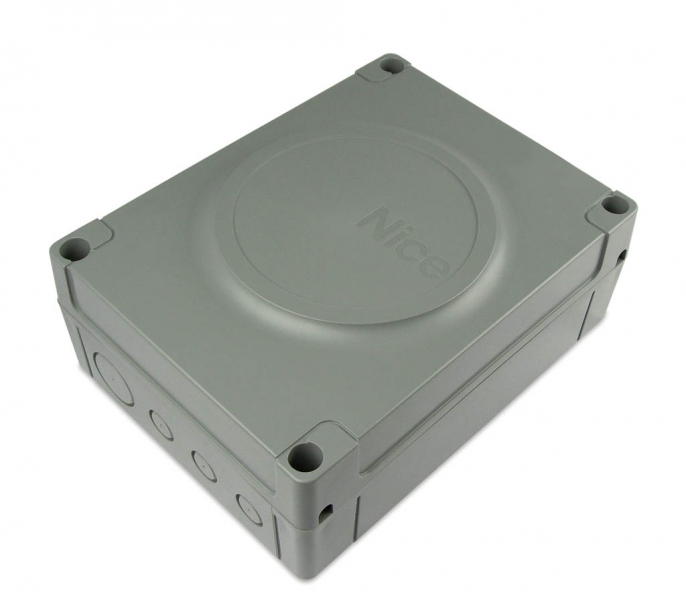 MC424L control unit includes MCA2 control unit, which is housed in a standard plastic box Moonclever. Includes an SM type connector for connecting radio receiver (SMXI, OXI,...) from remote controls (Flor, Era Flor, Era One, Era Inti,...).
Thanks to its 24V technology, it is also suitable for the NICE Solemyo solar system, which provides power even in locations without access to an electricity supply. It is also possible to power the control unit using a NICE PS124 backup battery, which allows several gate opening and closing cycles for a few hours after a power outage. When standby mode is enabled, the control unit with a connected radio receiver uses only 2W (when powered by the PS124 battery, or the Solemyo solar system, consumption is only 0.1W).
Diagnostics using a diagnostic LED.
After automatically assessing the gate leaf length, the acceleration and deceleration intervals for opening and closing are set automatically. You can also adjust the force, speed, pedestrian opening etc. See programming the drive control unit. Obstacle detection throughout the gate leaf's movement ensures safe operation of the motors.
The NICE Moonclever MC424L control unit is suitable for the climate in Slovakia and complies with all European safety standards.
Accessories compatible with the NICE Moonclever MC424L control unit
We recommend purchasing the following compatible optional accessories for the control unit:
| What | Why | Type |
|---|---|---|
| Flashing warning light | The warning light flashes to indicate gate movement—ideal for exits with limited visibility. It also has a built-in antenna for increased remote-control range. | - Lucy (LUCY24) - Moonlight (ML24T) |
| Photocells | They detect obstacles while the gate is closing and stop its movement, preventing it from hitting cars or people. | |
| Transmitter |
For remote control of the gate. |
- FloR (Flo2R-s, Flo4R-s) |
| Receiver | Required for remote gate operation. | - OXI - SMXI |
| Antenna | For improved remote control range. | - integrated into the flashing light ML24T - ABFKIT antenna only, or ABF |
| Keypad | If you forget your remote control, or if many vehicles or people visit and you don't want to give everyone a remote or open the gate manually. | - MOTXR |
NICE Moonclever MC424L control unit manual
Download the NICE Moonclever MC424L control unit manual here:
NICE Moonclever MC424L control unit manual
Installing the NICE Moonclever MC424L control unit
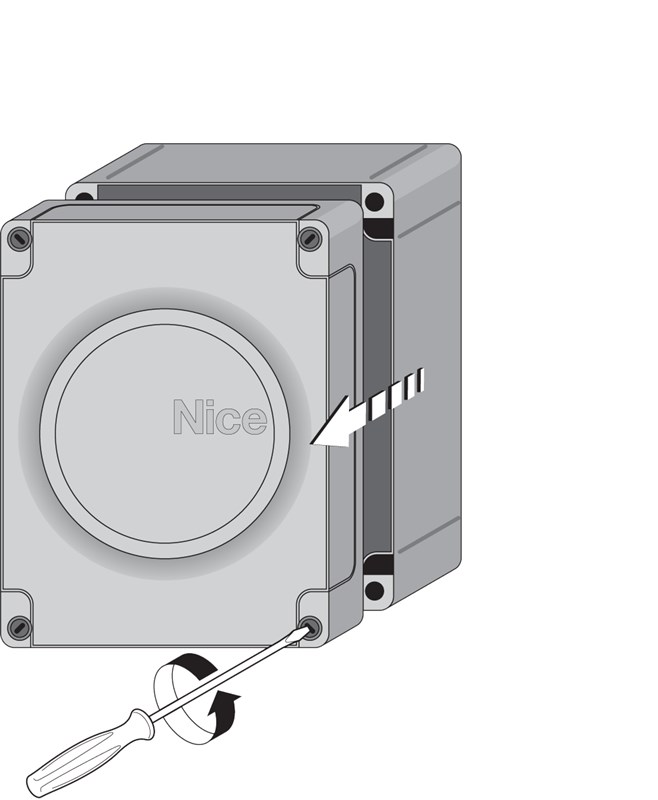
Installing the control unit in a standard mounting box Moonclever is done by fastening it with four screws:
 |
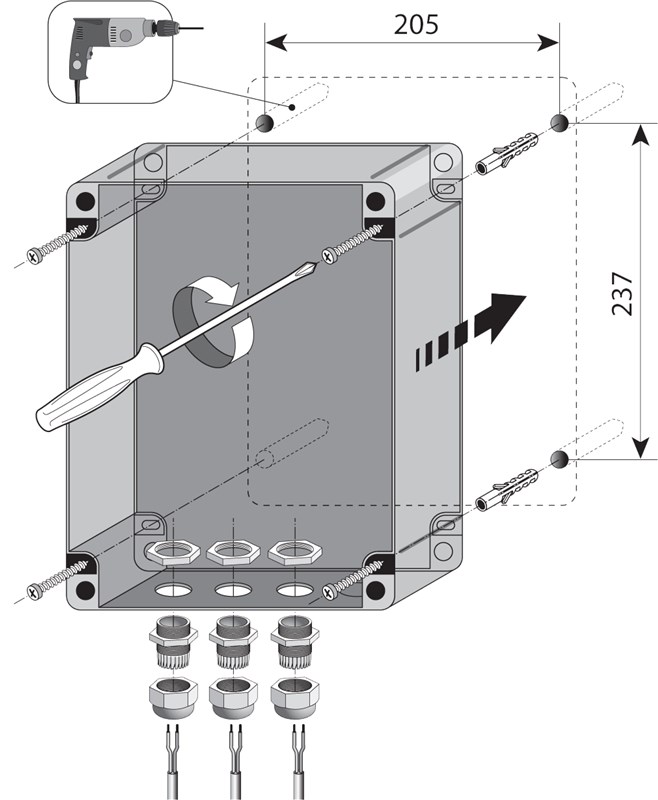 |
| 1. Unscrew the plastic cover screws | 2. Fasten the control unit box to four wall plugs |
|---|
A typical (optional) drive control unit wiring setup with accessories looks as follows:
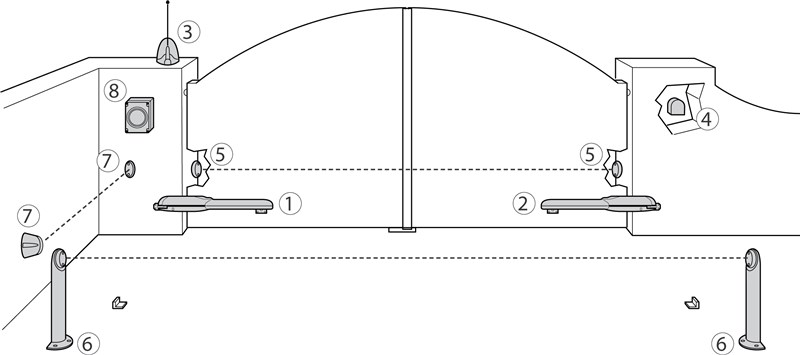
List of accessories
|
|
Photocell note:
| 5. | PHOTO | The photocells have no effect while the gate is opening. If interrupted while the gate is closing, they reverse its movement and open it. |
|---|---|---|
| 6. | PHOTO1 | The photocells stop the gate while it is opening or closing. |
| 7. | PHOTO2 | The photocells have no effect while the gate is closing. If interrupted while the gate is opening, they reverse its movement and close it. |
Wiring the NICE Moonclever MC424L control unit
Before connecting, disconnecting or changing the wiring, remember to drive disconnect the power supply to both the mains and accessories, either at the circuit breaker, by removing the power supply fuse, or by disconnecting the backup battery. Wait until all the LEDs go out.
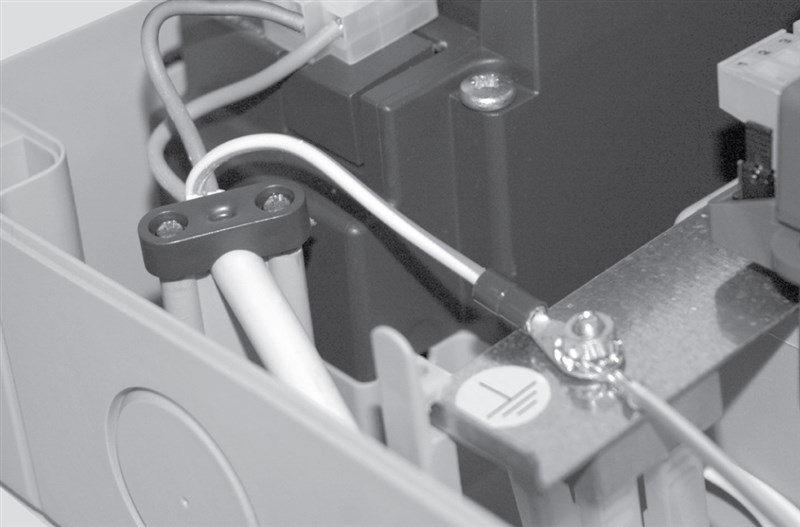
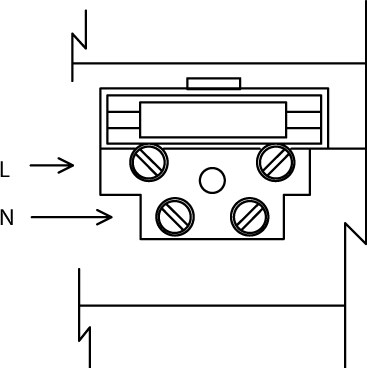
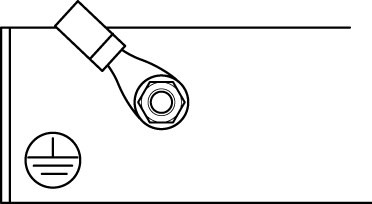
...to the mains
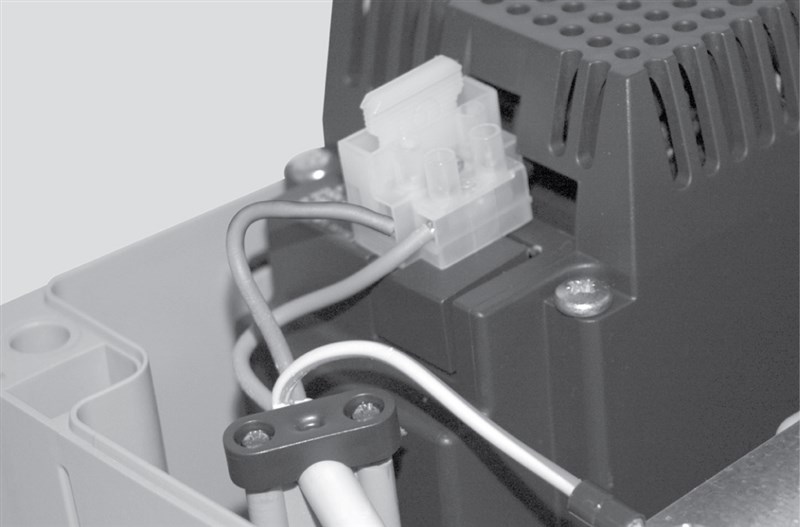
For the drive to work, you only need to connect the power supply to the drive control unit .
| Connect the live (L) and neutral (N) wires. | Connect the earth (I) wire. |
|---|---|
|
|
|
|
top view |
top view |
...of additional devices
To the control unit the following additional devices can be connected:
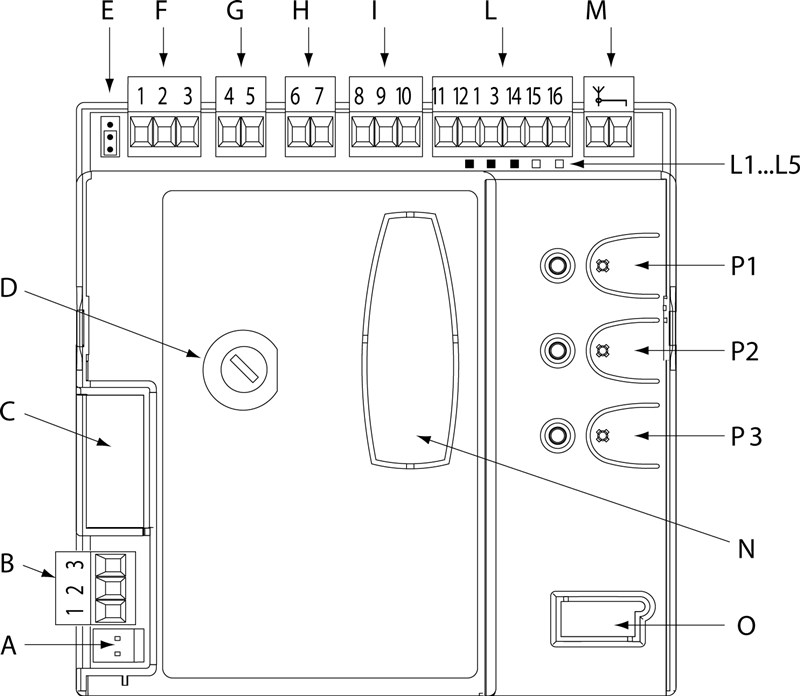
| A. | Power supply connector, 24 V |
|---|---|
| B. | Connection of the primary motor M1 |
| C. | Connector for connecting the NICE PS124 backup battery, or the NICE Solemyo solar system. |
| D. | Fuse for the F 500mA control unit |
| E. | Adjustable jumper for selecting the primary (first to open) gate leaf |
| F. | Connection of the secondary motor M2 (if it is not connected, the control unit automatically detects the gate as single-leaf) |
| G. | Output for the warning light |
| H. | Output for the gate status indicator, or electric lock (depending on the setting in the programming menu) |
| I. | 24 V DC power supply for accessories, Standby mode and PHOTOTEST |
| L. | Inputs for connected devices, photocells, buttons, etc. |
| L1...L5. | Programming LEDs |
| M. | Antenna input (e.g. ABF, ABFKIT, or built into the ML24T warning light) |
| N. | Connector for the NICE SM for radio receiver (e.g. SMXI, OXI) |
| O | Connector for diagnostics and programming (for professional use) |
| P1,P2,P3 | Programming buttons and LEDs |
Standard wiring diagrams:
The wiring to the control unit terminal blocks can be connected in three main configurations:
| With standby mode | Without standby mode | |
|---|---|---|
| Without PHOTOTEST | With PHOTOTEST | |
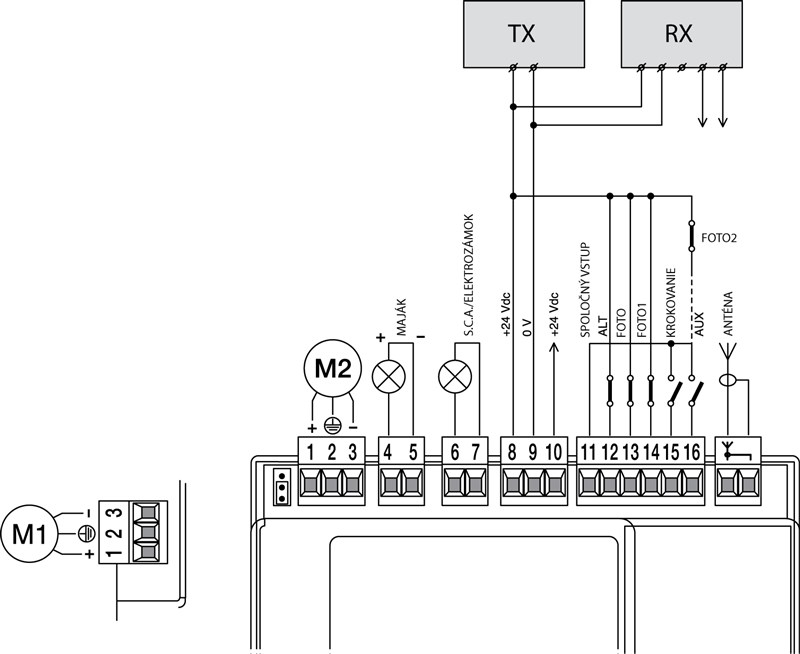 |
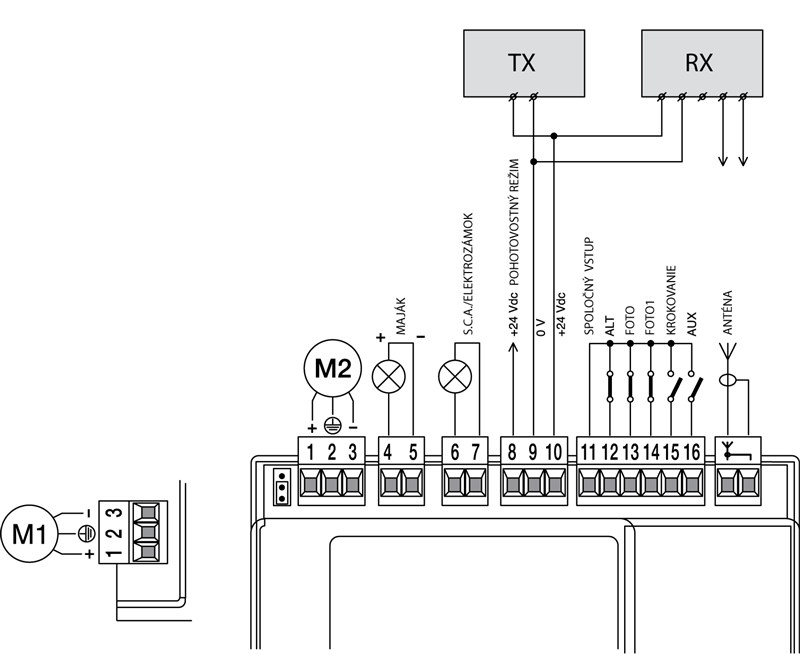 |
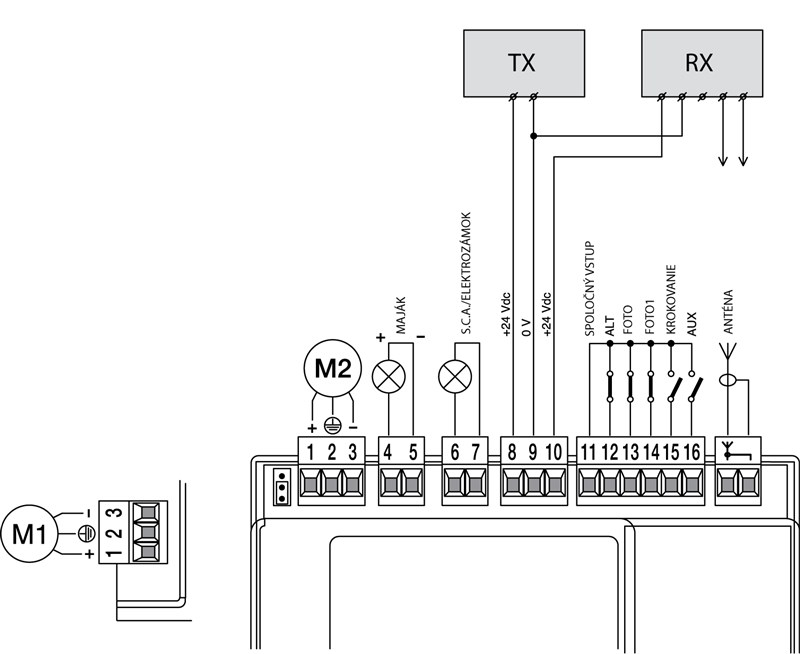 |
| One minute after the last operating cycle, the control unit enters energy-saving mode and switches off all inputs and outputs. Standby mode is indicated by the OK LED (LED P1), which flashes more slowly (once every 4 seconds) than usual (once per second). Standby mode is required when connecting the NICE Solemyo solar system, and also when connecting a NICE PS124 backup battery. | Wiring without standby mode and without PHOTOTEST. The system uses power at the standard rate, and an operating cycle will start even if a safety photocell has failed. | PHOTOTEST checks that the FOTO, FOTO1 and FOTO2 photocells are working correctly before starting an operating cycle (i.e. each photocell is powered separately). If any photocell is not working correctly, the operating cycle will not start. If any photocells are not used, their terminal must be connected to input no. 8 (Common). |
Wiring with standby mode is the standard configuration; it is only disabled when wiring with PHOTOTEST. Either standby mode or PHOTOTEST can be enabled, or neither.
Wiring to the individual terminals
NICE MCA2 control unit for the NICE Moonclever MC424L control center provides the following inputs and outputs for additional devices:
| Input | Function | Description | Cable type |
|---|---|---|---|
| L-N-I | Power supply | Main power supply. | 3×1.5mm2 |
| 1-3 | Motor M1 | Power supply of the primary motor M1. | 3×1.5mm2 |
| 1-3 | Motor M2 | Power supply of the secondary motor M2 (if it is not connected, the control unit will automatically classify the gate as single-leaf). | 3×1.5mm2 |
| 4-5 | Warning light | Output for one warning light NICE LUCY24 (or NICE ML24T) with one 24V 25W bulb. | 2×1mm2 |
| 6-7 | S.C.A. gate indicator, or electric lock |
Connection to S.C.A. open-gate indicator 24 Vdc, maximum 5W or electric lock 12Vac, maximum 25VA. |
S.C.A.: 2×0.5mm2 Electric lock: 2×1mm2 |
| 8 |
+24 Vdc (plus +) |
Two mutually exclusive uses: If neither standby mode nor PHOTOTEST is used, this input is not used; input no. 11. |
1×0.5mm2 |
| 9 | 0 Vdc (minus -) |
0 Vdc power supply (minus) for accessories | 1×0.5mm2 |
| 10 |
24 Vdc (plus +) |
Used as the power supply for accessories (24 Vdc, maximum 200mA), without standby mode. If standby mode is used, this input is not used; input no. 8. +24 Vdc power supply, maximum 100mA, for RX photocells (receiver) when using PHOTOTEST; if PHOTOTEST is not used, it powers all photocells. |
1×0.5mm2 |
| 11 | Common input | Common input for accessories (+24 Vdc), used when standby mode is not enabled. | 1×0.5mm2 |
| 12 | STOP |
Input for devices that stop gate movement. The following devices can be connected:
|
1×0.5mm2 |
| 13 | PHOTO | Input for safety devices, e.g. photocells, safety edges. An interruption during a manoeuvre causes the gate leaf to reverse or stop. Normally closed devices are connected here. | 1×0.5mm2 |
| 14 | PHOTO1 | Input for safety devices, e.g. photocells, safety edges. An interruption during a manoeuvre causes the gate leaf to reverse or stop. Normally closed devices are connected here. | 1×0.5mm2 |
| 15 | Step-by-step | Input for devices that control gate movement step by step (see Step-by-step gate movement). Normally open (NO) devices can be connected. | 1×0.5mm2 |
| 16 | AUX | Auxiliary input. | 1×0.5mm2 |
| 17-18 | Antenna | input for the radio receiver antenna. The antenna is usually built into the warning beacon, e.g. NICE ML24T, or you can use a separate external antenna NICE ABFKIT. | Shielded coaxial cable: RG58 |
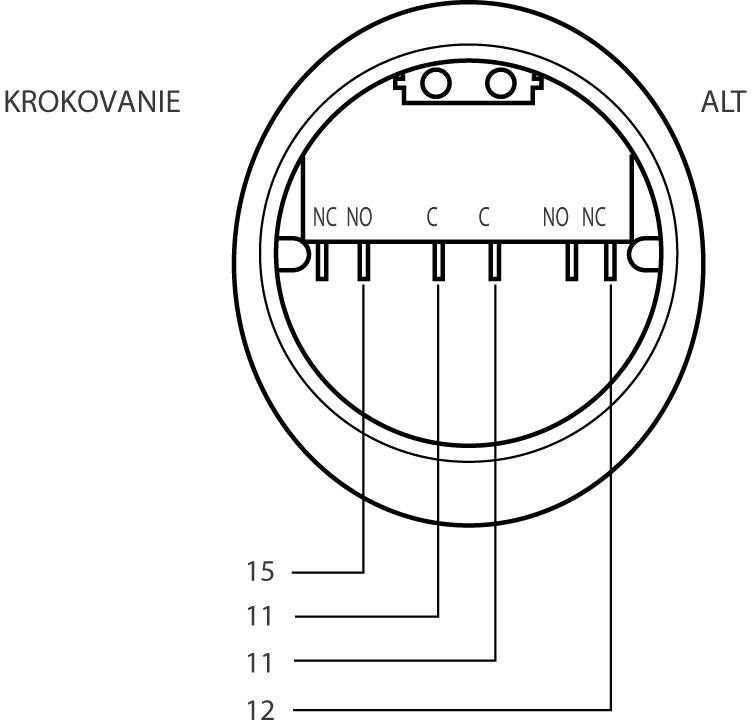
Key switch wiring
Control unit NICE Moonclever MC424L is compatible with all key switches in our range. Wiring can be done in at least two standard ways:
| STOP and Step-by-step | Step-by-step and auxiliary input |
|---|---|
 |
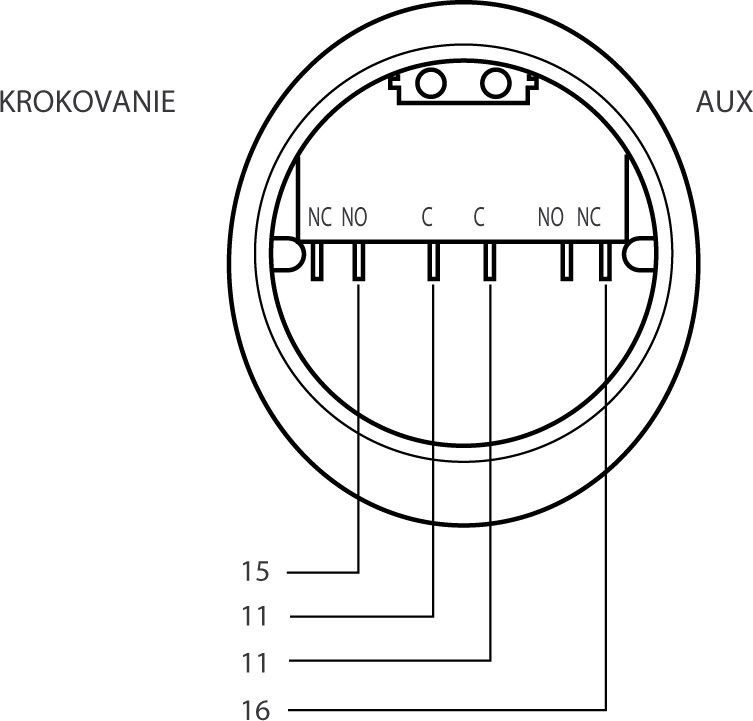 |
| Turning the key to the left immediately stops the gate movement. Turning it to the right steps through the gate movement. Note: if you want Standby mode, connect ALT to terminal no. 8 instead of terminal no. 11. |
Turning the key to the left executes the command programmed for the auxiliary input (partial opening of one gate leaf, partial opening of both gate leaves, open, close, execution FOTO2). Turning it to the right steps through the gate movement. |
STOP input wiring
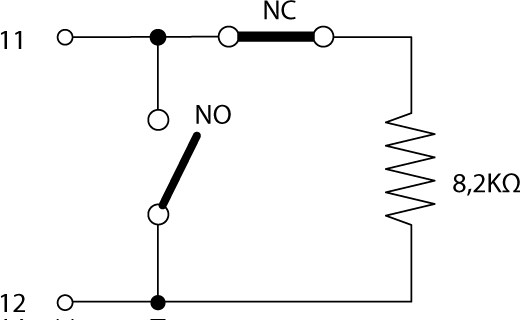
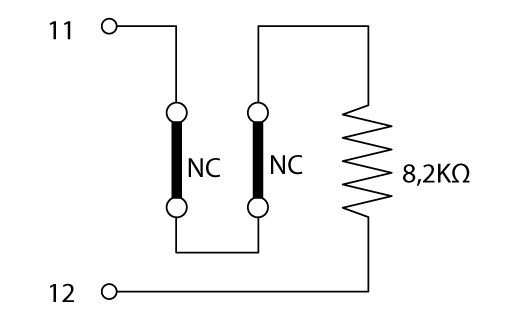
Control unit NICE Moonclever MC424L can be programmed to recognise the STOP input in two ways:
- Normally closed contacts (NC) - devices that open the contact when triggered, thereby instructing the control unit to stop the gate
- Devices with a constant resistance of 8.2k? (e.g. safety edges) - the control unit monitors the resistance and stops the gate if the resistance deviates from the standard value. Normally closed contacts (NC), normally open contacts (NO) and devices with a constant resistance of 8.2k? can be combined in this way (e.g. safety edges) according to the following table:
|
|
Type of first device | |||
| NO | NC | 8.2k? | ||
|---|---|---|---|---|
| Type of the second device |
NO | 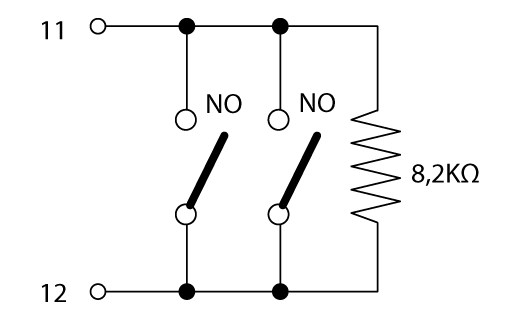 |
 |
|
| NC | |
 |
|
|
| 8.2k? | |
|
 |
|
Wiring the S.C.A. output - open gate indicator or electric lock
For this input, you can program two operating modes:
| 1. Open gate indicator | 2. Electric lock |
|---|---|
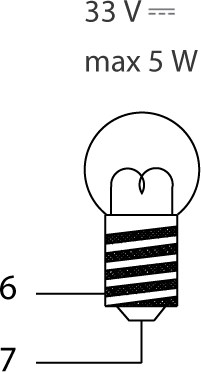 |
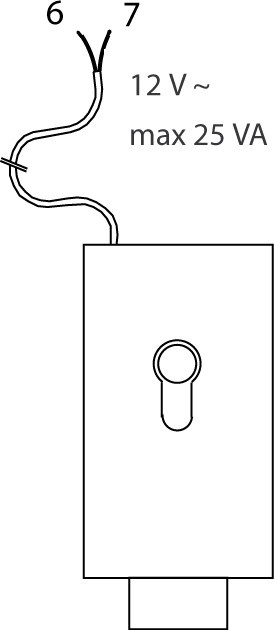 |
| The bulb connected to the S.C.A. input flashes slowly while the gate is opening and quickly while it is closing. The bulb is lit when the gate is open and off when the gate is closed. The behaviour can be configured. | At the same time, each time the gate opens, a signal is sent for three seconds to the electric lock to release it. |
Control unit fuses
Coming soon.
Drive photocells
Coming soon.
Radio receiver for drives
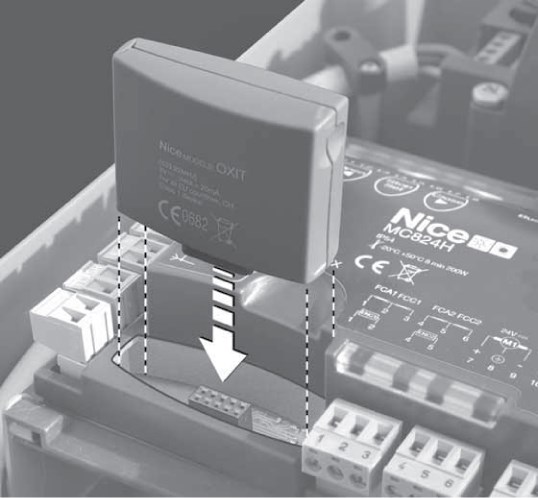 |
NICE Moonclever MC424L control unit is supplied with the NICE MCA2 control unit, which has an SM connector for connecting an external radio receiver (e.g. NICE OXI, NICE SMXI). This receiver is essential for receiving commands transmitted by from remote controls, and is therefore required to operate the sliding gate remotely remote control. |
Starting up the control unit
After connecting the control unit to the power supply, all the LEDs should flash rapidly for a few seconds, after which the following status should be displayed:
- Voltage approx. 30 Vdc (when using the backup battery 24 Vdc) at inputs 9-10.
- LED P1 flashes at one-second intervals. If an input has changed, the LED will flash rapidly twice in succession.
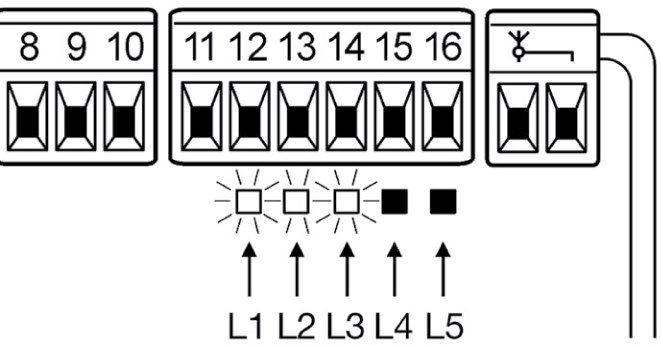
- The LEDs for normally closed contacts (NC) will be lit, while the LEDs for normally open contacts will be off; see illustration:
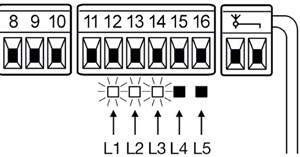
The LEDs will light according to the following key:
Input Input type LED status STOP STOP NC L1 lit Constant resistance 8.2k? L1 lit PHOTO NC L2 lit PHOTO1 NC L3 lit Step-by-step NO L4 offlit AUX NO - Partial opening I. L5 offlit NO - Partial opening II. L5 offlit NO - Open L5 offlit NO - Close L5 offlit NC - PHOTO2 active L5 lit - The individual LEDs should switch on and off as the status of the devices connected to them changes
- When the P2 button is pressed, both motors should start opening briefly, with the primary leaf moving first. Press P2 again to stop the operation. If the leaves do not start opening but remain stationary, or start closing, the motor polarity must be reversed. If the secondary leaf moves first, set the jumper as shown in the illustration:
Primary leaf motor M2 Primary leaf motor M1 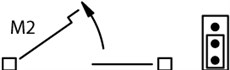
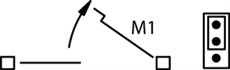
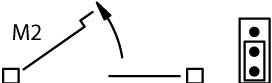
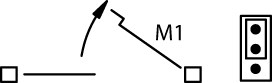
Gate leaf movement detection
For the gate to operate correctly (in particular, to calculate the acceleration and deceleration distances and partial opening), the control unit must automatically determine the opening arc of the gate leaves. During this operation, the actuators move the gate from stop to stop and determine the duration of the gate's opening cycle.
Note: If you have already completed the gate leaf movement detection procedure, you must clear the control unit's memory.
before repeating the detection procedure. Before starting, check that the devices connected to the STOP, PHOTO and PHOTO1 inputs are working properly and connected correctly. If any of them is activated during detection, the process must be repeated. Ideally, the gate leaves should be about halfway open. To do this, release the actuators, move the leaves manually to the half-open position, and then engage the actuators again. After engaging the motor, always move the leaf slightly by hand to ensure the motor engages. However, in principle, it does not matter what position the leaves are in before detection.
The gate leaf movement detection procedure is automatic and proceeds as follows:
- Press the P2 button
- Both leaves open slightly
- The secondary (lower) leaf closes
- The primary (upper) leaf closes
- The primary (upper) leaf opens
- After the programmed delay time for the secondary motor has elapsed, the secondary (lower) leaf starts to open. If the delay is not suitable, press P2 and set the required delay
- The control unit determines the travel time required to open the gate fully (i.e. until it reaches the mechanical stops)
- Both leaves close fully. The leaves start closing at different times to prevent them from rubbing against each other while closing
- The control unit saves the measured values, and the procedure is COMPLETE.
All the phases listed above must run one after another without any intervention from you. If any phase does not proceed correctly, stop it by pressing P1 and, if necessary, adjust the settings and repeat the process.
Programming the actuator control unit
The control unit MC424L allows you to program several functions, either by switching a function on or off by Level I programming, or by setting a preset parameter through Level II programming.
Programming may seem a little awkward and unclear at first, but once you understand the two basic principles, you can quickly find your way around the menu with a little imagination.
The basic idea is to understand that programming is done using three buttons (P1, P2 and P3) and their corresponding LEDs (LEDs P1, P2 and P3), as well as the indicator LEDs L1, L2, L3, L4 and L5.
The functions of the individual buttons and the LED signals depend on the programming level you are in.
MCA2 control unit has three buttons for operating and programming the drive:
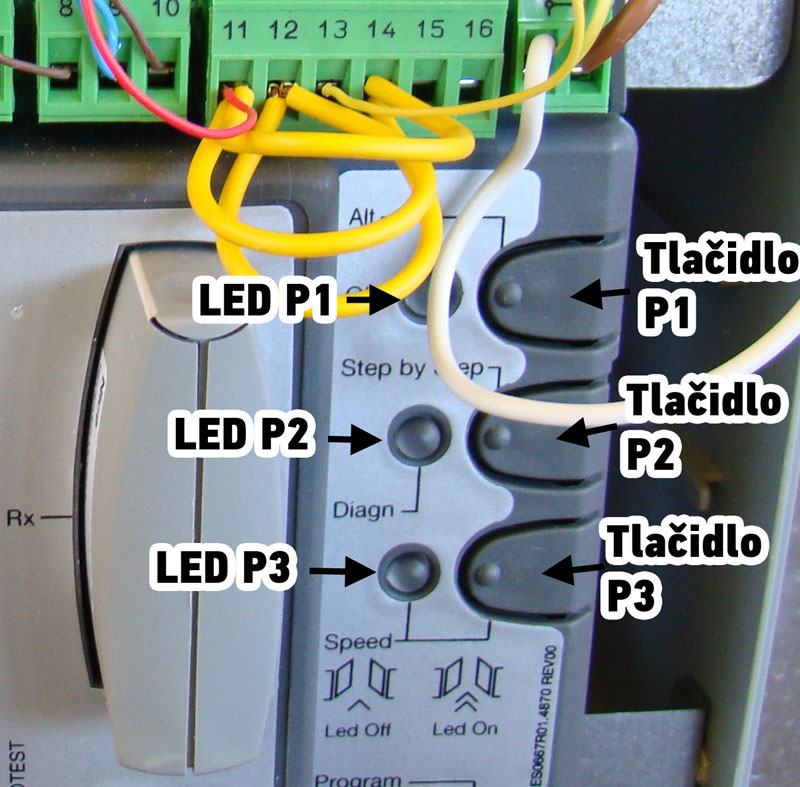 |
Button |
|---|---|
| P1 | |
| P2 | |
| P3 |
The control unit allows you to program 1 direct function and 10 on/off functions and 5 adjustable functions (of which the AUX auxiliary input has 5 additional on/off functions):
Direct function
There is one direct function, namely the gate speed, which can be switched in normal operating mode (i.e. not programming mode) by pressing the P3 button:
| Function | On (P3 LED lit) | Off (P3 LED not lit) |
|---|---|---|
| Movement speed | fast speed (default) | slow speed |
Switchable functions
There are 10 switchable functions, which are set in Level I programming. (default values are highlighted in bold):
| Function | On (LED lit) | Off (LED not lit) |
|---|---|---|
| Automatic closing | After the set pause duration the gate starts closing automatically. | The gate moves only when a command is entered using a remote control, using a key switch, a button, etc. |
| Condominium mode | Useful when several users operate the drive and their commands could conflict—for example, one user starts opening the gate while another also wants to open it, but because it is already opening, it starts to close, etc. After the first open command, all other commands are ignored until the gate is fully open. | The gate is controlled in step-by-step mode: Open > Stop > Close > Stop > Open |
| Pre-flashing | The warning light flashes for 3 seconds before the gate starts moving. | Movement starts immediately, at the same time as the warning light starts flashing. |
| Close after photocell interruption | This is useful only if automatic closing. After passing through the photocells (i.e. the photocell beam is interrupted and then restored), the gate starts closing after just 4 seconds, for example after a vehicle has exited. | The gate starts closing only after the set pause duration for automatic closing has elapsed.. |
| Delay for the secondary leaf | Sets whether the secondary leaf starts moving after a delay. Useful when one leaf could scrape against the other while moving. Also when using an electric lock. The delay can be set as a percentage in Level II programming. | Both leaves start moving at the same time. |
| Standby mode/Phototest |
Activates the output at terminal no. 8: On standby mode, or phototest. Only one function can be active at a time. Select the function to use by following the appropriate wiring diagram. |
Deactivates the output at terminal no. 8: Standby mode off and phototest off. |
| Gate-open indicator/Electric lock | The output at terminals 6–7 will operate the electric lock, meaning that the lock will release during the first three seconds of gate opening. | The output at terminals 6–7 will operate the gate-open indicator. The flashing pattern can be set; see Level I programming. Variable flashing rate of the gate-open indicator |
| Resistive STOP input | The connection between the common input and the STOP input will be set to a constant resistance of 8.2k? (+25% -25%), for example for safety edges. For more information, see STOP input. | To the STOP input you can connect normally closed (NC) devices that immediately stop the gate when the circuit opens. |
| Heavy gate | The drives will treat the gate as a heavy gate, meaning the control unit will adjust acceleration and deceleration accordingly. | The control unit will treat the gate as a light gate. |
| Variable flashing rate of the gate-open indicator | The bulb connected to the S.C.A. input flashes irregularly while the gate is opening—the closer the gate is to fully open, the faster it flashes; the closer it is to closed, the slower it flashes. | The bulb connected to S.C.A. input It flashes slowly while the gate is opening and quickly while it is closing. When the gate is open, the bulb is lit; when the gate is closed, the bulb is off. |
Adjustable functions
There are 5 adjustable functions (the default settings are shown in bold):
| L1 lit | L2 lit | L3 lit | L4 lit | L5 lit | none lit |
|---|---|---|---|---|---|
| Pause duration – Sets how long after opening the gate should close. Only applicable when automatic closing. | |||||
| 5 seconds | 10 seconds | 20 seconds | 40 seconds | 80 seconds | – |
| AUX auxiliary input – Turns an additional 5 functions on or off. | |||||
| Partial opening I – opens only the entire primary leaf | Partial opening II – opens both leaves halfway | Open only – cycles through the commands Open > Stop > Open | Close only – cycles through the commands Close > Stop > Close | FOTO2 photocells – activates the photocell function FOTO2 | AUX input (terminal no. 16) is not used |
| Motor cut-off after closing – Once the gate reaches the closing end stop, the motor continues pushing briefly to ensure the gate closes fully. This function sets the reverse run time so the motor does not keep pushing against the leaves while the gate is closed. | |||||
| no cut-off | 0.3 seconds | 0.7 seconds | 1.3 seconds | 2 seconds | – |
| Motor force – The motors are sensitive to friction, wind and fluctuations in the power supply. As a result, these factors may cause them to detect an obstacle when none is present. Increasing the force eliminates this risk. | |||||
| Low force | Lower force | Medium force | Higher force | High force | Maximum |
| Second leaf delay – Sets the percentage delay of the secondary leaf. The percentage is calculated based on the standard travel distance of the leaf. | |||||
| 5% | 10% | 20% | 30% | 40% | – |
Level I programming.
The control unit must be in normal mode. You can check this by confirming that LED P1 flashes slowly and LED P3 is off.
To enter Level I programming, then press and hold buttons P1+P2 for 3 seconds until all the LEDs flash. LED P1 stops flashing and stays lit. Congratulations, you are now in Level I programming. at “Screen I". To “Screen IIyou can switch by pressing button P3 and likewise back to “Screen I". The screen “Screenyou are on is indicated by the state of LED P3, see the table.
| Screen I | ||||
|---|---|---|---|---|
| LED P1 is lit; LED P3 is off | ||||
| L1 | L2 | L3 | L4 | L5 |
| Automatic closing | Condominium | Pre-flashing | Close after photocell interruption | Secondary leaf delay |
| Screen II | ||||
| LED P1 is lit, and LED P3 is also lit | ||||
| L1 | L2 | L3 | L4 | L5 |
| Standby mode/Phototest | Open gate indicator/Electric lock | Resistive STOP input | Heavy gate | Open gate indicator flashing rate |
By pressing button P1 you move through the LEDs towards the right. When you reach the fifth LED L5, you start again from the first LED L1, i.e. as if you were cycling through the selection. The currently illuminated LED will flash. If the flashing is short, the function is inactive, if the flashing is longer the function is active. Switch between short and longer flashes by pressing the P2 button once.
Once you have set all the values to the desired flashing pattern (and thus activated or deactivated the function), pressing and holding the P1+P2 buttons for 3 seconds saves the programming and returns you to normal mode.
Alternatively, if you are happy with everything and do not want to change anything, or are returning from Level II programming, or simply want to exit programming without saving, simply press and hold the P1 button for 3 seconds.
You can also enter Level II programming. by pressing and holding the P2 button for 3 seconds. First, however, you must select the function whose parameter you want to change.
Level II Programming
The control unit must be in Level I programming. on the “Screen I”, which you can check by confirming that the LED P1 is lit and the LED P3 is off.
Select the function you want to change:
| L1 | L2 | L3 | L4 | L5 |
|---|---|---|---|---|
| Pause duration | AUX auxiliary input | Motor shutdown after closing | Motor force | Second leaf delay |
Go to the desired LED by repeatedly pressing the P1 button once, as in Level I programming. You can then enter Level II programming. by pressing and holding the P2 button for 3 seconds. The LED P1 will stop glowing and start flashing rapidly. Great, you are now in Level II programming.
Press the P2 button repeatedly to select the parameter value you want to set, then press the P1 button once to return to Level I programming.
To save, you must also press and hold the buttons P1+P2 for 3 seconds (in Level I programming.).
To exit without saving, press and hold 3 seconds, using only the P1 button.
It's not that complicated, is it? The key is to understand that although you are always looking at 5 LEDs and 3 buttons, the LED indicators P1 and P2 tell you where you are in the process. The table below may help illustrate the possible states:
| LED P1 | ||||
|---|---|---|---|---|
| Lit | Flashing | Flashing rapidly | ||
| LED P3 |
Off | Level I programming. "Screen I" |
Normal mode |
Level II programming. |
| Lit |
Level I programming. |
- | - | |
For reference, here is the complete programming diagram (click to open full size):
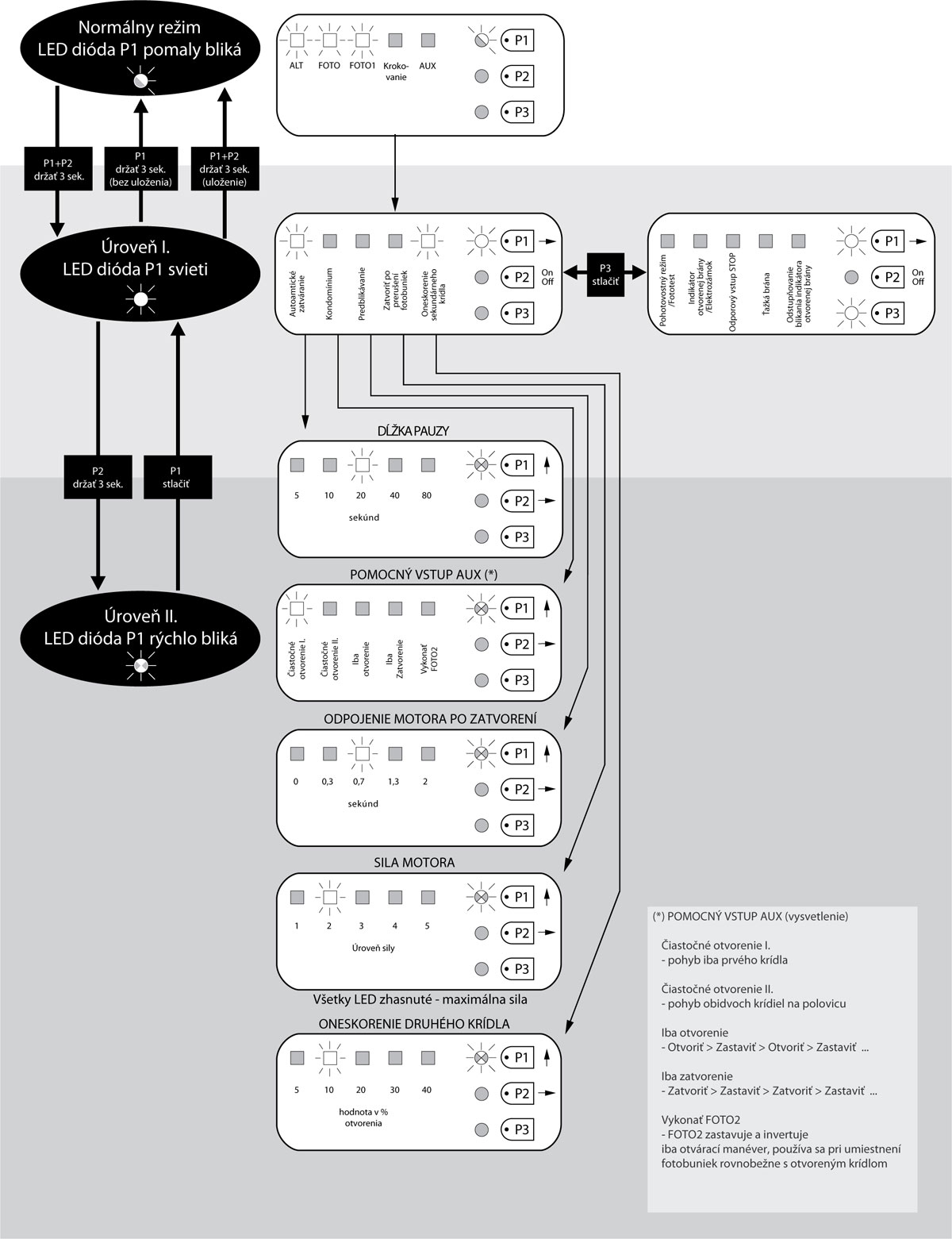
If you need help, feel free to contact our technical support team for NICE drives.
Connecting additional external devices to the drive
|
If you need to connect additional devices to the drive that require an external power supply (e.g. indicator lighting, key switch, card readers, etc.), connect the device as shown in the information alongside. The supplied voltage is 30 Vdc -30% to +50% (when using a backup battery 24 Vdc) with a maximum current of 200 mA. |
||||||||||||
Special control unit functions
Clearing the memory
- Disconnect the control unit from the mains (or remove the power fuse F1) and wait until all the LEDs go out.
- On the control unit, press buttons P1 and P2 and hold them (the control unit should still be disconnected from the power supply)
- While holding buttons P1 and P2, connect the control unit to the mains (or insert the power fuse)
- Exactly after 3 seconds, release the buttons (that is, during the third second)
- If the clearing process was successful, all the LEDs will go out for one second.. If this does not happen and the LEDs continue flashing, it is necessary to repeat the clearing process from the beginning..
To check that the memory has been cleared correctly, disconnect the control unit from the mains (or remove the power fuse F1) and wait until all the LEDs go out. After reconnecting the power, if the memory has been completely cleared, all the LEDs should flash for approximately six seconds.. If the LEDs flashed for only three seconds, the clearing was probably unsuccessful and must be repeated.
Troubleshooting the drive
If anything is unclear or you have any other problem, feel free to contact our technical support team for NICE drives.
Depending on the nature of the problem
During installation (or if the drive fails), you may encounter one of the following problems:
|
Problem |
Possible solution |
|---|---|
|
No LED is lit |
Check whether the control unit is receiving power. You can check this by measuring the voltage at terminals 9–10 on the terminal block; it should be approximately 30 Vdc, or 24 Vdc when powered by a battery. Try testing both fuses and, if necessary, replace them with new ones of the same rating. |
|
LED P1 flashes regularly, but the states of LEDs L1 to L5 do not correspond to the connected devices |
Disconnect the control unit from the mains briefly (or remove the power fuse F1) and wait until all the LEDs go out; you may be stuck in programming mode. Then check all device connections at inputs 11 to 16.. You can disconnect them all and reconnect them one by one to identify the issue. |
|
LED P1 flashes every 4 seconds |
The control unit is in standby mode. |
|
The gate-leaf movement learning phase will not start |
The gate-leaf movement learning phase starts only if it has not already been performed, or if the memory has been cleared.. If the gate movement was learned incorrectly, you will first need to clear the memory.. |
|
The gate-leaf movement learning phase has never been performed, yet it will not start or behaves abnormally |
First, check that all connected devices, including safety devices, are working correctly. Make sure that no device is activated during the gate-leaf movement learning phase. Before starting the learning process, the contact LEDs must be lit correctly and LED P1 must flash once per second. |
|
The gate-leaf movement learning phase completed correctly, but the manoeuvre does not start |
Check that the LEDs for the safety devices PHOTO, PHOTO1 and PHOTO2 (if connected), as well as the LEDs for the Step-by-step and AUX auxiliary input devices, are on when a movement command is given. If the PHOTOTEST function is enabled but the photocells are not working correctly, the diagnostic LED will flash 4 times. |
|
The gate moves, but stops during movement and starts moving in the opposite direction |
I. The photocells are being triggered. There are several possibilities.:
Check the photocell wiring and the corresponding LEDs. II. Another possibility is that the gate is too heavy for the drive, or that it is being obstructed by strong winds. In this case, the drive detects increased current draw and interprets the situation as an obstacle (the gate can also be stopped by hand). The diagnostic LED flashes once if motor M1 detected the obstacle, and twice if motor M2 detected it. There are two solutions: 1. Set the heavy gate option to active: First level (P1 LED lit): second part (P3 LED lit)
Activate LED L4 Heavy gates
Second level
In the parameter Amperometric sensitivity (motor force) set to All LEDs off: level 6 (max. amperometric sensitivity)
|
Diagnostics using LED P2
Coming soon.
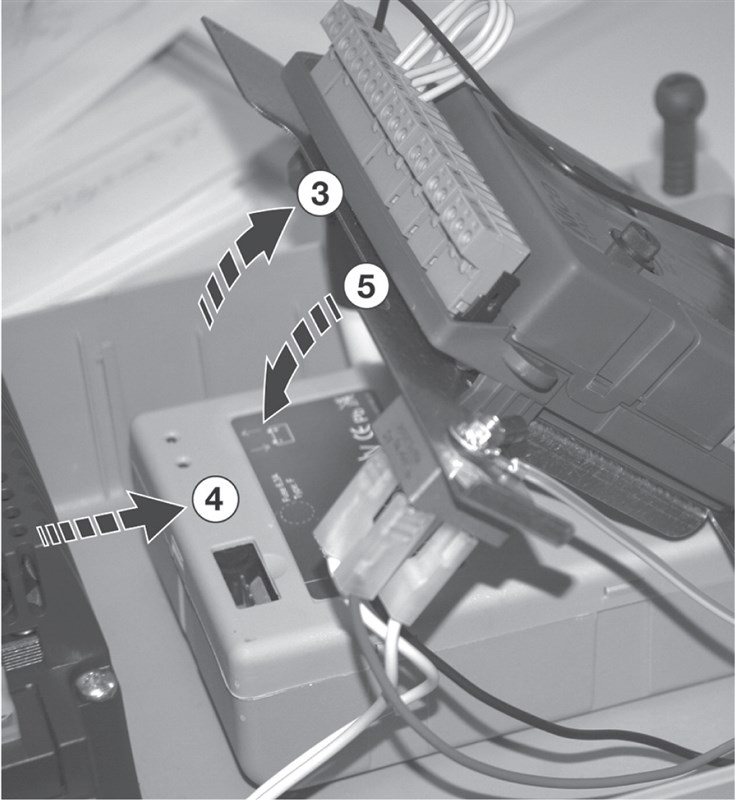
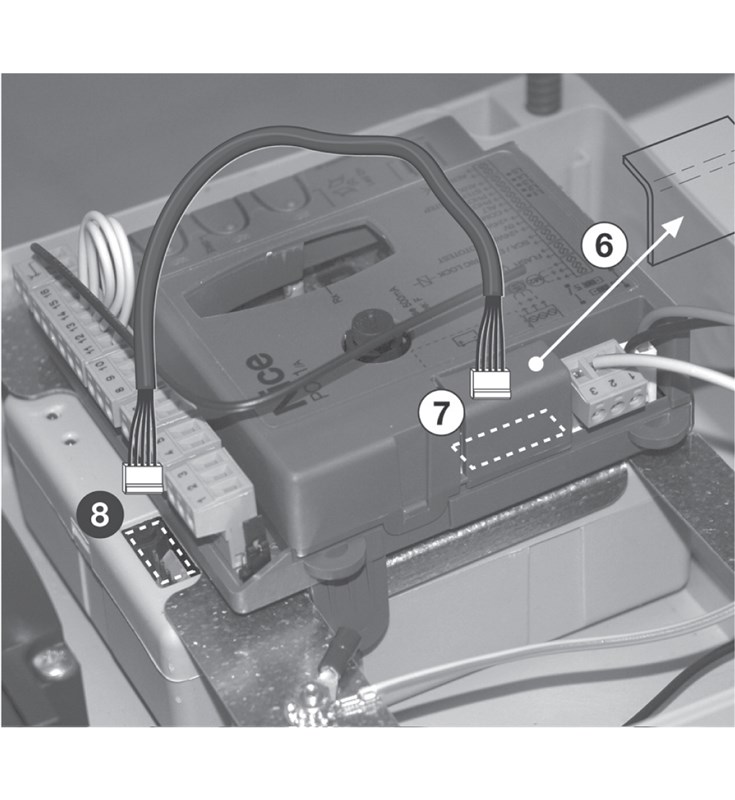
Installing the backup battery in the NICE MC424L control unit
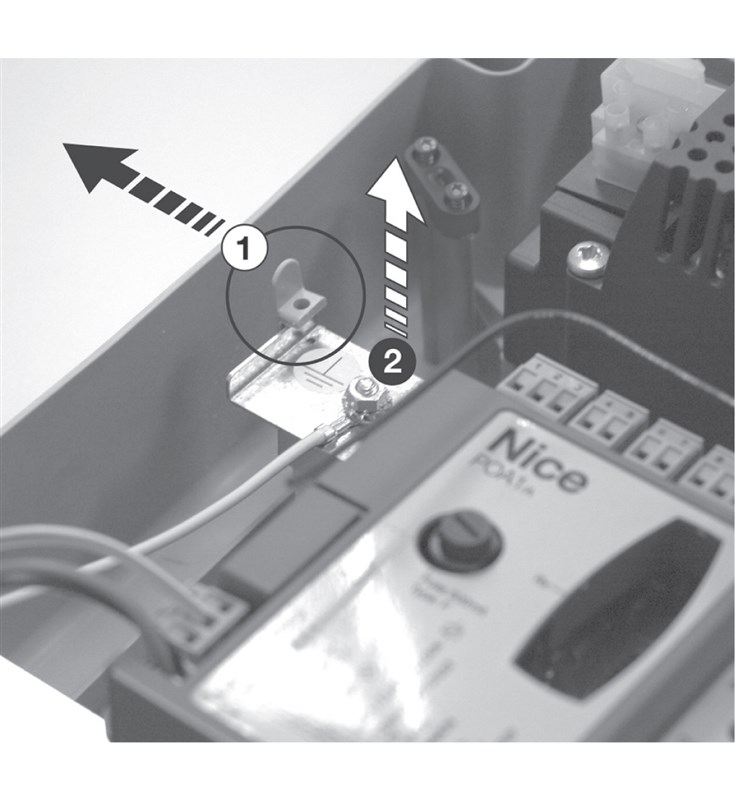
NICE PS124 backup battery is not included as standard drive, but it can be ordered separately. It is used in the event of a power outage, when the gate drive will be powered by it. The battery is continuously charged from the mains.
| 1. Flip open the control unit retaining latch 2. Lift the control unit bracket |
3. Flip open the control unit 4. Slide the battery under the control unit 5. Close the control unit retaining latch |
6. Pry off the plastic connector cover |
|---|---|---|
 |
 |
 |
Technical specifications of the NICE Moonclever MC424L control unit
| Model | NICE Moonclever MC424L | ||||||||||||||||
|---|---|---|---|---|---|---|---|---|---|---|---|---|---|---|---|---|---|
| Description | Electrical control unit for the automatic operation of swing gates. Supplied with NICE MCA2 control unit, but without radio receiver. | ||||||||||||||||
| Power supply | 230V (+10% -10%) 50/60Hz | ||||||||||||||||
|
Power consumption |
170W | ||||||||||||||||
| Backup power supply | can be purchased separately and installed NICE PS124 backup battery | ||||||||||||||||
| Beacon output | for one beacon 24Vdc with a bulb, max. 25W (e.g. NICE Lucy LUCY24, NICE Moonlight ML24T) | ||||||||||||||||
| Status indicator output (S.C.A.) | - for one 24Vdc, max. 5W bulb (output voltage +50% -30%); can control a small relay - or for one 12Vac, max. 25W electric lock |
||||||||||||||||
| FOTOTEST output | 24Vdc max. 100mA | ||||||||||||||||
| Accessory output | 24Vdc max. 200mA | ||||||||||||||||
| STOP input | for normally closed contacts and devices with a constant resistance of 8.2K? | ||||||||||||||||
| Radio receiver | without receiver; "SM" connector for receivers NICE SMXI, NICE OXI etc. | ||||||||||||||||
| Antenna input | 50? for RG-58 coaxial cable (or similar) | ||||||||||||||||
| Operating time | automatic calculation | ||||||||||||||||
| Pause duration | programmable to 5, 10, 20, 40, or 80 seconds | ||||||||||||||||
| Motor shut-off after closing | programmable to 0; 0.3; 0.7; 1.3; or 2 seconds | ||||||||||||||||
| Leaf delay during opening | programmable to 5, 10, 20, 30, or 40% of the operating time | ||||||||||||||||
| Leaf delay during closing | automatic calculation | ||||||||||||||||
| M1 motor output | for Wingo WG2024, WG3524, WG4024, WG5024 | ||||||||||||||||
| M2 motor output | for Wingo WG2024, WG3524, WG4024, WG5024 | ||||||||||||||||
| Maximum cable lengths |
|
||||||||||||||||
| Operating temperature | -20°C to +50°C | ||||||||||||||||
| Use in saline, acidic and potentially explosive environments | no | ||||||||||||||||
| Protection rating | IP54 | ||||||||||||||||
| Dimensions | 232×310×122 (w×d×h) | ||||||||||||||||
| Weight | 4.1kg |
How can I order this item?
Choose the option that suits you:
- order online: use the buy button to add the goods to your shopping cart (you will find the buy button here in the product variants table).
- order by email: place your order at [email protected]






