NICE Sumo SU2010 – operator for sectional/overhead doors up to 35 m², IP54
| Product availability: | within 3 days | We usually ship the goods within 3 days. |
|---|
within 3 days
€909.61 including VAT
| Weight |
|---|
| 10 kg |
Description of NICE Sumo SU2010 – operator for sectional/overhead doors up to 35 m², IP54
NICE SUMO SU2010 is a shaft-mounted drive for sectional garage doors or suspended sliding gates, including those with two opposing leaves. It has a 24 V DC motor, magnetic encoder, torque of 120 Nm and a speed of up to 16 rpm. The sectional door area limit is 35 m².
SU2010 does not include a control unit. For a balanced sectional door, add separately the NICE DPRO924. The 230 V AC mains supply connects to the control unit, not directly to the motor. The drive is irreversible and is released during a power failure by a steel cable in a Bowden cable.
| Quick navigation | |
|---|---|
| Drive selection | Accessories |
| Package contents | Installation |
| Manual release | Wiring |
| Initial setup | Settings |
| Remote controls | Diagnostics |
| Reset | Maintenance |
| Specifications | PDF manual |
Control unit and accessories
The wiring, programming and settings below apply to SU2010 with DPRO924 and an incremental encoder on a balanced sectional door. A suspended sliding gate requires a specially designed control system and safety equipment. For an older installed A924, use its own terminals and manual.
| What | Why | Type |
|---|---|---|
| Control unit | Required for the motor and safety devices; wiring. | |
| Photocells | Standard relay NC output, Phototest wiring. | |
| Flashing beacon | A separate 24 V flashing lamp on OUT1. | |
| Radio receiver and remote control | SM socket, selection and pairing. | |
| Backup battery | Emergency power supply for the DPRO924 after programming. | |
| Drive adapter | Direct adapter or chain, depending on the installation. |
DPRO924 does not have BlueBUS: EPMB photocells are not direct replacements for relay-type EPM photocells. The PS124 battery used with SOON drives is not a backup battery for the DPRO924.
When to choose the SUMO SU2010
The SU2010 is suitable for larger, mechanically balanced doors in commercial and industrial settings. The choice depends on the movement resistance, drums, shaft, drive ratio and required number of operations.
| Condition | What it means |
|---|---|
| Area up to 35 m² | Maximum limit for a sectional door; it does not automatically determine the weight or length of a suspended gate leaf. |
| Torque: 120 Nm | Assess the torque required at the shaft for the complete door, including during start-up. |
| Speed: 7.5–16 rpm | Motor speed range; door speed depends on the drum and any reduction gearing. |
| Duty cycle: 50% | This does not mean continuous operation without breaks or a universal number of cycles per hour. |
| IP54 rating | Protect the motor from flooding and unsuitable environments; the separate DPRO924 has an IP55 rating when its enclosure is properly closed. |
SU2010 drive and separate control unit
| SUMO SU2010 | DPRO924 |
|---|---|
NICE SU2010 IP54; 120 Nm; up to 35 m². | NICE DPRO924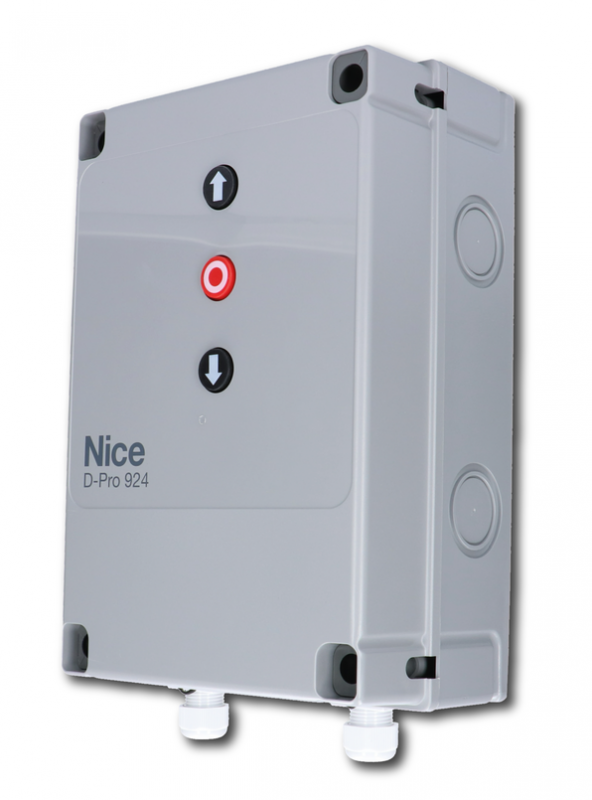 Sectional door operator; motor sold separately. |
SUMO SU2010 package contents
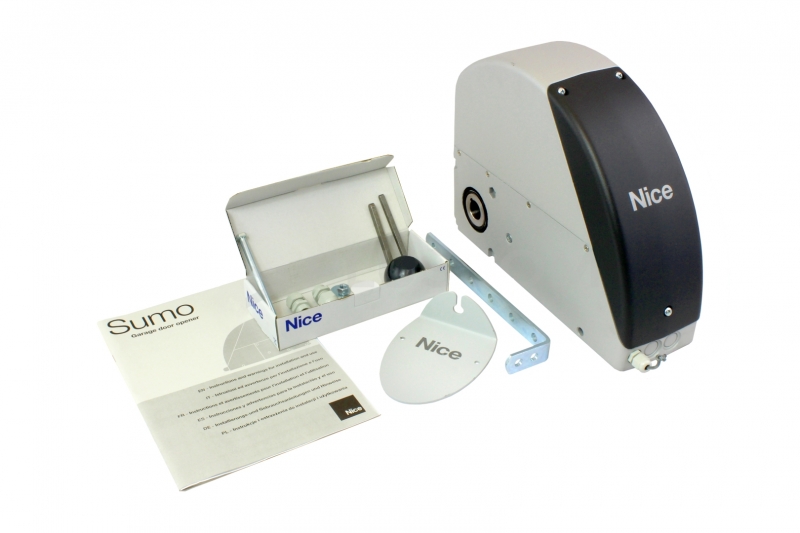
Standalone motor with encoder, mounting bracket, coupling key, mounting hardware, and release by steel cable in a Bowden sheath with an operating handle. DPRO924, radio receiver, photocells, and chain drive are not automatically included with the motor.
Installing the operator
Installation, electrical connection, and testing must be carried out by a qualified technician. Disconnect the mains supply and backup battery before carrying out any work. The door must be mechanically safe and properly balanced, with functional springs, tracks, and stops. The operator will not fix a door that is difficult to move.
Direct mounting on the shaft
The NICE SUMO SU2010 operator mounts directly on the sectional door shaft Ø 25.4 mm. For shafts Ø 31.75 / 35 / 40 mm, use NICE CRA9. The mounting bracket is included; select wall anchors to suit the substrate. The Ø 25.5 mm opening in the motor does not indicate a different recommended shaft diameter.
- Remove the cover, prepare the cable glands and hold the release lever during installation; secure it in the installation position as shown.
- Slide the motor onto the shaft, aligning the grooves. Insert the coupling key and secure it against slipping out with a suitable collar.
- Bolt the bracket to the operator and anchor it to the wall so that the operator remains parallel to the wall.
- Release the release lever’s installation lock, return it to the operating position, and check the cover and release mechanism.
For a steel structure, use M8 bolts, property class 6.8 or A2-50. Anchors used in other substrates must safely withstand a tensile load of 1,000 N; the installer must select the anchor type to suit the structure.
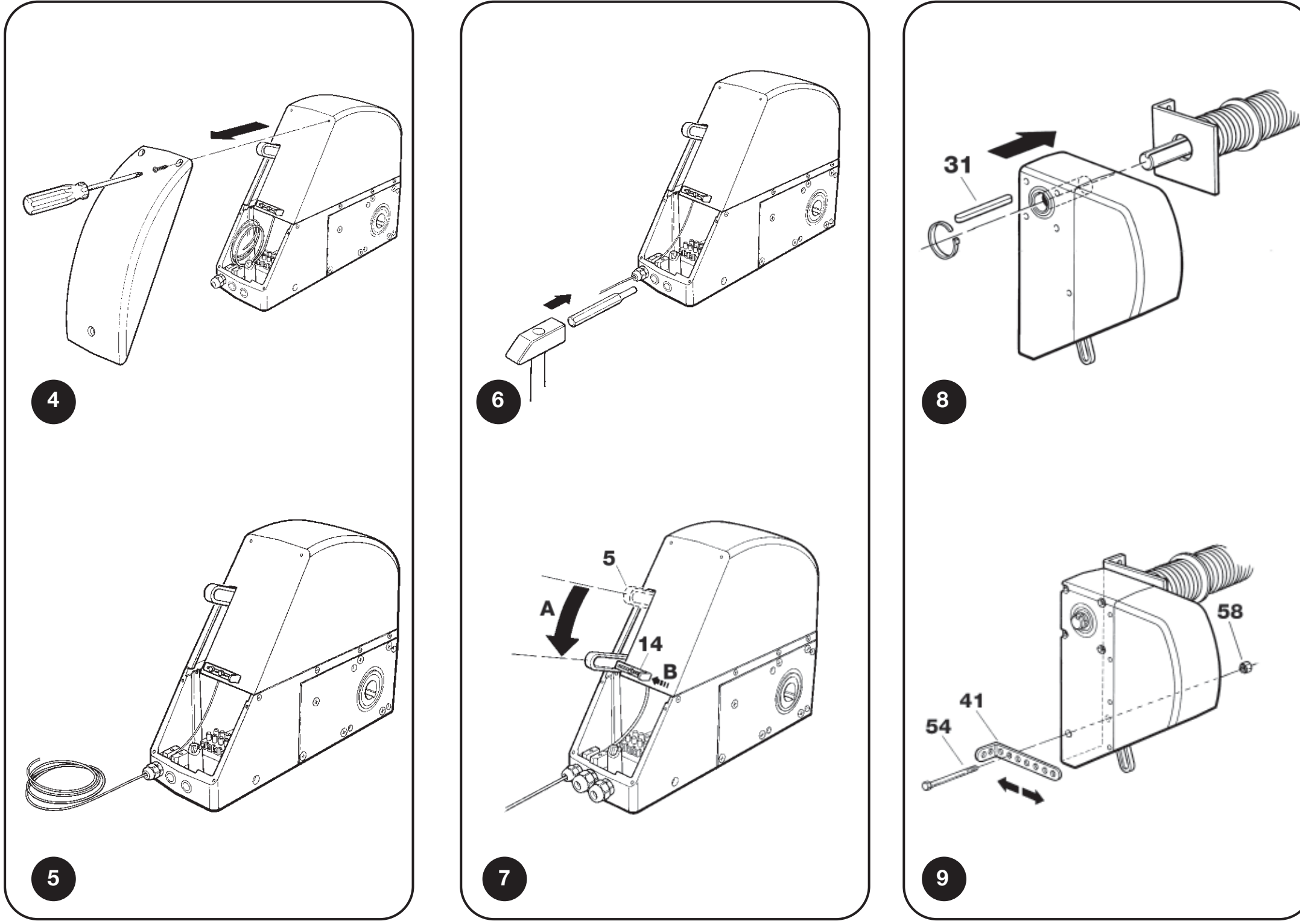
SUMO: cable glands, release lever installation position, key, and bracket
Offset mounting using a chain
Where there is not enough room for direct mounting, use a shaft with an 18-tooth sprocket NICE CRA1 in the operator and a sprocket on the door shaft. The drive uses a 1/2″ × 5/16″ chain NICE CRA3 (1 m) or NICE CRA4 (5 m), with connector NICE CRA2. Brackets for offset mounting of the operator are available as NICE CRA8.
| Drive | Components and result |
|---|---|
| 1 : 1 | NICE CRA1 + NICE CRA7 (18 / 18 teeth). No speed reduction. |
| 1 : 2 | NICE CRA1 + NICE CRA6 (18 / 36 teeth). The door shaft turns more slowly; the transmitted torque and door construction must be assessed. |
The sprockets must be aligned, the chain correctly tensioned, and the chain guarded against catching hands or clothing. Changing the gear ratio does not automatically change the permitted door area. Dimensions, balance, travel, and the entire assembly must be assessed together.
Position the chain at least 2.4 m above the floor and out of reach; if this is not possible, fit a protective guard. Under a load of 4,000 N, the shaft supporting the sprocket must deflect no more than 2 mm.
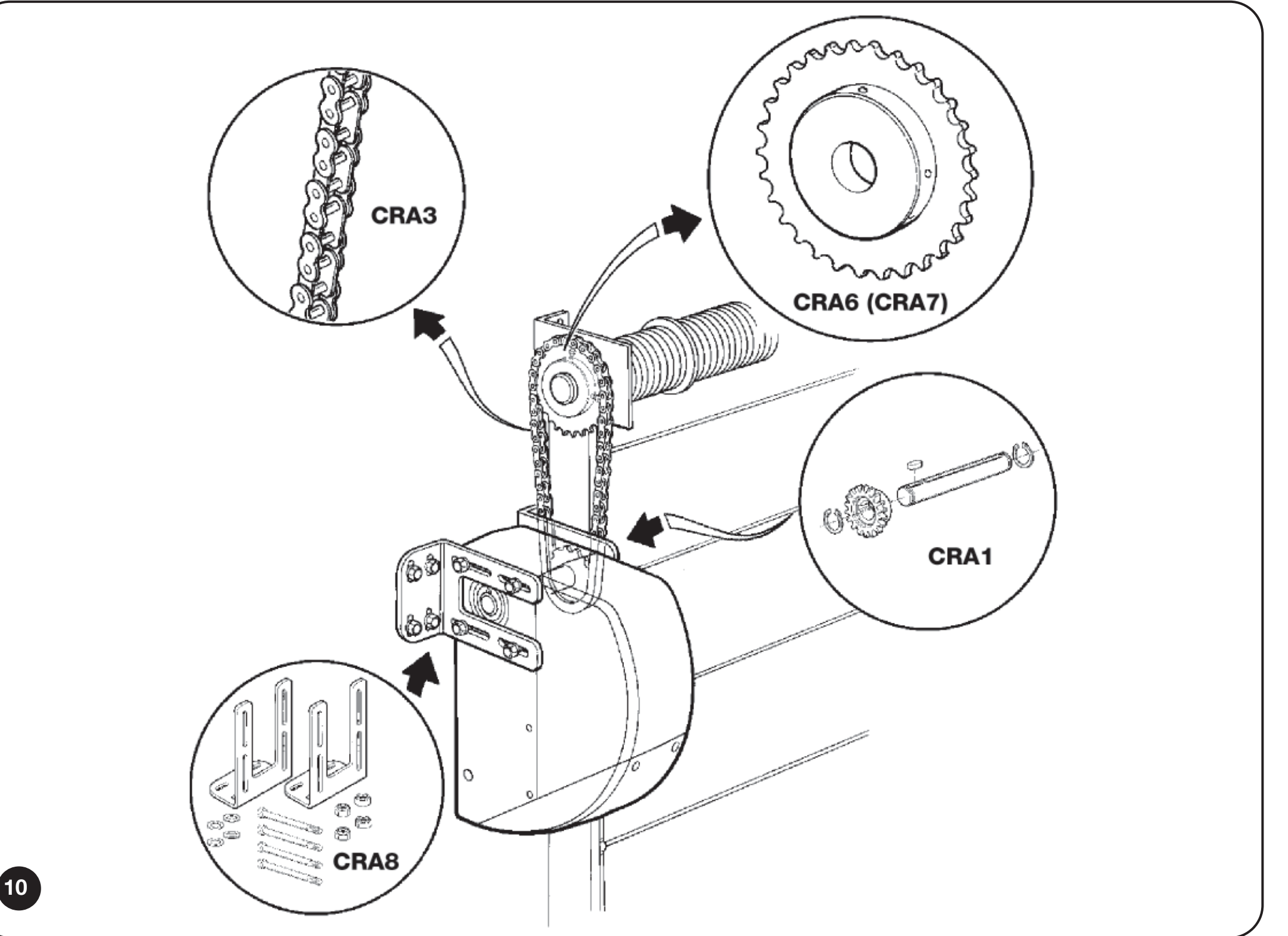
SUMO: vertical chain drive with CRA1, CRA6, or CRA7 and CRA8 brackets
Chain drive for a suspended sliding door
For a suspended door, the loop consists of a shaft with a sprocket NICE CRA1, a tensioner with a return sprocket NICE CRA5, chain NICE CRA4 and connectors NICE CRA2. Attach the door leaf to the upper or lower chain run, depending on the direction of travel. For two opposing door leaves, attach one to the upper run and the other to the lower run.
This is a custom-designed chain assembly. The sectional door area limit does not determine the permitted weight or length of a suspended door leaf. The installer must verify the sliding resistance, force transmission, travel path, mechanical stops, and protection of pinch points.
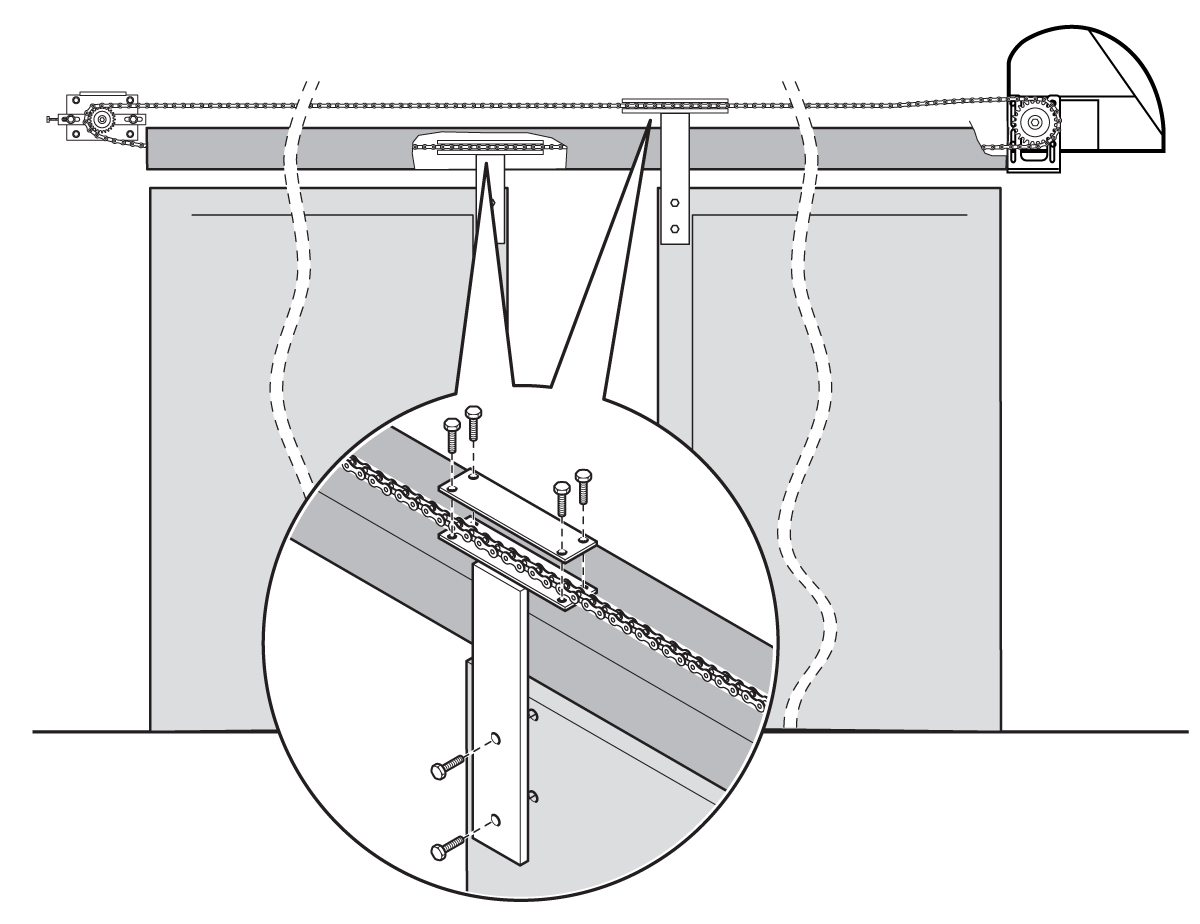
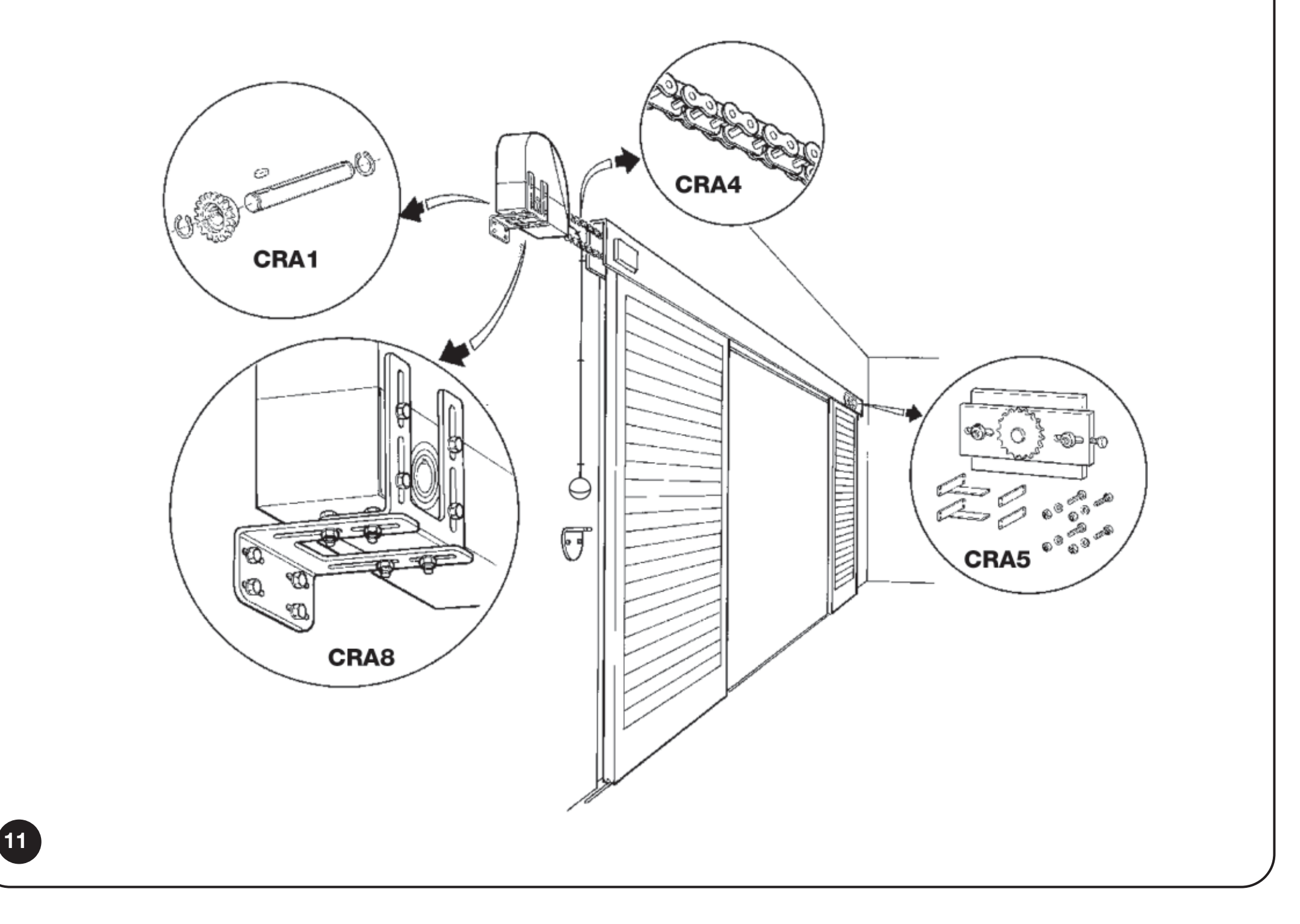
SUMO: installation of a horizontal chain loop for a suspended door
Manual release for SU2010
The SU2010 has a steel cable in a Bowden sheath, routed to an operating handle near floor level. Route the Bowden sheath as straight as possible; the maximum length is 6.5 m. Release only a stationary, balanced door. Do not release the door if a spring is damaged or the door could fall.
Installing and adjusting the cable
- With the power disconnected, remove the cover, lower the release lever, and secure it with the installation screw. Insert the end of the Bowden sheath without an end fitting into the PG7 cable gland.
- Feed the steel cable through from the opposite side. Secure the Bowden sheath with the clip. Place the cable in the farther groove of the lever and firmly secure its end with the clamp; it must not slip out when pulled hard.
- After mounting the motor, release the lever’s installation lock, return the lever to its operating position, and close the cover. Route the Bowden sheath along the wall without sharp bends.
- Fit the clamp and operating handle onto the cable. Set their height as shown; when the handle is moved to position 1, the drive must disengage reliably.
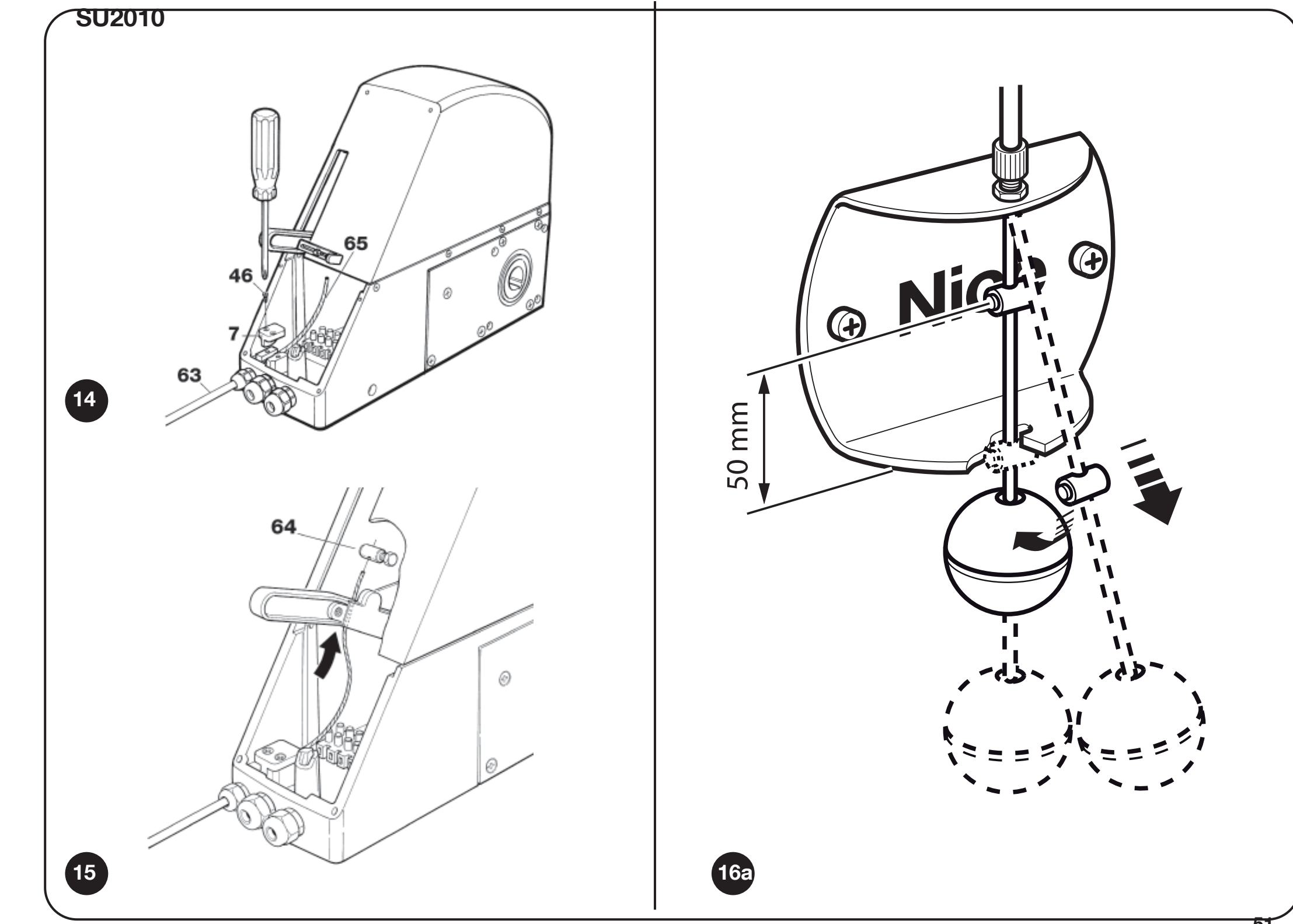
SU2010: Bowden sheath attachment, steel cable clamp, and operating handle near floor level
Manual operation and re-engagement
- Move the handle down to position 1 as shown.
- Move the door by hand without forcing it.
- Return the release mechanism to the locked position and check that the drive re-engages.
For access from outside, add the following, depending on the installation: NICE KA1 and NICE KIO or NICE KIOMINI. They are not automatically included with the standalone drive.
After manual movement, the SU2010 with DPRO924 needs to restore position synchronization. If the control unit remained powered during manual release, it will record the release. Synchronization is restored by moving to the stored fully closed position; until then, the gate opens only while the command is held. Monitor the gate and do not bypass safety devices.
Wiring the SU2010 with DPRO924
Disconnect both the mains supply and PS224 before working. The motor cable and encoder cable are separate circuits. DPRO924 controls one SU2010 on a balanced sectional door; the procedures below do not apply to a chain-operated suspended door.
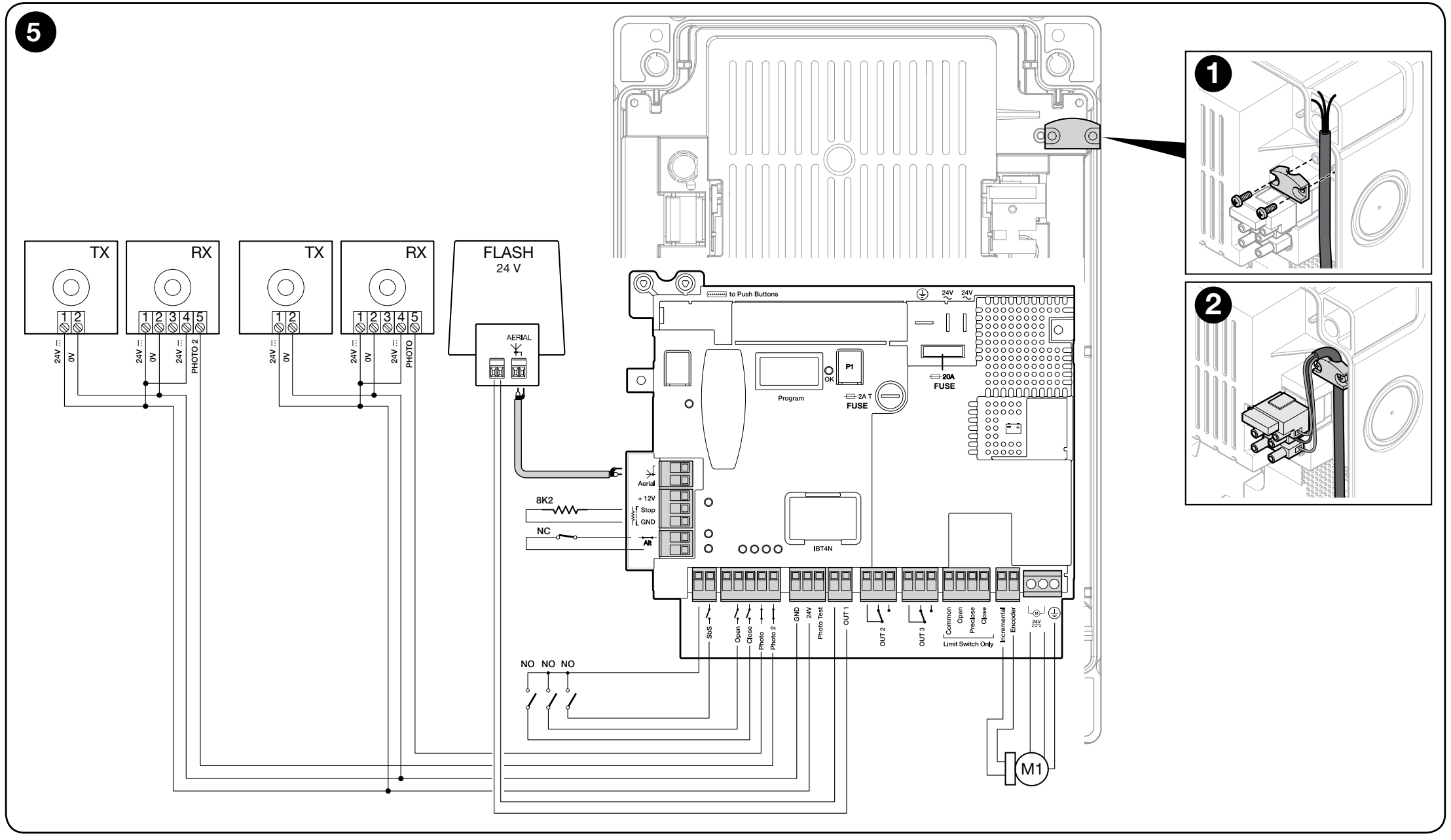
DPRO924: motor, incremental encoder, commands, relay photocells, warning light and safety circuit
Wiring and cable lengths
| Connection | Cable / maximum length |
|---|---|
| Mains supply to DPRO924 | 3 × 1.5 mm² / 30 m. For longer runs, use 3 × 2.5 mm² and provide protective earthing at the automation unit. |
| Motor | 3 × 2.5 mm² / 10 m; according to the motor terminals and protective wiring. |
| Incremental encoder | 2 × 1 mm² / 10 m; route separately from power cables. |
| Warning light | 2 × 0.5 mm² / 20 m. |
| Photocells | 4 × 0.5 mm² / 20 m; specific circuits depend on the selected wiring diagram. |
| Command switch | 2 × 0.25 mm² / 20 m or 4 × 0.5 mm². |
| Antenna | RG58 / maximum 10 m, 5 m or less recommended. |
Terminals and accessory polarity
| DPRO924 terminal | Function / connection |
|---|---|
| MOTOR 1 / 2 / 3 | 1 and 2 – 24 V DC motor output; 3 – protective earth. The polarity at the motor output changes with the direction of travel. Do not connect 230 V mains power to the motor terminals. |
| Incremental encoder | Two encoder signal wires; no polarity. Not an auxiliary power supply. |
| GND (1) / 24 V (2) | 1 GND = negative (−), 2 24 V = positive (+); 24 V DC −30% / +50%, maximum 200 mA for all accessories combined. |
| Phototest (3) | Tested positive supply for TX: 3 = positive (+), GND 1 = negative (−); 24 V DC, −30% / +50%, max. 200 mA at the Phototest output. |
| Common / COM SBY | Positive common terminal for commands, 24 V DC. Common for SbS remains active; COM SBY for Open/Close/Photo/Photo2 is switched off in Total Stand-by mode. This is not GND. |
| SbS / Open / Close | Voltage-free NO contacts: SbS to Common, Open and Close to COM SBY. The contacts themselves have no polarity. |
| Photo / Photo2 | Voltage-free NC photocell contact; the common terminal connection depends on Phototest or Stand-by mode. |
| STOP Safety Edge | 8.2 kΩ resistive or OSE optical safety edge. OSE: +12 V = positive, GND = negative, SIG = signal. |
| ALT | NC safety circuit. An open contact blocks operation. |
| OUT1 / OUT2 / OUT3 | OUT1 – 24 V warning light up to 25 W with independent flashing; OUT2/3 – voltage-free relay contacts for resistive loads up to 3 A. Do not assign fictitious +/− polarity to the OUT2/3 contacts. |
| LIGHT on the cover board | 1 = negative (−), 2 = positive (+), 24 V DC, maximum 5 W; cable up to 2 m. The output is not short-circuit protected. |
Terminal block directly in the SU2010
SU2010: 1/2 are for the motor, 3/4 are for the encoder. Connect 1/2 to the DPRO924 motor output and 3/4 to the Incremental encoder input. Label Terminal 3 on the motor is not PE. According to the SU2010 wiring diagram, the third conductor of the three-core motor cable is safely insulated at the motor end. Protective earthing of the DPRO924 mains supply is still mandatory.
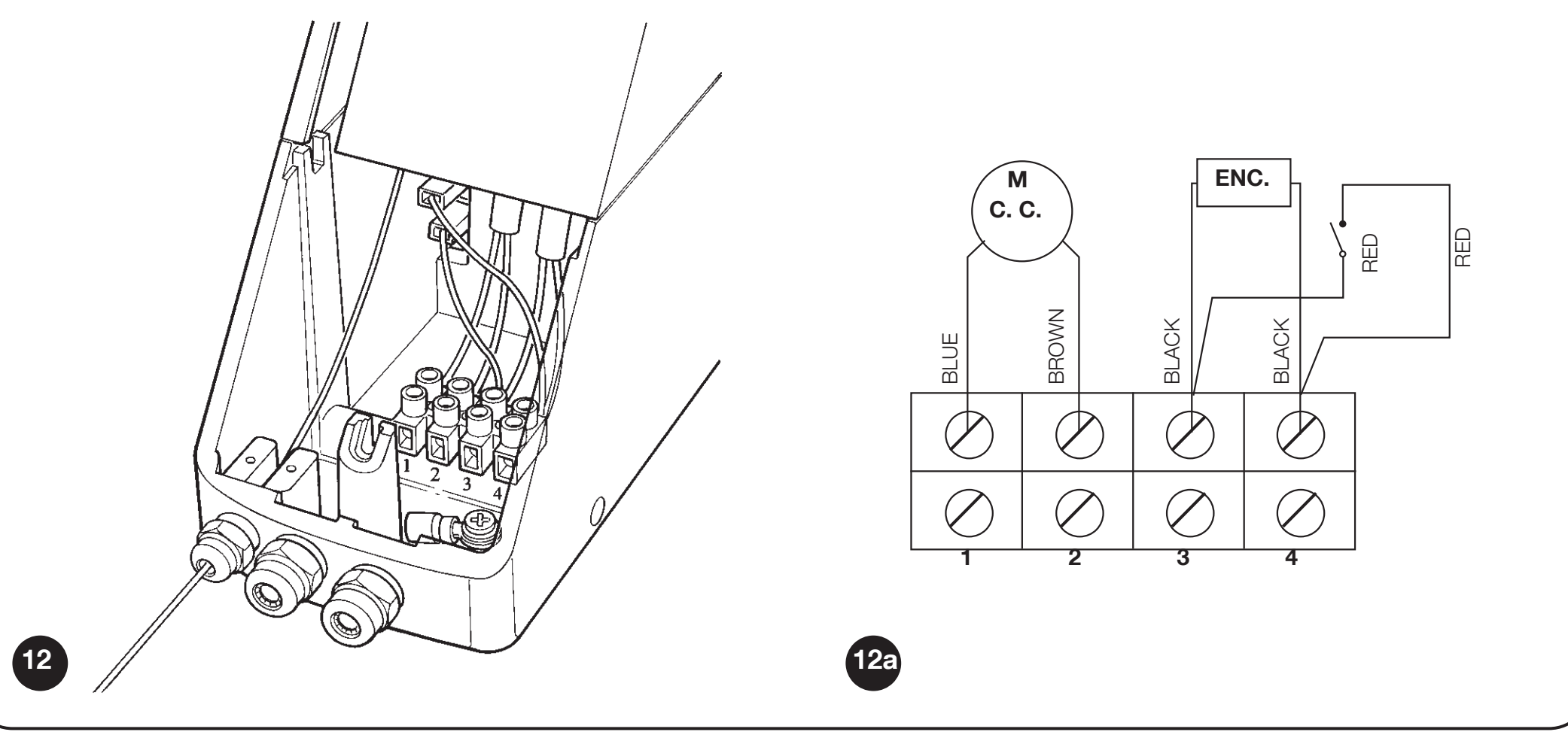
SUMO SU2010: motor terminals 1/2 and encoder terminals 3/4; third motor cable conductor safely insulated
EPM photocells with Phototest
DPRO924 uses NICE EPM with a conventional relay output. For the safety function, connect on the EPM 4 COM and 5 NC; contact 3 NO is not the correct safety contact.
| Device | Power supply and contact |
|---|---|
| TX EPM | 1 = positive (+), 2 = negative (−). In Phototest mode: TX 1 → Phototest (3) DPRO924, TX 2 → GND (1) DPRO924. |
| RX EPM | 1 = positive (+), 2 = negative (−). RX 1 → 24 V (2) DPRO924, RX 2 → GND (1). RX 4 COM → 24 V (2) DPRO924, 5 NC → Photo or Photo2 depending on the protected area. Contact 4/5 is voltage-free. |
| Two pairs | Assign each to the correct input. If they interfere with each other, change their position or use suitable optical shields. EPM synchronization via SYNC requires AC power; do not use it blindly with the control unit’s DC output. |
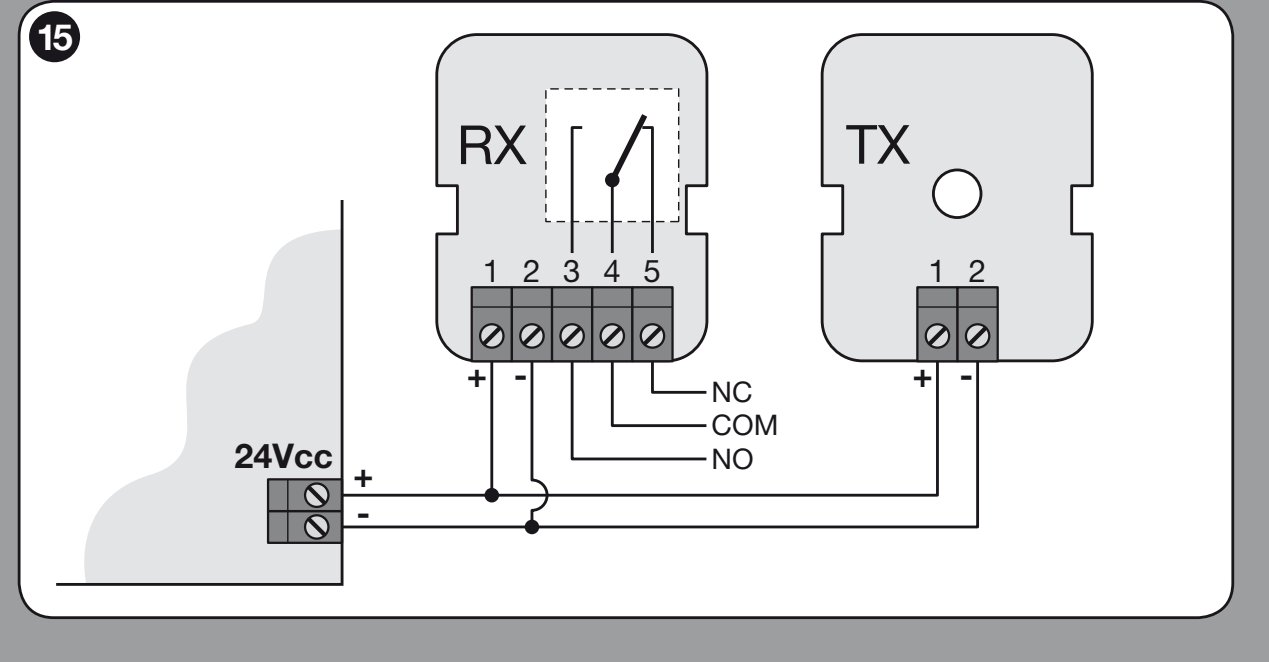
EPM: TX/RX power supply 1 (+), 2 (−), relay contacts 4 COM and 5 NC
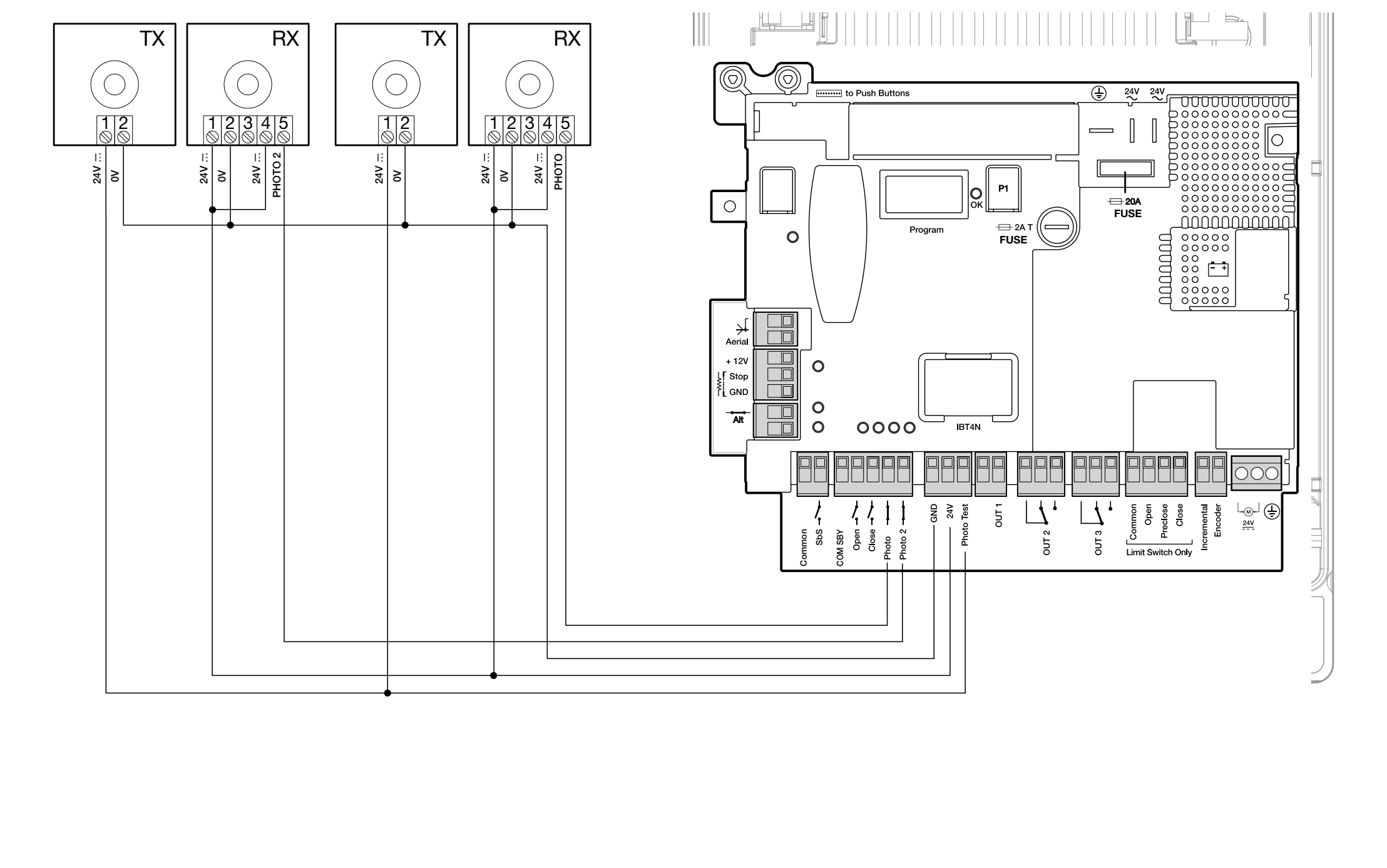
DPRO924: RX to GND/24 V and TX to GND/Phototest
Phototest checks the photocells before movement. After connecting it, teach in the safety devices. Unused Photo or Photo2 is jumpered to Phototest in this wiring diagram; this does not replace the required gate protection.
Alternative: Total Stand-by
Total Stand-by is enabled via Oview; after the set time, 1 minute by default, it reduces power consumption by switching off accessories. TX and RX: terminal 1 (+) → COM SBY, 2 (−) → GND; RX 4 COM → COM SBY, 5 NC → Photo or Photo2. Phototest is not performed with this wiring. Unused Photo/Photo2 is jumpered to COM SBY. Do not combine the two wiring diagrams.
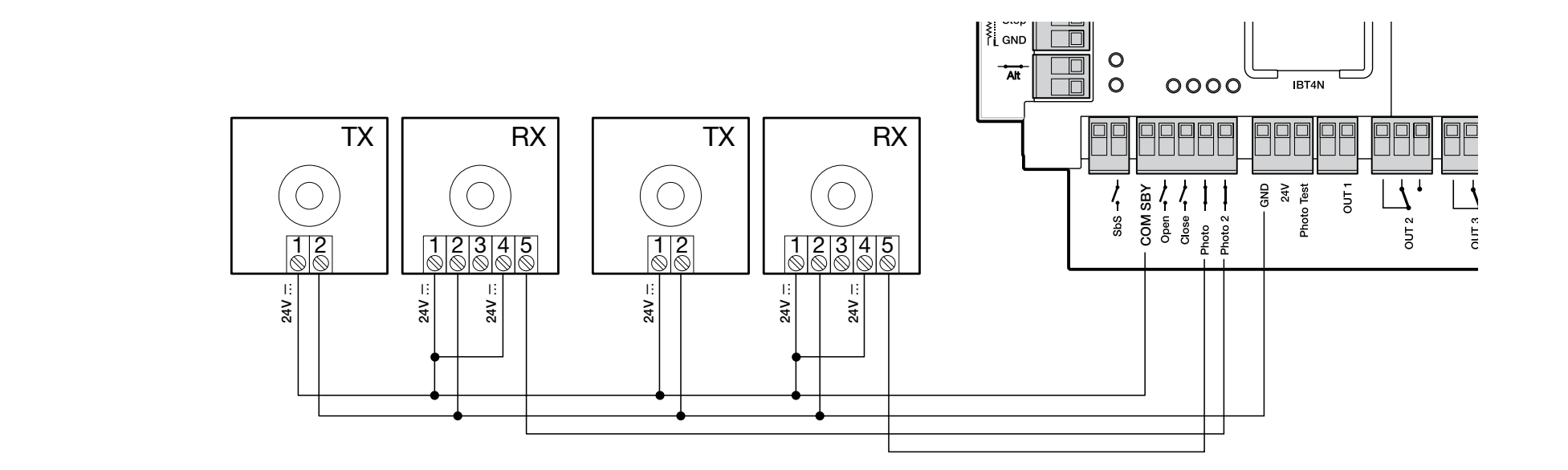
DPRO924: separate power supply option for photocells with Total Stand-by
Safety edge and safety circuit
The 8.2 kΩ resistive edge connects between SIG and GND, with no polarity. Optical OSE according to the markings: brown wire to +12 V, green to SIG, white to GND. For a different color scheme, follow the edge manufacturer's markings. With this resistive interface, NC contacts are connected in series with the 8.2 kΩ end-of-line resistor, and NO contacts in parallel with the resistor; the wiring must comply with the safety design. Repeat the learning procedure after making a change. The resistor must not be used to disable a required safety device.
Warning light and status indicator
The OUT1 is intended for the NICE ELDC with its own flashing function, 24 V, maximum 25 W. OUT1 is not an auxiliary GND/24 V pair; do not infer the polarity from other connectors. The ELDC power supply pair itself has no specified +/− polarity in its diagram. Connect the antenna to the radio receiver using its connector.
The status indicator on the cover board is separate: LIGHT 1 (−), 2 (+), 24 V DC / 5 W. It goes out when the safety circuit is open, flashes 0.5 s ON / 0.5 s OFF under normal conditions, and follows the OK indicator when there is a fault. The cable must not exceed 2 m, and the output is not short-circuit protected.
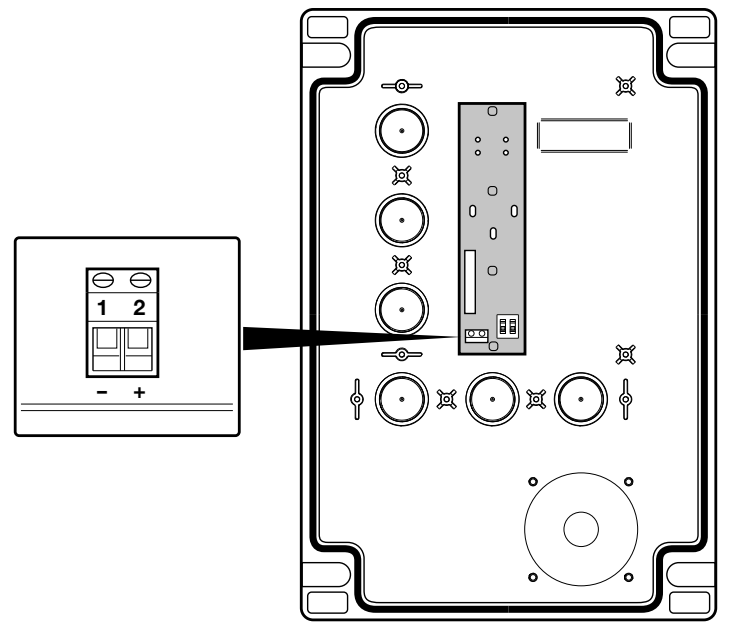
DPRO924: LIGHT 1 (−), 2 (+) on the cover button board
Backup power and service interface
NICE PS224 connects to the designated DPRO924 battery connector only after installation and programming are complete. The number of movements during a power failure is not fixed and depends on the gate and battery. Oview connects via IBT4N and allows you to adjust force, sensitivity and deceleration points, and perform diagnostics. Choose accessories for DPRO924, not for the older A924.
First start-up of DPRO924 with SUMO
On the cover board, the switches enabling the OPEN and CLOSE buttons must be set to ON; STOP is always active. Before learning, the gate should be approximately 50 cm above the floor, so the direction can be checked safely. The green OK indicator flashes about once per second; ALT/Photo/Photo2 must match the wiring.
1. Learning the safety devices
At least one safety device must be connected. Learn the devices and positions one after the other, without interruption.
- Set A1 to ON; A2/A3/A4 to OFF.
- Hold STOP for about 3 s until the OK indicator glows steady red; release it.
- When finished, set the switches to OFF and immediately proceed with incremental encoder learning.
2. Positions with an incremental encoder
- Set B2 OFF, B3 OFF; A1 ON, A2/A3/A4 OFF.
- Hold STOP for about 3 s until the indicator glows steady red, then release it.
- Press OPEN to move the gate to the desired open position before the mechanical stop. Confirm by holding STOP for 3 s: one red flash.
- Press CLOSE to move the gate to the fully closed position. Confirm by holding STOP for 3 s: two red flashes.
- For a custom partial opening, press OPEN to move the gate to that position and confirm by holding STOP for 3 s: three red flashes. If you do not set a partial position, the factory setting opens the gate to 1/4 of the full travel; this can also be changed via Oview.
- Set A1 to OFF; set A3/A4 according to the operating mode and confirm by holding P1 for at least 2 s.
If OPEN closes the gate, stop, disconnect the mains and battery, swap the motor wires at outputs 1/2, and start the learning procedure again. Do not swap the encoder pair to change the direction.
3. Learning the forces
After setting the positions, perform complete opening and closing cycles without interruption until the unit stops flashing the OK indicator alternately red/green during movement. An interrupted cycle is not counted. During learning, the unit uses maximum force: the area must be supervised. Repeat force learning after changing the speed, deceleration points, or sensitivity. Perform safety tests when finished.
The unit initially calculates the RA/RB deceleration points. If you need to adjust them, use the Oview programmer, then repeat force learning and the safety tests.
Setting DPRO924 operating modes
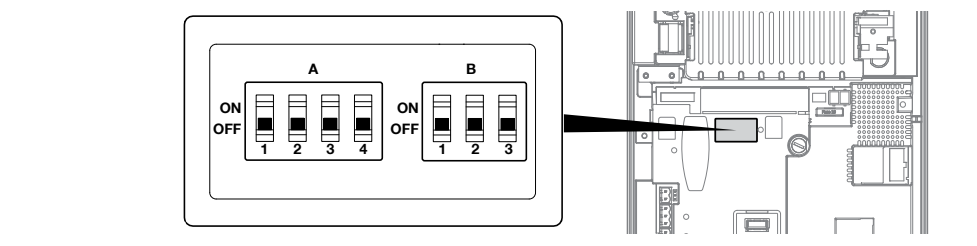
DPRO924: A1–A4 and B1–B3 switches on the main board
Switches A and B are on the main board. After changing them, the OK indicator may flash alternately red/green and the unit may reject commands: confirm the correct configuration by holding P1 for 2 s, or repeat the safety-device learning procedure. If these functions are set via Oview, the corresponding DIP switches must be OFF.
Safety equipment required for each operating mode
For hold-to-run operation, the operator must be able to see the gate, and the control device must be protected against unauthorized use. Semi-automatic operation requires an active safety edge; automatic closing requires both a safety edge and photocells. The installer must assess protection at potential trapping points and compliance with safety requirements. Changing the DIP switch setting alone does not make the automation system safe.
DIP A – operation
| Setting | Meaning |
|---|---|
| A1 OFF, A2 OFF, A3 OFF, A4 OFF | Hold-to-run operation: movement only while the command is held. |
| A1 ON, A3/A4 OFF | Learning the safety devices and positions. For SU2010, also set A2 to OFF. |
| A1 OFF, A2 OFF, A3 OFF, A4 ON | Industrial mode: semi-automatic opening, closing with hold-to-run control. |
| A1 OFF, A2 OFF, A3 ON, A4 OFF | Semi-automatic operation after position learning. |
| A1 OFF, A2 OFF, A3 ON, A4 ON | Automatic closing with a stored pause time. |
| A2 ON | Reverse the absolute encoder; not used with the SU2010 incremental encoder. |
DIP B – sensitivity, speed and motor
| Switch | Setting and function |
|---|---|
| B1 – sensitivity | OFF: disabled; ON: enabled. ON reduces the force applied when an obstacle is detected; relearn the forces and take measurements after changing this setting. |
| B2 – speed adjustment | OFF: normal operation; ON: speed adjustment, with the OK indicator flashing orange rapidly. |
| B3 – motor type | OFF for SU2010 with encoder. ON for a motor with electromechanical limit switches. |
Automatic closing – pause time
- After learning the positions, set A3/A4 to ON and A1/A2 to OFF.
- Hold P1 for at least 2 s.
- Send OPEN and wait until it is fully open.
- From this point, wait for the required pause, then send CLOSE. The time will be saved.
To change the pause, set A4 to OFF and confirm by holding P1 for 2 s; this cancels the original pause. Then set A4 to ON, confirm by holding P1 for 2 s, and repeat the opening, waiting and closing sequence.
Movement and deceleration speed
Opening, decelerated opening, closing and decelerated closing are set separately. Use Oview or the control board buttons:
- Set B2 to ON; OK flashes orange rapidly.
- Hold P1 and send OPEN or CLOSE, depending on the direction being changed.
- While holding P1, adjust the current movement phase: OPEN increases the speed by 5% per press; CLOSE decreases it by 5%.. Green OK indicates a normal-speed phase; red indicates deceleration.
- Release P1; to adjust another movement phase, start again by holding it down.
- Set B2 back to OFF, complete force learning and carry out the tests.
Current monitoring is disabled while P1 is held. This procedure must be carried out by an installer who can monitor the gate; it must not be used to test force against an obstruction.
Remote control and antenna
The radio receiver plugs into the SM socket with both the mains power and battery disconnected. Do not confuse the equipment supplied with a standalone drive with a complete kit: choose the receiver and transmitters according to the actual supplied configuration.
NICE OXIBD supports both unidirectional and bidirectional transmitters; a suitable unidirectional transmitter is the NICE MYGO4. An older installed receiver may use a different encoding. The same 433.92 MHz frequency alone is not sufficient.
In standard Mode 1, the receiver outputs are: 1 – step-by-step operation, 2 – partial opening, 3 – opening, 4 – closing. Mode 2 lets you assign an individual button to a selected command. For precise pairing and deletion, follow the instructions for the specific OXIBD receiver; the motor buttons do not erase its radio memory.
For OXIBD, connect the antenna to the receiver connector according to the OXIBD antenna wiring diagram. Connect the coaxial cable's center conductor to the signal terminal and its shield to the antenna ground. These are not the power supply +/− terminals.
On a receiver that supports Extended Mode 2, command 13 – Unlock the automation is used to cancel the electronic lockout. It does not release the mechanical drive; release that manually using the cord.
DPRO924 diagnostics
After power-up, two slow green OK flashes indicate a motor with an incremental encoder. One slow red flash confirms a learned 8.2 kΩ safety edge; two flashes indicate OSE. Rapid green flashing after power-up may indicate that the memory has not been learned.
| Red OK | Cause and check |
|---|---|
| 2 flashes | Photocell: obstruction, optical component or relay wiring. |
| 3 flashes | Force, sensitivity or blocked encoder: check for mechanical resistance and inspect the encoder cable. |
| 4 flashes | STOP/ALT or release: secure the motor and check the safety circuit. |
| 5 flashes | Internal parameters: press STOP on the cover and wait at least 30 s. If the fault persists, contact service; if necessary, perform a reset and relearn. |
| 6 flashes | The hourly limit for operating cycles has been exceeded. Wait a few minutes for the limiter to allow another movement. |
| 7 flashes | Internal electrical fault: press STOP, disconnect all power sources, and have the control board and wiring checked by a qualified technician. |
| 8 flashes | Continuous input command: remove the cause of the stuck contact. |
| 9 flashes | The automation is electronically locked: use the command to unlock it electronically. This is not a manual release of the drive. |
| Other OK indicator signals | Solution |
|---|---|
| Steady red + 8 green flashes | No encoder signal. Press STOP and check the separate encoder cable. |
| Steady red + 10 green flashes | Movement time exceeded. Press STOP and check the mechanism and positions; adjust the time using Oview. |
| Red/green alternating while idle | DIP settings changed: check the configuration and confirm by holding P1 for at least 2 s. |
| Red/green alternating during movement | Force learning is in progress; complete the full operating cycles. |
| Rapid orange flashing | B2 is ON; finish setting the speed, then set B2 to OFF. |
Clearing DPRO924 memory
Resetting erases the settings, positions and learned safety devices. The plug-in radio receiver has a separate memory.
- With the gate stationary, set A1/A2/A3/A4 to ON; OK flashes orange rapidly.
- Hold STOP for about 3 s until OK lights steady red, then release it.
- After the reset, OK flashes orange rapidly. Set all A DIP switches back to OFF; OK flashes green.
- Set the correct motor type, repeat the safety device, position and force learning procedures, then carry out the tests.
Checks before handing over the gate
- With the drive released, check that the gate moves smoothly and is balanced. Manual testing requires a force of no more than 225 N. This is not the motor's torque or the permitted impact force.
- After engaging the drive, test opening, closing and STOP; the gate must not bind or strike beyond the stored end positions.
- Test each pair of photocells at the TX, at the RX and in the middle of the beam, for example using a cylinder Ø 5 cm and 30 cm long. Check the gate's actual response.
- Test the safety edge, safety circuit and emergency release. The installer must measure impact forces using a suitable measuring device; repeat the test after changing the force or sensitivity settings.
- Hand over the gate only after it has passed the tests and has been provided with labels, release instructions and a maintenance schedule. Pass through only when the gate is fully open and stationary.
Drive and gate maintenance
Disconnect both the mains power and battery during every scheduled inspection. Check the bracket, anchors, wedge, shaft, release mechanism, guide components and balance; for chain drives, also check tension, wear and whether lubrication is needed. Operate the drive only with functional mechanical stops and safety devices.
For normal domestic use, the manufacturer recommends a professional inspection every 6 months. The installer should set the inspection interval for the complete assembly according to the gate's workload and operating conditions; inspect and clean EPM photocells at least every 6 months. Repeat the tests after servicing. Spring or load-bearing cable faults must be repaired by a qualified professional, not by increasing the motor force.
SUMO SU2010 technical specifications
| Parameter | Value |
|---|---|
| Control | For a balanced sectional door, separate NICE DPRO924; not included with SU2010. |
| Motor power supply | 24 V DC; operating range 15–36 V DC. |
| Motor current draw / power consumption | 13 A DC / 500 W. This is not current drawn from the 230 V mains. |
| Torque | 120 Nm. |
| Speed | 7.5–16 rpm; settings depend on the control unit and configuration. |
| Sectional door area | Up to 35 m². |
| Duty cycle | 50%. |
| Ingress protection / temperature | SU2010 IP54; −20 to +50 °C. |
| Shaft / bore | Shaft Ø 25.4 mm; motor bore Ø 25.5 mm. |
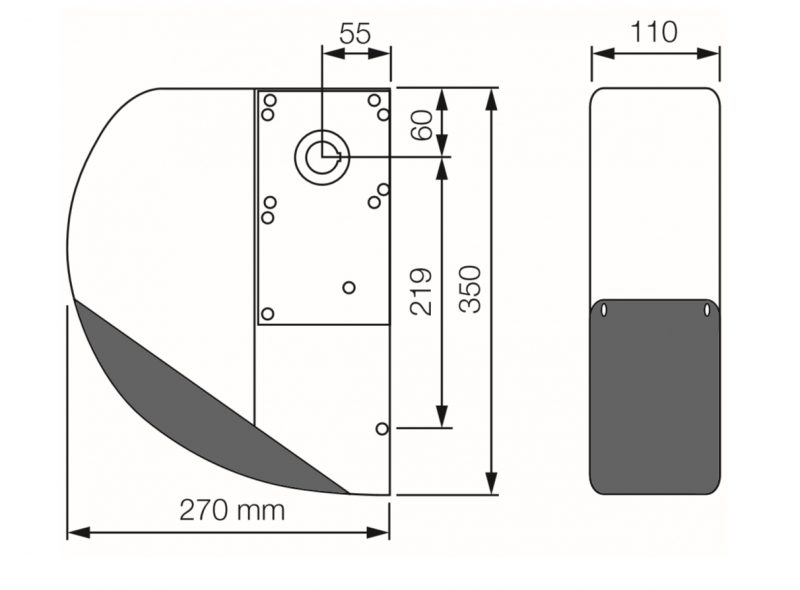
| Dimensions / weight | 350 × 270 × 110 mm / 10.5 kg. |
| Motor insulation thermal class | Class B. |
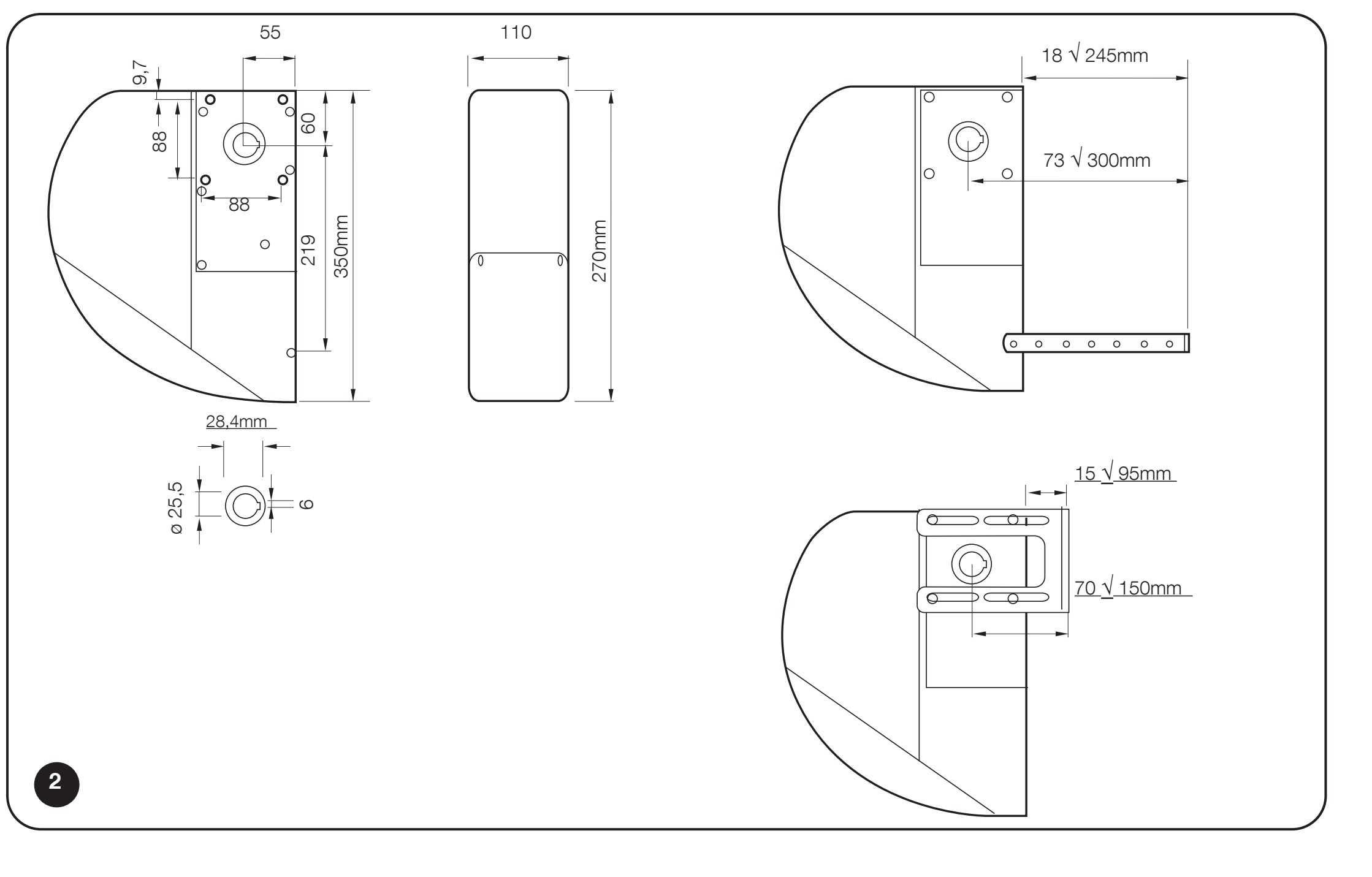
SUMO SU2010 dimensions, shaft bore and bracket range
DPRO924 power supply and limits
| Parameter | Value |
|---|---|
| Mains power supply | 230 V AC, 50/60 Hz; Class I, earthing. |
| Maximum mains power consumption | 500 W. |
| Accessory output | 24 V DC −30% / +50%, 200 mA; polarity and terminals. |
| Backup | NICE PS224. |
| Fuses | F2 T2 A; F1 automotive 20 A. Same type and rating after eliminating the cause. |
| Enclosure | IP55 when properly closed; 310 × 210 × 125 mm, approximately 4 kg. |
360° view of the drive
How can I order this item?
Choose the option that suits you:
- order online: use the buy button to add the goods to your shopping cart (you will find the buy button here in the product variants table).
- order by email: place your order at [email protected]






