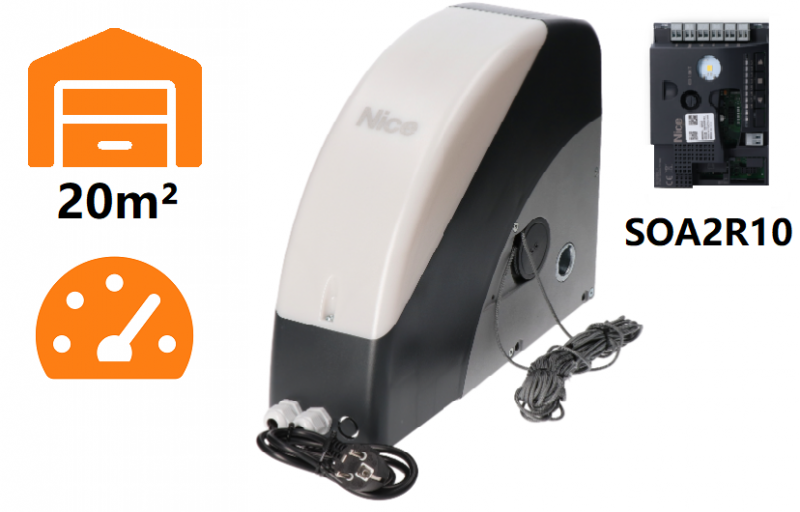
NICE Soon SO2000 – drive for a sectional garage door with a maximum area of 20 m² and a maximum height of 5 m
| Product availability: | within 3 days | We usually ship the goods within 3 days. |
|---|
within 3 days
€564.03 including VAT
| Weight |
|---|
| 11 kg |
Description of NICE Soon SO2000 – drive for a sectional garage door with a maximum area of 20 m² and a maximum height of 5 m
NICE SOON SO2000 is a shaft-mounted operator for sectional garage doors up to 20 m² and an approximate height of 5 m. It has a 24 V DC motor, a built-in control unit NICE SOA2R10 with BlueBUS, a magnetic encoder and integrated LED lighting. The entire operator is powered from a 230 V AC.
The operator is non-reversible and can be released using the supplied cords in the event of a power failure. The encoder tracks the position; the open and closed positions must be programmed. Mechanical stops and correct door balancing are still required.
| Quick navigation | |
|---|---|
| Operator selection | Accessories |
| Package contents | Installation |
| Release | Wiring |
| Initial setup | Settings |
| Remote controls | Diagnostics |
| Reset | Maintenance |
| Specifications | PDF manual |
Accessories and control selection
The SOA2R10 is built into the SOON SO2000. A separate DPRO924 is not included with this version. The wiring and setup below apply to the SOA2R10; if your control board has a different designation, follow the instructions for the installed unit.
| What | Why | Type |
|---|---|---|
| Photocells | Passageway protection; two-wire non-polarised wiring. | |
| Warning light | Alerts you when the door is moving; FLASH setting. | |
| Radio receiver and remote control | Transmitter control; SM socket and pairing. | |
| Backup battery | Operation during a power failure; installed in the operator. | |
| Direct shaft drive | Adapts to shaft diameters of 31.75 / 35 / 40 mm. | |
| Chain drive | Off-axis installation; choose the drive ratio and brackets. |
When to choose the SOON SO2000
This operator is suitable for indoor use with a balanced sectional door when you want the control unit built into the motor and an operator without a ceiling rail. IP40 means it is protected for indoor installation. The resistance of the door, springs, wind and ice determine suitability more than the door area alone.
| Condition | Value |
|---|---|
| Sectional door area | Up to 20 m². |
| Approximate dimensions | Height up to 5 m, width up to 4 m; check the specific door. |
| Torque | Maximum 50 Nm; rated 30 Nm. |
| Output speed | Maximum 30 rpm; rated 18 rpm. Door speed also depends on the drum diameter and drive ratio. |
Cycles according to operating resistance
One cycle is one complete opening and closing. The following conditions apply to intensive use:
| Manual operating force | Cycles/h | Consecutive |
|---|---|---|
| Up to 120 N | 20 | 35 |
| 120–180 N | 18 | 33 |
| 180–220 N | 15 | 30 |
At the threshold between ranges, use the lower limit. The thermal limiter monitors the load and duration of movement; if it trips, allow the drive to cool down. The figure of 15 cycles/hour in the technical specifications applies to a 3 m door at the rated torque. It is not a guarantee for every possible setup.
What’s included with the drive
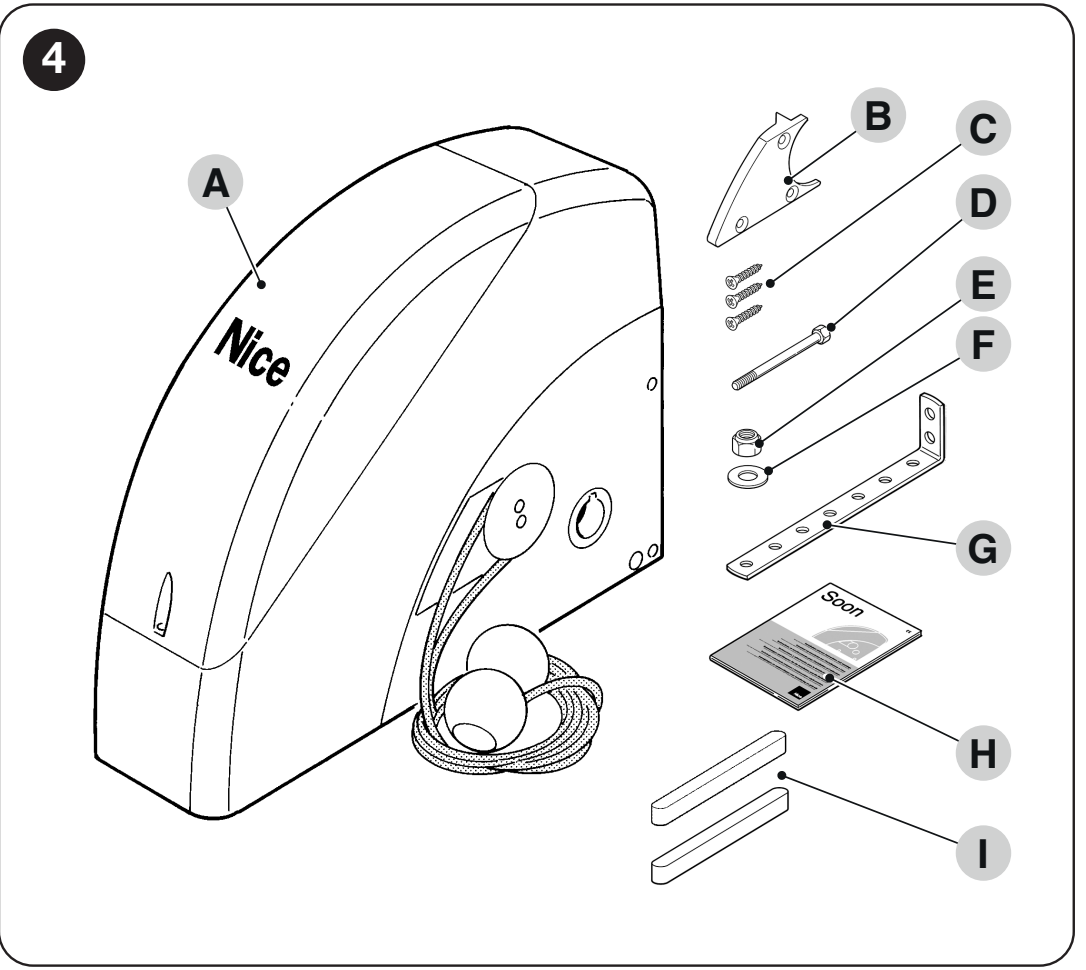
SOON: motor, cable release, bracket and mounting fasteners
| Part | Purpose |
|---|---|
| Motor with control unit | SOON SO2000 with SOA2R10 control board and lighting. |
| Release | Cable release; 4 m cables and a guide part for horizontal installation. |
| Fastening | Bracket, M8 × 130 bolt, M8 self-locking nut, D8 washer, 3 self-tapping screws and 2 connecting keys. |
| Installation instructions | Drive instructions. Wall anchors, CRA transmission, photocells, radio receiver and battery are selected to suit the setup. |
Installing the drive
Installation, electrical connections and testing must be carried out by a qualified technician. Disconnect the mains supply and backup battery before working on the unit. The door must be mechanically safe and properly balanced, with guides and stops in working order. For a sectional door, also check the springs and lifting cables. The drive will not fix a door that is difficult to move.
Direct shaft mounting
The NICE SOON SO2000 drive mounts directly on the shaft of a sectional door Ø 25.4 mm. For shafts Ø 31.75 / 35 / 40 mm, use NICE CRA9. The mounting bracket is included; choose wall anchors to suit the substrate. The Ø 25.5 mm opening in the motor does not indicate a different recommended shaft diameter.
- Install SOON with the door closed. Slide the drive onto the shaft and insert the supplied connecting key.
- Fasten the bracket to the drive using the supplied bolt, nut and washer. Securely anchor the bracket to the load-bearing wall.
- For horizontal installation, attach the supplied cable guide with three screws and route the release cables as shown. The cables must remain accessible.
- Before setup, check the encoder position and ensure the travel path is clear. The encoder’s usable range is 5–95%; the end positions must fall within this range.
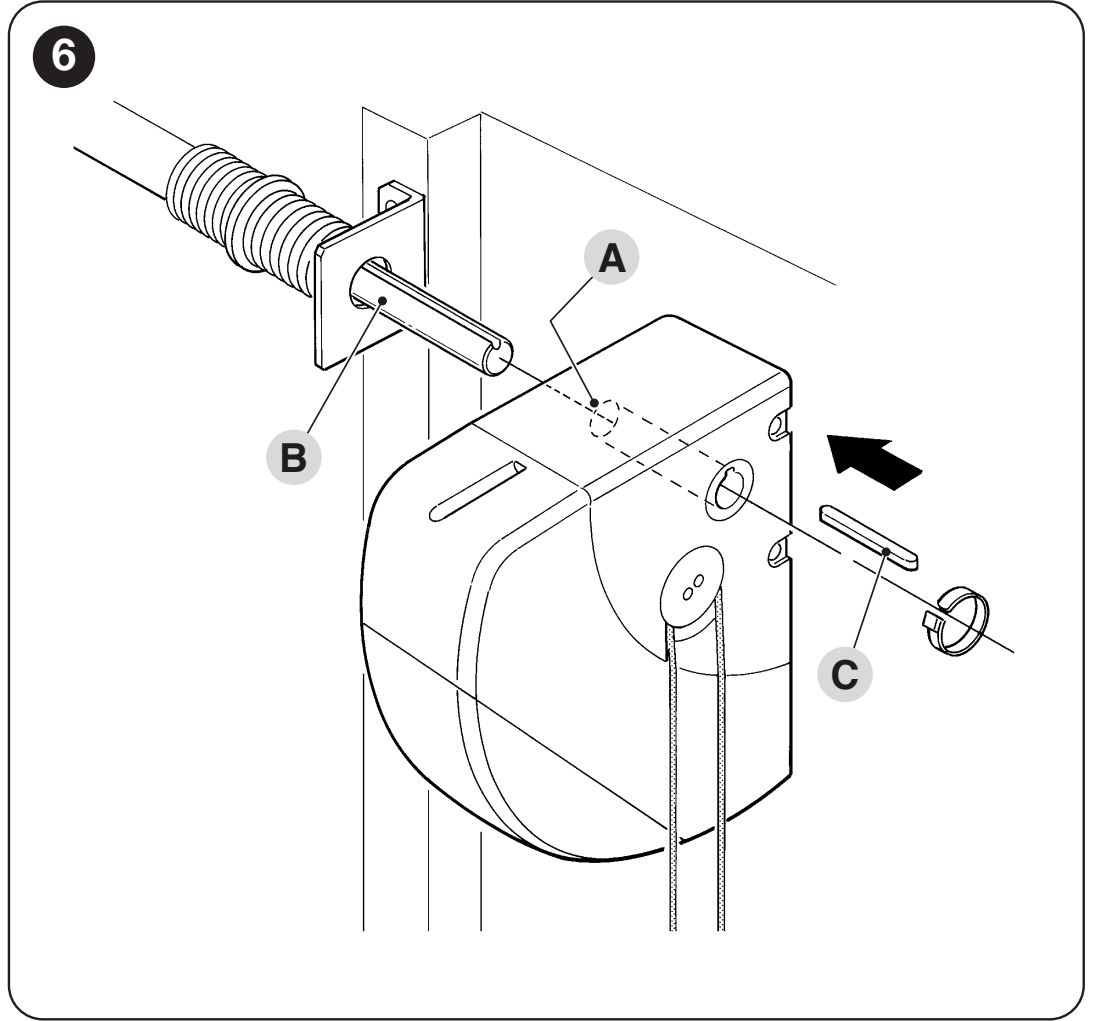
SOON: sliding the drive onto the shaft and inserting the connecting key
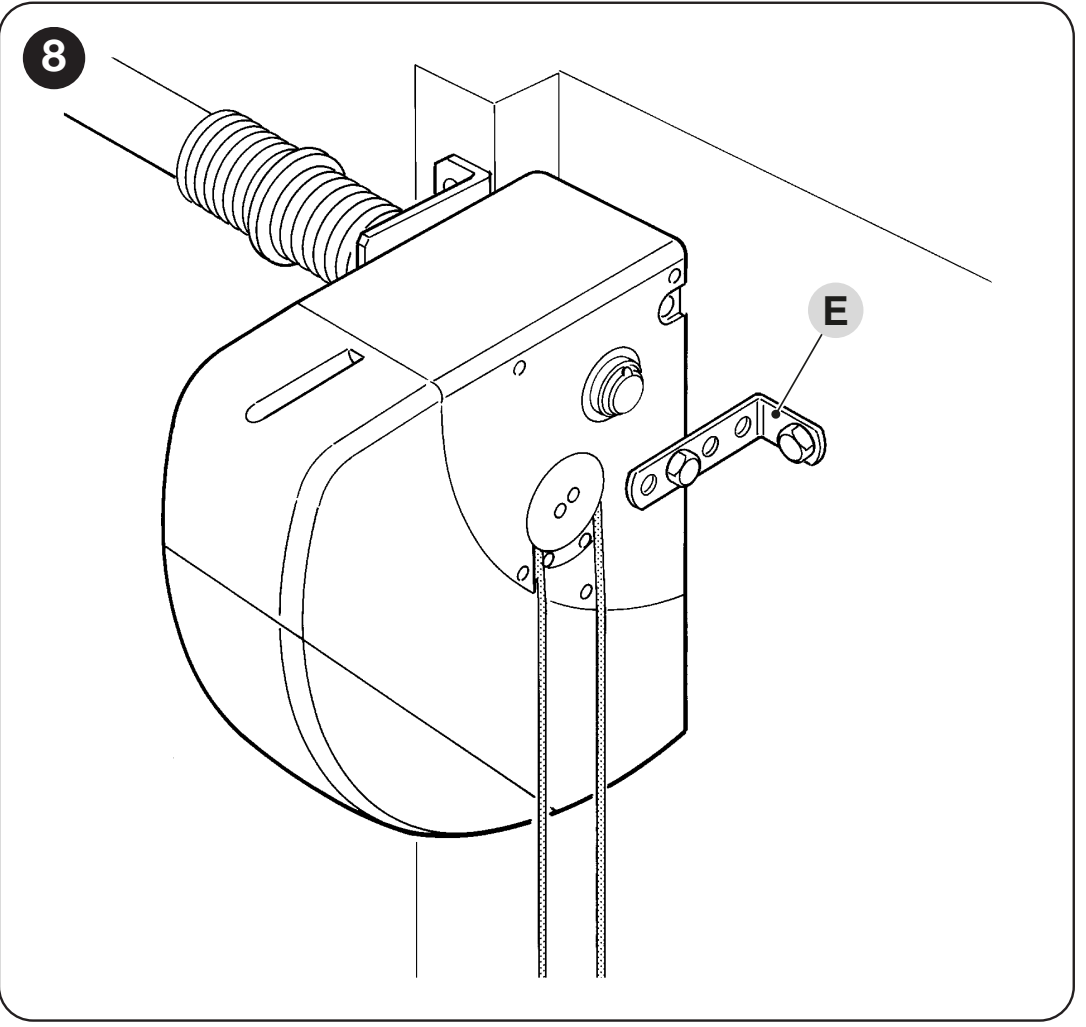
SOON: anchoring the supplied bracket to the wall
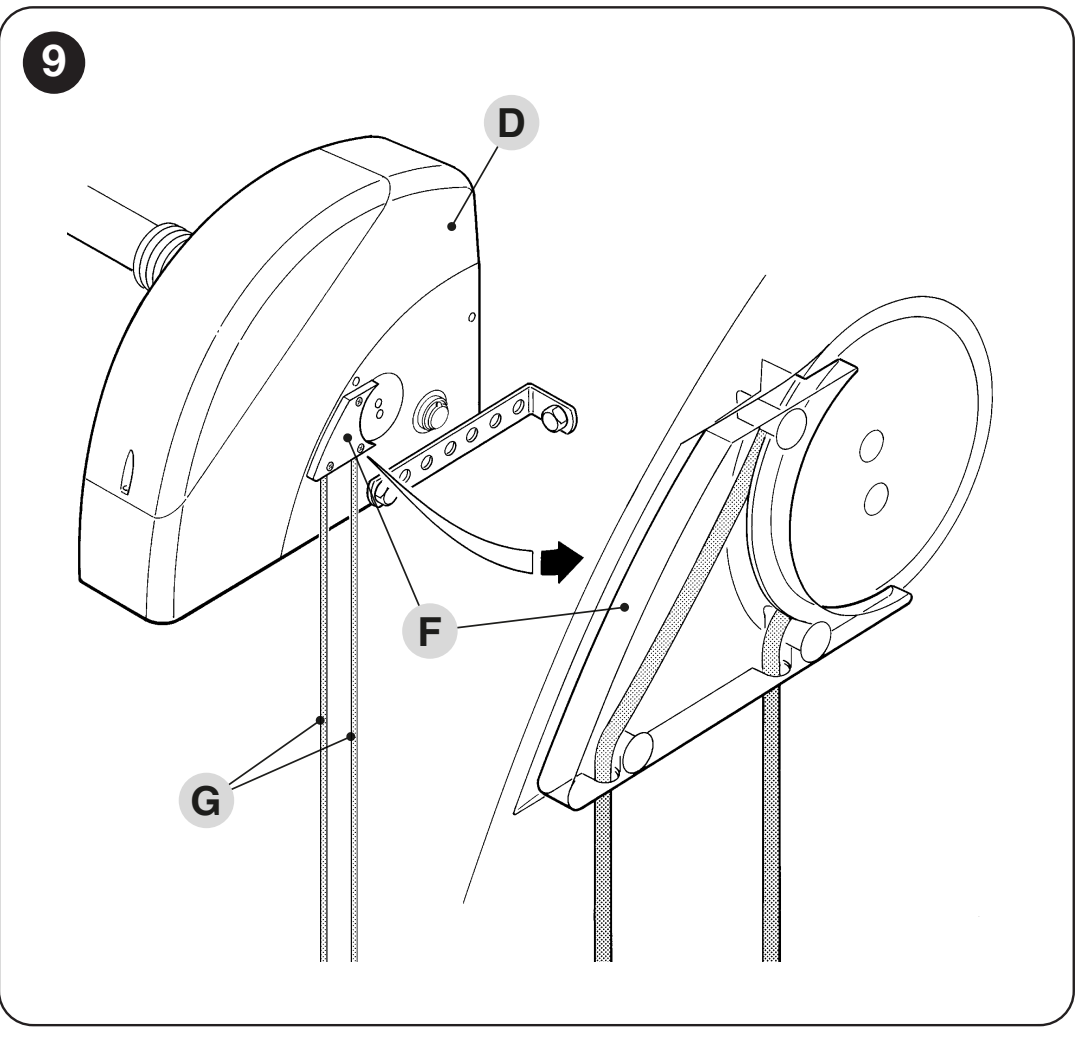
SOON in horizontal position: routing the release cables
Offset mounting using a chain
If there is not enough room for direct mounting, use a shaft with an 18-tooth sprocket NICE CRA1 in the drive and a sprocket on the door shaft. The transmission connects them with a 1/2″ × 5/16″ chain NICE CRA3 (1 m) or NICE CRA4 (5 m), with a connecting link NICE CRA2. For mounting the drive off-axis, use brackets NICE CRA8.
| Transmission | Components and outcome |
|---|---|
| 1 : 1 | NICE CRA1 + NICE CRA7 (18 / 18 teeth). No speed reduction. |
| 1 : 2 | NICE CRA1 + NICE CRA6 (18 / 36 teeth). The door shaft rotates more slowly; the transmitted torque and door construction must be assessed. |
The sprockets must be aligned, the chain properly tensioned, and the assembly protected against hands or clothing getting caught. Changing the transmission ratio does not automatically change the permitted door area. Dimensions, balance, travel and the complete assembly must be assessed together.
Chain system for a suspended sliding door
The SOON wiring and setup instructions on this page apply to sectional doors. A chain system for a suspended door requires a separate assessment to determine a suitable drive.
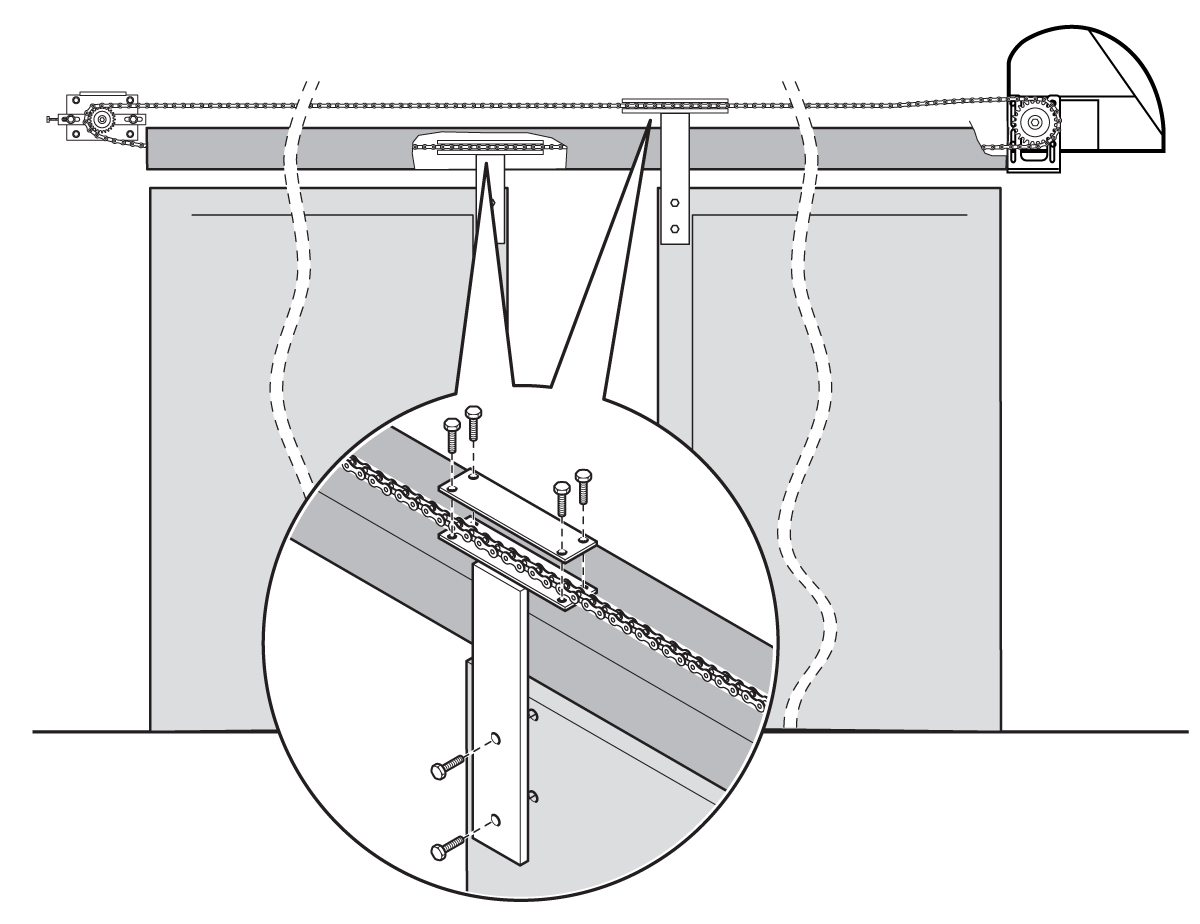
For a suspended door, the chain loop consists of a shaft with a sprocket NICE CRA1, a tensioner with an idler sprocket NICE CRA5, a chain NICE CRA4 and connecting links NICE CRA2. Attach the door leaf to the upper or lower chain run, depending on the direction of travel. For two doors moving in opposite directions, attach one to the upper run and the other to the lower run.
This is a custom-designed chain system. The area limit for a sectional door does not determine the permitted weight or length of a suspended door leaf. The installer must check the resistance to movement, force transmission, travel path, mechanical stops and protection of pinch points.
Manual release during a power failure
Release only when the door is stationary and properly balanced. Never release it if the springs are damaged or if the door could fall.
- Pull the release handle/cable A as shown. The drive disengages.
- Move the door by hand without forcing it.
- To resume motorized operation, pull the release handle/cable B. Check that it has re-engaged.
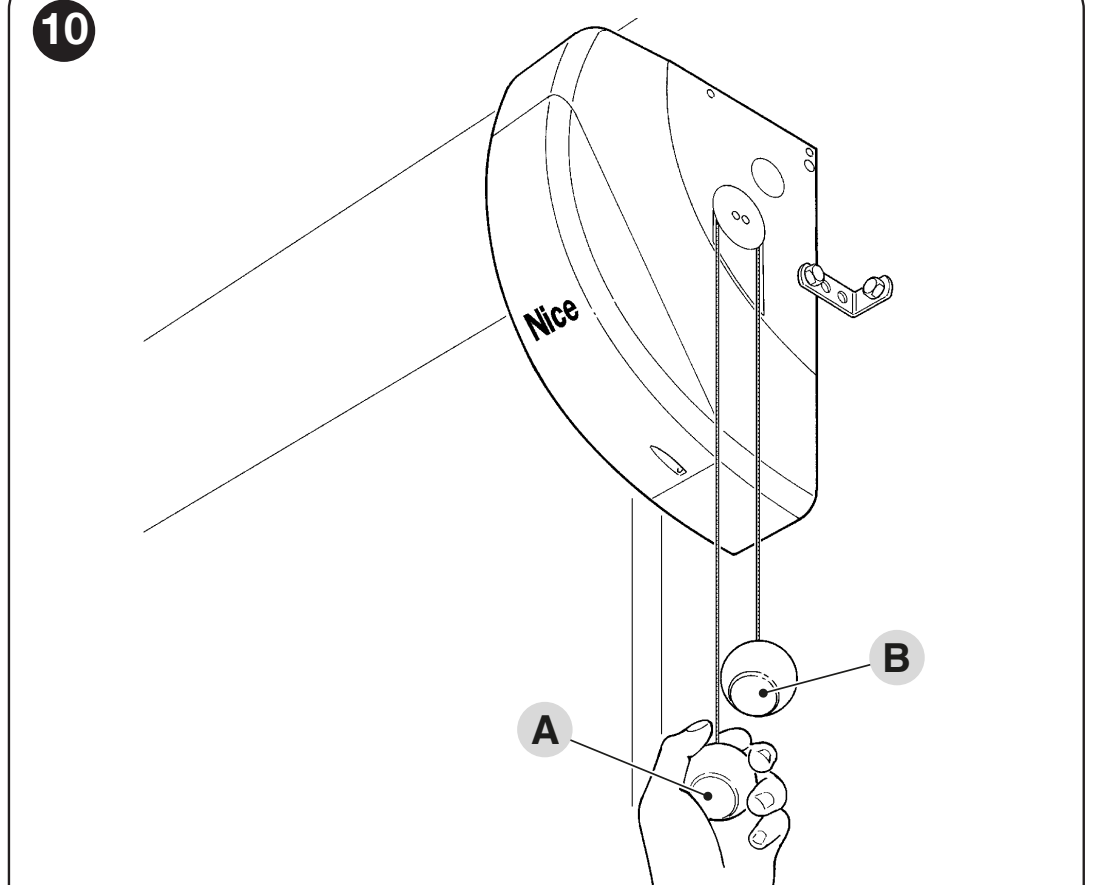
SOON: A disengages the transmission, B re-engages it
SOA2R10 wiring
Disconnect both the 230 V supply and PS124 before opening the cover. The control unit is integrated into the drive. Route cables through the cable glands, keep mains wiring separate from signal cables, and connect the protective earth.
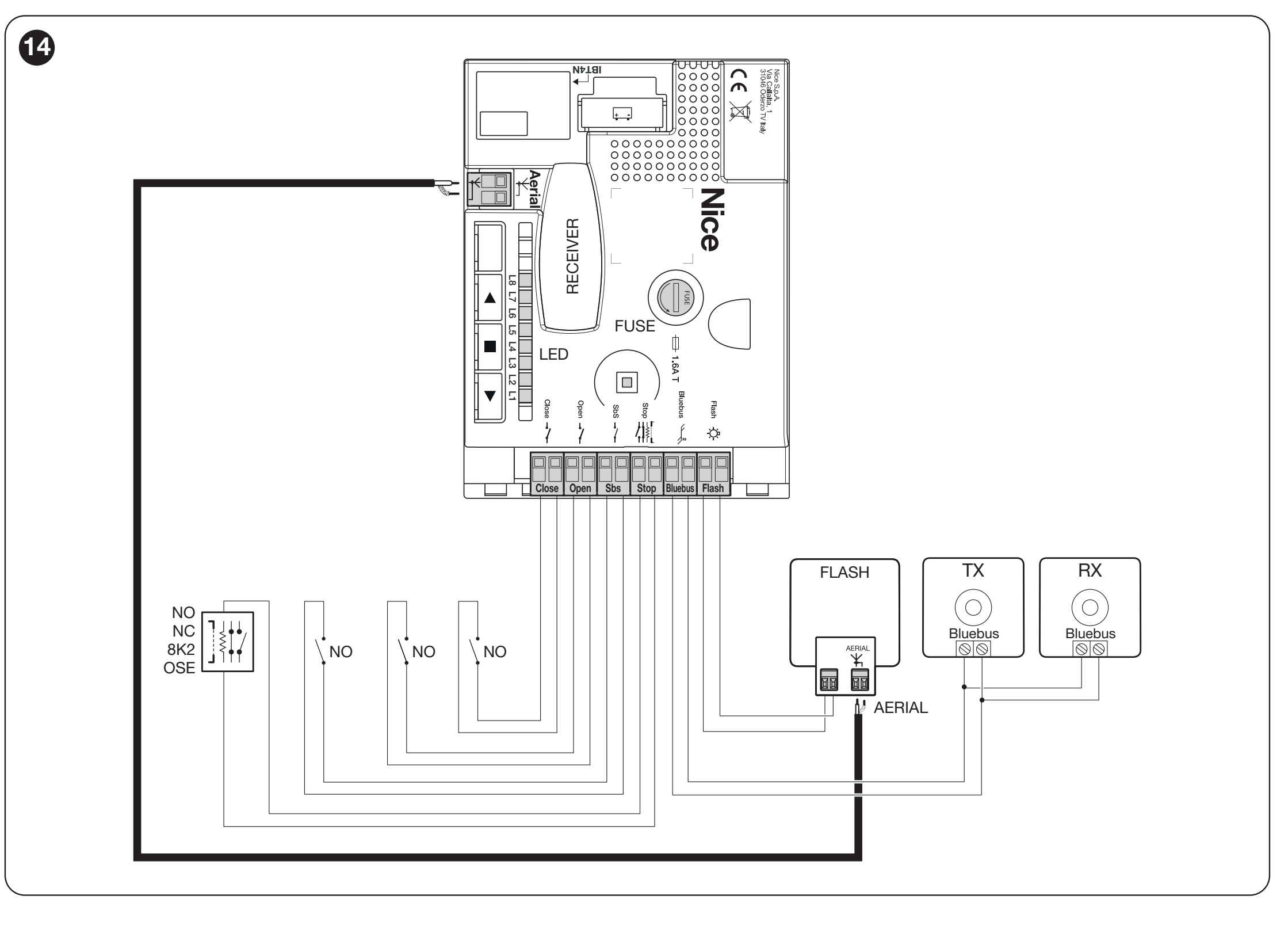
SOA2R10: FLASH, BlueBUS, STOP, SbS, OPEN, CLOSE, antenna, SM and IBT4N
Wiring and maximum lengths
| Cable | Cable / length |
|---|---|
| 230 V AC mains | 3 × 1.5 mm² / 30 m; for longer runs, use 3 × 2.5 mm² and earth the drive. |
| FLASH | 2 × 1 mm² / 20 m. |
| BlueBUS | 2 × 0.5 mm² / 30 m; for 30–50 m, use 2 × 1 mm². |
| Key switch | Two runs of 2 × 0.5 mm² / 50 m, or one 4 × 0.5 mm² run. |
| Safety edge | 2 × 0.5 mm² / 20 m; with OSE, follow its specific wiring system. |
| Antenna | RG58 / max. 20 m; less than 5 m recommended. |
Terminals and auxiliary power supply
| Terminal | Connection |
|---|---|
| BlueBUS | Two-wire power supply and communication for compatible devices; non-polarized, up to 12 BlueBUS units. This is not a free 24 V output. |
| STOP | Safety devices: NO, NC, 8.2 kΩ, or a supported optical edge; wiring conditions. |
| SbS / OPEN / CLOSE | Voltage-free NO contacts: step-by-step / open / close. Do not apply external voltage; the contact itself is non-polarized. |
| Auxiliary + / − | + right-hand terminal of the SbS pair, − left-hand terminal of the STOP pair, as oriented in the detail below. 24 V DC, −30% / +50%, max. 100 mA total. Do not confuse these with the complete pairs of command inputs. |
| SM / IBT4N | SM for the plug-in receiver; IBT4N for the BusT4 interface and programmer. |
| FLASH | The output varies according to the selected mode; voltage and limits below. |
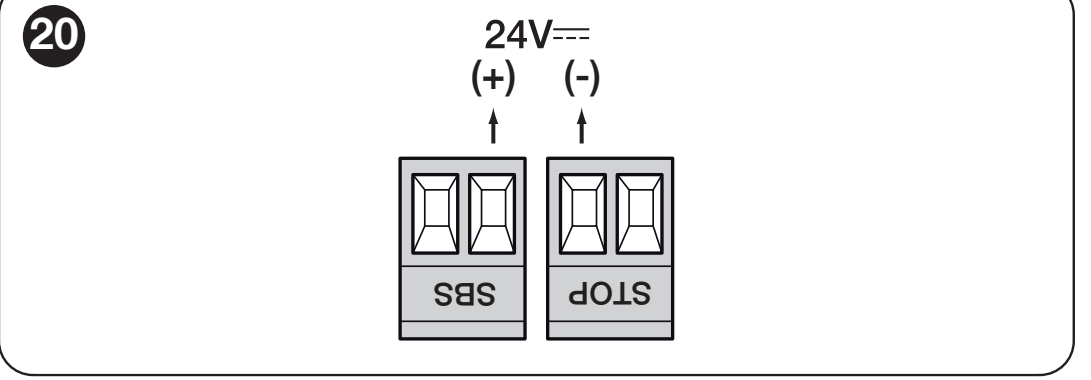
SOA2R10 auxiliary power supply: marked SbS (+) and STOP (−) terminals
BlueBUS photocells
NICE EPMB connect in parallel using two wires to BlueBUS. Wire order does not matter. Set the same jumpers on the TX and RX of each pair; each pair has a different address. After adding or removing a device, repeat device learning.
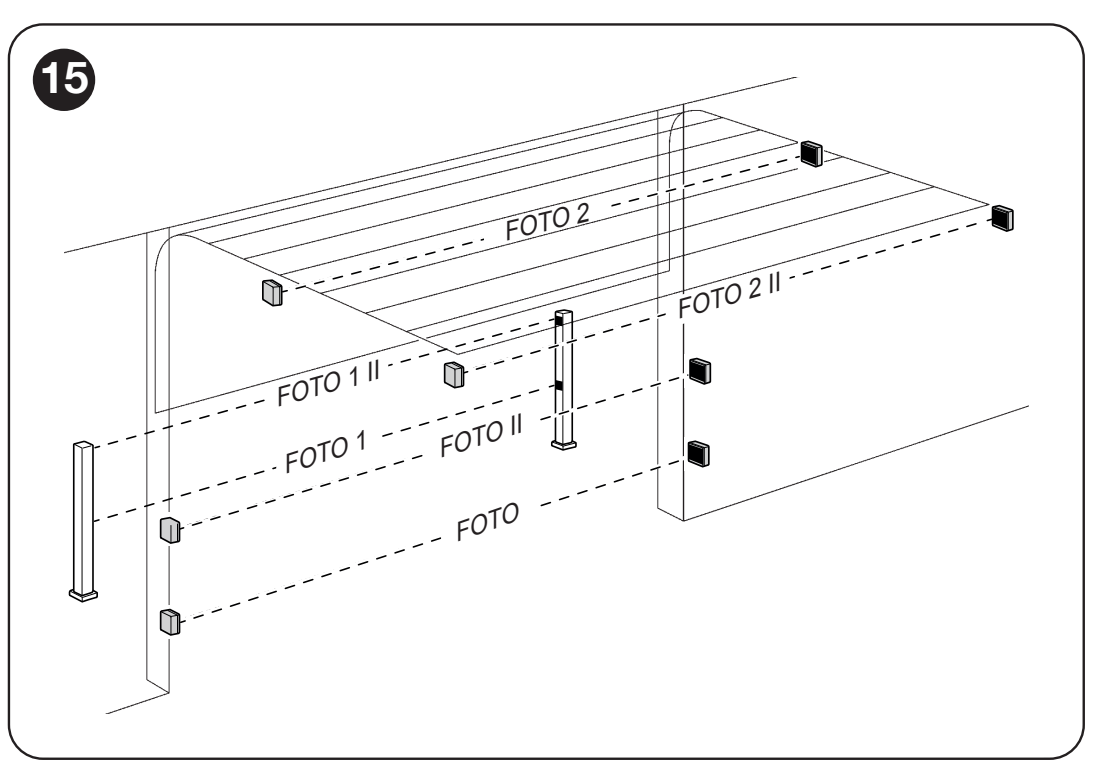
SOON: positions and functions of the individual photocell pairs
| Address | Response |
|---|---|
| FOTO / FOTO II | Outer pairs at heights of 50 / 100 cm: stop and reverse movement during closing. |
| FOTO 1 / FOTO 1 II | Inner pairs at heights of 50 / 100 cm: protection during both opening and closing. |
| FOTO 2 / FOTO 2 II | Outer / inner pair active during opening. |
| FOTO 3 | Pair protecting the entire automation area. |
| FA1 / FA2 | Open command, not a substitute for a safety pair; on supported TX and RX units, remove jumper A. |
Set the jumper positions according to the EPMB photocell instructions and the required function. Classic relay-type EPM photocells do not connect directly to BlueBUS.
STOP and safety edge
Wire multiple NO contacts in parallel and multiple NC contacts in series. The resistive edge must present 8.2 kΩ to the control unit at rest; in a cascade, use the terminating resistor only at the end. The wiring for an OSE optical edge depends on its specific interface. Do not supply these devices from the auxiliary SbS/STOP +/− terminals without the correct edge wiring diagram. After each change, run device learning and test STOP.
Flashing light and FLASH modes
NICE ELDC is a low-voltage flashing light for 12–36 V. On the SOA2R10, FLASH must be set to II/L4 → value L4 “flashing light”. This mode is intended for a 12 V warning lamp up to 21 W; do not select an accessory based on the drive’s 230 V mains input. After connecting, check that the light flashes visibly while the gate is moving.
| FLASH mode | Voltage and load |
|---|---|
| Flashing light | 12 V warning lamp, max. 21 W; during movement, 0.5 s on / 0.5 s off. |
| Open-gate indicator | 24 V, max. 5 W. |
| Electromagnet, latch or lock | 24 V, max. 10 W; coil only, with no built-in electronics. Select the corresponding II/L4 function. |
Neither the FLASH pair nor the antenna connector is designated as auxiliary +/− terminals. Do not infer wire order from the SbS/STOP detail; for a polarized coil, follow the markings on the device and installed board.
PS124 backup battery and programming
NICE PS124 is installed in the drive and connected to the designated connector only after installation and programming. It is not included with the motor alone. The number of movements during a power outage depends on the gate, power consumption and battery condition; the figure of approximately 10 cycles is indicative only.
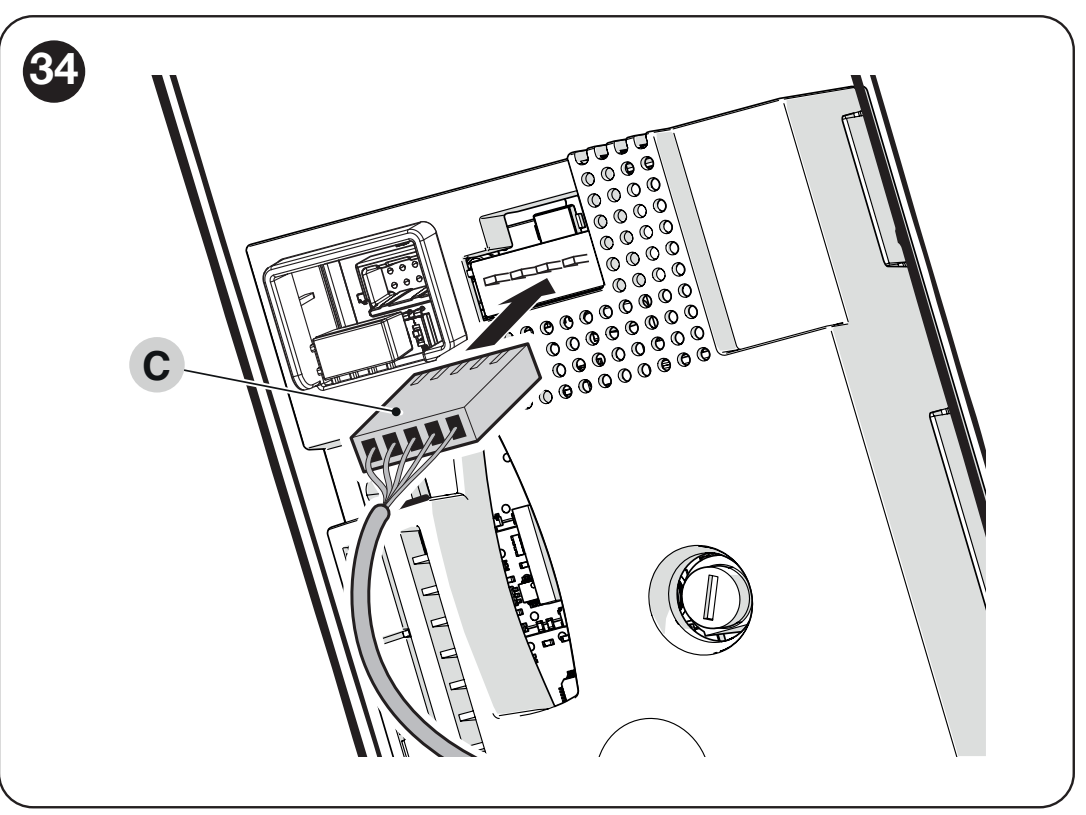
SOON: connecting the PS124 backup battery connector
The Oview programmer uses the IBT4N/BusT4 interface. When using the supported Solemyo solar power supply, the drive must not be powered from the mains at the same time. Do not substitute backup or solar accessories from another generation based on a similar-looking connector.
Initial startup and travel-limit learning
Before powering on for a test, move the gate to approximately the midpoint of its travel. After power-up, BlueBUS should flash once per second; the flashing light and courtesy light should be off at rest. If the check fails, disconnect the power supply and check the wiring.
1. BlueBUS and STOP learning
- Press and hold OPEN ▲ + STOP ■ for approximately 3 s.
- Release when L1 and L2 flash rapidly.
- Wait for completion: the STOP LED stays lit and L1/L2 go out. L3/L4 may start flashing to prompt travel-limit learning.
Learning is required even when no accessories are connected.
2. Quick open and close learning
- Press and hold STOP ■ + CLOSE ▼ 3 s; L1 flashes.
- Use ▲/▼ to set the desired fully open position. Press and hold STOP 5 s to save A1 and skip the optional positions.
- When L8 flashes, set the closed position A0. Confirm with STOP 2 s.
- When the LED goes out, the courtesy light flashes. Continue with the required force learning procedure.
Full learning and custom slowdowns
The entry procedure is the same: STOP + CLOSE for 3 s. At each point, move the gate with ▲/▼ and confirm the position with STOP 2 s. Skip an optional position by pressing STOP twice quickly.
| LED / position | Meaning |
|---|---|
| L1 – A1 | Fully open position; required. |
| L2 – RA1 | Start of slowdown when opening; optional. |
| L4 – RINT | Intermediate slowdown position when closing; slows down about 50 cm before the position, then returns to the set speed. |
| L5 – AP | Partial opening position; optional. |
| L7 – RA0 | Start of slowdown when closing; optional. |
| L8 – A0 | Closed position; required. |
3. Required automatic force learning
Send a movement command using SbS or OPEN. The control unit performs 3 complete cycles. Do not interrupt them, and keep the entire gate area under observation. If interrupted, restart the procedure using SbS, OPEN or CLOSE. Changing positions, speed or direction of rotation triggers force learning again. Successful completion does not replace testing the safety devices and impact forces.
Programming SOA2R10
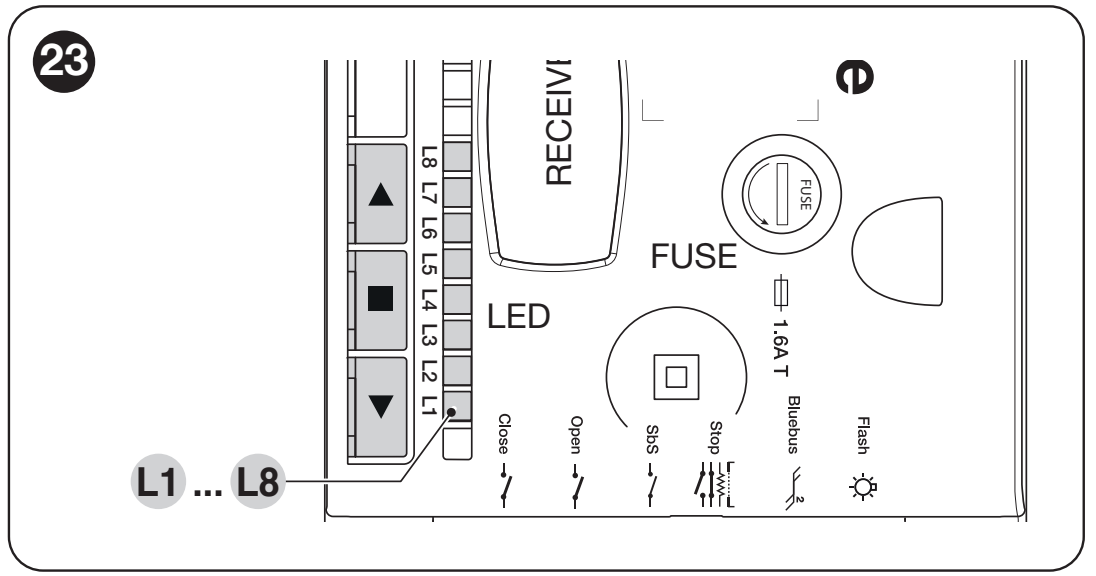
SOA2R10: OPEN ▲, STOP ■, CLOSE ▼ and programming LEDs L1–L8
At rest, ▲ opens, ▼ closes and ■ stops. While the gate is moving, all three buttons stop the motor. During setup, each parameter has its own entry LED; the value LED in Level II is a separate selection.
Level I – enable and disable functions
- Press and hold STOP for about 3 s until L1 starts flashing; release.
- Use ▲/▼ to select the entry LED.
- Press STOP briefly: a short flash means OFF, a long flash means ON.
- If no button is pressed for 10 s, programming ends and the changes are saved.
All eight functions are set to OFF.
| LED – function | Operation and factory setting |
|---|---|
| L1 – Automatic closing | ON: closes after the pause set in II/L1. OFF: automatic closing disabled. Factory setting: OFF. |
| L2 – Close after photocell | ON: after the photocell is cleared, the pause is 5 s. With automatic closing OFF, the gate completes opening first; with it ON, clearing the photocell may stop opening and start a 5 s pause. A STOP command cancels the subsequent closing operation. Factory setting: OFF. |
| L3 – Always close | ON: when power returns and the gate is detected as open, it closes after a 3 s pre-flashing period. OFF: this return-to-operation command is not used. Factory setting: OFF. |
| L4 – Stand-by | ON: after about one minute at rest, BlueBUS and the standard LEDs switch off; BlueBUS flashes slowly. Reduces power consumption when using backup power. Factory setting: OFF. |
| L5 – Long reversal | ON: after a safety STOP or force limit is triggered, reverses movement all the way to the end position. OFF: short reversal of about 15 cm. Factory setting: OFF. |
| L6 – Pre-flashing | ON: the warning light flashes for 3 s before movement. OFF: switches on when movement starts. Factory setting: OFF. |
| L7 – Sensitivity | ON: increases obstacle detection sensitivity. Requires checking the forces and safety responses. Factory setting: OFF. |
| L8 – Gate type | ON: heavy gate. OFF: light gate. This setting does not change the permitted area or mechanical requirements. Factory setting: OFF. |
Level II – adjustable parameters
- Press and hold STOP for about 3 s until L1 flashes, then release.
- Use ▲/▼ to select the parameter entry LED.
- Press and hold STOP; after about 3 s, the value LED lights up.
- Keep STOP pressed, change the value with ▲/▼, then release STOP.
- If no button is pressed for 10 s, the setting is saved. Bold values are factory defaults.
| Entry LED – name and description | Setting LED – value |
|---|---|
| L1 – Pause time Applies when I/L1 is ON. | L1 – 10 s L2 – 20 s L3 – 40 s L4 – 60 s L5 – 80 s L6 – 120 s L7 – 160 s L8 – 200 s |
| L2 – SbS step-by-step mode Sequence for the SbS input and the step-by-step radio command. | L1 – Open – stop – close – stop L2 – Open – stop – close – open L3 – Open – close – open – close L4 – Condominium L5 – Condominium 2; command over 2 s = STOP L6 – Step-by-step 2; command over 2 s = partial opening L7 – Hold-to-run L8 – Semi-automatic opening, hold-to-run closing |
| L3 – Motor speed Repeat force learning after changing this setting. | L1 – V1 – 30% L2 – V2 – 44% L3 – V3 – 58% L4 – V4 – 72% L5 – V5 – 86% L6 – V6 – 100% L7 – Open V4 / close V2 L8 – Open V6 / close V4 |
| L4 – FLASH function Adapt to the connected device and output limit. | L1 – Gate open indicator L2 – Active when the gate is closed L3 – Active when the gate is open L4 – Warning beacon L5 – Electric strike L6 – Electric lock L7 – Electromagnet L8 – Maintenance indicator |
| L5 – Opening force Force does not compensate for friction that needs repair. Measure impact forces again after making changes. | L1 – Force 1 – low L2 – Force 2 L3 – Force 3 L4 – Force 4 L5 – Force 5 L6 – Force 6 L7 – Force 7 L8 – Force 8 – high |
| L6 – Closing force Adjust only after checking the mechanics and safety devices. | L1 – Force 1 – low L2 – Force 2 L3 – Force 3 L4 – Force 4 L5 – Force 5 L6 – Force 6 L7 – Force 7 L8 – Force 8 – high |
| L7 – Maintenance alert Counts manoeuvres; opening and closing count as two manoeuvres. | L1 – Automatic, based on load L2 – 1,000 manoeuvres L3 – 2,000 manoeuvres L4 – 4,000 manoeuvres L5 – 6,000 manoeuvres L6 – 8,000 manoeuvres L7 – 10,000 manoeuvres L8 – 12,000 manoeuvres |
| L8 – Fault history Read-only, display sequence. | L1 – 1st manoeuvre – most recent L2 – 2nd manoeuvre L3 – 3rd manoeuvre L4 – 4th manoeuvre L5 – 5th manoeuvre L6 – 6th manoeuvre L7 – 7th manoeuvre L8 – 8th manoeuvre |
If the unit uses a value between two levels, two LEDs flash alternately. This does not automatically indicate a fault. Do not confuse the parameter input LED with its value LED.
Changing the direction of rotation
While idle, hold STOP for 3 s until L1 flashes. Press ▲ + ▼ simultaneously: a lit courtesy light indicates reverse direction; an unlit light indicates the standard direction. Wait 10 s for the procedure to finish, then repeat the position and force learning procedure. Do not change the direction while the gate is moving.
Remote control and antenna
The radio receiver plugs into the SM socket with both the mains and battery disconnected. Do not confuse the equipment for a standalone drive with a complete kit: choose the receiver and transmitters to match the actual supplied configuration.
NICE OXIBD supports both unidirectional and bidirectional transmitters; a suitable unidirectional transmitter is the NICE MYGO4. An older installed receiver may use a different coding system. The same 433.92 MHz frequency alone is not enough.
In standard Mode 1, the receiver outputs are: 1 – step-by-step, 2 – partial opening, 3 – open, 4 – close. Mode 2 lets you assign an individual button to a selected command. Follow the instructions for the specific OXIBD receiverfor exact pairing and deletion; the motor buttons do not erase its radio memory.
For OXIBD, connect the antenna to the receiver connector according to the OXIBD antenna wiring. Connect the coaxial cable's centre conductor to the signal terminal and the shield to the antenna ground. These are not the power supply +/− terminals.
Diagnostics and troubleshooting
The beacon's short flashes repeat twice, with a 1 s pause. First eliminate the cause; do not use excessive force to overcome an obstruction.
| Signal | Cause and solution |
|---|---|
| 2 flashes | The photocell is preventing movement. Clean and align the optics, remove the obstruction; check the addressing. |
| 3 flashes | Increased resistance or force limit triggered. Check the balance, guides and springs; perform a test. |
| 4 flashes | STOP. Check the safety edge and its wiring. |
| 5 flashes | Internal parameter error: wait at least 30 s, then try issuing a command. If the error persists, have the unit serviced. |
| 6 flashes | Operating limit exceeded: let the drive cool for a few minutes. |
| 7 flashes | Internal electrical fault: a qualified technician should disconnect all power sources and check the control board and cables. |
| 8 flashes | A continuous command is blocking further commands. Check for a stuck SbS/OPEN/CLOSE contact. |
| 9 flashes | Electronic lockout of the automation system. Use the unlock command; this is not a cable-release mechanism. |
| LED at rest | Meaning |
|---|---|
| BlueBUS: 1 flash per second | Normal operation. Two quick flashes confirm an input change or a received radio command. |
| BlueBUS off / continuously lit | Check the power supply, fuses and control board; the standby indication is different. |
| STOP off | The safety input is not in the stored idle state. |
| L1 + L2 are flashing | Need to teach the devices. |
| L3 + L4 are flashing | Need to teach the positions. |
| L1 or L8 flashes rapidly on its own | Encoder limit reached. Have a service technician check the mechanical installation; do not force the motor beyond its travel limits. |
| The courtesy light is flashing | Request to learn the force settings or learning in progress; if it coincides with the beacon, this may indicate a diagnostic check. |
During movement, LEDs L1–L8 indicate the motor load: from L1 at low force to L8 at maximum force. This display is not a value selection in the programming menu. If the load increases, check the gate for mechanical resistance and correct balance; do not increase the force without carrying out a safety test.
History of the last eight manoeuvres
Enter Level II, select input L8, and hold STOP for about 3 seconds. The illuminated LEDs indicate manoeuvres with a fault; L1 is the most recent and L8 the eighth. With STOP held down, select a manoeuvre using ▲/▼: the LED will flash the corresponding diagnostic code. Then release STOP.
Control unit reset and encoder servicing
A reset clears the positions, learned devices and control unit settings. This does not erase the receiver.
- With the gate stationary, hold ▲ + ▼ for about 3 seconds until L1–L8 light up.
- Release the buttons. L2 and L8 flash rapidly for about 3 seconds, and the control unit restores the factory settings.
- Repeat the learning procedure for the devices, positions and forces, and carry out all safety tests.
The reset does not change the direction of rotation or the total number of manoeuvres. Encoder reset is a separate service procedure to be carried out only on a workbench, never with the motor connected to the gate.
Pre-handover gate checks
- With the drive disengaged, check that the gate moves smoothly and is properly balanced. For the sectional door assembly described here, the force required to move it manually must not exceed 225 N. When selecting SOON, also observe the gate resistance operating ranges in the table above. This force is neither the motor torque nor the permissible impact force.
- After engaging the drive, test opening, closing and STOP; the gate must not bind or hit beyond the stored limit positions.
- Test each pair of photocells at the TX, at the RX and in the centre of the beam, for example using a cylinder Ø 5 cm and 30 cm long. Check the gate’s actual response.
- Test the safety edge, safety circuit and emergency release. The installer must measure impact forces using a suitable measuring device; repeat the test after any change to the force or sensitivity settings.
- Hand over the gate only after all tests have been passed, and provide the identification, release instructions and maintenance schedule. Only pass through when the gate is fully open and stationary.
Maintenance and safe operation
Carry out professional maintenance at least every 6 months or after 4,000 manoeuvres since the last service, whichever comes first. After disconnecting the mains and battery, check the anchors, corrosion, wedge, shaft, chain if fitted, springs and guide components. Repeat the safety tests after restoring the power supply.
The maintenance alert in II/L7 supplements the service schedule. If FLASH is set as a maintenance indicator, it flashes throughout the entire manoeuvre at 81–100% of the limit; above the limit, it flashes continuously, even when the gate is stationary. If FLASH is set as a warning beacon, maintenance is indicated differently: at 81–100%, it stays on for 2 s at the start; above the limit, it stays on for 2 s at both the start and end of the manoeuvre, then resumes normal flashing. After servicing, enter II/L7, hold STOP and press ▲ + ▼ simultaneously for at least 5 seconds to reset the service counter. This does not erase the total counter.
If a safety device fails, do not operate the gate automatically. Use safe manual operation and arrange for repairs. Do not attempt to work on tensioned springs yourself.
SOON SO2000 technical specifications
| Parameter | Value |
|---|---|
| Control unit | NICE SOA2R10 built-in; magnetic encoder. |
| Mains supply | 230 V AC, +10% / −15%, 50/60 Hz; Class I, earthing required. |
| Motor | 24 V DC. |
| Mains current draw | Maximum 1.5 A; rated 1 A. |
| Power consumption | Maximum 350 W; rated 220 W. |
| Torque | Maximum 50 Nm; rated 30 Nm; static 130 Nm. The static value is not an available operating torque. |
| Speed | Maximum 30 / rated 18 rpm. |
| Operation | Depending on resistance and travel length; cycle table. |
| Area / height | Up to 20 m² / approx. 5 m. |
| Protection rating / temperature | IP40, indoor use; −20 to +50 °C. |
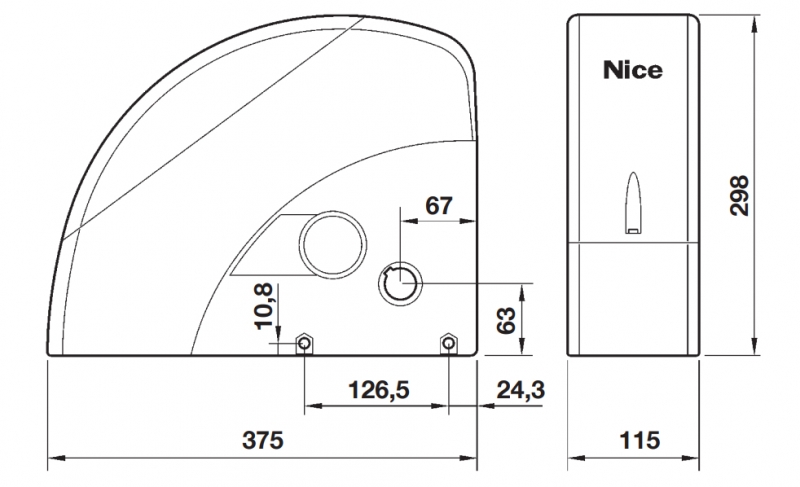
| Dimensions / weight | Approx. 115 × 375 × 300 mm / 10.5 kg. The dimensioned drawing gives a height of 298 mm. |
| Fuses | F1 mains fuse 1.6 A; F2 control fuse 1.6 A, time-delay. Replace only with the same type after eliminating the cause. |
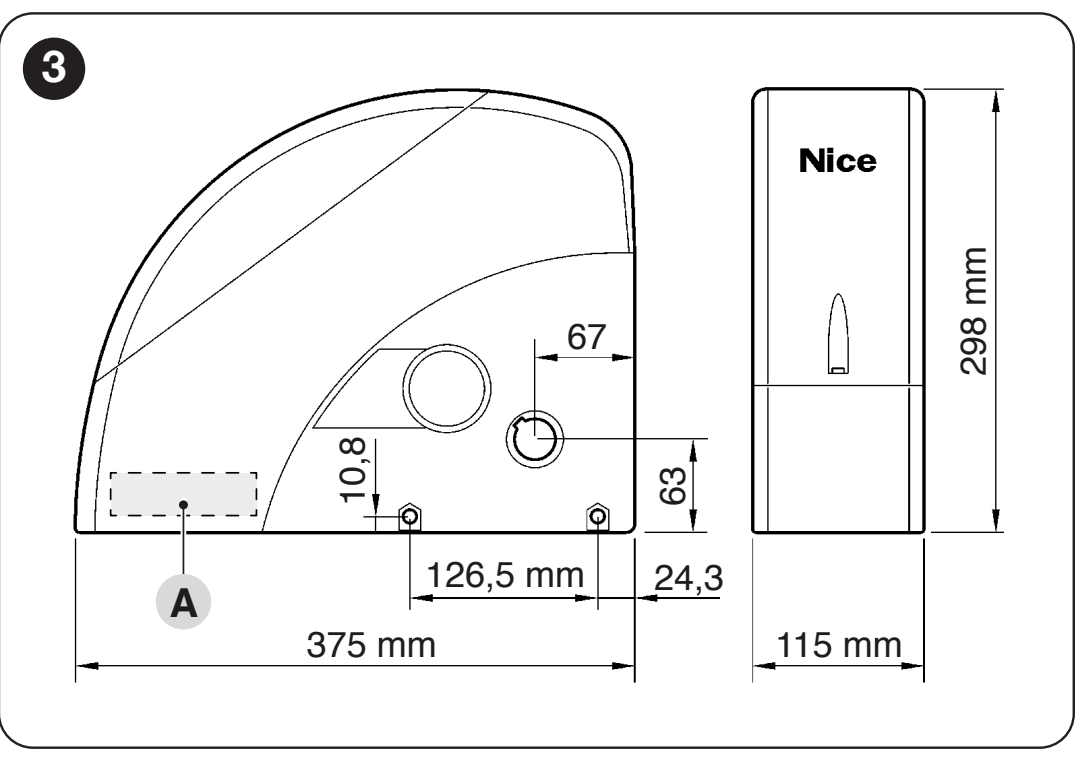
Dimensions of the SOON SO2000 drive and positions of the mounting holes
360° view of the drive
Drive installation video guide
How can I order this item?
Choose the option that suits you:
- order online: use the buy button to add the goods to your shopping cart (you will find the buy button here in the product variants table).
- order by email: place your order at [email protected]






