NICE Hyke HK7024 HS high-speed operator
NEW| Product availability: | within 7 days | We usually dispatch goods within 7 days. |
|---|
within 7 days
€1,099.44 including VAT
| Weight |
|---|
| 13 kg |
Description of NICE Hyke HK7024 HS high-speed operator
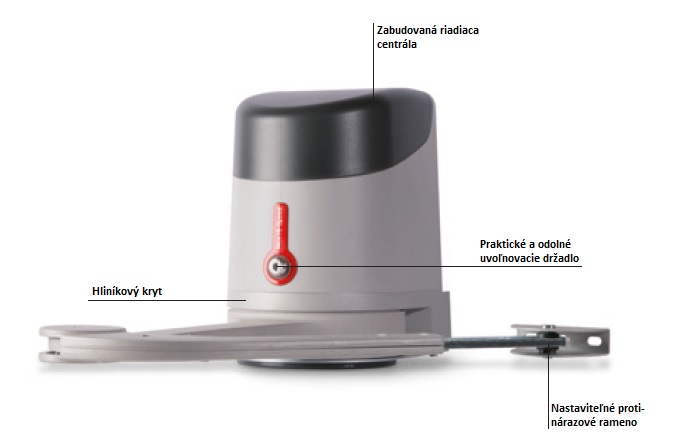
NICE HYKE HK7024HS is a fast articulated non-reversible drive for one leaf of a swing gate. It has a built-in control unit; for a double-leaf gate, it is paired with HK7224HS.
The motor runs on 24 V DC. The 230 V AC mains supply is connected to the integrated HK7024HS control unit, not directly to the second motor. Thanks to its articulated arm, it can also be installed when the hinge is set back on a wider post, provided the position and clearance comply with the installation diagram. With a standard installation, a 90° opening takes approximately 10 s.
| Quick navigation | |
|---|---|
| Choosing a drive | Accessories |
| Installation | Arm and stops |
| Wiring | Terminals |
| Initial start-up | Programming |
| Diagnostics | Reset |
| Maintenance | Service life |
| Specifications | PDF manual |
Choosing a drive and leaf limits
The HYKE HS has separate maximum limits for a length of 3 m and a weight of 270 kg. These limits do not apply simultaneously: the permissible combination is determined by the graph. According to the graph, a 3 m leaf can weigh approximately 175 kg; a 1.8 m leaf can weigh approximately 260 kg. Therefore, a length of 3 m and a weight of 250 kg are not a permissible combination for one leaf. Solid infill, wind, poor balance or resistance to movement may further reduce the limit.
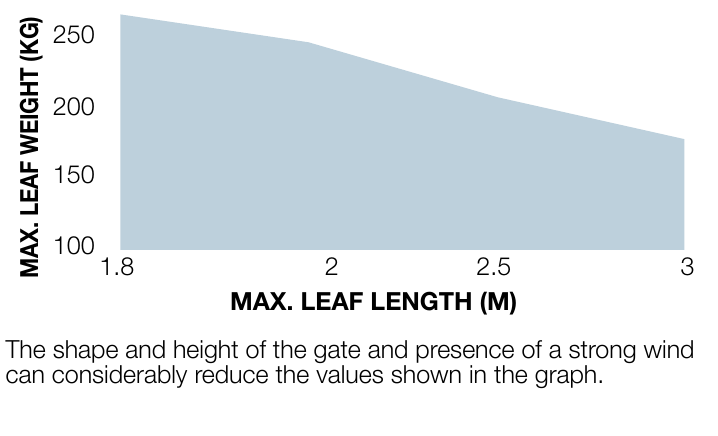
The graph shows leaf length on the horizontal axis and weight on the vertical axis one leaf.
With the shortened arm, the operating range is smaller than with the full-length arm. Before choosing a drive, check that the gate moves freely, the leaf is sturdy, and the arm can be positioned safely. Each motor operates one leaf; using two motors does not increase the permitted weight of a single leaf.
Control unit and compatible accessories
| What | Why | Type |
|---|---|---|
| Motor and control unit | One motor per leaf. For the second leaf, add HK7224HS. |
|
| Radio receiver | SM connector on the HK7024HS control unit; choose a receiver compatible with the transmitter’s coding. | |
| Remote control | Pair it with the installed receiver; frequency alone does not determine compatibility. | |
| Photocells | Safety devices connect to BlueBUS; run the learning procedure after adding them. | |
| Warning light | Indicates movement. The FLASH output is 12 V DC / max. 21 W. | |
| Emergency power supply | For the HK7024HS in the event of a mains failure, after checking the circuit board and connector. |
|
Installation and site check
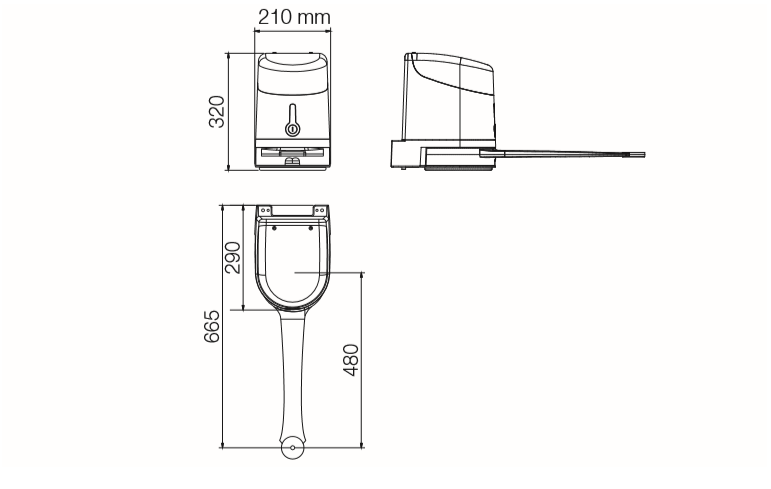
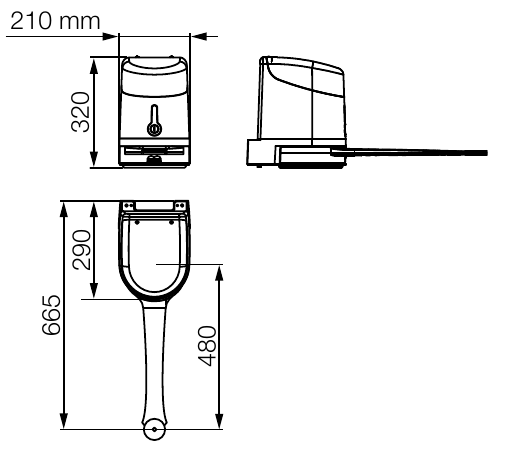
The mounting surface must safely support the bracket, and the arm must rotate freely throughout its full travel. Allow at least 210 mm of clearance. For the installation shown, the distance from the motor axis to the opposite obstacle must be at least 300 mm; measure the additional 150 mm dimension and hinge offset according to the relevant drawing. These are not universal post dimensions. A hinge offset of up to approximately 400 mm is possible only with geometry matching the drawing and chart. Choose the bracket anchors to suit the actual substrate; they are not included with the motor.
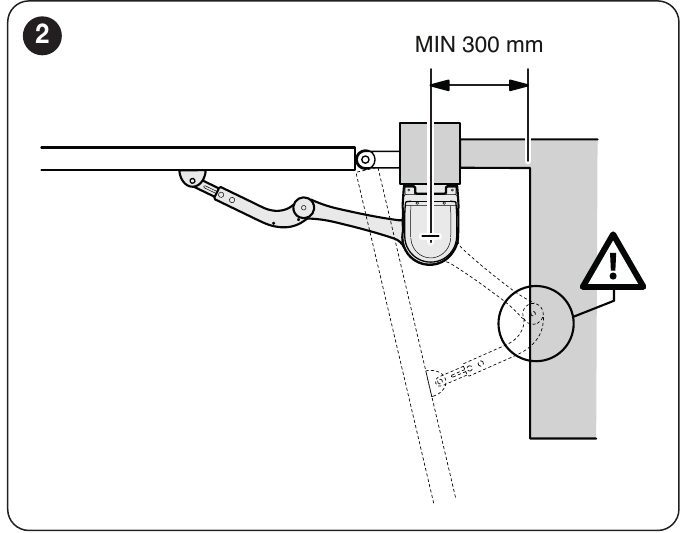
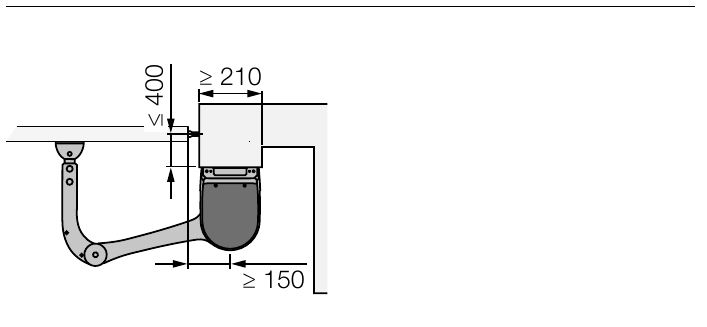
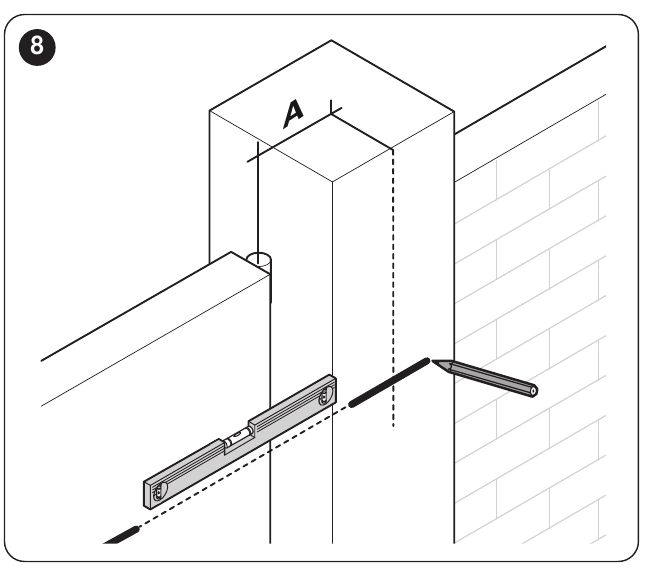
Before drilling, measure the hinge axis position, bracket position and required angle. For the full-length arm, use the original A/B dimension chart; secure the gate-leaf bracket to a solid part of the frame. With the full-length arm, the maximum opening angle is 110° according to the installation chart. Repair any gate that binds, is deformed or lacks solid stops before installation.
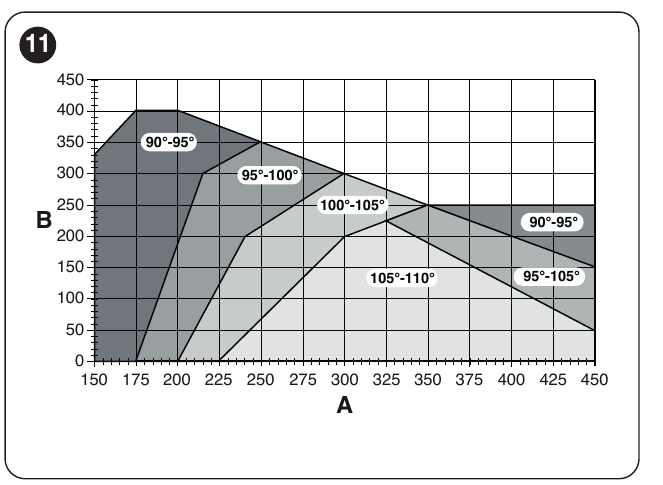
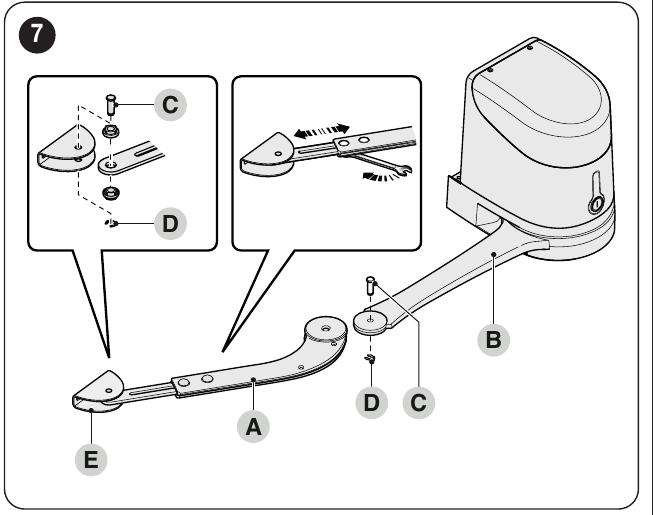
Full-length and shortened arms, end stops
Where there is an obstacle, measure the available dimension E. Use the full-length arm when E is at least 650 mm; if E is 300–650 mm, shorten it according to the installation instructions. The shortened arm limits the permitted angle and the combinations of length and weight; for this configuration, refer to the chart and do not exceed the specified opening angle. Shortening must be done at the specified points on the original arm, not by guesswork.
After securing the motor, position the arm and gate-leaf bracket at the furthest solid point. Check that the arm engages correctly in the end position, then set the mechanical opening and closing stops. With the motor disengaged, manually move it through its full travel; movement must be smooth and free of collisions.
Electrical connections
The integrated control board operates both motors. For a single-leaf gate, connect the motor to M2; leave M1 unused. For a two-leaf gate, M1 operates the leaf that closes first and M2 the second; connect the corresponding encoders to ENC1/ENC2. Disconnect the mains and backup power supply before working. For the second motor, use a 3 × 1.5 mm² cable up to 10 m long and a 2 × 1 mm² encoder cable up to 10 m long; the actual route and conductor cross-section must suit the installation.
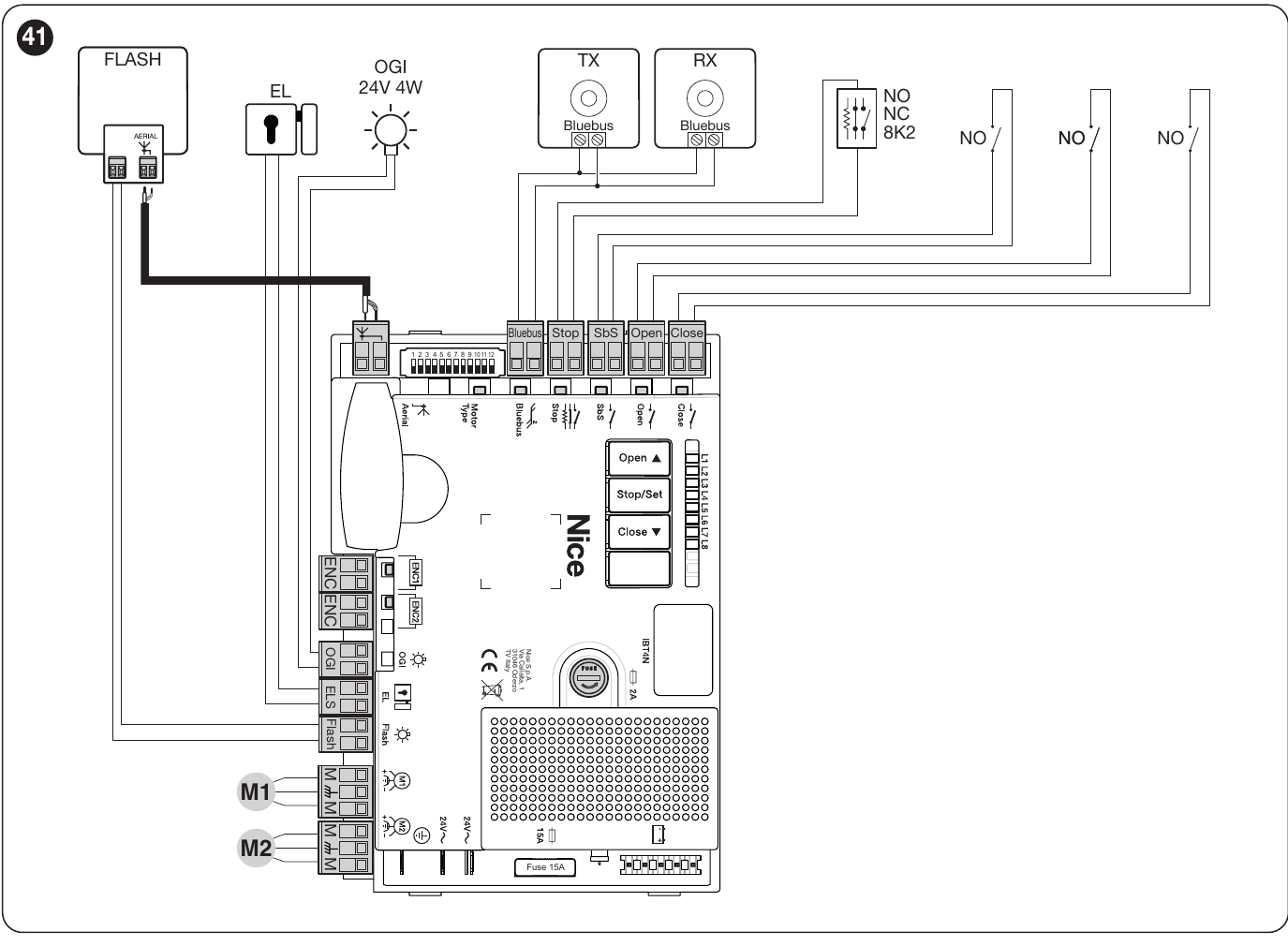
Accessory power supply and polarity
| Terminals | Connection |
|---|---|
| BlueBUS | Two wires for compatible photocells; non-polarized. Repeat the learning procedure after changing devices. |
| SbS (+) and STOP (−) | Auxiliary 24 V DC, maximum 200 mA between the terminals marked as shown on the integrated control board. Voltage remains present in standby mode. These terminals also serve as command and safety inputs; accessory power connections must be compatible with the contact wiring. |
| STOP, step-by-step (SbS), OPEN, CLOSE | Volt-free contacts; STOP can be NO, NC or an 8.2 kΩ resistor, depending on the learning procedure. No +/− polarity applies to the contact itself. |
| ENC1 / ENC2 | Encoder for the corresponding motor; refer to the instructions non-polarized. |
| FLASH | 12 V DC, maximum 21 W; select a warning light to suit the operating mode and power consumption. Do not guess the polarity of individual unmarked terminals. |
| ELS / OGI | ELS: 12 V AC lock, maximum 15 VA. OGI: 24 V DC indicator, maximum 4 W. The function of the outputs can be changed by programming. |
Initial startup and position learning
On the HK7024HS board, set the motor type before learning the positions. For the 12-position switch on the board shown, position 12 must be ON for HYKE HS; all other positions must be OFF. If your board has different markings or a different version, use the settings for the board actually installed.
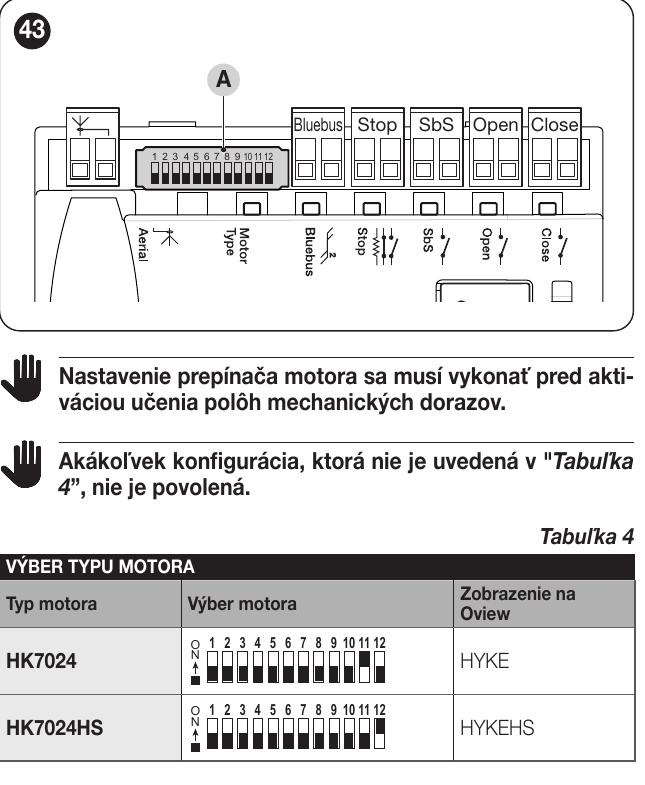
- Check that the wiring is correct, the mechanical stops are set and there is sufficient clearance. Before switching on the power, position the gate leaf approximately halfway along its travel.
- After switching on, BlueBUS should flash approximately once per second; the photocell LEDs should respond and FLASH should remain off.
- Press Open and Stop/Set simultaneously for approximately 3 s, until L1 and L2 start flashing rapidly. After learning, STOP must be lit and L1/L2 must be off.
- Check that the HS motor is selected. Press Stop/Set + Close for approximately 5 s, until L3/L4 flash rapidly. The control unit slowly closes M1, then M2, opens both leaves and then closes them rapidly. With a single motor, M1 is skipped.
- If the wrong leaf moves first or moves in the wrong direction, stop the learning procedure. A qualified technician must correct the motor and corresponding encoder connections, then repeat learning. Activation of a photocell or STOP interrupts the learning procedure.
- Run several complete cycles to check the direction, deceleration, stops and all safety devices. The gate leaf must move freely when operated manually with the motor disengaged.
Programming on the integrated control board
First level: hold Stop/Set until L1 starts flashing, then release the button; use Open/Close to select an LED and Stop/Set to toggle its state (rapid flashing = OFF, slow flashing = ON). When finished, wait 10 s. Do not leave more than 20 s between button presses.
| LED – function | ON / OFF state |
|---|---|
| L1 – Automatic closing | Closes after the pause time; OFF = semi-automatic operation. Factory setting: OFF. |
| L2 – Close after photocell activation | When automatic closing is enabled, photocell activation shortens the pause to 5 s. If automatic closing is disabled, photocell activation enables it with the programmed pause time. Factory setting: OFF. |
| L3 – Always close | If the gate is open when power is restored, the warning light flashes for 5 s after 10 s, then the gate closes. Factory setting: OFF. |
| L4 – Standby for all | After one minute without movement, BlueBUS and most LEDs switch off. Factory setting: OFF. |
| L5 – ELS output as courtesy light | ON changes the electric lock output to a courtesy light output. Factory setting: OFF. |
| L6 – Pre-flashing | ON activates the warning light 3 s before movement. Factory setting: OFF. |
| L7 – CLOSE as partial opening 1 | ON changes the function of the CLOSE input. Factory setting: OFF. |
| L8 – OGI as maintenance indicator | ON changes the function of the open-gate indicator. Factory setting: OFF. |
Second level: hold Stop/Set until L1 starts flashing, then release the button; use Open/Close to select the input LED. Hold Stop/Set again; after approximately 3 s, the current value will light up. While continuing to hold Stop/Set, use Open/Close to select the value LED, then release Stop/Set and wait 10 s. Factory settings for this board are shown in bold.
| Input LED – parameter | Setting LED – value |
|---|---|
| L1 – Pause time | L1 5 s; L2 15 s; L3 30 s; L4 45 s; L5 60 s; L6 80 s; L7 120 s; L8 180 s. |
| L2 – Step-by-step mode | L1 O–S–C–S; L2 O–S–C–O; L3 O–Z–O–Z; L4 residential; L5 residential 2; L6 short command for pedestrian opening; L7 presence of a person; L8 opening in semi-automatic mode and closing by holding the command. |
| L3 – Motor speed | L1 very slow; L2 slow; L3 medium; L4 fast; L5 very fast; L6 very fast; L7 fast opening/slow closing; L8 very fast opening/medium-speed closing. |
| L4 – Relief after closing | L1 none; L2 level 1 ≈100 ms; L3 level 2; L4 level 3; L5 level 4; L6 level 5; L7 level 6; L8 level 7 ≈800 ms. |
| L5 – Motor force | L1 minimum; L2 level 2; L3 level 3; L4 level 4; L5 level 5; L6 level 6; L7 level 7; L8 maximum. |
| L6 – Pedestrian / partial opening | L1 M2 1/4; L2 M2 1/2; L3 M2 3/4; L4 full M2; L5 both leaves 1/4 of the smaller opening; L6 both 1/2; L7 both 3/4; L8 both to the smaller of the learned angles. |
| L7 – Maintenance reminder | L1 500; L2 1,000; L3 1,500; L4 2,500; L5 5,000; L6 10,000; L7 15,000; L8 20,000 operations. |
| L8 – Fault history | L1 last operation; L2–L8 second- to eighth-most recent operation. |
Diagnostics
On the HK7024HS, BlueBUS flashes approximately once per second during normal operation. Slow flashing of L1/L2 indicates changed or unlearned devices; slow flashing of L3/L4 indicates unlearned positions or a change to the switches after learning; relearn the positions. The STOP LED being off indicates that a safety input has been triggered. For the second HK7224HS motor, check these indicators on the first operator with the control unit.
When a fault occurs, the FLASH light repeats a group of short flashes, then repeats it after a 1-second pause. Count the flashes in one group.
| Number of FLASH light flashes | What to check |
|---|---|
| 1 | BlueBUS device changed/disconnected; after fixing the issue, repeat device learning. |
| 2 | Photocell or an obstruction in its beam. |
| 3 | Increased resistance to movement or force setting; check the mechanism first. |
| 4 | STOP active or a change to a learned safety input. |
| 5 | Control unit internal parameter error; wait at least 30 s, then try the command again. If the problem persists, disconnect and restore the power supply; if it recurs, contact service. |
| 6 | Limit for consecutive or hourly cycles exceeded; wait a few minutes for the limiter to allow movement again. |
| 7 | Electrical circuit fault; wait at least 30 s, then try the command again. If the problem persists after restoring the power supply, contact service. |
| 8 | Another continuously active command is preventing movement; check the control inputs and the cause of the held command. |
| 9 | The gate was locked by a command; unlock it using the relevant control command. |
| 10 | The encoder detected an obstruction or high friction; check the gate leaf's path. |
Restoring settings
On the integrated HK7024HS board, press and hold Open and Close, until L1 and L2 start flashing, then release the buttons. This restores the factory programming values; custom settings will be lost. After resetting, check the board wiring and indicators; if the system requests device or position relearning, complete it before operation.
Manual release and maintenance
In the event of a power failure, release the motor using the supplied key and the lever turned 90°, then move the gate leaf manually. Re-engage the motor before resuming automatic operation. Maintenance must be carried out by a technician no later than 6 months or 20,000 operations: they will check for wear, bracket tightness, stops, free gate movement, and safety devices.
Estimated service life
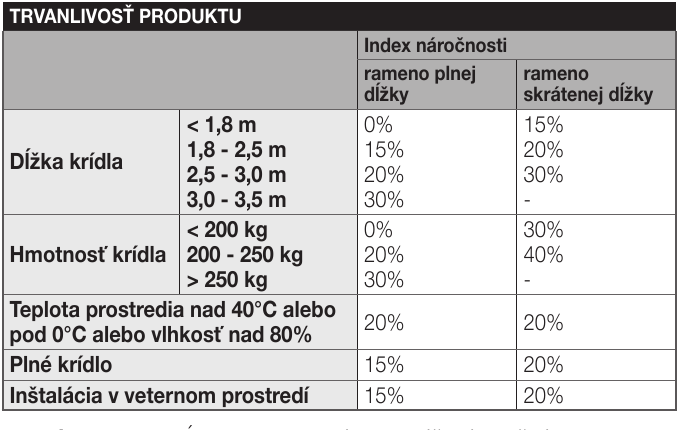
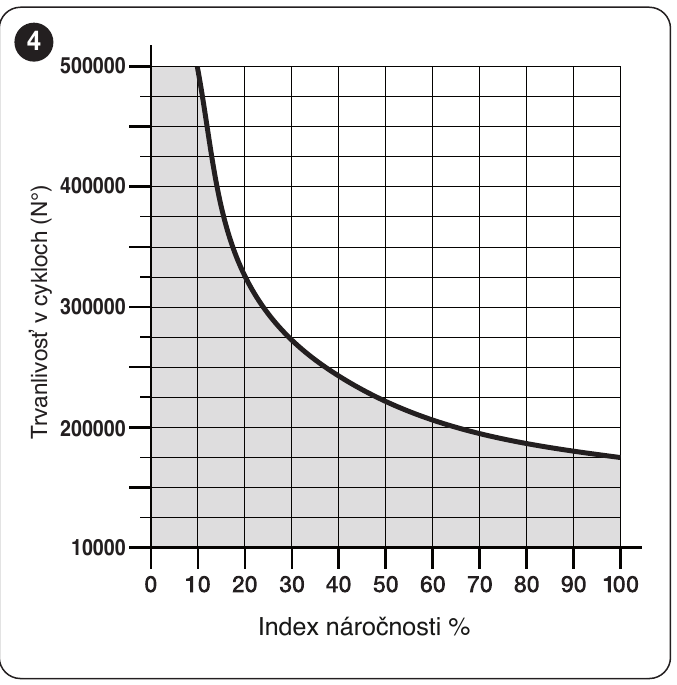
The usage severity index is the sum of the effects of length, weight, full or shortened arm, temperature/humidity, a solid gate leaf, and wind. The manufacturer's figures are estimates, not a guarantee of the number of cycles. First verify that the length and weight combination is permitted in the HYKE HS graph above; only then use the index to estimate the service life. The cycle-count graph is not a guarantee.
| Characteristics of the complete automation system | Index | Service life graph |
|---|---|---|
|
| |
Technical specifications and dimensions
| Parameter | Value |
|---|---|
| Model | NICE HYKE HK7024HS |
| Intended use | High-speed articulated operator with integrated control unit for one or two leaves. |
| Motor voltage | 24 V DC |
| Power supply | 230 V AC, 50/60 Hz to the built-in control unit; the motor is 24 V DC. |
| Power consumption / current draw | 300 W; 1.5 A at the mains input. |
| No-load speed | 2 rpm; 90° operating time approximately 10 s with standard installation, excluding acceleration and deceleration. |
| Starting / rated torque | 500 / 120 Nm. |
| Operation | Maximum 40 cycles/h at rated torque; maximum continuous operation 7 min. |
| Operating temperature | −20 to +50 °C according to the current catalogue. |
| Protection rating | IP54 with the cover intact. |
| Motor dimensions | 290 × 210 × 320 mm. |
| Motor weight only | 10.5 kg. |
How can I order this item?
Choose the option that suits you:
- order online: use the buy button to add the goods to your shopping cart (you will find the buy button here in the product variants table).
- order by email: place your order at [email protected]






