NICE Hopp HO7224 – swing gate operator without control unit, for a gate leaf up to 2.4 m / 250 kg
| Product availability: | In stock | We normally dispatch goods within 24 hours. |
|---|

In stock
€419.51 including VAT
| Weight |
|---|
| 6,50 kg |
Description of NICE Hopp HO7224 – swing gate operator without control unit, for a gate leaf up to 2.4 m / 250 kg
The NICE HOPP HO7224 does not have a control unit. This articulated-arm operator is designed as the second motor for HO7124. Both operators are controlled by the unit POA3R10 built into the HO7124; no additional unit is installed in the HO7224. The limits for one gate leaf are 2.4 m at 160 kg or 1.5 m at 250 kg.
The motor operates on 24 V DC. The operator is non-backdrivable; in the event of a power failure, release it with the key. HO7224 is not a standalone gate automation system and must not be connected directly to 230 V.
What to add to the HOPP operator
Choose the equipment based on the entire gate and the risks in its surroundings. Electronic accessories connect to the control unit in the HO7124; the HO7224 has neither its own inputs nor a receiver socket.
| What | Why | Type |
|---|---|---|
| Main operator with controller | Its built-in POA3R10 unit also controls the HO7224 motor. | |
| Photocells | Monitor the passage; two-wire connection BlueBUS. | |
| Warning light | Signals movement; connects to FLASH. | |
| Remote control | The receiver is installed in the HO7124. The kits listed include this receiver and one two-channel remote control. | |
| Code/card access control | Compatible control devices connect to BlueBUS. | |
| Backup battery | During a power outage, it powers the system via the POA3R10 in the HO7124; the number of operations depends on the gate and battery charge. | |
| External release | Allows the gate to be released manually during a power outage when there is no other access to the property. |
|
| Service and diagnostics | The programmer connects to the POA3R10 via the BUS T4 interface. |
When to choose NICE HOPP
HOPP is an articulated-arm operator with an aluminium arm for swing gates that open inwards onto the property. It is also suitable for more intensive use, provided the gate meets the mechanical and operating limits. These operators are not suitable for gates that open outwards.
| Length of one gate leaf | Weight of one gate leaf |
|---|---|
| Up to 1.5 m | Up to 250 kg |
| Up to 2.4 m | Up to 160 kg |
The maximum values of 2.4 m and 250 kg do not apply at the same time. For lengths between these values, follow the admissible-load curve. Two motors operate two gate leaves; they do not increase the load capacity of a single leaf. Solid infill, wind, friction and hinge condition affect suitability and service life.
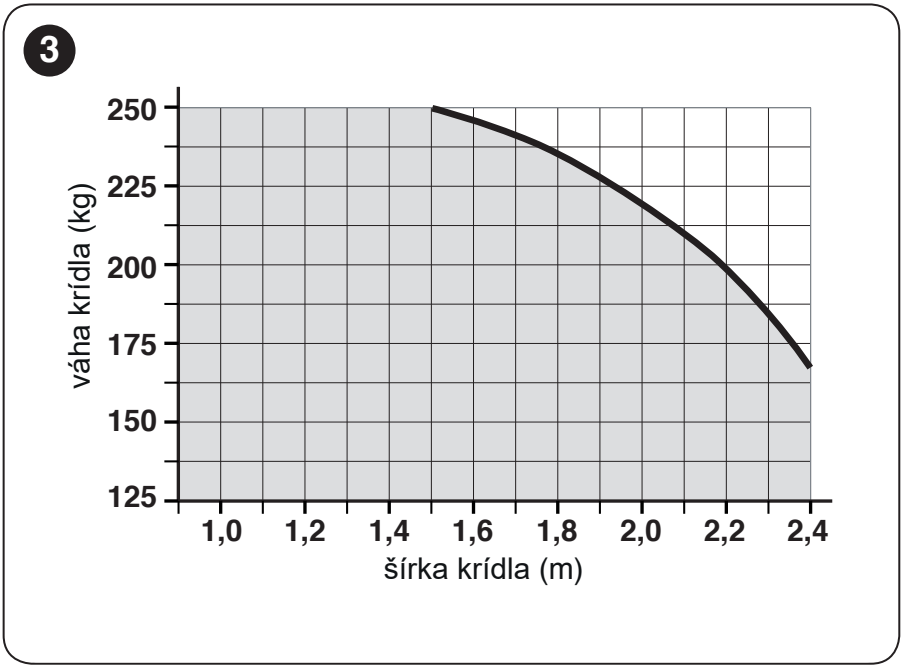
Load and estimated service life
To estimate the service life, add the relevant indices. Read the result from the original chart. This is an approximate estimate assuming regular maintenance, not a guarantee of the number of cycles.
| Characteristics of the complete automation system | Index | Service life chart |
|---|---|---|
| Gate leaf length | < 1 m: 0 % 1–1.5 m: 15 % 1.5–2.4 m: 20 % | 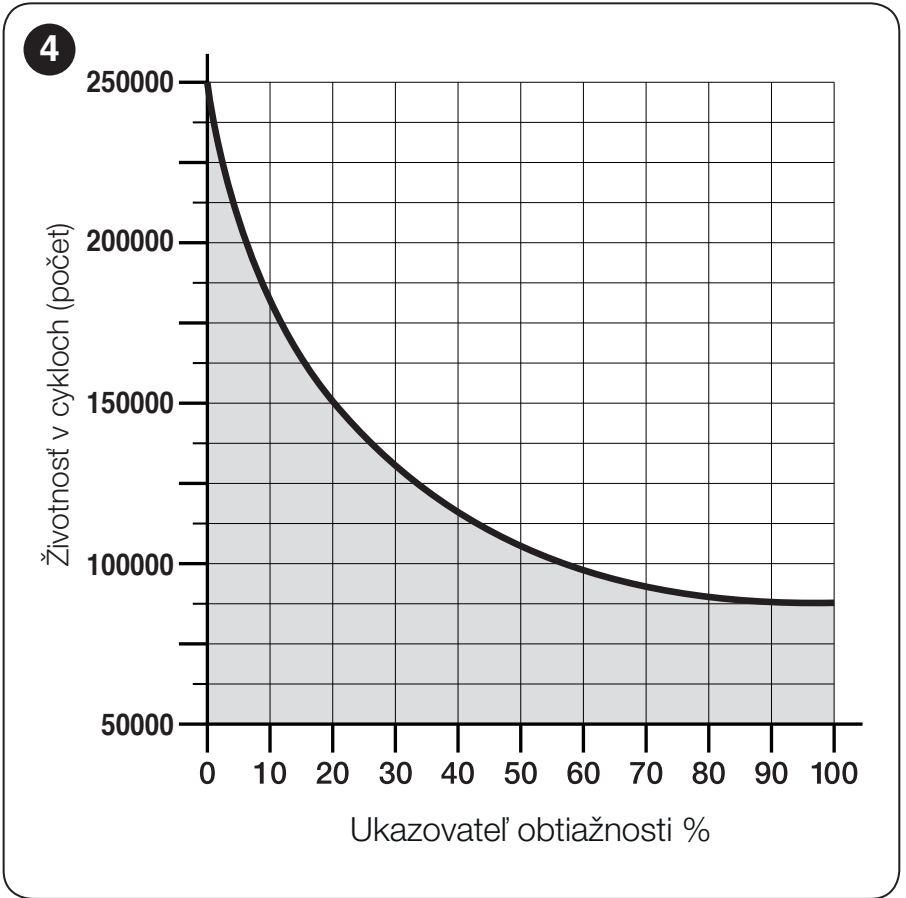 |
| Weight | < 100 kg: 0 % 100–150 kg: 20 % 150–250 kg: 30 % | |
| Temperature and humidity | > 40 °C or < 0 °C or humidity > 80 %: 20 % | |
| Solid infill | 15 % | |
| Windy location | 15 % |
| Effect and index | Service life chart |
|---|---|
If a value falls on the boundary between intervals, use the higher index for an estimated assessment. The estimated service life does not replace checking the permitted length and weight or testing the force on the completed gate.
Kits for one or two leaves
One leaf: HO7124 with control unit. Two leaves: HO7124 with control unit and HO7224 without control unit. Both motors are controlled by the control unit in the HO7124. All kits listed below include OXIBD and 1× ON2E. The photocell option includes one pair of EPMB; the accessory option also includes a flashing light ELDC.
| Kits for 1 leaf | Main operator HO7124 with control unit | Kits for 2 leaves |
|---|---|---|
HOPP for 1 leaf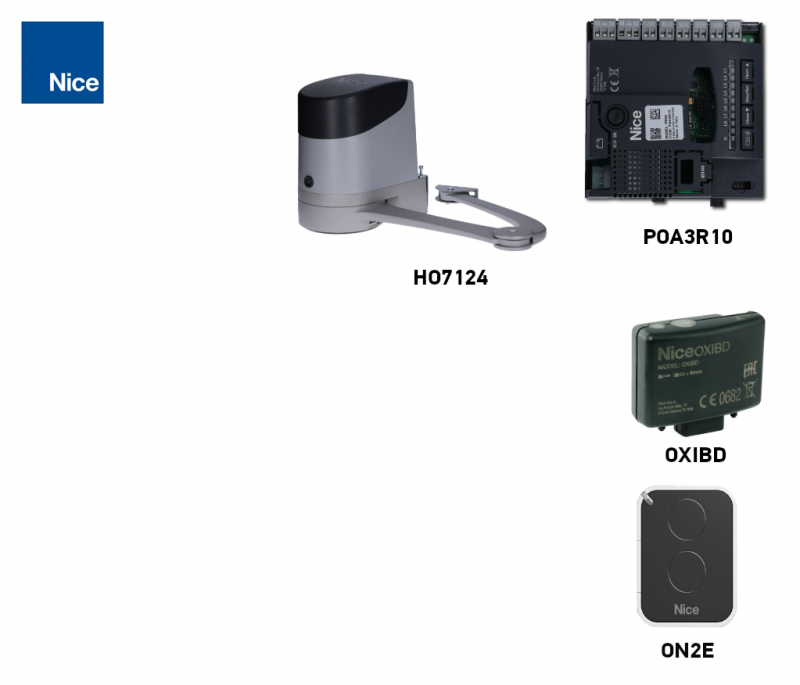 Basic With photocells With accessories 1× HO7124 Control unit in the HO7124. The limit applies to one leaf. | NICE HO7124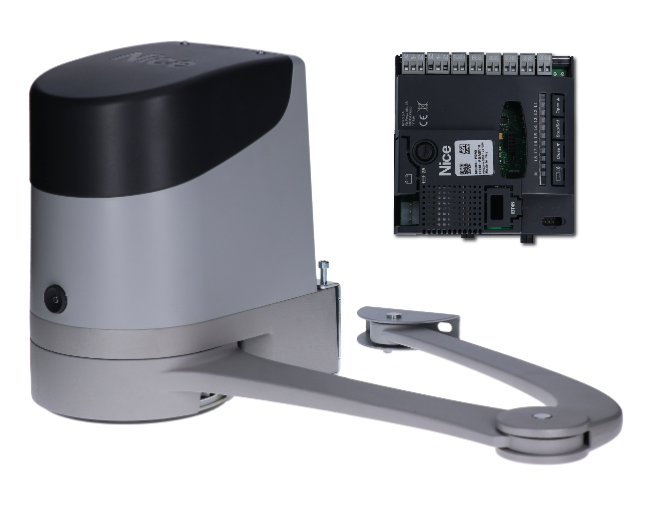 24 V DC The HO7124 has a built-in POA3R10, which also controls the HO7224 motor. | HOPP for 2 leaves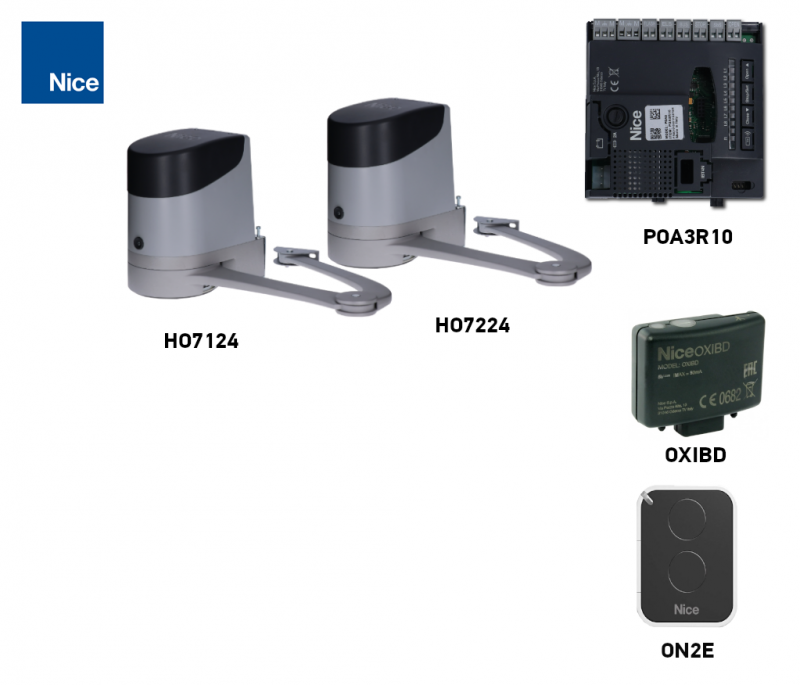 Basic With photocells With accessories HO7124 + HO7224 Control unit in the HO7124. The limit applies to one leaf. |
Installing the operator and articulated arm
Before installation, check that the gate is sturdy, the leaf is balanced, and it moves smoothly by hand throughout its full travel. The operator does not replace repair of damaged hinges. Attach the arm bracket to a solid part of the leaf, such as the frame. The anchoring surface must safely withstand the forces exerted by the operator.
| What to check | Requirement |
|---|---|
| Motor clearance | Minimum installation width: 170 mm; the operator body is 180 mm wide. Check the full outline and the arm's range of movement. |
| Arm movement clearance | Maintain at least 400 mm at the location shown in the drawing. This is not the post cross-section dimension. |
| A/B geometry | This is determined by the hinge position and required opening angle; use the chart below. |
| Access | Safe access to the release key and cover must remain available. |
| Obstacles and wicket gate | The leaf or arm must not strike a wall or any other object. For a gate with an integrated wicket gate, the operator must be disabled while the wicket gate is open. |
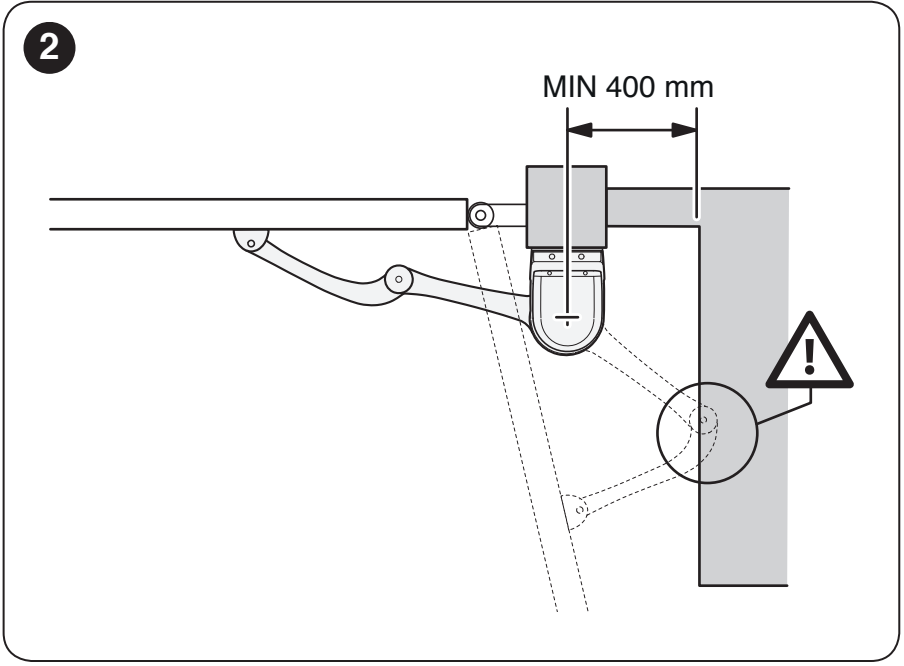
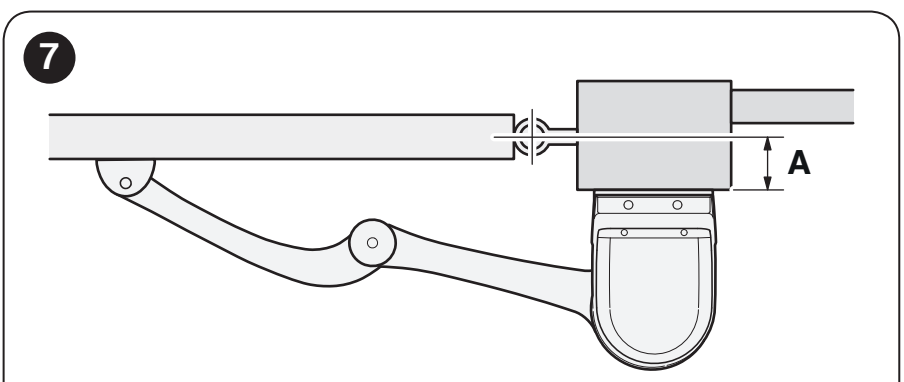
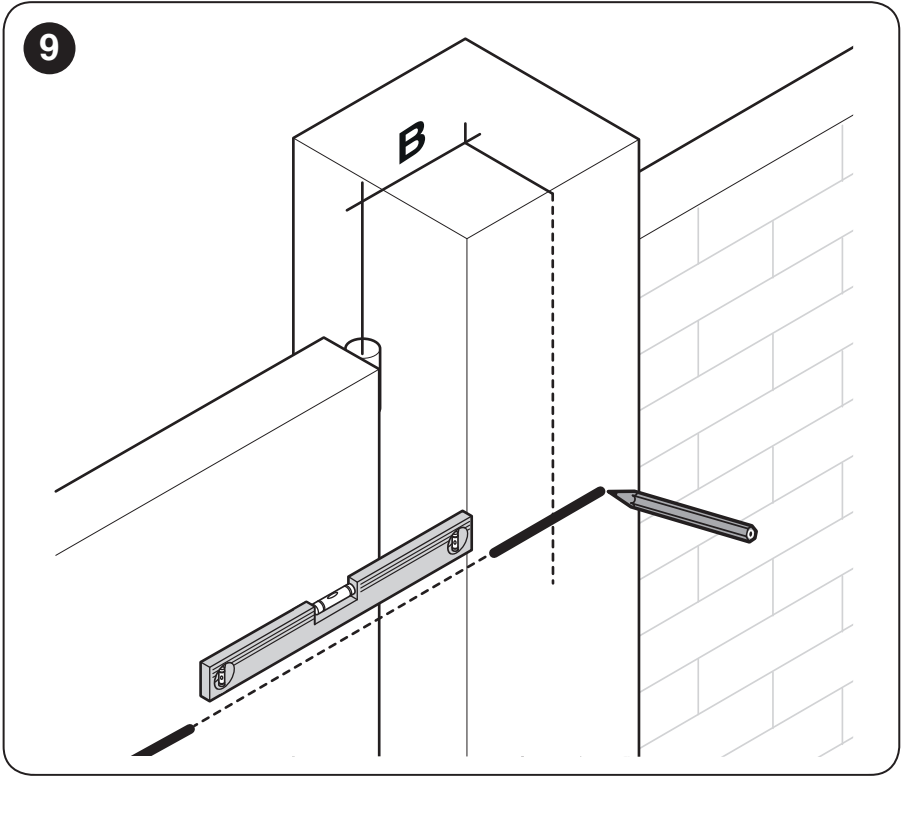
How to determine installation distances A and B
- Measure distance A according to the hinge position and mounting surface shown in the drawing.
- Open the leaf by hand to the desired position and determine its angle.
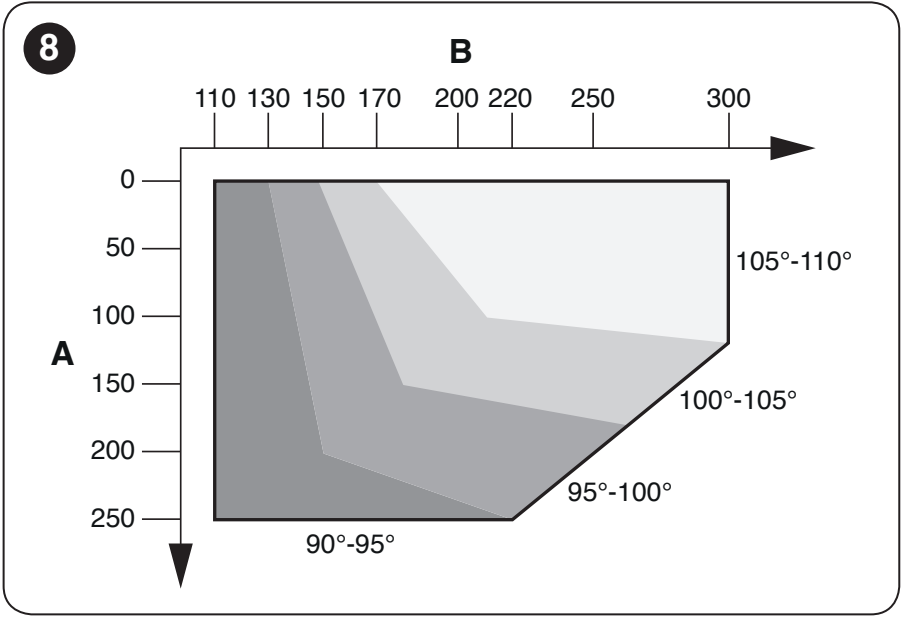
- Use the value of A and the required angle range on the chart to determine B, i.e. the position of the motor bracket. Dimensions are in millimetres.
Manufacturer's example: for A = 100 mm and an angle of 100°, B is approximately 180 mm. This example is not a universal installation dimension.
The chart distinguishes ranges of 90–95°, 95–100°, 100–105° and 105–110°. A larger angle is not possible with every hinge offset; both A and B must remain within the relevant range.
| Dimension A | Dimension B |
|---|---|
 |  |
Anchoring the brackets and assembling the arm
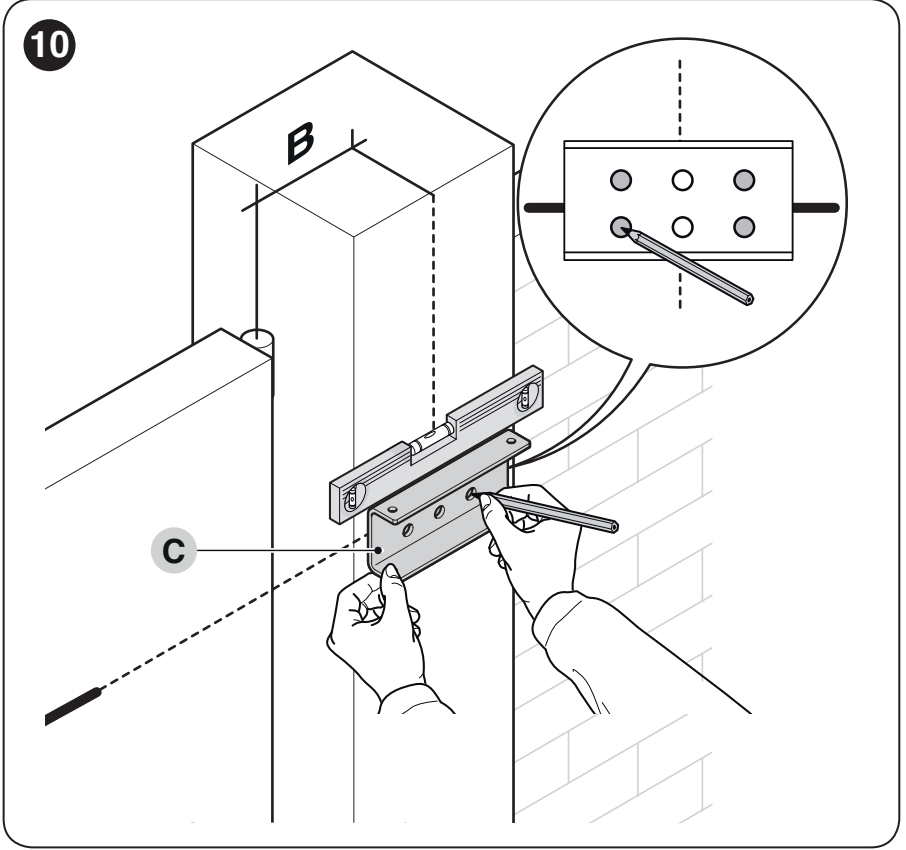
- Hold the motor bracket level and mark the four holes. Select anchor bolts, washers and wall plugs to suit the substrate; these anchoring components are not included.
- Attach the motor to the bracket with the two supplied M4.8 × 13 screws.
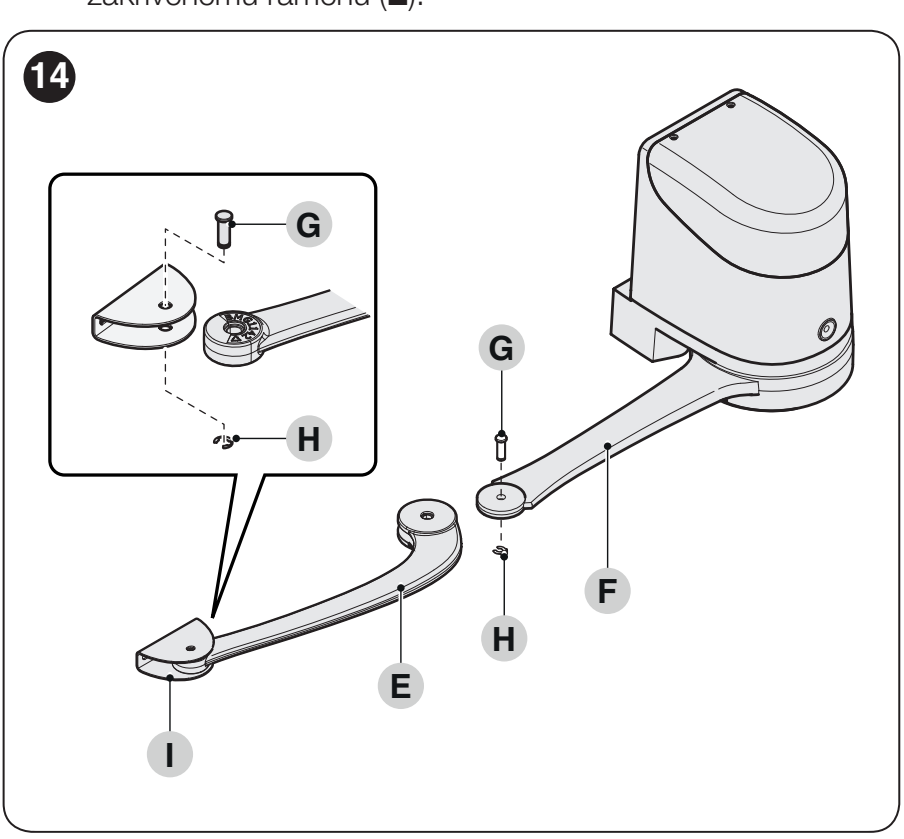
- Connect the curved arm to the straight arm using the pin and retaining ring. Connect the gate-leaf bracket in the same way.
- Unlock the motor and, with the gate closed, determine the position for the gate-leaf bracket. Extend the arms as shown in the original drawing and position the bracket as far from the drive as possible.
- Attach the bracket level to the rigid gate frame. Reconnect the joint using the pin and retaining ring; then check the full travel and set the stops.
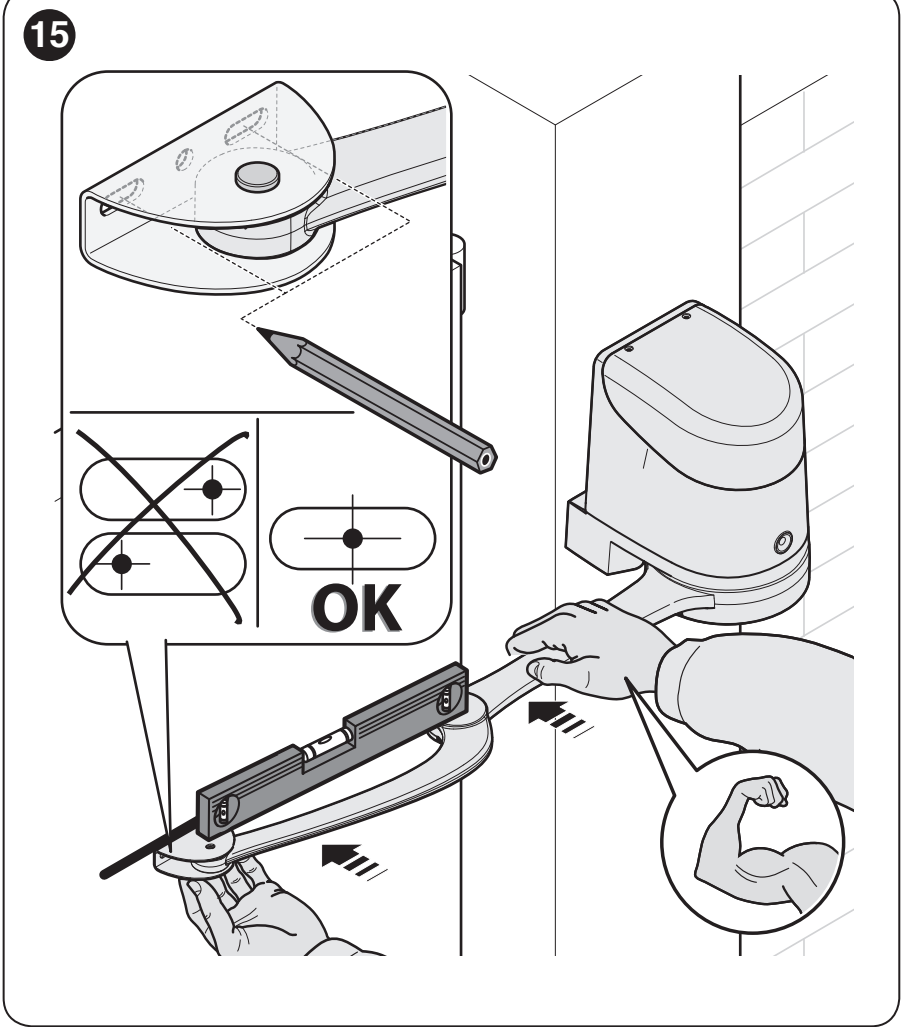
Adjusting the mechanical stops
The motor has mechanical stops with fine adjustment for opening and closing. The stops define the end positions for the subsequent learning procedure.
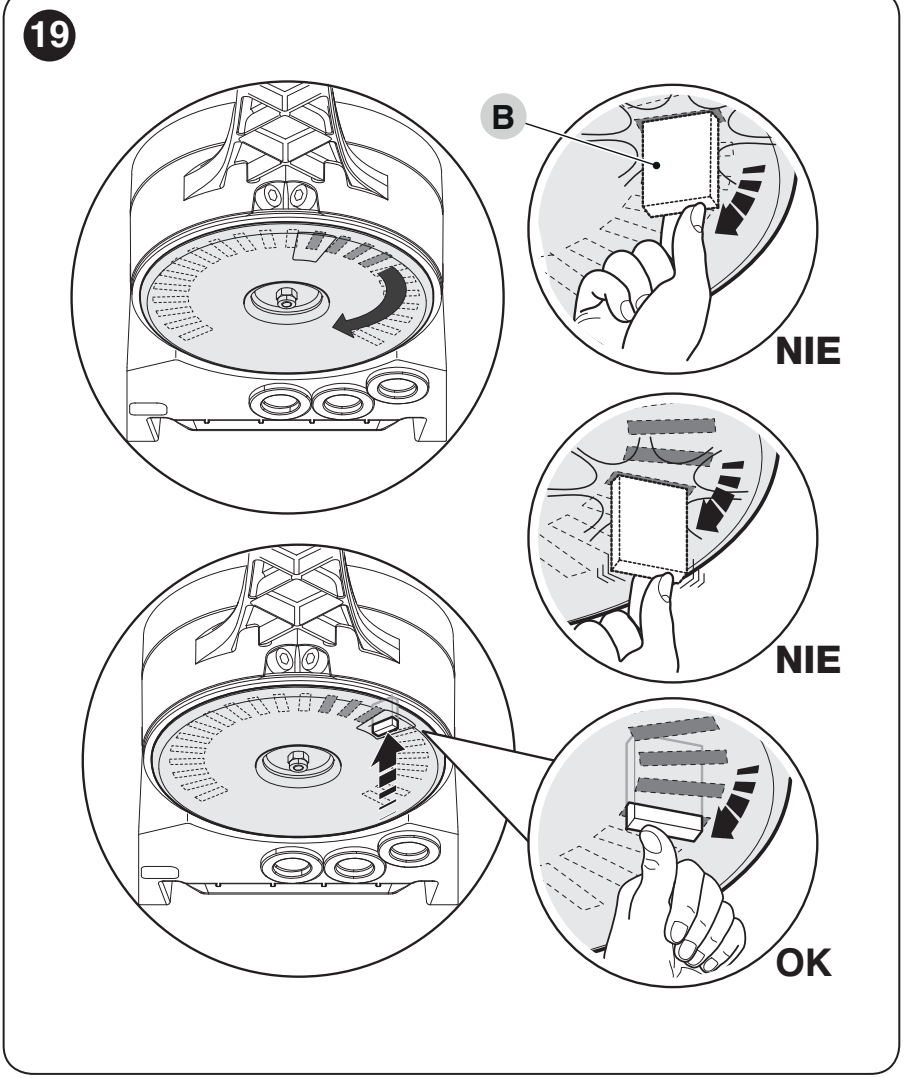
- Unlock the motor with the key and move the gate leaf manually to the desired open position.
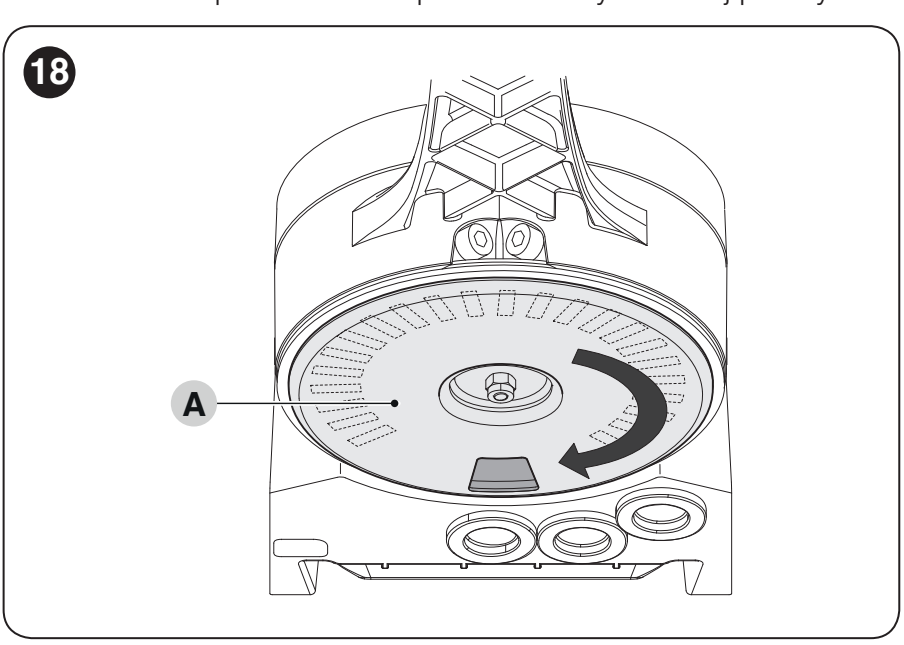
- Turn plastic disc A on the underside so that the cut-out is positioned under the arm as shown in the drawing.
- Insert stop B in the first available position, correctly oriented. Turn the disc to secure it and prevent it from falling out.
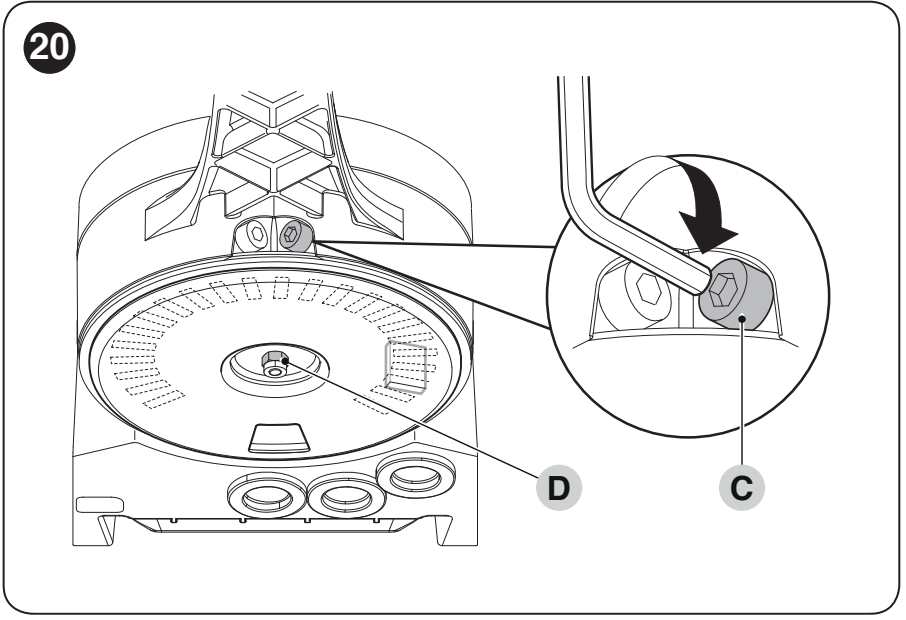
- Fine-adjust the position using screw C. If the closing stop is not on the ground, adjust the closing stop inside the motor in the same way.
- Tighten the disc's retaining nut D to prevent it from turning on its own. Manually check that both positions are reached, then lock the motor again.
| Position of disc A | Fine adjustment C and locking D |
|---|---|
 |  |
Preparing the wiring
Cables must be suitable for the installation location. Route cable entries so that water or condensation cannot run into the electronics. The mains supply, grounding and power isolation must be prepared by a qualified electrician.
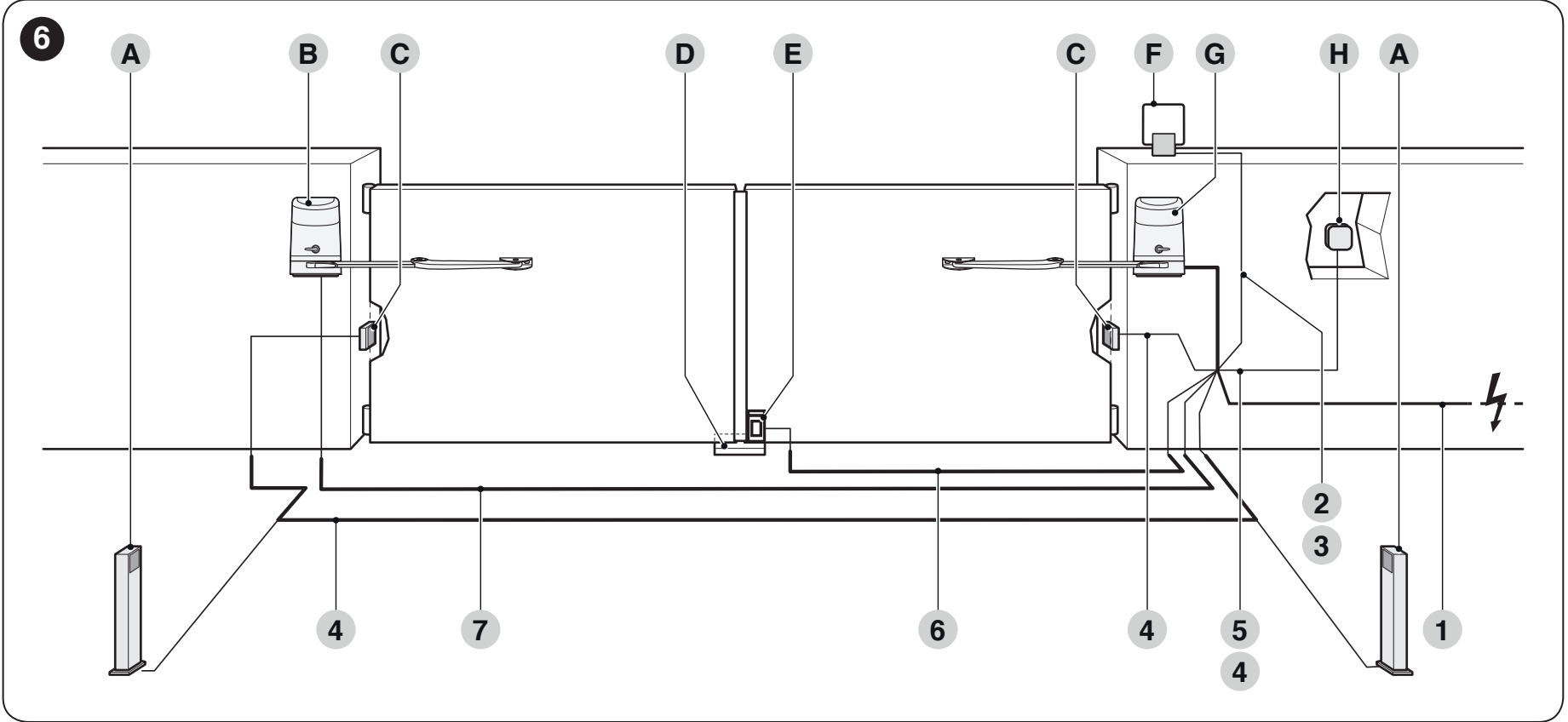
| Cable run | Cable and length |
|---|---|
| 1 – Supply to HO7124 | 3 × 1.5 mm², up to 30 m. For longer runs, the manufacturer specifies 3 × 2.5 mm² and grounding at the automation system; the supply must be assessed by an electrician. |
| 2 – Warning light | 2 × 1 mm², up to 20 m. |
| 3 – Antenna | RG58 coaxial cable, up to 20 m; recommended length under 5 m. |
| 4 – BlueBUS | 2 × 0.5 mm², up to 20 m; for 20–40 m, use 2 × 1 mm². |
| 5 – Key switch | Two 2 × 0.5 mm² cables or one 4 × 0.5 mm² cable, up to 50 m. |
| 6 – Electric lock | 2 × 1 mm², up to 6 m. |
| 7 – Interconnection between drives | 3 × 1.5 mm², up to 10 m; refer to the terminal block and original wiring diagram. |
HOPP control unit and wiring
HO7124 has a built-in POA3R10 and a mains supply of 230 V AC. The motors in the set operate on 24 V DC. HO7224 must not be connected directly to 230 V.
The following wiring and setup instructions apply to the POA3R10. This board is not interchangeable with the older POA3. When carrying out repairs, check the markings on the board actually installed and its connectors; a similar drive name is not sufficient.
Disconnect the mains and backup battery before opening the cover. All electrical work must be carried out by a qualified technician.
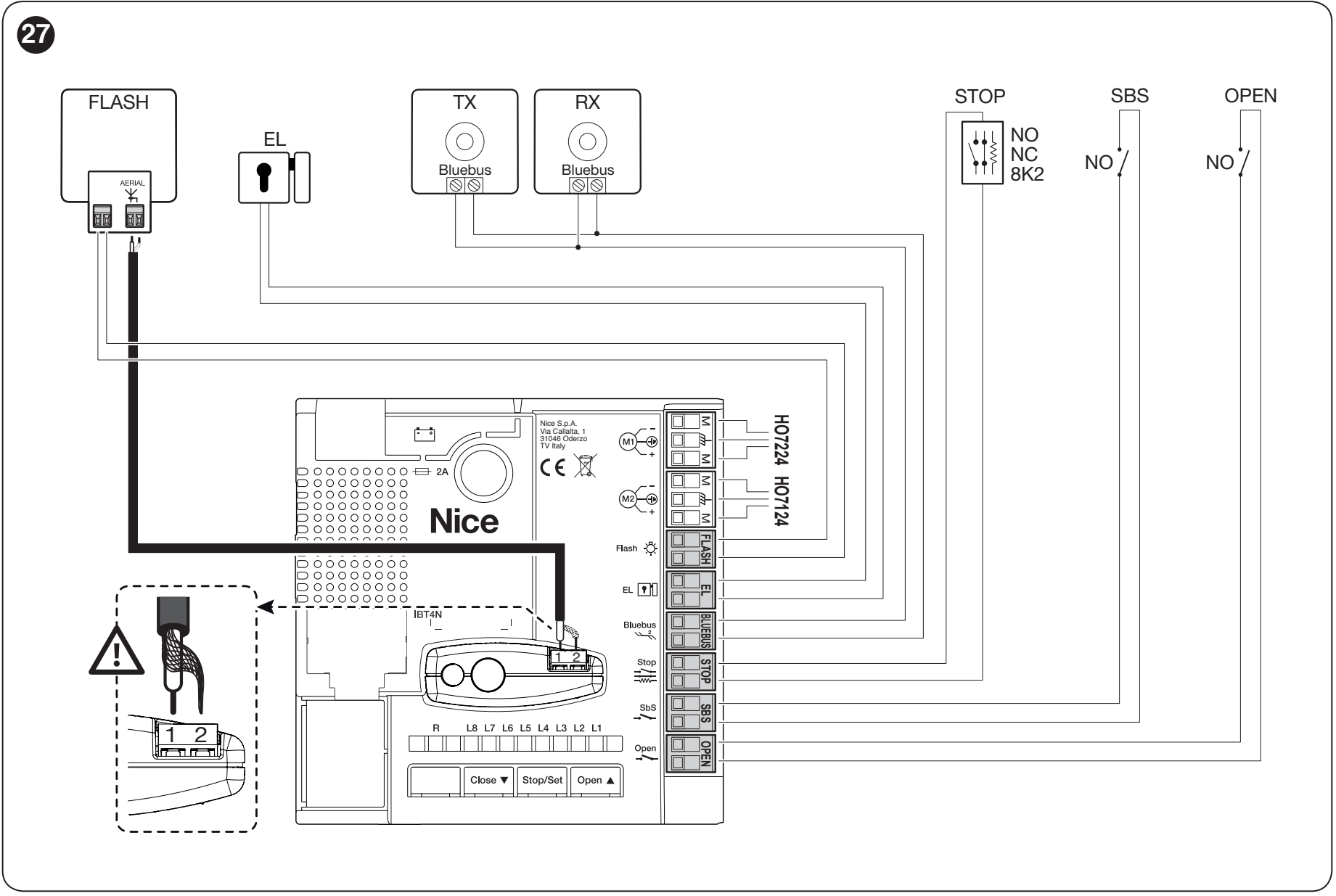
POA3R10 terminals
| Terminal | Use |
|---|---|
| M1 | Output for HO7224 without a control unit. |
| M2 | Output for HO7124 motor with control unit. If there is only one motor unit, HO7124 remains connected. |
| FLASH | ELDC warning light or 12 V DC bulb warning light, max. 21 W. |
| EL | 12 V AC electric lock, max. 15 VA. |
| BlueBUS | Power and communication for compatible devices via two non-polarised wires. Maximum 12 BlueBUS units; the load is calculated according to the types of devices connected. |
| STOP | Safety input for an NO, NC or 8.2 kΩ resistive device; the type is learned during device scanning. |
| SbS | Voltage-free NO contact for step-by-step operation. |
| OPEN | Voltage-free NO contact for partial opening; the function can be changed through programming. |
| Receiver antenna | Coaxial cable to the antenna connector on the installed OXIBD receiver; follow the markings on its terminals. |
Do not apply an external voltage to the SbS and OPEN control inputs. Changing the function of FLASH or EL also changes the electrical characteristics of the output: for other auxiliary functions, it is intended for a 24 V DC lamp or relay, max. 4 W. Do not use a load intended for the original function without checking its suitability.
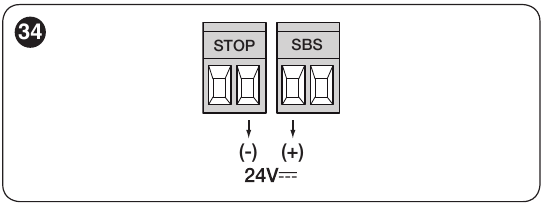
Auxiliary power supply on the POA3R10
For a compatible reader or key-switch illumination, use the right terminal of the STOP pair = − and the left terminal of the SbS pair = +, with the image below oriented so the labels are above the terminals: 24 V DC (−30% to +50%), max. 200 mA. This pair remains powered in Stand-by mode. Connect the device's command relay separately as a voltage-free NO contact; do not apply an external voltage to the command input. BlueBUS and voltage-free contacts have no +/− polarity. The EL output is 12 V AC/max. 15 VA, with no fixed +/− polarity; FLASH for the warning light is 12 V DC/max. 21 W. For a polarised warning light, check the markings on the board and the light.
BlueBUS photocells and STOP input
EPMB, EDSB and ETPB are connected in parallel to BlueBUS. The TX and RX of each photocell pair must have the same jumper settings; each additional pair must have a different address. Set the addresses of keypads and readers according to their respective instructions. After adding or removing a device, repeat the device scan and functional test.
| Photocell address | HOPP response according to position |
|---|---|
| FOTO / FOTO II | External photocells: when closing, they stop movement and the leaves reopen. |
| FOTO 1 / FOTO 1 II | Internal photocells: when closing, they stop and reverse movement. When opening, they stop the leaves; once the beam is clear, opening resumes. |
| FOTO 2 / FOTO 2 II | Internal photocells: when opening, they stop and reverse movement. |
| FOTO 3 | This configuration is not permitted for the HOPP control unit. |
EPMB address jumper table shows the TX/RX settings. The general photocell manual also includes configurations for other control units; for HOPP, use a supported address from the table above.
Standard relay photocells are not a substitute for BlueBUS photocells. For STOP, NO contacts are connected in parallel and NC contacts in series. Contact combinations or multiple resistive safety edges must be wired by a technician according to the relevant device diagrams; do not disable the safety input by bridging it.
Receiver and remote controls
With the power disconnected, plug the receiver into the socket on the HO7124. Verified HOPP kits use OXIBD with ON2E. Pairing and deleting remote controls must be carried out according to the receiver actually installed. OXIBD instructions and settings are available on its own product page; resetting the POA3R10 does not erase the radio memory.
PS124 backup power supply
For the POA3R10, PS124 is installed in the HO7124. Connect it only after installation and programming are complete, as it can operate the gate even when mains power is off. It must be disconnected while working on the wiring. The battery in the HO7124 also provides backup power to an HO7224 connected to this control unit.
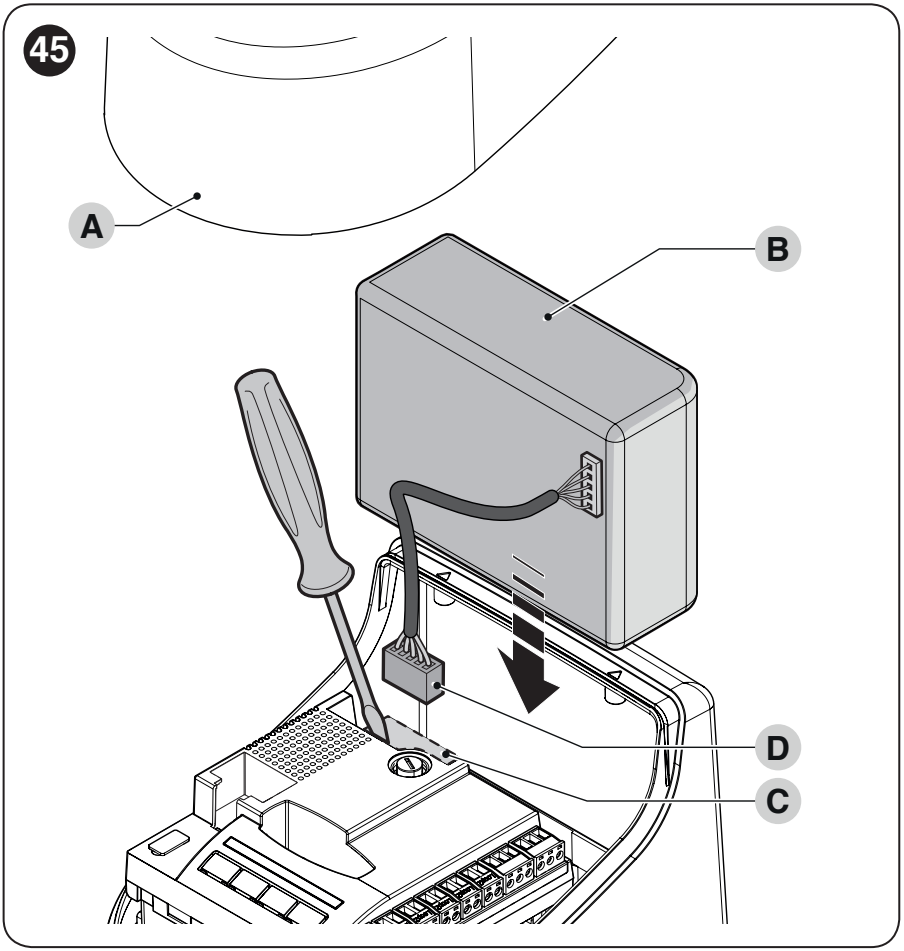
The PS124 is not included in the basic kits listed above. After charging, test a complete cycle both on mains power and on battery power only. The speed and number of operations depend on the battery condition and gate load. Do not assume that a battery connector from a different generation is interchangeable.
First start-up and gate testing
The arms of all installed operators must be fitted, the stops firmly set, and the motors secured. Set the leaves approximately halfway along their travel so they have room to move in both directions during testing. For a two-leaf gate, check the sequence according to the overlap; the leaves must not collide when closing.
The HO7224 is configured from the POA3R10 in the HO7124. It has no programming buttons of its own. The learning process is carried out for the complete system: first the devices, then the stop positions, followed by the safety test. If the HO7224 is replaced or the stops are changed, the settings for the entire gate must be checked again.
1. Scanning devices in the HO7124
Once the accessories are connected, the HO7124 scans the BlueBUS devices and the STOP input. Repeat the scan after adding or removing devices. Scanning the accessories alone does not determine the leaf end positions.
2. Learning the positions of the complete gate
Once the mechanical stops are set, start automatic movement learning for both motors from the HO7124. The first movement should be closing; stop the process if the direction is reversed or the leaf sequence is incorrect. After successful learning, check the deceleration, leaf overlap and safety functions.
For the button and LED procedures on the HO7124 control unit, see the preserved HOPP installation PDF.
What to check before normal use
- Several complete opening and closing cycles, with no points of excessive friction, arm collisions or leaf contact.
- Correct deceleration, leaf sequence and reliable end positions.
- The operation of each photocell pair and the STOP device in the relevant directions of movement.
- Manual release, re-engagement and any backup power supply.
- Impact force measurement and protection of all crushing, shearing and trapping points.
Installation and commissioning must be completed by a qualified technician. Obstacle detection by the operator does not replace the required safety devices or force measurement.
Manual release during a power failure
Release the operator only when the leaf is stationary. Insert the key into the release mechanism and turn it 180° in the direction marked on the mechanism. The leaf can then be opened or closed manually without forcing it. Before restoring automatic operation, re-engage the operator with the key and remove the key; on a double-leaf gate, check both motors.
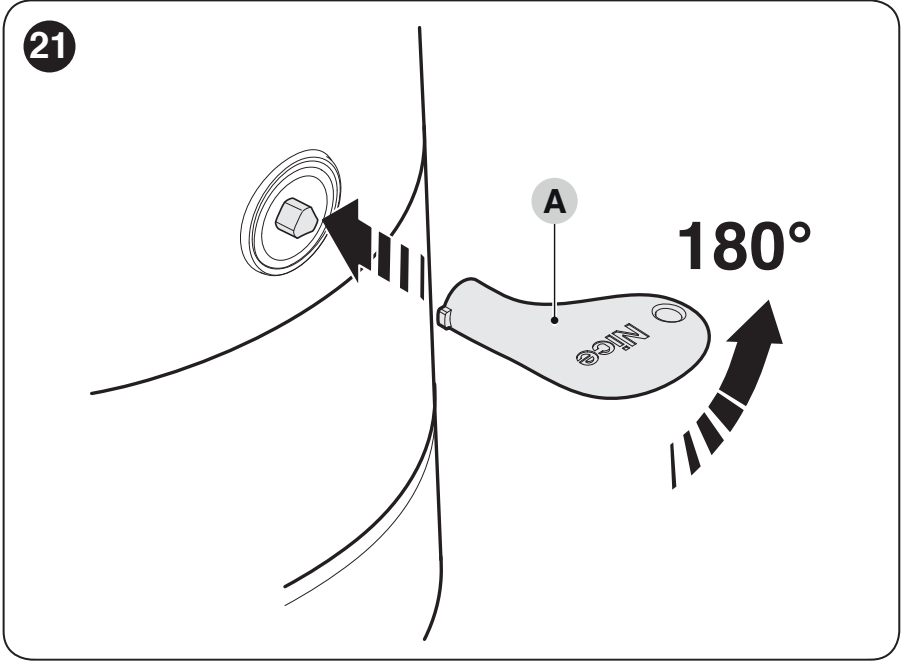
External release
If there is no other access to the property, you can add a KIO with a cable KA1. For a double-leaf gate, connect it to the motor of the leaf that opens first from the closed position, as specified by the manufacturer. The cable is fitted to the release mechanism; it does not change the gate's opening direction.
Maintenance and safe use
Schedule servicing no later than 6 months or 20,000 operations, whichever comes first. Disconnect both the mains supply and the battery before carrying out any work. Check the anchor points, corrosion, pins and retaining rings, the condition of the arms, hinges, cables, stops and release mechanism. After servicing, repeat the functional and safety tests.
Do not operate the leaf while anyone is working in its path. Children must not use the gate as a toy, and remote controls must be kept out of their reach. If a safety device malfunctions, use the manual release and arrange for repairs; do not disable the safety protection.
NICE HO7224 technical specifications
| Parameter | Value |
|---|---|
| Type | Articulated electromechanical operator, 24 V DC motor. |
| Control unit | Not built in; controlled by the HO7124. |
| Product power supply | 24 V DC ±25%, supplied by the control unit. |
| Maximum torque | 250 Nm. |
| Rated torque | 100 Nm. |
| Speed at rated torque | 0.13 rad/s (1.2 rpm). |
| No-load speed | 0.17 rad/s (1.6 rpm); adjustable via the control unit. |
| Cycling at rated torque | Up to 35 cycles/h; at maximum temperature, up to 25 cycles/h. |
| Continuous operation | Up to 10 minutes; at maximum temperature, up to 8 minutes. |
| Power consumption at rated torque | 50 W. |
| Maximum power consumption | 100 W. |
| Rated current | 2 A. |
| Maximum current | 4 A, for up to 1 s. |
| Operating temperature | −20 to +55 °C; efficiency decreases at low temperatures. |
| Ingress protection rating | IP54 with the cover intact and properly closed. |
| Body dimensions | 180 × 252 × 290 mm (width × depth × height). |
| Operator weight | 6.5 kg. |
Parameters at rated load apply to ambient conditions of approximately 20 °C. The number of cycles depends on the gate leaf and resistance to movement; the following also apply: length and weight limits.
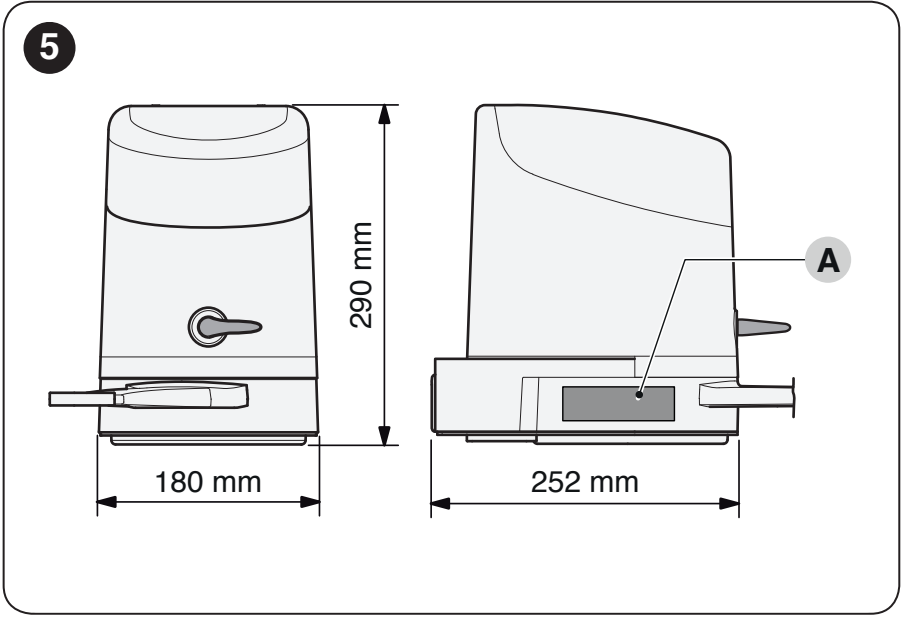
360°:
How can I order this item?
Choose the option that suits you:
- order online: use the buy button to add the goods to your shopping cart (you will find the buy button here in the product variants table).
- order by email: place your order at [email protected]






