Fast and quiet NICE Spykit 650 HS BD drive
| Product availability: | In stock | We normally dispatch goods within 24 hours. |
|---|
in stock
€477.85 including VAT
| Weight |
|---|
| 7,00 kg |
Description of Fast and quiet NICE Spykit 650 HS BD drive
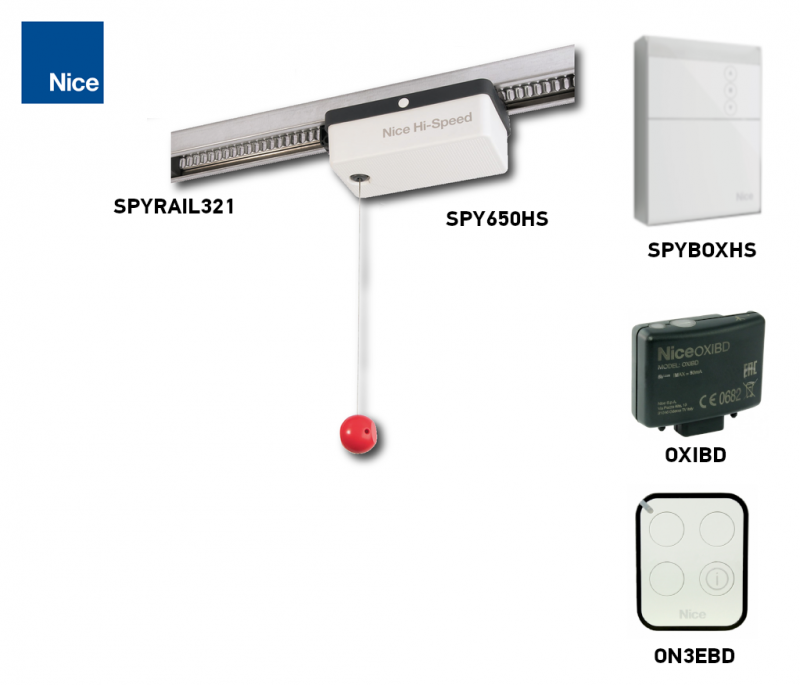
NICE SPYKIT 650 HS BD is a high-speed kit with a motor SPY650HS, 24 V DC, a separate SPYBOX BHS, OXIBD receiver and one ON3EBD. The complete system is powered from the mains 230 V AC. The motor is non-backdrivable; pull the cord to release it for manual operation.
The kit includes 1× one-piece SPYRAIL321 rail, 3.2 m long, with mounting accessories. The rail guides and powers the moving motor.
Control unit and compatible accessories
Photo cells, a warning light and a safety edge are not automatically included. Obstacle detection does not replace a safety assessment of the complete gate or force measurements during commissioning.
| What | Why | Type |
|---|---|---|
| Control unit | A separate wall-mounted unit that controls the motor and safety devices. |
|
| Remote control | Two-way control and confirmation that the command was received / gate status. |
|
| Rail | A guide track and power supply for the moving motor. |
|
| Photo cells | Obstacle detection in the protected area. | |
| Additional photo cells | Adjustable or specialist solutions, depending on the gate design. | |
| Signalling | Warning during operation and optional lighting. | |
| Up-and-over door | Adaptation of the drive arm's travel path. |
|
| Service configuration | Advanced configuration and diagnostics via BusT4. | |
| Backup power | Operation during a power outage. |
|
Equipment included in the SPYKIT650HSBD kit
Compare the drive type, speed and control, as well as the limits of the specific door. Greater force or speed alone does not guarantee suitability. Safety accessories and backup power are selected separately.
| Fast SPY kit |
|---|
NICE SPYKIT 650 HS BD 650 N; speed up to 0.24 m/s. SPYBOX BHS, OXIBD and ON3EBD; 1× SPYRAIL321, one-piece 3.2 m rail. |
Which garage door is the SPY650HS suitable for?
The kit is designed for sectional doors up to 10.5 m² or up-and-over doors up to 11.5 m². The approximate dimensions below are width × height; they depend on the type and length of the rail. Also check the door balance, resistance and installation clearance. Area alone is not enough.
| Door type | 3.2 m rail | 4 m rail |
|---|---|---|
| Sectional | 4.2 × 2.5 m | 3.2 × 3.3 m |
| Non-protruding up-and-over door with SPA5 | 4.0 × 2.3 m | 3.0 × 3.1 m |
| Protruding up-and-over door with SPA5 / spring-balanced door without SPA5 | 4.0 × 2.8 m | 3.3 × 3.5 m |
The motor has a maximum force of 650 N and a rated force of 200 N. Newtons do not indicate the door's weight in kilograms. For residential use, the door must move easily by hand, with a resistance of no more than 150 N; do not compensate for faulty springs or binding by increasing the motor force.
What does opening in approximately 8.5 seconds mean?
The figure approximately 8.5 seconds is based on a typical door 2 m and does not include acceleration or deceleration. This is not a guaranteed time for the full movement of every door. The maximum speed is 0.24 m/s; the actual time depends on the settings, travel and load.
Operating duty
| Limit | Value |
|---|---|
| Cycles per hour | Maximum 30 |
| Cycles per day | Maximum 300 |
| Consecutive cycles | Maximum 12 |
One cycle is a complete opening and closing operation. These are upper limits for a suitable door, not a requirement for the operator to handle the same number of cycles at any resistance or temperature. A longer rail does not increase the permitted door area. If you need help checking your selection, send us the door type, dimensions and expected usage.
Installing the SPYRAIL rail, motor and SPYBOX BHS
Disconnect the mains and backup power before installation. Check the springs, door balance and manual operation. The SPY650HS moves directly along the toothed rail as a carriage; it does not use a belt or chain. The motor receives 24 V DC through the rail and its insulated inner profile.
The rail must be electrically isolated from the door and nearby conductive structures. Use the supplied insulating components. Contact between the rail and metal door, or damaged insulation, can cause a short circuit; the same installation method as for SR32B is not suitable.
- Disengage the motor using the cord and check that the toothed wheel moves freely. For a two-piece rail, join both profiles, secure the connector and insert the strip into the insulating profile without deforming it.
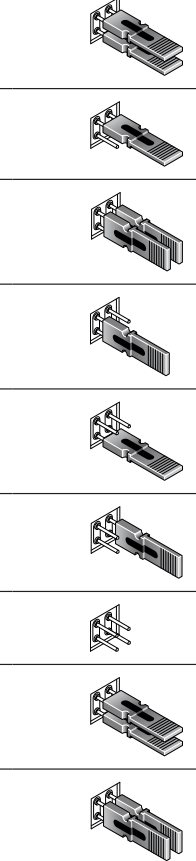
- Insert the motor in the correct orientation. When pulling out the two transport strips, both contact elements must be secured as shown in the installation diagram. Do not force the motor over incorrectly extended contacts.
- Fit both adjustable end stops and the power-feed end piece. Its position must match the MOT wiring and the direction of movement.
- Mount the rail in line with the door, align it with the ceiling and use secure fixings with the supplied insulation. Trim the ceiling brackets flush with the rail so they do not obstruct the carriage.
- Connect the arm to a suitably reinforced part of the door. Set the closing and opening stops and tighten their screws securely.
- Mount the SPYBOX BHS on a wall in a location suitable for safe operation and servicing. The release cord should be accessible at a height below 1.8 m. Position controls away from moving parts, generally at least 1.5 m above the floor.
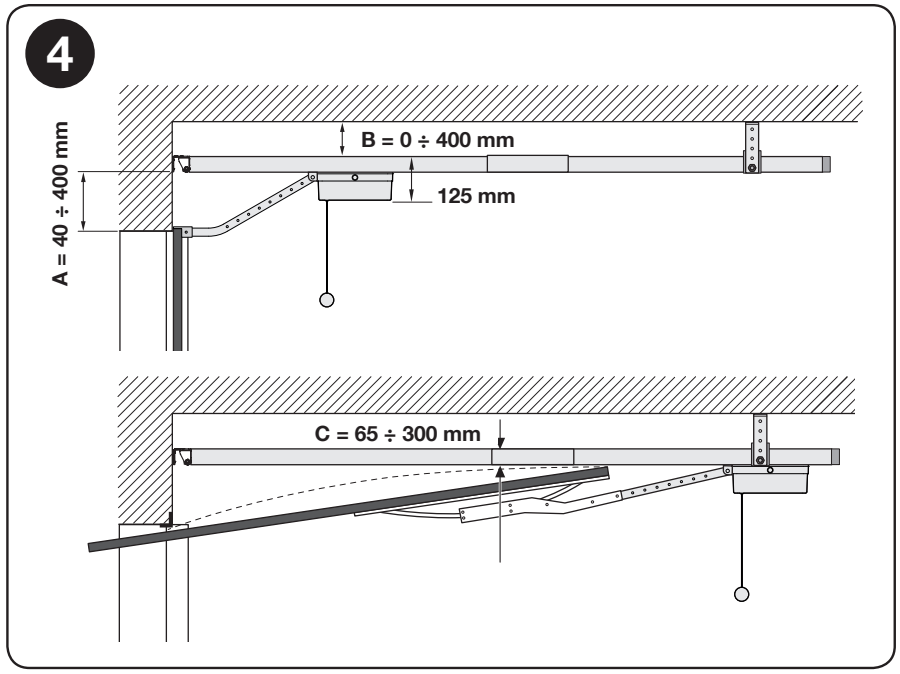
In the orientation shown, maintain
- A = 40–400 mm
- B = 0–400 mm
- C = 65–300 mm.
C is the clearance between the rail and the door's highest point during movement.
Wiring
| Connection | Cross-section / maximum length |
|---|---|
| MOT – rail power supply | 2 × 1 mm²; 5 m; supplied cable. |
| BlueBUS | 2 × 0.75 mm²; 20 m; connect devices in parallel. |
| INP1 / INP2 / STOP | 2 × 0.5 mm²; 20 m. |
| FLASH | 2 × 0.5 mm²; 20 m. |
| Antenna | RG58; 10 m; separate coaxial cable. |
| Mains | 3 × 1 mm²; 230 V AC 50/60 Hz; protective earth conductor and suitable disconnection. |
The mains connection must be made by an electrician. Keep low-voltage wiring separate from the mains and protect it against pulling, door movement and crushing. Do not connect the 230 V supply to accessory inputs.
SPYBOX BHS: terminals and polarity
These terminals are for the SPYBOX BHS with BlueBUS. The basic SPYBOX with relay PHOTO uses different wiring. Before working, check the marking on the unit actually installed.
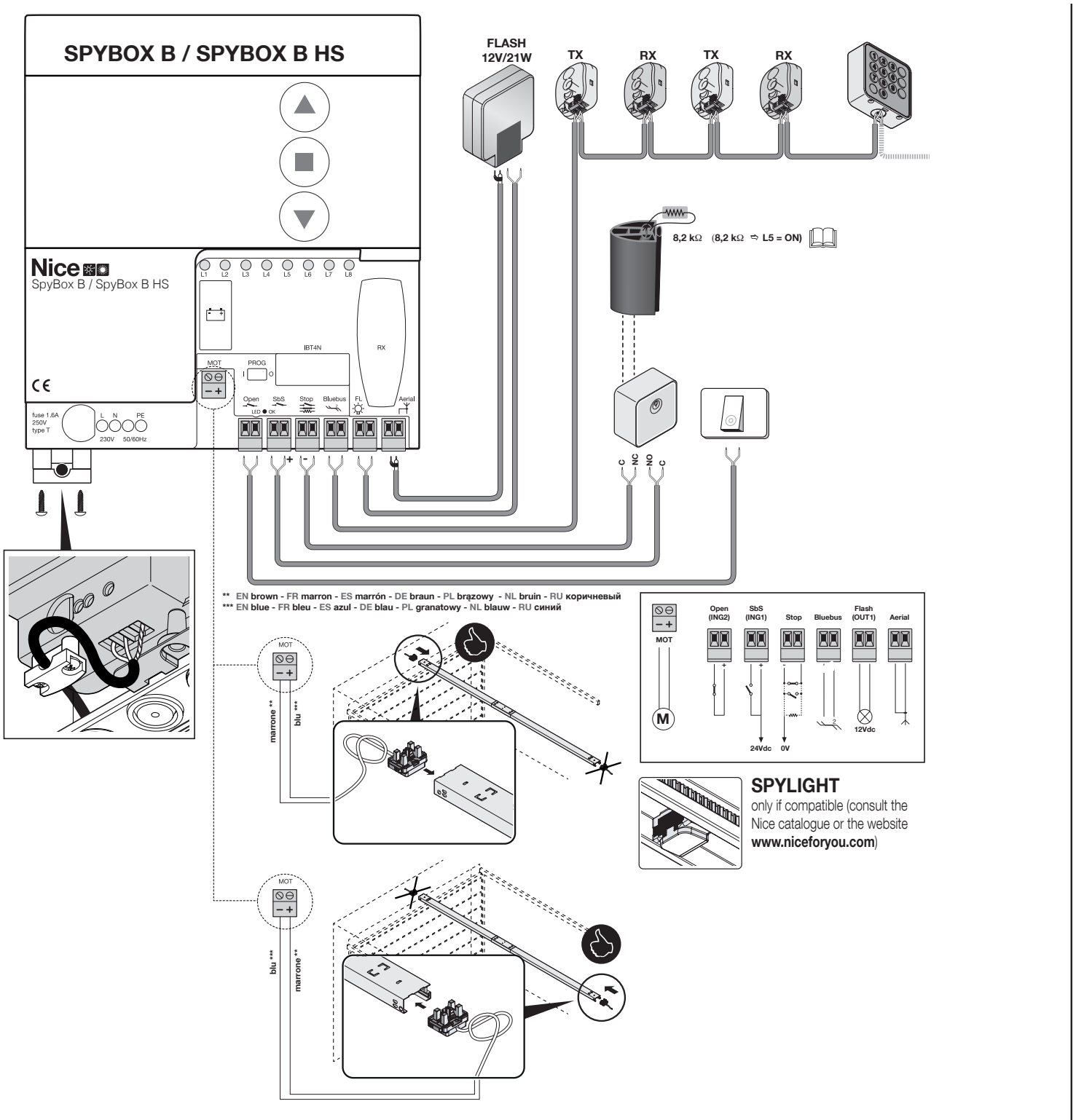
| Terminals | Function / connection |
|---|---|
| MOT − / + | 24 V DC for the rail power-feed unit. Observe the marked − / + and orient the power-feed unit as shown. Change the direction with the power disconnected. |
| BlueBUS | Two-wire communication and power supply for compatible devices; no polarity +/−. |
| Open / INP2 | Normally, a volt-free NO contact between Open and its common terminal +. The function is changed by parameter INP2. |
| SbS / INP1 | Volt-free NO contact between SbS and its common terminal +; step-by-step command. |
| STOP | Safety input to GND; NO, NC or 8.2 kΩ; the type is learned during device recognition. The contact itself has no polarity. |
| FLASH / OUT1 | Factory setting for the warning light 12 V DC / 21 W; programmable to 24 V DC / 25 W. Select the mode according to the actual load. |
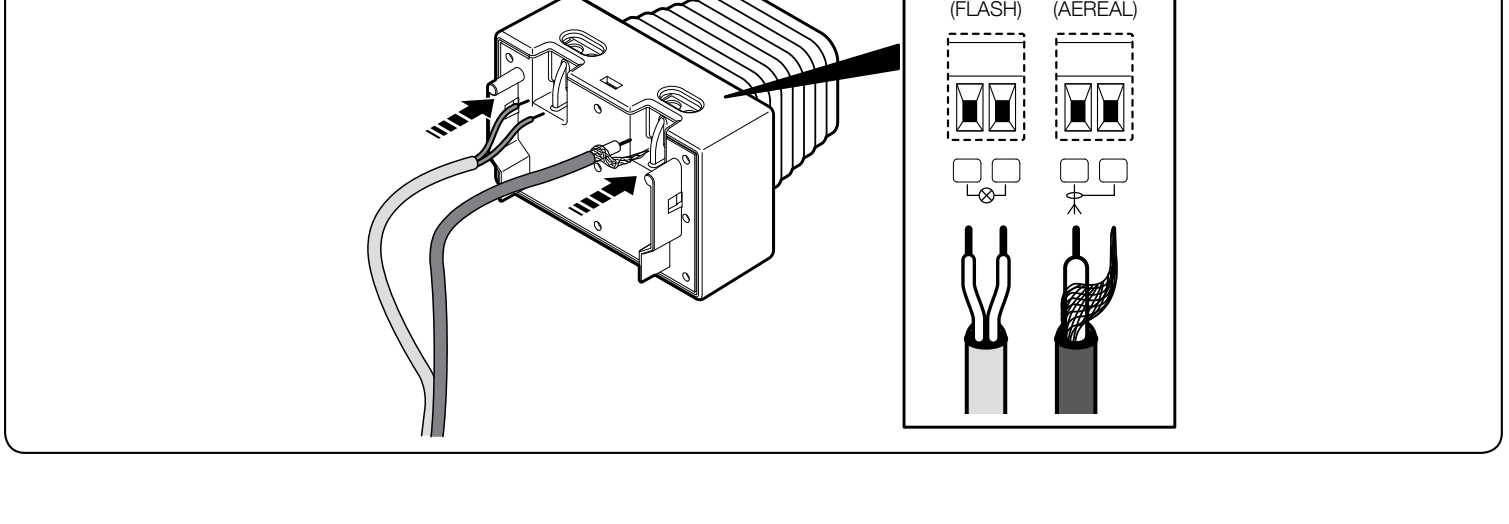
| AERIAL | Dedicated coaxial antenna input; connect the centre conductor and shield as shown in the detail; not a power supply. |
| L / N / PE | 230 V AC mains and protective earth; keep separate from the motor and accessories. |
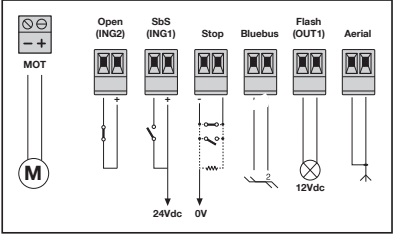
Power supply for external control: positive and negative
With the same orientation as in the illustration, the right terminal of the STOP pair = GND, negative (−) and the left terminal of the SbS pair = power supply, positive (+). The “24 Vdc” marking at the terminal does not replace checking the connected device’s permitted operating range: the auxiliary supply is 30 V DC, with a tolerance of −20% / +5%, i.e. approximately 24–31.5 V DC, and a maximum of 100 mA total. Use only a device suitable for this entire range.
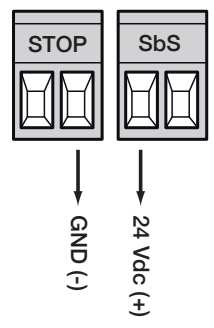
Button or relay of the control module
The command is generated by a volt-free NO contact between INP1 (SbS) and the common terminal + of this pair. If the module requires power, connect it separately to the verified positive and negative. Do not apply the module’s output voltage to the command input.
STOP safety edge
A change in the learned STOP state immediately stops movement and briefly reverses direction. NO contacts can be connected in parallel; NC contacts must be connected in series. For a monitored resistive safety edge, 8.2 kΩ activate the STOP 8K2 test and then learn the devices. Wire combinations of different types according to their diagrams; a standard switch is not equivalent to a monitored safety edge.
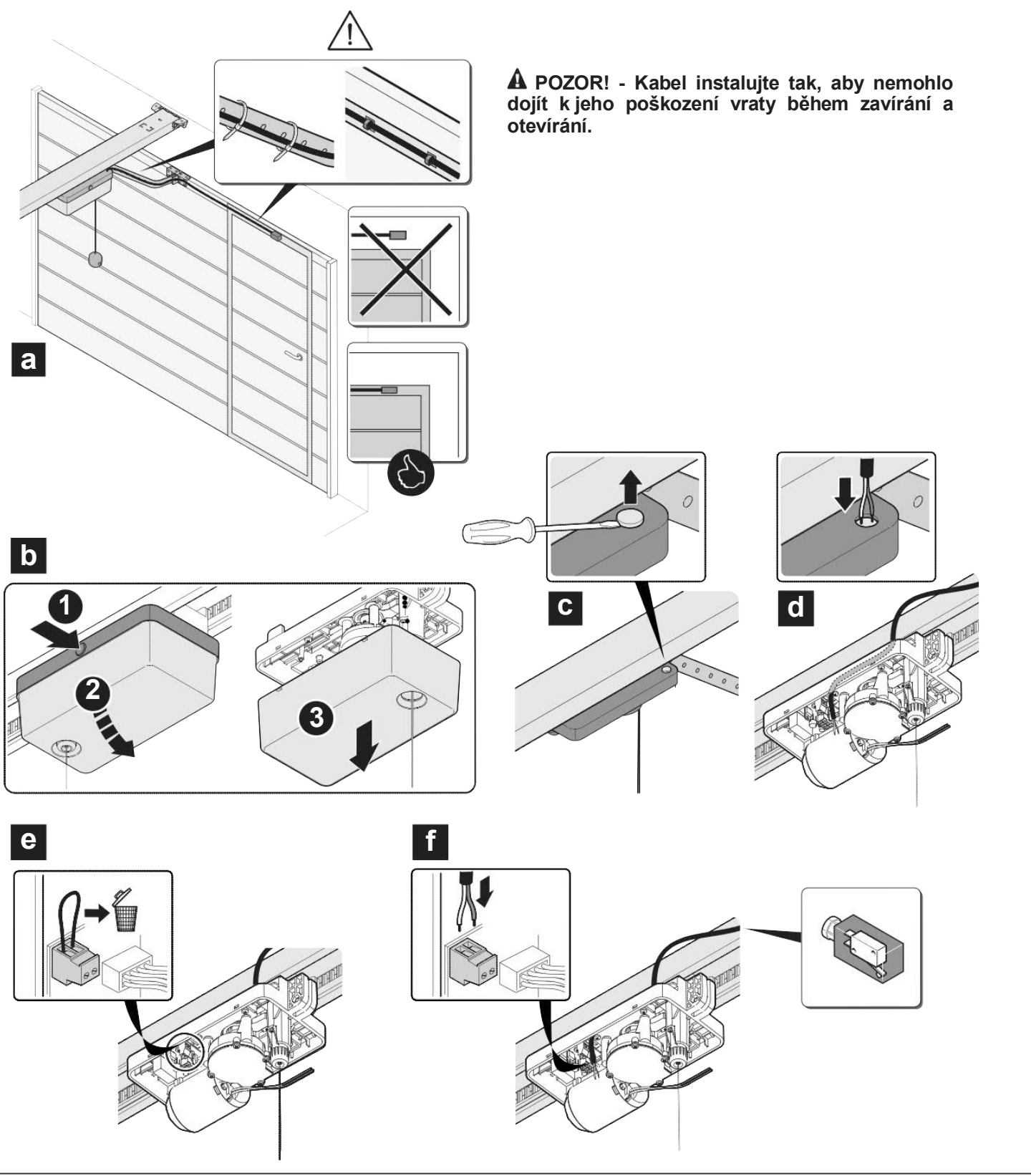
Gate with built-in pedestrian door
The moving motor’s control board has a separate pair of terminals 1–2 for the safety microswitch NC. The motor must be disabled when the door is open. With the power disconnected, remove the jumper and connect a contact rated for at least 10 A; maximum cable length 3 m, minimum cross-sectional area 1 mm². Secure it to prevent it from being pinched. The contact has no polarity and is not a power output.
BlueBUS photocells
EPSB, EPMB or EPLB connect both TX and RX in parallel to the BlueBUS pair. This is a polarity-free connection. Relay-type NC photocells must not be connected to this bus as a substitute for a two-wire device.
- With the power off, set matching jumpers on the TX and RX of each pair. Each additional pair must have a different address.
- Align the transmitter and receiver, then complete the wiring. Select the function according to the area being protected.
- After adding, removing or changing an address, repeat device recognition and test each pair.
| Address | Function | TX / RX jumpers |
|---|---|---|
| PHOTO | When closing, reverses to open; h = 50 cm. | 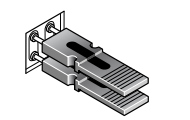 |
| PHOTO II | When closing, reverses to open; h = 100 cm. | 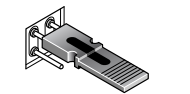 |
| PHOTO 1 | When closing, briefly stops and reverses; h = 50 cm. | 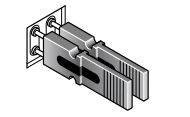 |
| PHOTO 1 II | When closing, briefly stops and reverses; h = 100 cm. | 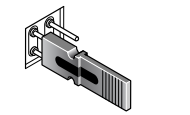 |
| PHOTO 2 | Stops movement while opening. | 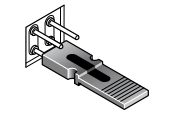 |
| PHOTO 2 II | Stops movement while opening. | 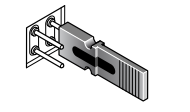 |
| PHOTO 3 | While opening or closing, briefly stops and reverses to open. | 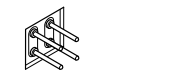 |
| FA1 | Command to open; requires compatible photocells and adjustment of jumper A. | 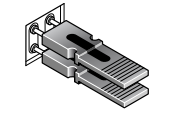 |
| FA2 | Second command to open; requires compatible photocells and adjustment of jumper A. | 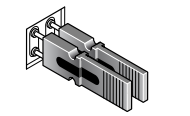 |
Enlarge all jumpers. For FA1/FA2, do not modify the device without checking its own instructions; these provide a command function, not standard protection during closing.
ELDC or WLT beacon and antenna
For ELDC a basic FLASH is suitable 12 V DC; the permitted power for this mode is 21 W. ELDC has a FLASH power input for 12–36 V DC. For WLT select the appropriate 24 V mode and check its setting as well. The voltage is changed by level II/L4; do not change it without checking the connected load.
On the beacon, distinguish FLASH from AERIAL. The illustrated ELDC detail does not specify the +/− order for FLASH; do not take it from the auxiliary STOP/SbS connector. Connect the antenna with a separate coaxial cable, with the centre conductor and shield wired according to the diagram.
Initial start-up and SPYBOX BHS programming
First set and secure the mechanical stops, connect the safety devices, and secure the motor with the gate approximately halfway along its travel. The entire gate area must be clear during programming. This unit uses the PROG switch, OPEN, STOP/SET and CLOSE buttons, and LEDs L1–L8.
1. BlueBUS and STOP device recognition
- Move PROG left to I, i.e. to programming mode. Perform recognition even if no accessories have been added.
- Press and hold OPEN + STOP/SET for approximately 3 s; release when L1 + L2 flash rapidly.
- Wait for recognition to finish. Relays may switch during operation. Then move PROG right to 0.
2. Gate position programming
- Check both stops and make sure the motor is secured. To start the procedure, move PROG left to I.
- Press and hold STOP/SET + CLOSE for approximately 3 s; release when L3 + L4 flash rapidly.
- The drive must perform closing → opening → closing. Wait for the entire sequence to finish.
- Move PROG right to 0, then test normal operation.
If the first movement is towards opening, stop the programming procedure immediately. Disconnect the mains power and backup supply, check the orientation of the power supply unit, and swap the MOT motor connections according to the installation diagram. Start the programming procedure again. Do not swap the BlueBUS or STOP wires to correct the motor direction.
Test before normal operation
- Repeat the opening and closing cycles; check the stops, deceleration, brackets and smooth operation.
- Test STOP, each photocell at TX, RX and midway through the beam, and the pedestrian door safety contact, if fitted.
- Check manual release, re-engagement and that the remote control operates the correct receiver.
- A technician must measure impact forces and set them to the minimum required for safe movement. Do not compensate for binding by increasing the force.
- Give the user the instructions and maintenance schedule. Only pass through when the gate is fully open and stationary.
SPYBOX BHS programming
PROG left = I, programming mode. PROG right = 0, normal operation. In programming mode, the OPEN / CLOSE buttons select options; movement commands are disabled. If the gate does not respond after adjustments, first check the position of PROG.
Level I – ON / OFF functions
- Move PROG to the left. Press and hold STOP/SET 3 s, until L1 starts flashing, then release.
- Use OPEN / CLOSE to select the function LED. Press STOP/SET briefly to change the state: lit = ON, unlit = OFF.
- Do not exceed 10 s. Wait 10 s without pressing any buttons, or move PROG to the right to exit.
| LED – function | Meaning / status |
|---|---|
| L1 – Automatic closing | ON: after fully opening, the gate closes after the pause set in II/L1. OFF: waits for a command. |
| L2 – Close after photocell activation | ON: initiates closing once passage through the photocell has been completed. Requires photocells to be installed and tested. |
| L3 – Always close | ON: initiates closing after power is restored, with a 3 s pre-flashing warning. |
| L4 – Standby | ON: after 1 minute of inactivity, reduces power to the output and BlueBUS transmitters. Check dependent accessories. |
| L5 – 8K2 STOP test | ON: tests the 8.2 kΩ resistive safety edge before a movement. After activation, the devices must be programmed; not suitable for an NC/NO contact alone. |
| L6 – OPEN / CLOSE lock | ON: disables the movement buttons on the cover when PROG is in the normal 0 position. |
| L7 – Disable internal radio programming | ON: prevents new remote controls from being stored in the built-in radio receiver. Does not affect the memory of a separate OXIBD. |
| L8 – Disable internal radio receiver | ON: the internal receiver does not respond to stored remote controls. OXIBD is configured separately. |
In the normal PROG 0 position, L1–L8 are off even when the functions are active. Therefore, the LEDs being off during normal operation does not mean that every function is disabled.
Level II – parameter values
- Move PROG to the left and press and hold STOP/SET 3 s until L1 flashes; release.
- Use OPEN / CLOSE to select the input LED for the required parameter.
- Press and hold STOP/SET. After 3 s the value LED will light up. Continue holding STOP/SET and use OPEN / CLOSE to select the new value.
- Release STOP/SET. Wait 10 s without pressing any buttons, or turn PROG back to the right.
Values shown in bold are factory defaults; the actual board setting takes precedence. For L8, the radio command is triggered; it is not a permanent setting. Speed and force percentages have different meanings.
| Input LED – name and description | Setting LED – value |
|---|---|
| L1 – Pause Used for automatic closing when I/L1 is ON. | L1 – 10 s L2 – 20 s L3 – 40 s L4 – 60 s L5 – 80 s L6 – 120 s L7 – 160 s L8 – 200 s |
| L2 – Operating mode Step-by-step command sequence. L7/L8 are not used. | L1 – open – stop – close – stop L2 – open – stop – close – stop L3 – open – close – open – close L4 – shared input L5 – hold-to-run operation L6 – industrial mode L7 – not used L8 – not used |
| L3 – Motor speed Percentages of the maximum. V1 = 30%, V2 = 50%, V3 = 75%, V4 = 100%. | L1 – 30% L2 – 50% L3 – 75% L4 – 100% L5 – opening 75%, closing 30% L6 – opening 75%, closing 50% L7 – opening 100%, closing 50% L8 – opening 100%, closing 75% |
| L4 – FLASH / OUT1 The mode must match the voltage and the load’s intended use. | L1 – gate open indicator L2 – active when the gate is closed L3 – active when the gate is open L4 – 12 V DC / 21 W flashing light L5 – 24 V DC / 25 W flashing light L6 – electric lock L7 – magnetic latch L8 – radio channel 2 |
| L5 – Motor force Opening / closing; adjustment in %, not impact force in N. | L1 – 25 / 25% L2 – 50 / 50% L3 – 75 / 75% L4 – 100 / 100% L5 – 75 / 25% L6 – 75 / 50% L7 – 100 / 50% L8 – 100 / 75% |
| L6 – Obstacle sensitivity Opening / closing. A higher number means greater sensitivity and a lower permitted force. | L1 – off L2 – 60 / 60% L3 – 60 / 70% L4 – 60 / 80% L5 – 60 / 90% L6 – 70 / 70% L7 – 70 / 80% L8 – 70 / 90% |
| L7 – INP2 Contact type and function of the Open input; shared + terminal. | L1 – SbS, NO L2 – open, NO L3 – close, NO L4 – partial opening 1, NO L5 – STOP, NC L6 – PHOTO during closing, NC L7 – PHOTO1 during both opening and closing, NC L8 – PHOTO2 during opening, NC |
| L8 – Built-in radio command Applies to the built-in FLOR receiver, not the supplied OXIBD. | L1 – store the entire transmitter in Mode 1 L2 – Mode 2 – SbS L3 – Mode 2 – partial opening L4 – Mode 2 – open L5 – Mode 2 – close L6 – Mode 2 – STOP L7 – Mode 2 – lighting L8 – delete one code |
After changing the force, sensitivity or speed, repeat the safety test and force measurement. When using a different output mode, disconnect any load that is no longer compatible with its function.
Pair the ON3EBD with the supplied OXIBD
This kit includes plug-in two-way receiver OXIBD and three-channel remote control ON3EBD. Store the ON3EBD in two-way mode using button A on the OXIBD, not through the board’s L8 menu. SPYBOX BHS also has its own one-way FLOR receiver. When using the OXIBD, the built-in radio can be switched off via I/L8 ON.
OXIBD: Mode 1 – entire remote control
- On the OXIBD, press and hold button A until the green LED lights up B and release.
- Within 10 s briefly press and release one of the ON3EBD control buttons. Do not use the i button to query the status.
- Successful storage is confirmed by 3 green flashes of B. Another transmitter can be added during the next 15 s.
| ON3EBD button | Command in mode 1 |
|---|---|
| 1 | SbS – step-by-step |
| 2 | Partial opening |
| 3 | Open |
| i | Status query with the correct two-way configuration; not a fourth motion channel. |
OXIBD: mode 2 – one button
On the OXIBD, press A n times, according to the command number; LED B confirms the count. Within 10 s, briefly press the selected ON3EBD button; three green flashes confirm success. Start a new procedure for the next command.
| Number | SPYBOX BHS command |
|---|---|
| 1 | SbS |
| 2 | Partial opening 1 |
| 3 | Open |
| 4 | Close |
| 5 | STOP |
| 6 | SbS common input |
| 7 | High-priority SbS |
| 8 | Unlock and open |
| 9 | Unlock and close |
| 10 | Open and disable automatic operation |
| 11 | Close and disable automatic operation |
| 12 | Disable automatic operation |
| 13 | Enable automatic operation |
| 14 | Lighting – timer |
| 15 | Lighting ON/OFF |
Status feedback requires the correct series and control address configuration in the OXIBD. For configuration instructions and details, see the OXIBD receiver manual and its installation PDF. Pairing the transmitter is a separate procedure from identifying the control unit.
Clearing the OXIBD memory
Clearing the memory will erase the stored transmitters. Keep holding A, including while B lights up and then goes out. When the next series of flashes begins, release exactly at the 3rd flash to erase all transmitters, or at the 5th flash to erase the receiver's entire memory. At the 7th flash, only the BusT4 series/address is erased; do not confuse these procedures.
After clearing two-way pairing, the stored entry in the ON3EBD must also be deleted; use the ON3EBD reset procedure, then pair the transmitter again. Resetting the SPYBOX board or using its option 6 will not erase a separate OXIBD.
Built-in unidirectional FLOR receiver
If you use a compatible unidirectional transmitter with the internal radio, enter II/L8 and select L1 for the entire transmitter or L2–L7 for one specific command. After selecting the value, release STOP/SET and, within 10 s send the desired button signal. Three slow flashes confirm storage; one means the transmitter is already stored, eight means the memory is full, and two quick flashes mean learning is disabled. L8 erases the individual code transmitted.
Clearing the SPYBOX BHS memory
Before clearing, decide what you want to keep. Move PROG to the left to I and hold OPEN + CLOSE until the relevant LED lights up. Releasing the buttons starts the selected procedure; then move PROG back to the right.
| Hold time / LED | Effect |
|---|---|
| 3 s / L1 | Erases settings and learned configuration; preserves the internal radio codes. |
| 6 s / L2 | Erases codes from the internal radio only. |
| 10 s / L3 | Erases both settings and internal radio codes. |
The separate OXIBD remains unchanged; its erasure is a separate procedure. After clearing the configuration, repeat the device learning, positions and the complete gate test.
Diagnostics and troubleshooting
Count one series of short flashes. The beacon, interior light, OK/BB and, if fitted, SPYLIGHT repeat the series after a 1 s pause.
| Flashes | Cause / next step |
|---|---|
| 1 | BlueBUS Check the cables and connected devices; after making a change, repeat learning. |
| 2 | Photocell Remove the obstacle, check alignment and addresses / wiring. |
| 3 | Force limitation Check manual movement, springs and binding. A technician should increase the force only after the mechanical cause has been eliminated and a new test has been carried out. |
| 4 | STOP Check the safety edge, contacts and the setting of the 8K2 test. |
| 5 | Parameter memory Disconnect and restore the power supply. If the error persists, have a technician check the configuration; a full reset requires the system to be taught again. |
| 6 | Unused No associated fault is listed for this model. |
| 7 | Internal electrical circuit Disconnect all power supplies for 20–30 s. If it happens again, order service. |
| 8 | Continuous command Check for a button, relay or control system that is continuously activated on the command input. |
| 9 | Automation locked Use the Unlock automation command; check that the area is clear before moving the gate. |
| 10 | No motor current detected during learning Check MOT, the power-supply end component, the track contact and the carriage contacts. |
| Symptom | Check |
|---|---|
| Gate does not respond; OK flashes rapidly twice | PROG was left turned to the left; turn it back to the right to 0. |
| OK/BB off | Check the mains supply and fuse. Identify and fix the cause before replacing the fuse; use the same type. |
| OK/BB stays on for over 20 s | Disconnect the power supply for 20–30 s; if the problem recurs, contact service. |
| L1 + L2 flashing | Devices need to be learned. |
| L3 + L4 flashing | Positions need to be learned. |
| Interior light flashes rapidly for 10 s | MOT short circuit or excessive current draw. Check the track's electrical insulation and balance. |
| Remote control lights up, but the gate does not respond | Check that the OXIBD receiver is correct, and verify pairing and lockout. |
Backup power supply
The SPYBOX BHS supports backup power via PS324. Connect it only after installation and programming are complete, using the designated connector; disconnect both mains power and the battery before servicing. Availability and correct type check when ordering. Solemyo solar power is not automatically compatible with the high-speed BHS when used with a standard SPYBOX B.
Manual release and re-engagement
Release the gate only when it is stationary. If the springs are damaged, the gate may drop uncontrollably. If the garage can only be accessed through this gate, arrange suitable external release in advance.
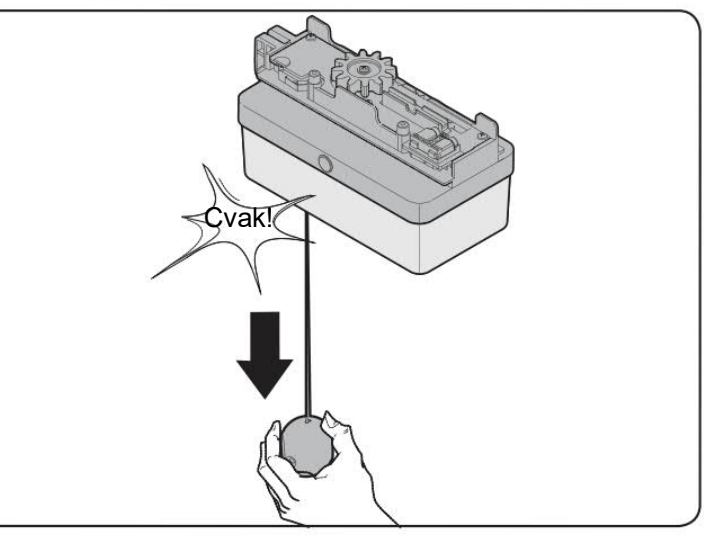
- Pull the cord down until you hear a double click; the motor is released and the gate can be moved by hand.
- To re-engage the motor, pull the cord again until you hear a double click.
- Before issuing an electrical command, check that the motor is engaged, the area is clear and the safety devices are working.
Maintenance and safe operation
Schedule a technical inspection every 6 months. Every month, check that the gate reverses when its bottom edge contacts a 50 mm-high object, following the instructions for your gate. If it fails, do not use the automation system; call a technician.
Do not apply oil or grease to the track or internal metal profile where the sliding electrical contacts are located. Lubricant may impair electrical contact. At least once a year, with both mains power and the battery disconnected, clean the track and check the insulation, fastenings, free manual movement and photocell optics; then re-engage the motor and test the system.
Keep remote controls out of children's reach. Do not go under a moving gate. If there is unusual noise, a safety fault or a faulty spring, safely release the gate and arrange a repair. Dispose of electronic equipment and batteries at an appropriate collection point.
SPY650HS / SPYBOX BHS technical specifications
| Parameter | Value |
|---|---|
| Application | Garage doors in a sheltered indoor location. |
| Motor / control unit | SPY650HS / separate SPYBOX BHS. |
| Mains / motor | 230 V AC ±10%, 50/60 Hz / 24 V DC via the track. |
| Maximum / rated force | 650 / 200 N. |
| Maximum speed | 0.24 m/s; time conditions: 8.5 s. |
| Power consumption, maximum / rated | 300 / 190 W; maximum current draw 1.6 A. |
| Standby | 0.5 W under the conditions of the relevant operating mode. |
| Duty cycle | 30 cycles/h, 300 cycles/day, 12 consecutive cycles. |
| Protection rating / temperature | IP41 / −20 to +55 °C. |
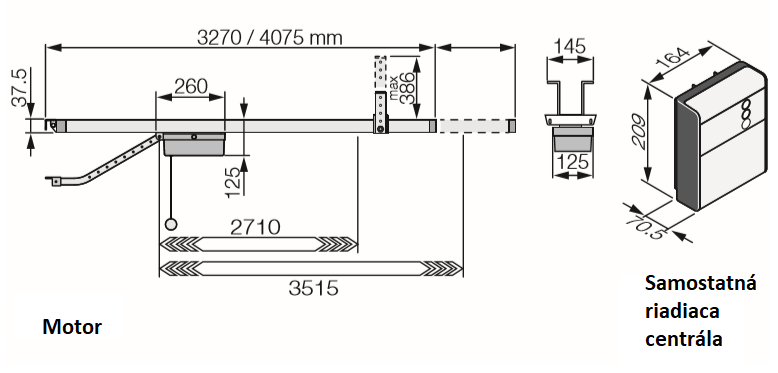
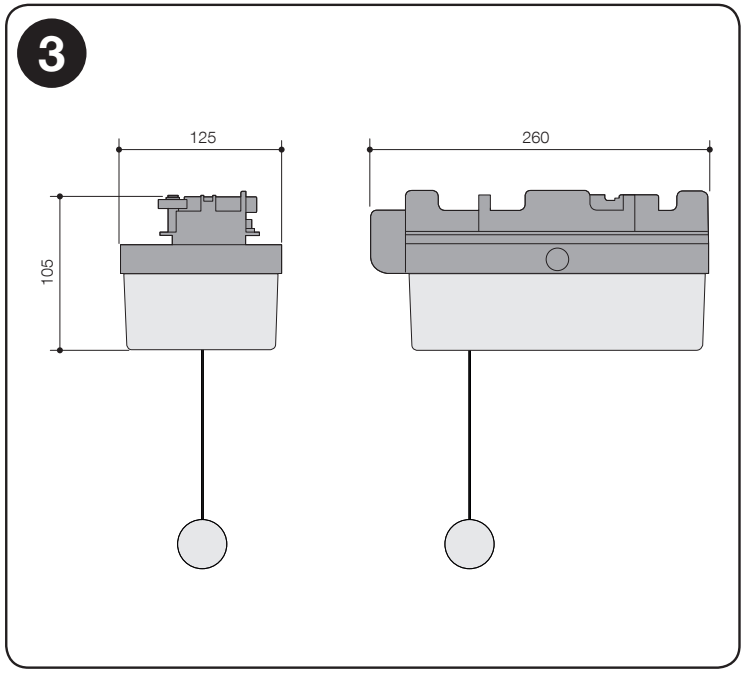
| Motor dimensions | 260 × 125 × 105 mm; separate control box 209 × 145 × 70.5 mm. |
| Shipment weight | Depends on the specific configuration and supplied track; the kit details are shown at the top of the product page. |
| Gate area | Sectional: up to 10.5 m²; up-and-over: up to 11.5 m²; dimensional and installation requirements. |
| Auxiliary power supply | 30 V DC, −20% / +5%, max. 100 mA; observe the specified positive and negative polarity. |
| Radio receiver included in this kit | OXIBD + ON3EBD; 433.92 MHz, two-way BD. |
| Lighting | Built-in LED in the separate control box; SPYLIGHT is optional, max. 2, outside the carriage track. |
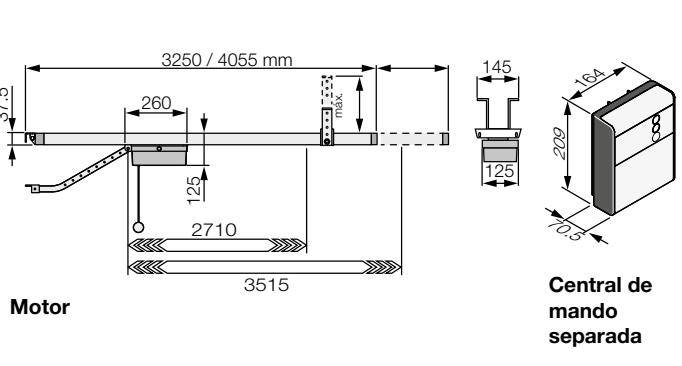
SPY Hi-Speed – drive demonstration
How can I order this item?
Choose the option that suits you:
- order online: use the buy button to add the goods to your shopping cart (you will find the buy button here in the product variants table).
- order by email: place your order at [email protected]