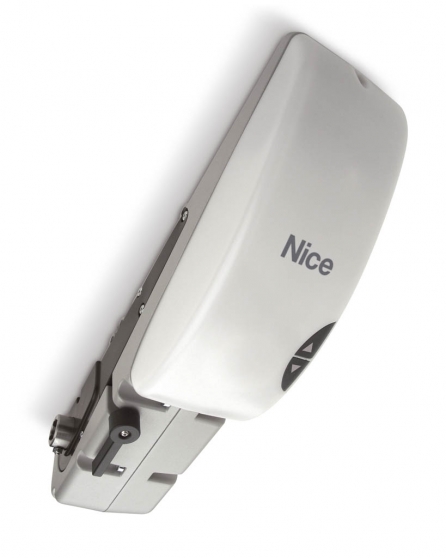
NICE Ten TN2010L - operator for up-and-over garage doors
| Product availability: | to the question | The product may not be available, contact us for more information. |
|---|
to the question
€733.09 including VAT
| Weight |
|---|
| 10 kg |
Description of NICE Ten TN2010L - operator for up-and-over garage doors
NICE TEN TN2010L – operator for up-and-over garage doors
The NICE TN2010L operator is designed for up-and-over garage doors. Before ordering, check the door’s dimensions, weight and construction.
The TN2010L has a built-in control unit, absolute encoder and auxiliary LED lighting. It can also control a connected second motor NICE TN2020L. The operator is non-reversible; in the event of a power failure, it allows manual release using the handle.
When to choose this operator
The TEN is designed for properly balanced up-and-over garage doors with counterweights or springs, with or without an overhang. The motor is mounted on the door structure and transfers motion through shafts and telescopic arms. It is not a ceiling-mounted operator with a guide rail for a sectional door.
The TN2020L is an additional motor, not a standalone replacement for the TN2010L. Accessories, the receiver, safety inputs and settings for the two-motor system are all handled by the main TN2010L unit. If you already have a different main control unit, check the exact combination and its own manual.
| System configuration according to the supplied installation manual | Approximate door dimensions |
|---|---|
| 1 × TN2010L | Maximum height 2.6 m, maximum width 3 m; area up to 8 m². |
| 1 × TN2010L + 1 × TN2020L | Maximum height 2.6 m, maximum width 5.4 m; area up to 14 m². |
Dimensions alone are not enough: balance, movement resistance throughout the full travel and the number of cycles all matter. The installation limits listed above apply to the configuration described in the supplied manual. Larger doors must be assessed individually for the specific motor and control unit. A second motor does not replace the repair of damaged springs, cables or guides.
Number of cycles and force required to move the door
| Configuration | Force required to move the door | Max. cycles/hour | Max. consecutive cycles |
|---|---|---|---|
| TN2010L | Up to 120 N | 20 | 35 |
| TN2010L | Over 120–180 N | 18 | 33 |
| TN2010L | Over 180–220 N | 15 | 30 |
| TN2010L + TN2020L | Up to 150 N | 30 | 19 |
| TN2010L + TN2020L | Over 150–250 N | 28 | 16 |
| TN2010L + TN2020L | Over 250–350 N | 25 | 14 |
A cycle means a complete opening and closing; one operation is movement in one direction. These are maximum operating limits, not a recommendation to increase door resistance. When preparing the door for private use, the force required for manual operation must not exceed 150 N; the manual operation test during commissioning has a separate limit of 225 N. The control unit limits operation according to load and duration to prevent overheating.
Motor and system control
| System component | Role in door automation |
|---|---|
| NICE TN2010L | Main motor with built-in control unit, absolute encoder and BlueBUS. It controls the safety devices, receiver and connected second motor. The plug-in receiver is selected separately. |
| NICE TN2020L | Second 24 V DC motor without a control unit. In a two-motor installation, it is connected to the main TN2010L; it cannot operate the door on its own. |
Standalone motor and required installation equipment
This product page is for the TN2010L. A complete automation system also requires a support bracket, suitable shafts, telescopic arms, controls and safety devices. Their selection depends on the door structure and the number of motors. Before ordering, check the supplied equipment and the accessories required.
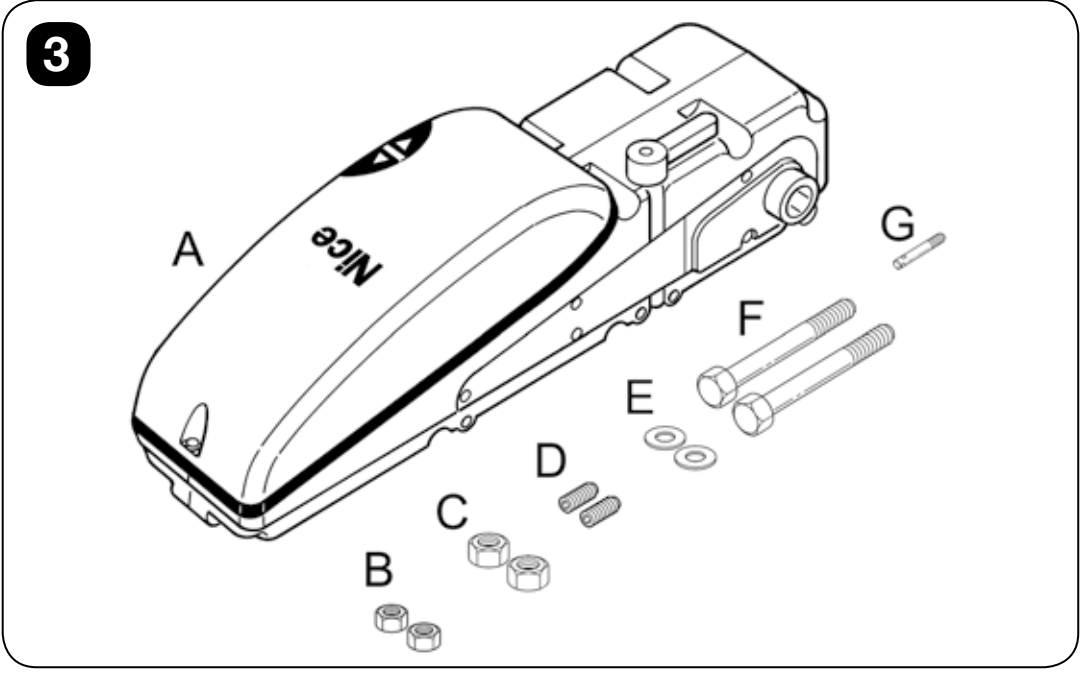
Installation component labels:
- A – TEN motor
- B – M6 nuts
- C – M8 nuts
- D – M6 × 14 threaded studs
- E – Ø8 washers
- F – M8 × 110 screws
- G – release rod.
| What | Why | Type |
|---|---|---|
| Motor mounting bracket | Motor mounting bracket, length 1 250 / 2 000 mm. | |
| Shafts | Square shafts, 20 × 20 mm, length 1 500 / 200 mm. | |
| Telescopic arms | Pair of straight / bent telescopic arms. Bent arms help when there is limited space around the gate support arm. | |
| Shaft guide | Guide for a pair of drive shafts. | |
| External release | Release from outside using a cable / key lock. OTA12 is not used with side-mounted motors. |
Gate installation and inspection
Installation, wiring and commissioning must be carried out by a qualified technician. The motor is installed inside the garage. An IP44 rating does not permit outdoor installation. Disconnect the mains supply and any backup battery before carrying out work.
- Check the condition and balance of the gate, springs, cables, guides and supporting components. The gate must move smoothly by hand along its entire travel and must not fall under its own weight.
- Remove any unnecessary cables and disable the original locking mechanism if it would impede powered movement.
- Choose a sturdy bracket and shafts to suit the gate width. Before tightening everything fully, test the full travel of the shafts and telescopic arms; they must not collide with the guides, frame or counterweight.
- Assess potential crush points around the arms, top edge and bottom edge. If the gate has a pass door, its opening must be safely monitored.
- The manual release must be accessible up to a height of 1.8 m. Install the fixed control device within sight of the gate, away from moving parts, at least 1.5 m above floor level.
- If there is no other entrance to the garage, install an external release before handover. The gate must not extend over a public footpath or roadway while moving.
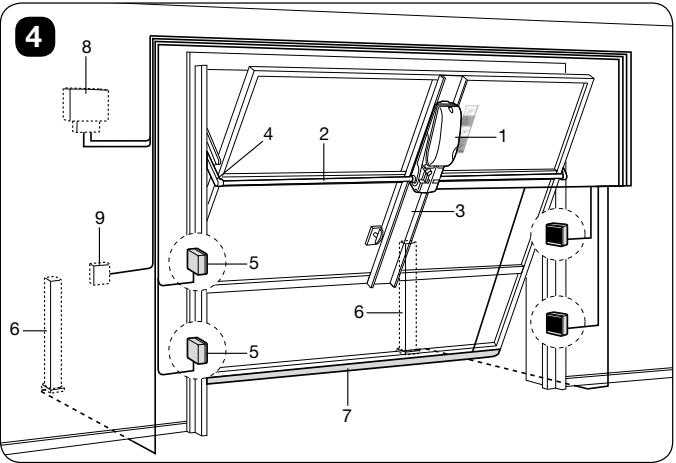
Diagram:
- 1 – TEN
- 2 – 20 × 20 mm square shaft
- 3 – mounting bracket
- 4 – telescopic arm
- 5 – photocells
- 6 – photocells on stands
- 7 – safety edge
- 8 – low-voltage flashing light with antenna
- 9 – control device.
This shows the general layout; safety devices must be designed for the actual gate.
Motor dimensions and cable routing
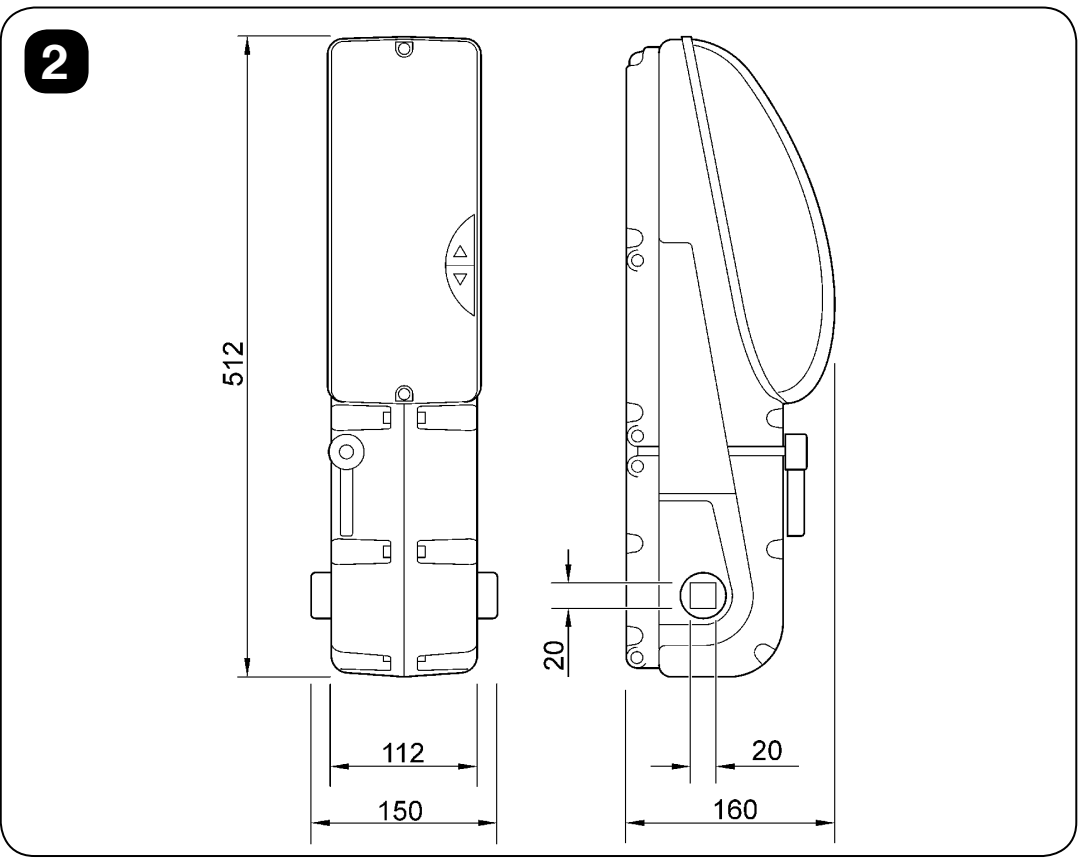
The drawing shows a height of 512 mm, a width of 150 mm, a maximum depth of 160 mm and a shaft output of 20 × 20 mm. When mounting, also allow space for the cover, release mechanism and gate movement. The technical body specifications state a depth of 158 mm; allow for the 160 mm outline shown in the drawing when allocating space.
With the cover open, make only the necessary cable entries and fit suitable cable glands. Route the mains supply separately from low-voltage cables, secure cables against tension and leave slack for gate movement. Do not allow water or condensation to remain in conduits or at entry points. After adjustment, install the cover and check its clearance throughout the full travel.
Manual release and re-engagement
Release the gate only when it is stopped, and first secure it against falling. An unbalanced gate or damaged spring can cause sudden movement when released. For a two-motor system, release both motors.
- Stop the gate and disconnect all power sources.
- Turn the motor handle counterclockwise as shown in the illustration. Then move the gate by hand without forcing it.
- To re-engage the drive, turn the handle clockwise to the vertical position.
- Move the gate briefly by hand until the gear engages. Only then restore power and check the controls.
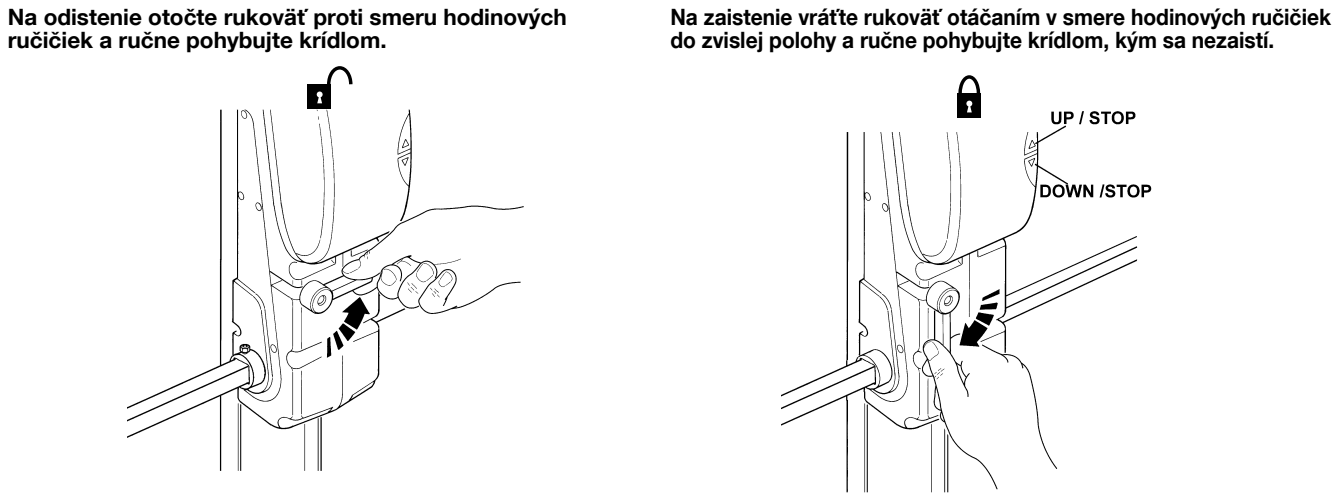
For external release, use correctly installed NICE OTA11 or NICE OTA12. For a two-motor system, the solution must allow both drives to be released safely.
Wiring
| Main TN2010L circuit | Cable type and length according to the manual |
|---|---|
| Mains supply | 3 × 1.5 mm², maximum 30 m. For lengths over 30 m, use a larger cross-section, for example 3 × 2.5 mm², as determined by the power supply and protection design. |
| 12 V flashing light | 2 × 1 mm², maximum 20 m. |
| Antenna | RG58 coaxial cable, maximum 20 m; a length under 5 m is recommended. |
| BlueBUS photocells | 2 × 0.5 mm², maximum 20 m. |
| Key switch | Maximum 20 m; number of cores depends on the contacts used. The manual allows the use of a shared 4 × 0.5 mm² cable. |
| Contact safety edge | 2 × 0.25 mm², maximum 20 m; an optical edge requires wiring according to its three signals. |
Cables must be suitable for the environment and moving installation. A qualified electrician must design the route, protection and supply; simply observing the stated cross-section is not enough. Between the motors are two separate circuits – motor and courtesy light; choose the wiring according to the supplied assembly and the image below.
Control unit and wiring
TN2010L has an integrated control unit; TN2020L does not. The terminals and procedures below apply to the TN2010L control unit shown in the image, with three buttons and eight LEDs, L1–L8. When replacing the NICE TNA2 board or if a different version is installed, use the instructions for the version actually installed.
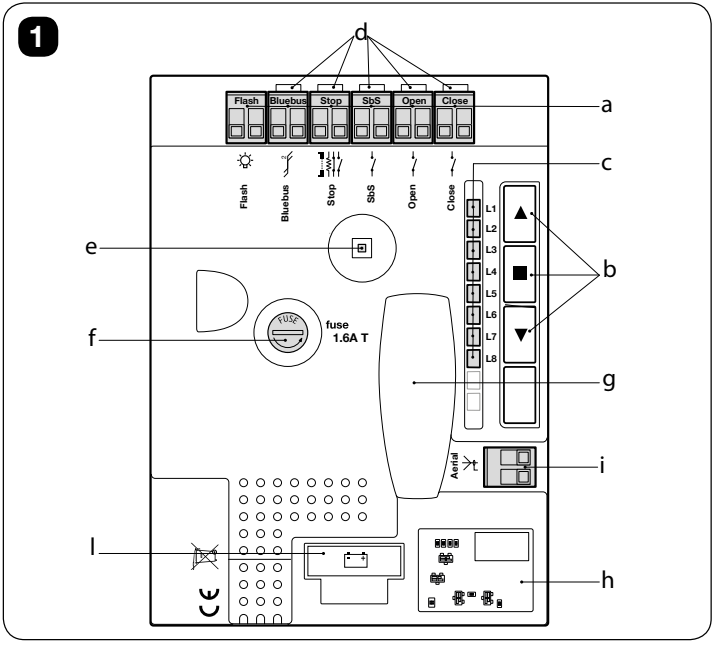
On the board:
- a – terminals
- b – buttons
- c – LEDs L1–L8
- d – input LEDs
- e – courtesy light
- f – F2 fuse
- g – SM receiver socket
- h – BusT4
- i – Aerial terminal
- l – battery connector.
Mains and low-voltage accessories
| Circuit / terminals | Wiring and limits |
|---|---|
| TN2010L: 1 / 2 / 3 | Mains 230 V AC, 50/60 Hz: 1 = L (live), 2 = N (neutral), 3 = PE (protective earth). AC has no positive/negative polarity. The supply must have suitable disconnection and protection. |
| Auxiliary power supply | Right STOP contact = GND (−), left SbS contact = 24 V DC (+), in the same orientation as the image. Voltage 24 V DC −30/+50%, maximum 100 mA total. Remains live in Stand-by. |
| BlueBUS | Parallel two-wire connection of compatible devices, e.g. NICE EPMB. No polarity; it is not a general-purpose 24 V auxiliary output. Maximum 12 BlueBUS load units. |
| SbS / Open / Close | Command pairs for voltage-free NO contacts: step-by-step / open / close. Switch the corresponding pair of contacts; do not connect an external power supply. An NO contact has no polarity. |
| Stop | Learned safety input: NO, NC, 8.2 kΩ or compatible optical safety edge; see detailed STOP wiring. |
| Flash | Factory-configured output for a 12 V DC warning light, max. 21 W, e.g. NICE ELDC. Do not connect a 230 V ELAC here. Follow the markings on the installed board for the exact output polarity; do not infer its position from the auxiliary power supply. |
| Aerial / receiver | Coaxial cable: centre conductor = signal, braid = shield. These are not power supply +/− terminals. With NICE OXIBD connect the external aerial directly to its aerial terminals. |
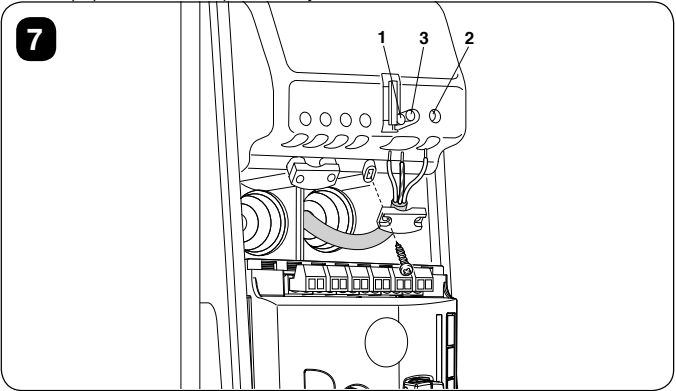
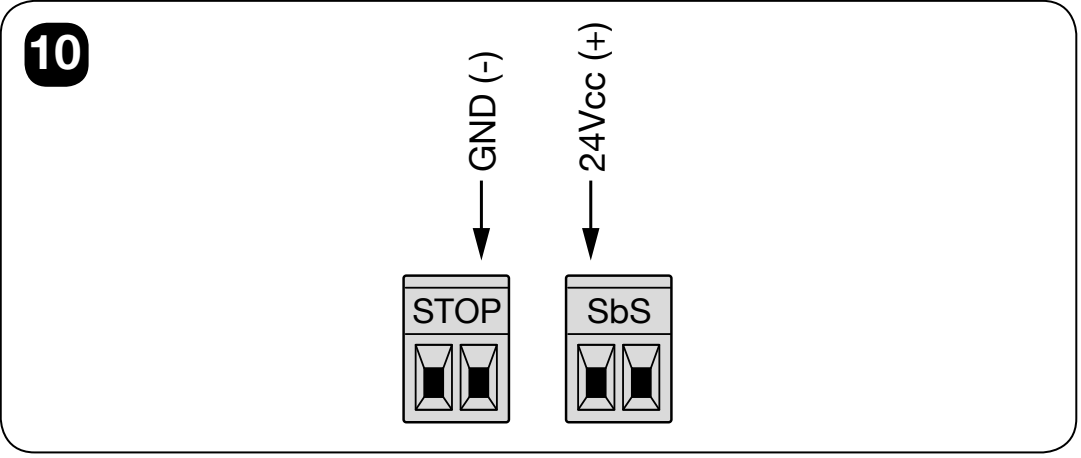
The positive and negative signs above refer to individual contacts, not to the terminal blocks as a whole. Connect the accessory’s + to SbS (+) and − to STOP (−) only if its voltage and total current draw are within the limits specified above. Do not power the TN2020L motor or the warning light from this 100 mA output.
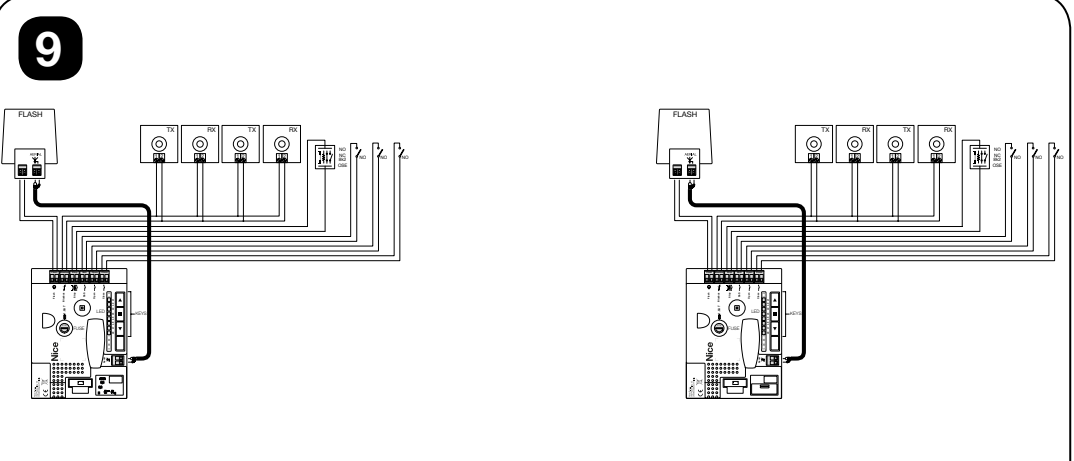
The diagram shows alternative safety-device wiring options; it does not mean that all STOP variants should be connected at the same time. For the NICE ELDC connect the power supply to its designated low-voltage input and connect the aerial cable separately. Set the flashing mode according to the warning light instructions for an output that already supplies pulsed voltage.
Connecting the TN2010L and TN2020L
Connect the 230 V mains supply only to the main TN2010L. The TN2020L receives motor power from the main control unit. It has its own terminals for the motor and light, but no second control unit or separate safety inputs.
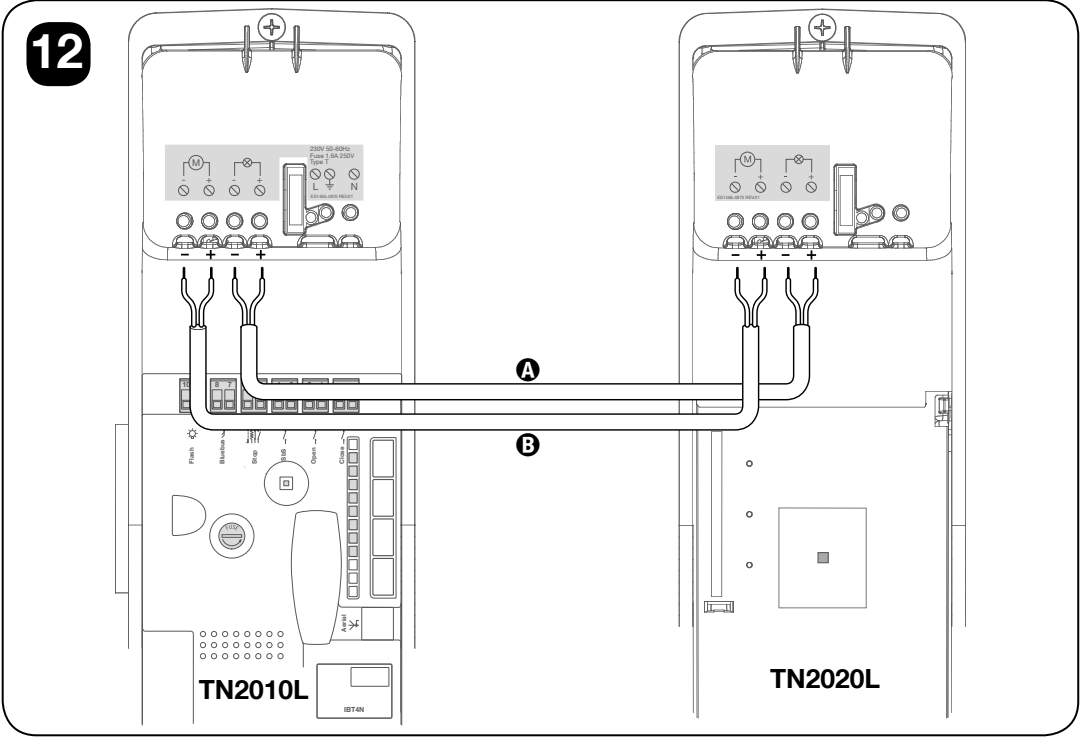
| Wiring as shown | Requirements |
|---|---|
| A – second motor | Connect the TN2010L second-motor output to the TN2020L motor terminals. For both pairs shown, left −, right +; maintain − → − and + → +. |
| B – second-motor courtesy light | Run a separate cable from the second-motor light output to the TN2020L light terminals. Again, as shown, left −, right +; do not connect it to the motor terminals or the 100 mA auxiliary output. |
| Settings on the main TN2010L | Level I, L8 ON = two motors; with one TN2010L, it must remain L8 OFF. |
Read the pole positions with the original diagram in the same orientation, and always check against the actual terminal markings. Do not enable two-motor mode when only one motor is installed – this may cause malfunction and damage. After changing the configuration, repeat the learning procedure, force calibration and safety tests.
BlueBUS photocells and their addressing
NICE EPMB connect with two wires to BlueBUS of the main TN2010L. The TX and RX of one pair have the same jumpers; the next pair is assigned a different address. BlueBUS devices are polarity-insensitive and are connected in parallel. Standard EPM relay devices must not be connected to BlueBUS.
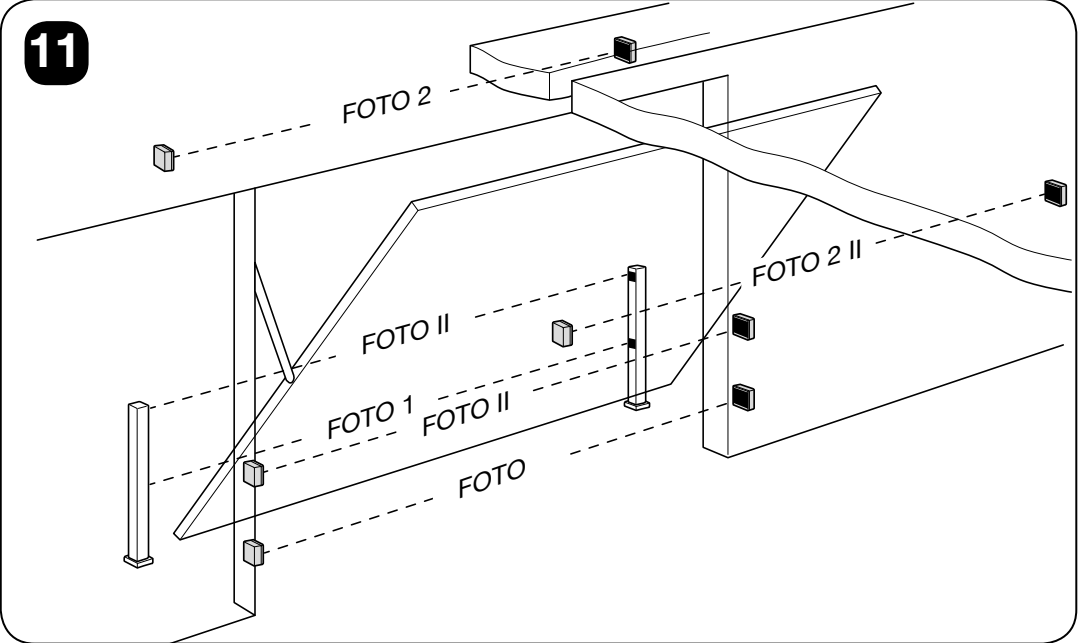
| Address | Function with TEN |
|---|---|
| PHOTO / PHOTO II | Monitors during closing; height approximately 50 / 100 cm. |
| PHOTO 1 / PHOTO 1 II | Monitors during both opening and closing; height approximately 50 / 100 cm. |
| PHOTO 2 / PHOTO 2 II | Monitors during opening. |
| PHOTO 3 | A single photocell safety device covering the entire automation system, as specified in the proposed configuration. |
| FA1 / FA2 | Photocell for the opening command; use only with a suitable photocell type and in accordance with its instructions. It does not replace the required safety protection. |
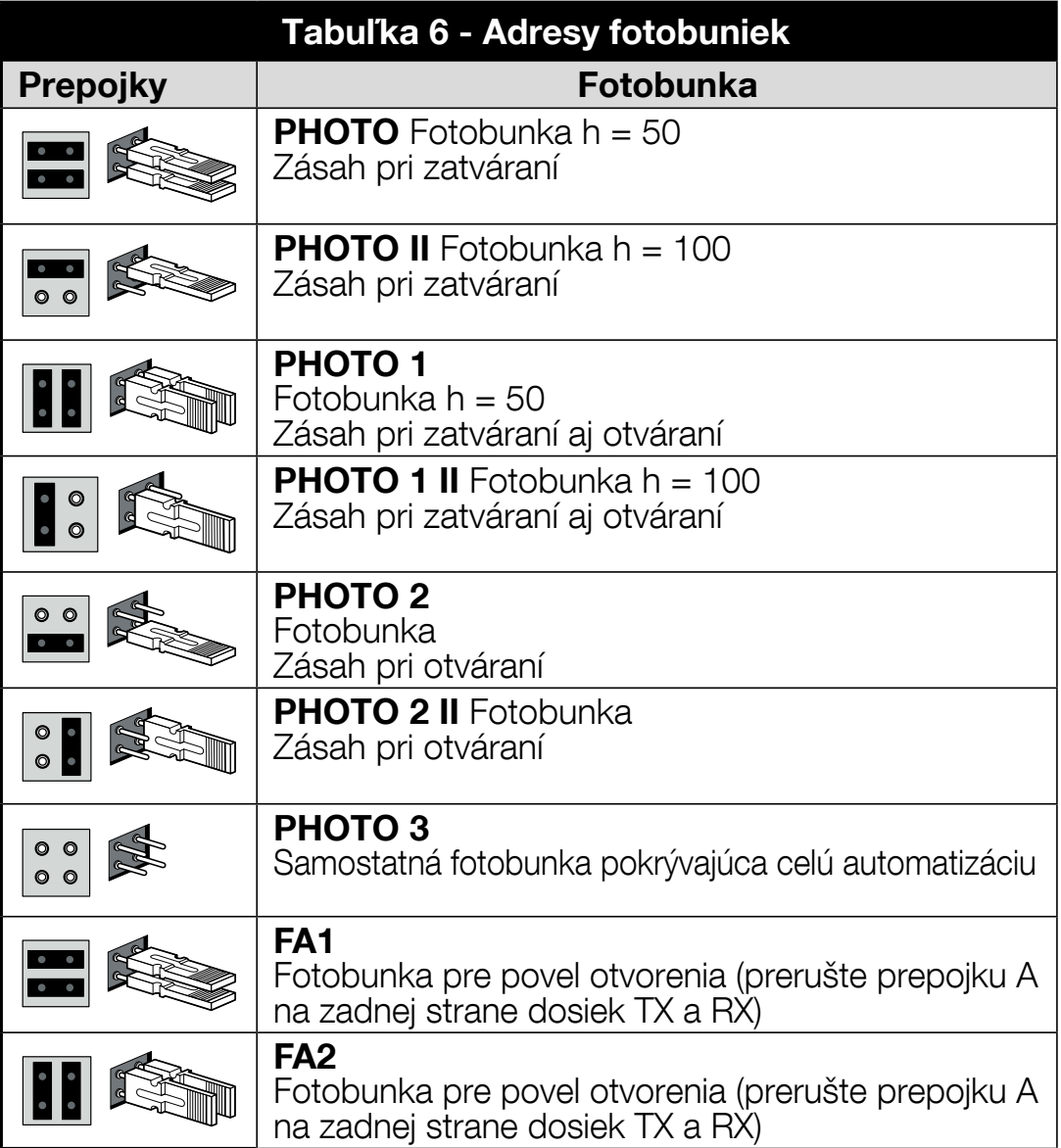
When replacing photocells, check that the jumpers have the same function as described in their own instructions. After adding or removing any device, perform device recognition and test the response again in both directions. Do not test movement with the safety device bypassed. EPMB jumper settings.
Sensitive safety edge and STOP input
STOP triggers a stop and a brief reverse movement. During device recognition, the control unit stores the type of connected device and triggers a safety response when its state changes. Multiple NO contacts can be connected in parallel; NC contacts in series. Resistive edges are connected according to their instructions; for a cascade, use a single terminating resistor 8.2 kΩ.
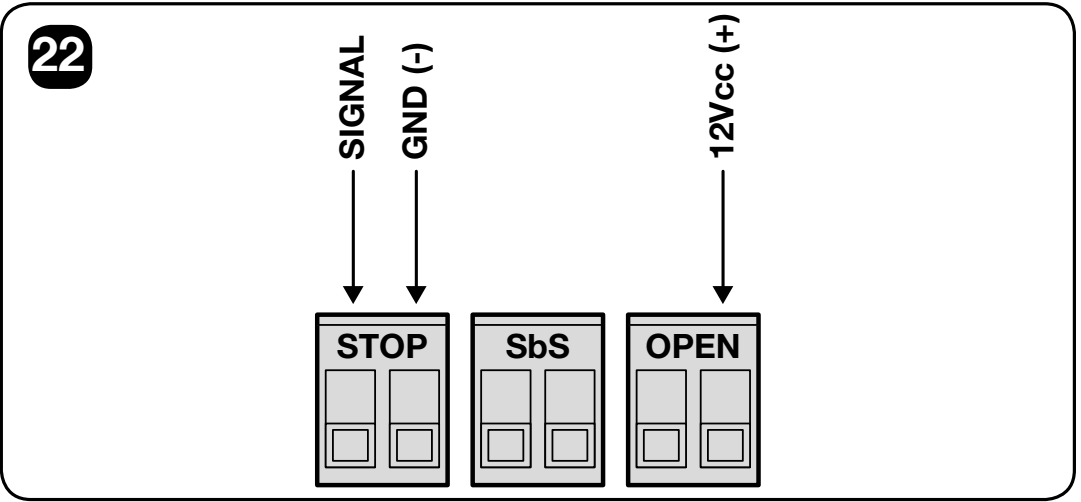
| OSE optical edge | Specific contact, as oriented in the image |
|---|---|
| Power supply + | Right-hand contact OPEN = +12 V DC, maximum 40 mA. Connect the positive supply wire of a compatible optical edge here. |
| Power supply − | Right-hand contact STOP = GND (−). |
| Signal | Left-hand contact STOP = SIGNAL. This is not the positive power supply. |
When connecting OSE, the OPEN contact is used to power the edge—do not use it for an arbitrary push-button control connection. NO/NC contacts and resistive edges have no power-supply polarity; optical edges do. For the required safety category, choose a suitable optical or 8.2 kΩ device and test the entire gate.
Initial startup and device recognition
All the following buttons and LEDs are on the main TN2010L. This procedure is not performed separately on the TN2020L. Before startup, complete the installation, safety devices and L8 setting according to the number of motors.
- After switching on, check the BlueBUS LED: after an initial rapid flash, it should flash regularly about once per second. The LEDs on the connected TX/RX units should indicate operation; the warning light and auxiliary light should remain off when idle.
- If the indicators are incorrect or a fault is suspected, disconnect the power and check the wiring. Do not proceed with device recognition blindly.
- Press and hold ▲ + STOP/SET. Release them when L1 and L2 start flashing rapidly, after approximately 3 seconds.
- Wait for the process to finish. The STOP LED should remain lit and L1/L2 should go out; L3/L4 may flash to indicate that position recognition is required.
Device recognition is performed even when no devices are connected and must be repeated after changing the BlueBUS or STOP connections.
Position programming and automatic force learning
First check that the direction of movement is correct and the area is clear. If the direction is reversed, use direction programming; do not swap the motor wires at random. While the gate is moving, any of the three board buttons will stop the motor.
Quick procedure – open and closed positions
- Press and hold STOP/SET + ▼ for approximately 3 seconds, until L1 starts flashing, then release the buttons.
- Use ▲ / ▼ to set the required fully open position FCA.
- Press and hold STOP/SET for 5 seconds and wait for L8 to start flashing; then release the button.
- Use ▲ / ▼ to set the fully closed position FCC.
- Confirm by pressing STOP/SET for 2 seconds and release. L1/L8 will go out. The control unit calculates the other positions.
- The auxiliary light will start flashing about once per second. Issue an SbS or OPEN command: the system will perform two complete automatic force-learning cycles.
Full setup of individual positions
Enter the procedure in the same way, by pressing STOP/SET + ▼ for approximately 3 seconds. Set the position with ▲ / ▼ and confirm each position to be saved by pressing STOP/SET for 2 seconds. An optional position can be skipped by pressing STOP/SET twice in quick succession.
| Sequence / LED | Position and description |
|---|---|
| 1 – L1 / FCA | Fully open position; mandatory. |
| 2 – L2 / RA | Start of deceleration when opening; optional. |
| 3 – L4 / RI | Intermediate deceleration when closing. The gate starts to slow down about 50 cm before this point and returns to the set speed after passing it; optional. |
| 4 – L5 / AP | Partial opening; optional. |
| 5 – L7 / RC | Start of deceleration when closing; optional. |
| 6 – L8 / FCC | Fully closed position; mandatory. |
After FCC, release STOP/SET and issue a command to start the two complete force-learning cycles. The process must finish automatically without interruption. If interrupted, the process remains incomplete even after a power outage and must be started again. Changing the positions, opening/closing speed or direction of rotation triggers a new force-learning request.
The encoder operates within the permitted range of 5–95%. If L1 or L8 flashes individually while idle, this may indicate that the range has been exceeded; it does not automatically mean a photocell fault. A technician must correct this; do not bypass the safety device.
Safety tests before use
- With the power disconnected and the motors disengaged, check that the gate moves manually; the test limit is 225 N, while the stricter limit for preparing a private gate is 150 N.
- Test each photocell, safety edge, STOP, and other protective devices individually. Their response must match the function selected for them.
- Test the photocells with an object Ø5 cm in diameter and 30 cm long at TX, RX, and in the middle of the beam.
- When closing onto an object 50 mm high placed on the floor, the drive must, when the bottom edge makes contact, reverse the direction of travel. During the safety test with a weight of 20 kg attached to the centre of the bottom edge, the drive must prevent opening or stop the opening movement. The installer must carry out the tests with the test area secured; this is not a test of manual release with a weight.
- Measure impact forces and assess operational risks for the entire gate. Increasing the force must not conceal friction or poor balancing.
- Provide the instructions, maintenance plan, test documentation, and guidance on releasing the drive. The gate may be operated only after the tests have been passed.
Settings on the main TN2010L
▲ opens or scrolls up through the menu, ▼ closes or scrolls down, and STOP/SET stops and confirms. While the gate is moving, all three buttons stop it. These procedures apply to the control unit shown; do not allow more than 10 s to elapse between programming steps.
Level I – eight ON/OFF functions
- With the gate stopped, press and hold STOP/SET for approximately 3 s, then release it when L1 flashes.
- Use ▲ / ▼ to select the function LED.
- Press STOP/SET briefly to change the state: short flash = OFF, long flash = ON.
- Wait 10 s for the setting to be saved and the menu to exit.
These functions are disabled by default. For a two-motor setup, the technician must switch on L8.
| LED | Function | Description |
|---|---|---|
| L1 | Automatic closing | Closes after opening once the set pause time has elapsed. Without this function, operation is semi-automatic. |
| L2 | Closing after photocell activation | 5 s pause after the photocell is cleared. Without L1, the gate completes opening first; with L1, opening may end once the photocell is cleared. This function does not apply after STOP is activated. |
| L3 | Always close | When power is restored, the control unit detects if the gate is open and starts closing, with a 3 s pre-flash. |
| L4 | Standby | After 1 minute of inactivity, it switches off the BlueBUS output and all LEDs except the BlueBUS LED, which flashes more slowly. A new command resumes operation; the auxiliary 24 V supply remains active. |
| L5 | Long reverse movement | After STOP is activated or the force limiter trips, the gate reverses all the way to the end position. OFF means a short reverse movement of approximately 15 cm. |
| L6 | Pre-flashing | The warning light starts 3 s before movement. |
| L7 | Sensitivity | Increases sensitivity to obstacle detection. Requires suitable speed and force settings, followed by measurement. |
| L8 | Two motors | ON: TN2010L + TN2020L. OFF: one TN2010L. |
Level II – eight adjustable parameters
- Press and hold STOP/SET for approximately 3 s, release it when L1 appears, then use ▲ / ▼ to select the parameter's entry LED.
- Press and hold STOP/SET. After about 3 s, the current value lights up.
- While holding STOP/SET, change the value using ▲ / ▼.
- Release STOP/SET and wait 10 s for the menu to exit.
Bold values indicate the table's defaults for the control unit shown; always read the actual setting from the board LEDs. The pause time applies only when automatic closing is enabled. For parameters with a value between two levels, two LEDs may alternate.
| Parameter | Values L1–L8 |
|---|---|
| L1 – Pause time | L1 10 s L2 20 s L3 40 s L4 60 s L5 80 s L6 120 s L7 160 s L8 200 s |
| Parameter | Values L1–L8 |
|---|---|
| L2 – SbS function | L1 open–stop–close–stop L2 open–stop–close–open L3 open–close–open–close L4 condominium mode L5 condominium mode 2; a command longer than 2 s stops the gate L6 step-by-step mode 2; a command shorter than 2 s partially opens the gate L7 movement while the command is held L8 semi-automatic opening; closing while the command is held |
| Parameter | Values L1–L8 |
|---|---|
| L3 – Speed | L1 30% L2 44% L3 58% L4 72% L5 86% L6 100% L7 opening V4 / closing V2 L8 opening V6 / closing V4 |
| Parameter | Values L1–L8 |
|---|---|
| L4 – FLASH output | L1 gate-open indicator L2 active when the gate is closed L3 active when the gate is open L4 warning light L5 electric locking L6 electric lock L7 holding magnet L8 maintenance indicator |
| Parameter | Values L1–L8 |
|---|---|
| L5 – Opening force | L1 force 1 L2 force 2 L3 force 3 L4 force 4 L5 force 5 L6 force 6 L7 force 7 L8 force 8 |
| Parameter | Values L1–L8 |
|---|---|
| L6 – Closing force | L1 force 1 L2 force 2 L3 force 3 L4 force 4 L5 force 5 L6 force 6 L7 force 7 L8 force 8 |
| Parameter | L1–L8 values |
|---|---|
| L7 – Maintenance warning | L1 automatic, based on operating conditions L2 1,000 manoeuvres L3 2,000 manoeuvres L4 4,000 manoeuvres L5 6,000 manoeuvres L6 8,000 manoeuvres L7 10,000 manoeuvres L8 12,000 manoeuvres |
| Parameter | L1–L8 values |
|---|---|
| L8 – Fault history | L1 most recent manoeuvre L2 second most recent manoeuvre L3 third most recent manoeuvre L4 fourth most recent manoeuvre L5 fifth most recent manoeuvre L6 sixth most recent manoeuvre L7 seventh most recent manoeuvre L8 eighth most recent manoeuvre |
Force is not intended to compensate for a gate fault. After changing the force setting, repeat the protective force measurement; after changing the speed, also repeat automatic force learning. Output FLASH changes function and the required load depending on the selected mode; it is not a universal 24 V power supply. The warning light and lock must not be connected to it at the same time. For L6, use an electric lock 24 V, maximum 10 W, and for L7, a holding magnet 24 V, maximum 10 W; both must be electromagnetic, with no built-in electronics. The L6 lock is released by a short pulse when opening; the L7 magnet holds the gate closed and switches off while the gate is moving. In L5 electric locking mode, the latch is held released while opening; the selection and permissible current draw of a specific latch rated at no more than 24 V, electromagnetic only and without built-in electronics, must be confirmed by a technician based on the installed control board. When closing, the latch must mechanically engage again.
Additional commands
A continuous SbS command lasting more than 3 s can keep the gate open, for example when used with a suitable timed contact. Emergency movement when a safety device has failed is possible only under controlled conditions while holding the command: after an unsuccessful command, repeat it within 3 s and keep holding it; movement starts after about 2 s and stops when the command is released. This mode is not a substitute for repair and may only be used under supervision, with no people or objects in the gate's path.
Receiver, remote controls and antenna
TN2010L has an SM socket for a separate receiver. TN2020L has no built-in receiver; it is controlled via the main motor. The current selection is NICE OXIBD; the remote control type must match the receiver's coding. Existing installations may use SMXI, SMXIS or OXI—the learning procedure for radio remote controls depends on the receiver.
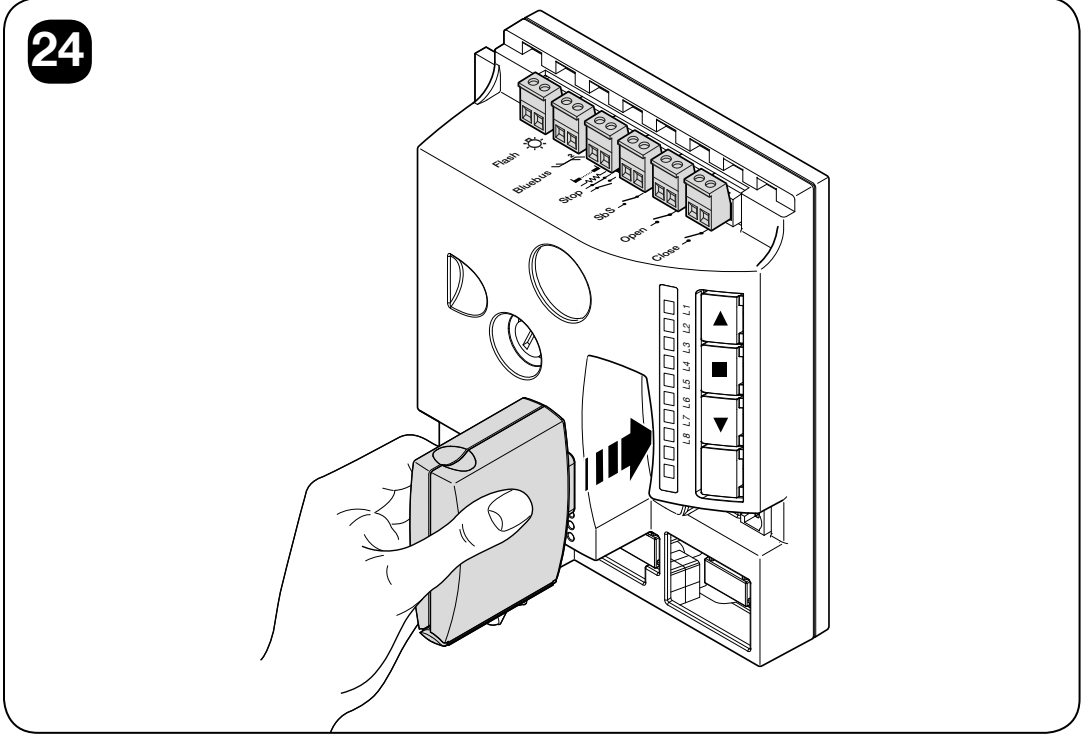
Disconnect both the mains supply and backup power before inserting or removing the receiver. With OXIBD, connect the external antenna directly to the receiver's antenna terminals, connecting the signal and shield as specified in its instructions. Do not automatically connect it to an older Aerial terminal on the control board just because it is shown in the original diagram. Extended commands for the OXI/OXIBD receiver and pairing NICE remote controls.
| Basic receiver output | Main TEN command |
|---|---|
| 1 | Step-by-step (SbS) |
| 2 | Partial opening |
| 3 | Open |
| 4 | Close |
In extended mode, OXI also supports Stop, condominium and priority step-by-step commands, additional partial openings, open/close with lockout, lockout/unlock, and timed or continuous auxiliary lighting. Select the range according to the receiver and its own instructions. A suitable OView interface can be used for programming and diagnostics via BusT4; it is not a second control motor.
Backup power
The backup power supply connects to the main TN2010L, which controls the entire two-motor system from it. Do not connect the battery directly to the TN2020L motor or to the auxiliary STOP/SbS output.
The current TEN catalogue lists the NICE PSS324. It has its own connector and requires a compatible control generation and the correct connection cable. The original NICE PS324 is an older, superseded version; for an existing installation, follow its original wiring. The old and new connectors and their charging controls are not automatically interchangeable. Check the control board and battery labels before replacing them.
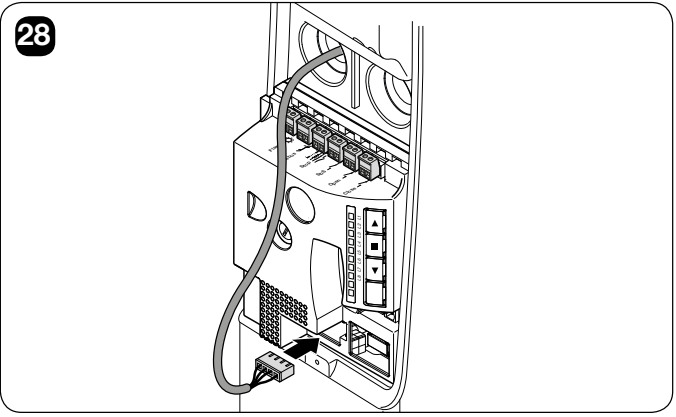
Install the battery with the system disconnected and use the designated keyed connector without forcing it into place. After installation, test a complete cycle using both mains and backup power, then restore the mains supply. The number of movements depends on the gate, number of motors, temperature, and the battery's condition and age. The gate may move more slowly during a power failure. The emergency release must remain accessible even when the battery is discharged.
Diagnostics and common faults
In the event of a fault, the warning light and auxiliary light repeat a group of rapid flashes twice, with a 1 s pause. Count the flashes in one group. The warning light's normal flashing while the gate is moving is not this fault code.
| Flashes | Cause | What to check |
|---|---|---|
| 2 | Photocell is preventing movement | Check for obstructions, the optics, wiring and addressing. |
| 3 | Force limit triggered | Check for obstructions, friction and balance. Do not automatically increase the force. |
| 4 | STOP triggered | Check the safety edge, contacts and the learned STOP type. |
| 5 | Internal parameter error | Wait at least 30 s and try a command. If the fault recurs, have the control board serviced. |
| 6 | Hourly manoeuvre limit exceeded | Wait a few minutes for the thermal/operational limit to clear. |
| 7 | Internal circuit fault | Disconnect all power sources for a few seconds. If the problem recurs, have the motor/cables inspected by a service technician. |
| 8 | Another command is already active | Remove any continuous or simultaneous command. |
| 9 | Automation blocked | Unlock it using the appropriate receiver command; do not confuse this with mechanical release. |
Control board LEDs and auxiliary light
First distinguish Stand-by from a fault. When Stand-by is enabled, after one minute of inactivity the other LEDs go out and the BlueBUS LED flashes more slowly. Before assessing the LEDs, wake the controller with a command only if the gate path is clear and safe; be prepared for the gate to move. The following table applies when the controller is awake.
| Indicator | Meaning |
|---|---|
| BlueBUS: green, once per second | Normal operation. Two quick green flashes = an input change or a command received. |
| BlueBUS: off / continuously lit | Check the power supply and fuses / fault requiring inspection of the control board. |
| BlueBUS: rapid and long red flashes | BlueBUS short circuit. Disconnect and inspect the wiring; after the fault is cleared, normal flashing may take about 10 s to resume. |
| STOP: lit / unlit | Normal after learning / safety input activated or faulty. |
| SbS, OPEN, CLOSE | A lit LED indicates that the corresponding command is active. |
| L1 + L2 flashing | Connected devices must be detected. |
| L3 + L4 flashing | The gate positions must be learned. |
| L1 or L8 flashing on its own while idle | L1 = upper limit, position ≥95%; L8 = lower limit, position ≤5%. A technician should adjust the position and repeat the learning procedure; do not use the workshop encoder reset on an installed gate. |
| L1–L8 while moving | Current motor load; L1 low, L8 high. This is not the same as the relative force setting in the menu. |
| Auxiliary light flashes once per second | Automatic force learning is incomplete; if a fault flash sequence is also present, count the fault code. |
If the remote control does not respond and its LED does not light, check the battery. If the LED lights up, check the receiver and pairing. If the control board is completely unresponsive, a technician should check the mains supply and fuses. Replace a fuse only after correcting the cause, using the same type and rating shown on the label. After a short movement followed by a reversal, first check the gate's resistance to movement, not just the force setting.
Maintenance reminder during normal operation
The warning beacon staying lit for longer may indicate that servicing is due. This is not the same indication as the rapid groups of flashes used for faults. This applies when the FLASH output is configured accordingly; the maintenance indicator is an alternative mode of the same output.
| Maintenance limit reached | Beacon in FLASH mode | Output in maintenance indicator mode |
|---|---|---|
| Less than 80% | Normal flashing: on for 0.5 s / off for 0.5 s. | Lights up for 2 s at the start of opening. |
| 81–100% | Lights up for 2 s at the start of the operation, then flashes normally. | Flashes throughout the operation. |
| More than 100% | Lights up for 2 s at the start and end of the operation; otherwise flashes normally. | Flashes continuously. |
Have the warning addressed through professional maintenance; do not reset the counter just to stop the indication.
History of the last eight operations
- Hold STOP/SET for about 3 s, release when L1 lights up, then select input LED L8.
- Hold STOP/SET and wait about 3 s. Lit LEDs indicate operations with a fault: L1 is the most recent, L8 the eighth most recent. An unlit LED indicates an operation without a fault; the history is read-only.
- While holding STOP/SET, use ▲ / ▼ to select an operation. The LED flashes the corresponding code from the table.
- Release STOP/SET.
Reset, motor direction and maintenance counter
Clearing the main controller's memory
A reset deletes learned devices, positions and user settings. Afterwards, you must select the number of motors again, repeat the learning procedure and carry out tests; this is not a standard way to resolve a mechanical fault.
- With the motor stopped, hold ▲ + ▼, until all LEDs L1–L8 light up, about 3 s.
- Release the buttons. The LEDs flash rapidly for about 3 s and the controller restarts.
- At the end, L1/L2 flash. Repeat the device detection, L8 setting and position and force learning.
This reset does not change the set rotation direction or encoder position. The plug-in radio receiver's memory is managed separately according to its instructions.
Changing the rotation direction
- With the gate stopped, hold STOP/SET for about 3 s and release when L1 is flashing.
- Briefly press ▲ + ▼ together and release.
- The auxiliary light on indicates reverse direction; off indicates the standard direction.
- Wait 10 s for the procedure to finish. Then repeat position learning and automatic force learning.
Restoring the encoder position
Resetting the encoder position is strictly a workshop procedure performed on a workbench. Never perform it with the motor installed on the gate. It sets the encoder to the L6 installation position and restores the controller's factory settings at the same time. If required, it must be carried out by a service technician in accordance with the complete installation manual; it does not replace position learning on an installed gate.
Reading and resetting the maintenance counter
Level II, input LED L7: hold STOP/SET and wait about 3 s for the level to be displayed. Briefly press ▲ + ▼ to read the counter: each flash represents 10% of the set limit. For example, four flashes at a limit of 10,000 indicate 4,000–4,999 operations. Holding ▲ + ▼ for at least 5 s resets the counter; do this only after maintenance has been carried out. Then release STOP/SET.
Maintenance and safe use
Professional maintenance at least every 6 months or 4,000 operating cycles, whichever comes first. Shorten the interval accordingly if the gate is used frequently. A counter warning does not replace the scheduled maintenance interval.
- Before servicing, disconnect the mains supply and battery, and secure the gate against movement.
- Check the mounts, shafts, telescopic arms, cables, springs and guides for corrosion and wear. Replace damaged parts; spring adjustment must be carried out by a professional.
- After maintenance, restore the power supply and repeat the safety tests. Document the result.
- Users may clean the photocell lenses with a slightly damp cloth and remove debris from the gate path. Do not use the gate if it is faulty; contact the installer.
Walk through only when the gate is fully open and stationary. Keep children and remote controls away from moving parts. Following the installer's instructions, check monthly that when closing onto an object 50 mm high on the floor, the drive, when the lower edge makes contact, reverses direction. If it does not work correctly, stop automatic operation and arrange for servicing. The drive and batteries must not be disposed of with municipal waste; a professional must dismantle them and hand them over for recycling.
Estimated service life
Add the relevant weight and force indices, along with any other relevant factors; include the latter factors if their likelihood of occurrence exceeds 10%. The weight in this table is an input for estimating wear, not a load capacity or authorization to automate a gate of any weight. Installation and operating limits take precedence.
| Characteristics of the complete automation system | Index | Service life chart | |
|---|---|---|---|
| TN2010L | TN2010L + TN2020L | ||
| Gate weight up to 100 kg | 20% | 10% |
The horizontal axis shows the sum of the indices in %, and the vertical axis shows the number of complete cycles. |
| Over 100–180 kg | 30% | 20% | |
| Over 180–230 kg | 40% | 30% | |
| Over 230 kg | 60% | 50% | |
| Movement force up to 160 N | 10% | 5% | |
| Over 160–240 N | 20% | 15% | |
| Over 240–290 N | 40% | 30% | |
| Over 290–350 N | — | 50% | |
| Temperature above 40 °C / below 0 °C or humidity above 80% | 10% | 10% | |
| Dust or sand | 15% | 15% | |
| Saline environment | 20% | 20% | |
| Interruption by photocell | 10% | 10% | |
| STOP interruption | 20% | 20% | |
| Speed above level L4 | 15% | 15% | |
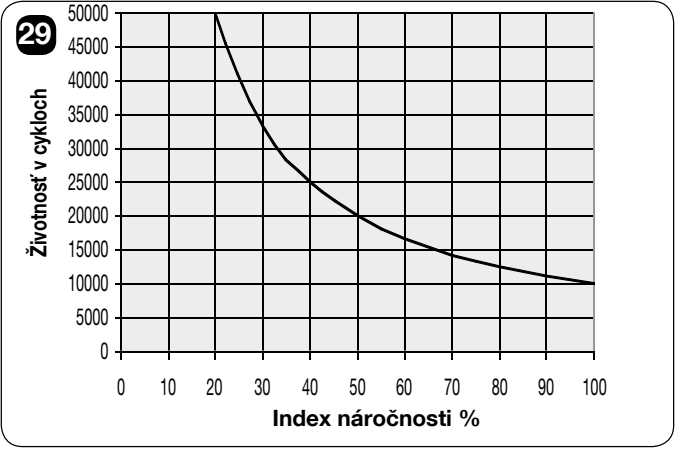
The chart of approximately 10,000–50,000 cycles is an indicative estimate assuming proper maintenance, not a service-life guarantee or a number of years. It is not based solely on the number of openings and does not indicate a service interval.
NICE TN2010L technical specifications
| Intended use | Main motor with built-in control unit and absolute encoder. |
|---|---|
| Power supply | 230 V AC −10/+15%, 50/60 Hz; the motor itself operates on low-voltage DC. |
| Max. starting torque | 350 Nm |
| Rated torque | 240 Nm |
| No-load speed | 1.7 rpm; six adjustable control levels. |
| Speed at rated torque | 1.2 rpm |
| Max. power consumption at start-up | 240 W / 1 A from the mains. |
| Motor weight | 10 kg |
| Ingress protection and environment | IP44; installation inside the garage. |
| Operating temperature | −20 to +50 °C |
| Overall dimensions | Height 512 mm, width 150 mm, depth 160 mm according to the drawing; table-listed body depth 158 mm. |
| Auxiliary light | Built-in LED lighting. |
| Insulation class | I |
For the complete TN2010L + TN2020L assembly, the manual specifies a starting torque of 500 Nm, rated torque of 330 Nm, and power consumption of 350 W / 1.4 A from the mains and a weight of 17.2 kg for both motors. The assembly's torque is not determined by simply adding the torques of the individual motors.
At rated load, the TN2010L is specified for 15 cycles/h and 22 minutes of continuous operation; the dual-motor assembly is specified for 25 cycles/h and 14 minutes. At +50 °C, the corresponding values decrease to 6 cycles/h and 6 minutes for one TN2010L, and 4 cycles/h and 7 minutes for the pair. Load tables and the control system impose further limits on actual operation. The basic technical values apply at 20 °C ±5 °C.
To verify your selection, contact us with the gate type, height and width, balancing method, and expected number of cycles. For a replacement, include a photo of the rating plate and control board.
How can I order this item?
Choose the option that suits you:
- order online: use the buy button to add the goods to your shopping cart (you will find the buy button here in the product variants table).
- order by email: place your order at [email protected]






