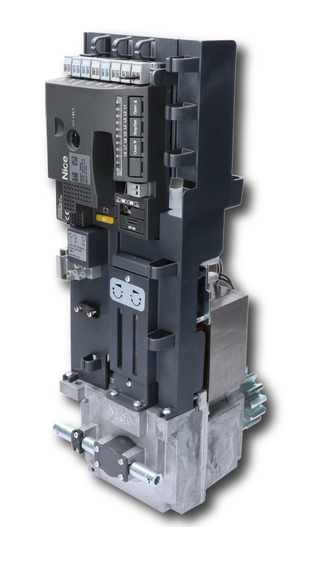
NICE Naked Sliding NKSL400 - exposed sliding gate operator for gates up to 6 m / 400 kg (A)
| Product availability: | In stock | We normally dispatch goods within 24 hours. |
|---|
in stock
€632.53 including VAT
| Weight |
|---|
| 6,50 kg |
Description of NICE Naked Sliding NKSL400 - exposed sliding gate operator for gates up to 6 m / 400 kg (A)
NICE NAKED NKSL400 – drive concealed in the post
NICE NKSL400 is a compact electromechanical drive for a sliding gate up to 6 m and 400 kg, designed to be installed directly inside a hollow post. It is supplied without external covers and with a built-in NKA3R10 control unit. The motor itself operates on 24 V DC, while the complete assembly is powered from a 230 V AC.
It is non-reversible, with internal adjustable limit switches and position monitoring by an absolute encoder. There is no need to install limit-switch activators on the rack. The gate still requires fixed mechanical stops to prevent it from running off the track.
When to choose the NKSL400
Choose NAKED if you want to conceal the motor inside the post structure and have space to install it, fit the covers and carry out maintenance later. Consider the gate leaf's weight and length, resistance to movement, number of cycles and condition of the running gear.
| Gate leaf length | Maximum cycles per hour | Maximum consecutive cycles |
|---|---|---|
| Up to 4 m | 35 | 14 |
| Over 4 m up to 6 m | 23 | 11 |
| Weight | Share of the stated number of cycles | Maximum recommended speed |
|---|---|---|
| Up to 200 kg | 100% | V6 – exceptionally fast |
| Over 200 kg up to 400 kg | 50% | V5 – very fast |
Example: for a 5 m / 350 kg gate, the maximum is 11 cycles per hour and 5 consecutive cycles, at a maximum speed of V5. One cycle consists of opening and closing. At high temperatures, the thermal limiter may allow fewer operations.
When choosing a drive, allow at least 50% force reserve: starting resistance should be less than half the maximum force, and resistance while moving should be less than half the rated force. For this motor, that means approximately under 200 N when starting and under 100 N while running. This refers to resistance to movement, not the gate's weight in kilograms.
What is included with the drive and what must be added
The NKSL400 includes a motor with an M4, 15-tooth pinion and built-in NKA3R10. The outer post, cut-out covers, rack and safety accessories are selected to suit the gate. Choose the receiver and remote controls to suit the specific package.
The control unit supports automatic closing and closing after photocell activation, separate OPEN/CLOSE inputs and step-by-step control, and adjustable partial opening, force and speed. The temperature sensor adjusts the force control for cold conditions. Manual release works even when the power is off. Two opposing gates can be synchronised in Master/Slave mode.
The NKSL400 has its own method of installation and adjustment of the internal limit switches.
Accessories for the drive
| Item | Use |
|---|---|
| BlueBUS photocells | NICE EPMB or NICE EPSB – slim version. Two-wire power and polarity-free communication; run device learning after making changes. |
| Warning light | NICE ELDC for the low-voltage FLASH output. The mains-powered ELAC warning light is not suitable for this output. |
| Radio control | NICE OXIBD for the SM socket, and compatible NICE remote controls. The remote control type and coding must match the receiver. |
| Rack | M4 nylon rack with metal reinforcement. The gate's weight must not rest on the pinion. |
| Remote release | NICE KIO together with a cable NICE KA1, 6 m. Ensure access to the release mechanism even when the gate is closed. |
| Backup power during outages | NICE PS124 is optional. The number of emergency operations depends on the gate, the charge level and the condition of the battery. |
Drive dimensions and required internal clearance
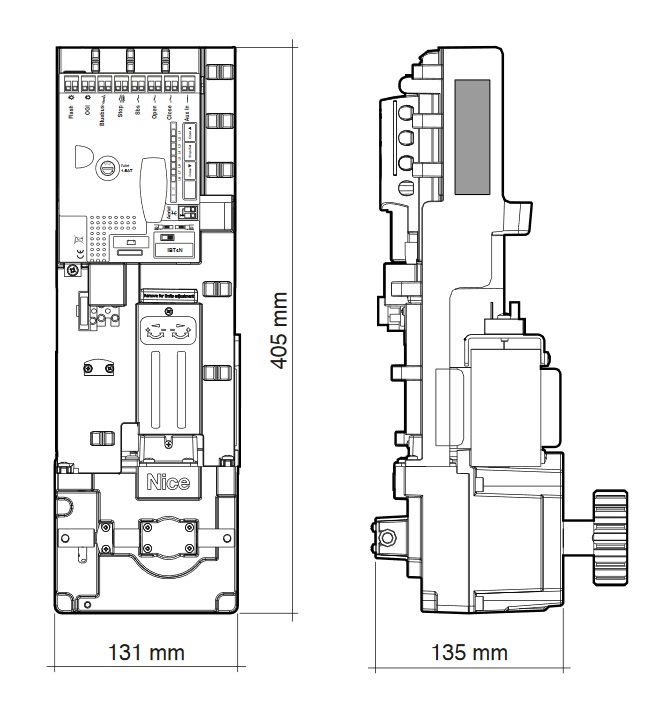
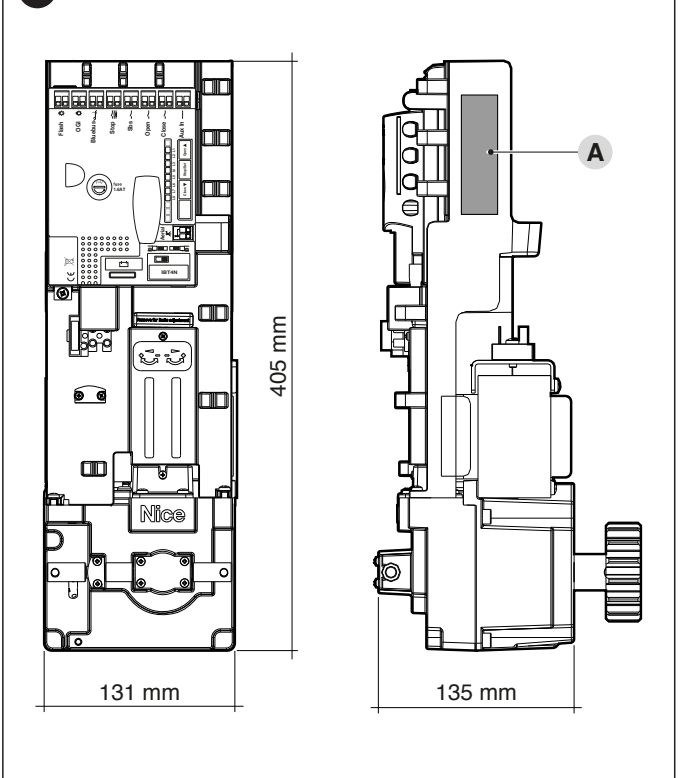
The motor dimensions are 131 × 135 × 405 mm. The post must have a clear internal cross-section of at least 140 × 140 mm. An example would be 150 × 150 × 4 mm profile; check the actual internal clearance, welds, and mounting tolerances before fabrication. Also see the post cutout drawing.
Post cutout drawing
The front has an opening Ø 70 mm for the pinion and mounting holes. The rear requires a rectangular service opening measuring 520 × 134 mm. Prepare the side openings according to the selected release side. Take the dimensions of all openings from the drawing.
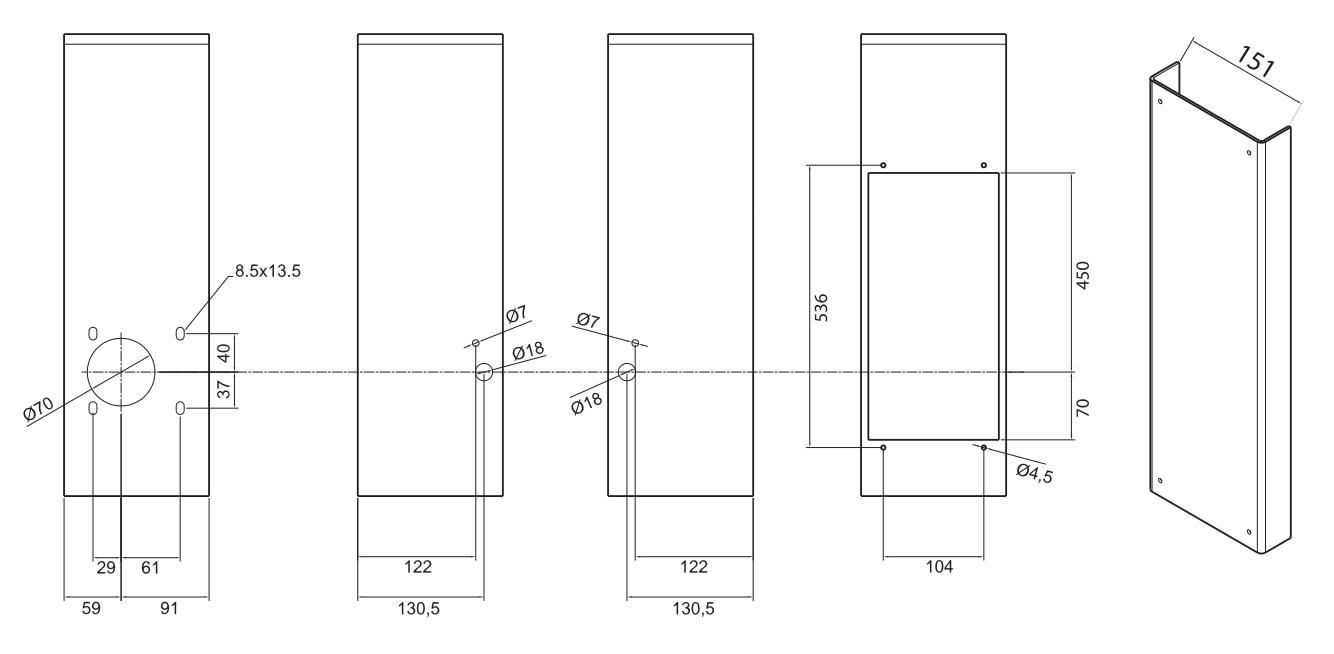
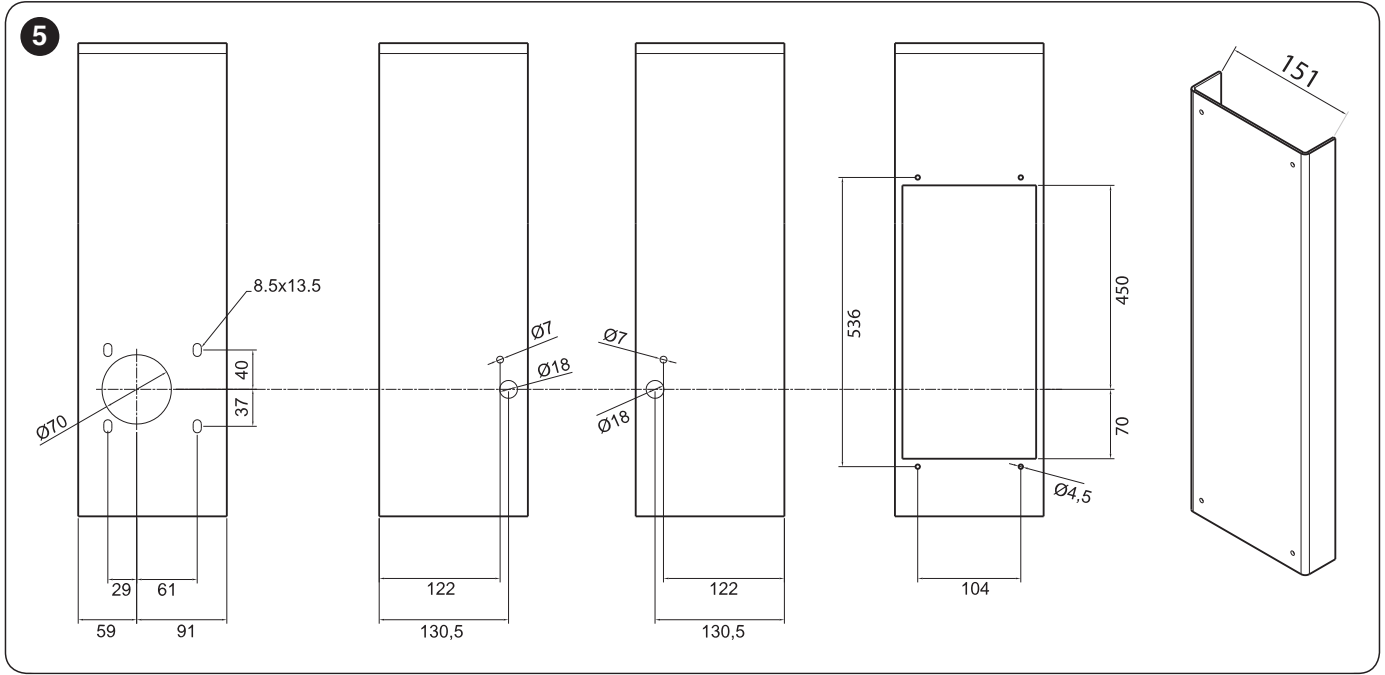
The internal dimension of the recommended bent cover is 151 mm. Seal the top of the post against water and cover the rear service cutout. The post and gate must be connected to protective earth. The IP44 rating applies only to a properly completed assembly motor + post.
Installation and rack
Installation, mains connection, and testing must be carried out by a qualified technician. Disconnect the mains power and battery before carrying out any work. The gate must move easily by hand along its entire travel; it must not derail or move by itself.
- Fit solid open and closed stops and check the post structure. Before inserting the motor, set the released gate leaf approximately halfway along its travel.
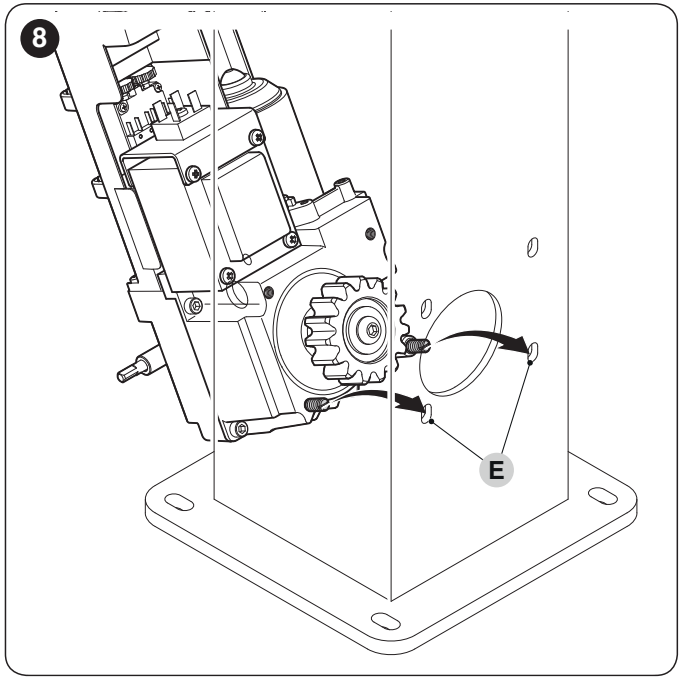
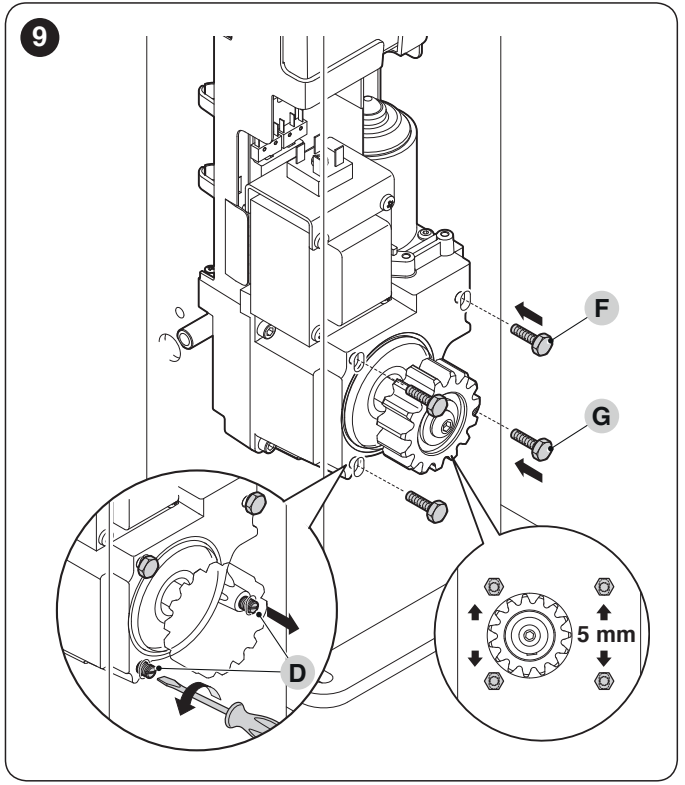
- Fit the release cover with the screw and washer. If you need to support the motor while inserting it, use the two supplied auxiliary screws D in the lower post slots, as shown.
- Insert the motor through the rear opening, position it, and secure it with the two upper M8 screws (F). Then remove the auxiliary screws D and only then fit the two lower M8 screws (G).
- The motor height can be adjusted by 5 mm. Adjust the triangular release pin to suit the post width, check its fit by inserting the key, and secure it with the nut against the flat side of the pin, as shown in the drawing.
- When installing a new rack, open the gate at least 50 cm from the closed stop. Align the rack with the pinion and fasten it to the gate leaf.
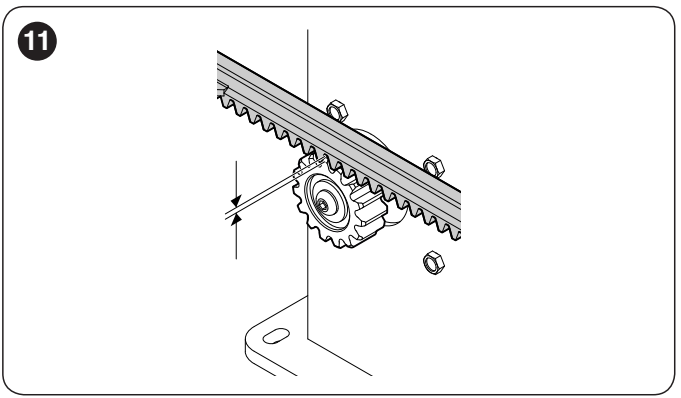
- Maintain a gap between the rack and pinion teeth of 1–2 mm along the entire travel. The gate's weight must not rest on the pinion.
- With the gate released, open and close it fully by hand. The rack and pinion may be misaligned by no more than 5 mm; the gap between the teeth must remain 1–2 mm along the entire travel.
Manual release
Stop the gate and disconnect the power before releasing it. Hold the gate leaf to prevent unintended movement. Slide back the lock cover, insert the key, and turn it 90° clockwise. The gate can then be moved by hand.
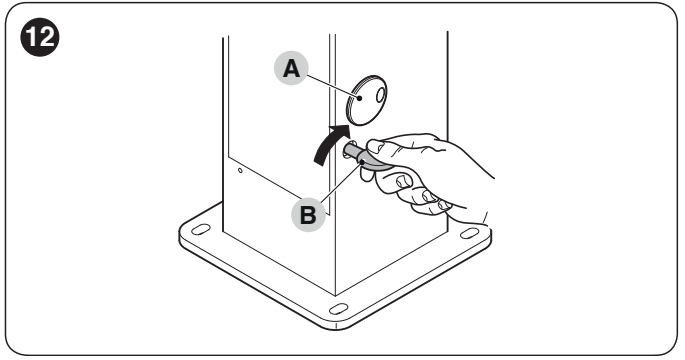
After moving the gate by hand, return the release mechanism to the locked position and check that the drive has engaged before issuing an automatic command. Access can be prepared on either side of the post or remotely using KIO and KA1.
Electrical cable preparation
| Line | Cable / length |
|---|---|
| 230 V AC mains supply | 3 × 1.5 mm² up to 30 m; for longer runs, 3 × 2.5 mm² and protective earthing as specified by the technician. |
| FLASH | 2 × 0.5 mm², up to 20 m. |
| BlueBUS | 2 × 1.5 mm², up to 30 m. Assess longer runs separately. |
| Antenna | RG58 coaxial cable, up to 20 m; under 5 m recommended. |
| Key switch | 2 × 2 × 0.5 mm² or 1 × 4 × 0.5 mm², up to 50 m. |
| Safety edges | 2 × 0.5 mm² up to 30 m; for a moving edge, use a suitable transfer system or flexible cable. |
Route the supply cables with sufficient slack and secure them against pull-out. Water or condensation must not enter the electronics through the conduit. Mains and low-voltage wiring must be installed in accordance with the electrical design.
NKA3R10 wiring diagram and accessory polarity
The wiring and settings below apply to a control board labelled BlueBUS, STOP, SbS, OPEN, CLOSE, and AUX_IN, with eight LEDs L1–L8 and three buttons. For an older control board, compare the terminal labels with its own manual; the additional AUX_IN input cannot be added by bridging to another terminal.
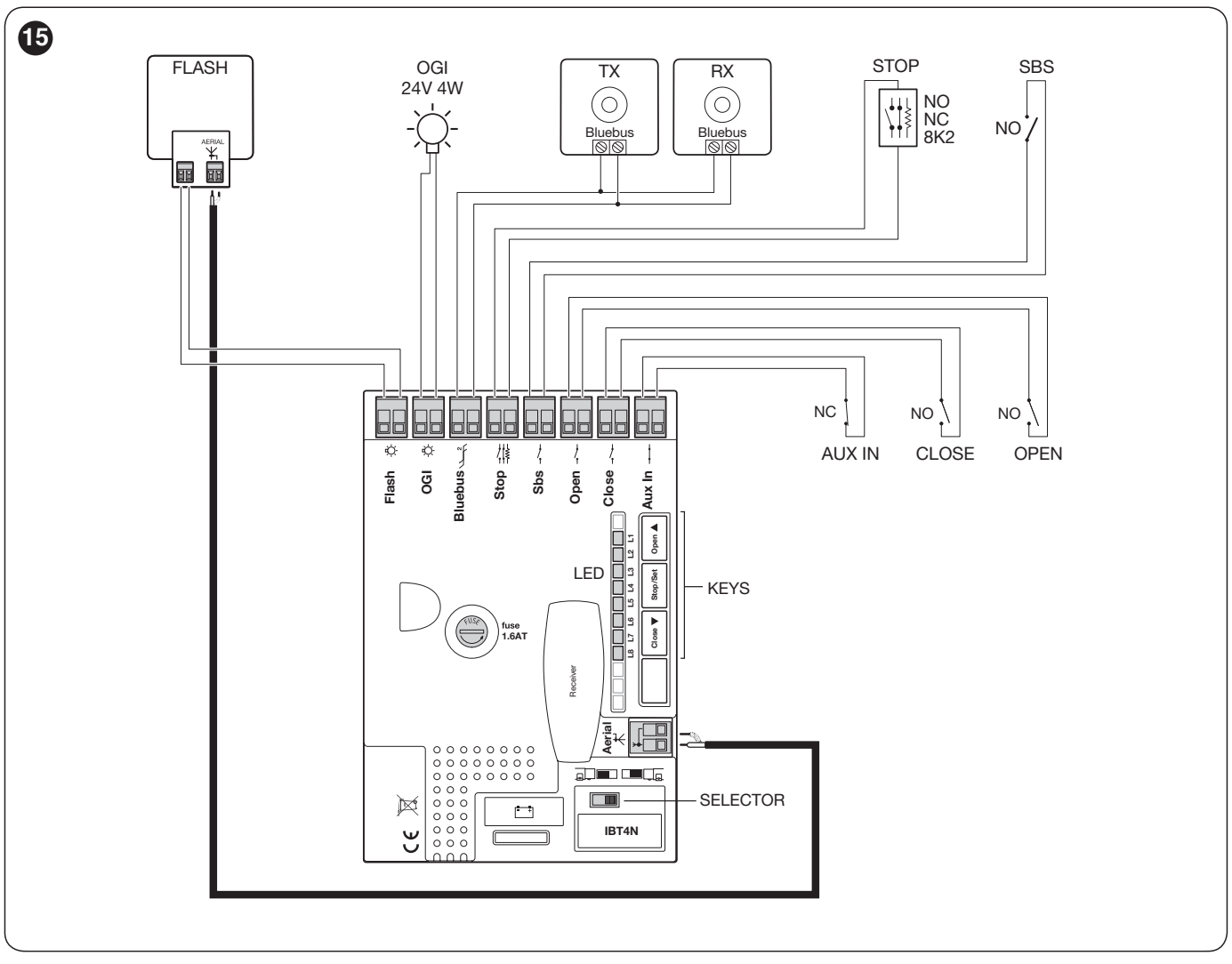
| Terminal | Function and polarity |
|---|---|
| FLASH | For up to two ELDC beacons or up to two 12 V / 21 W bulbs. Do not use mains-powered ELAC. Follow the labels on the connected beacon. |
| OGI | Programmable output, 24 V DC −30/+50%, max. 4 W. Function set by second-level L4; factory setting responds to radio output 3. |
| BlueBUS | Compatible devices connected in parallel using two wires, with no +/− polarity. Maximum 15 BlueBUS units. |
| STOP | Learned input: NO, NC, or 8.2 kΩ. A change from the learned state stops movement and briefly reverses it. The contact itself has no polarity. |
| SbS / OPEN / CLOSE | Voltage-free NO contact: step-by-step / open / close. CLOSE can be switched to partial opening. |
| AUX_IN | Voltage-free NC contact, factory-set to the STOP function. The function can be changed using the Oview programmer. |
| Accessory power supply | Right-hand STOP contact = −, left-hand SbS contact = + as shown in the detail below. 24 V DC −30/+50%, 100 mA maximum for all devices powered this way combined. |
| Antenna | Coaxial cable: core to the signal terminal and shield to the corresponding terminal. These are not the power supply +/− terminals. |
| SM receiver / IBT4N | Radio receiver socket / BusT4 interface for Oview. Insert with the power disconnected. |
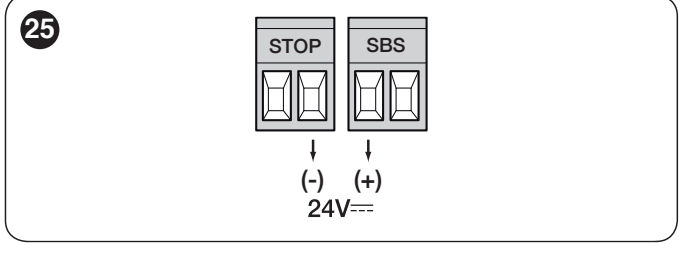
Do not confuse the auxiliary power terminals with the pair of terminals for the command input itself. Do not connect an external voltage to the inputs. For a resistive safety edge, follow its instructions for wiring and fitting the 8.2 kΩ termination resistor.
Photocells and safety devices
NICE EPMB and NICE EPSB are two-wire BlueBUS photocells. Connect both TX and RX in parallel to BlueBUS, observing no polarity. The same pair must have the same jumper settings; different pairs must be assigned different addresses.
| Address | Response / application |
|---|---|
| PHOTO / PHOTO II | Outer pair at a height of approximately 50 / 100 cm; stops and reverses movement during closing. |
| PHOTO 1 / PHOTO 1 II | Inner pair at approximately 50 / 100 cm; stops and reverses movement during closing. |
| PHOTO 2 / PHOTO 2 II | Protection during opening; position according to the area to be protected. |
| PHOTO 3 | Pair covering the entire automation system. When used with PHOTO II, position TX and RX relative to each other as specified in the photocell instructions. |
Position the photocells and safety edges to cover the hazards specific to the gate, including the area behind the open gate leaf. After every change to the wiring or addressing, repeat device learning and functional tests.
Limit switches and initial startup
- Mechanical setup: the motor must be mounted at the gate with the gate approximately halfway along its travel. With the gate leaf released, open and close it fully; this presets the internal limit switches. Move it back to halfway and engage the drive.
- Direction: with the power disconnected, set the selector according to the opening direction—left or right. When powered on, BlueBUS should flash once per second, the TX/RX LED should flash, and FLASH/OGI should be off.
- Device learning: press and hold OPEN + STOP/SET. Release when L1/L2 flash rapidly, after approximately 3 seconds. Wait until the process is complete; STOP must be lit and L1/L2 must be off.
- Travel learning: press and hold CLOSE + STOP/SET and release when the gate starts moving, after approximately 3 seconds. The first movement must be opening. If the gate closes, press STOP/SET, disconnect the power, correct the direction selector setting, and repeat the learning procedure.
- Allow the gate to complete a full opening to the limit switch, followed by a full closing. Do not obstruct the gate during travel; if an error occurs, check the wiring and safety devices.
Fine-tuning the end positions
The technician removes the cover over the two adjustment knobs. Select the knob marked with an arrow for the relevant end position and adjust it in small increments. Half a turn corresponds to approximately 3 cm of gate movement. After adjusting, issue a new command in that direction and check that the gate stops correctly.
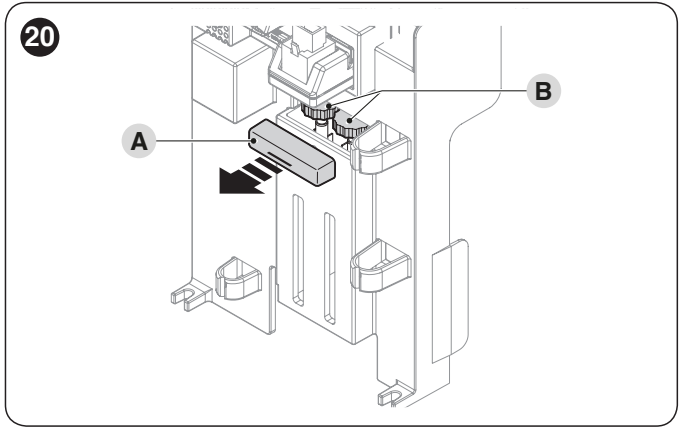
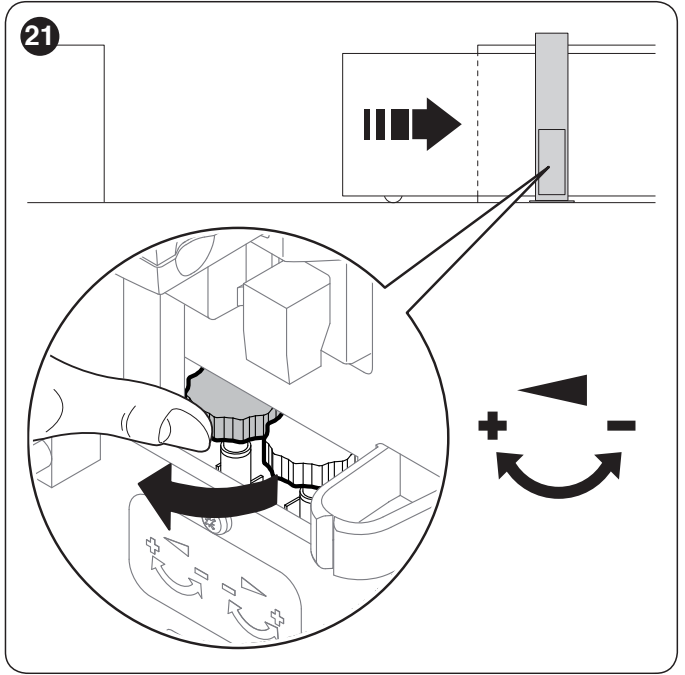
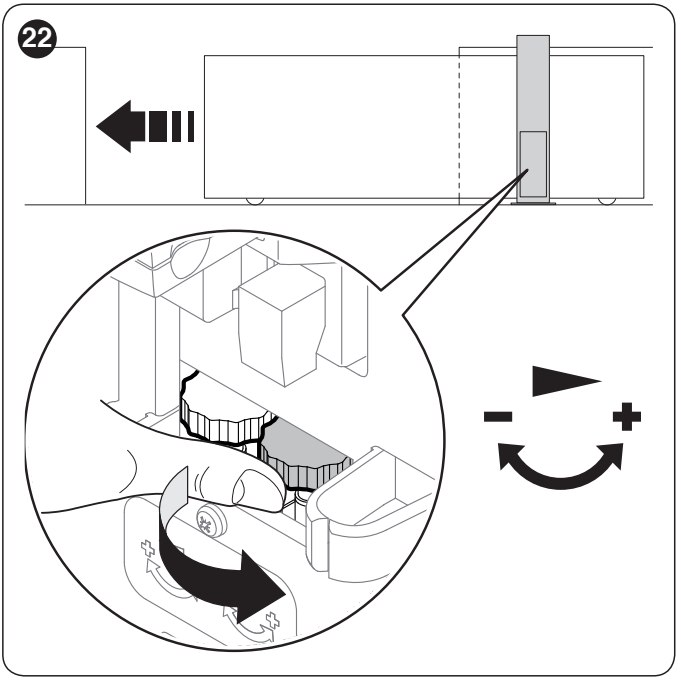
During testing, the gate leaf should slow down before reaching the end and stop approximately 2–3 cm before the fixed mechanical stop. Check rack clearance, the stability of the fixings, photocell and safety-edge operation, and measure impact forces. The system must not be operated until the complete assembly has been tested.
Level 1 settings – enable / disable
The following settings apply to the NKA3R10 control board with OPEN, STOP/SET and CLOSE buttons and L1–L8 LEDs. All Level 1 functions are OFF by default.
- Press and hold STOP/SET until L1 starts flashing.
- Use OPEN/CLOSE to select the function LED.
- Briefly press STOP/SET to change the state: short flash = OFF, long flash = ON.
- After 10 seconds without a button press, the setting is saved and programming ends.
| LED | Function | When enabled |
|---|---|---|
| L1 | Automatic closing | After opening, the set pause time is counted down; the default is 30 seconds. |
| L2 | Close after photocell activation | After the photocell beam is cleared, the gate closes after 5 seconds. With L1 off, the gate first opens fully; with L1 on, it may stop opening as soon as the beam is cleared. STOP interrupts this function. |
| L3 | Always close | After power is restored, the open gate closes with a 5-second pre-warning flash. |
| L4 | Standby | After 1 minute without movement, BlueBUS and the LEDs switch off, except for the slow BlueBUS flashing. A command restores operation. |
| L5 | Boost | Skips smooth acceleration and starts at full power. |
| L6 | Pre-flashing | The warning light starts flashing 3 seconds before movement. |
| L7 | CLOSE as partial opening | Changes the function of the wired CLOSE input. |
| L8 | Slave | Second motor for synchronised, opposing gate leaves. |
Level 2 settings
Hold STOP/SET until L1 flashes, then use OPEN/CLOSE to select a parameter. Press and hold STOP/SET again; after approximately 3 seconds, the current value is displayed. While holding STOP/SET, use OPEN/CLOSE to select the required value, then release STOP/SET. It is saved after 10 seconds of inactivity. Bold values are the factory settings.
| Parameter | L1–L8 values |
|---|---|
| L1 – pause | L1: 5 s; L2: 15 s; L3: 30 s; L4: 45 s; L5: 60 s; L6: 80 s; L7: 120 s; L8: 180 s. |
| L2 – step-by-step operation | L1: open–stop–close–stop; L2: open–stop–close–open; L3: open–close–open–close; L4: condominium mode; L5: condominium mode 2 (command over 2 s = STOP); L6: step-by-step operation 2 (command under 2 s = partial opening); L7: hold-to-run; L8: semi-automatic opening / closing with hold-to-run. |
| L3 – speed | L1: very slow; L2: slow; L3: medium; L4: fast; L5: very fast; L6: extremely fast; L7: fast opening / slow closing; L8: extremely fast opening / fast closing. |
| L4 – OGI output | L1: gate-open indicator; L2: active when closed; L3: active when open; L4: radio output 2; L5: radio output 3; L6: radio output 4; L7: service indicator; L8: electric lock. Voltage remains 24 V DC −30/+50 %, max. 4 W. |
| L5 – force | L1: extremely light; L2: very light; L3: light; L4: medium; L5: medium-heavy; L6: heavy; L7: very heavy; L8: extremely heavy gate. The value must be verified by force testing. |
| L6 – partial opening | L1: 0.5 m; L2: 1 m; L3: 1.5 m; L4: 2 m; L5: 2.5 m; L6: 3 m; L7: 3.4 m; L8: 4 m. |
| L7 – service interval | L1: automatic, based on load; L2: 1,000; L3: 2,000; L4: 4,000; L5: 7,000; L6: 10,000; L7: 15,000; L8: 20,000 manoeuvres. |
| L8 – last errors | L1: last manoeuvre; L2–L8: progressively older manoeuvres. Used to read the history. |
The force setting does not compensate for a jammed guide or an obstruction. After changing the force or speed, recheck safety and measure impact forces. For gates over 200 kg, observe the V5 upper speed limit.
Receiver and remote controls
The control unit has an SM connector for a receiver, for example NICE OXIBD. With the standard assignment, output 1 is step-by-step operation, 2 is partial opening, 3 is opening, and 4 is closing. Era One, Era Inti or other NICE remote controls should be selected according to compatibility with the installed receiver; the receiver’s own manual explains how to store and delete remote controls.
With the OXIBD, connect the external antenna directly to the receiver, to the coaxial cable core and shield terminals. The baseboard antenna terminal shown in the diagram for the older receiver is not a substitute. Insert the receiver and connect the antenna with the power disconnected.
Two opposing leaves – Master / Slave
Each leaf needs its own NKSL400. One motor remains the Master; on the other, enable L8 Slave. The BlueBUS connection between the motors must preserve contact 1 Master → 1 Slave and 2 Master → 2 Slave as shown in the original detail. These numbers indicate contact positions; they are not universal +/− markings. BlueBUS photocells remain polarity-independent.
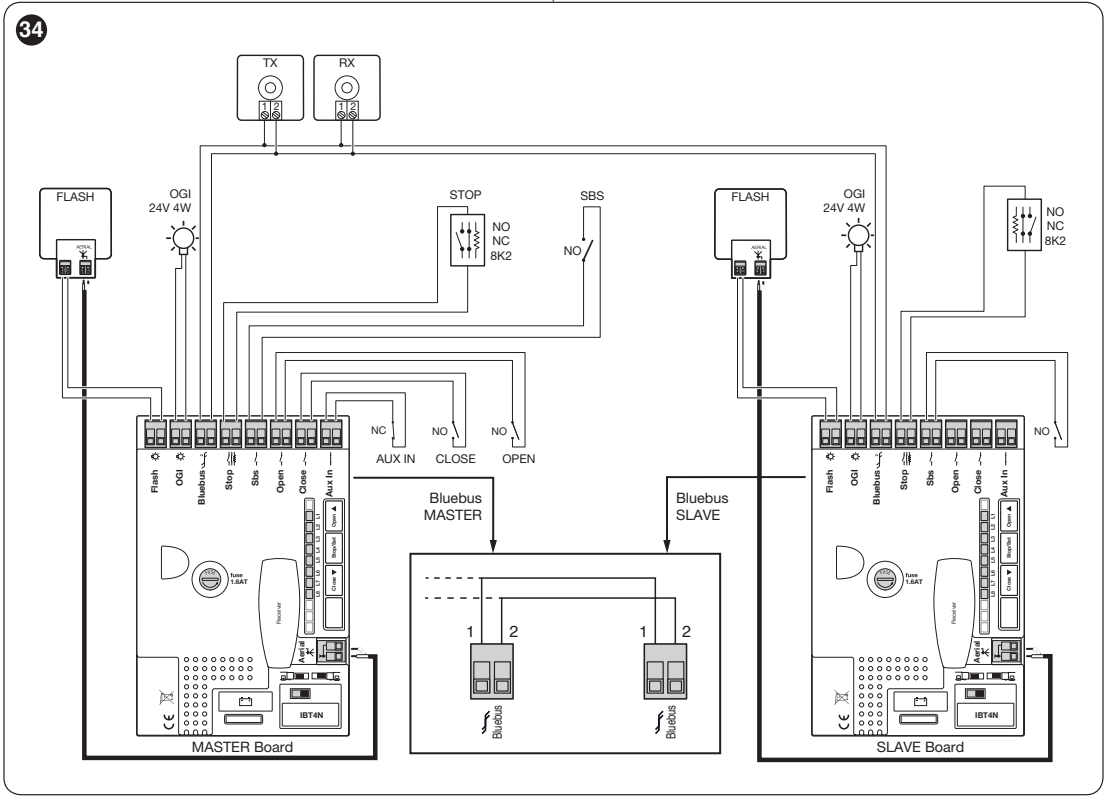
- With the power disconnected, install and connect the motors and set opposite opening directions.
- Connect the receiver and shared control and safety devices to the Master as shown in the wiring diagram. The Slave may have its own FLASH, OGI, STOP and SbS, controlling only its own leaf.
- After powering up, set L8 to ON on the Slave. First run device learning on the Slave, then on the Master.
- Start the learning procedure for the length of both leaves on the Master. Test every safety device and the combined operation.
OPEN, CLOSE and AUX_IN are not used on the Slave. For backup power, each motor needs its own battery. The Slave’s own force and indicator settings may differ.
Diagnostics using the warning light’s flashes
If a fault occurs, count the short flashes: the sequence repeats after a pause of approximately 1 s. During movement, normal flashing is approximately 0.5 s on / 0.5 s off.
| Count | Meaning and checks |
|---|---|
| 1 | BlueBUS: the devices do not match the learned configuration. Check the cable, addresses and any changes to the setup. |
| 2 | Photocell activated: obstruction, dirt or misalignment. |
| 3 | Force limiter: obstruction or increased friction. Check the mechanics first. |
| 4 | STOP activated. Check the safety circuit. |
| 5 | Internal parameter error. Wait at least 30 s and try a command; if the fault recurs, contact service. |
| 6 | The number of manoeuvres per hour has been exceeded. Allow the drive to rest. |
| 7 | Internal circuit error. A technician should disconnect all power sources; if the fault recurs, contact service. |
| 8 | A continuous command blocks further commands; check, for example, the OPEN timer. |
| 9 | Automation blocked by the automation STOP command; it requires the corresponding electronic unlock command, not just a mechanical key. |
| BlueBUS: once per second | Normal operation; two quick flashes confirm an input change or a received command. |
|---|---|
| STOP lit | The learned safety input is in the permitted state; when the light goes out, it has been triggered. |
| L1/L2 flashing together | Device learning is required. |
| L3/L4 flashing together | Track-length learning is required. |
| AUX_IN off | For the basic function, the NC contact is open; check the circuit. |
| Remote control not responding | Check the battery and that it is stored in the correct receiver. If BlueBUS is not flashing either, a technician should check the power supply and fuses. |
The last eight errors can be read using the second-level L8 parameter: while holding STOP/SET, use OPEN/CLOSE to select the relevant manoeuvre, then count the flashes. Do not disable safety circuits by bridging them.
Estimated service life
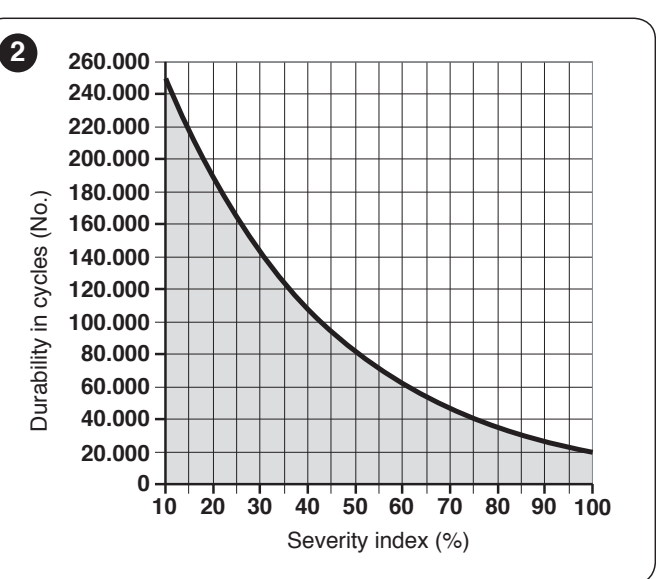
Add the indices for the specific gate and operating conditions. On the graph, find the total percentage on the horizontal axis and read the estimated number of cycles from the vertical axis. The graph assumes regular maintenance; it is not a guarantee or a number of years.
| Characteristics of the complete automation system | Index | Service life graph |
|---|---|---|
| Length | Under 3 m: 0%; 3–4 m: 5%; 4–5 m: 10%; 5–6 m: 20%. |
|
| Weight | Under 200 kg: 0%; 200–300 kg: 15%; 300–400 kg: 30%. | |
| Temperature / humidity | Above +40 °C or below 0 °C, or humidity above 80%: 20%. | |
| Dust, sand or salt | 15%. | |
| Force set to level 4 | 15%. |
Maintenance and backup
Carry out servicing no later than 6 months or 20,000 operations after the previous maintenance, whichever comes first. Also take into account any earlier alert set via L7. The technician checks for corrosion and inspects the fastenings, pinion, rack, manual operation, limit switches and safety devices, and repeats the tests.
Disconnect the mains power and backup battery before servicing. PS124 is connected only after installation and programming are complete, as it can also power the device when the mains supply is off. The drive has a dedicated space for the battery. The user must keep the gate path and photocell optics clean; if a fault occurs or the system operates abnormally, stop using the automatic control. Keep children and other people away from the moving gate.
NKSL400 technical specifications
| Power supply, system / motor | 230 V AC, 50/60 Hz / 24 V DC |
|---|---|
| Current draw / power consumption | 1.1 A / 250 W |
| Maximum peak power consumption | 330 W |
| Maximum / rated force | 400 N / 200 N |
| Maximum / rated torque | 12 Nm / 6 Nm |
| Speed | Up to 0.34 m/s without a load; 0.18 m/s at rated torque. |
| Maximum continuous operating time | 10 minutes at rated torque; cycle limits based on gate length and weight also apply. |
| Rack drive | M4, Z15 pinion |
| Dimensions / weight | 131 × 135 × 405 mm / 6.5 kg |
| Protection rating of the completed assembly | IP44, when the post is correctly installed and covered |
| Operating temperature | −20 to +50 °C |
| Insulation class | I – protective earthing is mandatory. |
| Backup | Optional PS124; operation during a power outage depends on the battery and gate condition. |
360° view
Installation manual PDF
How can I order this item?
Choose the option that suits you:
- order online: use the buy button to add the goods to your shopping cart (you will find the buy button here in the product variants table).
- order by email: place your order at [email protected]






