Control of additional devices via NICE external receivers
If you want to control using NICE transmitters devices from other brands, you need to connect a NICE external receiver (for example NICE SMX2R, NICE OX2 NICE FLOXR, NICE OX4T and so on). External receivers are powered by 12V or 24V and have a RELAY output, which you connect to the terminal block of the drive from another brand.
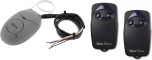 |
We have put together a competitively priced kit for controlling anything consisting of: |
The examples shown are for controlling gates, but a NICE external receiver can also be used for remote control of any automation system.
I. Controlling a device from another brand with a NICE remote control
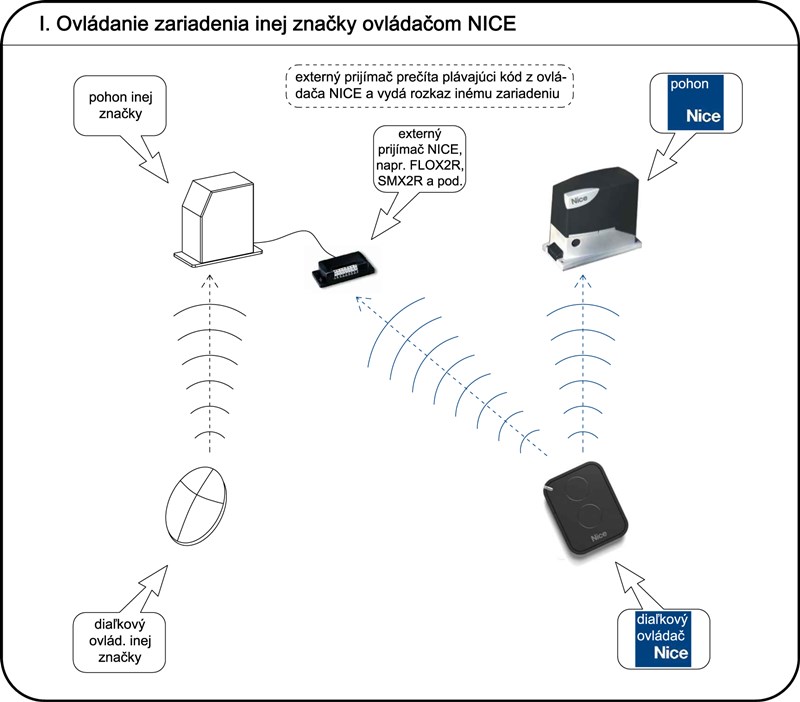
Examples of using NICE external receivers
Example 1 – NICE drive on the entrance gate + another drive on the garage door:
I have a NICE drive on my sliding gate and a drive from brand XY on my garage door. I want to control both drives with one remote. So I connect a NICE external receiver to the drive from brand XY. It receives the radio signal from the NICE remote, allowing me to control both devices with one two-channel remote.
Example 2 – using multiple functions:
I may also want to use more than one type of command for a device: for example, I want to be able to partially open my sliding gate. At the same time, I want to use the same remote to control another device, such as a garage door. In that case, I use a four-channel remote control and connect the external receiver to the garage door drive. I can set it up as follows:
- the first button controls the sliding gate (e.g. open – stop – close)
- the second button opens the gate by one metre (partial opening function)
- I use the third button to control the garage door
- I leave the fourth button free so I can use it in the future to control another automation system, since my external receiver is two-channel and I can connect it to one more device.
Example 3 – too many remotes:
I have 7 automated systems at different properties that I want to control remotely, but I don't want to keep 7 different remotes in my car. In this situation, external receivers + a NICE ON9E nine-channel remote control, which lets you control up to 9 automated systems. However, remember that external receivers have two channels. So if you have more automated systems, you will need to connect one receiver to each pair.
Example 4 – devices for which additional remotes are unavailable:
I have a device of unknown origin/manufacturer and can't find any remotes for it. If the device has a control unit with wired inputs for an external receiver, the problem is solved.
Example 5 – I want to remotely control something you wouldn't even think of:
Yes, sometimes it's surprising what people use a receiver for: remotely operating church bells, a pond sluice gate, a feed dispenser, and so on. The information in the introduction still applies: if the device has the required input, it can be controlled remotely using an external receiver.
Example 6 – I want to remotely control a 230V device:
Use the NICE OX4T, which contains 4 relays, each of which can be set to one of 14 commands.
Explore further:
- full range of external receivers
- full range of remote controls
- Order: or [email protected]
- Contact technical support for drives
- Instructions for pairing remote controls
II. Controlling NICE devices with a remote control from another brand
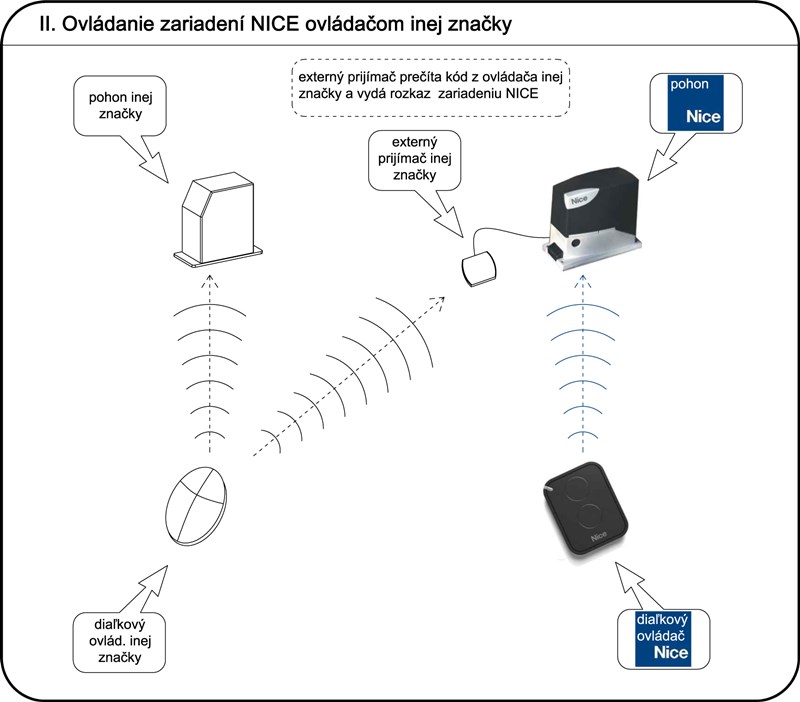
Using the same principle, you can control NICE drives using remote controls from other manufacturers. If you already have remotes from manufacturer XY, you will also need an external receiver from the same manufacturer, XY. Consider:
a) the price of an external receiver from another manufacturer
b) the price of additional remotes from another manufacturer if I need to buy more in the future
Once you consider the initial costs, it may sometimes be more economical to keep using the remote controls you already have and simply buy an external receiver for them. That's why our range also includes external receivers from other brands:
- CAME external receiver, and others CAME remote controls
- KEY external receiver, and others KEY remote controls
A real-life example:
Hello!
Could you please provide some information?
I have an ON3EBD remote control for a NICE gate drive, and I would like to use the same remote to open my garage door.
My garage door is an APERTO Baseline. Which type of external module do I need to control the garage door?
Thank you in advance for your reply.
Answer: the simplest solution is as follows:
- Buy a NICE OX2 external receiver
You can order it at https://fortamigo.com/sliding-gates/nice-ox2-2-channel-external-receiver-433-92-mhz - Connect this external receiver to the Aperto Baseline drive
Note: Since the control unit supplies 24V, this jumper should not be inserted in the OX2.
See page 12 of the manual https://fortamigo.com/uploads/4b1decfa7cf5a6851c08879111e8ffff-aperto-baseline-pdf.pdf, connect the OX2 receiver to the Aperto Baseline drive as follows:- red wire from the OX2 receiver to terminal 9 on the drive
- black wire from the OX2 receiver to terminal 10 on the drive
- first white wire from the OX2 receiver to terminal 5 on the drive
- second white wire from the OX2 receiver to terminal 6 on the drive
- Switch one button on the ON3EBD remote to momentary mode
Follow the instructions at https://fortamigo.com/switching-the-on3ebd-controller-to-dc-mode-and-back - Store this ON3EBD button in the OX2 receiver
1. Press the button on the OX2 once; the LED next to it will start flashing.
2. Then press and hold the button on the remote (the one you switched) until the LED flashes differently three times (approx. 3–5 seconds).
3. Wait for it to finish flashing, and you're done. - Give it a try :)






