NICE FLOX2R – universal two-channel external receiver with rolling code
| Product availability: | Sale ended | Unfortunately, the product is no longer available for delivery. This does not mean it will never be available again, but at present, it is not expected to be offered for sale again. |
|---|


Description of NICE FLOX2R – universal two-channel external receiver with rolling code
Available replacement!
Two-channel external receiver FLOX2R has been replaced by two-channel external receiver 433.92 MHz - NICE OX2.
Universal two-channel (what does this mean?) receiver compatible with NICE transmitters using the rolling code type FloR (the 52-bit code allows 4.5 trillion combinations, making it virtually impossible to misuse). It also recognizes the coding used by O-View transmitters Era One and Era Inti. With this receiver, you can control an automated device from another brand using a NICE transmitter. The device includes a BM250 memory module for storing 63 codes.
0. Page contents
1. Product description and electrical wiring
2. Selecting the transmitter channel for the relay
3. Using normally closed (NC) contacts
4. Swapping the receiver channel with the transmitter button
5. Programming
5.1. QUICK TRANSMITTER STORAGE
5.2. STANDARD TRANSMITTER STORAGE
5.3. REMOTE TRANSMITTER STORAGE (WITHIN RECEIVER RANGE)
5.4. ERASING THE ENTIRE MEMORY
5.5. ERASING A SPECIFIC TRANSMITTER FROM THE RECEIVER MEMORY
6.1 STEP-BY-STEP
6.2 TIMER
6.3 ALARM
7. Memory lock
7.1 ACTIVATING MEMORY LOCK USING HARDWARE
7.2 ACTIVATING MEMORY LOCK USING SOFTWARE
7.3 DEACTIVATING MEMORY LOCK
7.4 PASSWORD-PROTECTING THE MEMORY
8. Technical specifications of the NICE FloxR FLOX2R receiver
1. Product description and electrical wiring
The external receiver can be mounted on a wall or ceiling using screws, or beneath the cover operator, which it is intended to control.
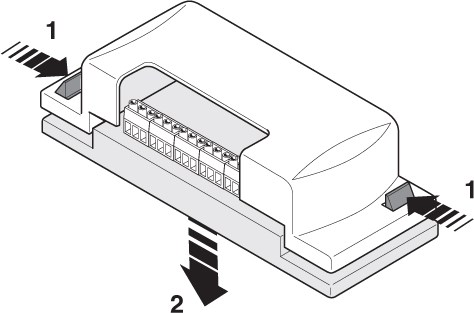
| 1. Open the receiver housing | 2. Make the electrical connections according to the following diagram: |
 |
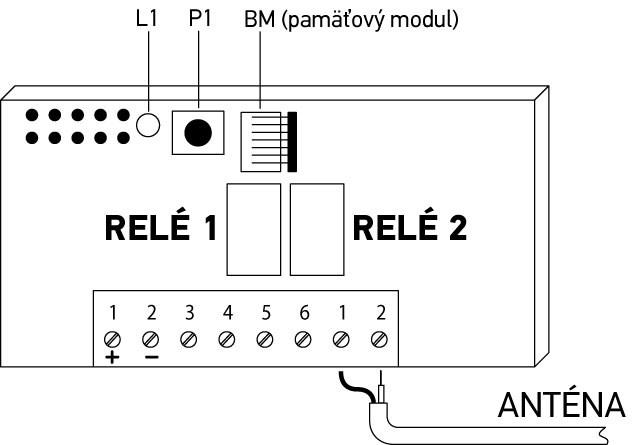 |
| Component | Description |
|---|---|
| L1 | Indicator LED |
| P1 | Programming button |
| BM | Removable BM memory module |
| Inputs | Description |
|---|---|
| 1–2 | POWER SUPPLY: 12/24 V DC or AC |
| 3–4 | RELAY 1: normally open (NO) contact for relay 1 |
| 5–6 | RELAY 2: normally open (NO) contact for relay 2 |
| 1–2 | ANTENNA: input for the antenna, preferably use RG58 coaxial cable, as short as possible (up to 10 m). In this case, connect the shield to input 1 and the core of the coaxial cable to input 2. |
2. Selecting the transmitter channel for the relay
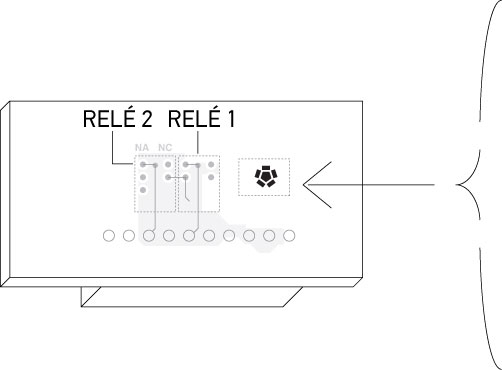
The external receiver can recognize all four buttons (channels) remote control), but only two buttons (channels) can be used.
Note: NICE transmitters using FloR coding support four types of commands assigned to the individual buttons (channels):
| Button | Command | Sequence when the transmitter button is pressed repeatedly |
|---|---|---|
| Button 1 | Step-by-step | Open > Stop > Close > Open |
| Button 2 | Partial opening | Partial opening > Stop > Close > Stop > Partial opening |
| Button 3 | Open only | Open > Stop > Open |
| Button 4 | Close only | Closing > Stop > Closing |
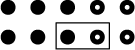
Channel assignment to individual relays is implemented using a jumper as shown in the following table:
| Channel | Relay 1 | Relay 2 |
|---|---|---|
| Channel 1 |  |
 |
| Channel 2 |  |
 |
| Channel 3 |  |
 |
| Channel 4 |  |
 |
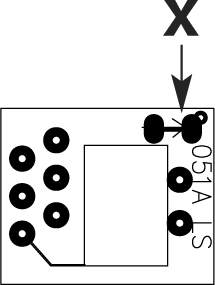
3. Using normally closed (NC) contacts
If you need to use an external receiver to control a device that requires normally closed (NC) contacts and performs the specified action when they open, proceed as follows:
- Disconnect the external receiver from the power supply.
- Carefully remove the circuit board from the housing and turn it over.
- As shown in the image
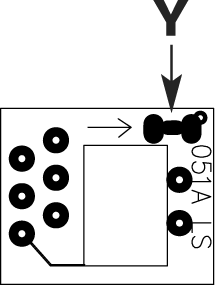
break the connection marked X and, using a small drop of solder, connect connection Y.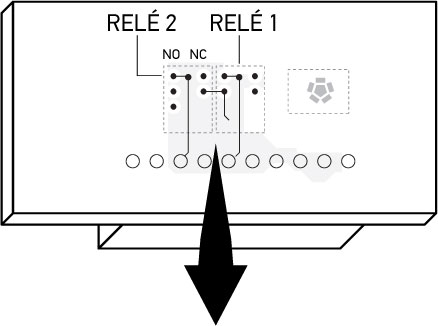
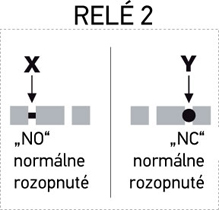
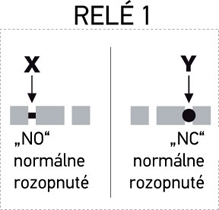
- This procedure does not have to be applied to both relays, so one relay can control normally closed (NC) contacts and the other normally open (NO) contacts
4. Changing the receiver channel assigned to a remote-control button
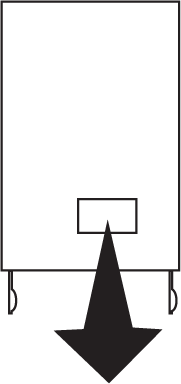
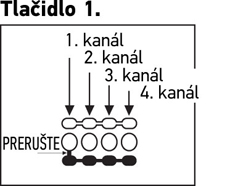
On NICE FloR FLO2R-S remote controls you can set the channel transmitted by each button directly on the remote control. By default, the first button is set to channel 1 and the second button to channel 2. The procedure is as follows for each button:
 |
|
 |
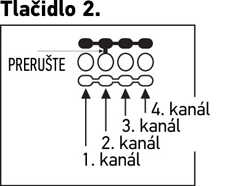 |
| Break the marked connection and connect it with a drop of solder to channel 2, 3 or 4. | Break the marked connection and connect it with a drop of solder to channel 1, 3 or 4. |
5. Programming
Programming is carried out using button P1 and LED L1 on the receiver. The LED indicates the following signals:
| Slow, half-second flashing | |
|---|---|
| Number of flashes | Meaning of the flashes |
| 1 | The received code from the remote control is not authorized, i.e. the remote control/button has not yet been paired. |
| 2 | Recognition of the received code was unsuccessful. If the second flash is longer than the first, the memory lock is enabled. If the flashes are identical, the memory lock is not enabled. |
| 3 | Recognition of the received code was successful. |
| 4 | The transmitted code is already among the authorized codes. |
| 5 | The code list is empty (no codes are authorized). |
| 6 | The code list is full (there is no space to store another code). |
| 7 | The code you want to delete is not among the authorized codes. |
| 8 | Another code was detected during code recognition (code collision). |
| 9 | A password |
| Fast, quarter-second flashing DURING INITIALIZATION | |
| Number of flashes | Meaning of the flashes |
| 1 | The device contains a BM60 memory module (capacity for 16 codes) |
| 2 | The device contains a BM250 memory module (capacity for 63 codes) |
| 3 | The device contains a BM1000 memory module (capacity for 250 codes) |
| 4 | The memory contains codes that do not use FloR encoding |
| 5 | An error was detected while reading the memory |
| Fast, quarter-second flashing DURING OPERATION | |
| Number of flashes | Meaning of the flashes |
| 1 | The received code is a copy; only original codes are valid. |
| 3 | The code is not in the code table, but has been resynchronized. |
| 4 | The code is not in the code table and resynchronization is locked. |
| 5 | The code is not in the code table and resynchronization is not possible. |
5.1. Quick remote control programming
Although this is the quickest method, it is not particularly secure, because while programming is in progress the receiver may pick up another code within range and accidentally store it. If you are unsure about the security, use the standard method.
- Press and hold the P1 button on the receiver; the LED L1 lights up while you continue to hold the P1 button
- Continue holding the P1 button and at the same time press and hold the button on the remote control (the code is being transmitted)
- When the LED L1 goes out, release the button on the remote control (continue holding the P1 button)
- When the LED L1 lights up again, you can program another remote control, see section 2.
- When you are finished, release the P1 button on the receiver
5.2. Standard remote control programming
- Press and hold the P1 button on the receiver until the LED L1lights up, then release the P1 button
- LED L1 will remain lit for 5 seconds. During this time, press and hold the button on the remote control (the code is being transmitted), until the LED L1
- goes out. Release the button on the remote control and wait 1 second
- Press and hold the button on the remote controluntil the LED L1 goes out, then release the button on the remote control
- If programming was successful, the LED L1 will flash three times
If you do not want any more remote controls to be stored in memory, you can lock it.
5.3. Programming a remote control remotely (within range of the receiver)
If you already have an OLD remote control paired with the receiver (i.e. the code transmitted by the remote control is stored in the receiver's memory), you can program a NEW remote control remotely within range of the receiver (10–20 m). The OLD remote control must already be programmed and fully functional.
- On the NEW remote control, press and hold the relevant button for at least 5 seconds, then release it
- On the OLD remote control, press the relevant button 3 times in succession (at approximately one-second intervals)
- On the NEW remote control, press the relevant button once.
- If pairing was unsuccessful, try pressing the buttons more slowly. Alternatively, in step 1 hold it for 6 seconds.
5.4. Complete memory erase
A complete erase also clears the software memory lock and the timer is set to 3 seconds.
- Press and hold the P1 button on the receiver; the LED L1 lights up and goes out after 3 seconds (keep holding the P1 button)
- When the LED L1 starts flashing (continue holding the P1 button), release the P1 button during the third flash and wait approximately 3 seconds
- As soon as LED L1 lights up again, press button P1 and hold it until LED L1 goes out
Depending on the type of memory module, the process may take several seconds. During this time, the LED flashes rapidly and then flashes five times slowly to indicate that the memory has been successfully erased. If this does not happen, repeat the process.
5.5. Deleting a specific remote control from the receiver's memory
- Press and hold the P1 button on the receiver for approximately 3 seconds, until the LED L1, Release the P1 button
- Press and hold the button on the remote control, which you want to delete, until the LED L1, Release the button on the remote control
- Wait 1 second
- Press the button on the remote control again and release it
- LED L1 flashes once to confirm that the remote control has been successfully deleted. If this does not happen, repeat the process.
6. Advanced functions
By default, the relay function is Momentary — when a signal is received from the remote control, the code contained in the signal is recognized and, once recognized, the relay switches on (switches off) for approx. 300ms.
Advanced functions are activated by soldering the links as shown in the diagram:
 |
 |
No jumper | all channels Momentary |
 |
Jumper 1 | Channel 1 Step-by-step Channels 2, 3 and 4 Momentary |
|
 |
Jumper 2 | Channels 1 and 2 Step-by-step Channels 3 and 4 Momentary |
|
 |
Jumper 3 | Channel 1 Timer Channels 2, 3 and 4 Momentary |
|
 |
Jumper 4 | Channels 1+2 Alarm Channels 3 and 4 Momentary |
|
 |
Jumper 5 | all channels Step-by-step |
6.1 Step-by-step
The relay is activated when the button on the remote control is pressed and remains activated after the button is released. Press the button again to deactivate the relay.
6.2 Timer
The relay is activated when the button on the remote control is pressed and remains activated for the programmed period:
- Press and hold button 1 on the remote control (or simply channel 1)
- While holding the button on the remote control for three seconds, also press the P1 button on the receiver, then release the button on the remote control
- Hold the P1 button for the desired time to be programmed (maximum 150 minutes), then release the P1 button
- The set time has been saved and will remain saved until new programming is performed
Note: while the timer is being programmed, the receiver does not respond to other commands. If you do not want the relays to activate while programming the timer, select channel jumpers.
6.3 Alarm
Coming soon.
7. Memory lock
If you do not want the memory to be modified any further, you can lock the memory module.
7.1 Activating the memory lock using hardware
This method is very easy, but not very secure, as an intruder can easily remove the lock.
- If you are sure that all the remote controls you need have been stored, disconnect the receiver from the power supply
- Break connection X on the memory module:
- To add more codes (store remote controls) after locking the memory, place a drop of solder between the two points of connection Y:
7.2 Activating the memory lock using software
This method is more secure because you need a remote control stored in the receiver's memory to deactivate the memory lock:
- Press and immediately release the P1 button on the receiver
- Wait for the LED L1 to flash twice (after approx. 5 seconds), then, during the second flash, press and hold the P1 button and release it when the LED L1 goes out
- The LED will then flash twice. If the second flash lasts longer than the first, the memory lock has been activated successfully. If the flashes are the same, the process was unsuccessful and must be repeated.
7.3 Deactivating the memory lock
To deactivate the memory lock, you need a remote control that is already stored in the receiver's memory.
- Press the P1 button on the receiver and release it immediately
- The L1 LED will then light up for approx. 5 seconds. During these five seconds, press and hold the button on the remote until the L1 LED goes out, then release it
- Wait 1 second
- Press and hold the button on the remote. The LED will flash 4 times to indicate that the remote is stored in memory and can therefore unlock the memory.
- During the fourth flash, press the P1 button and release it only when L1 goes out
- The LED will then flash twice. If both flashes last the same amount of time, deletion was successful. If the second flash lasts longer than the first, repeat the process.
7.4 Locking the memory with a password
This method can only be carried out using the BUPC and OBox professional programmers.
8. Technical specifications of the NICE FloxR FLOX2R receiver
| Encoding | FloR O-View (basic functions) |
|---|---|
| Power supply | 12-24V (limit 10-28V) |
| Current consumption (minimum) | 16 mA at 24V |
| Current consumption (maximum) | 80 mA at 24V |
| Frequency | 433,92 MHz |
| Sensitivity | 0,5 µV |
| Number of relays | 2 relays |
| Normally open relay contact | max. 0,5A and 50V SELV |
| Operating temperature | -20 to +55 °C |
| Protection class | IP 30 |
| Dimensions | 86×22×58 mm (w×d×h) |
| Weight | 55 g |
How can I order this item?
Choose the option that suits you:
- order online: use the buy button to add the goods to your shopping cart (you will find the buy button here in the product variants table).
- order by email: place your order at [email protected]






