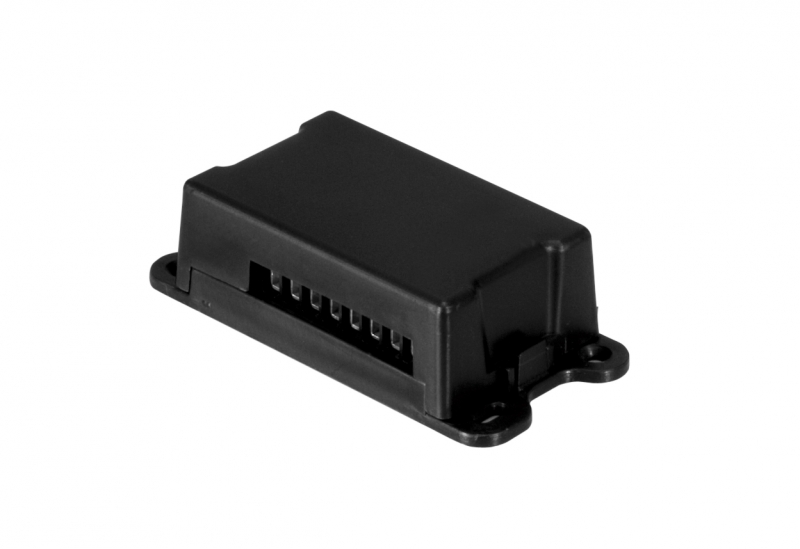
KEY RXM23 (900RXM23) - universal two-channel external receiver with both rolling and fixed code
| Product availability: | In stock | We normally dispatch goods within 24 hours. |
|---|
in stock
€61.67 including VAT
| Weight |
|---|
| 0,15 kg |
Description of KEY RXM23 (900RXM23) - universal two-channel external receiver with both rolling and fixed code
Dual-channel (i.e. two-button) receiver compatible with KEY remotes with rolling (ROLLING), as well as fixed (FIX) code. With this receiver, you can use a KEY-brand remote to operate an automated device from another brand, such as NICE-brand drives in our range. This is particularly useful if you already own a KEY drive and remotes, and would like to install a drive from another brand and operate it with your KEY remotes. Another option is to purchase an external NICE receiver, such as NICE SMX2R, or NICE FLOX2R, if you primarily want to use NICE remotes.
You can store up to 200 remotes in the receiver’s memory.
KEY RXM23 receiver diagram (900RXM23) and electrical wiring
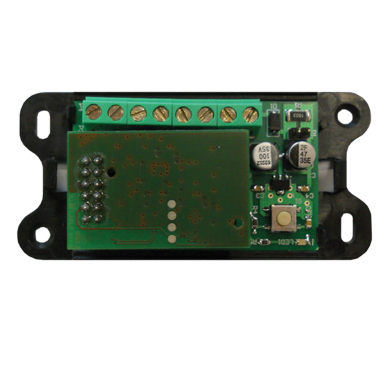
The KEY RXM23 receiver has a terminal block for the power supply, outputs for two potential-free relays, and an antenna input. It also has a T1 button, an L1 LED, and a jumper for selecting the power supply.
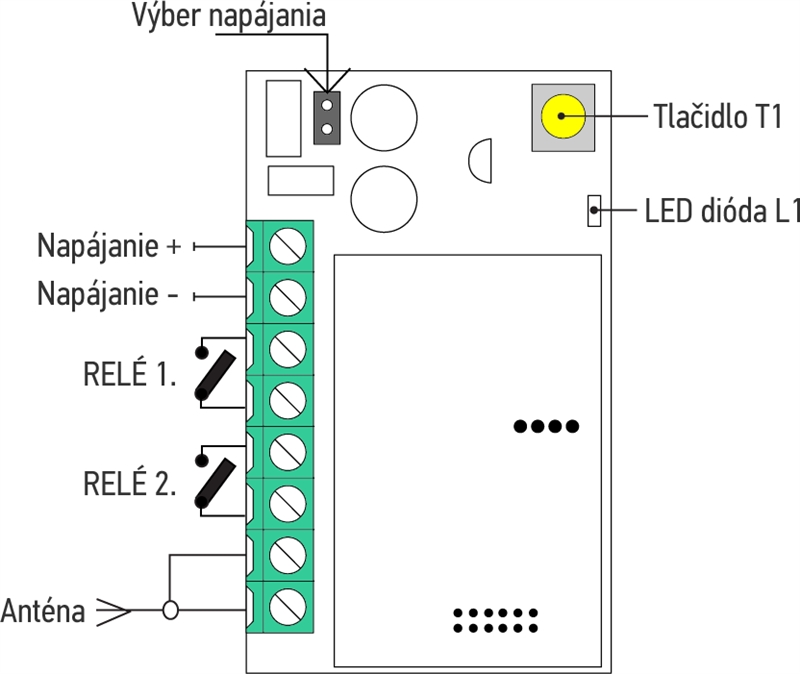
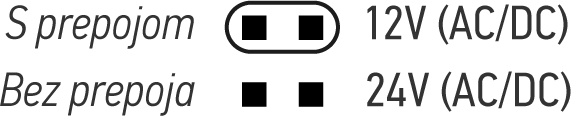
The unit is supplied with a terminal block for connecting the power supply (12V or 24V DC or AC). Select the power supply using the jumper as shown in the following illustration:
Pairing remotes with the KEY RXM23 receiver
The first remote programmed determines the code type that the receiver will recognise. It is therefore NOT universal for remotes with both fixed AND rolling codes, but for remotes with either fixed OR rolling codes. When power is connected to the receiver, it flashes:
| 1 long flash | The memory is empty, so you can store a remote with either a fixed or rolling code. This remote determines which code type the receiver will recognise from then on (until the entire memory is erased). |
|---|---|
| 2 quick flashes | You can store remotes with fixed codes only. |
| 3 quick flashes | You can store remotes with rolling codes only. For example, KEY Sub SUB-44R. |
Programming a remote into the receiver’s memory using the receiver button
Warning: once the receiver enters programming mode, any remote (transmitter) within range may be stored. To prevent an unauthorised remote from being stored in memory, temporarily disconnect the antenna to reduce the receiver’s range.
The programming procedure is as follows:
- Press the T1 button on the receiver once to store it on RELAY 1, or twice to store it on RELAY 2.
- The L1 LED on the receiver will flash once (for RELAY 1) or twice (for RELAY 2).
- Within seven seconds, press the button on the remote control and hold it for at least two seconds.
- If programming is successful, the L1 LED will flash once for a long duration.
- To program another remote, repeat step 3; otherwise, wait seven seconds for the timeout.
Programming a remote into the receiver’s memory using an already paired remote
NEW remote can be programmed into the receiver’s memory without accessing the receiver (provided it is within antenna range). However, you will need a remote that has already been programmed into the receiver’s memory (i.e. OLD remote). Follow the procedure below, repeating it separately for each button:
- Press the button on the NEW remote for at least 5 seconds
- Press the button on the OLD remote for at least 3 seconds (if step 1 was successful, the receiver should not trigger the gate; otherwise, start again and hold the button longer in step 1)
- Press the button on the NEW remote for at least 3 seconds
- Press the button on the OLD remote for at least 3 seconds
- Wait 7 seconds, then test the NEW remote (or the programmed button)
Deleting a remote from the receiver’s memory
To delete a remote from memory, follow these steps:
- Press the button on the receiver and hold it for at least 3 seconds, or until the L1 LED lights up. Then release it.
- Within seven seconds of the LED lighting up, press and hold the button on the remoteyou want to delete, until the L1 LED goes out. Then release it.
- After about one second, the LED on the receiver will start flashing at half-second intervals.
- Press the T1 button on the receiver.
- If deletion is successful, the L1 LED will flash once for a long duration.
- Wait 7 seconds
Erasing the receiver’s entire memory
To erase the ENTIRE memory, follow these steps:
- Press and hold the T1 button on the receiver until the L1 LED lights up (about 3 seconds). Keep holding it until the L1 LED goes out (about another 3 seconds), then release the button.
- After about one second, the LED will start flashing on its own at one-second intervals.
- When it flashes for the third time, press the T1 button on the receiver.
- If deletion is successful, the L1 LED will flash once for a long duration.
Technical specifications of the KEY RXM23 receiver
| Coding | - FIX - ROLLING |
|---|---|
| Compatible remotes | - SUB - ORION |
| Power supply | - 12V AC/DC - 24V AC/DC |
| Current draw (minimum) | 18 mA |
| Current draw (maximum) | 44 mA |
| Power consumption | 1W |
| Frequency | 433,92 MHz |
| Antenna | 50Ω |
| Sensitivity | -108 dB |
| Number of relays | 2 relays |
| Contact for normally open relay | max. 1A and 24Vdc |
| Operating temperature | -20 to +55 °C |
| Protection class | IP30 |
| Dimensions | 82×25×42 mm (w×d×h) |
| Weight | 55 g |
How can I order this item?
Choose the option that suits you:
- order online: use the buy button to add the goods to your shopping cart (you will find the buy button here in the product variants table).
- order by email: place your order at [email protected]






