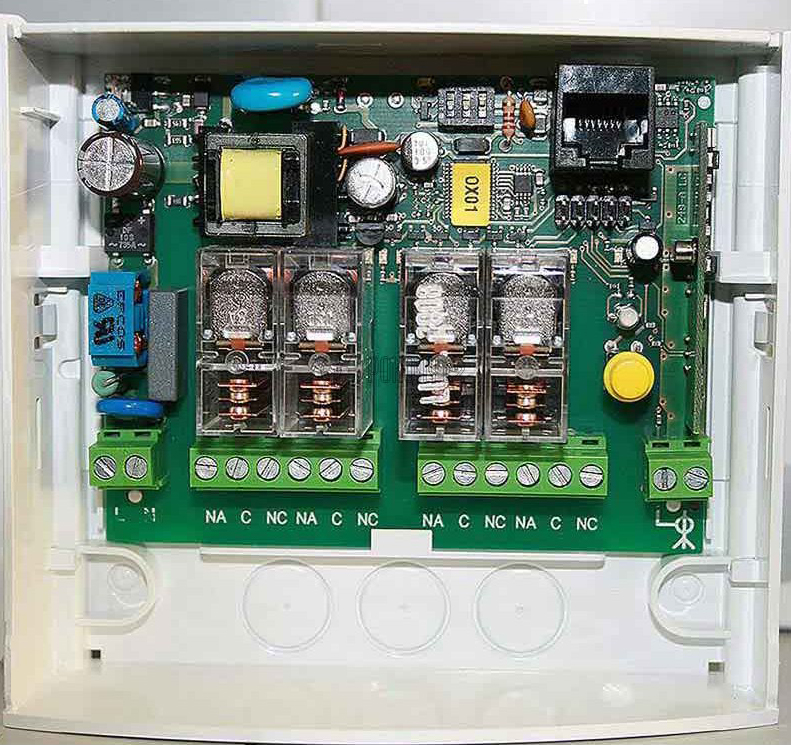
NICE OX4T – universal four-channel external receiver with rolling code
| Product availability: | In stock | We normally dispatch goods within 24 hours. |
|---|

in stock
€182.33 including VAT
| Weight |
|---|
| 0,40 kg |
Description of NICE OX4T – universal four-channel external receiver with rolling code
Four-channel (what does that mean?) receiver compatible with NICE remote controls with a rolling code of the O-Code (the 72-bit code allows 4.7 septillion combinations, making it virtually impossible to misuse). It also recognises the encoding of FloR remote controls Era Flor and FloR-s and the Smilo. With this receiver, you can control , using a remote control or a button from NICE, an automated device from another brand using volt-free relays. The relays are volt-free by default, but if you create a power connection through the relay, you can also control any other 230V device, such as a motor, light, blinds, awnings, roller shutters or shutters...
NICE OX4T receiver: features at a glance
- You can store up to 1024 remote controls in the receiver's memory.
- The device has 4 relays for normally open (NO) and normally closed (NC) contacts.
- Each relay can be set to one of 14 commands.
- It has 3 switches, 2 of which can be used to set the timer.
- It can also operate as a repeater, meaning it can transmit a signal from a remote control to another, more distant receiver, thereby extending the range of the entire automation system.
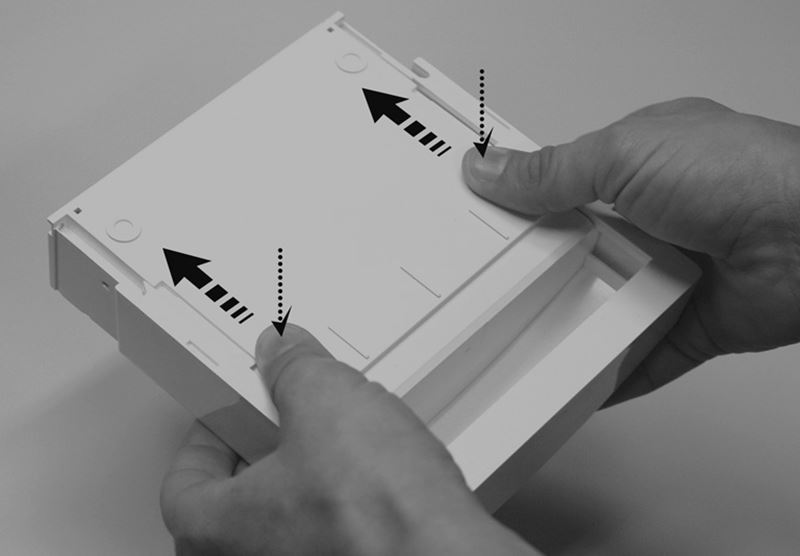
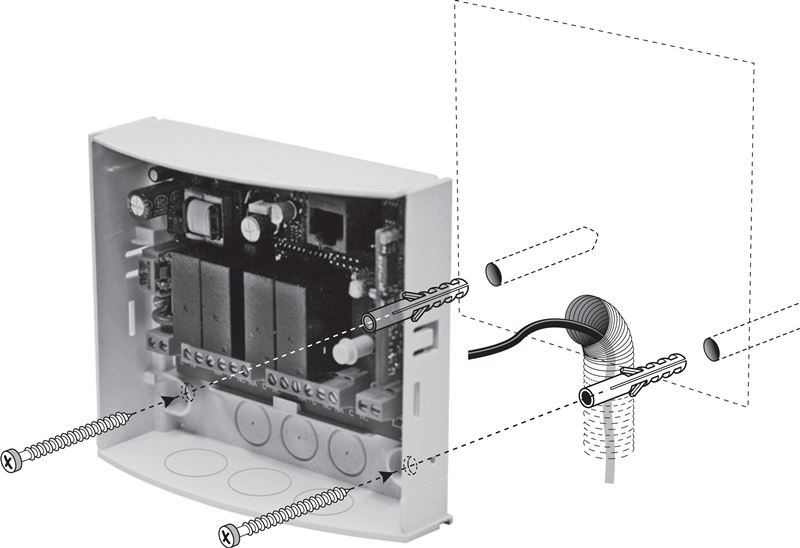
Installing the NICE OX4T receiver
| 1. Remove the receiver's top cover | 2. Drill holes at the marked locations for the screws and cables, then mount the receiver on a wall or another surface. |
|---|---|
 |
 |
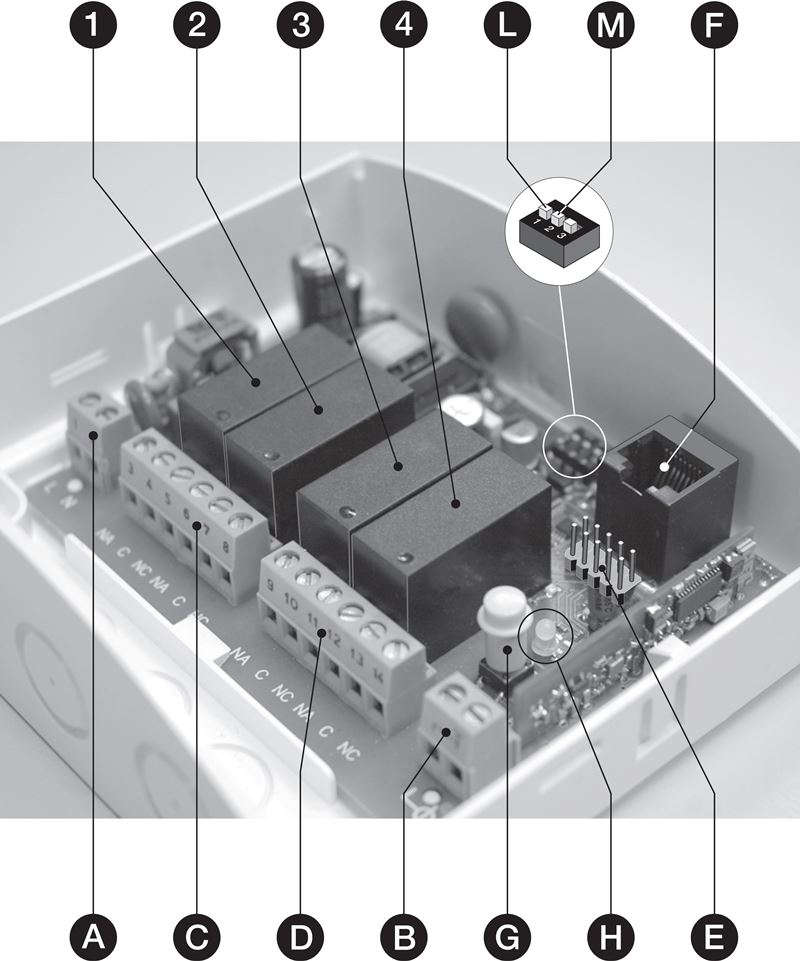
NICE OX4T receiver wiring diagram
The receiver has power inputs, outputs for four relays and an input for the antenna:
| Label | Description |
|---|---|
| 1, 2, 3, 4 | Relay |
| A | Power input |
| B | Input for the antenna |
| C | Relay 1 and 2 output |
| D | Relay 3 and 4 output |
| E | NICE OBOX port |
| F | Port for NICE O-View and NICE BusT4 |
| G | P1 programming button |
| H | L1 LED |
| L | Switch for Timer I |
| M | Switch for Timer II |
Electrical wiring and relay description
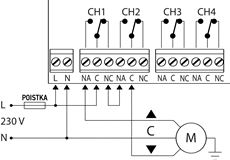
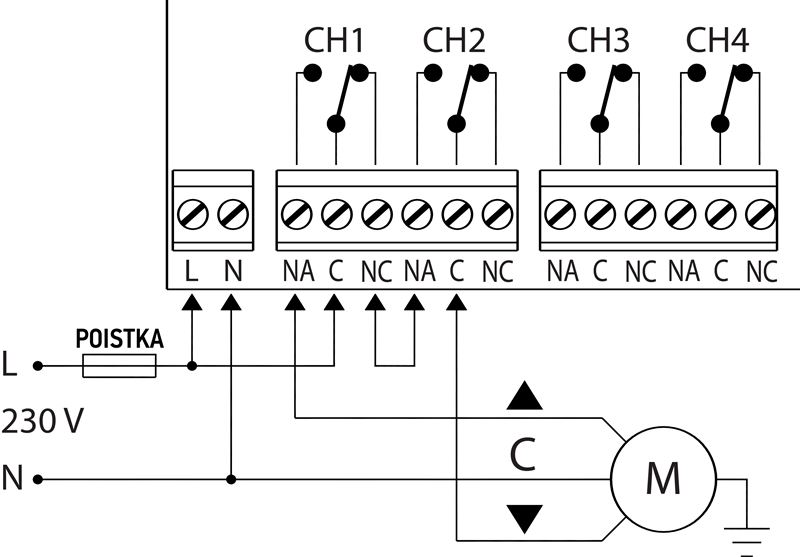
All 4 relays are volt-free.
Each relay has one common contact (C), one normally open contact (NO) and one normally closed contact (NC).
Relays 1+2+3+4 are isolated from the receiver's internal circuit, so they can carry 230V mains current. Relay pairs 1+2 and 3+4 are also isolated from each other. This means you can use the following combinations:
- use all relays for high current
- or use all relays for low current
- or use relays 1+2 for high current and relays 3+4 for low current
- or use relays 1+2 for low current and relays 3+4 for high current
High-current wiring example
| Wiring example for a general electrical circuit (light, motor, etc.) | Wiring example for a reversible motor (one channel/relay moves it in one direction, the other in the opposite direction) |
|---|---|
 |
 |
If the range of the remote control is poor, you need to use an external antenna, such as the you need to use an external antenna, such as the NICE ABF. When installing the antenna, keep the cable straight and avoid bending or twisting it as much as possible. For the best range, position the antenna as high as possible above metal or reinforced-concrete structures.
Programming the NICE OX4T external receiver
Pairing with a remote control – introduction
During pairing, the receiver communicates using the P1 button, which you press, and responds by flashing the LED. See the flashing diagnostics, if something isn't working for you.
The receiver can store 1024 remotes with the supported encoding O-Code/FloR/TTS, Smilo and Flo.
Warning: The first remote stored determines the encoding type used from then on. So, if you had a remote with Smilo encoding stored in memory, you would not be able to pair a remote with, for example, FloR with the receiver unless you erased the entire memory (an unlikely situation). When connected to a power supply, the receiver emits a certain number of long green flashes, indicating the type of encoding in use.
You can pair the remote with the receiver in two modes:
Pairing a remote in Mode I
This method stores all of the remote control's buttons in the receiver's memory at once. The first button then controls the first relay, the second button the second relay, the third button the third relay and the fourth button the fourth relay. The control mode is set to semi-automatic "open/close-while-held". If the remote has fewer buttons, only the corresponding number of relays will be stored.
Pairing procedure:
- Press the P1 button on the receiver and hold it until the L1 LED lights up, then release it.
- Within 10 seconds (or while the indicator is lit), press and hold any button on the remote until the receiver indicator flashes three times, then release the button on the remote.
- To program additional remotes, repeat step 2. You have 10 seconds to do so after programming the last paired remote.
Pairing a remote in Mode II
This is a more advanced procedure. Pairing procedure:
- Press the P1 button on the receiver as many times as the command you want to use appears in the table. The LED will flash as many times as you pressed the P1 button, pause briefly, then flash the sequence again.
- Within 10 seconds (or while the indicator is flashing), press and hold any button on the remote until the indicator on the receiver flashes three times (at a different rate), then release the button on the remote.
- To program additional remotes, repeat step 2. You have 10 seconds to do so after programming the last paired remote.
This method stores only that specific button in memory (except for commands 9, 10, 13 and 14). A button can be assigned one of 14 commands:
| Number | Description |
|---|---|
| 1 | activates RELAY 1 in "open/close-while-held" mode |
| 2 | activates RELAY 2 in "open/close-while-held" mode |
| 3 | activates RELAY 3 in "open/close-while-held" mode |
| 4 | activates RELAY 4 in "open/close-while-held" mode |
| 5 | activates RELAY 1 in "toggle open/close" mode |
| 6 | activates RELAY 2 in "toggle open/close" mode |
| 7 | activates RELAY 3 in "toggle open/close" mode |
| 8 | activates RELAY 4 in "toggle open/close" mode |
| 9* | activates RELAYS 1 and 2 for a reversible motor (with Timer I.) |
| 10* | activates RELAYS 3 and 4 for a reversible motor (with Timer II.) |
| 11** | activates RELAY 1 for the time set on Timer I. |
| 12** | activates RELAY 3 for the time set on Timer II. |
| 13* | activates RELAYS 1 and 2 for a reversible motor ("open/close-while-held") |
| 14* | activates RELAYS 3 and 4 for a reversible motor("open/close-while-held") |
*) Note for commands 9, 10, 13 and 14: When pairing, it does not matter which button you use; the entire remote is always stored in the receiver. The buttons will have the following functions: 1 - OPEN, 2 - STOP, 3 - CLOSE, (4 - STOP). Some remotes do not have a fourth button. Of course, you need to have the motor wired correctly. Additional notes for:
- Commands 9 and 10 - Whenever the receiver receives a command, it activates the relay for the corresponding Timer ("Command 9/RELAY 1+2/Timer I" and "Command 10/RELAY 3+4/Timer II").
- Commands 13 and 14 - Whenever you send a command, the relays remain activated as long as you hold the button. If you hold the button for more than 3 seconds, the relays remain activated for the corresponding Timer ("Command 13/RELAY 1+2/Timer I" and "Command 14/RELAY 3+4/Timer II").
**) Note for commands 11 and 12: Whenever the receiver receives a command, it activates the relay for the corresponding Timer ("Command 11/RELAY 1+2/Timer I" and "Command 12/RELAY 3+4/Timer II"). You can extend the timer before it expires by sending the command again. You can also end it early by sending the command again while holding the button for three seconds.
If the receiver happens to receive two commands addressed to the same RELAY, it will always execute the last command sent.
Pairing with an existing remote control
This operation must be performed within range of the receiver. You have two remote controls: one is OLD, already paired, and one is NEW, not yet paired. If the OLD remote control was paired in Mode I, the NEW remote control will inherit the same settings, and the operation can be performed using any button. If the OLD remote control was paired in Mode II, the operation must be performed separately for each button by pressing that particular button. Proceed as follows:
Standard procedure
- Press and hold a button on the NEW remote control for at least 5 seconds, then release it.
- Slowly press a button on the OLD remote control three times.
- Slowly press a button on the NEW remote control once.
- If pairing was unsuccessful, try pressing the buttons more slowly. Alternatively, hold the button for 6 seconds in step 1.
Alternative procedure
- Press and hold a button on the NEW remote control for at least 3 seconds, then release it.
- Press and hold a button on the OLD remote control for at least 3 seconds, then release it.
- Press and hold a button on the NEW remote control for at least 3 seconds, then release it.
- Press and hold a button on the OLD remote control for at least 3 seconds, then release it.
Programming the timer
The OX4T receiver can be set to use two timers:
- Timer I for RELAY 1 - If command 9, 11, or 13 has been programmed, the timer operates RELAYS 1+2. Otherwise, it operates RELAY 1 only.
- Timer II for RELAY 2 - If command 10, 12, or 14 has been programmed, the timer operates RELAYS 3+4. Otherwise, it operates RELAY 3 only.
The factory-set time is 120 seconds, and can be changed as follows:
- If the RELAY is active, deactivate it using the corresponding command.
- Set Switch I, (labelled L), to ON for Timer I, or set Switch II, (labelled M), to ON for Timer II. The LED next to the switches lights up to indicate that programming has started.
- Depending on the switch setting, send a command to activate the corresponding RELAY; timing starts once it is activated.
- After the desired time has elapsed, send a signal to deactivate the RELAY. The timer duration has now been saved successfully.
- Set the switch back to OFF. When the LED next to the switches also goes out, the receiver returns to normal operation (exits programming mode).
Clearing the memory
- Press and hold the P1 button on the receiver.
- Indicator L1 lights up and then goes out (keep holding the button).
- The indicator starts flashing, and:
- To delete remote controls only, release the buttonDURING the third flash.
- To clear the entire memory, release the P1 buttonDURING the fifth flash.
- If the memory has been cleared successfully, the indicator flashes rapidly for a moment, then flashes 5 times.
Deleting a specific remote control from the receiver's memory
- Press and hold the P1 button on the receiver.
- Indicator L1 lights up. While continuing to hold the P1 button, press and hold a button on the remote control.
- If deletion is successful, the indicator flashes 5 times; release both buttons.
Locking the memory to prevent remote-control copying
- Disconnect the receiver from the power supply and wait 5 seconds.
- Press and hold the P1 button, then restore the power supply.
- The LED first flashes green a few times, then flashes orange twice, and finally flashes once to indicate the memory status. Release the button after this.
- Within 5 seconds, press the button repeatedly to set the LED colour:
- off - remote-control copying unlocked
- green - remote-control copying blocked within range
- red - remote-control copying blocked by sharing the code
- orange - all remote-control copying blocked
- Within 5 seconds, press any button on a remote control that is already paired to save the setting.
Diagnostics using the LED flashes
Technical specifications of the NICE OX4T receiver
| Coding |
|
|---|---|
| Power supply | 110-240V AC 50/60Hz |
| Memory | 1024 remotes/buttons |
| Current consumption (maximum) | 80 mA |
| Frequency | 433.92 MHz |
| Antenna impedance | 52Ω |
| Range |
|
| Sensitivity | 0,5 µV |
| Number of relays | 4 potential-free relays, NC/NO |
| Contact for normally open relay | max. 5A and 250V |
| Protection rating | IP44 |
| Dimensions | 128×112×43 mm (w×d×h) |
| Weight | 260 g |
How can I order this item?
Choose the option that suits you:
- order online: use the buy button to add the goods to your shopping cart (you will find the buy button here in the product variants table).
- order by email: place your order at [email protected]






