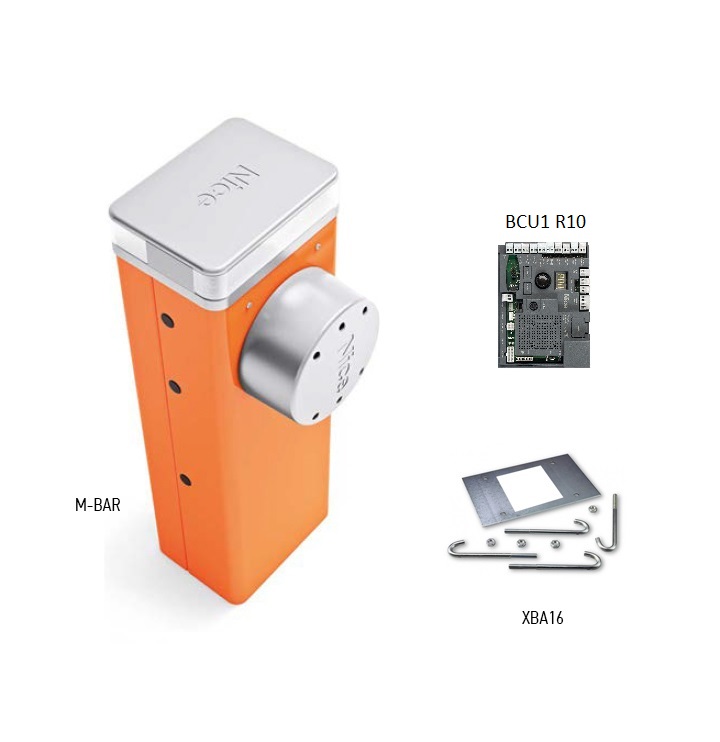
NICE M7BAR barrier gate – arm not included
| Product availability: | In stock | We normally dispatch goods within 24 hours. |
|---|
In stock
€1,461.97 including VAT
| Weight |
|---|
| 85 kg |
Description of NICE M7BAR barrier gate – arm not included
NICE M7BAR is an electromechanical barrier for controlled vehicle access, supplied without a boom. It has a 24 V DC motor and an integrated control unit BCU1 R10 (XBA3 R10). The standard setup is normally powered from a 230 V AC; 24 V is the motor voltage.
It is designed for a boom specified as 5, 6 or 7 m. It has a robust steel housing and a counterbalance spring. Elliptical aluminium booms XBA15, XBA14 and XBA5 can be joined in permitted combinations using the XBA9. The exact assembled boom length and its accessories determine the spring setting.
In the event of a power failure, the boom can be released with a key or operated using the PS224 backup battery. The housing can accommodate the XBA7 warning light or the XBA8 traffic light. Two opposing barriers can be synchronized in Master–Slave.
If you have an existing barrier, first check the control board marking. The following settings apply to the BCU1 R10 with display and rotary selector; the older XBA3 has different controls and is not interchangeable based on a similar name alone.
When to choose NICE M7BAR
| What to check | Specification and meaning |
|---|---|
| Clear passage width | 5–7 m |
| Adjustable operating time | 6–10 s |
| Max. cycles at rated torque | 200 cycles/h |
| Boom | Supplied separately; component and connector combinations |
| Manual release | With a key during a power failure or servicing |
| Two opposing barriers | Master–Slave synchronization |
Boom length is not the same as the clear passage width. When selecting a barrier, allow for the space taken up by the housing and bracket; verify the final clear passage width on site. Operating time depends on the settings, boom and its accessories. The maximum number of cycles does not guarantee unlimited operation under every load condition.
The barrier is designed for vehicles. Boom movement must not endanger pedestrians; provide a separate pedestrian passage and select safety devices based on the risks at the specific entrance. Before installation, also check the clearance above the boom when it is in the open position.
Boom accessories and their limitations
| Accessory | Condition |
|---|---|
| Rubber and lights | Permitted when the boom is the correct length and is wired and balanced correctly. Choose the light strip to match the actual boom length. |
| Barrier skirt WA13 | Only for shorter configurations listed in the spring table. This combination is not permitted with a 7.33 m M7BAR boom. |
| Mobile support WA12 | It is accounted for in the spring table, including for a 7.33 m boom. |
| XBA11 articulated joint | Not permitted for M7BAR. It is not a solution for low ceilings with this barrier. |
After adding lights, rubber, a support or a barrier skirt, reselect the spring attachment and balance. Increasing motor force does not replace correct mechanical adjustment.
What the boom consists of
| Boom identification | Parts | What to check |
|---|---|---|
| 5 m | 1 × XBA5, 5.15 m | Without the XBA9 connector; check the exact length and spring attachment according to the configuration. |
| 5 m | 2 × XBA15 + XBA9 | Configuration shortened to 5.00 m according to the spring table. |
| 6 m | 2 × XBA15 + XBA9 | Spring table: 6.33 m. |
| 7 m | XBA15 + XBA14 + XBA9 | Spring table: 7.33 m; shorter section next to the housing. |
XBA15 is 3,150 mm, XBA14 is 4,150 mm, and XBA5 is 5,150 mm. Do not use the commercial designations 6, 7, 8 or 9 m as exact installation dimensions. Measure the assembled boom length and clear passage width before installation. The XBA9 connector does not allow the barrier's limits to be exceeded.
Barrier kits with boom and accessories
For a complete assembly with a boom, choose from the available kits. The stated length refers to the boom, not the clear passage width. Kits from different ranges have different control units and limits; open the kit product page to see its exact contents.
| NICE M7BAR barrier kits | |
|---|---|
M7BAR – 6 m boom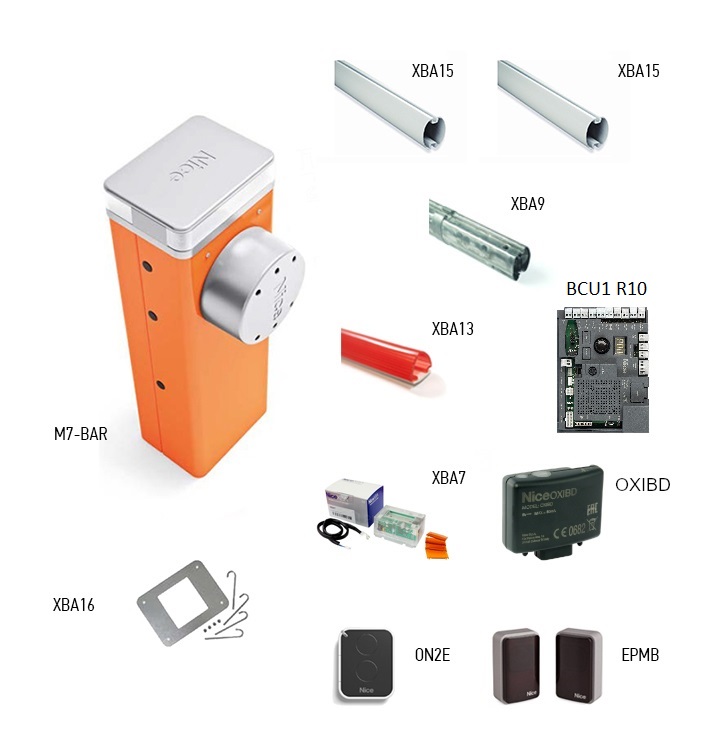 | M7BAR – 7 m boom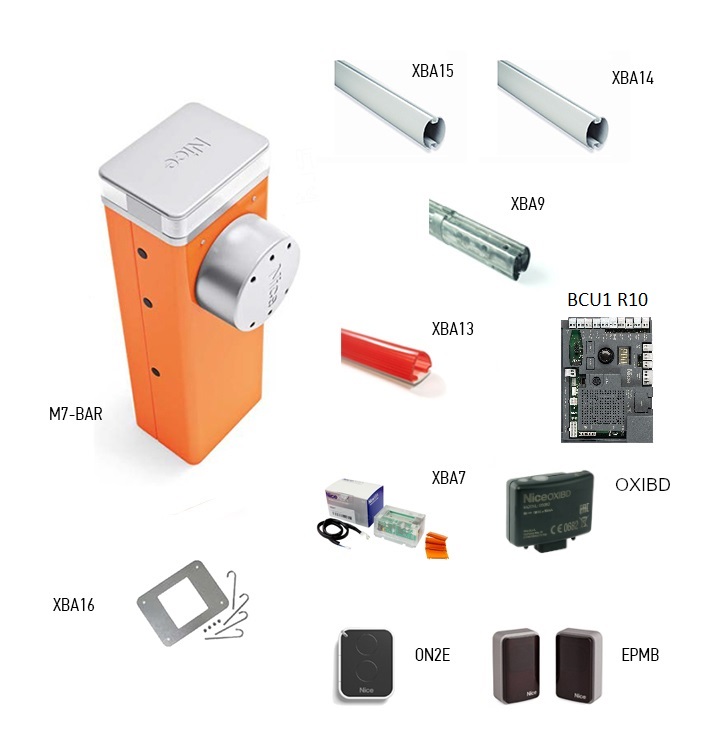 |
Accessories compatible with the M7BAR barrier
Choose equipment according to the boom length and operating conditions. Compatible accessories also have mechanical and electrical limitations; not all accessories can be used at the same time.
| What | Why | Type |
|---|---|---|
Boom 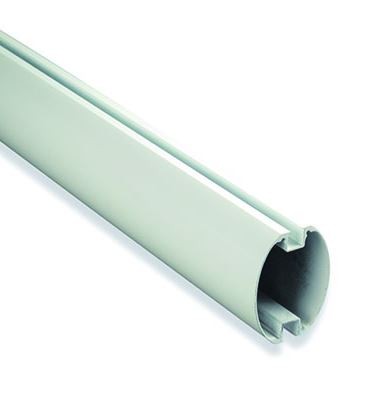 | The housing is supplied without a boom. Choose the sections and connector according to the exact length. | |
Boom connector 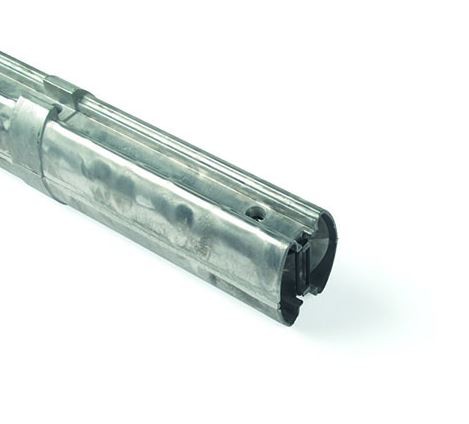 | Joins two boom sections; installation procedure. Use the connector only with compatible sections listed for this barrier. | |
Fixed support 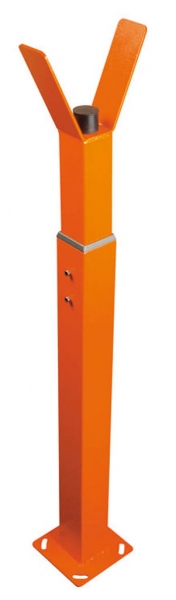 | Height-adjustable support for the end of the closed boom. This is not a support attached to the boom. | |
Mobile support 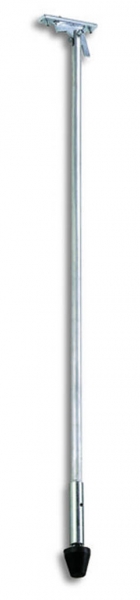 | Folding support mounted on the boom. Check the permitted lengths and its load capacity in the spring table. | |
Under-barrier skirt 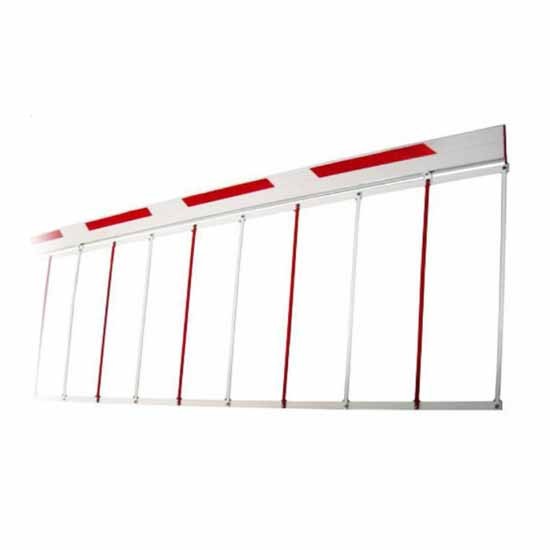 | Aluminium barrier skirt, 2 m section. Only in permitted configurations; length restrictions. | |
Reflective stickers  | 24 red stickers to improve the boom's visibility. | |
Boom lighting 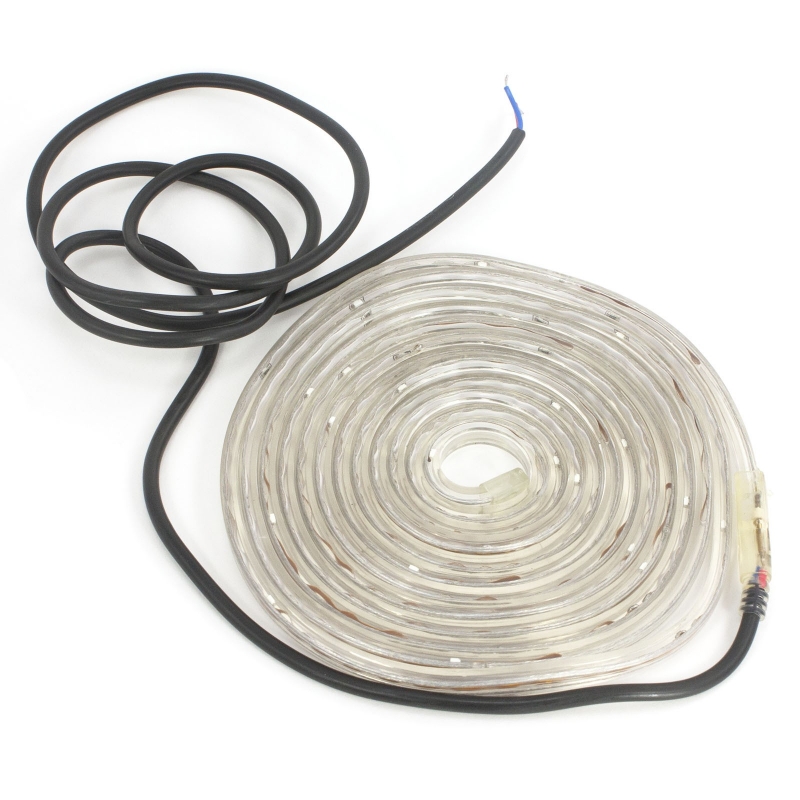 | XBA6 is a 6 m strip, and XBA18 is an 8 m strip. Check the quantity and wiring against the power consumption at the LIGHT output. | |
Protective rubber strip 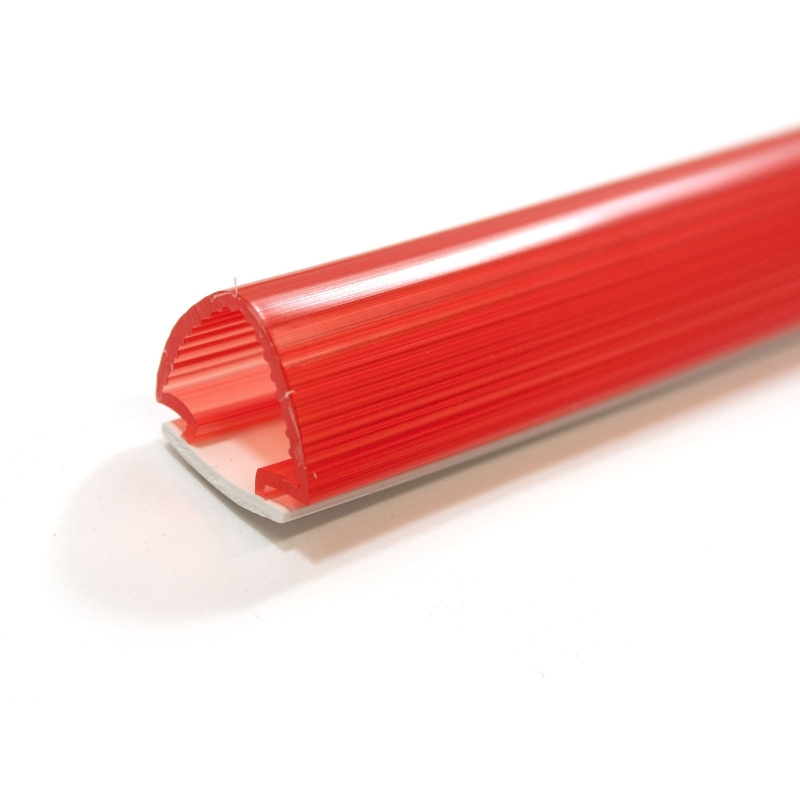 | 9 sections, each 1 m long. Mechanical edge protection; it does not replace a monitored safety edge. | |
Backup 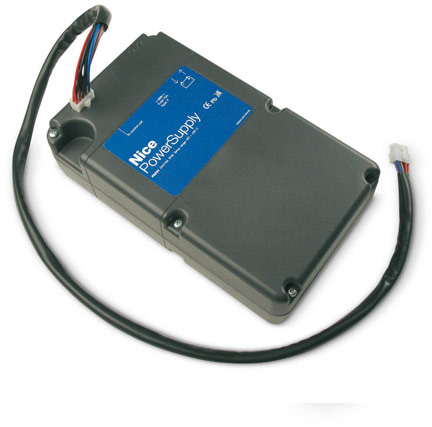 | 24 V rechargeable battery for operation during a power failure; the number of operating cycles depends on the charge level and equipment. | |
Beacon light in the housing 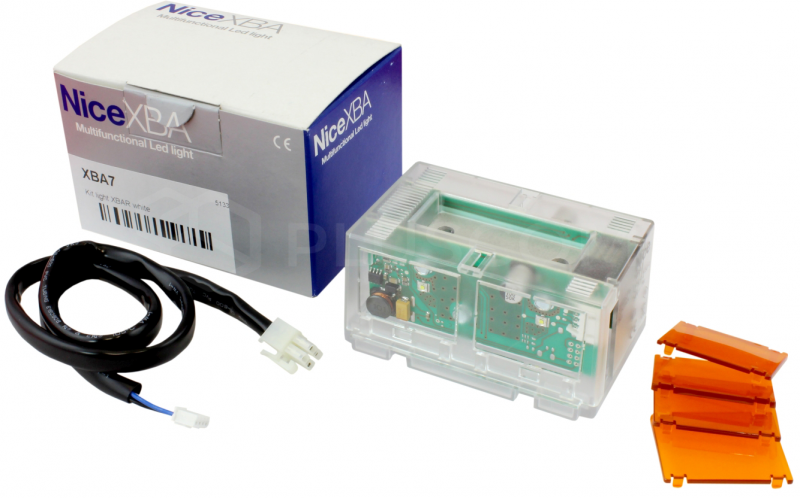 | Signals movement and diagnostics via INTERNAL LIGHT. | |
Traffic light in the housing 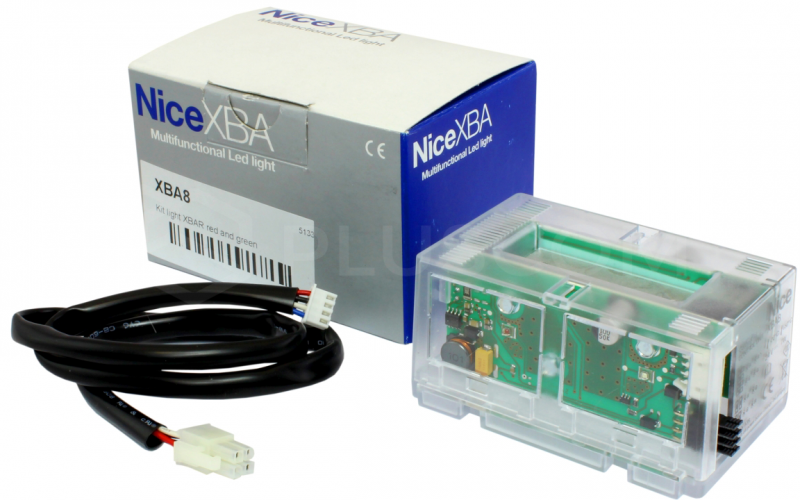 | Traffic control according to the INTERNAL LIGHT / OU4 setting. | |
Photocells | Two-wire BlueBUS. After changing the wiring, perform Set 1. | |
Remote control | SM receiver and remote control with matching coding; if a receiver is already installed, check the remote-control family already stored. | |
Control board | Replacement board for the generation with a display and selector. The barrier already has a control unit; no additional external controller is needed. | |
Service and setup | BUS T4 interface for diagnostics and the service counter. | |
Solar power supply | Alternative power source to mains electricity. Do not connect 230 V at the same time with this wiring. |
Housing and boom installation
Installation, mains connection and commissioning must be carried out by a qualified technician. Disconnect the mains and backup battery before starting work. Check that the mounting surface is solid, drainage is adequate, there is room for the full boom, and the release mechanism can be accessed safely.
Base plate and anchoring
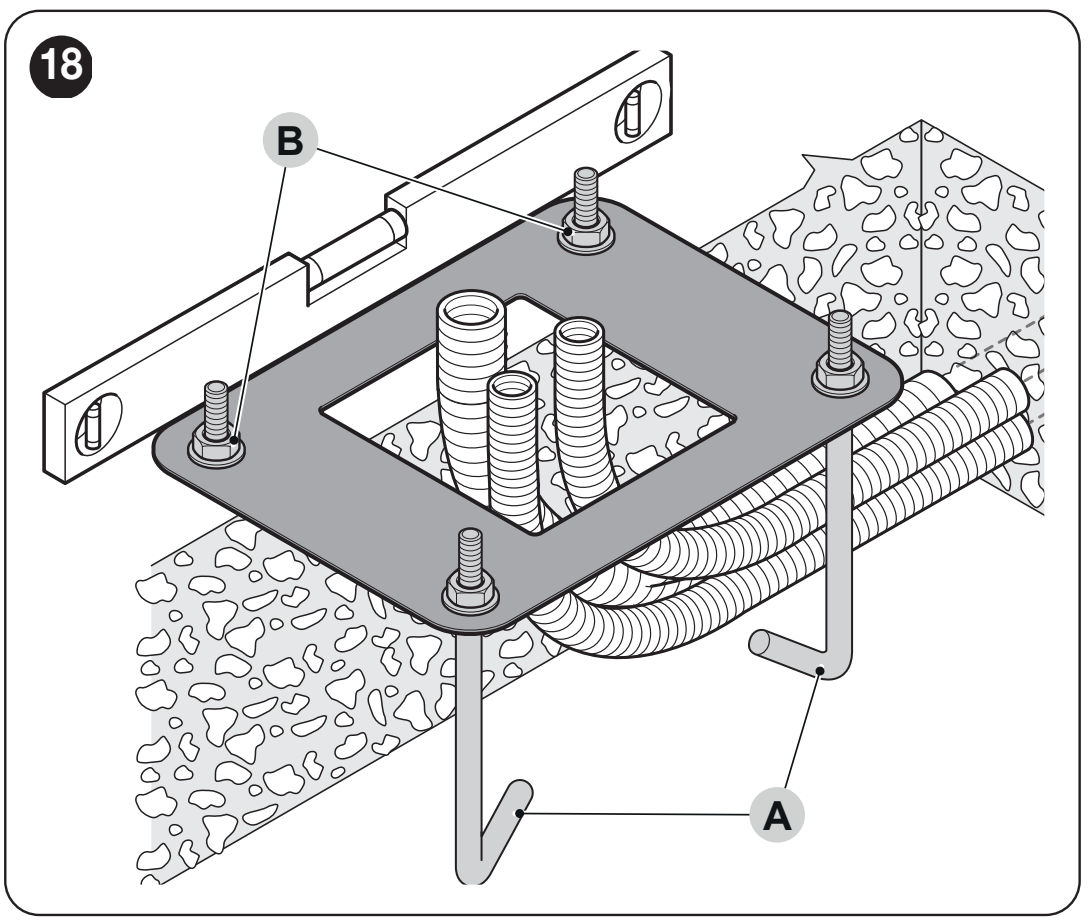
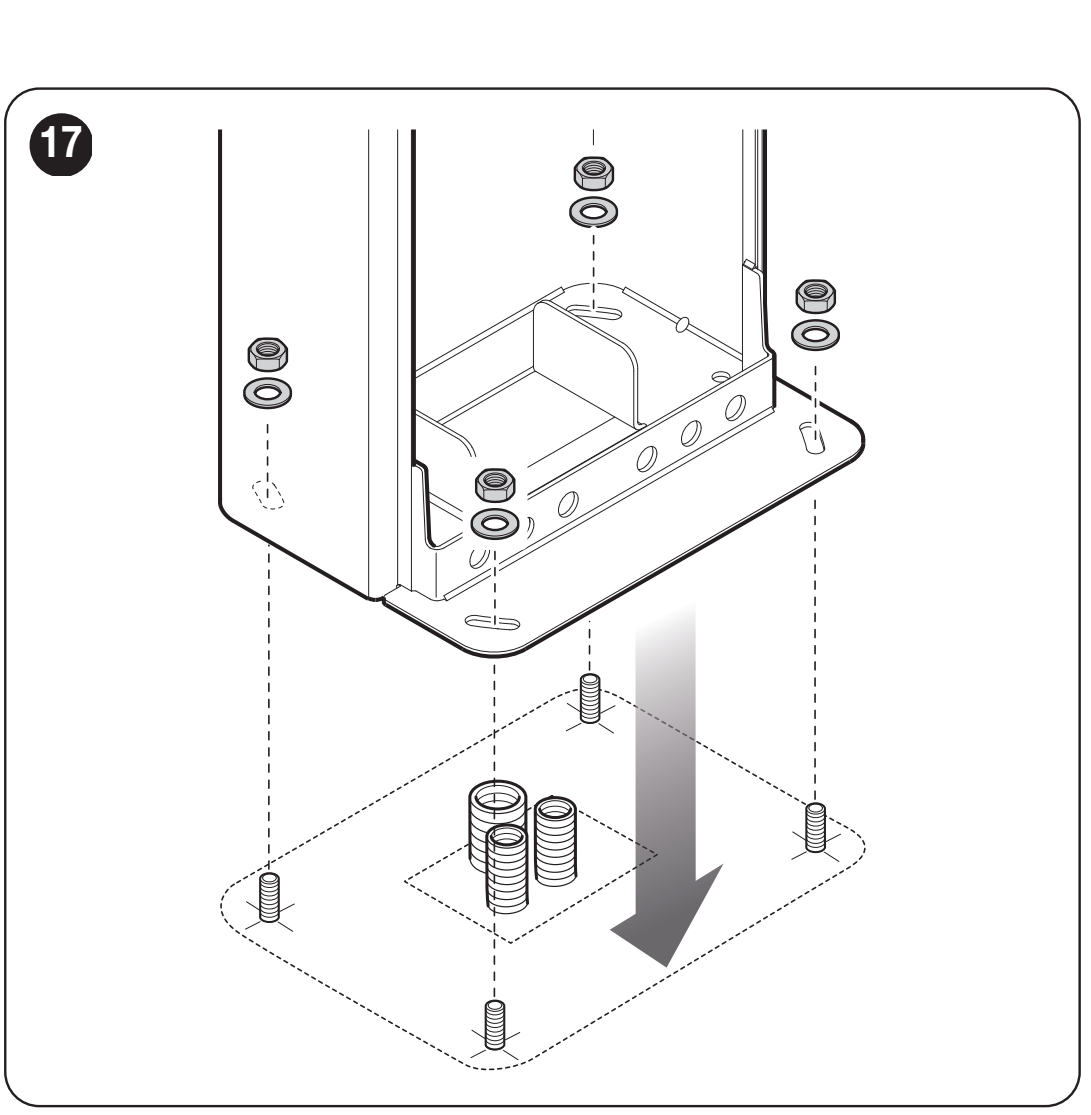
If the existing foundation is suitable, mark four holes using the housing as a guide and select anchors appropriate for the substrate. For a new foundation, prepare the conduits, the four supplied anchor bolts, and a level base plate positioned parallel to the boom.
| Substrate check | Requirement |
|---|---|
| Concrete foundation | Reinforced concrete, at least 0.15 m thick and with a volume greater than 0.2 m³. The technician must determine the foundation dimensions according to local conditions. |
| Concrete anchors | 4 anchors with 12 MA (M12) bolts, each with a tensile load capacity of at least approximately 3.9 kN. |
| Other load-bearing material | Verify the strength of the substrate and all four anchoring points for a load of at least approximately 9.8 kN. |
| Installation | Position the plate level with the surface; secure the housing only after the concrete has fully cured. |
Boom attachment and assembly
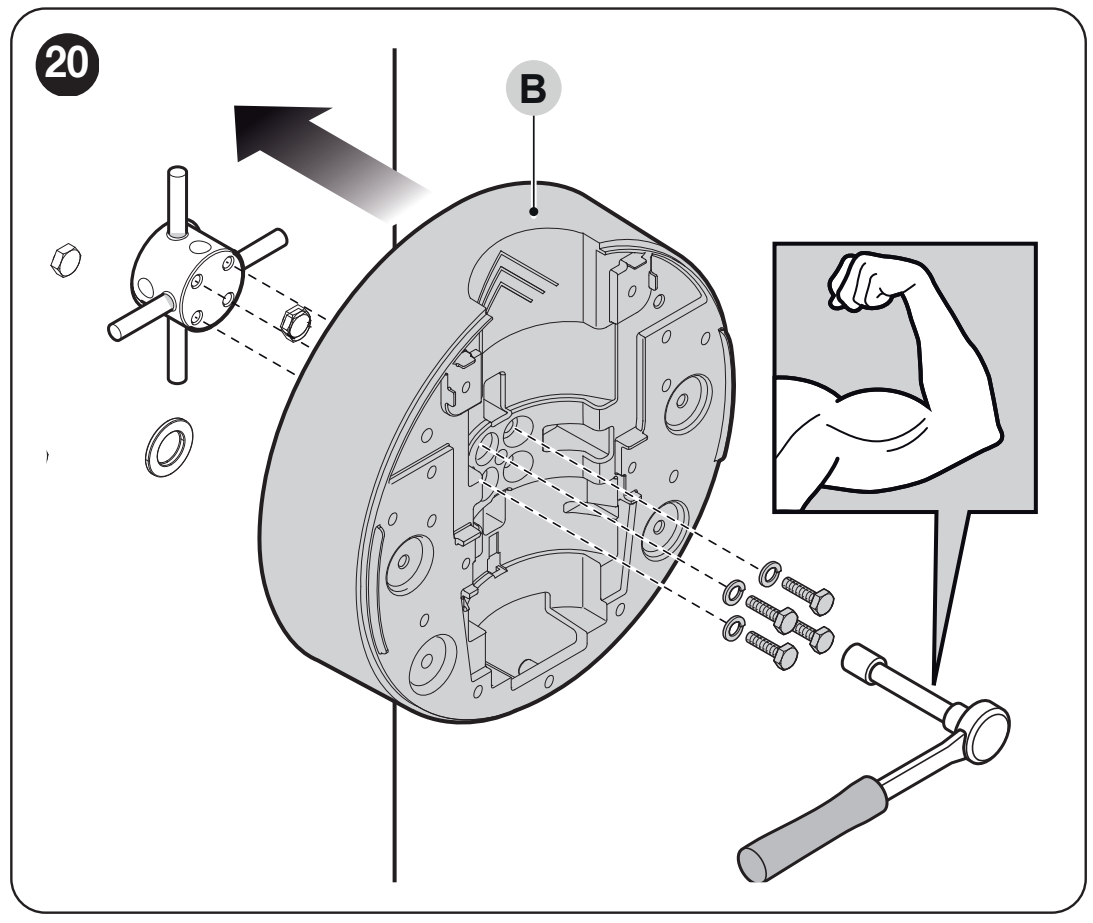
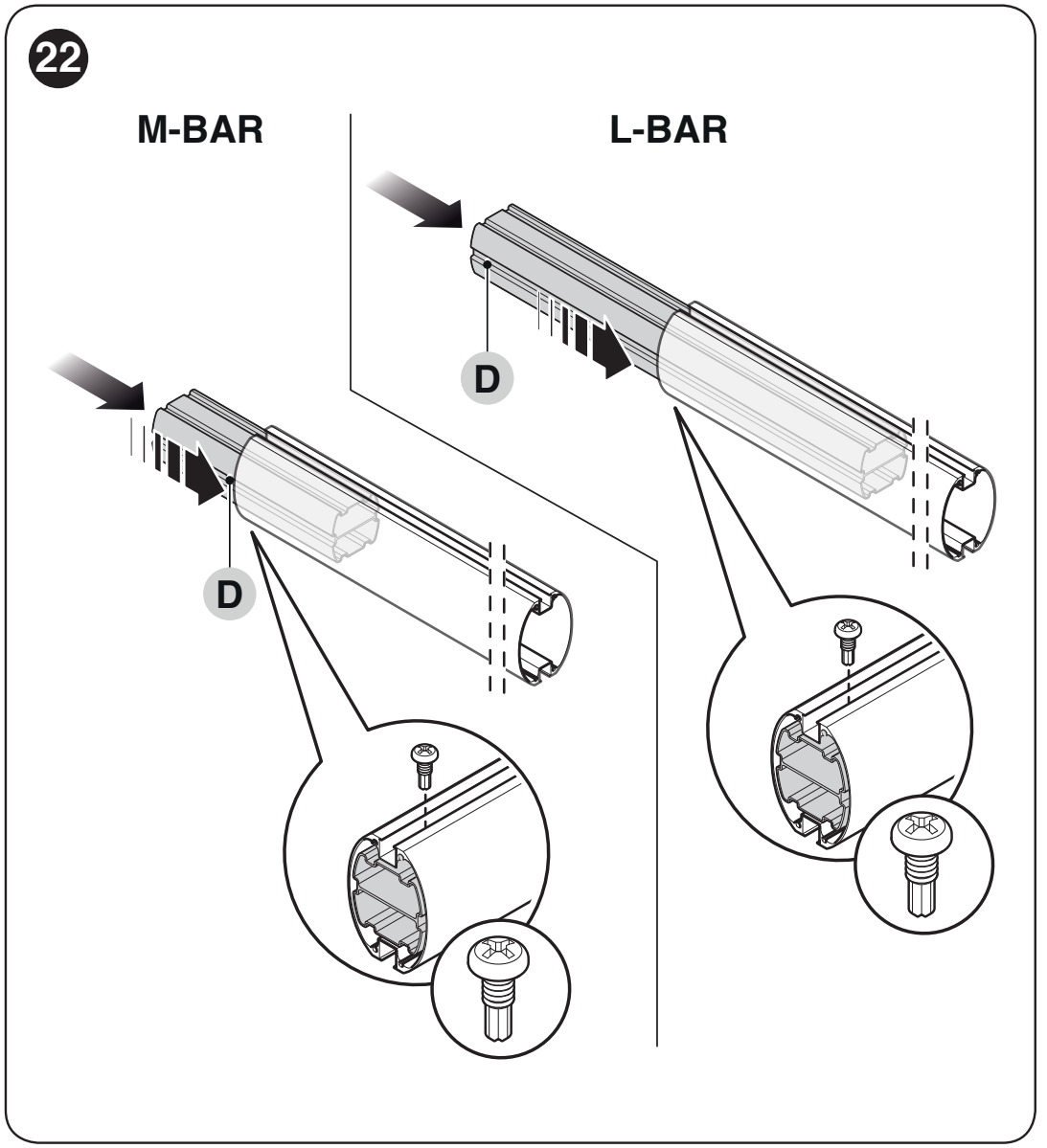
For a two-piece boom, the shorter section goes next to the barrier housing. Insert the specified reinforcing insert into its end by the bracket: 300 mm for M7BAR. This insert is not the XBA9 connector joining the two boom sections.
- Insert the two specified pins into the output shaft. Install the bracket in the position for vertical boom, and secure it with bolts and spring washers.
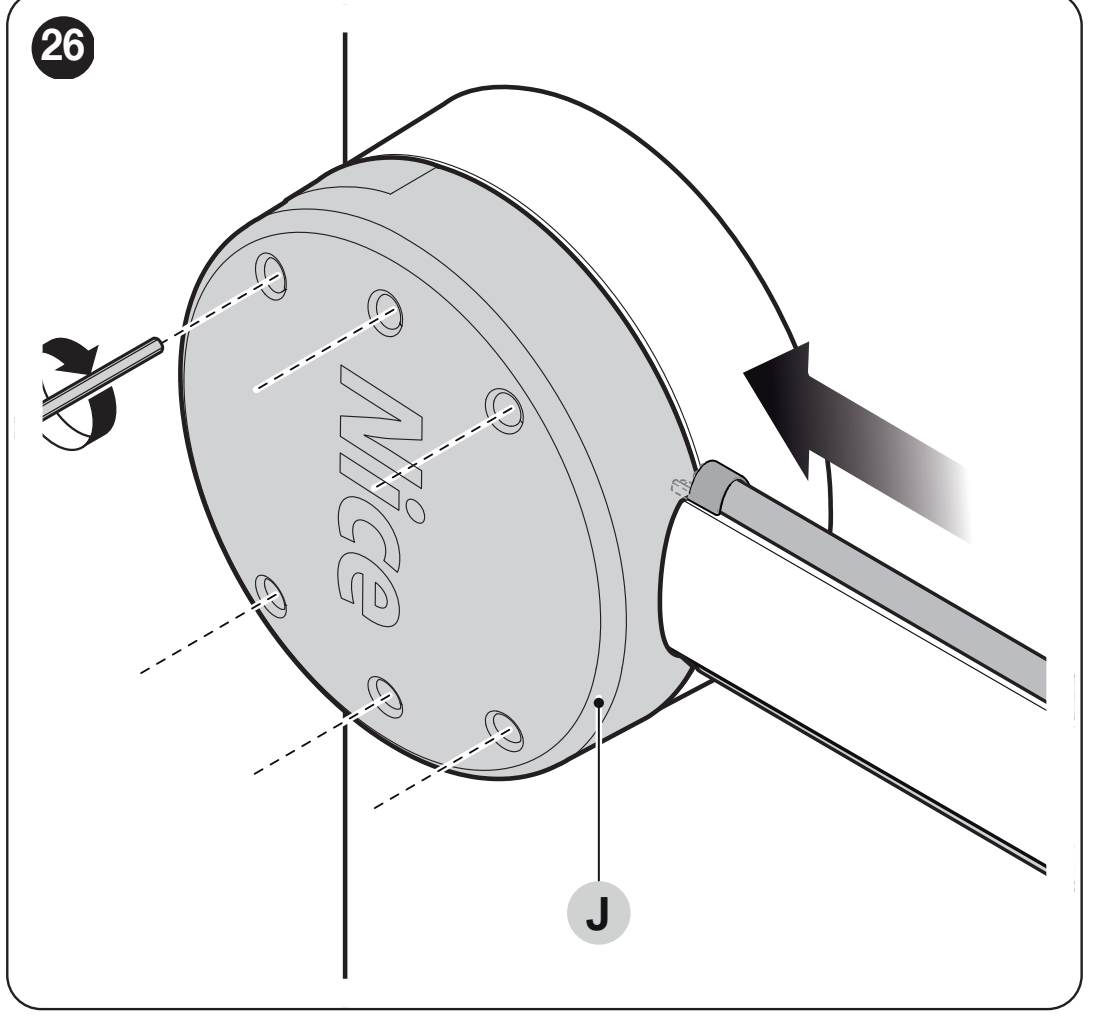
- Fit the cover onto the bracket using six screws; leave them loose for now.
- Insert the supplied connector into the end of the correct aluminum boom and secure it with a screw.
- Fit the protective rubber strip into the grooves with the appropriate connectors, then install the end cap and rubber-strip caps.
- Slide the complete boom into the bracket as far as it will go and firmly tighten all six screws.
- Install the selected accessories, then complete spring adjustment, balancing and programming.
Joining two sections using XBA9
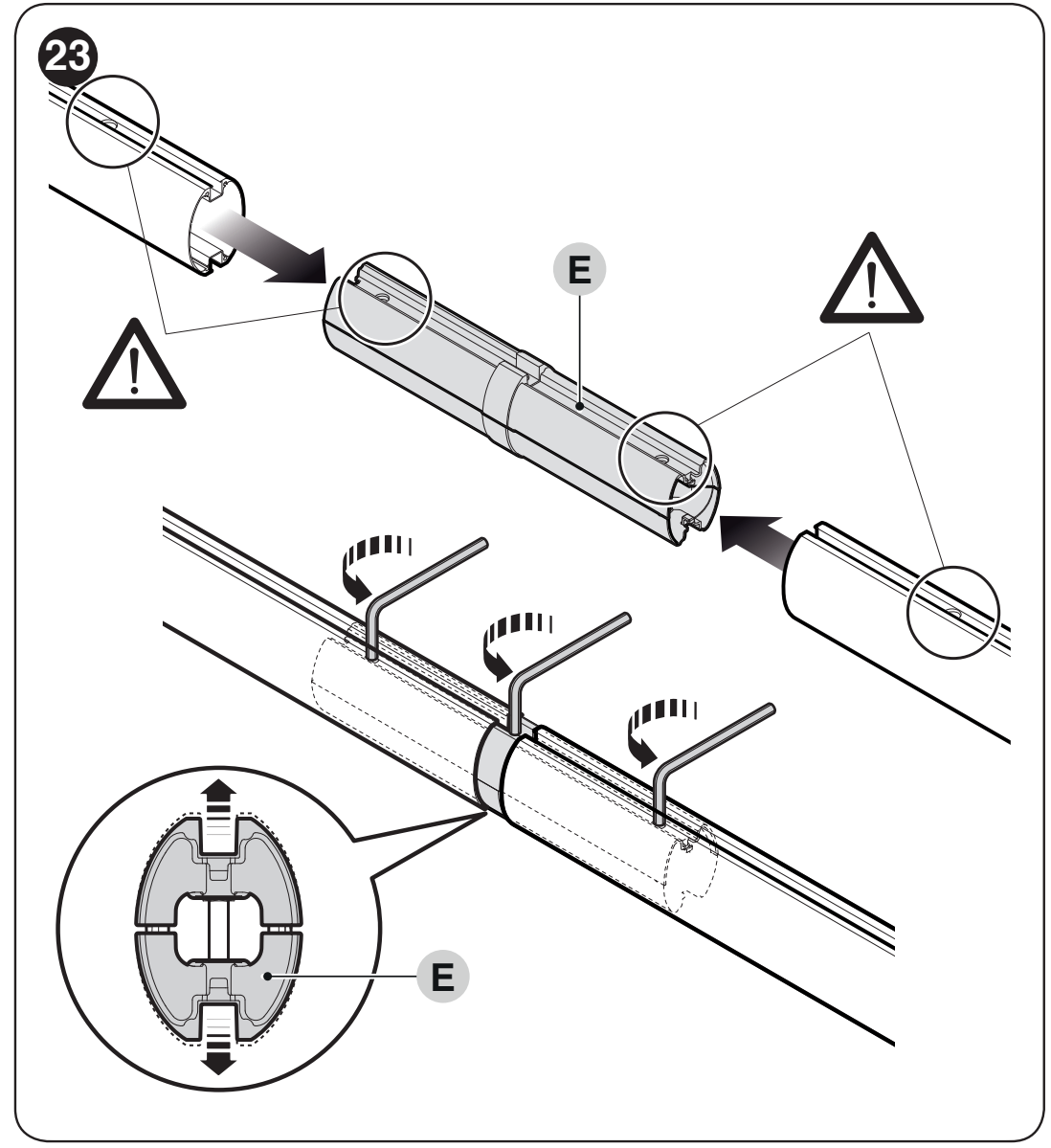
- Slide the XBA9 connector into the open ends of both sections. The holes in the booms and connector must line up.
- The connector's three expansion bolts loosen evenly as shown. This expands the mechanism and secures the connector inside the booms; it is not tightened like a standard fixing bolt.
- Check that the joint is secure and has no play. Only after assembling the boom and fitting its accessories should you complete balancing and testing.
Left- or right-hand barrier installation
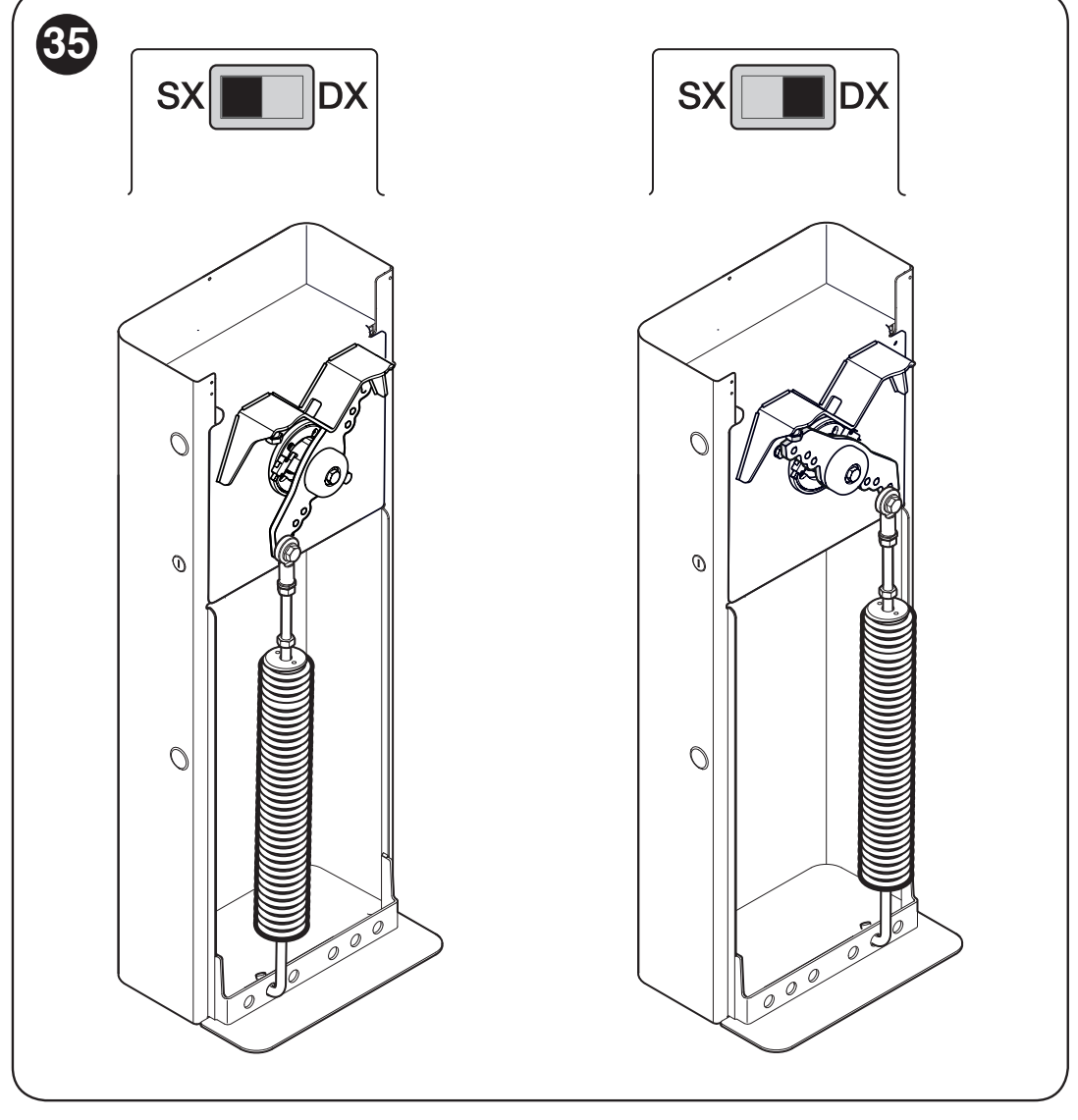
The spring pivot side must match the direction switch setting on the control board. RH/DX is for the spring on the right-hand side of the balancing lever, LH/SX for the spring on the left-hand side. A technician must change the mechanical configuration with the spring safely released; simply turning the switch without changing the mechanics is not sufficient.
Spring attachment and boom balancing
Select according to the exact model, actual length and all fitted accessories. The upper attachment is marked with the letter A or B, and the lower one with the number 1, 2 or 3. Use the lever holes marked for M7BAR. For the opposite closing direction, use the corresponding holes on the other side of the lever.
For the maximum-length boom with protective rubber, or with rubber and lights, use section A of the original table: M7BAR, 7.33 m = B / 2. For shorter booms and additional accessories, use section B.
Accessory indices for section B
| Boom accessories | Index |
|---|---|
| XBA13 protective rubber strip | 0 |
| Protective rubber strip with XBA4/XBA6/XBA18 lights | 1 |
| WA12 | 4 with standalone XBA5 5.15 m; 3 with 5.00, 6.33 and 7.33 m |
| WA13 | 2 with standalone XBA5 5.15 m; 1 with 5.00 and 6.33 m; not permitted with 7.33 m |
Add the corresponding index for each accessory used. The “rubber” and “rubber with lights” rows are alternatives and must not be added together. Each additional accessory increases the load; the total and number of pieces must remain within the permitted range for the configuration in question. A dash indicates a combination that is not permitted.
| Exact boom configuration | Mounting position by index total |
|---|---|
| XBA5, 5.15 m | 0–2: A / 2 3–5: A / 2 6–7: A / 3 |
| 2 × XBA15 shortened to 5.00 m | 0–2: A / 2 3–5: A / 3 |
| 2 × XBA15, 6.33 m | 0–2: B / 1 3–5: B / 2 |
| XBA15 + XBA14, 7.33 m | 3–4: B / 3 5–6: B / 2 Rubber or rubber with lights: section A, B / 2. WA13 is not permitted. |
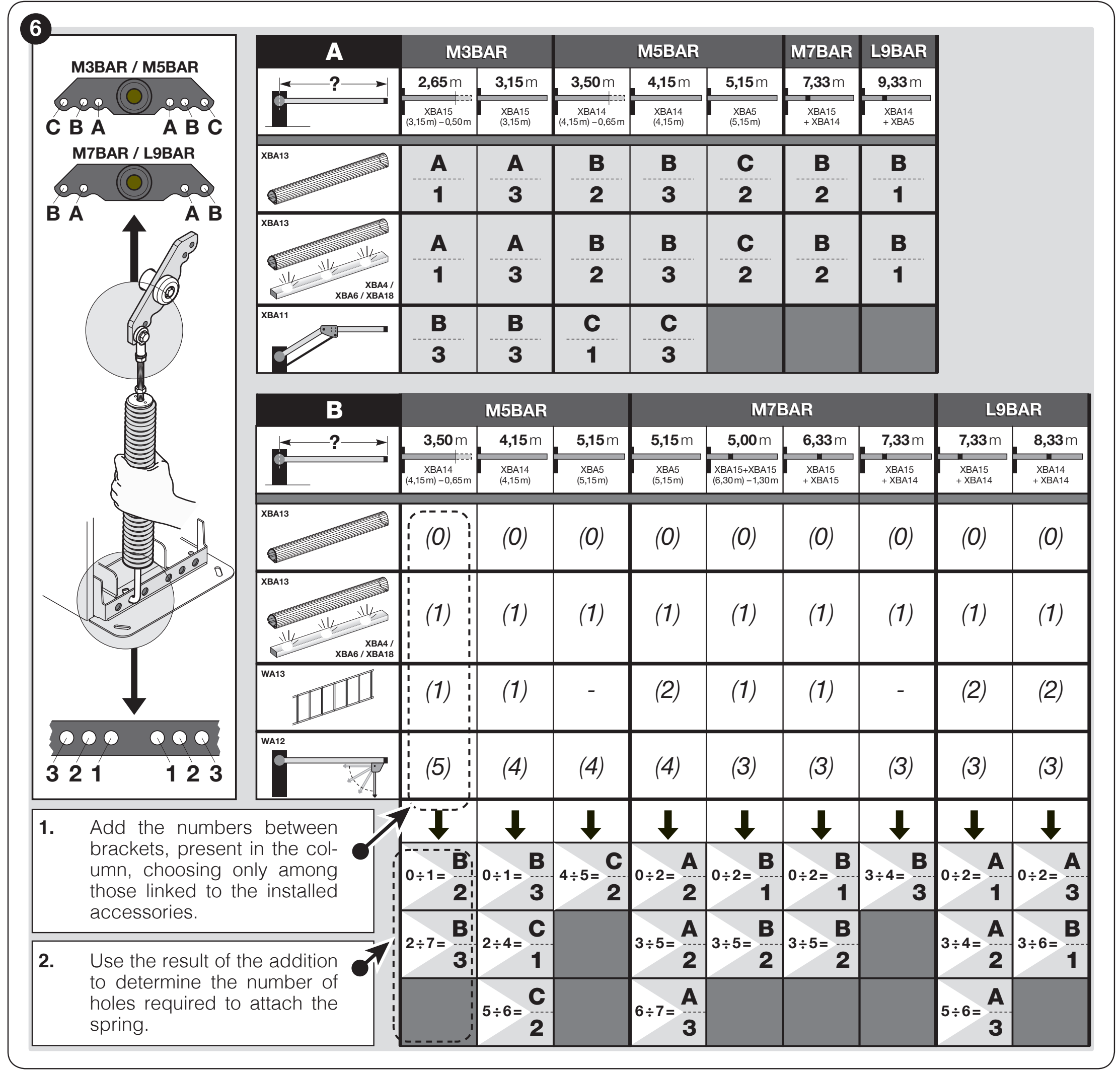
Use the positions shown only when the holder and spring arrangement match the illustration. For a different mechanical design, follow the instructions supplied with the specific barrier; do not interchange hole positions between designs.
If the table does not cover the length, accessories or resulting total, do not guess the mounting position. Before moving the spring, a technician must secure the arm and safely release its preload. Do not remove the arm from the holder while the spring is loaded.
Balance check at 45°, 20° and 70°
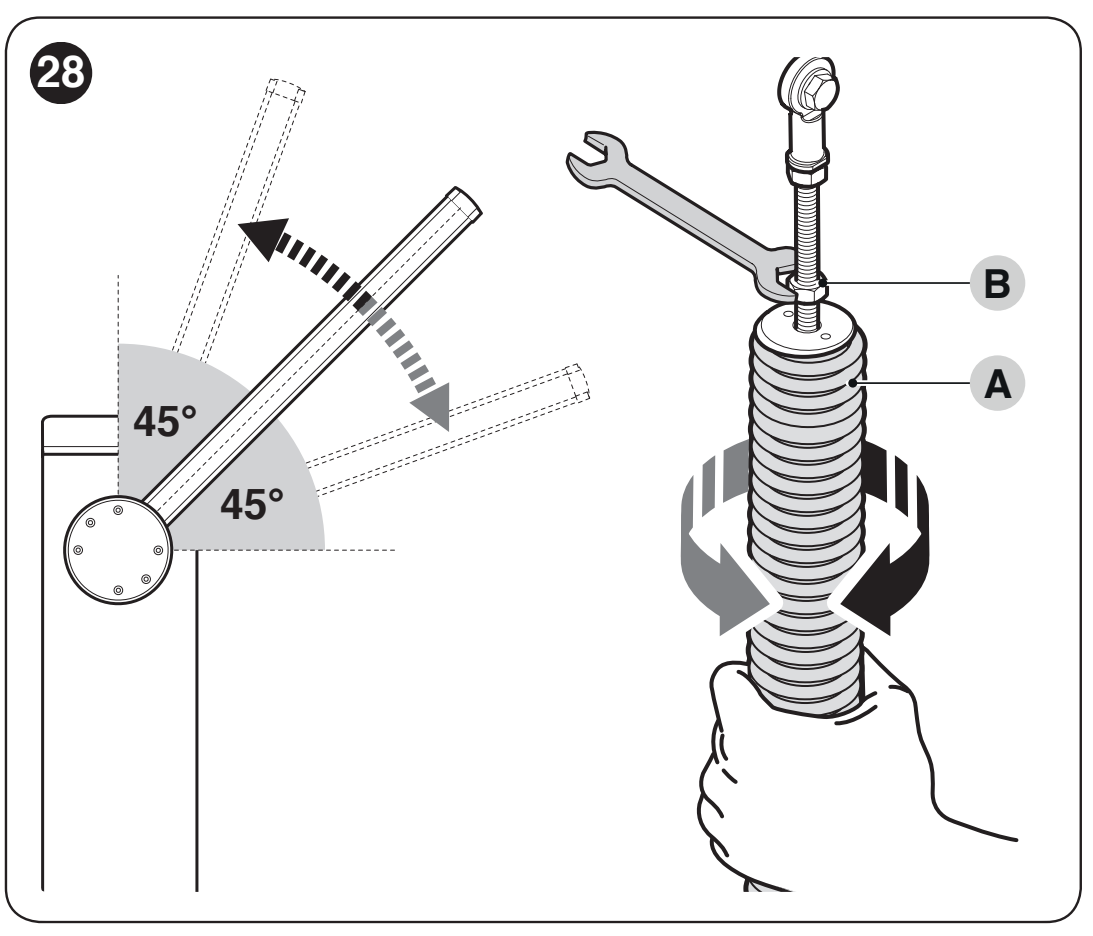
- Disconnect the mains and battery. Support the arm securely, release the gearbox, and set it to approximately 45°.
- If the arm rises, reduce the preload by turning spring A clockwise. If it drops, increase the preload by turning it counterclockwise.
- Repeat the check at approximately 20° and 70°. The arm must not move significantly on its own or accelerate as it falls.
- Secure the spring against rotation with nut B as shown; check that it is firmly secured.
- Lock the gearbox when finished.
With the motor released, the force required to move the arm manually, either opening or closing, must not exceed approximately 45 N. This is the maximum permitted imbalance, not the target setting. Measure the force perpendicular to the arm, 1 m from the pivot; this does not specify the impact force of the powered arm.
Mechanical stops
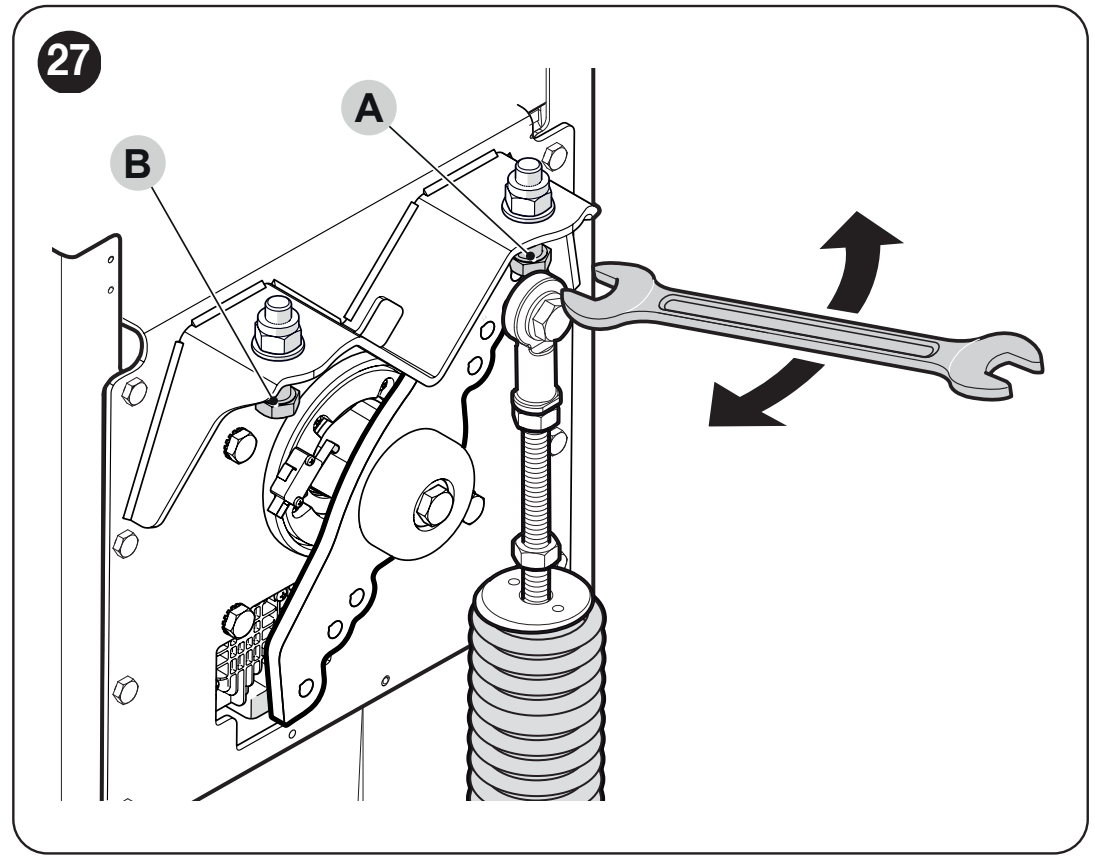
After releasing the mechanism, manually move it through its full travel. Use the stop screws to set the horizontal closed and vertical open positions, then tighten the locknuts. Then perform Set 2 position learning. Electronic position learning does not replace correctly adjusted mechanical stops.
Wiring and power supply separation
Connect the 230 V mains cable to the L/N mains terminal block and the protective conductor as shown in the original installation. Secure the cable with a cable gland and strain relief. Do not apply 230 V to the command inputs or BlueBUS. Do not interchange the motor and accessory circuits.
| Cable | Cross-section and length |
|---|---|
| 230 V mains | 3 × 1.5 mm² up to 30 m; for longer runs, use 3 × 2.5 mm² and appropriate grounding. |
| BlueBUS | 2 × 0.5 mm² up to 20 m; use 2 × 1 mm² for runs up to 40 m. |
| Key switch | 2 cables, each 2 × 0.25 mm², up to 30 m; alternatively, use one 4 × 0.5 mm² cable. |
| OPEN / CLOSE | 2 × 0.25 mm² up to 30 m for each input. |
| Flashing light / indicator | 2 × 0.5 mm² up to 30 m; the device voltage must match the output setting. |
| Master–Slave | 2 × 1 mm² up to 20 m. |
| Antenna | RG58 coaxial cable, maximum 15 m; recommended length under 5 m. |
BCU1 R10 control unit: diagram and terminals
Disconnect the mains and battery before wiring. The terminal blocks are removable; connect the wires according to the markings on the actual board. The following diagram is for a control unit with a display and rotary selector.
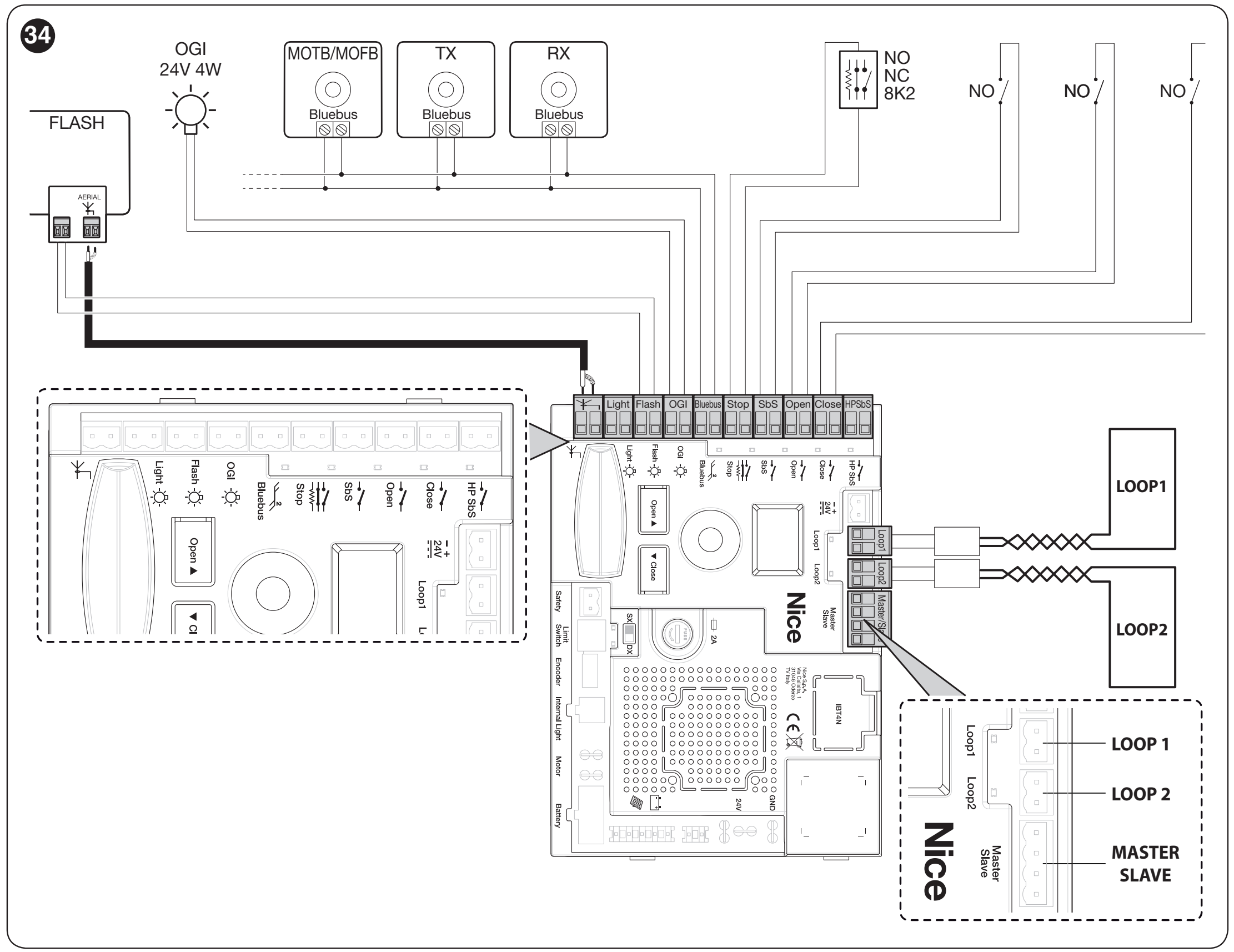
The mains supply must have protective earth (PE) and a suitable device for complete disconnection from the mains. A qualified electrician must connect the 230 V supply and check the protective measures. Mains voltage must not reach the command or accessory terminals.
| Terminal / connector | Connection |
|---|---|
| FLASH | Flashing light, 12 V standard, max. 21 W. OU2 changes both the function and voltage; check the current setting before connecting. |
| LIGHT | Arm lights, standard 24 V circuit, max. 10 W; OU1 function. |
| OGI | Barrier indicator, 24 V, max. 10 W; its operation is determined by OU3. |
| BlueBUS | Two-wire power supply and communication for compatible accessories; no polarity. |
| STOP | NO, NC or 8.2 kΩ; the type is detected during learning. A subsequent change of state stops the movement. |
| SbS / OPEN / CLOSE | Voltage-free NO switching contacts for step-by-step, open or close commands. The In1–In3 assignments can be changed. |
| HP SbS | High-priority NO command input, default In4 = 6. |
| LOOP1 / LOOP2 | Connection for the output of an inductive loop detector. Do not connect the loop itself directly as a command contact. |
| MASTER–SLAVE | Communication between two opposing barriers; maintain the 1–1 and 2–2 connections. |
| SAFETY | NC safety contact for the folding arm, depending on the accessories used. |
| INTERNAL LIGHT | Dedicated connector for XBA7 or XBA8, OU4 function. |
| ANTENNA / SM | Coaxial antenna and separate socket for a compatible receiver. |
BlueBUS photocells and STOP input
EPMB photocells are connected in parallel to the two BlueBUS wires. The TX and RX units in one pair must have the same address; another pair requires a different one. For safety protection across the passage, use the FOTO, FOTO II, FOTO 1 or FOTO 1 II addresses according to their position and function. FA1/FA2 are command addresses for opening and do not replace the safety function of the photocells.
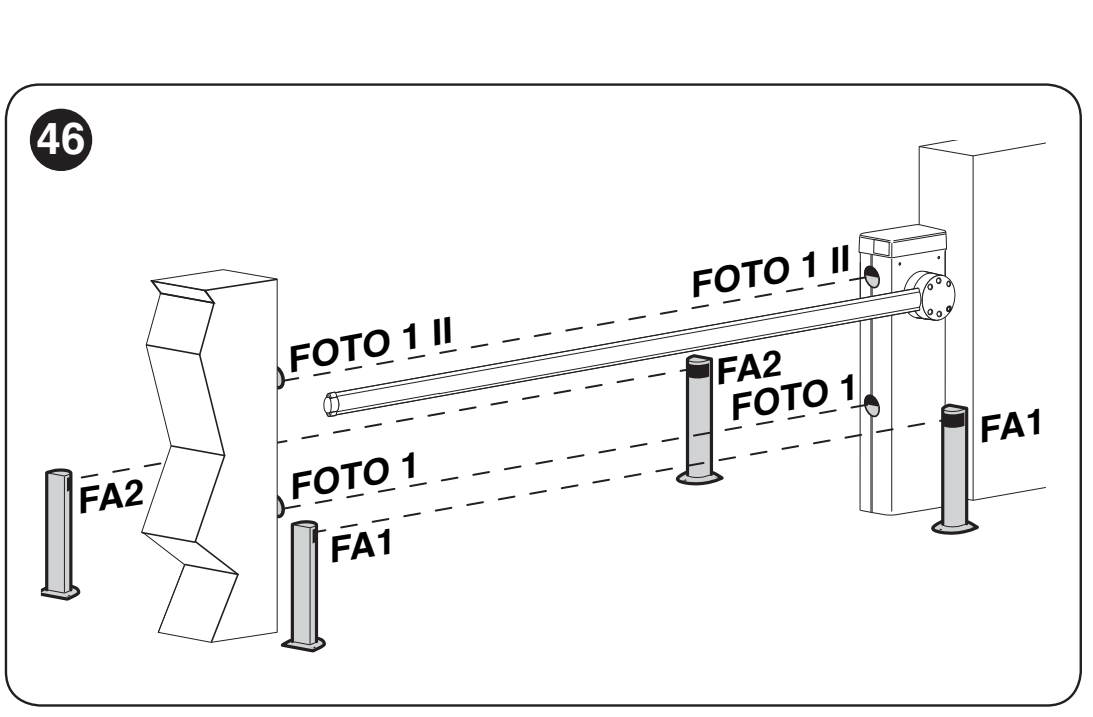
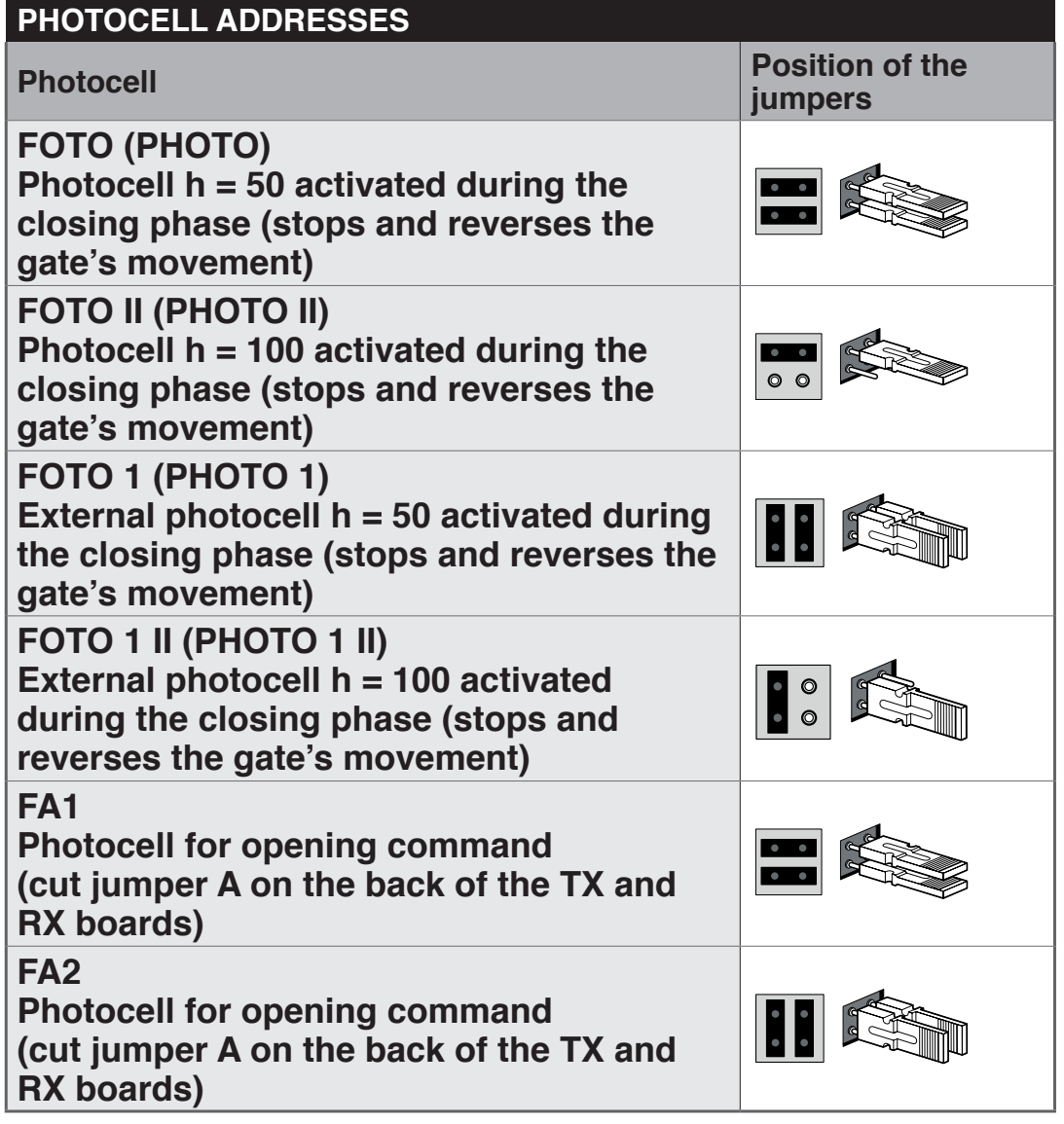
After adding or removing photocells or changing STOP, perform Set 1 and a new safety-function test. Do not disable STOP by bridging a fault; the connection of multiple safety devices must take account of their type and monitoring.
For the stated BCU1 R10 configuration, the BlueBUS load is a maximum of 10 BlueBUS units. Calculate the current consumption according to each device's manual; the number of units is not automatically the same as the number of physical devices.
Lights, flashing beacon and traffic light
XBA6 / XBA18 are fitted into the groove in the boom according to their own instructions. XBA7 and XBA8 are connected to INTERNAL LIGHT. Before each change to OU1–OU4, check the output voltage and maximum power consumption. Do not confuse the traffic-light connector with the terminal for a standard external flashing beacon.
24 V power supply for additional accessories
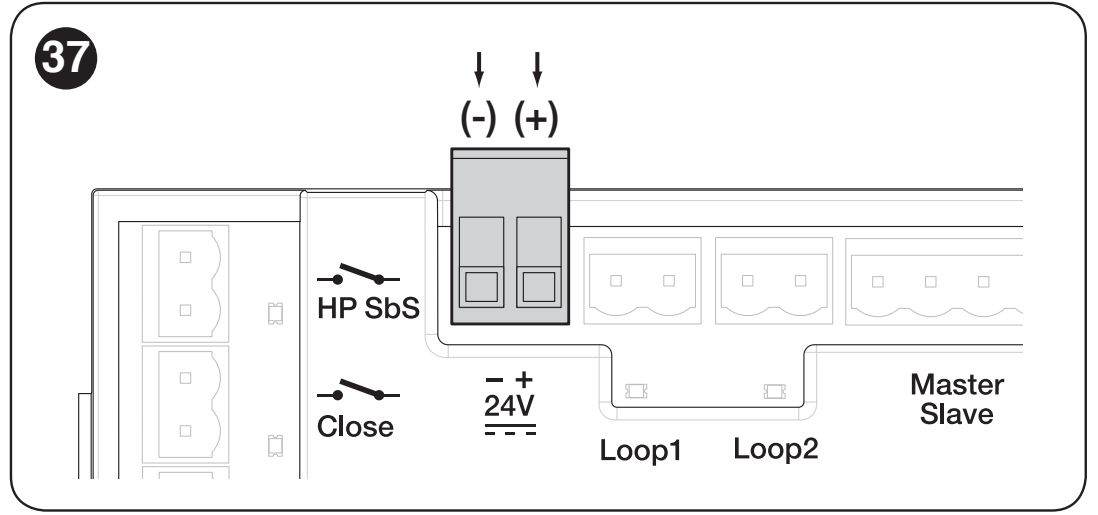
Separate output 24 V DC for auxiliary devices has a tolerance of −30% to +10% and a maximum available current of 500 mA total. Add up the current consumption of all devices powered in this way. On its two-pole terminal block marked − + 24 V when viewed as shown in the image below the left terminal is negative (−) and the right terminal is positive (+).
| 24 V auxiliary output terminal | Accessory power cable |
|---|---|
| Left: − | Negative (−), marked 0 V or GND on the device. |
| Right: + | Positive (+), marked +24 V on the device. |
This marking applies to the separate 24 V output shown below. BlueBUS photocells are connected without regard to polarity to their dedicated BlueBUS terminals. The SbS, OPEN, CLOSE and HP SbS command inputs use voltage-free contacts; do not connect an external power supply to them.
Initial startup and learning
Before switching on, the boom must be installed with all equipment, balanced and secured. Check the stops, direction switch, safety devices and clear passage. After connecting the mains, the display and photocell LEDs should light up; with the default settings, the flashing beacon should be off when no manoeuvre is in progress.
1. Set → 1: BlueBUS and STOP learning
- Turn the selector to find Set.
- Briefly press the selector and select value 1 then press again to confirm.
- The control unit detects the connected devices and the type of STOP input. Run the learning procedure even if no accessories are connected.
If error E01 remains, check the wiring and compatibility; simply repeating the learning procedure without fixing the cause is not enough.
2. Set → 2: learning the mechanical positions
- Unlock the motor, manually position the boom at approximately 45° and lock the gearbox.
- On the selector, choose Set → 2 and confirm.
- Allow the control unit to learn the full travel. The balancing lever must reach the set mechanical stops.
- If it does not reach the stops, stop the learning procedure by pressing the selector, adjust the mechanism and start again. After each interruption, repeat the procedure from the beginning.
Menu 8.8.8. starts quick combined learning of the devices and positions. With this option too, first manually position the boom at approximately 45° and lock the gearbox. Keep the movement area clear. Learning the devices or positions does not program the remote-control buttons.
3. Movement and safety checks
Use the OPEN and CLOSE buttons to run several complete cycles. The boom should slow down before reaching the stops; it must not snag, drop suddenly or vibrate excessively. Test each pair of photocells, STOP, the release mechanism, power failure and any Master–Slave setup.
The technician must also check the risk of the boom lifting a person: the test uses a 20 kg load at the midpoint of the boom and, when opening, the boom must not rise more than 50 cm above the closed position. Measure impact force according to the requirements of the specific installation; photocells and force reduction alone do not replace a full risk assessment.
Programming the BCU1 R10 using the rotary selector
The control unit is configured using the rotary selector and three-digit display. Record the original value before making changes; changes to force, speed and safety functions require a new barrier test.
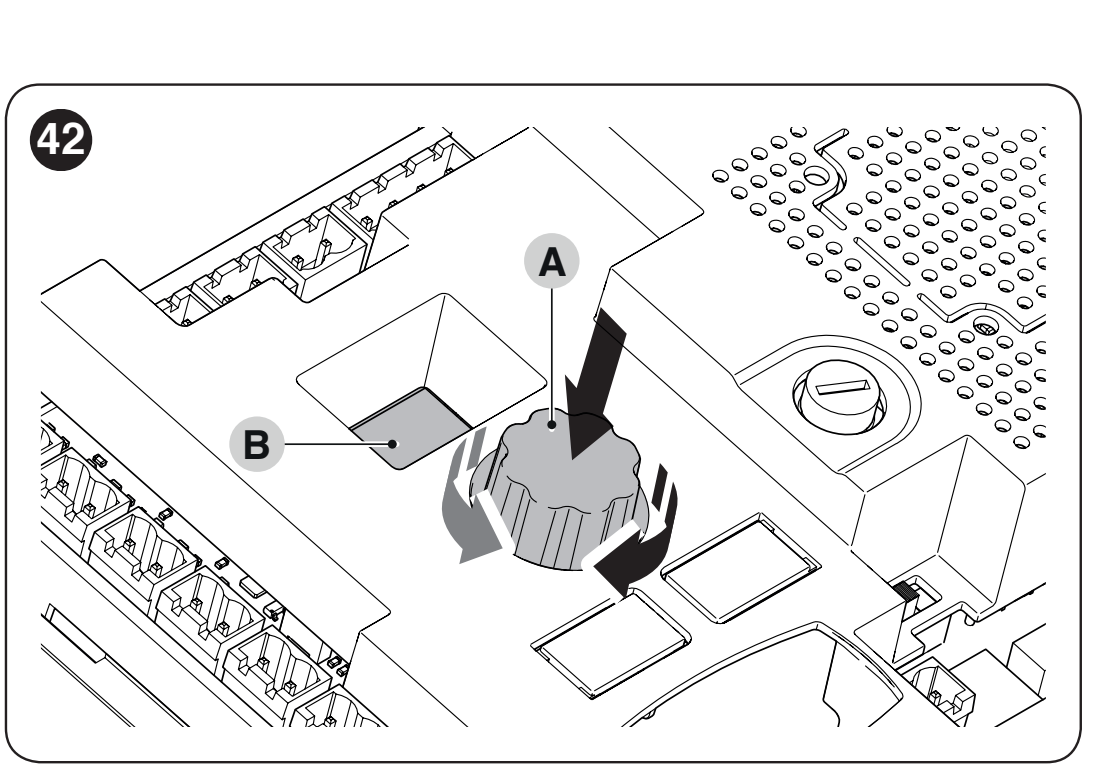
- Turn the selector in either direction to choose the parameter code.
- Press it briefly and release. The saved value is displayed; the display stays lit.
- Turn the selector to choose a new value. The display flashes while a value is being selected.
- Press and release to confirm the value. The control unit returns to parameter selection.
The ESC option exits without saving the change. The display --- indicates a configuration set via OVIEW; it is not another selectable value. In the tables, the confirmed factory setting is shown in bold; the actual control board may have values changed during installation.
Operating functions F01–F09
| Parameter and purpose | Values and behavior |
|---|---|
| F01 – Automatic closing Applies after fully opening. | OFF – semi-automatic operation: closes on command (factory setting) On – closes after time t01 |
| F02 – Closing after photocell activation After the selected safety device is cleared, it counts down time t10. | OFF – disabled (factory setting) 1 – open only until the photocell is cleared: activation stops movement; once cleared, t10 starts and the gate closes 2 – open fully: activation triggers full opening; a new opening command during t10 cancels the subsequent closing 3 – open fully 2: same as value 2, but a new opening command during t10 does not cancel the subsequent closing |
| F03 – Device for F02 | 1 – photocells and loops configured as photocells (factory setting) 2 – photocells only 3 – loops configured as photocells only |
| F04 – Close after power is restored Before enabling, assess the safety of automatic movement after a power failure. | OFF – disabled (factory setting) 1 – if the barrier arm is not closed, it flashes for t09 after power is restored, then closes 2 – resumes automatic closing if the pause timer was running before the power failure |
| F05 – Standby Enters standby after time t04; a new command restores operation. | OFF – disabled (factory setting) 1 – switches off the display, BlueBUS, outputs, and some internal circuits 2 – switches off BlueBUS 4 – when running on battery power, automatically enters full standby |
| F06 – Start-up force | OFF – disabled (factory setting) On – when starting from the open or closed position, briefly applies maximum power to overcome static friction |
| F07 – Emergency opening Requires a connected, working battery. | OFF – disabled (factory setting) On – automatically opens the barrier arm if mains power fails |
| F09 – Master / Slave | OFF – Master barrier (factory setting) On – Slave barrier; see the Master–Slave procedure |
Times, speeds, force, and input functions
| Parameter and purpose | Available values |
|---|---|
| 8.8.8. – Quick programming | Starts programming of BlueBUS, STOP, and positions in a single sequence. First, meet the start-up requirements. |
| Set – Programming | 1 – BlueBUS and STOP devices 2 – open and closed positions |
| Prn – Program | 000 – basic program (factory setting) 001 / 002 / 003 – reserved custom programs; not normally used |
| t01 – Pause before closing Effective when F01 = On. | 0–250 s Factory setting: 20 s |
| t02 – Pre-flashing before opening Time between the warning light switching on and opening starting. | 0–5.0 s Factory setting: 0 s |
| t03 – Pre-flashing before closing Time between the warning light switching on and closing starting. | 0–5.0 s Factory setting: 0 s |
| t04 – Standby delay Time from the end of a movement until enabled F05 activates. | 0–60 s Factory setting: 60 s |
| t06 – Electromagnet delay After disconnecting the locking electromagnet, waits before opening. Used only when an electromagnet is installed and the output is configured accordingly. | 0–3.0 s Factory setting: 0.2 s |
| t07 – Auxiliary light duration The time for which an output configured as an auxiliary light remains on. | 0–250 s Factory setting: 60 s |
| t09 – Pre-flashing after power is restored Used by function F04. | 0–20 s Factory setting: 5 s |
| t10 – Closing after photocell activation Time after the device is cleared when F02 is enabled. | 0–250 s Factory setting: 5 s |
| SPO – Opening speed | 1 – lowest 2 – level 2 3 – level 3 4 – highest (factory setting) |
| SPC – Closing speed | 1 – lowest 2 – level 2 3 – level 3 4 – highest (factory setting) |
| SLO – Opening slowdown | 1 – lowest speed 2 – medium speed (factory setting) 3 – highest speed |
| SLC – Closing slowdown | 1 – lowest speed 2 – medium speed (factory setting) 3 – highest speed |
| PLO – Opening slowdown position Difference between the end position and the start of slowdown. | 1 – 0° (factory setting) 2 – approximately 10° 3 – approximately 20° |
| PLC – Closing slowdown position Difference between the end position and the start of slowdown. | 1 – 0° (factory setting) 2 – approximately 10° 3 – approximately 20° |
| FrO – Opening force Does not replace mechanical balancing. | 1 – lowest 2 – level 2 3 – medium (factory setting) 4 – level 4 5 – level 5 6 – highest |
| FrC – Closing force Does not replace mechanical balancing. | 1 – lowest 2 – level 2 3 – medium (factory setting) 4 – level 4 5 – level 5 6 – highest |
| tF – Force limit response time A higher value increases the time it takes to detect an obstacle. | 3–32, each unit = 30 ms Range: 90–960 ms Factory setting: 3 = 90 ms |
| In1 – SbS input | Available codes: 0, 1, 3, 4, 6, 7, 8, 11, 12, 16, 19, 20, 21, 22, 25, 26, 27, 28, 29, 30. Factory setting: 1 Meaning of input codes; for In2, code 25 controls Master only. |
| In2 – OPEN input | Available codes: 0, 1, 3, 4, 6, 7, 8, 11, 12, 16, 19, 20, 21, 22, 25, 26, 27, 28, 29, 30. Factory setting: 3 Meaning of input codes; for In2, code 25 controls Master only. |
| In3 – CLOSE input | Available codes: 0, 1, 3, 4, 6, 7, 8, 11, 12, 16, 19, 20, 21, 22, 25, 26, 27, 28, 29, 30. Factory setting: 4 Meaning of input codes; for In2, code 25 controls Master only. |
| In4 – HP SbS input | Available codes: 0, 1, 3, 4, 6, 7, 8, 11, 12, 16, 19, 20, 21, 22, 25, 26, 27, 28, 29, 30. Factory setting: 6 Meaning of input codes; for In2, code 25 controls Master only. |
| SE1 – Step-by-step sequence | 1 – industrial: semi-automatic opening, closing while the command is held 2 – open – stop – close – stop 3 – open – stop – close – open 5 – residential step-by-step mode (factory setting) 6 – hold-to-run control |
| SE3 – OPEN sequence | 1 – open – stop – open 2 – residential opening mode (factory setting) 3 – hold-to-run opening |
| SE4 – CLOSE sequence | 1 – close – stop – close 2 – residential closing mode (factory setting) 3 – hold-to-run closing |
| SE5 – Photocell function during closing | 1 – stop and reverse to open (factory setting) 4 – stop temporarily; open when the photocell is clear 5 – stop temporarily; close when the photocell is clear |
| SE6 – STOP during opening | 1 – stop immediately 2 – stop and briefly reverse to close (factory setting) |
| SE7 – STOP during closing | 1 – stop immediately 2 – stop and briefly reverse to open (factory setting) |
| SE8 – Obstacle during opening | 2 – stop and briefly reverse to close (factory setting) 3 – stop and reverse fully to close |
| SE9 – Obstacle during closing | 2 – stop and briefly reverse to open 3 – stop and reverse fully to open (factory setting) |
| LO1 – LOOP1 function | 1 – open – open, NO contact (factory setting) 2 – close – close, NO contact 4 – photocell, NC contact |
| LO2 – LOOP2 function | 1 – open – open, NO contact 2 – close – close, NO contact (factory setting) 4 – photocell, NC contact |
With hold-to-run control, the arm moves only while the contact is active. Residential mode prevents opening from being interrupted by additional commands; check its operation in your own setup before use. F02 determines whether closing follows when the safety device is cleared; SE5 determines the arm’s response when triggered during closing. These settings are not interchangeable.
Meaning of In1–In4 command codes
| Code | Command |
|---|---|
| 0 | No command. |
| 1 | Step-by-step operation according to SE1. |
| 3 | Opening according to SE3. |
| 4 | Closing according to SE4. |
| 6 | High-priority step-by-step operation, effective even when software-locked. |
| 7 | Open and lock via software. |
| 8 | Close and lock via software. |
| 11 | Switch on the timed auxiliary light; it switches off after the set time. |
| 12 | Switch the auxiliary light on/off; the set time also applies. |
| 16 | Photocell. |
| 19 | Unlock via software and open. |
| 20 | Unlock via software and close. |
| 21 | Enable opening via BlueBUS command photocells. |
| 22 | Disable opening via BlueBUS command photocells. |
| 25 | Master and Slave step-by-step operation; for In2, controls Master only. Test both arms to verify the assignment before operation. |
| 26 | Open both Master and Slave. |
| 27 | Close both Master and Slave. |
| 28 | Step-by-step operation for Slave only. |
| 29 | Open Slave only. |
| 30 | Close Slave only. |
OU1–OU4 outputs and indicators
Changing the function may also change the output voltage. External 24 V functions are limited to 10 W per output; the 12 V flashing light on FLASH is limited to 21 W. Always check the device, voltage and power consumption before connecting. INTERNAL LIGHT is a connector for the dedicated XBA7/XBA8 module.
| Output | Code and function |
|---|---|
| OU1 – LIGHT | 0 – 24 V flashing light 1 – OGI indicator 2 – barrier closed 3 – barrier open 4 – flashing barrier-arm light (factory setting) 5 – maintenance indicator 6 – auxiliary light 8 – red traffic light 9 – green traffic light 10 – radio channel 1 11 – radio channel 2 12 – radio channel 3 13 – radio channel 4 14 – locking electromagnet |
| OU2 – FLASH | 0 – 24 V beacon 1 – 12 V beacon (factory setting) 2 – OGI indicator 3 – barrier closed 4 – barrier open 5 – flashing barrier-arm light 6 – maintenance indicator 7 – auxiliary light 9 – red traffic light 10 – green traffic light 11 – radio channel 1 12 – radio channel 2 13 – radio channel 3 14 – radio channel 4 15 – locking electromagnet |
| OU3 – OGI | 0 – 24 V beacon 1 – OGI indicator 2 – barrier closed (factory setting) 3 – barrier open 4 – flashing barrier-arm light 5 – maintenance indicator 6 – auxiliary light 8 – red traffic light 9 – green traffic light 10 – radio channel 1 11 – radio channel 2 12 – radio channel 3 13 – radio channel 4 14 – locking electromagnet |
| OU4 – INTERNAL LIGHT | 0 – beacon (factory setting) 1 – OGI indicator 2 – barrier closed 3 – barrier open 4 – auxiliary light 5 – red traffic light 6 – green traffic light 7 – one-way traffic light 8 – alternating one-way traffic light 9 – pedestrian traffic light |
| Signaling mode | Meaning |
|---|---|
| Beacon | Flashes during operation: on for 0.5 s / off for 0.5 s. |
| OGI | Closed: off; opening: slow flashing; closing: fast flashing; open: on. |
| Barrier closed / open | On only in the selected end position. |
| Flashing barrier-arm light | Flashes every 0.5 s, even when the arm is stationary. |
| Maintenance | Below 80% of the set number: stays on for 2 s at the start of opening. From 80% to 100%: flashes during operation. Above 100%: flashes continuously. |
| Auxiliary light | On during movement and afterward until t07 expires. |
| Red traffic light | Flashes slowly while closing, stays on when closed, and is off at all other times. |
| Green traffic light | Flashes slowly while opening, stays on when open, and is off at all other times. |
| Radio channels | A command on the corresponding channel activates the output; any command sent to the control unit is ignored. |
| Locking electromagnet | Active when closed; switches off before opening, and the unit waits for time t06. |
| OU4 = 7 | Green when the arm is open; red in all other states. |
| OU4 = 8 | For the inside, use In2 or LOOP1 set to open; for the outside, use In3 or LOOP2 set to open. Green is assigned to the side that issued the command; the opposite side shows red. When closed or closing, both sides show red. |
| OU4 = 9 | When closed, green on the inside and red on the outside; when open, the reverse. In intermediate positions, both sides show red. |
Counters, versions and service data
| Menu | Use |
|---|---|
| MnP – Set number of operations | Press to display, in sequence: a = units, b = thousands, c = millions. Used for maintenance signaling. |
| MnE – Number of operations performed | Press to display, in sequence: t = units, u = thousands, v = millions. |
| ErS – Clear | 1 – devices; 2 – positions; 3 – function values; 5 – all. Procedure and subsequent learning. |
| Fir – Firmware version | Press twice to display the two three-digit parts of the identification. |
| Hdr – Hardware version | Press three times to display the three three-digit parts of the identification. |
| din – Input diagnostics | Input and display statuses. |
Resetting the control board does not reset the service counter. Reset it using OVIEW only after maintenance has been completed and recorded.
Two opposing barriers: Master–Slave
Two complete barriers can be synchronized. Each has its own motor, control unit and power supply; they are not connected like two motors on a single control board. Connect the communication terminals 1–1 and 2–2 using 2 × 1 mm² cable, up to 20 m long.
- Complete the installation, direction, balancing and electrical wiring on both barriers.
- On the Slave barrier, perform Set 1 and Set 2, set its speeds, deceleration and force, then set F09 = On.
- Perform Set 1 and Set 2 on the Master barrier. Until then, the Slave may report communication error E05.
- Send a command from the Master unit and check the movement of both arms and the safety devices.
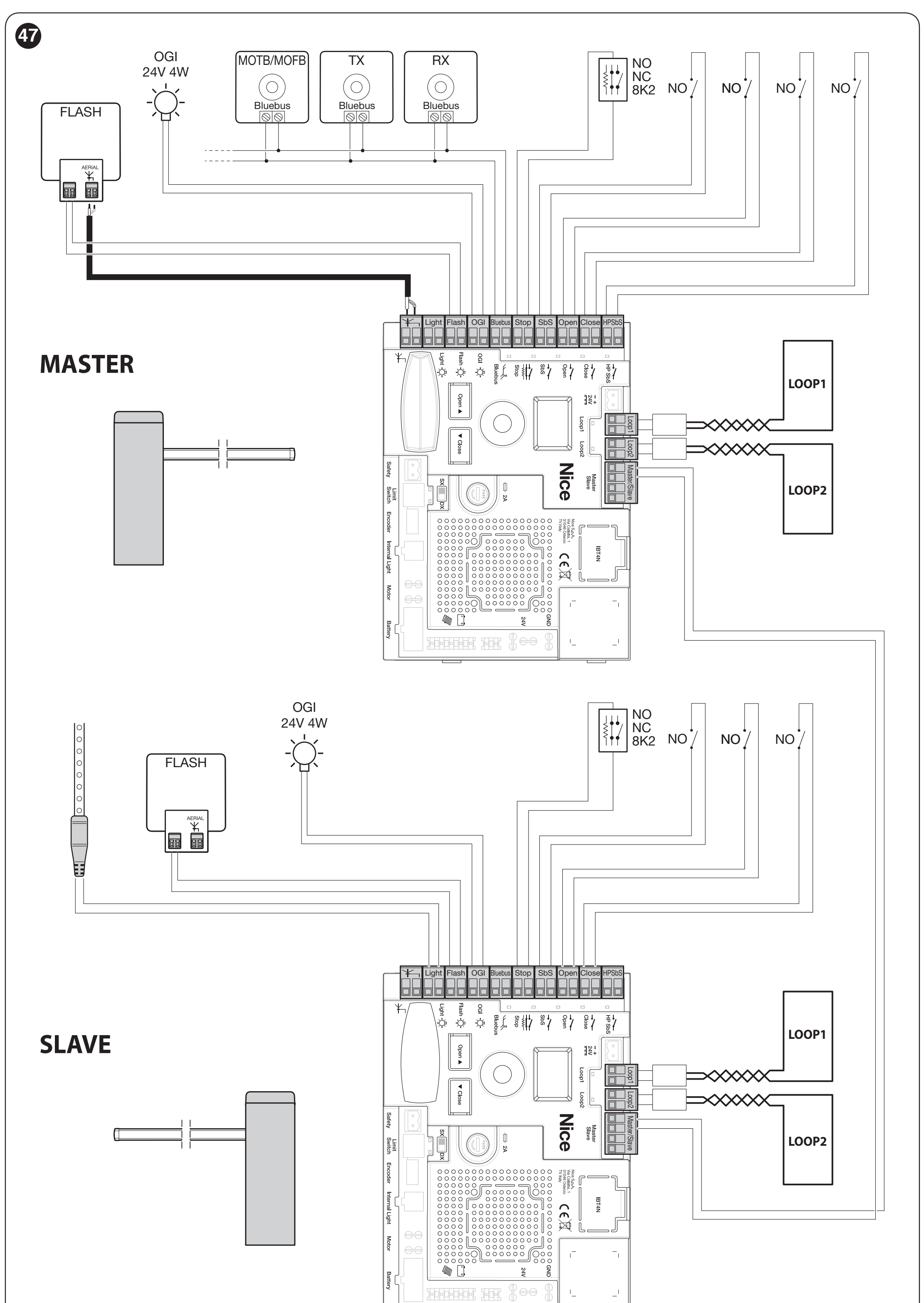
Shared BlueBUS devices and the receiver must be connected to the Master. Custom SbS/OPEN/CLOSE commands on the Slave can control only its own arm. Speed, deceleration, deceleration position, and force are set separately for each barrier. For backup power, each barrier needs its own PS224.
Remote control and backup power
Receiver and remote controls
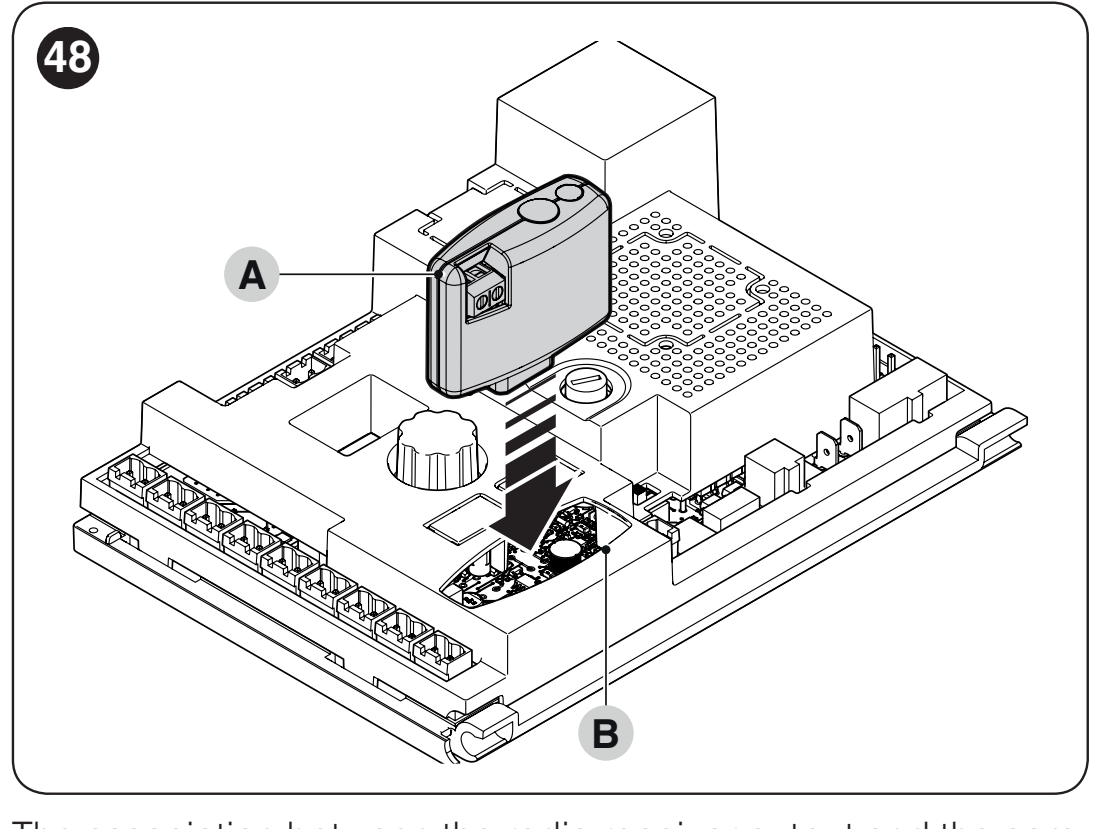
The board has an SM socket for a compatible receiver. Current selection OXIBD lets you use compatible remote controls, such as ON2E. Connect the receiver with both the mains supply and battery disconnected. Store and delete remote controls according to the specific receiver's instructions; resetting the control board is not a substitute for its radio programming procedure.
PS224 during a power outage
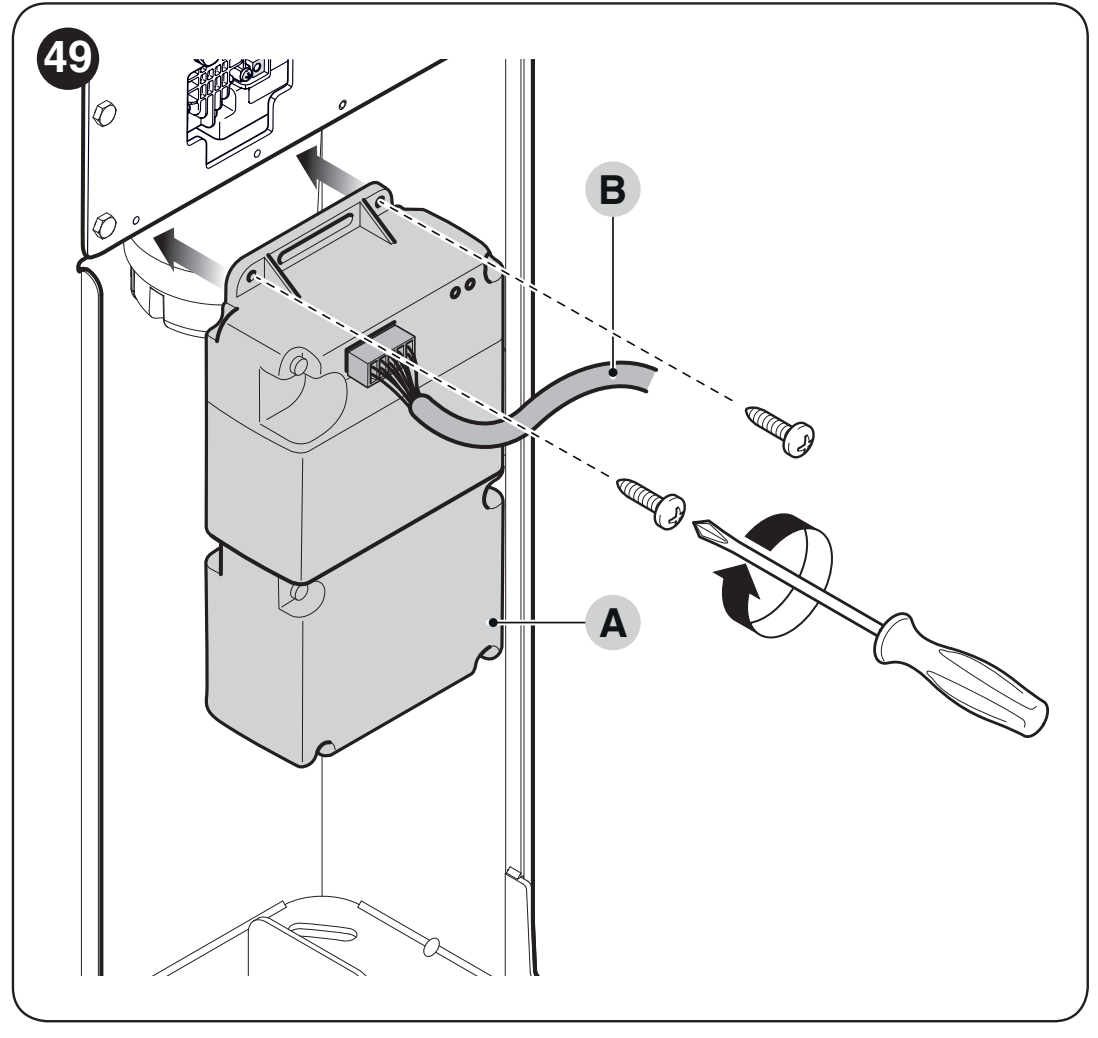
PS224 is connected only after installation and programming are complete: disconnect the mains supply, install the battery, and connect the designated cable to the backup connector; then restore mains power. Mode F05 = 4 can limit power consumption when running on battery. The F07 = On function commands the barrier to open during a power failure if a battery is installed; it is not enabled by default.
Solemyo SYKCE30 is a different power supply option. When connecting Solemyo, the barrier must not be connected to the 230 V mains at the same time. Assess the power source capacity based on the number of cycles and the accessories installed.
Diagnostics and troubleshooting
First, identify the code shown on the display or count the short flashes. The diagnostic sequence repeats after a pause of approximately 1 s; normal flashing during movement is not a fault code.
When the barrier does not respond or moves incorrectly
| Symptom | What to check |
|---|---|
| The remote control does not respond and its LED is off | Check the remote control battery. |
| The remote control LED is on, but the barrier does not respond | Check that the remote control is programmed and compatible with the installed receiver; receiver and remote control. |
| The display is off and no command works | A technician should check the power supply and fuses F1/F2. Replace a fuse only after identifying the cause, and use one of the same type and rating; never bypass a fuse. |
| A command is issued, but the cycle does not start | For a wired command, check the LED for the corresponding input. If the warning light indicates a fault, refer to the code table below. |
| The arm immediately reverses direction or moves unusually slowly | First check the balance, free movement, mechanical stops and limit switches. If the board cannot detect the end position, check the switches and position learning. |
| The arm moves in the opposite direction | Check the spring side and direction switch. Do not swap the wires without checking. |
| Code / signal | What to check |
|---|---|
| E01 / 1 flash | BlueBUS/STOP devices changed or not learned. Check the wiring, then perform Set 1. |
| E02 | Positions not learned; after checking the mechanical stops and balance, perform Set 2. |
| E03 | Limit switches reversed; check their direction and electrical wiring. |
| E04 | Encoder signal missing; a technician should check the sensor connector and cable. |
| E05 | Communication error Master–Slave; check the polarity and run the learning procedure for both barriers. |
| E06 / 5 flashes | Parameter memory error. Disconnect and restore all power sources, then try again; if the problem persists, servicing is required, possibly including a full reset and relearning. |
| E07 / 7 flashes | Internal electronics error. Disconnect all power sources; if the fault recurs, arrange servicing. |
| E08 | Barrier type configuration; a technician should check the board's factory settings. |
| E09 / 9 flashes | Software lockout. Enter the designated unlock command, or HP SbS if applicable; this is not mechanical release using a key. |
| E10 | Missing NC safety contact or limit switch; check SAFETY and the switches. |
| E11 | BlueBUS short circuit. With the power disconnected, check the wiring and devices. After resolving the cause, restore power, issue a command, and wait 40 s. If the fault recurs, servicing is required. |
| I02 / 2 flashes | Photocell active. Remove the obstruction, clean the optics, and check the alignment. |
| I03 / 3 flashes | Force limit triggered. First check the balance, friction, and mechanical stops. Do not increase the force to compensate for a mechanical fault. |
| I04 / 4 flashes | STOP triggered. Find the cause in the connected device; do not bypass the safety input. |
LEDs and din mode
STOP is lit when the input is normally enabled; if it goes out, the input has been triggered. The SbS, OPEN, CLOSE, and HP SbS LEDs light up when a command is active. FC1/FC2 status depends on the RH/LH switch: with RH, FC1 goes out in the closed position and FC2 in the open position; with LH, the opposite applies.
Display codes and beacon flash counts are not numbered in the same way. For example E06 means five flashes; six- and eight-flash sequences have no assigned function in this configuration.
The din menu displays inputs using the three digits of the display. The A-to-G labels and the dp decimal point are shown in the diagram. For FC1/FC2, the open and closed positions are determined by the RH/LH setting described above.
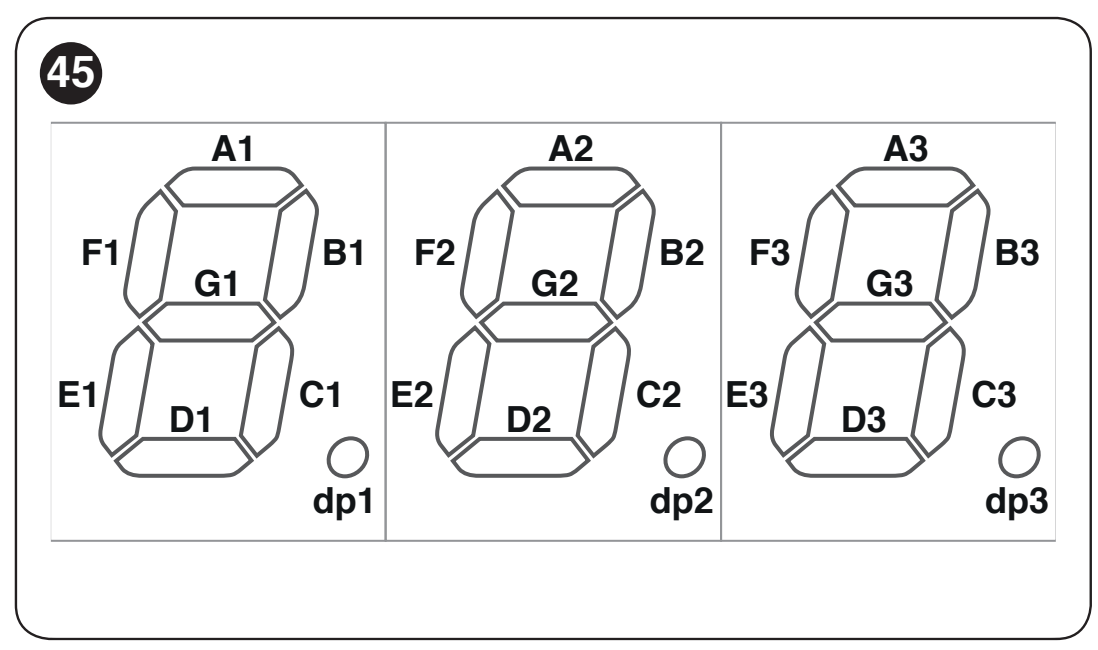
| Digit | Segment and function |
|---|---|
| First | A1 – LOOP1 B1 – CLOSE C1 – HP SbS D1 – LOOP2 E1 – OPEN F1 – SbS G1 – unused dp1 – flashes once per second while the control board is running |
| Second | A2 – FC1 B2 – CLOSE button on the control board C2 – RH direction D2 – battery power E2 – LH direction F2 – OPEN button on the control board G2 – FC2 dp2 – motor sensor input A |
| Third | A3 – FA1 opening photocell B3 – FOTO active C3 – FOTO II active D3 – FA2 opening photocell E3 – FOTO 1 active F3 – FOTO 1 II active G3 – Master has detected Slave dp3 – motor sensor input B |
With the motor stopped, dp2/dp3 may be lit or unlit depending on the sensor position; they flash while the motor is moving. Correct the direction in the mechanism and switch, not by swapping random wires.
Clearing settings and starting over
On the selector, choose ErS, press, select the desired value, and confirm. 1 clears the learned devices, 2 positions, 3 function values, 5 all control unit data. After a full clear, repeat Set 1, Set 2, the setup procedure, and the safety tests.
Control board reset does not reset the number of operations performed. After maintenance has actually been carried out, reset the service counter via OVIEW. Erasing transmitters is covered by the procedure for the specific receiver.
Manual arm release
In the event of a power failure, fault, or installation work, stop operation, disconnect the power supply, and secure the area. Hold the arm in place; an incorrectly balanced arm may move on its own.
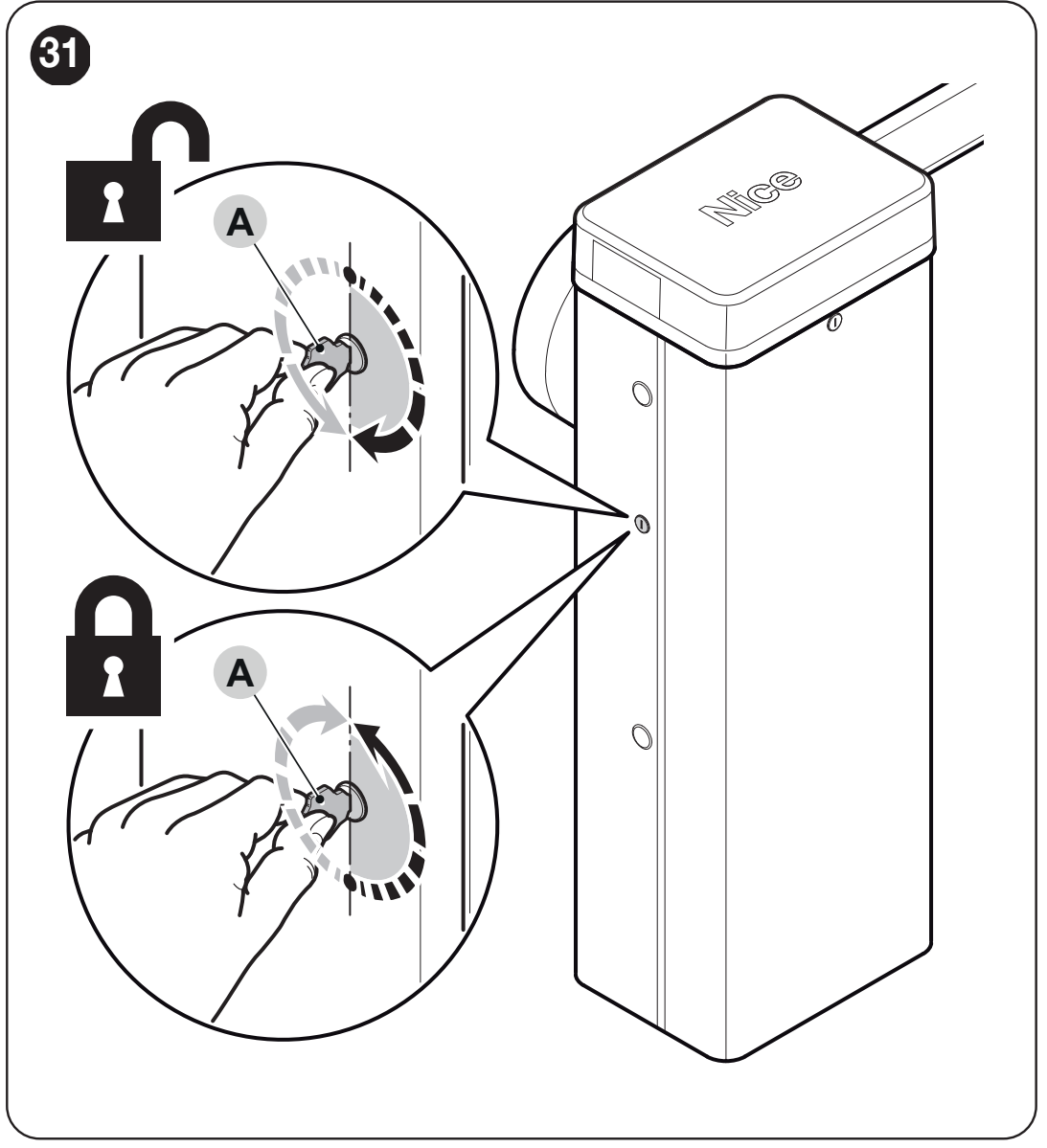
- Insert the release key and turn it 180° to the left or right.
- Move the arm manually to the required position.
- To restore motorized operation, return the key to its original position and remove it. Check that the system is secured and that control has been safely restored.
Maintenance and service life
For an existing installation with BCU1 R10, schedule a professional inspection no later than 6 months or 20,000 operations, whichever comes first. Under intensive use, the cycle limit may be reached much sooner. Check the balance after any change to the arm equipment as well.
The technician will disconnect all power sources and inspect the secure connection between the two arm sections, the XBA9 coupling expansion bolts, corrosion, anchoring, screws and spring attachment, shaft play, the condition of the arm, and the release mechanism. After restoring the power supply, they will repeat the safety device and force tests. Record servicing and any spring replacement in the maintenance log.
Factors affecting estimated service life
| Characteristics of the complete automation system | Index | Service life graph |
|---|---|---|
| Speed, level 3 | 15% |
|
| Speed, level 2 | 10% | |
| Photocell activations in more than 10% of operations | 15% | |
| STOP activations in more than 10% of operations | 15% | |
| WA12 mobile support | 10% in an approved configuration | |
| Salt in the environment | 10% | |
| Dust / sand | 5% | |
| Under-barrier support | 5% in an approved configuration | |
| Temperature above 40 °C or below 0 °C | 5% | |
| Set force FrO / FrC | Level 4: 5% Level 5: range 5–10% Level 6: 10% |
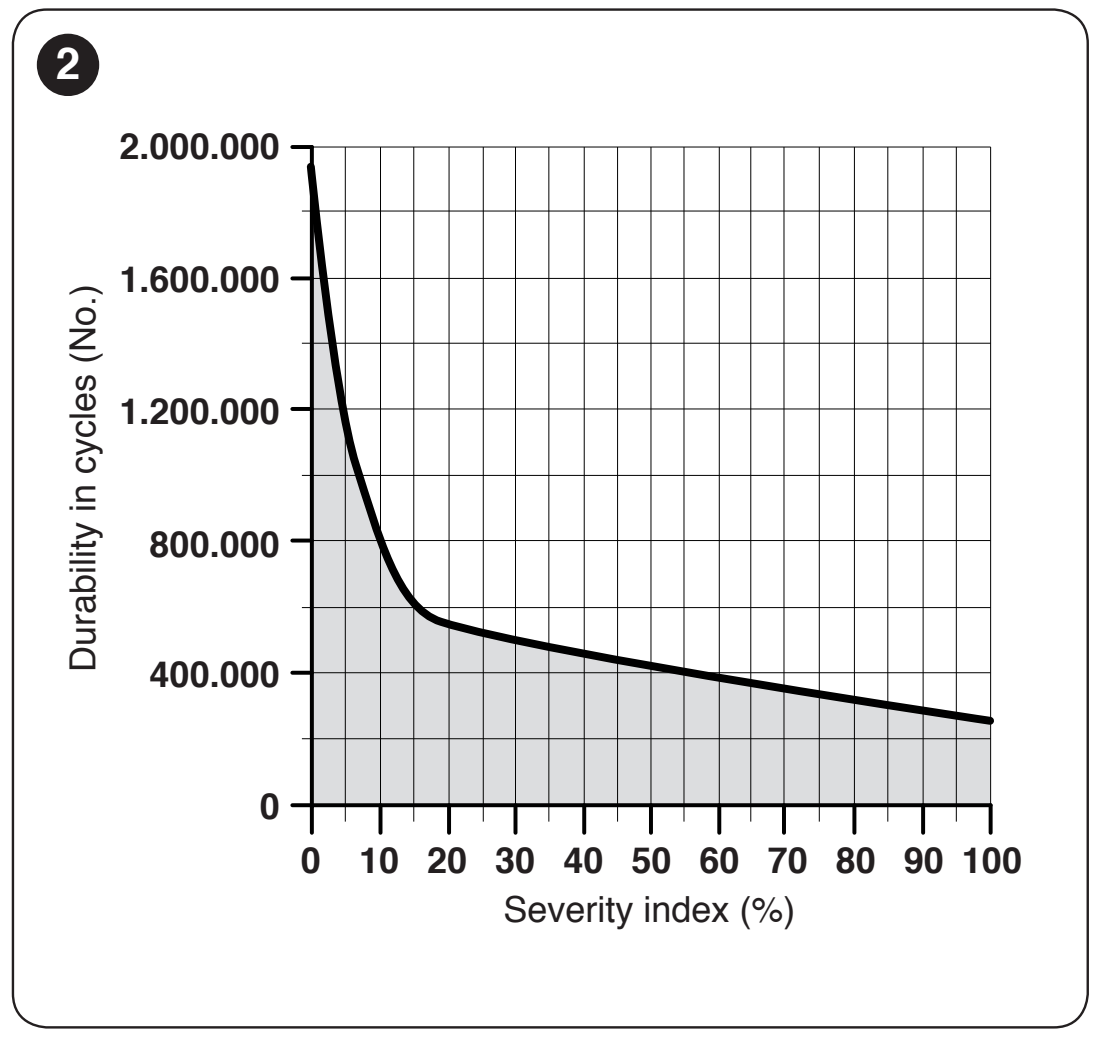
Speed levels 2 and 3 are alternatives; add only the level in use. No index is specified for level 4, so do not estimate the number of cycles for it. Add the indices for all other applicable factors. Find the total on the graph's horizontal axis and read the estimated number of cycles from the vertical axis. For force level 5, the estimate is a range; do not estimate the number of cycles beyond the graph's range. The estimate assumes correct installation and regular maintenance; it does not guarantee a number of cycles or recommend postponing servicing.
Technical specifications of the NICE M7BAR barrier
| Parameter | Value |
|---|---|
| Model | NICE M7BAR – without boom |
| Type | Electromechanical barrier with a 24 V DC motor and built-in control unit |
| Control unit | BCU1 R10 (XBA3 R10) |
| Mains power supply | 230 V AC, 50/60 Hz |
| Motor voltage | 24 V DC |
| Current draw | 1.1 A |
| Maximum power consumption at startup | 110 W |
| Power consumption at rated torque | 40 W |
| Operating time | 6–10 s |
| Starting torque | 300 Nm |
| Rated torque | 90 Nm |
| Max. frequency at rated torque | 200 cycles/h |
| Clear passage width | 5–7 m |
| Protection rating | IP54 |
| Operating temperature | −20 to +55 °C |
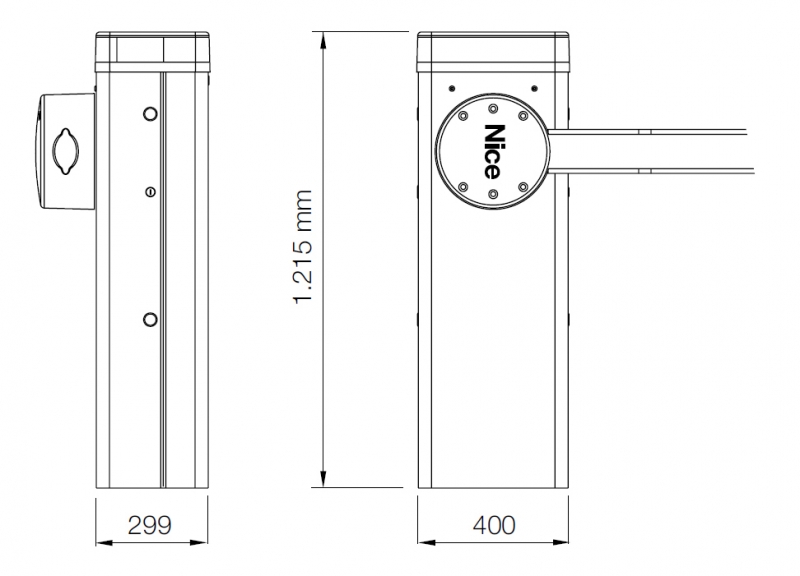
| Cabinet dimensions | 400 × 299 × 1 215 mm (width × depth × height) |
| Weight | 85 kg |
| Insulation class | I |
| Backup power supply | PS224 |
| Solar power supply | Solemyo SYKCE30 |
The specifications apply at a reference temperature of approximately 20 °C. Consider them together with the boom length, equipment and balancing. For a different drive or control unit version, check the movement time and available settings against the identification on the device.
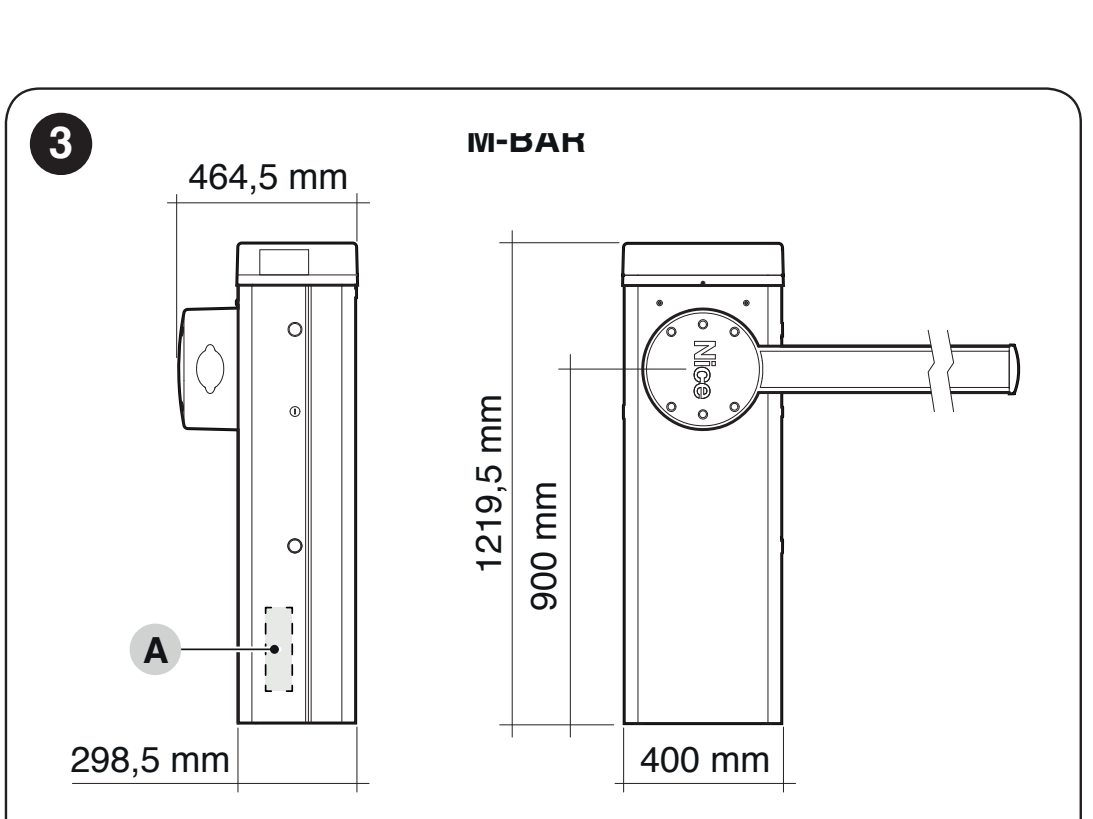
The drawing also shows projecting parts and the exact dimensions of 298.5 and 1,219.5 mm. When anchoring and positioning, follow the drawing rather than relying only on the rounded cabinet dimensions in the table.
How can I order this item?
Choose the option that suits you:
- order online: use the buy button to add the goods to your shopping cart (you will find the buy button here in the product variants table).
- order by email: place your order at [email protected]






