NICE Hyke HK7224 – swing gate operator without control unit, for a gate leaf up to 3.5 m / 330 kg
| Product availability: | within 3 days | We usually ship the goods within 3 days. |
|---|

within 3 days
€662.10 including VAT
| Weight |
|---|
| 9,50 kg |
Description of NICE Hyke HK7224 – swing gate operator without control unit, for a gate leaf up to 3.5 m / 330 kg
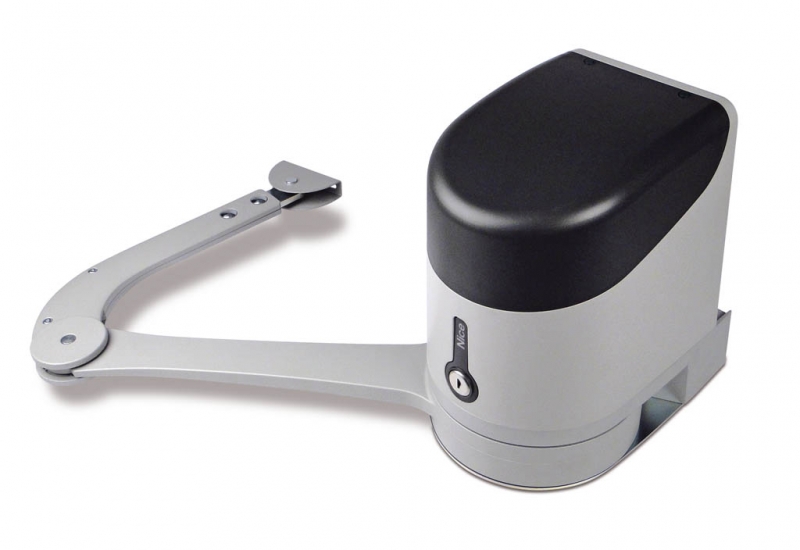
NICE HYKE HK7224 is an articulated non-reversible drive for one leaf of a swing gate. It has a 24 V DC motor with encoder and an adjustable articulated arm.
HK7224 does not include a control unit. It is the second motor for a double-leaf gate and connects to the drive NICE HYKE HK7024, which controls the entire system. HK7224 must not be connected directly to 230 V. Accessories are wired and configured at the control unit in HK7024.
The drive is designed for leaves up to 3.5 m or up to 330 kg depending on the application chart. It is also suitable for more intensive use; the permitted duty depends on the load, installation and temperature. In the event of a power failure, it can be manually released with a key.
Control unit and compatible accessories
A single control unit in HK7024 controls one or both leaves. The following wiring and programming instructions are for the HKA2R10 with an SM connector, eight LEDs L1–L8 and a 12-position motor selector. Before connecting accessories, check the markings and layout of the actual circuit board.
| What | Why | Type |
|---|---|---|
| Control | Controls one or two HYKE motors. Motor wiring. |
|
| Receiver and remote control | Remote control compatible with the receiver's coding system. Pairing and commands. | |
| Safety photocells | Protects the passage, depending on the installation location. Wiring and addressing. |
|
| Warning light | Signals movement and faults. FLASH output. |
|
| Safety edge | Protects hazardous areas when they come into contact with an obstacle. STOP input. |
|
| Key switch control | Switches a command input using a voltage-free contact. SbS, OPEN and CLOSE inputs. |
|
| External release | Manual opening if you cannot reach the drive when the power is out. |
|
| Backup power supply | A few operating cycles during a power outage. Selecting and connecting the battery. |
|
| Electric lock | Additional locking of the gate leaf, depending on its design. ELS output. |
|
Standalone gate motor and control unit
| Model | What it includes and how it is used |
|---|---|
| HK7024 | Articulated-arm drive with mounting brackets, manual release and built-in control unit. It operates one gate leaf, or two leaves when used with the HK7224. |
| HK7224 | Articulated-arm drive with manual release, without its own control unit. The control unit in the HK7024 operates the second leaf. |
| Standalone drive and kit | The receiver, remote control, photocells, warning light and backup battery are not automatically included with every standalone motor. Check the contents of the specific kit. |
Kits for one or two gate leaves
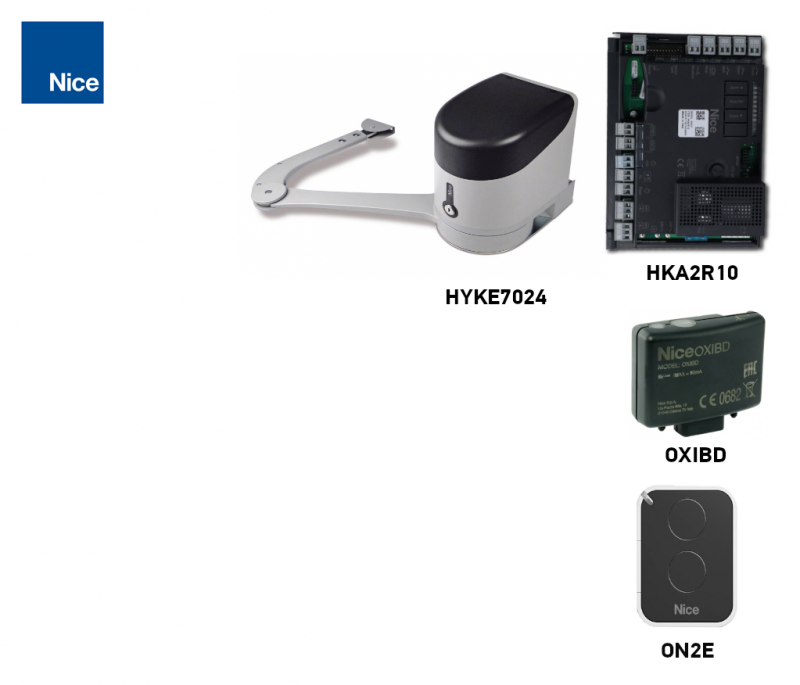
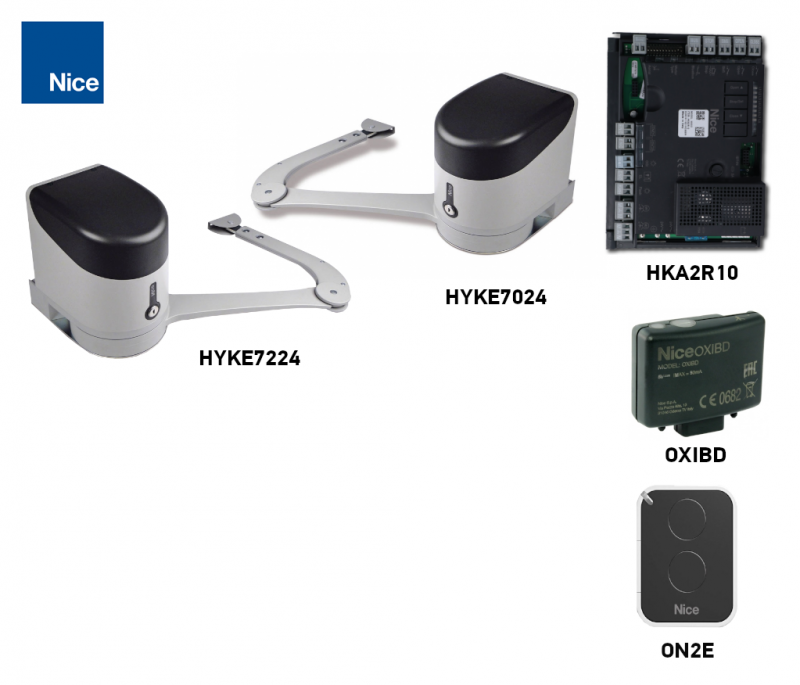
Kits include a receiver OXIBD and a remote control ON2E. The version with photocells also includes EPMB; the version with accessories also includes ELDC. Two motors do not increase the limit for an individual gate leaf.
| One gate leaf | Standalone drive | Two gate leaves |
|---|---|---|
1 × HK7024. One HKA2R10 control unit. | Standalone HK7224
One motor. No control unit. |
1 × HK7024 + 1 × HK7224. One HKA2R10 control unit. |
Gate leaf length and weight, and space for the drive
3.5 m and 330 kg are separate maximum limits. With the arm at full length, the permitted gate leaf is 3.5 m long and weighs up to 200 kg, or weighs up to 330 kg when its length is no more than 1.8 m. Read intermediate values from the graph according to the length and weight of one gate leaf.
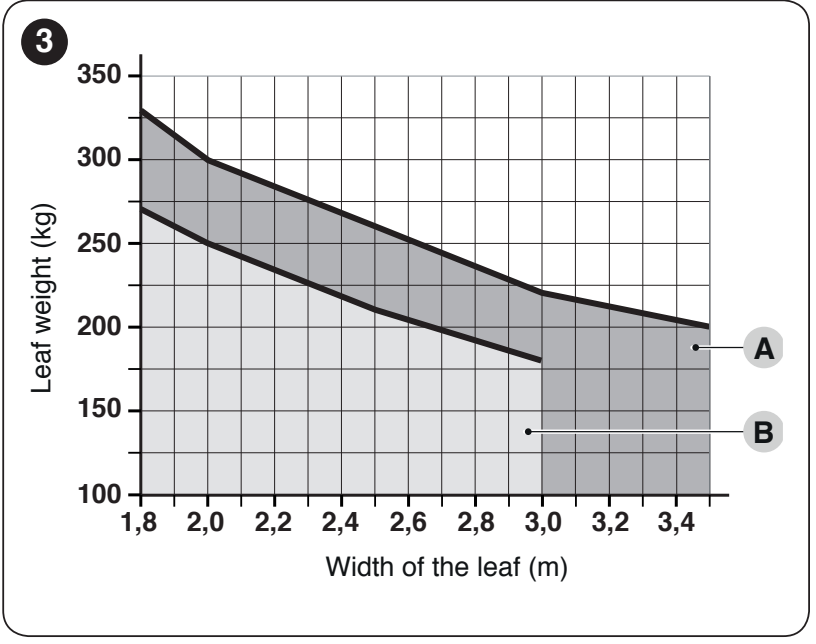
A = full-length arm, B = shortened arm. The horizontal axis shows gate leaf length in metres; the vertical axis shows its weight in kilograms. When shortening the arm, use the lower B curve and an opening angle of no more than 90°. Do not apply the full-length arm limits to a shortened arm.
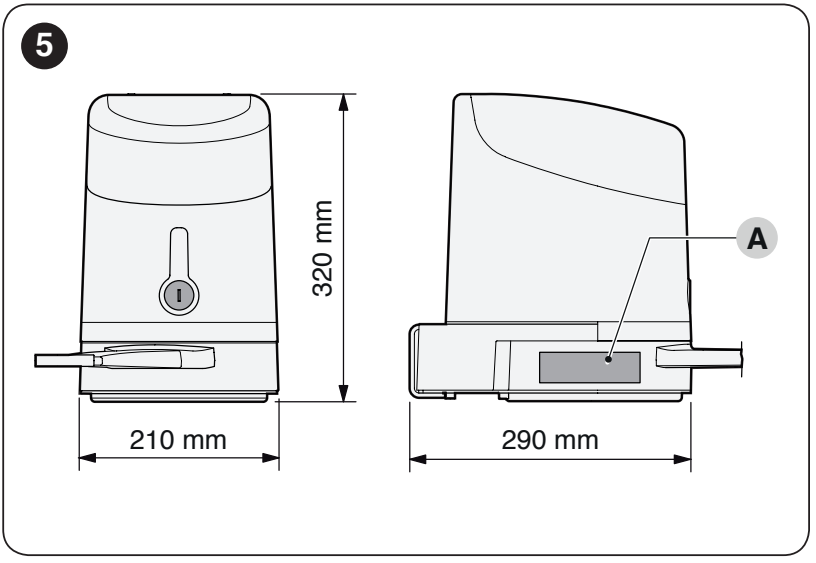
The installation space available for the drive itself must be at least 210 mm. Check the entire path of the moving arm and its clearance from the wall or fence. The dimensions below define the installation geometry, not a universal post size.
Installing the brackets and articulated arm
Installation, electrical connection and testing must be carried out by a qualified technician. Disconnect the mains power and any backup battery before starting work. The gate must move easily along its entire path, must not open or close by itself, and its mounting must not flex or loosen.
The motor mounting bracket must be level and attached to a solid surface. Secure the arm bracket to the load-bearing gate frame, not to a weak infill panel. Position the drive so that the key and release lever remain safely accessible. The installation site must not be prone to flooding; if necessary, mount the drive higher above ground level. Route the cables so that water and condensation cannot enter the drive.
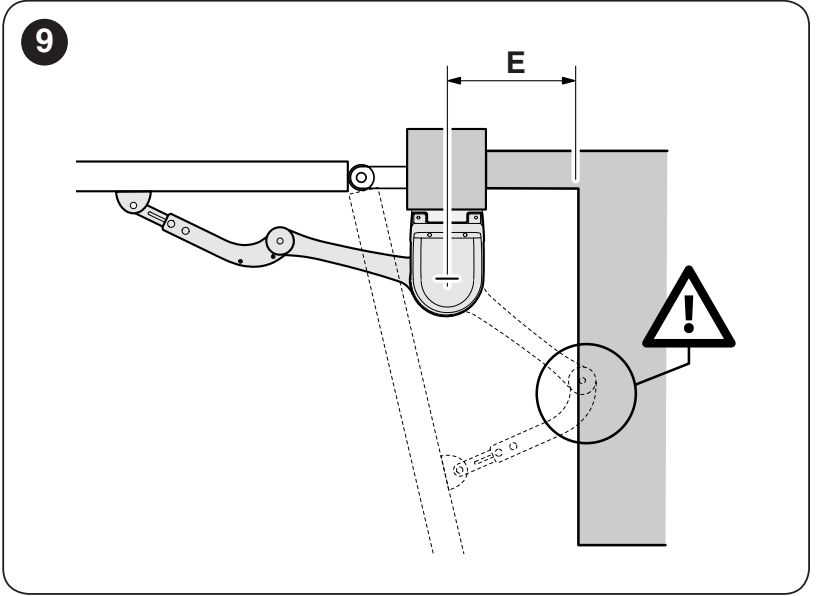
| Dimension E | Arm selection |
|---|---|
| E at least 650 mm | Full-length arm; determine the angle and dimensions A/B from the installation graph. |
| E from 300 to 650 mm | Shortened arm; opening angle no more than 90° and stricter gate leaf weight limits. |
| E less than 300 mm | The shown installation is not permitted. Choose a different position or another suitable solution. |
A is the position of the drive bracket relative to the hinge axis; B is the offset of the hinge axis from the mounting surface, as shown in the diagrams. Both values are in millimetres.
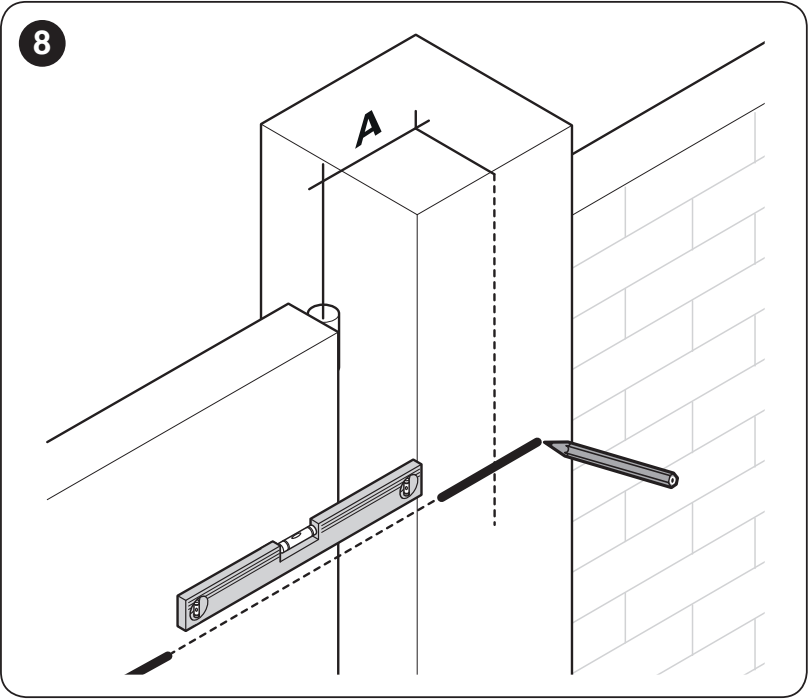
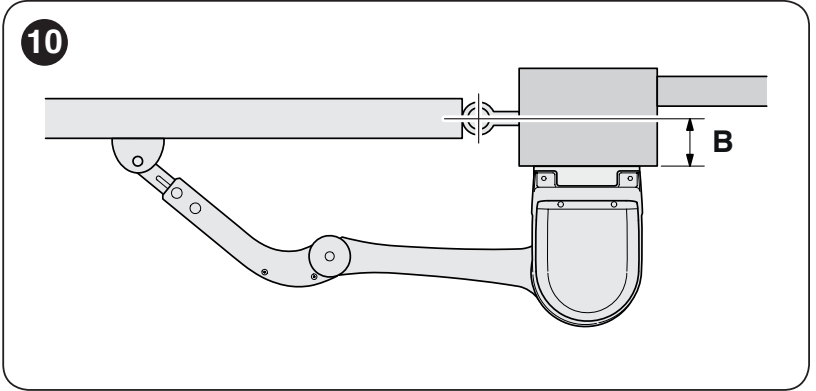
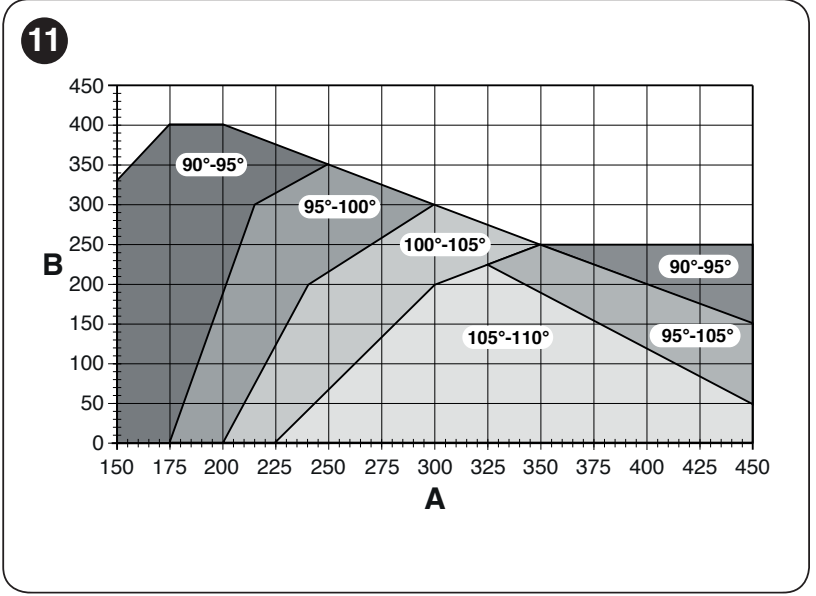
- Measure B and select the required opening angle. With the full-length arm, the maximum opening angle is 110°.
- On the graph, draw a horizontal line from the value of B to the required opening angle area. Read the permitted range for A from the intersection points. For example, with B = 200 mm and an opening angle of 110°, A is approximately 300–345 mm.
- Assemble the straight and curved arms with the pins and retaining rings. After installation, the motor and gate-leaf brackets must be level with each other.
- Use the motor bracket as a template, mark four fixing points and secure it with suitable anchors. Attach the motor to the bracket using the two supplied screws.
- Unlock the motor. With the arm fully extended, position the bracket on the gate leaf so that the arm is as extended as possible and stops at its travel limit. Secure the bracket horizontally and fit the pin and retaining ring.
- Manually move the gate through its full travel. The arm must not strike the wall, fence or gate leaf, and its movement must not create any unguarded trapping or shearing points. Then set the stops and lock the motor again.
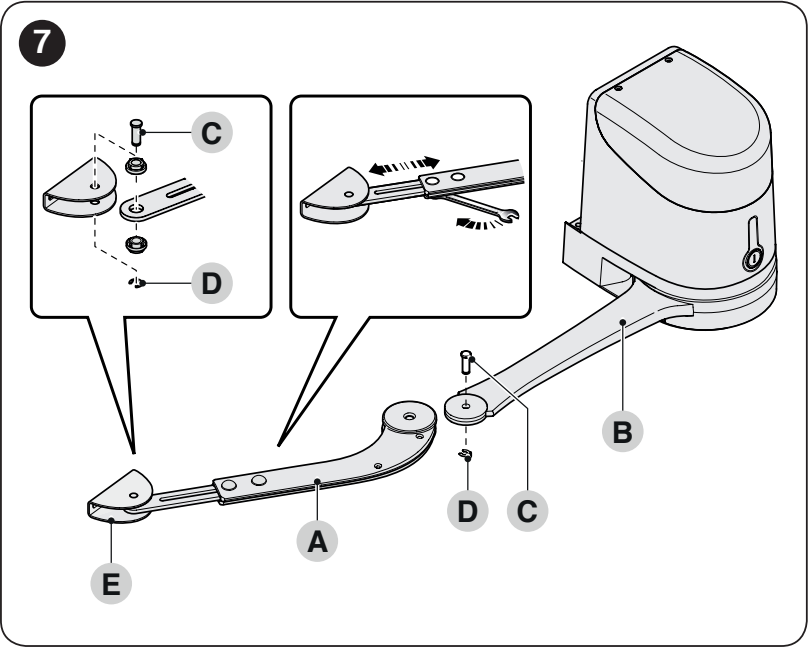
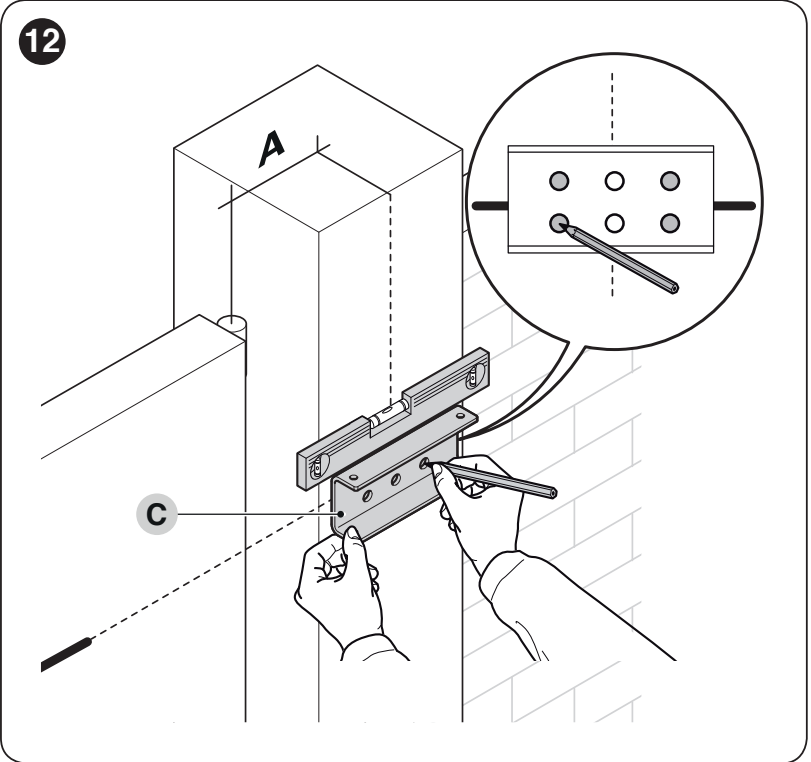
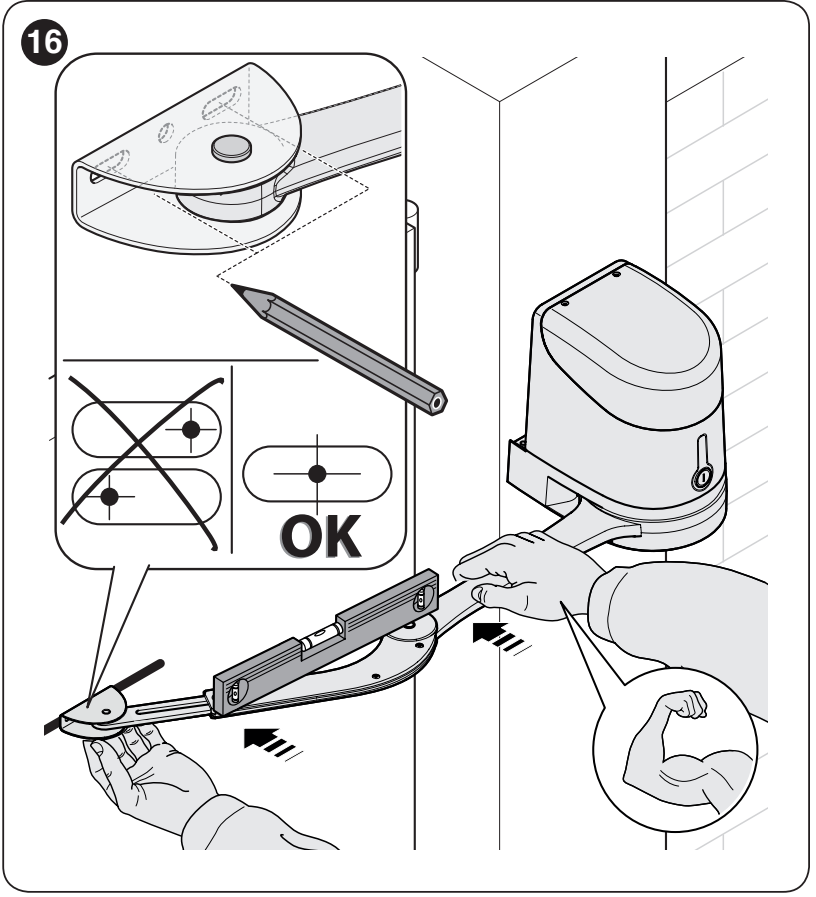
Installation with the shortened arm
With the shortened arm, select A from the 90°–95° range in the installation chart; the actual gate-leaf opening must not exceed 90°. Determine the bracket position on the gate leaf with the motor unlocked: press the curved arm against the closed gate leaf until it reaches its travel limit. Keep E at least 300 mm, the opening angle at no more than 90°, and stay below curve B. During a manual test opening, hold the bracket against the gate leaf and check that neither the bent arm nor its joint strikes an obstruction. Secure the bracket only after checking the full travel path.
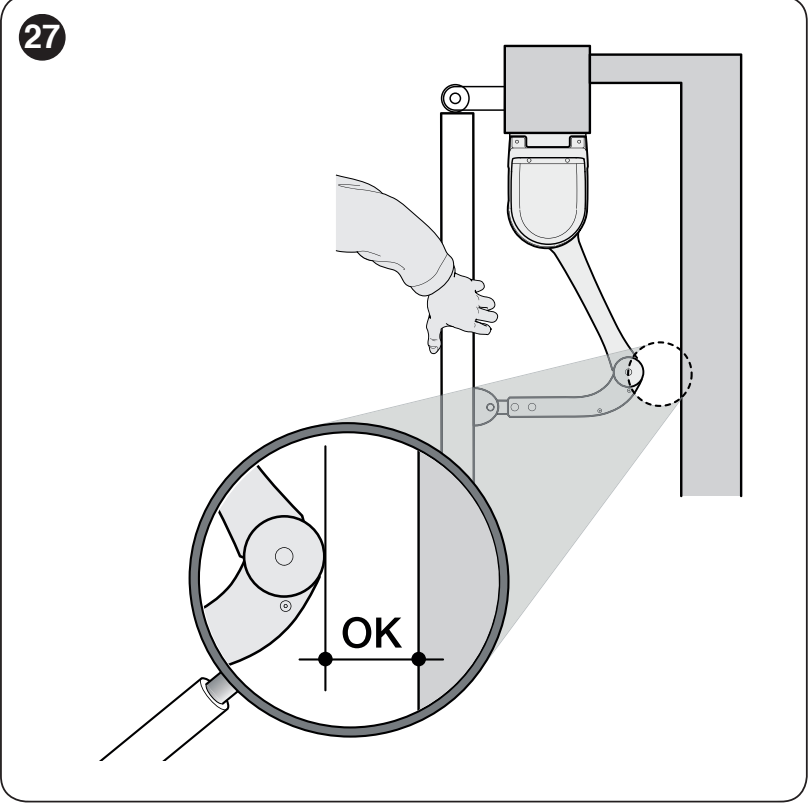
Mechanical opening and closing stops
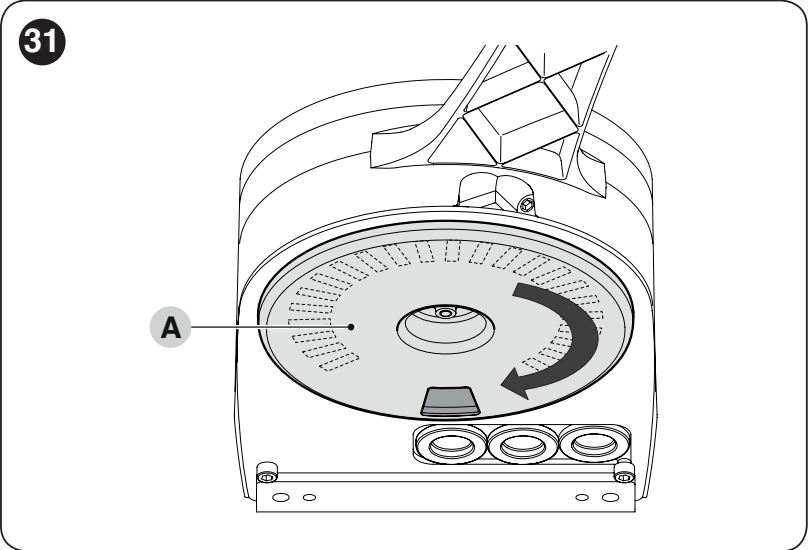
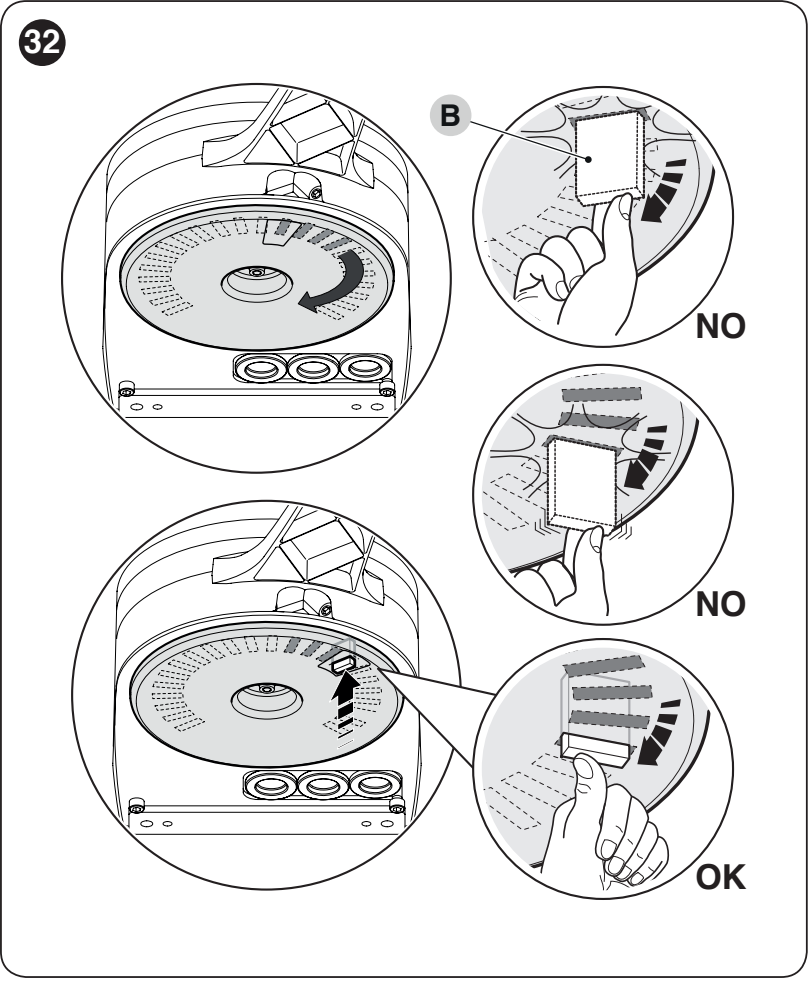
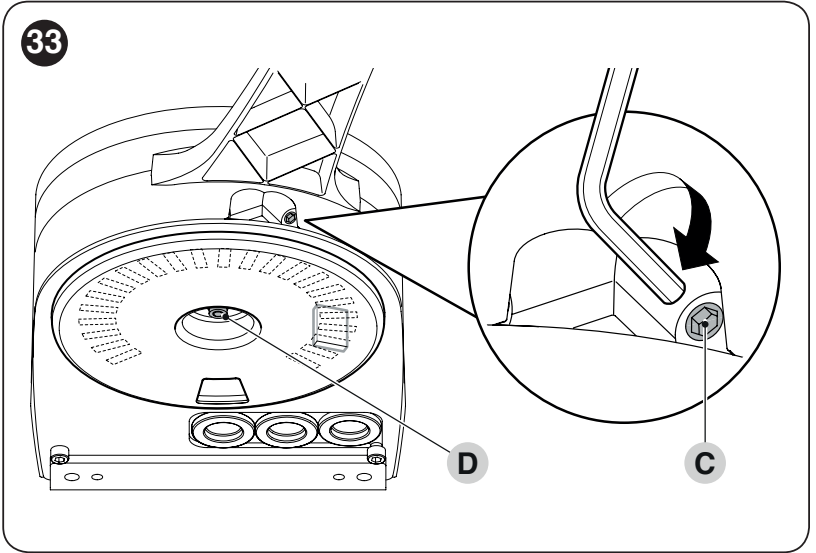
- Unlock the motor and manually move the gate leaf to the desired open position.
- On the underside of the motor, turn plastic disc A and align the opening under the arm as shown.
- Insert stop B in the nearest suitable position. It must engage correctly; compare the OK/NO markings.
- Turn the disc so that the stop cannot fall out. Fine-tune the position using adjustment screw C.
- If the gate has no ground-mounted closing stop, set the closing stop in the same way. Finally, firmly tighten nut D so that the disc cannot turn by itself.
- After changing the stop positions, carry out a new position-learning procedure and tests.
Manual release in the event of a power failure
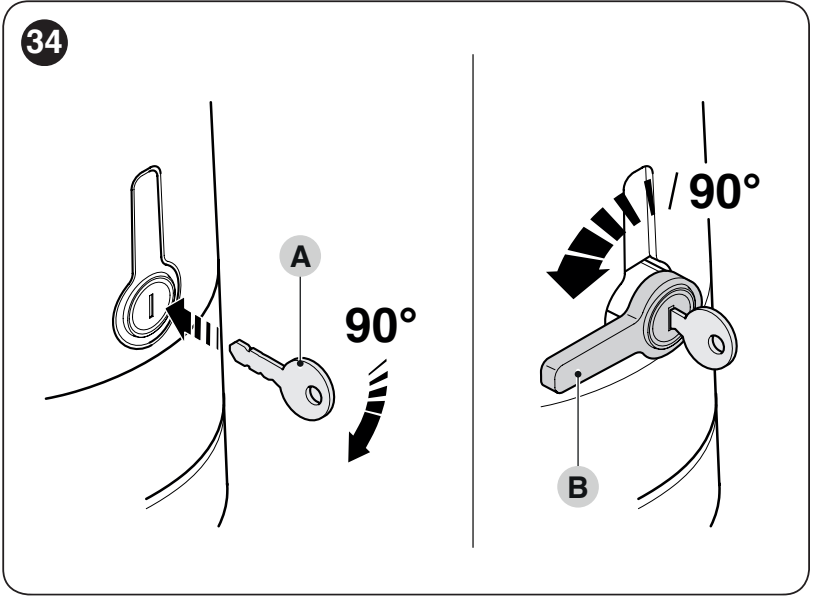
Stop the movement and disconnect the power before releasing the drive. Make sure the gate leaf cannot move by itself; control it in windy conditions.
- Insert key A and turn it 90° clockwise.
- Turn the extended lever B 90° counterclockwise. The gate leaf can now be moved manually.
- To lock the drive again, return the lever to the vertical position and push it into its housing. Turn the key 90° counterclockwise and remove it.
- After pushing the lever in, move the gate leaf manually a few centimetres in the opening direction to fully engage the drive. Before operating electrically, check that the lever is fully inserted and the drive is locked. If a safety fault occurs, do not operate the gate until the cause has been resolved.
Electrical connection of motors and accessories
Disconnect the 230 V mains supply and the backup battery before opening the cover. The power supply and protective earth must be connected by a qualified technician. The installation must include a device that allows complete disconnection, and the cables must be secured against being pulled out.
Open the HK7024 cover, lift the control unit and route the cables through the bottom entry. Secure the mains cable with a cable clamp. HK7224 receives motor power and a separate encoder cable from the HK7024 control unit.
| Cable | Cross-section and maximum length |
|---|---|
| Mains supply to HK7024 | 3 × 1.5 mm², up to 30 m. For a longer supply cable, use 3 × 2.5 mm² and provide protective earth at the automation system as specified in the installation design. |
| Second HK7224 motor | 3 × 1.5 mm², up to 10 m. Two motor conductors and a protective conductor, according to the motor terminals. |
| Second motor encoder | 2 × 1 mm², up to 10 m. The motor and encoder cables can be replaced by a single 5 × 1.5 mm² cable; connect each conductor to the corresponding terminal. |
| BlueBUS | 2 × 0.5 mm², up to 20 m; over 20 m and up to 40 m, 2 × 1 mm². |
| Flashing light | 2 × 0.5 mm², up to 20 m. |
| Antenna | Shielded RG58, up to 20 m; a length of less than 5 m is recommended. |
| OPEN/CLOSE switch | Two 2 × 0.5 mm² cables or one 4 × 0.5 mm² cable, up to 50 m. |
| Electric lock | 2 × 1 mm², up to 6 m. |
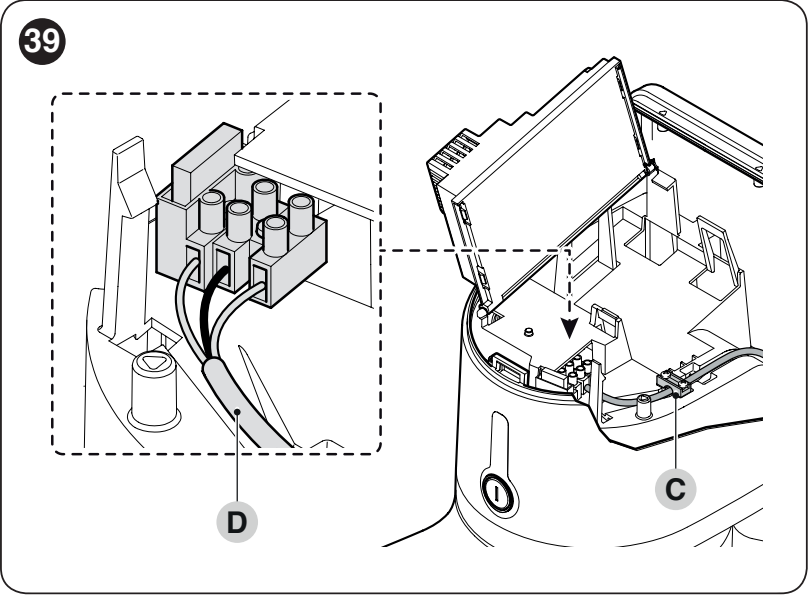
M1, M2 and encoders
M2 is the gate leaf that opens first; M1 closes first. For a single-leaf configuration, use the M2 output and the corresponding ENC2 input; M1 remains unused. For a two-leaf configuration, assign a separate encoder to each motor. Use the standard HK7224 motor specified for this configuration.
At the motor terminals, connect the motor conductors to the outer terminals marked M; connect the protective conductor to the terminal marked with the earth symbol. Connect the encoders to the corresponding pairs of terminals ENC1/ENC2, with no polarity requirement. To correct the direction, disconnect the power and swap only the outer motor conductors for that motor—not the protective conductor.
HKA2 control unit wiring diagram
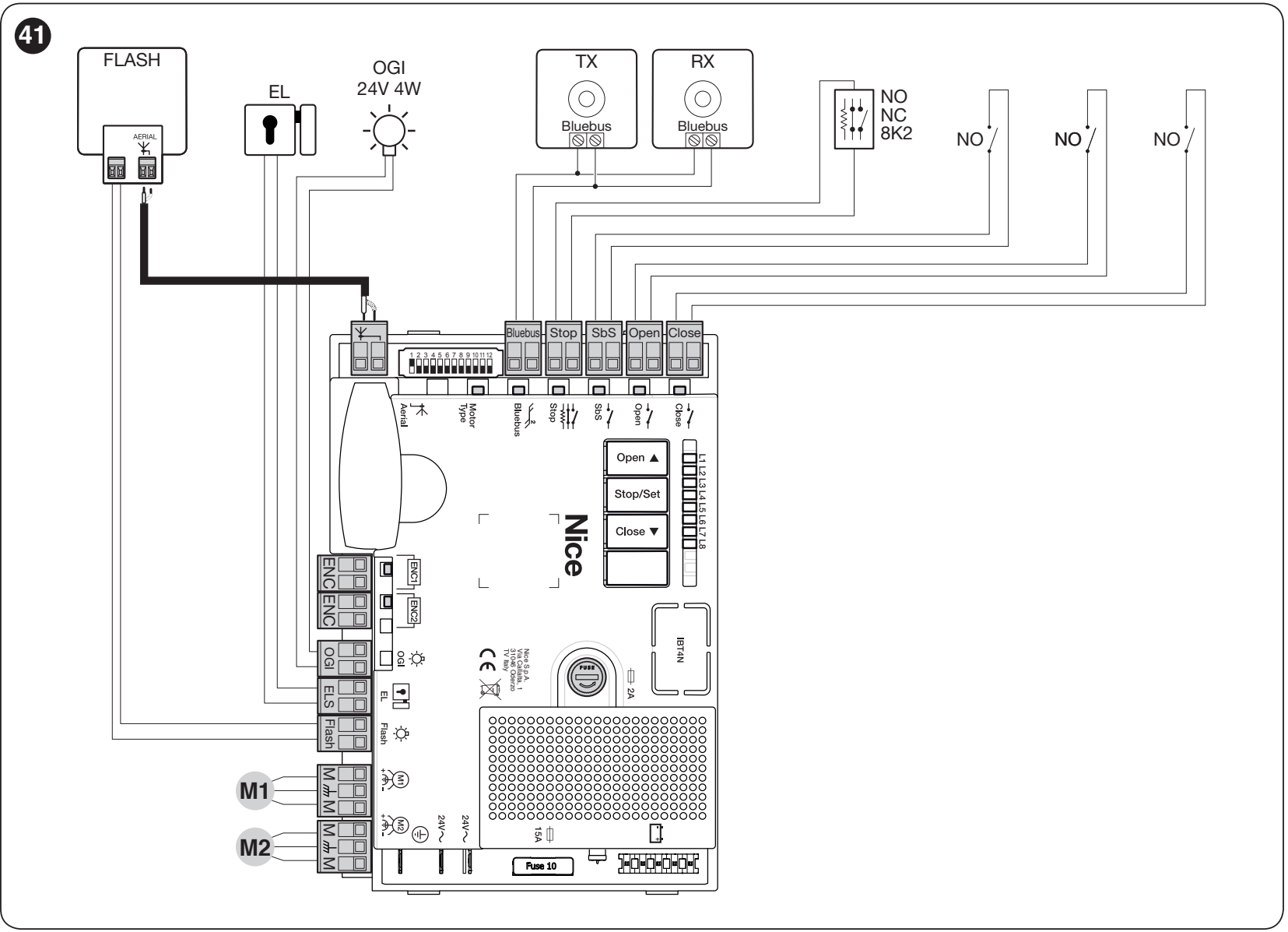
Legend:
- FLASH = flashing light
- EL/ELS = electric lock
- OGI = gate-open indicator
- TX/RX = photocell transmitter/receiver
- NO = normally open contact
- NC = normally closed contact.
The diagram shows the inputs and their functions; select the equipment to suit the specific configuration.
Accessory terminals, voltage and polarity
| Terminal | Function and connection |
|---|---|
| Auxiliary power supply | SbS (+) and STOP (−), 24 V DC, 200 mA maximum in total. Use the auxiliary power contact at the SbS terminal as positive and the auxiliary power contact at the STOP terminal as negative. Before connecting, check the relevant contacts on the installed board; the complete pair of command-input terminals is not a power output. This power supply is for low-power accessories, not for the motor, flashing light or electric lock. |
| BlueBUS | Two wires for both communication and power; no polarity (+/−). Up to 15 BlueBUS devices, depending on their power consumption. EPMB are connected in parallel. |
| FLASH | For flashing-light operation 12 V DC, 21 W maximum; suitable for ELDC. Connect the DC power supply according to the markings on the specific terminals and device. Do not infer the polarity from an adjacent output; if the markings on the board are illegible, a technician must verify the wiring. |
| ELS | 12 V AC, maximum 15 VA for an electric lock; AC has no positive or negative polarity. With L5 = ON, it changes to a lighting output 24 V DC (−30/+50 %), maximum 4 W. When changing the function, choose a device rated for this voltage and observe its DC polarity. |
| OGI | Gate-open indicator light 24 V DC (−30/+50 %), maximum 4 W; can be used to control a small relay. With L8 = ON, it changes to a maintenance indicator light. For a device with specified DC polarity, check the output markings on the actual board. |
| SbS | Step-by-step command via voltage-free NO contact, non-polarized. Do not apply an external voltage to the input. |
| OPEN / CLOSE | Open / close via voltage-free NO contacts, non-polarized. With L7 = ON, CLOSE can be changed to partial opening. |
| STOP | Input: NC, NO or 8.2 kΩ, depending on the learned device. This is not a universal power supply pair; the contact wiring is described below. |
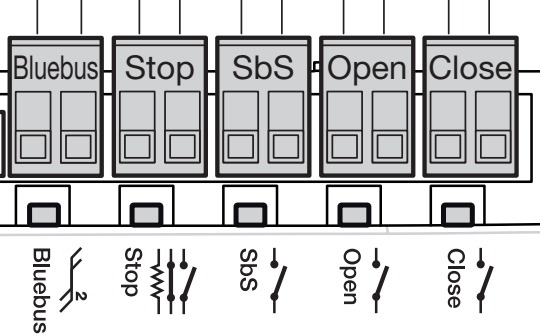
Auxiliary power and command contacts serve different functions. Do not power accessories through both contacts of an SbS or STOP pair, and do not short the pair when drawing power. On the HKA2R10, auxiliary power remains available even when Standby is enabled.
STOP, safety edge and pedestrian gate
After a learned state changes, STOP immediately halts movement and briefly reverses it. Connect multiple NO contacts in parallel and multiple NC contacts in series. Design the wiring for resistive safety edges according to the specific device; do not combine them with an arbitrary jumper.
If the gate leaf has a pedestrian gate, its monitoring contact must prevent powered movement while it is open. After each change to the STOP wiring, perform device learning and safety tests. Photoelectric sensors and safety edges protect different hazardous areas; one does not automatically replace the other.
BlueBUS photoelectric sensors
Both the TX transmitter and RX receiver of the photoelectric sensors EPMB connect using two wires to non-polarized BlueBUS. Each pair must have the same addressing on TX and RX, and different addressing from the other pairs. Repeat device learning after connecting or removing a device.
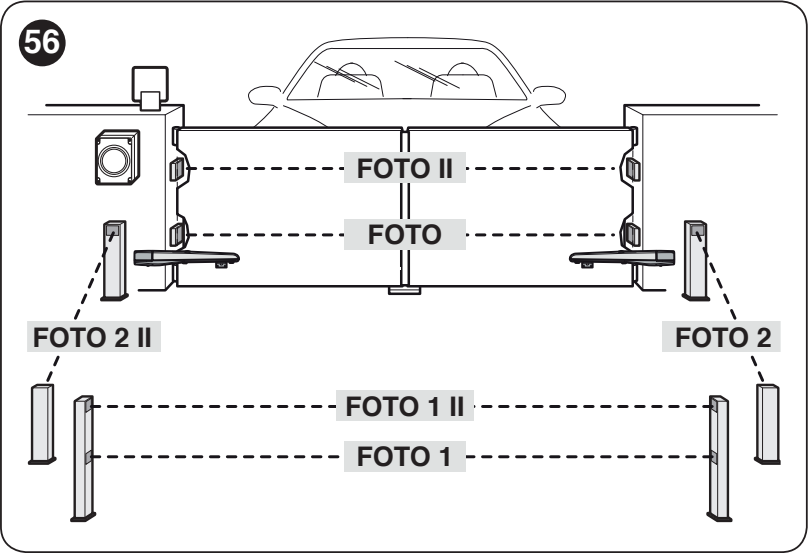
| Address | What it protects and how it responds |
|---|---|
| PHOTO / PHOTO II | PHOTO at approximately 50 cm, PHOTO II at approximately 100 cm; outer pairs. When closing, it stops and reverses movement. |
| PHOTO1 / PHOTO1 II | PHOTO1 at approximately 50 cm, PHOTO1 II at approximately 100 cm; inner pairs. When closing, it stops and reverses movement; when opening, it stops and resumes once the beam is clear. |
| PHOTO2 / PHOTO2 II | Protection of the opening area. When opening, it stops and reverses movement. |
| PHOTO3 | Not permitted for this HYKE wiring configuration. |
The jumper positions must match the selected function, not just the physical location of the photoelectric sensor. You can also find the complete addressing and wiring information on the EPMB data sheet.
Initial startup and control unit check
All buttons and LEDs listed below are on the control unit in the HK7024. The HK7224 does not have onboard programming. Before connecting the power supply, ensure that the cables, end stops, covers and safety devices are securely installed.
- Move the gate leaves to approximately the midpoint of their travel, secure the motor gears and clear the movement area.
- After connecting the power supply, the BlueBUS LED should flash approximately once per second. The LEDs on both the TX and RX photoelectric sensors must indicate power, and the FLASH beacon should be off at rest.
- If the power supply is missing or abnormal, switch off the unit and check the wiring and fuses. Do not proceed with learning if a problem is detected.
- Before learning the positions, select the correct motor using the selector and perform device learning.
12-position motor type selector
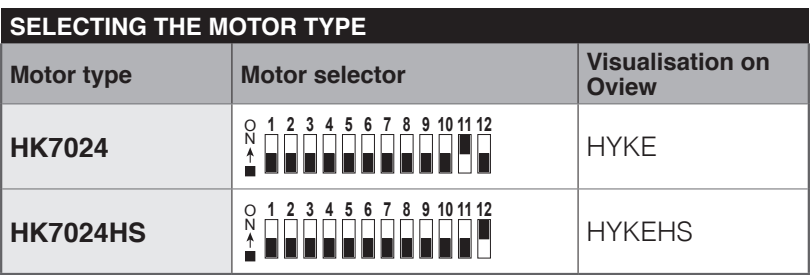
For standard motors For HK7024 + HK7224, set DIP 10 = ON; all other positions 1–9, 11 and 12 = OFF. In Oview, this corresponds to the HYKE designation. Adjust the selector with the power off and always before learning the positions. The setting for HYKE HS does not apply here.
BlueBUS and STOP device learning
- Press and hold simultaneously Open ▲ + Stop/Set.
- When L1 and L2 start flashing rapidly, after approximately 3 seconds, release both buttons.
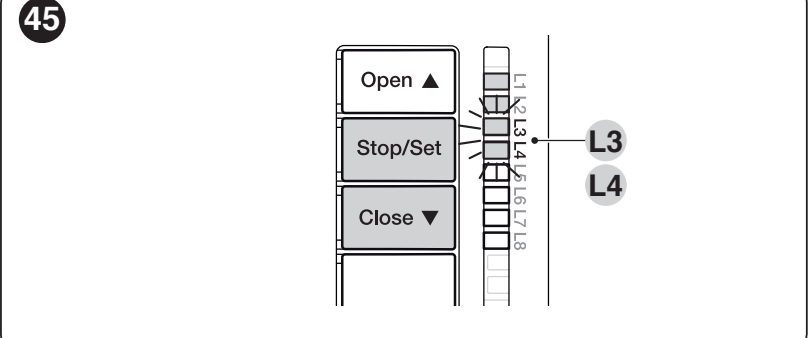
- Wait for recognition to finish. STOP must be lit and L1/L2 must be off. L3/L4 may start flashing to indicate that position learning is required.
- Learning is required even if no photoelectric sensors are connected, and whenever a device is added or removed. Then repeat the safety tests.
Learning the gate leaf positions
Devices must be learned first, and the motor selector must be set correctly. The mechanical end stops must be secure, and the force must be suitable for the gate. Monitor both motors and the entire movement area during learning.
Automatic learning
- Press and hold simultaneously Stop/Set + Close ▼.
- When L3 and L4 start flashing rapidly, after approximately 5 seconds, release the buttons.
- The control unit slowly closes M1 to the end stop, slowly closes M2 to the end stop, slowly opens M2 and M1 to the end stops, and finally quickly closes both gate leaves. With one motor, only the corresponding M2 gate leaf is learned.
- Successful completion is confirmed when both L3 and L4 go out. Then check several normal opening and closing cycles.
- If the direction or sequence is incorrect, stop movement using the Open or Close button. Disconnect both the mains and the battery before making repairs. If M1/M2 are swapped, swap their encoders as well; if the direction is incorrect, swap the motor's outer operating wires.
- If a photoelectric sensor or STOP is triggered, learning is interrupted and L1 starts flashing. Once the cause has been resolved, repeat the procedure from the beginning.
Manual learning and position definitions
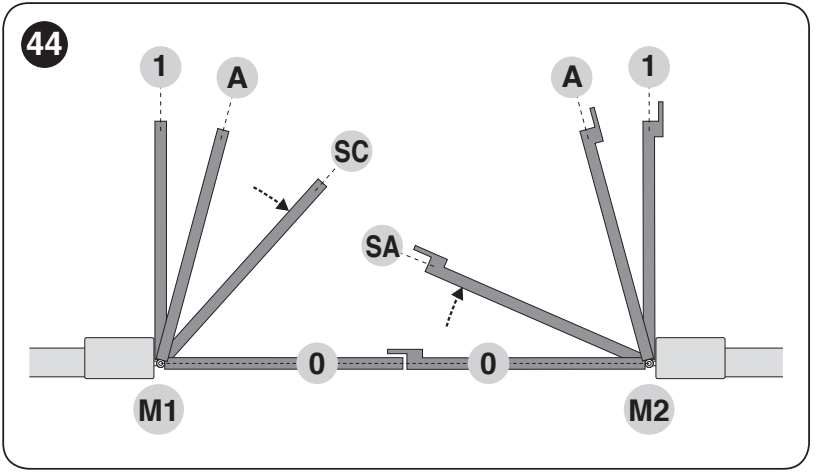
Manual learning allows positions to be set individually. Briefly pressing Open/Close switches the LEDs; holding the button moves the motor. Position 0 is the closing end stop, position 1 is the opening end stop, and A is the desired intermediate opening stop.
| LED – position | What is stored |
|---|---|
| L1 – 0/M1 | Fully closed position of gate leaf M1 at the mechanical end stop. |
| L2 – 0/M2 | M2 fully closes against the mechanical stop. |
| L3 – SA/M2 | Opening delay: once M2 passes this position, M1 may start opening. |
| L4 – A/M1 | Required stop position for opening M1. |
| L5 – A/M2 | Required stop position for opening M2. |
| L6 – SC/M1 | Closing delay: once M1 passes this position, M2 may start closing. |
| L7 – 1/M1 | M1 fully opens against the mechanical stop. |
| L8 – 1/M2 | M2 fully opens against the mechanical stop. |
- Press Stop/Set + Close and release as soon as L1 starts flashing, after about 3 seconds. For manual programming, do not wait for L3/L4, which start automatic programming.
- Move the selected motor to the required position by holding Open or Close. Release the button to stop the movement.
- To save, hold Stop/Set for at least 3 seconds. While you hold it, the corresponding LED will stay lit after about 2 seconds. Release the button only after at least 3 seconds; the next LED will then start flashing.
- Continue through L8. Keep less than 10 seconds between button presses; a longer pause ends the procedure and retains the changes saved so far.
For a single M2 motor: Confirm unused positions L1 and L7 by holding Stop/Set for at least 3 seconds. Skip L3, L4 and L6 with a short press of Open/Close. Save positions L2, L5 and L8 for the actual M2 leaf.
Mixed programming
First, perform automatic programming. Then enter manual mode by pressing Stop/Set + Close and releasing when L1 flashes. Briefly press Open/Close to select a position, adjust it by moving the gate, and save it as in manual programming. Use this method to adjust A, SA and SC; leave the end positions 0 and 1 as learned from the stops. To end the procedure, switch past the flashing LED after L8.
Pre-handover tests
- After disconnecting all power sources, disengage the motor and check manual movement along the full travel path. For this test, the manufacturer specifies a maximum of 390 N for manual movement; this figure does not replace drive selection or impact-force measurement.
- After securing the gate and restoring power, check opening, closing, stopping, slow-down and correct overlap of the leaves.
- Test each photocell, safety edge and gate control contact separately. Eliminate all crushing and shearing hazards around the arms.
- The technician must verify the forces and provide the user manual, release procedure and maintenance plan. Use the gate only after all tests have been completed successfully.
HKA2R10 control unit settings
Open ▲ selects or opens, Stop/Set stops and confirms, Close ▼ selects or closes. The fourth button is not used. Holding Stop/Set for more than 5 seconds opens programming when L1 flashes.
Level I – switching functions on and off
- Hold Stop/Set until L1 starts flashing, then release.
- Use Open/Close to select the LED for the required function. Briefly press Stop/Set to change the state: short flash = OFF, long flash = ON.
- Repeat the selection and change for the next function. To save and exit, do not press any buttons for 10 seconds.
| LED – function and meaning | State |
|---|---|
| L1 – Automatic closing ON: after opening, the gate closes after the set pause. OFF: semi-automatic operation. The factory-set pause is 30 s. | ON / OFF Factory setting: OFF |
| L2 – Close after photocell activation ON: if automatic closing is enabled, photocell activation shortens the pause to 5 s. If automatic closing is disabled, activation starts closing after the set pause. | ON / OFF Factory setting: OFF |
| L3 – Always close ON: if power is restored while the gate is open, the control unit starts closing after 10 s, with a 5 s pre-warning flash. OFF: the gate does not start moving automatically when power is restored. | ON / OFF Factory setting: OFF |
| L4 – Standby all ON: about 1 minute after movement, BlueBUS and most LEDs switch off; a command restores operation after a short delay. OFF: this energy-saving mode is disabled. Auxiliary SbS/STOP power on R10 remains available. | ON / OFF Factory setting: OFF |
| L5 – ELS as a light ON: the ELS output operates as a light at 24 V DC (−30/+50 %), maximum 4 W. OFF: ELS controls an electric lock at 12 V AC, maximum 15 VA. Match the equipment and wiring to the selected function. | ON / OFF Factory setting: OFF |
| L6 – Pre-warning flash ON: the warning light flashes for 3 s before movement. OFF: it starts flashing at the same time as movement begins. | ON / OFF Factory setting: OFF |
| L7 – CLOSE as partial opening ON: the CLOSE input issues a partial opening 1 command. OFF: it issues a close command. | ON / OFF Factory setting: OFF |
| L8 – OGI as a maintenance indicator ON: OGI indicates that maintenance is due. OFF: OGI indicates that the gate is open. The limit is set at Level II/L7. | ON / OFF Factory setting: OFF |
Level II – adjustable parameters
- Hold Stop/Set until L1 starts flashing, then release.
- Use Open/Close to select the input LED for the required parameter.
- Hold Stop/Set. After about 3 s, the value LED for the current setting lights up. While still holding Stop/Set, move it using Open or Close.
- Release Stop/Set. To save and exit, do not press any buttons for 10 seconds.
The bold value is the HKA2R10 factory setting. The input LED identifies the parameter; the value LED identifies its value. The same LED number in both columns does not necessarily indicate the same thing.
| Input LED – name and description | Setting LED – value |
|---|---|
| L1 – Pause time Time before automatic closing; effective only when closing is enabled. | L1 – 5 s L2 – 15 s L3 – 30 s L4 – 45 s L5 – 60 s L6 – 80 s L7 – 120 s L8 – 180 s |
| L2 – Step-by-step mode SbS sequence and related commands; L4, L5, L7 and L8 also change OPEN/CLOSE behavior. | L1 – Open – stop – close – stop L2 – Open – stop – close – open L3 – Open – close – open – close L4 – Condominium mode: while opening, SbS/OPEN has no effect and CLOSE reverses movement to closing; while closing, SbS/OPEN reverses movement to opening and CLOSE has no effect. L5 – Condominium mode 2: responses are the same as for L4; holding the command for more than 2 s triggers STOP. L6 – Step-by-step mode 2: a command shorter than 2 s triggers partial opening. L7 – Hold-to-run: movement continues only while the command is held; releasing it stops the gate. L8 – Semi-automatic opening; closing only while the command is held. |
| L3 – Motor speed Standard operating speed; after changing it, check safety, forces and deceleration. | L1 – Very slow L2 – Slow L3 – Medium L4 – Fast L5 – Very fast L6 – Maximum L7 – Opens quickly, closes slowly L8 – Opens at maximum speed, closes at medium speed |
| L4 – Pressure relief after closing A brief reverse movement releases residual pressure, ensures the gate is properly closed and makes manual release easier. | L1 – No pressure relief L2 – Level 1 – minimum, approximately 100 ms L3 – Level 2 L4 – Level 3 L5 – Level 4 L6 – Level 5 L7 – Level 6 L8 – Level 7 – maximum, approximately 800 ms |
| L5 – Motor force Force of both motors. A higher setting is no substitute for fixing friction; impact-force tests are required after changing it. | L1 – Level 1 – minimum L2 – Level 2 L3 – Level 3 L4 – Level 4 L5 – Level 5 L6 – Level 6 L7 – Level 7 L8 – Level 8 – maximum |
| L6 – Pedestrian and partial opening During pedestrian opening, M2 moves. For both leaves, the fractions are based on the smaller of their learned angles. | L1 – Pedestrian 1 – M2 to 1/4 L2 – Pedestrian 2 – M2 to 1/2 L3 – Pedestrian 3 – M2 to 3/4 L4 – Pedestrian 4 – fully open M2 L5 – Partial 1 – both leaves to 1/4 of the smaller angle L6 – Partial 2 – both leaves to 1/2 of the smaller angle L7 – Partial 3 – both leaves to 3/4 of the smaller angle L8 – Partial 4 – both leaves to the smaller learned angle |
| L7 – Maintenance reminder Number of cycles before the reminder. This does not replace regular servicing at the specified intervals. | L1 – 500 L2 – 1,000 L3 – 1,500 L4 – 2,500 L5 – 5,000 L6 – 10,000 L7 – 15,000 L8 – 20,000 |
| L8 – Fault history Displays the results of the last eight cycles. After selecting an entry, count the BlueBUS flashes and refer to the diagnostic table. | L1 – 1st cycle – most recent L2 – 2nd cycle L3 – 3rd cycle L4 – 4th cycle L5 – 5th cycle L6 – 6th cycle L7 – 7th cycle L8 – 8th cycle – oldest |
After changing force, speed or positions, check the entire travel path, photocells, STOP and impact forces. Automatic closing must be appropriate for the protection and use of the specific gate.
Radio receiver and remote controls
The radio receiver plugs into the SM connector on the HK7024 control unit. Disconnect all power sources before inserting or removing it. The HK7224 does not require a separate radio receiver.
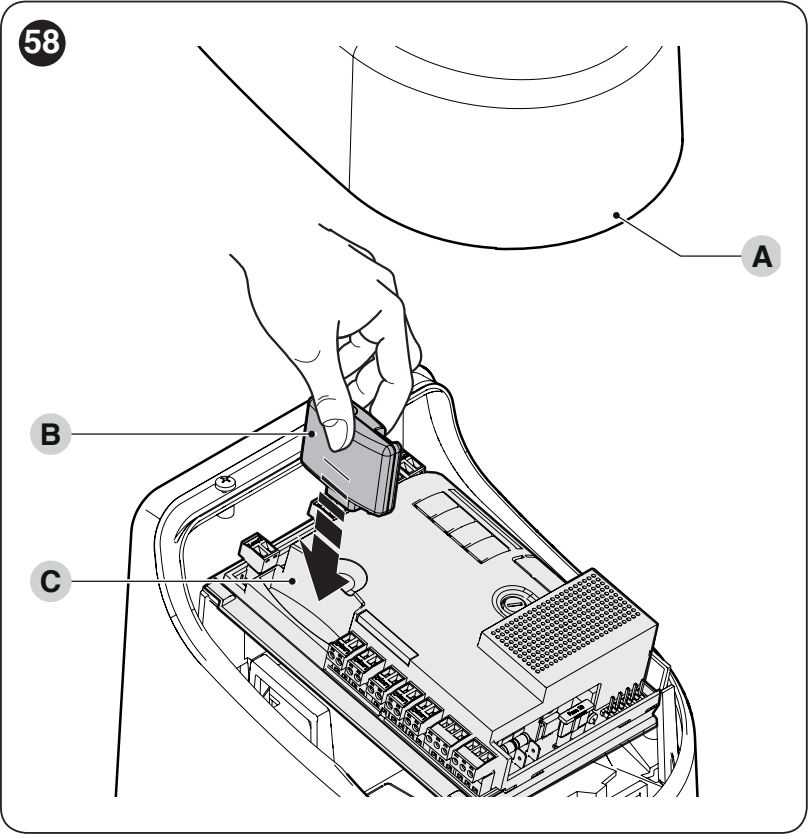
Current kits use NICE OXIBD and ON2E. OXIBD also supports compatible two-way remote controls; MYGO4 is a standard rolling-code remote control. For an older receiver, choose a transmitter that matches its specific coding.
| Receiver output | Command to HYKE |
|---|---|
| 1 | SbS – step-by-step mode as set by parameter II/L2. |
| 2 | Partial opening 1 as set by parameter II/L6; factory setting is full opening of M2. |
| 3 | OPEN – open. |
| 4 | CLOSE – close. |
In Mode I, the entire remote control is stored; in Mode II, an individual button is assigned to the selected command. Storage and deletion are performed using the button on the receiver, not by resetting the board. For exact button presses, timings and confirmations, see the NICE remote control pairing guide and the OXIBD card. In extended mode, there may be more commands; select the command number according to the receiver.
Backup battery and control unit generation
The backup battery fits in the designated compartment in the HK7024. A single compatible battery powers the system through its control unit; it does not connect directly to the HK7224 motor terminals.
| Installation | Correct selection |
|---|---|
| HKA2R10 | The older version uses the PS124. Current PSS124 connects using the cable specified for the older compatible control unit; the PSS124 package includes cables for both R10 and R30. |
| Newer control unit | PSS124 with the appropriate connector. The older PS124 requires a CABLA11 adapter and Standby to be switched off; choose the connection according to the markings on the actual board. |
- Disconnect the mains power and any existing battery. Remove the cover and lift the control unit.
- Insert the battery into the designated compartment and use the correct cable for that generation. Do not confuse the connector with the motor output.
- Connect the battery electrically only after completing installation and programming. Check operation with the mains power off, then restore power to recharge the battery.
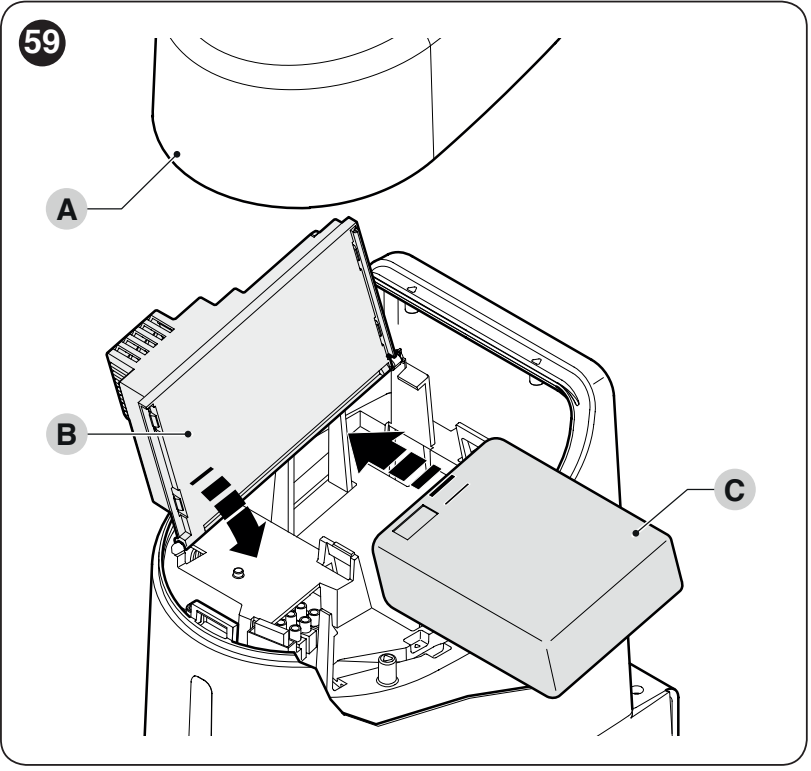
The number of operations during a power outage depends on the battery condition, temperature and load. The battery does not replace the available manual release. Solemyo solar power is connected through the designated power input on a compatible control unit; the mains and solar power sources must not be connected at the same time.
Diagnostics and troubleshooting
The warning light flashes regularly while the gate is moving. When a fault occurs, it emits a short series of flashes, pauses for approximately 1 s, then repeats the same series. Count the short flashes before resetting or changing any settings.
| Number of flashes | Cause and next step |
|---|---|
| 1 | BlueBUS – a device is missing or has changed. Check the wiring and addressing; after making changes, carry out device learning. |
| 2 | The photocell is obstructing movement. Remove the obstruction, clean the covers and check the TX/RX setting. Photocells. |
| 3 | Resistance to movement or intervention of the force limit. Check the gate leaf, hinges and arm; do not increase the force until the cause has been addressed and new tests have been carried out. |
| 4 | STOP input activated. Check the safety edge, gate wicket contact and the learned input status. STOP wiring. |
| 5 | Internal control unit parameters. Wait at least 30 s, try a command and restore power if necessary. If the fault recurs, servicing is required. |
| 6 | The maximum number of consecutive operations or the hourly operation limit has been exceeded. Allow the operator to cool down for a few minutes and reduce its use. |
| 7 | Electrical fault. Wait at least 30 s and restore power if necessary; a technician must investigate any recurring fault. |
| 8 | A continuously active command is preventing further commands. Check the button, switch and any timer. |
| 9 | The system is locked by an electronic Stop automation command. Use the relevant Unlock automation command; this is not the mechanical release lever. |
| 10 | The encoder has detected an obstruction or excessive friction. Check the mechanism, encoder assignment and encoder wiring. M1/M2 and ENC1/ENC2. |
Checking the LEDs on the control board
| LED | Normal status or next step |
|---|---|
| BlueBUS | Approximately 1 green flash/s = normal operation. When Standby is enabled, it flashes more slowly; normal operation resumes after a command. Two quick flashes = input status change. If the LED is off, check the power supply and fuses; investigate a steadily lit LED or red flash sequences using the diagnostics. |
| STOP | Lit = safe status learned. Off = input activated or changed. |
| SbS / OPEN / CLOSE | Off when idle, lit while a command is active. A steadily lit LED may indicate a held or faulty contact. |
| L1/L2 flash slowly | Request to learn devices. |
| L3/L4 flash slowly | Request to learn positions. |
If the motor runs but the gate leaf does not move, check that the release lever is fully engaged. If the HK7224 does not respond or moves incorrectly, check its M1/M2 output and the corresponding encoder in the HK7024. Before replacing a fuse, eliminate the cause; use a fuse of the same type and rating.
Resetting the control unit settings
Resetting will erase the custom HKA2 settings. This does not pair remote controls or erase the radio memory of a separate receiver.
- On the unit in the HK7024, press and hold Open ▲ + Close ▼, until L1 and L2 start flashing.
- Release both buttons.
- After resetting, recheck the selector, learn the devices and positions, set the functions and carry out safety tests.
Maintenance and safe operation
Schedule a professional inspection no later than 6 months or 20,000 operations after the previous inspection, whichever comes first. Choose a shorter interval for intensive use or harsh operating conditions.
- Before servicing, disconnect the mains, battery and any other power source.
- Check that the brackets, screws, pins, retaining rings, arms, stops, cover and cable glands are secure. Replace any damaged or worn parts.
- Check that the gate moves easily by hand, the release is secure, and all photocells, safety edges and gate wicket contacts work correctly.
- Do not enter the gate’s path or touch the arms while it is moving. Keep remote controls out of children’s reach.
- The customer can keep the photocell covers clean and remove debris from the gate’s path. If there is a mechanical or electrical fault, do not use the operator; contact service.
Estimated service life
Add together the indices for length, weight and all other relevant factors. Then use the graph to estimate the number of cycles with regular maintenance. The horizontal axis shows the sum of the indices in %, and the vertical axis shows the number of cycles. This estimate does not guarantee a number of years or cycles.
| Characteristics of the complete automation system | Index | Service life graph |
|---|---|---|
| Factor | Full / shortened arm |
|
| Length | Less than 1.8 m: 0 / 15 % 1.8–2.5 m: 15 / 20 % 2.5–3.0 m: 20 / 30 % Over 3.0 to 3.5 m: 30 % / not applicable | |
| Weight | Less than 200 kg: 0 / 30 % 200–250 kg: 20 / 40 % Over 250 kg: 30 % / not applicable | |
| Temperature / humidity | Over 40 °C or below 0 °C, or humidity over 80 %: 20 / 20 % | |
| Solid infill | 15 / 20 % | |
| Windy location | 15 / 20 % |
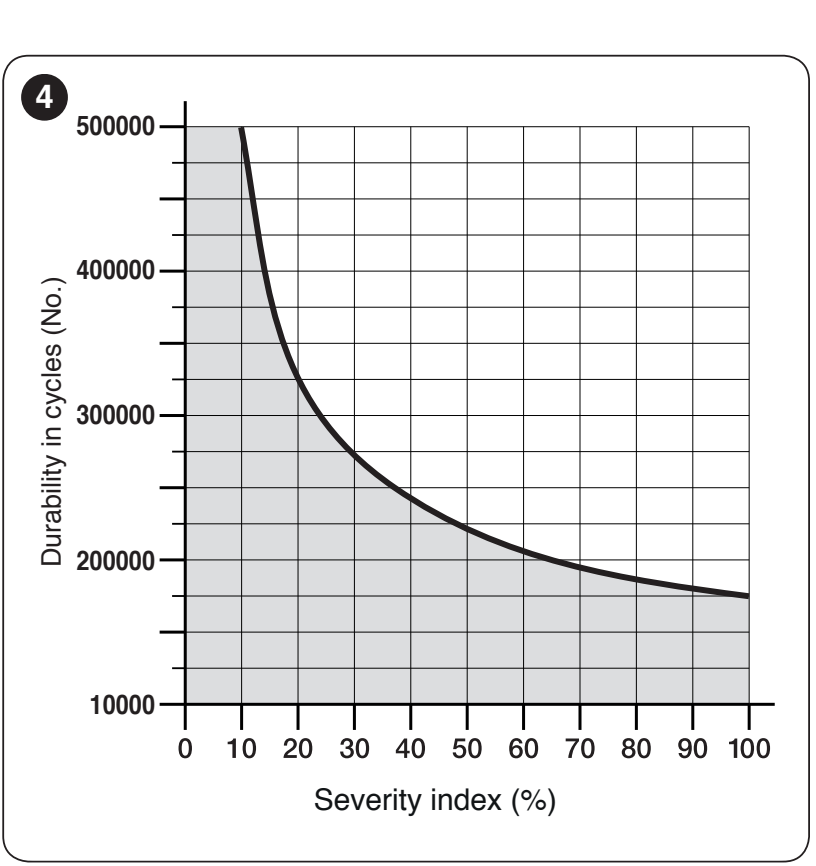
First check the gate’s suitability against the weight and length chart and mounting geometry. If the value falls between two ranges, choose the higher of the available numerical indices. The shortened arm is permitted at a length of 3.0 m only for a weight corresponding to curve B; do not use it for lengths over 3.0 m. Always assess the complete installation.
Technical specifications and dimensions
| Parameter | NICE HYKE HK7224 |
|---|---|
| Control unit | No control unit; controlled by the HK7024. |
| Power supply | 24 V DC ±10% from the HK7024 control unit. |
| No-load speed | 1.5 rpm; adjustable speed settings. |
| Torque | Maximum: 500 Nm; rated: 120 Nm. |
| Maximum cycle frequency | 40 cycles/h at rated torque; 25 cycles/h at the maximum operating temperature. |
| Continuous operation | Approximately 7 minutes maximum at rated torque. |
| Maximum power consumption | 140 W for the second motor. |
| Maximum current draw | 6 A for a maximum of 2 s. |
| Ingress protection rating | IP54 with the cover intact. |
| Operating temperature | −20 to +55 °C; drive efficiency decreases in cold conditions. |
| Dimensions | 210 × 290 × 320 mm (width × depth × height). |
| Drive unit weight | 9.5 kg. |
| Single-leaf limit | With the full-length arm: 3.5 m / 200 kg or 1.8 m / 330 kg; intermediate values and the shortened arm as shown in the chart. |
How can I order this item?
Choose the option that suits you:
- order online: use the buy button to add the goods to your shopping cart (you will find the buy button here in the product variants table).
- order by email: place your order at [email protected]






