Technical manual for NICE WIDE S, WIDE M, and WIDE L barriers
NICE WIDE model comparison
| Parameter | NICE WIDES | NICE WIDEM | NICE WIDEL |
|---|---|---|---|
| Minimum opening time | 4 s | 3.5 s | 5 s |
| Radio receiver | built-in + SM / OXI | built-in + SM / OXI | built-in + SM / OXI |
Common control unit specifications
| Parameter | Value |
|---|---|
| Backup power supply | NICE PS324 |
| Photovoltaic power supply | No |
| Flashing light output | max. 25 W |
| CL / OGI outputs | 24 V DC, max. 10 W per output |
| Inputs | STOP, PHOTO, PHOTO 2, SbS, OPEN, CLOSE |
| Antenna | 50 Ω, RG58 cable |
| Adjustment | potentiometers and microswitches on the control unit |
All WIDE S, WIDE M and WIDE L models have a simple built-in radio receiver as well as an SM connector for OXI family receivers. A current example of a plug-in receiver is NICE OXIBD; a long-range alternative is NICE OXILR with compatible NICE ON3ELR remote controls.
For more information about the full range, visit the NICE WIDE barriers category or see the overview of NICE barriers.
Compatible accessories for NICE WIDE barriers
The barrier is sold without a boom. First select the boom and foundation plate for your model, then choose safety and operational accessories to suit the specific entrance.
Basic setup by model
WIDE S and WIDE M: boom NICE XBA19 and foundation plate NICE SIA1.
WIDE L: boom NICE XBA15 (3 m), NICE XBA14 (4 m) or NICE XBA5 (5 m) and foundation plate NICE SIA2.
WIDE L with a 6 m boom: two NICE XBA15 booms joined with NICE XBA9.
Traffic safety
- NICE EPM – relay photocells for the PHOTO input.
- NICE XBA13 – impact-protection rubber for the underside of the boom.
- NICE WA10 – reflective elements to improve boom visibility.
Warning lights
- NICE XBA4 for WIDE S/M; NICE XBA6 or NICE XBA18 for WIDE L, depending on boom length.
- NICE ELDC – external LED flashing light; flashing light output max. 25 W.
Supports, under-boom skirts and special mounting options
- NICE WA11 – adjustable fixed support for all models.
- NICE WA12 – mobile support for WIDE M/L.
- NICE WA13 – aluminium under-boom skirt.
- NICE WIA10 – side-folding boom mechanism for WIDE S/M.
- NICE WIA11 – folding joint for WIDE M in low-clearance installations.
Controls and backup power
- NICE OXIBD – current OXI family plug-in receiver.
- NICE OXILR – long-range receiver for compatible NICE ON3ELR remote controls.
- NICE PS324 – backup power supply with built-in charger for WIDE S/M/L.
Important: Lights, rubber, the under-boom skirt, the support and other components affect the weight of the boom. After every change to the setup, recheck the boom balance and spring suitability.
Documents and more options
Recommended wiring for NICE WIDE
For the barrier's electrical installation, it is important to prepare the cables before installing the barrier cabinet. For longer cable runs or when several devices share a cable route, verify the cable sizing for the specific installation.
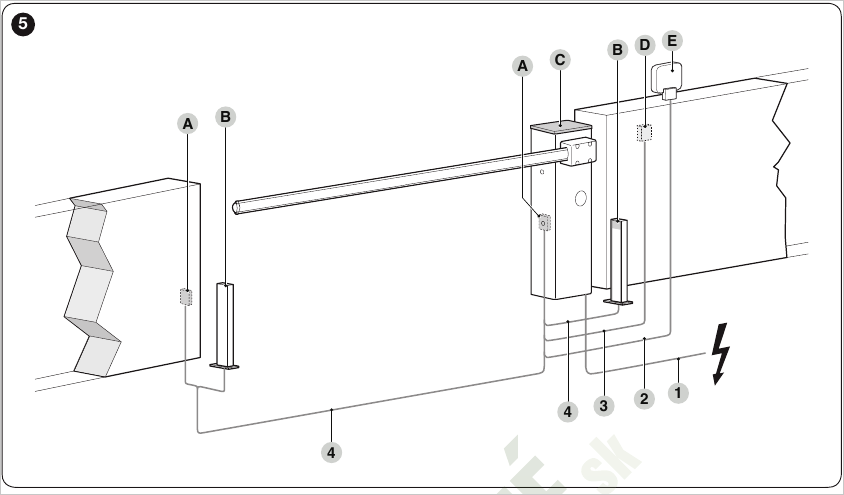
Indicative layout of the equipment and cables. Exact cross-sections and maximum lengths are listed in the table below the diagram.
| Connection | Cable, length and notes |
|---|---|
| 230 V power supply | 3 x 1.5 mm², max. 30 m. For lengths over 30 m, use 3 x 2.5 mm² and a separate protective earth at the barrier. |
| Flashing light | 2 x 0.5 mm², max. 30 m. LIGHT output. |
| Key switch | 2 x 2 x 0,25 mm², max. 30 m. Two separate wires for the control contacts; can be replaced with a 4 x 0,5 mm² cable. |
| Photocell TX | 2 x 0,25 mm², max. 30 m. For lengths over 30 m and up to 40 m, use 2 x 1 mm². |
| Photocell RX | 4 x 0,25 mm², max. 30 m. For lengths over 30 m and up to 40 m, use 2 x 1 mm². |
| OPEN input | 2 x 0,25 mm², max. 30 m. Normally open contact. |
| CLOSE input | 2 x 0,25 mm², max. 30 m. Normally open contact. |
| Antenna | RG58, shielded coaxial cable, max. 15 m. Keep the cable as short as possible; ideally no longer than 5 m. |
| Open barrier indicator light | 2 x 0,5 mm², max. 30 m. OGI output or traffic light, depending on the settings of microswitches 9 and 10. |
Installing the NICE WIDE cabinet and base plate
Before installing the barrier, prepare the cable conduits and check that the substrate allows for secure, level and safe anchoring. The base plate for WIDE S and WIDE M is NICE SIA1and the base plate for WIDE L is NICE SIA2.
Safety: A qualified installer must assess the foundation and anchoring method based on the substrate, local conditions and barrier loads. The area must not be prone to flooding and must allow safe access to the cabinet.
Anchoring to a prepared load-bearing foundation
- Remove the top cover and rear panel of the barrier cabinet.
- Place the cabinet on the prepared foundation and mark the four anchor points through the mounting holes.
- Move the cabinet aside and drill holes at the marked points.
- Fit four suitable expansion anchors.
- Put the cabinet back in place and secure it with suitable nuts and washers.
Anchors, nuts and washers for direct anchoring are not included.
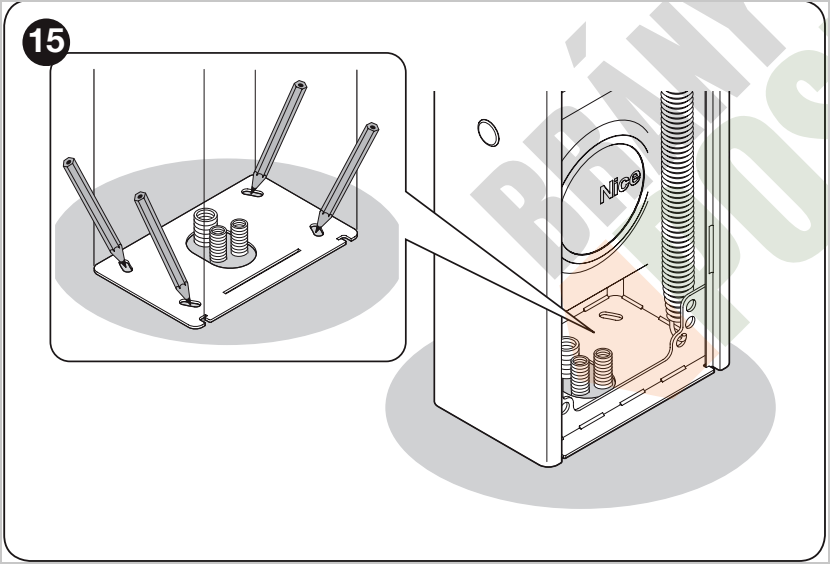
Use the cabinet as a template to accurately mark the four anchor points.
New concrete foundation with base plate
| Requirement | Value according to the manual |
|---|---|
| Minimum concrete thickness | 150 mm |
| Reinforcement | steel reinforcement |
| Concrete volume | more than 0.2 m³ |
| Example foundation dimensions | 250 mm thick, area 0.8 m²; approximately 0.9 × 0.9 m |
| Post-installed anchoring of the plate into concrete | 4 anchors with M12 bolts; tensile load capacity of at least 400 kg, according to the documentation |
- Prepare the foundation pit and conduits for the electrical cables.
- Attach four anchor hooks to the base plate. Fit a nut and washer onto each hook, both above and below the plate.
- Check that the cable conduits are positioned in the central opening of the plate.
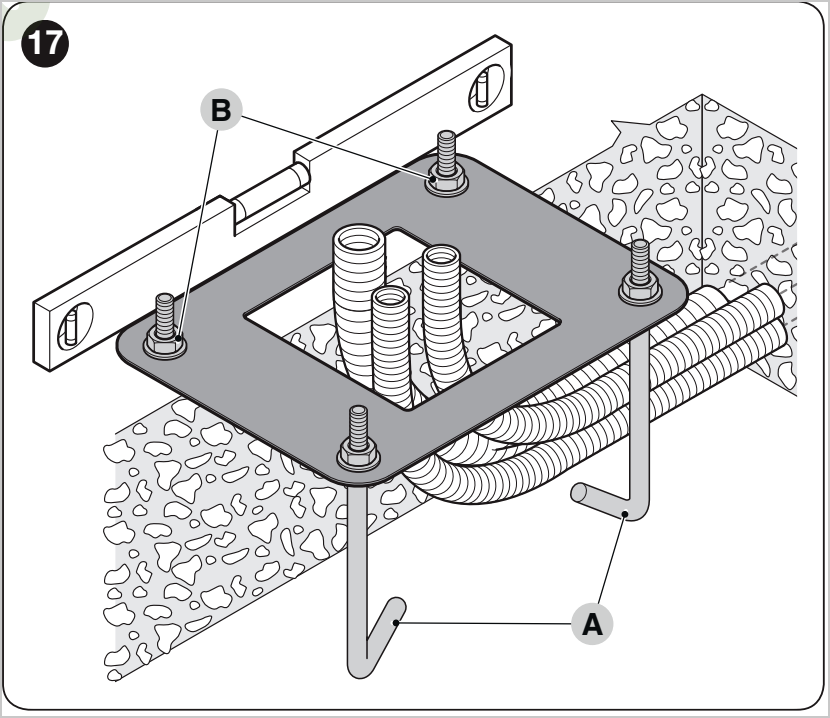
Keep the base plate level; route the cable conduits through its central opening.
Important: Tighten the lower nut on each anchor hook all the way to the end of the thread.
- Pour the concrete and insert the base plate before it begins to set.
- Set the plate flush with the surface, parallel to the future barrier arm and perfectly level.
- Wait for the concrete to cure completely. The manual states that this usually takes about two weeks.
- Remove the four upper nuts and washers from the anchor hooks.
- Open the cabinet, lower it onto the anchor hooks and secure it with the nuts and washers you removed.
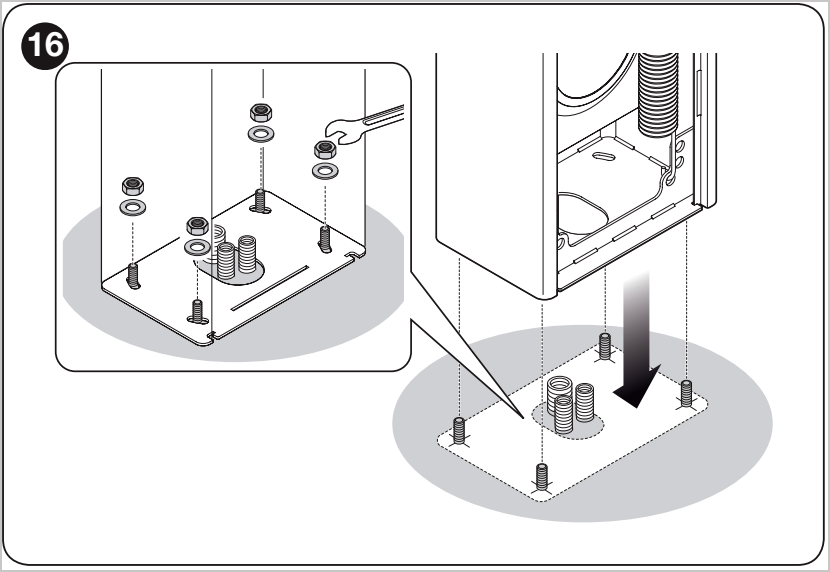
Once the foundation has cured, fit the cabinet onto the four anchor points and secure it with nuts and washers.
Substrates other than reinforced concrete: Check the substrate's consistency and load-bearing capacity. According to the manual, the four anchor points must safely withstand a load of approximately 1,000 kg. The installer must select the specific anchor type based on the substrate.
Wiring the NICE WIDE control unit
The WIDE control unit has separate terminals for the power supply to accessories, safety inputs, control inputs, warning light, lighting and antenna. Unused NC inputs must be bridged to a common terminal, depending on the wiring configuration.
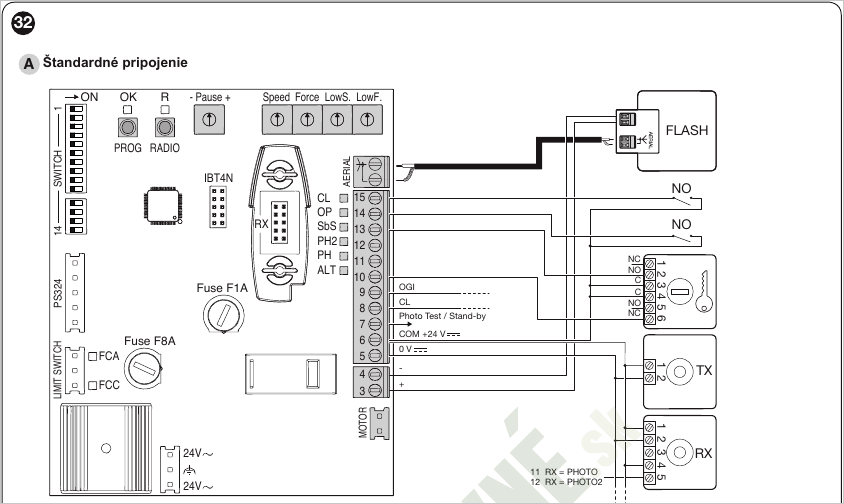
Standard connection for the warning light, control inputs and photocells.
| Terminals | Name / type | Function |
|---|---|---|
| 3 - 4 | LIGHT Output |
Warning light. During movement, it flashes at intervals of approximately 0.5 s on and 0.5 s off. |
| 5 | SERVICES 24 V DC |
24 V DC accessory power supply, maximum 200 mA. |
| 6 - 8 | CL Output |
Lighting or traffic light output, depending on the settings. With the standard settings, it switches on at the start of the manoeuvre and switches off approximately 60 s after it ends. |
| 6 - 9 | OGI Output |
Open barrier indicator light or traffic light output, depending on the settings. With the standard settings, it is off when the barrier is closed, on when it is open and flashing while it is moving. |
| 6 - 10 | STOP NC input |
Safety device input for blocking or immediately stopping a manoeuvre. |
| 6 - 11 | PHOTO NC input |
Photocells for closing. Activation during closing causes the barrier to stop or reverse, depending on the settings. |
| 6 - 12 | PHOTO 2 NC input |
Photocells for opening. Activation during opening stops the barrier or reverses its direction, depending on the setting. |
| 6 - 13 | SbS NO input |
Step-by-step command. The standard sequence is Open - Stop - Close - Stop. |
| 6 - 14 | OPEN NO input |
Open command. Sequence: Open - Stop - Open - Stop. |
| 6 - 15 | CLOSE NO input |
Close command. Sequence: Close - Stop - Close - Stop. |
| 7 | 24 V / Photo test / Stand-by 24 V DC |
Auxiliary 24 V DC power supply, maximum 200 mA. Depending on the selected mode, this is used to test the photocells or for the stand-by function. |
| AERIAL | Antenna Input |
Receiver antenna connection, 50 Ω impedance, RG58 cable. |
Setting the boom and limit positions
Before programming, the boom must be correctly installed and balanced mechanically, and the control unit must know the direction of travel and the limit positions. The barrier uses limit switches labelled FCA and FCC.
Balancing the boom
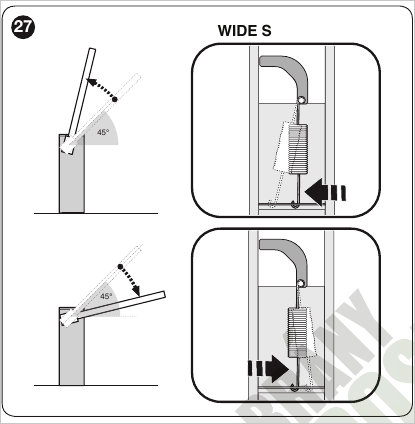
WIDE S balancing mechanism.
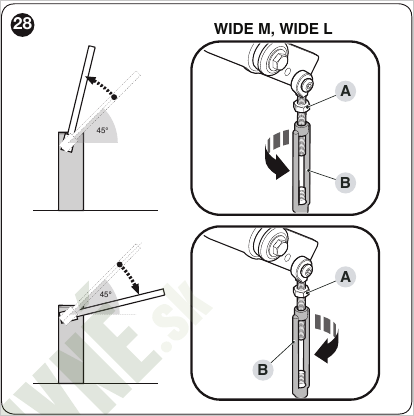
WIDE M and WIDE L balancing mechanism.
- Disengage the drive and set the boom to approximately 45°.
- Check that the boom stays in position. If it rises, reduce the spring force; if it falls, increase the spring force, following the mechanism for the specific model.
- Repeat the check at approximately 20° and 70°. The boom must not rise or fall abruptly on its own.
Checking the limit switches
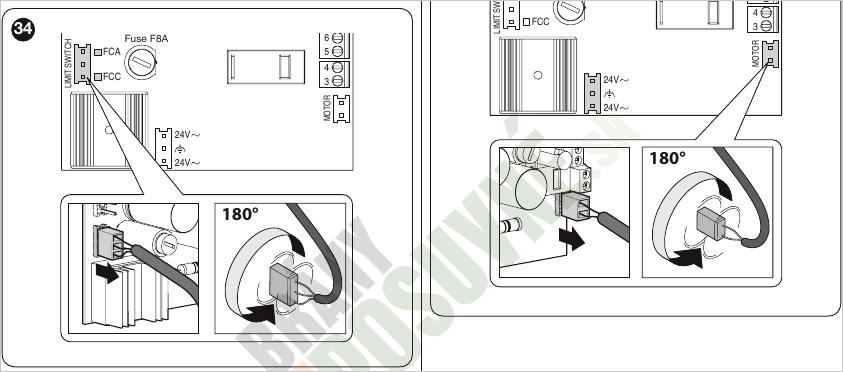
If the FCA/FCC LED indication or the direction of boom travel is incorrect, disconnect the power and rotate the relevant connector 180°.
- Disengage the drive and move the boom manually to the closed position.
- In the closed position, FCC must be off and FCA must be on.
- Move the boom manually to the open position.
- In the open position, FCA must be off and FCC must be on.
- Set the boom to approximately 45° and re-engage the drive.
The slowdown limit switch should activate approximately 20° before the mechanical stop. If the exact slowdown point needs adjustment, adjust the limit switch cams.
Checking the direction of travel
- Set all programming DIP switches to OFF.
- Set the boom to approximately 45°.
- Send a brief pulse to the OPEN input.
- The boom must start opening. If it moves in the opposite direction, rotate the motor connector 180° and repeat the check.
Programming the NICE WIDE barrier
The NICE WIDE is not programmed in the same way as Robus drives, using programming levels L1 to L8. Basic settings are made using a combination of potentiometers A to E,, DIP switches 1 to 14, and the PROG and RADIO buttons on the control unit.
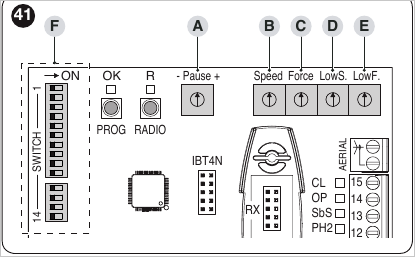
Controls on the control unit board.
Potentiometers A to E
| Item | Setting |
|---|---|
| A – Pause | Pause time between the end of opening and the start of automatic closing. Used only in automatic mode. |
| B – Speed | The maximum boom speed from the start of movement to the slowdown point. |
| C – Force | Obstacle detection sensitivity from the start of movement to the slowdown point. When an obstacle is detected, the movement reverses. |
| D – Low Speed | Boom speed during the slow phase, from the limit switch to the end position. |
| E – Low Force | Obstacle detection sensitivity during the slow phase of movement. |
Potentiometer values are set with DIP switches 13 and 14 set to OFF.. Once adjusted, save the settings by switching DIP switches 13 and 14 back to ON.
Learning the ALT input and mechanical stops
- Set the boom approximately halfway along its travel.
- Set DIP switches 13 and 14 to OFF.
- Press and hold the PROG button for approximately 3 seconds.
- The control unit learns the status of the ALT/STOP input and starts the sequence: fully closed - fully open - fully closed.
- If the limit switch cams were repositioned after programming, the mechanical stops must be learned again.
- After testing the movement, adjust the speed, force and slowdown using the potentiometers.
- When setup is complete, set DIP switches 13 and 14 to ON.
After successful learning, the OK LED flashes green approximately once per second. If a DIP switch or potentiometer setting is changed during normal operation, the control unit continues to use the previously saved values and the OK LED warns by flashing orange.
Programming DIP switches 1 to 14
| DIP switch / position | Function |
|---|---|
| 1 - 2 OFF - OFF |
Manual mode. Movement occurs only while a command is active. |
| 1 - 2 ON - OFF |
Semi-automatic mode. One command performs a complete opening or closing cycle. |
| 1 - 2 OFF - ON |
Automatic mode. A command opens the barrier; after the set pause, it closes automatically. |
| 1 - 2 ON - ON |
Automatic mode with the always-close function. After a power failure, the barrier starts closing if it was left open. |
| 3 ON |
Apartment block mode. While opening, further SbS or OPEN commands are ignored until the gate is fully open. While closing, the next command stops movement and opens the barrier. |
| 3 OFF |
Apartment block function is disabled. |
| 4 ON |
The step-by-step command operates in the Open - Close - Open - Close cycle. |
| 4 OFF |
The step-by-step command operates in the Open - Stop - Close - Stop cycle. |
| 5 ON |
Pre-flashing. The warning light starts flashing before the manoeuvre begins, for approximately 5 seconds in automatic mode and 2 seconds in manual mode. |
| 5 OFF |
Pre-flashing is disabled. |
| 6 ON |
The warning light stays on or flashes during the manoeuvre and during the pause before automatic closing. |
| 6 OFF |
The warning light operates only while the barrier is moving. |
| 7 ON |
Close immediately after passing through the photocells. Once the photocells are clear, the barrier closes after approximately 5 seconds. |
| 7 OFF |
The function is disabled. |
| 8 ON |
The PHOTO input is also active during opening. In semi-automatic or automatic mode, opening resumes once the photocells are clear. |
| 8 OFF |
The PHOTO input is active only during closing. |
| 9 - 10 OFF - OFF |
The OGI output is an open-barrier indicator, and the CL output is lighting. |
| 9 - 10 ON - OFF |
One-way traffic light and lighting. OGI operates as a green light; CL remains a lighting output. |
| 9 - 10 OFF - ON |
Alternating traffic light for entry and exit. OGI and CL control the red or green light according to the direction of travel and the barrier status. |
| 9 - 10 ON - ON |
Traffic light configurable via Oview. The default logic uses a green light when the barrier is open and a red light when it is closed. |
| 11 ON |
Fast clearance of the passage. The fast opening or closing times are set via Oview. |
| 11 OFF |
Fast clearance of the passage is disabled. |
| 12 ON |
Function configured via Oview; photocell test by default. Terminal 7 is used as a 24 V output for photocell testing. |
| 12 OFF |
Terminal 7 is a fixed 24 V output for accessories. |
| 13 - 14 OFF - OFF |
Test and adjustment mode. The control unit operates using the current potentiometer settings and allows them to be adjusted during testing. |
| 13 - 14 ON - ON |
Programming lock. Saves and locks the potentiometer and microswitch settings. |
| 13 - 14 ON - OFF or OFF - ON |
Invalid combination. |
Radio receiver outputs
All WIDE S, WIDE M and WIDE L models have a built-in radio receiver and an SM connector for OXI family receivers; a current example of a plug-in receiver is the NICE OXIBD. An alternative for long range is the NICE OXILR with LoRa technology, which requires compatible NICE ON3ELR transmitters. With the standard assignment, the receiver outputs have the following functions:
| Receiver output | Function |
|---|---|
| 1 | SbS - step-by-step command |
| 2 | STOP |
| 3 | OPEN - open |
| 4 | CLOSE - close |
| 5 | CL - lighting or traffic light output |
| 6 | Radio channel 1 |
| 7 | Radio channel 2 |
NICE WIDE special functions
| Function | Description |
|---|---|
| Always close function | If mode 1 - 2 is selected with the switches set to ON - ON and the barrier is open when power is restored, the control unit automatically starts closing with pre-flashing. |
| Closing after passing through the photocells | With microswitch 7 set to ON, the pause is shortened in automatic mode and the barrier closes approximately 5 seconds after the photocells are clear. |
| Traffic light | Microswitches 9 and 10 change the function of the OGI and CL outputs. The outputs can function as an indicator light, lighting, a one-way traffic light, or an alternating traffic light for entry and exit. |
| Forced movement in hold-to-run mode | If a safety device blocks movement, the control unit allows forced movement by holding down the command. This mode is intended for servicing or emergency situations. |
| Maintenance notification | The control unit can indicate when maintenance is required based on the number of manoeuvres performed. The threshold is set via Oview. |
Troubleshooting and diagnostics
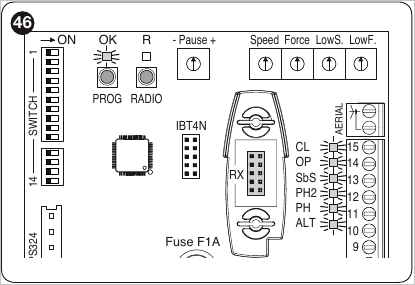
Positions of the OK and R LEDs and the input indicator lights on the control board.
Basic faults
| Problem | Cause and check |
|---|---|
| The transmitter does not operate the barrier and its LED does not light up. | Cause: Remote control battery is dead. Check: Check and replace the battery in the remote control. |
| The LED on the remote control lights up, but the barrier does not respond. | Cause: The remote control has not been stored in the receiver. Check: Check that the remote control is stored as described in the section separate article on pairing remote controls. |
| The barrier does not respond to any command. | Cause: Power is missing or a fuse is damaged. Check: Check the mains power supply and fuses F1 and F2. |
| The movement does not start and the beacon does not flash. | Cause: The control unit is not receiving a command. Check: Check the SbS input LED or the receiver indicator. For a radio command, the OK LED should flash twice quickly. |
| The barrier moves and then reverses direction. | Cause: The force is set too low or the boom is unbalanced. Check: Check the boom balance and the Force and Low Force potentiometer settings. |
| The barrier moves slowly or does not start from the end position. | Cause: The control unit has not correctly learned the end positions. Check: Check the limit switches and repeat the stop-point learning procedure. |
| The barrier moves in the opposite direction. | Cause: The motor is wired in reverse. Check: Check the direction of movement and the motor connector. |
Diagnostics using the OK LED flashing pattern
| OK LED flashing pattern | Meaning and checks |
|---|---|
| Off | Control unit fault or no power supply. Check: Check the power supply and fuses. |
| On continuously | Serious control unit fault. Check: Try disconnecting and reconnecting the power; if the condition persists, check the control unit. |
| Flashes once per second | Normal status. Check: The control unit is working correctly. |
| 2 quick flashes and a pause | Photocell triggered. Check: Check inputs PHOTO and PHOTO 2 and the passage area. |
| 3 quick flashes and a pause | Obstacle detection triggered between the limit switches. Check: Check the boom balance and force setting. |
| 4 quick flashes and a pause | ALT/STOP input triggered. Check: Check the STOP circuit and connected safety devices. |
| 5 quick flashes and a pause | Motor control hardware problem. Check: Wait about 30 seconds, try a new command and, if necessary, disconnect and reconnect the power supply. |
| 6 quick flashes and a pause | Temperature limit exceeded. Check: Wait for the control unit to cool down. |
Input status LEDs
| LED | Status meaning |
|---|---|
| STOP | Off: The STOP input is active or the circuit is open. On: Normal status of the STOP input. |
| PH | Off: PHOTO photocell triggered. On: Normal status of the PHOTO input. |
| PH2 | Off: PHOTO 2 photocell triggered. On: Normal status of the PHOTO 2 input. |
| SbS | Off: The step-by-step command input is inactive. On: The SbS input is active. |
| OP | Off: The OPEN input is inactive. On: The OPEN input is active. |
| CL | Off: The CLOSE input is inactive. On: The CLOSE input is active. |
| FCA | Off: The opening limit switch is engaged; the boom is open. On: The boom is not at the opening limit switch. |
| FCC | Off: The closing limit switch is engaged; the boom is closed. On: The boom is not at the closing limit switch. |
NICE WIDE barrier service life
The NICE WIDE barrier manual gives an indicative service life of up to 500,000 operating cycles. Actual service life depends on operating conditions, boom length, accessories fitted to the boom, and how often safety devices intervene during a cycle.
| Factor | S | M | L |
|---|---|---|---|
| Dusty or sandy environment | 10% | 10% | 10% |
| Saline environment | 10% | 10% | 10% |
| Aluminium skirt on the boom | 5% | 5% | 5% |
| Mobile boom support | - | 15% | 15% |
| Ambient temperature above 40 °C or below 0 °C | 5% | 5% | 5% |
| Movement interrupted by photocell | 10% | 15% | 15% |
| Movement interrupted by STOP input | 10% | 15% | 15% |
| Speed trimmer set above 50% | 10% | 10% | 15% |
| Force trimmer set above 50% | 5% | 10% | 10% |
The percentages are cumulative. The higher the resulting load index, the lower the expected number of operating cycles. At a load index of approximately 30%, the service life is estimated at around 200,000 cycles.
Backup battery, photocells and lights
For backup power for the WIDE S, WIDE M and WIDE L barriers, use the NICE PS324 with built-in charging. It enables emergency operation during a power outage; the number of movements depends on the battery condition and the load on the system.
Safety photocells connect to the PHOTO and PHOTO 2 inputs. With the standard setting, the PHOTO input intervenes during closing; with microswitch 8 activated, it can also intervene during opening. If microswitch 12 is set to ON, terminal 7 is used to test the photocells.
The warning light connects to the LIGHT output. Depending on the microswitch 9 and 10 settings, the CL and OGI outputs can be used for lighting, as an open-barrier indicator, or to control a traffic light. The maximum power for one indicator or traffic-light output is 10 W.
Compatible boom lights: for WIDE S and WIDE M NICE XBA4; for WIDE L NICE XBA6 or NICE XBA18 depending on the assembly length. After installation, check the boom balance.
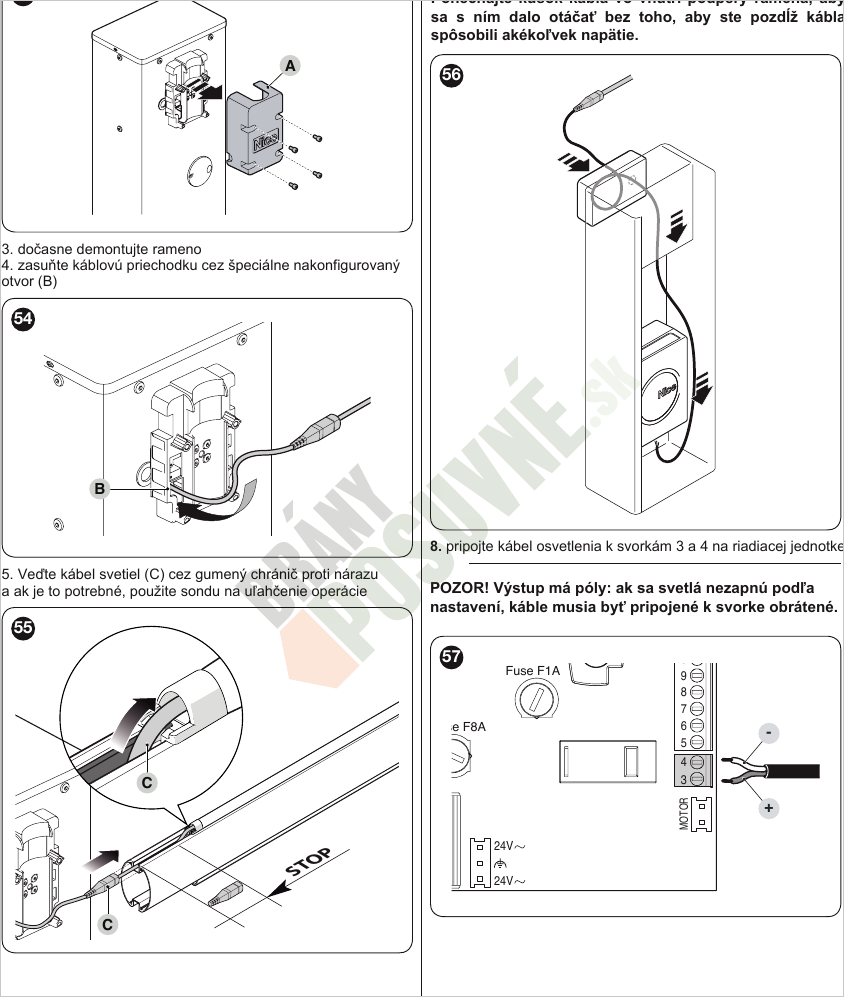
Route the cable through the bracket and boom. Observe polarity when connecting to terminals 3 and 4.
Manual release of the NICE WIDE barrier
In the event of a power failure or during servicing, the barrier can be released with a key and the boom moved by hand.
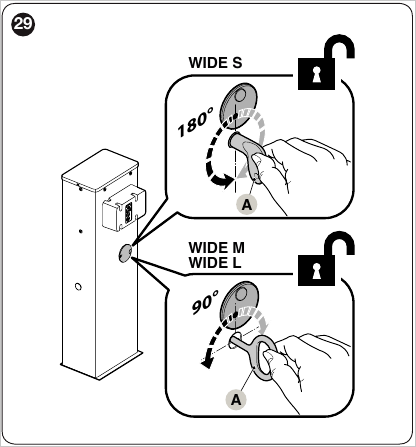
Release the WIDE S by turning the key 180°; release the WIDE M and WIDE L by turning it 90°.
- Slide the lock cover aside.
- Insert the release key.
- Turn the key 180° for the WIDE S, or 90° for the WIDE M and WIDE L.
- Move the boom by hand to the desired position.
- To lock the barrier, turn the key back, remove it and close the lock cover.
Ordering and technical advice
Ask us about wiring or choosing a system
If you can't find the information you're looking for, email us at [email protected]. We can advise you on choosing a barrier, boom, spring, safety devices and accessories.
Information we need to select a system
- the clear passage width and required boom length,
- the expected number of cycles per hour,
- a list of accessories on the boom: lights, protective rubber strip, skirt or mobile support,
- the preferred control method and safety devices.
Technical note: Electrical wiring, force adjustment and checking of safety devices must be carried out by a qualified person in accordance with the specific installation and applicable regulations.






