NICE Walky WL1024 - gate operator without control unit for gates up to 1.8 m / 180 kg
| Product availability: | In stock | We normally dispatch goods within 24 hours. |
|---|

in stock
€784.68 including VAT
| Weight |
|---|
| 4,30 kg |
Description of NICE Walky WL1024 - gate operator without control unit for gates up to 1.8 m / 180 kg
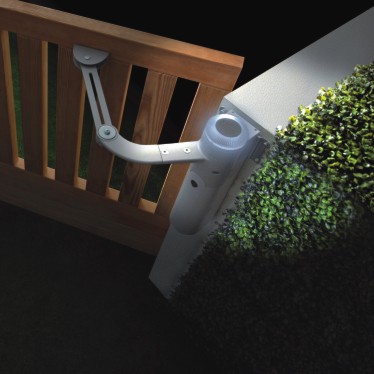
NICE WALKY WL1024 is an articulated-arm drive without a control unit. It is designed as the second motor for a double-leaf gate and connects to NICE WALKY WL1024C, which includes the WLA1 control unit. The WL1024 itself has no receiver, programming buttons or mains power supply.
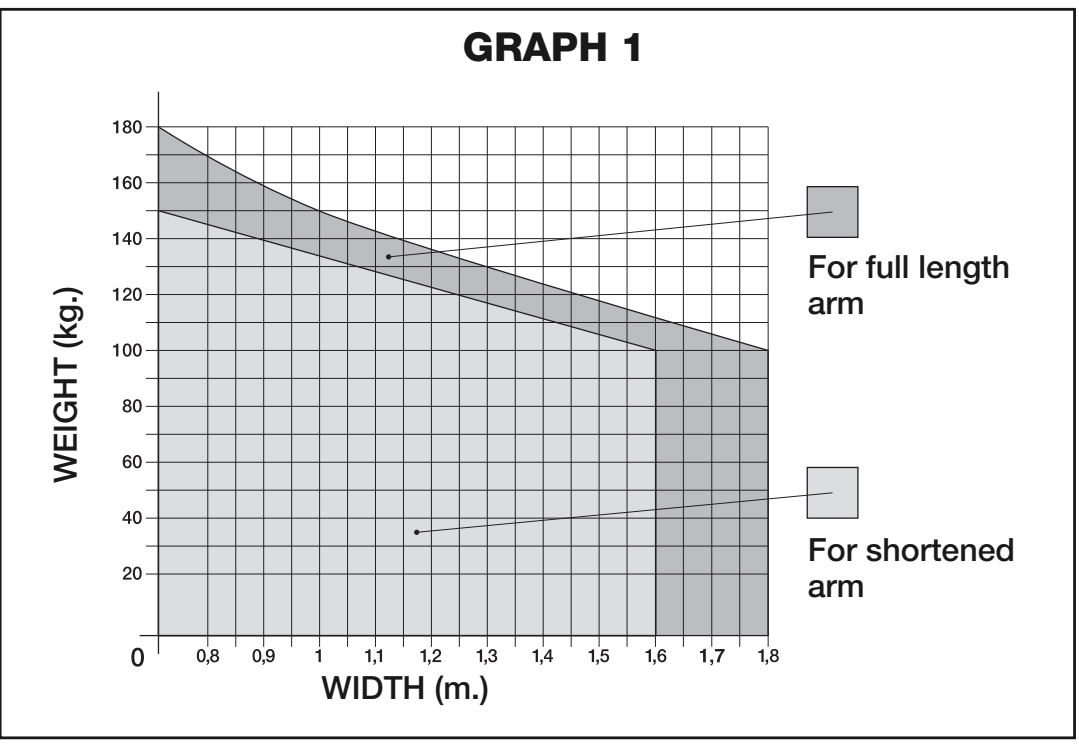
The motor is non-reversible; in the event of a power outage, the leaf can be released with a key and operated manually. Select the leaf length and weight together based on the application graph.
Control unit and compatible accessories
All accessories connect to the WLA1 in the WL1024C motor. Only the power cable from the control unit connects to the WL1024. For a single-leaf gate, choose the WL1024C; for a double-leaf gate, use one WL1024C and one WL1024.
| What | Why | Type |
|---|---|---|
| Control of the second leaf | Powers and controls both motors; sets their travel, force and speed. | |
| Photocells | Monitors the passage; connects with two wires and no polarity requirement. | |
| Remote control | Plug-in receiver and matching remote control; accessories for the standalone motor must be purchased separately. | |
| Warning light | Indicates movement. The WLT mounts on the WL1024C and connects to its FLASH connector. | |
| Backup power for outages | The battery connects to the WL1024C and powers both motors. | |
| Solar power | Can operate off-grid after assessing power consumption and site conditions. |
Motor, control unit or complete kit
| WL1024C | WL1024 | Double-leaf gate kits |
|---|---|---|
Motor with WLA1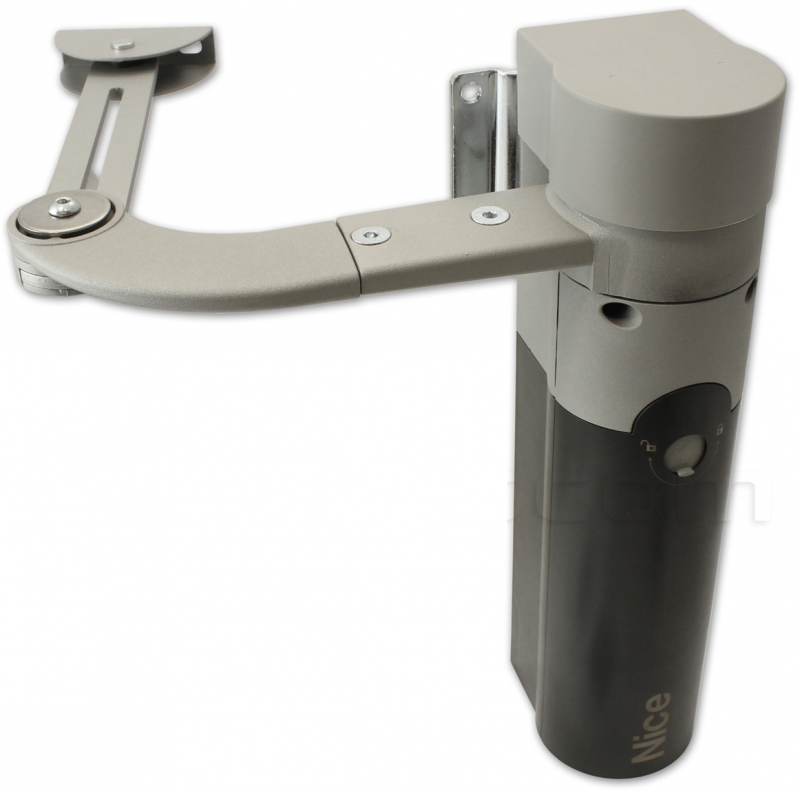 For a single leaf or as the control motor for a double-leaf gate. | Second motor without control unit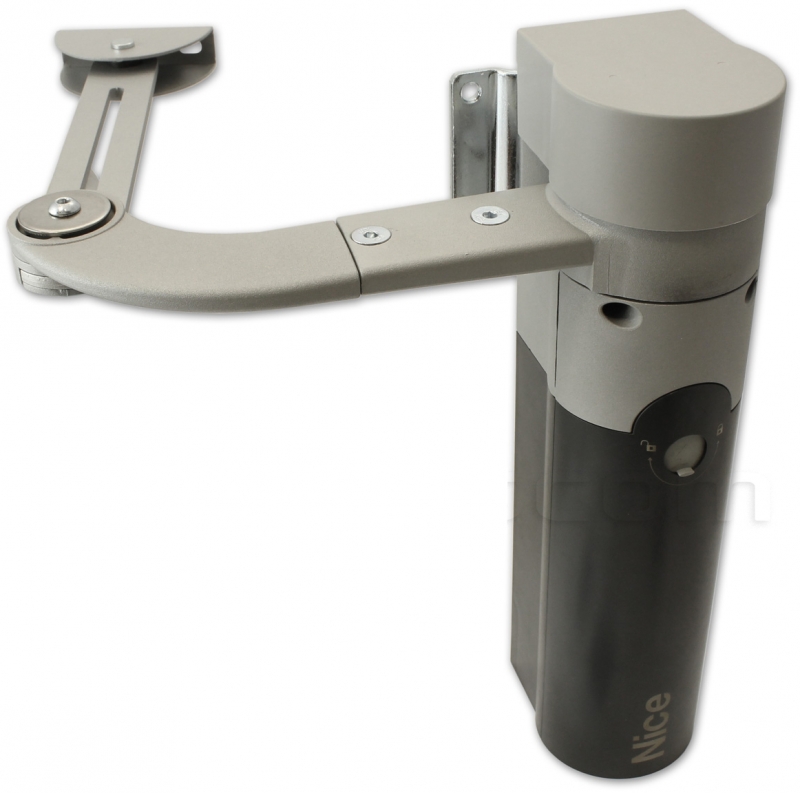 This product. Connects to the WL1024C; it cannot operate the gate on its own. | Basic kit With photocells With accessories 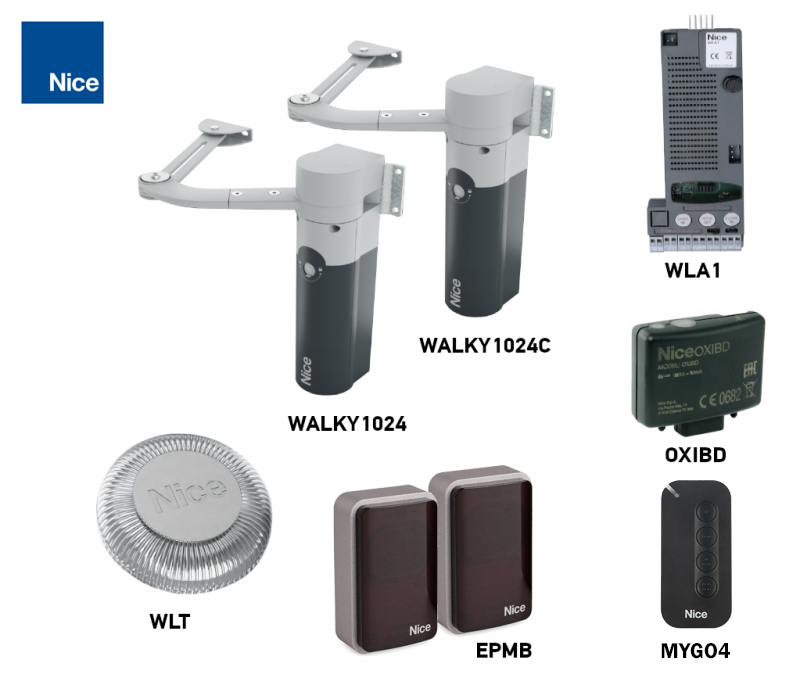 |
Double-leaf gate kits include the WL1024C, WL1024, OXIBD receiver and MYGO4 remote control. The photocell version also includes EPMB; the accessories kit also includes WLT. Using two motors does not increase the permitted length or weight of a single leaf.
Standalone motor package contents
The standalone WL1024 includes the motor, articulated arm with fasteners, mounting brackets and release keys. It does not include WLA1 or radio controls; control is provided by WL1024C. Anchors suitable for the specific substrate and fixed stops must be provided as required for the installation.
When is the WALKY WL1024 suitable?
| Configuration | Use |
|---|---|
| Full-length arm | Gate leaf up to 1.8 m at 100 kg; up to 180 kg at 0.8 m. The angle depends on the geometry and must not exceed 110°. |
| Shortened arm | Gate leaf up to 1.6 m at 100 kg; angle up to 90°. For other combinations of length and weight, refer to the relevant area of the graph. |
| Gate leaf height | Maximum 2 m. A solid infill and wind increase the load. |
| Gate condition | Moves smoothly by hand in both directions, with no points of increased resistance. The gate leaf remains stationary when released. |
| Use | Swing gate opening inward, with sufficient clearance for the arm to move. |
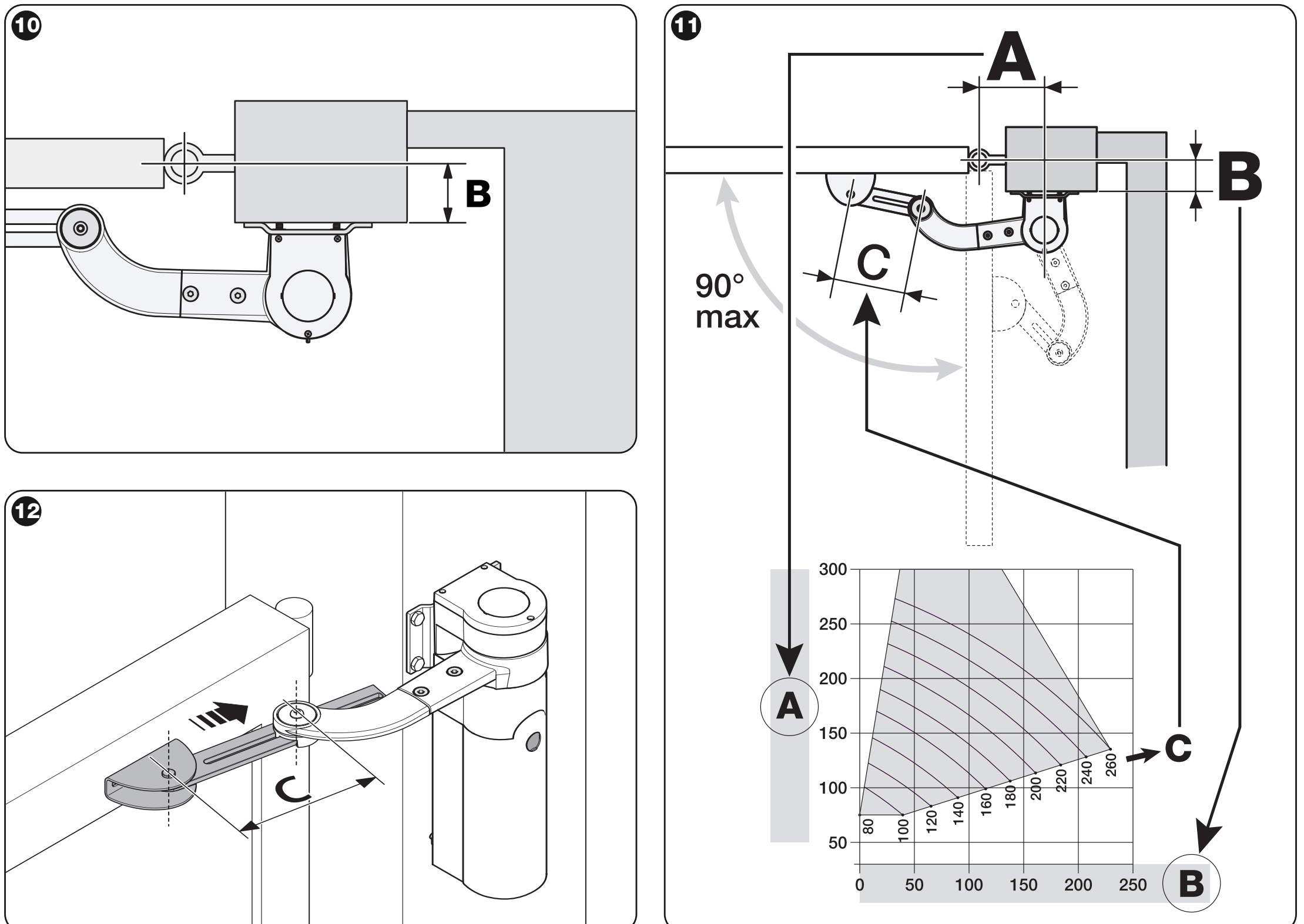
The 1.8 m and 180 kg values are separate maximum limits. The graph shows gate-leaf length in metres horizontally and weight in kilograms vertically; the intersection must fall within the permitted grey area for the selected arm length. The white area is not permitted.
Load and estimated service life
Service life is affected by the gate-leaf length and weight, temperature, infill and wind. Add the index for length and weight to the indices for any other applicable factors. The graph shows an estimated number of cycles with maintenance, not a guaranteed number of years.
| Characteristics of the complete automation system | Index | Service-life graph | |
|---|---|---|---|
| Full-length arm | Shortened arm | ||
| Gate leaf under 1.2 m; over 100 kg / under 100 kg | 55% / 30% | 65% / 50% |
|
| Gate leaf 1.2–1.6 m; over 80 kg / under 80 kg | 55% / 40% | 65% / 50% | |
| Gate leaf over 1.6 m; over 60 kg / under 60 kg | 55% / 40% | Not permitted | |
| Temperature above 40 °C or below 0 °C, or humidity above 80% | +15% | +15% | |
| Solid infill | +15% | +10% | |
| Windy location | +15% | +10% | |
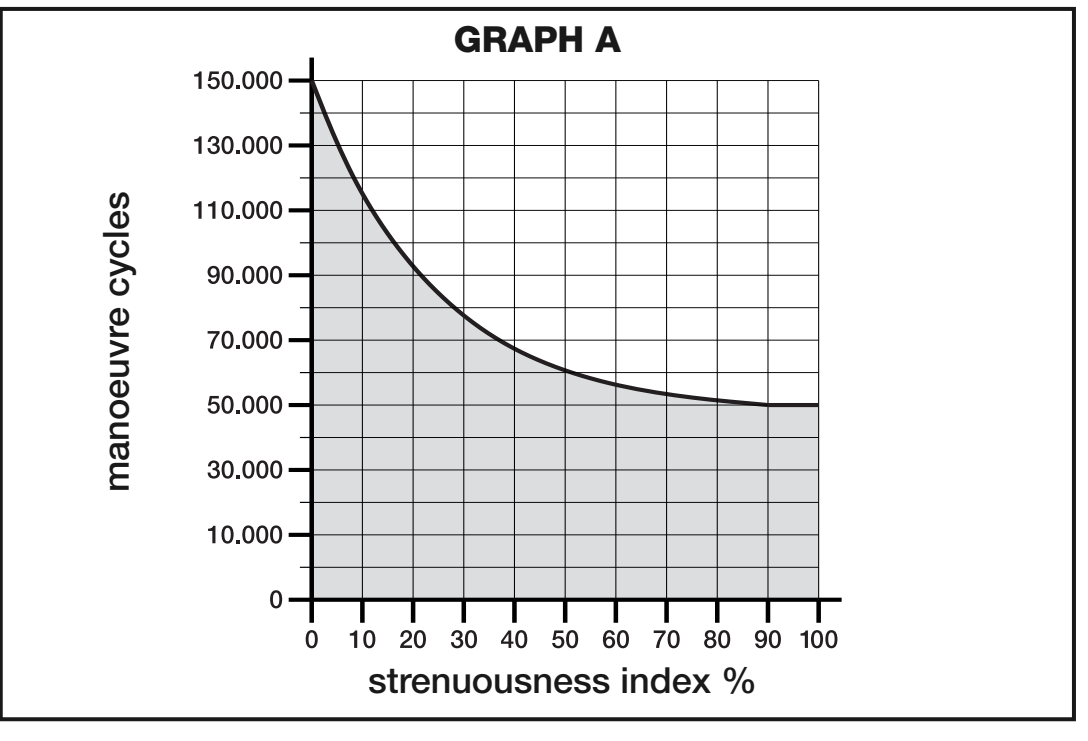
If the weight is exactly at the boundary of a stated range, use the higher index when selecting the system. If the gate encounters greater resistance or is exposed to wind, have an installer assess whether the system is suitable.
Installing the brackets and full-length arm
Have installation and electrical connection carried out by a qualified installer. Before starting work, disconnect the mains supply and any battery or solar power source. The drive must not be used to compensate for a poorly hung, damaged or binding gate.
Mounting surface, dimensions A/B and clearance E
| Requirement | What to observe |
|---|---|
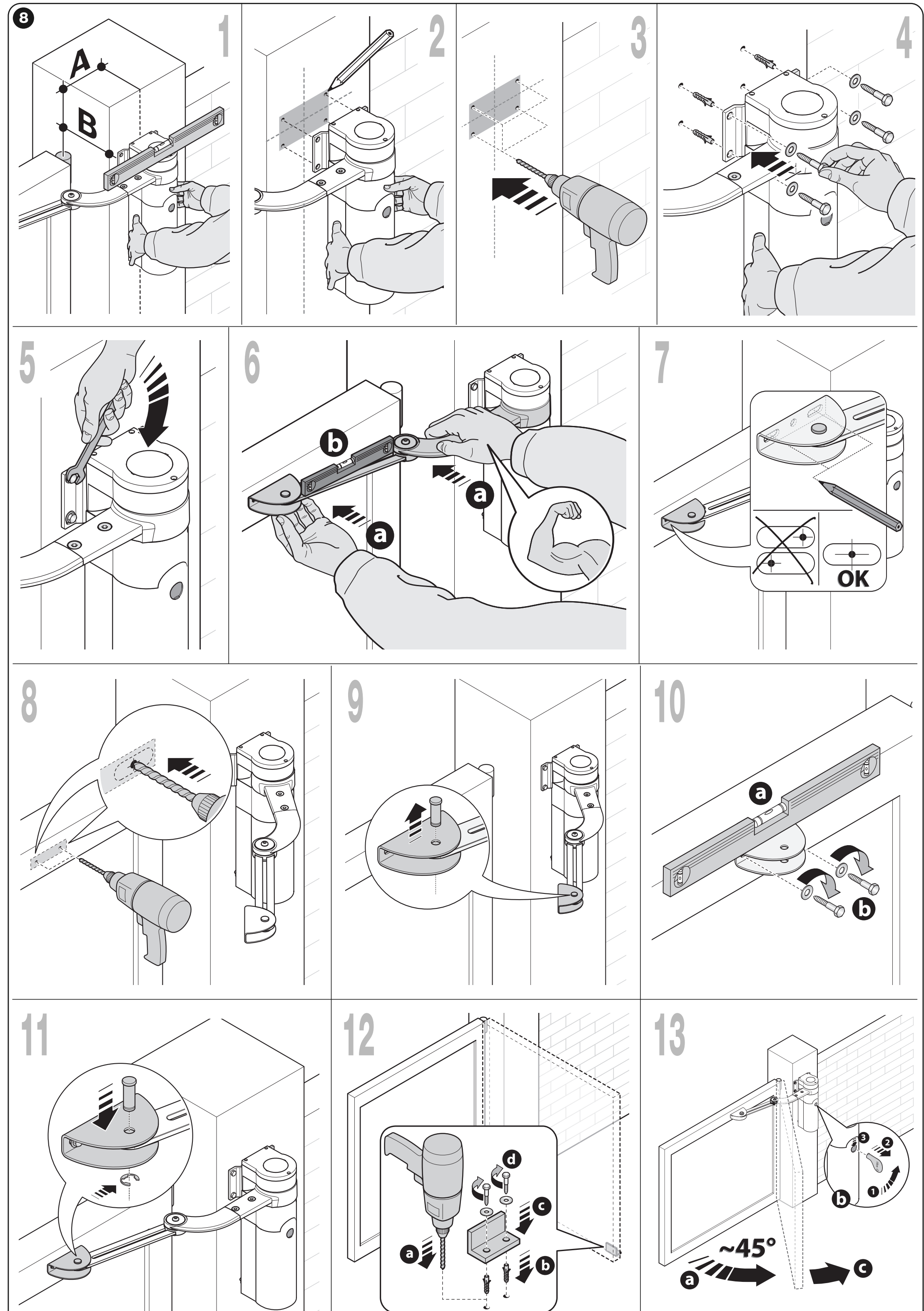
| Surface on the post | At least 80 mm wide, solid mounting surface. For a width of 80–135 mm, rotate the rear mounting bracket by 90° as shown. |
| Drive position | Vertical, with the arm facing up. Do not install the drive upside down with the arm facing down. |
| Front bracket | Anchor it to a solid part of the gate leaf, such as the supporting frame; the drive and arm must be level. |
| Clearance E | 80–299 mm: the arm must be shortened; maximum opening angle 90°. From 300 mm: full-length arm; maximum opening angle 110°, depending on A/B. |
| Dimensions A/B | Measure B from the hinge axis to the mounting surface. Determine A for the selected angle so that point A/B falls within the permitted area of the graph. |
| Stops | Fit fixed, sufficiently sturdy mechanical stops for both the open and closed positions; these are not automatically included with a standalone drive. |
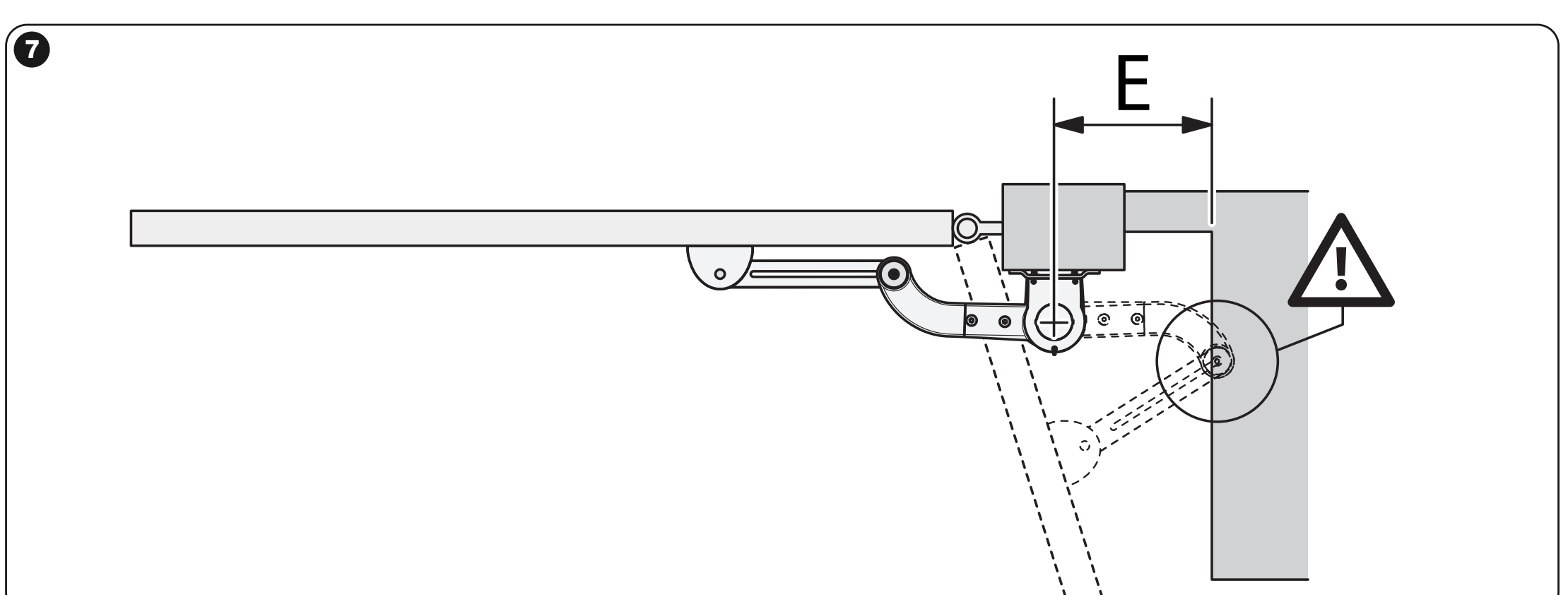
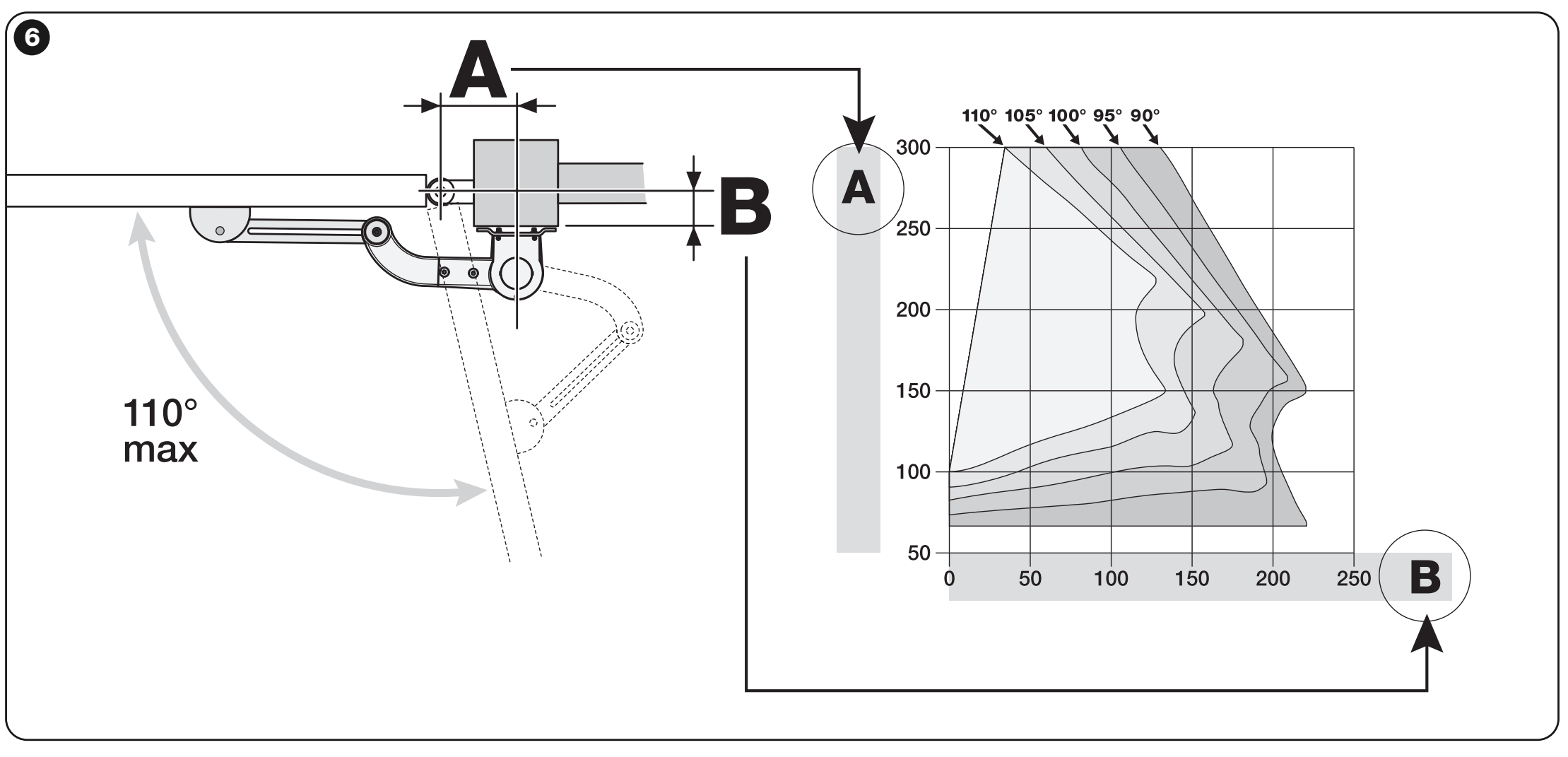
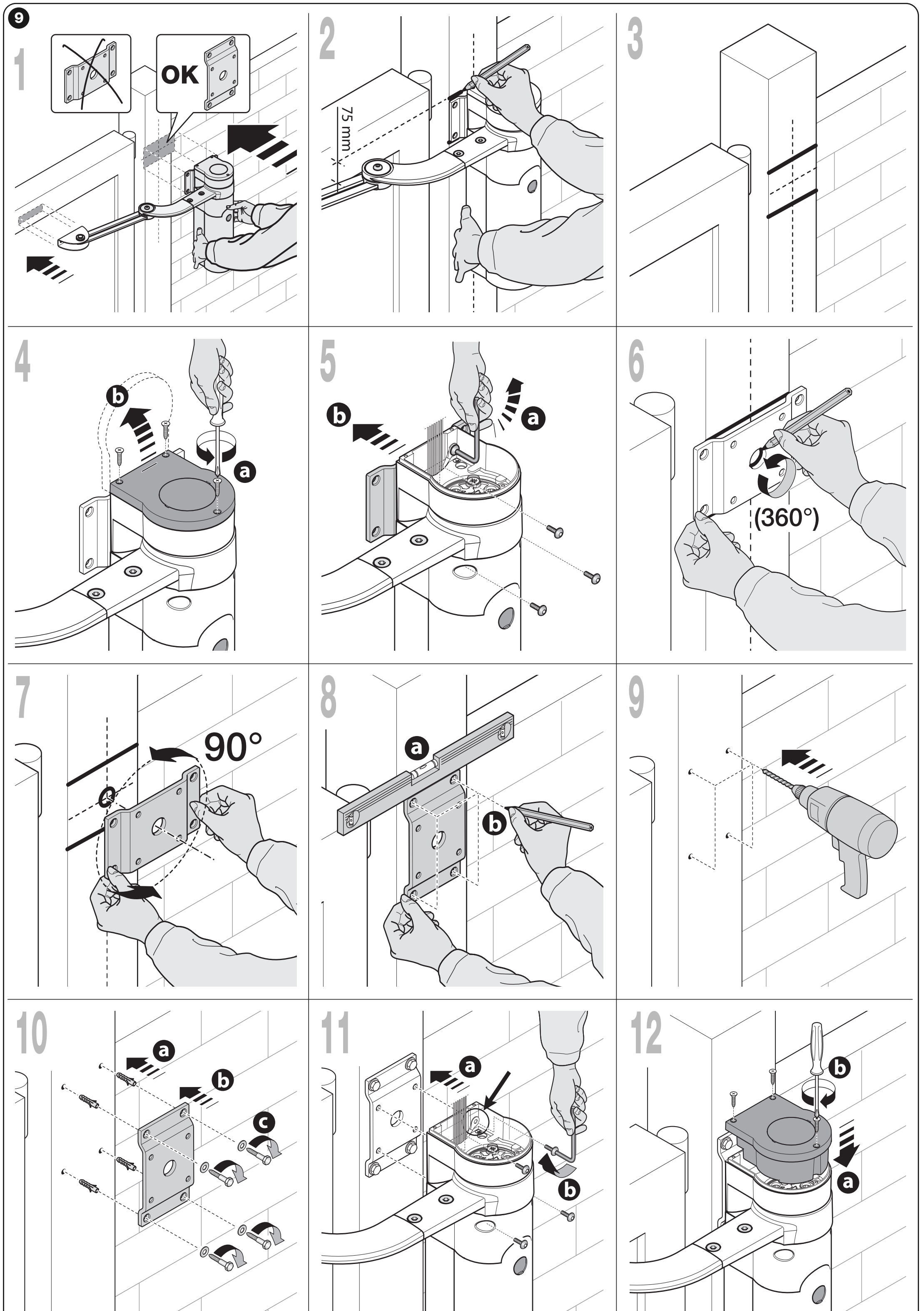
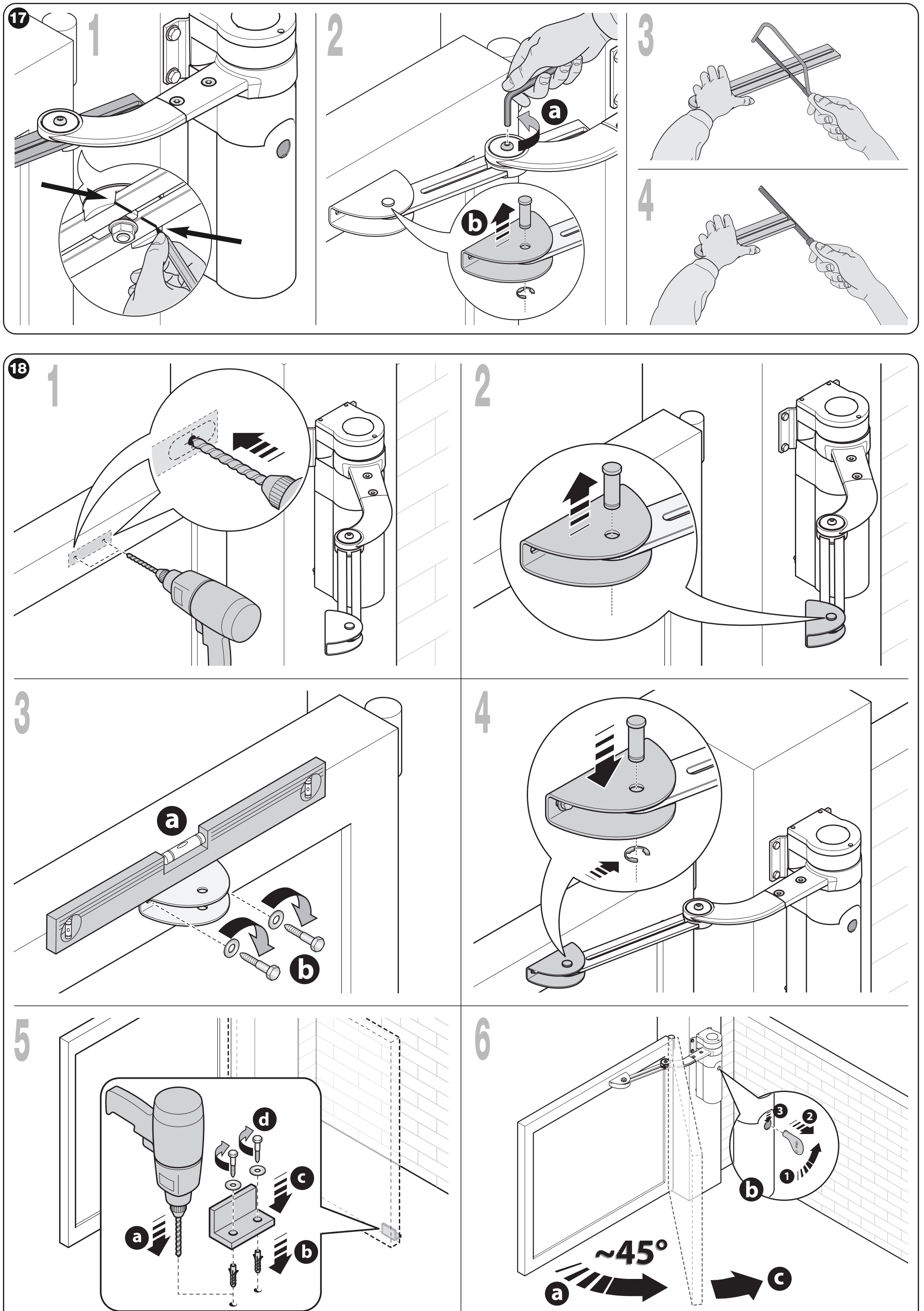
- Prepare sturdy stops for the open and closed positions, and determine the required angle and mounting dimensions A/B. Check the entire range of arm movement.
- Assemble the arm and secure the rear bracket to the supporting substrate with suitable anchors. Mount the drive vertically and release it.
- With the gate leaf closed, extend the arm to its maximum extension and check that it is mechanically locked in the end position. Position the front bracket on a solid part of the frame. The curved arm should point towards the gate leaf; level the arm.
- Secure the bracket temporarily first. Move the gate manually through its entire range and check that the arm does not collide with the post or wall and that the gate leaf reaches both stops.
- Complete the installation, insert the pins and retaining Benzing rings. Align the front bracket so that the 75 mm check dimension shown in the installation drawing is also met.
- Move the gate leaf approximately halfway along its travel, lock the drive with the key, then gently move the gate by hand to engage the gear.
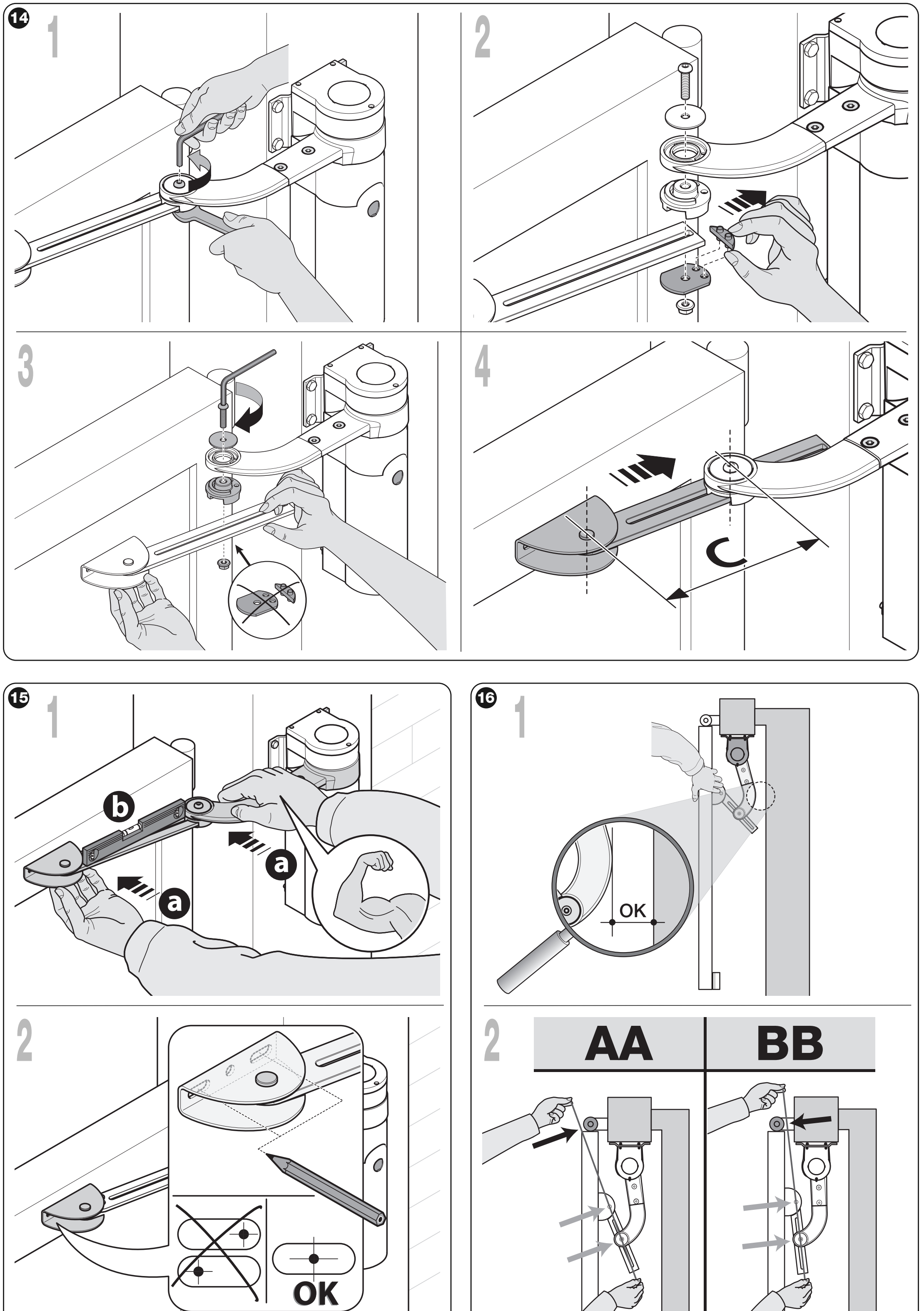
Shortening the arm when space is limited
Arm shortening must be carried out by an installer before the bracket is permanently secured. The maximum angle for the shortened arm is 90°, and the maximum gate-leaf length is 1.6 m, as shown in the load graph.
- Set the open position to no more than 90° and fit a temporary stop. Measure B; use the graph for the shortened arm to determine A and the distance C between the pins.
- Set the arm to dimension C and temporarily secure the front bracket with the gate leaf closed. When open, check the position of the pins relative to the hinge as shown in diagram AA/BB.
- If the taut check string passes through as in BB, increase C by a few millimetres and repeat the test until it matches position AA, ensuring the arm does not touch any obstruction.
- Only after verifying the geometry, cut the arm as shown in the original drawing, assemble it, permanently secure the bracket and install fixed stops.
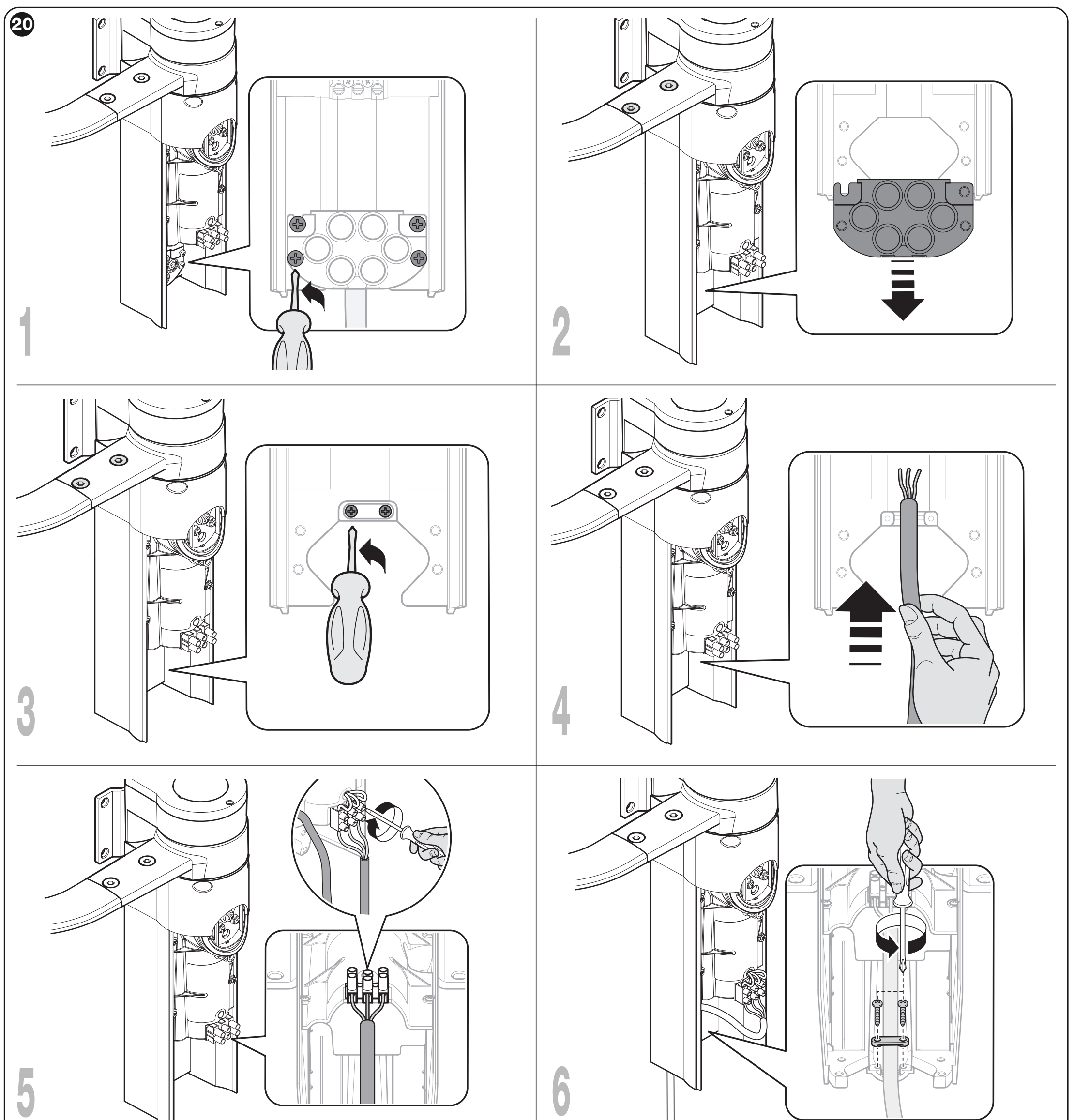
Connecting WL1024 to the WL1024C control unit
Do not connect WL1024 to 230 V. It is powered by the WLA1 motor output in the WL1024C. Use a cable of 3 × 1.5 mm², maximum 6 m: two motor wires and a protective earth conductor. The motor wires reverse polarity when the direction changes; they are not a constant +/− supply for accessories.
- Disconnect all power supplies. Remove the lower cover of the WL1024 and the four cable-gland holder screws; keep the two spacers.
- Feed the cable through the cable gland. Connect the three wires exactly as indicated by the symbols on the motor terminal block, and connect the protective earth wire to the marked earth terminal. Tighten the cable gland.
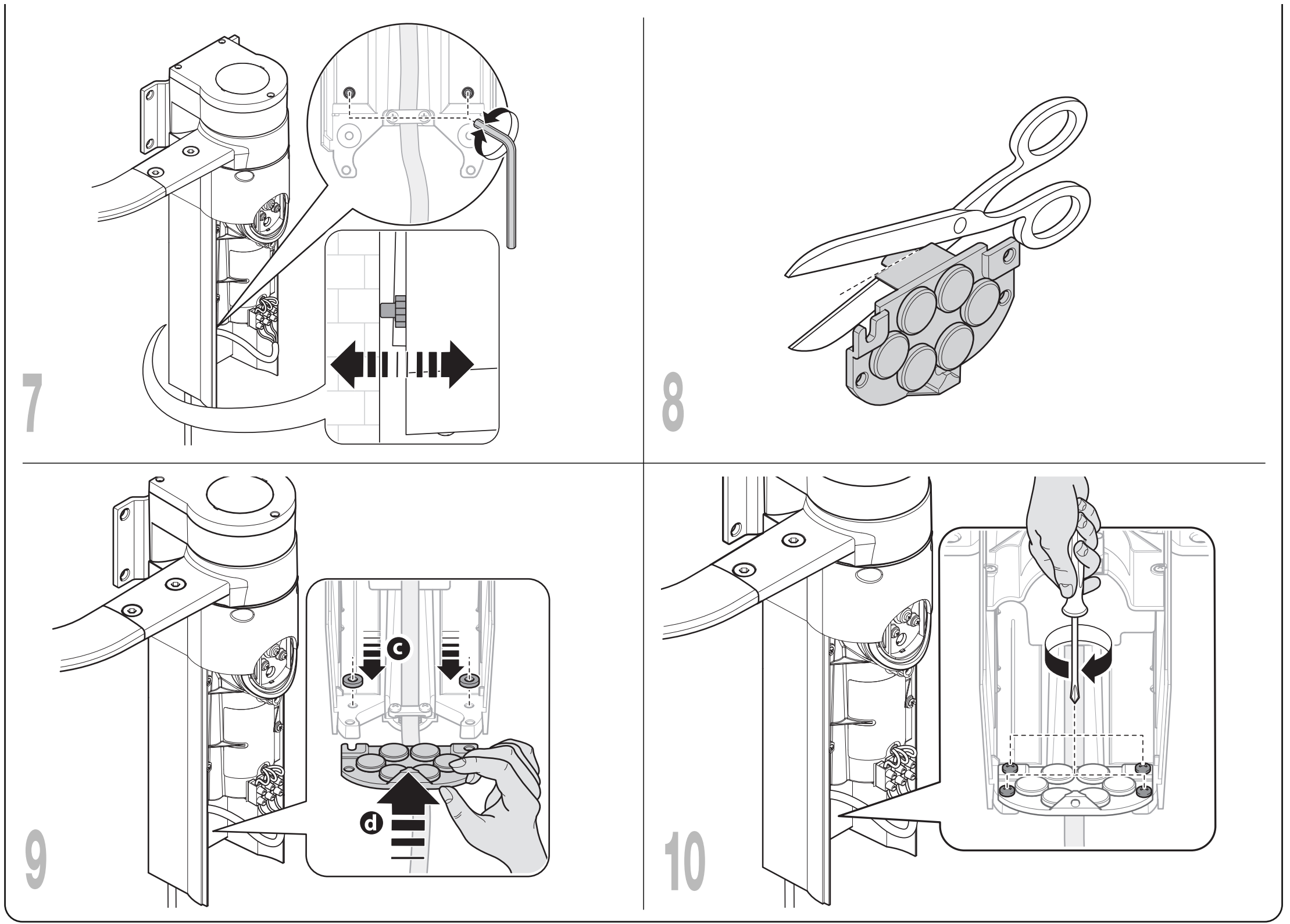
- Adjust the two inner supports so that they rest against the post. Trim the edge of the cable-gland holder as shown, then refit both spacers and the cover.
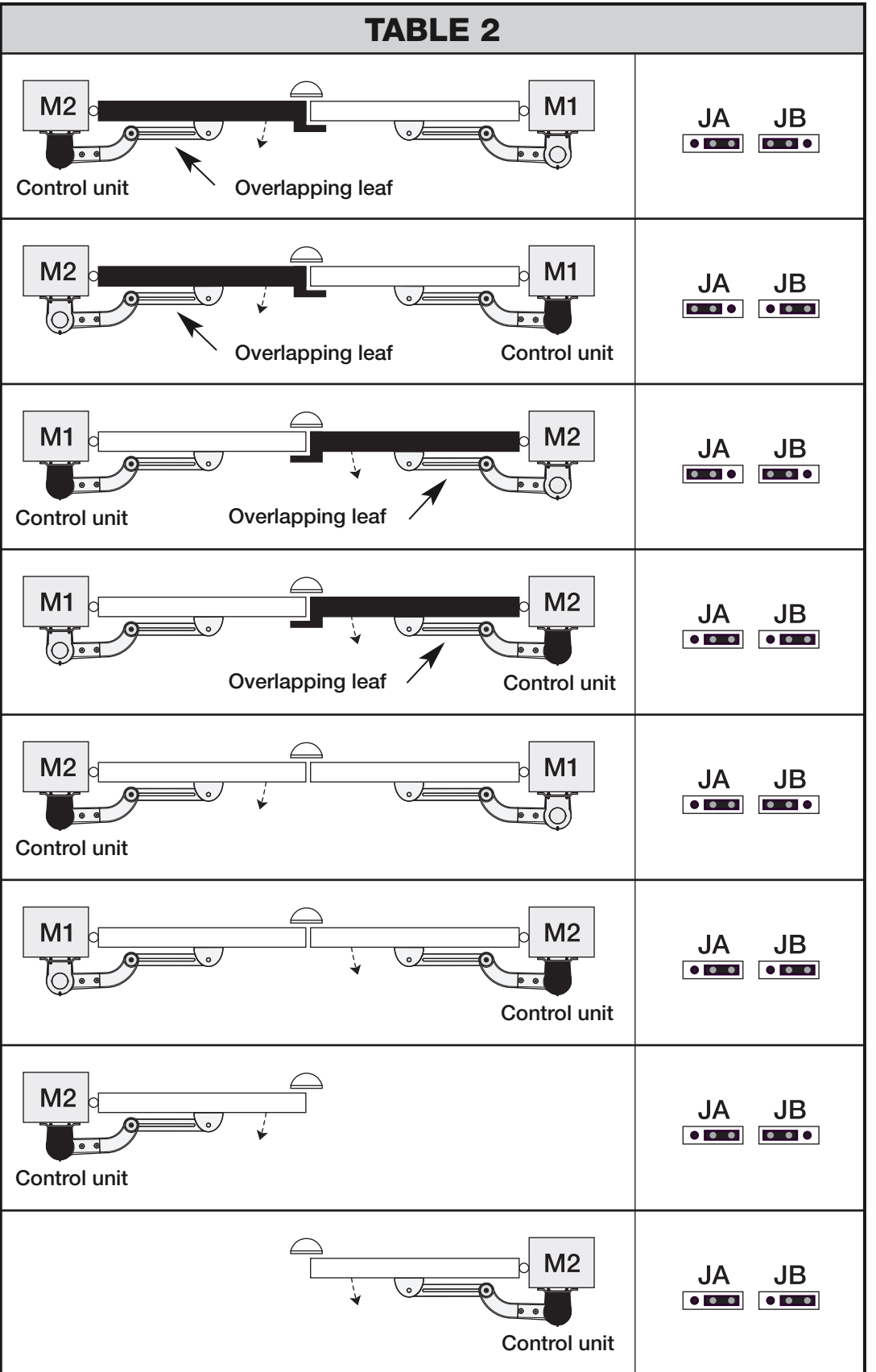
- On the WLA1, connect the second motor to its M1 motor output. Set jumpers JA/JB according to the control motor’s position and the leaf overlap, as shown in the table below.
The M1/M2 designation during setup depends on the JA/JB configuration and leaf overlap. Do not choose the jumpers solely according to which side the WL1024 motor is on; use the matching diagram showing the control unit and the overlapping leaf.
Accessory terminals on the WLA1
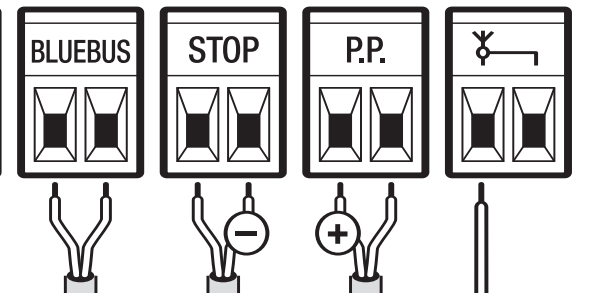
These terminals are on the WL1024C, not on the standalone WL1024. Take auxiliary power from the specific terminals marked in the detail below, not from any arbitrary pair of contacts.
| Connection | Polarity and electrical specifications |
|---|---|
| Auxiliary power | + left terminal of the P.P. pair; − right terminal of the STOP pair, when the labels are oriented as shown in the diagram below. Voltage 18–31 V DC with mains or solar power, 11–14 V DC with the PS424. Maximum total current draw: 200 mA. Power remains available in Stand-by. |
| BlueBUS / NICE EPMB | Two wires in parallel, no polarity. Use 2 × 0.5 mm² cable for runs up to 20 m; for 20–40 m, use 2 × 1 mm². Set TX and RX to the corresponding address and repeat device setup. |
| P.P. – command | Normally open voltage-free NO contact. The +/− power supply is not used for the command input. |
| STOP | NO, NC or 8.2 kΩ, depending on the safety device; the type is stored during setup. Contact is non-polarized, do not connect an external voltage. |
| ELS – electric lock | 12 V AC, maximum 15 VA; no +/−. This specification applies to the electric lock function. |
| FLASH / NICE WLT | FLASH connector on the WL1024C power section; retain the original connector and WLT wiring. For the warning-light function, the output is 12 V DC, maximum 21 W. Do not apply the P.P./STOP polarity here. |
Initial startup of a double-leaf gate
The installer carries out the following steps on the WLA1 in the WL1024C after installation is complete, the wiring has been checked and the fixed stops have been fitted. Keep people and obstacles clear of the gate area. These instructions apply to the control board with four LEDs, L1–L4.
1. BlueBUS and STOP setup
- After switching on, the BlueBUS LED should flash regularly, about once per second. If the indicators behave unusually, switch off the power and check the wiring.
- Press and hold OPEN + STOP/SET for about 3 seconds. Release when L1 and L2 start flashing rapidly.
- When setup is complete, STOP should be lit and L1/L2 should be off. Repeat setup whenever a device is added or removed, even if no devices were connected initially.
2. Setting the end positions
- Check JA/JB. Unlock both motors, move the leaves to the midpoint of their travel, then lock them again.
- Press and hold STOP/SET + CLOSE for about 3 seconds. Release when L3/L4 are flashing rapidly.
- The system should slowly close M1, slowly close M2, slowly open both leaves to the stops, then fully close them at speed.
- If the direction or sequence is incorrect, press any button immediately. After disconnecting the power, check JA/JB and the polarity of the two WL1024 motor wires; do not change the protective earth wire.
- After successful closing, L3/L4 will go out. Test a complete opening and closing cycle, including the slow-down phase. Activation of a photocell or another command during setup will interrupt the procedure; repeat it from the beginning.
Double-leaf gate settings on the WLA1
No programming is required on the standalone WL1024. The following settings apply to the WLA1 control unit with four LEDs, L1–L4, in the WL1024C motor. During programming, use OPEN and CLOSE to select and STOP/SET to confirm. Slow-down and end positions are determined by travel setup. The leaf sequence must match the JA/JB configuration.
Level I – enabling and disabling functions
- Press and hold STOP/SET for about 3 seconds. Release when L1 starts flashing.
- Use OPEN or CLOSE to move the flashing LED to the desired function.
- Briefly press STOP/SET to change its status: short flash = OFF, long flash = ON.
- Wait 10 seconds without pressing a button; programming will end and the changes will be saved. When setting additional functions, do not leave more than 10 seconds between button presses.
| LED – function | ON / OFF and factory setting |
|---|---|
| L1 – Automatic closing Closes after the set pause time. | ON: after opening, the gate closes when the pause time expires; the default is 30 s. OFF – factory setting: semi-automatic operation; a command is required to close the gate. |
| L2 – Closing after photocell activation Reduces the wait after passage. | ON: photocell activation during opening or closing reduces the pause to 5 s. If automatic closing is disabled and the photocell is activated while the gate is closing, the programmed pause time is applied after activation. OFF – factory setting: this function is disabled. |
| L3 – Closing after power is restored Behaviour when power is restored. | ON: if the controller detects that the gate is open after power is restored, it closes it after a 5 s warning-light pre-flash. OFF – factory setting: restoring power will not initiate closing automatically. |
| L4 – BlueBUS standby Energy-saving mode, especially when using a battery or solar power. | ON: 1 minute after a movement, the BlueBUS output and LEDs switch off, except for the slowly flashing BlueBUS LED. A new command restores operation after a short delay. OFF – factory setting: normal operation without this shutdown. |
Level II – parameter values
The input LED selects the parameter; the value LED shows its setting. Values in bold are the factory settings. Any change to force or speed must be followed by an operational and safety test of the entire gate.
- Press and hold STOP/SET for approximately 3 seconds; release it when L1 flashes.
- Use OPEN or CLOSE to select the input LED for the desired parameter.
- Press STOP/SET again and hold it. After approximately 3 seconds, the LED for the current value lights up.
- While continuing to hold STOP/SET, select the value LED using OPEN or CLOSE. Then release STOP/SET.
- Wait 10 seconds without pressing anything, so the setting is saved and programming ends.
| Input LED – name and description | Setting LED – value |
|---|---|
| L1 – Pause time Wait time before closing; effective when automatic closing is enabled. | L1 – 5 s L2 – 30 s L3 – 60 s L4 – 120 s |
| L2 – Step-by-step Sequence of commands from P.P. and the remote control. | L1 – open → stop → close → stop L2 – open → stop → close → open L3 – open → close → open → close L4 – condominium mode: while opening, P.P. and OPEN have no effect; CLOSE reverses movement to closing. While closing, P.P. and OPEN reverse movement to opening; CLOSE has no effect. |
| L3 – Motor speed Speed during normal travel. | L1 – slow L2 – medium L3 – fast L4 – very fast |
| L4 – Motor force Force level for both motors; do not use it to compensate for binding or incorrect geometry. | L1 – level 1, minimum force L2 – level 2 L3 – level 3 L4 – level 4, maximum force |
Remote control
Transmitters NICE MYGO4 transmitters are paired with the plug-in receiver NICE OXIBD in the WL1024C control motor, following its instructions. Transmitter pairing is separate from device and travel learning; the WL1024 does not have a built-in radio receiver.
Resetting WLA1 settings
On the WLA1, press and hold OPEN + CLOSE, until L1 and L2 start flashing, then release the buttons. The control board restores the factory settings. Repeat device learning and travel learning and the safety test. This procedure does not erase the receiver's radio memory.
Backup battery and solar power
NICE PS424 is connected to the WL1024C control motor only after installation, learning and testing are complete. The WL1024 receives power from it via the WLA1. Use the designated battery connector; do not confuse its polarity with the accessory terminals.
NICE SOLEMYO SYKCE30 is an alternative to mains power, subject to checking sunlight conditions and the number of cycles. Mains and solar power must not be used at the same time. The WL1024 alone does not include a battery or solar kit.
When the second leaf does not work properly
| Symptom | What to check |
|---|---|
| WL1024 does not move | Power supply and WLA1 status in the WL1024C, secure seating of the motor terminal block, 3 × 1.5 mm² cable, and a jammed drive. |
| The leaf opens instead of closing during learning | Stop the learning procedure. After disconnecting the power sources, check JA/JB and the WL1024 motor wires according to the wiring diagram. |
| The leaves overlap in the wrong order when closing | Check the JA/JB configuration against the actual leaf overlap and confirm that travel learning was completed correctly. Repeat the learning procedure after repairs. |
| The motor stops or reverses | First disengage the motor and check movement resistance, arm geometry and the fixed stops. Check the photocells and STOP. Do not increase the force to compensate for a mechanical fault. |
| L1/L2 or L3/L4 flash slowly | L1/L2 indicate that device learning is required; L3/L4 indicate that end-position learning is required. Continue with initial setup. |
| Only the transmitter is not working | If the gate responds to the WLA1 button, check the transmitter battery and receiver, not the wiring of the second motor. |
Manual release during a power outage
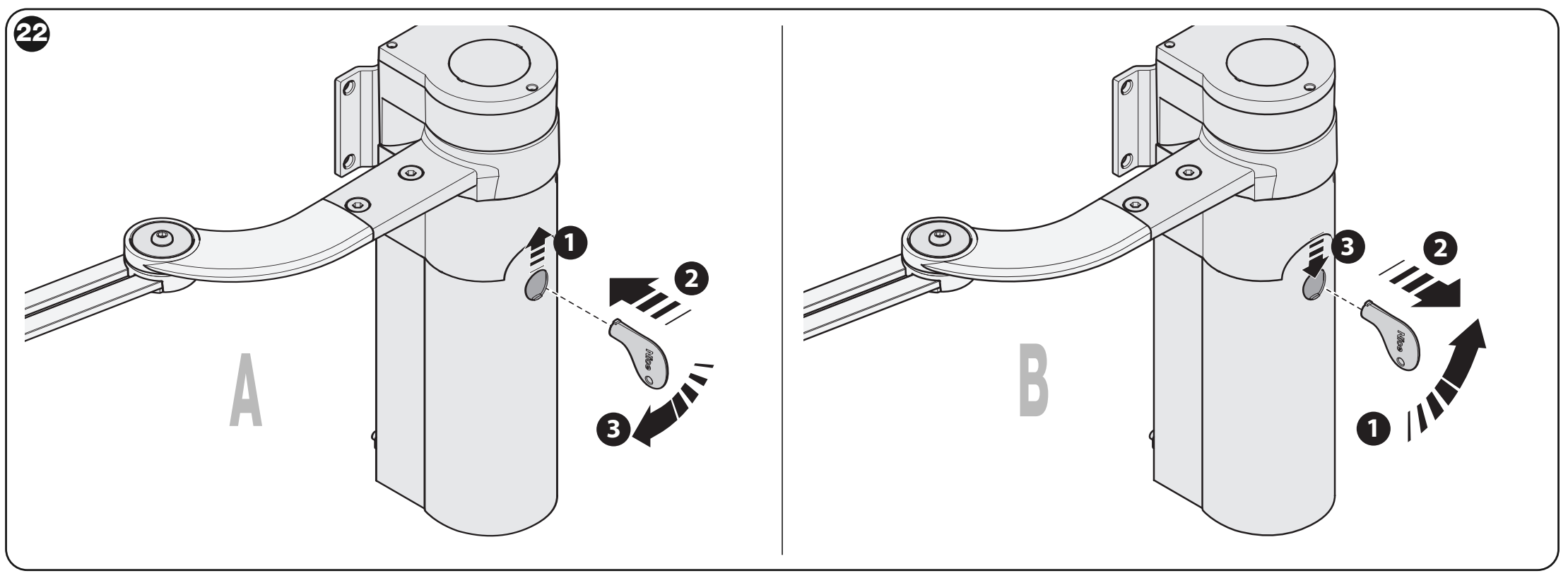
- Stop the gate and hold the leaf so it cannot move on its own. Open the cover and insert the release key.
- Turn the key almost one full turn clockwise. The leaf can now be moved manually.
- To re-engage the drive, turn the key counterclockwise and gently move the leaf until the drive engages mechanically.
- Remove the key, turn the release disc 90° counterclockwise and close the cover. For a double-leaf gate, release each motor separately.
Pre-use check
- With the motor disengaged, the leaf must be able to open and close manually using a force of less than 390 N and remain stationary when released. This is a manual movement test, not a permitted impact force on a person.
- Check the anchors, pins, retaining clips, covers and the full movement of the arm. Repeatedly test opening, closing and stopping.
- Test each photocell, safety edge and STOP separately. If the safety system relies on force limitation, the installer must measure impact forces and verify the safety of the entire assembly.
- Hand over the gate only after successful testing. The owner must be given the operating instructions, a demonstration of the manual release, and a maintenance schedule. Children and other people must stay clear of the gate leaves while they are moving.
Maintenance and regular inspection
Arrange an inspection at least every 6 months or after 20,000 operating cycles, whichever comes first. Disconnect all power sources before carrying out any work. Check the fastenings, corrosion, pin play, retaining rings, arm wear, and the tightness of the covers; replace any damaged parts. Repeat the functional and safety tests after maintenance.
WL1024 technical specifications
| Parameter | Value |
|---|---|
| Type | Articulated electromechanical motor without a control unit |
| Motor power supply | 24 V DC from the WLA1 in the WL1024C |
| Rated current | 2 A |
| Starting current | 3 A, for a maximum of 2 s |
| Rated torque | 50 Nm |
| No-load angular speed | 0.20–0.30 rad/s |
| Angular speed at rated torque | 0.16–0.24 rad/s |
| Duty | A maximum of 100 complete cycles per day; the WLA1 limits operation to approximately 50 cycles/hour |
| Continuous operation | Approximately 10 minutes |
| Ingress protection | IP44 with the cover intact and closed |
| Temperature | −20 to +50 °C |
| Dimensions | 90 × 125 × 385 mm |
| Motor weight | 4.3 kg |
The motor is not suitable for acidic, highly saline, or explosive environments. The stated number of cycles does not guarantee suitability for every gate; load limits and the condition of the mechanism must also be taken into account.
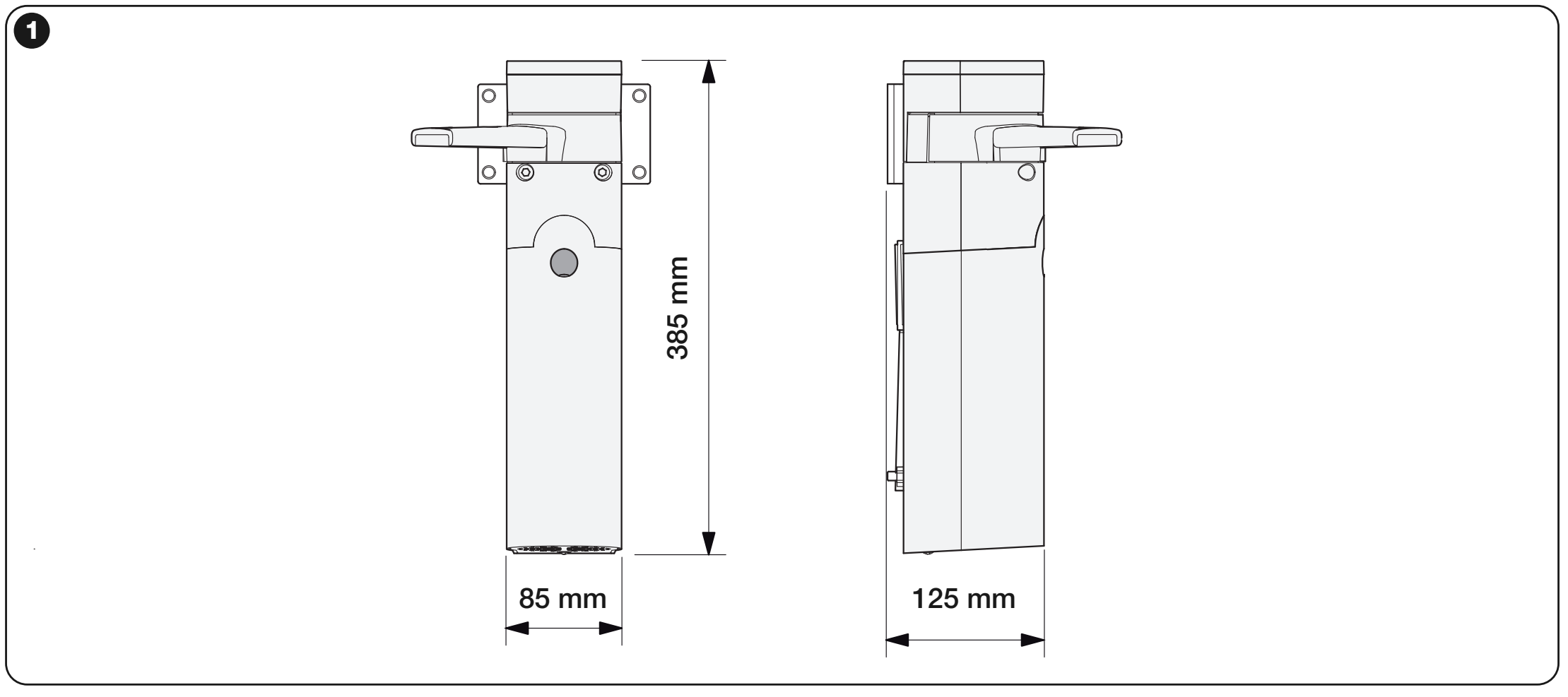
The dimensional drawing shows a width of 85 mm; the drive's technical dimensions are 90 × 125 × 385 mm. Before drilling, check the actual motor and bracket, and make sure the arm's full range of movement is unobstructed.
How can I order this item?
Choose the option that suits you:
- order online: use the buy button to add the goods to your shopping cart (you will find the buy button here in the product variants table).
- order by email: place your order at [email protected]






