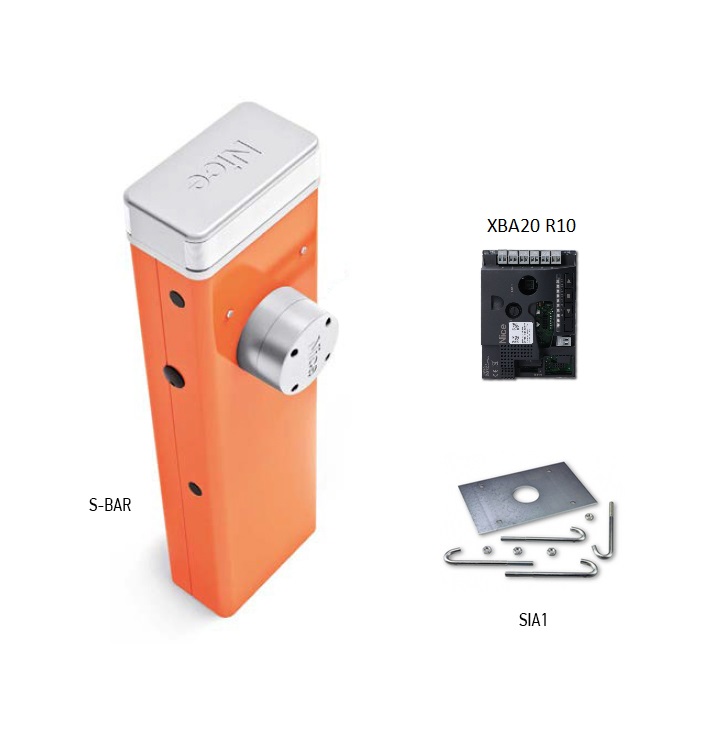
NICE SBAR barrier gate - without arm
| Product availability: | In stock | We normally dispatch goods within 24 hours. |
|---|

in stock
€1,018.69 including VAT
| Weight |
|---|
| 46 kg |
Description of NICE SBAR barrier gate - without arm
NICE SBAR is an electromechanical barrier for controlled vehicle access, supplied without an arm. It has a 24 V DC motor and a built-in control unit XBA20 R10. The standard setup is powered from a 230 V AC; 24 V is the motor voltage.
A steel cabinet with a protective finish, a balancing spring and an elliptical arm XBA19 make up a setup for an entrance up to 4 m wide. Select the arm and accessories separately or as part of a complete kit. The drive is non-reversible; in the event of a power failure, it can be released with a key or operated using an optional battery PS124.
The following can be installed in the top cover: XBA7 flashing light, which indicates movement and fault conditions. The following wiring and programming instructions are for the XBA20 R10 with OPEN / STOP / CLOSE buttons and LEDs L1–L8. For an existing barrier, first check the board's labelling and layout.
When to choose the NICE SBAR barrier
| What to check | Limit and meaning |
|---|---|
| Clear passage width | Up to 4 m; the length of the purchased profile is not the clear passage width. |
| Opening time | At least 4 s; more than 5 s with XBA4 lights. The settings, arm and its accessories affect movement. |
| Cycle frequency | Up to 100 cycles/h at rated torque; 80 cycles/h with XBA4 lights. |
| Space for the arm | Check the arm's path when opening and closing, the available headroom, clearance from vehicles and access to the manual release. |
| Supplied without an arm | Choose the arm, safety devices and remote control to suit the setup. |
The barrier controls vehicle access. Provide a separate pedestrian passage and select safety devices according to the specific risks. The motor's obstacle detection does not replace photocells or other required protective devices. Do not use the arm as a pedestrian gate.
Barrier kits with arm and accessories
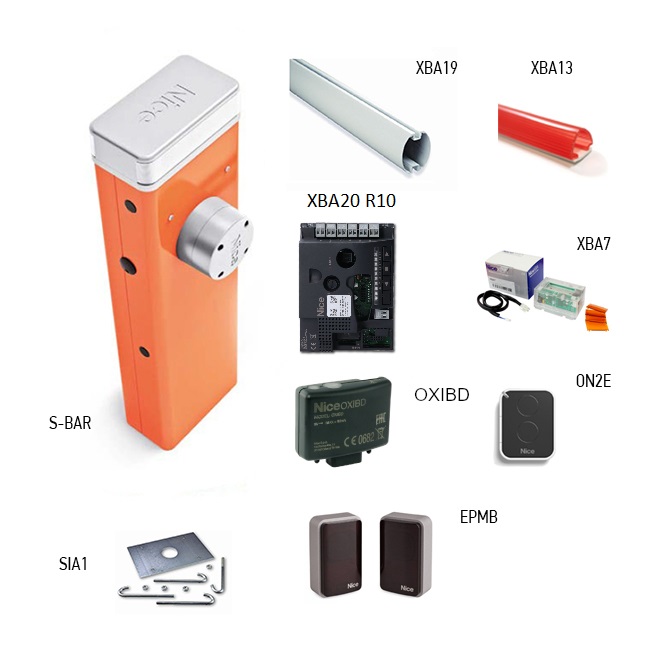
The SBAR kit includes a 4 m arm and additional equipment. The other kits in the comparison use a different barrier model; a longer arm is not an accessory that can be fitted to the SBAR at will. Check the contents and length of the setup on the specific product page.
| NICE SBAR barrier kits |
|---|
| SBAR – 4 m arm
XBA20 R10, XBA19, XBA7, XBA13 rubber, OXIBD, ON2E, EPMB and SIA1 anchoring, depending on the kit configuration. |
What you need for the setup
| What | Why | Type |
|---|---|---|
XBA19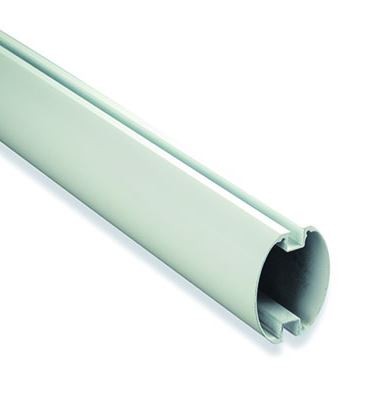 | Elliptical arm, 45 × 58 mm; supplied profile length: 4,270 mm. The profile length is not the clear passage width. | |
XBA13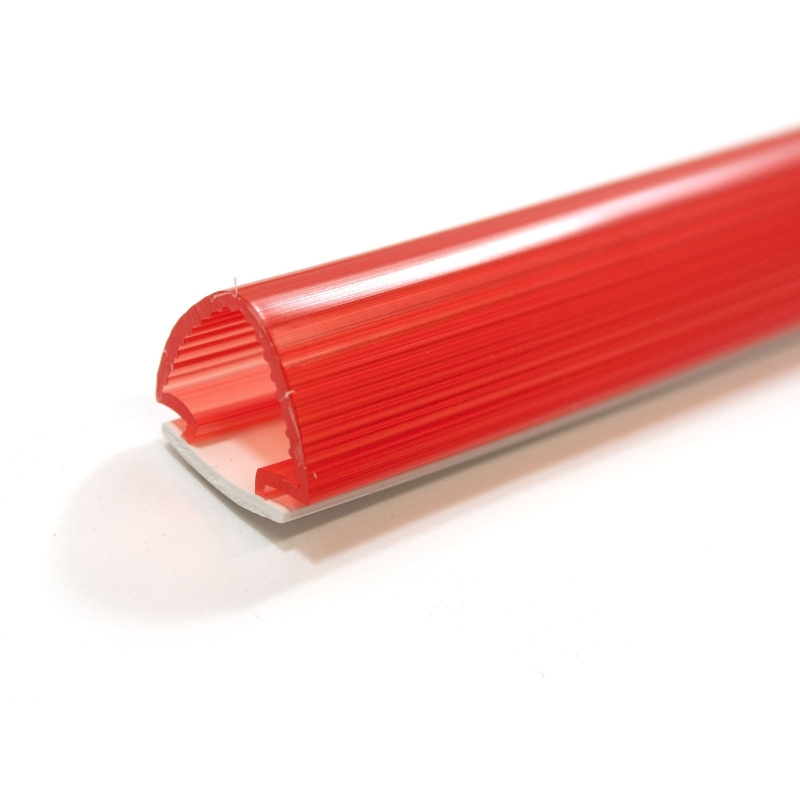 | Impact-protection rubber, 9 × 1 m pack; fit it before balancing. | |
XBA4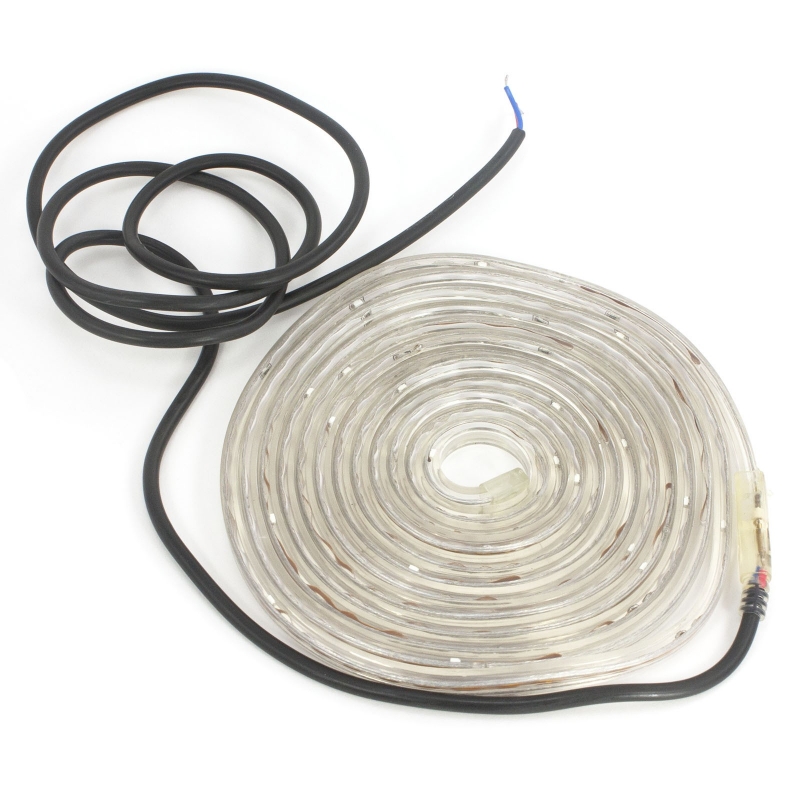 | Arm lights; they affect travel time and cycle frequency. | |
XBA7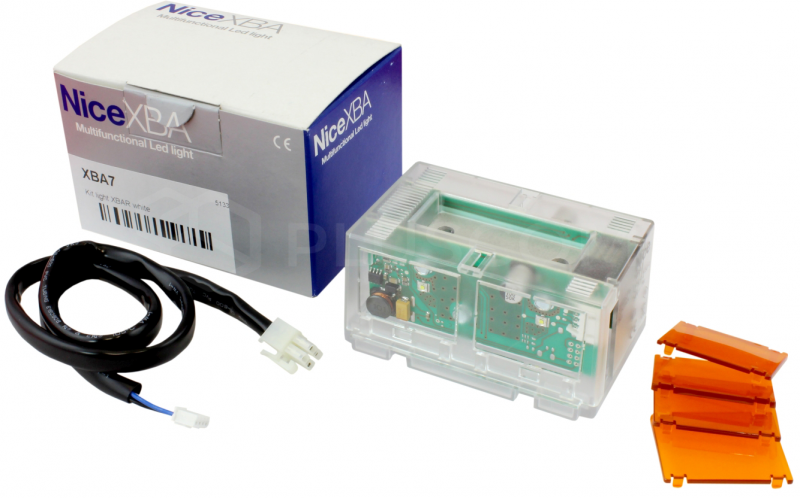 | Optional beacon or lighting in the top cover. | |
WA11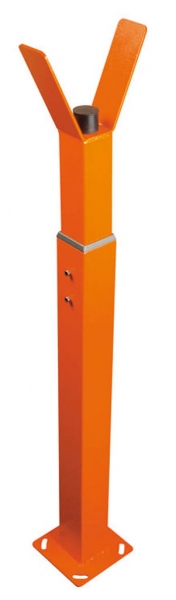 | A separate height-adjustable support for the closed boom. | |
WA10 | 24 reflective stickers for improved boom visibility. |
|
EPMB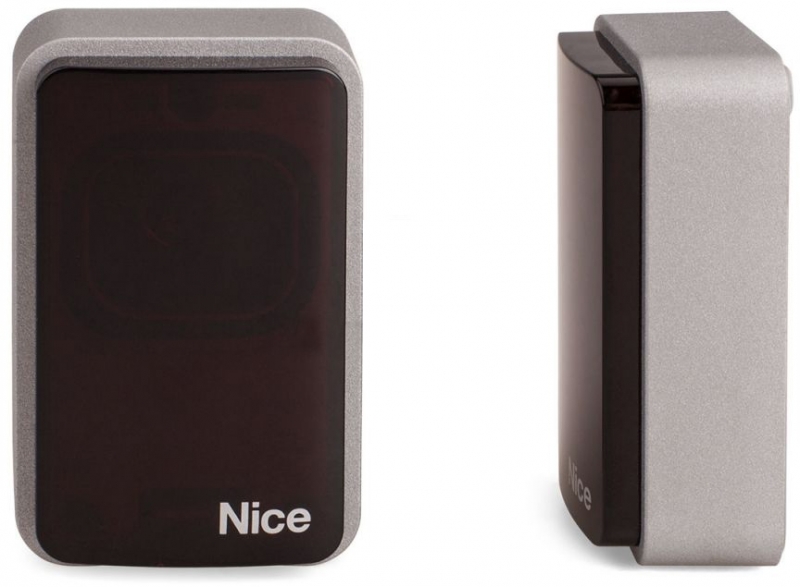 | BlueBUS photocells monitor the hazard area; select the function according to the risks. | |
OXIBD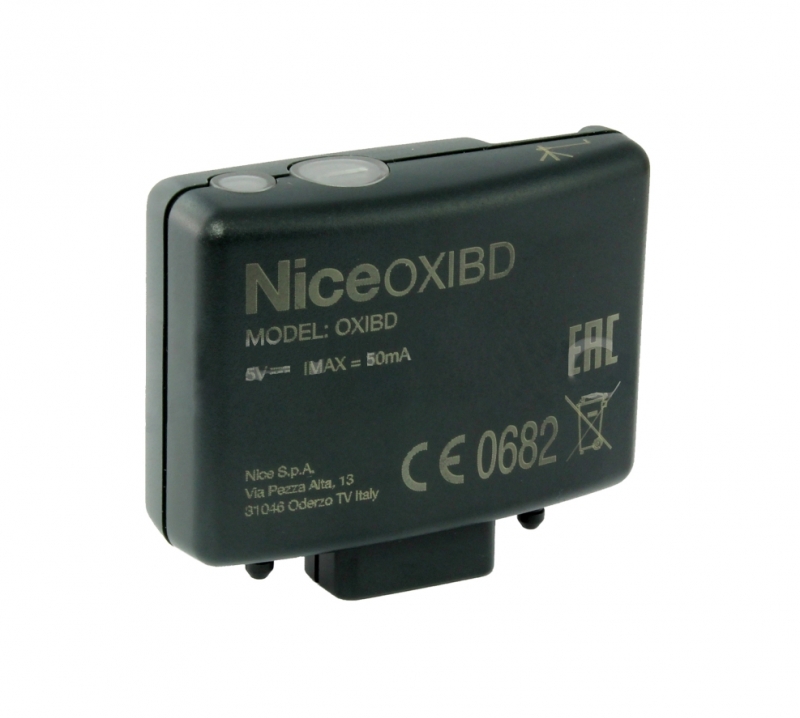 | Plug-in radio receiver for compatible remote controls; not automatically included with a standalone operator. | |
PS124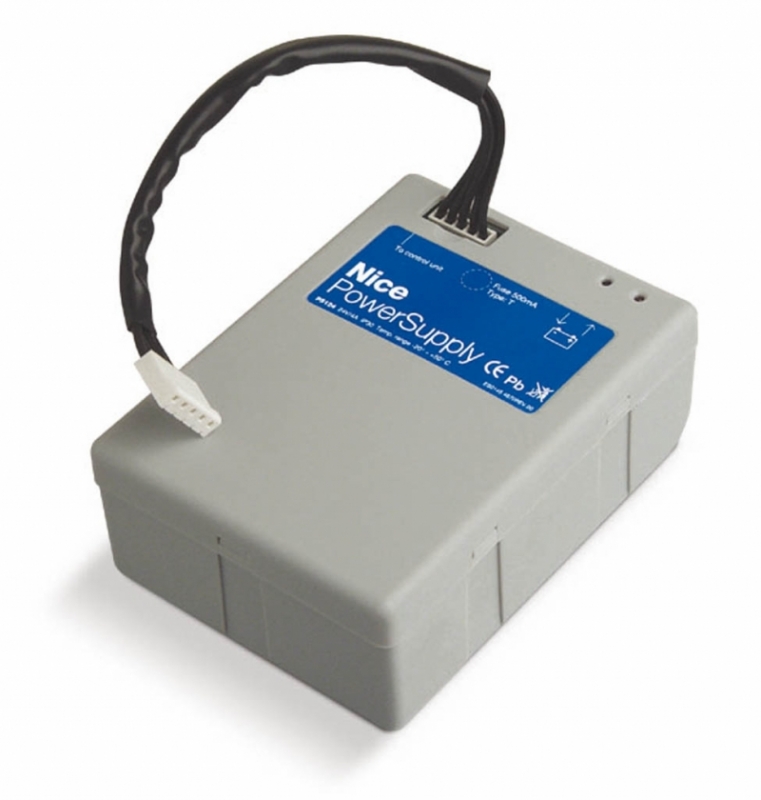 | Backup operation during a power outage. |
A more compact alternative to photocells is EPSB. Both use BlueBUS; the relay-type EPM/EPS photocells cannot be connected to BlueBUS as direct replacements.
Cabinet mounting and anchoring
Installation, mains connection and commissioning must be carried out by a qualified technician. Disconnect both the mains and the battery before starting work. Check that all parts are present and in good condition, that the substrate is sound, assess the risk of flooding, and ensure the boom has a clear path.
Left- and right-hand configurations
The barrier is supplied in the default left-closing configuration. For a right-hand configuration, you must mechanically reposition the balance lever and spring and change level I/L8. Changing the electronic setting alone is not sufficient. Adjust the spring according to the illustration of the relevant mechanism, with the boom safely secured; do not disconnect the spring while it is under uncontrolled tension.
- Choose a level, solid substrate and mark the four anchor points. Prepare conduits for the mains cable and other wiring.
- On an existing substrate, use suitable anchors for the material and load; these are not automatically included with the cabinet.
- For a new foundation, fasten the anchors to the base plate with nuts and washers on both sides. Tighten the lower nut to the end of the thread.
- Position the plate parallel to the boom, level and at the correct height. Allow the concrete to cure completely; do not load the cabinet before it has cured.
- Position the cabinet and firmly tighten all four anchor fasteners. Prevent water and condensation from entering the electronics through the conduits.
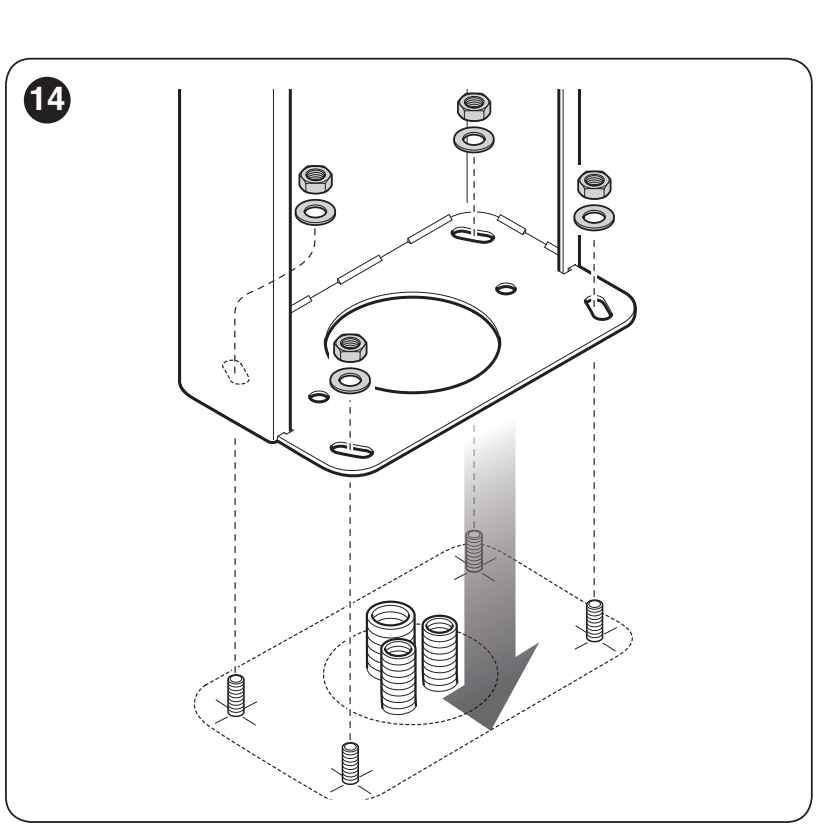
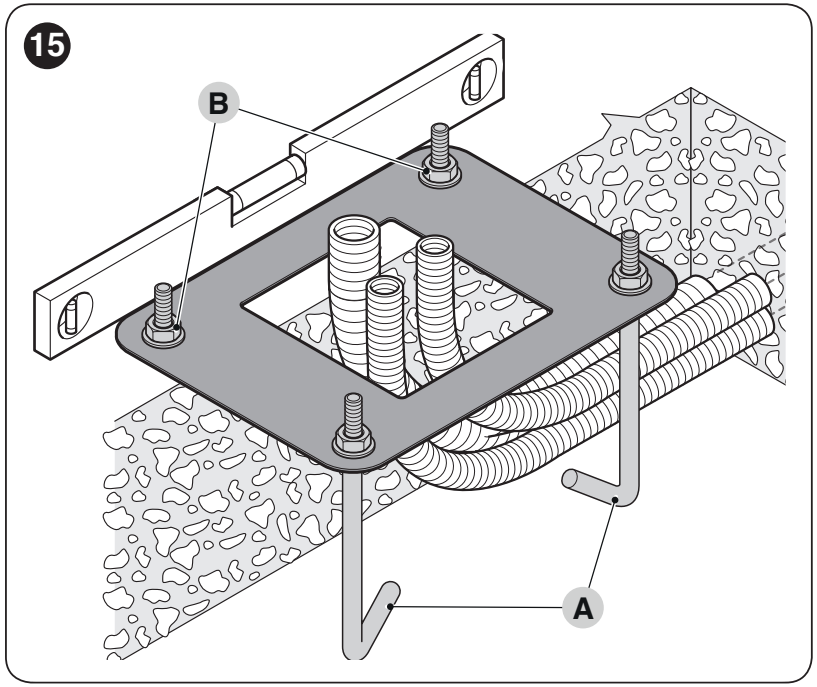
The concrete base should be reinforced, at least 0.15 m thick and have a volume greater than 0.2 m³. Specify the foundation and anchor load capacity according to the ground conditions and load; select four M12 anchors to meet the installation requirements, not solely by the hole diameter.
Installing the boom and safety features
- Insert the two pins into the output shaft. Orient the bracket for a vertical boom and firmly secure it with the appropriate washers.
- Fit the bracket cover and leave the mounting screws loose for now.
- Slide the protective rubber strip with its connectors into the boom grooves, then fit the end cap and rubber strip end caps. The rubber strip may protrude by approximately 1 cm at the end.
- Insert the support inserts from the opposite end, slide the boom fully into the bracket and firmly tighten its four fixing screws.
- Install any lights and other approved accessories before balancing. Whenever you change the length or accessories, complete the work by checking the balance again.
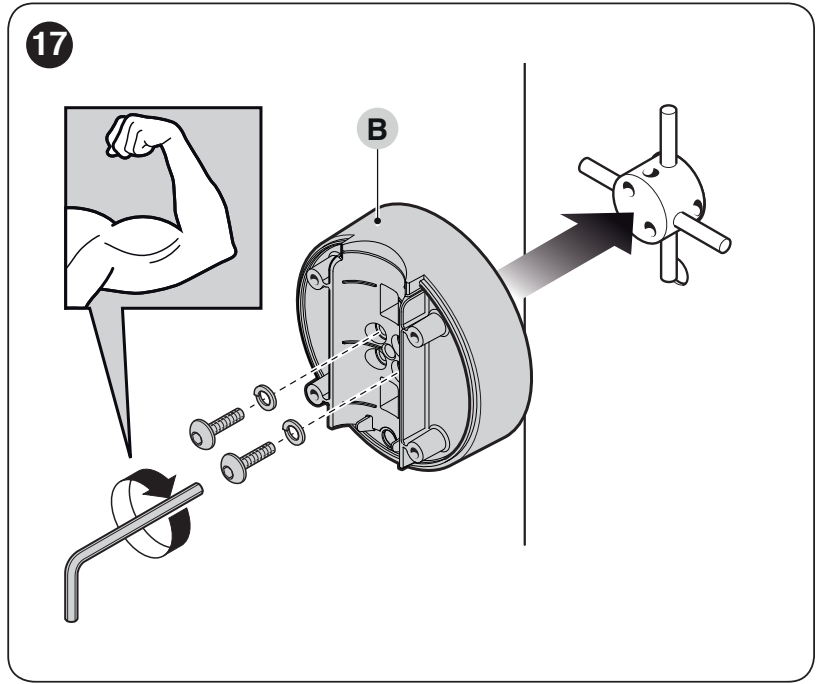
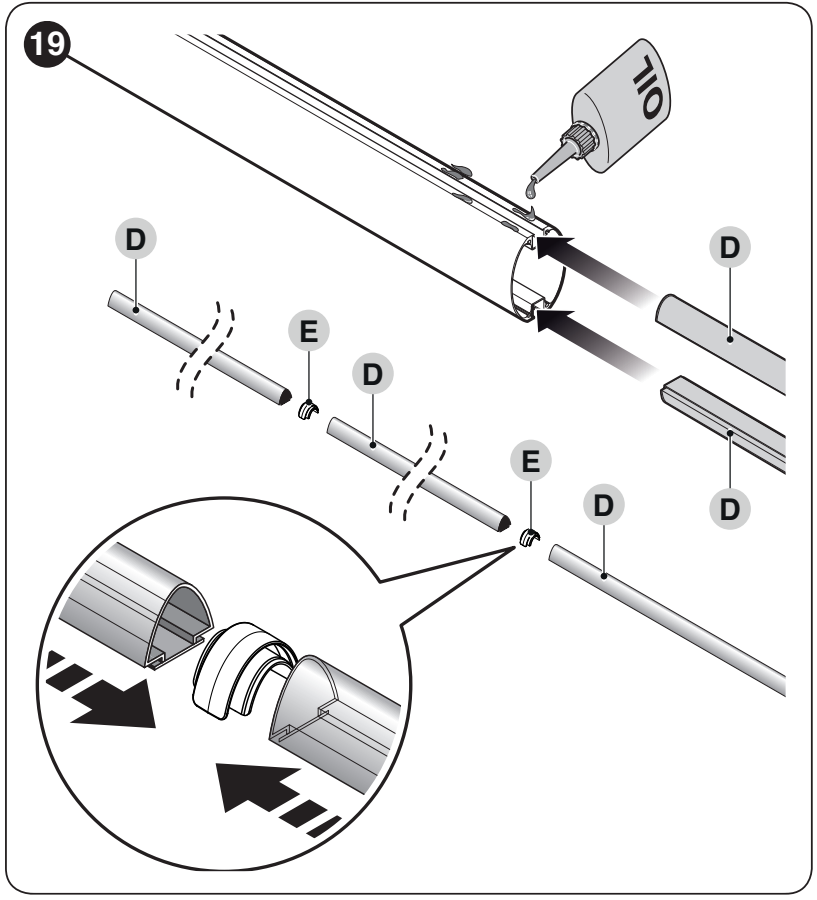
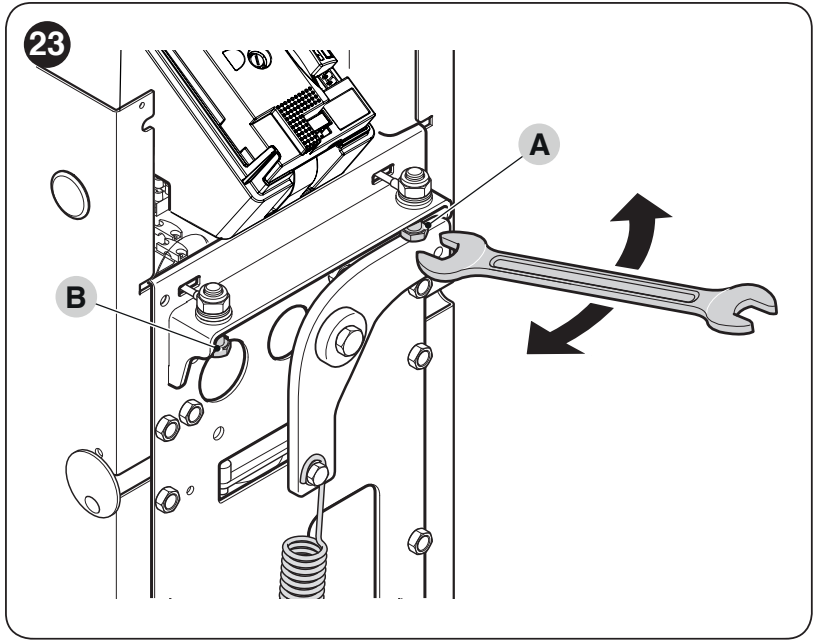
Adjusting the mechanical stops
- Hold the boom and release the gearbox.
- Manually move the boom through its full opening and closing range.
- Use stop screws A/B to set the boom horizontally when closed and vertically when open.
- After adjustment, firmly tighten the locknuts. Do not use motor force in place of the stops.
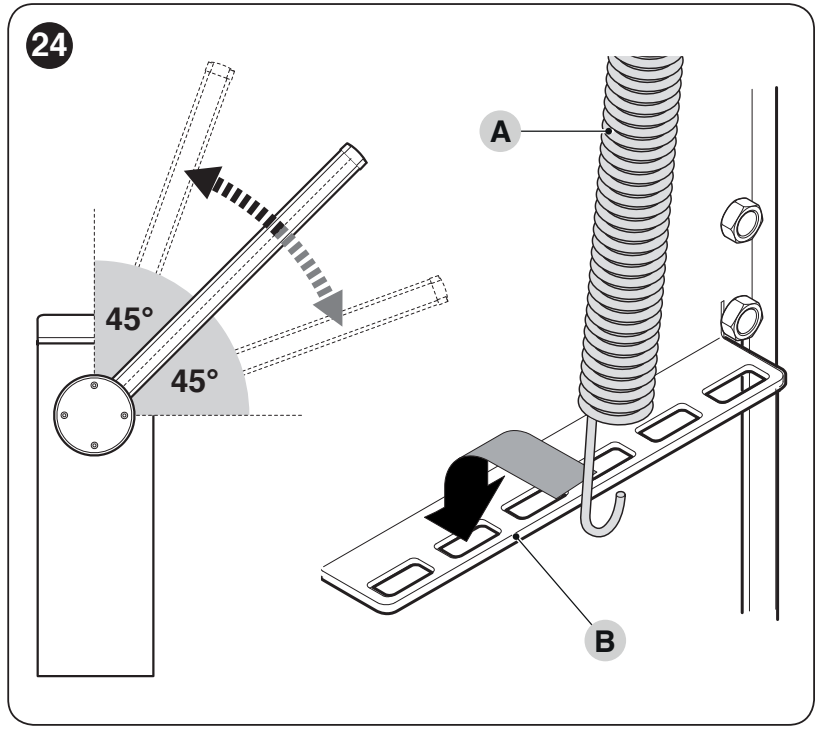
Balancing the boom with all accessories fitted
- Hold the boom, release the motor, set it to approximately 45° and check that it does not move significantly on its own.
- If it rises, reduce the spring tension; if it falls, increase it. Before moving the spring attachment, set the boom to the fully open position and secure it safely.
- For the mechanism shown, move attachment point B towards the centre to reduce tension, and outwards to increase it.
- Repeat the check at approximately 20° and 70° as well. The boom must not drop or rise significantly on its own.
- Check manual movement in all positions and in both directions, then re-engage the gearbox.
The permitted manual force during the check is approximately no more than 50 N, applied perpendicular to the boom at a distance of 1 m from its axis, in all positions and in both directions. This is the upper limit, not the target setting. Balancing is a mechanical adjustment; do not compensate for an imbalance by increasing the motor force.
Preparing the wiring
| Cable | Cross-section and length |
|---|---|
| Mains power supply | 3 × 1.5 mm², up to 30 m; over 30 m, 3 × 2.5 mm² and provide protective earthing for the automation system in accordance with the installation requirements. |
| BlueBUS | 2 × 0.5 mm², up to 30 m. |
| Key switch | 4 × 0.25 mm², up to 30 m. Compatible two-wire keypad/reader has its own requirements. |
| Boom lights / beacon in the cover | Specified accessory cables; allow movement without tension or pinching. |
Cables must be suitable for the environment and conduits. Route the 230 V supply through the strain relief to the L/N mains terminals and PE protective earth. Route the other cables so they do not touch the moving mechanism. Do not connect 230 V to low-voltage terminals.
XBA20 R10 control unit – terminals and diagram
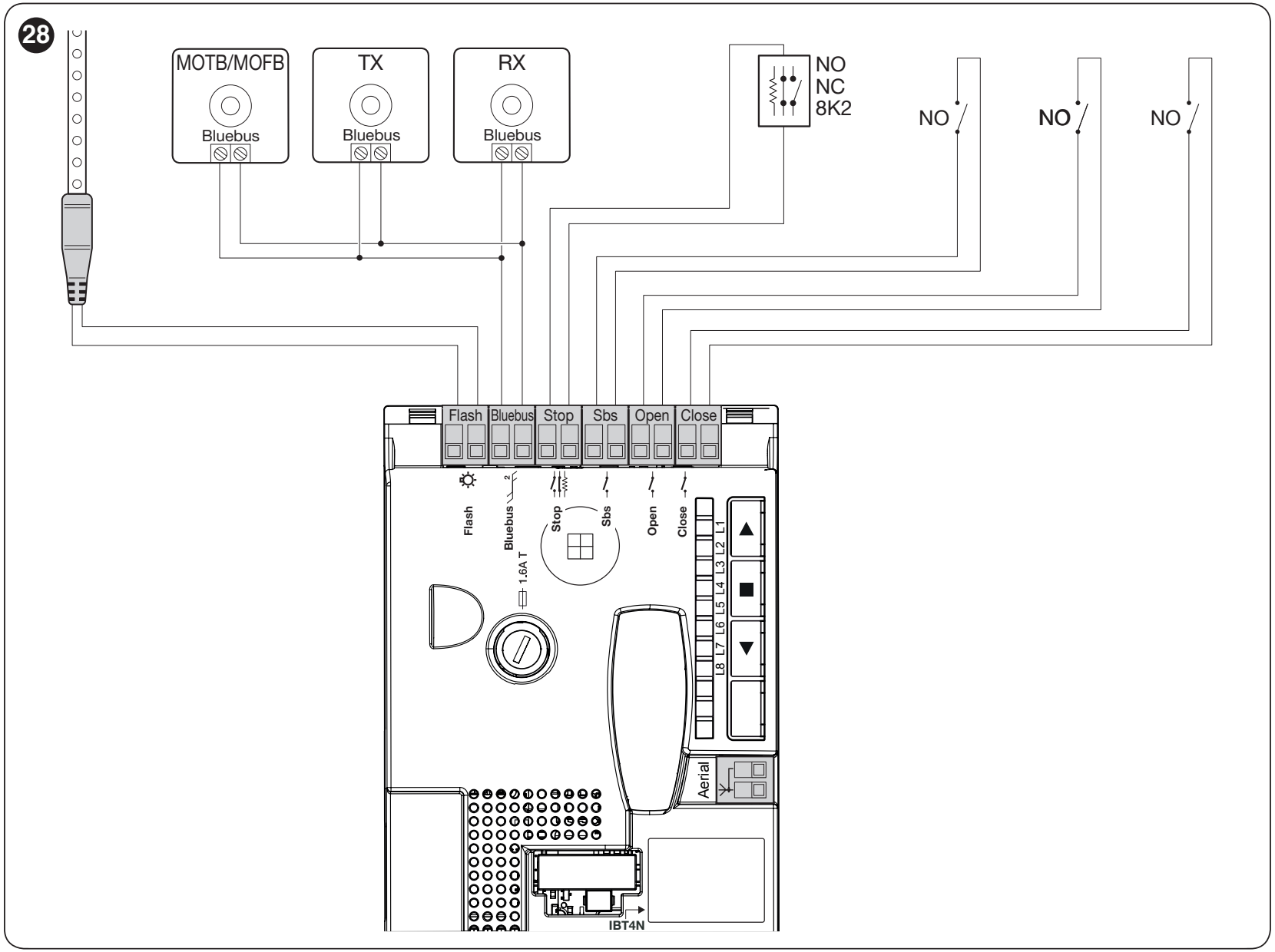
| Terminal / connector | Purpose and condition |
|---|---|
| FLASH | Programmable output. For a beacon, use a compatible 12 V device, with a bulb rated up to 21 W; select the function at level II/L4. For XBA4, set the boom lights. The FLASH output has polarity; for polarity-sensitive accessories, check the markings and voltage. Polarity does not matter for a bulb. |
| BlueBUS | Compatible two-wire devices connected in parallel, with no polarity. Maximum of 12 BlueBUS unit loads; this does not automatically mean 12 pairs. |
| STOP | Learned safety input for NO, NC, or 8.2 kΩ; a dry contact or resistor alone is connected without regard to polarity. A change in the learned state stops movement; connect a resistive safety edge according to its instructions. |
| SbS | Dry NO contact for step-by-step operation, with no polarity; set the function at II/L2. |
| OPEN / CLOSE | Separate dry NO contacts for opening / closing, with no polarity. |
| ANTENNA | Receiver antenna, RG58 coaxial cable; connect the center conductor and shield as shown for the connector. |
| SM / IBT4N | Radio receiver connector / BusT4 interface for suitable programming accessories. These are not 230 V inputs. |
XBA4 boom lights and XBA7 beacon
Connect XBA4 to FLASH with the function set to boom lights. Leave enough cable slack for the boom to rotate, protect the cable with a grommet, and cut it only at the marked points; seal the end after cutting. If the lights do not work with the correct setting, disconnect the mains and battery, then swap the two wires at FLASH. Restore power and test the function. Power supplies must be switched off before carrying out any work.
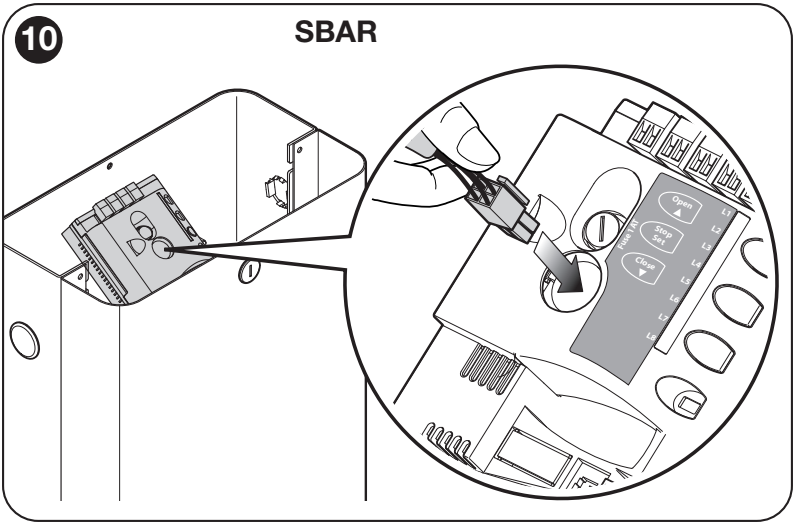
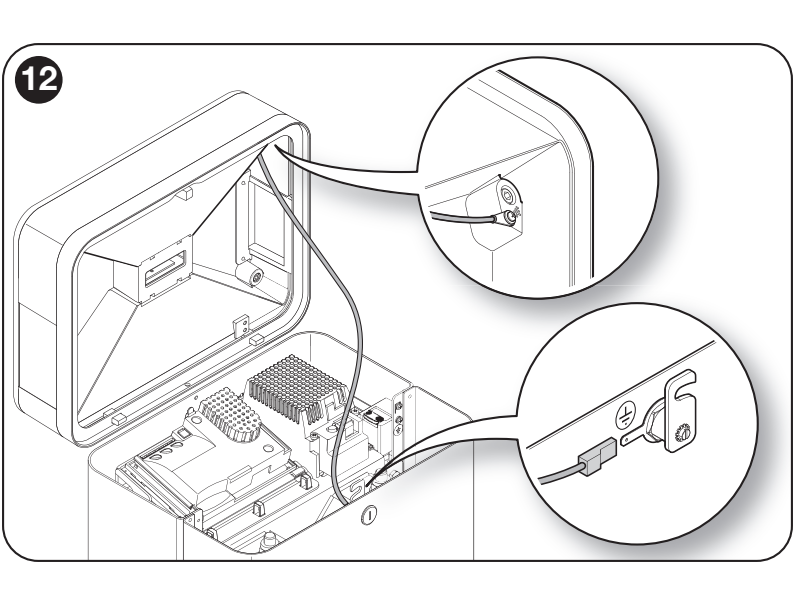
XBA7 is a separate accessory installed inside the barrier housing. With the power supplies switched off, connect its supplied cable to the light and to the dedicated connector on the SBAR board, as shown, then connect the designated earth wire. Do not use FLASH for the boom lights or the 100 mA auxiliary power supply instead. Flashing and lighting are different functions; after setup, check both the operation and the diagnostics. For installation details, see the XBA7 product page.
24 V power supply for accessories
The auxiliary power supply provides 24 V DC (−30 / +50 %), maximum 100 mA. The left and right terminals below are identified when viewing the connectors with the STOP and SbS labels readable, in the same orientation as in the original image.
| Polarity on the board | Accessory connection |
|---|---|
| Plus (+) | Left terminal of the SbS pair → accessory power supply + terminal. |
| Minus (−) | Right terminal of the STOP pair → accessory power supply − / 0 V terminal. |
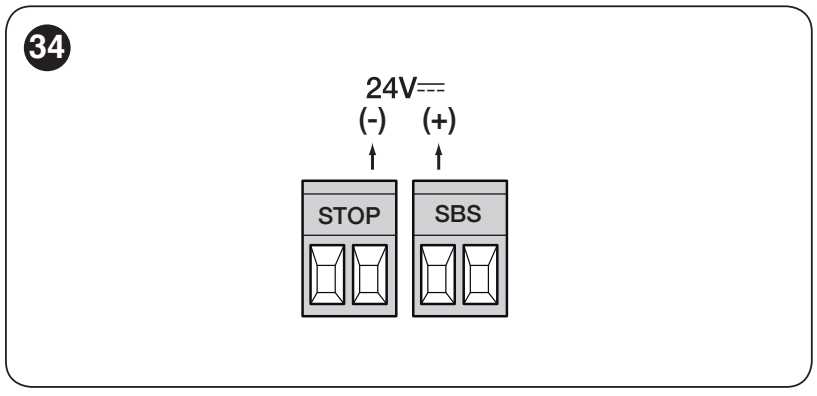
The total current draw of connected accessories must not exceed 100 mA. The STOP/SbS power supply pair is not the same as the STOP contact or step-by-step command: connect a dry contact between the two terminals of its pair. BlueBUS photocells are powered by BlueBUS, not by this auxiliary pair.
BlueBUS photocells – addresses and checking
Set the TX and RX of each pair using the same jumpers. The next pair must have a different address. For the specific jumper settings, see the EPMB product page and the original illustration below. After adding, removing, or readdressing devices, perform device learning and safety tests.
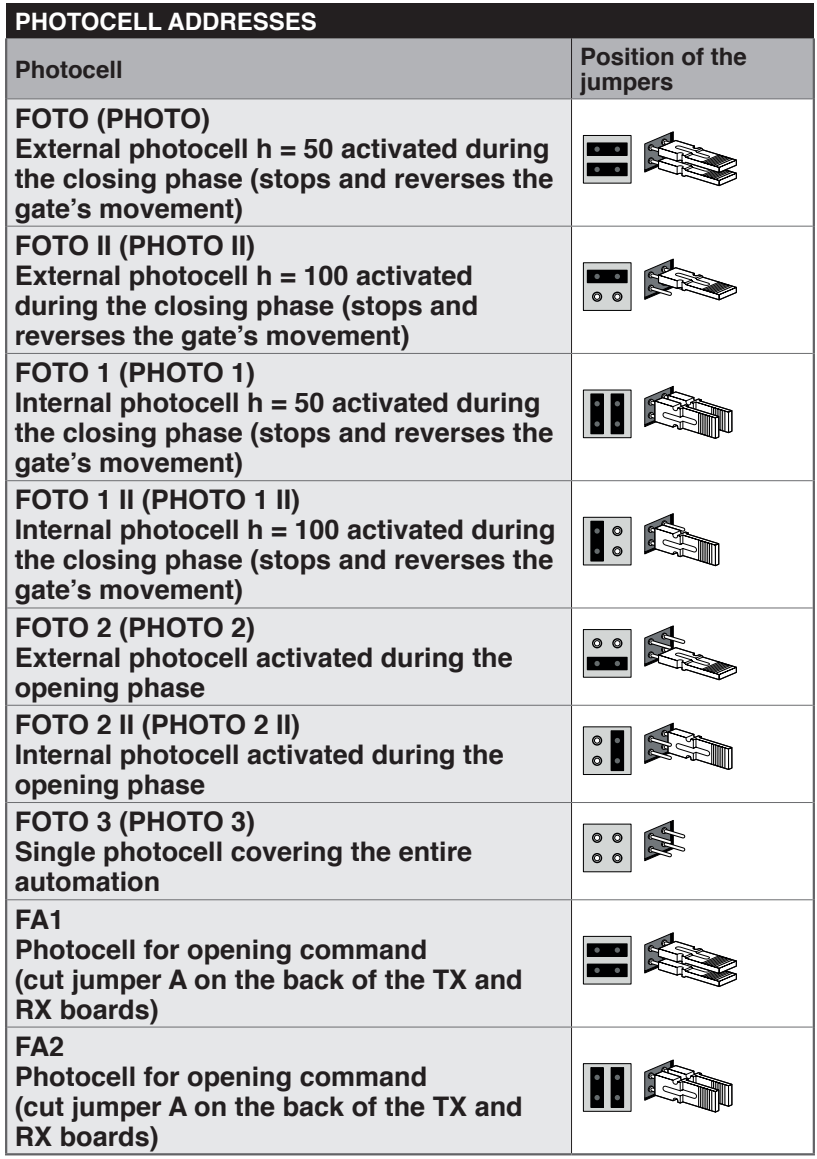
FOTO / FOTO II and FOTO 1 / FOTO 1 II provide protection during closing; FOTO 2 / FOTO 2 II are used during opening. Other configurations shown, FOTO 3 and FA1/FA2, are also supported. FA1/FA2 are an opening command, not automatically a safety device. Check the function and positioning for the specific entrance.
Initial startup and learning
Before switching on, complete the anchoring, fit the boom and accessories, balance it, set the stops, and finish the wiring. Clear the movement area. After switching on, check that BlueBUS flashes regularly, the photocells respond, and the lights are off at rest, according to the settings.
1. BlueBUS and STOP device learning
- Press and hold OPEN + STOP/SET together for about 3 seconds.
- When L1 and L2 start flashing rapidly, release both buttons.
- Wait for the procedure to finish. STOP should be lit and L1 and L2 should be off; L3 and L4 may indicate that position learning is required.
Perform this procedure even if no accessories are connected to the board. Repeat learning after changing devices.
2. Open and closed positions
- Release the motor, set the boom to approximately 45°, then lock the motor.
- Press and hold CLOSE + STOP/SET for about 3 seconds; release when movement begins.
- The barrier will perform closing – opening – closing. Check that the correct mechanical stops are reached.
- If the movement or stops are incorrect, press STOP immediately. After correcting the issue, repeat the entire procedure; do not treat incomplete learning as a finished setup.
3. Automatic force learning
When L5 and L6 are flashing, complete the procedure by issuing three complete opening and closing cycles without interruption, until both LEDs go out. Automatic closing functions are temporarily disabled during this learning procedure. Repeat learning after changing the speed or deceleration; check the resulting forces and safety.
Tests before normal operation
Test opening, closing, Stop, each control, and each safety device separately. Check deceleration before the stops, manual release, and balance. The photocells must respond across the entire protected area; the technician must also carry out the prescribed tests and measure impact forces. Give the user the key, the release instructions, and the maintenance schedule.
Control unit programming
OPEN ▲ opens and moves through the options, STOP/SET ■ stops and confirms, CLOSE ▼ closes and moves through the options in the opposite direction. The following tables use eight LEDs, L1–L8; the input LED selects the parameter, and the value LED shows its setting.
Level I – switching functions on and off
- Press and hold STOP/SET until L1 starts flashing, then release the button.
- Use OPEN/CLOSE to select the LED for the required function.
- Briefly press STOP/SET to change the state: a short flash means OFF; a long flash means ON.
- Use OPEN/CLOSE to select the next function, then press STOP/SET again to toggle it. After 10 seconds without a button press, the changes are saved and programming ends.
| Function and description | ON/OFF state |
|---|---|
| L1 – Automatic closing ON: after opening and the set pause, closing starts. OFF: waits for the next command. Set the time at level II/L1. | ON = on OFF = off Factory setting: OFF |
| L2 – Close after photocell ON: closes 5 seconds after the photocell is cleared. With automatic closing off, it completes the opening cycle first; when enabled, it may stop opening as soon as the beam is cleared. A STOP command cancels this function for the current cycle. OFF: closing is controlled by the Automatic Closing function and the set pause. | ON = on OFF = off Factory setting: OFF |
| L3 – Always close ON: after power is restored, it closes if it detects that it is open; the warning light flashes for 3 seconds before movement. OFF: remains in its original position. | ON = on OFF = off Factory setting: OFF |
| L4 – Standby ON: one minute after a cycle, it switches off BlueBUS and most LEDs; a new command activates them again. Saves battery power. OFF: energy-saving mode is disabled. | ON = on OFF = off Factory setting: OFF |
| L5 – Extended deceleration ON: doubles the deceleration distance when opening and closing. OFF: short deceleration. After changing it, relearn the forces. | ON = on OFF = off Factory setting: ON |
| L6 – Pre-flashing ON: the warning light starts flashing 3 seconds before movement. OFF: at the same time as movement. | ON = on OFF = off Factory setting: OFF |
| L7 – Increased sensitivity ON: increases obstacle-detection sensitivity. Force and speed must be set and tested together. OFF: normal sensitivity. | ON = on OFF = off Factory setting: OFF |
| L8 – Motor direction OFF: original configuration, closing to the left. ON: closes to the right. Also change the mechanical configuration and relearn the positions. | ON = on OFF = off Factory setting: OFF |
Level II – Adjustable parameters
- Press and hold STOP/SET until L1 flashes, then release it.
- Use OPEN/CLOSE to select the parameter's input LED.
- Press and hold STOP/SET; after about 3 seconds, the value LED lights up. Keep holding STOP/SET and use OPEN/CLOSE to select the new value.
- Release STOP/SET. Set the next parameter in the same way; programming ends if no button is pressed for 10 seconds.
Basic factory settings are shown in bold. Settings on a board already in use may differ. SBAR forces are also adjusted through learning. L8 history has no adjustable factory setting.
| Input LED – name and description | Setting LED – value |
|---|---|
| L1 – Pause time Applies when automatic closing is enabled. Check the default pause on your board's value LED. | L1 – 5 s L2 – 10 s L3 – 20 s L4 – 40 s L5 – 60 s L6 – 80 s L7 – 120 s L8 – 200 s |
| L2 – Step-by-step SbS Sequence of commands for wired SbS and the first radio command. The hold-to-run mode requires the command to be held down. | L1 – Open – stop – close – stop L2 – Open – stop – close – open L3 – Open – close – open – close L4 – Condominium; a command held for more than 2 seconds triggers Stop L5 – Condominium 2; a command held for less than 2 seconds triggers partial opening L6 – Step-by-step 2 L7 – Hold-to-run L8 – Semi-automatic opening, hold-to-run closing |
| L3 – Motor speed After changing it, perform automatic force learning. | L1 – V1 – 30% L2 – V2 – 47% L3 – V3 – 65% L4 – V4 – 82% L5 – V5 – 100% L6 – Open V3, close V2 L7 – Open V4, close V3 L8 – Open V5, close V4 |
| L4 – FLASH output The function must match the connected device and its voltage. XBA4 requires arm lights. | L1 – Open-arm indicator L2 – Active when the arm is closed L3 – Active when the arm is open L4 – Warning light L5 – Arm lights L6 – Electric lock L7 – Electromagnetic lock L8 – Service indicator |
| L5 – Opening force Relative control sensitivity; learning may change it. Do not compensate for poor balancing by increasing the force. | L1 – Force 1 – low L2 – Force 2 L3 – Force 3 L4 – Force 4 L5 – Force 5 L6 – Force 6 L7 – Force 7 L8 – Force 8 – high |
| L6 – Closing force After each change, check safety and impact forces. | L1 – Force 1 – low L2 – Force 2 L3 – Force 3 L4 – Force 4 L5 – Force 5 L6 – Force 6 L7 – Force 7 L8 – Force 8 – high |
| L7 – Service alert Number of manoeuvres before the service alert. Does not replace regular maintenance. | L1 – 2,500 manoeuvres L2 – 5,000 manoeuvres L3 – 10,000 manoeuvres L4 – 15,000 manoeuvres L5 – 20,000 manoeuvres L6 – 30,000 manoeuvres L7 – 40,000 manoeuvres L8 – 50,000 manoeuvres |
| L8 – Anomaly history Read-only access to the last eight manoeuvres; display sequence. | L1 – Result of the 1st manoeuvre – most recent L2 – Result of the 2nd manoeuvre L3 – Result of the 3rd manoeuvre L4 – Result of the 4th manoeuvre L5 – Result of the 5th manoeuvre L6 – Result of the 6th manoeuvre L7 – Result of the 7th manoeuvre L8 – Result of the 8th manoeuvre |
If two adjacent value LEDs flash for pause time, speed, force or service alert, the current value lies between them. OPEN/CLOSE rounds it to one of the available levels. Flashing L1 or L8 may indicate a value outside the range shown in the table. While the gate is moving, the LEDs show the instantaneous load; this is not the same scale as the force setting.
Do not use excessive force to compensate for friction, incorrect balancing or an obstruction. After changing the force or speed, repeat the safety tests and measure the impact forces.
Remote control and backup power
Insert the radio receiver into the SM connector with both mains and battery power switched off. A standalone motor or barrier control unit does not automatically include a receiver and remote control; check the equipment supplied with the specific kit. Current kits use OXIBD. Pairing, deleting transmitters and locking the radio memory are configured on the receiver according to its own instructions.
| Receiver output in the standard mode | Command |
|---|---|
| 1 | Step-by-step |
| 2 | Partial opening |
| 3 | Open |
| 4 | Close |
NICE remote controls Choose according to the receiver's coding. Era One, Era Inti and MYGO models with compatible coding pair with the corresponding family; matching frequency alone does not guarantee compatibility. Do not assess mixing different coding types in one memory based solely on the transmitter name.
PS124 backup battery
PS124 is an optional rechargeable 24 V battery. It provides a limited number of manoeuvres during a power outage; the number depends on the charge level, temperature and load. Connect it to the designated battery connector only after installation and programming. Switch off the mains before connecting, secure the battery in place, and restore power after connection. Disconnect the battery during servicing as well.
Use the supplied PS124 connecting cable: the narrower connector goes to the battery and the wider one to the control board. Connect it to the designated battery connection, not to BlueBUS, FLASH or the 24 V auxiliary output. With the original supplied PS124 cable, polarity (+/−) is not specified; use both designated connectors. Do not force or modify the connectors.
- With the mains disconnected and a charged battery connected, L2 on the PS124 should confirm that the automation system is powered.
- When the mains is switched on, L1 should confirm charging. If the battery is discharged, leave the system to charge and repeat the test.
- Test a complete manoeuvre on mains power, then disconnect the mains and check opening and closing on battery power. Speed may be lower when running on backup power.
- Restore mains power after the test.
For solar-only power Solemyo SYKCE30 The drive must not be connected to the mains at the same time. Selection of the system and connection of the PSY24 must take into account the specific control board, number of cycles, accessories and local lighting conditions.
Diagnostics and troubleshooting
The beacon's short flashes occur in two identical groups, separated by approximately 1 s. Count the flashes in one group. During normal operation, BlueBUS flashes once per second; two quick flashes confirm an input change.
| Flashes | Meaning and what to check |
|---|---|
| 2 | The photocell is blocking movement. Remove the obstruction, clean and align TX/RX; check the addresses. |
| 3 | Increased resistance / force limit activated. Check the mechanism and the balance; do not increase the force without checking. |
| 4 | STOP activated. Check the contact or resistive circuit; do not bypass the safety input to resolve a fault. |
| 5 | Internal parameter error. Disconnect all power supplies and reconnect them. If the error persists, a technician can perform a reset followed by a learning procedure; if that does not help, the control board needs servicing. |
| 6 | Manoeuvre frequency exceeded. Wait a few minutes and observe the permitted number of cycles. |
| 7 | Internal electrical fault. Disconnect the mains and battery; if the fault recurs, the control board or motor wiring needs servicing. |
| Symptom / LED | Procedure |
|---|---|
| BlueBUS not lit | Check the power supply and fuses. Replace only when the power is off and the cause has been eliminated; always use the same type and rating. |
| BlueBUS is continuously lit | Serious error. Disconnect both the mains and the battery for a few seconds, then restore power. If the condition persists, the control board requires servicing. |
| STOP is off | STOP does not match the learned safe state. Check the connected device and learning. |
| L1 + L2 are flashing | The connected devices need to be learned. |
| L3 + L4 are flashing | The positions / travel path need to be learned. |
| The remote control lights up, but the drive does not respond | Check the battery, compatible coding and storage in the receiver. |
| SbS / OPEN / CLOSE is continuously lit | The command contact may remain closed; check the button, relay and wiring. |
L5 + L6 flash during force learning. For an electrical fault indicated by rapid L1 flashing, check that the release is locked; L2 may indicate that the arm is moving for too long. Fuses on the board shown: F1 = T1 A, F2 = T1.6 A; also follow the markings on the specific board.
History of the last eight manoeuvres
- Enter programming using STOP/SET and use OPEN/CLOSE to select input LED L8.
- Hold STOP/SET for approximately 3 s. The lit value LEDs indicate manoeuvres with an anomaly; L1 is the most recent, L8 the eighth.
- While holding STOP/SET, use OPEN/CLOSE to select the relevant manoeuvre. The LED indicates the number of error flashes, as shown in the table above.
- Release STOP/SET and allow the menu to exit.
Control unit reset
Resetting removes custom board settings. The radio memory is cleared separately on the receiver. This procedure does not erase the motor direction or the number of manoeuvres performed.
- With the barrier stopped, hold OPEN + CLOSE for approximately 3 s, until L1–L8 light up.
- Release both buttons. All LEDs flashing rapidly for approximately 3 s confirms the reset.
- Once the factory settings are restored, L1 and L2 flash. Relearn the devices, positions and forces, then carry out safety tests.
Manual release during a power failure
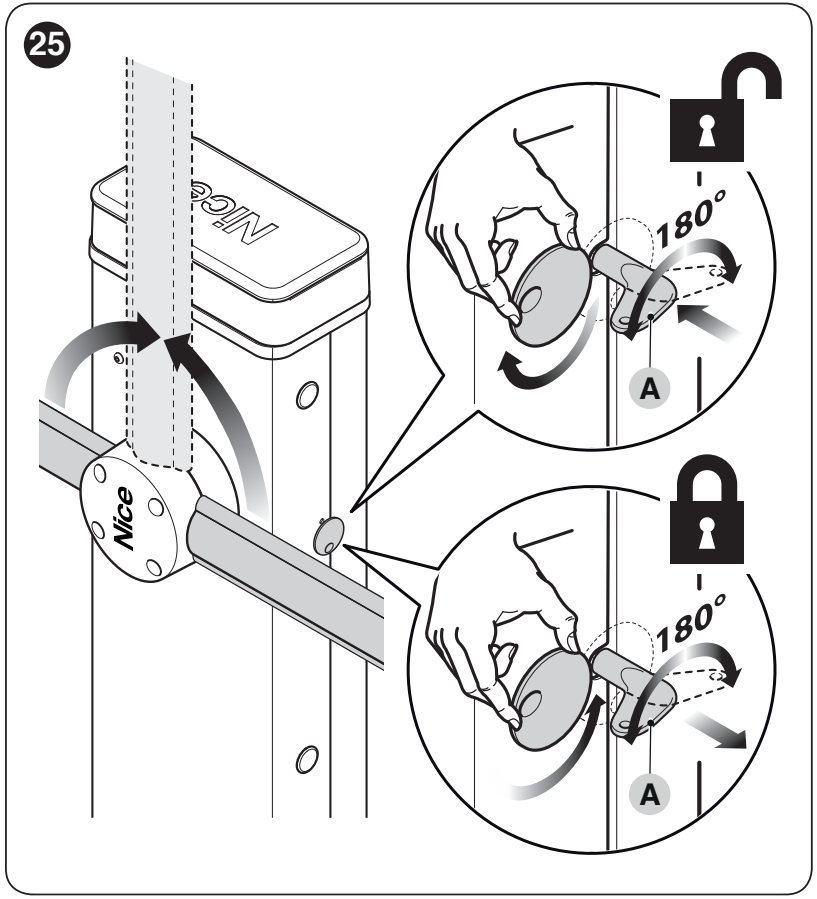
Stop the automation and support the arm before releasing it. If it is incorrectly balanced, it may move on its own.
- Turn the keyhole cover, insert the key and turn it 180° as shown.
- Move the arm manually, ensuring the path is clear and safe.
- To lock it again, return the key to its original position, remove it and close the keyhole cover. Check that it is secured again before issuing another command.
Maintenance and safe use
Service at least every 6 months or 20,000 manoeuvres, whichever comes first. Shorten the interval for intensive use. The service reminder does not replace regular inspections.
- Disconnect both the mains supply and the backup battery before servicing.
- Check the anchors, corrosion, wires, arm, spring, bracket, stops and balance. Replace damaged parts.
- Clean the photocells and check their response and the manual release. Repeat the safety tests after servicing.
- Keep remote controls out of reach of children. Keep clear of the movement path and do not use equipment that needs repair.
Service reminder and resetting the service counter
Enter Level II programming and select input LED L7. Hold STOP/SET for approximately 3 s until the value LED is displayed, and keep holding it during the following steps. Briefly press OPEN + CLOSE together to display the portion of the limit used: one flash = approximately 10%. After servicing, on the same parameter, hold STOP/SET and press OPEN + CLOSE together for at least 5 s; rapid flashes confirm the reset. Then release STOP/SET. This does not erase transmitters or replace a full reset.
| Set limit exceeded | Signal |
|---|---|
| Below 80% | The beacon flashes normally; the service indicator lights for 2 s when opening. |
| Approximately 81–100% | The beacon lights for 2 s at the start of movement; the service indicator flashes during the manoeuvre. |
| Above 100% | The beacon lights for 2 s at both the start and end; the service indicator flashes continuously. |
The service indicator works only with the relevant output. Dispose of the equipment and batteries at the appropriate collection point at the end of their service life; do not put them in household waste.
Factors affecting service life
Service life depends on the equipment and operating conditions. Add the relevant indices from the table; for alternative speed and force levels, use only the selected level.
| Characteristics of the complete automation system | Index | Service life graph |
|---|---|---|
| XBA4 arm lights | 15% |
|
| Speed | V3/V4: 5%; V5: 20% | |
| Photocell interruption in more than 10% of manoeuvres | 15% | |
| STOP interruption in more than 10% of manoeuvres | 25% | |
| Braking | 10% | |
| Force 5/6 or 7/8 | 10% for the selected group | |
| Salinity | 10% | |
| Dust and sand | 10% | |
| Temperature above 40 °C or below 0 °C | 15% |
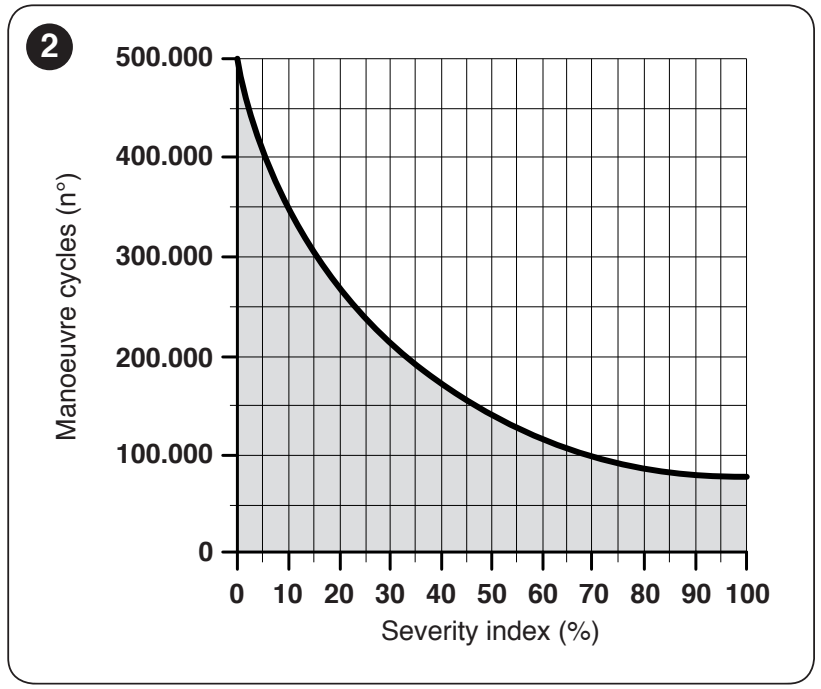
Find the total on the graph's horizontal axis, then read the estimated number of cycles from the curve. The result assumes correct installation and maintenance; it is neither a warranty nor a service interval.
Technical specifications of the NICE SBAR barrier
| Parameter | Value |
|---|---|
| Model / control unit | SBAR without arm / XBA20 R10 |
| Mains power supply | 230 V AC, 50/60 Hz |
| Motor | 24 V DC |
| Current consumption | 1 A, catalogue specification |
| Power consumption | Maximum 300 W at start-up; 200 W at rated torque |
| Torque | 100 Nm at start-up / 25 Nm rated |
| Opening time | ≥ 4 s; with XBA4 > 5 s |
| Max. cycle frequency | 100 cycles/hour; with XBA4, 80 cycles/hour, at nominal torque |
| Protection rating / insulation class | IP44 / Class I, with protective earthing |
| Operating temperature | −20 to +50 °C |
| Cabinet dimensions | 330 × 180 × 1 180 mm (width × depth × height) |
| Cabinet weight | 46 kg |
| Backup power supply | PS124, optional |
Before anchoring, measure the actual cabinet and hole positions; the installation space must also allow for the bracket and access to the cover. Assess the technical specifications together with the arm, its equipment and balancing.
How can I order this item?
Choose the option that suits you:
- order online: use the buy button to add the goods to your shopping cart (you will find the buy button here in the product variants table).
- order by email: place your order at [email protected]






