NICE OLTRE 1824 – standalone operator for swing gates, for gate leaves up to 1.8 m / 100 kg
| Product availability: | In stock | We normally dispatch goods within 24 hours. |
|---|
in stock
€403.67 including VAT
| Weight |
|---|
| 5,50 kg |
Description of NICE OLTRE 1824 – standalone operator for swing gates, for gate leaves up to 1.8 m / 100 kg
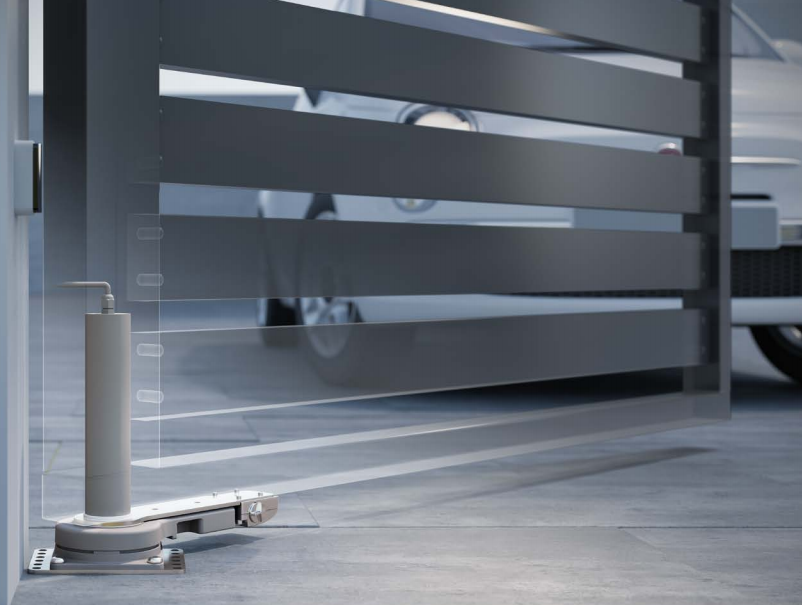
NICE OLTRE1824 – concealed swing gate operator
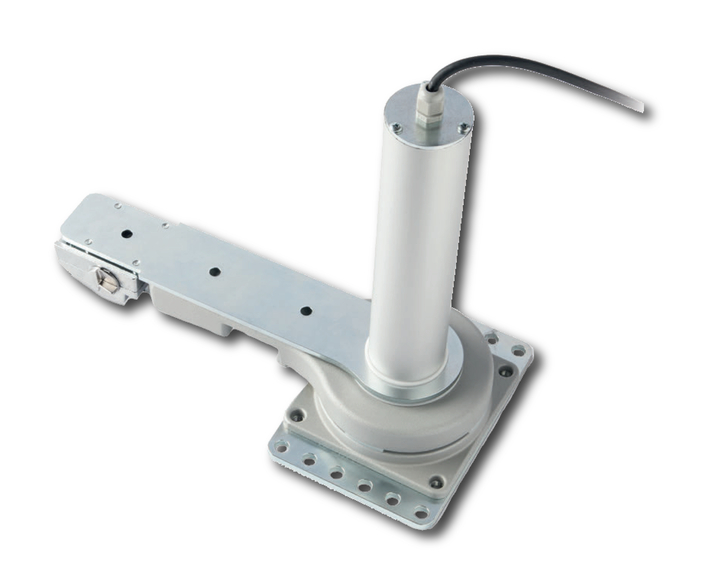
NICE OLTRE1824 is a standalone electromechanical operator for residential swing gates, for one leaf up to 1.8 m and 100 kg. The motor 24 V DC is concealed inside the hollow vertical profile of the leaf, at its pivot axis. The lower part is anchored to the ground. It is non-reversible; in the event of a power failure, it allows manual release using a lever.
It requires a separate NICE MC824L control unit. The motor's 24 V DC voltage does not mean that the control unit is connected to a 24 V mains supply: its mains input is 230 V AC.
When to choose the OLTRE1824
It is suitable where you want to keep the swing gate's appearance clean, without a visible piston-style operator or arm. Space for the motor must be provided in the gate leaf structure during fabrication. The profile must have an internal clearance for the motor of at least 56 mm in diameter and the mounting must allow precise alignment with the hinges.
| Single leaf | Maximum 1.8 m / 100 kg; suitability also depends on how freely the gate moves, its infill and wind exposure. |
|---|---|
| Opening speed | Approximately 10 s to 90° under rated conditions; acceleration and deceleration affect the total time. |
| Duty | Up to 60 cycles per hour at rated torque. One cycle consists of opening and closing. |
| Mechanical stops | Fixed opening and closing stops are required for correct operation and setup; they are not included with the operator. |
The leaf must move easily by hand without sticking. Do not use the motor's force to overcome a faulty hinge or an improperly hung gate.
Standalone motor and control unit
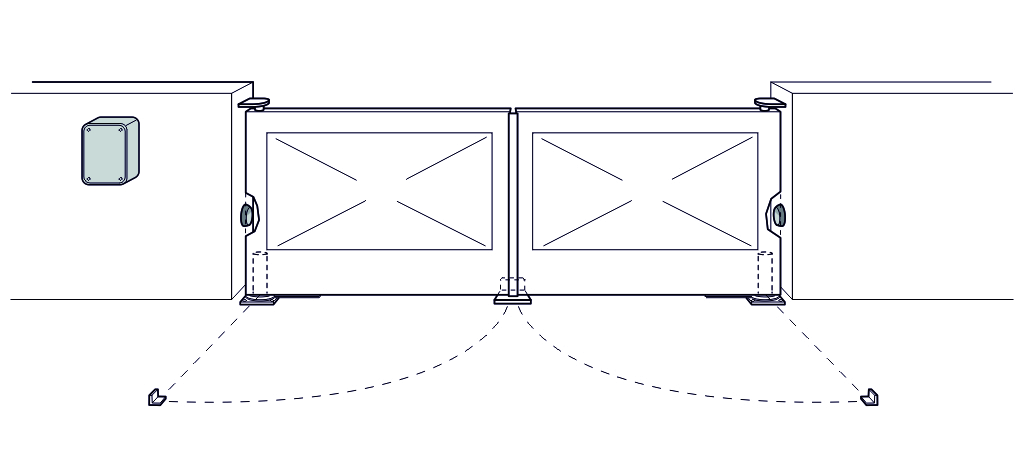
This listing is for one OLTRE1824 motor, not a complete automation system for the entire gate. A double-leaf gate requires two motors. MC824L controls one or two OLTRE1824 motors without an encoder; the motor has two power wires. With one motor, use output M2 and leave M1 unused.
The MC824L and MC824H designations are not interchangeable. For OLTRE, choose MC824L; matching motor voltage alone is not enough to choose a different control unit. Photocells, a warning light, receiver and remote controls are selected to suit the system configuration.
Operator accessories
| Item | Use |
|---|---|
| Separate control unit | NICE MC824L for one or two OLTRE1824 motors without an encoder. |
| BlueBUS photocells | NICE EPMB or NICE EPSB – slim version. Two-wire power and polarity-independent communication; run device setup after making changes. |
| Warning light | NICE ELDC for the low-voltage FLASH output. The mains-powered ELAC warning light is not suitable for this output. |
| Radio control | NICE OXIBD for the SM socket and compatible NICE remote controls. The remote control type and coding must match the receiver. |
Dimensions and pivot-axis position
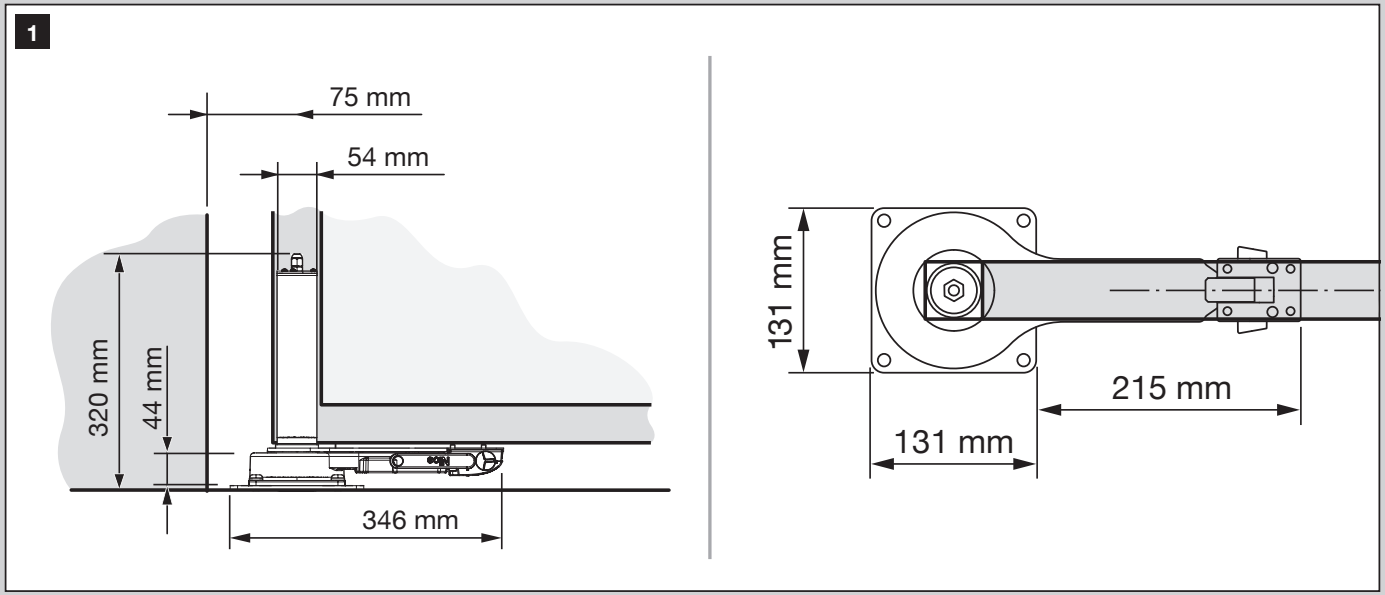
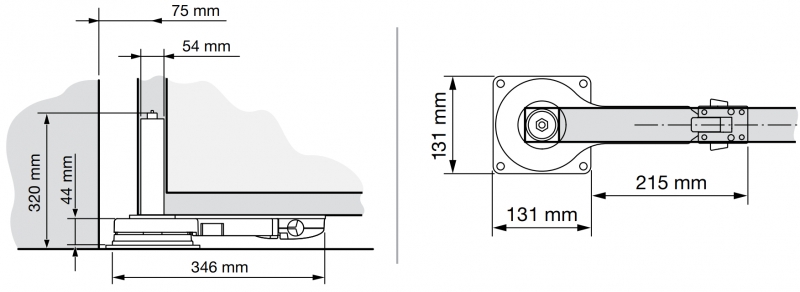
The outside diameter of the motor's cylindrical section is 54 mm. When preparing the profile, allow for internal clearance and hinge position; the outside dimensions of the hollow section alone are not enough.
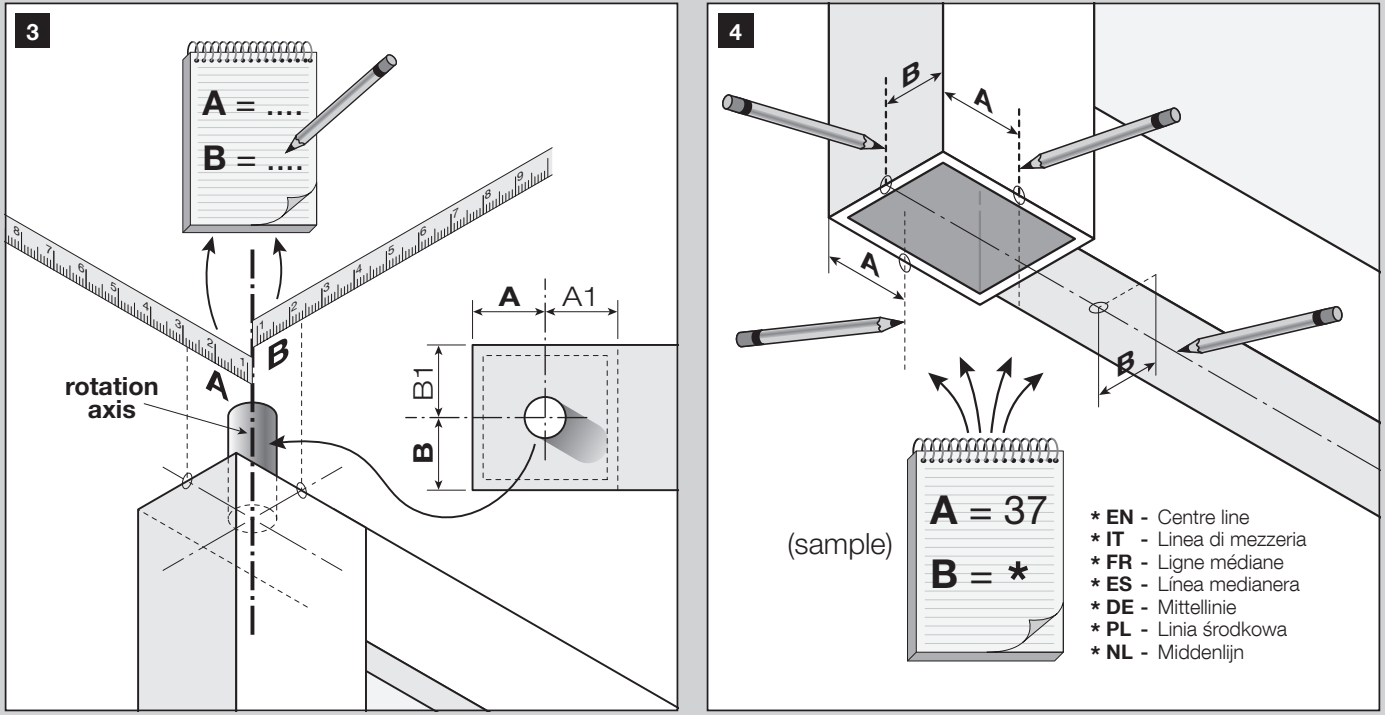
Distances A, A1, B and B1 must be at least 31 mm. Measure from the pivot axis to the corresponding inner walls of the profile, as shown in the diagram. Position the mounting plate and motor according to the actual hinge axis, not an estimated centre of the profile.
Installing the operator in the gate leaf
Have a qualified technician carry out the installation and electrical connections. Disconnect the mains supply and any backup power before starting work. Secure the leaf to prevent it from falling or moving unexpectedly.
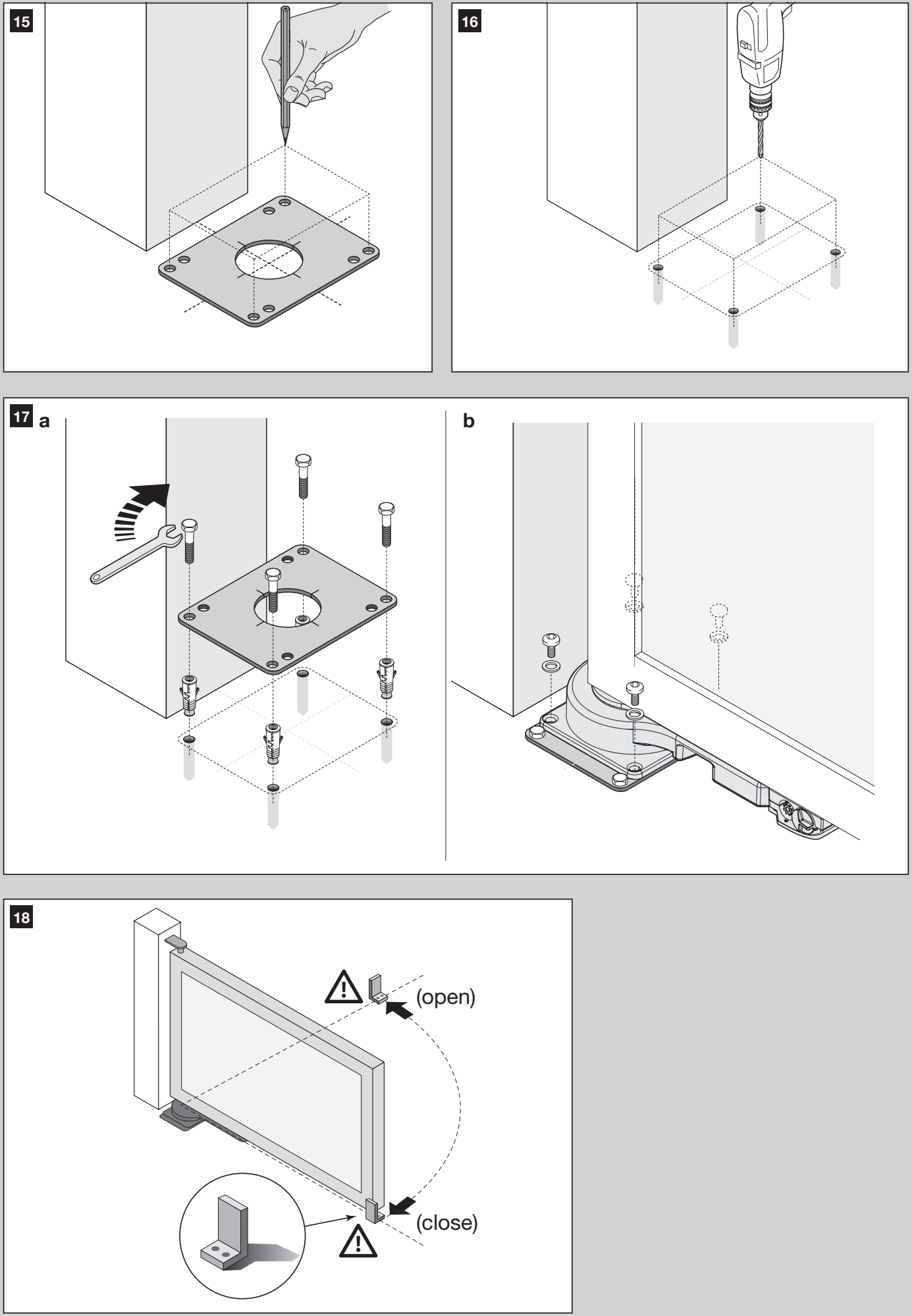
- Check that the gate is sturdy, moves freely and has hinges aligned on a common axis. Fit fixed opening and closing stops.
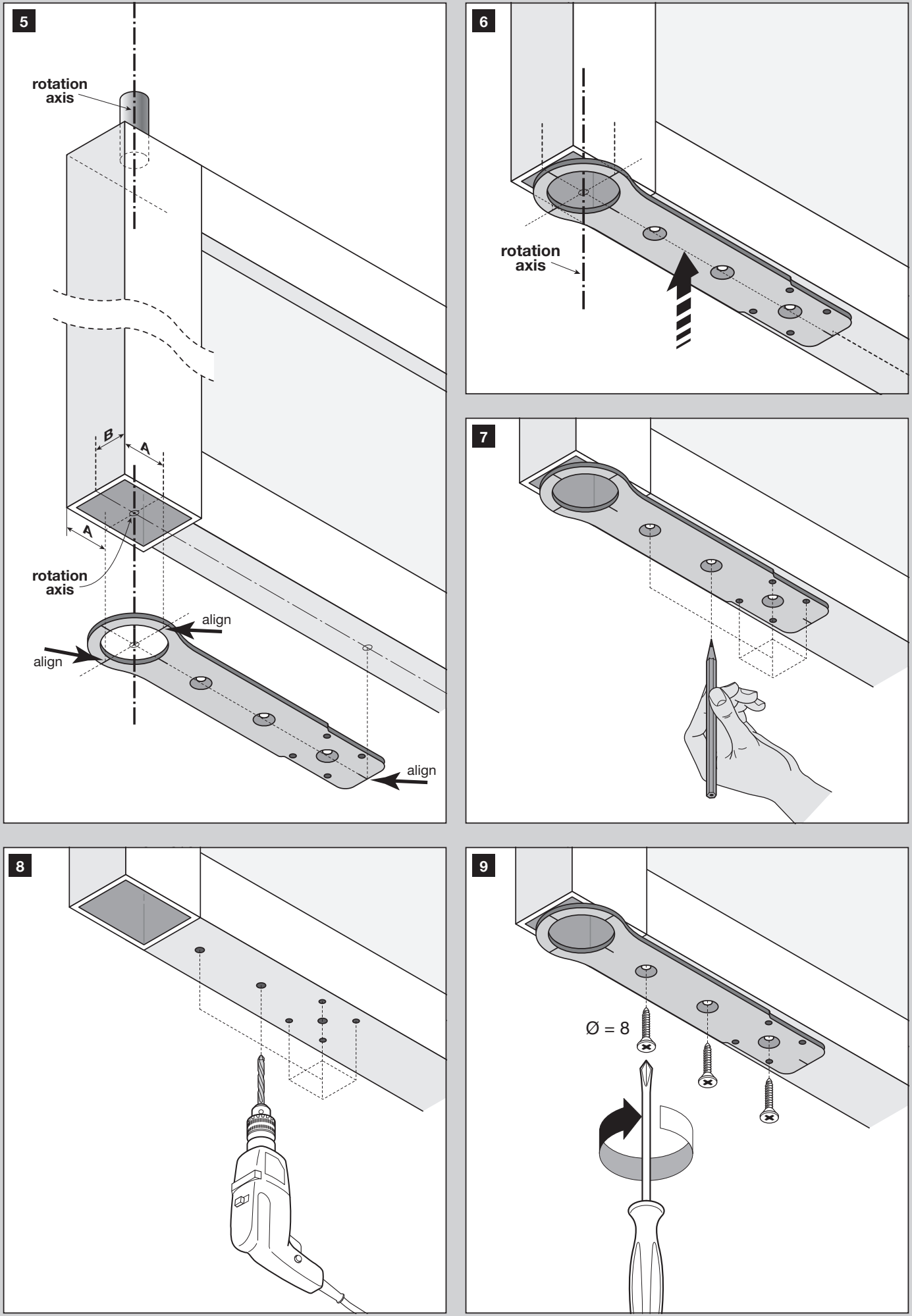
- Measure the axis position in the profile and transfer it to the mounting template. Align the plate with the axis as shown in figures 5–7.
- Drill the fixing holes according to the template; figure 8 shows Ø 8 mm holes. Fit the plate without twisting it.
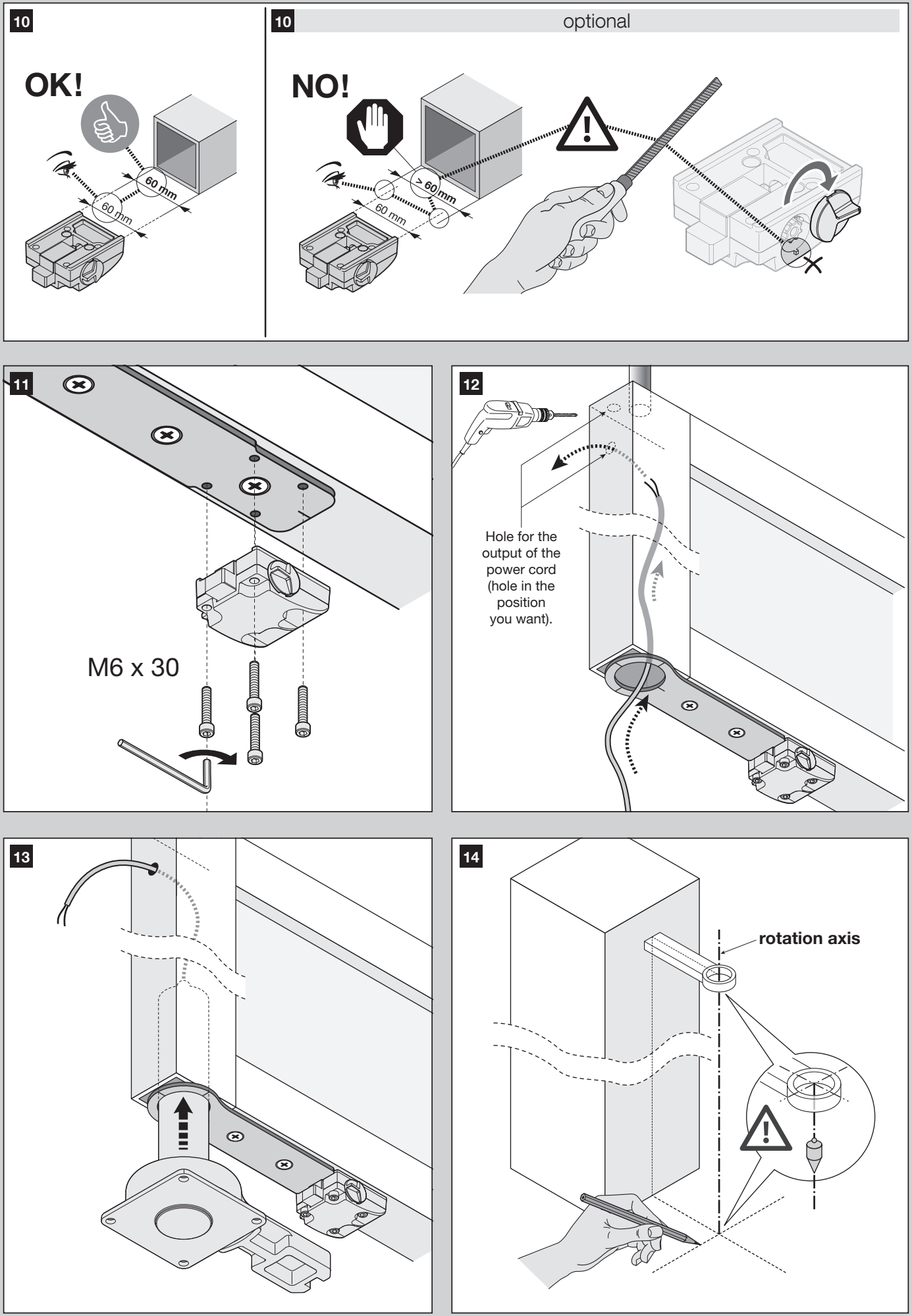
- Prepare the cable route and motor section as shown in figures 10–14. Do not strike the gearbox with a hammer. Use M6 × 30 fasteners as shown in the drawing.
- Insert the motor into the profile, connect it to the mounting plate and transfer the position of the lower base precisely onto the ground. Drill and anchor it as shown in figures 15–17.
- Manually test the unlocked gate leaf through its full range of travel. Check the alignment, cable, and free movement all the way to both stops.
Manual release and re-engagement
First disconnect the power and hold the gate leaf in place, especially in windy conditions. The release allows the gate to be moved manually in the event of a power failure or malfunction.
- On the accessible side, turn the lock cover 180°.
- Insert the release lever and turn it 180° clockwise.
- Remove the lever, close the cover, and move the gate leaf manually.
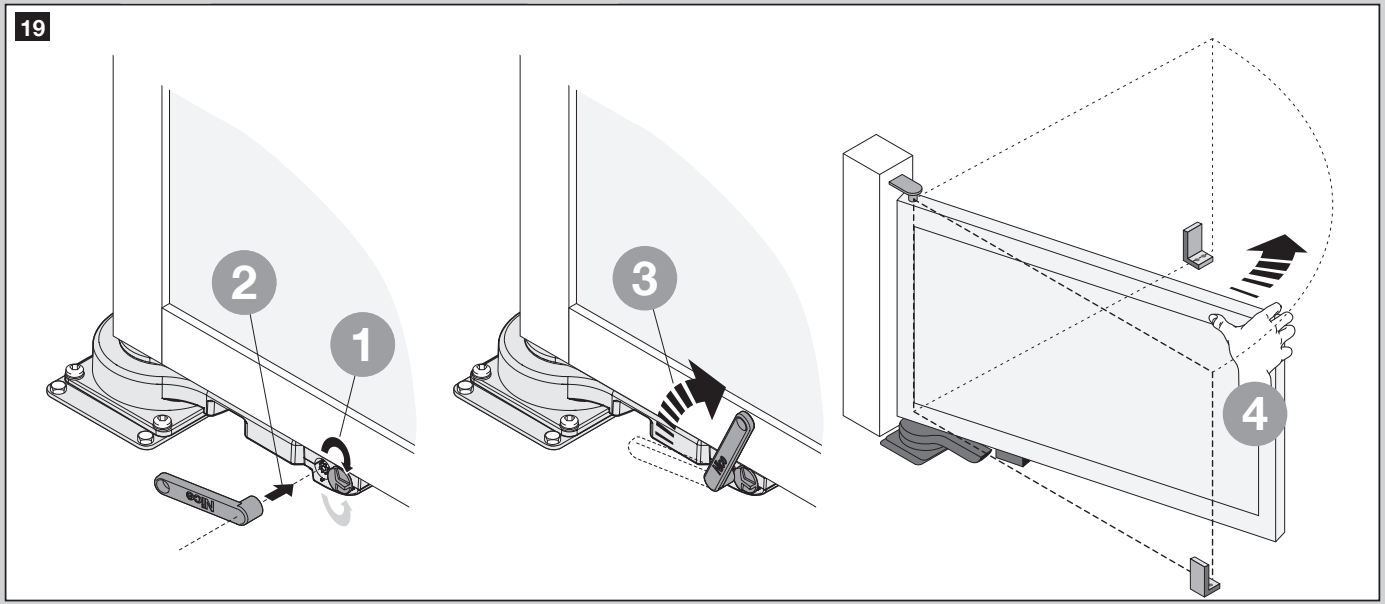
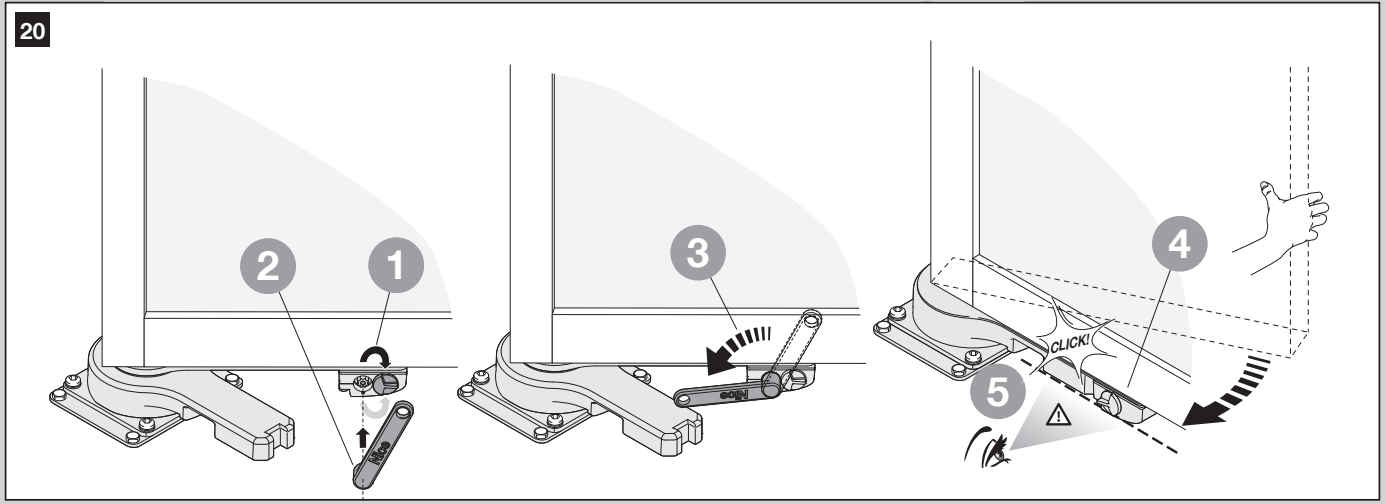
To re-engage the drive, open the cover, insert the lever, and turn it 180° counterclockwise. Remove the lever, close the cover, and move the gate leaf slightly until the gear engages audibly. Only then restore power and check the movement.
Wiring for MC824L and OLTRE
| Connection | Cable / length |
|---|---|
| Mains supply to MC824L | 3 × 1.5 mm², max. 30 m; a longer supply cable must be sized separately by a technician. |
| OLTRE1824 motor | Supplied 3 m two-core cable; for the MC824L motor cable, 2 × 1.5 mm², max. 10 m. |
| BlueBUS | 2 × 0.5 mm² up to 20 m; over 20 m, max. 40 m with 2 × 1 mm². |
| FLASH | 2 × 0.5 mm², max. 20 m. |
| Key switch | 2 cables, 2 × 0.5 mm² each, or 1 cable, 4 × 0.5 mm², max. 50 m. |
| Antenna | RG58 coaxial cable, max. 20 m; recommended length under 5 m. |
Any extension to the motor cable must be housed in a protected junction box, which is not included with the drive. Cables and glands must be suitable for outdoor use. Prevent water from entering the electronics through the conduit.
MC824L wiring
The following diagram is for the MC824L with a 12-position motor selector and eight LEDs, L1–L8. Connect the OLTRE motor's blue and brown wires to the M1 or M2 motor output; never connect it directly to 230 V. The polarity of the motor wires determines the direction of travel and is checked during setup.
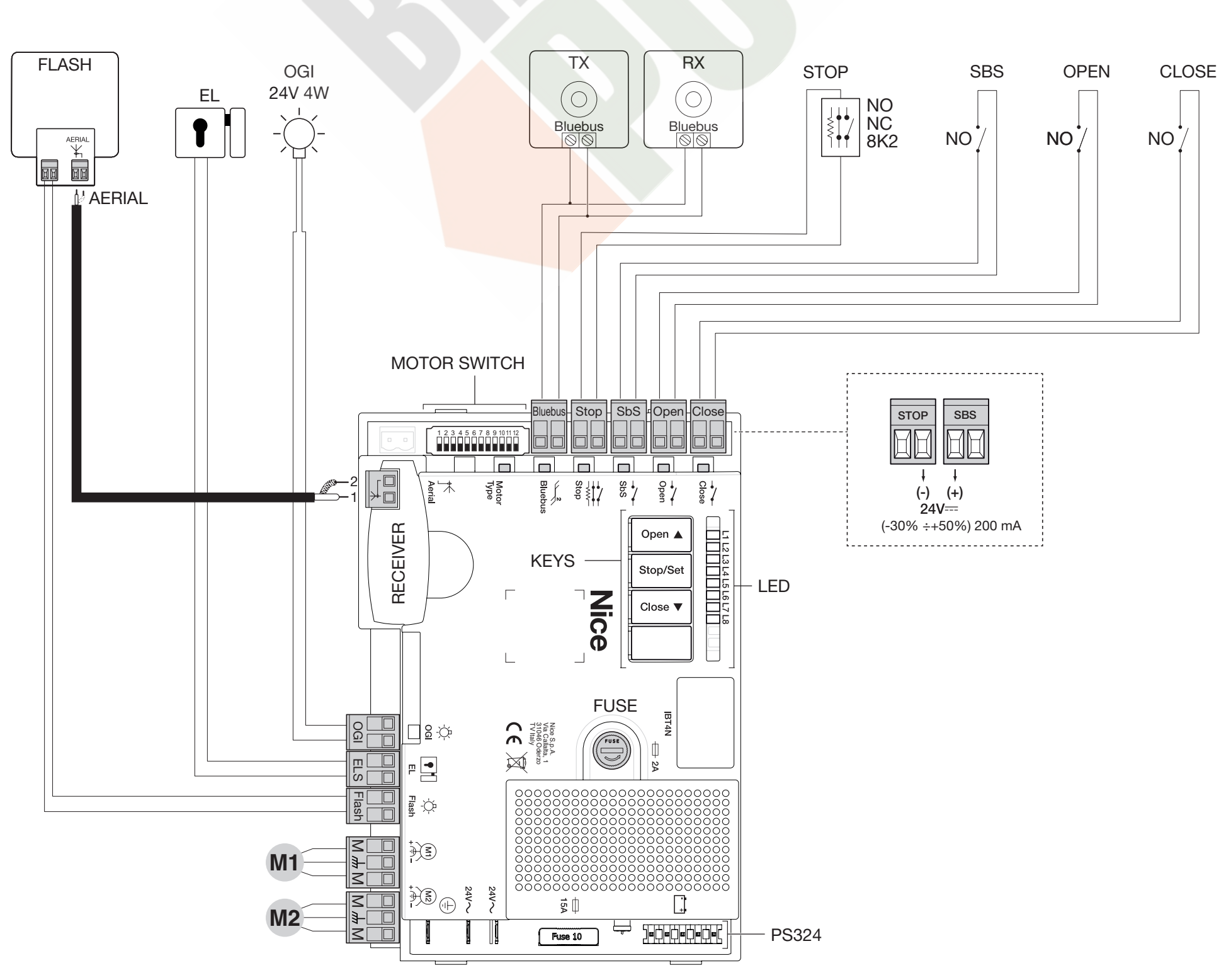
| Terminal / device | Connection and polarity |
|---|---|
| M1 / M2 | 24 V DC motor. With one motor, use M2 only; with two motors, M2 opens first and M1 closes first. The ENC inputs are not used with the MC824L. |
| BlueBUS | Photocells EPMB / EPSB in parallel using two wires. No +/− polarity. |
| STOP | Volt-free safety input: NO, NC, or 8.2 kΩ resistor, depending on the device. The type is detected during setup; the contact is non-polarized. |
| SbS / OPEN / CLOSE | Normally open (NO), volt-free switching contacts. SbS: step-by-step; OPEN: open; CLOSE: close. Do not apply an external voltage to the input. |
| Auxiliary power supply | Right-hand STOP contact = minus (−); left-hand SbS contact = plus (+) as shown in the detail in the diagram. 24 V DC −30/+50%, max. 200 mA total. The remaining contacts are for their respective inputs. |
| FLASH | Low-voltage flashing light; output for a 12 V bulb up to 21 W; suitable for NICE ELDC. Follow the markings on the connected device; do not infer +/− from the wire color. |
| ELS | 12 V electric lock AC, max. 15 VA; the AC output has no +/− polarity. |
| OGI | Open-gate indicator, 24 V DC, max. 4 W. The function depends on the settings; do not confuse it with FLASH. |
| Antenna | Coaxial cable: connect the center conductor and shield to the marked terminals; these are not power +/− connections. |
BlueBUS photocells
Photocell transmitter TX and receiver RX EPMB or EPSB connect in parallel to BlueBUS with no polarity. Set the same address on both devices in one pair using jumpers; the next pair must have a different address according to its function. Basic address PHOTO protects during closing. On the MC824L, PHOTO 3 is not used. After adding, removing, or changing an address, repeat setup and the safety test.
Initial startup and setup
First, manually move the gate leaves to approximately halfway along their travel and engage the drive. Check the fixed stops and wiring before switching on.
- Motor selector: with the power disconnected, set for OLTRE1824 DIP 9 ON; DIP switches 1–8 and 10–12 OFF. Set this before setting the travel limits.
- Initial check: After switching on, BlueBUS should flash about once per second, the photocell LEDs should flash, and the flashing light should be off.
- Device setup: press and hold OPEN + STOP/SET. When L1 and L2 start flashing rapidly, after about 3 seconds, release the buttons. Wait; STOP must be lit and L1/L2 must go out. This step must also be performed when no devices are connected.
- Automatic travel-limit setup: hold STOP/SET + CLOSE and release when L3/L4 flash rapidly, after approximately 5 seconds. With two motors the sequence is: slow closing of M1, slow closing of M2, slow opening of M2 and M1, then rapid closing of both. With a single motor on M2 the control unit automatically detects the single-motor setup and learns only that gate leaf; the first movement must be closing.
- If the direction is wrong, or if gate leaf M2 starts closing first on a double-leaf gate, stop the learning procedure using the OPEN or CLOSE button. Disconnect both the mains supply and backup power before changing the wiring. With two motors in the wrong sequence, swap the M1/M2 outputs; if the direction is wrong, swap the two wires for the relevant motor. The single motor remains connected to M2. OLTRE has no encoder wires.
- Successful learning ends when L3/L4 go out. If the procedure is interrupted by a photocell or STOP and L1 flashes, clear the cause and repeat the learning procedure.

The technician then checks operation through to the limit stops, tests the response of the photocells and safety edges, and measures impact forces. The gate is handed over only after the complete system has passed testing.
MC824L settings
Automatic closing, closing after photocell activation, closing after power is restored, Stand-by, ELS output function, pre-flashing, changing CLOSE to partial opening, and maintenance indication are first-level functions L1–L8. Read the current status from the LEDs; the Stand-by setting and the point at which programming ends may vary depending on the control unit version.
On a board with eight LEDs, hold STOP/SET until L1 flashes, use OPEN/CLOSE to select a function, then press STOP/SET briefly to toggle it. Short flashes indicate OFF; long flashes indicate ON. Wait for programming to end automatically.
| Second-level parameter | Function |
|---|---|
| L1 – pause | Time before automatic closing. |
| L2 – step-by-step | Sequence of responses to an SbS command and radio step-by-step control. |
| L3 – speed | Motor operating speed. |
| L4 – release after closing | Relieves the motors after they reach the closed position. |
| L5 – force | Force level; verify the setting by carrying out a safety measurement. |
| L6 – partial opening | Opening range for pedestrian access, including operation of gate leaf M2 alone. |
| L7 – service interval | Number of manoeuvres before the maintenance warning. |
| L8 – error memory | Results of the last eight manoeuvres. |
To change a second-level parameter, select its LED and hold STOP/SET; after approximately 3 seconds, the current value lights up. Keep holding STOP/SET and use OPEN/CLOSE to select a value. Release the buttons and wait for programming to finish. The specific values must match the version of the installed MC824L. For basic wiring and commissioning, refer to the MC824L quick guide; consult the manual supplied with the control unit for the full parameter ranges. Repeat the safety measurement after changing the force setting.
Remote controls
The remote control is stored in the installed radio receiver, not in the motor. For example, connect an OXIBD; use a NICE remote control with the appropriate frequency and coding. The pairing and deletion procedure depends on the specific receiver.
For OXIBD, connect the external antenna directly to the receiver, to its marked contacts for the coaxial cable core and shield. Do not use the antenna terminal on the control unit’s main board instead. Disconnect the power supply before inserting the receiver or changing the wiring.
If the gate does not move
| Symptom | What to check |
|---|---|
| Motor does not drive after manual release | Check that the drive has been re-engaged and locked after moving the gate manually. |
| L1 + L2 flashing | Connected devices need to be learned. Also check BlueBUS and STOP. |
| L3 + L4 flashing | The positions need to be learned after correctly setting the selector and limit stops. |
| STOP LED off after learning | Check the safety circuit; do not disable it with a jumper. |
| Wrong direction or sequence | Stop the movement, disconnect the power supply, and correct the motor connections as described in the initial start-up procedure. |
| Remote control does not work, but the button on the control unit does | Check the remote control battery, stored code, and receiver compatibility. |
| Repeated stops or reverse movement | First remove any obstruction and check manual operation. Increasing the force does not fix mechanical problems. |
If the fault recurs, note the number of beacon flashes and the LED status, and contact service. Diagnostics and memory clearing depend on the installed MC824L; the procedure for MC824H is not automatically applicable to OLTRE.
Use and maintenance
Keep people clear of the gate leaf while it is moving. Keep remote controls out of children's reach. Stop automatic operation if there is unusual noise, a loose fixing, or a fault in a safety device.
Professional inspection at least every 6 months includes fixings, corrosion, hinges, limit stops, wiring, manual release, and a repeat safety test. Disconnect both the mains supply and the battery before servicing. The user may keep the gate area and photocell optics clean without dismantling the drive.
OLTRE1824 technical specifications
| Motor power supply | 24 V DC |
|---|---|
| Rated / maximum current draw | 1 A / 2.9 A |
| Rated / maximum power consumption | 25 W / 70 W |
| Rated / maximum torque | 60 Nm / 150 Nm |
| Rotation speed | 1.5 rpm |
| Operating angle | 0–120° (±10°); the actual range depends on the design and installation. |
| Number of cycles | Up to 60/h at rated torque |
| Motor protection rating | IP67 |
| Operating temperature | −20 to +50 °C |
| Motor weight | 5.5 kg |
| Dimensions | As shown in the dimension drawing above; cylindrical motor section Ø 54 mm. |
Example of use
PDF installation manual
How can I order this item?
Choose the option that suits you:
- order online: use the buy button to add the goods to your shopping cart (you will find the buy button here in the product variants table).
- order by email: place your order at [email protected]






