GSM-01 Module for controlling a gate/automation system using a mobile phone
| Product availability: | Unavailable | We’ll be happy to help you choose a replacement. Feel free to contact us. |
|---|

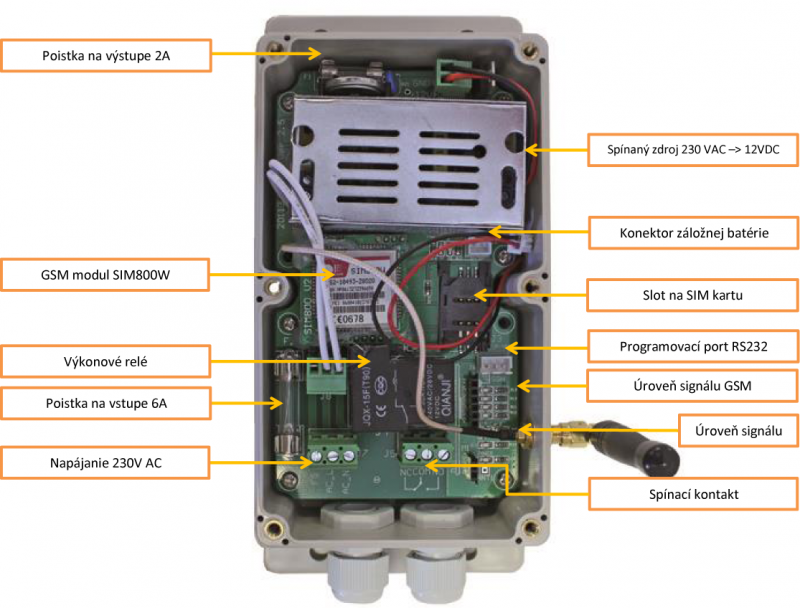
Description of GSM-01 Module for controlling a gate/automation system using a mobile phone
New!
GSM-01 has been discontinued. We currently offer the latest version of the GSM module GSM LITE 3 and GSM SMART 3.
How does a GSM module work, and how do you choose the right one? Find out in the article Controlling a gate with a GSM module.
GSM module for controlling automation (for example, gate operator) using a mobile phone. Fit the GSM module with a SIM card and activate the automation by calling the SIM card's phone number and hanging up. You can either allow access to all users who know this phone number, or use SMS to manage the users the GSM module will respond to.
Contents
- Introduction
- Installation
- Checking signal strength
- Programming
- Relay activation notification
- Setting the relay switching duration
- Temporarily activating the relay by SMS
- Permanently activating the relay by SMS
- Checking the relay status
- Setting the administrator's number
- Setting authorized phone numbers
- Replacing an authorized number
- Setting the relay activation timer
- Setting the time
- Power failure notifications
- Resetting the GSM module
1. Introduction
The GSM module is a device with one relay, which provides both NO (normally open) and NC (normally closed) contacts. It is suitable for a range of applications requiring simple GSM control. It features a 30-amp relay, so it can also be used to switch high-voltage circuits, such as lighting and heating. It has a built-in clock with a timer that can be set to activate the relay twice a day.
The GSM module is flexible in its power supply options, and can be connected to a 230V AC mains supply, which is converted to 12V DC using a transformer, or powered directly by 12V DC without a transformer.
The backup battery can power the GSM module for approximately 8 hours, and the GSM module can send SMS messages in the event of a power failure and when power is restored.
The GSM module is activated by calling the phone number of the inserted SIM card. If number authorizationis enabled, it then checks the caller's number and, if it is on the authorized contacts list, rejects the call and sends a command to the controlled device. The GSM module therefore works by ringing the number briefly, so calls are free of charge. The only charges are for configuration SMS messages or SMS messages used to control the GSM module.
Up to 250 authorized phone numbers can be stored in the GSM module. The relay can be programmed to switch on for a specified duration (1 second to 2 hours) each time the GSM module is called. Alternatively, an SMS message can be sent to the device to switch it on or off permanently.
The GSM module can be programmed using configuration SMS messages, or using the application on a computer (the application and its manual are available in English only).
1.1. Important information
- The inserted SIM card must be active, have no PIN code, and have CLIP service enabled. Ideally, it should also have credit for sending reply SMS messages. We also recommend turning off voicemail.
- Use an external antenna if the signal is weak.
- Check the device status regularly.
- The signal may be lost in adverse weather conditions.
1.2. Warranty
The warranty is valid for 24 months from the date of sale. It does not cover damage caused by incorrect wiring or use contrary to these instructions.
1.3. Warning
These instructions are intended for qualified technicians. None of the information in these instructions is intended for end users.
1.4. Technical specifications
| Power supply | 80-250V AC or 12V DC |
|---|---|
| Relay output type | Adjustable from 1 second to 12 hours
|
| Switching voltage | 230V AC
|
| Ingress protection rating | IP 65 (with cable glands) |
| Power supply protection |
|
| Backup battery | 7.2V 1800mA for 6 hours of operation |
| GSM module | SIM800W |
| Operating temperature | -10° ÷ 50°C |
| Frequency range | Quad-band 850/900/1800/1900 MHz |
| Dimensions | 200x90x60mm |
| Programming |
|
| Package contents | module, antenna, manual |
2. Installation
- Remove the front cover of the GSM module.
- Insert the SIM card into the slot, following the conditions (see “Important information“) .
- Make sure the internal wiring matches the diagram below.
- Connect the device to be switched (auxiliary relay, contact relay) to the terminal block contacts.
- COM-NO for a normally open contact
- COM-NC for a normally closed contact
- Connect the power supply in the order PE, L, N.
- After switching on, wait about 30 seconds for the device to initialize.
- If the LED starts flashing at 3-second intervals, the device is connected to the GSM network. If not, connect the antenna, reposition the SIM card, or replace it with a SIM card from another operator.
- You can then configure it by sending configuration SMS messages, or by using the app. The default settings allow any caller to call the device and switch the relay on for 1 s. See below for more information about configuring the app.

3. Checking signal strength
The four LEDs marked “Signal level” indicate the signal strength. To check the exact value, send an SMS containing the following text to the SIM card in the GSM module:
*PSSW*SGH?
This is the only command that does not require a password in the SMS. The GSM module will reply by SMS in the following format: Signal strength < 18 >
Signal strength typically ranges from 3 to 31, and ideally a signal level of at least 12 should be available. Values between 10 and 15 are acceptable. If the recorded signal strength is below 7, it is recommended to connect an antenna to the GSM module.
4. Programming
The GSM module can be programmed by sending configuration SMS messages or using software available in English.
The factory-set password is 12345 and can be changed to any other 5-digit number. To change the password to, for example, 67890, send a configuration SMS in this format:
*PSSW12345*NPW=67890
If you forget the password, the only option is to perform a full reset.
Every configuration SMS must start with a 5-character password prefix. The prefix is formatted as follows:
*PSSW12345
Configuration SMS messages must be written in UPPERCASE and must not contain any extra characters or spaces; otherwise, the GSM module will ignore them.
The factory default settings are as follows:
- Any phone number can call the device.
- The relay switches on for 1 second.
- Relay activation notification is disabled. When the GSM module is first switched on, it sends an SMS message saying RELAY OFF
4.1. Relay activation notification
Whenever the GSM module is called and the call is rejected, it can send the caller an SMS notification that the relay has been activated (RELAY ON) or deactivated (RELAY OFF). This setting is recommended only for infrequent use and is disabled by default.
To enable this function, send the following SMS:
*PSSW12345*RLYM=ON
The GSM module will reply with RLYM=ON , after which the GSM module will send SMS messages when the relay is activated (RELAY ON) or deactivated (RELAY OFF). To disable this function, send the following SMS:
*PSSW12345*RLYM=OFF
The GSM module will reply with RLYM=OFF , and the function will then be disabled.
4.2. Setting the relay activation/deactivation duration
The GSM module can be programmed to keep the relay activated for a period ranging from 1 second to 12 hours. Values must be entered as a 5-digit number of seconds, so, for example, 1 hour (3,600 seconds) must be entered as 03600
To set the duration, send an SMS in the following format:
*PSSW12345*RLY=03600
The GSM module will reply with RELAY SET - 03600 , and the relay will then remain activated for 1 hour.
Note: If security mode is enabled, only a phone number saved in the authorization list can send an SMS.
4.3. Temporarily activating the relay by SMS
Even if a relay activation duration has been set, you can temporarily set a different duration by sending a direct SMS, without changing the settings for call activation. For example, if the relay is set to activate for 10 minutes but needs to be activated temporarily for 2 hours, send an SMS with the duration in seconds in the following format:
*PSSW12345*RLYT=07200
The GSM module will reply with a confirmation message: RELAY TEMP 07200 , meaning the relay will remain activated for another 7,200 seconds (2 hours).
4.4. Permanently activating the relay by SMS
You can set the relay to remain activated, just as with temporary relay activation.. Send an SMS in the following format:
*PSSW12345*RLYP=ON
The GSM module will reply with RELAY < P > ON
, and the relay will remain activated until it receives a command to switch it off:
*PSSW54321*RLYP=OFF
The GSM module will reply with RELAY < P > OFF
4.5. Checking the relay status
To check whether the relay is active or inactive, send an SMS in the following format:
*PSSW12345*RLY?
If the relay is inactive, the GSM module will reply with RELAY OFF, or, if it is active, with:
- RELAY ON 03600 if it will remain activated for another 3,600 seconds (1 hour).
- RELAY ON < P > if it is activated permanently.
4.6. Setting the administrator phone number
You can set one administrator phone number, which will be the only number allowed to send configuration SMS messages. You can also call the GSM module from this number to control the connected device. In addition, this number will receive power outage notifications and notifications when power is restored.
To add an administrator phone number, send the following SMS to the GSM module:
*PSSW12345*ADM1=
Note: Enter the administrator phone number as a 10-digit number.
4.7. Setting authorized phone numbers
If you do not want the GSM module to be controlled by every phone number that calls it, but only by numbers you specify, send a configuration SMS in the following format:
*PSSW12345*SSM=ON
The GSM module will reply *SSM=ON. You can turn this function off again at any time by sending an SMS in the following format:
*PSSW12345*SSM=OFF
The GSM module will reply *SSM=OFF
You can set up to 250 phone numbers (using the app, or only 25 numbers via SMS), which can call the GSM module and thereby control the device connected to it.
Enter phone numbers using their last 7 digits. When any number, whether authorized or unauthorized, calls the GSM module, the system automatically checks the last 7 digits. If the number is authorized, it rejects the call and activates the relay. If the number is not authorized, the system rejects the call and takes no action.
Authorized numbers are added in batches of five; enter only the last 7 digits of each number. Example: you want to add numbers ending in 1212121, 1313131, 1414141, 1515151, 1616161. Send an SMS in the following format:
*PSSW12345*CLD01=1212121,CLD02=1313131,
CLD03=1414141,CLD04=1515151,CLD05=1616161
The GSM module will reply:
CLD01=1212121
CLD02=1313131
CLD03=1414141
CLD04=1515151
CLD05=1616161
END
This procedure applies only to the first 25 numbers. If you need to add more phone numbers, you must do so using the software application.
4.8. Replacing an authorized number
To replace a number already saved in the list of authorized numbers, you need to know which position it is stored in. Example: you want to replace the number stored in position 6 with 1717171. Send an SMS in the following format:
*PSSW12345*CLD06=1717171
The GSM module will reply: CLD06=1717171 This effectively deletes the number in position 6 and saves the new number.
To check which phone number is stored in a particular position—for example, position 5—send an SMS in the following format:
*PSSW12345*CLD05?
The GSM module will reply CLD05=1616161
4.9. Setting the relay activation timer
The GSM module can twice a day activate the relay automatically at a specified time. Send an SMS in the following format:
*PSSW12345*SMW=SS,MM,HH,TTT,G;
The characters mean the following:
SS is a two-digit value for seconds
MM is a two-digit value for minutes
HH is a two-digit value for hours
TTT is a three-digit value for the relay activation duration in seconds
G is a value of 1 or 2 to identify the timer
Example: you want the relay to activate for 20 seconds every day at 8:30 a.m. Send an SMS in the following format:
*PSSW12345*SMW=00,30,08,020,1;
The GSM module will reply: SMW=00,30,08,020,1;
You want the relay to activate a second time at 6:00 p.m., with an activation duration of 100 seconds. Send an SMS in the following format:
*PSSW12345*SMW=00,00,18,100,2;
The GSM module will reply: SMW=00,00,18,100,2;
4.10. Setting the time
The time is set in 24-hour format using a configuration SMS in the following format:
*PSSW12345*TSET=SS,MM,HH;
The characters mean the following:
SS is a two-digit value for seconds
MM is a two-digit value for minutes
HH is a two-digit value for hours
Example: You want to set the time to 8:41. Send an SMS in the following format:
*PSSW12345*TSET=00,41,08;
The GSM module will reply: TSET=00,41,08;
To check the currently set time, send an SMS:
*PSSW12345*TREAD?
The GSM module will reply:
The time is SSMMHH: 00,41,08;
4.11. Power outage alerts
In the event of a power outage, the GSM module can operate on its backup battery for up to 8 hours. In the event of an outage, an SMS is sent to the administrator number ADM1 with the message POWER DOWN and when power is restored, the message sent will be POWER RESTORED.
5. Resetting the GSM module
To reset the GSM module to factory settings, send an SMS with the following text:
*PSSW12345*RESET*
After a successful reset, the GSM module will send an SMS:
< UNIT RESET >
6. Software application
The GSM module comes with an RS232 connector, so if your computer does not have this type of port, you will need an RS232-to-USB adapter. The application and manual are currently available in English.
- Download the configuration application.
- Follow the instructions in the manual provided.
6.1. Application preview:

How can I order this item?
Choose the option that suits you:
- order online: use the buy button to add the goods to your shopping cart (you will find the buy button here in the product variants table).
- order by email: place your order at [email protected]






