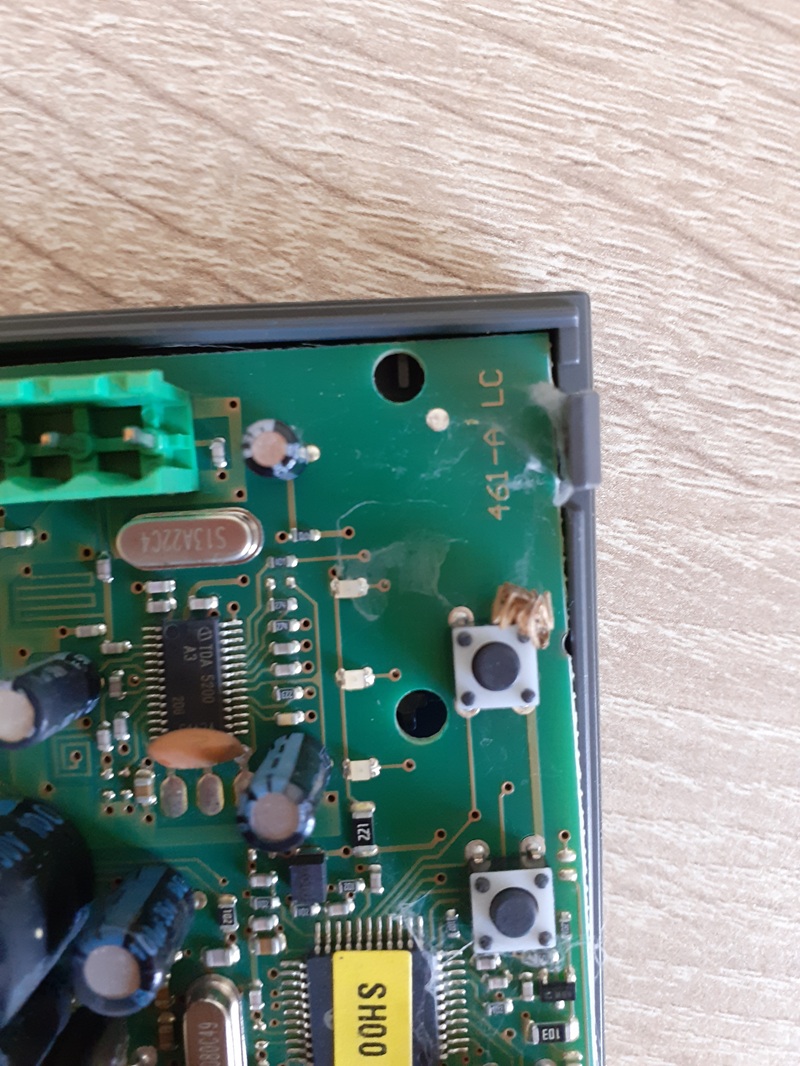
Resetting NICE control units
- Resetting the MCU1 and MCU4 control units (NICE Robus RBS gate operator)
- Resetting the RBA3 control unit (NICE Robus 400/600/1000 and RUN1500 gate operator)
- Resetting the RBA4/A and RBA4 control units (NICE Road 200/400 gate operator)
- Resetting the MC424L control unit (NICE Wingo 2024/3524 gate operator)
- Resetting the MC424LR10 control unit (NICE Wingo 2024/3524 gate operator)
- Resetting the MC800 control unit
- Resetting the ROA40R10 control unit (NICE Rox ROX600 and ROX1000 gate operator)
Before resetting, you can try the following:
- Clean the gate operator, control unit and photocells, including the inside. A common cause is a spiderweb, dirt on the photocell covers, etc.
- Disengage the gate and manually check for any mechanical obstruction. An obstruction can also appear some time after installation, for example due to a change in temperature.
- If you suspect a problem with the photocells, disconnect them and test the gate operator without them.
Resetting the MCU1 and MCU4 control units (NICE Robus RBS 400/600/600HS gate operator)
Note: This procedure erases only the control unit's memory; the remote controls will remain stored in it.
Resetting:
- Press and hold the first (Open) and third (Close) buttons simultaneously
- Release them when all the LEDs light up
- Wait for the control unit to reset
Detection of connected gate operator devices
After each connection, disconnection or wiring change to auxiliary devices on the BlueBUS inputs and STOP the auxiliary device detection procedure must be carried out. The gate operator will alert you that this procedure needs to be carried out by flashing LEDs L1 and L2.
 |
|
Gate leaf length detection
For the gate to operate correctly (specifically, to calculate the acceleration and deceleration distances and partial opening), the gate operator must detect the length of the gate leaf itself. During this procedure, the gate operator moves the gate from one stop to the other and uses a switch to determine the gate's length.
 |
|
Programming the gate operator
For complete instructions on programming the gate operator, see Programming the gate operator with the MCU1 control unit or MCU4.
Resetting the RBA3 control unit (NICE Robus 400/600/1000 and RUN1500 gate operator)
Note: This procedure erases only the control unit's memory; the remote controls will remain stored in it.
Resetting:
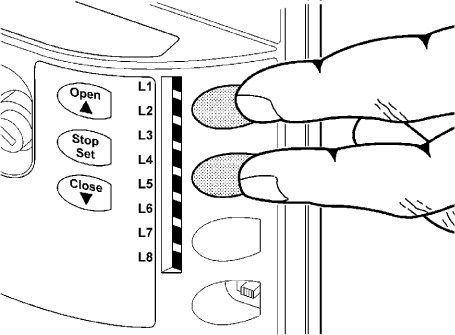
- Press and hold the first (Open) and third (Close) buttons simultaneously
- Release them when all the LEDs light up
- Wait for the control unit to reset
Detection of connected gate operator devices
After each connection, disconnection or wiring change to auxiliary devices on the BlueBUS inputs and STOP the auxiliary device detection procedure must be carried out. The gate operator will alert you that this procedure needs to be carried out by flashing LEDs L1 and L2.
 |
|
Sliding gate leaf length calibration
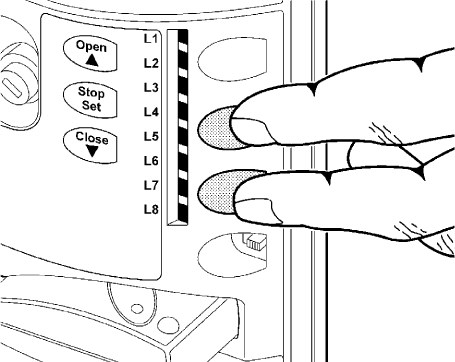
For the gate to move correctly (specifically, to calculate the acceleration and deceleration distances and partial opening), the operator must automatically detect the length of the gate leaf. During this operation, the operator moves the gate from one end stop to the other and uses a switch to determine the gate length.
 |
|
Programming the operator
For complete operator programming instructions, see Programming the operator with the RBA3 control unit
Resetting the RBA4/A and RBA4 control units (NICE Road 200/400 operator)
Note: This procedure erases only the control unit's memory; the remote controls stored in it will remain saved.
Reset:
- Press and hold the first (Open or Radio) and third (Close or P.P.) buttons simultaneously
- Release them when all the LEDs light up
- Wait for the control unit to reset
Setting up the operator again:
You can also find detailed instructions here: fortamigo.com/na-posuvnu-branu/pohon-pre-posuvne-brany-do-400-kg-nice-road-rd400
Gate leaf length calibration
For the gate to move correctly (specifically, to calculate the acceleration and deceleration distances and partial opening), the operator must automatically detect the length of the gate leaf. During this operation, the operator moves the gate from one end stop to the other and uses a switch to determine the gate length.
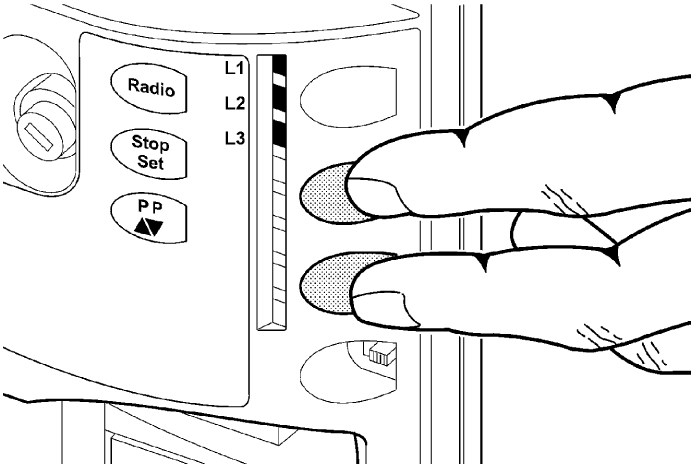 |
|
Programming the operator
For complete operator programming instructions, see Programming the operator with the RBA4 control unit
Reset without photocells
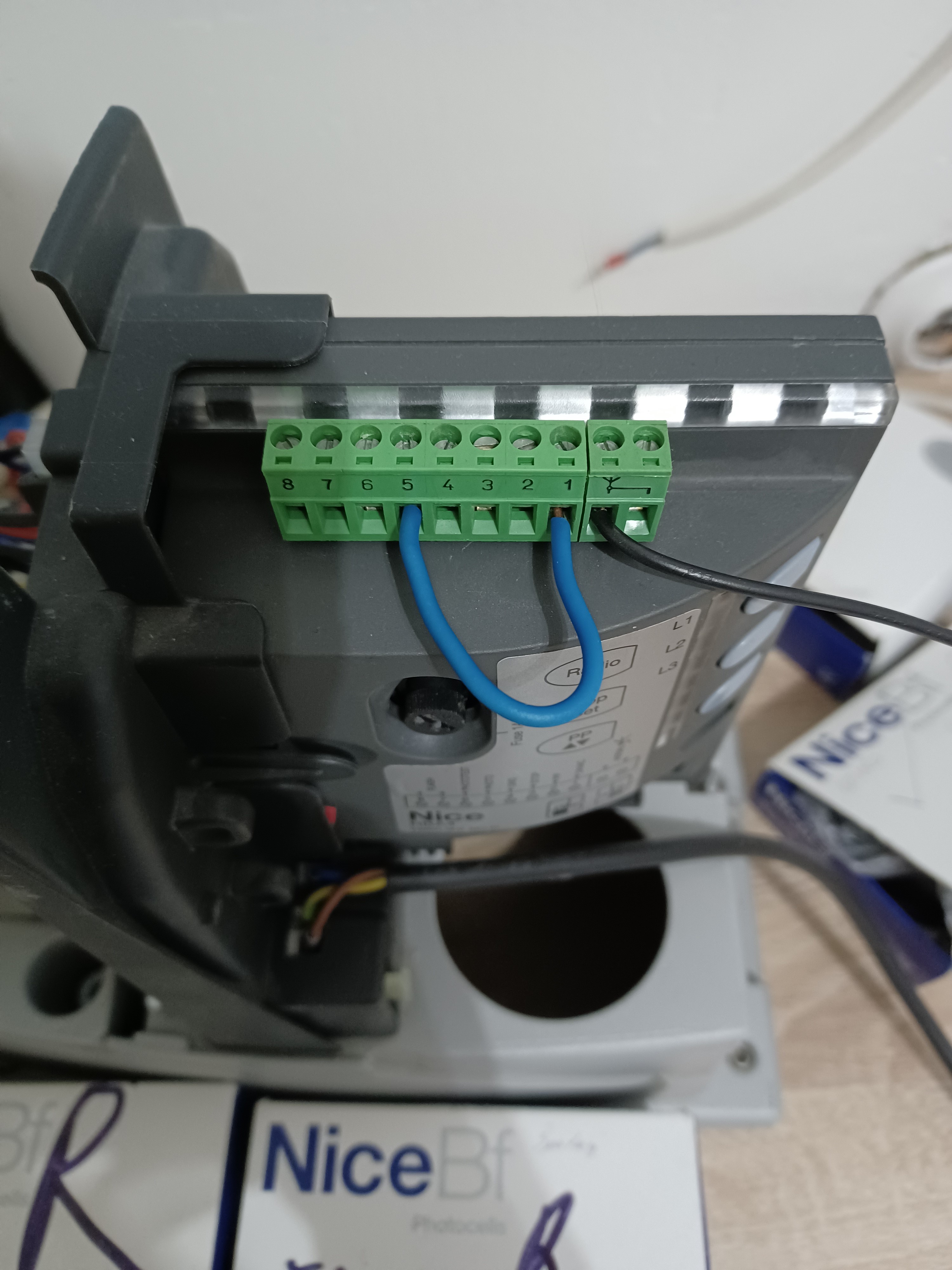
If you suspect that the photocells are not working correctly, disconnect them and on the control unit bridge inputs 1 and 5 (for Road operators with an RBA4 control unit only). This closes the photocell circuit, allowing you to test that the operator works correctly without the photocells.
Resetting the MC424L control unit (NICE Wingo 2024/3524 operator)
Note: This procedure erases only the control unit's memory; the remote controls stored in it will remain saved.
Reset:
- Disconnect the control unit from the mains (or remove the F1 power fuse) and wait until all the LEDs go out.
- Press and hold buttons P1 and P2 on the control unit (the control unit should still be disconnected from the power supply)
- While holding buttons P1 and P2, reconnect the control unit to the mains (or reinsert the power fuse)
- Release the buttons exactly after 3 seconds (i.e. during the third second)
- If the erase procedure was successful, all the LEDs will go out for one second. If this does not happen and the LEDs continue flashing, repeat the erase procedure from the beginning
To check that the memory has been erased correctly, disconnect the control unit from the mains (or remove the F1 power fuse) and wait until all the LEDs go out. After reconnecting it to the mains, all the LEDs should flash for approximately six seconds if the memory has been completely erased. If the LEDs flashed for only three seconds, the erase procedure was probably unsuccessful and must be repeated.
Setting up the operator again: You can also find detailed instructions here: fortamigo.com/na-posuvnu-branu/nice-moon-mc424-riadiaca-centrala-pre-24v-pohony-kridlovych-bran-rodiny-wingo
Gate leaf travel calibration
For the gate to move correctly (specifically, to calculate the acceleration and deceleration distances and partial opening), the control unit must automatically determine the gate leaves' opening arc length. During this operation, the operators move the gates from one end stop to the other and determine the gate opening travel distance.
Note: If you have already completed the gate leaf travel calibration phase, you must, before calibrating again, erase the control unit's memory.
Before calibrating the gate leaf travel, check that the devices connected to the STOP, PHOTO and FOTO1 inputs are working properly and connected correctly. If any of them is activated during calibration, the procedure must be repeated. Ideally, the gate leaves should be about halfway open. To achieve this, release the operators and move the leaves manually to a half-open position, then engage the operators again. After engaging the motor, always move the leaf a little by hand so that the motor engages. In principle, however, it does not matter what position the leaves are in before calibration.
The gate leaf travel calibration procedure is automatic and takes place as follows:
- Press the P2 button
- Both leaves open slightly
- The secondary (bottom) leaf closes
- The primary (top) leaf closes
- The primary (top) leaf opens
- After the programmed delay time for the secondary motor has elapsed, the secondary (bottom) leaf starts opening. If the delay is unsuitable, press the P2 button and set a suitable delay
- The control unit determines the travel required to open the gate fully (i.e. until it reaches the mechanical stops)
- Both leaves close fully. The leaves begin closing at different times so that they do not scrape against each other as they close
- The control unit saves the measured values and DONE.
All the phases listed above must run one after another without any intervention from you. If any phase does not proceed correctly, stop it by pressing the P1 button and, if necessary, adjust the settings and repeat the procedure.
Programming the operator control unit
For complete control unit programming instructions, see Programming the MC424L control unit
Resetting the MC424LR10 control unit (NICE Wingo 2024/3524 operator)
Note: This procedure erases only the control unit's memory; the remote controls stored in it will remain saved.
Reset:
- Press and hold the first (OPEN) and third (CLOSE) buttons simultaneously
- When all the LEDs L1..L8 start flashing (after approx. 3-4 seconds), release them
- Wait 5 seconds; the control unit will then be in factory settings.
Initial control unit startup (or calibration after a reset)
- Set/check the operator model selection switches according to table 2.6 in the control unit manual
Note: i.e. WG2024 motor: 1-down, 2-up, 3-down, 4-down; WG3524: 1-up, 2-up, 3-down, 4-down; TOO3024: 1-down, 2-up, 3-up, 4-down; TOO4524: 1-up, 2-up, 3-up, 4-down; SFAB2024: 1-down, 2-down, 3-down, 4-up; unspecified model: 1-up, 2-down, 3-down, 4-down - Manually release the gate leaves and move them to the halfway position (open to approx. 45°), then re-engage the drives and pull the leaves slightly so the motors engage.
- On the control unit, press the second (STOP/SET) and third (CLOSE) buttons simultaneously. Release them when the leaves start moving.
- The leaves will perform the following sequence (the movement detection process can be interrupted at any time by pressing STOP).
- Both leaves open slightly.
Note: If they move in the opposite direction, i.e. close slightly, interrupt the operation by pressing STOP, disconnect the control unit from the power supply, and reverse the polarity on both motors. If one leaf starts opening and the other starts closing, reverse the polarity only on the motor that started closing. Reversing the polarity means swapping the wires between the + (plus) and - (minus) terminals in the three-terminal motor connector for that motor. - The bottom leaf closes fully.
Note: If the wrong leaf starts moving (i.e. the top one), interrupt the operation by pressing STOP, disconnect the control unit from the power supply, and swap the entire M1 and M2 three-terminal motor connectors. - The top leaf closes fully.
- The top leaf starts opening, followed shortly by the bottom leaf.
Note: If the delay is not long enough, it can be changed in the programming settings; see section 5.2.2, LED L6 "Leaf delay". - Both leaves open fully.
- The bottom leaf starts closing, followed shortly by the top leaf.
- The leaves close fully, and the control unit stores their end positions in memory.
- Done
Programming the drive control unit
For complete programming instructions for the control unit, go to Programming the MC424LR10 control unit