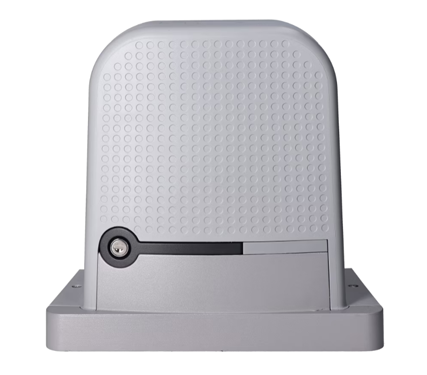
Standalone operator for a sliding gate up to 1000 kg/12 m, (230 V), NICE ROBO1000 (A)
| Product availability: | within 3 days | We usually ship the goods within 3 days. |
|---|
within 3 days
€571.64 including VAT
| Weight |
|---|
| 12 kg |
Description of Standalone operator for a sliding gate up to 1000 kg/12 m, (230 V), NICE ROBO1000 (A)
NICE ROBO1000 is a 230V drive designed for sliding gates with a weight of up to 1000 kg and a passage width up to 12 m. It has a built-in control unit, radio receiver and electromechanical stop switch. The drive is non-reversible. >>Download the manual>>.
Nice ROBO1000 drive is not compatible with transmitters FLOR.
NICE ROBO1000: installation, wiring and setup
NICE ROBO1000 (RO1000) with control board ROA42 is a sliding gate operator with mechanical limit switches and an integrated O-CODE 433.92 MHz receiver. The maximum gate leaf weight is 1,000 kg and the maximum length is 12 m. The suitability of a specific combination also depends on operating resistance, usage and environmental conditions; the two maximum values cannot automatically be used at the same time. The gate leaf length is not the clear opening width.
Before installation: check the RO1000 and ROA42 markings, ensure the gate moves easily by hand along its entire travel, check that the stops are secure, and allow space for manual release. The mains connection and safety test must be carried out by a qualified person. The warning light terminals are rated for 230 V; accessories have a separate 24 V output.
Choosing a remote control: NICE ROBO1000 with ROA42 board is not compatible with NICE FloR (FLOR) transmitters. The built-in receiver uses O-CODE 433.92 MHz coding; compatible models include ON2E and ON4E.
| Quick navigation | |
|---|---|
| Choosing an operator | Installation |
| Wiring | Board and terminals |
| Photocells and STOP | First startup |
| Settings | Remote controls |
| Accessories | Diagnostics |
| Technical specifications | |
| PDF manual | |
Accessories compatible with NICE ROBO1000
The products listed are compatible with the wiring and interfaces of the ROA42 board. When choosing, check the voltage, contact type and current draw. The remote-control receiver is already built in, so an additional plug-in radio receiver is not needed for standard operation.
| What | Why | Type |
|---|---|---|
| Warning light | Signals gate movement; it also has an antenna for remote controls. |
|
| Photocells | Protect the opening when the beam is interrupted. |
|
| Transmitter | Remote control and, depending on how it is stored, separate commands as well. |
|
| Antenna | May improve reception where the signal is weak. |
|
| Key switch | Local command without a remote control. |
|
| Rack | Transfers movement from the pinion to the gate leaf. |
|
| Wi-Fi interface | Adjust supported settings using the MyNice Pro app. | |
| Programmer | Professional diagnostics and advanced settings. |
|
Add up the current draw of devices powered from terminals 8–9 and keep it within their 100 mA limit. Phototest output 8–12 also has a 100 mA limit. If the combined current draw of both outputs is higher, the installer must check the load capacity of the ROA42 board. In standby mode, the accessory output is switched off. BiDi-WiFi, Oview and ProView connect via the BusT4 interface, not to the 8–9 power supply terminals.
What type of gate is the ROBO1000 suitable for?
When choosing, consider the gate leaf weight and length together, resistance throughout its travel, the number of opening cycles and environmental conditions. The installer must measure the force required to move the gate and verify that it remains within the operator's capacity throughout the entire travel.
NICE ROBO1000 OPERATOR LIMITS
Weight and length are separate maximum values. When combining them, add the severity indices from the table below.
| ROBO1000 | Maximum | Index at maximum |
|---|---|---|
| Gate leaf length | 12 m | 50% |
| Gate leaf weight | 1,000 kg | 60% |
A gate leaf weighing 1,000 kg and measuring 12 m has an index of 110% (60% + 50%). An index above 100% exceeds the limit for suitable operation. Additional adverse factors increase the index; therefore, the separate maximum values cannot automatically be used at the same time.
NICE ROBO1000 OPERATOR SERVICE LIFE
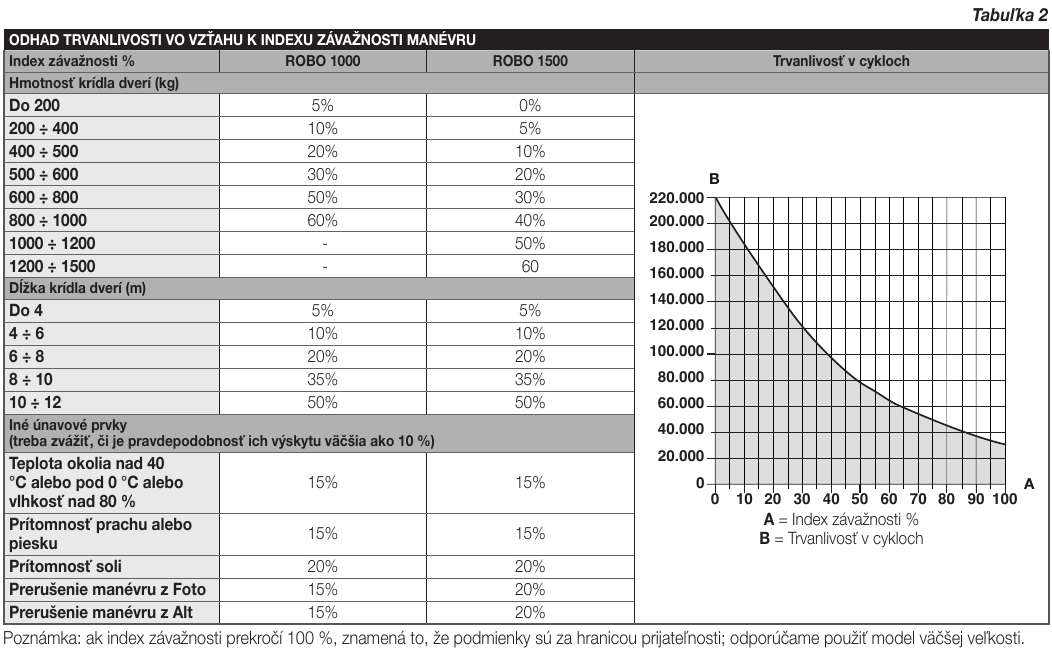
Add the gate leaf weight and length indices, and include other factors if they are likely to occur more than 10% of the time. Use the graph below to estimate the service life in number of cycles. The installer must also verify the final suitability based on the actual force required to move the gate.
Example: A 300 kg, 5 m gate leaf has an index of 10% + 10% = 20% before other factors are taken into account. Read the estimated number of cycles from the graph at an index of 20%.
| Characteristics of the complete automation system | Index | Service life graph |
|---|---|---|
| Gate leaf weight | 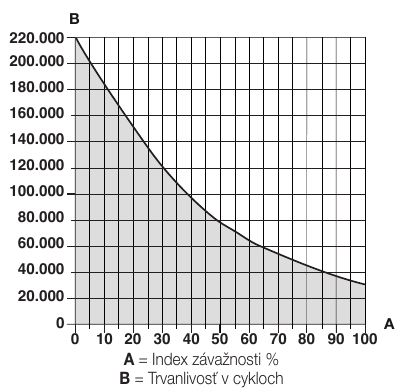 A = index (%), B = service life (cycles). | |
| Up to 200 kg | 5% | |
| Over 200 kg up to 400 kg | 10% | |
| Over 400 kg up to 500 kg | 20% | |
| Over 500 kg up to 600 kg | 30% | |
| Over 600 kg up to 800 kg | 50% | |
| Over 800 kg up to 1,000 kg | 60% | |
| Gate leaf length | ||
| Up to 4 m | 5% | |
| Over 4 m up to 6 m | 10% | |
| Over 6 m up to 8 m | 20% | |
| Over 8 m up to 10 m | 35% | |
| Over 10 m up to 12 m | 50% | |
| Other factors (with a probability of occurrence above 10%) | ||
| Temperature above 40 °C or below 0 °C, or humidity above 80% | 15% | |
| Dust or sand | 15% | |
| Salt in the environment | 20% | |
| Manoeuvre interrupted by the Photo input | 15% | |
| Manoeuvre interrupted by the Alt input | 15% | |
| Service life graph |
|---|
If the total index exceeds 100%, choose a more powerful model. Enlarge the index table and service life graph.
Installing the drive and limit switches
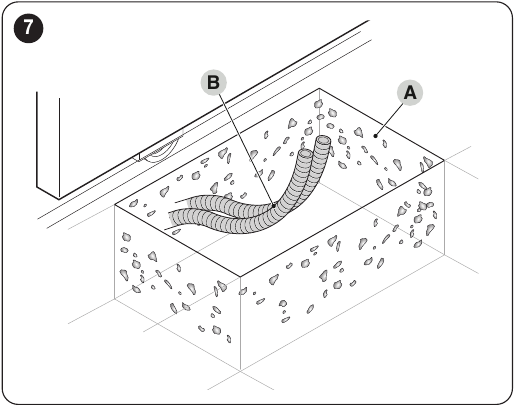
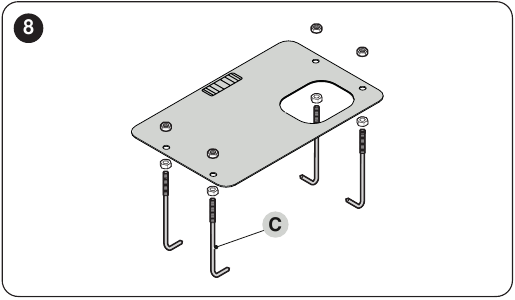
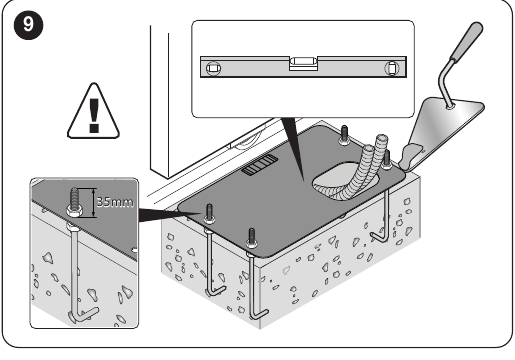
First prepare a solid foundation and cable conduits, then install the drive and the M4 toothed rack. The images below show the positions of the mounting plate, pinion and stops. Click to enlarge.
Rack and mechanical stops
The rack must mesh with the pinion along its entire length; leave approximately 2 mm of clearance. The weight of the gate must not load the pinion. When opening and closing, stop the gate 2–3 cm before the mechanical stop, slide the corresponding limit-switch bracket along the rack until it clicks, then move it at least another 2 cm. After fastening it in place, check that the gate stops correctly by running a test cycle.
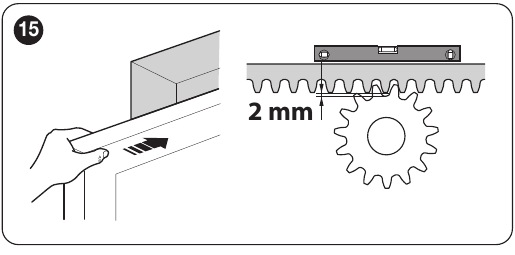
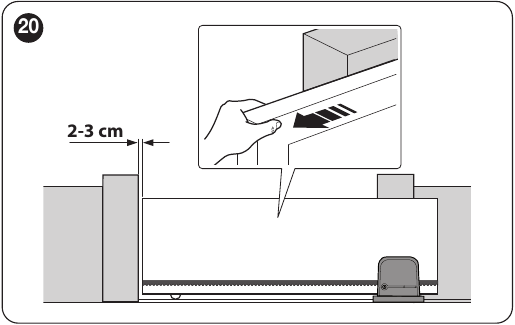
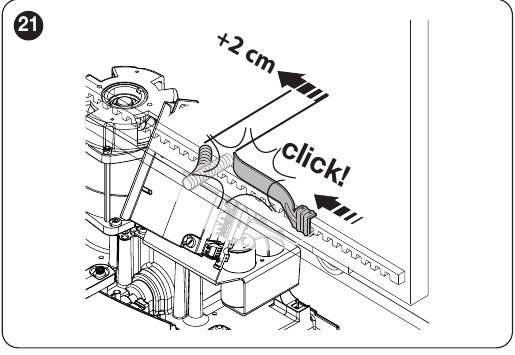
Left- or right-hand installation
The drive is factory-configured for right-hand installation. For left-hand installation, disconnect the mains supply. As shown in the images below, pull out and rotate the LIMIT SWITCH connector and the MOTOR connector 180°; this does not involve mechanically turning the motor. Once connected, check the direction of movement and that the limit switches are assigned correctly, then repeat device learning. Use the key release only after the gate has stopped.
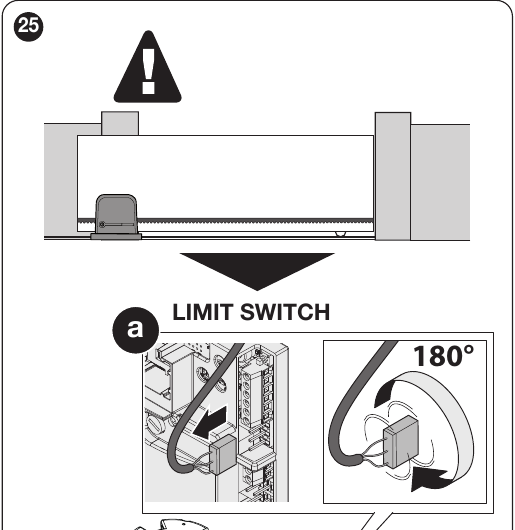
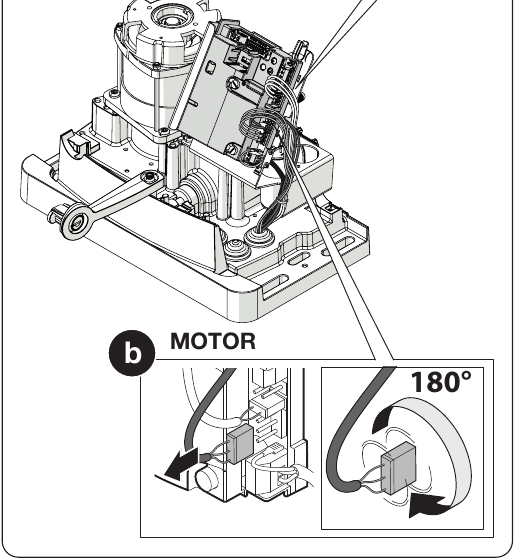
Wiring preparation
Prepare the cables before fastening the drive in place. For a different cable route or more demanding conditions, the installer must check that the cable cross-section and length are suitable.
| Circuit | Cable and length |
|---|---|
| 230 V supply | 3 × 1.5 mm² up to 30 m; for longer runs, e.g. 3 × 2.5 mm², with earthing at the drive |
| 230 V warning light | 2 × 1.5 mm² up to 10 m |
| Antenna | RG58 coaxial cable up to 10 m; under 5 m recommended |
| Photocells | TX 2 × 0.25 mm²; RX 4 × 0.25 mm², up to 30 m |
| Key switch | Two 2 × 0.5 mm² cables or one 4 × 0.5 mm² cable, up to 20 m. A two-wire cable is sufficient for a single NO contact on SbS. |
ROA42 board and terminals
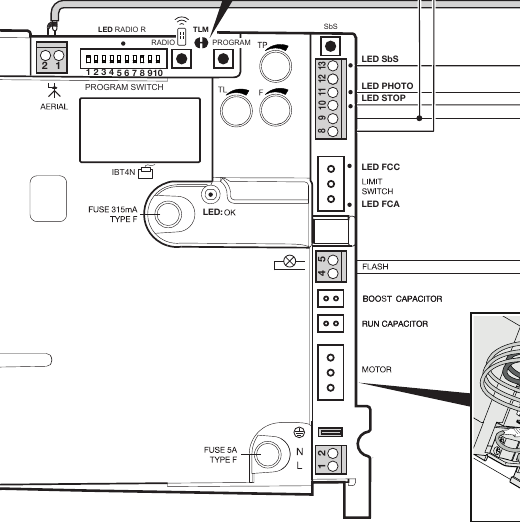
The image shows the connection points, PROGRAM and RADIO buttons, TL/TP/F trimmers and programming switches. Make connections with the mains supply disconnected.
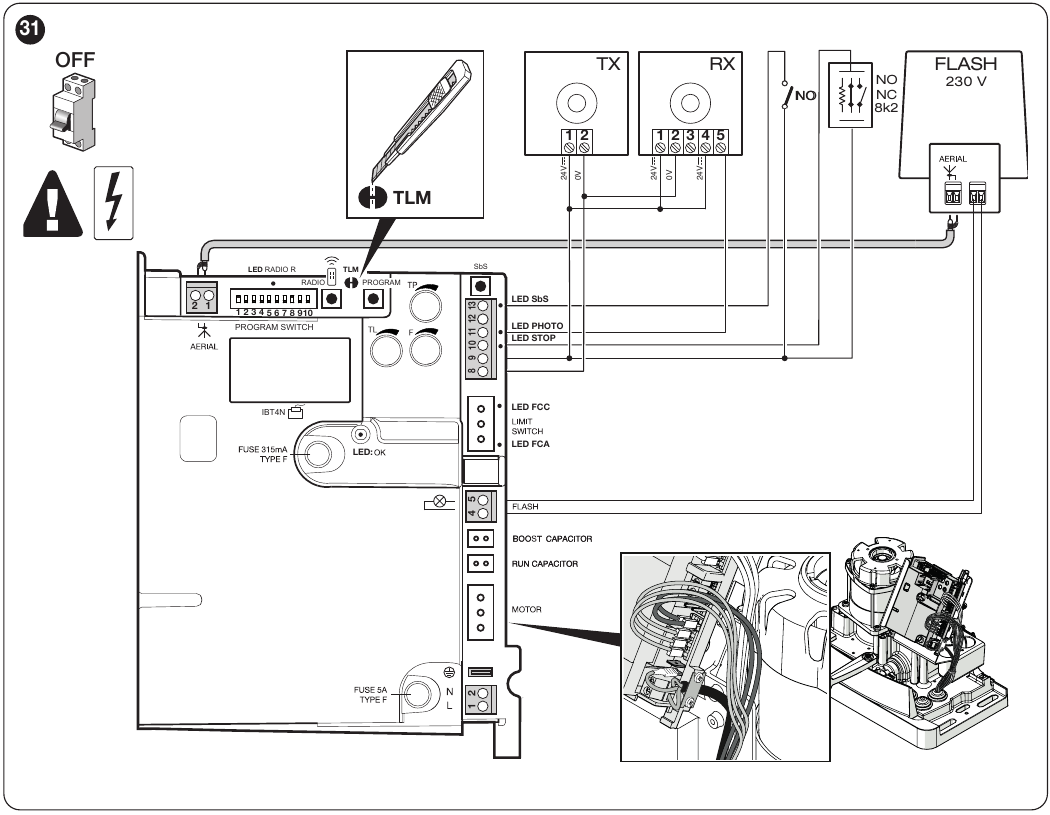
Enlarge the close-up of the ROA42 buttons, switches and terminals
| Terminals | Function and connection |
|---|---|
| 1–2 | Antenna for the integrated 433.92 MHz receiver. |
| 4–5 | Output 230 V AC for a self-flashing warning light. Choose a warning light with the correct voltage. |
| 8–9 | Accessory power supply 24 V DC (±10%), 100 mA max.; terminal 8 = 0 V, terminal 9 = +24 V. The output is switched off in standby mode. |
| 9–10 | STOP: NO or NC contact, or 8.2 kΩ resistor. The type is recognized during learning. |
| 9–11 | PHOTO: NC safety contact of the photocell relay. |
| 8–12 | TX transmitter power supply during the photocell test; max. 100 mA at the photocell test output. |
| 9–13 | SbS (step-by-step): voltage-free NO contact, e.g. NICE EKSEU. |
Photocells, photocell test and STOP
ROA42 uses a PHOTO relay input; suitable examples include NICE EPM. Two-wire BlueBUS photocells are not connected to PHOTO.
Without photocell test
Power both TX and RX from 8–9; connect the RX safety NC contact to 9–11.
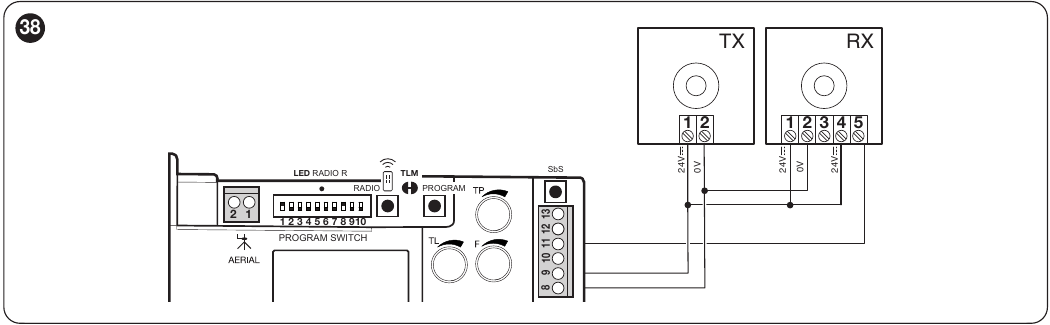
With photocell test
RX remains connected to 8–9, while TX is powered from 8–12. The ROA42 control board supplies accessories with 24 V DC. For EPM photocells, do not automatically change the SYNC jumper when enabling the photocell test. The setting depends on how the photocells are powered; the installer must verify that the photocell test works correctly when testing the gate.
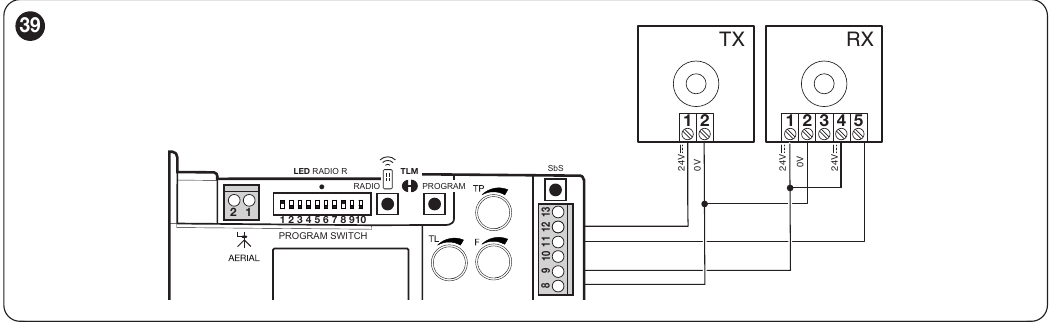
After each change to PHOTO or STOP, repeat device learning and test the gate response. When STOP is activated, the drive stops immediately and makes a short reverse movement.
Initial start-up and device learning
- Release the drive, move the gate manually to roughly the middle of its travel, secure it again, and switch on the power.
- Check the input LEDs and the operation of both limit switches. Perform the learning procedure even if no additional accessories are connected.
- Press and hold PROGRAM. After about 3 seconds, the OK LED starts flashing rapidly. Wait until STOP is lit and the green OK LED is steady; release PROGRAM within 10 seconds.
- Three green flashes confirm that the settings have been saved. Five red flashes immediately after learning mean that the procedure was unsuccessful. Disconnect the power and check PHOTO, STOP and the wiring, then repeat the learning procedure. Distinguish this one-time learning result from the repeated operating signal 5× red OK.
- Test the gate by opening and closing it; check the direction, limit stopping, photocells, STOP and manual release. The installer must carry out the safety test and force measurement.
Repeat the learning procedure after changing the PHOTO/STOP inputs, DIP switches 1/2 or the drive orientation.
ROA42 control board settings
TL, TP and F trimmers
| Trimmer | Range and setting |
|---|---|
| TL | Maximum operating time; marked positions: 20, 30, 60, 90 and 120 s. After fully opening and closing the gate, set a reserve of 2–3 s. When slow-down is enabled, the slow phase begins after TL/2. If even the 120 s setting is insufficient, the installer must decide whether to adjust the TLM jumper and measure the resulting time on the gate. |
| TP | Pause before automatic closing; marked positions: 3, 20, 40, 60 and 120 s. Used in automatic modes. Check the actual pause by testing the gate opening. |
| F | Motor force setting: MIN, 25%, 50%, 75% and MAX are positions on the trimmer. The percentages do not represent a guaranteed proportion of the force measured in newtons. The setting must be verified by force measurement and a safety test. |
The factory setting is DIP 1 ON, DIP 2 OFF (semi-automatic mode) and DIP 8 ON (slow-down). The default TL is 90 s. For TP and F, approximate reference positions are marked at about 60 s and 75%; check the actual setting on the control board and when testing the gate.
DIP 1 and 2: operating mode
| DIP 1 / 2 | Mode |
|---|---|
| OFF / OFF | Hold-to-run operation: the gate moves only while the command is held down continuously |
| ON / OFF | Semi-automatic; one pulse starts the full movement up to the limit switch or until TL expires; factory setting |
| OFF / ON | Automatic with TP pause |
| ON / ON | Automatic with “always close” function: if the gate is open when power is restored, closing is preceded by 5 s of pre-flashing |
DIP 3 to 10: additional functions
| DIP | When ON |
|---|---|
| 3 | Shared entrance operation: another step-by-step command does not interrupt opening; during closing, it stops the gate and reverses its direction. This function is not available in manual mode. |
| 4 | Beacon pre-flashing for 5 s; 2 s in manual mode. |
| 5 | In automatic mode, closing starts 5 s after the photocells are cleared. In semi-automatic mode, activation of PHOTO during closing triggers automatic closing after the TP pause. |
| 6 | PHOTO is also active during opening and stops the gate. In semi-automatic or automatic mode, opening resumes once the photocells are cleared. |
| 7 | Soft start. |
| 8 | Slow-down begins after TL/2. Speed drops to 30% of the nominal value, and the motor's torque drops by 70%. Set TL so that slow-down begins approximately 50–70 cm before the limit switch is activated; with a heavy gate, check that the motor has sufficient torque. |
| 9 / 10 | Braking: OFF/OFF disabled; OFF/ON light; ON/OFF medium; ON/ON strong. |
With TL set to 90 s, slow-down begins after approximately 45 s. A change to TL takes effect on the next opening cycle. If the gate stops before reaching the end, the installer must check mechanical resistance, TL, F and the effect of slow-down; increasing F alone is not a substitute for a safety test.
Standby mode
Standby is enabled by default. After successful learning, it activates after 5 minutes of inactivity; before learning, after 10 minutes. The 24 V accessory output is then switched off. If a connected device requires continuous power, the installer must select a suitable power supply or disable standby; power consumption will increase. The time can be changed using Oview/ProView.
Briefly press and release PROGRAM, then check the status: two OK flashes = standby active, one flash = inactive. To change the status, select the desired option according to the OK flashes (two = enabled, one = disabled), then hold PROGRAM for at least 5 s and release it when OK returns to its normal 1 Hz flashing. Check the status again afterwards.
Connecting BusT4 programming devices
The ROA42 control board has a connector marked IBT4N in the board image. With the power disconnected, insert BiDi-WiFi directly into the BusT4 connector. To connect ProView or Oview use the IBT4N. Disconnect the mains power before inserting it; an incorrectly inserted module may damage the control unit.
BiDi-WiFi is used to configure supported parameters via MyNice Pro. Oview and ProView are service programmers. These devices do not replace the O-CODE radio receiver and do not connect to the power output 8–9.
Remote Controls and Built-in Receiver
The integrated ROA42 receiver operates at 433.92 MHz with O-CODE coding and in Mode I stores up to 100 transmitters. A suitable example is NICE Era One ON2E. NICE FloR (FLOR) transmitters are not compatible with this receiver and cannot be stored in it. Matching the 433.92 MHz frequency alone is not enough; check the remote control's coding before ordering.
Mode I: store all buttons
- Hold RADIO for about 4 seconds and release it when the R LED lights up.
- Within 10 seconds, hold a button on the new transmitter for about 3 seconds.
- Three flashes of the R LED confirm that it has been stored. Buttons 1/2/3/4 are assigned to step-by-step/open for pedestrians/open/close. The two-button ON2E has buttons 1 and 2 only.
Mode II: one button, one command
- Briefly press RADIO once for step-by-step, twice for pedestrian opening, three times for open, or four times for close.
- Check that the R LED repeats the selected number of flashes. Within 10 seconds, hold the selected transmitter button for about 3 seconds.
- Three flashes of the R LED confirm that it has been stored. The same command can be stored for another transmitter by repeating the previous step within 10 seconds; the mode exits if no further action is taken.
Adding a new remote control using one already stored
While the motor is stopped, you can add a new transmitter without using the RADIO button on the board. Leave only the receiver for the gate where you want to store the transmitter powered; this procedure may affect all receivers within range.
- Near the board, hold the same button on the new remote control for about 5 seconds.
- On the already stored old remote control, press the corresponding button 3 times, for about 1 second each time.. In Mode I, this can be any button; in Mode II, use the button for the command you want to transfer.
- On the new remote control, press the same button again for about 1 second and check that it works by sending a test command.
The new remote control inherits the storage mode of the old one. Six flashes of the R LED during the procedure indicate incompatible coding; eight flashes indicate that the memory is full.
Clearing and locking the radio memory
If you have lost your only remote control, contact a service technician before clearing the memory; an incorrect procedure may also delete other stored remote controls. The radio memory lock prevents remote controls from being added or deleted.
Remote control pairing instructions
The steps for the built-in ROA42 receiver are given above. The image below links to general NICE pairing instructions; for the ROBO1000, follow the timings and R LED confirmation specified here.
LED diagnostics
During normal operation, the green OK LED flashes about once per second. Repeated groups of red flashes separated by a one-second pause indicate a fault; single flashes during device learning should be interpreted according to the relevant procedure. Always perform a functional test after repairs.
| Indicator | Check |
|---|---|
| OK LED off | Power supply, switch and fuses; an installer must determine the cause of the power failure. |
| 1 red OK flash | Unsuccessful learning or a change to DIP 1/2 without subsequent learning. Check PHOTO and STOP, then repeat device learning. |
| 2 red OK flashes | PHOTO, obstructions, the NC contact and the photocell test. |
| 4 red OK flashes | STOP and its learned type. |
| 5 red OK flashes | Error storing internal parameters. Wait at least 30 s, while the control unit attempts to resume operation. If the error persists, contact NICE service. |
| 7 red OK flashes | After changing DIP 1/2 repeat the learning procedure or restore the original mode. If the fault is unrelated to a mode change and persists, a service technician must check the board's internal circuits and the motor wiring. |
| 8 red OK flashes | Another command is still active. Release it and check the step-by-step contact, button or transmitter holding it. |
The PHOTO and STOP indicators are lit when the safety circuit is ready; the SbS LED is lit when a command is present. When the corresponding limit switch is activated manually, its LED should go out. When replacing fuses, first eliminate the cause of the fault and use only the ratings specified for the particular board.
NICE ROBO1000 Technical Specifications
| Parameter | ROBO1000 / ROA42 |
|---|---|
| Gate | Separate maximums: 1,000 kg and 12 m; check the combination against the severity index |
| Power supply / input power | 230 V AC, 50/60 Hz / 350 W |
| Motor | 230 V AC; accessory output is separate, 24 V |
| Force | Rated 300 N; max. starting force 680 N |
| Speed | Approx. 9 m/min at rated load |
| Duty cycle | Gate leaf up to 4 m: 16 cycles/h; up to 8 m: 8 cycles/h. No separate cycles-per-hour figure is specified for gate leaves over 8 m. Maximum continuous operation: 4 min. |
| Operating environment | −20 to +55 °C; IP44 |
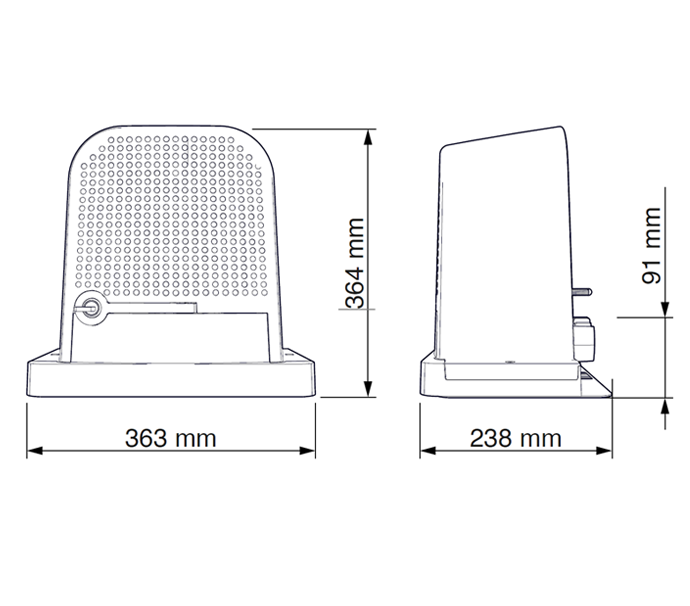
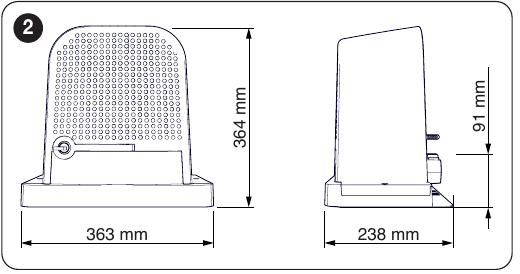
| Dimensions / weight | 363 mm wide × 238 mm deep × 364 mm high; 11.5 kg |
How can I order this item?
Choose the option that suits you:
- order online: use the buy button to add the goods to your shopping cart (you will find the buy button here in the product variants table).
- order by email: place your order at [email protected]