NICE Wi-Fi – universal Wi-Fi control of the drive via a mobile app
| Product availability: | replaced | This product is no longer manufactured, but fortunately it has been replaced by a newer model. |
|---|
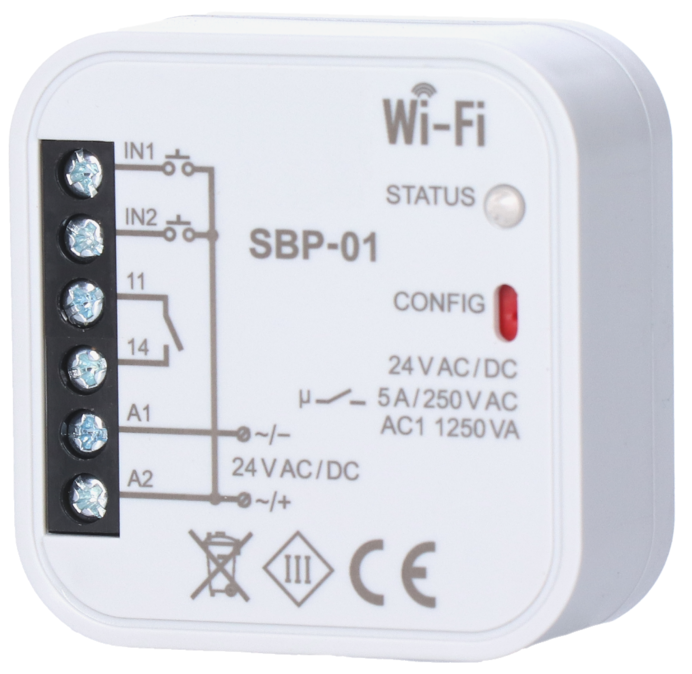

Description of NICE Wi-Fi – universal Wi-Fi control of the drive via a mobile app
NICE-WIFI has been replaced.
Its fully compatible successor is ZAMEL-SBW-02.
Receiver NICE Wi-Fi allows remote control of automation from anywhere in the world using a smartphone. The device can control entrance gates, garage doors, roller shutters, lighting, and any other devices that require switching on/off via an NC/NO signal control input.
Another advantage of the device is the ability to receive feedback on whether the gate has reached one of its end positions.
The open/closed status of the gate is displayed in the mobile app.
The app can display this information if the Wi-Fi module is connected:
- via the INT adapter (included) to the O.G.I. terminal pair (S.C.A.) on a NICE-brand operator
- or using magnetic switches.
When using magnetic switches, the Wi-Fi module can be used with a device of any brand that has a volt-free input. You can either use one magnetic switch, which lets you read two gate states: Open/Closed, or use 2 magnetic switches, which lets you read three gate states: Open/Between open and closed/Closed. “Between open and closed” means the gate is neither open nor closed (unfortunately, you cannot tell whether it is moving or stationary between the two positions).
The NICE Wi-Fi module is designed for indoor installation. For outdoor installation, the device must be adequately protected from the elements. The enclosure dimensions allow it to be installed in any Nice control unit.
24V AC / DC power supply allows installation directly in the control panel or operator enclosure.
For the device to work, it must be connected to the internet via a Wi-Fi network. Check that the Wi-Fi signal is strong enough at the installation location.
The operator or other device is controlled via the cloud server of the open-source project Supla.org, where you need to create a free account (email, password). The website is also available in Slovak and, optionally, Czech.
Wiring:
Connect the power supply to the NICE Wi-Fi module. As soon as the device is switched on, the software checks the settings. If they have not yet been entered, the module automatically switches to configuration mode, indicated by a rapidly flashing LED. Otherwise, enter configuration mode by holding down the red CONFIG button for at least 5 seconds. In configuration mode, the module acts as a Wi-Fi access point and is visible on the Wi-Fi network under a name beginning with “NICE-NICE Wi-Fi”.
For more information, see the included manual.
How can I order this item?
Choose the option that suits you:
- order online: use the buy button to add the goods to your shopping cart (you will find the buy button here in the product variants table).
- order by email: place your order at [email protected]






