NICE Tub4000 – drive for a sliding gate up to 4000 kg/30 m
| Product availability: | to the question | The product may not be available, contact us for more information. |
|---|
to the question
€3,069.50 including VAT
| Weight |
|---|
| 60 kg |
Description of NICE Tub4000 – drive for a sliding gate up to 4000 kg/30 m
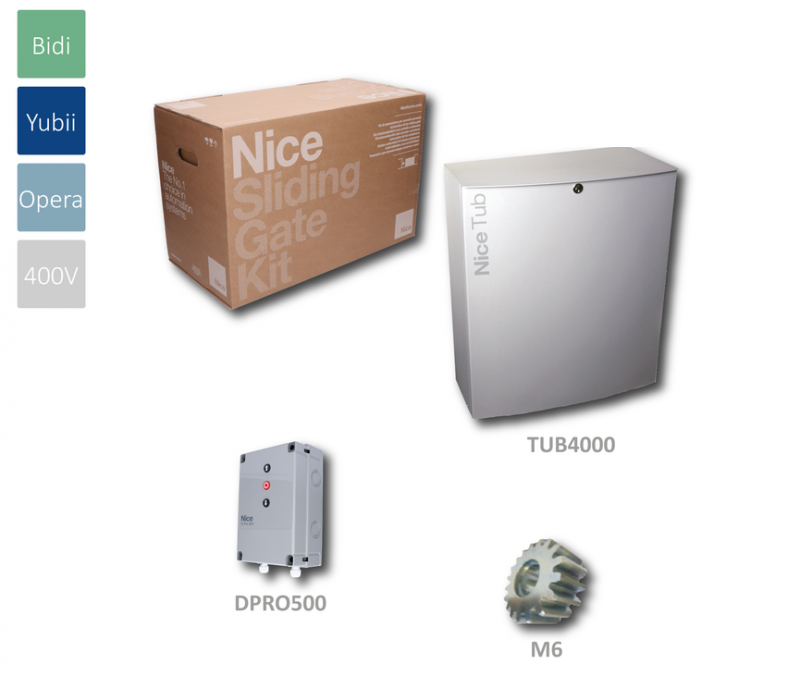
NICE TUB4000 is a standalone industrial operator for a sliding gate weighing up to 4,000 kg and measuring up to 30 m. It has a 400 V AC three-phase motor, a built-in control unit DPRO500, a mechanical brake, fan cooling, and a pinion for module 6 rack. It is non-reversible; in the event of a power failure, the drive can be released and the gate moved manually.
When to choose NICE TUB4000
It is designed for large, heavy sliding gates at industrial sites. When selecting an operator, consider the gate weight, actual leaf length, rolling resistance, wind exposure, and the number of opening and closing cycles. The gate must move smoothly by hand, must not start moving on its own, and must have solid mechanical stops in both directions.
| Gate weight | Up to 4,000 kg. |
|---|---|
| Gate length | Up to 30 m; the permitted number of cycles per hour decreases as the length increases. |
| Power supply | 3~ 400 V AC ±10%, 50 Hz; protective earthing required. |
| Rack | Module 6. The module 4 rack used with smaller operators is not interchangeable. |
Cycles by gate leaf length
| Gate leaf length | Max. cycles/h |
|---|---|
| Up to 5 m | 42 |
| Over 5 m up to 10 m | 21 |
| Over 10 m up to 15 m | 14 |
| Over 15 m up to 20 m | 10 |
| Over 20 m up to 25 m | 8 |
| Over 25 m up to 30 m | 7 |
One cycle is one complete opening and closing operation. When designing the system, observe the dimensional, weight, and operating limits together; the maximum weight alone does not confirm suitability for a particular gate. For example, for a 30 m gate leaf, the limit is 7 cycles/h.
When replacing an existing operator, also check the accessories, wiring method, and available installation space.
Built-in DPRO500 control unit
NICE DPRO500 is built into the TUB4000. It has four DIP switches, Open/Stop/Close buttons, and an SM connector for a radio receiver. The TUB4000's limit positions are determined by mechanical limit switches; the ENCODER connector is not used in this version.
The option to configure the control unit itself for a different power supply does not make this motor a single-phase 230 V operator.. Connect the TUB4000 in accordance with its rating plate and the wiring diagram for the three-phase 400 V version.
What the operator includes and what you need to add
- Geared motor with built-in controls, a mechanical brake, and a fan.
- Pinion module 6, 18 teeth.
- Manual-release mechanism for moving the gate by hand.
- For a complete automation system, you need a suitable rack, anchors, mechanical stops, and safety devices appropriate for the specific gate. Remote control requires a compatible receiver and transmitters.
When you place your order, we can match the mounting hardware, rack, and accessories to your specific setup. The standalone operator is not a complete automatic gate system.
Dimensions and installation space
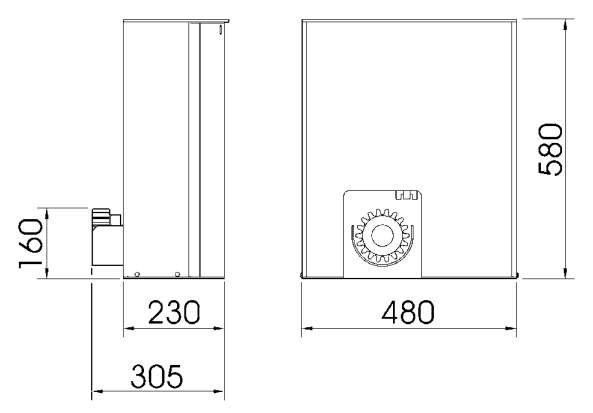
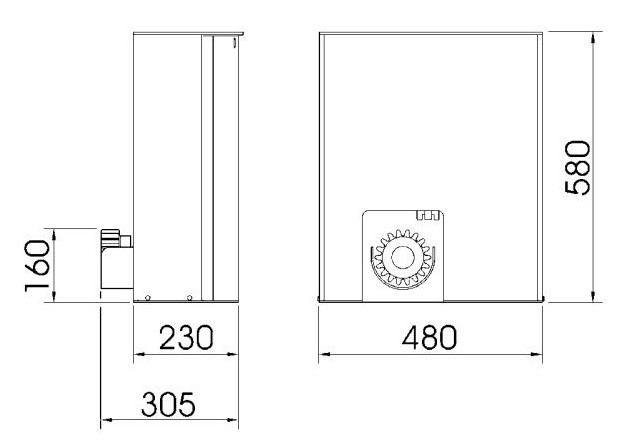
The drawing specifies a height of 580 mm, a width of 480 mm, a housing depth of 230 mm, and an overall dimension of 305 mm to the pinion. The pinion axis is shown on the drawing at a height of 160 mm. Dimensions are in millimetres. Keep the door, manual release, limit switch, and electrical controls accessible.
Installing the foundation, motor, and rack
Installation, wiring, and testing must be carried out by a qualified technician. Before starting work, disconnect all power supplies and secure them against being switched on. The foundation must be solid, level, and protected from flooding. When installing conduit, prevent water and condensation from entering the control unit.
- For an existing suitable foundation, use anchors appropriate for the substrate. For a new foundation, prepare an excavation and conduit; determine the foundation dimensions according to the installation site.
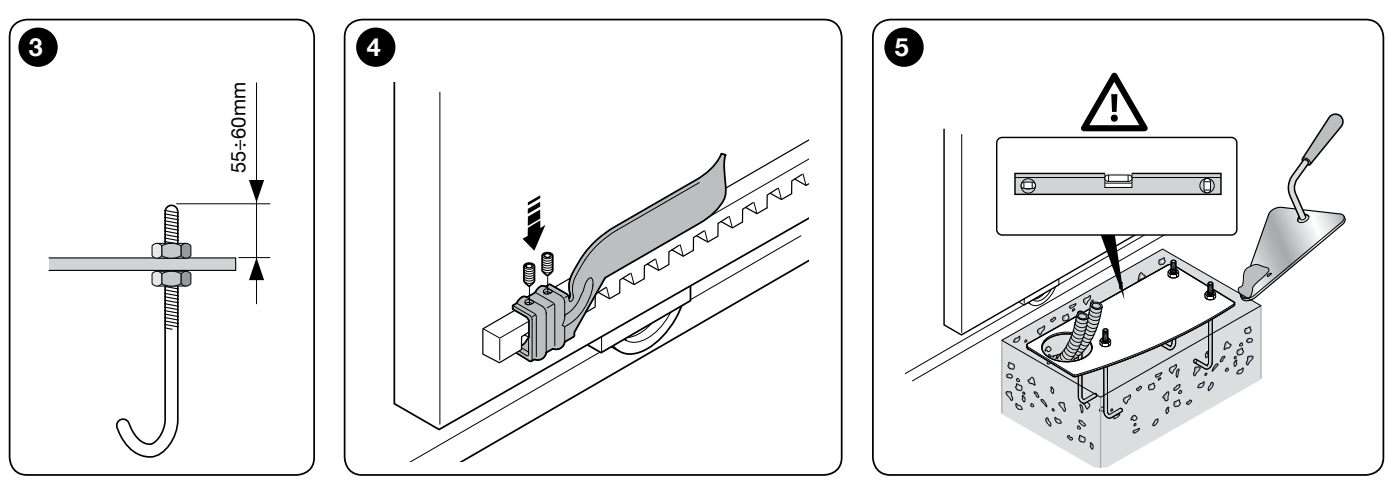
- Install the base plate with its four anchor bolts parallel to the gate leaf and level. The anchor detail specifies a thread projection of 55–60 mm. Allow the concrete to cure completely.
- Place the motor on the plate, align it with the gate leaf, and secure it with four nuts and washers. Release the gearbox before continuing.
- Fasten the module 6 rack progressively along the entire travel path. Maintain a 2–3 mm clearancebetween the rack and pinion; the gate's weight must not be borne by the operator.
- Move the gate manually several times. Check for even meshing, smooth movement over rack joints, and consistent clearance along the entire length.
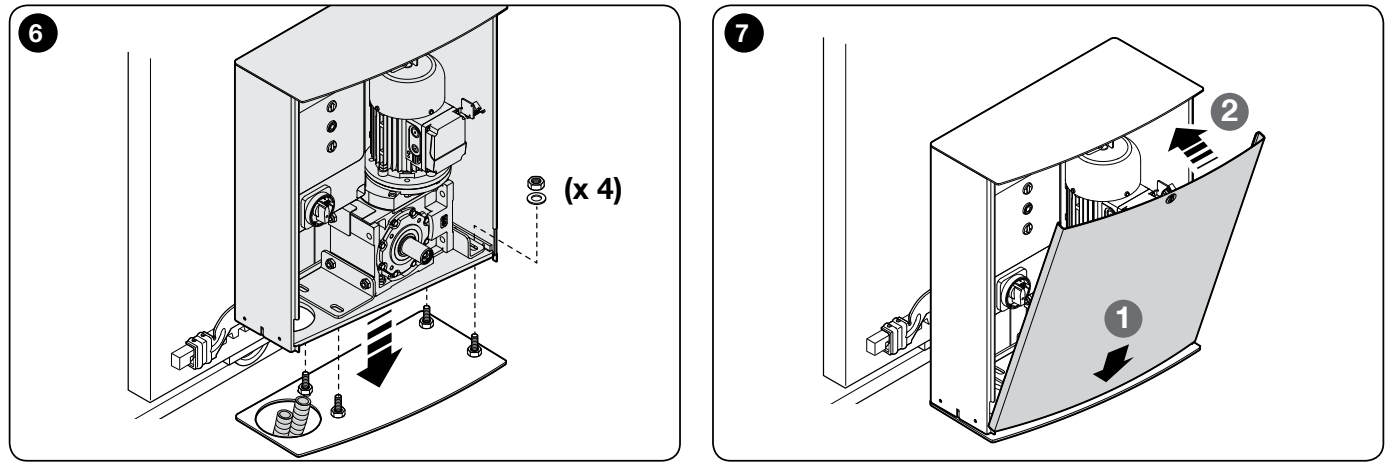
Limit switches and mechanical stops
Two brackets are attached to the rack to operate the limit switch lever for opening and closing. They do not replace the gate’s fixed mechanical stops. The lever must move freely, and the brackets must act in the correct direction.
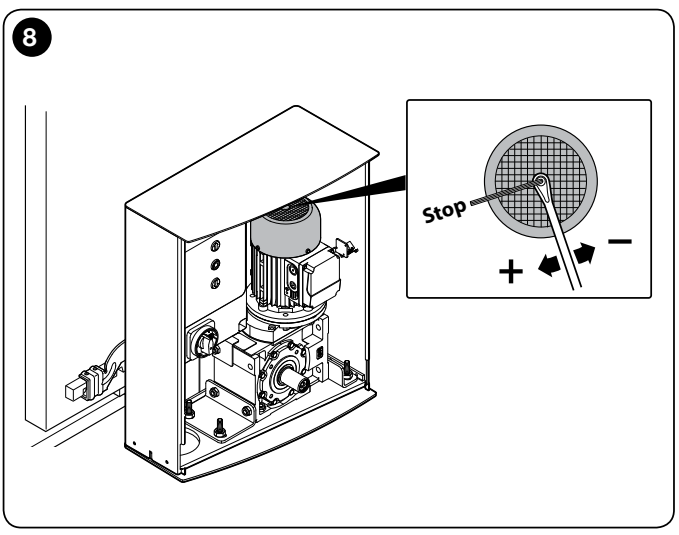
After the limit switch is activated, allow for a run-on distance of approximately 2–3 cm. Set the brackets so the gate stops safely before the mechanical stops; also check the run-on distance with the motor warm.
If the run-on distance is longer, a technician will check and adjust the mechanical brake. The power must be switched off before making adjustments. According to the instructions, first tighten the nut on the shaft by half a turn clockwise; overtightening may lock the motor. Repeat the tests after making the adjustment.
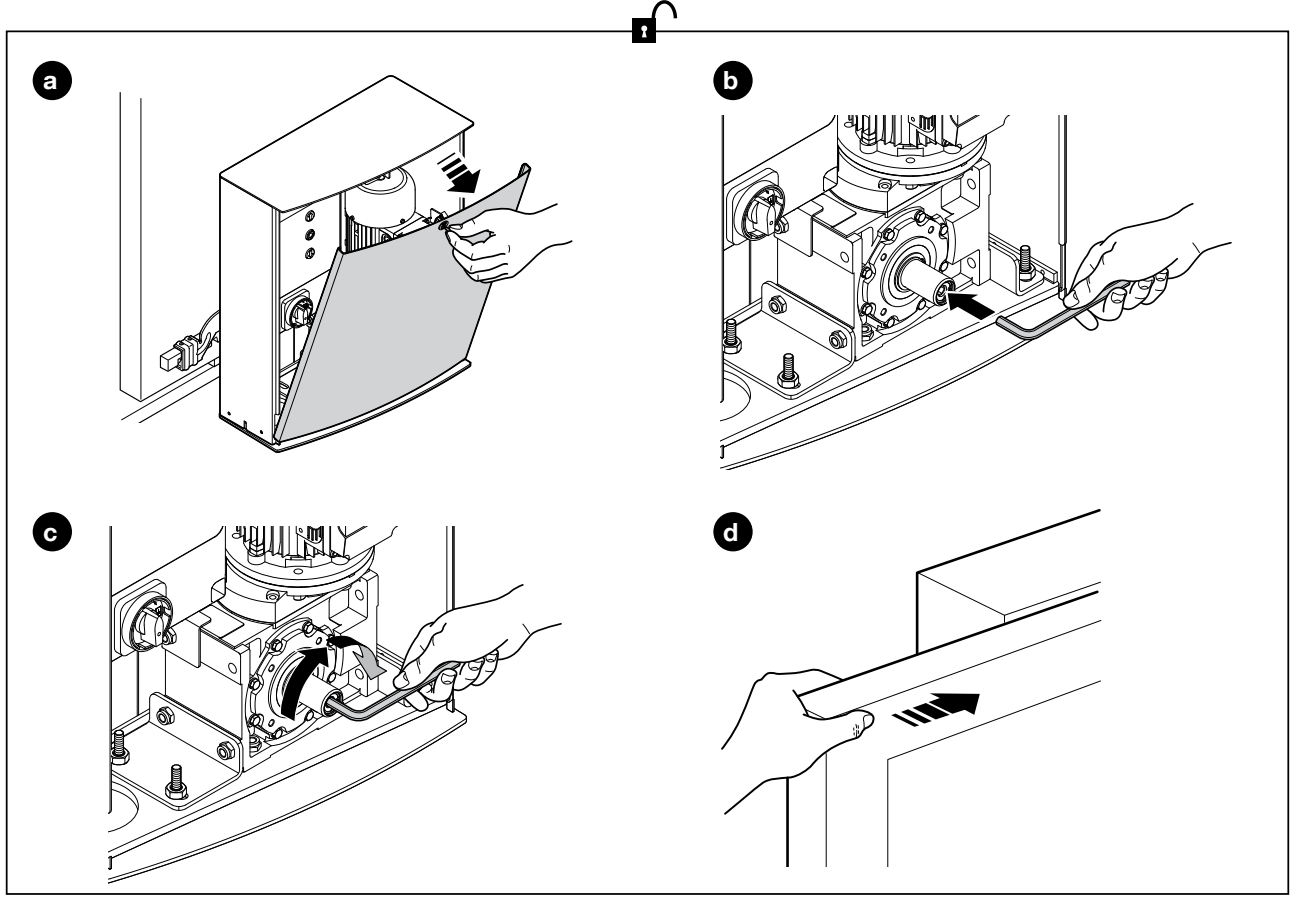
Manual release during a power outage
Only release the drive when the gate is stationary and the power is off. Secure the gate leaf to prevent it from moving on its own. During handover, the technician will show you the procedure and give you the keys.
- Open the front cover of the drive as shown in the illustration.
- Insert the Allen key into the shaft and fully loosen the internal screw as shown in the illustration.
- Remove the key and close the door. You can carefully move the gate by hand.
- To secure it again, follow the steps in reverse order. Check that the gears are engaged and the door is closed; its safety microswitch must be activated.
Wiring for a typical setup
| Connection | Cable | Length |
|---|---|---|
| Power supply to the drive | 4 × 1.5 mm² | Up to 30 m |
| Flashing beacon | 2 × 1 mm² | Up to 20 m |
| Antenna | RG58 coaxial cable | Recommended: less than 5 m |
| Photocell transmitter TX | 2 × 0.25 mm² | Up to 30 m |
| Photocell receiver RX | 2 cables, 2 × 0.25 mm² each | Up to 30 m |
| Key switch | 2 cables, 2 × 0.25 mm² each | Up to 50 m |
| Fixed / moving safety edge | Depending on the edge and interface | Depending on the specific device |
Two 2 × 0.25 mm² cables can be replaced by one 4 × 0.25 mm² cable. For a power supply run longer than 30 m, a technician must determine the larger conductor cross-section required and the appropriate earthing. For low-voltage photocell wiring longer than 30 m, the instructions require shielding that is earthed only at the control unit end. Cables must be suitable for the environment; for outdoor installation, the manufacturer specifies, for example, H07RN-F.
The conductor cross-sections shown are from the TUB4000 typical setup table. For a 230 V flashing beacon wired according to diagram NDA040, a separate neutral conductor N is also required. A four-core supply cable with 3 phases + PE does not include it. The power supply and protection must therefore be designed to suit the actual equipment.
A moving safety edge needs a connection that remains functional while the gate leaf is moving. Determine the number of conductors and the interface according to the type of edge; the two-core example from an older typical setup is not suitable for every OSE edge.
DPRO500 wiring and terminal polarity
All wiring changes, receiver insertion and service interface connections must be carried out with the power disconnected. Keep 400 V power cables separate from low-voltage signal cables. Protective earth (PE), neutral (N) and signal ground (GND) serve different functions.
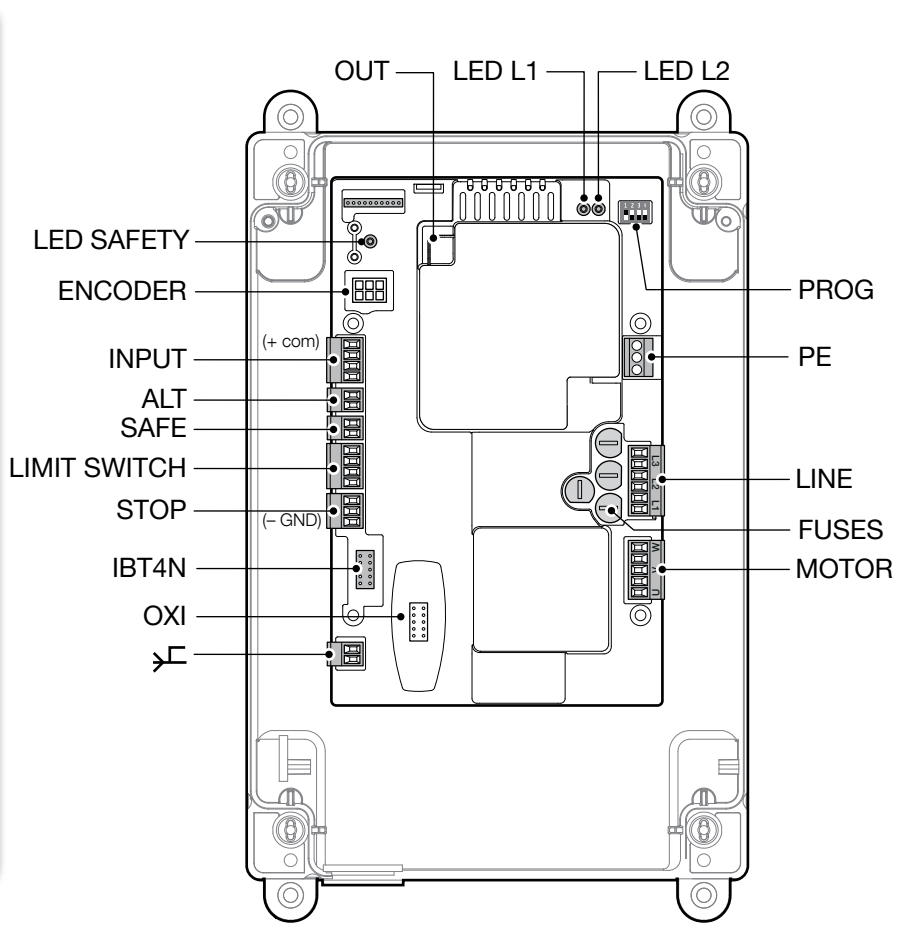
| Connector / terminal | Function |
|---|---|
| LINE L1–L2–L3 / PE | Three-phase 400 V power supply and protective earth. |
| MOTOR U–V–W | Motor connection; this is not DC polarity +/−. |
| INPUT 8 COMMON | Common point for the control inputs and +24 V DC for accessories. |
| STOP 7 GND | Negative − / 0 V DC for accessories. Between INPUT 8 (+) and STOP 7 (−): 24 V DC, max. 100 mA. |
| INPUT 9 OPEN | NO volt-free opening contact relative to 8 COMMON. |
| INPUT 10 CLOSE | NO volt-free closing contact relative to 8 COMMON. |
| INPUT 11 ING1 / PHOTO | Photocell by default: NC volt-free contact relative to 8 COMMON. Another function can be configured via OVIEW. |
| ALT | NC safety stop input; not an accessory power supply. |
| SAFE | Motor thermal protection on versions with mechanical limit switches. |
| LIMIT SWITCH 1 / 2 / 3 / 4 | Common contact / open / pre-limit switch for closing / close, depending on the motor wiring. |
| STOP 5 / 6 / 7 | Safety edge input: 5 +12 V DC (brown OSE wire), 6 signal S (green), 7 GND − (white). |
| STOP 6–7, 8k2 edge | Connect the 8.2 kΩ resistive edge between signal and GND as shown in the diagram. It does not use power supply terminal 5. |
| PUSH BUTTONS | Buttons on the cover: Open / Stop / Close. |
| OXI / SM | Plug-in radio receiver of the appropriate type. |
| IBT4N | Connect the OVIEW programmer via the IBT4N interface. |
| OUT / NDA040 | Expansion with two relay outputs with volt-free contacts; functions are programmed via OVIEW. |
| ENCODER | Not used in the TUB4000 with mechanical limit switches. |
COMMON 8 is a positive low-voltage power supply, not a mains neutral conductor N. For an OSE safety edge, do not confuse the 12 V supply from terminal 5 with the 24 V supply for photocells. Mains voltage must not be connected to the INPUT or ALT control inputs or to the photocell contacts. mains voltage. NDA040 relay outputs form a separate circuit for the load according to beacon diagrams.
8k2 or OSE safety edge
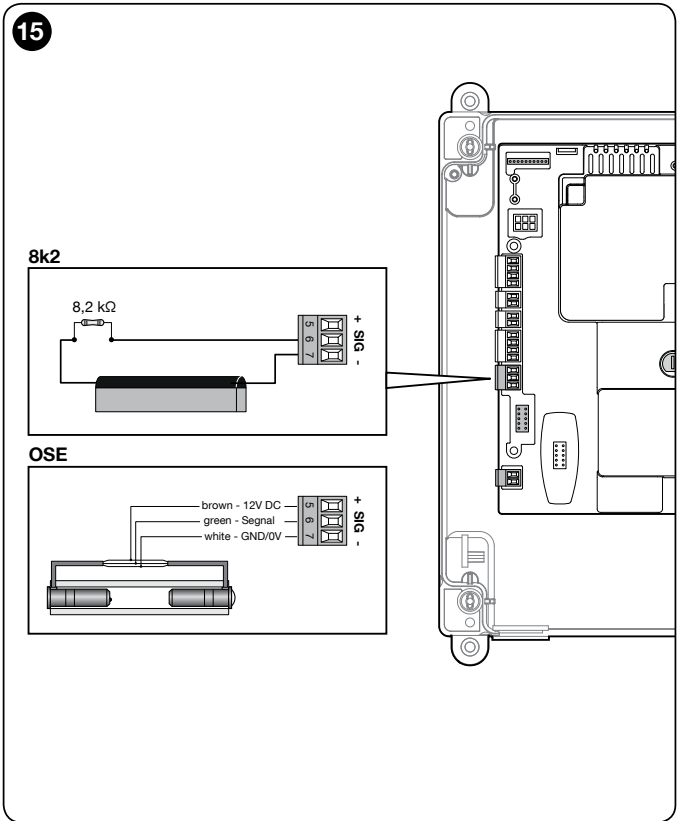
When triggered, the safety edge input stops movement and initiates a brief reversal. During setup, the DPRO500 detects the connected type 8k2 or OSE. If the edge or its wiring is changed, detection must be repeated. During setup, at the STOP SAFETY EDGE input at least one safety device must be connected; a photocell connected to INPUT 11 alone does not replace it. Do not replace the safety edge with a wire jumper.
NO or NC safety edges must be wired with an 8.2 kΩ resistor exactly as shown in the instructions. Multiple safety edges should be designed as a single monitored circuit with the appropriate termination; do not interconnect them arbitrarily. For semi-automatic operation, the instructions require an active safety edge; for automatic operation, at least one pair of photocells is also required.
Photocells for DPRO500
Use relay-output photocells with a suitable power supply, for example NICE EPM. The DPRO500 does not have BlueBUS, so EPMB cannot be connected to INPUT as a substitute for EPM. For the basic PHOTO function, ING1 remains configured as a photocell by default.
Choose the photocell range according to the passage width. The EPM has a useful range of 15 m; the manufacturer specifies a maximum of 30 m. If the TX–RX distance exceeds 10 m, the technician must adjust the jumper +10m on the RX receiver as specified in the EPM instructions. Fog, rain and dust can reduce the range by 50%, so the maximum figure of 30 m does not guarantee reliable coverage across a passage of the same width. Choose a suitable model for the specific location and verify that it works correctly.
| EPM | DPRO500 |
|---|---|
| TX and RX 1 | Plus + → INPUT 8 COMMON, +24 V DC. |
| TX and RX 2 | Minus − → STOP 7 GND, 0 V DC. |
| RX 4 COM | → INPUT 8 COMMON. |
| RX 5 NC | → INPUT 11 ING1 / PHOTO. |
| RX 3 NO | Not used for the PHOTO safety function. |
| Current draw | An EPM pair draws approximately 55 mA maximum. The control unit output has a total maximum rating of 100 mA; two such pairs require a different power-supply design. |
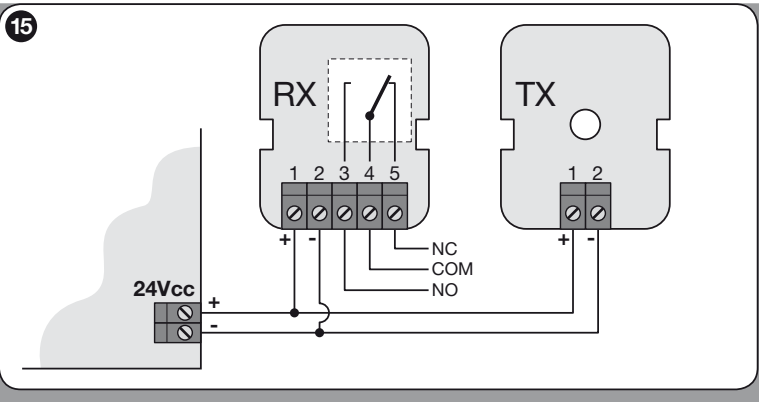
Install the photocells facing each other and check their alignment. With multiple pairs, assess potential interference between them and the total current draw. The EPM synchronization described for AC power does not work automatically with DC power from the DPRO500. A technician must design any separate power supply for the photocells and safety circuits.
Flashing beacon and status indicator
The DPRO500 uses the expansion card NDA040. Its relay outputs are volt-free; they do not supply power to the beacon. The technician configures the function using OVIEW. For 230 V AC NICE ELAC the original diagram below shows the wiring, including the N conductor from the mains supply. Do not connect the ELAC to 400 V between phases.
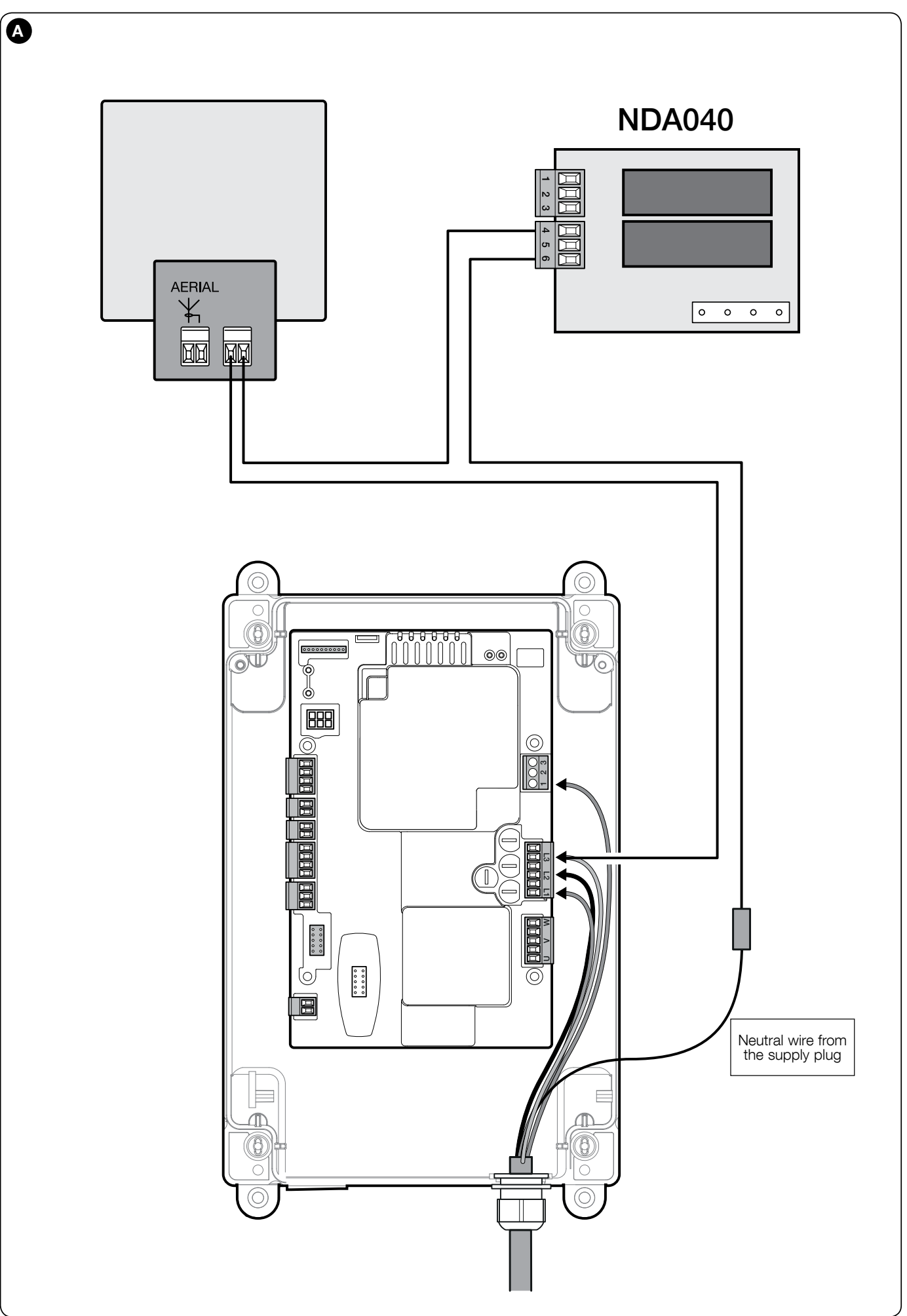
The diagram functionally shows the beacon and its antenna. The current ELAC model has its own terminals, as shown in its instructions. AERIAL identifies the antenna; the beacon power supply connects to FLASH. With AC power, there is no DC polarity (+/−).
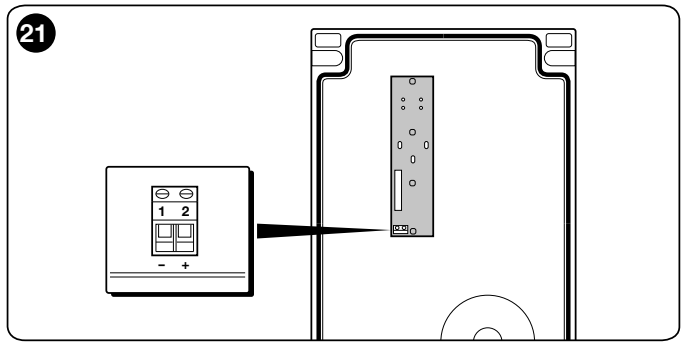
The separate status indicator on the button board has terminal 1 negative − and terminal 2 positive +, 24 V DC, max. 5 W and a maximum cable length of 2 m. This output is not short-circuit protected and does not replace the power supply for the beacon or photocells.
First power-up and TUB4000 setup
Before setup, adjust the mechanical limit-switch brackets, and check the brake, gear lock and safety equipment. Start with all four DIP switches set to OFF. The travel path must be clear. For a long gate, the technician must also check the movement time limit; the original setting of 60 s may not be long enough for the full travel and can be adjusted via OVIEW.
- After switching on, check the green LED L2 OK, which should flash regularly, approximately once per second. The red SAFETY must remain steadily lit. Also check the status of the photocells. If the status is incorrect, switch off the power and correct the fault.
- To detect the safety input, set DIP 1 ON. The green LED flashes rapidly and the red LED is off. Hold STOP for approximately 3 s, until the red LED lights steadily, then release the button.
- Proceed immediately to position setup without interruption. Set DIP 1 to OFF; leave the other DIP switches set to OFF. Hold Open until the gate is fully open and stops at the opening limit switch, then hold Close until it is fully closed and stops at the closing limit switch.
- If Open moves the gate in the opposite direction, stop immediately and switch off the power. Following the diagram, the technician must swap the motor wires V and W, then check the direction and correct operation of the limit switches again.
- If the red LED flashes three times followed by a pause, acknowledge the fault by pressing STOP. Then, with the power off, correct the swapped opening and closing limit-switch connections and repeat detection. Nine flashes indicate a position setup error; after fixing the cause, follow the instructions to clear the control unit memory and repeat detection of both the safety device and the positions.
- Repeat the movement, run-on, safety edge, photocell and STOP tests. Enable the selected semi-automatic or automatic mode only after successful testing.
Detection of safety devices and position setup must be carried out consecutively. If interrupted, the detection process must be repeated. Do not confuse the SAFETY LED for the safety circuit with the red diagnostic LED L1 WARNING.
DPRO500 operating modes
| DIP 1 / 2 / 3 / 4 | Mode |
|---|---|
| OFF / OFF / OFF / OFF | Man-present operation: movement while the corresponding control is held. |
| ON / any / OFF / OFF | Device and position recognition according to the procedure above. |
| OFF / OFF / OFF / ON | Industrial mode: semi-automatic opening, closing with man-present operation; after position learning. |
| OFF / OFF / ON / OFF | Semi-automatic mode; after position learning. |
| OFF / OFF / ON / ON | Automatic mode with adjustable pause; after position learning. |
DIP 2 changes the encoder direction. On the TUB4000 with mechanical limit switches, do not use it to correct the motor direction. If you configure the modes via OVIEW, the manual requires the DIP switches to be set to OFF.
Setting the automatic closing pause
- After the positions have been learned successfully, set DIP 3 and 4 to ON.
- Command a full opening. Measure the required pause from the moment the open position is reached.
- When this pause has elapsed, command closing; the control unit will save the time.
- To change it, set DIP 3 and 4 to OFF and then back to ON, and repeat the procedure. Setting DIP 4 to OFF deletes the saved pause.
Advanced settings, the ING1 input function, the time limit, and relay outputs can be managed via IBT4N and OVIEW. Connect and disconnect the interface with the power turned off.
TUB4000 remote control
The board has an SM connector for SMXI, SMXIS, OXI receivers, or a compatible equivalent type. NICE OXIBD is selected together with compatible transmitters according to the radio protocol. Insert the receiver only when the power is disconnected; transmitter codes are stored in its memory.
| Receiver output in basic mode | DPRO500 command |
|---|---|
| 1 | Step-by-step |
| 2 | Partial opening; factory setting is half-open, with the option to change it |
| 3 | Opening |
| 4 | Closing |
With the OXIBD, the external antenna is connected directly to the receiver terminals, following its manual; the older antenna diagram on the control board does not automatically apply to it. Follow the specific receiver’s instructions for pairing and deleting codes. Resetting the DPRO500 does not replace managing the transmitters in the receiver.
TUB4000 accessories
| Component | Selection |
|---|---|
| Photocells | NICE EPM with an NC relay contact; observe the DC polarity and the output current draw of 100 mA. |
| Warning light | NICE ELAC 230 V AC via the NDA040 and a suitably powered relay circuit, as shown in the diagram. |
| Safety edge | Resistive 8k2 or OSE, depending on the DPRO500 safety-edge input. |
| Radio receiver | NICE OXIBD or another compatible supported SM receiver; select compatible transmitters as well. |
| Programming | NICE IBT4N + OVIEW for configuration and diagnostics. |
| Control unit | NICE DPRO500 with enclosure as a separate service item. The PIU expansion board from the old A500 is not a substitute for the NDA040. |
Two opposing sliding gate leaves
Each gate leaf requires its own motor, control unit, and limit switches. The connection of two DPRO500 units is shown in a separate diagram in the manual; set Open mode via OVIEW as condominium mode. Activation of the safety edge, red STOP, and thermal protection in this configuration affects only the corresponding gate leaf. A technician must design the overall protection for both gate leaves.
DPRO500 diagnostics
Count the group of flashes between pauses and distinguish the LED color. The green L2 OK indicates the operating status; the red L1 WARNING indicates a fault. The SAFETY LED remains lit when the safety circuit is closed; if it goes out, check ALT, the STOP button on the cover, the thermal protection, and the release mechanism.
| Green L2 | Meaning |
|---|---|
| Regular flashing, approximately once per second | Normal control-unit operation after the initial signal. |
| 2 flashes | Photocell activated or passage clearance not granted; check for obstructions and alignment. |
| 4 flashes | STOP or ALT activated; identify the cause. |
| 6 flashes | Manoeuvre count limit reached. |
| 9 flashes | Automation locked; release it with the corresponding command after checking the cause. |
| Red L1 | Meaning and procedure |
|---|---|
| 2 flashes | Safety test error; check the safety edge and repeat its recognition procedure. |
| 3 flashes | For TUB4000 units with mechanical limit switches, acknowledge the fault with the STOP button and, with the power off, correct the swapped open/close connections. Do not correct this using encoder DIP 2. |
| 4 flashes | Safety limit switch overrun; after safely disconnecting the power, manually return the gate to an intermediate position, check the settings, and secure the drive. A technician can then restore operation using the STOP button. |
| 5 flashes | Internal memory error; professional inspection is required. If the fault persists, reset and reconfigure the unit or service the board. |
| 6 flashes | Contactor error; check the power circuit and control unit. |
| 7 / 8 flashes | Communication error / encoder error. The TUB4000 uses mechanical limit switches; check the selected configuration and control unit. |
| 9 flashes | Position learning error; eliminate the cause, erase the control unit memory and repeat the recognition procedure for the safety device and positions. |
| 10 flashes | Motion time exceeded; check for obstructions, the travel path, and the time limit in OVIEW. |
After power-up, rapid flashing of both L1 and L2 for 5 s indicates empty memory. When positions have been learned, the green LED flashes rapidly for 2 s; one slow red flash confirms 8k2, and two confirm OSE. Alternating rapid red and green flashes indicate a firmware update; four simultaneous flashes indicate that an update is pending.
Complete settings reset
A technician should perform the reset only after diagnosis. This erases the learned control data and restores the default settings. Set DIP switches 1–4 to ON, hold STOP for approximately 3 s until both the red and green LEDs stay lit, release STOP, and set all DIP switches back to OFF once the reset is complete. The safety devices and positions must then be detected again, the operating mode set, and safety tests carried out.
Safety, testing and maintenance
Before handover, the technician repeatedly tests opening, closing, stopping, limit switches, all photocells, safety edges, and the emergency stop. They check the run-down and safety along the entire travel path; if protection relies on limiting impact force, they also carry out the relevant measurement. Adjusting the trimmer or wiring a photocell alone does not replace testing the entire gate.
Follow the maintenance schedule provided by the installer according to operating intensity. Check the fastenings, corrosion, pinion and rack, mechanical brake, limit switches, cables, access door, and all safety devices. Carry out an operational and safety test after maintenance.
With the power off, users may remove leaves and stones from the travel path and gently clean accessible surfaces and photocell optics with a slightly damp cloth. If the gate makes unusual noises, jerks, or malfunctions, take it out of service and contact a service technician. Do not bypass safety inputs. Keep remote controls out of reach of children, and enter the passage only once the gate is fully open and has stopped. An open pedestrian gate in the gate leaf must disable the motor.
TUB4000 technical specifications
| Model | NICE TUB4000 |
|---|---|
| Control unit | DPRO500, built-in |
| Power supply | 3~ 400 V AC ±10 %, 50 Hz |
| Max. power consumption | 580 W |
| Rated current | 1.6 A |
| Rated torque | 65 Nm |
| Peak torque | 216 Nm |
| Speed at rated torque | 0.16 m/s (approximately 9.5 m/min) |
| Max. gate weight / length | 4,000 kg / 30 m; suitability depends on operating conditions |
| Number of cycles | According to the length table |
| Pinion | Z = 18; module 6; tooth pitch 18.8 mm |
| Ingress protection | IP54 |
| Insulation class | I; protective earthing required |
| Operating temperature | −20 to +55 °C |
| Installation dimensions | Drawing in mm: height 580, width 480, housing depth 230, depth to pinion 305 |
| Weight | 60 kg |
Technical values apply at an ambient temperature of 20 °C ±5 °C. When selecting spare parts and a control unit, specify the exact model and version shown on the rating plate.
Help choosing and completing your setup
Contact us with the gate length and weight, the number of cycles per hour and per day, the available power supply, and a photo of the installed control unit. We can help you choose the rack, receiver, and safety accessories.
How can I order this item?
Choose the option that suits you:
- order online: use the buy button to add the goods to your shopping cart (you will find the buy button here in the product variants table).
- order by email: place your order at [email protected]






