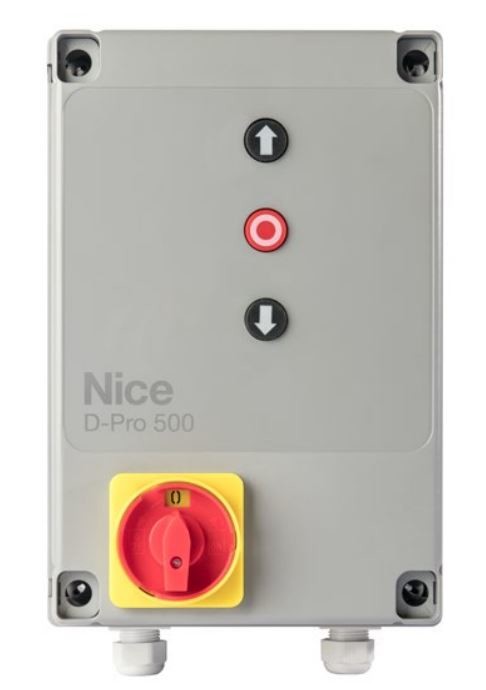
NICE DPRO500 - control unit for the TUB4000 operator with enclosure
| Product availability: | In stock | We normally dispatch goods within 24 hours. |
|---|
in stock
€471.78 including VAT
| Weight |
|---|
| 5,30 kg |
Description of NICE DPRO500 - control unit for the TUB4000 operator with enclosure
Control unit with enclosure NICE DPRO500 for operating the NICE TUB4000. The buttons on the cover allow you to open, stop and close the gate. Depending on the selected operating mode, the controller can operate with a hold-to-run command, in semi-automatic mode, or with automatic closing after a pause.
DPRO500 use and supplied equipment
This is a standalone control unit with enclosure for the TUB4000. The motor must be ordered separately. Before replacing the controller, check the label on the original unit, the power supply, motor wiring, limit switches and safety devices. D-PRO ACTION, DPRO924 and the older A500 are different control units; do not use their wiring or procedures for the DPRO500.
The plug-in radio receiver, remote controls, photo cells, safety edge and additional interfaces are selected according to the system configuration. The receiver is not built in. Replacing the controller alone does not increase the permitted weight, length or number of operating cycles of the TUB4000 drive.
Installing and protecting the control unit enclosure
Mount the enclosure on a solid, stationary surface, outside flood-prone areas, with clear access to the buttons and service area. The enclosure dimensions are 310 × 210 × 160 mm. It can be mounted directly from inside the enclosure or using brackets. The optional NDA100 kit allows cables to be routed behind the enclosure, with a clearance of up to 2 cm from the wall.
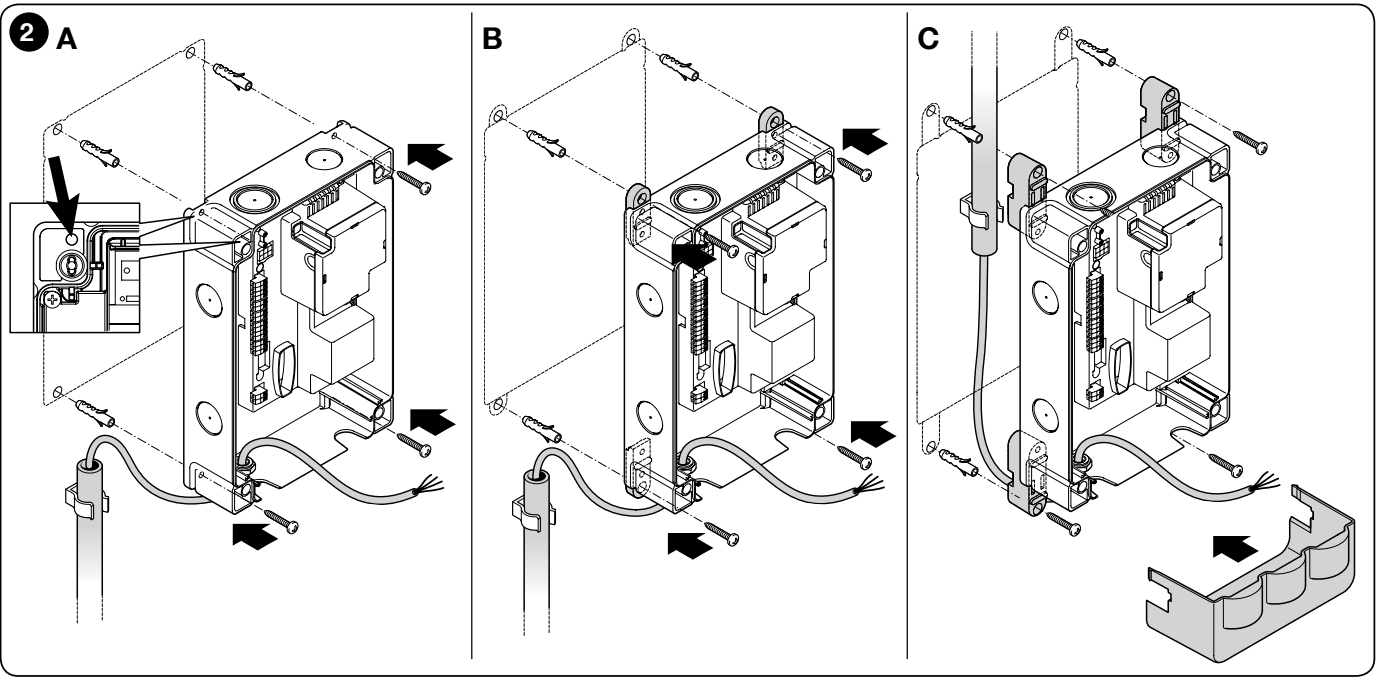
Route cables through suitable glands, preferably through the prepared openings at the bottom. Seal the cable entries and prevent water from running in or condensation from forming inside the conduits. Check the enclosure’s IP rating on its label and maintain it by using suitable glands and seals and by closing the cover properly.
DPRO500 power supply and motor connection
Wiring must be carried out by a qualified technician with the power supply disconnected. Before working on the unit, also secure it against accidental reconnection. The power supply must have suitable overcurrent protection and a disconnecting device that provides complete isolation. Connect the PE protective conductor to both the control unit enclosure and the motor, as shown in the wiring diagram.
| Connection | Use |
|---|---|
| TUB4000: 3~ 400 V AC | Connect the mains supply to LINE L1, L2, L3 and PE; connect the three-phase motor to MOTOR U, V, W and PE. The TUB4000 has mechanical limit switches. |
| 1~ 230 V AC | Only for a compatible single-phase motor and after correctly setting the power-supply jumper; connect the supply to L1, L3 and PE. This setting does not convert the TUB4000 into a 230 V motor. |
| Motor U/V/W in a single-phase application | U = common conductor, V = opening, W = closing; applies only to a suitable single-phase motor. |
| Incorrect direction of travel | After disconnecting the power supply, the technician swaps V and W. The technician then also checks that the opening and closing limit switches are assigned correctly. |
When using this with the TUB4000, also refer to the TUB4000 drive wiring table. The power-supply cable must be sized according to its length and installation conditions; values for a short cable to a standalone unit cannot automatically be applied to a long run to the gate. If a 230 V beacon is to be switched from a 400/230 V mains supply via an auxiliary card, a neutral conductor (N) must also be available.
Control terminals and accessory polarity
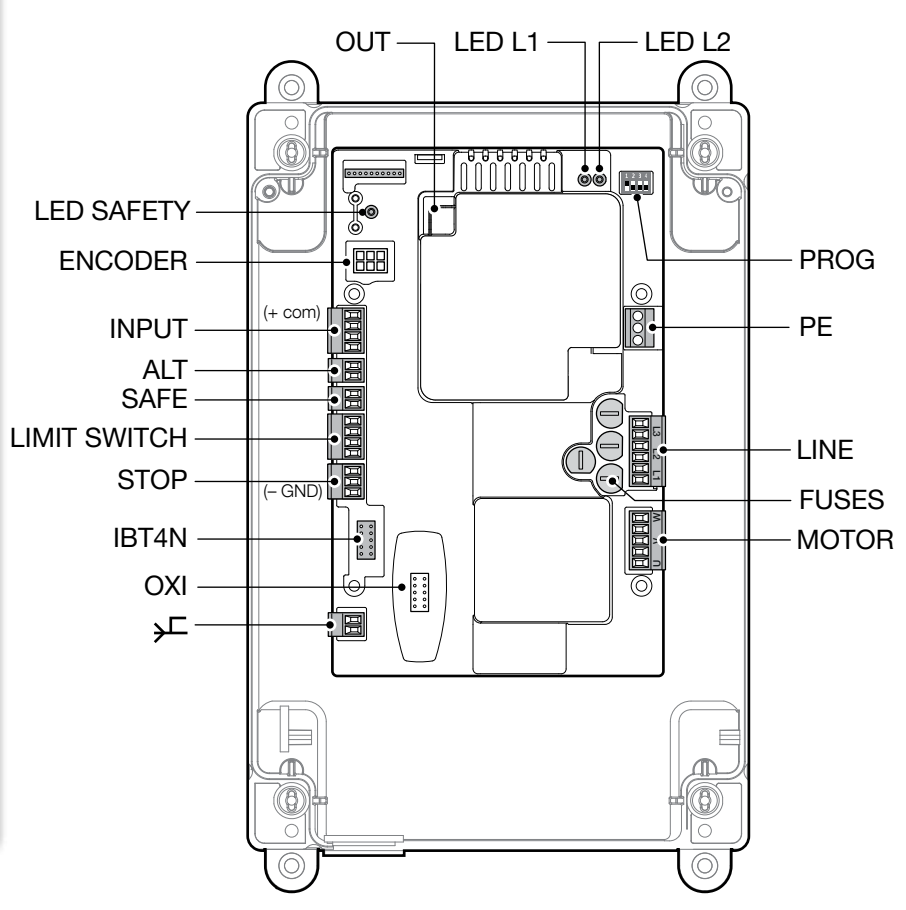
The auxiliary supply is 24 V DC: INPUT 8 / COM = positive (+), STOP 7 / GND = negative (−). The maximum total current draw is 100 mA. Do not confuse this supply with the 12 V output for the optical safety edge. Do not connect mains voltage to INPUT, ALT, SAFE or the safety-edge inputs.
| Terminal / connector | Connection |
|---|---|
| INPUT 8 – COMMON | +24 V DC; common command terminal and positive auxiliary supply. |
| INPUT 9 – OPEN | Normally open dry contact between 8 and 9: open. The contact has no +/− polarity. |
| INPUT 10 – CLOSE | Normally open dry contact between 8 and 10: close. The contact has no +/− polarity. |
| INPUT 11 – ING1 / PHOTO | Factory-set as a normally closed (NC) safety input referenced to terminal 8. Additional functions are configured via OVIEW; the input function must match the wiring. |
| ALT | Separate safety input for an NC contact. Do not confuse it with the three-pole STOP SAFETY EDGE terminal. |
| SAFE | Motor thermal protection when using mechanical limit switches. For the TUB4000, retain the actual protection wiring. |
| LIMIT SWITCH 1 / 2 / 3 / 4 | 1 = common conductor; 2 = opening; 3 = pre-limit switch for closing; 4 = closing. Limit switches do not replace the gate’s mechanical stops. |
| STOP 5 / 6 / 7 | 5 = +12 V DC for OSE; 6 = S signal; 7 = GND, negative (−). Connect the 8.2 kΩ resistive safety edge between 6 and 7. |
| ENCODER | Not used with the TUB4000, which has mechanical limit switches. Do not apply encoder procedures to this configuration. |
| OXI / SM | Plug-in radio receiver with a compatible SM connector. |
| IBT4N | Interface for OVIEW; connect or disconnect only with the power off. |
| OUT | NDA040 auxiliary card with two potential-free relay outputs. |
STOP SAFETY EDGE
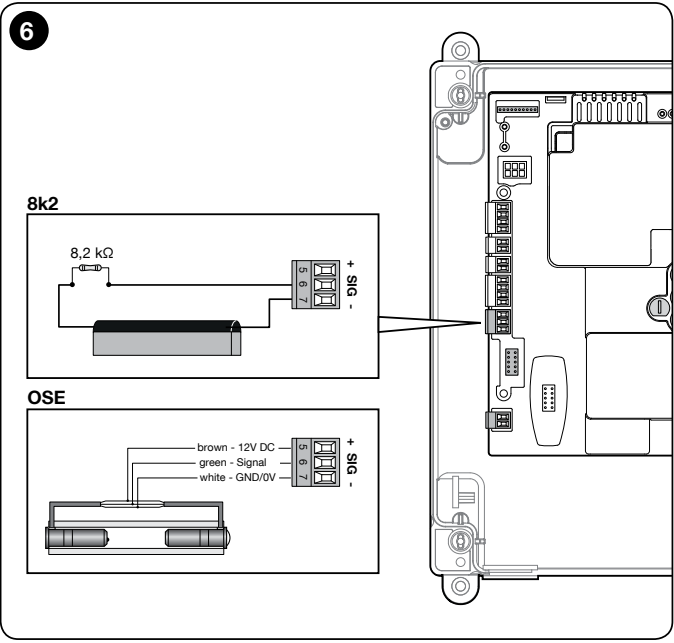
Supported types are an 8.2 kΩ resistive safety edge or an OSE optical safety edge. A change in the learned state triggers a stop followed by a short reverse movement. A photo cell connected to PHOTO is not a substitute for a safety edge connected to STOP SAFETY EDGE.
| Safety edge type | Connection |
|---|---|
| 8.2 kΩ resistive | Connect the safety-edge output between 6 (S) and 7 (GND). Terminal 5 is not used to power this safety edge. |
| OSE optical | 5 = +12 V DC, brown wire; 6 = S signal, green; 7 = GND/0 V (−), white. Also check the labels on the specific safety edge. |
| Additional safety devices | A technician must configure the NO/NC/8.2 kΩ combination according to the wiring diagram in the manual. The single 8.2 kΩ end-of-line resistor must be fitted at the end of the relevant safety circuit; do not bypass the input. |
When operating with a hold-to-run command, the operator must have a clear view of the gate’s path, and the controls must not be freely accessible to unauthorized persons. Semi-automatic operation requires an active safety edge to limit forces; automatic operation also requires at least one pair of photocells. The technician must assess all crushing, shearing and drawing-in hazards.
Wiring NICE EPM photocells
For relay photocells NICE EPM use their power supply and safety terminals separately. EPMB with BlueBUS is not a direct replacement for relay-type EPM on this control unit.
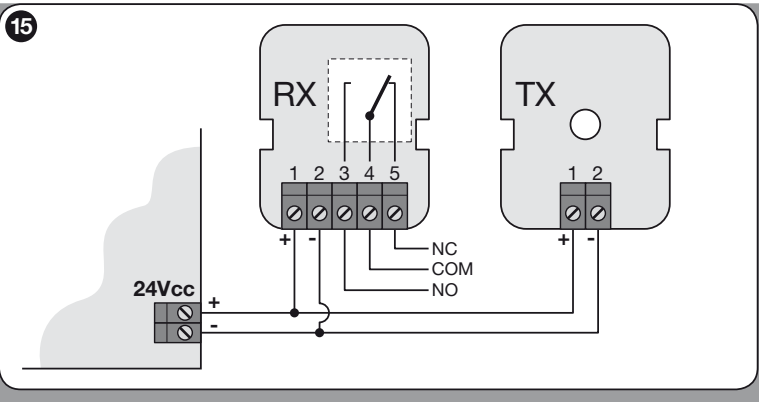
| EPM | DPRO500 in PHOTO mode |
|---|---|
| Both TX and RX: 1 = +, 2 = − | 1 → INPUT 8 / +24 V DC; 2 → STOP 7 / GND (−). An EPM pair draws no more than 55 mA; the total current draw of all accessories must not exceed 100 mA. |
| RX 4 = COM, RX 5 = NC | 4 → INPUT 8; 5 → INPUT 11 / PHOTO. RX 3 = NO is not used for this safety circuit. |
| RX volt-free contact | COM/NC has no power-supply polarity; terminals 1/2 provide a separate power supply. |
| Range | 15 m useful range, 30 m maximum. For distances over 10 m, adjust the +10m jumper on the RX according to the EPM manual; fog, rain and dust can reduce the range by 50%. |
After wiring, verify the response both when the beam is interrupted and when the photocells lose power. Do not select the range based solely on the maximum catalogue figure. In the wiring shown, the EPM photocells are powered directly from terminals 8 and 7; do not use the photo-test or Stand-by wiring intended for a different control unit.
Initial startup and TUB4000 limit-position learning
Before switching on, check the PE connection, correct voltage, motor, mechanical stops, limit switches, closed safety circuit and all safety devices. After switching on, the green L2 OK LED should flash regularly at about once per second, and the red SAFETY LED should remain steadily lit. If the check fails, disconnect the power supply and fix the cause.
- Connect at least one suitable safety device to STOP SAFETY EDGE. Set DIP 1 to ON and all other DIP switches to OFF. The green LED flashes rapidly; the red LED is off.
- Hold STOP for about 3 seconds until the red LED stays lit, then release the button.
- Continue immediately with limit-position learning: Set DIP 1 to OFF. With all other DIP switches set to OFF, hold Open and move the gate to the fully open limit switch. Then hold Close until the gate is fully closed.
- If the direction of travel is reversed, disconnect the power supply and correct the V/W motor wires. If the limit switches are assigned the wrong way round, a technician must correct the open/closed switch circuit; DIP 2 for the encoder does not correct the TUB4000 mechanical switches.
- After successful learning, select the required operating mode and carry out all functional and safety tests. If the safety edge type changes or learning is interrupted, repeat the entire subsequent procedure.
Nine red flashes indicate a limit-position learning error. With three flashes, the technician should check the direction and assignment of the limit switches; after correcting the issue, clear the error with the STOP button and repeat learning. Do not test the system with safety devices disabled.
DIP operating modes and automatic pause
| DIP 1 / 2 / 3 / 4 | Mode |
|---|---|
| OFF / OFF / OFF / OFF | Hold-to-run command: movement continues while the button is held. |
| ON / OFF / OFF / OFF | Safety input and limit-position learning according to the procedure above. |
| OFF / OFF / OFF / ON | Industrial mode: semi-automatic opening and hold-to-run closing; learned positions are required. |
| OFF / OFF / ON / OFF | Semi-automatic operation; learned positions are required. |
| OFF / OFF / ON / ON | Automatic operation with adjustable pause; learned positions and the relevant safety devices are required. |
Keep DIP 2 OFF when using the TUB4000 mechanical switches. It is used to change the encoder direction in the relevant supported application. When setting modes via OVIEW, all DIP switches must be OFF.
- To learn the automatic pause, set DIP 3 and 4 to ON and open the gate fully.
- Once the gate reaches the open position, wait for the required time and then issue the close command. This interval is saved as the pause time.
- To change it, set DIP 3 and 4 to OFF and then back to ON, and repeat the opening, waiting and closing steps. Setting DIP 4 to OFF deletes the saved pause time.
Radio receiver and remote controls
The control unit has an SM connector for a plug-in receiver. One suitable option is NICE OXIBD; older installations may use SMXI, SMXIS, OXI or OXIT. Insert or remove the receiver with the power disconnected. Remote control select according to the specific receiver and its radio protocol. The procedure for storing or deleting a remote control is specific to the receiver, not a DPRO500 reset.
| Receiver output in basic mode | DPRO500 command |
|---|---|
| 1 | Step-by-step |
| 2 | Partial opening, factory-set to half the travel; the setting can be adjusted. |
| 3 | Open |
| 4 | Close |
The compatible receiver’s extended mode also enables additional commands, including Stop, lock and automation release. Check the receiver and its settings before use. Connect the OXIBD external antenna according to the instructions directly to the receiver connector: connect the centre conductor to the antenna signal and the shield to the corresponding earth contact; these are not the power supply +/− terminals.
Expansion modules and signalling
OVIEW and IBT4N
Programming, diagnostics and changing the ING1 function are available via OVIEW via IBT4N. Connect the interface with the power switched off. When setting modes via OVIEW, leave the DIP switches set to OFF. The changed input function must match the device’s actual wiring.
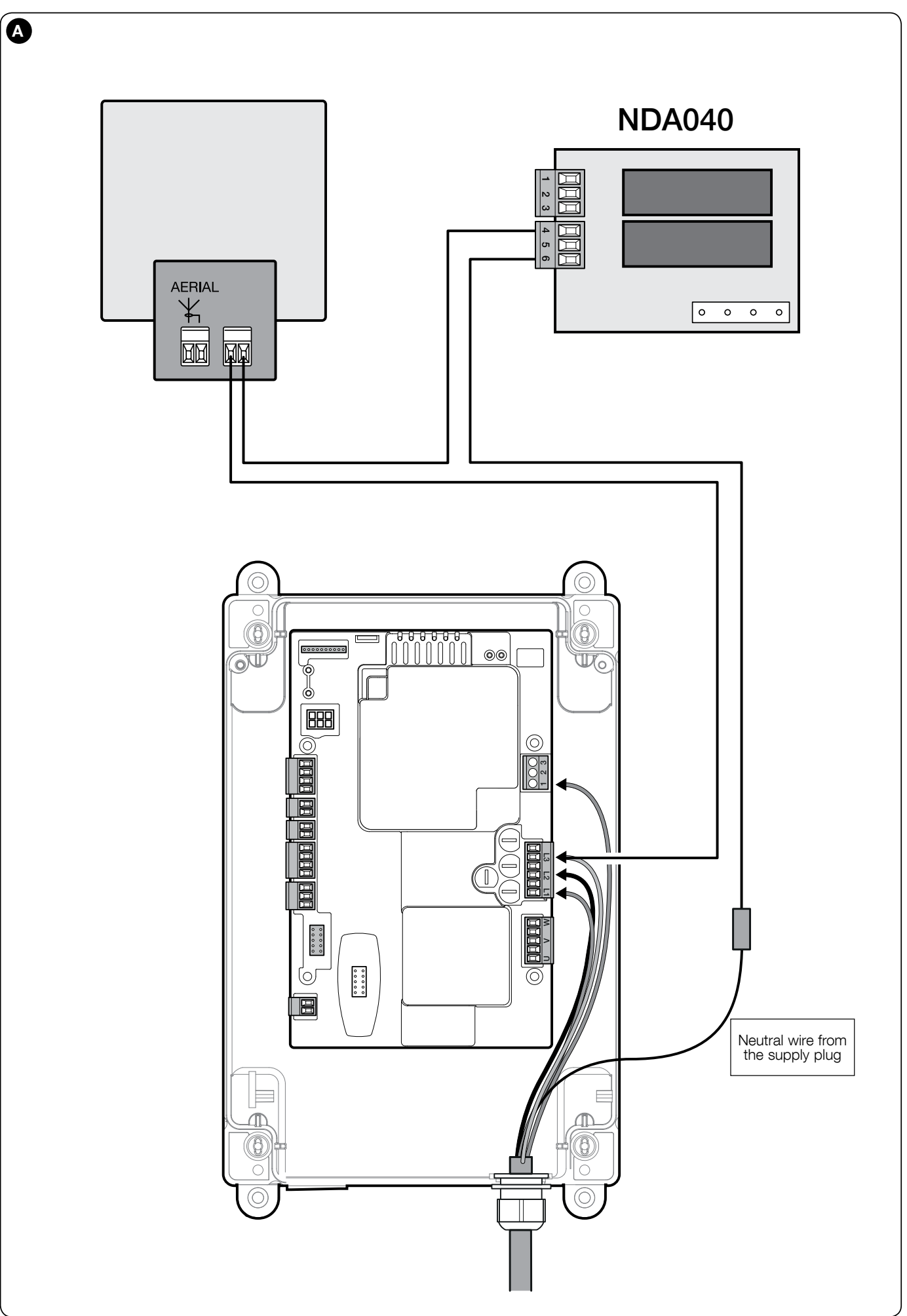
Warning light via NDA040
DPRO500 requires an additional NDA040 card in the OUT connector for external relay outputs. It has two volt-free relay contacts, configurable via OVIEW. The contact itself does not provide a supply voltage; the supply and load must be selected according to the NDA040 wiring diagram and limits.
For the TUB4000, the manual shows wiring a 230 V AC warning light NICE ELAC via the NDA040 and the N wire. An AC warning light does not have power supply +/− terminals. Do not connect it to the low-voltage INPUT or STOP terminals; a DC warning light must not be connected to 230 V. The NDA040 relay load and the safety inputs are separate circuits.
In the wiring diagram shown, the NDA040 uses 4 = COM and 6 = NO: the L3 live wire connects to terminal 6; from terminal 4, continue to one power terminal on the warning light, and connect the light’s other terminal to N. Terminal 5 = NC is not used in this wiring. Set the output to the required warning-light function via OVIEW. This switches 230 V AC and has no fixed +/− polarity; work must be carried out by a technician with the supply disconnected.
Status indicator on the cover
The terminal block on the button board provides a connection for an indicator 24 V DC, max. 5 W: terminal 1 = negative (−), terminal 2 = positive (+). Maximum distance is 2 m. The output is not short-circuit protected and is separate from the 100 mA auxiliary power supply.
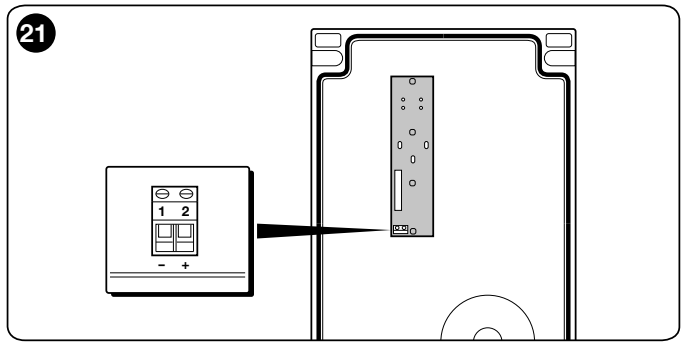
When the safety circuit is open, the indicator turns off; during normal operation, it flashes 0.5 s on / 0.5 s off. For a serious fault, it repeats the red L1 diagnostic sequence.
Two opposing sliding gate leaves
Each leaf must have its own motor, control unit and limit switches. Connect the two units according to the separate diagram in the manual; configure Open as a condominium function via OVIEW. In this configuration, the safety edge, red STOP button and thermal protection affect only their respective leaf. A technician must design the protection for the complete two-leaf system; this is not a single motor output for two motors.
DPRO500 LED diagnostics
Count the flashes between pauses and always distinguish between green L2 OK, red L1 WARNING and the separate SAFETY. The same number of flashes in a different color indicates a different condition. Do not bypass safety inputs when troubleshooting a fault.
| Green L2 | Meaning and checks |
|---|---|
| Approximately 1 flash/s | Normal operation after the initial signal. |
| 2 flashes | Photocell activated: check for an obstacle, alignment, power supply or missing PHOTO enable signal. |
| 4 flashes | STOP or ALT activated; identify and remove the cause. |
| 6 flashes | Operating cycles restricted; check the operating load. |
| 9 flashes | Automation locked; identify the cause, then release it using the appropriate command. |
| Red L1 | Meaning and checks |
|---|---|
| 2 flashes | Safety test error: check the connected safety edge and repeat its learning procedure. |
| 3 flashes | Incorrect direction / limit switch assignment. For mechanical switches, check the opening and closing circuits; after repair, press STOP and run the learning procedure again. |
| 4 flashes | Safety limit switch exceeded. Disconnect the power supply, manually move the gate approximately halfway according to the motor manual, then re-engage it; a technician must check the switches and positions and restore operation. |
| 5 flashes | Internal memory/parameter error. Switch off and back on; if the error persists, have the system professionally reset and repeat the installation, or have the control board serviced. |
| 6 flashes | Contactor, control board or motor connection fault; disconnect the power supply and arrange a professional inspection. |
| 7 or 8 flashes | Communication or encoder fault in the relevant application; this procedure is not intended for TUB4000 mechanical switches. |
| 9 flashes | Limit position learning error; check the wiring and repeat the learning procedure. If the error persists, perform a reset and configure the system again. |
| 10 flashes | Movement time exceeded; factory setting is 60 s. Check for obstructions, verify movement and check the timer setting in OVIEW; do not increase the time to mask a mechanical fault. |
SAFETY lit: the safety circuit is closed. SAFETY not lit: check ALT, STOP on the cover, thermal protection and motor release. Rapid alternating L1/L2 flashes indicate a firmware update; four simultaneous flashes from both LEDs indicate that an update is pending. Have the update performed by a service technician.
When the unit is switched on, empty memory causes both LEDs to flash rapidly for approximately 5 s. When positions have been learned, the green LED flashes rapidly for approximately 2 s; one slow red flash indicates that an 8.2 kΩ safety edge has been detected, and two slow flashes indicate OSE. Interpret subsequent signals according to the color and number of flashes listed above.
Completely erasing the DPRO500 memory
Resetting erases the control unit settings. Only reset after identifying the cause of the fault and securing the gate; this is not a routine way to clear an error or erase transmitters from a separate receiver.
- Set DIP switches 1, 2, 3 and 4 to ON; the red and green LEDs will flash rapidly.
- Hold STOP for approximately 3 seconds until both LEDs remain lit. Release STOP; after the reset, the LEDs will flash rapidly again.
- Set all four DIP switches back to OFF. Repeat the learning procedure for the safety devices and positions, configure the operating mode and carry out the safety tests.
Testing, operation and maintenance
Before handover, test Open, Close and Stop repeatedly, both limit switches, all photocells and safety edges, and the pedestrian gate interlock if the pedestrian gate is incorporated into the leaf. Check the run-on, mechanical stops and hazardous areas; where protection relies on force limitation, a technician must also carry out the required measurements. Testing the control unit alone does not replace checking the complete gate.
Follow the maintenance schedule for the complete system. With the power supply disconnected, check the terminals, cables, cable glands, seals, moisture, mounting and protective conductors. Repeat the functional and safety tests after any work. Replace a fuse only after removing the cause of the fault, and only with the same type and rating. Users must not work inside an open control cabinet.
Keep transmitters out of the reach of children. Keep the gate in view while it is moving, and enter the passage only after it has fully opened and stopped. If the equipment malfunctions or behaves unusually, take it out of service and call a service technician.
Control unit technical specifications
| Model | NICE DPRO500 with control box |
|---|---|
| Use with TUB4000 | NICE TUB4000 with mechanical limit switches |
| TUB4000 power supply | 3~ 400 V AC, according to the motor and its power supply |
| Control unit power supply options | 3~ 400 V AC / 3~ 230 V AC or 1~ 230 V AC, ±10 %, 50/60 Hz; the specific application depends on the motor and wiring diagram |
| Maximum motor power | 2.2 kW; this is not the power consumption of the control unit itself or a new TUB4000 limit |
| Power consumption in Stand-by | Less than 5 W |
| Auxiliary power supply | 24 V DC, max. 100 mA total: INPUT 8 + / STOP 7 − |
| OSE safety edge | 5 +12 V DC / 6 signal / 7 GND − |
| Status indicator | 24 V DC / max. 5 W, 1 − / 2 +; cable length up to 2 m, not short-circuit protected |
| Fuses | F1: 500 mA, type F; F2, F3, F4: 6.3 A, type T |
| Control unit operating temperature | −20 to +50 °C |
| Dimensions / weight | 310 × 210 × 160 mm / 2.5 kg |
| Installation | Rigid, vibration-free surface; protect against water and condensation |
Do not confuse the control unit specifications with the TUB4000 motor specifications. Before connecting, compare the nameplates on the supplied motor and control box, check the power supply setting and verify the exact control board installation.
Help with selecting and replacing the control unit
Contact us with the motor and original board identification, a photo of the terminals, the power supply, and a list of accessories. If a fault occurs, specify the LED color, the number of flashes, and the circumstances in which the error occurs.
How can I order this item?
Choose the option that suits you:
- order online: use the buy button to add the goods to your shopping cart (you will find the buy button here in the product variants table).
- order by email: place your order at [email protected]






