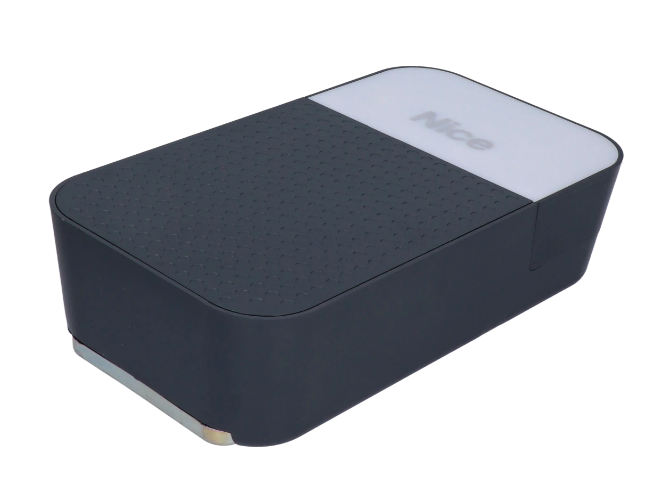
NICE SPIDO600 - standalone drive for garage doors
| Product availability: | In stock | We normally dispatch goods within 24 hours. |
|---|
In stock
€249.62 including VAT
| Weight |
|---|
| 3,80 kg |
Description of NICE SPIDO600 - standalone drive for garage doors
NICE SPIDO600 is a standalone garage door operator with a 24 V DC motor, built-in control unit and radio receiver. The system is powered from a 230 V AC. Choose the rail and remote control separately, or select a complete kit.
The belt rail, reinforced with steel cables, ensures quiet operation. The control unit learns the limit positions, force and slowdown settings, and detects obstacles. In the event of a power failure, the garage door can be released using the cord and operated manually.
Accessories and control unit
Choose safety devices according to the actual risks posed by the garage door. Obstacle detection by the operator does not replace photocells, a safety edge or force measurement during installation handover.
| What | Why | Type |
|---|---|---|
| Control unit | Operator setup, operation and servicing; the control board is built in. |
|
| Rail | The operator moves a carriage with an arm and requires a suitable belt rail. |
|
| Taller door | Choose a rail extension based on the door type, height, area and resistance. | |
| Up-and-over door | Up-and-over doors with counterweights require an arm with suitable geometry. |
|
| Photocells | Obstacle detection in the protected area. Choose the correct electrical interface. | |
| Warning light | Visible signal indicating door movement, with the option of an external antenna. | |
| Remote control | The receiver is built in. The remote control must be stored in the receiver's memory. | |
| Backup power supply | Enables operation during a power outage when a battery is added. | |
| Service settings | Diagnostics and more detailed settings via BusT4. |
SPIDO600 operator equipment and kits
This product page offers the standalone SPIDO600. For a complete setup, also choose a rail, remote control and safety accessories. Photocells, a warning light, backup power and the SPA5 arm are ordered as needed; they are not automatically included in every kit.
| Standalone operator | Kit with rail |
|---|---|
NICE SPIDO600 600 N; sectional door up to 9.6 m². Add a rail and remote control. | NICE SPIDO600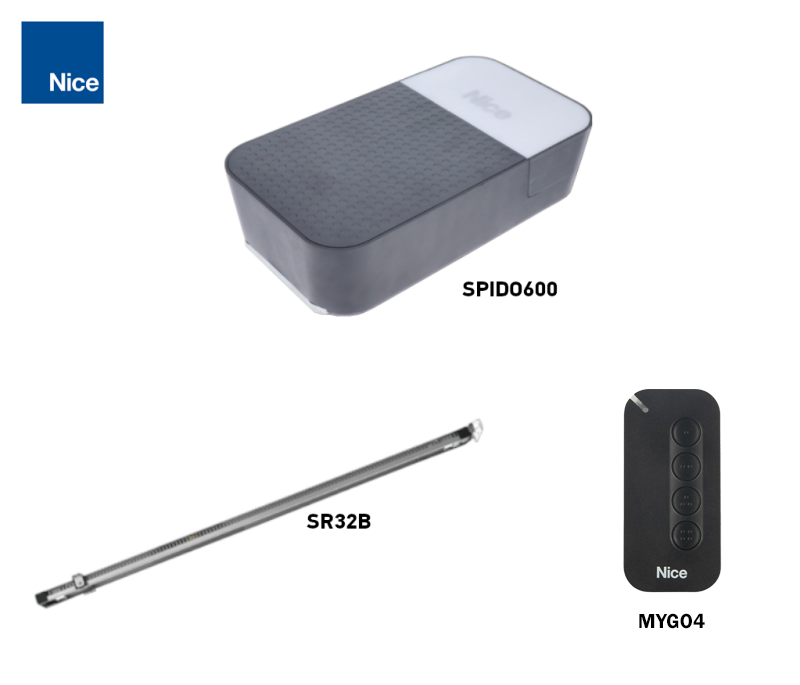 600 N; SR32B rail and remote control, depending on kit contents. |
Which garage doors is the operator suitable for?
With the standard guide rail SR32B the approximate dimensions depend on the type of garage door. The dimensions in the table are width × height. Suitability also depends on balance, friction and installation clearance.
| Door type | Approximate dimensions | Condition |
|---|---|---|
| Sectional | 3.7 × 2.6 m | Approximately 9.6 m². |
| Non-protruding up-and-over | 3.5 × 2.4 m | SPA5; area 8.4 m². |
| Protruding up-and-over | 3.5 × 3.0 m | SPA5; area 10.5 m². |
| Spring-operated up-and-over | 3.5 × 3.0 m | Depending on the installation, SPA5 may not be required; check the travel path and balance. |
Maximum force 600 N indicates the drive's pulling force. It is not the weight of the door in kilograms. During the test with the door disengaged the force required to move it manually in either direction throughout its full travel must not exceed 225 N. The drive must not be used as a substitute for repairing damaged springs or an improperly balanced door. The SPIDO600 also has a door weight limit of 110 kg and a maximum total area of 10.5 m²; for a sectional door, observe its lower dimensional limit.
The SR32B guide rail is 3.2 m long, with a usable trolley travel of 2.8 m. The door height also depends on its design and the arm. For a taller door, you can add an SR08B 0.8 m extension with a longer belt; with a 4 m travel path, usable travel is 3.5 m. The extension alone does not confirm that a larger or heavier door is suitable. Send us the width, height, door type and required travel via contact.
Operating cycles and load
SPIDO600 is designed for domestic use: a maximum of 40 cycles/day and 4 minutes of continuous operation. Repeated operation and increased resistance may cause the control unit to temporarily limit operation to prevent the motor from overheating. One cycle consists of opening and closing.
Installing the guide rail and drive
Install with the door closed and both the mains supply and backup battery disconnected. The door must move smoothly by hand and remain balanced in each position when disengaged from the trolley. Resolve any locks that would prevent automatic movement before installation. Springs and counterweights must be adjusted by a qualified technician.
- Check the clearance above the door, guide rail length, and the strength of the wall and ceiling. Keep the drive and emergency release cord accessible.
- For a two-piece track, push both sections into the connector as far as they will go. With the assembled SR32B this joining step is not required. Check that the trolley moves freely and continuously.
- Fit the motor head onto the guide rail and secure it with the supplied screws. The head may also be rotated 90° relative to the track axis, as shown in the installation drawing.
- Adjust the belt tension. An overtightened belt can damage the drive; a loose belt causes noise and unreliable movement. When using an extension, fit the correct longer belt.
- Secure the front bracket to a sufficiently strong substrate and suspend the rear section from the ceiling brackets. Align the track and tighten all fixings.
- With the door closed, disengage the trolley, fit the door bracket in line with the guide rail, and connect the draw arm. A thin panel must be suitably reinforced; the installation must withstand the drive force without deforming.
- Fit the emergency release cord. Move the door manually through its full travel, check the clearances, then re-engage the trolley before programming.
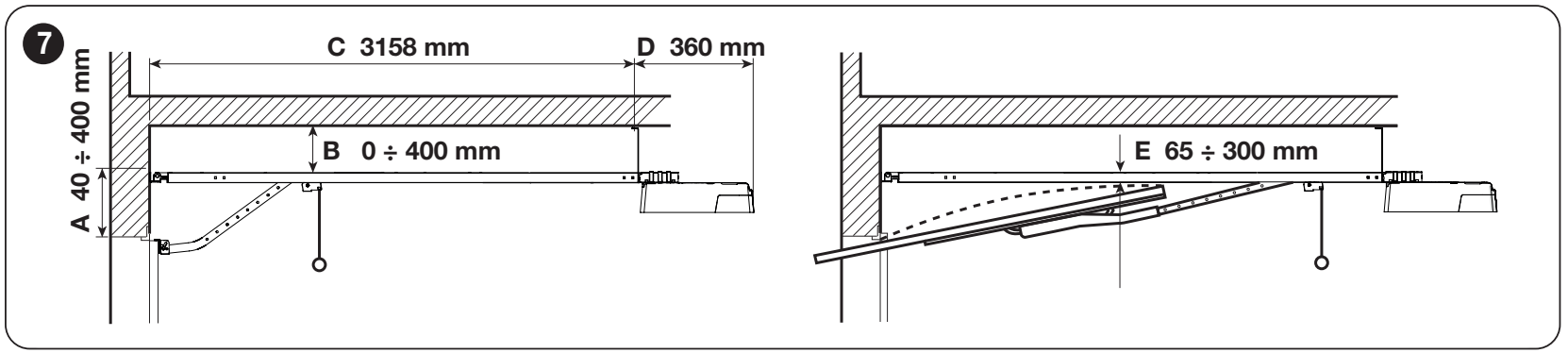
In the orientation shown:
- A = 40–400 mm
- B = 0–400 mm
- C = 3 158 mm
- D = 360 mm.
For an up-and-over door, maintain E = 65–300 mm, the clearance between the track and the highest point of the door's top edge as it moves. The dimensions apply to the installation arrangement shown.
Wiring and mains power supply
Use a protected socket 230 V AC, 50/60 Hz, with a protective earth conductor and a means of safe disconnection. Do not cut off the supplied cable or plug. If no suitable socket is available, an electrician must install the supply and protective devices. Route low-voltage cables separately from mains wiring and secure them against strain and contact with moving parts.
| Connection | Cable / maximum length |
|---|---|
| Warning light | 2 × 0.5 mm²; maximum 20 m. |
| Antenna | Separate RG58 coaxial cable; maximum 10 m, less than 5 m recommended. |
| Push button / key switch | 2 × 0.5 mm² for a volt-free NO command; maximum 50 m. For two contacts, use two 2 × 0.5 mm² cables or one 4 × 0.5 mm² cable. |
| Photocells | TX: 2 × 0.5 mm²; RX: 4 × 0.5 mm², for power and NC contact. Maximum 30 m. |
| Safety edge | 2 × 0.5 mm²; maximum 20 m. OSE requires three wires according to the safety edge wiring. |
| Mains supply to the socket | 3 × 1.5 mm² up to 30 m; for longer runs, use 3 × 2.5 mm² as specified in the installation instructions, and provide protective earthing at the automation unit. The design and installation must be carried out by an electrician. |
The stated lengths apply to the relevant wiring configuration and environment. For a different safety edge or control module, also follow the instructions for that device. Mains power must not be connected to accessory inputs.
Control board, terminals and polarity
The following wiring and options apply to the SPA600 with a seven-segment display and PHOTOTEST terminal. Check the markings on your board before wiring. If the board has an OUT STB output instead of PHOTOTEST, use the instructions for that version.
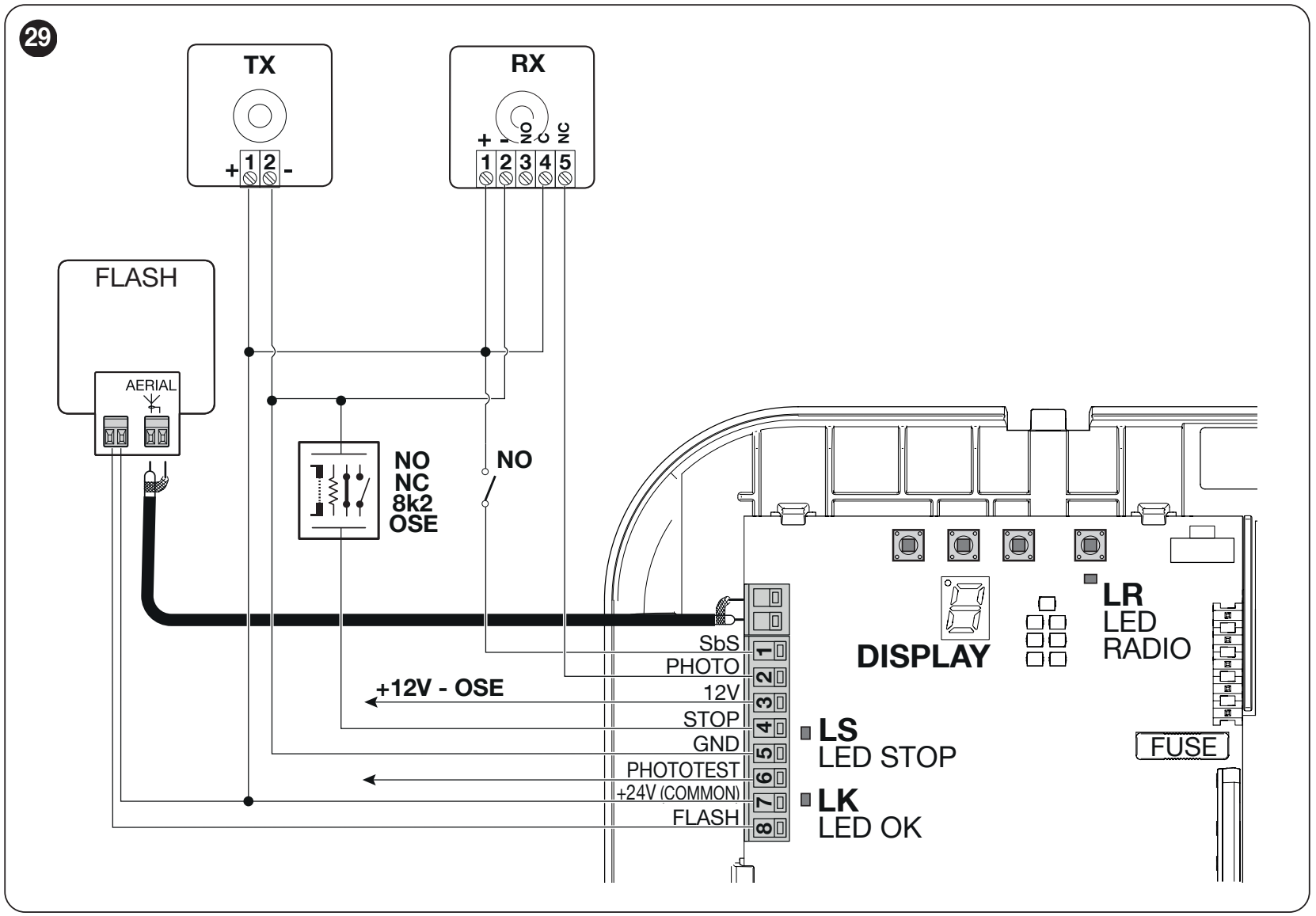
| Terminal | Function and connection |
|---|---|
| 1 – SbS | Voltage-free NO contact between 1 and 7; step-by-step command. |
| 2 – PHOTO | Voltage-free NC contact between 2 and 7; opening the contact triggers a safety response. |
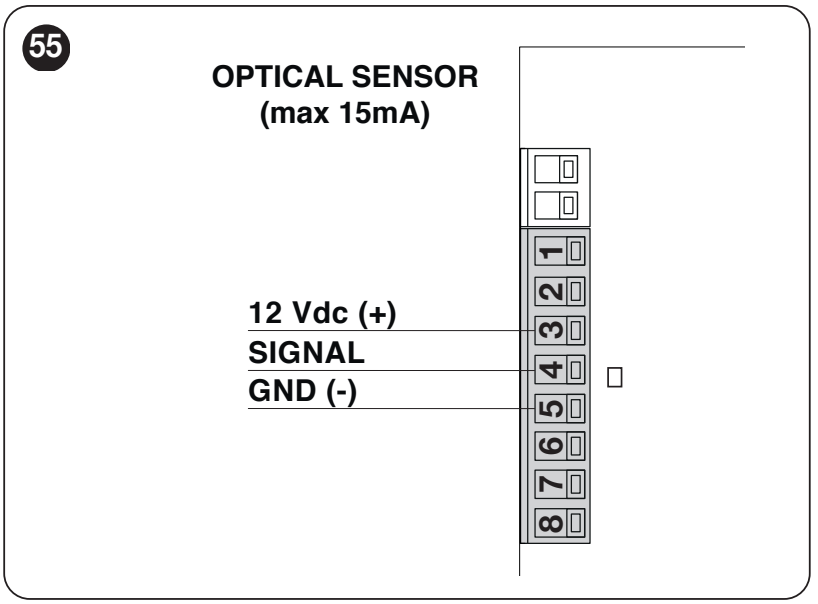
| 3 – 12 V OSE | Plus (+) 12 V DC for the optical safety edge, max. 15 mA. Signal to 4, negative to 5. |
| 4 – STOP | Safety input referenced to 5 – GND; NO, NC, 8.2 kΩ or OSE. The type is detected during setup. |
| 5 – GND | Negative (−) for auxiliary power and OSE; not the mains protective earth. |
| 6 – PHOTOTEST | Switched power supply for the photocell transmitter during testing. In PHOTOTEST mode, max. 15 mA; the function can be changed in the menu. |
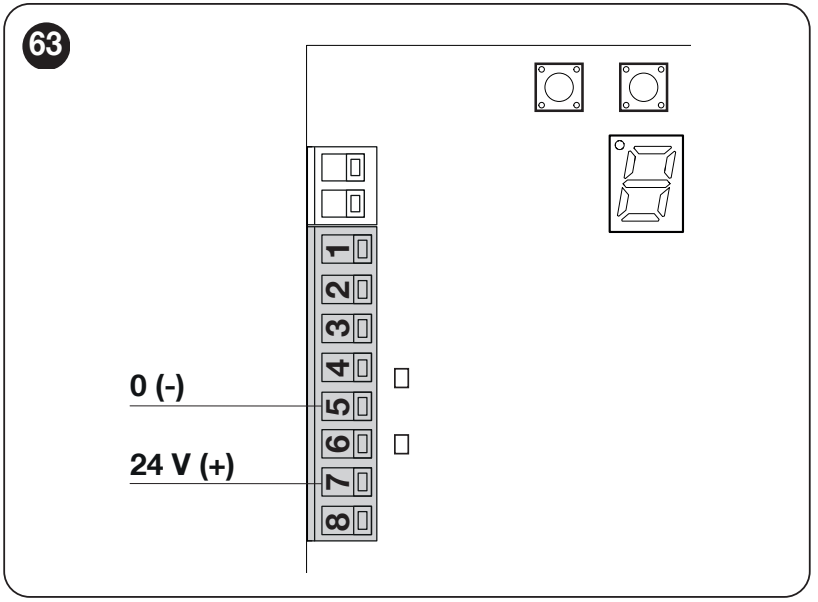
| 7 – +24 V COMMON | Plus (+); auxiliary 24 V DC, tolerance −30% / +50%, total max. 100 mA between 7 (+) and 5 (−). |
| 8 – FLASH | Connect the flashing light between 8 and 7 as shown in the diagram. For one ELDC the limit is 200 mA; other output functions require a different load. |
| AERIAL | Separate two-pole antenna connector; connect the centre conductor and shielding of the RG58 coaxial cable as shown in the diagram. |
Push button, key switch or relay
Connect only a voltage-free NO contact, such as a push button or control-module relay, to SbS. The contact connects 1 – SbS and 7 – COMMON. Do not apply the module's output voltage to the command input. If the module requires power, use 7 (+) and 5 (−) separately, and observe the 100 mA total limit.
Safety edge and STOP input
STOP halts movement and briefly reverses it. When changing a safety device, you must run the device setup again. Connect multiple NO contacts in parallel and NC contacts in series. Wire 8.2 kΩ safety edges and their combinations according to the relevant diagram; a standard switch does not provide the same level of fault monitoring as a monitored edge.
Photocell wiring
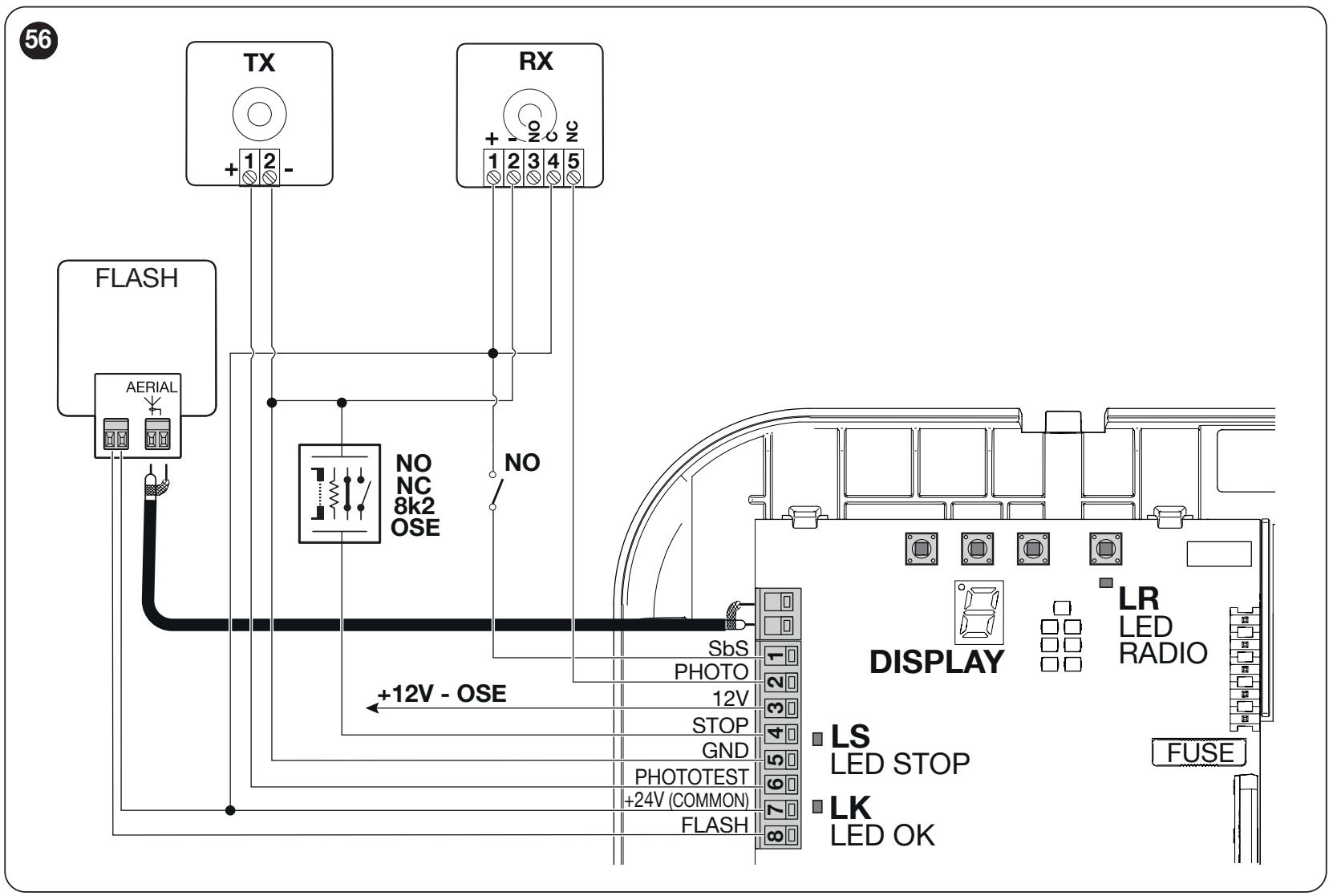
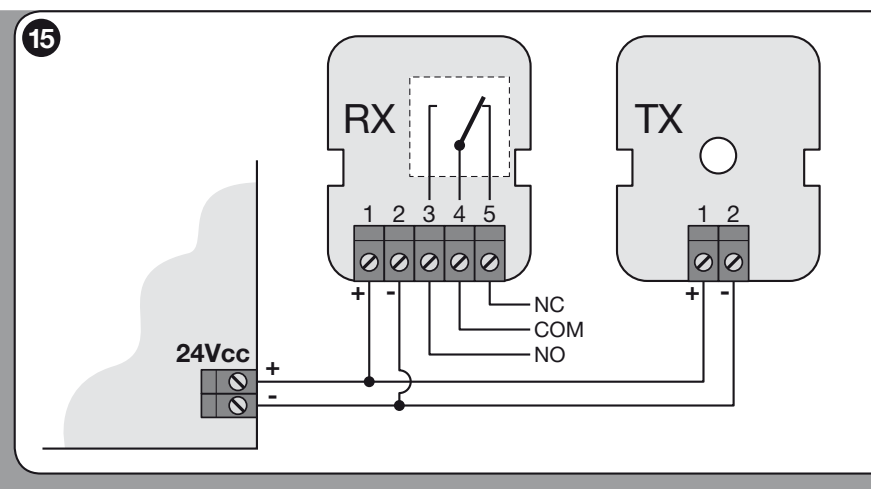
SPA600 does not have BlueBUS. For standard wiring, use NICE EPM with a relay contact. The EPMB model does not connect to this terminal block.
| Connecting EPM | SPA600 terminals |
|---|---|
| TX 1 (+) and RX 1 (+) | 7 – +24 V COMMON (+). |
| TX 2 (−) and RX 2 (−) | 5 – GND (−). |
| RX 4 – COM / RX 5 – NC | Between 7 – COMMON and 2 – PHOTO. The contact is non-polarised. Leave RX 3 – NO unconnected for this wiring configuration. |
In this configuration, EPM operates at 24 V DC; do not set the jumper to 12 V. The TX + RX pair draws approximately 55 mA; include this in the 100 mA total auxiliary power limit.
Wiring with the PHOTOTEST function
Before operation, PHOTOTEST checks that the photocells respond correctly. Use only a transmitter with a current draw no greater than 15 mA; this limit applies to the entire output. Check compatibility of the specific TX before moving the power connection.
| Wire | Wiring with testing |
|---|---|
| TX positive (+) | 6 – PHOTOTEST instead of the permanent positive supply from terminal 7. |
| TX negative (−) | 5 – GND. |
| RX positive / negative | 7 (+) / 5 (−), permanent power supply. |
| RX COM / NC | Between 7 and 2 – PHOTO; NC, not NO. |
In PHOTOTEST settings leave the value at 0 and run the device setup again run the device setup again. Do not mistake standard EPM power from terminals 7 / 5 for tested wiring just because the photocells are connected to PHOTO.
Flashing light FLASH, lighting and antenna
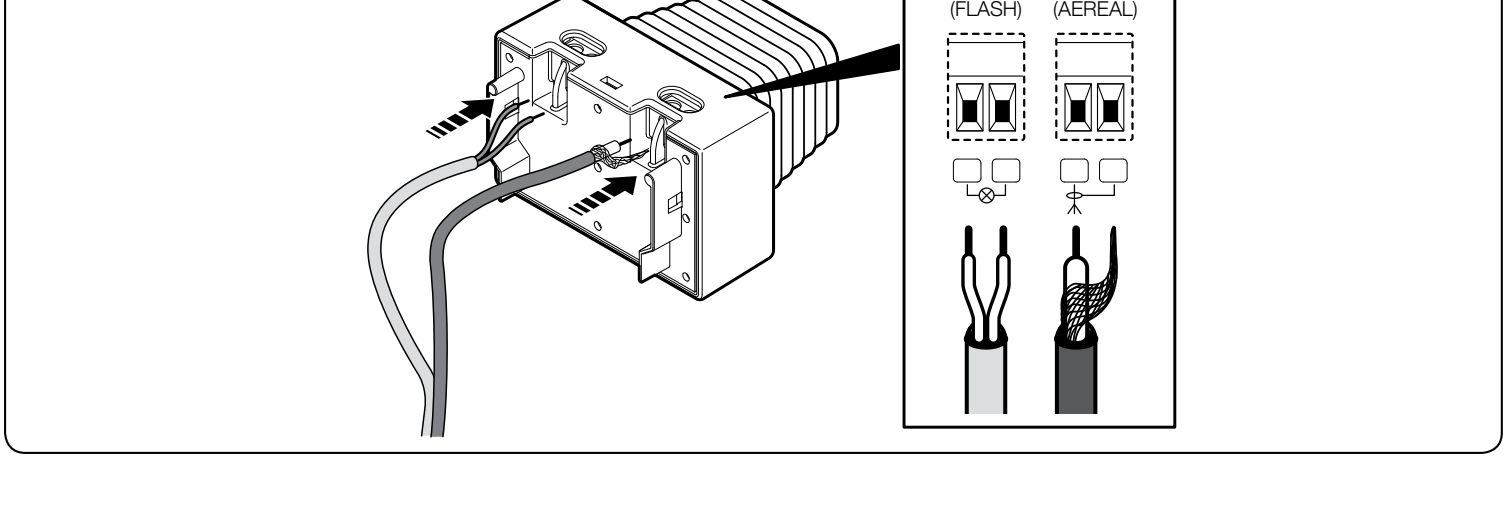
NICE ELDC connect it via its terminal block marked FLASH to 7 – COMMON and 8 – FLASH as shown in the SPA600 diagram. The standard flashing-light mode uses 12 V DC; for a single ELDC LED flashing light, observe the limit of 200 mA. The output function must be set accordingly in programming. Do not connect a 230 V mains-powered warning light to these terminals.
For the FLASH pair on the warning light, follow the markings on the connected device. The polarity is not marked on this ELDC detail; do not transfer the orientation of the auxiliary 24 V / GND terminal block to it. Input AERIAL on the ELDC is a separate antenna: connect the coaxial cable to the control unit’s antenna connector as shown. Do not confuse the antenna with the warning light’s power supply.
The drive also has built-in LED garage lighting. Assigning the FLASH or PHOTOTEST function to lighting, a lock or a radio channel changes the purpose of the output. The same connector must then no longer be used by the original device.
Initial start-up and setup
First complete the mechanical installation and wiring, secure the carriage, and clear the entire travel area. Check the STOP input, photocells and correct direction of travel. Learning the positions, force learning and pairing the remote control are separate procedures.
After power-up, the OK LED should flash approximately once per second; on start-up, the display quickly shows 8 for 3 s. The warning light output should be off when idle.
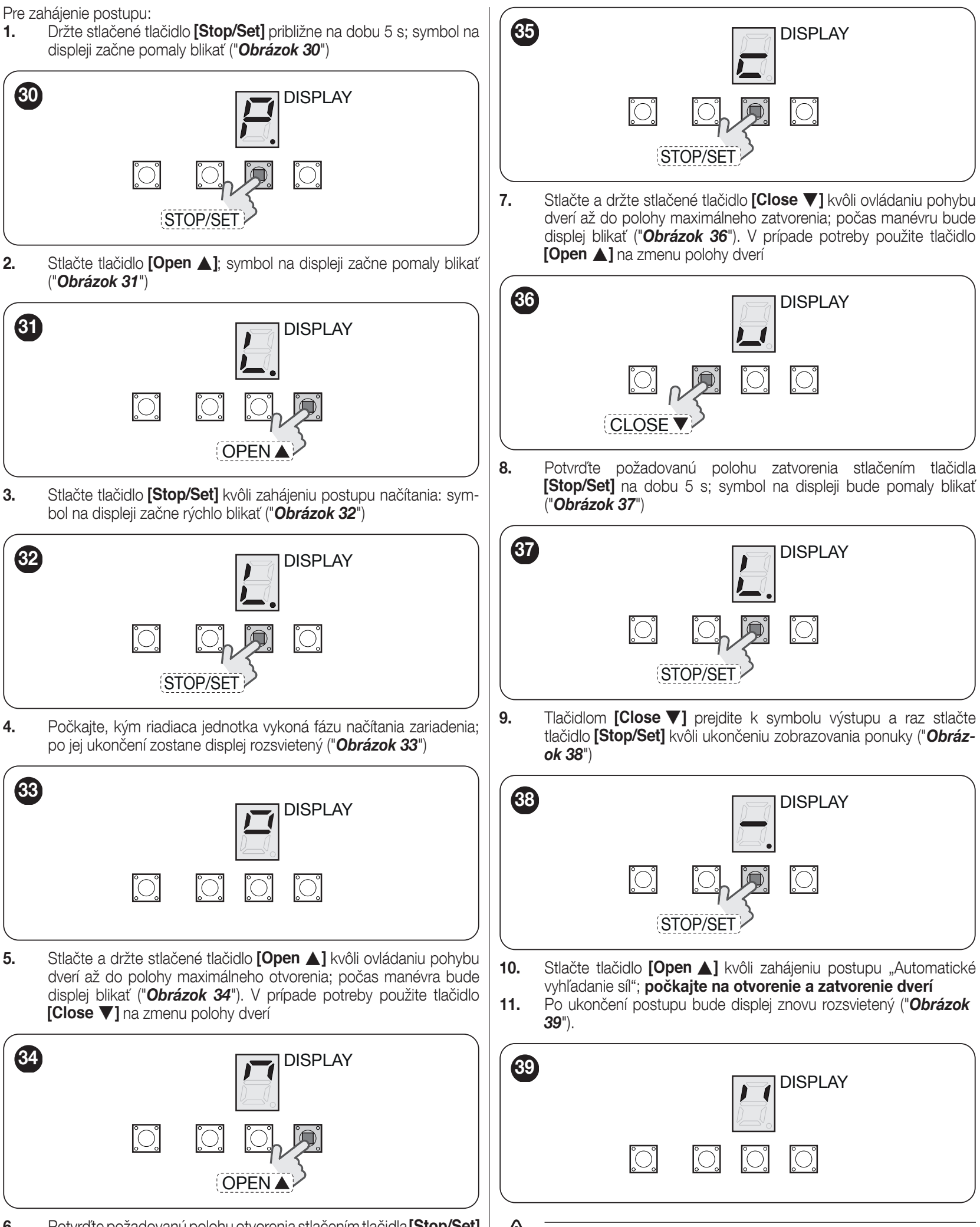
1. Learning devices and end positions
- Press and hold STOP/SET for approximately 5 s, until the menu-entry symbol flashes slowly.
- Press OPEN to go to item 1 – Device and position search. Press STOP/SET to start; the display flashes rapidly.
- Wait until device detection is complete and the display stays lit.
- Press and hold OPEN to move the gate to the desired open position. Use CLOSE to adjust the position. Confirm by holding STOP/SET until the closed-position symbol shown in the illustration appears; release the button.
- Press and hold CLOSE to move the gate to the desired fully closed position. Use OPEN to make an adjustment. Press and hold STOP/SET for 5 s; the symbol flashes slowly.
- Press CLOSE to go to the exit symbol, then confirm with STOP/SET. Press OPEN: the gate opens and closes while the force is learned automatically.
- Wait until the process is complete. The display should stay lit. If it starts flashing again, resolve the cause and repeat the learning procedure.
Repeat learning after changing accessories
Go to installation item 1 as described in the menu. Press and hold STOP/SET for approximately 6 s; once the devices have been detected, the display flashes slowly; then release the button. If slow flashing does not resume, wait 15 s without pressing any buttons, then repeat the procedure. Exit using the exit symbol and STOP/SET. Repeat the safety test after making a change.
Changing the direction of rotation for reverse mounting
- Disconnect the mains power and backup power supply. Press and hold STOP/SET, then restore the power supply.
- Release STOP/SET 3 s after powering on. Briefly press STOP/SET to select the direction: internal LC light on = reverse direction; off = standard direction.
- Wait 3 s without pressing any buttons to confirm, then repeat position learning.
Force learning and the first movement test
Force learning runs an automatic opening and closing cycle at increased force. Keep people and objects clear of the gate during this cycle. When started via SbS or radio, the internal light flashes during learning; when started using the control board buttons, it does not light up. Force must be learned again after changing the positions, speed or direction, or after reducing mechanical resistance.
If positioning is interrupted by STOP or PHOTO, resolve the cause and resume using OPEN / CLOSE. After resolving the cause, resume interrupted force learning with a movement command.
Pre-commissioning test
- With the carriage disengaged, check manual opening and closing over the full travel: the force required must not exceed 225 N (approximately 23 kg of force, not the weight of the gate). Then re-engage the carriage.
- Repeat the powered opening and closing test; the gate must reach the stored positions without binding or deforming the brackets.
- Check deceleration at the end positions, belt slackening after stopping, manual release and re-engagement.
- Interrupt each photocell at the TX, at the RX and midway through the beam; check that it responds correctly as a safety device. Test all STOP devices.
- A technician must measure impact forces and verify the safety of the entire gate. Do not use increased force to compensate for poor mechanics. Repeat the measurement after changing the force setting.
- Give the user instructions for operation, manual release and maintenance. Pass through only when the gate is fully open and stationary.
Programming the SPA600 via the display
Make adjustments while the motor is stationary. Buttons OPEN / CLOSE navigate the menu or change a value; STOP/SET selects and confirms. A lit dot distinguishes a menu item from its numerical value. The position number below indicates the item’s sequence, not the symbol displayed.
- Press and hold STOP/SET for approximately 5 s, to open the menu.
- Use OPEN / CLOSE to select the function by the symbol shown in the original illustration. Briefly press STOP/SET; the current value is displayed.
- OPEN / CLOSE changes the value. STOP/SET confirms it and returns to the menu.
- Select the exit symbol the horizontal line and confirm with STOP/SET. If you select the exit option while changing a value, the change will be cancelled.
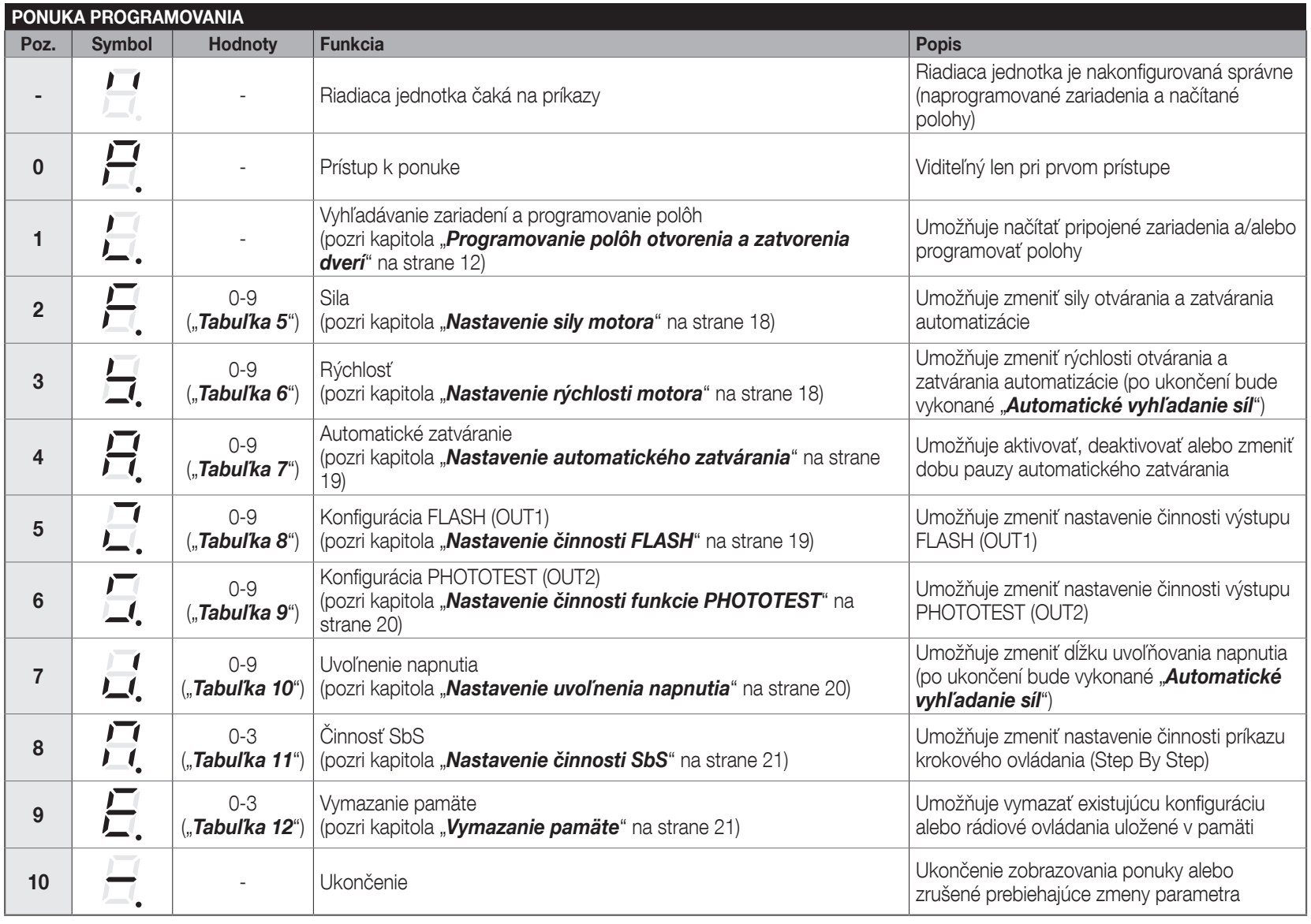
Item 1 is for learning devices and positions, item 9 is for clearing the memory. Factory settings are shown in bold.
| Position – parameter and purpose | Values |
|---|---|
| 2 – Force Range of adjustment levels, not a value in newtons. | 0 – minimum 1–4 – increasing levels 5 – factory setting 6–8 – increasing levels 9 – maximum |
| 3 – Speed Values are opening / closing speeds in %. Force learning is required after changing the setting. | 0 – 40 / 40 1 – 50 / 50 2 – 50 / 75 3 – 50 / 100 4 – 75 / 50 5 – 75 / 75 6 – 75 / 100 7 – 100 / 50 8 – 100 / 75 9 – 100 / 100 |
| 4 – Automatic closing Pause after opening before automatic closing. | 0 – off 1 – 10 s 2 – 20 s 3 – 30 s 4 – 40 s 5 – 50 s 6 – 60 s 7 – 70 s 8 – 80 s 9 – 90 s |
| 5 – FLASH (OUT1) The function must match the load actually connected. Lock/magnet: use only a suitable electromagnetic type. | 0 – beacon, 12 V DC; for ELDC, max. 200 mA 1 – gate status: output active while moving 2 – electric lock, 3 s pulse 3 – electric strike during opening 4 – magnet active when the gate is closed; releases and delays 3 s before opening 5 – lighting during movement and for 1 minute afterwards 6 – radio channel 1 7 – radio channel 2 8 – radio channel 3 9 – radio channel 4 Modes 1–9: 24 V DC, max. 10 W. If channel 1–4 is assigned to an output, the motor will not execute its original command. |
| 6 – PHOTOTEST (OUT2) Observe the TX limit during testing. If you reprogram the output, it will no longer perform the photocell test function. | 0 – PHOTOTEST, max. 15 mA 1 – gate status: output active while moving 2 – electric lock, 3 s pulse 3 – electric strike during opening 4 – magnet active when the gate is closed; releases and delays 3 s before opening 5 – lighting during movement and for 1 minute afterwards 6 – radio channel 1 7 – radio channel 2 8 – radio channel 3 9 – radio channel 4 Modes 1–9: 24 V DC, max. 3 W. After selecting 0, teach the devices again. A channel assigned to an output does not control the motor. |
| 7 – Mechanical stress relief A short reverse movement relieves tension after stopping. This is not a lift distance in centimetres. After changing this setting, force learning is required. | 0 – off 1 – minimum 2 – intermediate level 3 – factory setting 4 – intermediate level 5 – medium setting 6–8 – higher intermediate levels 9 – maximum |
| 8 – Step-by-step command (SbS) Changes the sequence for the button and the corresponding radio command. | 0 – open → stop → close → open 1 – open → stop → close → stop 2 – common input: a command during opening will not close the gate; after it is fully open, the next command closes it 3 – semi-automatic opening; closing while the command is held |
Set the force only as high as needed for proper movement. A high setting must not be used to compensate for friction or a faulty spring. After setting, check the obstruction protection and impact forces.
Remote controls and pairing
The receiver is built in. Compatible remote controls MYGO4, ON2E and INTI2 are paired using the RADIO button. The memory holds 90 entries: in mode 1, one entry per transmitter; in mode 2, one per button.
Mode 1 – all buttons
- Hold RADIO until the LR LED lights up, then release it.
- Within 10 s hold any button on the one-way remote control. After LR flashes three times for a long duration, release the button.
- You can save another transmitter within the next 10 s. Press RADIO briefly to end reception.
| Button in mode 1 | Command |
|---|---|
| 1 | Step-by-step command (SbS) |
| 2 | Partial opening |
| 3 | Open |
| 4 | Close |
Mode 2 – one button
Press and release RADIO n times, according to the command number. The LR LED will repeat the count. Within 10 s, save the selected remote-control button as described above; repeat the procedure for each additional button.
| Number of times to press RADIO | Command |
|---|---|
| 1 | SbS |
| 2 | Partial opening 1 |
| 3 | Open |
| 4 | Close |
| 5 | Lighting – timer |
| 6 | Lighting – on/off |
LR flashes once for a remote control that is already stored, 6 times for incompatible coding, and 8 times when the memory is full.
Adding a remote control using an existing one
Carry out the procedure within range of the operator and only when learning is enabled. The new remote control will inherit the assignment of the original one.
- On the new remote control, hold down the required button at least 8 s and release it.
- On the original remote, slowly press and release the stored button three times.
- On the new remote, press and release the same button once, as in the first step.
Erasing the radio memory
Erases all stored remotes. Keep holding RADIO even after the LR LED lights up and then goes out. When it flashes again, release exactly on the third flash. Five long flashes confirm success. Erasing the radio memory is a separate operation, distinct from resetting the control unit.
Locking or unlocking the radio memory
- Disconnect the mains power and the backup power supply. Hold RADIO and restore the power supply.
- After 5 s, LR flashes slowly twice. Release RADIO.
- Within 5 s, use short presses of RADIO to select: LR off = unlocked; LR on = locked.
- Two slow flashes 5 s after the last press confirm that the procedure is complete.
A locked memory prevents pairing, copying, and erasing remotes; it does not mechanically lock the gate.
Erasing the memory and restoring settings
Select position 9 – Erase memory. Selecting a value starts the corresponding erase operation; it is not merely a tentative selection. Before proceeding, decide what you want to keep.
| Value | What is erased |
|---|---|
| 0 | Custom parameters are restored to factory settings; positions and remotes are retained. |
| 1 | Configuration, learned devices, and positions; remotes are retained. |
| 2 | Only the remotes in the radio memory. |
| 3 | The entire memory, including configuration, positions, and remotes. |
After erasing the configuration or positions, teach the gate and test it. After erasing the radio memory, pair the remotes.
Troubleshooting
The display indicates E1–E8. The corresponding number of short flashes may also be shown by the warning light or interior light; the sequence repeats after a 1 s pause.
| Indicator | Cause and next step |
|---|---|
| E1 / 1 flash | Closing / position Position learning is not complete. Perform position learning. |
| E2 / 2 flashes | Photocells Remove the obstruction, check the alignment and photocell wiring. Activation when an obstruction is detected is expected. |
| E3 / 3 flashes | Force limit Check the gate's movement by hand, springs, obstructions, and friction. Do not automatically increase the force; check the mechanics and safety. |
| E4 / 4 flashes | STOP Check the STOP safety device. |
| E5 / 5 flashes | Parameter memory Wait at least 30 s, then try issuing a command. If the error persists, arrange for servicing. |
| E6 / 6 flashes | Operation limit Wait a few minutes for it to cool down. Check operating load and gate resistance. |
| E7 / 7 flashes | Internal electrical circuit Disconnect all power supplies for a few seconds. If the error persists, have a service technician check the control board and motor wiring. |
| E8 / 8 flashes | Continuous command Remove the continuously active command, such as a stuck button or relay; check Step-by-Step. |
| LED / indication | Meaning and check |
|---|---|
| OK – 1 green flash/s | Normal operation; two quick green flashes indicate an input change. |
| OK off | Check the mains supply and fuses. Before replacing a fuse, identify and eliminate the cause of the fault. |
| STOP on / off | On = STOP not activated; off = check the STOP device. |
| Interior light flashes | Automatic force learning has not yet been completed; complete the learning procedure. |
| Remote lights up, but the gate does not respond | Check pairing, coding, and the status of the radio memory. |
If a safety device is faulty, do not use the automatic system in normal operation. Safely disengage the gate and arrange for repairs. Replace a fuse only with one of the same type and rating; never bypass it.
PS124 backup battery
PS124 is fitted in the dedicated compartment in the drive unit and connected to the designated connector as shown in the installation PDF. Connect it only after completing the mechanical installation, wiring, and programming. The battery remains a source of voltage even when the mains power is disconnected: before working on the unit, disconnect the mains power and PS124. The number of movements possible during a power failure depends on the battery condition, temperature, and gate resistance.
Disengaging and operating the gate manually
Disengage the gate only when it is stationary. If a spring is faulty or the gate is unbalanced, a released gate may drop uncontrollably; secure it and call a technician. If the garage can only be accessed through this gate, arrange in advance for an external release suitable for that specific gate.
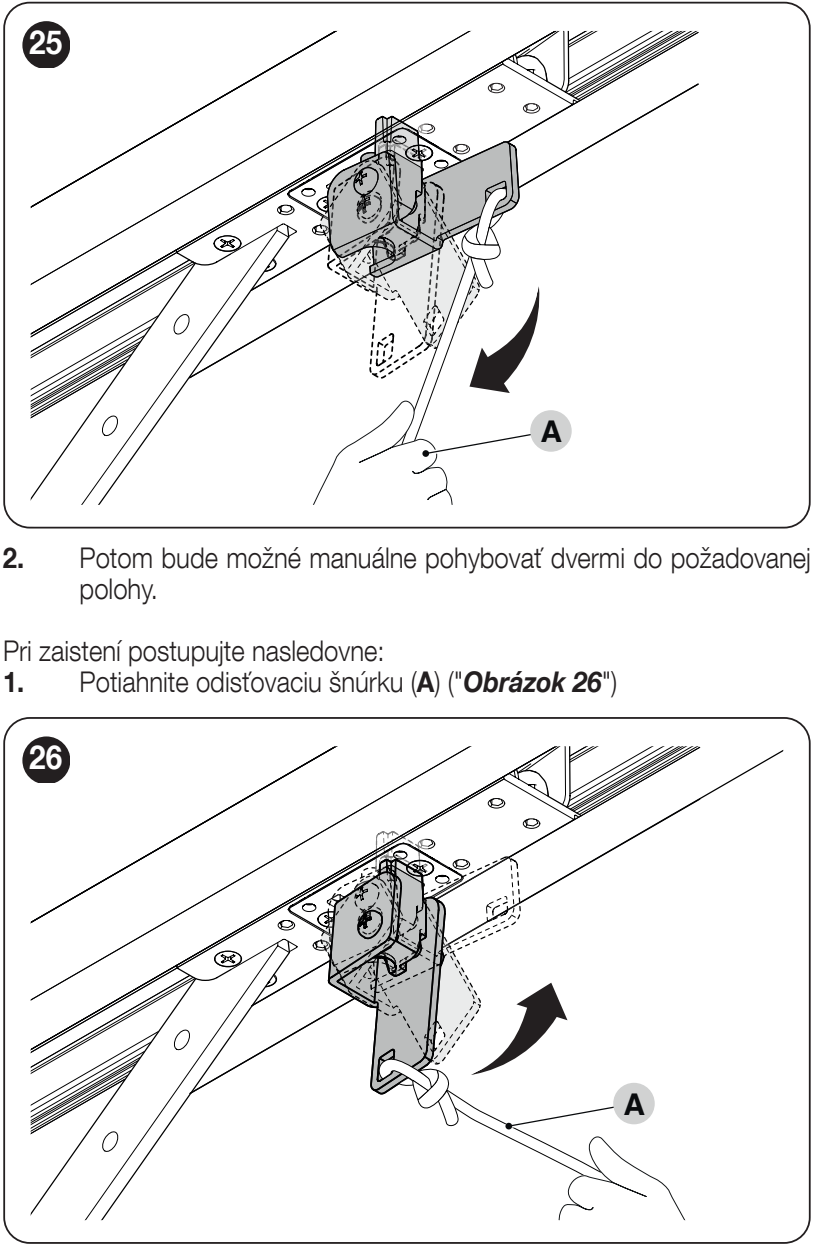
- Pull release cord A. The trolley disengages, and you can safely move the gate by hand.
- To re-engage it, pull cord A again as shown in the second picture.
- Move the gate by hand until the lower and upper parts of the trolley align and engage. Check that it is engaged before issuing an electrical command.
Maintenance and safe operation
Schedule an inspection no later than every 6 months or after 3,000 cycles, whichever comes first. Disconnect all power sources before maintenance. Check the rail, belt, trolley, brackets, corrosion, springs and gate balance; replace worn parts. After the inspection, repeat the test of the safety devices and forces.
Keep the controls out of reach of children. Do not enter the gate’s path while it is moving. If you notice unusual noise, jerking or a change in the gate’s balance, stop operating it and contact service. Take electronic equipment and batteries to an appropriate collection point, not to general waste.
SPIDO600 Technical Specifications
| Parameter | Value |
|---|---|
| Application | Electromechanical garage door operator for residential use. |
| Control unit | Built-in SPA600 with display and PHOTOTEST. |
| Mains power supply | 230 V AC ±10%, 50/60 Hz; protective earth conductor. |
| Motor | 24 V DC; the entire assembly is powered from a 230 V AC mains supply. |
| Maximum / minimum force | 600 / 300 N. |
| Rated / maximum power consumption | 150 / 350 W. |
| Maximum speed | 0.20 m/s; actual travel depends on the settings and load. |
| Cycles/day | 40; also observe the other operating limits. |
| Continuous operation | Maximum 4 minutes. |
| Ingress protection / temperature | IP40; −20 to +55 °C. |
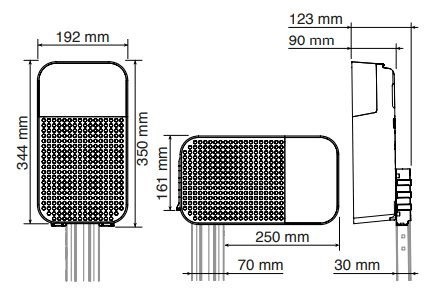
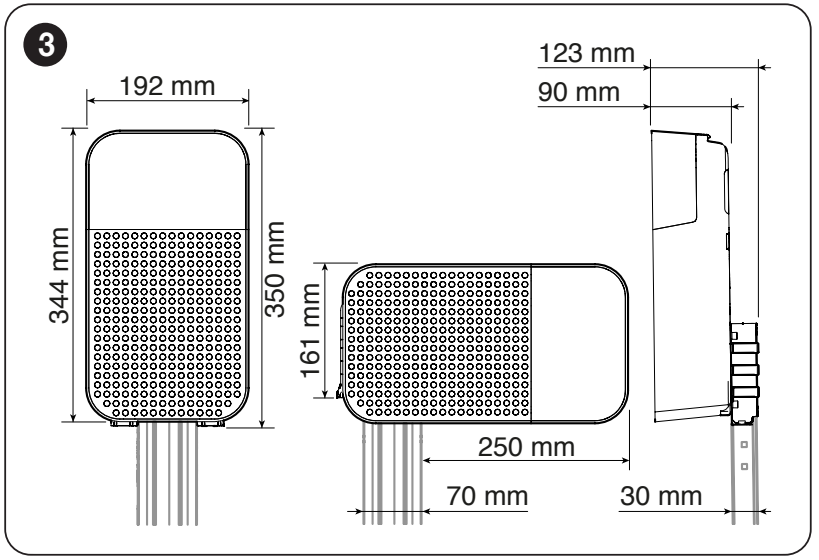
| Drive head dimensions | 192 × 344 × 90 mm; see drawing for mounting details. |
| Motor weight | 3.8 kg; not the weight of the complete kit. |
| Auxiliary accessories | 24 V DC, tolerance −30% / +50%, max. total 100 mA; polarity and terminals. |
| Backup power | PS124 – optional. |
| Lighting | Built-in LED. |
SPIDO600 programming – video
The video instructions supplement the steps above; always check the connections against the terminals on your control board.
Illustrated SPIDO600 quick installation guide (PDF). See the installation manual below for the full safety and programming instructions.
How can I order this item?
Choose the option that suits you:
- order online: use the buy button to add the goods to your shopping cart (you will find the buy button here in the product variants table).
- order by email: place your order at [email protected]






