NICE RBSKITSAFE1 internal photocell and lighting mount under the cover for Robus RBS operators
NEW| Product availability: | within 3 days | We usually ship the goods within 3 days. |
|---|
within 3 days
€41.32 including VAT
| Weight |
|---|
| 0,20 kg |
Description of NICE RBSKITSAFE1 internal photocell and lighting mount under the cover for Robus RBS operators
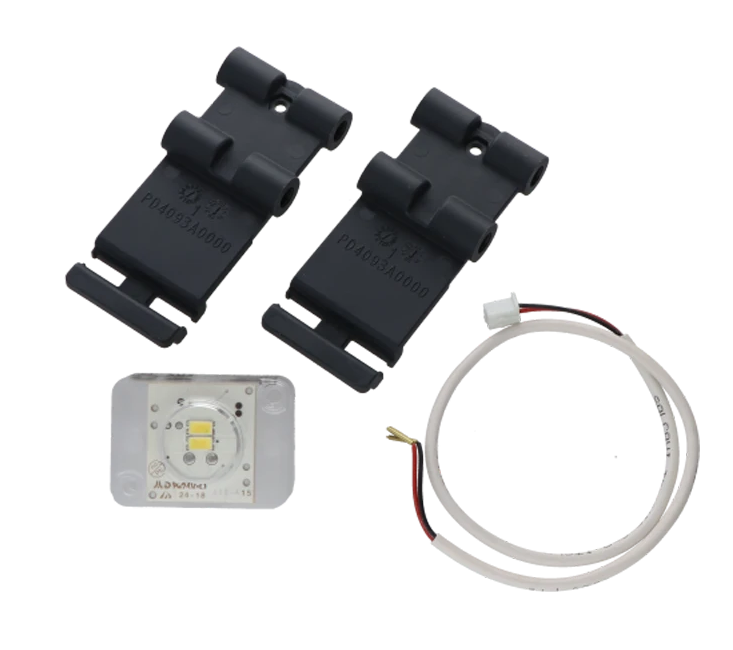
Kit NICE-RBSKITSAFE1 is designed for the RBS600HS, which has transparent windows in the cover ready for fitting reflective photocells EPMOR or EPMOB. The photocells are therefore installed directly under the cover, without the need for separate posts or other support elements. This makes installation quicker and gives the gate a clean, attractive appearance.
The ROBUS600HS drive is supplied without mounting brackets for accessories, so these must be purchased separately.
Package Contents
- plastic photocell holder
- ELMM supplementary module with LED for reflective photocells EPMOR or wired photocells EPMOB
- connection cable
Photocell Installation
1. Open the locking hook (A) using the supplied key.
2. Loosen the screws.
3. Remove the cover.

4. Insert the holder (D) into the pins (E).

Photocell Installation EPMOR is shown below. The procedure described also applies to the installation of the EPMOB.
5. Remove the covers (F) by loosening the screws (G).

6. Remove the photocell (H) by loosening the screw (I) and removing the nut (L).

7. Attach the photocell to the bracket (M) using the same screw and nut,
that you removed earlier.
CAUTION! Pay attention to the direction in which the photocell is installed.

8. Connect the device.

CAUTION! Before proceeding with final fastening,
check that the photocell is aligned with the reflector unit
(EPMOB or EPMOR).

9. Secure the photocell permanently to the mounting bracket.
Take care not to apply excessive pressure to the holder.

10. Connect the ELMM LED light (N).
This LED light illuminates the passage and also enables diagnostics through signaling.

11. Secure the LED light using the clip (O).

12. Connect the wires according to the markings.

13. Replace the drive cover, tighten the screws, close the drive's locking hook and remove the supplied key.
How can I order this item?
Choose the option that suits you:
- order online: use the buy button to add the goods to your shopping cart (you will find the buy button here in the product variants table).
- order by email: place your order at [email protected]






