Drive kit for sliding gates up to 1000 kg NICE Rox ROX1000 (B)
| Product availability: | In stock | We normally dispatch goods within 24 hours. |
|---|
In stock
€585.59 including VAT
| Weight |
|---|
| 11 kg |
Description of Drive kit for sliding gates up to 1000 kg NICE Rox ROX1000 (B)
NICE Rox ROX1000 is the successor to the ROBO 1000 gate opener
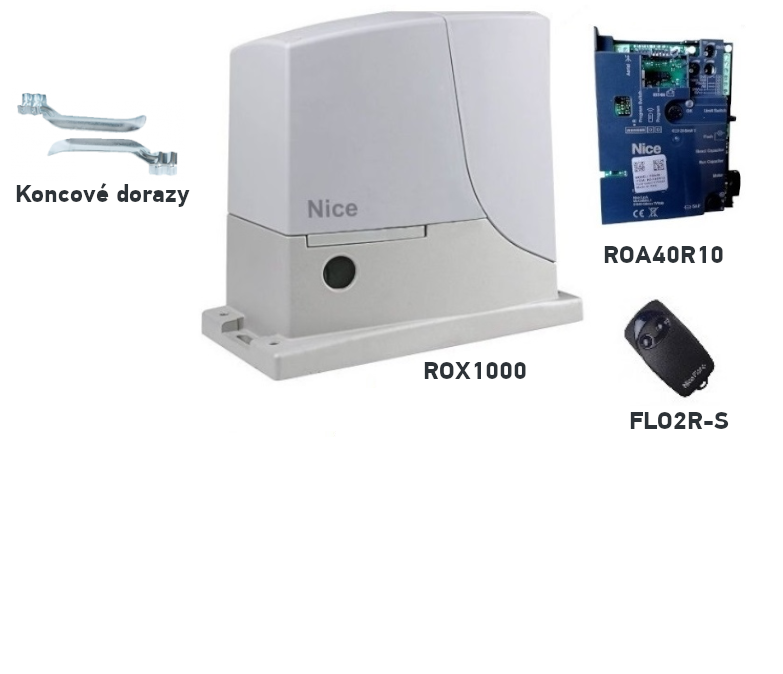
NICE Rox ROX1000 gate opener is designed for sliding gates weighing up to 1000 kg and a passage width up to 8 m (recommended maximum length: 5m). It has an electromechanical stop switch. The gate opener is non-reversible.
Key features of the ROX 1000 gate opener: The ROX 1000 is a 230V gate opener that is easy to install and delivers high power.. The gate opener features manual limit-position adjustment, limited options for connecting additional devices, and limited programming options. It is suitable, for example, for a holiday home or a location where integration with a smart home system is not required, and where what you're looking for is more of a workhorse that opens and closes the gate. It has one speed and manual force adjustment. It does not support partial opening. It is manufactured as a replacement for older gate openers (NICE ROBO).
All accessories from NICE ROBO can be used with NICE ROX gate openers..
So, if you are replacing a NICE ROBO gate opener with a NICE ROX, you can keep all the existing accessories:
- photocells
- warning light
- key switch
- all transmitters
Another advantage is the integrated receiver, which uses rolling-code technology but can also accept older fixed-code remotes. It therefore works with FLOR coding (FLO2R-S, FLO4R-S), FLO (FLO2, FLO4) and SMILO (SM2). This makes it suitable when you have a large number of fixed-code remotes.
| Set NICE-ROX1000-B contains: | ||||
|---|---|---|---|---|

|
1 × | NICE Rox ROX1000 Gate Opener | NICE-ROX1000-A | |
|
NICE Rox ROX1000 gate operator with ROA40R10 control unit and built-in receiver, suitable for gates weighing up to 1000kg, with a passage width of up to 8 m (recommended maximum length 5m). |
Details 
|
|||

|
1 × | NICE Flo2R-s remote control | NICE-FLO2R-S | |
|
Two-button remote control for operating a gate automatically from a distance. You can use it to control two devices or send two different commands to one device. |
Details
|
|||

|
1 × | Installation Manual |
Download
|
|
|
Installation manual with illustrated wiring diagrams and instructions for programming and pairing remote controls. |
||||
NICE ROX 1000 Technical Specifications
| Power supply | 230 V - 50/60 Hz |
|---|---|
| Power consumption | 350 W |
| Protection rating | IP44 |
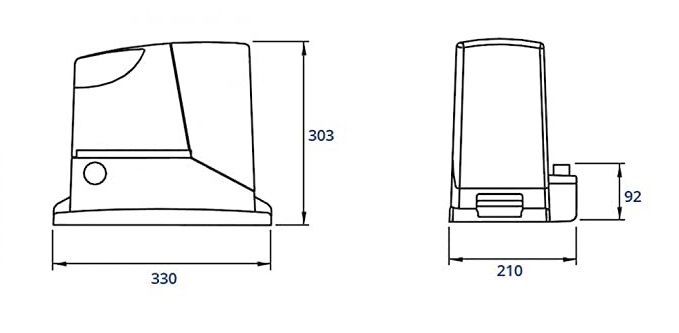
| Weight | 10 kg |
| Speed | 8.5 m/min |
| Force | 800 N |
| Max. gate weight | 1000 kg |
| Operating temperature | -20°C to +50°C |
| Control unit | ROA40R10 |
Manuals and documents for download
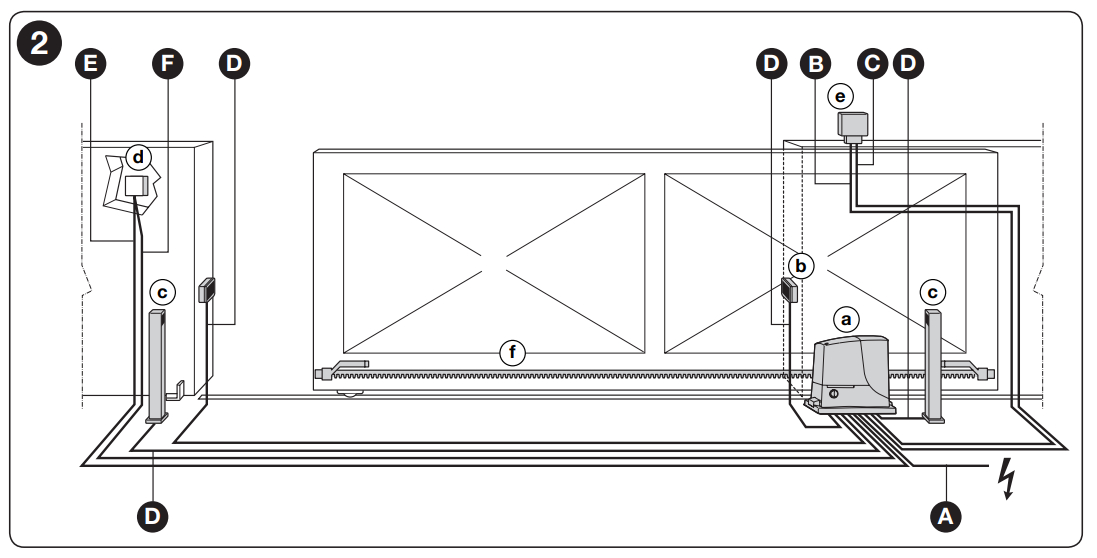
Types of electrical cables
| Connection | Cable type | Maximum length | |
|---|---|---|---|
| A | POWER SUPPLY | 3 x 1.5 mm² | 30m * |
| B | WARNING LIGHT WITH ANTENNA | 1 cable: 2 x 1.5 mm² 1 RG58-type coaxial cable |
10m 10m (recommended < 5m) |
| D | PHOTOCELLS | 1 cable: 2 x 0.25 mm² (TX) 1 cable: 4 x 0.25 mm² (RX) |
30m 30m |
| E-F | KEY SWITCH | 2 cables: 2 x 0.5 mm² ** | 20m |
** If the power supply cable is longer than 30 m, a cable with a larger cross-section is required, for example 3 x 2.5 mm², and a safety earth connection must be provided near the drive.
** Two 2 x 2.5 mm² cables can be replaced by a single 4 x 0.5 mm² cable
Connecting to the control unit
Adding or removing devices
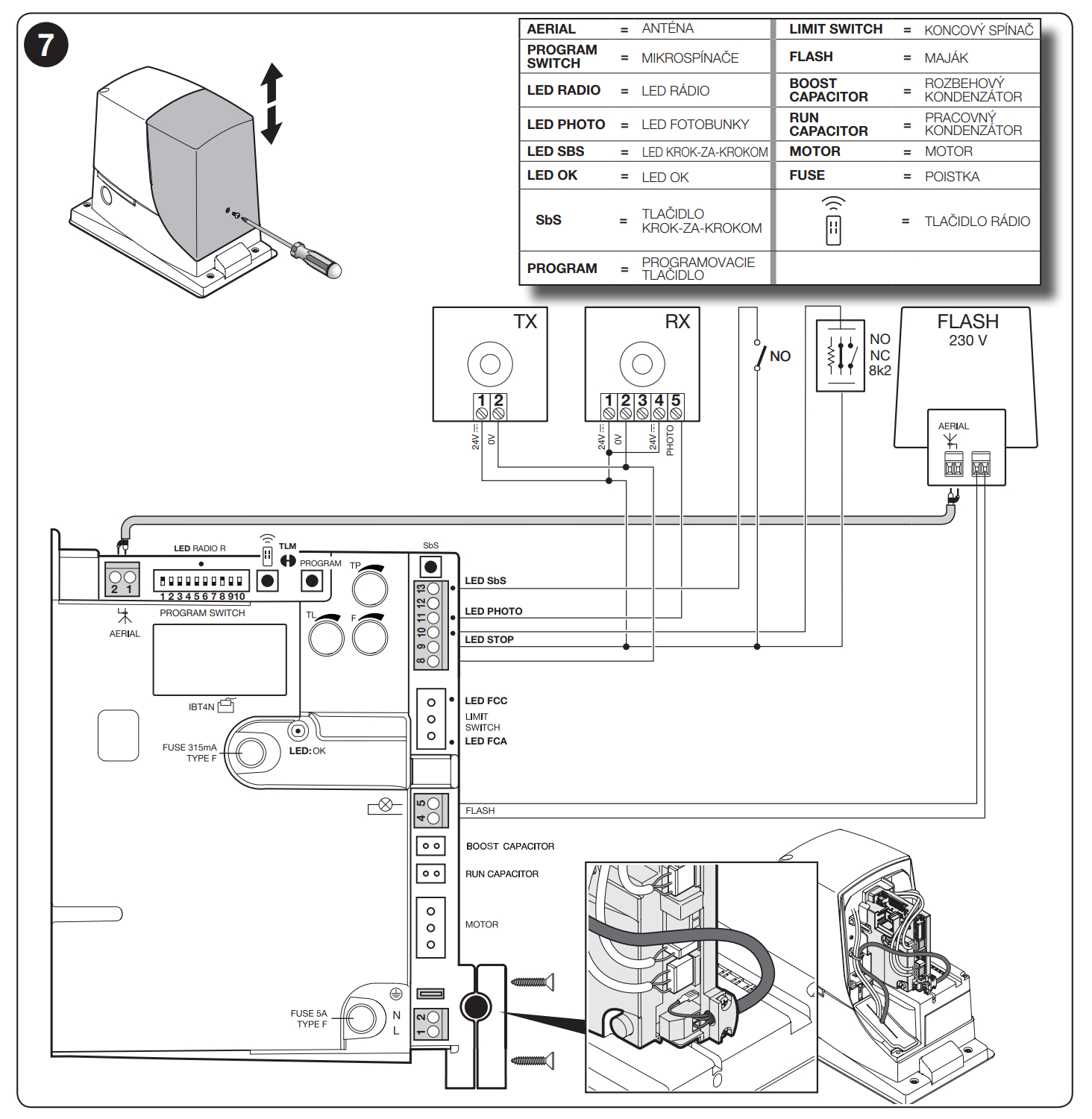
Devices can be added to or removed from the automation system at any time; various types of devices can be connected to the STOP input, as described in the following sections. After making changes to the configuration of the automatic gate drive, the device learning procedure must be repeated.
STOP input
An input that immediately stops the manoeuvre, followed by a brief reversal.
Devices with normally open (NO) or normally closed (NC) contacts, or devices with a constant resistance output of 8.2 kΩ, such as safety edges, can be connected to the input. The control unit detects the type of device connected to the STOP input during the device learning phase.
If a change from the learned state is detected, the drive stops the manoeuvre and briefly reverses. With suitable settings, more than one device, including devices of different types, can be connected to the STOP input:
- Multiple NO devices can be connected in parallel, with no limit on the number.
- Multiple NC devices can be connected in series, with no limit on the number.
- Multiple devices with a constant resistance of 8.2 kΩ can be connected in a cascade, with a single 8.2 kΩ terminating resistor.
- NO and NC devices can be combined by connecting the two contacts in parallel, but an 8.2 kΩ resistor must be added to the NC contact (this also allows three devices to be combined: NO, NC and 8.2 kΩ).
If the STOP input is used to connect safety devices, only devices with a constant resistance output of 8.2 kΩ guarantee Category 3 fault tolerance in accordance with EN 13849-1.
Photocells
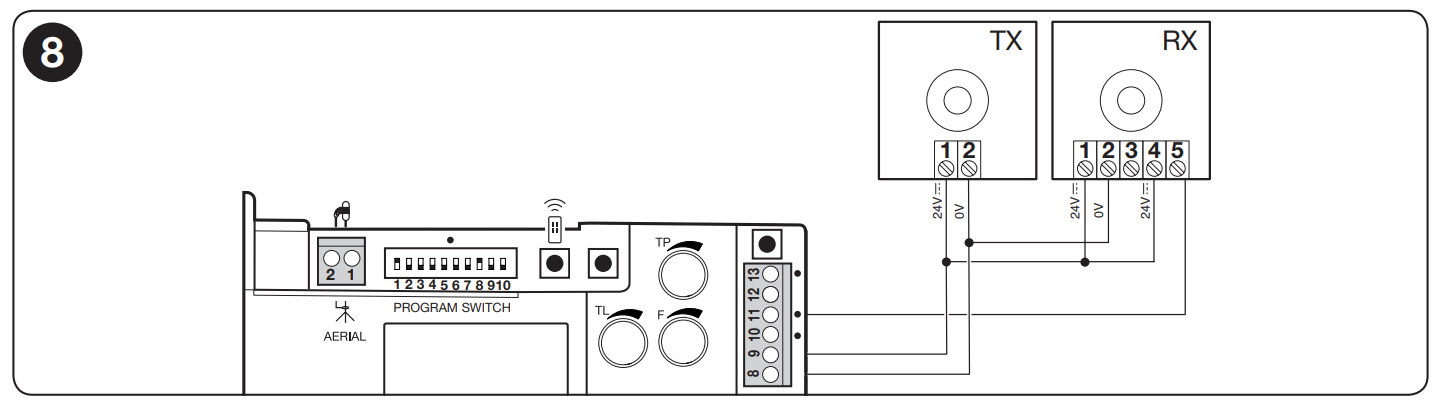
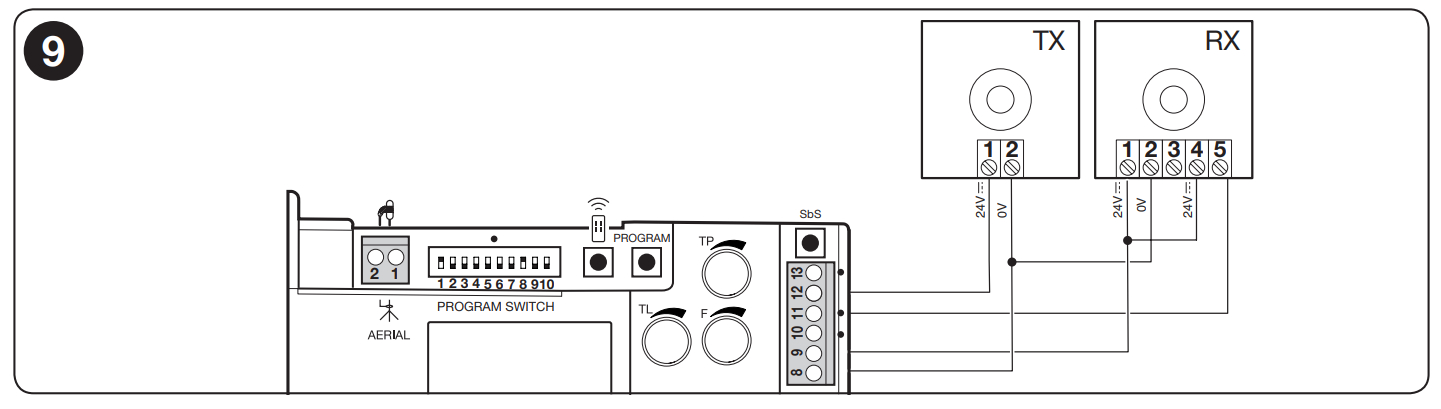
To add a pair of photocells, proceed as follows: Connect the power supply to the receivers (RX) directly to terminals 8 and 9.
The transmitters’ wiring method depends on whether you want the photocells to operate with the photocell test function enabled or disabled.
The photocell test is a control unit function that increases the reliability of safety devices and enables Category 2 compliance with EN 13849-1 for the control unit and safety photocells assembly.
When a manoeuvre is activated, the associated safety devices are checked, and the manoeuvre starts only if everything is in order.
If the test fails (for example, a photocell is blinded by sunlight or there is a short circuit in the cables), the control unit treats this as a fault and the manoeuvre is not carried out.
To add a pair of photocells, connect them as described below.
Wiring without the photocell test function:
Connect the receivers and transmitters directly to the control unit accessory output (terminals 8 and 9).
Wiring with the photocell test function:
Connect the receivers directly to the control unit accessory output (terminals 8 and 9). The photocell transmitters are not powered from the accessory output, but from the photocell test output between terminals 8 and 12. The maximum current draw from the photocell test output is 100 mA.
To use the photocell test function, synchronisation must be enabled as described in the photocell installation instructions.
How can I order this item?
Choose the option that suits you:
- order online: use the buy button to add the goods to your shopping cart (you will find the buy button here in the product variants table).
- order by email: place your order at [email protected]






