NICE Tub TUB3500 (A) - standalone operator for sliding gates
| Product availability: | to the question | The product may not be available, contact us for more information. |
|---|
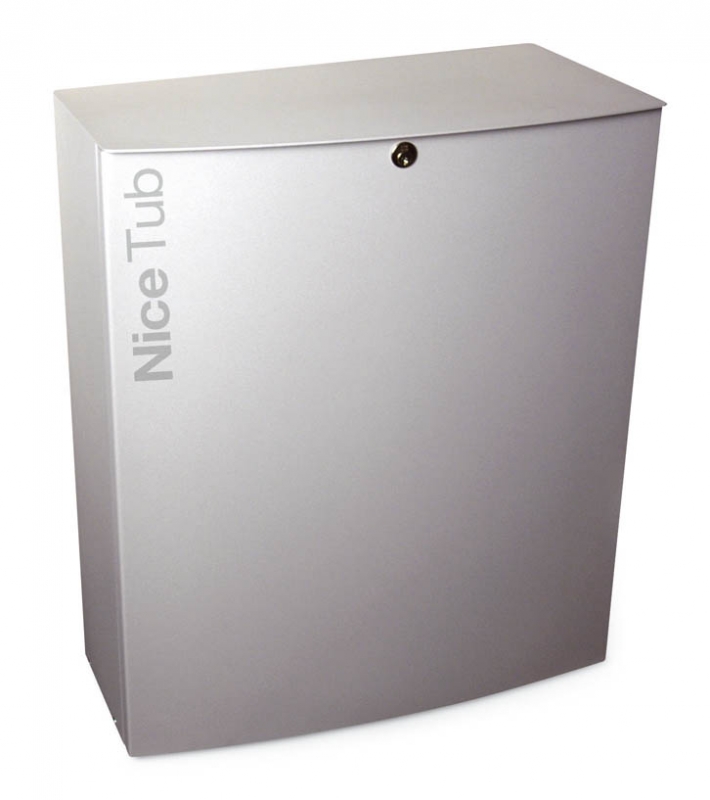
to the question
€2,397.54 including VAT
| Weight |
|---|
| 60 kg |
Description of NICE Tub TUB3500 (A) - standalone operator for sliding gates
NICE TUB3500 is a standalone industrial operator for a sliding gate weighing up to 3,500 kg and up to 30 m. It has a 400 V AC three-phase motor, a built-in control unit Mindy A500, a mechanical brake, fan cooling and a pinion for module 6 rack. It is non-reversible; in the event of a power failure, the gearbox can be released and the gate moved manually.
When to choose the NICE TUB3500
Designed for large, heavy sliding gates at industrial sites. When selecting an operator, consider the gate weight, actual leaf length, resistance to movement, wind exposure, and the number of opening and closing cycles. The gate must move smoothly by hand, must not move off on its own, and must have sturdy mechanical stops in both directions.
| Gate weight | Up to 3,500 kg. |
|---|---|
| Gate length | Up to 30 m; the maximum number of cycles per hour decreases as the gate length increases. |
| Power supply | 3~ 400 V AC ±10%, 50 Hz; protective earthing is required. |
| Rack | Module 6. The module 4 rack used with smaller operators is not interchangeable. |
Cycles per hour by gate leaf length
| Gate leaf length | Max. cycles/hour |
|---|---|
| Up to 5 m | 30 |
| Over 5 m up to 10 m | 15 |
| Over 10 m up to 15 m | 10 |
| Over 15 m up to 20 m | 7 |
| Over 20 m up to 25 m | 6 |
| Over 25 m up to 30 m | 5 |
One cycle consists of a complete opening and closing. When designing the system, comply with the dimensional, weight and operating limits together; the maximum weight alone does not confirm suitability for a particular gate. The manufacturer also specifies for the TUB3500 max. 200 cycles per day and 30 minutes of continuous operation. This does not override the cycles/hour limits or the single-run time set in the A500.
When replacing an existing operator, also check the accessories, wiring method and available installation space.
Built-in Mindy A500 control unit
The Mindy A500 is part of the TUB3500 operator. It has 10 function DIP switches, TL, TP and F trimmers, an input for mechanical limit switches, a photo-test function and an older connector for FLOXI family receivers. The wiring instructions below apply to this board; if the control unit has been replaced, follow the unit that is installed.
The option to configure the control unit itself for a different power supply does not turn this motor into a single-phase 230 V operator. Connect the TUB3500 according to its rating plate and the wiring diagram for the three-phase 400 V version.
What the operator includes and what needs to be added
- Motor with gearbox, built-in control unit, mechanical brake and fan.
- Pinion module 6, 18 teeth.
- Manual release mechanism for moving the gate by hand.
- A complete automation system requires a suitable rack, anchoring, mechanical stops and safety devices selected for the specific gate. Remote control operation requires a compatible receiver and transmitters.
When you place your order, we’ll match the mounting hardware, rack and accessories to your specific setup. The operator alone is not a complete automatic gate system.
Dimensions and installation space
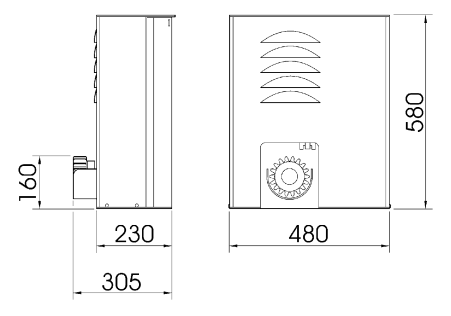
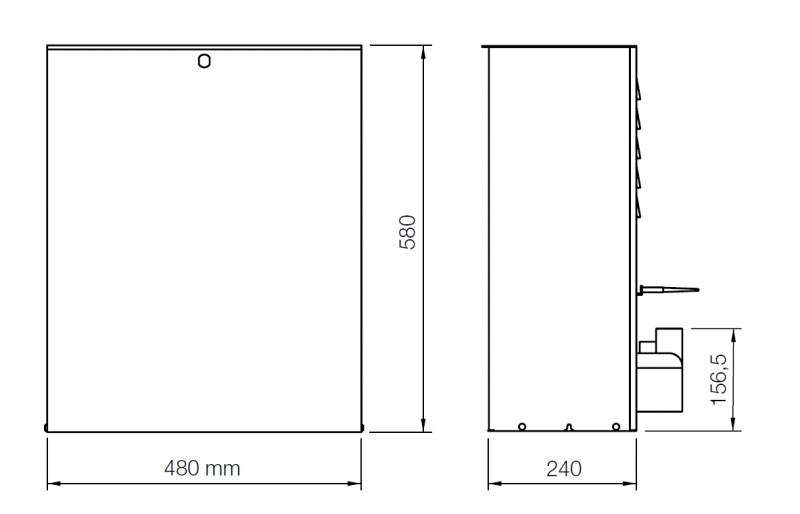
The drawing specifies a height of 580 mm, a width of 480 mm, a body depth of 230 mm and an overall dimension to the pinion of 305 mm. The pinion axis is shown in the drawing at a height of 160 mm. Dimensions are in millimetres. Keep the access door, manual release, limit switch and electrical control unit accessible.
Installing the foundation, motor and rack
Installation, wiring and testing must be carried out by a qualified technician. Before carrying out any work, disconnect all power supplies and secure them against being switched on. The foundation must be solid, level and protected from flooding. When preparing conduit runs, prevent water and condensation from entering the control unit.
- For an existing suitable foundation, use anchors appropriate for the substrate. For a new foundation, prepare the excavation and conduit runs; determine the foundation dimensions according to the installation location.
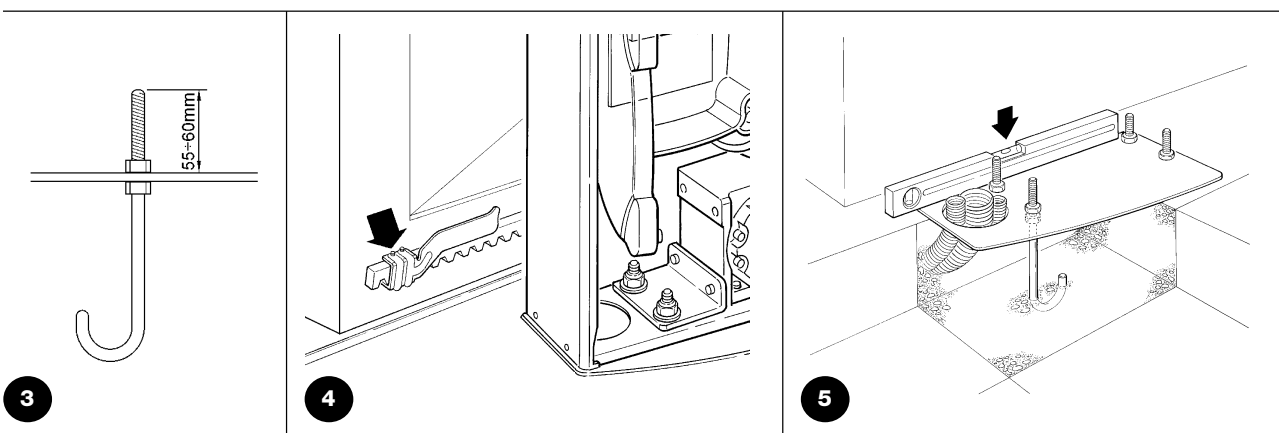
- Position the base plate with its four anchors parallel to the gate leaf and level. The anchor detail specifies a thread projection of 55–60 mm. Allow the concrete to cure completely.
- Place the motor on the plate, align it with the gate leaf and secure it with four nuts and washers. Release the gearbox before proceeding.
- Install the module 6 rack section by section along the entire travel path. Maintain a 2–3 mm clearancebetween the rack and pinion; the gate weight must not be transferred to the operator.
- Move the gate by hand several times. Check for proper meshing, smooth passage over rack joints and consistent clearance along the entire length.
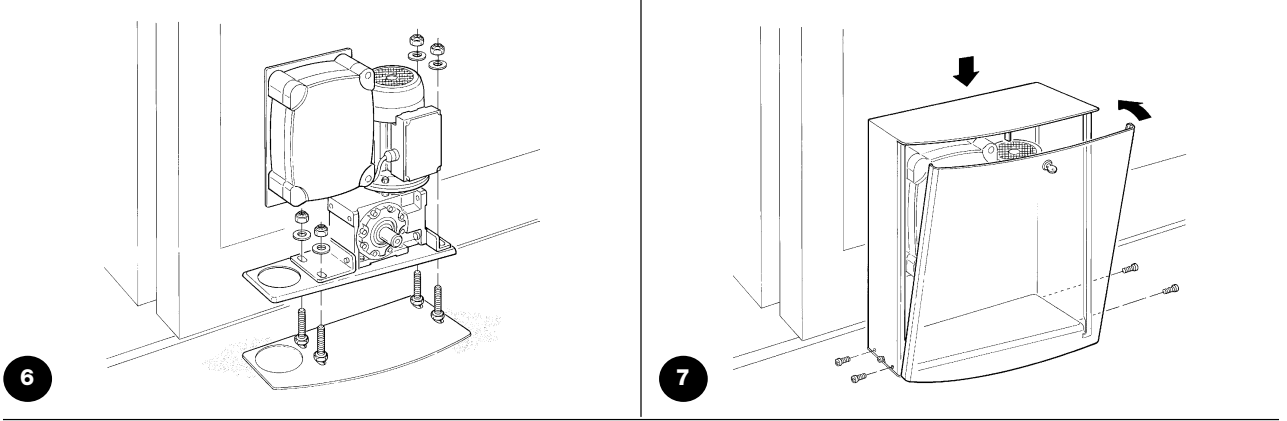
Limit switches and mechanical stops
Two brackets are attached to the rack to operate the limit-switch lever for opening and closing. They do not replace the gate’s fixed mechanical stops. The lever must move freely, and the brackets must act in the correct direction.
After the limit switch is activated, allow for a run-on distance of approximately 2–3 cm. Adjust the brackets so the gate stops safely before reaching the mechanical stops; also check the run-on distance when the motor is warm. During the TUB3500 inspection, the stopped gate leaf should remain approximately 4–5 cm from the fixed stop.
If the run-on distance is longer, a technician will inspect and adjust the mechanical brake. The power supply must be switched off before making adjustments. According to the instructions, first tighten the nut on the shaft by half a turn clockwise; overtightening can lock the motor. Repeat the tests after making the adjustment.
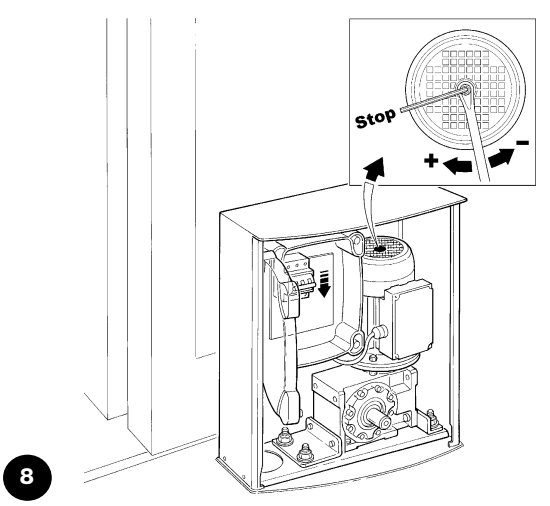
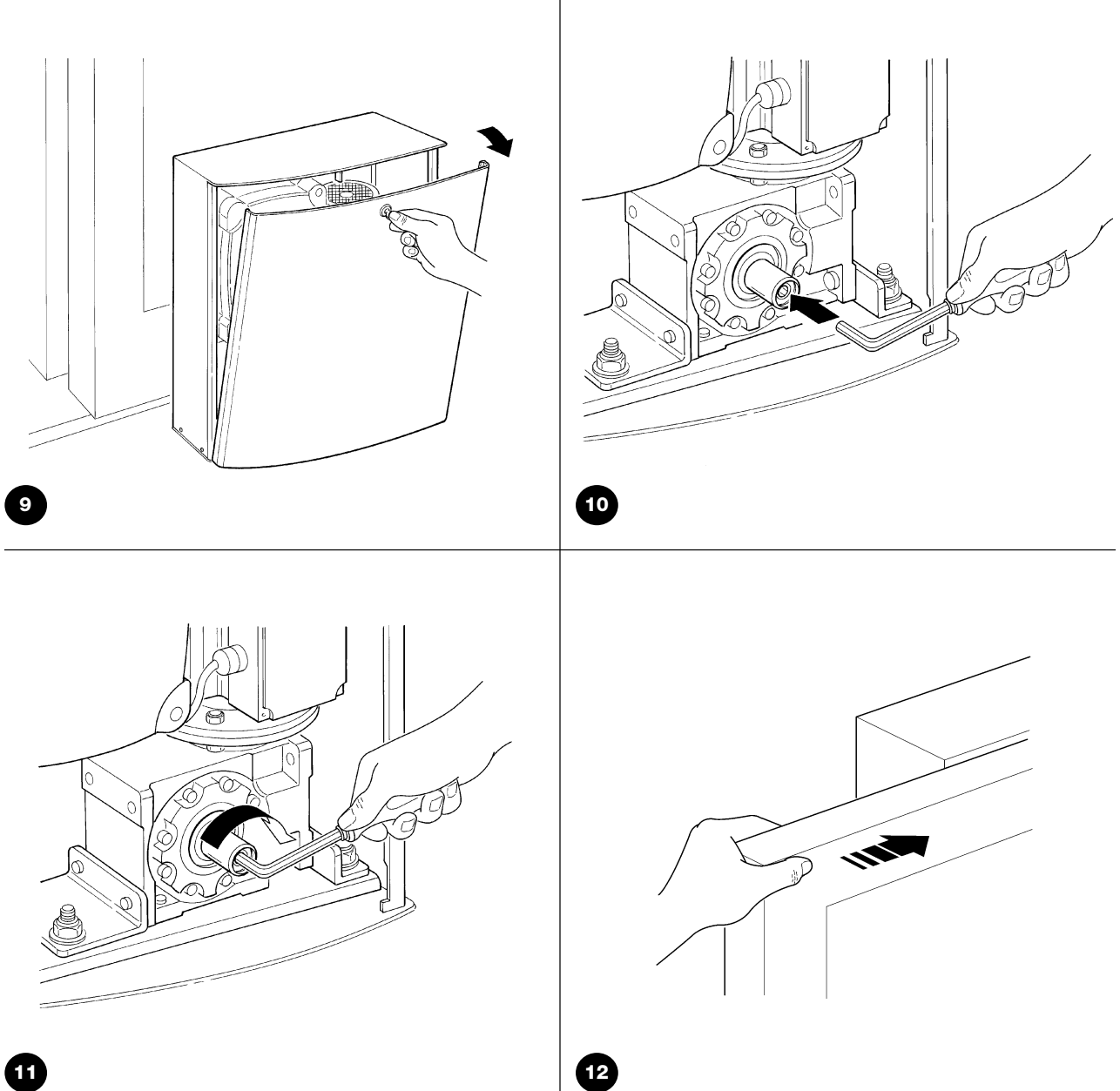
Manual release during a power outage
Only release the drive when the gate is stationary and the power is switched off. Secure the gate leaf to prevent it from moving on its own. When handing over the system, the technician will show you the procedure and provide the keys.
- Use the key to open the drive cover.
- Insert the Allen key into the shaft and fully loosen the inner screw as shown.
- Remove the key and close the cover. You can carefully move the gate by hand.
- To re-engage the drive, follow the procedure in reverse. Check that the gear is engaged and the cover is closed; its safety microswitch must be activated.
Wiring for a typical setup
| Connection | Cable | Length |
|---|---|---|
| Power supply to the drive | 4 × 1.5 mm² | Up to 30 m |
| Warning light | 2 × 1.5 mm² | Up to 20 m |
| Antenna | RG58 coaxial cable | Recommended length: less than 5 m |
| Photocell transmitter TX | 2 × 0.25 mm² | Up to 30 m |
| Photocell receiver RX | 2 cables, 2 × 0.25 mm² each | Up to 30 m |
| Key switch | 2 cables, 2 × 0.25 mm² each | Up to 50 m |
| Fixed / moving safety edge | Depending on the safety edge and interface | Depending on the specific device |
Two 2 × 0.25 mm² cables can be replaced with one 4 × 0.25 mm² cable. For a supply cable longer than 30 m, a technician must specify a larger conductor cross-section and suitable grounding. For low-voltage photocell wiring longer than 30 m, the instructions require shielding grounded only at the control-unit end. Cables must be suitable for the environment; for outdoor installation, the manufacturer specifies, for example, H07RN-F.
A moving safety edge requires a connection that remains functional while the gate leaf is moving. Determine the number of conductors and the interface according to the type of safety edge; the two-core example from an older typical setup is not suitable for every OSE safety edge.
Mindy A500 wiring and terminal voltage
Make connections with the power supply disconnected. Terminals 13–14 and 8–9 provide 24 V AC, so they have no DC +/− polarity. COMMON 15 is the common point for the control inputs; do not confuse it with protective earth (PE). The control contacts are volt-free.
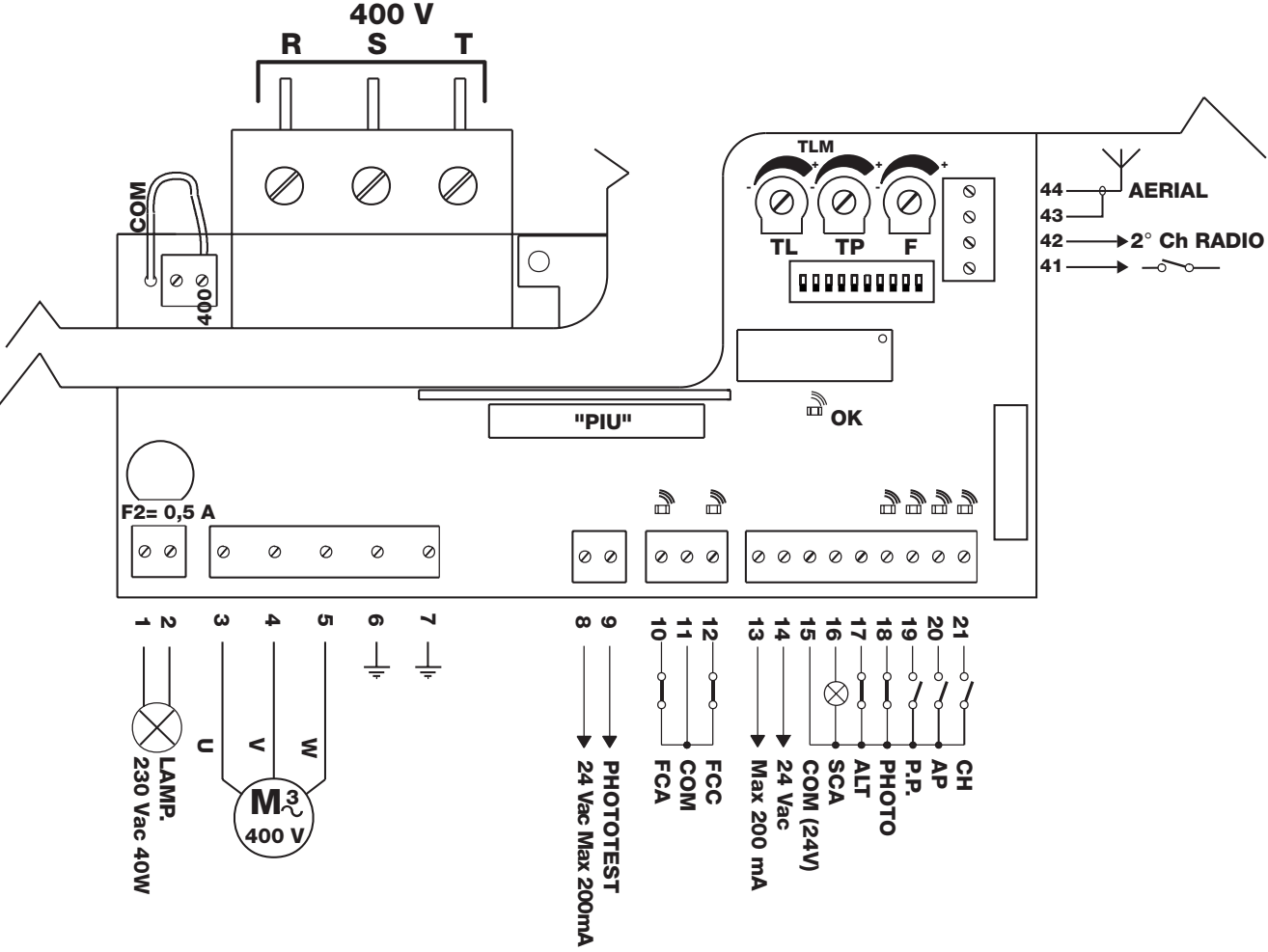
| Terminal | Function and connection |
|---|---|
| Power supply R / S / T | Three-phase 400 V supply via the appropriate protective device; select the A500 power supply as shown in the diagram. |
| 1–2 LAMP | Output for a 230 V AC warning light, max. 40 W; no +/− polarity. |
| 3–4–5 MOTOR | Motor wires U–V–W; these are not DC positive and negative. |
| 6–7 PE | Protective earth for the control unit and motor. |
| 8–9 PHOTOTEST | 24 V AC for the transmitters of tested photocells, max. 200 mA; no +/− polarity. |
| 10 / 11 / 12 | FCA open / common / FCC close. |
| 13–14 accessories | 24 V AC, max. 200 mA; without photocell testing, the instructions allow up to 400 mA. |
| 15 COMMON | Common point for control and safety inputs. |
| 16 SCA | Open-gate indicator between 15–16: 24 V AC, max. 2 W. |
| 17 ALT / STOP | NC safety stop input relative to 15. |
| 18 PHOTO | Photocell NC contact relative to 15 in standard wiring without photocell testing. |
| 19 P.P. | Step-by-step NO contact relative to 15: open – stop – close – stop. |
| 20 AP / 21 CH | NO open / close relative to 15. |
| 41–42 | Volt-free output for the second radio channel, if a receiver is installed. |
| 43–44 antenna | Coaxial cable as shown in the diagram: shield to 43, centre conductor to 44. |
| RADIO / PIU | Older radio receiver connector / PIU expansion card socket. |
NC means the contact is closed at rest; NO means it is open at rest. Multiple NC contacts with the same function are wired in series, while NO control contacts are wired in parallel. Unused NO inputs should be left unconnected. Safety devices required for safe operation must not be bypassed.
Photocells and A500 photocell testing
Original NICE BF can be replaced with relay-type photocells when upgrading the setup NICE EPM. EPM and EPMB do not use the same wiring: The A500 does not have BlueBUS. For this control board, choose photocells with a suitable power supply and a volt-free NC contact.
Choose the photocell range according to the width of the passage. The EPM has a useful range of 15 m; the manufacturer specifies a maximum of 30 m. For a TX–RX distance greater than 10 m, a technician must adjust the jumper +10m on the RX receiver as described in the EPM instructions. Fog, rain and dust can reduce the range by 50%, so the maximum stated range of 30 m does not guarantee reliable coverage across a passage of the same width. For the specific location, choose a suitable model and check how it works.
| EPM wiring | A500 |
|---|---|
| Power supply without photocell testing | TX and RX terminals 1–2 → output 13–14 (24 V AC). With AC, there is no +/− polarity. |
| Safety contact without photocell testing | RX 4 COM → A500 15 COMMON; RX 5 NC → A500 18 PHOTO. RX 3 NO is not used for the safety function. |
| Photocell testing | Power the TX from 8–9 and the RX from 13–14; the contact wiring and any unused PHOTO inputs must be connected as shown in the original diagram below. Set DIP switch 7 to ON. |
| Multiple pairs | Suitable NC contacts can be connected in series for the same safety function. A separate PHOTO2 function, for example to provide protection while opening, is added by the PIU card. |
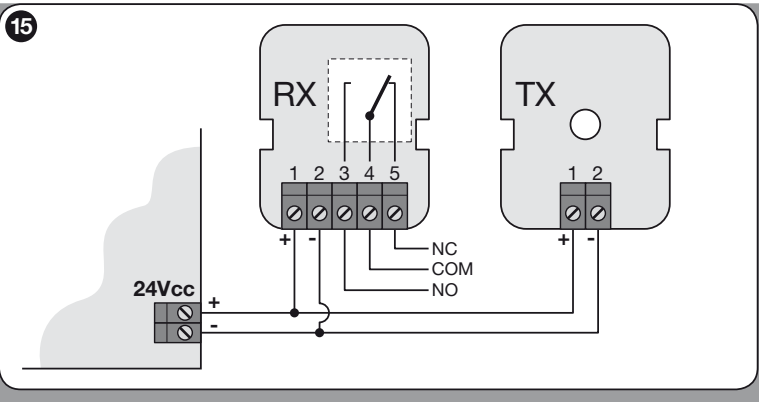
The EPM detail shows the power supply 24 V DC: 1 positive, 2 negative, but the A500 supplies this pair with 24 V AC, with no +/− polarity, as shown in the table above. Relay contact numbers 3 NO / 4 COM / 5 NC remain the same.
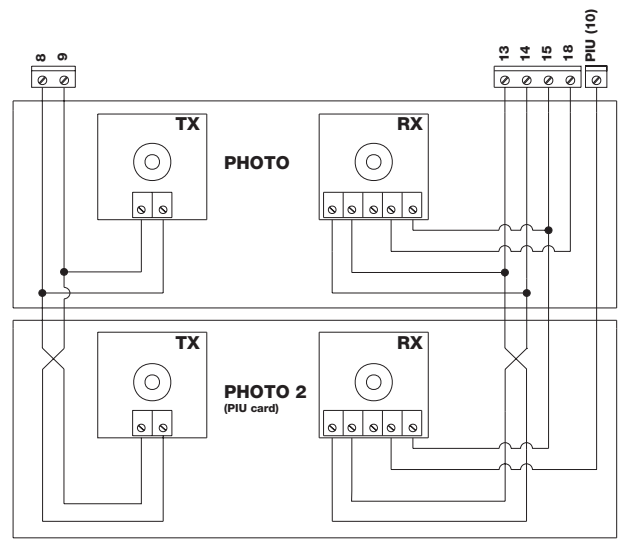
PHOTO2 in the diagram requires a NICE PIU card. When photocell testing is enabled, connect any unused PHOTO input to the photocell test output as specified in the manual 9, not as shown in the diagram for operation without testing. When using multiple EPM pairs, prevent interference between them as instructed in their manual; synchronisation requires an AC power supply, modifying the SYNC setting on the TX, and reversing the power supply wires on one pair. After installation, test each pair individually.
Initial startup and checking the direction
- Move the gate manually to approximately halfway along its travel, re-engage the drive, and check the access door and safety microswitch. For the initial tests, select a hold-to-run mode with additional functions disabled.
- After switching on, the OK LED should flash regularly. With the safety circuit closed, the STOP and PHOTO LEDs are lit; the FCA and FCC LEDs are also lit when the gate is not at an end position. The control NO inputs are not lit when no command is being issued.
- Briefly activate AP / OPEN at terminal 20. The gate should open. If it moves in the opposite direction, switch off the power immediately; a technician should swap the motor wires at terminals 3 and 4 as instructed in the motor manual, then repeat the test.
- Before the gate is fully open, check that the open limit switch stops its movement. If the wrong limit switch activates, switch off the power and check the FCA/FCC assignments; the manual specifies swapping terminals 10 and 12.
- Test a complete opening and closing cycle, bracket settings, run-on, and all safety devices. Only then set the desired operating mode.
A500 settings
| DIP | Function |
|---|---|
| 1 OFF / 2 OFF | Movement only while the control is held – hold-to-run operation. |
| 1 ON / 2 OFF | Semi-automatic mode. |
| 1 OFF / 2 ON | Automatic mode with automatic closing. |
| 1 ON / 2 ON | Automatic mode + always closes, including after power is restored. |
| 3 ON | Condominium mode; not available in manual mode. |
| 4 ON | Pre-flashing: 5 s, or 2 s in manual mode. |
| 5 ON | Closes 5 s after the photocell is cleared; automatic mode only. |
| 6 ON | PHOTO is also active while opening. |
| 7 ON | Photocell testing; requires the corresponding wiring. |
| 8 ON | Intelligent overload detection. |
| 9 ON | Brief 1.5 s reversal after an overload; not available in manual mode. |
| 10 ON | Electric braking when stopping, with motor power applied for 1 s. |
| Component | What it controls |
|---|---|
| TL | One-way travel time, approximately 3–120 s. For a long travel distance, the manual describes extending TLM to approximately 90–210 s; a technician should make this modification according to the exact board. |
| TP | Pause before automatic closing, approximately 5–200 s. |
| F | The overload protection threshold, based on motor current draw. Verify the setting by measuring forces, not by trying to push the gate by hand. |
Set TL to cover the full travel time, with approximately 2–3 s to spare. At its rated speed, a 30 m gate takes approximately 3 minutes to travel in one direction, so the basic time range may not be sufficient. A500 overload detection is inactive during the first 1.5 s of movement; safety equipment and testing are therefore essential. DIP 10 electric braking does not replace checking the mechanical brake and run-on.
Receiver and remote controls
A500 uses an older connector from the FLOXI family.. For FloR rolling-code systems, for example, use NICE FLOXI2R. The receiver type determines which NICE remote controls it supports and how to pair them. The NICE brand alone, or the 433.92 MHz frequency, does not guarantee protocol compatibility. Fixed-code FLO and rolling-code FloR are not interchangeable.
Insert the receiver only when the power is off. Pair a new remote control with the receiver according to its model; the A500 DIP switches control the gate functions. If a receiver is already installed, check its type and memory first. A factory reset may also erase other users’ remote controls.
Accessories for TUB3500
| Component | Selection |
|---|---|
| Warning light | NICE ELAC for the 230 V AC output 1–2, max. 40 W; ELDC does not connect directly here. |
| Photocells | NICE EPM with an NC relay contact; the original BF are older equipment. |
| Expansion | NICE PIU adds PHOTO2, partial opening, and other functions. It is not designed for the DPRO500. |
| Radio | NICE FLOXI2R depending on the coding used. The modern SM connector is not the same as the older FLOXI slot. |
| Rack and safety edges | Module 6 rack, safety edges, and transmission of their signal, depending on the specific gate and control unit. |
When the TUB3500 does not work correctly
| Symptom | Check |
|---|---|
| LEDs do not light up | Power supply, main switch, circuit breaker, and fuses. A technician must resolve the cause of the circuit breaker tripping before switching it on again. |
| OK flashes regularly every 1 s | The control logic is active. Two short flashes indicate a change to an input or switch. |
| OK flashes irregularly | An internal check detected an error; check the wiring and control unit. |
| STOP, PHOTO, or a limit switch input is preventing movement | Obstruction, photocell alignment, open cover, contact, or cable; the safety circuit must not be bypassed. |
| Will not start during the photocell test | TX 8–9 and RX 13–14 power supply, contact wiring, DIP switch 7 setting, and mutual interference between pairs. |
| Motor moves in the opposite direction | Check the motor direction and FCA/FCC according to initial start-up. Make adjustments only with the power off. |
| Stops midway along the travel path | TL/TLM timing, friction, obstruction, overload protection, or thermal protection. Resolve the cause first; do not automatically increase force F. |
| Excessive overrun | Adjust the brackets and mechanical brake; test again after the unit has warmed up. |
| Only the remote control is not working | Transmitter battery, code type and storage, receiver, and antenna. |
Safety, testing, and maintenance
Before handover, the technician repeatedly tests opening, closing, stopping, limit switches, all photocells, safety edges, and the emergency stop. They check the overrun and the safety of the entire travel path; if protection relies on limiting impact force, they also perform the relevant measurement. Adjusting the trim potentiometer or wiring a photocell alone does not replace testing the entire gate.
Service the unit at least every 6 months or after 10,000 operations, whichever comes first. An operation is one opening or one closing, not a complete open–close cycle. Check the fastenings, corrosion, wear on the pinion and rack, moving gate parts, mechanical brake, overload detection, and safety devices.
With the power off, users may remove leaves and stones from the travel path and gently clean accessible surfaces and photocell optics with a damp cloth. If you notice unusual noise, jerky movement, or a fault, take the gate out of service and contact a service technician. Do not bridge safety inputs. Keep remote controls out of children's reach, and enter the passage only after the gate is fully open and has stopped. An open pedestrian gate built into the gate leaf must disable the motor.
TUB3500 technical specifications
| Model | NICE TUB3500 |
|---|---|
| Control unit | Mindy A500 |
| Power supply | 3~ 400 V AC ±10 %, 50 Hz |
| Max. power consumption | 550 W |
| Rated torque | 190 Nm |
| Peak torque | 418 Nm |
| Speed at rated torque | 0.167 m/s (approximately 10 m/min) |
| Max. gate weight / length | 3,500 kg / 30 m; suitability depends on operating conditions |
| Number of cycles | According to the length chart; max. 200 cycles/day |
| Pinion | Z = 18; module 6; tooth pitch 18.8 mm |
| Ingress protection rating | IP44 |
| Insulation class | I; protective earthing required |
| Operating temperature | −20 to +50 °C |
| Installation dimensions | Drawing in mm: height 580, width 480, housing depth 230, depth to pinion 305 |
| Weight | 60 kg |
Technical values apply at an ambient temperature of 20 °C ±5 °C. When selecting spare parts and a control unit, provide the exact model and version shown on the rating plate.
Help choosing and completing your setup
Contact us with the gate length and weight, number of cycles per hour and per day, available power supply, and a photo of the installed control unit. We can help you choose a rack, receiver, and safety accessories.
How can I order this item?
Choose the option that suits you:
- order online: use the buy button to add the goods to your shopping cart (you will find the buy button here in the product variants table).
- order by email: place your order at [email protected]






