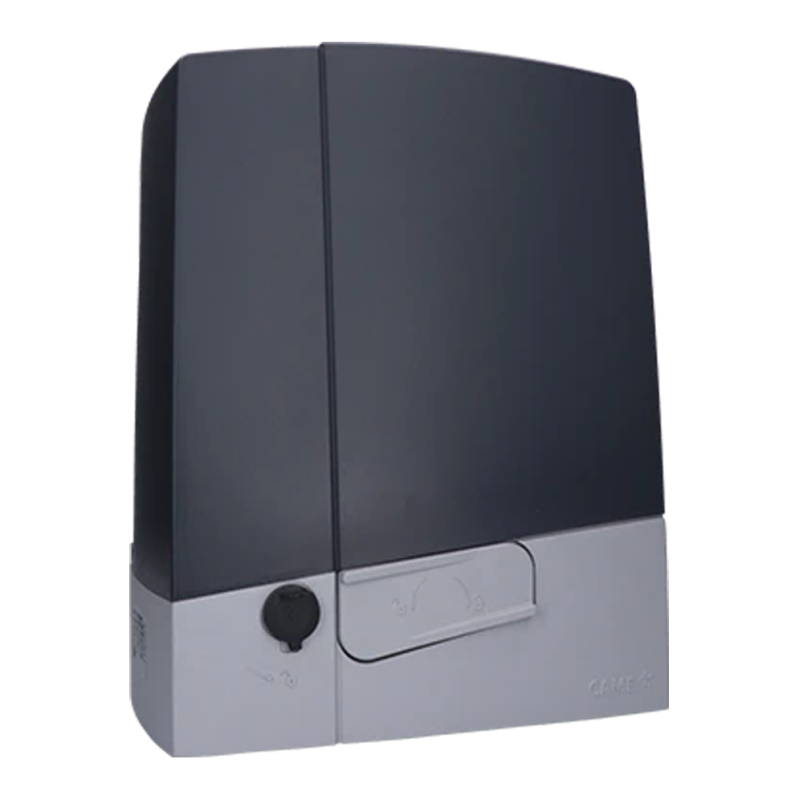
CAME BXV10AGS – standalone operator for sliding gates up to 1000 kg (A)
NEW| Product availability: | within 3 days | We usually ship the goods within 3 days. |
|---|
within 3 days
€765.28 including VAT
| Weight |
|---|
| 12 kg |
Description of CAME BXV10AGS – standalone operator for sliding gates up to 1000 kg (A)
CAME BXV10AGS gate operator is designed for sliding gates weighing up to 1,000 kg and gate leaf lengths up to 20 m. It has an electromechanical stop switch. The operator is non-reversible. Detailed technical specifications ». Download the manual ».
CAME BXV10AGS with ZN7 control board is an operator for a sliding gate leaf weighing up to 1,000 kg and measuring up to 20 m long. The mains supply is 230 V AC, and the motor is 24 V DC; the limit switches are mechanical. Consider the gate’s dimensions, weight and resistance together.
Installation and commissioning must be carried out by a qualified technician. Disconnect the mains supply and any batteries before carrying out work. Check the fixed stops, protection of hazardous areas, and the completed gate’s safety functions and operating forces.
Before installation, check the rating plate, ZN7, H1 version and menu. The technical specifications below apply to the described configuration with F28 = 60–100%, F8 = 1/2 and U3 = 0/1. These three items alone do not identify the complete firmware. If the labels or connectors differ, refer to the applicable manual.
Standalone CAME BXV10AGS operator
This manual covers the standalone CAME BXV10AGS operator (A). For an offer including accessories, see the CAME BXV10AGS kit page.
The maximum 20 m length refers to the gate leaf; it does not automatically mean the clear opening width. Selecting A1 does not increase the actual operator’s load capacity.
Accessories and wiring examples
The devices below are specific examples for the wiring configurations shown. Check the standalone operator’s package contents and confirm which accessories are actually supplied against the specific offer; for a different model, use its own manual.
| Component | Example / application |
|---|---|
| Photocells | CAME DIR10, 12/24 V AC/DC; range 10 m, terminals and test. |
| Flashing light | CAME KLED24, 24 V AC/DC, 2 W; 10–E connection. |
| Radio | CAME AF43S and TOP-432EE, example of fixed-code 433.92 MHz; check coding compatibility against the control board settings. |
| Rack | Rack sections, module 4 for this model. |
| Controls | Switches, push buttons and readers; voltage-free NO commands and NC STOP input, as specified for the control board. |
Operator installation
With the operator released, the gate must move easily along its entire travel, without sagging, damaged wheels or any risk of coming off the guide. Check that there are solid mechanical stops in both the open and closed positions, that the base is stable, and that areas where the gate leaf could crush someone are protected. Water must not collect in the operator area, and the operator must not be exposed to a direct jet of water. If the sliding gate leaf has a built-in pedestrian gate, powered movement must only be possible when it is securely closed.
Foundation and anchor plate
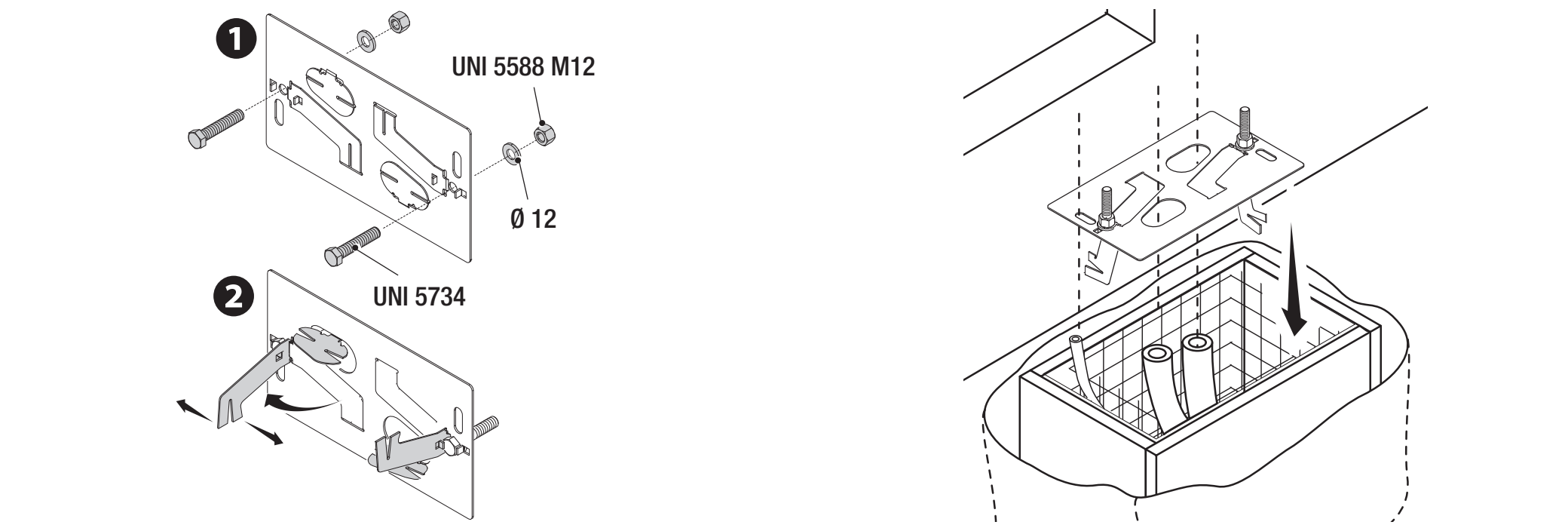
The installation example uses an excavation 400 × 240 mm and 800 mm deep. Adapt the foundation dimensions to the ground conditions and the specific gate. The formwork extends 50 mm above ground level; use reinforcement and M12 anchors. A Ø 40 mm conduit is recommended for the operator supply cable, Ø 25 mm for accessories, and Ø 20 mm for an optional manual-release cable.
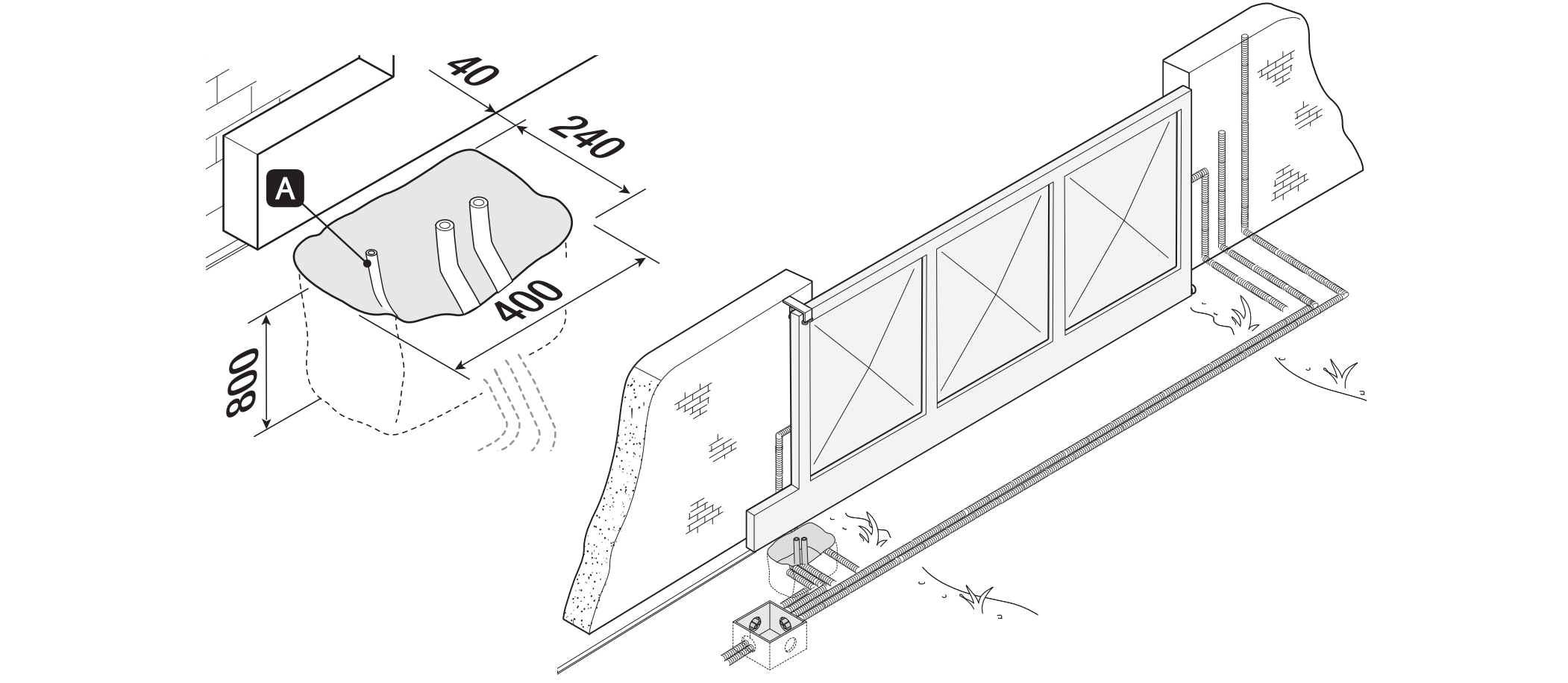
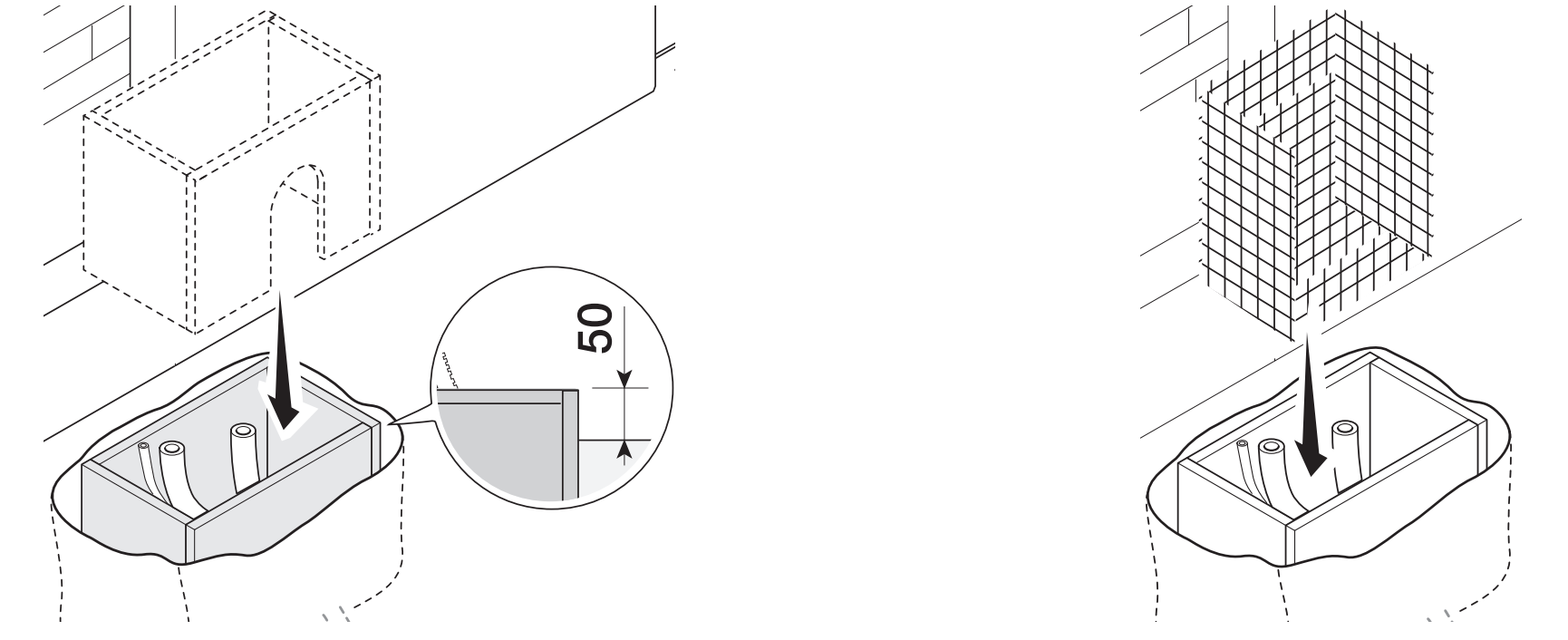
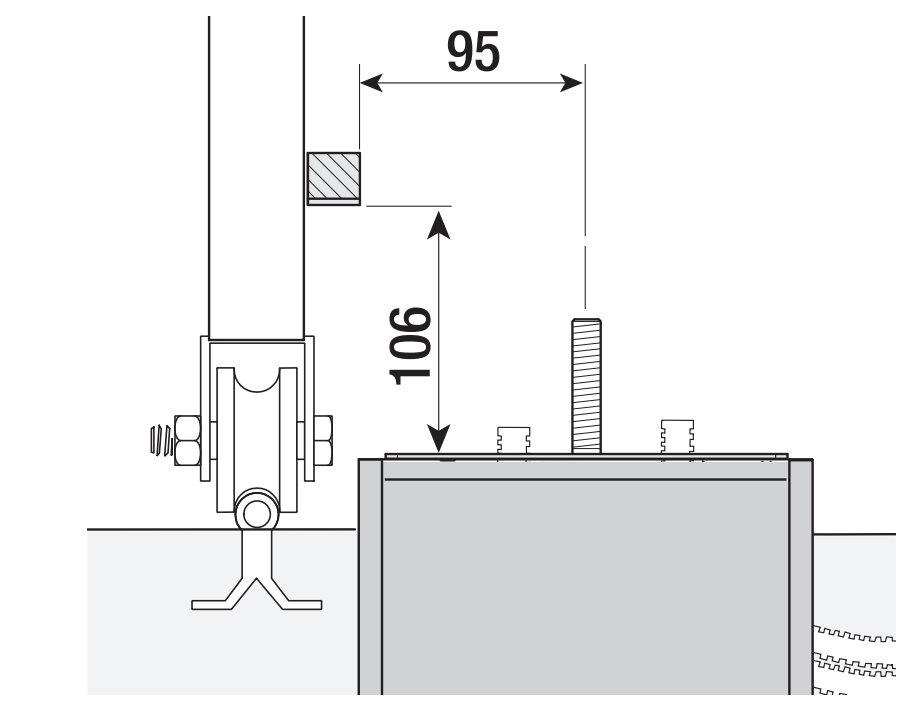
Set the anchor plate level, route the cables through its openings, and leave the threaded parts of the anchors protruding above the surface. Allow the concrete to cure for at least 24 hours. Position the plate relative to the rack as shown: the 95 mm horizontal offset and 106 mm height refer to the marked surfaces in the cross-section. Do not confuse these with the foundation dimensions.
Installation and height adjustment
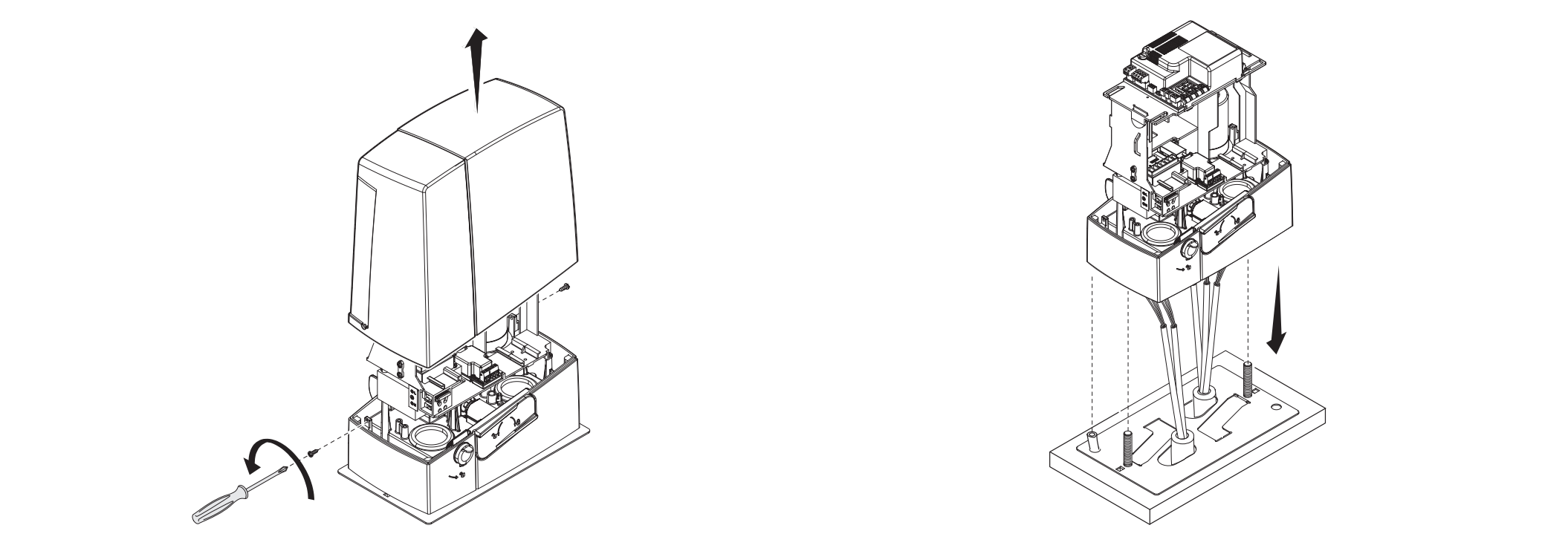
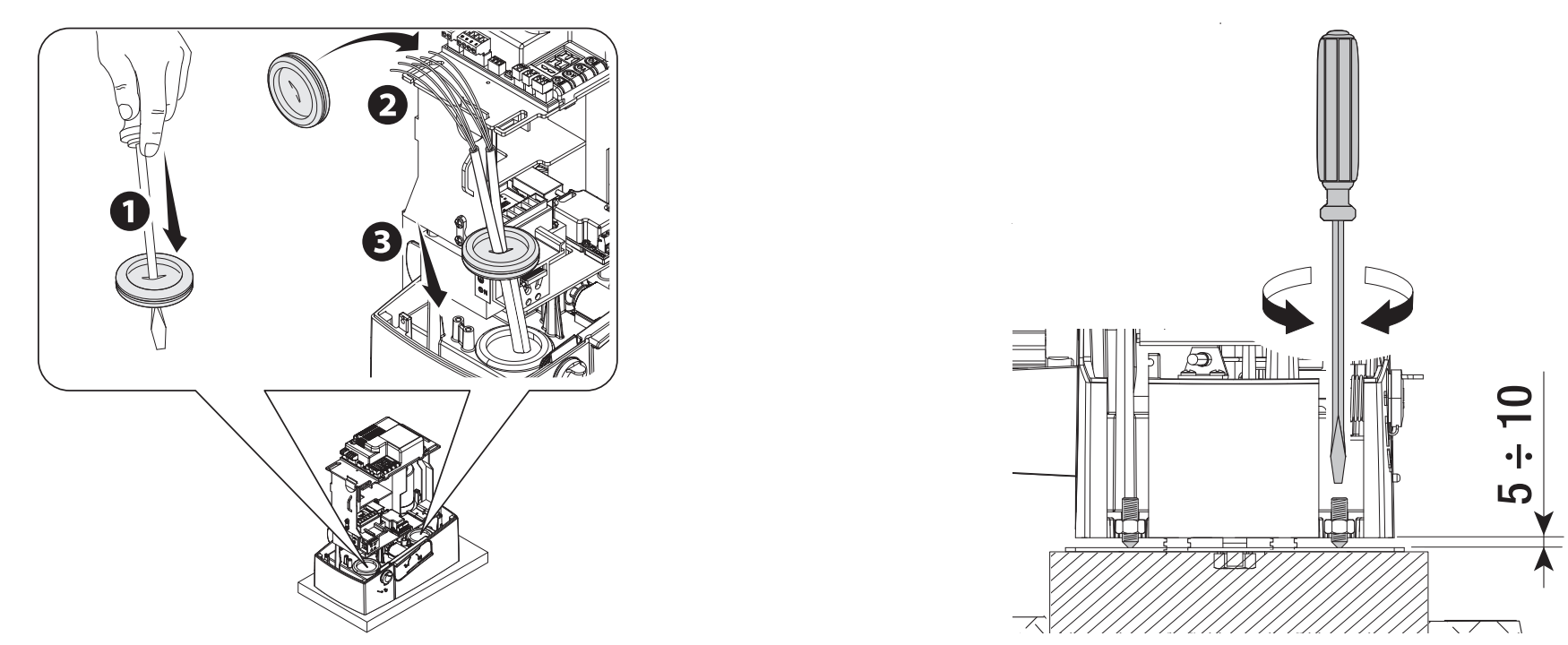
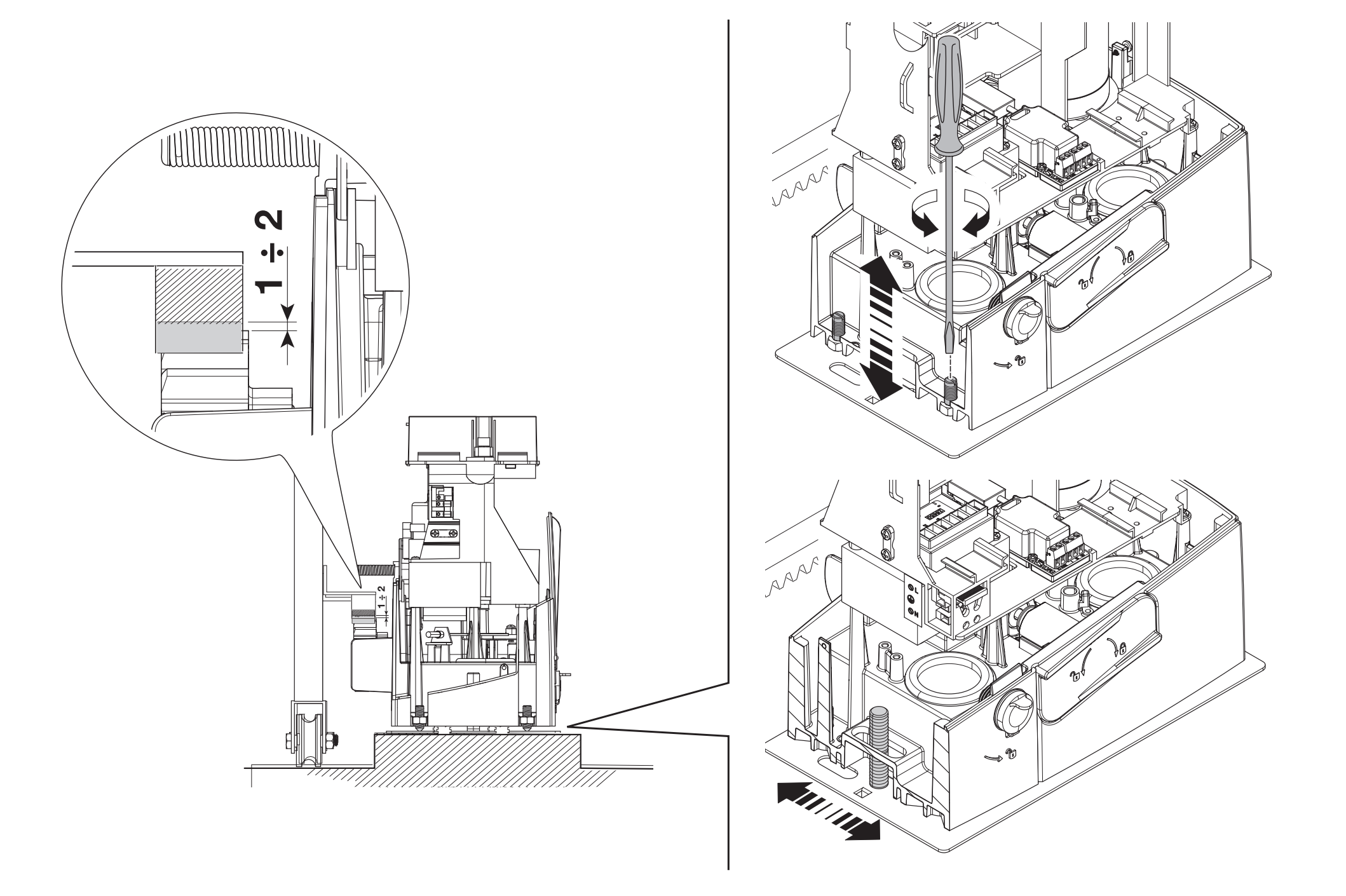
Remove the cover and mount the operator on the plate. The cables must pass through the underside of the housing and through correctly fitted cable glands. During adjustment, raise the operator using the threaded adjustment feet by 5–10 mm, leaving room to adjust the gear mesh.
Rack and gear mesh clearance
Release the operator and install the rack while moving the gate leaf by hand. When joining rack sections, place a spare rack section under the joint so that the teeth align smoothly. After installation, adjust the operator’s vertical and horizontal position.
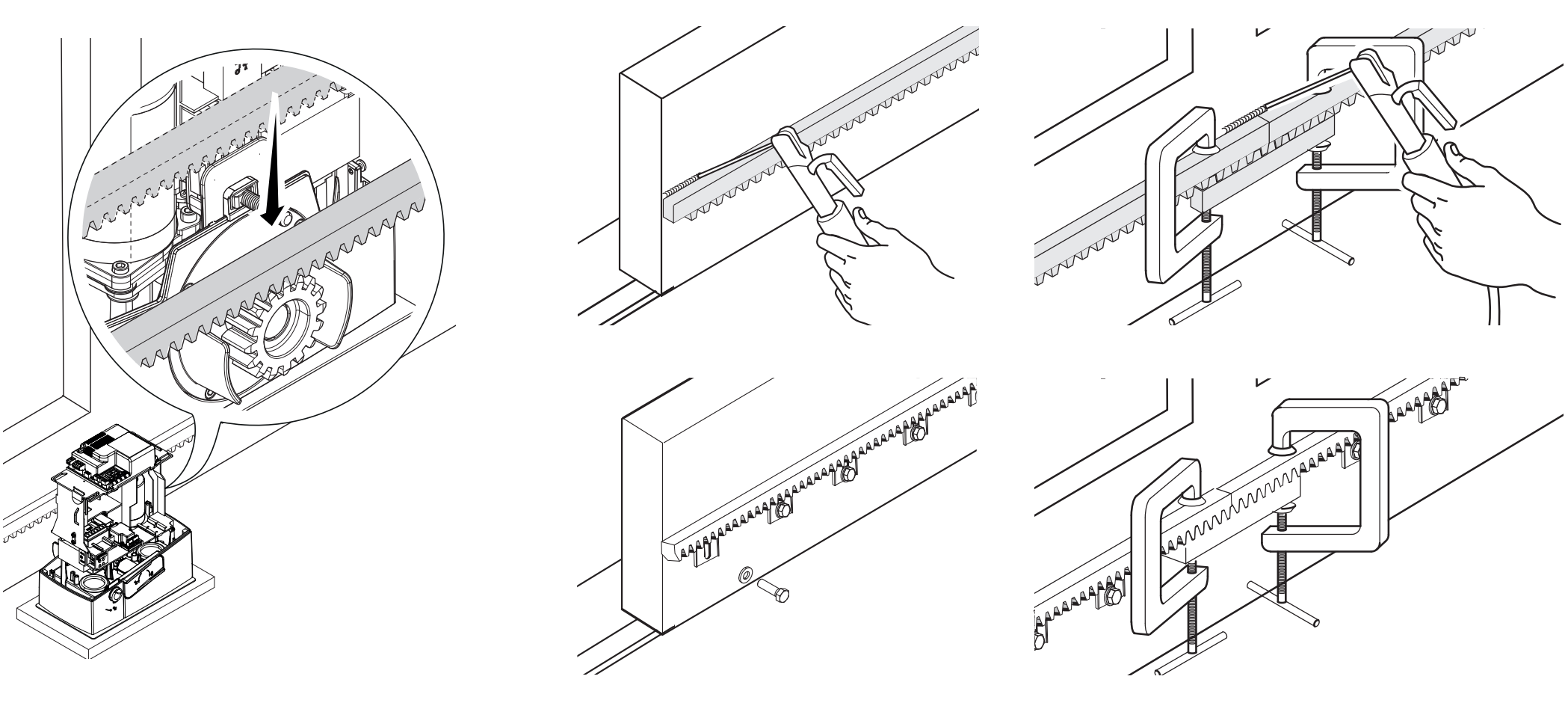
Leave 1–2 mm clearance between the rack and pinion. The gate’s weight must not rest on the operator. Move the gate through its full travel by hand and check the mesh and rack joints; only then tighten the nuts and washers on the anchors.
Mechanical limit switches
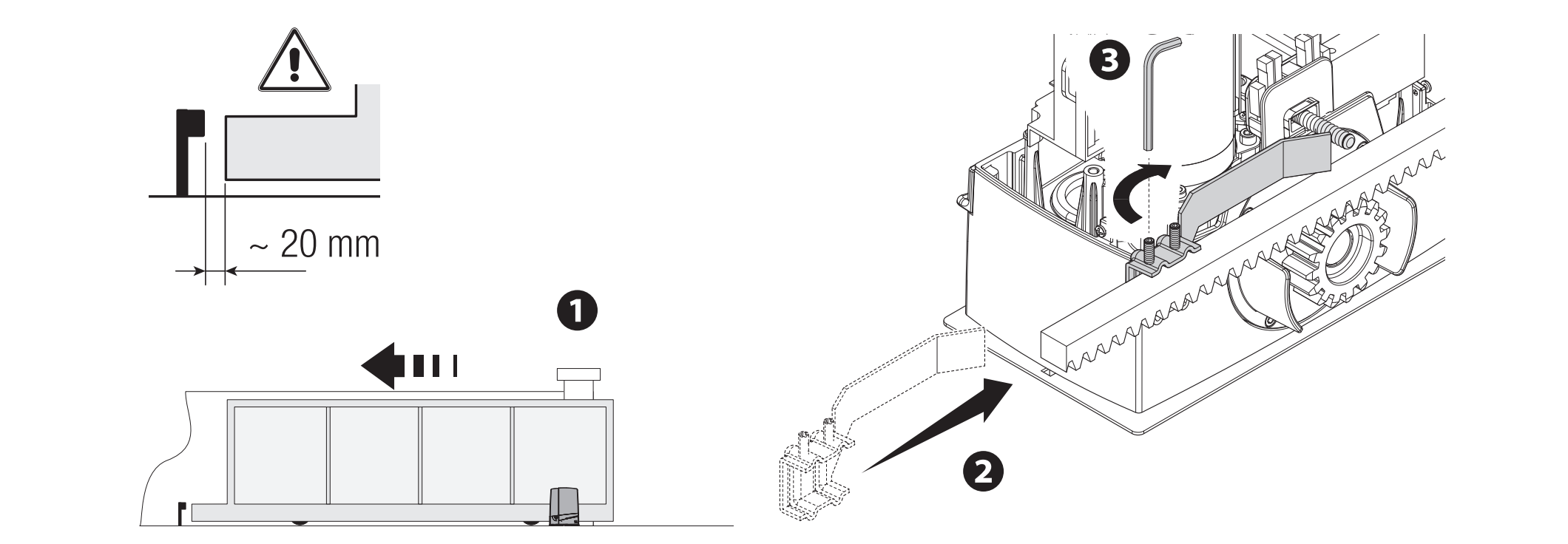
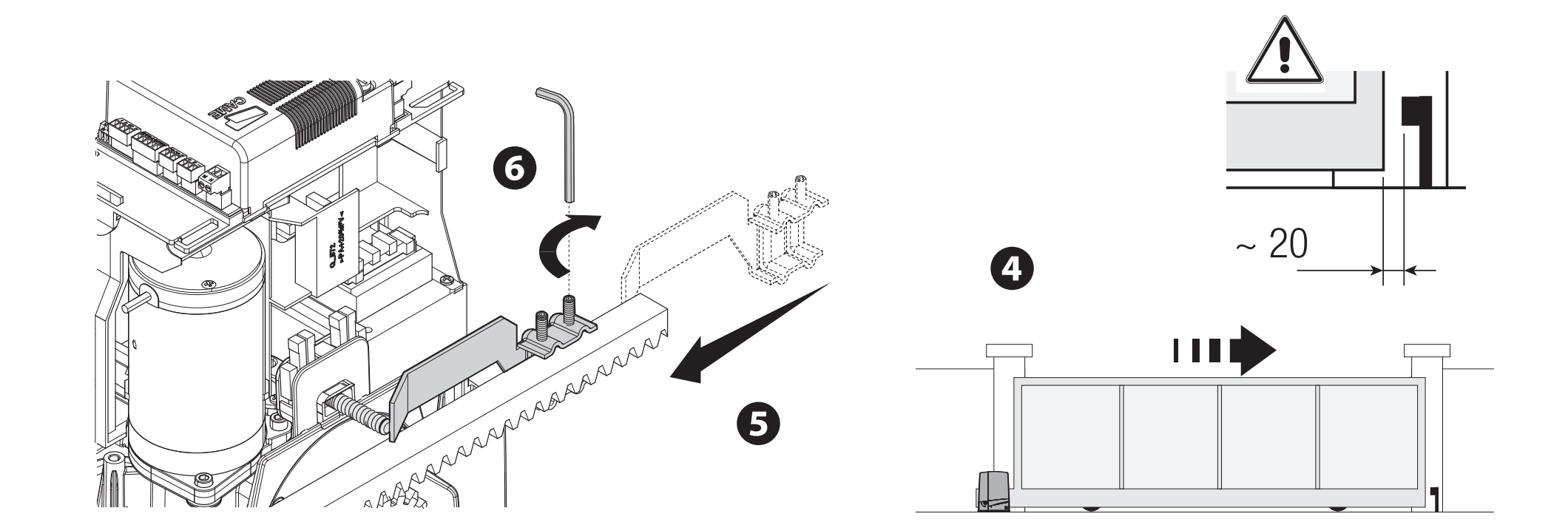
Move the gate leaf manually to the open position. Attach the opening switch stop to the rack so that its ramp reliably actuates the spring-loaded microswitch. Set the closing stop in the same way. Secure the stops firmly; the gate’s fixed mechanical stop and the operator’s switch stop serve different purposes.
In the configuration shown, leave approximately 20 mm before the fixed stop. Check the stopping distance at the actual speed and under load.
Wiring
| Connection | Cable / requirement |
|---|---|
| 230 V AC mains, L/N/PE | 3G × 1.5 mm² up to 20 m; 3G × 2.5 mm² for 20–30 m. |
| Controls | Number of conductors as required by the control system; 0.5 mm² cross-section for the short runs listed. |
| DIR10 photocells | TX: 2 × 0.5 mm²; RX: 4 × 0.5 mm². Ensure the TX connection and NC contact are wired. |
| Antenna | RG58, maximum 10 m; 5 m or less recommended. |
| RSE / CRP | UTP CAT 5; separate serial connection, not motor power. |
The number of conductors must cover the entire selected circuit diagram. For longer runs, parallel loads, or other accessories, the technician must recalculate the cross-section based on current and voltage drop. Protect cables from damage and contact with the motor or transformer; route mains and low-voltage circuits with suitable separation.
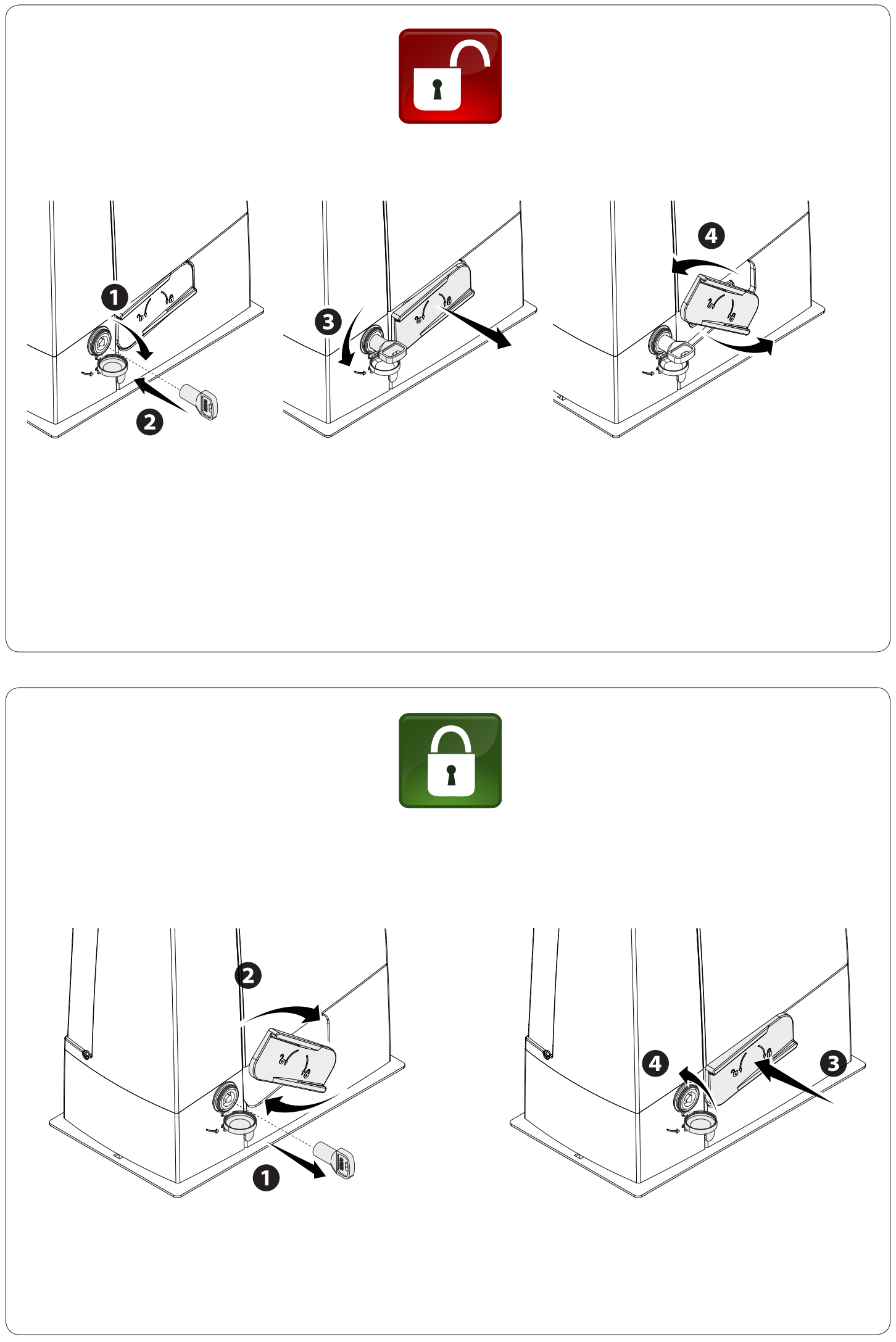
Manual release in the event of a power failure
Disconnect the power supply and secure the gate leaf before moving it manually. Releasing a damaged or unbalanced gate may cause uncontrolled movement.
- Insert the key into the lock and turn it in the direction of the arrow shown in the illustration.
- Pull and open the release lever as shown in the illustration.
- Move the gate manually in a controlled manner, keeping people clear of its path.
- To re-engage the mechanism, return the lever to its original position and lock the mechanism. Before issuing a motor command, check that the drive is engaged.
Guide to the ZN7 control board
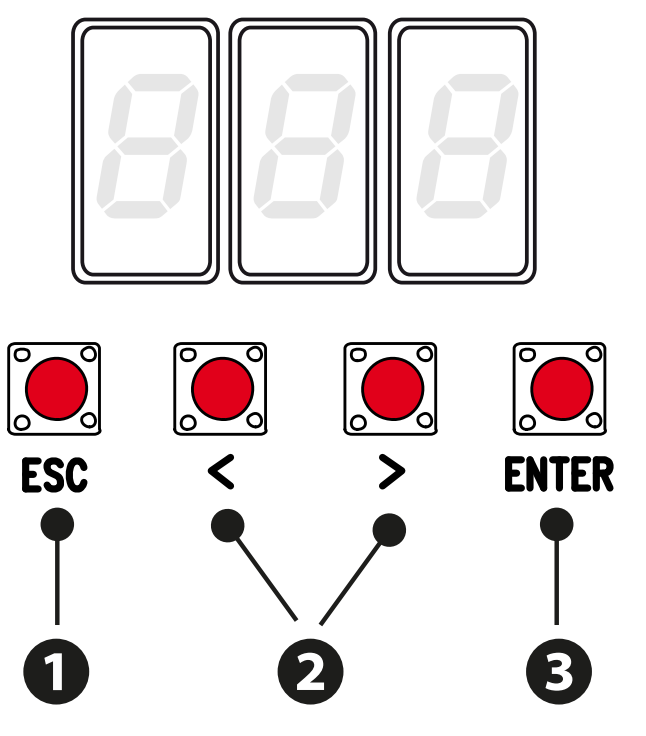
The ZN7 has a display and ESC, arrow, and ENTER buttons. Settings, timings, and users are managed via the menu. The AF, Memory Roll, R700/R800, RSE, and RIOCN8WS connectors have specific functions; insert or remove the card only when both the mains supply and batteries are disconnected.
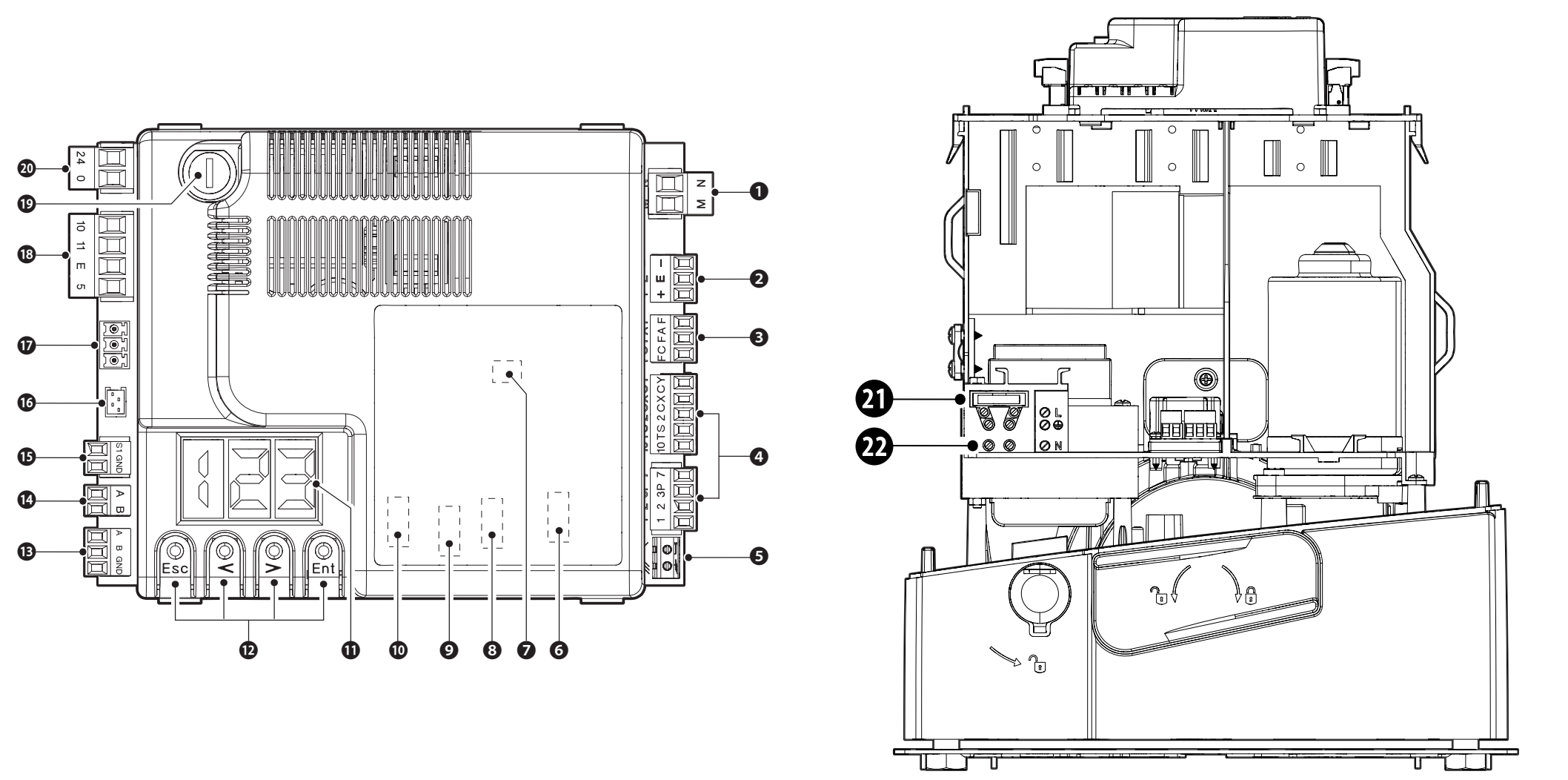
| Figure number | Component |
|---|---|
| 1 / 2 / 3 | Motor / encoder / limit switches |
| 4 / 5 / 6 | Commands and safety / antenna / AF |
| 7 / 8 / 9 / 10 | Memory Roll / R700 or R800 / RSE / RIOCN8WS |
| 11 / 12 | Display / programming buttons |
| 13 / 14 / 15 | A–B–GND serial connection / A–B keypad / S1–GND transponder |
| 16 / 17 / 18 | GSM module / RGP1 / accessories and lights |
| 19 / 20 / 21 / 22 | Accessory fuse / board input / mains fuse / mains supply |
ZN7 terminals and power supply
| Terminals | Function / voltage / polarity |
|---|---|
| L / N / PE | 230 V AC mains, 50/60 Hz for BXV10AGS. PE is the protective conductor; AC has no +/−. |
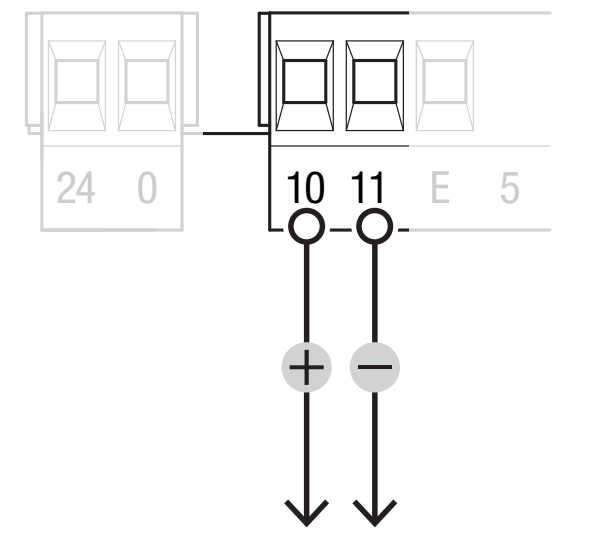
| 10 / 11 | Accessories: normally 24 V AC, in battery operation 24 V DC, total load no more than 40 W. For DC 10 = positive (+), 11 = negative (−); for AC, no polarity. |
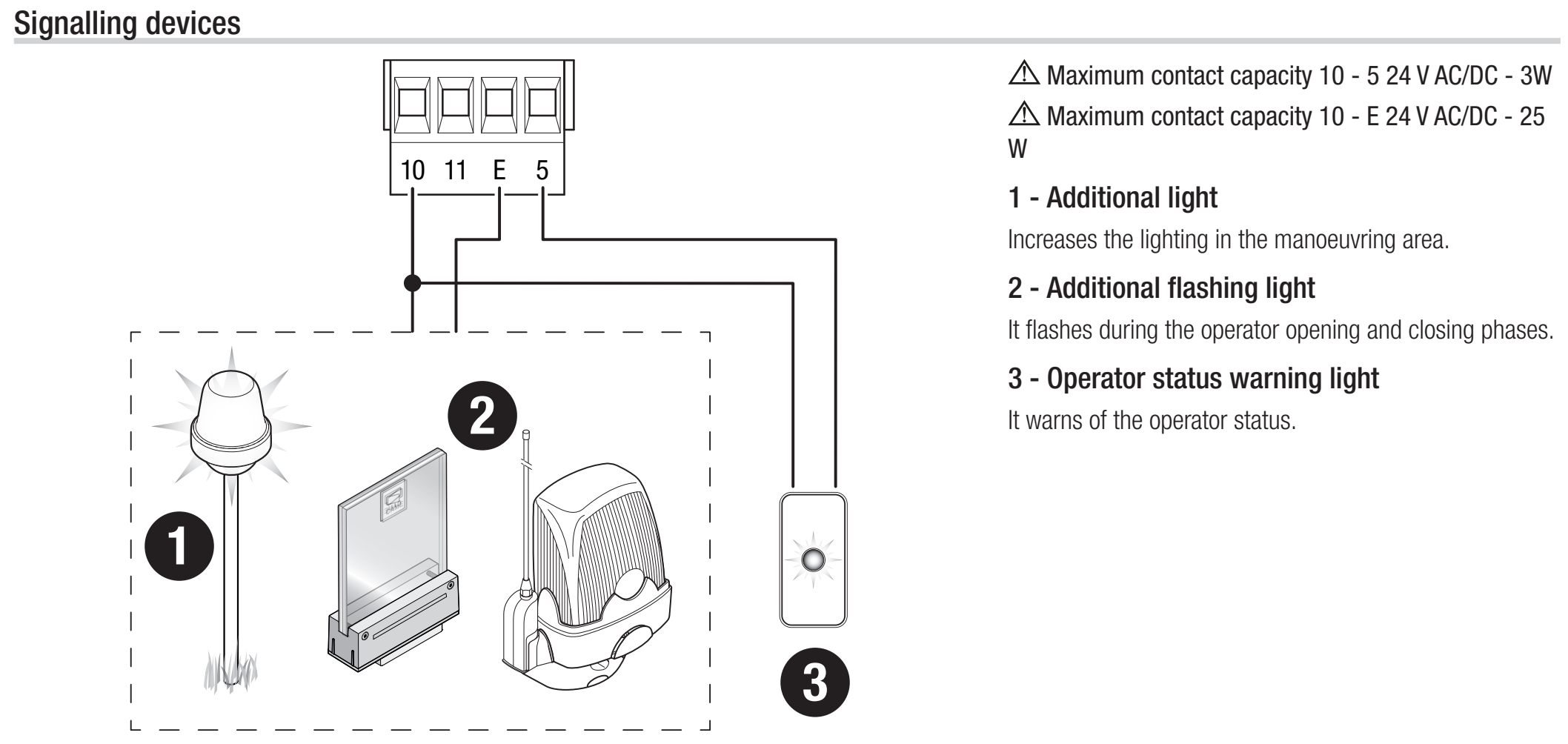
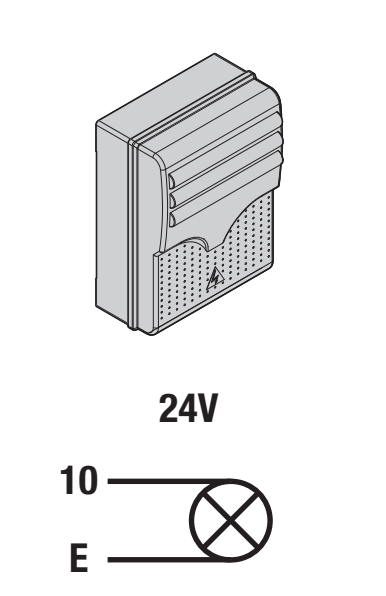
| 10 / E | Flashing beacon or courtesy light, 24 V AC/DC, max. 25 W. For DC, 10 is the positive common terminal and E is the switched output. |
| 10 / 5 | Gate status indicator, 24 V AC/DC, max. 3 W. For DC, 10 is the positive common terminal and 5 is the switched output; not for continuous power supply. |
| 24 / 0 | Internal supply to the board from the power supply section; do not connect as an accessory output or an external battery input. |
| M / N | 24 V DC motor; retain the wiring for the correct assembly. Not a 230 V supply. |
| + / E / − | Encoder: +/− power supply and E signal; not a general-purpose accessory output. |
| F / FA, F / FC | F common, FA open, FC close; NC limit contacts, no polarity. |
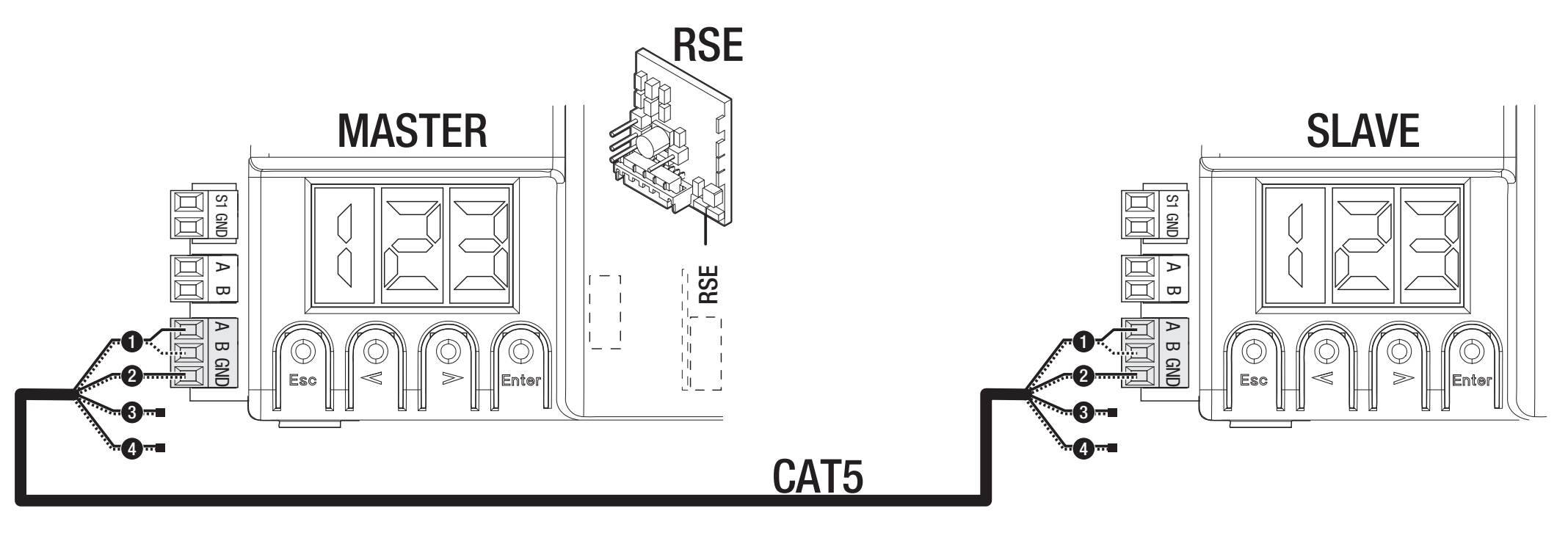
| A / B / GND – RSE | Serial interface with RSE card; do not confuse with the A/B keypad terminals. |
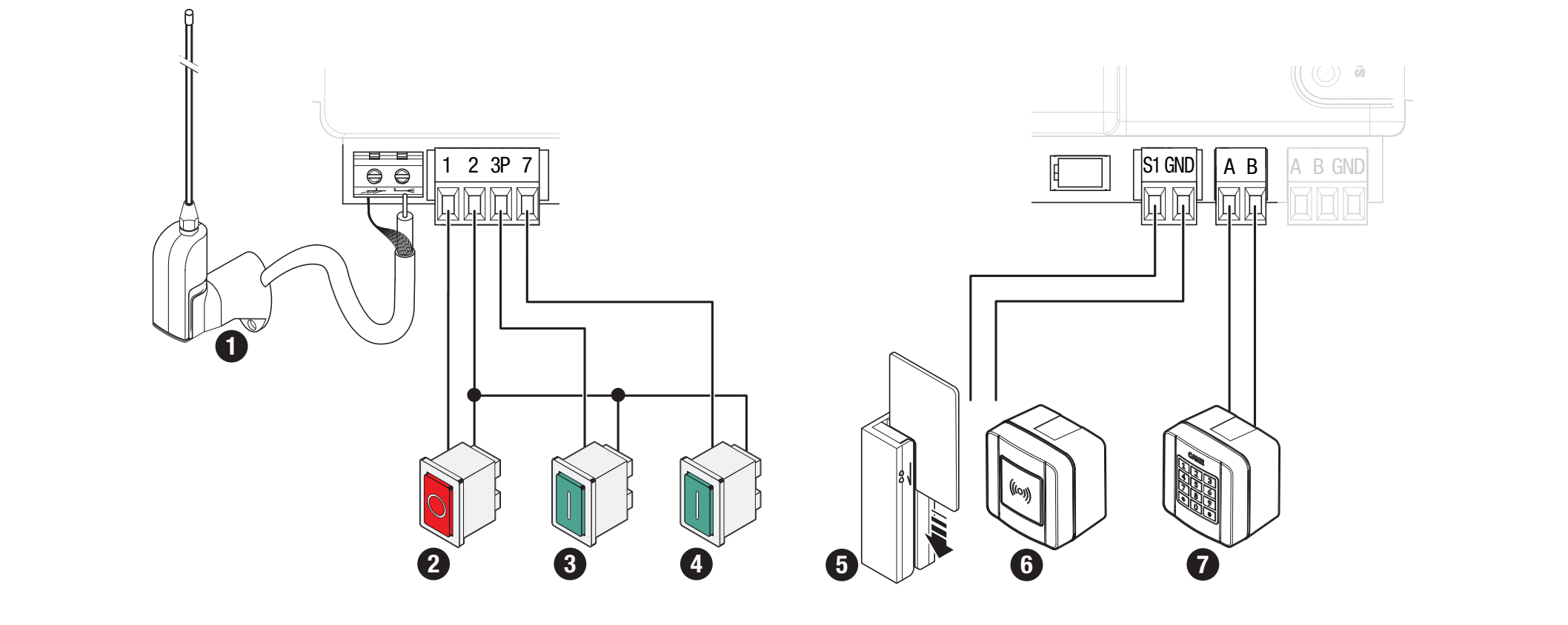
Commands and safety contacts
| Terminals | Contact / function |
|---|---|
| 1–2 | NC STOP; set F1 = ON if connected. Factory setting: F1 = OFF. No polarity. |
| 2–7 | NO command; function selected by F7. Volt-free contact, no polarity. |
| 2–3P | NO partial or full opening, according to F8. Volt-free contact, no polarity. |
| 2–CX / 2–CY | NC safety inputs; configure F2/F3. No polarity. |
| 10 / TS | Tested photocell power supply branch as shown in the diagram; do not enable F5 unless wired correctly. |
| A–B / R800 | Code keypad with R800 decoding card, F14 = 1. |
| S1–GND / R700 | Transponder or reader with R700, F14 = 0. |
| Antenna / AF | RG58 and plug-in radio card with the correct frequency/coding. |
Flashing beacon and status indication
KLED24, 24 V AC/DC and 2 W, connect to 10–E; for the flashing beacon, set F18 = 0. KLED24 does not have a supply terminal marked separately as +/−. For AC there is no DC polarity; for DC, 10 is the board's positive common terminal. Do not connect a 230 V flashing beacon to this 24 V output.
Output 10–5 is for a low-power status indicator, max. 3 W, with setting F10. Courtesy light mode F18 = 1 requires an automatic closing time; the light stays on from opening until fully closed, including during the pause.
Photocells and safety testing
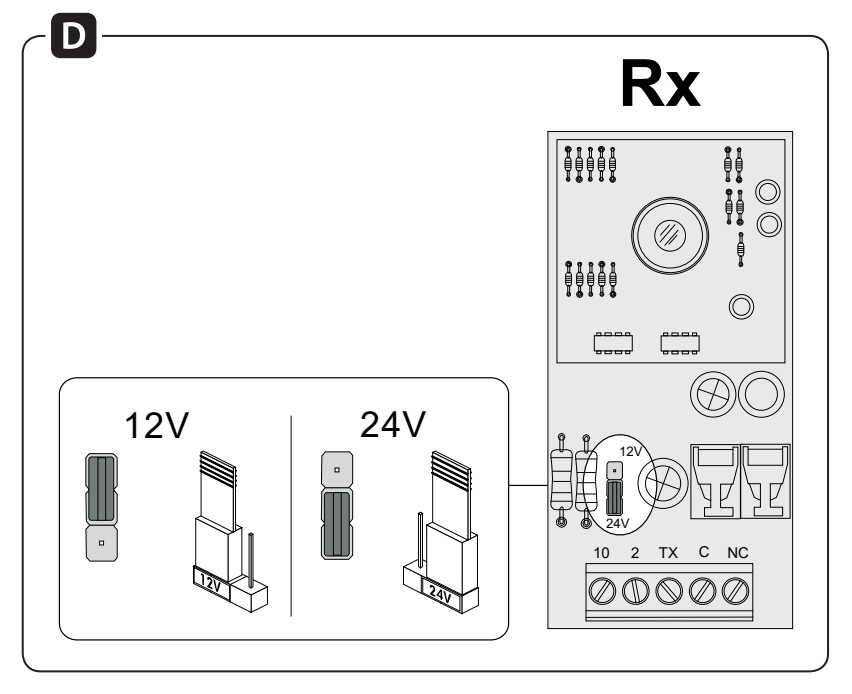
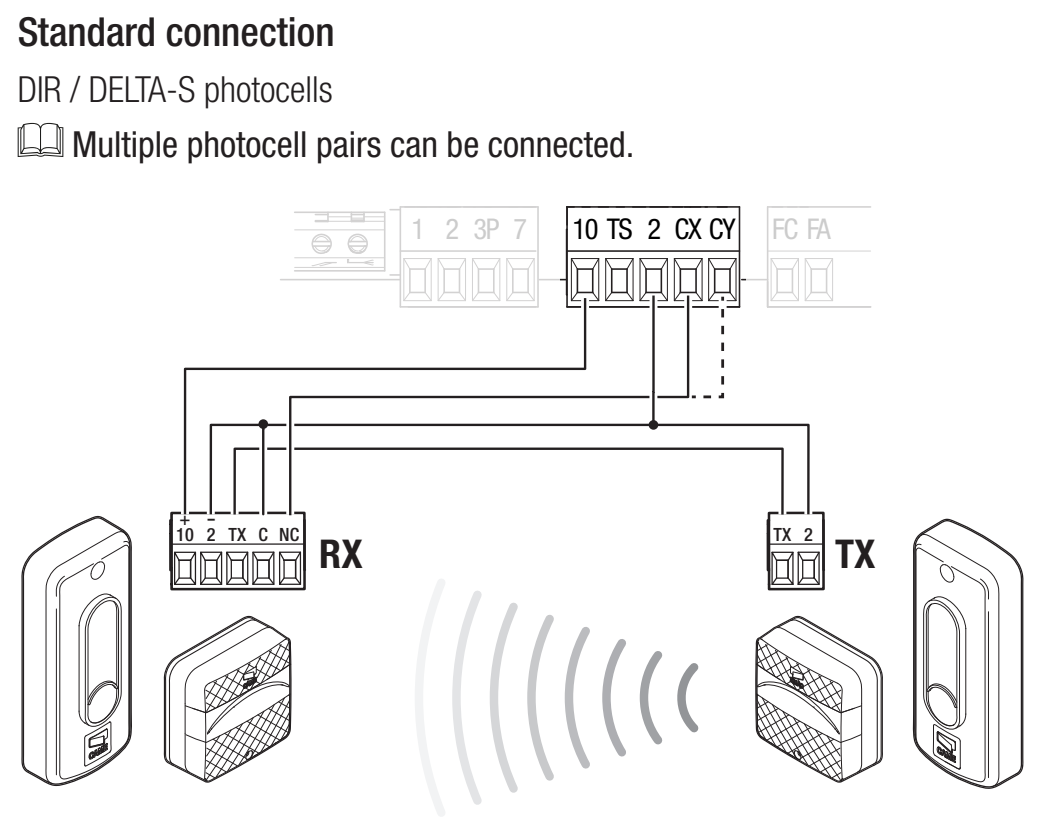
CAME DIR10 consists of a TX transmitter and an RX receiver with a range of 10 m. Set the receiver jumper to 24 V. The pair draws 60 mA at 24 V AC. The RX power terminals are marked 10 (+), 2 (−); the TX has terminals TX and 2; the manufacturer does not show separate +/− markings for these in this diagram. With AC power, DC polarity does not apply. The TX output is part of the synchronisation circuit; connect RX TX to TX TX as shown in the diagram, not directly to board terminal 10.
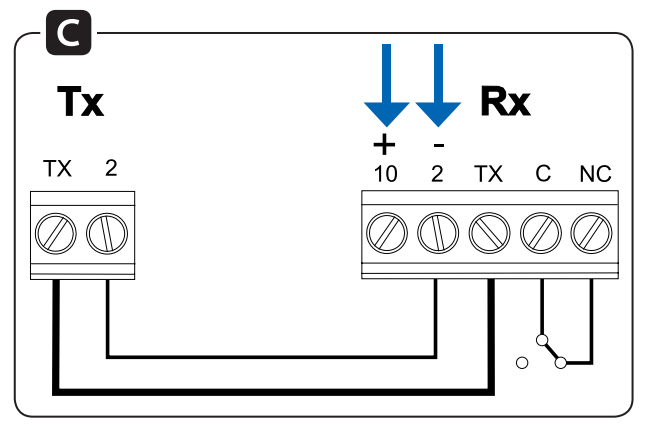
| Photocell terminal | Standard wiring | Wiring with test |
|---|---|---|
| RX 10 (+) | Board 10 | Board 10 |
| RX 2 (−) and RX C | Board 2 | Board 2 |
| RX TX ↔ TX TX | Connect TX between the receiver and transmitter | Same connection |
| TX 2 | Board 2 | Board TS |
| RX NC | Board CX | Board CX |
The C–NC contact is a volt-free safety contact. It has no positive or negative polarity. The power supply and contact wiring are two separate circuits. For DC, terminal 10 is positive; the negative RX 2 lead is connected to the board's common terminal 2 in this particular diagram. Do not confuse terminal 2 with power supply terminal 11.
For a contact connected to CX, set F2 = C1. For a contact connected to CY, select the corresponding response using F3. C1 reopens during closing, C2 recloses during opening, C3 stops and then closes automatically and requires F19; C4 waits for the obstacle to be removed and then resumes movement.
Test wiring via TS
For the test, TX 2 is moved to TS, while RX 2 and RX C remain connected to board terminal 2. The TX connection between the transmitter and receiver remains in place. First change the wiring with the power off, and only then enable the test.
Set F5 = 1 for CX, 2 for CY or 4 for both CX and CY. If the test fails, E4 is displayed and the drive will not execute the command. This function is used together with active safety inputs.
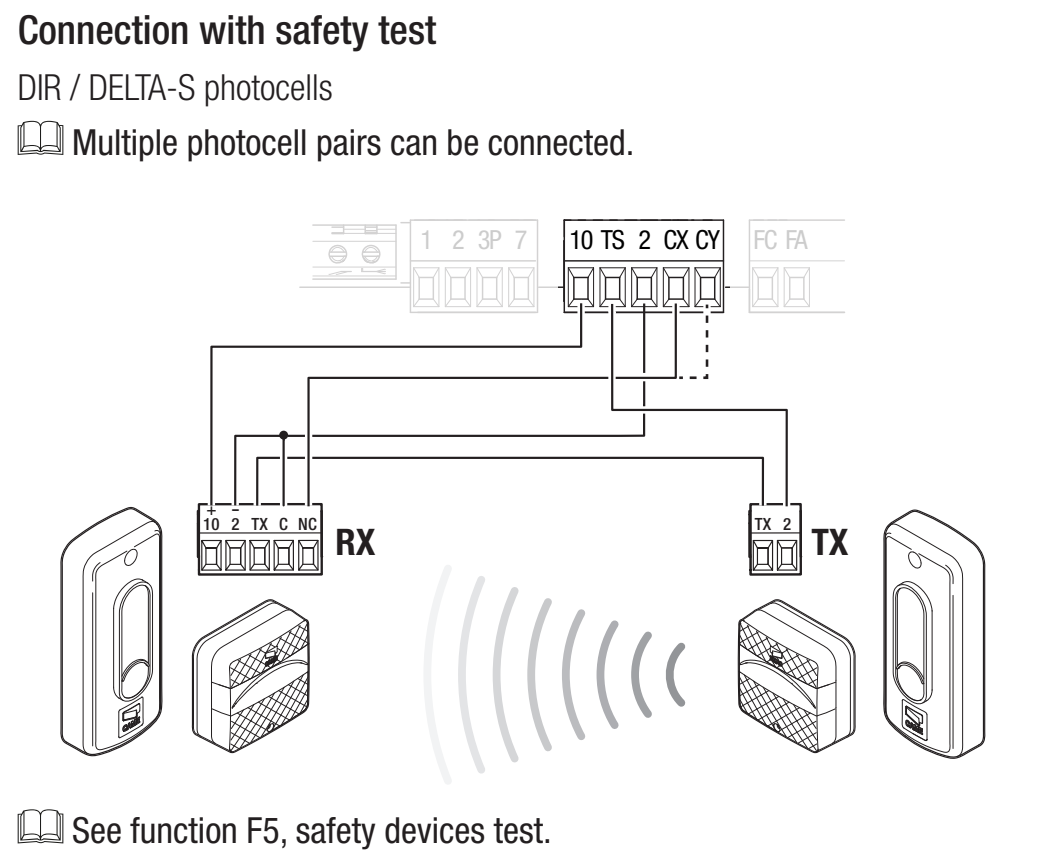
After wiring, test interrupting the beam during the relevant movement and then clearing it again. Do not bridge a safety input as a permanent fix for a fault.
Safety edges
Connect an NC contact edge between 2 and CX or CY, and select C7 – reopen during closing, or C8 – reclose during opening. A volt-free contact has no polarity. Do not connect a resistive edge as a standard NC contact; it must have an interface suitable for the specific controller.
First start-up of the ZN7
- Check that the gate moves freely, the rack is correctly positioned, the fixed and limit stops are secure, the drive is engaged, the wiring is correct and hazardous areas are protected.
- Switch on the power and check the display. Set A1 = 4 for a motor rated up to 1000 kg, F54 according to the direction and F1 according to the connected STOP.
- Set F2/F3 for the connected safety devices and F5 if a test is required. Leave unused inputs disabled. For learning, F11 must be set to ON.
- Run A3 – travel learning.
- Set the operating parameters and users, then test the full cycle, partial opening, each safety device, the beacon and behaviour after a power failure.
The first normal manoeuvre after switching on the power is opening; wait for it to finish. A3 calibration has its own sequence. If you hear unusual noise, notice vibration or observe the wrong direction of travel, stop immediately using ESC/STOP and identify the cause.
A3 – automatic travel learning
Prerequisites: A1 and F54 correctly set, STOP configured, encoder active, and limit switches and fixed stops correctly set. Move the gate leaf manually to approximately halfway and re-engage the drive. Keep the area clear.
During calibration, the safety devices are disabled, except for stopping with the ESC button. A technician must supervise the entire movement and prevent anyone from entering the travel path.
- Press ENTER, use the arrow buttons to select A3, then press ENTER to confirm.
- Select ON and press ENTER to confirm.
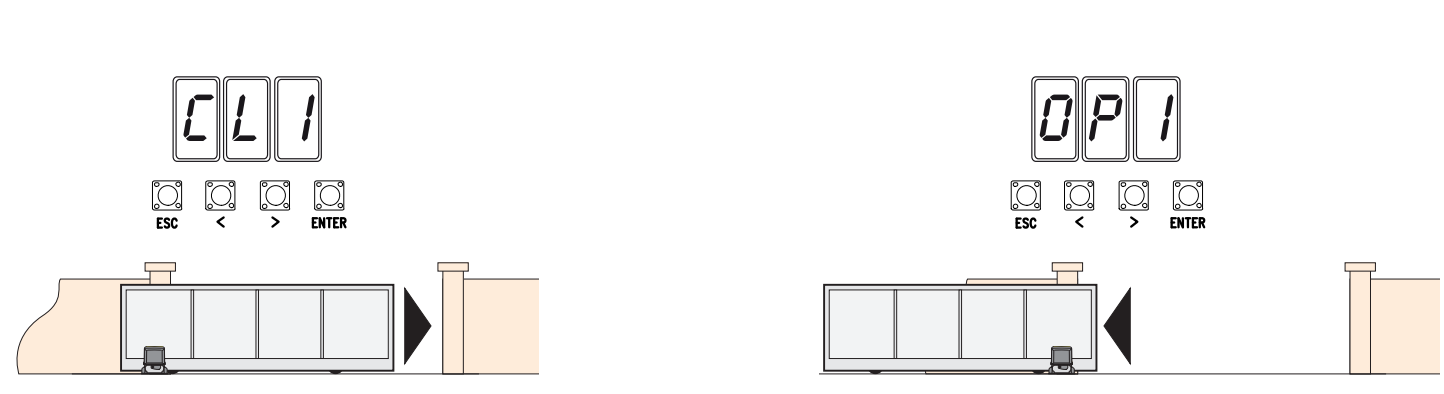
- The drive first closes the gate to its end position; the display shows CL1.
- It then opens the gate to its end position; the display shows OP1.
- When complete, check the full movement and safety devices. For E1/E2, first resolve the cause using the diagnostics; do not repeat the learning procedure while a mechanical fault remains.
Programming via the display
Program with the drive stopped. ENTER opens the menu and confirms a selection; arrows </> select an item or change a value. After making a change, press ENTER to confirm. ESC cancels an unconfirmed change, goes back or exits the menu. During normal operation, ESC stops the drive; the arrow buttons allow test movement.
The factory values explicitly specified for the menu are shown in bold. Accessory functions appear only when the required card is installed or the related function is enabled. Record the current settings before making any changes. A lower F34/F35 sensitivity number means higher sensitivity; after changing the speed, torque or sensitivity, check the forces and safety devices.
F functions
Users and system U / A / H
Pairing and deleting remote controls
The ZN7 memory has a capacity of 250 users. The receiver must be installed in the AF socket and match the transmitter’s frequency and coding. An example of a 433.92 MHz fixed-code transmitter is the TOP-432EE with AF43S. U4 can restrict the range of accepted coding systems; matching frequencies alone are not enough.
- In U1, select the function: 1 step-by-step, 2 sequential, 3 open only, or 4 partial opening.
- Press ENTER to confirm, then transmit the code by pressing the selected button on the remote control.
- Repeat the procedure for each additional user. Record the memory slot numbers and assigned commands, then test the actual operation.
Delete one user via U2: select ON, choose the number with the arrow keys or activate the corresponding saved transmitter, then press ENTER to confirm. The display shows CLr to confirm deletion. U3 = 1 deletes all users.
U4 = 2 (Rolling Code) or 3 (TWIN) deletes previously saved transmitters using a different coding system. Before making changes, check the system, H1 version, and remote control records; do not use this setting to troubleshoot receiver faults by trial and error.
Backup via Memory Roll
- Disconnect the mains and any batteries, then insert the Memory Roll into its connector.
- Switch on the power; use F50 = 1 to save the data and F51 = 1 to load it. Loading replaces the board's data with the saved data.
- When finished, disconnect the power again and remove the memory card.
- After loading, verify the model, direction, safety devices and all commands. This ZN7 has a Memory Roll connector; do not use a USB port that is not present.
Pairing two drives
An RSE card is used in each board, with a CAT 5 connection via A–B–GND as shown. Connect the control and safety devices to the MASTER board. On that board, set F49 = 1, the direction in F54 and parameter transfer in F52. Store users on the MASTER; partial opening and the step-by-step command operate as shown for the combined system.
RIO wireless safety
RIOCN8WS uses a dedicated RIO connector. F65/F66 set up two wireless safety edges, and F67/F68 set up two photocell channels. Verify the actual device and channel labels on the display. The wireless safety test remains active; resolve connection loss E17 or missing configuration E18 before resuming operation.
A4 – parameter reset
Before resetting, record the H1 version, settings and users; if you have a Memory Roll, save the data. In A4, select ON and confirm with ENTER. For the version described here, the factory settings are restored and the travel path learning is erased.
After resetting, set A1, F54, F1, the safety inputs and A3 learning again. Verify the safety devices before normal operation. Deleting users is a separate function, U3. On a board with a different menu, A4 may restore a different range of settings; follow the instructions for that specific version.
Display diagnostics
| Code | Meaning / check |
|---|---|
| E1 | Calibration error. Check A3, the mechanism, direction and limit switches. |
| E2 | Configuration error. Verify model A1, direction F54 and completion of the learning procedure. |
| E3 | Encoder error. With the power off, check the +/E/− connector and wiring; perform learning after the repair. |
| E4 | Safety test error. Check TX on TS, power supply, NC and F5. |
| E7 | Operating time exceeded. Check resistance, stops and completion of the movement. |
| E9 | Obstacle while closing. Remove the actual obstruction; check the rack and sensitivity. |
| E10 | Obstacle while opening. Check the travel path and correct force settings. |
| E11 | Too many consecutive obstacles. Repair the mechanism or address the cause of the safety device activation. |
| E13 | Both limit contacts are open. Check FA/FC/F and switching stops. |
| E14 | Serial communication error. Check RSE, CAT 5 and configuration. |
| E15 | Incompatible transmitter. Check AF, frequency and U4. |
| E17 | Wireless system communication fault. Check RIO, devices and interference. |
| E18 | Wireless system is not configured. Verify RIO and the relevant F65–F68 settings. |
If the gate does not move, check the power supply, drive release, STOP and active safety inputs, a button that is held down continuously, and the transmitter battery. If it opens but does not close, check the photocells and their NC contact. Do not bypass a safety device fault with a permanent jumper.
ZN7 fuses for 230 V
| Circuit | Fast-acting fuse |
|---|---|
| Mains LINE | 1.6 A-F |
| Accessories | 2 A-F |
Check fuses with the mains and batteries disconnected. Replace only with a fuse of the same rating and type; first eliminate the cause of the short circuit or overload.
Maintenance and servicing
Regularly check that the travel path and rack are clean, that the gate moves easily by hand, and that the drive, switching stops, cables, release mechanism and all safety devices are secure and functioning correctly. Disconnect the mains and battery backup before cleaning or carrying out any work. If damage, unusual noise or vibration occurs, stop operation and address the cause.
Set torque A6 and sensitivity F34/F35 according to the actual mechanism; do not use increased torque to mask resistance or a fault. After adjustment or servicing, verify the full movement, forces and safety devices. Record H1, the number of operations A5 and any repairs. Give the user the instructions for the complete assembly and demonstrate the manual release. Dispose of electronic components and batteries at a designated collection point when decommissioning.
CAME BXV10AGS technical specifications
| Parameter | Value |
|---|---|
| Maximum gate leaf weight | 1000 kg |
| Maximum gate leaf length | 20 m |
| Drive power supply – mains | 230 V AC, 50/60 Hz |
| Motor power supply | 24 V DC |
| Power | 400 W |
| Thrust | 1000 N |
| Maximum travel speed | 11 m/min |
| Maximum current – value from the manufacturer's rating plate | 16 A |
| Protection rating | IP54 |
| Operating temperature | −20 to +55 °C |
| Duty | Intensive duty; there is no fixed number of cycles per hour. |
| Operating time | 180 s |
| Standby power consumption | 5.5 W |
| Protection class | I |
| Pinion / limit switches | Module 4 / mechanical |
| Cover colour | Grey RAL 7024 |
| Controls in this manual | ZN7, display and ESC/arrows/ENTER |
| Setting A1 | 4–1000 kg |
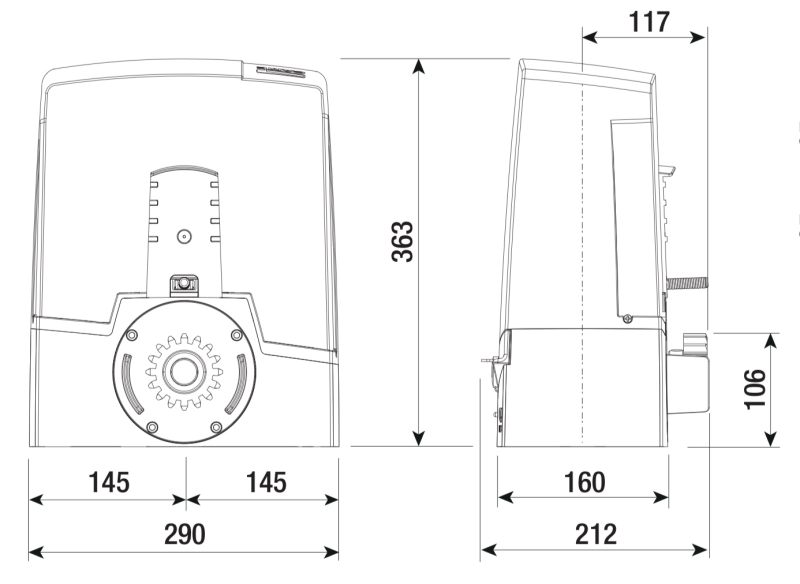
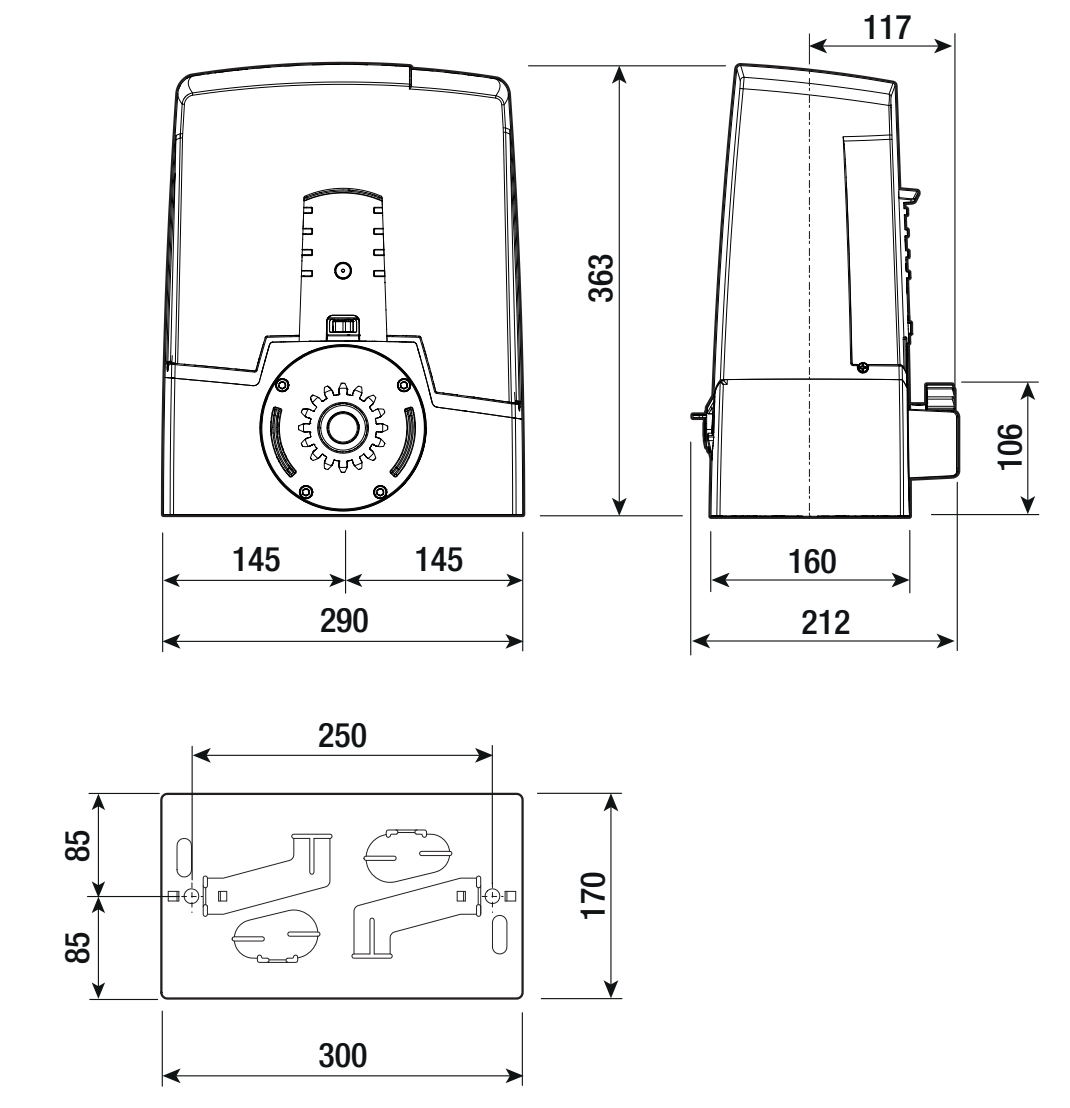
| Body dimensions (width × depth × height) | 290 × 212 × 363 mm |
| Anchor plate | 300 × 170 mm; spacing as shown in the drawing |
How can I order this item?
Choose the option that suits you:
- order online: use the buy button to add the goods to your shopping cart (you will find the buy button here in the product variants table).
- order by email: place your order at [email protected]






