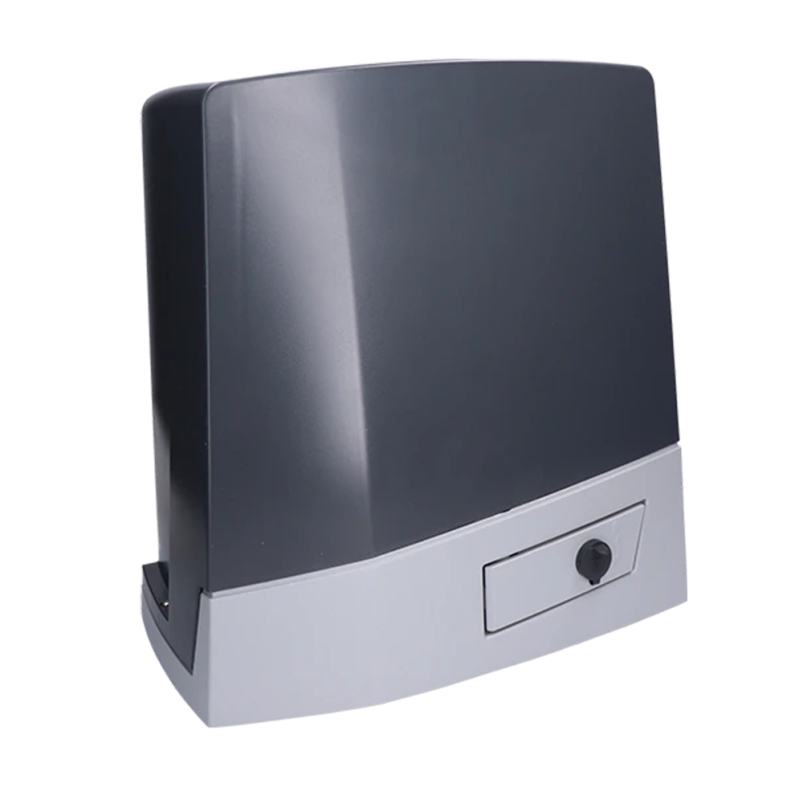
CAME BKV20AGS - standalone operator for sliding gates up to 2000 kg (A)
NEW| Product availability: | within 3 days | We usually ship the goods within 3 days. |
|---|
within 3 days
€1,276.18 including VAT
| Weight |
|---|
| 12 kg |
Description of CAME BKV20AGS - standalone operator for sliding gates up to 2000 kg (A)
CAME BKV20AGS gate operator is designed for sliding gates weighing up to 2000 kg and a gate leaf length of up to 20 m. It has an electromechanical stop switch. The operator is non-reversible. Detailed technical specifications ». Download the manual ».
CAME BKV20AGS, code 801MS-0310is a drive for a large sliding gate leaf up to 2,000 kg and 20 m long. It has a 36 V DC motor, a graphic display, four wired safety inputs and mechanical limit switches. The mains supply is 230 V AC. Consider the gate’s load capacity, length and actual resistance together.
Installation, mains wiring and commissioning must be carried out by a qualified technician. Disconnect the mains and any batteries before opening the unit or inserting cards. Check the BKV20AGS label, the ZN8 board and the FW/GUI version in the Information menu. The settings below are for the graphic menu with the Motor type BKV2000 option. For a different version or menu, use the relevant manual.
Standalone BKV20AGS drive and related kits
| Version | Selection |
|---|---|
| CAME BKV20AGS standalone drive (A) | A drive for adding to or replacing an assembly; accessories are selected separately. |
| CAME BKV20AGS kit (D) | Alternative assembly option. Check the contents on the product page for the specific kit. |
20 m is the maximum gate-leaf length; do not confuse it with the clear opening width. The BKV20AGS uses mechanical limit switches. Magnetic limit switches and the clock card included with AGE versions are not standard equipment on the AGS.
Accessories and wiring examples
The devices below are examples of accessories and their wiring, not items included with the standalone drive. For a different type, use its own manual.
| Item | Example / use |
|---|---|
| Photocells | CAME DIR10, 12/24 V AC/DC; range 10 m, terminals and testing. |
| Flashing light | CAME KLED24, 24 V AC/DC, 2 W; wiring 10–E. |
| Radio | CAME AF43S and TOP-432EE, example of fixed code 433.92 MHz; check code compatibility against the board settings. |
| Rack | Gear racks, module 4 for this model. |
| Controls | Switches, push buttons and readers; volt-free NO commands and NC STOP input as specified by the board. |
Installing the BKV20AGS
Before installation, check that the gate moves easily and smoothly by hand along its entire travel. The gate and guide must be stable, level and free from any risk of derailment. Check that there are solid stops in both the open and closed positions, and protect against crush, pinch and rack-engagement hazards. Secure the drive to a solid base, away from direct water flow. If the gate leaf has a pedestrian gate, movement may only be enabled when it is safely secured.
Foundation and mounting plate
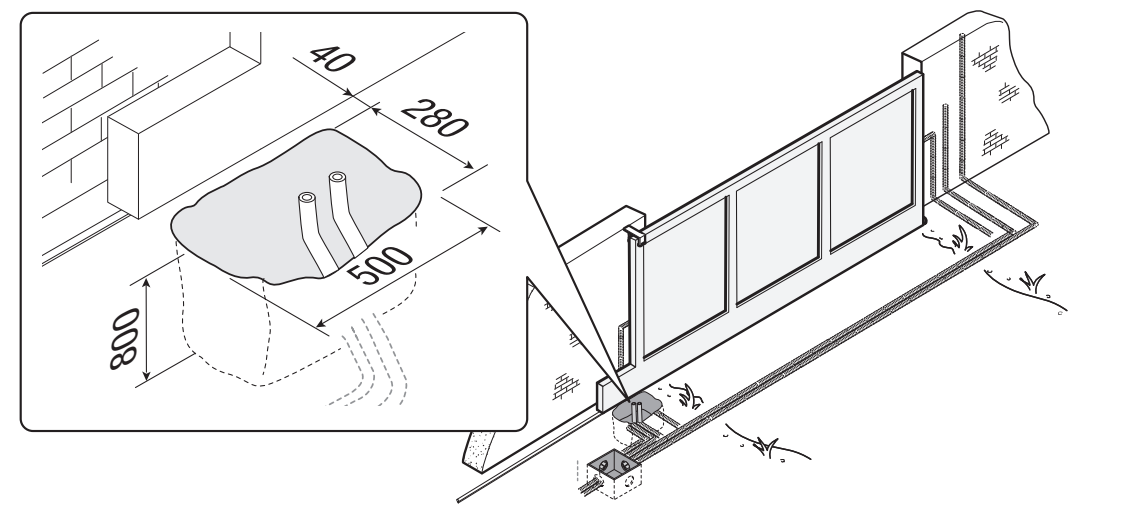
The manufacturer’s example specifies an excavation 500 × 280 mm, 800 mm deep and Ø 40 mm conduits. Adapt the foundation dimensions to the ground conditions and the specific gate; this is an installation example, not a universal foundation design. The formwork extends 50 mm above ground and contains steel reinforcement.
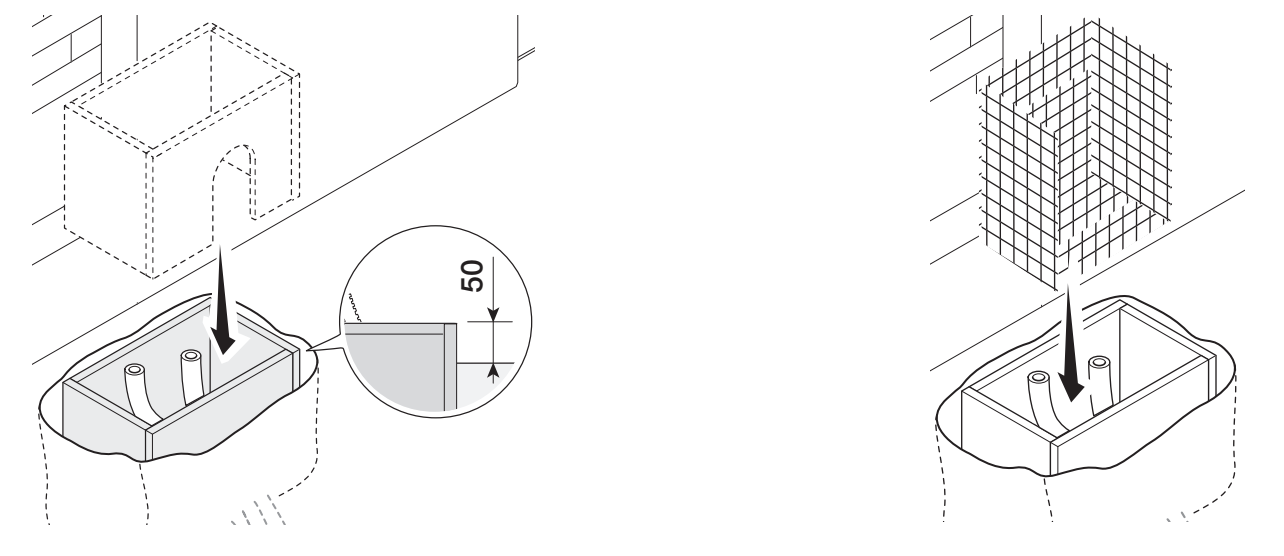
Insert the supplied M12 bolts into the plate and secure them with nuts. Bend the preformed anchor lugs and position the plate within the reinforcement. The conduits must pass through its openings. Align the plate precisely; the threaded ends must remain above the concrete. The position relative to the rack is based on the dimensions 76 and 96 mm shown in the section view. Allow the concrete to cure for at least 24 hours.
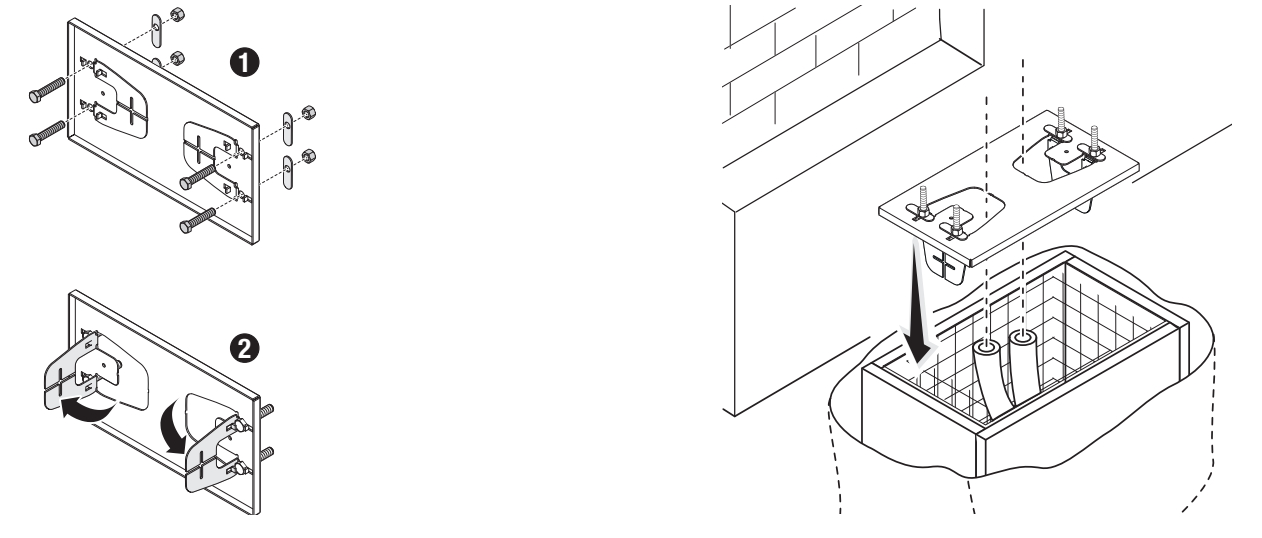
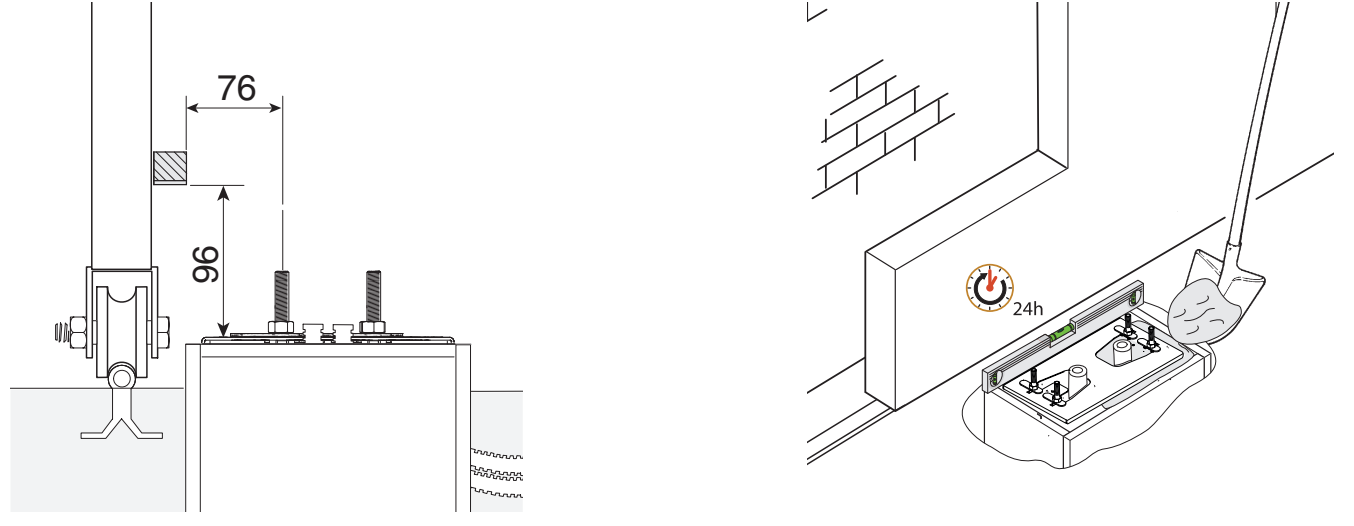
Positioning and height adjustment
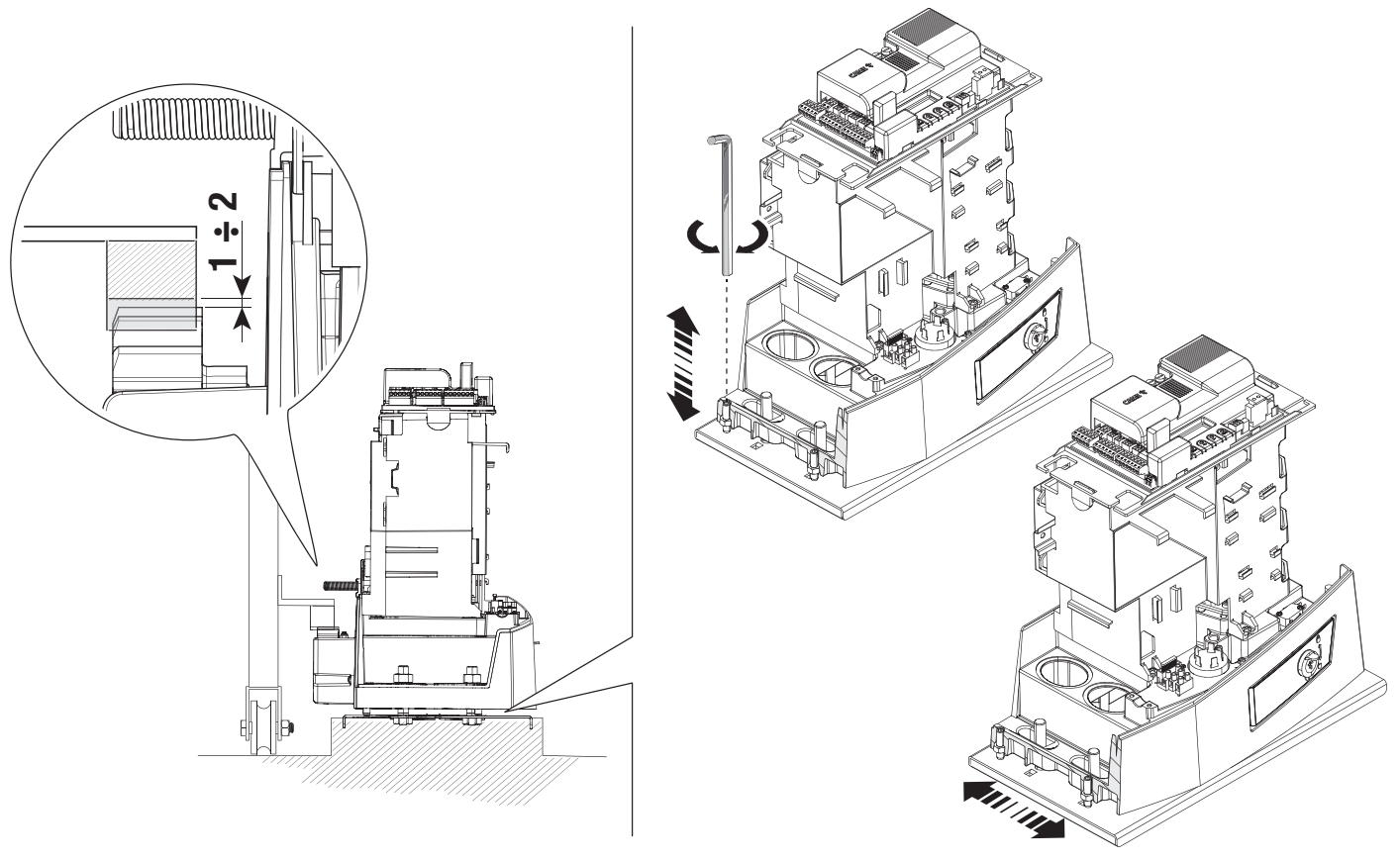
After removing the formwork, backfill around the foundation. Remove the anchor nuts and pull the cables approximately 600 mm above the plate. Remove the cover and position the drive; the cables pass through its underside and sealed cable glands. Raise the drive using the threaded feet by 5–10 mm, leaving room to adjust the mesh.
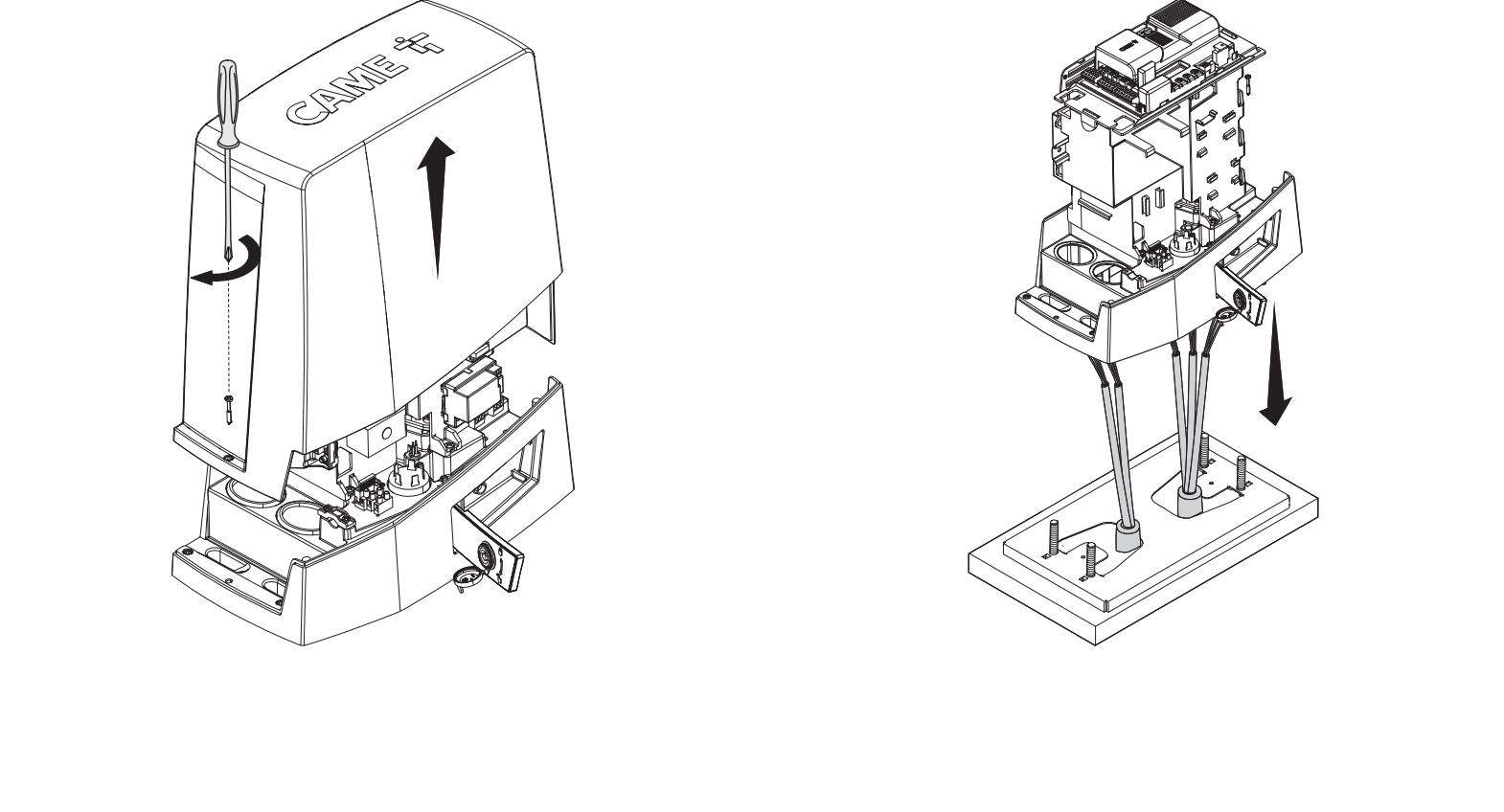
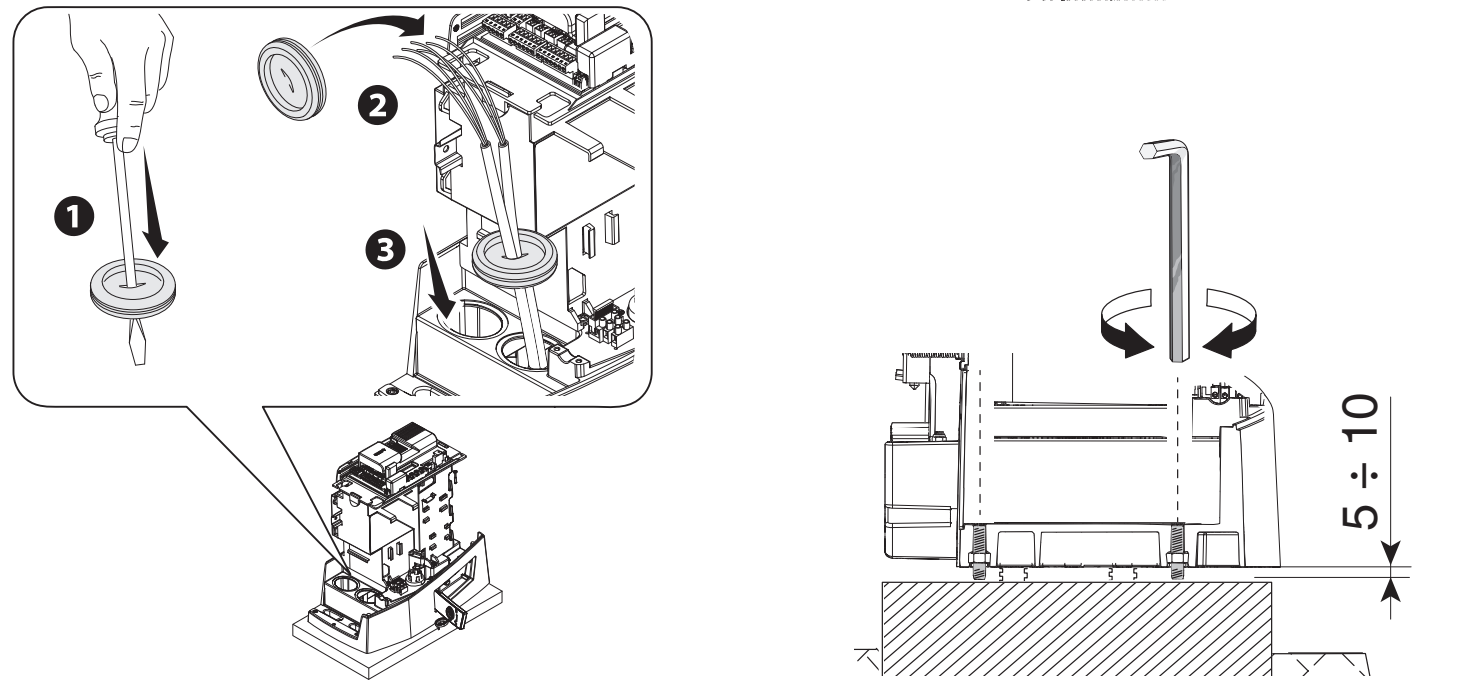
Rack and 1–2 mm clearance
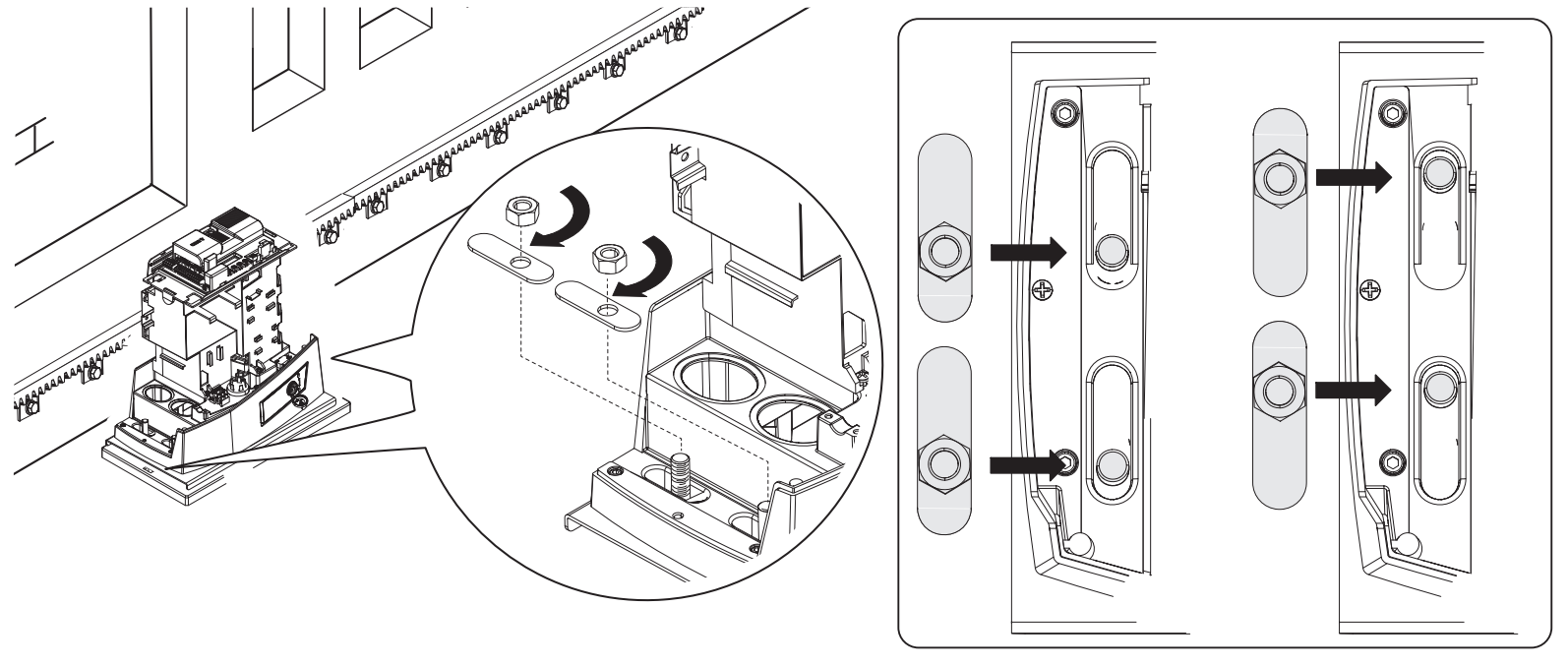
Release the drive and secure the module 4 rack while moving the gate by hand. When joining rack sections, place a spare rack section underneath the joint and use two clamps to ensure the teeth align smoothly. Once secured, adjust the height using the feet and the horizontal position using the slotted holes.
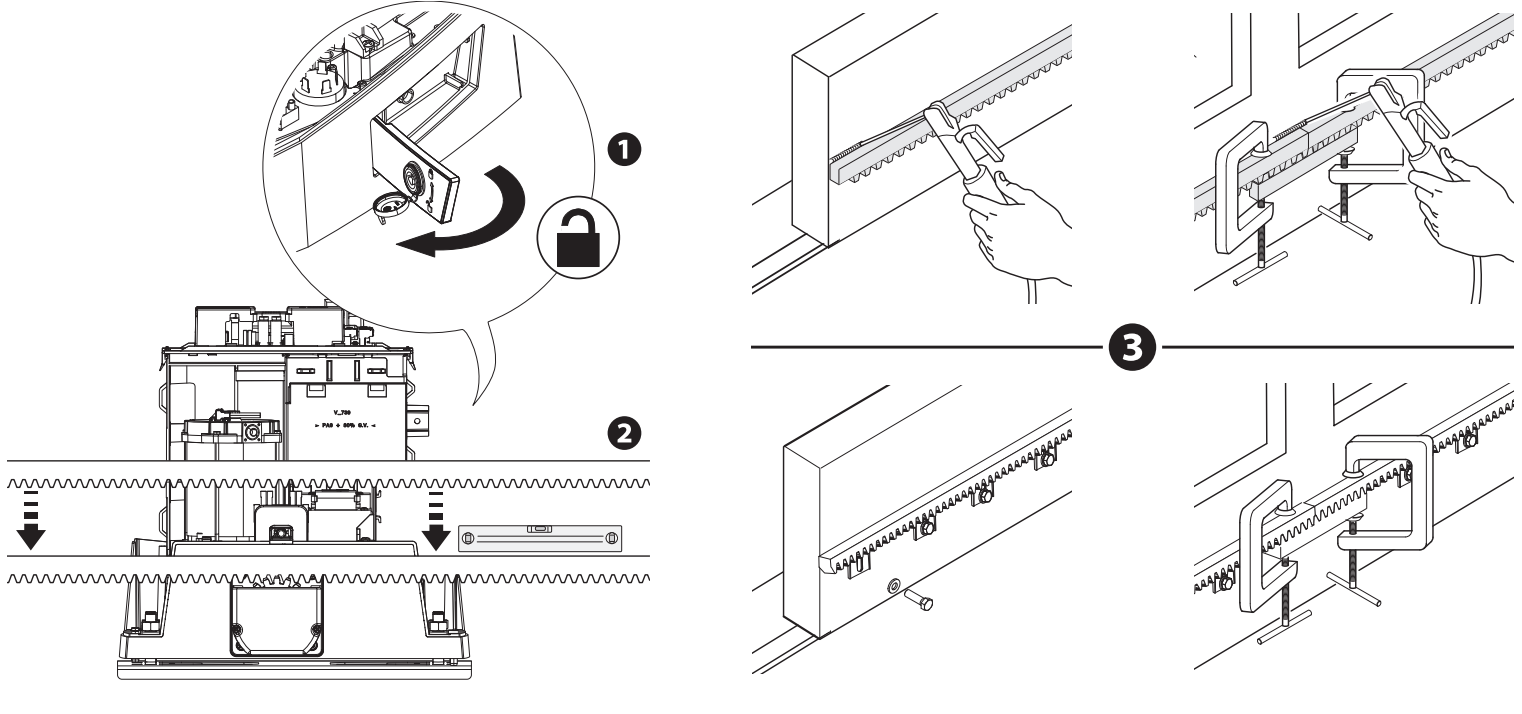
Leave a clearance of 1–2 mm between the pinion and rack. The gate’s weight must not rest on the drive. Move the gate by hand through its full travel and, only after adjustment, secure the drive to the plate with washers and nuts.
AGS mechanical limit switches
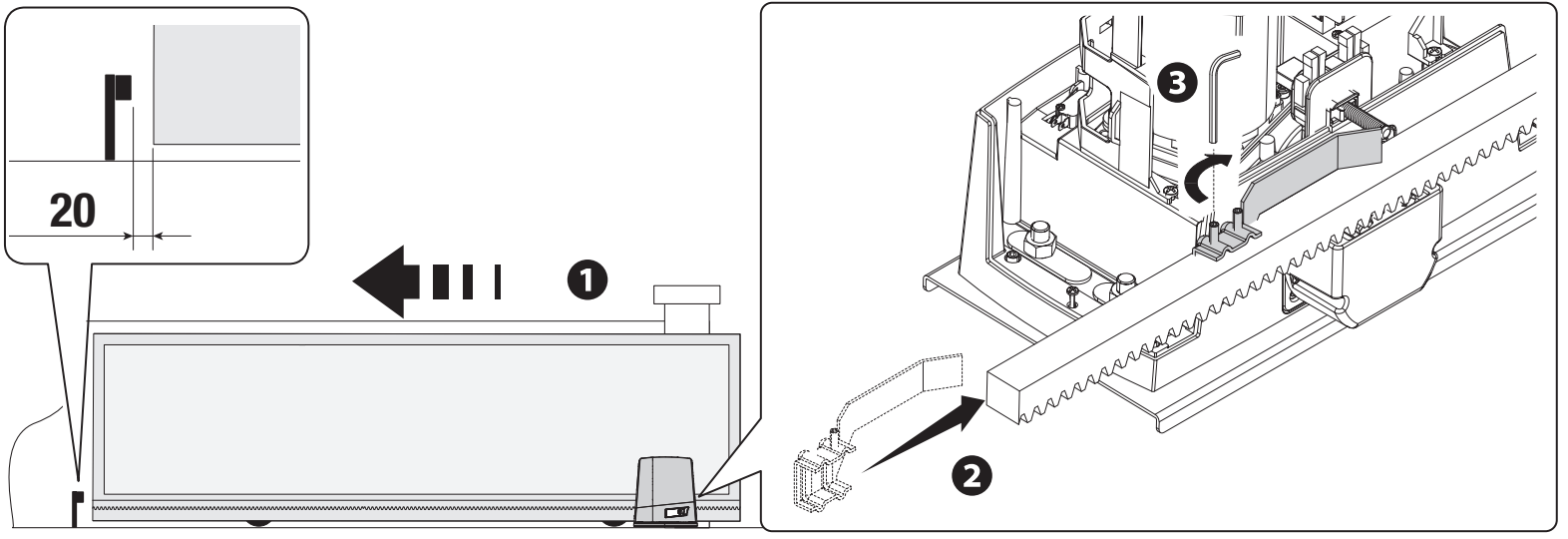
Open the gate manually. Fit the opening limit switch cam onto the rack so that its ramp actuates the spring-loaded microswitch, then secure it with the supplied screws. Repeat the same procedure for closing. In the illustrated setup, leave approximately 20 mm before the fixed stop; check the run-on distance under the actual load. The gate's fixed stop and the drive's limit switch cam have different functions.
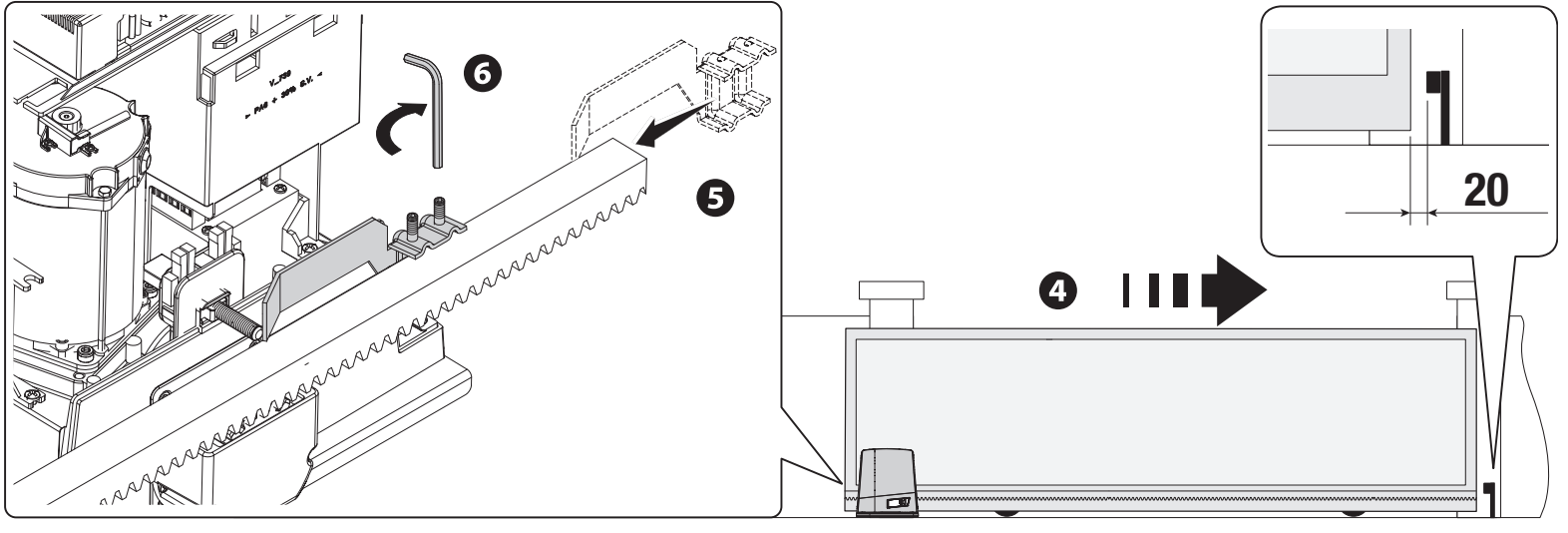
Wiring
| Circuit | Cross-section / condition |
|---|---|
| 230 V AC mains | 3G × 1.5 mm² up to 20 m; 3G × 2.5 mm² for 20–30 m. |
| 24 V beacon | 2 × 1 mm² for the specified runs up to 30 m. |
| Photocells | TX 2 × 0.5 mm²; RX 4 × 0.5 mm², according to the complete wiring diagram. |
| Control devices | Number of cores according to the device; 0.5 mm² cross-section for the specified runs. |
| Antenna | RG58, up to 5 m. |
| RSE / CRP | UTP CAT 5, up to 1,000 m, subject to the conditions of the serial system. |
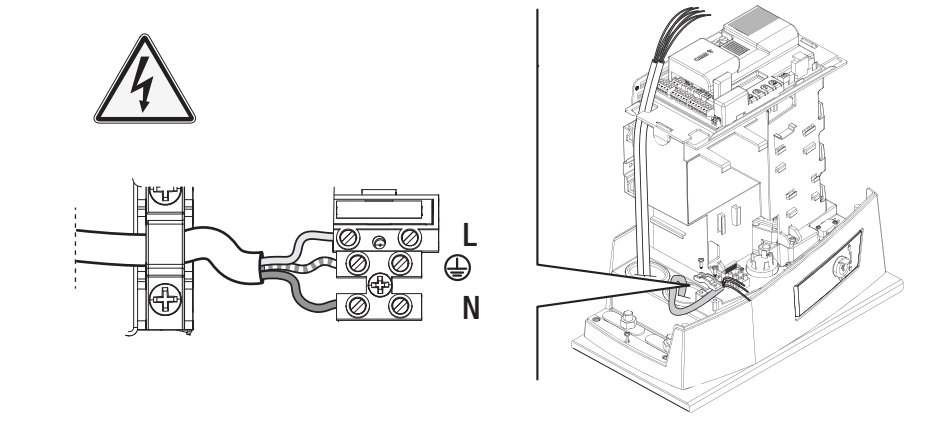
For longer runs or multiple loads, recalculate the cross-section based on current and voltage drop. Route the mains supply cable through its own cable gland, separate from low-voltage circuits. Cables must not rest against heated parts or be exposed to mechanical damage.
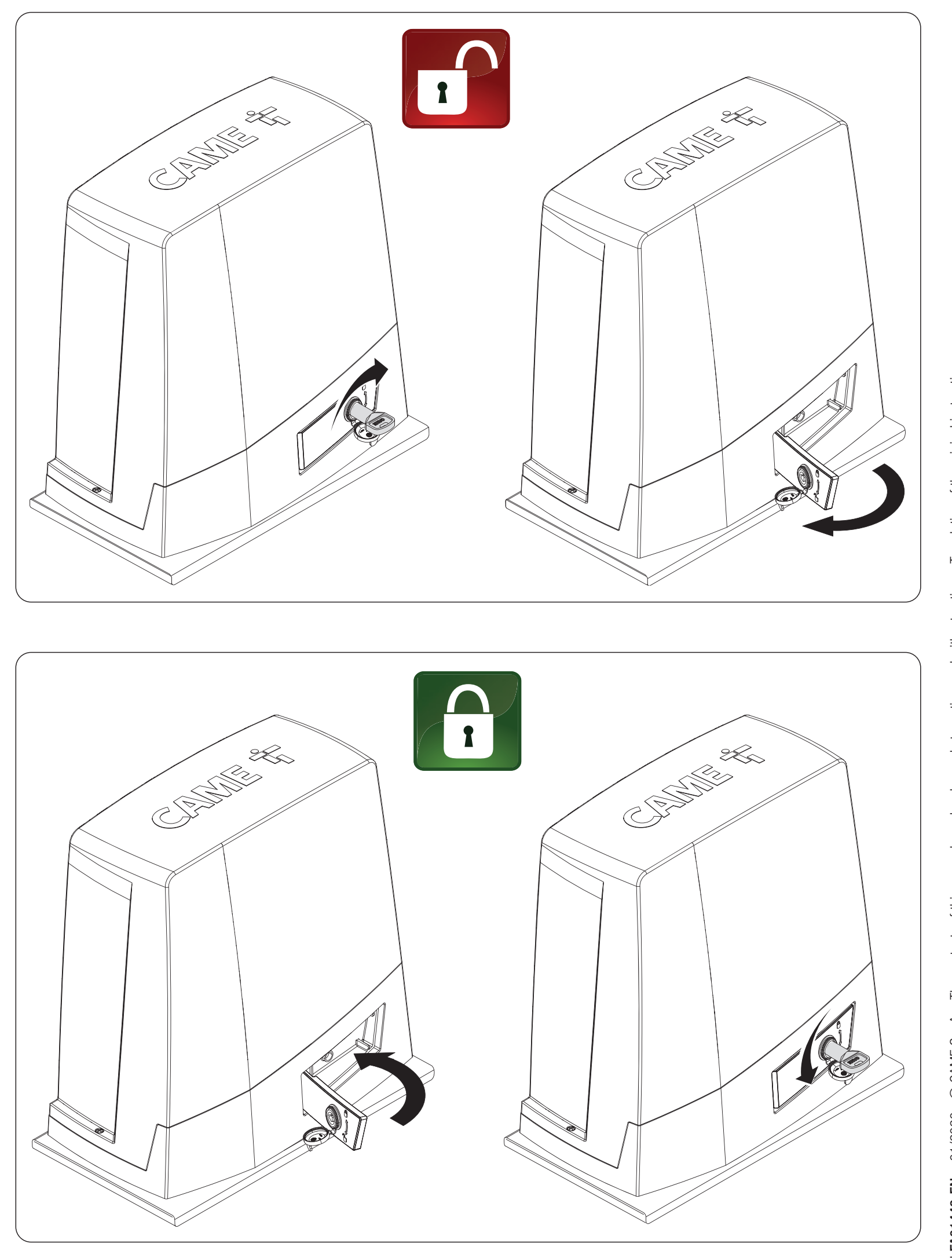
Manual release and re-engagement
First disconnect the power supply and secure the gate leaf to prevent uncontrolled movement. Do not release a damaged or unbalanced gate unless it has been secured.
- Insert the key into the lock and turn it as shown in the upper pair of images.
- Open the release lever outward from the housing, as indicated by the arrow.
- Move the gate manually and under control, keeping people clear of its path.
- To re-engage the mechanism, return the lever to its original position and lock it as shown in the lower pair of images.
- Before operating the motor, check that the mechanism is locked again.
Orientation of the ZN8 control board
In the following image, the board is shown with the large capacitors at the top, the long terminal blocks at the bottom, and the programming buttons on the right. The graphic display and ESC/arrow/ENTER buttons are used for settings, diagnostics, and user management. Insert or remove cards only when the mains power and any batteries are disconnected.
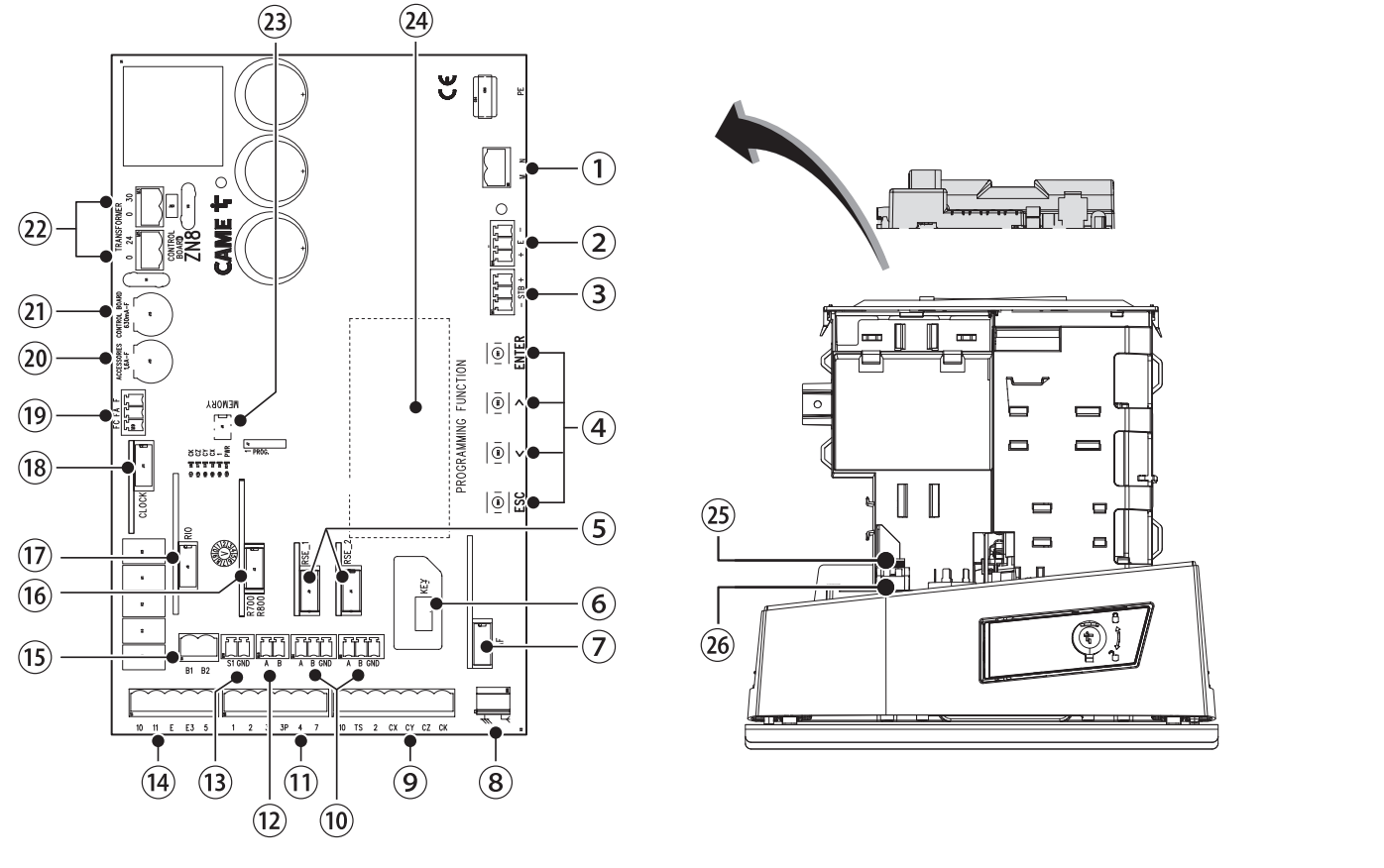
| Figure number | Component |
|---|---|
| 1 / 2 / 3 | Motor / encoder / RGP1 or LBB. |
| 4 / 5 / 6 / 7 | Programming buttons / RSE / CAME KEY / AF. |
| 8 / 9 / 10 / 11 | Antenna / safety devices / serial connection / wired commands. |
| 12 / 13 / 14 / 15 | Keypad / transponder / lights / B1–B2. |
| 16 / 17 / 18 / 19 | R700 or R800 / RIOCN8WS / clock card / limit switches. |
| 20 / 21 / 22 / 23 / 24 | Accessory fuse / control board fuse / transformer / Memory Roll / display. |
| 25 / 26 | Mains fuse / mains supply to the drive. |
BKV20AGS power supply and terminals
| Circuit / terminals | Voltage, polarity and limit |
|---|---|
| L / N / PE | Mains 230 V AC, 50/60 Hz. L is live, N is neutral, and PE is protective earth. AC has no positive or negative polarity. |
| Motor / internal control board power supply | Motor 36 V DC, control board according to the technical table 26 V DC. These are internal circuits for the correct configuration, not an output for accessories. Keep them connected as specified; do not connect mains power or an external power supply to them by guesswork. |
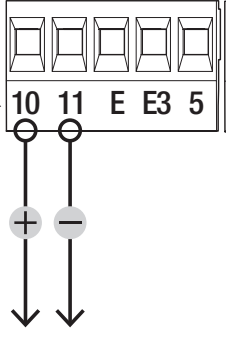
| 10 / 11 | Accessories 24 V AC/DC, 20 W maximum in total; typically 24 V AC. For DC 10 = positive (+), 11 = negative (−); AC has no fixed polarity. |
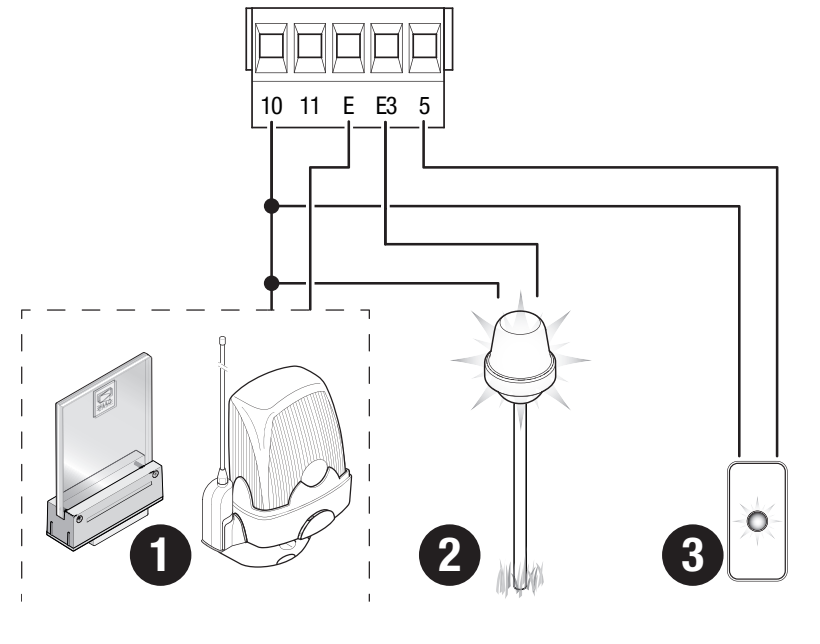
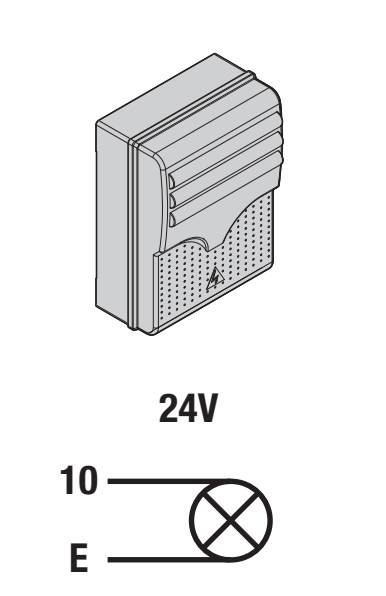
| 10 / E | Beacon 24 V AC/DC, max. 3 W. For DC, 10 is the positive common terminal and E is the switched output. |
| 10 / E3 | Auxiliary light 24 V AC/DC, max. 12 W; set the mode in Manage lights → Light E3. For DC, 10 is the positive common terminal and E3 is the switched output. |
| 10 / 5 | Status indicator 24 V AC/DC, max. 3 W. For DC, 10 is the positive common terminal and 5 is the switched output. |
| B1 / B2 | Separate controlled contact with monostable or bistable operation. Does not power accessories via 10/11. |
| 10 / TS / 2 | Power supply and test circuit for photocells, and common terminal according to the specific wiring diagram; TS is not a universal permanent negative output. |
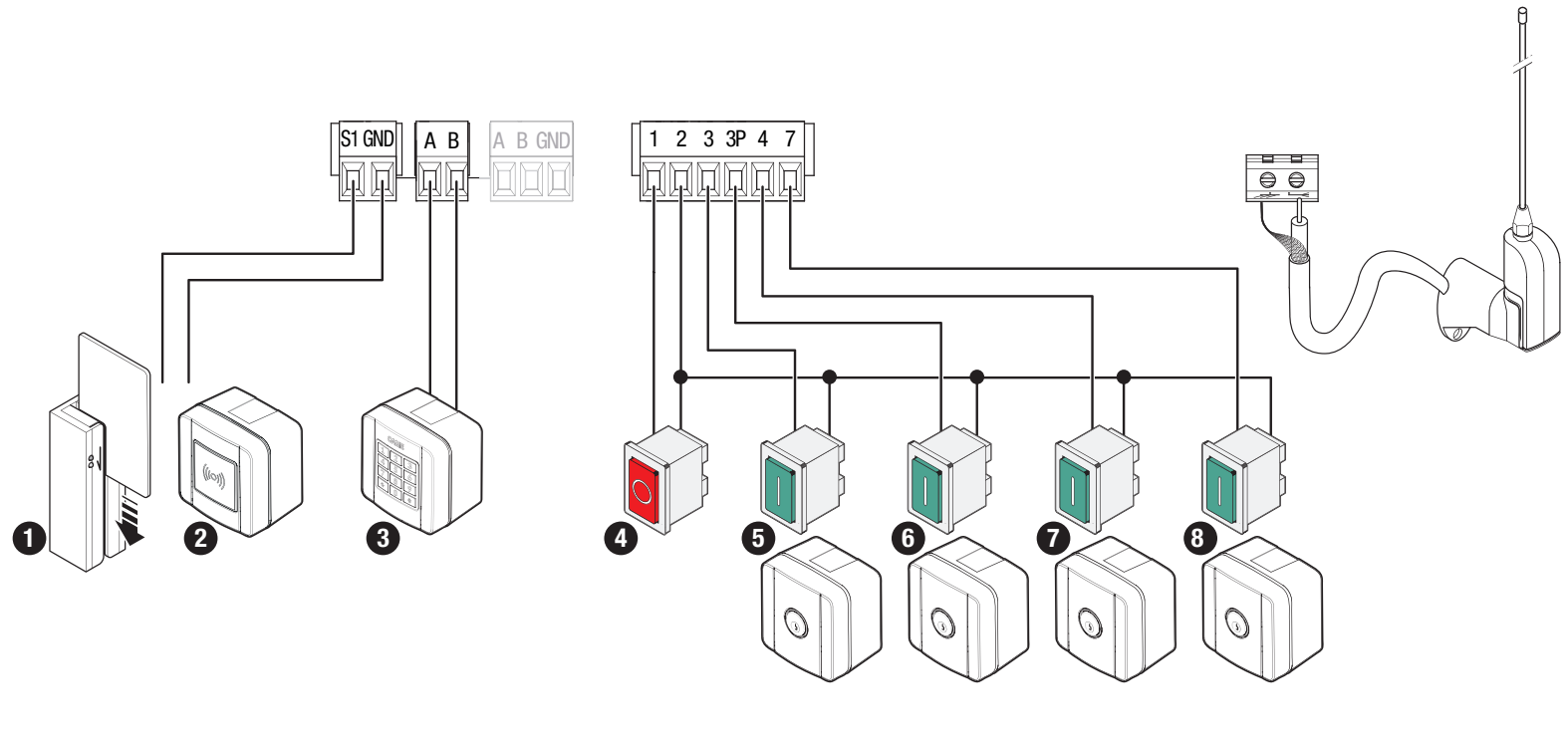
Commands, STOP, safety devices and antenna
| Terminals | Function / contact |
|---|---|
| 1–2 | NC STOP. Stops the gate and disables automatic closing; a new command is required to move it again. If STOP is not used, disable Total stop. |
| 2–3 | NO command: open only. |
| 2–3P | NO partial opening. |
| 2–4 | NO command: close only. |
| 2–7 | NO step-by-step or sequential command according to Command 2-7. |
| 2–CX / CY / CZ / CK | Four independently configurable safety inputs. Disable unused inputs; configure used ones according to the protection device. |
| S1 / GND | A transponder or reader with the corresponding R700 card. |
| A / B on readers | Code keypad with R800; do not confuse these with the same letters used for the serial connection. |
| A / B / GND on RSE | Serial connection for a pair or CRP, depending on the connector. |
| Antenna / AF | Connect the center conductor of the RG58 cable to the antenna signal and the shield to the marked earth terminal as shown; plug the radio card into AF. |
NO/NC commands and safety contacts are voltage-free and have no +/− polarity. The accessory power supply and its output contact are separate circuits. Do not apply 230 V to the command terminals.
Flashing light and auxiliary light
CAME KLED24 is rated at 24 V AC/DC and 2 W, so it should be connected to 10–E within the 3 W limit. Its input is not marked separately with +/−; polarity does not matter with AC, while with DC, terminal 10 is the board’s positive common terminal. Do not connect a 230 V version of the flashing light here. E3 is a separate light output with a 12 W limit; do not confuse E with E3.
DIR10 photocells and testing via TS
The example is for CAME DIR10: TX/RX pair, 10 m range, 12/24 V AC/DC power supply. Set the RX jumper to 24 V. The pair draws 60 mA at 24 V AC. RX has terminals 10 (+), 2 (−), TX, C and NC. TX has terminals TX and 2, with no separate +/− markings in the original diagram. With AC, DC polarity does not apply.
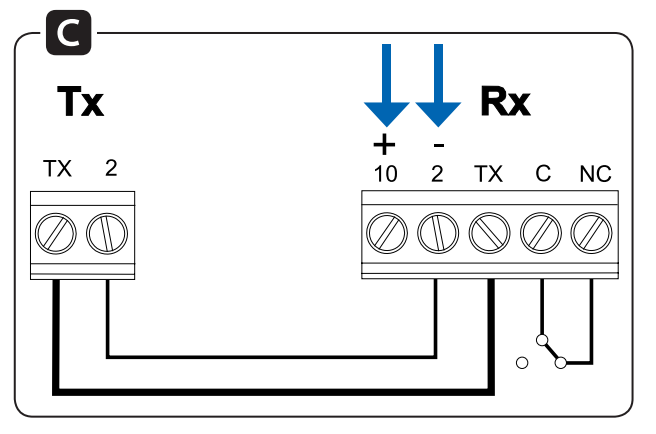
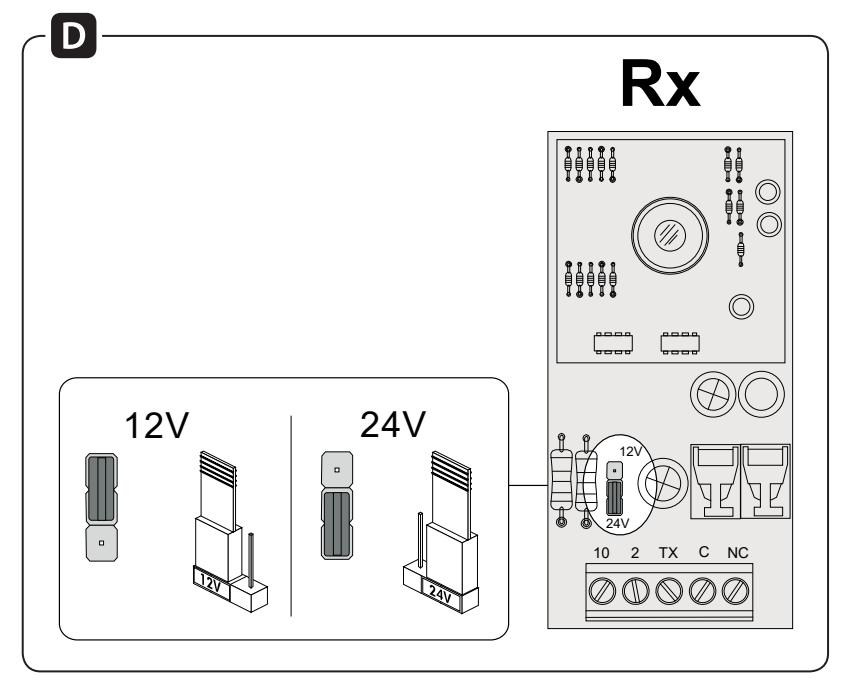
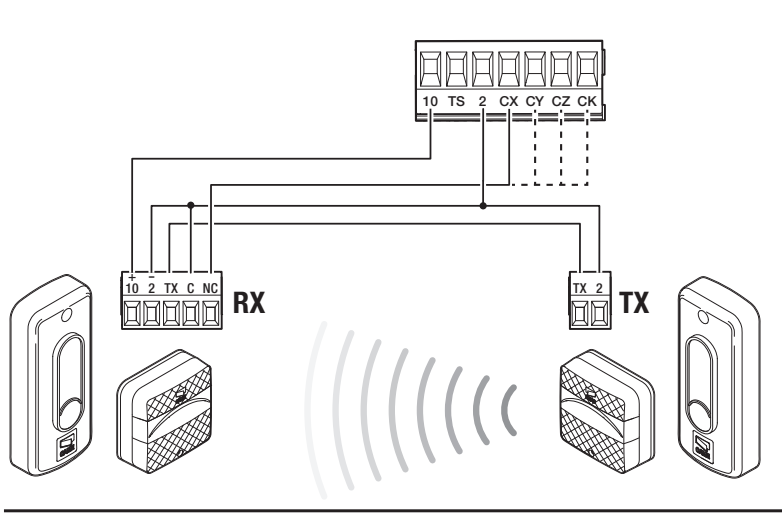
| DIR10 terminal | Standard | With test |
|---|---|---|
| RX10 (+) | Board 10 | Board 10 |
| RX2 (−) and RX C | Board 2 | Board 2 |
| RX TX ↔ TX TX | Connect between RX and TX | Same connection |
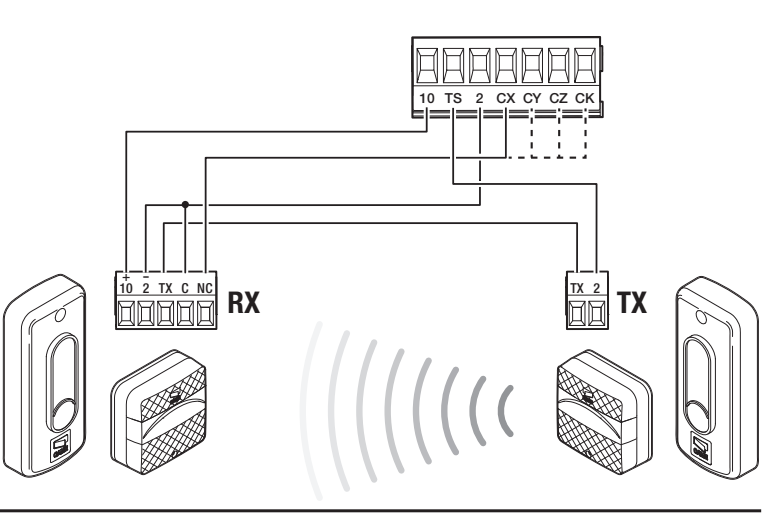
| TX2 | Board 2 | Board TS |
| RX NC | Board CX | Board CX |
The C–NC contact has no polarity. In this synchronized diagram, RX2 and C are connected to board terminal 2, not to 11. Connect RX TX to TX TX; do not replace this connection with a direct power supply from board terminal 10. Set CX to C1 to reopen during closing.
Enabling the safety device test
With the power off, move the TX2 wire to TS; RX2/C remain on 2, and the TX connection between RX/TX remains in place. Then, in Configuration → Wired safety devices → Safety devices test enable the test and the corresponding safety input. If the test fails, resolve the issue with the power supply, wiring or configuration; do not permanently bypass the safety device.
Safety edges and four inputs
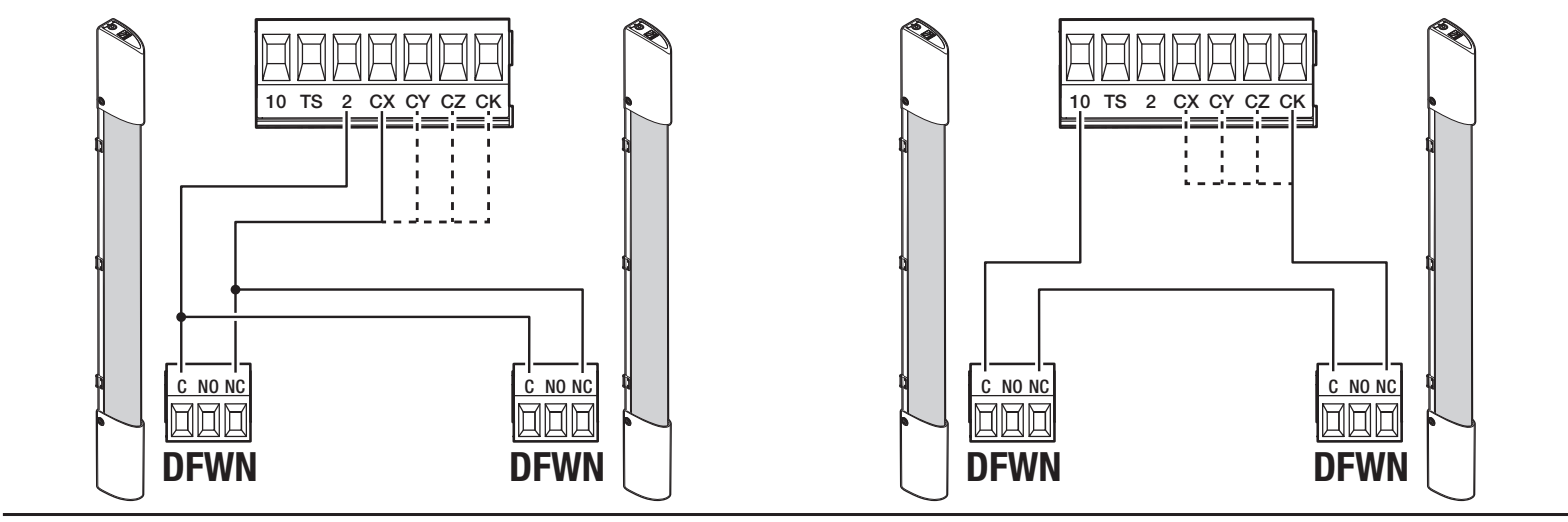
Configure CX, CY, CZ and CK individually. An NC safety edge uses a C–NC contact with no polarity, for example as shown in the DFWN diagram. For a resistive safety edge, select the appropriate R7/R8 mode and the actual 8K2 wiring diagram; a pair of edges has its own setting and wiring. Do not confuse a resistive safety edge with a standard NC contact.
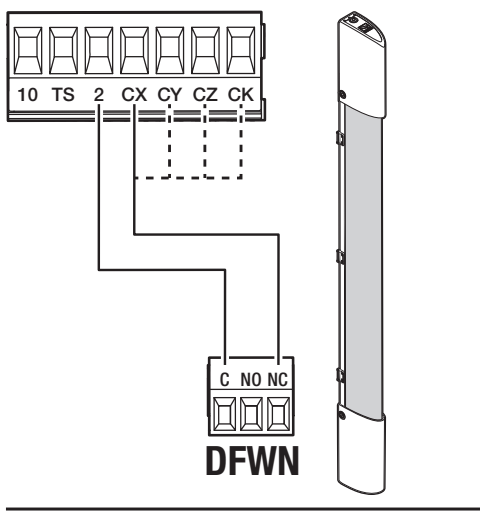
For a pair of DFWN NC safety edges, the left-hand diagram shows both contacts connected separately: C from both edges to board terminal 2, the NC contact of one edge to CX and the NC contact of the other to CY. The manufacturer recommends this wiring and identifies it as parallel; each input must be configured separately. On the right, the NC contacts are wired in series to one input: board terminal 2 → C of the first edge, NC of the first edge → C of the second, NC of the second → board CX. These are DFWN contact diagrams, not 8K2 resistive safety edge diagrams.
Initial startup and checking the direction
- Check the mechanics, stops, rack, cables, release locking and clear space.
- After switching on, follow the graphical display wizard. For this operator, select Motor type → BKV2000; changing the type does not change the physical load capacity.
- Set the direction in Configuration → Motor settings → Opening direction. The default direction is left.
- In the Motor test function, the > button closes, and the < button opens. If the direction is incorrect, correct it in the menu; do not swap the wires by guesswork.
- Set STOP, all connected safety inputs and any required test, then run travel calibration.
- Check a full cycle, partial opening, all safety devices, lights, radio and behavior after a power failure.
The first normal movement after switching on is opening; wait for it to finish. If there is unusual behavior, noise or vibration, stop immediately and resolve the cause.
BKV automatic travel calibration
Before calibration, the mechanical limit switches, fixed stops, BKV2000 type and direction must be set correctly. The operator must be secured and the entire movement area clear. A technician must supervise the entire procedure; keep people out of the travel path.
- Open Configuration → Motor settings → Travel calibration.
- When asked “Confirm?”, select YES and press ENTER.
- Let the complete learning wizard shown on the specific board run; do not issue another command prematurely.
- After completion, check the positions, slowdowns, and operation of all safety devices. If a Calibration error appears, first remove the obstruction or mechanical fault, then repeat the calibration.
This control board is programmed using the menu names. Do not transfer the numerical A1/A3 or ZN7 settings from another product range to this one.
Programming using the graphic display
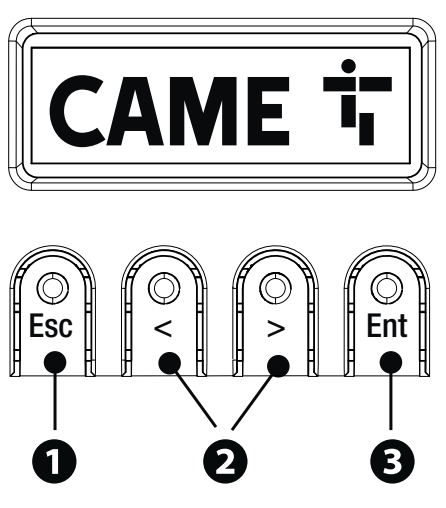
ENTER opens the menu and confirms a selection. < and > navigate through the items and change the value. ESC cancels an unconfirmed change, goes back, exits the menu, or stops movement. Program the system while the drive is stationary, and save the current settings before making changes.
Below is an explanation in Slovak, with the English menu names included so you can find each item unambiguously. Only items shown in bold are explicitly specified factory settings. Available functions depend on the connected cards and the board version.
Configuration → Motor settings
| Item / description | Options and conditions |
|---|---|
| Opening direction Opening direction. | To the left – left; To the right – right. |
| Motor test Direction test. | > closes, < opens; if the direction is incorrect, change it using the direction setting. |
| Travel calibration Travel calibration. | Confirm? NO/YES; calibration procedure. |
| Motor type Drive type. | For the BKV20AGS, select BKV2000; the other options, BKV1500/BKV2500, do not increase this model’s load capacity. |
Configuration → Gate travel settings
Configuration → Wired safety devices
| Item / description | Options and conditions |
|---|---|
| Total stop STOP1–2: stops the gate and disables automatic closing. | Deactivated / On. Activate only when using the correct NC contact. |
| CX input / CY input / CZ input / CK input Four separately configurable inputs. | Each Deactivated; C1/C2/C3/C4/C7/C8/C13/R7/R8 and R7/R8 for two safety edges. Descriptions are provided below the table. |
| Safety devices test Photocell test for opening and closing commands. | Deactivated / On; requires connection via TS. |
| Obst. with motor stopped When an obstruction is detected, this prevents the drive from starting, even from a stationary position. | Deactivated / On. |
Configuration → RIO safety devices
Configuration → Command inputs / Functions
Configuration → Times / Manage lights
Configuration → RSE communication / External memory
| Item / meaning | Options and conditions |
|---|---|
| RSE1 Role of the card in RSE_1. | CRP, Paired or Off. |
| CRP address Unique address of the control board in the system. | 1–254. |
| RSE1 speed / RSE2 speed Transmission speed of each port. | 1200/2400/4800/9600/14400/19200/38400/57600/115200 bps. Default speed of both ports: 38400 bps. |
| Save data Save users, times and configuration. | Displayed when external memory is inserted; Memory Roll. |
| Read data Load saved data onto the control board. | Replaces the board data with the saved configuration; check the entire system after loading. |
Manage users – users
Information – information and service
| Item / meaning | Options and conditions |
|---|---|
| FW version Display the FW and GUI versions. | Record both versions before changing the settings. |
| Manoeuvre counter Movement counters. | Total manoeuvres / Partial manoeuvres. |
| Set up maintenance Service reminder. | Deactivated or 1×100 to 250×100 manoeuvres; the reminder flashes 3+3 times. |
| Maintenance reset Reset the partial service counter. | Confirm? NO/YES; perform after actual maintenance. |
| Parameter reset Restore the parameters. | Preserves Radio decoding, Motor type and calibration data; distinguish it from a full reset. |
| Errors list Last 8 errors. | Use the arrows to browse the history; Delete errors clears it after confirmation. |
Timer management / Commands
Language / Password / F Menu
Responses of wired and RIO inputs
| Response | Meaning |
|---|---|
| C1 / P1 | Reopen while closing – photocells. |
| C2 / P2 | Reclose while opening – photocells. |
| C3 / P3 | Partial stop; check in conjunction with the operating automation. |
| C4 / P4 | Stop and wait for the obstacle to be removed. |
| C7 / P7 | Reopen while closing – safety edges. |
| C8 / P8 | Reclose while opening – safety edges. |
| C13 / P13 | Reopen while closing and stop immediately once the obstacle is removed; this response also applies when the gate is stationary. |
| R7 / R8 | Corresponding response for 8K2-resistance safety edges; separate options are available for one or two edges. |
| P0 | Stop and disable the automation; operation can resume only with a new command. |
Storing and managing remote controls
For the graphical menu described above, the capacity is 250 users. The AF requires a receiver with the correct frequency and encoding; one example is AF43S with TOP-432EE. Matching frequency alone does not confirm compatibility.
- Open Manage users → New user.
- Select the required function and confirm with ENTER.
- Send the code using the selected button on the remote control.
- Repeat the procedure for another button or user, record the number and command, and test the actual operation.
Use Remove user to delete an individual user, or Remove all to delete everyone. Radio decoding → Rolling code or TW Key block deletes previously stored transmitters with different encoding. Do not use this option unless you have a record of the existing remote controls.
Parameter reset and full restore
Information → Parameter reset restores factory parameters but preserves Radio decoding, Motor type, and travel calibration settings. Save the configuration before confirming, then check the direction, safety devices, timings, and operating tests after the reset. Use the separate option Manage users → Remove all to delete all users. After each restore, also check the stored remote controls.
Recovery after a forgotten password requires a different, full reset. It deletes stored users, timings, and calibration. This should be done by a technician able to safely recommission the entire system.
- Disconnect power to the control board, including any batteries.
- Press and hold < and > simultaneously, then restore power according to the service procedure.
- Keep the buttons pressed until Factory reset appears, select Confirm YES, and press ENTER.
- Set the correct model and direction again, configure all safety devices, run the learning procedure, and add users; carry out complete tests before operation.
Backing up to and loading from Memory Roll
- Disconnect the mains and batteries, then insert the Memory Roll into the marked connector.
- After powering on, select Configuration → External memory → Save data or Read data.
- Saving/loading includes users, timings, and configuration. Loading may overwrite the board's existing data.
- When complete, disconnect the power and remove the Memory Roll. After restoring, verify the model, direction, all safety devices, and commands.
These items appear when memory is connected. Use the documented Memory Roll connector; do not connect a USB device to another connector just because its function has a similar name.
The Memory Roll is labeled in the image of the actual ZN8 control board as number 23.
Two operators in MASTER–SLAVE mode
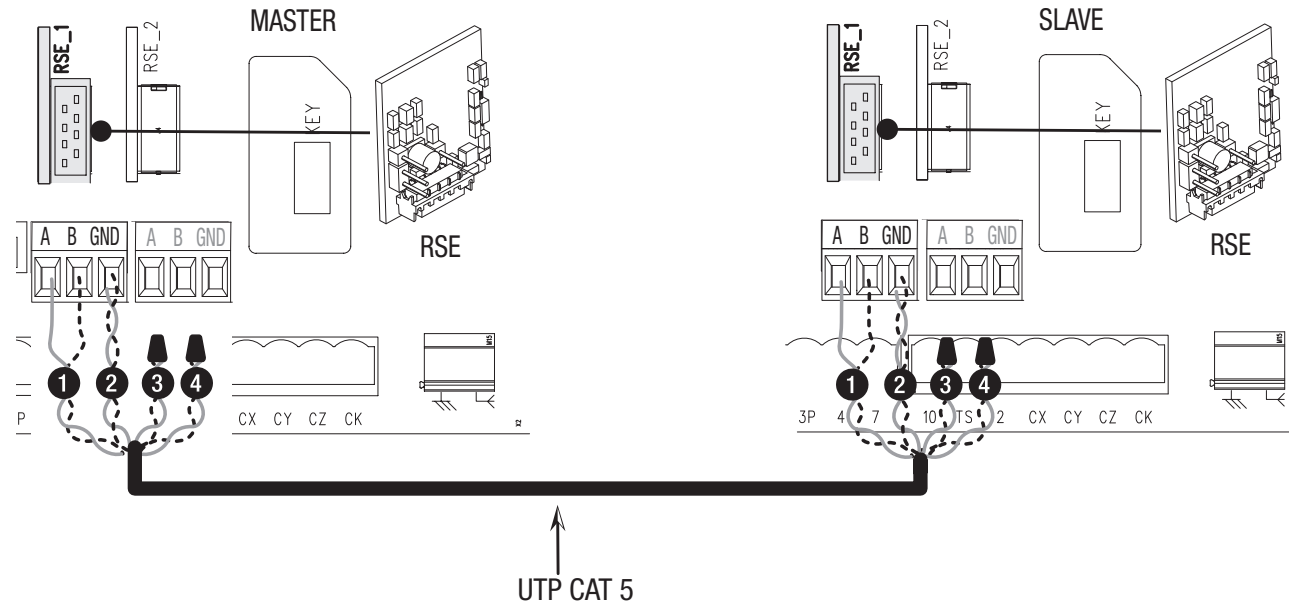
Insert RSE cards into RSE_1 on both control boards and connect A–A, B–B, GND–GND via UTP CAT5 as shown in the diagram. Accessories and controls are connected to the MASTER, where users are also stored. On the MASTER, select Paired in the wizard or in the RSE1 settings; the other operator becomes the SLAVE. The MASTER handles the partial command as shown in the original diagram, while the shared opening command operates both leaves.
If RSE_1 is used for pairing, CRP uses RSE_2. CAME KEY cannot be connected in this configuration. Do not confuse identical A/B labels on different interfaces.
Troubleshooting display messages
| Message | Check / procedure |
|---|---|
| Calibration error | Learning interrupted by an obstacle; remove the cause and check the mechanism. |
| The Encoder does not work | Encoder disconnected or damaged; with the power off, check its specific connector and wiring. |
| Service test failure error | Obstacle at the photocells, incorrect wiring/configuration, or a faulty photocell; check the TS test. |
| Door lock open | The operator is released; check that the lever is secured. |
| Maximum number of closing / opening obstacles / obstacles | The maximum number of consecutive obstacles has been exceeded; remove the obstruction or resolve the cause of the safety-device activation. |
| Communication error | Incorrect RSE port setting; check the connection and mode. |
| Incompatible remote control | Transmitter, encoding, or TWIN KEY BLOCK mismatch. |
| Slave door open | The SLAVE operator is released. |
| No communication from the RIO system | The RIO module is missing from the connector or faulty. |
| RIO system not configured | The wireless system or its devices are not configured. |
Information → Errors list stores the last 8 errors. Record the status and FW/GUI before deleting them. If the gate does not move, check the mains supply, fuses, release mechanism, STOP circuit, safety devices, and any continuously activated command. If it opens but does not close, check the photocells and the setting for the relevant input. Do not bypass a safety device with a permanent jumper.
Fuses for 230 V BKV20AGS
| Circuit | Fast-acting fuse |
|---|---|
| Mains power | 2 A F |
| Control board | 630 mA F |
| Accessories | 1.6 A F |
Check the fuses with the mains power and batteries disconnected. Replace them only with fuses of the same type and rating, and first eliminate the cause of the short circuit or overload.
Maintenance and servicing
Every 10,000 cycles and at least every 6 months check that screws/nuts are tight; inspect moving parts for wear and proper operation; lubricate the relevant mechanical parts; and check the warning and safety devices, manual release, cables, guide rail and rack. Disconnect the power supply and batteries before carrying out any work. After an extended period out of service, check that the entire system operates correctly once mains power is restored.
The manufacturer specifies an MCBF of 250,000 cycles for the BKV20 at 20 m/2,000 kg; in windy areas, this figure is reduced by 15%. This is a reference figure for the mean number of cycles between failures, not a maintenance-free interval or a guarantee of the service life of every gate. Set the maintenance reminder in Information → Set up maintenance and reset it only after servicing has been completed.
After setup, close the board guard, cover and all fasteners. Check the forces and safety functions of the entire gate, show the user how to operate the manual release, and provide the manuals for the complete assembly. Dispose of electronic equipment and batteries at a designated collection point when decommissioning.
Technical specifications of the CAME BKV20AGS
| Parameter | Value for the configuration described |
|---|---|
| Model / code | BKV20AGS / 801MS-0310 |
| Maximum gate leaf weight / length | 2,000 kg / 20 m |
| Mains power supply | 230 V AC, 50/60 Hz |
| Motor / internal board supply | 36 V DC / 26 V DC |
| Power | 250 W |
| Force / maximum force | 900 N / 1,350 N |
| Maximum speed | 12 m/min |
| Ingress protection rating | IP54 |
| Operating temperature | −20 to +55 °C |
| Operation | Continuous operation; no fixed number of cycles per hour. |
| Operating time | 180 s |
| Standby power consumption | 14 W; 0.8 W with the RGP1 module |
| Transformer thermal protection | 120 °C |
| Insulation class / gear ratio | I / 40 |
| Operator weight | 21 kg |
| Colour | Grey RAL 7024 |
| Pinion / limit switches | Module 4 / mechanical |
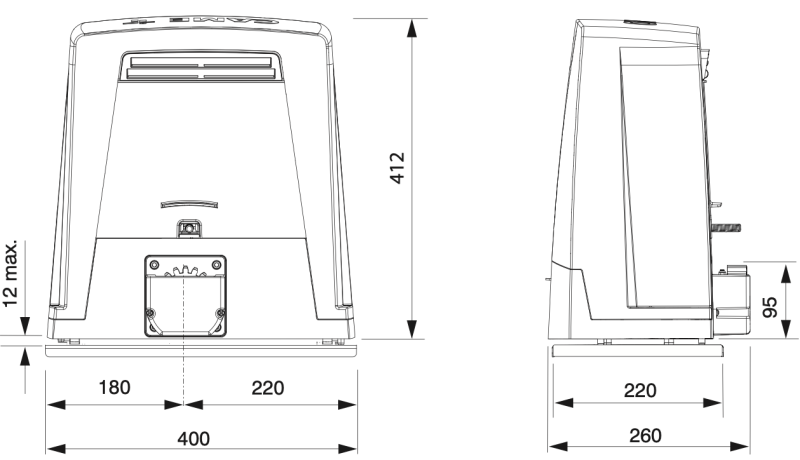
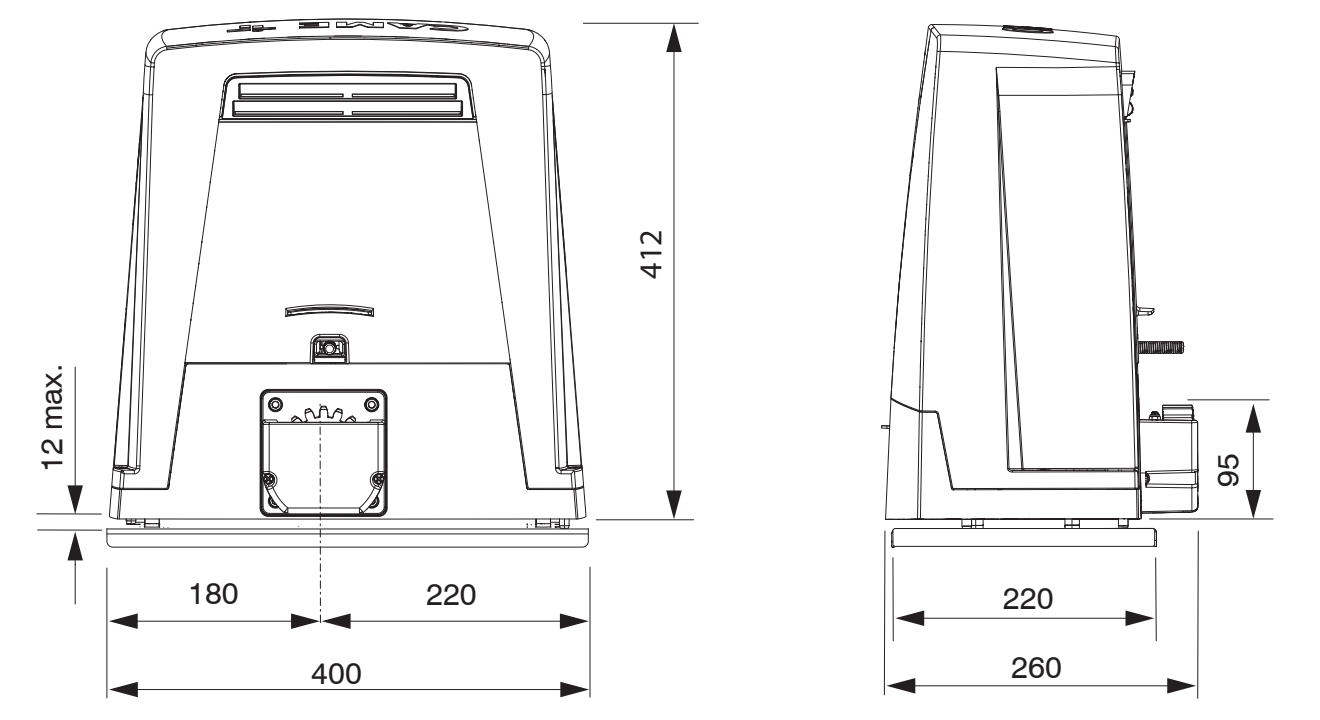
| Dimensions: width × depth × height | 400 × 260 × 412 mm |
| Model setting | Motor type → BKV2000 |
| User capacity for this menu | 250 |
How can I order this item?
Choose the option that suits you:
- order online: use the buy button to add the goods to your shopping cart (you will find the buy button here in the product variants table).
- order by email: place your order at [email protected]






